


This is engineering guidance, not legal advice. Confirm specifics with qualified counsel.
Why this matters
For most buyers, search is the feature that justifies the entire analytics budget. A system that records 64 cameras is worthless in an investigation if finding one event means a person watching weeks of video; a system that returns "every silver van that left the north gate on Tuesday" in ten seconds is the difference between solving an incident and closing it unsolved. This article is for the security integrator, product manager, retail-operations lead, or enterprise security manager who needs to know what forensic search can and cannot do before they buy, build, or promise it. Get the upstream metadata and the retention right and search is the most-used tool in the control room; get them wrong and it quietly fails the day you need it most.
What "search by event" really means — turning video into a database
Start with the problem it solves. A modern surveillance deployment records continuously across dozens or hundreds of cameras, which produces an amount of video no human can watch. Finding a single event — a specific person, a particular vehicle, the moment a door was forced — by scrubbing the timeline is impossible at any real scale. Search by event is the answer: instead of watching video, you query it, the way you query a database, and the system returns the handful of clips that match.
The thing to understand first is what the search actually reads. It does not re-watch the pixels of your footage every time you run a query. It reads a metadata index — a structured, written-down description of what was in the video, created as the video was recorded. Think of it as the difference between a library and its card catalogue. To find a book you do not read every page of every book on the shelves; you look it up in the catalogue, which already records each book's title, author, and shelf location. Forensic search is the catalogue for your video: the analytics write down "person, red top, walking left, camera 12, 18:42:07," and the search reads those entries.
This is why the industry uses two names for the same idea. "Search by event" describes the everyday use — find the event you care about. "Forensic search" describes the investigative use — reconstruct what happened after an incident, across time and across cameras. Both read the same metadata index. And both depend, completely, on the quality of what was written into that index upstream — which is the single most important principle in this entire topic.
The one principle that governs everything: you can only find what was indexed
Here is the rule that vendor demos skip and that decides whether your search works in the real world: search can only find what the analytics detected and tagged at the moment of recording. If a camera's analytics did not recognize "a person carrying a bag" while the video was being recorded, then no search — however clever its interface — can find that bag later, because there is no index entry for it. The catalogue only contains the cards someone wrote.
There are exactly two ways to fill a gap, and they trade off sharply:
The first is record-time indexing, the normal and scalable approach. Analytics run live as the video is recorded and continuously write metadata: object classes, attributes, colors, motion, line crossings, zone entries. Because the index is built as you go, search later is near-instant — it is a database lookup, not a video re-analysis. The cost is that you must decide in advance what to detect. If you only indexed "person" and "vehicle," you cannot later search for "umbrella," because nobody wrote umbrella cards.
The second is search-time reprocessing, the forensic fallback. You take the original recorded video off storage and run a fresh analytic over it after the fact, generating new metadata for something you did not index the first time. This can find what record-time indexing missed — but it is slow (you are re-analyzing hours or days of video), compute-heavy, and it only works if you still have the raw footage. Once the original video has aged past your retention window and been deleted, reprocessing has nothing to read, and the event is gone forever. Products built around video-summary review, such as the BriefCam engine behind Milestone's XProtect Rapid REVIEW, lean on this reprocessing model to extract rich metadata from archived video.
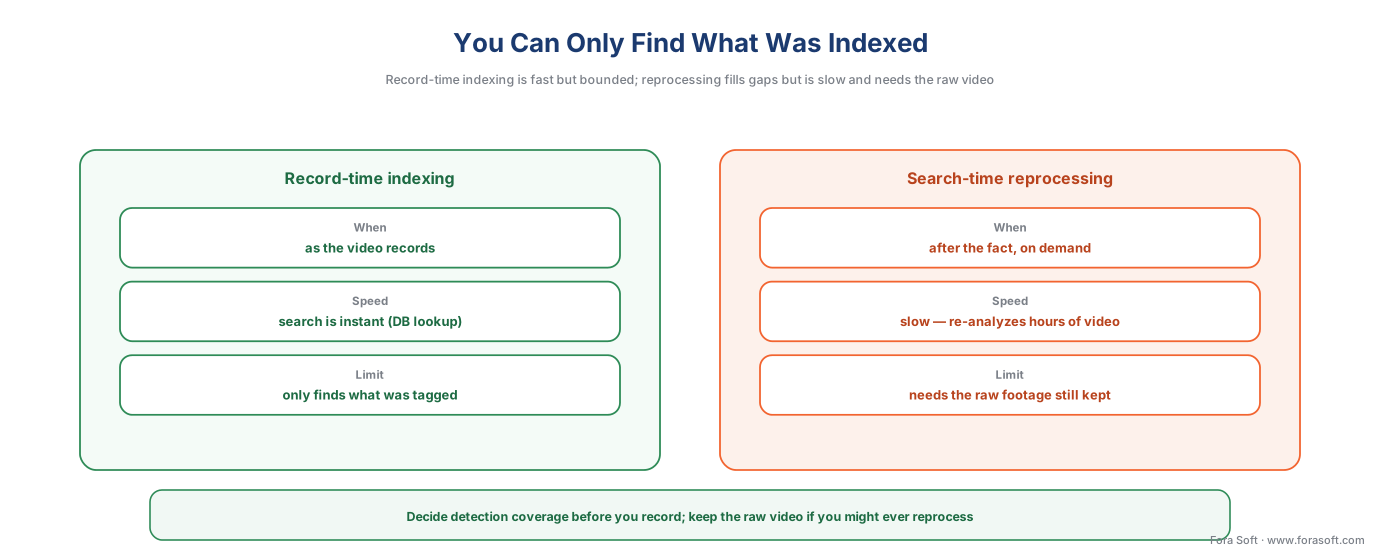 Figure 1. The governing trade-off. Record-time indexing builds the catalogue as you record — fast search, but it only contains what you chose to detect. Reprocessing re-analyzes the original video to fill a gap — powerful, but slow and only possible while the raw footage still exists.
Internalize this and most "why can't it find X?" mysteries dissolve. The richness of your search is decided long before anyone types a query — it is decided by the analytics you ran at record time and the footage you kept.
How the pipeline actually works
The path from a camera to a search result has five stages, and naming them makes the whole feature legible.
It starts at capture and analysis. A camera, or an analytic running on the camera's own chip or on a nearby server, looks at each frame and produces a description: this is a person, here is its bounding box, it is moving left, its dominant color is red, the time is 18:42:07. This description is metadata — in the words of the ONVIF standard that governs surveillance interoperability, "all streaming data except video and audio, including video analytics results."
Next is transport. That metadata travels alongside the video into the recording system. In a standards-based system it rides over ONVIF Profile M, the part of the standard that carries analytics metadata and events from a device into the Video Management System — the software, called a VMS, that records the cameras and that operators actually watch. The deep treatment of that interface is in events, metadata, and the ONVIF analytics interface.
Third is indexing. The VMS writes the metadata into a searchable store — a database and a metadata track alongside the recorded video — so that it can be queried by time, camera, object class, and attribute. This index is the catalogue. Crucially, the metadata is tiny compared with the video itself: a description of an object is a few bytes; a second of HD video is hundreds of kilobytes. That size gap is why search is fast and why keeping the index is cheap even when keeping the video is not.
Fourth is the query. An operator asks a question — "people on camera 12 between 18:00 and 19:00," "silver vans leaving the north gate," "anyone who crossed this line after midnight." The VMS matches the query against the index and returns results, usually as thumbnails with timestamps, the source camera, and a confidence score.
Fifth is review and action. The operator confirms the candidates, bookmarks the real matches, assembles them into a case, and exports evidence. Search narrows weeks of video to a reviewable shortlist; a human still makes the final call.
 Figure 2. Search reads the index, not the pixels. Analytics describe the scene as metadata (over ONVIF Profile M), the VMS indexes it, and a query is a database lookup — which is why a result comes back in seconds.
What you can actually search for — from motion to natural language
"Search" covers a wide ladder of capability, and the rungs differ enormously in power, in the metadata they require, and in their privacy weight. Knowing which rung a product sits on is most of what separates a real evaluation from a demo.
Rung 0 — time and camera. Every VMS lets you jump to a camera at a time. This is not really search; it is the floor.
Rung 1 — motion in a region. You draw a box on a camera's view and ask "show me when anything moved here." Often called smart search or motion search, it needs only motion metadata and is widely available. It is blunt — a swaying tree moves too — but it is genuinely useful for "did anyone touch this door."
Rung 2 — events and object metadata. You search for a kind of thing or a defined event: people, vehicles, a line crossing, a zone entry. This is the rung the ONVIF standard explicitly supports, through the recording-search operations described below, and it is the backbone of practical forensic search: "all vehicles, north camera, last 24 hours."
Rung 3 — attribute search. You add descriptors: not just "a person" but "a person in a red top, moving left"; not just "a vehicle" but "a silver van." Milestone's XProtect Rapid REVIEW, for example, filters by class, apparel, color, size, speed, path, direction, and dwell time. Attribute search is where forensic review gets fast, because it cuts the candidate list by an order of magnitude.
Rung 4 — appearance and similarity search. You select a specific person or vehicle in one clip and ask the system to find that one across every camera and hour. Avigilon's Appearance Search, a deep-learning engine, lets an operator find a person or vehicle of interest by physical description and pull their appearances across the camera network. This is the rung that reconstructs a path through a building — and the rung where the privacy weight climbs sharply, because following one individual across cameras is re-identification, the subject of object tracking and re-identification.
Rung 5 — natural-language search. The 2025–2026 frontier. Instead of filters, you type a sentence — "a person in a red jacket who entered the loading dock carrying a package after 6 PM" — and a vision-language model (the kind of AI that connects images to words) interprets it, finds matching moments, and can explain why each was returned. Startups built entirely around this approach are now funded and shipping; Conntour, for instance, raised a $7M seed in March 2026 to build a natural-language search engine for security video. It is genuinely powerful and genuinely early: the language layer adds a new way to misunderstand the query, so treat its results as leads to confirm, not answers.
 Figure 3. The rungs of search. Each step up — motion, object, attribute, appearance, language — needs richer upstream metadata, more compute, and carries more privacy weight. Most real systems live on rungs 2–4.
Notice the pattern: every rung up the ladder demands richer metadata written at record time, more compute, and a heavier privacy footprint. You cannot do attribute search on a system that only indexed motion. Which rung you need is a design decision you make before the first camera records.
The ONVIF standards boundary: a search interface, not a search engine
If you buy multi-vendor, you need to know what the ONVIF standard actually guarantees about search — because here, as everywhere in surveillance, "ONVIF-conformant" is a baseline, not a promise of full features.
ONVIF does standardize search. Its Recording Search Service Specification defines a real search interface that a conformant recorder exposes, and it is more capable than most people assume. It provides four paired "find then fetch" operations: FindRecordings, FindEvents, FindPTZPosition, and FindMetadata, each with a matching results call. Searches are asynchronous sessions: a Find call opens a session and returns a token, and the client pulls results in increments, forward or backward in time. There is a GetRecordingSummary call to build a timeline view. Most importantly for forensic work, FindMetadata lets a client search the recorded analytics metadata with an XPath filter — the spec's own example finds objects whose bounding box sits in the lower-right quadrant of the scene. This is recorded-metadata search, standardized.
Now the boundary, which is precise and worth getting right. The standard makes event search mandatory but generic metadata search optional: FindEvents must be supported by any device implementing the recording-search service, while FindMetadata is only required if the device advertises the MetadataSearch capability. So even at the standard's own level, two conformant recorders can differ in how richly you can search them. And the standardized interface searches the metadata that was recorded — it does not define appearance search, similarity matching, or natural-language queries. Those higher rungs are the VMS and vendor layer built on top. The clean way to hold it: ONVIF standardizes the plumbing of search — the query interface over recorded metadata — while the richness of what you can ask lives in the VMS. A camera can be fully conformant and still feed a thin index. For the commercial overview of how the ONVIF profiles fit a security system, see Fora Soft's guide to ONVIF profiles in security systems.
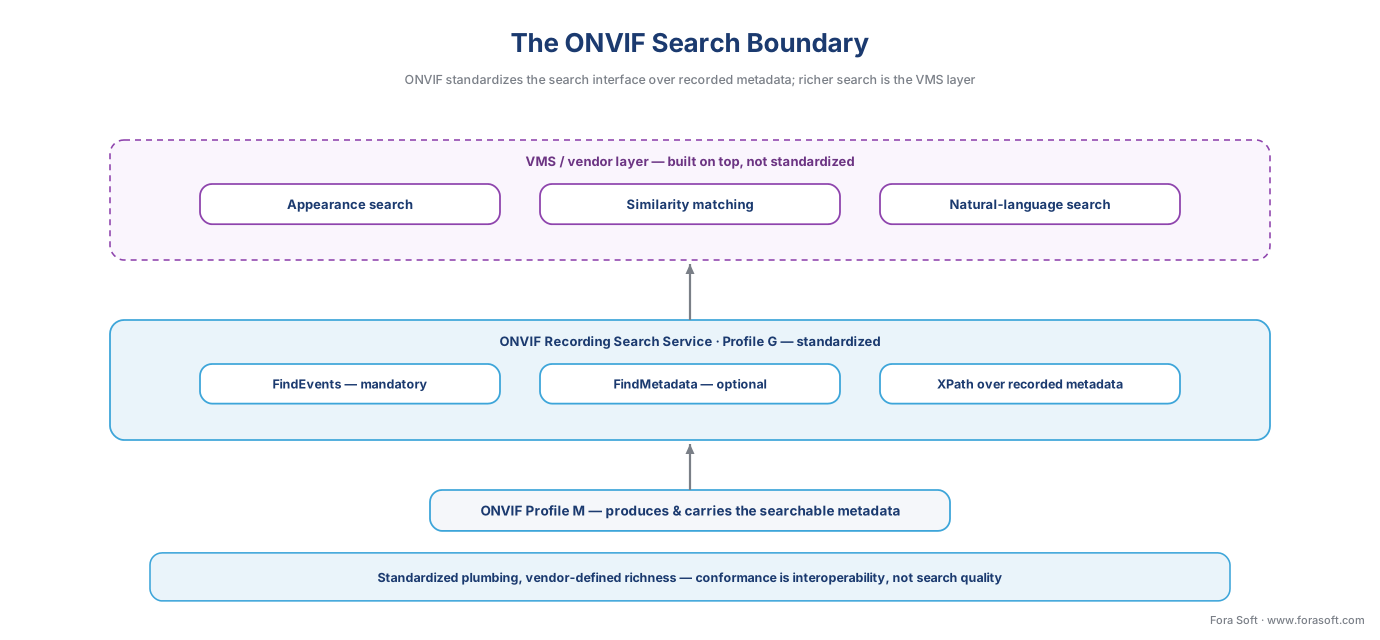 Figure 4. The standards boundary. ONVIF's Recording Search Service standardizes the query interface over recorded metadata (FindEvents mandatory, FindMetadata optional). Appearance, similarity, and language search are the VMS/vendor layer on top — portable plumbing, vendor-defined richness.
How fast, how accurate — the performance reality
This is where the section's accuracy-vs-performance stance matters, because search is sold on speed and lives or dies on recall.
The speed is real. Replacing manual review with an index lookup turns a multi-day task into a multi-second one; vendors and integrators commonly report forensic review time cut by large margins — claims of up to a 70% reduction are typical, and "hours to seconds" is the standard pitch. Walk the arithmetic to see why the prize is so big. Take a modest 64-camera site recording continuously. That is 64 camera-streams running 24 hours a day; over a 30-day retention window it is 64 × 24 × 30 ≈ 46,000 camera-hours of video. A person reviewing footage at, say, four-times speed would need over 11,000 hours — more than five working years — to watch it once. A metadata query against the index returns the matching clips in seconds. There is no contest, and that gap is the entire value proposition.
 Figure 5. Search is triage, not an oracle. The same footage that would take 5+ work-years to watch by hand collapses to a few candidate clips in seconds — which a human then confirms. The power to find anyone that fast is also why a searchable archive must be scoped and logged.
But speed is only half the story, and the other half is where honesty earns trust. Search recall is capped by the accuracy of the upstream detection. If the analytic missed a person at record time — bad lighting, an odd angle, an occlusion — that person is not in the index, and no query will surface them. Search does not improve on the detector; it inherits the detector's misses as permanent blind spots. And the higher rungs return ranked candidates with confidence scores, not exact matches: appearance search and natural-language search hand you a sorted list of likely hits, and a human decides which are real. That is the correct mental model — search is a triage tool that narrows the haystack, not an oracle that hands you the needle. It is never 100% accurate, because the analytics underneath it never are. The companion discipline of setting those operating points is the subject of tuning analytics: false alarms, accuracy, and the operator's reality.
Common mistakes to avoid
Four errors sink search projects. The first is assuming search can find anything, when it can only find what was indexed at record time — decide your detection coverage before you record, not after an incident. The second is discarding the raw video too soon, which forecloses reprocessing; if a topic might ever need a fresh analytic, the original footage has to outlive that need. The third is treating an appearance or language match as proof rather than a ranked candidate a human must confirm — the cost of skipping that step is a wrongful accusation built on a similarity score. The fourth is forgetting that search amplifies privacy: the same index that finds a shoplifter in seconds finds an ex-partner, a protester, or an employee just as fast, which is why scoping and logging searches is not optional.
Where the index and the search run
Search has two cost centers in different places. The indexing happens where the analytics run — on the camera, on a local server, or in the cloud — the deployment choice covered in edge vs cloud video analytics. The search runs against the index wherever the VMS keeps it: typically a server on-site for an on-prem VMS, or a cloud service for a cloud VMS. Because the metadata index is small, it is cheap to keep and query even when the video is tiered off to cheaper, slower storage — which means search can stay fast over months of history while the underlying footage moves to cold storage, a pattern explained in storage tiers: hot, warm, cold, and archive. The practical rule: keep the index hot and close to the operator; let the video age into cheaper tiers behind it.
The privacy line: search makes retention's stakes real
Search by event is not, by itself, a biometric technology — and the standard disclaimer applies: this is engineering guidance, not legal advice, and any face-based or profiling use needs a qualified privacy reviewer. The full treatment is in GDPR for video surveillance and the Block 6 privacy articles. But search deserves its own privacy section, because it changes the stakes of everything else you do.
Start with the baseline. Searching footage of identifiable people is processing personal data under the EU's General Data Protection Regulation (GDPR, Regulation (EU) 2016/679, Art. 4(1)), even when no name is attached, so the system needs a lawful basis, clear notice, and — for systematic monitoring of a public area — a Data Protection Impact Assessment (Art. 35; European Data Protection Board Guidelines 3/2019). That is the ordinary surveillance baseline.
Search then raises the stakes in two specific ways. First, the higher rungs edge toward profiling and biometrics. Appearance and cross-camera "find this person" search is re-identification; recent research notes that instance-search and re-ID of persons process personal data and can assist profiling under GDPR Art. 4(4). And the moment search matches on a face template — "find this face across the archive" — it is processing biometric data, a special category under GDPR Art. 9 and, in the United States, a class regulated by laws such as Illinois' Biometric Information Privacy Act (BIPA, 740 ILCS 14). The legal gate for face-based forensic search is the same gate that governs face recognition in surveillance, and it is a hard one. Note the nuance regulators draw: holding an image of a face is not automatically biometric processing; using it to identify a person is. Search is exactly the act of using it.
Second, a searchable archive is far more powerful — and more sensitive — than a pile of recordings. Hours of un-indexed video are practically obscure; nobody can find anything in them. Index that same video and any operator can reconstruct one person's entire day across your cameras in seconds. The capability is the point, and it is also the risk. The protections that match the power are not exotic: purpose limitation (search only for defined, lawful reasons), audit logging (record who searched for what, so the power can be reviewed), and retention limits (you can only search what you still hold, so deleting on schedule is a privacy control, not just a storage one — see retention policy: how long to keep footage). The design rule that keeps you both effective and defensible is the one this whole section keeps returning to: let search cue an investigator, never act on its own, and keep the most intrusive rungs — face and cross-camera person search — behind the biometric legal gate.
The five rungs of search at a glance
The table is the decision in one view. Most systems should aim for rungs 2–4 and treat rung 5 as an emerging assist.
| Rung | What you search | Metadata it needs | Accuracy model | ONVIF support | Privacy weight |
|---|---|---|---|---|---|
| 0 · Time + camera | A camera at a time | None | Exact | Native (replay) | Low |
| 1 · Motion region | Movement in a drawn box | Motion | Blunt; tree-moves noise | Vendor smart-search | Low |
| 2 · Event / object | Object class, line, zone | Object + event metadata | Inherits detector recall | FindEvents / FindMetadata | Medium |
| 3 · Attribute | Color, type, direction, speed, dwell | Attribute metadata | Ranked; cuts the list | Vendor layer | Medium–high |
| 4 · Appearance | "Find this person/vehicle" across cameras | Re-ID embeddings | Ranked candidates; confirm | Vendor layer | High (re-identification) |
| 5 · Natural language | A typed sentence | VLM features + index | Ranked; language can misread | Vendor layer | High |
Where Fora Soft fits in
Fora Soft has built video streaming, real-time communication, and computer-vision software since 2005, across 625+ delivered projects for 400+ clients, with surveillance and computer vision at the center of that work. On forensic search our stance is the accuracy-vs-performance one this article argues: we design the upstream metadata first — because search is only as good as what was indexed at record time — and we wire the query path over ONVIF Profile M and the recording-search interface so it stays portable, then add the appearance and attribute layers on top. We treat appearance and language results as ranked candidates an investigator confirms, not as verdicts, and we build purpose-scoped, audit-logged search with the most intrusive rungs gated behind the biometric and retention rules — so the system is fast in the control room and defensible under review.
What to read next
- The video-analytics map: what a surveillance system can detect — the catalogue of analytics whose metadata search reads.
- Object tracking and re-identification across cameras — the engine behind appearance and cross-camera search.
- Anomaly detection in surveillance video — a triage layer that feeds search the clips worth a look.
Call to action
- Talk to a surveillance engineer — book a 30-minute scoping call to talk through your search by event surveillance plan.
- See our case studies — 250+ shipped projects across video streaming, WebRTC, OTT, telemedicine, e-learning, surveillance, and AR/VR.
- Download the Search by Event / Forensic Search — One-Page Reference — What search by event is (querying a metadata index built at record time, not the pixels) and how the pipeline works (camera/analytics -> ONVIF Profile M -> VMS index -> query -> ranked results); the governing principle (you can only….
References
- ONVIF Recording Search Service Specification, Ver. 22.06 (June 2022) — ONVIF. (Tier 1.) Defines the standardized recording-search interface: the four paired find/fetch operations (
FindRecordings/GetRecordingSearchResults,FindEvents/GetEventSearchResults,FindPTZPosition/GetPTZPositionSearchResults,FindMetadata/GetMetadataSearchResults), asynchronous search sessions with forward/backward time order,GetRecordingSummaryfor a timeline, the XPath metadata filter (with the lower-right-quadrant bounding-box example), and the definition of metadata as "all streaming data except video and audio, including video analytics results." Establishes thatFindEventsis mandatory while genericFindMetadatais optional (gated by theMetadataSearchcapability) — the basis for "ONVIF standardizes the search interface over recorded metadata; richness above that is the VMS layer." https://www.onvif.org/specs/srv/rsrch/ONVIF-RecordingSearch-Service-Spec.pdf - ONVIF Profile G Specification — ONVIF. (Tier 1.) The conformance profile for on-device recording, storage, search, and replay; a Profile G device records and exposes the recording-search service, and a Profile G client can search and play back recorded video. The basis for "search is the standardized Profile G capability that reads what Profile M produced." https://www.onvif.org/profiles/profile-g/
- ONVIF Profile M — Metadata and events for analytics applications — ONVIF. (Tier 1.) Standardizes the channel through which analytics metadata and events reach a VMS, and states that conformance is a baseline for interoperability, not a guarantee of accuracy — the basis for "the searchable metadata is produced and carried over Profile M; conformance does not guarantee a rich index." https://www.onvif.org/profiles/profile-m/
- GDPR — Regulation (EU) 2016/679, Art. 4(1) (personal data), Art. 4(4) (profiling), Art. 9 (special-category biometric data), Art. 35 (DPIA) — European Union (EUR-Lex). (Tier 1.) Searching identifiable people is personal-data processing even without a name (Art. 4(1)); cross-camera "find this person" search edges into profiling (Art. 4(4)); face-template matching is special-category biometric processing (Art. 9); systematic public monitoring needs a DPIA (Art. 35). The basis for the privacy section. https://eur-lex.europa.eu/eli/reg/2016/679/oj
- Guidelines 3/2019 on processing of personal data through video devices — European Data Protection Board (EDPB). (Tier 1.) Ranks intelligent video analysis from less intrusive (scene-level) to more intrusive (biometric identification), distinguishes holding an image of a face from using it to identify a person, and sets the DPIA expectation for systematic monitoring — the basis for "search by event is personal data; face-based forensic search is biometric." https://www.edpb.europa.eu/our-work-tools/our-documents/guidelines/guidelines-32019-processing-personal-data-through-video_en
- XProtect Rapid REVIEW — forensic video analytics (powered by BriefCam) — Milestone Systems. (Tier 4, vendor.) Documents cross-camera forensic search by class, apparel, color, size, speed, path, direction, dwell time, and face recognition, plus VIDEO SYNOPSIS review that condenses hours of footage into minutes — the basis for the attribute-search and video-summary/reprocessing examples. https://www.milestonesys.com/resources/content/articles/finding-video-evidence-in-XProtect/
- Avigilon Appearance Search technology — Avigilon / Motorola Solutions; with IPVM analysis. (Tier 4 vendor + Tier 5 analyst.) A deep-learning search engine that finds a person or vehicle of interest by physical description (clothing color, gender, age) and pulls their appearances across the camera network — the basis for the appearance/similarity (rung 4) example and the re-identification framing. https://ipvm.com/reports/avigilon-appearance
- Conntour raises $7M to build an AI search engine for security video — TechCrunch (March 2026). (Tier 5, press.) Documents the 2025–2026 natural-language / vision-language search frontier: querying camera archives in plain language to find any object, person, or situation without preset categories — the basis for the rung-5 example and the "treat language results as leads" caution. https://techcrunch.com/2026/03/26/conntour-raises-7m-from-general-catalyst-yc-to-build-an-ai-search-engine-for-security-video-systems/
- Emergent AI Surveillance: Overlearned Person Re-Identification and Its Mitigation in Law Enforcement Context — arXiv:2510.06026 (2025). (Tier 5, academic.) Analyzes instance-search and person re-identification for forensic surveillance and their treatment under GDPR profiling — the basis for "appearance and cross-camera search is re-identification and can assist profiling (GDPR Art. 4(4))." https://arxiv.org/abs/2510.06026
- Metadata Search in Video Management: Search by What, Where, and When — Salient Systems. (Tier 6, educational.) Describes how a VMS indexes analytics metadata (object class, attributes, timestamps) into a searchable store queried by what/where/when — the basis for the pipeline and "the metadata index is the catalogue" framing. https://www.salientsys.com/metadata-search-in-video-management-search-by-what-where-and-when/
