


This is engineering guidance, not legal advice. Confirm specifics with qualified counsel.
Why this matters
If you are scoping an AI surveillance system, the edge-versus-cloud decision is the one that quietly fixes your network design, your monthly bill, and your compliance posture years before anyone reviews a detection. Choose cloud because the demo was effortless and you may find that forty cameras streaming up at once saturate the office internet link, that the GPU rental has a comma in it, and that footage of recognizable faces now lives in another country under transfer rules you never checked. Choose pure on-camera analytics for privacy and speed and you may hit the ceiling of what a small camera chip can run, then struggle to add a heavier model later. This article gives you a precise, non-technical model of all three tiers — on-camera, edge-server, and cloud — so you can match the tier to the job, talk to vendors about the right numbers, and avoid the costly architecture you cannot easily reverse once the cameras are mounted.
One decision, three places the analysis can run
Before the tiers, two definitions, because the whole article rests on them. Video analytics is software that watches a camera feed and turns pixels into meaning — "a person crossed this line", "a truck entered this zone", "this object was left behind" — instead of leaving a human to stare at the screen. The second term is the one this article is really about. Where the analytics run — the deployment tier — is simply the question of which computer does that watching: a small chip inside the camera, a dedicated box on the local network, or a rented server in a data center far away.
Keep one thing separate as we go. This is not the same decision as where your Video Management System (VMS) — the software that records and manages all the cameras — physically lives. That deployment question (on-premises, cloud, or hybrid) has its own article in on-prem, cloud, and hybrid VMS. You can record locally but analyze in the cloud, or record in the cloud but detect on the camera. This article is about the analysis compute specifically, because that is the part with the heaviest appetite for processing power, and so the part whose placement drives the bill.
It helps to hold five questions in mind as we walk each tier, because they are the five bills every tier pays in a different ratio:
- Latency — how fast the system reacts, in milliseconds, from event to alert.
- Bandwidth — how much continuous internet upload the tier consumes.
- Cost shape — whether you pay once (hardware) or forever (rental).
- Privacy and residency — whether recognizable video leaves the building, and which laws reach it.
- Capability — how heavy a model the tier can actually run, and how accurately.
Keep those five in view and the three tiers stop being buzzwords and become a clear set of tradeoffs.
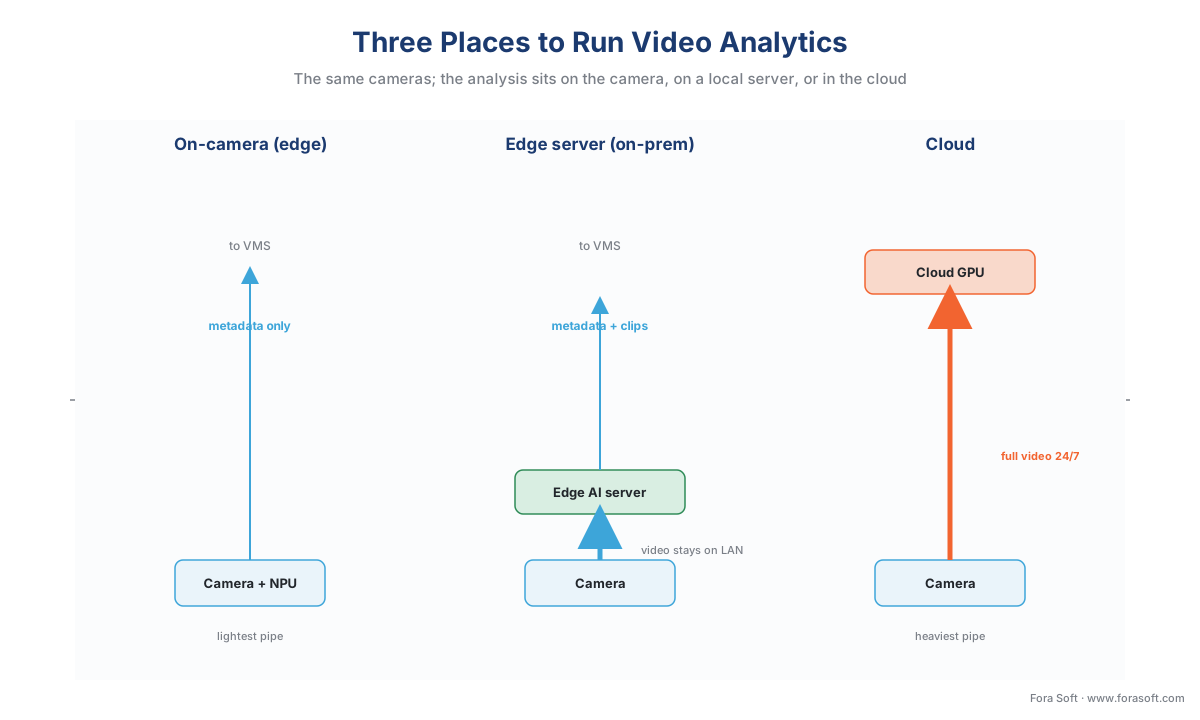 Figure 1. The same cameras, three places to run the analysis. On-camera analytics emit only small metadata; an edge server keeps full video on the local network and sends metadata up; cloud analytics push every camera's full video across the internet. Watch which arrows cross the WAN line — that is the bandwidth and privacy bill.
Tier 1 — On-camera (edge) analytics
The one-line version: a small AI chip inside the camera runs the detection itself, so the camera ships meaning — "person", "vehicle", "line crossed" — instead of raw pixels.
"Edge" simply means the computing happens at the edge of the network, where the data is born — here, inside the camera. A modern smart camera carries a dedicated Neural Processing Unit (NPU), a chip built to run the math of an AI model efficiently, measured in TOPS (trillions of operations per second). The numbers are real and current: surveillance camera processors such as Ambarella's CV-series deliver well over 20 TOPS for on-device vision (Ambarella), Axis cameras run deep-learning analytics on their in-house ARTPEC-8 silicon, and a coin-sized add-in accelerator like the Hailo-8 packs 26 TOPS into roughly 2.5 watts (Hailo). That is enough to run a quantized object detector — a model trimmed to run on small hardware — at 15 to 30 frames per second inside the camera.
The defining advantage is that the heavy data never leaves the camera. The video stays put; only the result of looking at it travels onward, and that result is tiny. A detection event — object type, a box location, a timestamp, maybe a confidence score — is a few hundred bytes to a few kilobytes, not the one-to-four megabits per second of the video stream itself. By sending metadata instead of pixels, on-camera analytics cut the upstream traffic for analysis by well over 90% compared with shipping the video to be analyzed elsewhere. That is the property that makes edge analytics scale to hundreds of cameras without a bandwidth crisis.
The second advantage is latency — the delay between something happening and the system reacting. With detection happening in the camera, there is no network round-trip to a server; the reaction is on the order of tens of milliseconds. For jobs where the speed of the response matters — a perimeter line-cross that should trigger a deterrent before the intruder is gone, a safety stop on a machine — this immediacy is the whole point, and a tier that has to phone a distant data center cannot match it.
The third advantage is privacy by construction. Because the recognizable video can stay inside the camera and only abstract metadata leaves, on-camera analytics keep the most sensitive data — people's faces and bodies — out of the network and out of the cloud entirely. We will return to why that matters legally; for now, note that the tier that moves the least data is also the tier that exposes the least.
The price of all that is capability. A camera chip has a fixed, modest compute budget and a power and heat ceiling, so it runs one or two lightweight models, not a large or frequently-updated one. You cannot easily run a heavy cross-camera reasoning model or swap in a brand-new architecture every quarter on hardware bolted to a wall. And the accuracy you get is bounded by what fits: a small model tuned for a clean scene can be excellent, but it is not the same model you would run on a data-center GPU. This is the deployment-and-bandwidth story; for how the underlying detection models are built, trained, and shrunk to fit a camera, that is the model-engineering layer covered in real-time edge vs cloud AI deployment in our AI for Video Engineering section — this article stays on where the compute lives, not how the model is made.
Typical failure mode: buying "AI cameras" without checking which models the chip can actually run and whether they update — a camera that detects people well today but cannot be upgraded to the behavior or vehicle model you need next year, because the compute budget is already full.
Tier 2 — The edge server (on-prem AI appliance)
The one-line version: a dedicated, more powerful computer on the local network takes the full video from many cameras and runs heavier analytics on-site, without sending the video to the cloud.
The edge server is the middle tier, and it exists because the two extremes each leave something on the table. The camera is fast and private but weak; the cloud is powerful but distant and bandwidth-hungry. An on-premises AI box — often built around a compact AI computer such as an NVIDIA Jetson AGX Orin, which delivers up to 275 TOPS in a small module (NVIDIA), or a rack server with a full inference GPU — sits in the building, pulls the full-quality streams over the local network, and runs models far heavier than any camera could host. One Jetson AGX Orin can run real-time analytics across roughly eight camera streams at once, each with several AI models applied (NVIDIA); a GPU server scales further.
Because the edge server sits on the local network (LAN), the heavy video travels only inside the building, where bandwidth is effectively free and fast — gigabit and ten-gigabit wiring is ordinary. The forty cameras can pour their full streams into the box all day without touching the internet link. Only the results — the same compact metadata and event clips — need to go up to a central VMS or cloud, exactly as with on-camera analytics. So the edge server keeps the cloud's processing muscle and the edge's bandwidth discipline at the same time.
It keeps much of the edge's privacy advantage too: the recognizable video stays on hardware you own, in one jurisdiction, and you choose what abstracted data, if any, leaves. It adds latency measured in tens of milliseconds — a short hop across the LAN and back — which is slower than on-camera but far faster than the cloud, and fast enough for almost every surveillance reaction. And it answers the camera's capability ceiling: you can run bigger models, more of them, and update them centrally on one box instead of reflashing a hundred cameras.
The cost is a box to buy, run, and maintain. The edge server is a real capital purchase, it draws power and produces heat, and it is a single point of failure unless you build in a second one. You also size its compute up front: pack too many cameras or too heavy a model onto one box and the frame rate drops or detections lag. The edge server is the pragmatic middle — more capable than the camera, more private and bandwidth-friendly than the cloud — bought with on-site hardware and the duty to keep it running. Its GPU economics and data-residency advantages get a full treatment in edge servers and on-prem AI appliances.
Typical failure mode: sizing the box for today's camera count and one model, then starving it as cameras and analytics are added — the appliance that ran four models on eight cameras smoothly and now drops frames trying to run six models on twenty.
Tier 3 — Cloud analytics
The one-line version: the cameras send their full video up the internet to a provider's data center, where powerful, elastic servers run the analytics, and you pay for the compute and the bandwidth by the month.
Cloud analytics is the tier with the most raw power and the fewest physical constraints. The data center has effectively unlimited GPUs you can rent by the hour, so you can run the largest, newest models, apply several of them to every stream, retrain on your own footage, and reason across many cameras and many sites at once — the heavy, long-horizon analysis the camera and the edge box cannot touch. Management is central by nature: one console, every site, models updated in one place. For analytics that genuinely need data-center scale — large vision-language models, cross-site search, forensic reprocessing of an archive — the cloud is where they live.
The first cost of that power is bandwidth, and it is the constraint that decides most cloud-analytics projects. To analyze video in the cloud, the video has to get there — continuously, for every camera, because the cloud cannot detect on a stream it has not received. A single 1080p camera consumes roughly 1–2 Mbps of upload around the clock; a 4-megapixel camera, about 2–4 Mbps. Multiply across cameras and the number grows fast, and it is the same continuous-upload bill that caps cloud recording, now charged to analysis. (For the full bandwidth-and-storage arithmetic, see how surveillance storage works: the retention math.)
The second cost is the GPU meter, and it is easy to underestimate. Cloud AI servers are rented by the hour, and a server running detection on your streams runs every hour of every day. We will price this precisely in the worked example below; the headline is that cloud analytics convert a one-time hardware decision into a recurring per-camera bill that scales with your camera count and never stops — the operating-expense shape, where the camera and edge-server tiers are mostly capital-expense shapes.
The third cost is latency. Sending a frame to a data center, waiting for the model, and getting the answer back adds a network round-trip — typically hundreds of milliseconds, sometimes more under congestion or distance — on top of the processing itself. For batch insight ("how many vehicles entered today") that delay is irrelevant; for a real-time deterrent it can be the difference between stopping an event and merely recording it.
The fourth cost is privacy and residency, and for surveillance it is the sharpest. In the cloud tier, recognizable video of real people leaves your building and lands on a third party's servers, possibly in another country. Under the EU's General Data Protection Regulation (GDPR, Reg. (EU) 2016/679), that footage is personal data, and transferring personal data outside the EU is lawful only where there is an adequacy decision for the destination country (Art. 45) or appropriate safeguards such as Standard Contractual Clauses are in place (Art. 46) — the rules of Chapter V. If the cloud analytics perform facial recognition or any biometric identification, the bar rises further: biometric data processed "for the purpose of uniquely identifying a natural person" is special-category data under GDPR Art. 9, which the European Data Protection Board treats as carrying heightened risk and generally requiring explicit consent and a Data Protection Impact Assessment (EDPB Guidelines 3/2019; EDPB Guidelines 05/2022). The practical consequence is concrete: with cloud analytics you must know which region holds the video and confirm a lawful basis before you stream a single frame up. This is engineering guidance, not legal advice; confirm specifics with qualified counsel.
Typical failure mode: the pilot that analyzed four cameras flawlessly and then, at forty, saturates the upload link, runs a four-figure monthly GPU bill nobody modeled, and quietly moves biometric footage into a jurisdiction the privacy policy forbids.
The five bills, side by side
Here is the whole comparison on one screen — the version to keep beside you while scoping. Read it by column if you already know your binding constraint (a hard latency target, a thin internet link, a residency rule), or by row if you are weighing the tiers evenly.
| Factor | On-camera (edge) | Edge server (on-prem) | Cloud |
|---|---|---|---|
| Where compute sits | Inside the camera (NPU) | A box on the local network | A provider's data center |
| Latency | Lowest — tens of ms, no network hop | Low — tens of ms across the LAN | Highest — adds a 200 ms+ round-trip |
| Internet bandwidth | Minimal — metadata only | Minimal — video stays on the LAN | High — every camera streams up 24/7 |
| Cost shape | CapEx — built into the camera, ~free to run | CapEx — buy the box, low running cost | OpEx — GPU + bandwidth bill, never stops |
| Capability ceiling | Low — one or two light models | High — heavy models, several per stream | Highest — largest models, cross-camera |
| Privacy / residency | Strongest — video can stay in the camera | Strong — video stays on hardware you own | Weakest — recognizable video leaves the site |
| Model updates | Hardest — limited by chip, per-camera | Central — update one box | Easiest — update in the cloud |
| Best fit | Fast, simple, high-camera-count, private | Heavy on-site analytics, many cameras | Elastic, heavy, cross-site, central insight |
Table 1. The three tiers against the bills that decide projects. No tier wins every row — the right one is the column whose tradeoffs match your latency target, your network, your budget shape, and your compliance constraints.
The same comparison reads faster as a color-coded scorecard, where the green cell marks the tier that wins each row. It makes the central point of this article visible at a glance: the wins are spread across all three columns, so there is no single best tier — only the best match, which is why most real systems combine them.
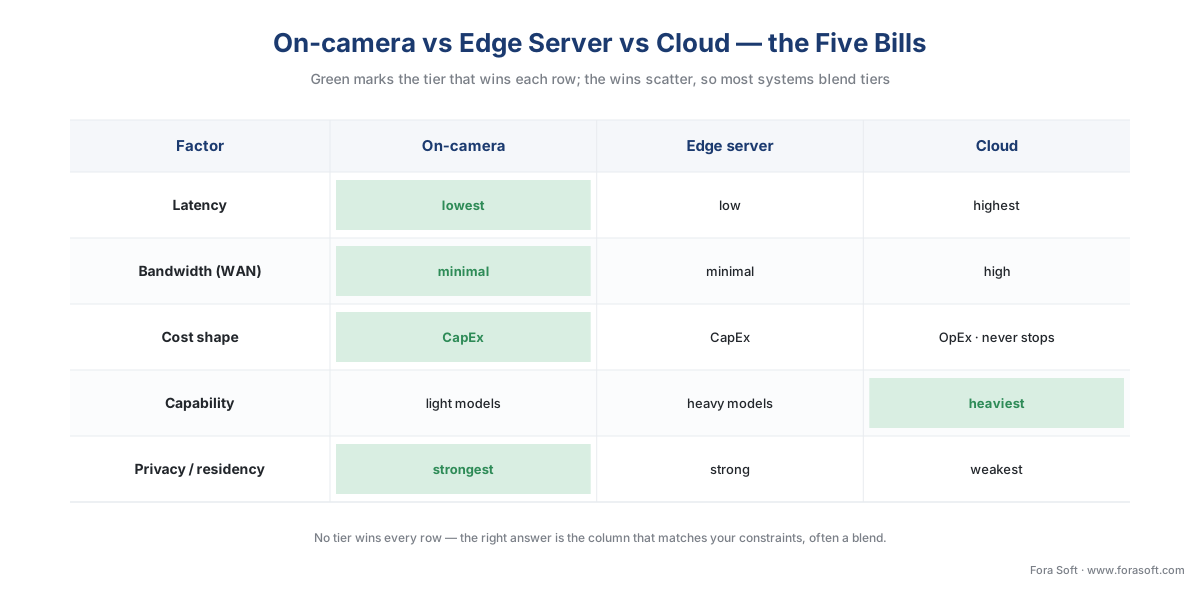 Figure 2. The five bills as a scorecard. Green marks the row winner; the wins scatter across all three tiers, which is why the right answer for most systems is a blend — cheap detection at the edge, heavy analysis in the cloud.
A worked example: 40 cameras, three tiers
Numbers make the tradeoffs concrete, so let us cost one realistic site — 40 cameras, each a 4-megapixel unit at about 2 Mbps in H.265 — running continuous object detection under each tier. The arithmetic is simple and you control every input.
Bandwidth to the analytics. This is the quantity that only bites once video must cross the internet to be analyzed.
For cloud analytics, every camera streams its full video up, continuously:
2 Mbps × 40 cameras = 80 Mbps of sustained upload, 24 hours a day.
That 80 Mbps is the binding constraint — it can saturate a business internet link on its own and may force an upgrade before a single detection is paid for.
For on-camera and edge-server analytics, the full video never crosses the internet. The cameras analyze locally (or hand video to a box on the LAN), and only metadata and the occasional event clip go up. If each camera emits a handful of events a minute, the metadata is on the order of kilobits per second, so the whole site's upstream for analysis falls from 80 Mbps to roughly 2 Mbps or less — a reduction of well over 95%. Same cameras, same detections, a different place to do the looking.
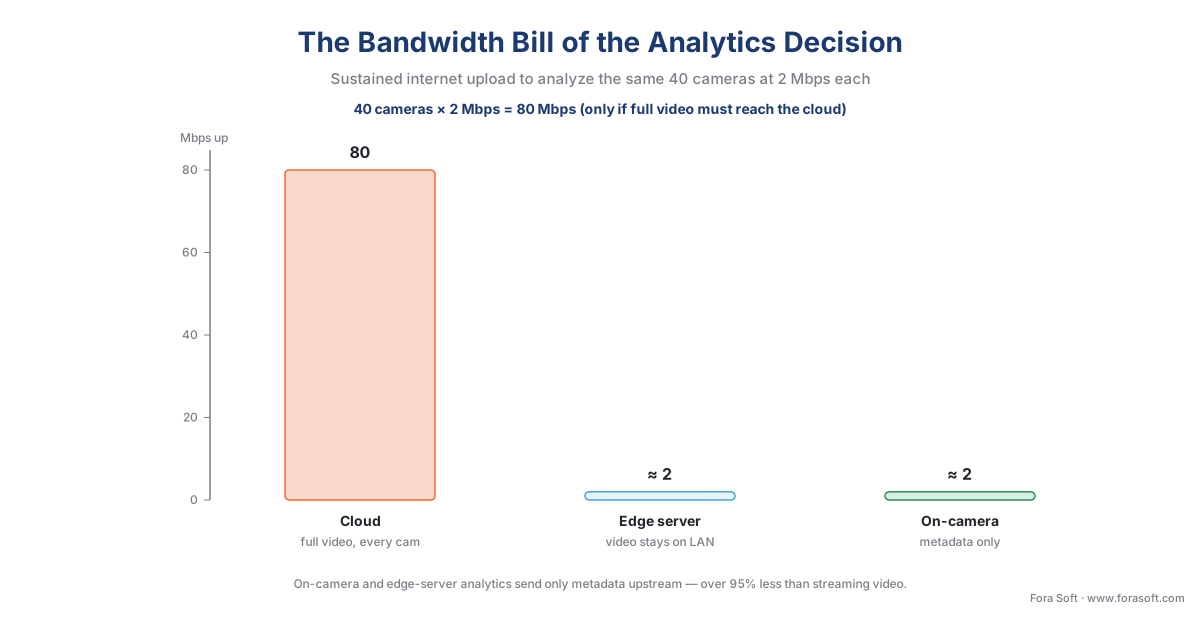 Figure 3. The bandwidth bill of the analytics decision. Cloud analysis puts all 80 Mbps on the internet continuously; on-camera and edge-server analysis keep the video local and send only metadata — roughly 2 Mbps for the whole site. Bandwidth, more than accuracy, is what caps the cloud tier.
The cloud GPU meter. Now the recurring compute cost the cloud tier adds. Cloud AI servers are rented by the hour. A current entry inference instance — an AWS g6.xlarge with one NVIDIA L4 GPU — lists at about $0.80 per hour on demand (AWS). Running every hour of the month:
$0.80 × 730 hours ≈ $584 per GPU per month.
How many cameras one GPU can carry depends on the model and frame rate; surveillance detection is often run at 5–15 fps, not 30, which stretches a GPU further. Taking a conservative 15 streams per GPU:
$584 ÷ 15 streams ≈ $39 per camera per month — for the detection compute alone.
For all 40 cameras you would rent about three such GPUs:
3 GPUs × $584 ≈ $1,750 per month ≈ $21,000 per year — before the bandwidth upgrade, before storage, before egress.
There is one more cloud line item teams forget: egress, the fee for data leaving the cloud. As a yardstick, AWS charges about $0.09 per GB for internet data-transfer-out after the first 100 GB (AWS). Pull a single camera's month of footage back out (≈ 648 GB) and that is roughly $58 in egress on top of everything else.
The edge tiers, by contrast, are mostly a one-time spend. On-camera analytics are built into the camera's price — a smart camera costs more than a "dumb" one, but the detection then runs for $0 per month. An edge server is a capital purchase in the low thousands of dollars that, once bought, also runs for only the cost of power. The shape is the same one the deployment-model article found for storage: a tall step then a flat line for edge; a low start then a climb that never stops for cloud. For continuous, compute-heavy analytics, the cloud compute bill tends to overtake the edge hardware cost within the first year.
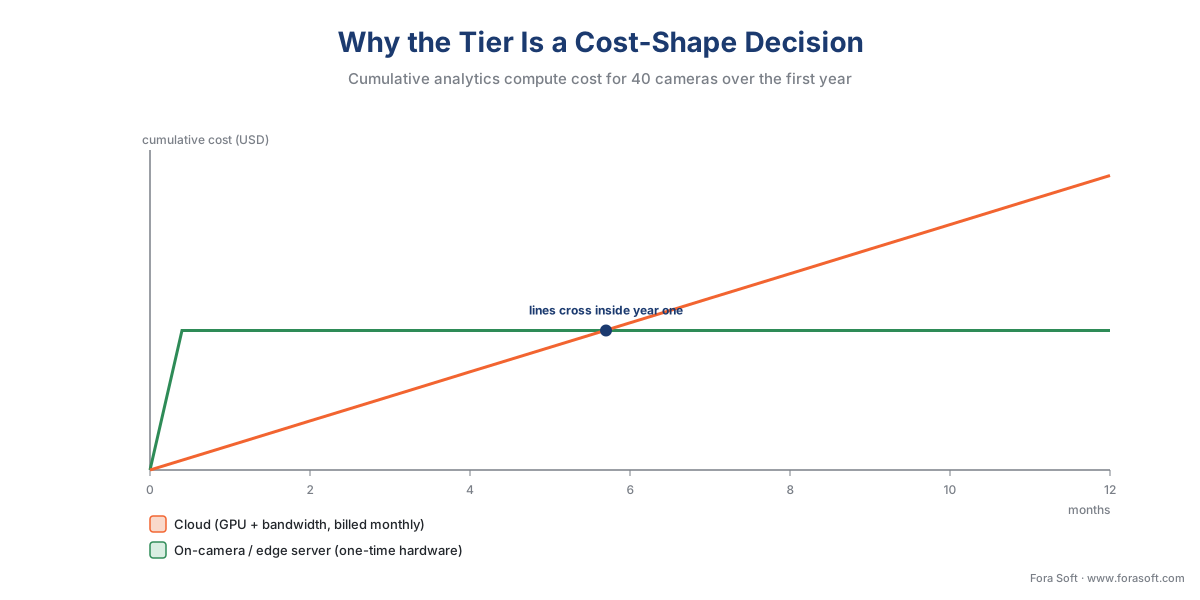 Figure 4. Why this is a cost-shape decision, not just a price. The edge tiers pay once for hardware then run nearly free; the cloud tier pays a GPU-and-bandwidth bill every month. For continuous heavy analytics on this many cameras, the lines cross inside year one.
The economics of the split — cost per camera per month at each tier and the break-even points — get their own deep dive in the economics of analytics. The takeaway here is that the tier you pick is a choice about the shape of the bill, not only its size.
Latency and accuracy: the honest ranges
Two performance numbers decide whether a tier fits a job, and both deserve honest ranges rather than marketing single-points.
Latency is bounded by physics, and the tiers separate cleanly. On-camera detection reacts in roughly tens of milliseconds because nothing leaves the device. An edge server adds a short LAN hop, still in the tens of milliseconds. Cloud analytics add the internet round-trip — commonly a few hundred milliseconds, and more under distance or congestion — before the model even starts. For a dashboard counting today's footfall, that delay is invisible. For a perimeter intrusion that should trigger a light and a siren before the intruder reaches the door, it is the whole game. Decide first whether your job is a real-time reaction or an after-the-fact insight, because that alone can settle the tier.
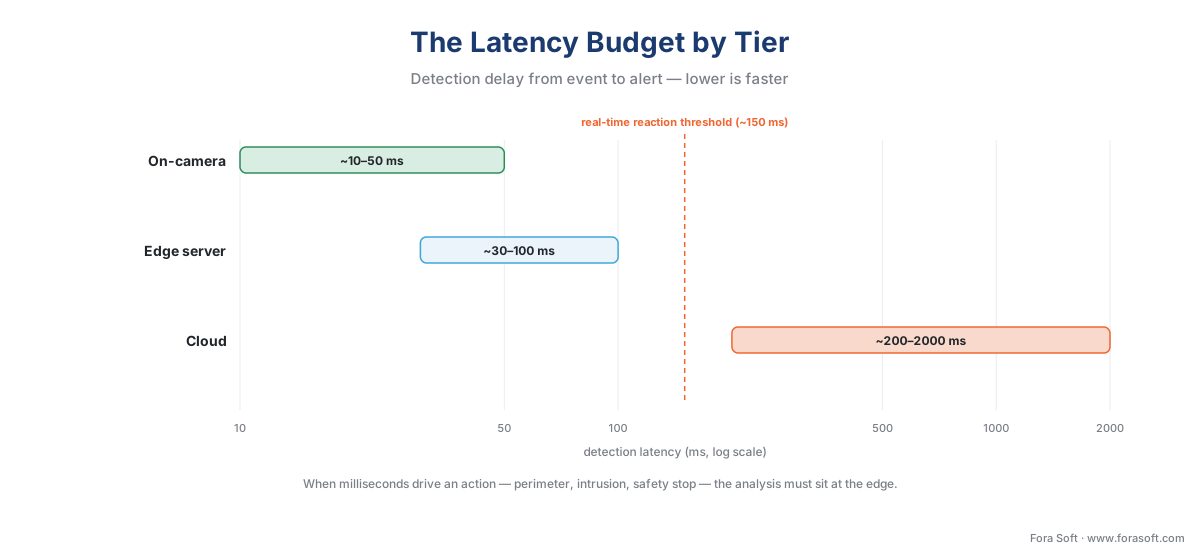 Figure 5. The latency budget by tier. On-camera and edge-server analytics react in tens of milliseconds; cloud adds a network round-trip of hundreds of milliseconds. When milliseconds matter — perimeter, intrusion, safety stops — the analysis must sit at the edge.
Accuracy is where the section's editorial rule bites: there is no "100% accuracy" in video analytics, on any tier. Detection quality is reported as two numbers in tension — precision, the share of the system's alerts that are real, and recall, the share of real events the system catches — and both depend on the scene, the lighting, the camera angle, and how well the model is tuned. As a rough orientation, a well-tuned object detector might reach precision above 0.8 (few false alarms) and recall near 0.9 (few misses) in a favorable scene, and noticeably less in glare, rain, or crowding. The tier influences the ceiling: the cloud can run a heavier, more accurate model than a camera chip, but a heavier model badly tuned for the scene still underperforms a light model tuned well. The realistic precision-and-recall ranges per tier, and how the compute budget bounds them, are the subject of latency and accuracy at each tier; the model engineering behind those numbers lives in our AI for Video Engineering section. The discipline to carry from here: ask any vendor for precision and recall, in your lighting, never a single "99%".
Where the standard fits: ONVIF Profile M is the bridge
A reassuring point ties the three tiers together, and it is the part this section owns. Wherever the analysis runs — camera, edge box, or cloud — the result has to reach your VMS in a form it understands, and there is an industry standard for exactly that. ONVIF is the common language that lets cameras and software from different makers work together, and one ONVIF profile is built for analytics. ONVIF Profile M standardizes the metadata and events that analytics produce: object classification, and specific metadata for geolocation, vehicle, license plate, human face, and human body, plus event interfaces for object counting, license-plate recognition, and facial recognition (ONVIF, Profile M Specification v1.1, 2024).
The detail that makes Profile M the bridge for this article is in its own definition: a Profile M conformant product can be an edge device (such as an IP camera) or a service (such as a server- or cloud-based app), and a Profile M client can be a VMS, an NVR, or a cloud service (ONVIF). In plain terms, the standard was designed so that the same metadata interface works whether the detection happened on the camera, on an edge server, or in the cloud. The metadata can travel through the video stream, through ONVIF's event service, or over MQTT — a lightweight messaging protocol common in Internet-of-Things systems — so an edge camera can even push a detection straight to a building-automation platform (ONVIF). Choosing a tier, then, does not have to lock you to one vendor's private format: if the analytics and the VMS both speak Profile M, the detections arrive in a standard shape regardless of where they were computed.
The same caution applies here as everywhere with ONVIF: conformance guarantees a baseline, not every feature. Two products that share Profile M will reliably exchange standard metadata; a vendor's special analytic or a proprietary attribute may still need that manufacturer's own software kit. Treat the profile as the floor both sides stand on, not the ceiling. For the full standards layer, see events, metadata, and the ONVIF analytics interface and the commercial overview in ONVIF profiles in security systems.
How to choose: a decision path
The tiers are clear; the choice is a short series of questions, taken in order. Start with the hard constraints that eliminate a tier outright, and only then weigh the soft preferences.
The first hard gate is privacy and residency. If the analytics involve faces or other biometrics, or a rule forbids recognizable footage leaving your premises or your jurisdiction, that points away from cloud and toward on-camera or edge-server analysis, where the video stays on hardware you control. Settle this first, because no speed or convenience justifies an unlawful deployment.
The second gate is latency. Decide whether the job is a real-time reaction or an after-the-fact insight. If milliseconds drive an action — a deterrent, a safety stop, an immediate alert — the analysis must sit at the edge (camera or server). If the job is reporting, search, or trend analysis, the cloud's delay is harmless and its power is welcome.
The third question is the internet link and scale. Measure the sustained upload at each site against the cameras-times-bitrate sum. If the link cannot carry every camera continuously with headroom for the rest of the business, cloud analytics are off the table for that site, and you are choosing between the two edge tiers. The fourth is model heaviness: a light, stable model fits the camera; a heavy or frequently-updated model wants an edge server or the cloud. The last is the cost shape you can carry: a one-time capital budget favors the edge tiers; a need for elastic, pay-as-you-go compute favors the cloud.
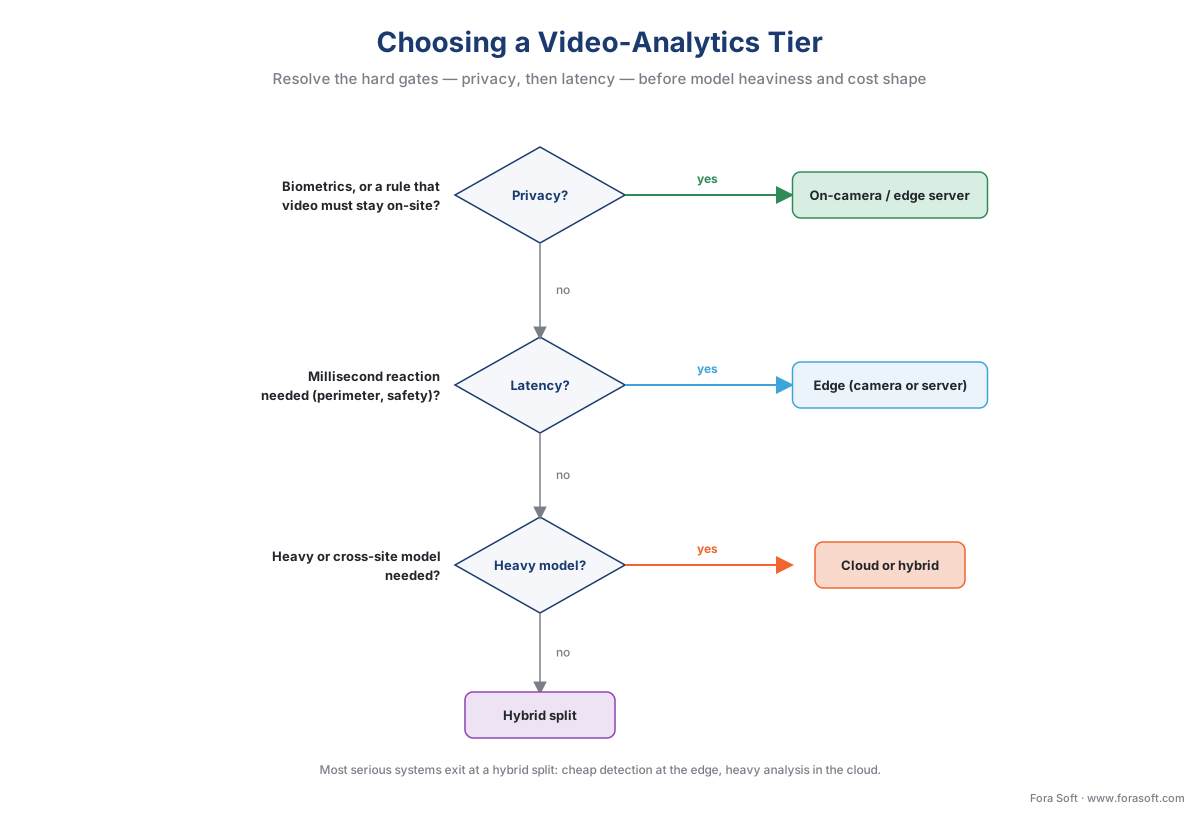 Figure 6. The analytics-tier decision as a path. Resolve the hard gates — privacy/residency, then latency — before the soft preferences of model heaviness and cost shape. Most serious systems exit this tree at a hybrid split, not a single tier.
Walk that path for a real system and you will usually find that no single tier wins every camera. The perimeter cameras need edge speed and privacy; the analytics team wants cloud-scale search over the archive; the budget cannot stream forty feeds up forever. That is why the honest answer for most systems is not edge or cloud but both — cheap, fast detection at the edge, heavy analysis in the cloud, and a thin pipe of metadata and clips between them. That hybrid pattern is common enough, and important enough, to get its own article and a cost worksheet in the hybrid edge-cloud processing pattern.
A common mistake to avoid
The costliest pattern we see is choosing the tier on the demo, not the deployment — and it has two faces. The first is lifting everything to the cloud because a four-camera pilot was effortless, then discovering at forty cameras that the upload link is saturated, the GPU rental has a comma in it, egress fees appear when an investigator pulls footage, and biometric video has quietly crossed a border the policy forbids. The second is the opposite reflex: insisting on pure on-camera analytics for every job, then being unable to run the heavier cross-camera search the operations team actually needs, because a wall-mounted camera chip was never going to host it. The fix is the discipline this article is built around — decide by the five bills against your latency target, your link, your compliance rules, and your model, at full scale, not at pilot scale. For most systems the answer is a blend, and that is not a compromise; it is the design that matches the bills.
Where Fora Soft fits in
Fora Soft has built real-time video, streaming, and computer-vision software since 2005, across 625+ shipped projects, and the edge-versus-cloud split is a decision we make with clients constantly, because off-the-shelf analytics platforms force their own answer. Teams come to us when on-camera models cannot carry the accuracy a scene demands, when a multi-site fleet needs edge detection feeding cloud search without streaming every feed up, or when biometric analytics must stay on-premises to satisfy a residency rule a cloud product cannot meet. We build the custom analytics pipeline — detection on the camera or an edge server, ONVIF Profile M metadata into the VMS, and only the events that matter sent to the cloud — and the framing we lead with is always how the system behaves under real load first: the latency you can hold, the bandwidth you actually consume, and the realistic precision and recall in your lighting, not a demo's. A design that survives the worst day beats one that shines in the pilot.
What to read next
- The video-analytics map: what a surveillance system can detect
- The hybrid edge-cloud processing pattern
- On-prem, cloud, and hybrid VMS — three deployment models
Call to action
- Talk to a surveillance engineer — book a 30-minute scoping call to talk through your video analytics software plan.
- See our case studies — 250+ shipped projects across video streaming, WebRTC, OTT, telemedicine, e-learning, surveillance, and AR/VR.
- Download the Edge vs Cloud Video Analytics — Decision Guide — One-page decision reference: on-camera, edge-server, and cloud analytics compared across latency, bandwidth, cost shape, privacy, and capability, with the 40-camera bandwidth and cloud-GPU worked example and the order to resolve the….
References
- ONVIF — "Profile M" (metadata and events for analytics applications: standardizes object classification and metadata for geolocation, vehicle, license plate, human face and body, and analytics events; a conformant product can be an edge device or a server/cloud service, and a client can be a VMS, NVR, or cloud service; metadata over the stream, the ONVIF event service, or MQTT; Profile M Specification v1.1, 2024). Primary (tier 1). https://www.onvif.org/profiles/profile-m/
- European Union — "GDPR, Regulation (EU) 2016/679, Art. 9 and Chapter V (Arts. 44–49)" (biometric data processed to uniquely identify a person is special-category data under Art. 9; transfers of personal data outside the EU are lawful only via an adequacy decision (Art. 45) or appropriate safeguards such as SCCs (Art. 46)). Primary (tier 1). https://eur-lex.europa.eu/eli/reg/2016/679/oj
- European Data Protection Board — "Guidelines 3/2019 on processing of personal data through video devices" (video of identifiable persons is personal data; biometric identification triggers Art. 9; storage limitation and security at rest and in transit). Primary (tier 1/2). https://www.edpb.europa.eu/our-work-tools/our-documents/guidelines/guidelines-32019-processing-personal-data-through-video_en
- European Data Protection Board — "Guidelines 05/2022 on the use of facial recognition technology" (facial recognition entails heightened risk to data subjects; business use generally requires explicit consent and a DPIA). Primary (tier 1/2). https://www.edpb.europa.eu/our-work-tools/documents/public-consultations/2022/guidelines-052022-use-facial-recognition_en
- NVIDIA — "Jetson Orin module specifications" (Jetson AGX Orin up to 275 TOPS at 15–60 W; Orin NX up to 157 TOPS; Orin Nano up to 67 TOPS; AGX Orin runs multi-stream video analytics across roughly eight streams with multiple models). First-party engineering (tier 3). https://www.nvidia.com/en-us/autonomous-machines/embedded-systems/jetson-orin/
- Hailo — "Hailo-8 AI Accelerator" (26 TOPS at ~2.5 W typical, on-die memory, M.2 form factor for embedding deep-learning inference inside edge cameras; supports TensorFlow, PyTorch, ONNX). First-party engineering (tier 3). https://hailo.ai/products/ai-accelerators/hailo-8-ai-accelerator/
- Ambarella — "CV-series edge AI vision SoCs" (camera-class SoCs delivering 20+ TOPS for on-device computer vision; CV7 family announced January 2026 for multi-imager enterprise security cameras and 8K). First-party engineering (tier 3). https://www.ambarella.com/
- Amazon Web Services — "Amazon EC2 On-Demand Pricing" (g6.xlarge with one NVIDIA L4 GPU ≈ $0.80/hour; g5.xlarge with one A10G ≈ $1.006/hour; internet data-transfer-out ≈ $0.09/GB after the first 100 GB/month). First-party engineering (tier 3). https://aws.amazon.com/ec2/pricing/on-demand/
- Roboflow — "Object detection metrics: precision, recall, and mAP" (detection quality is a precision/recall tradeoff scored by mAP@50 and mAP@50:95; precision above 0.8 indicates few false positives, recall near 0.9 indicates few misses; real scores depend on scene and tuning). Educational (tier 6). https://blog.roboflow.com/object-detection-metrics/
- MarketsandMarkets — "Intelligent Video Analytics Market" (≈ USD 14.65B in 2026 to ≈ USD 41.39B by 2031 at ~23.1% CAGR; edge deployment among the fastest-growing segments, driven by real-time inference, bandwidth savings, and data-sovereignty needs). Institutional/analyst (tier 5). https://www.marketsandmarkets.com/Market-Reports/intelligent-video-analytics-market-778.html
