


Why this matters
If you are scoping or buying a surveillance system, the deployment model is the decision that quietly sets your budget shape, your network requirements, and your compliance exposure for years — and it is the hardest to reverse once cameras are installed and footage is flowing. Pick cloud for its easy start and you may discover the upload link cannot carry every camera at once, or that a year of subscription has overtaken what the on-premises gear would have cost outright. Pick on-premises for control and you own the maintenance, the capacity planning, and the 2 a.m. disk failure. Pick hybrid without understanding what crosses the internet and you can still leak sensitive footage into a jurisdiction your policy forbids. This article gives you a precise, non-technical model of all three so you can match the model to the site, talk to vendors about the right numbers, and avoid the expensive surprises that show up only after the system is live.
One decision, three shapes
Before the models, one definition, because the whole article rests on it. A Video Management System (VMS) is the software that ingests many camera streams at once, records them, lets people watch live and recorded video, and turns events into alerts and actions. The VMS is the brain of a surveillance system; if you want the broader feature checklist of what modern VMS software includes, our commercial overview of modern VMS software features covers that, while this article stays on the deployment decision beneath it. The "deployment model" is simply the question of where that brain and its memory physically run — in your building, in a provider's cloud, or split across both. Everything else in this article follows from that one placement choice.
It helps to hold four questions in mind as we walk each model, because they are the four bills every model pays in a different ratio:
- Upfront cost — what you spend once, before the system records a single frame.
- Recurring cost — what you pay every month for as long as the system runs.
- Bandwidth — how much internet upload capacity the model consumes, continuously.
- Control and residency — who physically holds the footage, and which laws reach it.
Keep those four in view and the three models stop being marketing categories and become a clear set of tradeoffs.
 Figure 1. The same cameras, three placements. On-premises keeps recording and storage on the local network; cloud streams every camera up to a provider; hybrid records locally and sends only management traffic and event clips over the internet. Watch where the thick video arrows cross the WAN line — that is the bandwidth bill.
Model 1 — On-premises: everything stays in the building
The one-line version: the cameras, the recording server, the storage, and the VMS software all live on your own network, inside your own walls.
On-premises is the original shape of surveillance and still the default for large sites. Picture it as a private library: the books (your footage) sit on shelves in your own building, you bought the shelves, and nobody outside can reach them unless you let them. The cameras send their streams over the local network to a recording server — often a purpose-built Network Video Recorder (NVR), which is the appliance or server that records IP cameras — and that server writes to disks on-site, usually arranged in a RAID array so a single dead drive does not lose evidence. The VMS software that ties it together also runs on-site, and operators watch from clients on the same network.
The defining feature of on-premises is that the video never has to leave the building. A 40-camera site can push 80 megabits per second of video around its own local network all day, and that traffic costs nothing extra because a local network is cheap and fast — gigabit and ten-gigabit switching is ordinary. Your internet connection is used only when someone logs in remotely to view a camera, which is a small, occasional load. For bandwidth, on-premises is the cheapest model by a wide margin.
The cost shape is capital expenditure (CapEx) — a large one-time spend. You buy the cameras, the server, the disks, the switches, and the VMS licenses up front, install it all, and then running costs are modest: electricity, cooling, the occasional replacement disk, and a maintenance contract. There is no per-camera monthly fee. Over a long enough horizon, on-premises is usually the lowest total cost, especially at scale, because you are not renting the same capacity month after month.
On-premises also gives you the strongest answer to the control and data-residency question. The footage sits on hardware you own, in a location you choose, governed by exactly one jurisdiction — yours. For organizations under strict data-sovereignty rules, regulated industries, or government facilities that simply cannot place monitoring footage on third-party infrastructure, this is often not a preference but a requirement. You also keep recording during an internet outage, because nothing about recording depends on the internet; the system only loses remote access, not the recording itself.
The price of all that control is that you own everything that can go wrong. You size the storage (and live with it if you guessed low), you plan the capacity, you patch the software, you replace the failed disk, and you build your own redundancy if you want to survive a server failure. A single building also means a single point of physical risk: a fire or theft that takes the server takes the footage with it unless you have arranged an off-site copy. On-premises is powerful and private, but it is the model that asks the most of your own team.
Typical failure mode: storage and compute sized for today and never revisited — the array that fills three weeks early because someone budgeted motion recording but the cameras shipped recording continuously, or a server with no off-site backup, so the one fire that matters erases the evidence it was installed to capture.
Model 2 — Cloud (VSaaS): recording and management in a data center
The one-line version: the cameras send their video over the internet to a provider's data center, where recording, storage, and management all happen, and you pay a monthly subscription per camera.
Cloud surveillance is usually sold as Video Surveillance as a Service (VSaaS) — the software, the storage, and the management delivered as a subscription, the way Netflix delivers film instead of you buying discs. You install cameras (sometimes a small bridge device), point them at the provider's cloud, and from then on you log into a web app to watch and manage everything. There is almost no on-site hardware to own, no server to patch, and no storage to size — the provider handles all of it, and capacity grows with a setting rather than a purchase order. For a small site, a chain of small sites, or a team with no IT staff, this convenience is the whole appeal, and it is real.
The cost shape flips from CapEx to operating expenditure (OpEx) — a predictable monthly fee instead of a big upfront spend. That predictability is much easier to budget, and it lowers the barrier to starting. But the meter never stops. Cloud recording subscriptions in 2026 commonly run $10–30 per camera per month for short retention (7–30 days of continuous recording), $30–60 for longer retention (60–90 days), and $75–150 at the enterprise end with extended retention and analytics (Solink). Budget tiers exist as low as a few dollars per camera for image-only or motion-only recording, but continuous recording at useful resolution sits in the higher bands. Multiply by cameras and months and the number grows fast — we will do that arithmetic in a moment — and for a large deployment kept for years, the subscription total can exceed what an on-premises system would have cost outright.
Then there is the constraint that decides more cloud projects than cost: bandwidth. In the cloud model, every camera's video has to travel up your internet connection, continuously, because the recording lives in the data center. A single 1080p camera consumes roughly 1–2 Mbps of upload around the clock; a 4-megapixel camera at 15 frames per second consumes about 2–4 Mbps (Videoloft; SecurityCameraKing). That sounds modest until you multiply: ten cameras need 10–20 Mbps of sustained upload, and a few dozen cameras can saturate the upstream link that the rest of the business also depends on, sometimes forcing an internet upgrade of $50–200 a month on top of the subscription. This is why integrators repeatedly hit a practical ceiling: past roughly 100 cameras, pure cloud usually becomes infeasible on bandwidth and storage cost alone, and on-premises or hybrid becomes the more efficient footing (Wittenbach; Salient). Cloud is most comfortable for smaller camera counts on good connections.
Cloud also changes the resilience equation. Recording now depends on the internet: if the link to the building goes down, a pure-cloud camera may stop recording until it comes back, unless it has local buffering. Providers advertise high availability — "99.9%" or "99.99%" uptime — but those numbers deserve a hard look. A cloud service-level agreement (SLA) is per-service, not a blanket promise; the credit for missing it is usually a small discount on next month's bill, not compensation for lost footage; and a single-region deployment is a single point of failure no matter what percentage is printed on it (Cloud Computing Authority). The honest framing: cloud can be very reliable, but its reliability is a property of your internet link and the provider's architecture together, not a guarantee you can assume.
Finally, cloud sharpens the data-residency question that on-premises answered so simply. Your footage now lives on someone else's servers, possibly in another country, and surveillance video of recognizable people is personal data under laws like the EU's General Data Protection Regulation (GDPR, Reg. (EU) 2016/679). GDPR does not forbid storing that data outside the EU, but it tightly regulates the transfer: moving personal data to a country outside the EU is lawful only where there is an "adequacy decision" for that country (GDPR Art. 45) or appropriate safeguards such as Standard Contractual Clauses are in place (GDPR Art. 46) — the rules in Chapter V of the Regulation. The practical consequence is concrete: with cloud you must know which region your provider stores footage in, and confirm the transfer has a lawful basis, before you sign. This is engineering guidance, not legal advice; confirm specifics with qualified counsel. Our GDPR for video surveillance article goes deeper on the legal layer.
Typical failure mode: the bandwidth and egress surprise — a system that demos perfectly on four cameras and then stutters when forty stream up at once, or a finance team that discovers the per-camera fee, multiplied across every site and renewed every year, has quietly overtaken the one-time cost of owning the gear.
Model 3 — Hybrid: record locally, manage in the cloud
The one-line version: keep the heavy, continuous recording on a local device, and use the cloud only for the light work — remote management, redundancy, overflow, and analytics.
Hybrid is the model that most serious, multi-site deployments converge on, because it puts each job where it is cheapest. The full-bitrate video is recorded locally — on an NVR, an edge server, or storage inside the cameras themselves — so the heavy 80 Mbps of a 40-camera site stays on the local network where bandwidth is free, exactly as in the on-premises model. Then a thin layer of traffic goes up to the cloud: the management and configuration data, health and status, and only the footage that matters — motion clips, event-triggered recordings, alerts, and metadata. By recording the heavy stream locally and uploading only small event clips, hybrid systems preserve the internet link for everything else and sidestep the bandwidth ceiling that limits pure cloud (Spotter Security; iVIS).
Think of hybrid as keeping your working files on the desk (local, instant, always available) while syncing a curated set of important documents to an off-site vault (the cloud, for safety and remote access). You get the cloud's two best properties — manage every site from one web app, and keep an off-site copy that survives a local fire or theft — without paying the cloud's bandwidth and storage bill for footage nobody will ever watch. Many hybrid cameras even adapt to conditions, doing more locally when the link is constrained and offloading more to the cloud when connectivity is good.
On the four bills, hybrid sits deliberately in the middle. Upfront cost is lower than full on-premises (you still buy local recording, but can lean on the cloud for management and redundancy instead of building your own). Recurring cost is lower than full cloud (you pay for cloud management and a slice of cloud storage, not for streaming and storing every camera continuously). Bandwidth is dramatically lower than cloud, because only events and management traffic cross the internet. And resilience is the model's quiet strength: because recording is local, a dropped internet connection does not stop recording — the footage keeps accumulating on the local device and syncs to the cloud when the link returns. The cloud copy, meanwhile, means a destroyed local recorder is not the end of the evidence.
Hybrid does ask for more design thought than either pure model, and that is its real cost. You decide what gets uploaded and what stays local, you manage two places where footage can live, and you must still answer the residency question for whatever does go to the cloud — which is exactly why hybrid lets you keep the most sensitive footage on-site and send only de-identified events or non-sensitive clips up. Done well, it is the model that gives a security team local performance and an operations team central visibility at the same time.
Typical failure mode: treating "hybrid" as a label rather than a design — uploading far more than the events that matter (so the bandwidth advantage evaporates), or never testing the local-buffer-then-sync path, so the one internet outage that coincides with an incident still loses the clip.
The four bills, side by side
Here is the whole comparison on one screen — the version to keep beside you while scoping. Read it by column if you already know your constraint (a fixed budget shape, a thin internet link, a residency rule), or by row if you are weighing the models evenly.
| Factor | On-premises | Cloud (VSaaS) | Hybrid |
|---|---|---|---|
| Deployment model | Recording, storage, VMS all on-site | Recording, storage, VMS in provider cloud | Local recording + cloud management/overflow |
| Upfront cost | High — CapEx for servers, storage, licenses | Low — little or no on-site hardware | Medium — local recording, lighter than full on-prem |
| Recurring cost | Low — power, maintenance, spares | High — per-camera/month, grows with retention | Medium — cloud management + partial storage |
| Internet bandwidth | Minimal — video stays on the LAN | High — every camera uploads continuously | Low — only events + management cross the WAN |
| Resilience to internet loss | Recording unaffected; remote view lost | Recording may stop without local buffer | Recording continues locally, syncs on reconnect |
| Data residency / control | Fullest — you hold the footage, one jurisdiction | Provider holds it; confirm region + transfer basis | Sensitive footage stays local; choose what goes up |
| Practical scale ceiling | Very high — limited by your own build | ~100 cameras before bandwidth/cost bite | Very high — heavy video never leaves the site |
| Who maintains it | You — patching, capacity, hardware | Provider — managed service | Shared — local gear yours, cloud theirs |
| Best fit | Large/regulated single sites; strict residency | Small sites, multi-site chains, no IT staff | Multi-site, mixed sensitivity, unreliable links |
Table 1. The three models against the bills that actually decide projects. No model wins every row — the right one is the column whose tradeoffs match your site, your network, and your compliance constraints.
The same comparison reads faster as a color-coded scorecard, where the green cell marks the model that wins each row. It makes the central point of this article visible at a glance: the wins are spread across all three columns, so there is no single best model — only the best match.
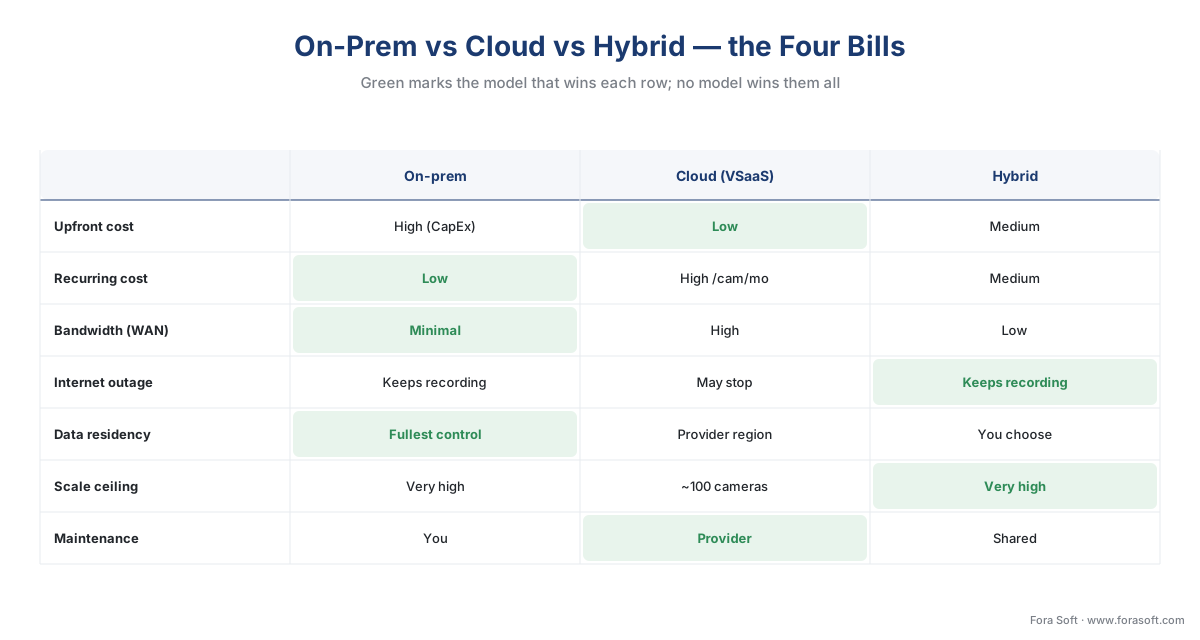 Figure 5. The four bills as a scorecard. Green marks the row winner; the wins scatter across all three models, which is why the right choice is a match to your constraints, not an overall champion.
A worked example: 40 cameras, three ways
Numbers make the tradeoffs concrete, so let us cost and size one realistic site — 40 cameras, each a 4-megapixel unit recording continuously at about 2 Mbps in H.265, kept for 30 days — under all three models. The arithmetic is simple and you control every input.
First, the two physical quantities that drive everything. Storage per camera per day is the bitrate times the seconds in a day, and a handy shortcut gives the same answer: storage in GB per day ≈ bitrate in Mbps × 10.8. So:
2 Mbps × 10.8 ≈ 21.6 GB per camera per day.
Across 40 cameras for 30 days:
21.6 GB × 40 cameras × 30 days ≈ 25,920 GB ≈ 26 TB.
And upload bandwidth, the quantity that only matters once video crosses the internet:
2 Mbps × 40 cameras = 80 Mbps of sustained upload, 24 hours a day.
Now the three models.
On-premises. That 80 Mbps stays entirely on the local network, so the internet bandwidth needed for recording is zero. The 26 TB lives on local disks (size the array larger for RAID overhead and headroom). You pay once for the server, disks, switches, and VMS licenses — a one-time spend in the rough order of tens of thousands of dollars depending on retention and redundancy — and then only power and maintenance. Year two and year three add almost nothing.
Cloud (VSaaS). That same 80 Mbps now has to leave the building continuously, which alone may force an internet upgrade. The 26 TB sits in the provider's cloud, included in the subscription. At a mid-tier $20 per camera per month:
40 cameras × $20 × 12 months = $9,600 per year, and about $48,000 over five years — recurring, before any bandwidth upgrade or analytics add-on.
There is also a trap worth naming: if you ever pull large amounts of footage back out of a raw cloud-storage account, providers charge egress — the fee for data leaving the cloud. As a yardstick, Amazon S3 charges about $0.09 per GB for the first tier of internet egress (AWS S3 pricing). Exporting a single camera's month of footage (≈ 648 GB) would cost roughly $58 in egress alone, on top of storage — a line item teams routinely forget when they model cloud cost. (Managed VSaaS usually folds normal viewing into the subscription; the egress trap bites hardest on self-built cloud storage.)
Hybrid. The 80 Mbps of continuous video records locally, so it never touches the internet — the same bandwidth win as on-premises. Only event clips and management traffic go up; if events are, say, 10% of footage, the sustained upload falls to roughly 8 Mbps, a load almost any business link carries comfortably. You pay a smaller cloud fee (management plus a slice of event storage) and a moderate upfront cost for the local recording. You get the off-site copy and the single-pane remote management without the full subscription or the full bandwidth bill.
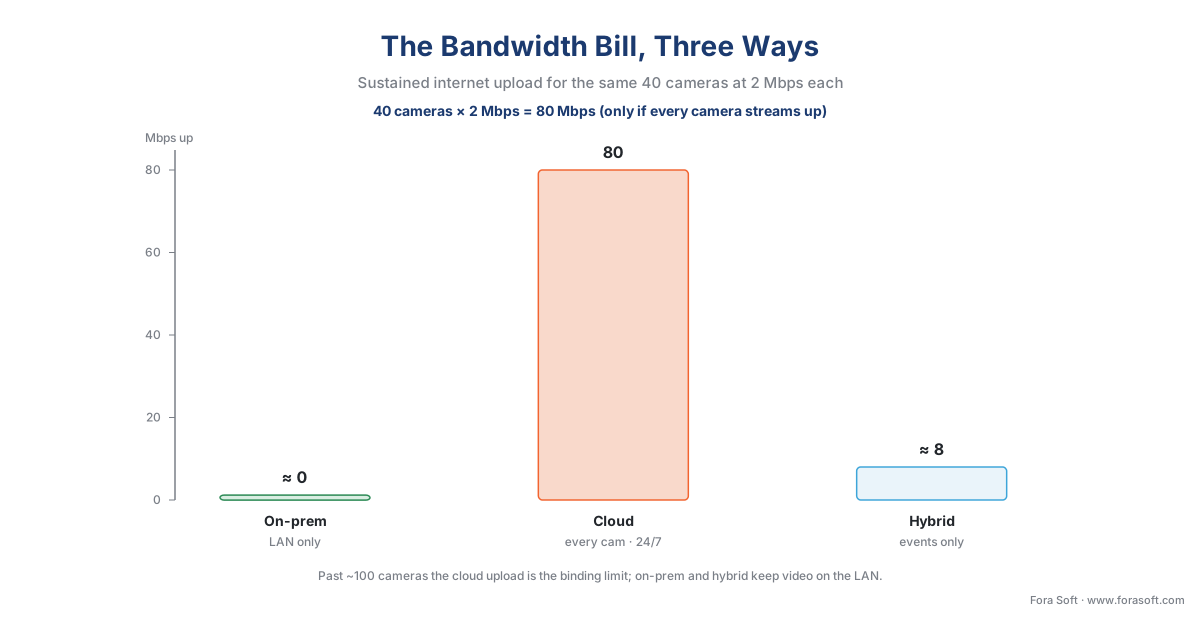 Figure 2. The bandwidth bill, three ways. The same 40 cameras put 80 Mbps on the internet continuously under pure cloud, but near zero under on-premises and only the event traffic — roughly 8 Mbps here — under hybrid. Bandwidth, more than cost, is what caps the cloud model.
The cost shapes matter as much as the totals, because they cross over. On-premises is a tall step then a flat line; cloud is a low start then a steady climb that never stops; hybrid sits between them. For a small, short-lived, or fast-changing deployment, cloud's low start wins. For a large system kept for years, the on-premises or hybrid line ends up lower — often the cloud subscription overtakes the one-time on-premises cost somewhere in the second or third year.
 Figure 3. Why the model is a cost-shape decision, not just a price. On-premises pays once; cloud pays forever; the lines cross in year two or three for a system of this size. Where you expect to be on the time axis should drive the choice.
For the full storage arithmetic and the levers that move it, see how surveillance storage works: the retention math, and for the complete budget picture, the surveillance cost model.
How to choose: a decision path
The models are clear; the choice is a short series of questions, taken in order. Start with the hard constraints — the ones that eliminate a model outright — and only then weigh the soft preferences.
The first hard gate is data residency and control. If a law, a contract, or a sovereignty rule says the footage cannot sit on third-party infrastructure or must stay in a specific jurisdiction, that points to on-premises, or to hybrid with the sensitive footage held local. Settle this first, because no convenience or price justifies an unlawful deployment.
The second gate is the internet link. Measure the sustained upload available at each site, then compare it to the cameras × bitrate sum. If the link cannot carry every camera continuously with headroom for the rest of the business, pure cloud is off the table for that site, and you are choosing between on-premises and hybrid. Remote and bandwidth-poor sites lean hybrid; well-connected small sites can consider cloud.
The third question is scale and growth. A handful of cameras at a site with no IT staff is the comfort zone of cloud. Hundreds of cameras, or a count that will grow, favors on-premises or hybrid, because that is where the bandwidth and per-camera economics turn. The fourth is the cost shape you can carry: a one-time capital budget points to on-premises; a need for predictable monthly OpEx points to cloud or hybrid. The last is how many sites you manage: one building tolerates on-premises management; a fleet of sites is far easier from the single cloud console that cloud and hybrid provide.
 Figure 4. The deployment decision as a path. Resolve the hard gates — residency, then bandwidth — before the soft preferences of cost shape and number of sites. Most multi-site systems exit this tree at hybrid.
Where the standards fit, across every model
A reassuring point that holds across all three models: the standards that make a multi-vendor system work do not change with deployment. ONVIF — the industry standard that lets cameras and software from different makers understand each other — still governs how the VMS discovers and pulls each camera's stream, whether the VMS runs in your basement or in a data center. One ONVIF profile is especially relevant to the deployment question. ONVIF Profile G is the profile for recording and storage: a Profile G device (a camera or encoder) can record video over the network or on the device itself, and a Profile G client (the VMS) can configure, request, and control that recording (ONVIF, Profile G Specification v1.1, 2025). That on-device recording capability is precisely what makes the hybrid model practical — the camera or local recorder holds the footage, and the VMS, wherever it lives, manages it over a standard interface.
The detail that saves projects is the same one that applies everywhere with ONVIF: conformance guarantees a baseline, not every feature. A camera and VMS that share Profile G will reliably record and retrieve; a vendor's special edge-storage behavior or cloud-failover trick may still need that manufacturer's own software kit. Treat the profile as the floor both devices stand on, not the ceiling. For the full standards layer, see ONVIF explained for engineers, and the commercial overview in ONVIF profiles in security systems.
A common mistake to avoid
The costliest pattern we see is choosing the model on the demo, not the deployment — and it has two faces. The first is lifting everything to the cloud because the four-camera pilot was effortless, then discovering at forty cameras that the upload link is saturated, the monthly bill has a comma in it, and pulling footage for an investigation incurs egress fees nobody modeled. The second is the opposite reflex: building everything on-premises out of habit at a thirty-site retail chain, then drowning in the cost and labor of maintaining thirty independent recorders that no one can see from one place. The fix is the discipline this article is built around — decide by the four bills against your site, your link, and your compliance constraints, at full scale, not at pilot scale. For most multi-site operations the honest answer is hybrid, and that is not a compromise; it is the model that matches the bills.
Where Fora Soft fits in
Fora Soft has built real-time video, streaming, and computer-vision software since 2005, across 625+ shipped projects, and the deployment-model decision is one we make with clients constantly because off-the-shelf platforms force their own answer. Teams come to us when the standard cloud product cannot meet a residency rule, when a multi-site fleet needs hybrid recording that no single vendor's appliance supports cleanly, or when the bandwidth and cost math at full camera count rules out the model a vendor is selling. We build the custom VMS layer — local-record-plus-cloud-manage pipelines, multi-region storage that honors data-residency constraints, and the failover paths that keep recording through an internet outage — and the framing we lead with is always how the system behaves under real load and real network conditions first, convenience second. A model that survives the worst day beats one that shines in the demo.
What to read next
- What is a VMS, an NVR, and a DVR
- How surveillance storage works: the retention math
- NVR software vs a VMS: when a recorder is enough
Call to action
- Talk to a surveillance engineer — book a 30-minute scoping call to talk through your vms software plan.
- See our case studies — 250+ shipped projects across video streaming, WebRTC, OTT, telemedicine, e-learning, surveillance, and AR/VR.
- Download the VMS Deployment Model Decision Guide — On-Prem vs Cloud vs Hybrid — One-page decision reference: the three deployment models compared across upfront cost, recurring cost, bandwidth, resilience, and data residency, with the 40-camera worked example and the order to resolve the decision in.
References
- ONVIF — "Profile G" (for edge storage and retrieval: a Profile G device records video over the network or on the device itself; a Profile G client configures, requests, and controls that recording; Profile G Specification v1.1, 2025). Primary (tier 1). https://www.onvif.org/profiles/profile-g/
- European Union — "GDPR, Regulation (EU) 2016/679, Chapter V (Arts. 44–49)" (transfers of personal data to third countries are lawful only via an adequacy decision (Art. 45) or appropriate safeguards such as Standard Contractual Clauses (Art. 46)). Primary (tier 1). https://eur-lex.europa.eu/eli/reg/2016/679/oj
- European Data Protection Board — "Guidelines 3/2019 on processing of personal data through video devices" (video of identifiable persons is personal data; storage limitation; security at rest and in transit). Primary (tier 1/2). https://www.edpb.europa.eu/our-work-tools/our-documents/guidelines/guidelines-32019-processing-personal-data-through-video_en
- Amazon Web Services — "Amazon S3 Pricing" (internet data-transfer-out tiers begin at ~$0.09/GB; S3 Standard storage ~$0.023/GB-month; egress is billed when data leaves the cloud). First-party engineering (tier 3). https://aws.amazon.com/s3/pricing/
- Mordor Intelligence — "Video Surveillance as a Service (VSaaS) Market" (market ≈ USD 7.62B in 2026, forecast ≈ USD 15.64B by 2031 at ~15.5% CAGR; driven by the shift from CapEx on-prem to subscription cloud). Institutional/analyst (tier 5). https://www.mordorintelligence.com/industry-reports/video-surveillance-as-a-service-vsaas-market
- Solink — "Security camera cloud storage costs: the complete guide" (continuous-recording cloud subscriptions ≈ $10–30/camera/month short retention, $30–60 longer, $75–150 enterprise). Vendor engineering (tier 4). https://solink.com/resources/security-camera-cloud-storage-costs/
- Videoloft — "Bandwidth Requirements for Cloud Based CCTV" (≈ 1–2 Mbps upload per 1080p camera continuously; multiply across cameras for sustained upstream load). Vendor engineering (tier 4). https://videoloft.com/bandwidth-requirements-for-cloud-based-cctv/
- Wittenbach — "Video Management Systems (VMS): On-Premise, Cloud-Managed, and Cloud-Hosted Options" (pure cloud typically becomes infeasible past ~100 cameras on bandwidth and storage cost; cloud-managed reduces WAN load by keeping video local). Vendor engineering (tier 4). https://wittenbach.com/video-management-systems-vms-on-premise-cloud-managed-and-cloud-hosted-options-for-commercial-security/
- Spotter Security — "Hybrid Cloud Video Surveillance" (record heavy video locally, upload only event clips; local storage maintains recording continuity through an internet outage). Vendor engineering (tier 4). https://www.spottersecurity.com/blog/hybrid-cloud-video-surveillance/
- Salient Systems — "Cloud vs. On-Prem Video Management Solutions" (on-prem delivers lower per-GB storage cost and better performance where high-bandwidth local infrastructure exists; cloud OpEx can exceed on-prem CapEx at scale over time). Vendor engineering (tier 4). https://www.salientsys.com/cloud-vs-on-premise-video-management-solutions/
- Cloud Computing Authority — "Cloud SLAs, Uptime Guarantees, and Availability Tiers" (SLAs are per-service; remedies are bill credits, not loss compensation; a single-region deployment is a single point of failure regardless of the advertised percentage). Institutional/analyst (tier 5). https://cloudcomputingauthority.com/cloud-sla-and-uptime
