


Why this matters
If you are scoping a surveillance system, "do I need a VMS or will a recorder do?" is the first real money decision you make, and it is easy to get wrong in both directions. Buy a VMS for a six-camera shop and you pay for servers, licensing, and IT time the job never needed; outfit a growing twelve-site retail chain with standalone recorders and you build twelve islands nobody can manage, then pay to rip them out. The words themselves are part of the trap — "NVR," "NVR software," and "VMS" are used loosely by vendors, and a single appliance is often quietly running all three layers at once. This article gives you the mental model to make the call deliberately: what each thing actually is, where the capability boundary sits, and the few questions that decide which side of it your project lives on. You do not need to be technical; you need to know which line your deployment is about to cross.
First, three words people mix up
Almost every confusion in this topic comes from using one word for three different things. Untangling them takes two minutes and saves a wrong purchase, so start here. (If the broader vocabulary — what separates these from a DVR — is still fuzzy, our VMS, NVR, and DVR explainer is the companion to this one.)
An NVR — a Network Video Recorder — is, in its original sense, a hardware appliance: a sealed box you mount in a rack that records video from IP cameras over the network and stores it on built-in drives. Think of it as a dedicated video tape machine for the network age — it has one job, it does it without a general-purpose computer, and many models include a built-in network switch with Power over Ethernet so the cameras plug straight into the back.
NVR software is that same recording job, unbundled from the box. It is an application you install on an ordinary Windows or Linux server, or a package that runs on a network drive (a NAS) you may already own, that turns that general-purpose machine into a network video recorder. Synology's Surveillance Station, which runs as an app on a Synology NAS, and Blue Iris, which runs on a Windows PC, are two well-known examples (Synology; Blue Iris). The work is identical to the appliance — find cameras, record, play back — but you supply the hardware. This is the thing the keyword "nvr software" refers to, and it is the left-hand side of our comparison.
A Video Management System (VMS) is the software platform that records cameras and manages the whole operation around them: many recording servers and many sites presented as one system, user accounts with different permission levels, video analytics, a forensic search tool, and connections to access control, alarms, and other business systems. A recorder answers "what did camera 4 see at 2 p.m.?" A VMS answers that, plus "show me every door-forced event across all eleven branches last night, and only let the night manager see her own store."
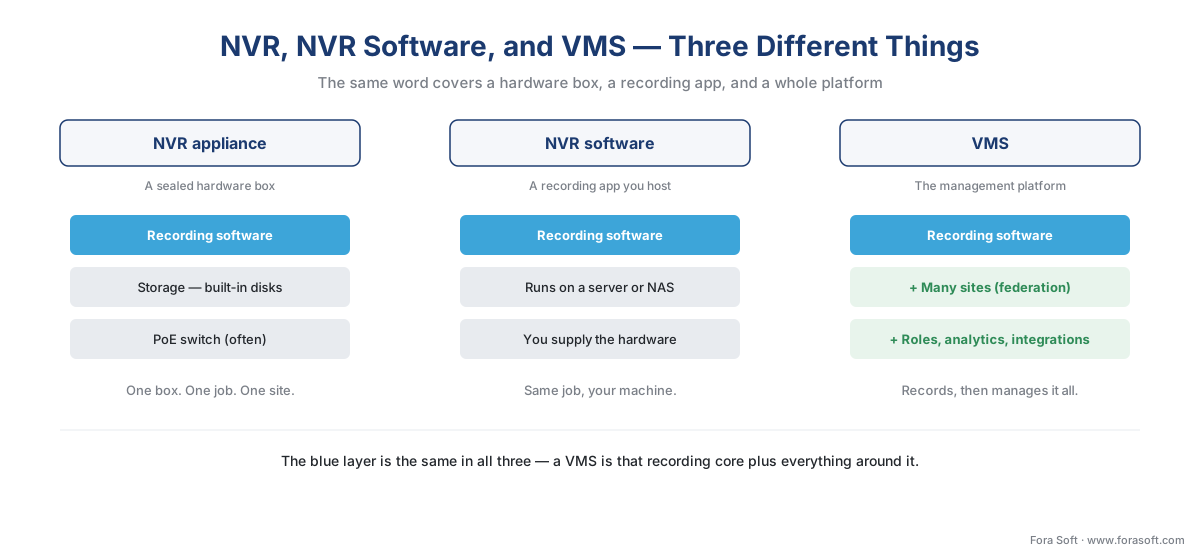 Figure 1. The same word, three different things. An NVR appliance bundles the recording software with storage and often a switch; NVR software is that recording layer on hardware you supply; a VMS is the management platform that can sit on top of many recorders and many sites.
One clarification that prevents a lot of arguments: these are layers, not rival products. Every VMS contains a recording function, so in a sense every VMS is NVR software with a great deal added on top. The useful question is never "NVR or VMS" as though they were two boxes on a shelf; it is "how much of the platform layer does this deployment actually need?"
What NVR software does — and where it stops
Strip a recorder down and it does three things, all of them well. It finds and connects to a set of IP cameras, usually through the industry standard that lets software and cameras from different makers talk, called ONVIF. It records each camera's stream to disk, storing the compressed video the camera sends without re-compressing it. And it lets you watch and play back — a live grid and a timeline you scrub to find an event. Basic motion detection, a mobile app, and email or push alerts are normal at this level too.
Those recording-and-playback duties are exactly what the relevant ONVIF standard describes, which is worth seeing in the standard's own words because it shows the recorder and the platform sharing one definition. ONVIF Profile G is the profile for recording and storage. The standard defines a Profile G device as one "that can record video data over an IP network or on the device itself," and — the telling part — it names the matching client as "a video management software" that can "configure, request, and control recording of video data over an IP network" (ONVIF, Profile G Specification v1.1, 2025). The streaming side is the same: ONVIF Profile S names "a video management software" as the example client that controls a camera's live stream (ONVIF, Profile S). Read those two definitions together and the point is clear — at the recording-and-streaming layer, a recorder and a VMS are doing the same standardized job. The profiles your cameras and software both support are what guarantee they interoperate; which profile to insist on is its own decision, covered in the ONVIF profile decision guide.
Where NVR software stops is everything around that core. Most recorders cap out at a fixed number of cameras — commonly 8, 16, or 32 channels, where a "channel" is one camera the recorder can handle at once (FS; Mammoth Security). They generally manage one site, because a recorder is built to watch the cameras on its own local network, not to federate a dozen buildings. Advanced analytics such as face recognition or smart object detection are usually absent (Mammoth Security). And integration is shallow: a recorder may connect to a few sensors, but it is not designed to be the hub that ties video to door access, alarms, and reporting. None of that is a defect — it is the deliberate trade that keeps a recorder cheap, simple, and reliable for the job it was built for.
What a VMS adds
A VMS keeps the recording core and wraps it in the operations layer a larger deployment needs. Five additions matter most, and each maps to a wall a recorder eventually hits.
Scale, across servers and sites. A VMS is built to grow from dozens to thousands of cameras on one management plane, spreading the load across many recording servers rather than one box (IPSecurityDepot; Ambient.ai). Crucially, it presents multiple buildings as a single system — the pattern called federation, where a retail chain or a city runs every site through one interface. That cross-site capability is the single clearest signal you have outgrown a recorder, and it is covered in depth in federation: managing many sites as one.
Many camera brands. A recorder often works best, or only, with its own manufacturer's cameras. A VMS is designed to ingest cameras from many vendors over ONVIF and RTSP, which is what lets you mix the best camera for each location and avoid lock-in to one maker (Mammoth Security). The mechanics of that ingest path are in how a camera stream gets into the VMS.
Real user management. A recorder typically has an admin login and maybe a viewer login. A VMS has role-based access control — granular permissions so a guard sees live video only, an investigator can export clips, and a regional manager sees just her own sites. For any deployment with more than a couple of operators, or any privacy or audit obligation, this stops being a nicety.
Analytics and forensic search. This is the feature most buyers are really paying the VMS premium for: turning months of recorded video into something searchable. Object detection, license-plate recognition, behavioral rules, and attribute search across time and cameras live here. The catalogue of what a system can detect — and the honest accuracy ranges, never "100% accuracy" — is mapped in the video-analytics map.
Integration and resilience. A VMS is built to be the hub that connects video to access control, alarms, and other systems, and event-correlates across them (Genetec; Verkada). It also offers redundancy a single recorder cannot: failover server clusters so a hardware failure does not stop recording — at real added cost and complexity, but available, which a standalone recorder simply is not unless you buy a second one (Video Management Software UK).
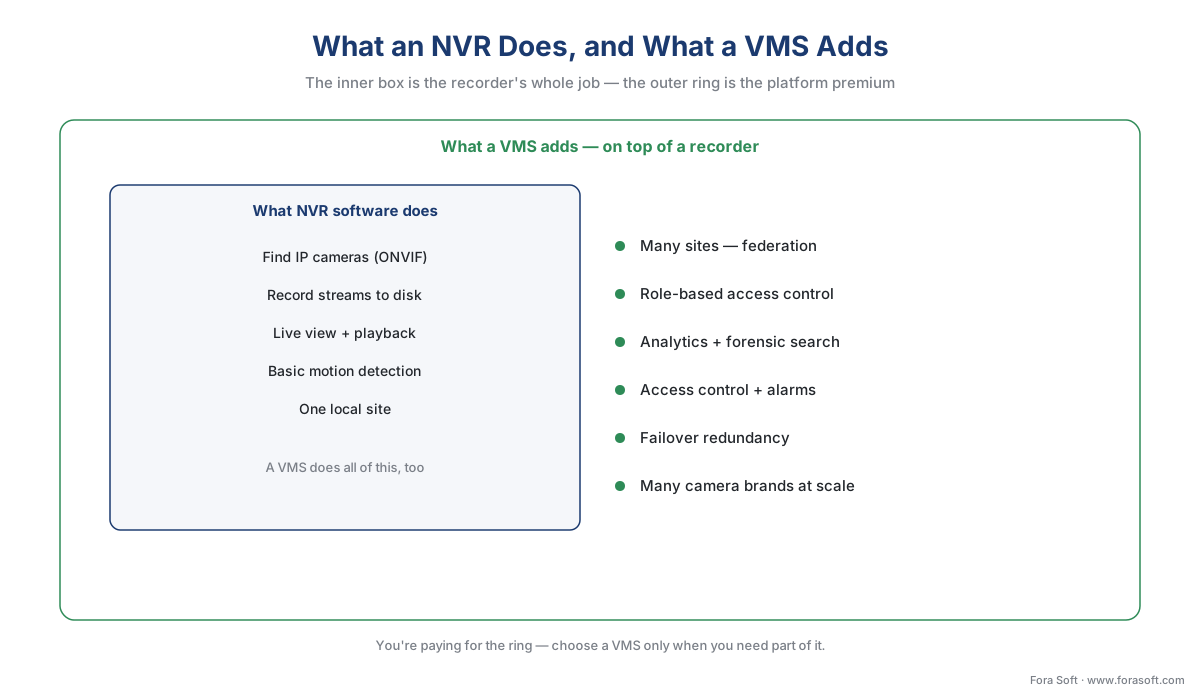 Figure 2. The capability boundary. The inner box is the recorder's job — and a VMS does all of it too. The outer ring is everything a VMS adds; you are paying for the ring, so the question is whether your deployment needs any of it.
The math that actually decides it: scale and licensing
Feature lists persuade nobody who is signing the cheque. Two numbers do: how many cameras you will run, and how the licensing is priced. They interact in a way that quietly flips the answer.
Recorders are usually sold and licensed in fixed blocks — an 8-, 16-, or 32-channel unit. The implication is a step cost: a 16-channel recorder costs the same whether you connect nine cameras or sixteen, and connecting a seventeenth means buying a second unit and a second block. Most VMS platforms instead license per channel — you pay for exactly the cameras you run, one at a time, and you do not jump in blocks of eight (Video Management Software UK). NVR software itself spans both models: Synology's Surveillance Station includes two camera licenses and charges per camera beyond that, while Blue Iris sells a single license that covers unlimited cameras on one machine (Synology; Blue Iris).
Walk a small example to see how the two pricing shapes cross. Suppose cameras need a license at roughly the same per-camera figure either way, and the VMS adds a server and management cost a recorder does not. At nine cameras, the recorder wins easily: one 16-channel box, no servers, minimal IT time. At nine cameras per site across eleven sites, the arithmetic inverts — eleven recorders are eleven islands to maintain, update, and watch separately, while one VMS licenses ninety-nine channels on a common plane that one team manages. The per-camera license barely moved; the management cost is what crossed over. Write it as a rule of thumb: cost scales with cameras, but complexity — and therefore the real bill — scales with sites and integrations.
The comparison reads fastest as a picture; the table beneath it carries the exact wording for each cell.
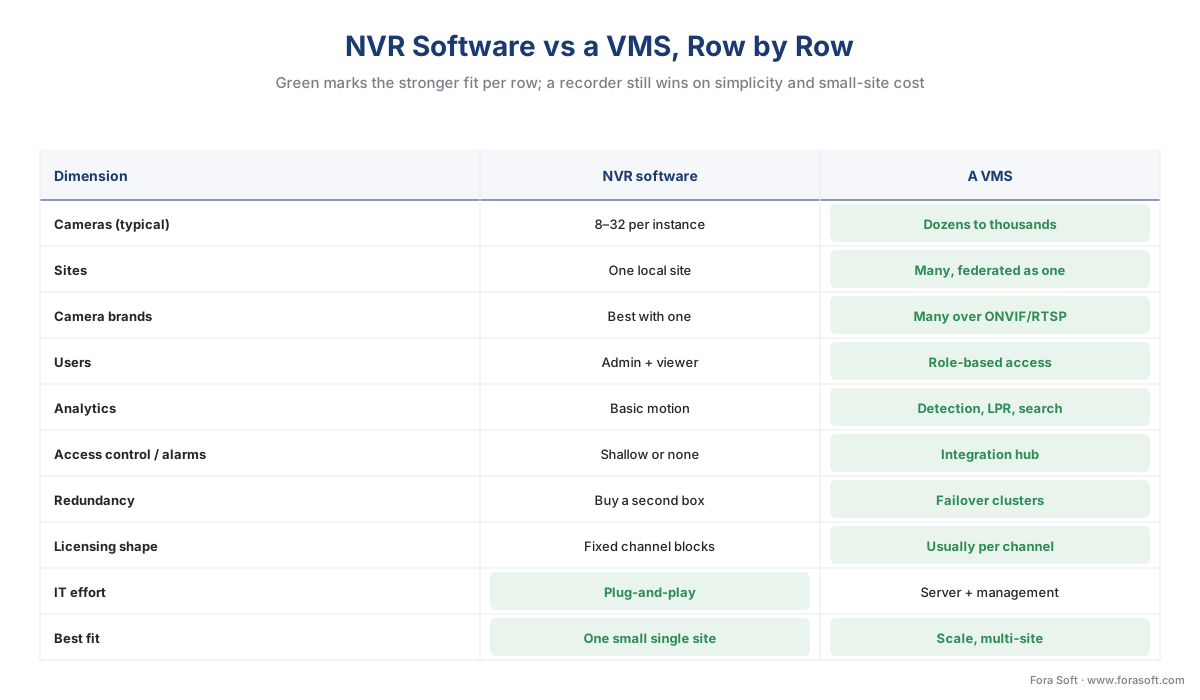 Figure 3. NVR software versus a VMS across ten dimensions. Green marks the stronger fit in each row — a VMS wins most, but a recorder still wins on IT simplicity and small-site cost. No column wins every row.
| Dimension | NVR software (a recorder) | A VMS (a platform) |
|---|---|---|
| Cameras (typical) | 8–32 per instance | Dozens to thousands |
| Sites | One local site | Many, federated as one |
| Camera brands | Best with one; limited mixing | Many vendors over ONVIF/RTSP |
| Users | Admin + viewer | Role-based access control |
| Analytics | Basic motion | Detection, LPR, forensic search |
| Access control / alarms | Shallow or none | Designed integration hub |
| Redundancy | Buy a second box | Failover server clusters |
| Licensing shape | Fixed channel blocks | Usually per channel |
| IT effort | Plug-and-play | Server + ongoing management |
| Best fit | One small single-brand site | Scale, multi-site, integration |
Table 1. The recorder-versus-platform comparison, row by row. No single row decides it; the pattern across the rows does. If your honest answers all sit in the left column, a recorder is enough — the moment two or three land on the right, you are running a VMS.
So: when is a recorder genuinely enough?
Put the marketing aside and the test is short. A recorder — appliance or NVR software — is enough when all of these are true: one site, a camera count comfortably inside a single recorder's channel limit (think 32 or fewer), cameras from one manufacturer or a small compatible set, no need for video analytics beyond motion, no other systems (door access, alarms, business reporting) that the video must connect to, and a handful of users who can share simple logins. A corner shop, a small warehouse, a single clinic, a self-storage facility — these are recorder territory, and putting a full VMS on them wastes money and adds fragility.
You have crossed into VMS territory the moment any one of those flips: a second site you want to see in the same window, a camera count that will outgrow the box, a second camera brand, a real analytics requirement, an access-control or alarm system to integrate, or an audit/privacy obligation that demands proper user roles. Notice it is any one, not all — a single small site with only twelve cameras still needs a VMS if those twelve must feed face recognition or tie into the building's access control. Scale is the most common trigger, but it is not the only one.
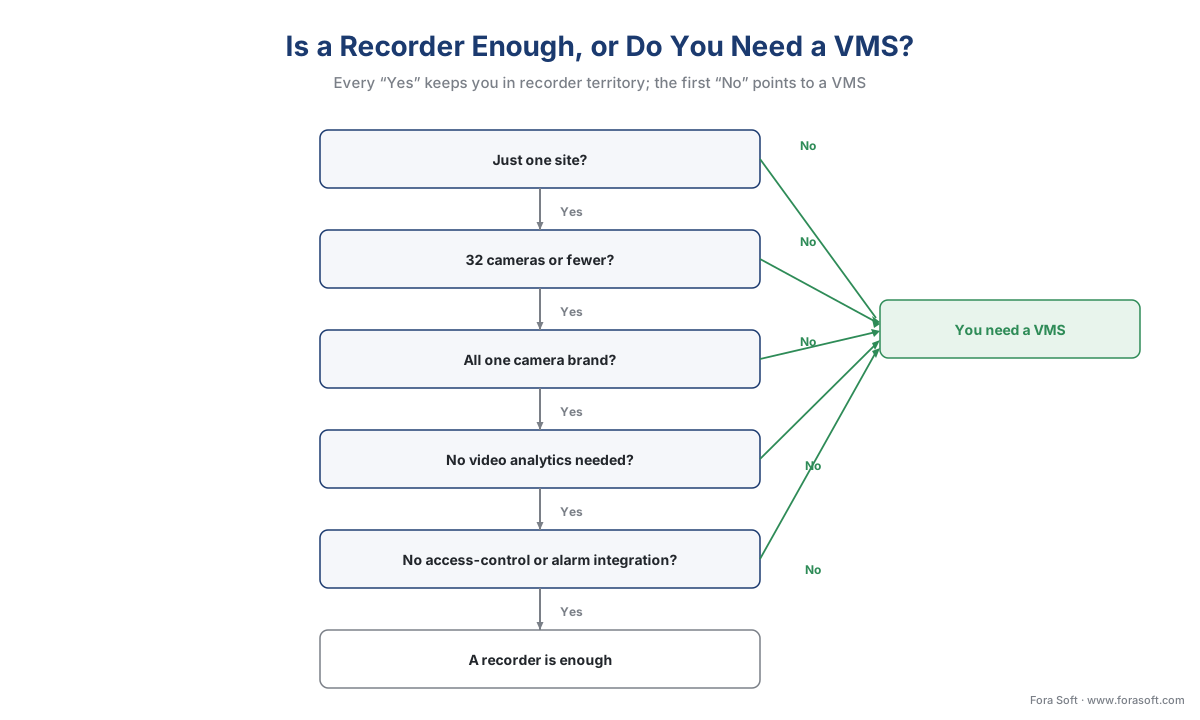 Figure 4. The decision in one path. Every "yes" keeps you in recorder territory; the first "no" — a second site, a second brand, analytics, an integration, real user roles — is the line into VMS territory.
A common mistake to avoid
The costliest pattern we see is buying a recorder for today and migrating to a VMS under duress eighteen months later. It happens because the recorder decision is made on the camera count on day one, when the real driver is the trajectory — the second store that opens, the access-control project that lands, the loss-prevention team that suddenly wants search. Standalone recorders do not federate, so the "upgrade" is rarely an upgrade; it is a rip-and-replace, with footage stranded on the old boxes and cameras re-onboarded one by one. Two cheaper habits avoid it. First, decide on the eighteen-to-thirty-six-month plan, not the opening-day count — if a second site or an integration is even likely, start on a VMS that can begin small. Second, know that the two are not mutually exclusive: many VMS deployments deliberately use recorders or recording servers as the local edge, with the VMS federating them — so a recorder bought today can sometimes become a recording node under a VMS later, if you choose models built to be managed that way. The mistake is not buying a recorder; it is buying an island when you can already see the second island coming.
Where Fora Soft fits in
Fora Soft has built real-time video, streaming, and computer-vision software since 2005, across 625+ shipped projects, and the recorder-versus-platform question is one we scope with clients before a line of code is written, because getting it wrong is expensive in both directions. The interesting work is rarely the recording itself — that is a solved problem — but the platform layer: federating many sites without melting the network, wiring role-based access that survives an audit, and embedding analytics that hold a realistic precision/recall under real lighting rather than a demo's 100% claim. We build custom and customized VMS platforms for teams who have outgrown off-the-shelf recorders, and we lead with how the system behaves at full camera load and on a bad network day, then the feature list. A platform that federates eleven sites reliably beats one that demos beautifully on two.
What to read next
- VMS, NVR, and DVR explained: the words that get confused
- The surveillance cost model: what a system actually costs
- Build vs buy vs customize a VMS
Call to action
- Talk to a surveillance engineer — book a 30-minute scoping call to talk through your nvr software plan.
- See our case studies — 250+ shipped projects across video streaming, WebRTC, OTT, telemedicine, e-learning, surveillance, and AR/VR.
- Download the NVR Software vs a VMS — Decision Worksheet — One-page worksheet for the recorder-versus-platform decision: the six questions that decide it, a capability checklist of what an NVR does versus what a VMS adds, the fixed-block-versus-per-channel licensing math, and a 'recorder is….
References
- ONVIF — "Profile G" (a Profile G device "can record video data over an IP network or on the device itself"; the matching client is "a video management software" that can "configure, request, and control recording of video data over an IP network." Profile G Specification v1.1, 2025). Primary (tier 1). https://www.onvif.org/profiles/profile-g/
- ONVIF — "Profile S" (a Profile S client, e.g., "a video management software," configures, requests, and controls video streaming from a Profile S device such as an IP camera. Profile S Specification v1.3; deprecation in process, last conformance submissions 2027-03-31; Profile T is the current streaming profile). Primary (tier 1). https://www.onvif.org/profiles/profile-s/
- ONVIF — "ONVIF Profile Feature Overview v2.6" (which features are mandatory or conditional for each profile, including the Profile G recording features that a recorder and a VMS share). Primary (tier 1). https://www.onvif.org/wp-content/uploads/2022/04/onvif-profile-feature-overview.pdf
- Genetec — "What are the differences between a VMS and an NVR?" (a VMS is software on general-purpose servers that centralizes feeds, playback, search, analytics, alarm management, and integrations; an NVR is a recording appliance with a more limited feature set). First-party engineering (tier 3). https://www.genetec.com/blog/products/what-are-the-differences-between-a-vms-and-an-nvr
- Verkada — "What Is Video Management Software (VMS)? Features, Types, and How to Choose" (a VMS centralizes many IP cameras into one interface for live view, playback, search, analytics, alarm management, and integration with other systems). First-party engineering (tier 3). https://www.verkada.com/blog/video-management-software-vms/
- Mammoth Security — "VMS vs NVR Systems: Which Do You Need?" (NVRs typically support 8–32 channels and one camera brand and lack advanced analytics; a VMS supports many brands, integration with access control/alarms, and large-scale deployments). Vendor engineering (tier 4). https://mammothsecurity.com/blog/vms-vs-nvr
- FS — "What Is NVR? Features, Types, and How It Works" (an NVR records, stores, and manages video from IP cameras; the channel number is the maximum number of cameras it supports simultaneously; cameras encode at the camera and send over the network). Vendor engineering (tier 4). https://www.fs.com/blog/what-is-nvr-do-i-need-nvr-for-ip-camera-985.html
- Synology — "Surveillance Station" (NVR software packaged as an app on a Synology NAS; includes two camera licenses, additional cameras licensed per camera). Vendor product documentation (tier 4). https://www.synology.com/en-us/surveillance
- Blue Iris (Perspective Software) — "Blue Iris" (Windows NVR/VMS software; a single license covers unlimited cameras on one machine; runs on a dedicated PC). Vendor product documentation (tier 4). https://blueirissoftware.com/
- Video Management Software (UK) — "Comparing VMS and NVR costs over time" (VMS platforms license per channel rather than in fixed 8/16/32 blocks; failover redundancy is available for a VMS at added cost; an NVR has no graceful failover without a second unit). Vendor engineering (tier 4). https://videomanagementsoftware.co.uk/articles/entry/comparing-vms-and-nvr-costs-over-time
- IP Security Depot — "VMS Software Buying Guide" (a VMS scales from dozens to thousands of cameras on a common management plane with unified licensing, user management, and integration paths). Institutional/buyer guide (tier 5). https://www.ipsecuritydepot.com/guides/vms-software-buying-guide/
