


Why this matters
A single building is easy: one VMS, some cameras, a few recording servers, one network. The trouble starts at the second building, and it compounds at the fiftieth. This article is for the security integrator, operations lead, product manager, or city or enterprise security lead who has to run more cameras than one server — or one site — can hold, and wants them to feel like one system without a fragile, bandwidth-hungry mess underneath. Get the architecture right and a retail chain or a city runs thousands of cameras as one pane of glass while each location stays self-sufficient; get it wrong and you either melt the network trying to centralize every stream, or you end up with fifty islands nobody can watch together. No prior knowledge is assumed: every term is defined in plain language, the bandwidth and storage math is shown out loud, and the one decision that quietly defines the whole system — where the video lives versus where it is watched — is made explicit.
The one idea: many independent systems, one pane of glass
Start with what federation is not. It is not one enormous VMS with every camera in the world plugged into it, and it is not a central warehouse that all the video gets shipped to. Both of those break at scale, for reasons we will get to.
Federation is the opposite move. You build each location as a complete, self-contained surveillance system — its own cameras, its own recording server, its own storage, its own local operators — and then you link those independent systems into a hierarchy so that an operator with the right permissions can see and search across all of them as if they were one. The word for this shared structure is a federated hierarchy: one parent site at the top, child sites beneath it, and (if you need them) child sites beneath those.
A useful analogy is a chain of embassies. Each embassy runs itself, keeps its own files, and stays open even if the phone line to the capital is cut. The head office in the capital does not hold copies of every file; it holds the authority and the directory to reach into any embassy when it needs to. Federation gives a surveillance network the same shape: local autonomy, central reach.
This is why the defining property of a federated system is independence. A federated child site records its cameras to its own disks and is fully usable on its own. If the wide-area network link — the long-distance connection between sites, abbreviated WAN — drops, that site keeps recording and its local staff keep working; only the central view of that one site goes dark, and every other site is unaffected. Milestone's federation white paper states this plainly: local administrators and users can log in, view video, and manage their site even when the connection to the hierarchy is broken, and losing one site does not compromise access to the others. That single guarantee is what separates federation from a centralized design where one outage blinds everyone.
 Figure 1. Federation links independent, self-recording sites into one parent/child hierarchy. Each site stays autonomous; the parent adds a shared view, not a shared recorder.
Why not just one big VMS?
The obvious question is why you would not simply make one VMS bigger until it covers everything. The answer is that a VMS scales in stages, and each stage hits a wall.
A single VMS server can record a limited number of cameras — practically somewhere around 50 to 100 before the recording, storage, and streaming load on one machine becomes the bottleneck. Past that, every serious VMS splits the work across distributed recording servers: one management server holds the configuration and user accounts, while several recording servers each take a slice of the cameras. This is still one system — one database, one administrative domain — and it scales a long way. Milestone's XProtect, for instance, documents single systems of 100,000 or more cameras built this way.
So if one system can already hold 100,000 cameras, why federate at all? Because camera count is not the only thing that scales. Three other forces push you past a single system, and they have nothing to do with raw capacity:
The first is geography. One system assumes one reliable, fast network. Stretch it across a WAN to fifty stores on business internet links and the assumption breaks — you cannot run a single low-latency database and a single streaming fabric over fifty unreliable long-distance links.
The second is autonomy. A bank branch, a store, or a remote substation usually must keep working when its link to head office is down, and often must stay under local control for legal or operational reasons. One monolithic system makes every site depend on the center.
The third is organization. Different sites often have different owners, different operators, and different rules about who may see what. Bolting them into one flat system fights that structure instead of expressing it.
Federation answers all three by keeping each site a separate system and adding a thin layer of shared visibility on top. It is the standard move once a deployment passes roughly a thousand cameras or spans more than one real location, which is why the largest surveillance networks in the world — one Genetec customer runs over 170,000 cameras — are federated, not monolithic.
What "as one" actually means
When vendors say a federated system behaves "as one," they mean a specific set of things are unified at the parent, even though the underlying systems stay separate. It helps to be concrete about what gets shared.
The camera tree is shared: an operator at the parent sees a folder structure containing every site and every camera they are allowed to see, and can drag cameras from different sites into the same on-screen layout. The alarm and event list is shared: a single alarm manager collects alarms, analytics events, and (where present) license-plate reads from every site into one queue, so a monitoring center watches one list instead of fifty. The map is shared: a global map can place cameras from every site at their real-world coordinates, so an operator clicks a location and pulls up its cameras. And search is shared, within the limits of what each site indexed — an operator can run a search that fans out across sites.
What is emphatically not shared is the recording itself. The video stays on each site's own storage. The parent does not hold a copy. When an operator opens a camera from a remote site, the video is fetched from that site's recorder over the WAN, live, for as long as they watch it — and then it stops. This is the seam that makes the whole thing affordable, and it is worth its own section.
Permissions deserve a word here too, because they are what makes a shared view safe. Federation carries fine-grained, per-site and per-camera rights, and they can be schedule-aware. A real example from Milestone's documentation: you can grant headquarters security officers access to a remote site's outdoor cameras only during working hours, but all of its cameras, indoor and outdoor, after hours. The shared view is not all-or-nothing; it is exactly as wide as each site's owner allows.
 Figure 2. The parent site shares the view — a unified camera tree, one alarm queue, a global map, cross-site search, and scheduled permissions — while the recordings stay on each site.
The bandwidth thesis: record at the edge, stream on demand
Here is the calculation that decides whether a multi-site design is sane or doomed. Picture a retail chain: 50 stores, 30 cameras each, so 1,500 cameras, each producing a 4 Mbps (megabits per second) high-definition stream. The naive design says: send every camera to a central VMS at headquarters so we can watch and record it all in one place. What does that cost on the network?
1,500 cameras × 4 Mbps = 6,000 Mbps = 6 Gbps, sustained, 24/7, into one building
Six gigabits per second, never pausing, just for ingest — before a single operator watches anything. No retail WAN budget survives that. The centralized dream is dead on arithmetic alone.
Federation kills the problem by refusing to move the video by default. Each store records its own 30 cameras locally. Across the WAN, only two things ever travel. The first is a trickle of synchronization traffic that keeps the hierarchy's directory current — in Milestone's federation, a scheduled sync of site-identity information runs every 10 minutes and uses less than 1 MB each time. Fifty sites syncing under 1 MB every ten minutes is on the order of a few kilobytes per second in aggregate: noise. The second is on-demand video — the cameras an operator is actually watching, only while they watch them.
So the real WAN question is not "how do I carry 1,500 streams?" but "how many cameras will someone watch at once, and at what quality?" Suppose a headquarters monitoring desk shows a 25-camera video wall. Stream those at full 4 Mbps and you need:
25 cameras × 4 Mbps = 100 Mbps, and only while they are on screen
That is a normal business link, not a fantasy — and it replaces 6 Gbps. The WAN shrank by a factor of sixty because we stopped centralizing the video and centralized only the view.
You can shrink it further with bandwidth-aware viewing. Most IP cameras emit more than one stream at once — a high-resolution main stream for local recording, and a low-resolution substream (often CIF resolution at a few frames per second, on the order of 100–500 kbps) meant for remote and multi-camera viewing. When the headquarters wall shows 25 small tiles, it does not need 25 full-resolution streams; it pulls the substreams. Twenty-five substreams at 512 kbps is about 12.8 Mbps — and the operator clicks one tile to full screen to pull that single camera's main stream when they need detail. (Some systems instead transcode — re-compress the stream smaller on the server — but multistreaming from the camera is more common because server-side transcoding is computationally expensive.) The principle is the same: spend WAN bandwidth only on what a human is looking at, at the quality they actually need.
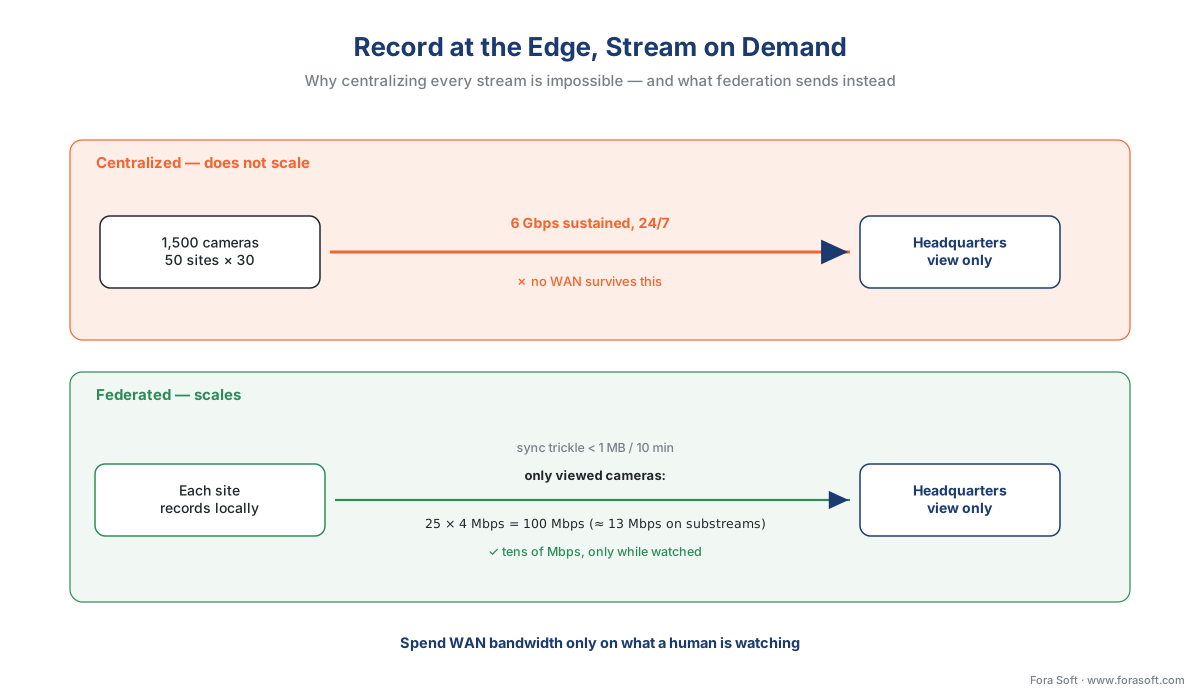 Figure 3. Centralizing every stream is impossible at scale (6 Gbps for 1,500 cameras). Federation records at the edge and sends only a sync trickle plus the cameras actually being watched.
Storage stays where the cameras are
A point that surprises people new to federation: it does not centralize storage, and it is not a backup strategy. Each site sizes and owns its own recording, using the same retention arithmetic as any standalone system. We worked that math out in detail in how surveillance storage works; applied to one store, 30 cameras at 2 Mbps recording continuously for 30 days is roughly:
30 cams × 2 Mbps → using ~10.8 GB/day per Mbps:
30 × 2 × 10.8 GB/day = 648 GB/day
648 GB/day × 30 days ≈ 19.4 TB at that store
That ~19.4 TB lives at the store, on the store's recorder, full stop. Federation never pulls it to headquarters. Multiply by 50 stores and you have ~970 TB of surveillance video distributed across the chain — which is precisely why no one wants it in one place. The design keeps each site's storage problem the size of one site.
This also means three storage decisions remain per-site, and you make them with the rest of Block 5, not with federation: how long each site retains footage and how it deletes on schedule (the retention policy), and whether any site backs up or archives off-box to the cloud (the cloud and hybrid storage patterns). Federation is indifferent to these; it federates the view, not the disks. One practical consequence: when an investigator needs to preserve footage past its normal deletion date, that "evidence lock" is applied and enforced on each managing site, so a single cross-site lock becomes one lock per site that holds the relevant cameras. The retention clock stays local even when the investigation is central.
The standards boundary: federation is vendor-proprietary
Now the most important — and most misunderstood — fact about federation. To see it, recall what makes the rest of a surveillance system interoperable. The open standard called ONVIF (Open Network Video Interface Forum) lets a camera from one maker talk to a VMS from another, through profiles: Profile S for live streaming, Profile G for recording and retrieval, Profile T for advanced streaming, Profile M for metadata and analytics. ONVIF is the common language at the camera-to-VMS boundary, and it is genuinely vendor-neutral. (For the depth on how ONVIF works, see the commercial overview of ONVIF profiles in security systems and our engineer's explainer, ONVIF explained for engineers.)
Here is the catch. ONVIF standardizes the boundary between a camera and a VMS. It says nothing about the boundary between one VMS and another. There is no ONVIF profile — and no PSIA profile, and no other open standard — for federating two VMS platforms into one hierarchy. Federation lives entirely above the standardized layer, in each vendor's own proprietary protocol.
The consequence is blunt: you can only federate a vendor's platform under itself. A Milestone site federates under a Milestone parent; a Genetec system federates under a Genetec parent. You cannot federate a Milestone site under a Genetec parent, because there is no shared language for them to form a hierarchy. Even within one vendor the path can be one-directional — in Genetec's platform, for example, a legacy Omnicast system can be federated up into Security Center, but Security Center video does not federate down into Omnicast. Federation is a vendor-ecosystem feature, not an interoperability standard.
 Figure 4. ONVIF standardizes the camera-to-VMS boundary (Profiles S/G/T/M). The VMS-to-VMS federation boundary has no open standard — it is vendor-proprietary.
Common mistake: assuming you can federate across brands. A city tells a contributing agency, "just federate your Milestone cameras under our Genetec system." It cannot be done as federation. A single view across different VMS brands is a different, heavier kind of project — a Physical Security Information Management (PSIM) layer, or a custom integration built on each VMS's software development kit (SDK) or API, that pulls video and events from each platform and re-presents them in a neutral console. That is buildable, and we build it, but it is integration work, not a checkbox. Confusing the two is how multi-agency projects blow their budget.
The patterns, compared
Federation is one of four ways to run more cameras than a single box, and choosing the right one is the actual design decision. The table sets them side by side. (As with every VMS comparison in this section, it names where recording lives, whether the design tolerates a WAN outage, whether it works across vendors, whether it exposes an open SDK for integration, and its deployment model.)
| Pattern | Where recording lives | WAN-outage tolerant? | Central management | Cross-vendor? | Open SDK / API? | Deployment model | Best fit |
|---|---|---|---|---|---|---|---|
| Single distributed VMS | Recording servers on one LAN, one system | N/A (single site) | One system, native | No (one platform) | Usually yes (VMS SDK) | On-prem, one site/campus | One building or campus, one fast network |
| Federation | At each site, locally; parent holds none | Yes — sites run independently | Parent view over child sites | No — same vendor only | Usually yes (VMS SDK) | On-prem (often hybrid), many sites | Many owned sites, stable WAN, local autonomy, one vendor |
| Interconnect | Central site records selected remote cameras | Partial — buffer-and-forward over weak links | Central, with remote camera pull | No — same vendor only | Usually yes (VMS SDK) | On-prem/hybrid, hub-and-spoke | Small/remote sites, unreliable links, no local VMS |
| Cloud-native (VSaaS) | Edge bridge buffers; cloud holds the managed copy | Yes — bridge keeps recording locally | The cloud account is the central plane | Limited — platform's camera support | Yes (cloud API) | Cloud / hybrid, multi-tenant | Greenfield, many sites, minimal on-site IT |
A few notes the table cannot hold. Interconnect (Milestone's term; other vendors have equivalents) is the right tool when remote sites are too small or too unreliable to run their own full VMS — instead of federating a peer, a central system reaches out and records selected cameras from each remote site, buffering across flaky links. It trades the edge autonomy of federation for central control and central storage, which is sometimes exactly what a lights-out remote site needs. Cloud-native video surveillance as a service (VSaaS) — Eagle Eye Networks and Verkada are the well-known examples — sidesteps the federation question by making the cloud account itself the central plane: an on-premises bridge or cloud-managed recorder at each site buffers locally and uploads to the provider's data centers, so multi-site is the default rather than a feature you assemble. It is the simplest multi-site story operationally, at the cost of the ongoing bandwidth and subscription economics covered in our cloud and hybrid storage article.
 Figure 5. A four-question path to the right pattern: how many sites, how reliable the WAN, one vendor or many, and how much on-site IT each location has.
How to size and stage a federated rollout
Designing a federation is mostly designing each site well and then adding the thin connective layer. The order that avoids rework:
First, design each site as if it were standalone, using the system anatomy and the storage math — cameras, recording servers, local storage, local retention. A federated site is just a normal site that will later be linked, so nothing about its internal design changes. This is also why federation needs no extra servers and, in Milestone's case, no extra licenses: the hierarchy is a feature of the products already there, carried over ordinary TCP/IP, with no special network hardware.
Second, size the WAN for viewing, not ingest. Estimate the realistic peak of simultaneously viewed remote cameras at the central site, pick the stream quality each viewing context needs (substream for walls and mobile, main stream for focused review), and add headroom. The earlier example — a 25-tile wall on substreams at ~13 Mbps, with bursts to full resolution on click — is a typical starting point; a 24/7 monitoring center watching more sites at once needs proportionally more.
Third, design the permission hierarchy before you connect anything, because it is the part that turns a shared view into a safe shared view. Decide who at the parent may see which sites, which cameras, and on what schedule, and mirror the organization's real structure rather than flattening it.
Fourth, stage the rollout. Federation's quiet superpower is that you grow in manageable parts: stand up and validate each site on its own, then attach it to the hierarchy — in Milestone, adding a site is a few clicks to point the parent at the child's address. You never have to design or cut over one enormous system at once, which is both lower risk and easier to budget across quarters.
When a federation crosses national borders — a European retailer pulling footage from stores in several countries into one head-office view — note that centrally viewing identifiable footage recorded in another country can constitute a cross-border transfer of personal data under privacy law (in the EU, GDPR Chapter V on transfers). The engineering pattern does not change, but the legal basis for the central view does; this is engineering guidance, not legal advice, and a cross-border deployment should confirm the transfer basis with qualified counsel. The deep treatment lives in Block 6.
Where Fora Soft fits in
Federation looks simple in a brochure and gets subtle in production: the central plane has to aggregate alarms and search across sites without dragging every recording over the WAN, the viewing path has to switch between substream and main stream by context, and the permission model has to express a real org chart with per-site, scheduled access. Fora Soft has built video streaming, WebRTC real-time media, surveillance, and computer-vision systems since 2005 — 625+ shipped projects for 400+ clients — which is the exact mix federation demands: bandwidth-aware media delivery, multi-server orchestration, and the cross-site search and analytics layer on top. When a single view has to span different VMS brands, we build the integration layer over each platform's SDK or API rather than pretending federation can cross a vendor boundary. We lead with how the system behaves under real load — what the WAN actually carries at peak, how fast cross-site search returns, what happens to each site when the link drops — and design the capability around those numbers.
What to read next
- How surveillance storage works: the retention math
- Cloud and hybrid storage for surveillance
- Scaling a VMS: capacity planning and the storage reference design
Download the federation architecture decision guide (PDF) — the record-at-the-edge bandwidth model with the viewed-cameras WAN formula, the four-pattern comparison (single / federation / interconnect / cloud-native), a site-by-site rollout staging checklist, the per-site permission and retention reminders, and the cross-vendor "this is PSIM, not federation" warning.
Call to action
- Talk to a surveillance engineer — book a 30-minute scoping call to talk through your federated vms plan.
- See our case studies — 250+ shipped projects across video streaming, WebRTC, OTT, telemedicine, e-learning, surveillance, and AR/VR.
- Download the Federation Architecture Decision Guide — One-page printable guide: the record-at-the-edge bandwidth model with the viewed-cameras WAN formula (centralizing 1,500 cams = 6 Gbps vs federation = tens of Mbps), a four-pattern comparison (single distributed VMS / federation /….
References
- Milestone Federated Architecture (White Paper, July 2023), Milestone Systems / John Rasmussen, Platform Architect. The first-party reference architecture for federation: independent XProtect sites tied into a parent/child hierarchy; scheduled inter-site synchronization of site-identity information every 10 minutes using less than 1 MB; sites operate independently and remain locally usable when the link to the hierarchy is broken; no extra licenses, no extra servers, standard TCP/IP unicast, no special network equipment; per-site and schedule-based permissions. Tier 3 (first-party engineering). https://doc.milestonesys.com/wp/pdf/en-US/MilestoneFederatedArchitecture_2023-07.pdf (accessed 2026-06-09)
- Configuring Milestone Federated Architecture — XProtect VMS Administrator manual, Milestone Systems. The product documentation for building a federated hierarchy (parent/child sites, central management from version 2018 R1, login points per site, access by user rights per site). Tier 3 (first-party engineering). https://doc.milestonesys.com/latest/en-US/feature_flags/ff_federatedsites/mc_configuringfedarch.htm (accessed 2026-06-09)
- Milestone VMS Design Guide / System Architecture Guide for IT Professionals, Milestone Systems. The multi-site design source for the bandwidth thesis: placing recording servers at remote sites means only the bandwidth for cameras actively viewed at the central site is needed (worked example: 10 cameras at 4 Mbit/s = 40 Mbit/s, only during viewing); single-server vs distributed-recording-server scaling; when to choose federation for geographically distributed systems. Tier 3 (first-party engineering). https://doc.milestonesys.com/latest/en-US/wp_sysarch/vms_design_guide.htm (accessed 2026-06-09)
- About the Federation™ feature — Security Center Administrator Guide, Genetec. First-party documentation that Federation joins multiple independent Security Center systems into one virtual system; scales to hundreds or thousands of remote sites; synchronizes cameras, doors, ALPR units, events, and alarms to a central system; and the Security Center / Omnicast Federation distinction (Omnicast federates up into Security Center). Tier 3 (first-party engineering). https://techdocs.genetec.com/r/en-US/Security-Center-Administrator-Guide-5.13/About-the-Federation-feature (accessed 2026-06-09)
- Connect multiple sites with Federation (Feature note), Genetec. The market-facing description of federation for multi-site operations — connecting hundreds or thousands of remote video, access-control, and ALPR sites into a unified command center for central monitoring, alarm management, and reporting. Tier 3 (first-party). https://resources.genetec.com/en-feature-notes/federation (accessed 2026-06-09)
- ONVIF Profiles (S, G, T, M) and the ONVIF profile specifications, ONVIF. The open standard that interoperates cameras and VMS at the device-to-VMS boundary — Profile S (streaming), Profile G (recording/retrieval), Profile T (advanced streaming), Profile M (metadata/analytics) — establishing that ONVIF standardizes the camera-to-VMS interface and does not define a VMS-to-VMS federation interface, which is therefore vendor-proprietary. Tier 1 (standards body). https://www.onvif.org/profiles/ (accessed 2026-06-09)
- Eagle Eye Networks — Cloud Video Management System (Bridge / CMVR architecture), Eagle Eye Networks / SecurityInfoWatch product reference. The cloud-native multi-site pattern: an on-premises Bridge or Cloud Managed Video Recorder (CMVR) buffers locally and transmits to the provider's data centers, with a centralized multi-site dashboard, so the cloud account itself is the central plane and CMVR enables hybrid on-prem-plus-cloud storage. Tier 3 (first-party) / Tier 5 (trade) corroboration. https://www.securityinfowatch.com/video-surveillance/video-management-software-vms/product/53028747/eagle-eye-networks-eagle-eye-networks-enterprise-edition-cloud-vms (accessed 2026-06-09)
- Regulation (EU) 2016/679 (GDPR), Chapter V — transfers of personal data to third countries, European Union. The legal frame for the cross-border note: centrally viewing identifiable footage recorded in another country can constitute a transfer of personal data, which requires a lawful transfer basis; cited here only to flag the gate, with the deep treatment deferred to Block 6. Tier 1 (regulation). https://eur-lex.europa.eu/eli/reg/2016/679/oj (accessed 2026-06-09)
- Main stream vs substream for remote viewing; multistreaming vs transcoding, IPVM / Techpro Security / Unifore technical references. Corroborates bandwidth-aware viewing: cameras emit a high-resolution main stream for local recording and a low-resolution substream (CIF, a few fps, ~100 kbps range) for remote and multi-camera viewing; multistreaming from the camera is generally preferred over server-side transcoding because transcoding is computationally expensive. Tier 5 (institutional/technical). https://www.techprosecurity.com/security-articles/surveillance-systems/how-to-use-substream-to-remotely-view-dvrs/ (accessed 2026-06-09)
- Genetec Federated Security Center at scale; "past ~1,000 cameras, look at federated/multi-server", IPVM discussions and Genetec case references. Real-world scale corroboration: federated deployments reaching 170,000+ cameras, and the practitioner heuristic that multi-server/federated design becomes the norm past roughly a thousand cameras. Tier 5 (institutional). https://ipvm.com/discussions/can-a-vms-scale-to-200k-camera (accessed 2026-06-09)
Where sources disagreed, the controlling first-party architecture document was followed. The most common popular misconception — that any VMS can be federated under any other — is corrected against the standards reality: ONVIF (tier 1) standardizes only the camera-to-VMS boundary, so VMS-to-VMS federation is necessarily vendor-proprietary, and the cross-vendor case is PSIM/SDK integration, not federation. Bandwidth and scale figures are first-party (Milestone, Genetec) where available and clearly labelled as worked examples where illustrative.
