


Why this matters
One building with thirty cameras almost sizes itself; a thousand cameras across a campus, or a system that must keep recording while a disk rebuilds, does not. This article is the capstone of the storage-and-scale block, written for the security integrator, IT or operations lead, or product manager who has to turn a camera count into a concrete bill of materials — how many recording servers, how much storage, what network, how many viewing seats — and defend that number to a budget owner. It assumes no prior knowledge: every term is defined in plain language, every estimate is shown as arithmetic you can redo, and the one mistake that quietly wrecks more surveillance budgets than any other — sizing for capacity while forgetting throughput, viewing, and redundancy — is made impossible to miss. Get capacity planning right and the system survives its first bad day; get it wrong and it drops frames, fills up early, or goes blind exactly when an incident needs it.
Capacity planning in one sentence
Capacity planning is the work of making sure every resource the system leans on is big enough for the load, with room to spare, before you buy anything. A video surveillance system — the cameras, the network that carries them, the software that records and manages many camera streams (called a Video Management System, or VMS), the storage, and the screens people watch — leans on five distinct resources, and the central insight of this article is that they do not run out at the same time.
The five resources are: recording throughput (how fast the recording software and its disks can absorb incoming video), storage capacity (how many terabytes the retention period requires), network and power (switch ports, bandwidth, and the electricity that drives the cameras), viewing capacity (how many camera streams the operators' computers can decode and display at once), and the management plane (the single brain that holds configuration, users, and the unified view).
A useful analogy is sizing a restaurant. You can have enough tables (storage capacity) and still fail because the kitchen cannot cook fast enough (throughput), or the dining room is fine but the front door is too narrow (network), or everything works until the one head waiter is out sick (the management plane with no backup). A surveillance system fails the same way: the resource you didn't size is the one that breaks. Capacity planning is simply refusing to leave any of the five unsized.
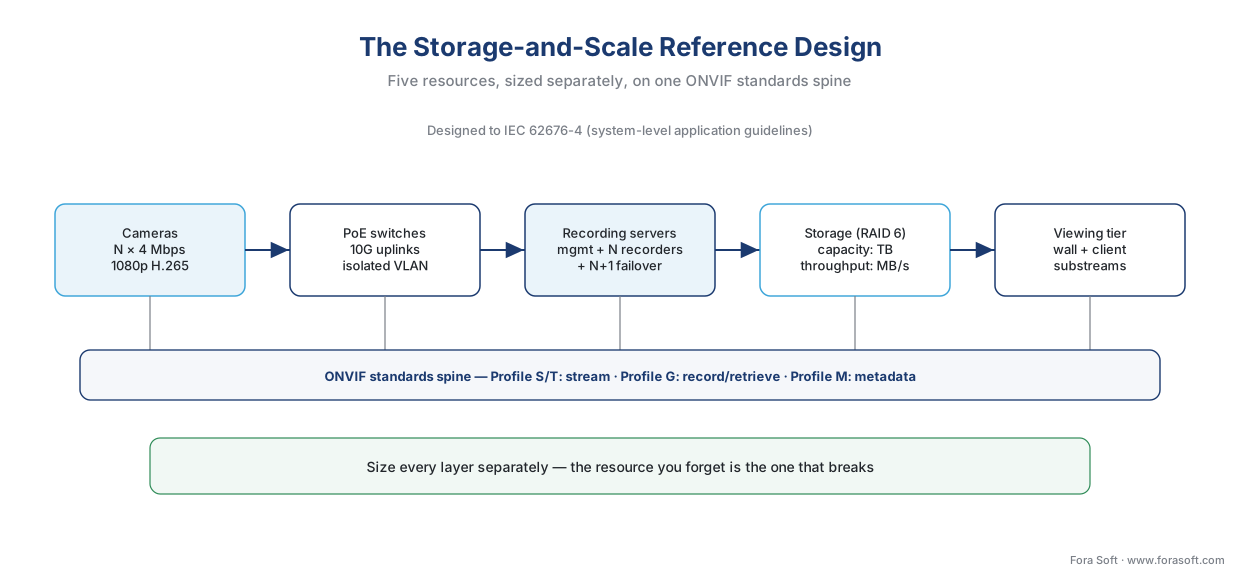 Figure 1. The storage-and-scale reference design: cameras → network → distributed recording servers under one management server → redundant storage → viewing tier, riding the ONVIF standards spine. Each layer is sized separately.
Start from the load: the camera is the unit of demand
Everything in capacity planning becomes simple once you accept one idea: the camera is the unit of demand, and its load is additive. A single camera imposes a small, knowable cost on each of the five resources. Size the system by listing the cameras, multiplying each load by the count, and summing. There is no hidden magic above that — scaling is arithmetic, the same way storage was arithmetic in how surveillance storage works.
Here is what one typical camera costs. Take a 1080p (two-megapixel) camera encoding in H.265 at 4 megabits per second (Mbps) — a normal modern setting.
| Resource | Load from one 1080p / 4 Mbps camera | How it adds up for 40 cameras |
|---|---|---|
| Recording throughput | 4 Mbps in = 0.5 MB/s written, continuously | 40 × 0.5 = 20 MB/s sustained write |
| Storage capacity | 4 Mbps × 10.8 GB/day per Mbps = 43.2 GB/day | 40 × 43.2 = 1.73 TB/day → ~52 TB at 30 days |
| Network | one switch port; 4 Mbps on the uplink | 40 ports; 160 Mbps aggregate to the recorder |
| Power | ~6–12 W over PoE (more for PTZ/heaters) | ~240–480 W of PoE budget |
| Viewing | a share of one operator's decode budget | only the cameras actually on screen |
The storage row uses the constant we derived in the storage article: a one-megabit-per-second stream recorded around the clock produces about 10.8 gigabytes per day (1 Mbps × 86,400 seconds ÷ 8 bits-per-byte ÷ 1,000 ≈ 10.8 GB). We will not re-derive the retention math here — that is the job of the retention-math article, and the recording-mode lever that can cut these numbers by half or more is covered in recording strategies. The point for capacity planning is narrower: once you have the per-camera load, every other number in the design falls out of multiplication.
One caution before we scale up: these are planning estimates, and real installations differ. Variable-bitrate cameras spike when scenes get busy, and vendor sizing tools say so explicitly — AXIS Site Designer, which estimates bandwidth and storage for a system, notes that calculated figures are estimates and "will invariably differ from the bandwidth measurements of the actual system." Plan with the numbers; verify with a pilot.
Recording-server sizing: a throughput question, not a count
The first wall most systems hit is the recording server — the computer running the part of the VMS that pulls in camera streams and writes them to disk. The common question is "how many cameras can one server handle?" and the common answer — a round number like fifty or a hundred — is misleading, because the real limit is sustained throughput, not camera count.
Start with the rule of thumb, because it is genuinely useful at the small end. Milestone, one of the largest VMS makers, documents that smaller systems of up to 50–100 cameras can run on a single server with every software component sharing one machine. Past roughly a hundred cameras, the guidance is to move components onto dedicated servers. That threshold is not a law of physics; it is the point where one machine's combined recording, database, and streaming load starts to compete with itself.
Now the throughput reality that the camera count hides. The same vendor documents a single recording server sustaining at least 3.1 gigabits per second of recording — enough to record 700 cameras at 1080p and 4.4 Mbps each. That is far more than "a hundred," and the reason is that a recording server doing pure recording is not decoding the video; it is receiving compressed streams and writing them to disk. The binding constraint is how fast the network card can receive and the disks can absorb, not how many camera names are in a list. Two thousand cameras' worth of a month of video can sit behind a single well-provisioned server, depending on resolution, frame rate, and compression.
This is why serious deployments split the software into roles. One management server holds the configuration, the user accounts, and the rules — it is the brain, and it carries almost no video. Several recording servers each take a slice of the cameras and do the heavy lifting of ingest and storage. This division is what lets a single VMS scale to 100,000 cameras or more, as Milestone's enterprise deployments show, without any single machine being asked to do everything. The management server is light; you add recording servers as the camera count grows.
 Figure 2. A VMS scales in stages: one server for a small site, then a light management server plus several recording servers each taking a slice of cameras, then a standby (failover) recorder added for redundancy.
Common mistake: sizing the recording server by camera count alone. A spec that says "one server per 100 cameras" can be wildly wrong in both directions — too few servers for 100 high-bitrate 4K cameras (which can exceed a server's write throughput), or wastefully many for 100 low-bitrate 1080p cameras. Size by the aggregate bitrate the server must receive and write, in megabytes per second, and check it against the server's network card and disk subsystem. The camera count is a starting estimate; the bitrate is the real budget.
Storage sizing: capacity and throughput are two budgets
Storage is where the single most expensive — and most miscounted — number in the system lives, and it has two budgets that must both be met. Missing either one breaks the system in a different way.
The first budget is capacity: enough terabytes to hold the footage for the retention period. This is the retention math, and we keep it short here because the retention-math article owns it in full. For our 40-camera example at 2 Mbps recorded continuously for 30 days:
40 cameras × 2 Mbps × 10.8 GB/day-per-Mbps = 864 GB/day
864 GB/day × 30 days ≈ 26 TB of recorded video
That 26 TB is the raw video. The disks you actually buy must be larger, because parity-based redundancy (RAID), the filesystem, and the rule never to run a disk past about 80% full add overhead — roughly a 1.4–1.6× multiplier, so ~26 TB of video needs ~39 TB of provisioned storage. The hardware that holds it — direct-attached disk, network-attached storage, RAID levels — is the subject of the on-prem storage architecture article; capacity planning just needs the multiplier.
The second budget is throughput: the disks must absorb the incoming write stream without pause, forever. This is the budget people forget, and it is where the camera count misleads again. Our 40 cameras at 2 Mbps write:
40 cameras × 2 Mbps = 80 Mbps = 10 MB/s of logical writes, 24/7
Ten megabytes per second sounds trivial — a single disk can do that. But surveillance recording is more than 90% writes, and parity RAID multiplies every write. On RAID 6 (dual parity, the common surveillance choice) a single logical write can cost up to six physical disk operations — the write penalty. So the array must sustain on the order of:
10 MB/s logical × ~6 (RAID 6 write penalty) ≈ 60 MB/s of raw disk work, non-stop
Push the cameras to 4 Mbps and that doubles to ~120 MB/s sustained, never pausing. A storage subsystem sized only for capacity — a few big slow drives — can hold the video but cannot keep up with it, and the recorder starts dropping frames. The fix is to size for sustained write throughput as well as terabytes: enough spindles or fast-enough drives, surveillance-rated (CMR, not SMR) disks, and a RAID level whose write penalty you have accounted for. Throughput, in storage terms, comes from IOPS × block size — the number of operations per second times how much data each moves — so a capacity-only design that ignores IOPS is half-planned.
 Figure 3. Storage has two budgets over the same cameras: capacity (terabytes for the retention period) and throughput (sustained write MB/s × the RAID penalty). A capacity-only design holds the video but cannot keep up.
Common mistake: sizing storage for terabytes but not megabytes-per-second. A 100 TB array built from a handful of large, slow archive drives has the capacity for weeks of footage and the throughput for none of it — the disks fill the capacity budget and miss the write budget, and the recorder drops frames under load. Always size both: capacity from the retention period, throughput from the live write rate times the RAID penalty.
The network and power budget
Cameras live on a network, and the network has its own ceilings — bandwidth, switch ports, and the electrical power that Power-over-Ethernet (PoE, electricity carried on the same cable as the data) delivers to each camera. These are cheap to plan and expensive to retrofit, so they belong in the capacity plan from the start.
Bandwidth is the additive load again. Forty cameras at 4 Mbps is 160 Mbps to the recorder — comfortable on a gigabit link. But density climbs fast: a 24-port switch fully loaded with 4-megapixel H.265 cameras can push close to 1 gigabit per second of steady-state traffic, which is why the practical guidance is to use 10-gigabit uplinks on any switch carrying more than about sixteen cameras. The uplink — the connection from an edge switch up toward the recording servers — is the usual hidden bottleneck: each camera's port is fine, but the single uplink carrying all of them is not, and a too-small uplink shows up as choppy or lost video.
Power has a budget too. Each camera draws roughly 6–12 watts over PoE; pan-tilt-zoom cameras and models with heaters draw more and need PoE+ (the 802.3at standard, up to 30 W). The rule integrators use is to choose a switch whose total power budget exceeds the projected peak draw by 20–30%, so the switch is never running its power supply at the edge.
And headroom: size switches to about 70–75% utilization so the network has room for 18–24 months of growth, and put the cameras on their own network segment (a separate VLAN or physical network) so surveillance traffic is isolated from office and guest traffic. The worked version:
40 cameras × 4 Mbps = 160 Mbps aggregate
→ a 1 Gbps recorder link runs at ~16% — comfortable, with room to grow
40 cameras × ~10 W avg = ~400 W of PoE
→ choose a switch (or switches) with ~520+ W of PoE budget (400 W × 1.3)
This network and power layer is part of the broader system the anatomy of a surveillance system lays out end to end; here it is one of the five budgets you sum.
Viewing capacity: the quietly forgotten bottleneck
Here is the resource that surprises almost everyone the first time: the client — the operator's computer or video wall — is frequently the weakest link in a scaled system, and it has nothing to do with recording. The reason is that watching live video means decoding it (decompressing each stream into pixels), and decoding is expensive.
A modern PC with a contemporary graphics processor (GPU) can decode roughly 150 frames per second of 1080p H.264 — which is only about five camera streams at 30 frames per second, or a single 4K stream. That is the wall. An operator who opens a 25-tile video wall of full-resolution streams will overwhelm a normal workstation long before the network or the recorders notice anything.
The surveillance industry solves this two ways, and a capacity plan should name both. First, substreams: most cameras emit a high-resolution main stream (for recording) and a low-resolution substream (for multi-camera viewing), so a video wall pulls 25 small substreams instead of 25 full streams, and the client decodes one main stream only when an operator zooms a tile to full screen. This is the same record-at-full-quality, view-at-low-quality trick that makes federation affordable across sites. Second, hardware-accelerated decoding: the VMS offloads decompression to the GPU (Intel Quick Sync or NVIDIA cards), which lets one machine show far more cameras than its CPU alone could.
For sizing, the rough guide integrators use: a workstation driving a wall of about sixteen feeds wants an 8-core CPU and a hardware-decoding GPU; a heavy multi-monitor station pushing toward 400 cameras across nine displays wants dual or quad CPUs and serious GPU power. The number that matters is the total decode throughput (megabits per second the client must decompress), not the camera count.
Common mistake: planning recording and storage perfectly, then forgetting the client. A control room buys beautiful recorders and a big array, then puts a 64-camera video wall on an office PC and watches it stutter. The recorders are fine; the client cannot decode that many streams. Size viewing as its own budget — substreams for walls, hardware decode, and a workstation matched to the decode load.
Headroom and redundancy: what a production system needs
A system sized exactly to its load is a system with no margin, and surveillance is precisely the domain where the margin matters, because the worst moment for a failure is during the incident you built the system to capture. Two ideas turn a sized design into a production design: headroom and redundancy.
Headroom is the deliberate gap between capacity and load. Run recording servers, storage, network, and clients at roughly 70–80% of their limit, not 100%, so that a busy scene, a burst of motion, or a year of growth does not push any resource over the edge. Headroom is the cheapest insurance in the design — it is mostly a matter of buying the next size up.
Redundancy is having a spare ready at each layer that can fail. A production VMS layers it:
| Layer | What fails | The redundancy | What it costs |
|---|---|---|---|
| Disk | A drive dies | RAID 6 (survives two failures) + a hot-spare drive | Extra drives; capacity overhead |
| Recording server | A recorder goes down | A standby failover recording server (N+1) takes over its cameras | One spare server per pool |
| Management plane | The brain stops | Management-server failover via Windows Server Failover Clustering | A second node, shared storage |
| Power | Mains drops | UPS on cameras, switches, servers | Battery capacity for the ride-through |
| Network | A switch or uplink fails | Redundant uplinks / dual NICs | Extra ports and cabling |
Two of these deserve a plain-language word. A failover recording server is a spare recorder sitting idle that monitors the active recorders; if one fails, the spare picks up its cameras so recording continues. That is the N+1 pattern — N working servers plus one standby — and it is what keeps a disk or server failure from becoming a recording gap. Management-server failover puts the brain on two clustered computers so that if the first stops, the second takes over automatically.
One important limit, carried from federation: this failover is within one vendor. A Milestone failover server monitors Milestone recorders, not another brand's; redundancy, like federation, lives inside a vendor's ecosystem. And the most under-appreciated risk is the rebuild window — after a disk fails, the RAID array runs degraded while it rebuilds onto the spare, and a second failure during that window (hours to days on large drives) can lose the array. That is the engineering reason RAID 6 plus a hot spare, not RAID 5, is the surveillance default; the on-prem storage article works that failure mode in detail.
 Figure 4. A production design adds redundancy at every layer — RAID plus hot spare, an N+1 failover recorder, clustered management failover, UPS, redundant links — and runs each resource at 70–80% so a bad day has somewhere to go.
The storage-and-scale reference design
Putting the five budgets and the redundancy together gives a reference design you can actually build. Here is a worked, mid-size example — 200 cameras at one site, 1080p, 4 Mbps, continuous recording, 30-day retention — sized end to end. The numbers are planning estimates; a pilot verifies them.
Recording throughput and servers. 200 cameras × 4 Mbps = 800 Mbps = 100 MB/s of writes. Well within a single well-provisioned recording server's documented capacity (recall the 3.1 Gbit/s / 700-camera figure), but for redundancy and headroom we split across two recording servers (~100 cameras each, at ~70% load) plus one failover recorder — an N+1 pool of three.
Storage. 200 × 4 Mbps × 10.8 GB/day = 8.64 TB/day; × 30 days ≈ 260 TB of video; × 1.5 for RAID 6 + filesystem + 80%-fill headroom ≈ ~390 TB provisioned, on surveillance-rated CMR drives in RAID 6 with a hot spare, sized for ~150 MB/s sustained write (100 MB/s logical × the RAID-6 penalty, with headroom).
Network and power. 200 × 4 Mbps = 800 Mbps aggregate, carried on access switches with 10G uplinks, on an isolated VLAN; PoE budget ~200 × 10 W × 1.3 ≈ 2.6 kW, spread across switches each sized 20–30% above their load.
Management and viewing. One management server (light), with management-server failover for production. A monitoring room with two video-wall workstations pulling substreams for the wall and main streams on zoom, hardware-decode GPUs in each.
Standards spine. The whole design rides open standards so it is not locked to one camera brand: ONVIF (the common language between cameras and the VMS) carries streaming over Profile S/T, recording and retrieval over Profile G, and analytics metadata over Profile M — for the depth, see the commercial overview of ONVIF profiles in security systems. At the system level, the international standard IEC 62676-4:2025 (Video surveillance systems for use in security applications — Part 4: Application guidelines) is the framework for selecting, planning, installing, and objectively evaluating a VSS — the standards anchor for "have I designed this properly?" For a single-vendor commercial overview of what a VMS does at this scale, see video surveillance management systems.
This is the single-site capstone. When the deployment spans many sites, the same per-site design becomes a node in a federated architecture; when analytics enter the picture, the compute tier follows the edge + cloud reference architecture. Capacity planning is the same arithmetic at every scale.
Capacity planning, step by step
The method that ties it together is a fixed sequence — follow it and nothing gets left unsized.
1. Count the cameras and fix each one's settings (resolution, bitrate, fps, recording mode).
2. Compute the per-camera load on each resource; multiply by count; sum.
3. Size recording servers by aggregate WRITE THROUGHPUT (MB/s), not camera count.
4. Size storage twice — CAPACITY (retention TB) and THROUGHPUT (write MB/s × RAID penalty).
5. Size the network (aggregate Mbps, uplinks, ports) and PoE power (+20–30%).
6. Size the viewing tier by total DECODE throughput (substreams + hardware decode).
7. Add headroom (run at 70–80%) and redundancy (RAID+spare, N+1 recorder, mgmt failover, UPS).
8. Validate against a pilot; re-baseline as cameras, bitrates, and retention change.
This is the same scoping discipline that estimating a surveillance project turns into a price, and that the whole-system surveillance cost model prices out with its spreadsheet — capacity planning produces the quantities; those articles attach the costs. Vendor sizing tools (AXIS Site Designer, Milestone's solution designer, server-sizing tools) automate steps 1–6 for small and mid systems and are worth using as a cross-check, remembering their output is an estimate. The downloadable worksheet below walks the eight steps with the formulas filled in.
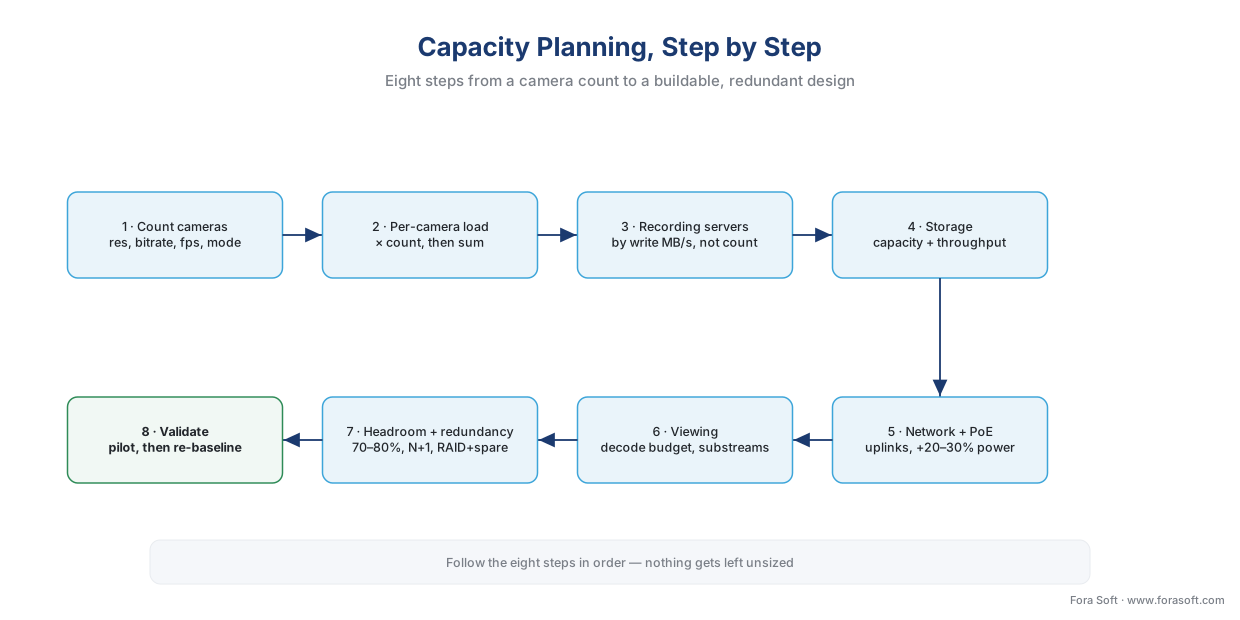 Figure 5. The eight-step capacity-planning method: from camera count to per-camera load to each sized resource, then headroom, redundancy, and a validating pilot.
Where Fora Soft fits in
Capacity planning looks like a spreadsheet and turns out to be an architecture problem: the recording tier has to be sized by sustained throughput rather than a camera count, the storage has to meet both a capacity and a write-rate budget, the client tier has to decode within a real GPU limit, and every layer needs a redundancy story for the moment something fails mid-incident. Fora Soft has built video streaming, WebRTC real-time media, surveillance, and computer-vision systems since 2005 — 625+ shipped projects for 400+ clients — which is the exact blend a scaled VMS needs: bandwidth-aware media delivery, multi-server orchestration, storage and throughput engineering, and the analytics tier on top. We lead with how the system behaves under real load — what the disks sustain when every camera is writing at once, what the client wall can actually decode, what happens to recording when a server drops — and size the design around those numbers, then validate with a pilot before anyone signs a purchase order.
What to read next
- How surveillance storage works: the retention math
- On-prem storage architecture: NVR, SAN, NAS, and RAID
- Federation: managing many sites and many servers as one
Download the VMS capacity-planning worksheet (PDF) — the eight-step method with every formula filled in: per-camera load, recording-server throughput sizing, the two storage budgets (capacity and write-rate × RAID penalty), the network/PoE budget, the client-decode budget, and the headroom-and-redundancy checklist (RAID+spare, N+1 failover recorder, management-server failover, UPS).
Call to action
- Talk to a surveillance engineer — book a 30-minute scoping call to talk through your vms capacity planning plan.
- See our case studies — 250+ shipped projects across video streaming, WebRTC, OTT, telemedicine, e-learning, surveillance, and AR/VR.
- Download the VMS Capacity Planning Worksheet — One-page printable worksheet for sizing a surveillance system end to end: the eight-step method with every formula filled in — per-camera load (bitrate, GB/day, switch port, decode share), recording-server sizing by sustained write….
References
- System scaling — XProtect VMS products (Administrator/System architecture documentation), Milestone Systems. First-party scaling guidance: smaller systems of up to 50–100 cameras can run on a single server with all components co-located; past ~100 cameras, dedicated servers are recommended for some or all components; a single recording server documented at ≥3.1 Gbit/s capacity records ~700 cameras at 1080p and 4.4 Mbit/s; the management-server-plus-distributed-recording-servers split scales a single system to 100,000+ cameras. Tier 3 (first-party engineering). https://doc.milestonesys.com/latest/en-US/standard_features/sf_mc_gsg/sysarch_systemscaling.htm (accessed 2026-06-09)
- IEC 62676-4:2025 — Video surveillance systems for use in security applications, Part 4: Application guidelines, IEC / CENELEC (EN IEC 62676-4:2025). The international system-level standard giving recommendations and requirements for the selection, planning, installation, commissioning, maintaining, and testing of a video surveillance system (VSS); provides the framework to establish requirements, determine appropriate equipment, and objectively evaluate VSS performance — the standards anchor for capacity planning and the reference design. Tier 1 (standards body). https://standards.iteh.ai/catalog/standards/clc/bb18ecb5-ea6b-4db3-8756-f1016718049a/en-iec-62676-4-2025 (accessed 2026-06-09)
- IEC 62676-1-1 — Video surveillance systems for use in security applications, Part 1-1: System requirements (General), IEC. The general system-requirements layer of the IEC 62676 series, cited as the system-requirements anchor beneath the Part 4 application guidelines. Tier 1 (standards body). https://webstore.iec.ch/publication/7321 (accessed 2026-06-09)
- ONVIF Profiles (S, G, T, M) and the ONVIF profile specifications, ONVIF. The open standard at the camera-to-VMS boundary that lets a scaled, multi-brand system interoperate: Profile S (streaming), Profile G (recording and retrieval — the recording/storage interface in the reference design), Profile T (advanced streaming), Profile M (metadata/analytics). Establishes the standards spine of the reference architecture; ONVIF standardizes the camera-to-VMS interface, not VMS-to-VMS (so federation and failover are vendor-proprietary). Tier 1 (standards body). https://www.onvif.org/profiles/ (accessed 2026-06-09)
- Failover recording servers and Management Server Failover — XProtect VMS products, Milestone Systems. First-party documentation of the redundancy patterns: a failover recording server monitors active recording servers and takes over their cameras (N+1); management-server failover runs the management/log/event server on two clustered nodes via Windows Server Failover Clustering with automatic takeover; failover monitors same-vendor recorders only. Tier 3 (first-party engineering). https://doc.milestonesys.com/latest/en-US/standard_features/sf_mc/sf_systemoverview/mc_failovermanagementserverexplained.htm (accessed 2026-06-09)
- AXIS Site Designer (system design and sizing tool), Axis Communications. First-party sizing tool that estimates bandwidth and storage and recommends recording solutions for systems up to ~100 cameras, exporting to Milestone XProtect / Genetec / AXIS Camera Station; states explicitly that calculated bandwidth and storage are estimates and "will invariably differ from the bandwidth measurements of the actual system installation" — the basis for "plan with the tool, verify with a pilot." Tier 3 (first-party engineering). https://www.axis.com/support/tools/axis-site-designer (accessed 2026-06-09)
- Video storage throughput and IOPS; surveillance write-pattern reality, IPVM technical discussions and storage-performance references (ManageEngine OpManager IOPS guidance). Establishes that storage throughput = IOPS × block size; that surveillance recording is write-dominated (>90% writes); that rated camera counts often fail under real load and sustained write speed (MB/s) and the RAID configuration must be verified against actual bitrate; and the RAID write-penalty mechanics (RAID 6 carries a much higher write penalty than RAID 0/10). Tier 5 (institutional/technical), corroborating the §5.4 first-party storage engineering. https://ipvm.com/discussions/video-storage-throughput-and-iop-s (accessed 2026-06-09)
- Client live-view decode limits and workstation sizing, IPVM technical discussions and VMS-client engineering references. Corroborates the viewing-tier bottleneck: a modern x86 PC with a contemporary GPU decodes ~150 fps of 1080p H.264 (~5 streams at 30 fps, or one 4K stream); hardware-accelerated decode (Intel Quick Sync / NVIDIA) offloads the CPU and raises the count; workstation guidance (8-core + hardware-decode GPU for ~16 feeds, dual/quad CPU for ~400 cameras across ~9 displays); client live-view performance is frequently the system's weakest link. Tier 5 (institutional/technical). https://ipvm.com/discussions/sizing-of-workstation-for-live-viewing (accessed 2026-06-09)
- IP surveillance networking, PoE budget, and uplink capacity planning, NETGEAR IP Video Surveillance Networking Solution Guide and switch/PoE buying references. Corroborates the network/power budget: a 24-port switch of 4MP H.265 cameras approaches ~1 Gbps steady state; use 10G uplinks above ~16 cameras; size the PoE PSE budget 20–30% above projected peak draw (PoE+ 802.3at = 30 W for PTZ/heaters); size switches to 70–75% utilization for 18–24-month growth; isolate cameras on a dedicated VLAN/network. Tier 5 (institutional/technical). https://www.netgear.com/images/pdf/IP-Video-Surveillance_Networking-Solution-Guide.pdf (accessed 2026-06-09)
Where sources disagreed, the first-party engineering documentation and the system-level standard were followed over rules of thumb. The most common popular error — sizing a recording server or a storage array by camera count alone — is corrected against the throughput reality the first-party documentation makes explicit: recording servers are bound by sustained ingest/write throughput (the documented 3.1 Gbit/s / 700-camera figure), and storage by write MB/s × the RAID penalty, not by a round camera number. Per-camera figures (10.8 GB/day per Mbps, the 1.4–1.6× provisioning multiplier, the RAID-6 write penalty) are carried consistently from the storage articles 5.1 and 5.4 and labelled as planning estimates.
