


This is engineering guidance, not legal advice. Confirm specifics with qualified counsel.
Why this matters
If you have to put a price on a surveillance system — as the security integrator quoting it, the product manager budgeting it, the facilities or retail lead approving it, or the engineer who will build the software behind it — you are usually handed the problem backwards. Someone names a budget or a camera count, and the real questions (what must each camera see, how long must footage live, what has to be detected automatically) get answered last, if at all. That is how projects end up with cameras that are too coarse to identify anyone, storage that fills three weeks early, and a "finished" install that nobody tuned. This article gives you the opposite habit: a repeatable way to turn a use case into a scope and a scope into a number you can stand behind, including the costs and the weeks that estimates routinely miss. The goal is that you can size a build, read an integrator's quote critically, and know which one or two assumptions are actually driving the price.
The frame: build the number from the job, not the budget
Every estimate is an argument about cause and effect. The weak version starts at the budget — "we have $100,000, how many cameras is that?" — and works backwards, which guarantees that something real (coverage, retention, or tuning) gets quietly cut to fit. The strong version starts at the job each camera does and lets the cost fall out of it. You can still compare the result to a budget; you just do it last, when you can see exactly what a cut would sacrifice.
The job-first method has another advantage: it makes the estimate auditable. When the number is built from a camera count, a retention period, and a labour rate that are all written down, anyone can check it, and you can re-run it when one input changes. When the number is a single round figure, no one — including you in six months — can tell what it assumed. Treat the estimate as a small model, not a quote.
The model has five steps, and the rest of this article is one step per section: turn the use case into requirements, turn requirements into a camera count, apply the four multipliers, assemble the cost stack, and lay out a realistic timeline. We show the math out loud on a single running example — a 60-camera distribution-and-retail site — so the method stays concrete.
 Figure 1. The estimate is a pipeline, not a guess. Requirements set the camera count; four multipliers (resolution, retention, analytics, deployment model) turn that count into storage and software; the cost stack and timeline fall out at the end. Change one input and you re-run the chain — that is what makes the number defensible.
Step 1 — Turn the use case into requirements: what each camera must see
The root of every later number is a deceptively small decision: for each area, what level of detail do you actually need? "Cover the loading dock" is not a requirement. "Tell whether a vehicle is at the dock" and "read the plate of a vehicle at the dock" are different requirements that need different cameras, and the gap between them can be a factor of ten in pixels.
The surveillance industry has a standard scale for this, and learning it removes most of the guesswork. It is called DORI, for Detection, Observation, Recognition, and Identification, and it comes from the international standard for video surveillance systems, IEC 62676-4. DORI maps four common goals to a required pixel density — how many pixels the camera lands across one metre of the scene at the distance that matters:
- Detection — 25 pixels per metre. Enough to tell that a person or vehicle is present. Good for wide-area awareness, not for telling who or what.
- Observation — about 63 pixels per metre. Enough to see distinctive details like clothing colour, and to count people.
- Recognition — 125 pixels per metre. Enough to tell whether someone is a person you have seen before.
- Identification — 250 pixels per metre. Enough to identify a stranger from the footage — the legal-evidence grade.
The model is built on faces: identification assumes roughly 40 pixels across a 16 cm human face, which works out to the 250 px/m figure. The same camera that identifies a face at 3 metres only detects a person at 30 metres, because pixel density falls with distance. That single fact is why "how many cameras?" has no answer until you have said, per area, which DORI level you need and over what distance.
 Figure 2. From goal to pixels to camera count. IEC 62676-4's DORI scale turns a plain-language goal ("read the plate", "just see if someone's there") into a pixel-density target. A higher target over the same distance means a tighter lens or more cameras — which is why the DORI decision, made first, sets the camera count and most of the budget.
In practice you walk the site (or the floor plan) zone by zone and write one line per zone: the area, the distance, the DORI goal, and any always-on constraints (low light, wide field, fast motion). That short table is the requirements document, and it is worth more than any spec sheet because every later number traces back to it. A note of realism: the pixel-density model is a guideline, not a guarantee — lighting direction, lens quality, and compression all move the result — so treat the DORI number as a floor and leave headroom for bad conditions.
Step 2 — From requirements to a camera count, and a camera count to effort
With a DORI line per zone, the camera count stops being arbitrary. Each zone needs enough cameras of the right resolution and lens to hit its pixel target across its distance. A wide yard that needs recognition might take four cameras; a single door that needs identification takes one tight camera. Sum the zones and you have a count — and, just as important, a mix, because a project of 60 identification-grade cameras costs far more than 60 detection-grade ones.
The count matters beyond hardware because effort scales with cameras, but not always linearly. Most of a project's labour is per-camera: a mount, a cable run, a network drop, aiming, focusing, and adding the camera to the software. Industry installation figures cluster around two to four hours of skilled labour per camera for a wired commercial device, before the non-linear extras — a lift for high mounts, conduit through concrete, trenching to a remote pole, coordinating with other trades. Those extras are where two sites with the same camera count diverge by a factor of two in price.
It helps to anchor the count in rough size bands before doing detailed math. The table below is a planning aid, not a quote — every cell moves with site conditions — but it gives the shape of the effort.
| Project size | Cameras | Typical recording/storage | Install labour (rough) | What dominates the estimate |
|---|---|---|---|---|
| Small | 4–16 | One recorder / small server | 1–4 days | Cameras + labour; storage minor |
| Medium | 16–100 | Server(s) + RAID storage | 1–4 weeks | Storage, VMS licences, labour together |
| Large | 100–1,000 | Multiple servers, federation | 1–4 months | Storage, network, services, project management |
| Very large | 1,000+ | Federated, multi-site, tiered | 3–12 months | Architecture, storage tiering, operations |
Table 1. Size bands as a planning aid. The point is not the exact hours — it is that what dominates the estimate changes with scale. In a small job the cameras and labour are the number; in a large one, storage, network, services, and project management quietly become the number.
Our running example sits in the medium band: a 60-camera distribution-and-retail site — 45 general-coverage cameras at recognition grade, 10 tighter cameras at entrances and the cash office for identification, and 5 wide cameras for the yard. Hold that mix; the multipliers in the next section turn it into storage and software.
Step 3 — The four multipliers that move the number
A camera count is the start, not the answer. Four multipliers turn the count into the parts of the estimate that surprise people. Get these explicit and the rest is addition.
Multiplier 1 — Resolution and frame rate (which is really bitrate)
Resolution and frame rate matter to the estimate mostly through bitrate — the megabits per second each camera produces, which drives both network bandwidth and storage. A modern 4-megapixel camera using the efficient H.265 codec produces roughly 2 to 4 Mbps; a 4K camera produces roughly 4 to 10 Mbps depending on motion. The codec is a real lever: H.265 typically uses 30–50% less bitrate than the older H.264 for the same picture, so a codec choice made in a spec line quietly changes the storage budget. (The codec itself is covered in the Video Encoding section; here it is just a multiplier on cost.)
The estimating habit is to assign each camera a planning bitrate, not a resolution. For our 60-camera site we will plan a blended 4 Mbps average — a reasonable mix of 4 MP recognition cameras and a few heavier 4K units.
Multiplier 2 — Retention (the storage multiplier, shown out loud)
Retention — how many days of footage you keep — is the multiplier that most often blows a budget, because storage is the one cost that scales with time as well as cameras. It is pure arithmetic, and it is worth doing once by hand. A useful constant: one continuous 1 Mbps stream produces about 10.8 GB per day.
Per camera (continuous):   4 Mbps × 10.8 GB/day-per-Mbps = 43.2 GB/day
Whole site:                60 cameras × 43.2 GB/day       = 2,592 GB/day ≈ 2.59 TB/day
30-day retention (usable): 2.59 TB/day × 30 days          ≈ 78 TB usable
That 78 TB is usable video. Real storage needs more raw capacity for redundancy: with RAID 6 plus a hot spare and filesystem overhead, plan roughly 30% more raw disk — about 100 TB raw for this site. The full storage method, including tiering older footage to cheaper disk, lives in surveillance storage and retention math; the point here is that retention is a slider with a steep cost gradient.
That gradient is also the easiest place to save money, through recording mode. Continuous recording captures everything; motion- or event-based recording captures only when something happens, and on a typical site it cuts storage by 40–60% because most hours are empty. Halving our example to motion-biased recording takes the 78 TB usable down to roughly 40 TB. Choosing the recording mode is an estimating decision, not just a configuration one — the modes are compared in recording strategies: continuous, motion, event. Two rules keep retention honest: legal or operational minimums set a floor (how long you must keep footage), and, for systems that record identifiable people in regulated regions, privacy law sets a ceiling (how long you may keep it). Estimate to the floor, never above the ceiling.
Multiplier 3 — Analytics (compute, licences, and a legal gate)
Automatically detecting things in video — counting people, reading plates, flagging a person in a restricted zone — adds three different costs, and conflating them is a classic estimating error. There is compute (the analytic has to run somewhere — on the camera's chip at the edge, on a server, or in the cloud), there is a licence (many analytics are sold per camera or per stream), and there is tuning (someone has to set zones and thresholds and reduce false alarms — a labour line, covered under services below). Where the analytic runs changes its cost and latency profile, which is the whole subject of edge vs cloud video analytics; the model internals belong to the AI for Video Engineering section, not to the estimate.
Two cautions belong in every analytics estimate. First, accuracy is a range, not a number: a detector quoted at "99%" in a brochure performs at a precision/recall that depends on lighting, angle, and scene, so budget for tuning time and never scope around a perfect figure. Second, some analytics are a legal gate before they are a line item. Face recognition and, in many places, licence-plate recognition process biometric or personal data that is heavily restricted — under the EU's GDPR these are special-category data (Art. 9), and Illinois' biometric law (BIPA, 740 ILCS 14) attaches a private right of action and statutory damages to getting consent wrong. The estimating consequence is concrete: a biometric analytic can add legal review, consent infrastructure, and deletion workflows that dwarf its licence cost, so flag it as a gate and price the compliance, not just the software. The legal detail is in GDPR for video surveillance and BIPA and US biometric privacy law.
Multiplier 4 — Deployment model (CapEx on-prem vs OpEx cloud)
The last multiplier reshapes the whole estimate rather than one line: where the system lives. An on-premises build is mostly capital expense — you buy cameras, servers, storage, and perpetual software once, and run them. A cloud / video-surveillance-as-a-service (VSaaS) build is mostly operating expense — lighter upfront, then a recurring per-camera fee that bundles storage and software. Off-the-shelf VMS software runs roughly $50–$300 per camera channel as a one-time licence; VSaaS runs roughly $10–$50 per camera per month. The two cross over: cloud is cheaper to start and more expensive to keep, with the crossover commonly landing somewhere around year two or three. Which side of the crossover you want depends on horizon, cash, and IT capacity — the trade-off is the subject of on-prem, cloud, and hybrid VMS, and the model behind both numbers is the surveillance cost model. For a market-level overview of how VMS platforms package these models, the video-surveillance management systems guide is the commercial companion to this engineering view.
 Figure 3. Four multipliers turn a camera count into a cost. Resolution sets bitrate; retention and recording mode set storage; analytics adds compute, licences, and sometimes a legal gate; the deployment model decides whether the bill is mostly upfront (on-prem CapEx) or mostly monthly (cloud OpEx). Each is an explicit input you can change and re-run.
Step 4 — Assemble the cost stack: the 60-camera site, end to end
Now add it up. The estimate is a stack of line items, and the discipline is to include every layer — especially the ones that are not hardware. The table below works the running 60-camera example as an on-premises build. The per-camera ranges are illustrative 2026 planning figures from public installation and software data, not a quote; the example column shows one reasonable point inside those ranges.
| Cost layer | What it covers | Per camera (range) | 60-camera example |
|---|---|---|---|
| Cameras + mounts | Camera, lens, housing, mount, accessories | $300–$1,200 | $30,000 |
| Network + cabling | PoE switch ports, cable, drops, conduit | $150–$500 | $18,000 |
| Servers + storage | N+1 recording servers, ~100 TB raw RAID storage | $250–$900 | $32,000 |
| VMS licences | Per-channel software + first-year support | $60–$350 | $12,000 |
| Analytics | Edge/server/cloud analytics, per analytic | $0–$600 | $8,000 |
| Professional services | Design, install labour, commissioning, project management | $300–$900 | $42,000 |
| Contingency | The named unknowns (≈ 10–15%) | — | $17,000 |
| Total | ≈ $1,500–$4,000 | ≈ $159,000 (~$2,650/camera) |
Table 2. The cost stack for the worked 60-camera on-premises site (illustrative). Note the bottom line: a full enterprise build lands near $2,650 per camera — well above the "$700–$1,500 per camera" figure that consumer guides quote, because that figure counts only the camera and its install, and omits the servers, storage, software, analytics, and services that a real system needs. Estimating the camera line alone is the most common way a quote comes in low.
Two things in that table deserve emphasis. Professional services is the largest single layer, not the cameras — design, installation, commissioning, and project management routinely run 40–70% of a commercial project's cost. And contingency is a line item, not an apology: a named 10–15% buffer for the unknowns (a wall that turns out to be concrete, a lead time that slips) is a sign of a mature estimate, not a padded one.
The same site as a cloud / VSaaS build looks different in shape. The cameras, network, and install are still capital (call it ~$55,000 upfront), but the servers, storage, and VMS licences are replaced by a subscription: 60 cameras × ~$30/camera/month ≈ $1,800/month ≈ $21,600/year. Over five years that subscription alone is about $108,000, so the cloud build is cheaper to start and, past the crossover, more expensive to hold — exactly the trade-off the deployment-model multiplier predicted. Run both with your real horizon in the surveillance cost model before committing.
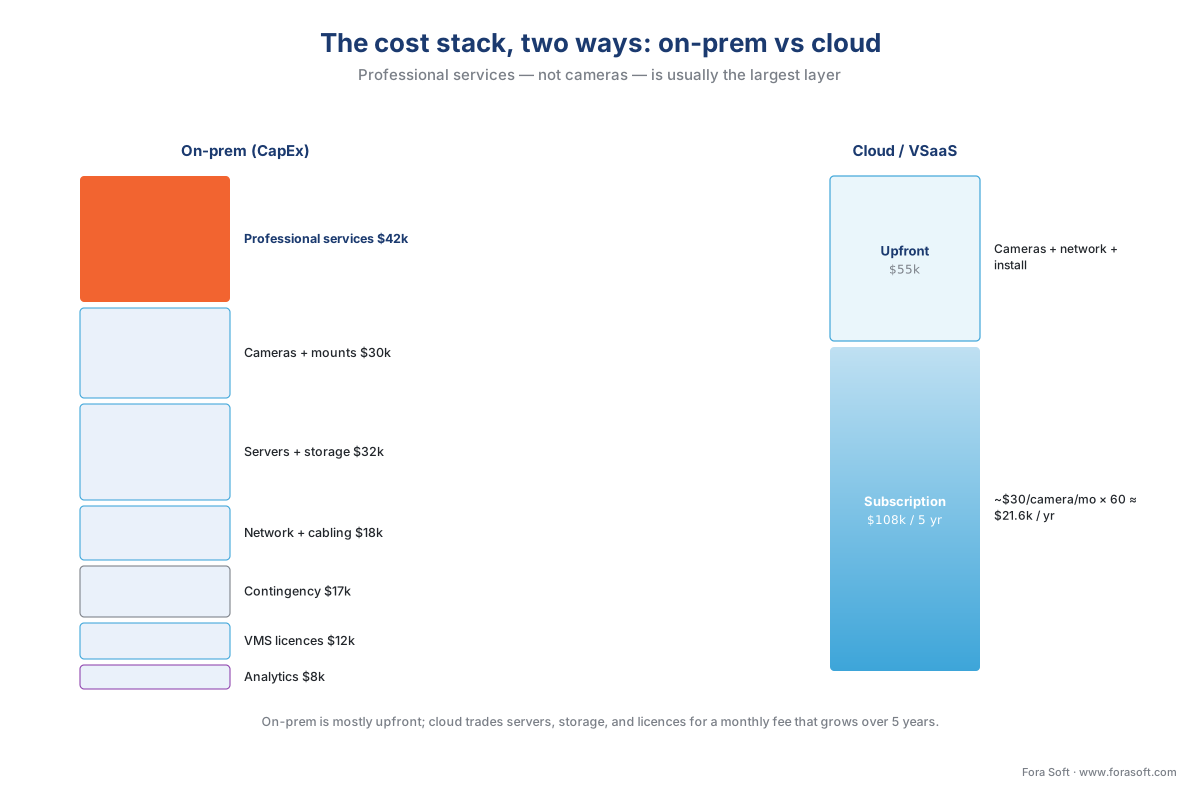 Figure 4. The cost stack, two ways. On-prem (left) is a tall column of mostly-upfront layers, with professional services — not cameras — usually the tallest. Cloud (right) trades the servers, storage, and licence layers for a recurring per-camera subscription: smaller upfront, larger over five years. The cameras, network, and install are common to both.
Step 5 — A realistic timeline, and the tail everyone underestimates
A number without a schedule is half an estimate. Surveillance projects move through five phases, and the two that get compressed in optimistic plans — procurement lead time and commissioning — are exactly the two that decide whether the system works on day one.
- Design and requirements (2–4 weeks). Walk the site, write the DORI lines, fix the camera mix, draw the network and storage, agree the retention and analytics. This is where Step 1 actually happens; skipping it just moves the cost to later.
- Procurement and lead times (4–10 weeks, overlapping). Cameras, servers, and switches are ordered. Enterprise gear can carry multi-week lead times, and a single back-ordered camera model can stall a phase, so order early and in parallel with site prep.
- Installation and cabling (2–6 weeks). Mounts, cable runs, drops, power, and the physical network. This scales with camera count and with the non-linear extras (lifts, conduit, trenching) from Step 2.
- Commissioning and analytics tuning (2–6 weeks). Aim and focus every camera, verify each hits its DORI target, set recording modes and retention, and — the underestimated tail — tune the analytics until false alarms are livable. Analytics tuning is iterative and scene-specific; it is the phase most often cut, and the one whose absence makes a "finished" system useless.
- Handover and documentation (about 1 week). As-builts, credentials, operator training, and the maintenance plan.
For our 60-camera site, those phases overlap into roughly a three-to-five-month project, dominated not by installation but by procurement lead time at the front and tuning at the back. The single most common scheduling mistake is to plan the install and forget that the system has to be commissioned — that the gap between "all cameras mounted" and "the system does its job" is weeks, not days.
 Figure 5. The timeline that estimates forget. Design and install are visible and easy to plan; the two phases that slip — procurement lead time at the front and analytics tuning at the back — are the ones that decide whether the system works on the day it is declared done. Plan the tail, not just the install.
Common mistakes that wreck a surveillance estimate. Budget-first scoping (picking a number, then cutting coverage to fit). Counting cameras but forgetting storage (the line that scales with retention, not just count). Quoting the "$X per camera" install figure as the whole project (it omits servers, storage, software, and services). Treating analytics accuracy as free and perfect (it needs tuning time and is a range). Ignoring procurement lead times and commissioning (the two phases that decide the go-live date). Pricing a biometric analytic as a licence when it is a legal gate. Every one of these makes the number look smaller than the project.
The estimate is a range, not a number
The last discipline is to deliver the estimate as a range with named assumptions, not a single confident figure. Three habits do this. Keep an assumptions register — the retention days, the recording mode, the DORI levels, the labour rate, the deployment model — so anyone can see what would change the price. Carry a contingency sized to the project's uncertainty (10% for a familiar site, 15–20% for an unknown one). And state the one or two swing factors that dominate the variance — usually retention and analytics, sometimes site access — because a reader who knows the swing factors can make the trade-offs instead of arguing with the total. An estimate built this way is not less precise for being a range; it is more useful, because it tells the reader where the money actually is.
Where Fora Soft fits in
Scoping a surveillance system is where Fora Soft's engineering view earns its keep, because we estimate the way we build — from the job each camera does, with the costs that demos leave out put back in. We have built video streaming, surveillance, and computer-vision systems since 2005, more than 625 projects for over 400 clients, and that experience shows up in the unglamorous lines: storage sized to real retention and recording mode, analytics quoted as a precision/recall range with tuning time budgeted, and professional services priced as the largest layer it usually is. When a build needs custom analytics or a VMS integration tuned to a specific site, we scope it by how it behaves under load — realistic accuracy, storage that does not fill early, latency that holds — rather than by a clean-day demo. That is the difference between an estimate that survives contact with the install and one that does not.
What to read next
- Surveillance cost model — the spreadsheet behind this method: cameras, retention, and deployment model into a storage and cost estimate.
- Surveillance storage and retention math — the full storage arithmetic and tiering that the retention multiplier draws on.
- The surveillance system deployment checklist — the capstone list a team runs once the scoped project is approved and built.
Call to action
- Talk to a surveillance engineer — book a 30-minute scoping call to talk through your surveillance project estimation plan.
- See our case studies — 250+ shipped projects across video streaming, WebRTC, OTT, telemedicine, e-learning, surveillance, and AR/VR.
- Download the Surveillance Project Scoping Worksheet — A one-page worksheet that walks the five-step estimating method from the article: (1) capture requirements per zone using the DORI scale (area, distance, goal — detection 25 / observation 63 / recognition 125 / identification 250 px/m);….
References
- IEC 62676-4 — Video surveillance systems for use in security applications, Part 4: Application guidelines (International Electrotechnical Commission). Tier 1. The application-guidelines standard for planning, designing, installing, commissioning, and maintaining a video surveillance system, and the source of the DORI operational requirements and pixel-density targets (Detection 25, Observation ~63, Recognition 125, Identification 250 px/m) that convert a scene goal into a camera-and-lens specification — the backbone of Steps 1 and 5. Edition 1.0 (2014) at https://webstore.iec.ch/en/publication/7353; superseded by IEC 62676-4:2025 (https://webstore.iec.ch/en/publication/83425), which adjusts the pixel-density ladder (accessed 2026-06-10).
- IEC 62676 — Video surveillance systems for use in security applications (family overview) (IEC). Tier 1. The video-surveillance systems standard family, including availability classes used to specify reliability grades referenced in the size-band and timeline discussion. https://webstore.iec.ch/publication/28442 (accessed 2026-06-10).
- Pixel density based on IEC 62676-4:2014 (Axis Communications, white paper, updated October 2025). Tier 3. First-party engineering explanation of the DORI pixel-density model — 4/10/20/40 pixels per face mapped to 25/63/125/250 px/m for a 16 cm face — and the caveat that lighting, optics, and compression move the result. Grounds the Step 1 numbers and the "guideline, not guarantee" note. https://whitepapers.axis.com/en-us/pixel-density-based-on-iec-62676-4-2014 (accessed 2026-06-10).
- General Data Protection Regulation (Regulation (EU) 2016/679), Art. 9 (European Union, EUR-Lex). Tier 1. Special-category treatment of biometric data — the legal gate that turns a face-recognition analytic from a licence line into a compliance project in the analytics multiplier. https://eur-lex.europa.eu/eli/reg/2016/679/oj (accessed 2026-06-10).
- Illinois Biometric Information Privacy Act (BIPA), 740 ILCS 14 (Illinois General Assembly). Tier 1. The US biometric statute with a private right of action and statutory damages, cited as the concrete reason a biometric analytic is scoped as a legal gate, not just software. https://www.ilga.gov/legislation/ilcs/ilcs3.asp?ActID=3004&ChapterID=57 (accessed 2026-06-10).
- Video Surveillance Management Systems: The 2026 Buyer & Builder Playbook (Fora Soft). Tier 4 (first-party orientation). Source for the VMS and VSaaS pricing bands used in the deployment-model multiplier ($50–$300 per channel off-the-shelf; $10–$50 per camera per month cloud) and the commercial overview companion to this engineering view. https://www.forasoft.com/blog/article/video-surveillance-management-systems (accessed 2026-06-10).
- Commercial Security Camera Installation Cost Guide (2026) (Umbrella Security / industry guide). Tier 6. One of several public 2026 installation-cost guides used to bound the per-camera hardware-plus-labour ranges ($700–$1,500 installed; labour 40–70% of total) in the cost stack — orientation only, not a primary source. https://umbrellasecurity.com/commercial-security-camera-installation-cost/ (accessed 2026-06-10).
- CCTV Installation Cost: Guide + Calculator (2026) (Get Safe and Sound). Tier 6. A second public installation-cost guide cross-checking the per-camera labour and all-in figures used in Table 2. https://getsafeandsound.com/blog/cctv-camera-installation-cost/ (accessed 2026-06-10).
- IP Camera Bandwidth Planning Guide (ASi Networks) and Hikvision H.264/H.265 Recommended Bitrate datasheet. Tier 4/6. Source for the planning bitrates (4 MP H.265 ≈ 2–4 Mbps; 4K ≈ 4–10 Mbps; H.265 30–50% lighter than H.264) behind the resolution multiplier and the storage arithmetic. https://www.asi-networks.com/blog/ip-camera-bandwidth-planning-guide-smbs/ (accessed 2026-06-10).
- The Cost Per Gigabyte of Hard Drives Over Time (Backblaze) and current enterprise-HDD street pricing. Tier 5/6. Grounds the storage-cost figures (~$17–$20 per TB raw for 14–24 TB enterprise drives in 2025), used to convert the ~100 TB raw requirement into a storage line. https://www.backblaze.com/blog/hard-drive-cost-per-gigabyte/ (accessed 2026-06-10).
Per the section's source hierarchy, standards and law (IEC 62676-4, GDPR, BIPA) are the controlling sources for the DORI targets and the biometric gate; vendor and educational guides were used only to bound the cost and bitrate ranges, which are explicitly labelled illustrative 2026 planning figures, not quotes.
