


Why this matters
Storage is where surveillance budgets quietly go, and it is the single calculation almost every first-time project gets wrong. Underestimate it and the system overwrites evidence before anyone reviews it, or the disks fill and recording silently stops. Overestimate it and you spend tens of thousands of dollars on terabytes that never hold anything useful. This guide is for the security integrator, product manager, or operations lead who has to size a system, sign off on a quote, or talk to an engineer about why the storage line is so large — and wants to understand the number instead of trusting a vendor's calculator. You do not need to be technical to follow it; every formula is walked through in plain numbers.
The one formula that runs the whole system
Everything about surveillance storage comes back to a single equation. The software that ingests and records many camera streams — the Video Management System, or VMS — is, at its core, a machine for turning a continuous data rate into a pile of files. So the place to start is that data rate.
A camera does not send "pictures." It sends a compressed video stream measured in bitrate — the number of bits of data per second, written in megabits per second (Mbps). A camera running at 4 Mbps is producing four million bits of video every second, all day, whether anyone is watching or not. That number, multiplied out over time, is your storage.
Here is the conversion that does all the work. One megabit per second, recorded continuously for a full day, produces a very predictable amount of data:
1 Mbps × (1 byte / 8 bits) × 86,400 seconds/day = 10,800 megabytes/day = 10.8 GB/day
That constant — 10.8 gigabytes per day for every 1 Mbps of continuous video — is the most useful number in surveillance storage. Memorize it and you can estimate any system in your head. A 4 Mbps camera recording around the clock produces about 4 × 10.8 ≈ 43 GB per day. The full system formula is just that, scaled up:
Storage (GB) = bitrate (Mbps) × 10.8 × cameras × retention days × recording factor
The recording factor is the fraction of the day the camera actually writes to disk — 1.0 for continuous recording, lower if you only record on motion (more on that below). Divide the result by 1,000 to get terabytes (TB). The whole article is, in a sense, a tour of those five inputs and which one to pull when the number is too big.
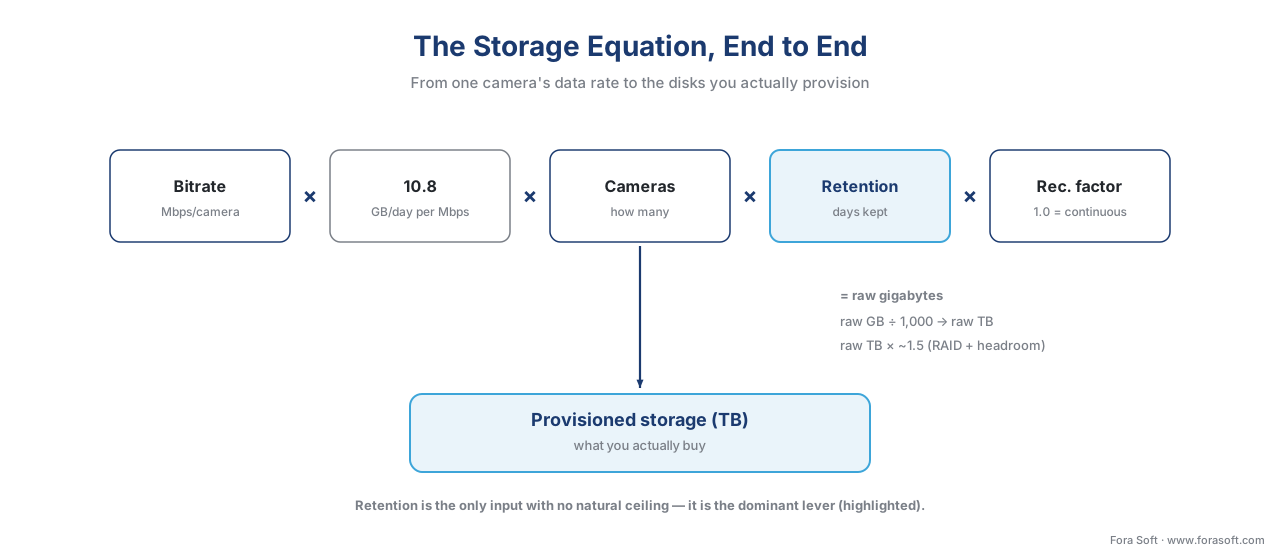 Figure 1. The storage equation, end to end — from a single camera's bitrate to the disks you provision.
What sets the bitrate: resolution, frame rate, and codec
The bitrate is not a free choice — it is mostly set by three things, and understanding them tells you where the data actually comes from.
Resolution is how many pixels each frame contains. A 1080p (also called 2-megapixel, or 2 MP) camera has about two million pixels per frame; a 4 MP camera has twice that; a 4K (8 MP) camera has four times. More pixels means more data to compress, so resolution pushes the bitrate up roughly in proportion.
Frame rate, measured in frames per second (FPS), is how many images per second the camera captures. Surveillance rarely needs the 30 FPS of broadcast video; 12–15 FPS is common and readable, and dropping from 30 to 15 FPS roughly halves the bitrate. A face at a door or a plate at a gate is captured fine at 15 FPS.
The codec is the compression method — the algorithm that shrinks the video before it travels. This is the lever most people miss. The older standard, H.264, has been the surveillance default for years. The newer H.265 (also called HEVC) compresses the same image to roughly half the size for similar quality — vendors typically cite a 30–50% bitrate reduction. We won't re-derive how the codecs work here; the Video Encoding section covers that. For storage planning, the rule is simple: switching a system from H.264 to H.265 can nearly halve the storage bill for free.
Here are realistic continuous-recording bitrate ranges by resolution and codec, current for 2026 cameras at typical surveillance frame rates (15–30 FPS). Scene complexity and motion move these — a busy street runs near the top, a quiet corridor near the bottom.
| Resolution | H.264 bitrate | H.265 bitrate | Storage/day (H.265, continuous) |
|---|---|---|---|
| 1080p / 2 MP | 2.5–5 Mbps | 1.5–3 Mbps | ~16–32 GB |
| 4 MP / 2K | 3.2–8 Mbps | 2.2–4.2 Mbps | ~24–45 GB |
| 4K / 8 MP | 8–12 Mbps | 4–10 Mbps | ~43–108 GB |
Read that last column as a warning: a single continuously recording 4K camera can eat 100 GB a day. Resolution and codec are the two levers that set how big the per-camera number is before retention multiplies it across the whole system.
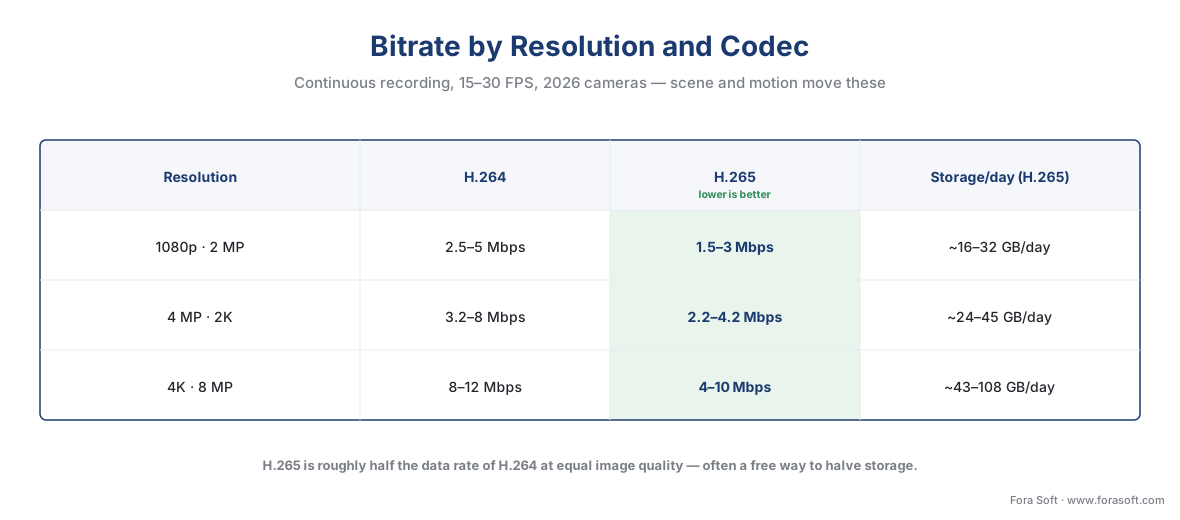 Figure 2. Bitrate by resolution and codec — H.265 roughly halves the data rate of H.264 at the same image quality.
A worked example: 40 cameras, step by step
Numbers make this concrete. Take a mid-sized site: 40 cameras, 4 MP each, recording continuously in H.265 at a typical 2 Mbps. We will size it in three steps, out loud.
Step 1 — daily storage per camera. Multiply the bitrate by our constant:
2 Mbps × 10.8 = 21.6 GB per camera per day
Step 2 — raw storage for the whole system at the chosen retention. Multiply by cameras and by retention days. Say the site keeps 30 days:
21.6 GB × 40 cameras × 30 days = 25,920 GB ≈ 26 TB (raw)
So 40 cameras, a month of continuous footage, is about 26 terabytes of raw video. That is the number every online calculator gives you — and it is not the number you buy. Hold that thought for the provisioning section.
Step 3 — see the retention lever. Keep the same 40 cameras but change only the retention period:
 7 days  →  21.6 × 40 ×  7   ≈   6 TB
30 days  →  21.6 × 40 × 30   ≈  26 TB
90 days  →  21.6 × 40 × 90   ≈  78 TB
365 days →  21.6 × 40 × 365  ≈ 315 TB
Same cameras, same image quality, same everything — and the storage swings from 6 TB to 315 TB purely on how long you keep footage. That is the whole point of the next section.
Why retention is the dominant cost driver
Look again at the four inputs to the storage formula. Three of them are bounded. Resolution tops out at whatever the camera supports and is constrained by what you actually need to see. Frame rate has a sensible ceiling — past 15–20 FPS you gain little for surveillance. Camera count is fixed by the building. Retention is the only input with no natural ceiling — nothing physical stops you from keeping a year, or three years, of footage, and each extra day adds the same slice of storage as the day before.
That makes retention a linear multiplier: double the days, double the storage and double that part of the bill. Going from 30 days to 90 days triples your storage. Going to a full year multiplies it roughly twelve-fold. In the cloud, where you rent storage by the month, the effect is identical — the monthly fee scales straight with retention days, so a one-year retention policy costs about twelve times a one-month policy forever.
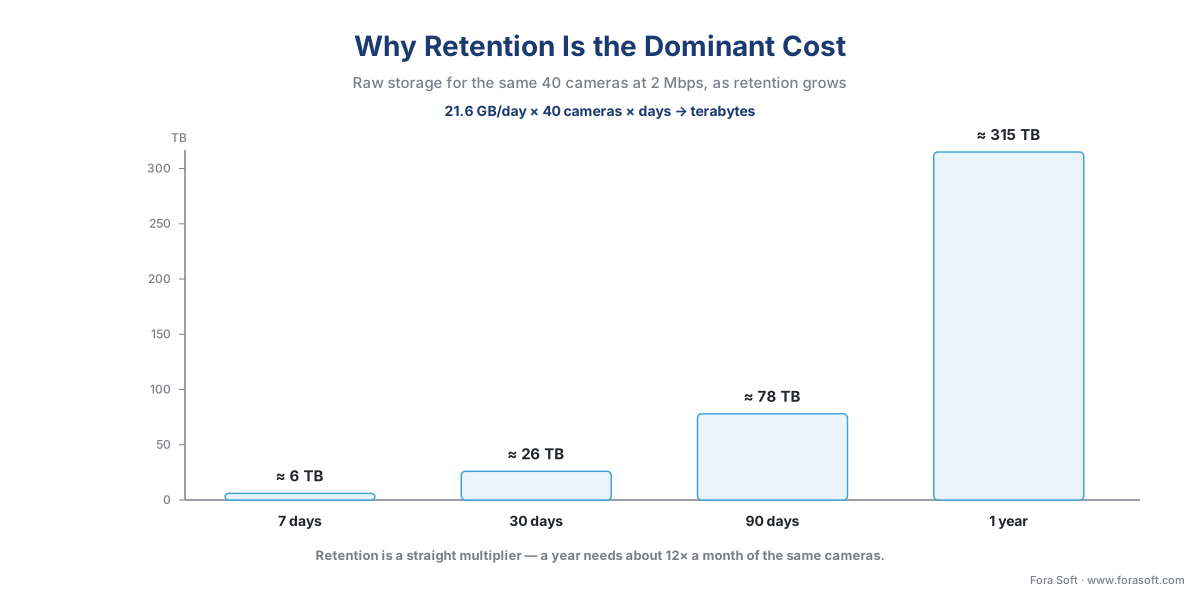 Figure 3. Retention is a straight multiplier — for the same 40 cameras, a year of footage needs about 12× a month.
This is why the first question on any storage estimate should not be "how many cameras?" but "how many days, and why that many?" Most teams pick a retention number out of habit — "let's keep 30 days" — without checking whether the real requirement is 7 days or 90. That single decision moves the storage bill more than any hardware choice.
Recording mode: the biggest lever you control
The recording factor in the formula — the fraction of the day a camera writes to disk — is where the most dramatic savings hide, and it is entirely under your control.
Continuous recording writes every frame, all day, factor = 1.0. It is the safe default and the only mode that guarantees you never miss a moment. It is also the most expensive, and for many cameras it is overkill: a loading-dock camera that sees activity two hours a day is writing 22 hours of empty footage.
Motion-triggered recording writes only when the camera detects change in the scene. Event or analytics-triggered recording writes only when a rule fires — a line crossed, a zone entered, a vehicle detected. Both can cut storage by 50–80% on cameras that watch mostly static scenes, because the recording factor drops to the fraction of the day something actually happens. A camera that records 4 active hours instead of 24 has a recording factor near 0.17 — roughly a sixth of the continuous cost.
The catch is what you give up. Motion recording can miss the seconds before motion is detected (good systems keep a few seconds of pre-event buffer to fix this) and can be fooled into either over-recording (rain, headlights, swaying trees) or under-recording (a slow, low-contrast intruder). Most real systems mix modes: continuous on the entrances and tills that matter most, motion or event on the perimeter and back-of-house. The full trade-off lives in our companion article on recording strategies; the point here is that the recording factor is a real, large lever — often a bigger single win than the codec.
From raw terabytes to disks you actually buy
Here is the mistake that turns a correct estimate into an undersized system: the raw terabytes from the formula are not the disk capacity you purchase. Three layers of overhead sit between them, and skipping any one leaves you short exactly when you need the footage.
Redundancy (RAID). Surveillance storage is almost always built on RAID — Redundant Array of Independent Disks — which spreads data across several drives so the system survives a disk failure without losing footage. Redundancy is not free space; it is space you pay for and cannot store video in. The two common surveillance levels:
- RAID 5 sacrifices the equivalent of one whole disk to parity. In a five-disk array, you lose about 20% of raw capacity and can survive one drive failing.
- RAID 6 sacrifices the equivalent of two disks, surviving two simultaneous failures — the safer choice for large arrays where a second disk often fails during the stressful rebuild after the first. On a small array that is a big percentage; on a large one it is modest insurance.
Parity arrays also carry a small write penalty (roughly 5–10% slower) because the parity has to be computed on every write — which matters more than it sounds, as we will see.
File-system and formatting overhead. A formatted drive never offers its full nameplate capacity to store files — a few percent goes to the file system itself.
Free-space headroom. You never run a recording array to 100% full. Surveillance systems record continuously and need room to work; the standard practice is to size so the array runs at no more than about 80% capacity, leaving headroom for indexing, bursts, and the day you add cameras. Running a recording filesystem to the brim invites corruption and dropped frames.
Stack these and a practical rule emerges: plan for roughly 1.4–1.6× your raw video figure in purchased disk capacity (the exact multiplier depends on RAID level and array size). Our 26 TB raw example becomes roughly 39 TB provisioned at a 1.5× factor — and that is before any growth margin. The arithmetic, made explicit:
26 TB raw  ÷  RAID 6 efficiency (~0.75 on an 8-disk array)  ≈  35 TB
35 TB      ×  ~1.1 (file-system + headroom)                 ≈  39 TB provisioned
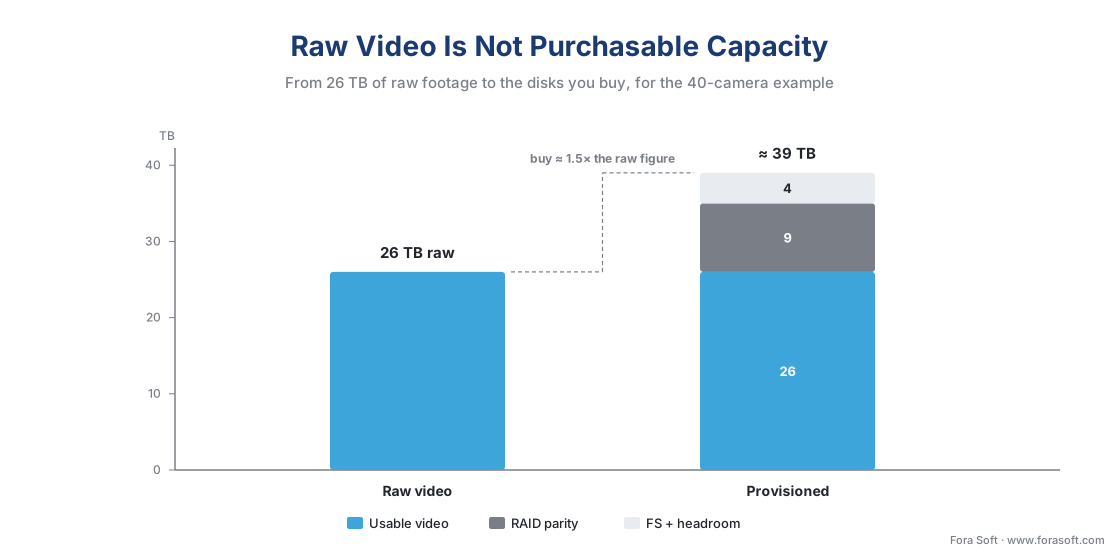 Figure 4. Raw video is not purchasable capacity — RAID, formatting, and headroom add roughly 40–60% before the system is safe to run.
Common mistake: sizing for capacity, not for sustained write. Surveillance is an unusual storage workload. Most IT storage is read-heavy and bursty; a recording array does the opposite — it writes 40 streams to disk every second of every day, forever, and reads only when someone reviews footage. A drive sized to hold the data can still fail to write it fast enough, dropping frames silently. Always size for sustained write throughput as well as capacity, use surveillance-rated drives built for 24/7 writing, and remember that a RAID rebuild after a failed disk hammers the array exactly when an incident might need it. Capacity is the headline; sustained write is what keeps the footage.
How long must you keep it? The two limits
Retention is the dominant cost, so "how many days?" deserves a real answer rather than a habit. The honest framing is that retention has two different limits that pull in opposite directions, and your policy lives in the window between them. (This is engineering guidance, not legal advice — confirm the specific requirements for your sector and region with qualified counsel.)
The lower limit — how long you must keep footage. This is set by operational need and, in some sectors, by law or regulation. Investigations and disputes do not surface the same day; insurance and law-enforcement requests arrive weeks later. Industry minimums cluster in a familiar band:
| Sector | Typical retention | Driver |
|---|---|---|
| General business / office | 30–90 days | Disputes, incident review |
| Retail | 30–90 days | Theft/fraud claims; longer for high-shrink sites |
| Healthcare | 30–90 days | Patient-safety and incident policy |
| Gaming / casinos | Jurisdiction minimums (often weeks, longer for disputed events) | Gaming-board regulation |
| Banking / finance | 90+ days, with multi-year rules for some records | Recordkeeping regulation |
These are common practice, not universal law — the exact requirement depends on your jurisdiction and sector, and some regulated records (certain banking and gaming footage) carry far longer mandates. The lesson for storage sizing: pin the real minimum before you size, because the difference between 30 and 90 days triples the disks.
The upper limit — how long you may keep footage. In privacy-regulated regions, the law sets a maximum, not just a minimum. Under the EU's General Data Protection Regulation (GDPR, Regulation (EU) 2016/679), recognizable video of people is personal data, and Article 5(1)(e), the "storage limitation" principle, requires that it be kept no longer than necessary for the purpose. The European Data Protection Board's Guidelines 3/2019 on processing of personal data through video devices make this concrete: footage "should in most cases be erased, ideally automatically, after a few days," and "the longer the storage period set (especially when beyond 72 hours), the more argumentation for the legitimacy of the purpose and the necessity of storage has to be provided." Their worked example: a small shop that would notice vandalism the same day needs only a 24-hour retention period.
So in the EU, a casual "let's keep everything for a year" is not just expensive — it can be unlawful unless you can justify the necessity. The privacy maximum and the operational minimum can even collide, and when they do, the law caps the policy. The detail of lawful retention and deletion lives in our retention policy and GDPR for video surveillance articles; for storage planning, the takeaway is that the shortest lawful, operationally adequate retention is usually the cheapest design, and privacy law often pushes that number down.
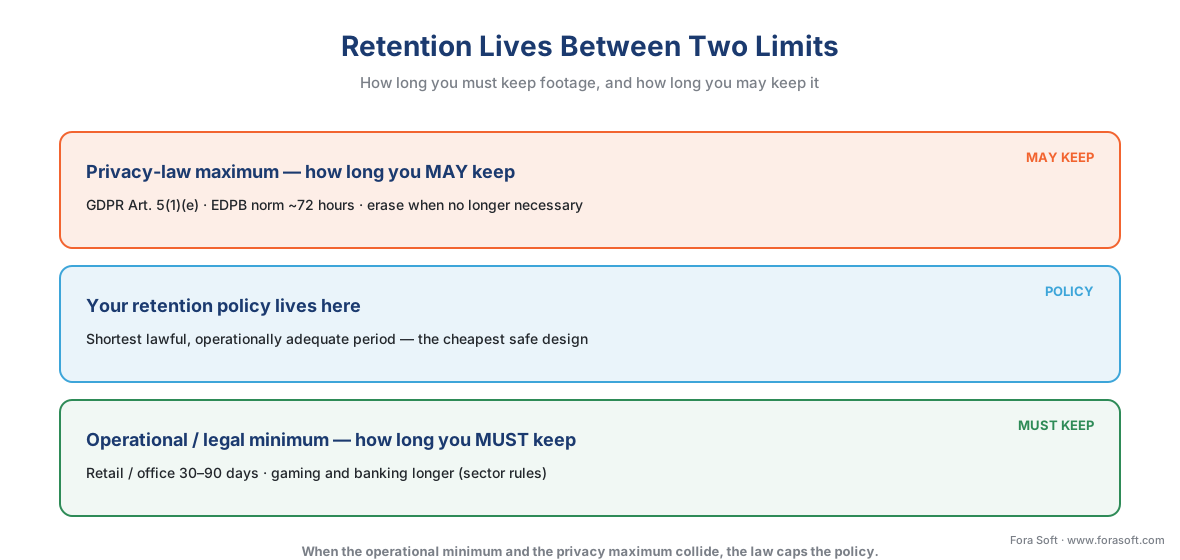 Figure 5. Retention lives between two limits — an operational/legal minimum and a privacy-law maximum. Your policy sits in the window.
Where the standards fit: ONVIF Profile G and IEC 62676
Storage is mostly arithmetic, but two standards shape how recorded video is managed and retrieved, and naming them keeps a system from locking you in.
ONVIF Profile G is the open standard for recording and retrieval. ONVIF is the common language that lets cameras and recording software from different makers work together; the profiles split that language by job. Profile G specifically covers recording video onto a device and searching and replaying it — so a Profile G-conformant VMS and recorder can store and pull back footage without a proprietary tie. Remember the surveillance rule, though: ONVIF guarantees a baseline both devices conform to, not full feature parity — advanced search or analytics-tagged retrieval may still need the vendor's own software. We cover the profile system in depth in ONVIF explained for engineers, and the commercial overview lives in Fora Soft's guide to ONVIF profiles in security systems.
IEC 62676 is the international standard for video surveillance systems for security applications. Its parts cover system requirements (62676-1), video transmission (62676-2), and application guidelines (62676-4, current 2025 edition) — the framework a serious deployment uses to specify and test storage and recording, not just buy disks. You will rarely read the standard itself, but a quote that references it is a quote built to last.
Where Fora Soft fits in
Storage sizing is where a surveillance product succeeds or quietly fails under real load, and it is squarely in our work. Fora Soft has built video streaming, real-time video, and computer-vision systems since 2005 — more than 625 shipped projects — and surveillance sits at the intersection of all three. When we build or customize a VMS, we size storage for sustained write under continuous load, not just nameplate capacity, and we wire retention policy into the system so the privacy maximum and the operational minimum are both honored automatically rather than left to a spreadsheet. The accuracy-vs-performance habit applies here too: a storage design that looks fine on paper but drops frames during a RAID rebuild is not a design, and we test for the bad day, not the brochure day.
What to read next
- Recording strategies: continuous, motion, event, and scheduled
- On-prem storage architecture: NVR, SAN, NAS, and RAID
- The surveillance cost model: what a system actually costs
Download the surveillance storage sizing calculator (PDF) — the formula, the bitrate table, the worked 40-camera example, the raw-to-provisioned steps, and a blank worksheet for your own site.
Call to action
- Talk to a surveillance engineer — book a 30-minute scoping call to talk through your cctv storage calculator plan.
- See our case studies — 250+ shipped projects across video streaming, WebRTC, OTT, telemedicine, e-learning, surveillance, and AR/VR.
- Download the Surveillance Storage Sizing Calculator — One-page printable calculator: the storage formula (bitrate × 10.8 × cameras × days × recording factor), the bitrate-by-resolution-and-codec table, the worked 40-camera example, the raw-to-provisioned steps (RAID + headroom), the….
References
- IEC 62676-1-1: Video surveillance systems for use in security applications — Part 1-1: System requirements (General), International Electrotechnical Commission (IEC). The system-level requirements framework for specifying surveillance recording and storage. Tier 1. https://webstore.iec.ch/publication/64385 (accessed 2026-06-09)
- EN IEC 62676-4:2025: Video surveillance systems for use in security applications — Part 4: Application guidelines, IEC / CENELEC. Practical guidance for planning, sizing, and commissioning surveillance systems, including recording and storage; current 2025 edition. Tier 1. https://webstore.iec.ch/publication/68479 (accessed 2026-06-09)
- GDPR — Regulation (EU) 2016/679, Article 5(1)(e) (storage limitation), European Union (EUR-Lex). Personal data, including recognizable video, must be kept no longer than necessary — the privacy-law maximum that caps retention and therefore storage. Tier 1. https://eur-lex.europa.eu/eli/reg/2016/679/oj (accessed 2026-06-09)
- EDPB Guidelines 3/2019 on processing of personal data through video devices (§120–122, storage periods), European Data Protection Board. Footage should "in most cases be erased, ideally automatically, after a few days"; storage beyond 72 hours requires documented justification; a 24-hour period suffices for a small shop. Tier 1. https://www.edpb.europa.eu/our-work-tools/our-documents/guidelines/guidelines-32019-processing-personal-data-through-video_en (accessed 2026-06-09)
- ONVIF Profile G (recording and retrieval), ONVIF. The open standard for recording video onto a device and searching/replaying it — reduces storage and VMS lock-in. Tier 1. https://www.onvif.org/profiles/profile-g/ (accessed 2026-06-09)
- Security Camera Storage, Bitrate, and Resolution: A Complete Guide, Nelly's Security. Continuous-recording bitrate ranges by resolution and codec for current cameras; the storage-per-day figures. Tier 4. https://nellyssecurity.com/blogs/articles/security-camera-storage-bitrate-and-resolution-a-complete-guide (accessed 2026-06-09)
- What is a Good Bitrate for 1080p Video Security Cameras, SCW. H.264 vs H.265 bitrate comparison; H.265 cuts bitrate roughly 30–50% at equal quality. Tier 4. https://www.getscw.com/knowledge-base/camera-bitrate-compression (accessed 2026-06-09)
- CCTV Storage Calculation: Formula & Storage Saving Tips, Reolink. The storage formula (bitrate × 10.8 GB/day; TB = Mbps × 0.0108 × days × cameras) and the three-step capacity calculation including RAID efficiency and the ~1.10 overhead factor. Tier 4. https://reolink.com/blog/cctv-storage-calculation-formula/ (accessed 2026-06-09)
- RAID Guide for Security Camera NVR 2026: Best Levels and Capacity, PVR Blog. RAID 5 / RAID 6 usable-capacity overhead (one and two disks of parity), the 25–50% capacity loss range, and surveillance write considerations. Tier 5. https://pvrblog.com/tech/raid/ (accessed 2026-06-09)
- RAID 5 vs. RAID 6: Capacity, performance, durability, TechTarget. Parity overhead and the ~5–10% write penalty on parity arrays; why RAID 6 is preferred on large arrays during rebuild. Tier 5. https://www.techtarget.com/searchdatabackup/tip/RAID-5-vs-RAID-6-Capacity-performance-durability (accessed 2026-06-09)
- How Long Do Security Cameras Keep Footage? (2026), Backstreet Surveillance. Common business retention band of 30–90 days and sector variation (retail, healthcare, banking, gaming). Tier 5. https://www.backstreet-surveillance.com/blog/post/how-long-do-security-cameras-keep-footage (accessed 2026-06-09)
- Seagate SkyHawk Surveillance Hard Drives, Seagate. Purpose-built 24/7 surveillance drives rated for sustained write — the basis for the sustained-write-throughput pitfall. Tier 3. https://www.seagate.com/products/surveillance-drives/skyhawk-hard-drive/ (accessed 2026-06-09)
Where sources disagreed, the official standard or law was followed. On retention, popular articles quote single "keep 30/90 days" numbers as if universal; the controlling sources (GDPR Art. 5(1)(e) and EDPB Guidelines 3/2019) establish that privacy law sets a maximum and that the operationally adequate minimum is what should be sized for — so the article frames retention as a window between two limits rather than a fixed number.
