


Why this matters
If you are scoping or buying a video surveillance system, "it's ONVIF, so it's compatible" sounds like the end of the compatibility conversation — and it is the start of it. The word "ONVIF" on a datasheet tells you a camera speaks a common language, but not which dialect, which features, or whether the one capability your project depends on travels over that language at all. Get this wrong and you discover, after purchase, that a camera connects and streams but its people-counting analytics are invisible to your software, or that "ONVIF support" meant a partial implementation that drops half the events. Understanding the profile system, the discovery handshake, and the standards boundary lets you write a specification a vendor cannot wriggle out of, ask the three questions that matter before you buy, and know in advance where you will need a manufacturer's software kit instead. You will not write a line of code; you will gain the mental model that keeps a multi-vendor fleet from becoming a multi-vendor headache.
What ONVIF actually is
Start with the problem it was invented to solve. A modern surveillance system mixes hardware and software from different companies on purpose: cameras from one maker because they are good in low light, recording software from another because it scales, an analytics engine from a third. Without a shared language, every one of those pairings would need a custom integration — a translator hand-built for each camera model and each software platform. That does not scale, and it locks a buyer into whoever wrote the first integration.
ONVIF — the Open Network Video Interface Forum — is the organization and the open standard that supplies the shared language. Founded in 2008 by three industry heavyweights, Axis Communications, Bosch Security Systems, and Sony, its stated mission is "to provide and promote standardized interfaces for effective interoperability of IP-based physical security products and services" (ONVIF, Our Mission). In plain terms: a way for a camera from one brand and software from another to understand each other without a custom translator. The forum now has more than 500 member companies across six continents, and its members collectively offer more than 33,000 profile-conformant products — which is why "does it support ONVIF?" is the first interoperability question anyone asks (ONVIF, Our Mission).
Two terms before we go further, because the rest of the article leans on them. A camera, in ONVIF's vocabulary, is a device — the thing that produces video and answers questions about itself. The Video Management System (VMS) — the software that finds, configures, records, and displays many cameras at once — is the client: the thing that asks the questions and gives the orders. (If a VMS, an NVR, and a DVR still blur together, our VMS, NVR, and DVR explainer untangles them.) Almost everything ONVIF does is a conversation between a client and a device, and almost every confusion about ONVIF comes from forgetting that both ends have to hold up their side of that conversation.
The useful analogy is a spoken language. English does not guarantee two people will agree on everything; it guarantees they can exchange ideas at all, and that a third English speaker can join later without a private tutor. ONVIF is that for security devices. It does not make every camera identical or every feature available everywhere. It guarantees that a conformant camera and a conformant client share enough common vocabulary to discover each other, set up a video stream, and exchange events — and that you can swap in a fourth vendor later without rebuilding the integration from scratch.
How ONVIF works under the hood: web services, not magic
Here is the part most overviews skip, and it is the part that demystifies everything else. ONVIF did not invent a new networking technology. It reused the boring, well-understood machinery of web services — the same family of technology that lets business software systems talk over the internet. The ONVIF organization is explicit about this: "ONVIF specifications are web services-based, using open standards such as XML, SOAP, and WSDL to define the communication between two electronic devices over an IP network" (ONVIF, Our Mission). Let us define those three acronyms in plain language, because they are the whole engine.
XML is a way of writing structured text that both humans and machines can read — labels wrapped around values, like a form with named fields. SOAP (Simple Object Access Protocol) is an agreed envelope for putting an XML request in, sending it, and getting an XML answer back — think of it as a standard letter format with a "to," a "from," and a body, so any post office can route it. WSDL (Web Services Description Language) is a machine-readable menu: a file the camera publishes that lists exactly which questions it can answer and what shape the answers take. The VMS reads the WSDL menu, then sends SOAP letters written in XML to place its orders.
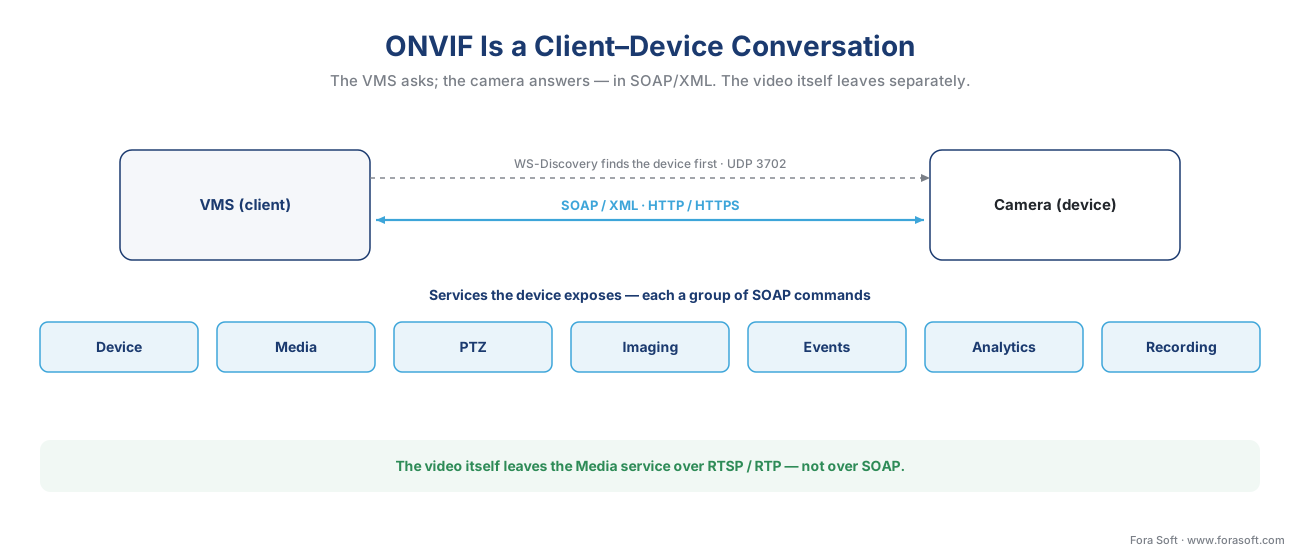 Figure 1. ONVIF is a client–device conversation. The VMS (client) sends SOAP/XML requests over HTTP/HTTPS; the camera (device) exposes its capabilities as named services. Discovery (WS-Discovery) finds the device; the services do the work; the actual video leaves over RTSP/RTP, not over SOAP.
The camera exposes its capabilities as a set of named services, each one a group of related commands. The management and control interfaces in the ONVIF standard "are described as Web Services" with full XML schema and WSDL definitions (ONVIF Core Specification). The ones that matter for a video system are easy to name in plain terms:
- The Device service is the front desk: it answers "who are you, what's your firmware, what can you do, set your clock, manage users."
- The Media service hands out the stream address — the VMS asks "give me the URI for your main video stream," and the camera returns an RTSP address to connect to.
- The PTZ service moves a pan-tilt-zoom camera; the Imaging service adjusts brightness, focus, and white balance.
- The Events service is the camera's way of raising its hand — "motion in zone 2," "I was tampered with" — and the VMS subscribes to hear those.
- The Analytics service carries the structured descriptions of what on-camera analytics saw, and the Recording / Search / Replay services let a client manage and pull back video stored on the camera itself.
Notice what travels over SOAP and what does not. The control conversation — find, describe, configure, subscribe — is SOAP/XML. The video itself does not. When the Media service hands over a stream address, the VMS connects to it using RTSP (the Real-Time Streaming Protocol, IETF RFC 2326) and receives the compressed video over RTP. ONVIF is the negotiator that sets up the call; the streaming protocols carry the call. The mechanics of that handover — discovery, the RTSP handshake, and the codec on the wire — are the subject of a companion article, how a camera stream gets into the VMS; here the point is only that ONVIF arranges the stream, it does not be the stream.
Discovery: how a VMS finds a camera
The first thing the shared language has to do is introductions. Before a VMS can send any SOAP command, it has to know a camera exists and where to reach it. ONVIF handles this with an open protocol called WS-Discovery (Web Services Dynamic Discovery), and the mechanism is a single shared channel that every device on the local network can hear.
Concretely, devices speak over one well-known address: they send small messages to the multicast group 239.255.255.250 on UDP port 3702 — multicast meaning one message that every device on the local segment receives at once, like an announcement over a room's loudspeaker rather than a private phone call (OASIS, WS-Discovery 1.1). A camera joining the network announces itself with a Hello. A VMS looking for cameras shouts a Probe — "any ONVIF devices out there?" Each matching camera answers with a ProbeMatch that carries the one thing the VMS needs next: the service address (ONVIF calls it the XAddrs) where the real SOAP conversation will happen.
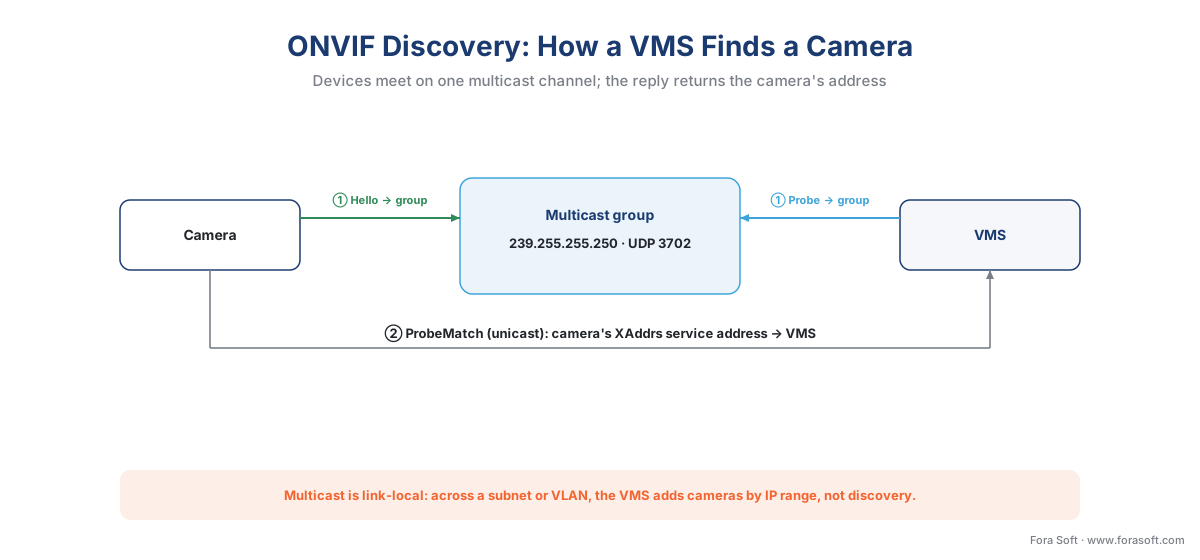 Figure 2. ONVIF discovery over WS-Discovery. Hello and Probe go to the multicast group on UDP 3702; the camera's ProbeMatch returns its XAddrs service address. The dashed boundary is the catch: multicast does not cross subnets by default.
That boundary is the most common large-deployment surprise, so it is worth stating plainly: multicast discovery is link-local. It reaches devices on the same network segment, not across routers or separate VLANs, unless the network is specifically set up to relay it. A discovery scan that finds every camera on a flat test bench can find none of them once the cameras live on a dedicated camera VLAN, which is normal practice. This is not ONVIF failing; it is multicast behaving as designed. Past that boundary, a VMS adds cameras the second way — manually, by IP address or by scanning an IP range — which is how any serious fleet is actually onboarded. The operational craft of onboarding hundreds of cameras is its own subject, covered in camera discovery and onboarding at scale.
One more thing discovery is not: discovery is not access. Finding a camera tells you it exists; it does not log you in. ONVIF authenticates the SOAP conversation with a mechanism called WS-UsernameToken, where the client sends a username plus a one-time number and a hashed (not plain-text) password digest, computed per the specification (ONVIF Core Specification). A camera left on its factory-default password is a documented security hole, not a convenience — and because ONVIF explicitly leaves the implementation of security to the manufacturer and integrator, default credentials are exactly the kind of gap the standard does not close for you.
A concrete request: what a SOAP exchange looks like
Theory becomes obvious with one example. Suppose the VMS has discovered a camera and wants the address of its video stream. It sends a SOAP request to the Media service — GetStreamUri — and the camera answers with the RTSP address to connect to. Stripped to its essence, the exchange looks like this:
<!-- VMS → camera: "give me the stream address" (SOAP, simplified) -->
<s:Envelope xmlns:s="http://www.w3.org/2003/05/soap-envelope">
  <s:Body>
    <GetStreamUri xmlns="http://www.onvif.org/ver10/media/wsdl">
      <ProfileToken>MainStreamProfile</ProfileToken>
    </GetStreamUri>
  </s:Body>
</s:Envelope>

<!-- camera → VMS: "here it is" -->
<GetStreamUriResponse>
  <MediaUri>
    <Uri>rtsp://192.0.2.10:554/onvif/media/stream1</Uri>
  </MediaUri>
</GetStreamUriResponse>
That is the entire pattern, repeated for every capability: the VMS names what it wants in an XML envelope, the camera replies in kind. (Note the word "Profile" appears here in a second, narrow sense — a media profile is the camera's own bundle of stream settings, a different thing from the ONVIF conformance profiles that are this article's main subject. Same word, two meanings; keep them separate.) The address that comes back is an RTSP URI, which is the seam where ONVIF hands off to the streaming layer. You never have to write this XML by hand — the VMS does — but seeing it makes ONVIF concrete: it is structured questions and structured answers, nothing more mysterious than that.
The profile system: how conformance actually works
If services are the vocabulary, profiles are the agreed phrasebooks — and they are the heart of ONVIF, because they turn "supports ONVIF" from a vague claim into a checkable promise. An ONVIF profile is, in the organization's own words, "a fixed set of features that must be supported by a conformant device and client," designed so that "a client that conforms to Profile T, for example, will work with a device that also conforms to Profile T" (ONVIF, Profiles). Read that twice, because two ideas hide in it.
First, a profile is a fixed checklist, not a vague badge. If a camera claims Profile T, every mandatory feature in Profile T must be present — not "most," not "the ones we got around to." Second, conformance is a two-sided promise: the device conforms, and the client conforms, and the guarantee only exists where the two overlap. A Profile T camera paired with a client that only supports Profile S gets you the Profile S baseline, not Profile T. The match is the product, not either half alone. ONVIF is blunt about the consequence: "conformance to profiles is the only way that ensures compatibility between ONVIF conformant products," and only products registered on ONVIF's conformant-product list count as conformant at all (ONVIF, Profiles).
There are seven active profiles in 2026, and they split cleanly into video and access control. A device or client can hold more than one — "a network camera with local storage can conform to both Profile T and G" (ONVIF, Profiles) — so think of them as a menu you combine, not a single rung on a ladder.
| Profile | What it standardizes | Side that uses it | Plain-language job |
|---|---|---|---|
| S | Basic video streaming, PTZ, audio in | Video | The original streaming profile (2012). Now deprecating — last conformance submissions March 31, 2027. |
| T | Advanced streaming: H.264/H.265, imaging, motion & tamper events, metadata, two-way audio | Video | The 2026 baseline for IP video. Replaces S. |
| G | Recording configuration, search, and replay (edge/on-camera storage) | Video | Manage and pull back video stored on the camera. |
| M | Metadata and events for analytics (objects, faces, plates, geolocation; via stream, events, or MQTT) | Video / analytics | The interface for analytics results — not the analytics quality. |
| A | Access control configuration (credentials, schedules) | Access control | Set up who may go where, and when. |
| C | Door control and event management | Access control | Operate doors and handle their alarms. |
| D | Access control peripherals (readers, locks) | Access control | The hardware hanging off a door controller. |
Table 1. The seven active ONVIF profiles (2026). Profiles are a menu, not a ladder: a modern IP-video VMS typically wants the S/T + G + M combination, and adds A/C/D only when access control is in scope. Profile Q was deprecated in 2022.
For a modern video system the working answer is short. Reach for Profile T for streaming (with Profile S as the legacy fallback for older 2016-era hardware), add Profile G if you want to manage recordings stored on the camera, and add Profile M if analytics metadata has to reach your software. That is the system bundle. The detailed, per-feature decision of which exact profile your product needs — including the mandatory-versus-conditional fine print and the streaming migration path — is a decision guide in its own right, and we treat it as one in ONVIF Profile S, G, T, and M — which profile your product needs. For the commercial, at-a-glance overview of the profile system, Fora Soft's own guide to ONVIF profiles in security systems is the companion piece to this engineering explainer.
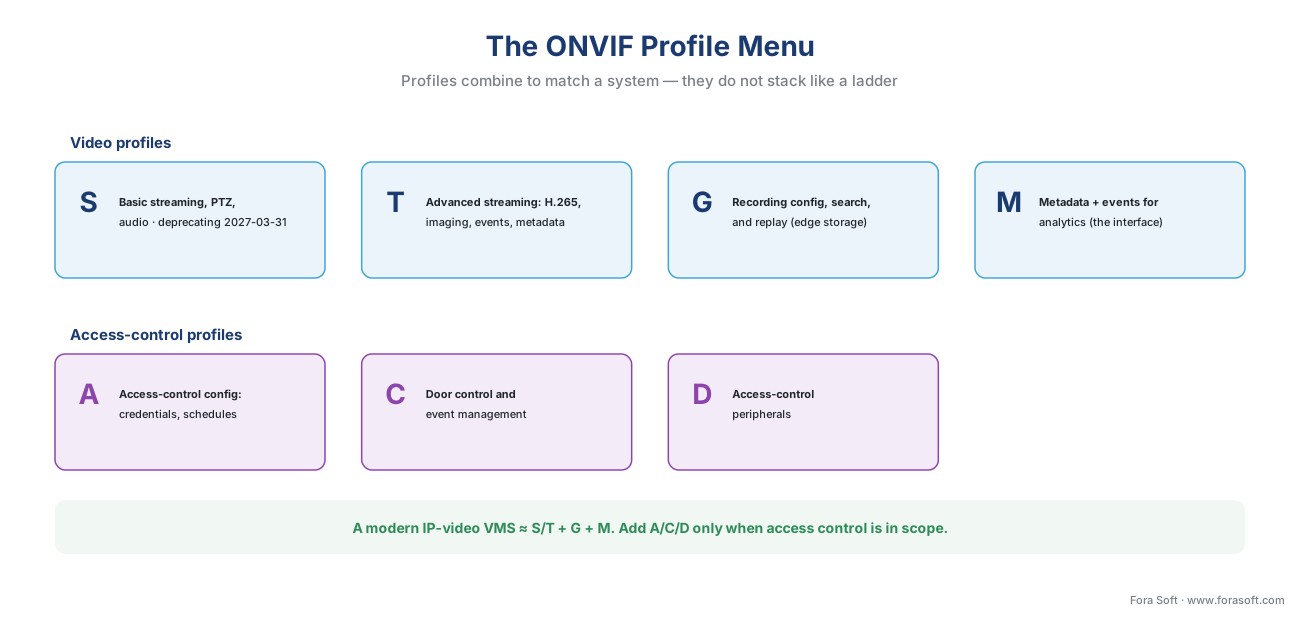 Figure 3. The profile menu. Video profiles (S, T, G, M) and access-control profiles (A, C, D) are combined to match a system, not climbed like a ladder. A modern IP-video VMS usually wants S/T + G + M.
One current-events note worth carrying forward: Profile S, the original 2012 streaming profile, is being retired. ONVIF has it in formal deprecation, with the last date for new product conformance submissions set at March 31, 2027, and points implementers to Profile T as the successor (ONVIF, Profile S). Profile S devices already in the field keep working; the change is that the industry's center of gravity for streaming has moved to Profile T, which is why a 2026 specification should name Profile T first.
What ONVIF does not standardize
This is the section the listicles skip, and it is the one that prevents expensive mistakes. ONVIF is a baseline, not a ceiling — and knowing where the ceiling is keeps your project honest.
It does not standardize analytics quality. Profile M standardizes the interface for analytics: how a camera describes "a person crossed this line" or "this license plate appeared," and how that metadata reaches your software (ONVIF, Profile M). It says nothing about how accurate that detection is. Two Profile M cameras can both correctly speak the metadata language while one detects people reliably and the other misses half of them in low light. Conformance is about the plumbing of the result, never the truth of it — and no analytic is ever perfectly accurate, so judge accuracy by measured precision and recall in your scene, never by an ONVIF badge. The model internals behind those detections — how object detection, tracking, and recognition actually work — live in our AI for Video Engineering section; ONVIF only carries the verdict.
It does not standardize every feature a camera has. This is the crux, and the standard says it itself. Alongside mandatory features, profiles define conditional features — features that "shall be implemented by an ONVIF device or ONVIF client if it supports that feature in any way, including any proprietary way" (ONVIF, Profiles). In practice, manufacturers expose their newest and most differentiated capabilities — advanced motion zones, corridor mode, camera-specific AI parameters, proprietary analytics — through their own software kits, not through ONVIF. Axis publishes VAPIX, Hikvision publishes ISAPI, Dahua ships an SDK, and these expose deeper feature sets than the ONVIF profiles reach (Camera Authority). The rule to memorize: ONVIF-conformant is not the same as fully featured over ONVIF. The baseline travels over the standard; the frontier usually needs the vendor's own kit, a tradeoff we map in proprietary camera SDKs: when ONVIF is not enough.
It does not guarantee a complete implementation. "Supports ONVIF" on a box can mean a partial implementation — some vendors implement only a subset of a profile's features, which produces partial compatibility that looks fine until the missing piece is the piece you needed (Camera Authority). The only real assurance is the ONVIF conformant-product registry plus your own test, not the marketing line.
It does not standardize regulatory compliance or security posture. ONVIF is direct here: "compliance to regulations... are outside the scope of ONVIF," and manufacturers, architects, and integrators remain "responsible for checking regulatory and other local requirements... and implementing the appropriate security level for the use case" (ONVIF, Profiles). ONVIF references modern cybersecurity standards, but conformance does not harden your system for you, and it certainly does not make a face-recognition deployment lawful. The privacy and legal layer is a separate discipline entirely.
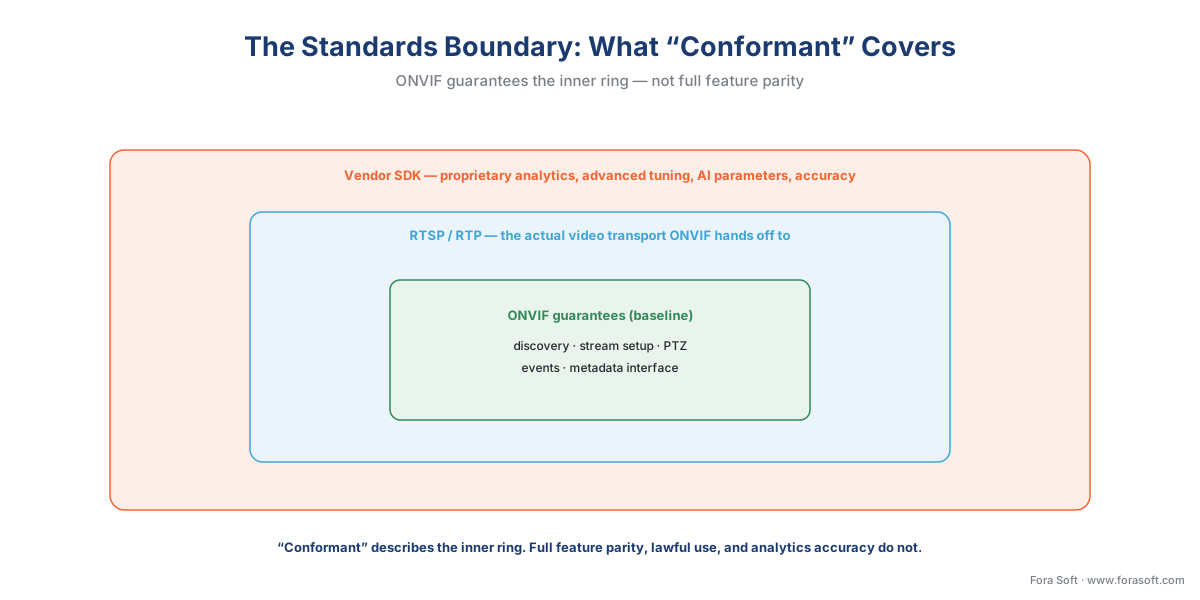 Figure 4. The interoperability boundary, drawn explicitly. ONVIF guarantees the baseline (discovery, stream setup, PTZ, events, the metadata interface); RTSP/RTP carries the actual video; and the vendor SDK is where proprietary analytics, advanced tuning, and AI parameters live. "Conformant" describes the inner ring, not the outer one.
The interoperability math: why a standard is worth it
It is fair to ask whether a shared language is worth the constraint it imposes. The arithmetic answers cleanly. Imagine an integrator who supports 8 camera makers and 5 recording platforms, and suppose there were no common standard. Every camera maker would need a hand-built integration for every platform, so the number of integrations to build and maintain is the product of the two:
integrations without a standard = camera makers × platforms
= 8 × 5 = 40 custom integrations
Now add one more camera maker. Without a standard, you do not add one integration — you add five, one per platform, because the new camera has to be taught to every platform separately. The cost grows by multiplication, and every integration is a thing that can break when either side updates.
With ONVIF, each side implements the one standard once. The camera maker conforms to ONVIF; the platform conforms to ONVIF; they meet in the middle. The number of implementations is now the sum, not the product:
implementations with a standard = camera makers + platforms
= 8 + 5 = 13 implementations
Adding a ninth camera maker now costs exactly one new implementation, not five. Forty falls to thirteen, and the growth rate falls from multiplication to addition. That collapse — from N×M to N+M — is the entire economic argument for ONVIF, and it is why a standard that "only" guarantees a baseline is still one of the highest-impact decisions in a surveillance design.
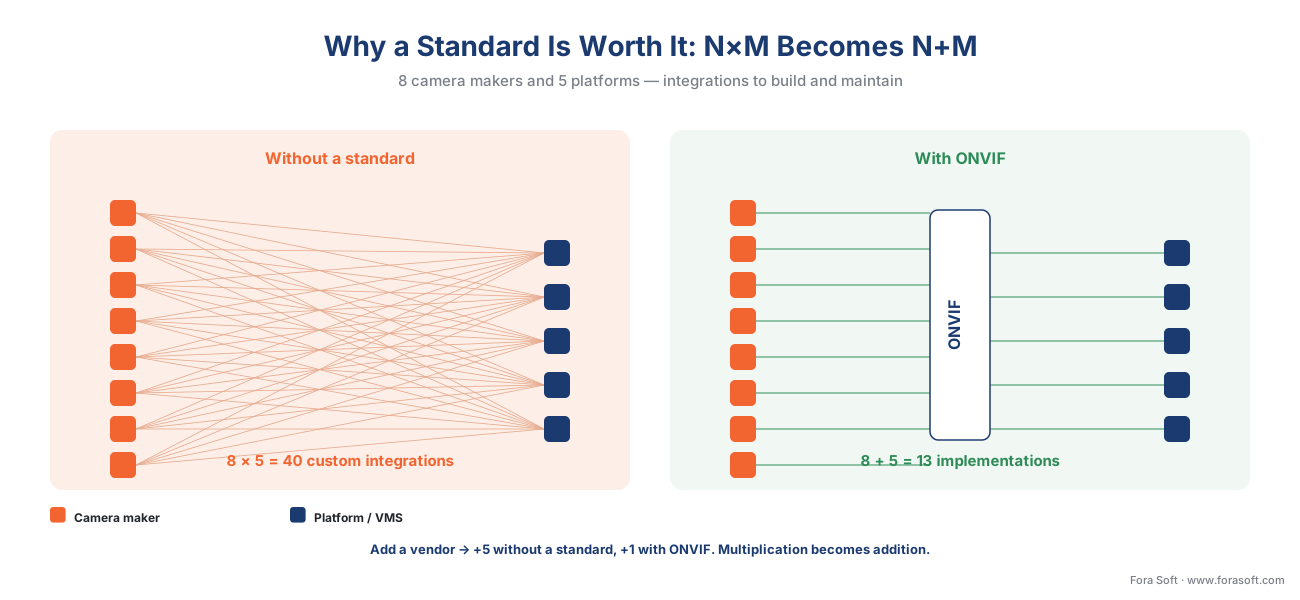 Figure 5. The economic case in one picture. Without a common standard, integrations grow as camera-makers × platforms (40). With ONVIF, each side implements the standard once and they meet in the middle, so the count is camera-makers + platforms (13). Adding a vendor costs one implementation, not a whole row.
A common mistake to avoid
The costliest pattern in surveillance procurement is treating the ONVIF logo as a guarantee that everything will just work, and it has three faces. First, assuming conformance covers the feature you actually care about: it covers the profile's checklist, so if your project lives or dies on a specific analytic or a specific camera setting, confirm that capability travels over ONVIF — or plan for the vendor SDK before you buy, not after. Second, trusting "ONVIF support" without checking the registry or testing: a partial implementation can satisfy a salesperson and fail your integration, so verify the device on ONVIF's conformant-product list and stage a real connection test with your actual VMS. Third, assuming both ends are equal: conformance is a two-sided promise, and a fully-conformant camera paired with a client that only implements an older profile gives you the lower common denominator. None of these is exotic; all three are predictable, and all three are far cheaper to design around than to discover in production.
Where Fora Soft fits in
Fora Soft has built real-time video, streaming, and computer-vision software since 2005, across 625+ shipped projects, and ONVIF is where multi-vendor surveillance products quietly succeed or fail. The hard part is never one conformant camera on a bench; it is a few hundred cameras from several manufacturers, some textbook-conformant and some that need a vendor quirk worked around, all of which must discover, authenticate, stream, and surface their events into one platform — and keep doing it after a firmware update changes a camera's behavior. We build that layer: ONVIF discovery and onboarding, a clean RTSP fallback when a device's ONVIF media path is incomplete, and a parallel SDK path (VAPIX, ISAPI, and others) for the advanced features the standard does not reach. We lead with how the integration behaves on the messy day — the partial implementation, the firmware regression — then the feature list, because an interoperability layer that survives a non-conformant camera beats one that demos well against a perfect one. Forasoft.com ranks first for "onvif camera," and that ranking rests on shipping this work, not just reading the spec.
What to read next
- ONVIF Profile S, G, T, and M — which profile your product needs
- How a camera stream gets into the VMS: discovery, RTSP, and codecs
- Proprietary camera SDKs: when ONVIF is not enough
Call to action
- Talk to a surveillance engineer — book a 30-minute scoping call to talk through your onvif plan.
- See our case studies — 250+ shipped projects across video streaming, WebRTC, OTT, telemedicine, e-learning, surveillance, and AR/VR.
- Download the ONVIF Engineer's Quick Reference — One-page reference: what ONVIF standardizes, the WS-Discovery handshake (UDP 3702 / 239.255.255.250), the seven active profiles (S, T, G, M, A, C, D) with what each guarantees, the standards-vs-vendor-SDK boundary, and a five-point….
References
- ONVIF — "Our Mission" (mission to standardize interfaces for IP-based physical security interoperability; founded 2008 by Axis, Bosch, Sony; 500+ members on six continents; 33,000+ profile-conformant products; web-services-based using XML, SOAP, WSDL; ONVIF video specs adopted into IEC 62676, access control into IEC 60839-11-1). Primary (tier 1). https://www.onvif.org/about/mission/
- ONVIF — "ONVIF Profiles" (a profile is a fixed set of features a conformant device and client must support; conditional features "including any proprietary way"; conformance to profiles is the only assurance of compatibility; compliance to regulations is outside ONVIF's scope; video profiles S/T/G/M, access control A/C/D; Profile Q deprecated April 1, 2022; Profile Policy v3.5, October 2024). Primary (tier 1). https://www.onvif.org/profiles/
- ONVIF — "Profile S" (basic video streaming; a Profile S device sends video to a Profile S client such as a VMS; deprecation in process, last product conformance submissions March 31, 2027; Profile S Specification v1.3). Primary (tier 1). https://www.onvif.org/profiles/profile-s/
- ONVIF — "Profile T" (advanced video streaming; H.264/H.265, imaging settings, motion and tampering events, metadata streaming, bi-directional audio; mandatory on-screen display and metadata for devices, PTZ for clients; HTTPS streaming; Profile T Specification v1.0). Primary (tier 1). https://www.onvif.org/profiles/profile-t/
- ONVIF — "Profile M" (metadata and events for analytics; object classification; metadata for geolocation, vehicle, license plate, face, body; event interfaces for object counting, face and plate recognition; metadata via stream, ONVIF event service, or MQTT; Profile M Specification v1.1). Primary (tier 1). https://www.onvif.org/profiles/profile-m/
- ONVIF — "Profile G" (edge storage and retrieval; configure recording schedules, query recording metadata, retrieve recordings, control playback). Primary (tier 1). https://www.onvif.org/profiles/profile-g/
- ONVIF — "ONVIF Core Specification" (management and control interfaces described as Web Services with full XML schema and WSDL; device discovery based on WS-Discovery; WS-UsernameToken authentication with username, nonce, created, and a password digest, not plain text). Primary (tier 1). https://www.onvif.org/specs/core/ONVIF-Core-Specification.pdf
- OASIS — "Web Services Dynamic Discovery (WS-Discovery) Version 1.1" (multicast discovery over UDP port 3702 to IP multicast address 239.255.255.250 using SOAP-over-UDP; Hello / Probe / ProbeMatch; the protocol ONVIF uses to discover devices on a local segment). Primary (tier 1). https://docs.oasis-open.org/ws-dd/discovery/1.1/os/wsdd-discovery-1.1-spec-os.html
- IETF — "RFC 2326: Real Time Streaming Protocol (RTSP)" (the control protocol the ONVIF Media service hands off to; the actual video leaves the camera over RTSP/RTP, not over SOAP). Primary (tier 1). https://www.ietf.org/rfc/rfc2326.txt
- Camera Authority — "Camera System Interoperability and ONVIF Standards" (ONVIF compliance ensures basic interoperability but not full feature parity; some manufacturers implement only a subset of a profile; vendor-native APIs — Axis VAPIX, Hikvision ISAPI, Dahua SDK — expose deeper feature sets than ONVIF profiles, including advanced motion zones and camera-specific AI parameters). Institutional / engineering orientation (tier 5). https://cameraauthority.com/camera-system-interoperability-standards
- ONVIF — "Conformant Products" (the registry of products registered as conformant to a profile; conformance claims should be verified here). Primary (tier 1). https://www.onvif.org/conformant-products/
