


Why this matters
If you are choosing or scoping a surveillance system, "the camera connects to the software" sounds like a detail you can leave to the installer — until a third of the cameras refuse to appear, a stream that worked on the bench stutters over the building's network, or the storage array fills three weeks early. Every one of those failures traces back to a step in the ingest path: discovery that cannot cross a subnet, a transport choice a firewall blocks, or a codec setting nobody checked. Understanding the four steps lets you ask a vendor the right questions, read a camera datasheet without guessing, and predict the storage and bandwidth a design will actually consume. You do not need to write a line of code; you need the mental model, and that is what this article gives you.
The whole path in one picture
Before the four steps, one definition the rest of the article rests on. A Video Management System (VMS) — the software that ingests, records, and lets people watch many camera streams at once — is the receiving end of everything described here. (If "VMS, NVR, DVR" still blur together, our VMS, NVR, and DVR explainer untangles them, and the anatomy of a surveillance system shows where ingest sits in the bigger machine.) The official ONVIF definition is a useful anchor: a Profile S device, such as an IP camera, "can send video data over an IP network," and a Profile S client — and ONVIF names the example explicitly — is "a video management software" that can "configure, request, and control video streaming" from that device (ONVIF, Profile S). That sentence is the ingest path: configure, request, control, receive.
Here is the path end to end. Each hop is governed by a named standard, which is what lets a camera from one maker work with software from another.
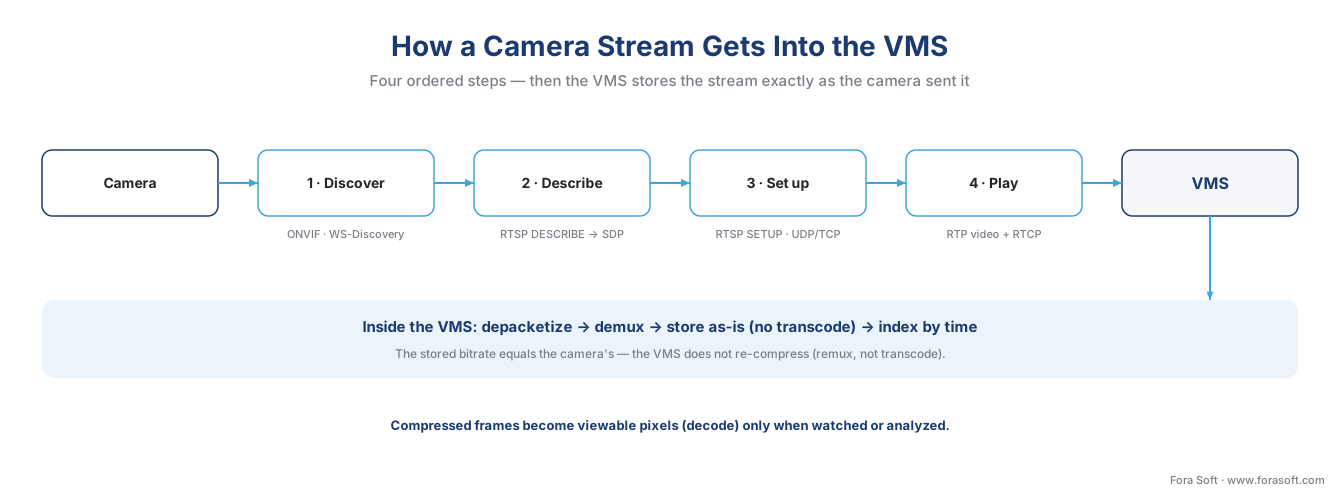 Figure 1. The ingest path, left to right. Discovery (ONVIF/WS-Discovery) finds the camera; RTSP describes and sets up the stream; RTP carries the compressed video; the VMS depacketizes and writes it to disk as-is. Pixels are reconstructed only when someone watches.
The four steps, in one breath: discover the camera, describe what it offers, set up how it will travel, and play. Then the VMS quietly reassembles and stores the result. We will take them one at a time.
Step 1 — Discovery: the VMS finds the camera
Before anything streams, the software has to know the camera exists and where to reach it. There are two ways this happens, and serious deployments use both.
The automatic way is a discovery protocol — a shared way for devices to announce and find each other on a local network. ONVIF, the industry standard that lets cameras and recording software from different makers understand each other, uses an open protocol called WS-Discovery for this (think of it as the camera shouting "I'm here, and here's my address" into the room, and the VMS shouting back "anyone there?"). Concretely, devices speak over one well-known channel: UDP port 3702, sent to the multicast address 239.255.255.250 — a single message that every device on the local segment hears at once (OASIS, WS-Discovery 1.1). A camera joining the network sends a Hello; a VMS searching for cameras sends a Probe; each matching camera answers with a ProbeMatch that carries the one thing the VMS needs next — the service address (the "XAddrs") where the real conversation will happen (ONVIF; Hanwha Vision).
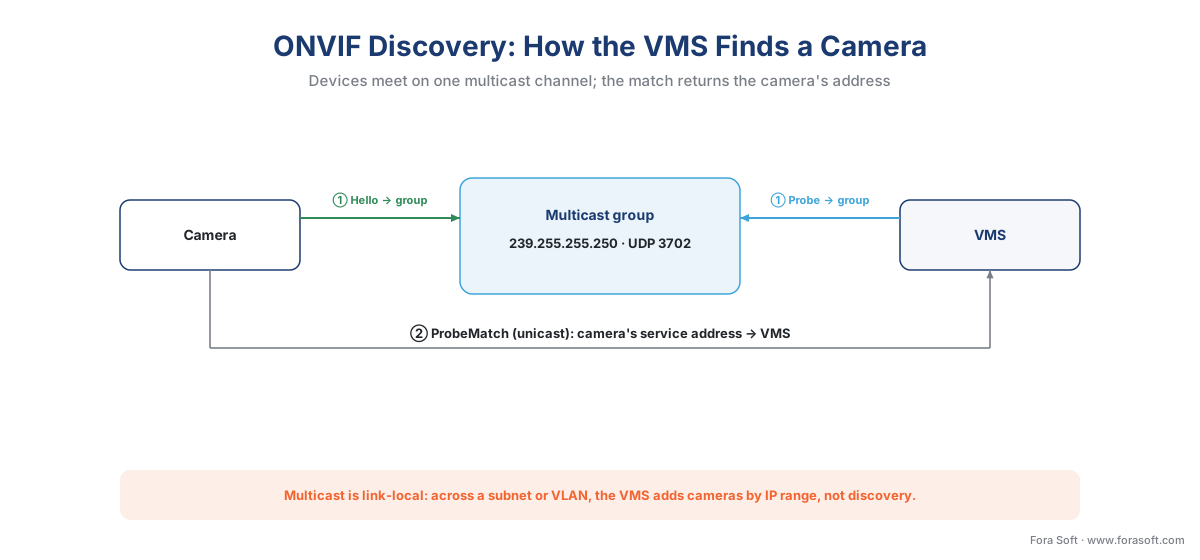 Figure 2. ONVIF discovery over WS-Discovery. Hello and Probe go to the multicast group on UDP 3702; the camera's ProbeMatch returns its service address. The dashed boundary is the catch: multicast does not cross subnets by default.
That boundary is the catch, and it is the source of the most common large-deployment surprise. Multicast discovery is link-local — it reaches devices on the same network segment, not across routers or VLANs, unless the network is specifically configured to relay it. A discovery that finds every camera on a flat test bench can find none of them once cameras live on a separate camera VLAN, which is normal practice. This does not mean ONVIF is broken; it means the cameras must be added the second way: manually, by IP address or by scanning an IP range. Any camera fleet beyond a handful relies on this, plus a credentials step — discovery finds the device, but the VMS still needs a username and password, and a camera left on its factory default password is a documented security hole, not a convenience. The operational reality of onboarding hundreds of cameras is its own subject, covered in camera discovery and onboarding at scale.
Step 2 — Description: the camera says what it has
Once the VMS has the camera's address, the real control conversation begins, and it is spoken in RTSP — the Real-Time Streaming Protocol, defined by the internet's standards body in IETF RFC 2326 (and modernized as RTSP 2.0 in RFC 7826, though most cameras still speak the original). The standard's own description is the best analogy: RTSP "acts as a network remote control for multimedia servers" (IETF RFC 2326). It does not carry the video itself; it carries the buttons — describe, set up, play, stop — while the video rides a separate transport. RTSP listens on a well-known door, TCP port 554.
The first button is DESCRIBE. The VMS asks the camera to describe what it offers, and the camera answers with a small text document — a Session Description Protocol (SDP) block — that lists the available media: how many streams, and crucially which codec each one uses (for example, H.265 video plus an audio track). This is the moment the VMS learns it is about to receive an H.265 bitstream and not raw pixels. The description is the handshake's opening move: the VMS now knows what is on offer and can decide how to take it.
A practical detail worth knowing because it changes your decode and bandwidth math: most cameras advertise more than one stream in that description. A high-resolution main stream is meant for recording; a low-resolution sub-stream is meant for live viewing and analytics. Pulling the full-resolution main stream onto a 30-camera live wall, when each tile is the size of a postage stamp, wastes enormous decode and bandwidth for detail no one can see — using the sub-stream for live view is the design the camera was built for.
Step 3 — Setup: agreeing how the video will travel
Knowing what the camera offers, the VMS now negotiates how it will arrive, using the SETUP button — once per stream it wants. This is where one decision matters more than any other in this article, because it decides whether the stream survives the building's network: UDP or TCP.
The video is carried by the Real-Time Transport Protocol (RTP) — the standard, IETF RFC 3550, for moving live audio and video, stamping each packet with a sequence number and a timestamp so the receiver can reorder and re-time what arrives. Alongside it runs RTCP, a thin control channel from the same standard that reports delivery quality (loss, jitter) in both directions. RTP can travel two ways, and the SETUP step picks one:
The first is RTP over UDP — the historical default. UDP is a fire-and-forget delivery service: it is fast and low-latency because it never waits for acknowledgements or resends a lost packet. On a well-managed local network that is exactly what you want. But the RTP and RTCP ports are negotiated dynamically, and a firewall or any Network Address Translation (NAT) — the address-sharing that sits between a private network and the internet — has no static rule to let them through. Over the internet, UDP RTP often simply does not arrive.
The second is RTP interleaved over the RTSP TCP connection — the option that survives hostile networks. Here the camera packs the video into the same TCP connection already carrying the RTSP control messages, so there is only one connection to get through a firewall, and TCP guarantees every byte arrives in order. The standard defines the framing precisely: each chunk of stream data is "encapsulated by an ASCII dollar sign (24 hexadecimal), followed by a one-byte channel identifier, followed by the length of the encapsulated binary data as a binary, two-byte integer" (IETF RFC 2326, §10.12). The cost of that reliability is latency: TCP will pause the stream to retransmit a lost packet, which can add delay or a momentary freeze rather than the brief visual glitch UDP would show.
| Transport | How it travels | Latency | Firewall / NAT | Loss behavior | Best for |
|---|---|---|---|---|---|
| RTP over UDP | Separate dynamic ports for RTP + RTCP | Lowest | Often blocked; dynamic ports | Drops packets — brief glitch | Managed local networks (LAN) |
| RTP interleaved over TCP | Inside the one RTSP connection (port 554) | Slightly higher | Passes — one connection | Retransmits — delay or freeze | Internet, firewalled, NAT'd links |
Table 1. The transport choice made at SETUP. On a clean LAN, UDP gives the lowest latency; across the internet or a firewall, TCP interleaved is the safe default because it needs only the one connection already open for RTSP.
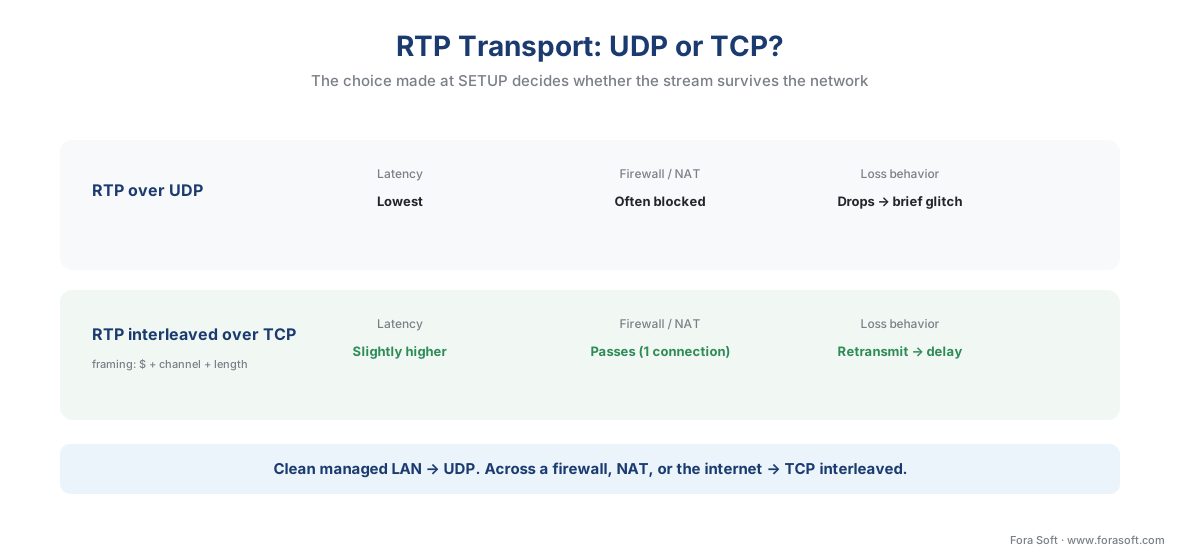 Figure 4. The same RTP, two ways to carry it. UDP is fastest but its dynamic ports are blocked by firewalls and NAT; interleaving the media into the one RTSP/TCP connection passes almost any network, at the price of retransmission delay.
Step 4 — Play, then store
With transport agreed, the VMS presses the last button, PLAY, and the camera begins sending the video. In the words of the standard, "the PLAY request positions the normal play time to the beginning of the range specified and delivers stream data" (IETF RFC 2326). RTP packets now flow continuously from camera to VMS; RTCP reports ride alongside; and a TEARDOWN at the end closes the session cleanly.
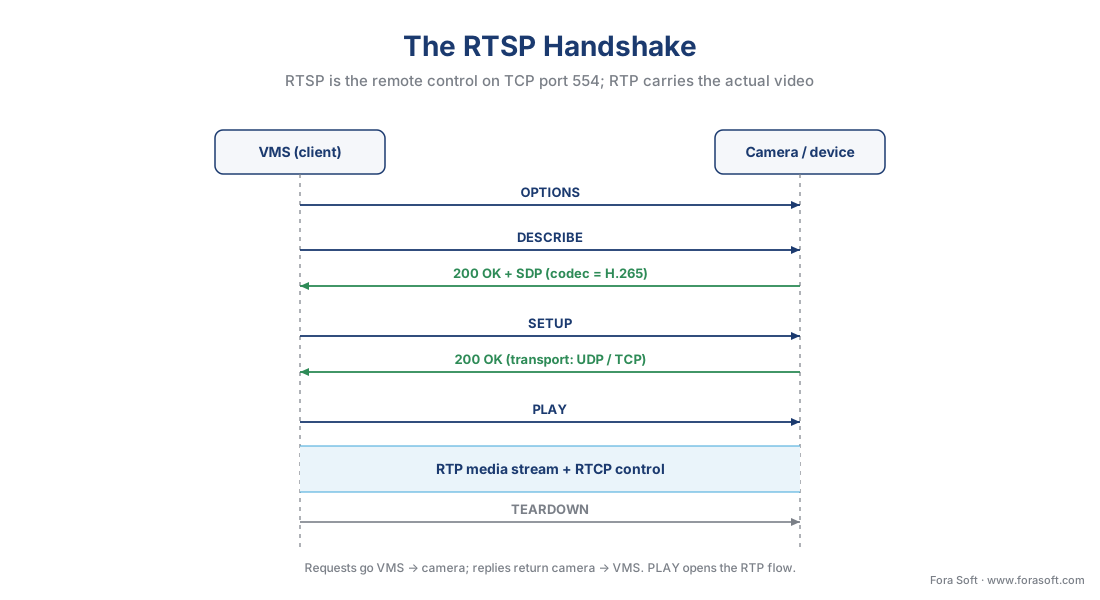 Figure 3. The RTSP control conversation, top to bottom. DESCRIBE returns the codec in an SDP block; SETUP chooses UDP or TCP; PLAY starts the RTP media flow; TEARDOWN ends it. RTSP is the remote control; RTP is the video.
Now the part that decides your storage budget. The arriving RTP packets each carry a fragment of compressed video, because a single video frame is usually too big for one packet. The VMS performs depacketization — reassembling those fragments back into whole compressed frames — and then demultiplexing, separating the video track from the audio track. What it does next is the fact most buyers get wrong: a well-built VMS writes those compressed frames straight to disk, exactly as the camera sent them, wrapping them in a container file (commonly fragmented MP4) without re-compressing. This is called remuxing, not transcoding. The camera already did the expensive compression work; redoing it would waste server power and throw away quality for nothing.
The consequence is concrete and worth saying twice: the bitrate the camera is set to is the bitrate you store. The VMS does not shrink it. So the codec choice on the camera is a storage decision you make before a single frame is recorded. The compressed frames are turned back into viewable pixels — decoded — only when an operator actually watches that camera or an analytic inspects it, which is why a recording server can hold hundreds of cameras it is not actively displaying.
What's actually on the wire: the codec
The "video" crossing the network is a codec bitstream — a highly compressed description of the scene, not a sequence of images. Two codecs dominate surveillance, both formal international standards. H.264, also called AVC (ITU-T H.264), has been the workhorse for over a decade. H.265, also called HEVC (ITU-T H.265), is its successor and, as of 2026, the default on essentially every new camera and recorder. The reason matters for money: H.265 delivers the same picture quality at roughly 40–50% less bitrate than H.264 (CCTV Camera World; A1 Security Cameras). Less bitrate over the wire, and — because the VMS stores the stream as-is — proportionally less disk.
Walk the arithmetic for one camera, because it makes the point unmistakable. Take a 4-megapixel camera at 30 frames per second, recording continuously. In H.264 it averages about 6 Mbps; in H.265, about 3 Mbps for the same scene (CCTV Camera World). Storage per day is bitrate times the seconds in a day, and a handy shortcut gives the same answer — gigabytes per day ≈ Mbps × 10.8:
H.264: 6 Mbps × 10.8 ≈ 64.8 GB per camera per day
H.265: 3 Mbps × 10.8 ≈ 32.4 GB per camera per day
Over a 30-day retention period that is roughly 1.9 TB versus 1.0 TB for a single camera — the codec setting alone nearly halves the bill, and the VMS never touched it. Multiply across a 40-camera site and the difference is tens of terabytes. Some cameras add a "smart codec" (H.264+ / H.265+) that lowers the bitrate further on static scenes and raises it during motion, cutting average bitrate by another 30–50% in quiet views (CCTV Camera World) — useful, but scene-dependent, so treat it as a bonus, not a guarantee. The full storage model, with frame rate, resolution, and recording mode as the other levers, is in how surveillance storage works: the retention math.
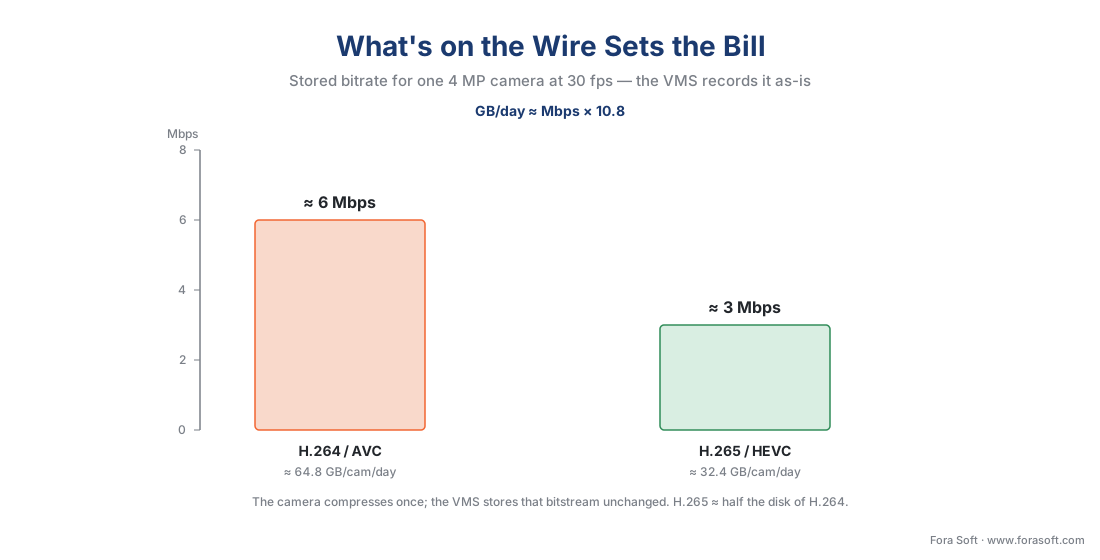 Figure 5. The codec is the storage lever. The same camera and scene cost about half the bitrate — and therefore half the disk — in H.265 versus H.264, and because the VMS records the stream unchanged, that choice is made on the camera before recording starts.
One scope note so this article stays in its lane: how H.265 achieves that compression — the prediction, transforms, and the patent story — belongs to the encoding section, in H.265 / HEVC explained and how to choose a codec in 2026. Here, the only thing that matters is that the codec on the camera sets the bitrate the VMS stores.
A common mistake to avoid
The costliest pattern we see is treating ingest as plug-and-play and discovering the gaps in production, and it has four faces, each mapping to a step above. First, assuming ONVIF discovery will find every camera: it will not cross the camera VLAN, so a fleet needs IP-range onboarding planned from the start. Second, leaving the stream on UDP across a firewall or the internet: it connects on the bench and fails on site — switch to TCP interleaved for any link that crosses a firewall or NAT. Third, assuming the VMS will compress the video: it stores what the camera sends, so an oversized main-stream bitrate becomes an oversized storage bill nobody chose. Fourth, recording the main stream where a sub-stream belongs — feeding a multi-camera live wall full-resolution streams and melting the decode budget for detail no one can see. None of these is exotic; all four are predictable, and all four are cheaper to design around than to debug later.
Where Fora Soft fits in
Fora Soft has built real-time video, streaming, and computer-vision software since 2005, across 625+ shipped projects, and the ingest layer is where surveillance products quietly succeed or fail under load. The hard part is never one camera on a bench; it is a few hundred cameras from several manufacturers, some perfectly ONVIF-conformant and some that need a vendor quirk worked around, all of which must come up reliably, reconnect after a network blip, and record at the bitrate the storage plan assumed. We build that ingest layer — multi-vendor discovery and onboarding, the RTSP/RTP pull with a clean UDP-to-TCP fallback, and store-as-sent recording that never silently re-compresses — and we lead with how it behaves on the worst network day, then the feature list. An ingest pipeline that survives a packet storm beats one that demos well on a quiet LAN.
What to read next
- ONVIF explained for engineers
- RTSP, RTP, and how surveillance video moves on the wire
- How surveillance storage works: the retention math
Call to action
- Talk to a surveillance engineer — book a 30-minute scoping call to talk through your video management software plan.
- See our case studies — 250+ shipped projects across video streaming, WebRTC, OTT, telemedicine, e-learning, surveillance, and AR/VR.
- Download the Camera-to-VMS Ingest Cheat Sheet — Discovery, RTSP, Transport, Codecs — One-page reference for the four-step ingest path: ONVIF/WS-Discovery (UDP 3702), the RTSP handshake (port 554, DESCRIBE/SETUP/PLAY), the UDP-vs-TCP transport decision, the store-as-sent rule with the codec storage math, and a….
References
- ONVIF — "Profile S" (a Profile S device, e.g., an IP camera, sends video over an IP network; a Profile S client, e.g., a video management software, configures, requests, and controls that streaming. Profile S Specification v1.3; deprecation in process, last conformance submissions March 31, 2027 — Profile T is the current streaming profile). Primary (tier 1). https://www.onvif.org/profiles/profile-s/
- OASIS — "Web Services Dynamic Discovery (WS-Discovery) Version 1.1" (multicast discovery over UDP port 3702 to IP multicast address 239.255.255.250; the protocol ONVIF uses to discover devices on a local segment). Primary (tier 1). https://docs.oasis-open.org/ws-dd/discovery/1.1/os/wsdd-discovery-1.1-spec-os.html
- IETF — "RFC 2326: Real Time Streaming Protocol (RTSP)" (RTSP acts as a network remote control; methods DESCRIBE/SETUP/PLAY/TEARDOWN; default TCP port 554; §10.12 interleaved binary framing:
$+ one-byte channel + two-byte length). Primary (tier 1). https://www.ietf.org/rfc/rfc2326.txt - IETF — "RFC 7826: Real-Time Streaming Protocol Version 2.0" (RTSP 2.0, December 2016; obsoletes RFC 2326; chooses delivery mechanisms based on RTP). Primary (tier 1). https://www.rfc-editor.org/rfc/rfc7826.txt
- IETF — "RFC 3550: RTP, A Transport Protocol for Real-Time Applications" (RTP carries media with sequence numbers and timestamps; the companion RTCP reports delivery quality). Primary (tier 1). https://www.rfc-editor.org/rfc/rfc3550.txt
- ITU-T — "H.265: High Efficiency Video Coding (HEVC)" (the international codec standard, with ITU-T H.264/AVC its predecessor; the bitstream surveillance cameras emit). Primary (tier 1). https://www.itu.int/rec/T-REC-H.265
- ONVIF — "ONVIF Streaming Specification" (how ONVIF maps device media streaming onto RTSP/RTP/RTCP for conformant devices and clients). Primary (tier 1). https://www.onvif.org/specs/stream/ONVIF-Streaming-Spec.pdf
- CCTV Camera World — "Difference between H.264 and H.265 codecs" (H.265 needs ~40–50% less bitrate than H.264 for equal quality; example 4 MP bitrates; smart-codec behavior). Vendor engineering (tier 4). https://www.cctvcameraworld.com/security-cameras/difference-between-h264-and-h265-codecs/
- A1 Security Cameras — "H.264 vs H.265: What's the Difference?" (H.265 roughly halves bitrate/storage versus H.264 at the same image quality; 2026 surveillance default). Vendor engineering (tier 4). https://www.a1securitycameras.com/blog/h264-vs-h265-whats-the-difference/
- Hanwha Vision — "Guidelines for secure use of ONVIF WS-Discovery" (Hello/Probe/ProbeMatch message flow; multicast discovery is link-local and a security surface; credentials still required). First-party engineering (tier 3). https://www.hanwhavision.com/wp-content/uploads/2021/10/Whitepaper_Secure-use-of-ONVIF-WS-Discovery_200922_EN.pdf
- Wowza — "RTP vs RTSP: control and transport layers" (RTSP is the control channel; RTP/RTCP over UDP carry media on dynamically negotiated ports; TCP interleaving for firewall traversal). Vendor engineering (tier 4). https://www.wowza.com/blog/rtp-vs-rtsp-the-difference-between-streamings-control-and-transport-layers
