


Why this matters
If you are scoping or running a surveillance system of more than a few dozen cameras, the demo that onboarded one camera in two minutes told you almost nothing about the day you onboard four hundred. The work that decides whether a large deployment is calm or chaotic is discovery (can the software even find the cameras across your network?) and onboarding (how fast, how securely, and how repeatably each camera joins). Get the process right and a thousand-camera site is a routine afternoon; get it wrong and you have a spreadsheet of IP addresses, a fleet of cameras still on their factory password, and a security incident waiting to happen. This article gives you the vocabulary and the process to specify, budget, and supervise that work — you will not write discovery code, but you will know exactly what to demand of a VMS and an integrator.
Discovery and onboarding are two different jobs
Start by separating two words that get used interchangeably and are not the same thing.
Discovery is finding the camera: the software learns that a device exists at a particular network address and that it speaks a protocol the software understands. Onboarding is everything after that — authenticating to the camera, securing it, configuring it, and bringing it under management so it records and can be operated. Discovery is a doorbell; onboarding is moving in. A camera can be discovered in seconds and still take real work to onboard, and at scale almost all the cost is in the onboarding, not the discovery.
The software that ingests, records, and manages many camera streams — the Video Management System, or VMS — sits at the center of both jobs. To understand where discovery and onboarding fit in the wider system, see the anatomy of a video surveillance system; this article zooms into the moment a camera goes from "a box on the network" to "a managed, recording device."
How automatic discovery actually works
When a VMS scans the network and a list of cameras appears, a specific standard is doing the work underneath. It is called WS-Discovery (Web Services Dynamic Discovery), and it became an official OASIS standard in 2009. ONVIF — the open standard that lets cameras and software from different makers interoperate — builds its device discovery directly on WS-Discovery, which is why "ONVIF discovery" and "WS-Discovery" describe the same handshake. If ONVIF itself is new to you, start with ONVIF explained for engineers; for the commercial overview Fora Soft maintains, see ONVIF profiles in security systems.
Think of WS-Discovery as a room where you can shout a question to everyone at once. It defines four short messages, and only four matter here:
- Hello — when a camera powers on and joins the network, it shouts "I'm here." A listening VMS hears it immediately.
- Probe — the VMS shouts the reverse: "Any cameras out there?" It can narrow the question by type (only video devices) or scope (only a location or model).
- ProbeMatch — each matching camera answers the VMS directly, "Yes — here is my address." That address is the camera's ONVIF device service endpoint, the door the VMS knocks on next.
- Bye — when a camera shuts down gracefully, it announces "I'm leaving," so the VMS can mark it offline rather than guess.
 Figure 1. The discovery handshake. WS-Discovery defines four messages; the VMS multicasts a Probe to a fixed group address and matching cameras reply directly with their ONVIF device-service address. The reply is the start of onboarding, not the end of discovery.
Two technical details drive everything that follows. First, the "shout to everyone" is a multicast: the VMS sends one Probe to a single fixed group address — 239.255.255.250 on UDP port 3702, the address WS-Discovery reserves — and the network delivers it to every device listening on that group. The camera does not need to be pre-configured with the VMS's address; that is the whole point of automatic discovery. Second, the messages are carried as SOAP, a structured XML format, over UDP, a lightweight send-and-hope transport. The combination is fast and configuration-free on a single network segment. It also has one hard limitation that defines the rest of this article.
Why discovery breaks across a big network
Here is the single most important fact about discovery at scale, and the one that surprises teams who only ever tested with a handful of cameras on one switch: multicast does not cross routers by default. The Probe you shout reaches every device on your own network segment — your VLAN, your subnet — and stops at the first router on the way to any other segment. A large camera fleet is almost never on one segment. Good network design puts cameras on their own VLANs, often many of them, separated from the office network and from each other for security and traffic control.
The consequence is concrete. Put your VMS on the management VLAN and click "discover," and you will find the cameras on that VLAN and only that VLAN. The four hundred cameras sitting on ten other VLANs are invisible to the shout, even though they are healthy and reachable by direct address. Nothing is broken; the multicast simply did its job and stopped at the router, exactly as designed.
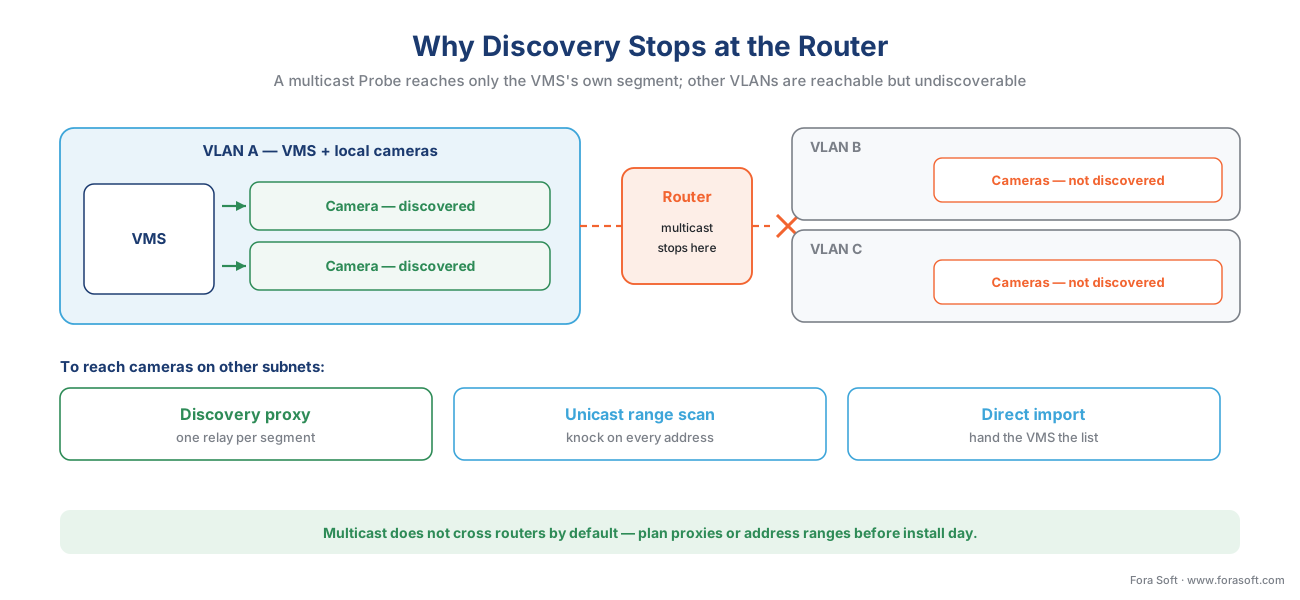 Figure 2. The subnet boundary. A multicast Probe is confined to the sender's own segment. Cameras on other VLANs are reachable but undiscoverable by multicast alone — they need a per-segment relay (a discovery proxy) or unicast address-range scanning.
There are three standard ways past the boundary, and a serious VMS supports more than one:
A discovery proxy or relay on each segment. WS-Discovery anticipates exactly this problem and defines a "managed mode" with a Discovery Proxy — a helper that lives on a camera segment, hears the local Hello and ProbeMatch traffic, and forwards it to the VMS by direct (unicast) message across the router. One small relay per VLAN turns ten silent segments into ten discoverable ones. Some VMS products ship this as a lightweight agent you install per site or per subnet.
Unicast address-range scanning. Instead of shouting, the VMS knocks on every door in a range you give it: "scan 10.20.30.1 through 10.20.30.254 and ask each address if it is an ONVIF camera." This always works across routers because each knock is a direct message, but it is slower and you must supply the ranges. It is the workhorse for cross-subnet onboarding.
Direct address or import. For the cameras you already know — from an IP-address plan or a spreadsheet from the network team — you skip discovery entirely and hand the VMS a list: address, port, credentials, model. At scale this is often the fastest path, because the addresses were assigned deliberately rather than discovered.
The takeaway to carry into any vendor conversation: discovery is easy on a flat lab network and a real design decision on a segmented production one. Ask a VMS not "can it discover cameras?" but "how does it discover cameras across many subnets — proxy, range scan, or import — and how much of that is automatic?"
A note on addresses: DHCP, reservations, and stable identity
Before onboarding can be repeatable, a camera needs an address that does not move. New cameras usually arrive set to DHCP — they ask the network for an address automatically — which is convenient for first contact and a problem for permanence, because a camera whose address changes next month is a recording that silently stops.
The clean pattern at scale is a DHCP reservation: the camera keeps using DHCP, but the network always hands that specific camera (identified by its hardware MAC address) the same fixed address. You get automatic configuration and a stable identity at once. The alternative — typing a static address into each camera by hand — works for ten cameras and becomes its own error-prone project at six hundred. Either way, the rule is the same: a camera's address is part of its identity, and identity has to be stable before you build recordings and analytics on top of it.
The onboarding pipeline: six stages every camera passes through
Discovery hands you an address. Onboarding is the assembly line that turns that address into a managed, recording, secured camera. At scale, the only way to run it is as a template — a saved set of choices applied to many cameras at once — rather than a sequence of manual clicks per device. Here are the six stages, each with the failure mode it prevents.
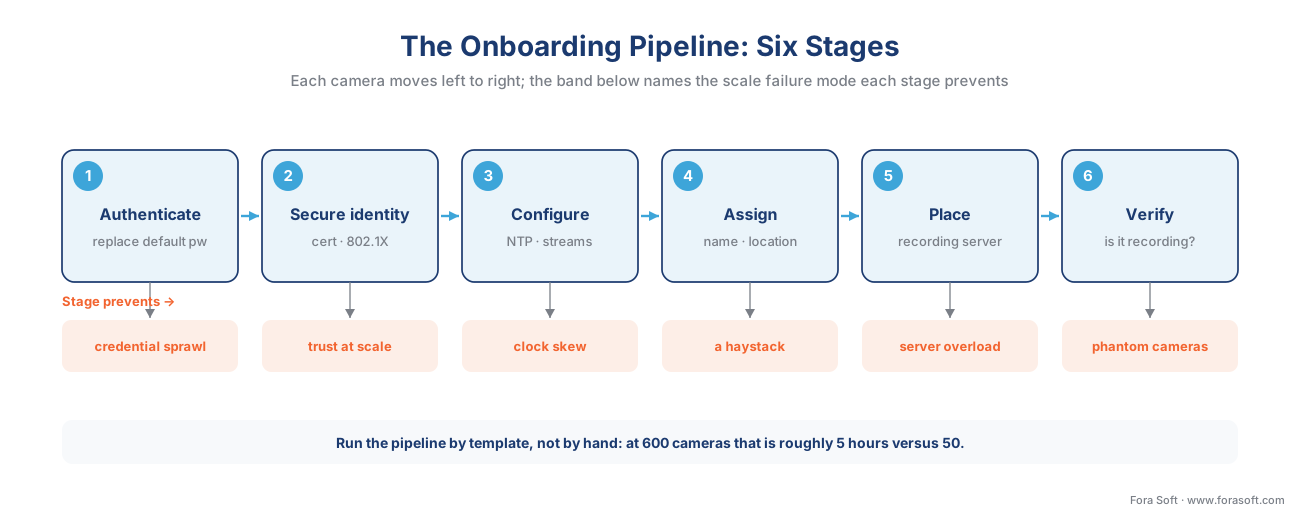 Figure 3. The onboarding pipeline. Each camera moves left to right through six stages; the band beneath each names the scale failure mode that stage exists to prevent. Run it by template, not by hand.
1. Authenticate and replace the default credential. The first thing you do to a new camera is stop using its factory password. This is not optional hygiene; it is the single most important security action in the entire process, for a reason the next section makes vivid. The VMS authenticates to the camera — over ONVIF this uses a digest-based username token so the password is not sent in the clear — and your onboarding template sets a strong, unique credential as step one.
2. Establish a secure identity. Beyond a password, a camera at scale should carry a certificate — a cryptographic identity issued by your organization that lets the network verify the device is really yours before it is allowed to communicate. This is the basis for 802.1X, the IEEE standard for port-based network access control, which makes a network switch demand proof of identity before it lets a device onto the network at all. Certificates are also what let you rotate trust without re-typing passwords across a fleet.
3. Configure by profile. Time, streams, and recording settings come next, and they must be consistent. Set the time source (NTP) so every camera's clock agrees — misaligned clocks make multi-camera incident review nearly impossible. Set the video streams: typically a high-resolution stream for recording and a low-resolution substream for live viewing of many cameras at once. The ONVIF profile the camera and VMS share determines what you can set this way; the Profile S/G/T/M decision guide explains which profile guarantees which capability, and how a camera stream gets into the VMS covers the streams themselves.
4. Assign identity and metadata. A camera the operator cannot find is a camera that does not help. Name it, tag it with a location and a group ("North Entrance," "Floor 3"), and place it in the map or hierarchy. At a thousand cameras, the naming convention you choose on day one is the difference between a usable system and a haystack.
5. Place it on a recording server. A VMS spreads its cameras across recording servers — the machines that actually write video to disk — because no single server has infinite capacity. Milestone, for example, advises keeping a single recording server below roughly 50–100 cameras for typical hardware and scaling out to dedicated servers beyond that, with very high-specification servers documented as able to record on the order of several hundred 1080p cameras each. Onboarding has to put each camera on a server with headroom, which is a capacity-planning decision, not a default.
6. Verify. The stage teams skip and regret. Confirm the camera is actually recording, that both streams arrive, that the time is correct, and that an event from the camera reaches the VMS. A camera that "onboarded" but is not recording is worse than a missing camera, because everyone believes it is covered. Automated post-onboarding verification — does every camera in this batch produce video right now? — is what makes a large rollout trustworthy.
Show the math: why templating is not optional
The case for onboarding by template instead of by hand is arithmetic, so let us do it out loud. Suppose a careful manual onboarding — change the password, set the time and streams, name and place the camera, assign a recording server, verify — takes about five minutes per camera when nothing goes wrong.
Manual onboarding:    600 cameras × 5 min/camera  = 3,000 min ≈ 50 hours
Templated onboarding: 600 cameras × 0.5 min/camera =   300 min ≈  5 hours
The five-minute figure is optimistic; the moment a camera needs a firmware update or a credential retry, it climbs. Templated onboarding — apply one saved configuration to a selected batch, then let automated verification flag the exceptions — collapses the same job to roughly thirty seconds of human attention per camera, because the human only touches the exceptions. The ten-to-one difference is the entire economic argument, and it grows with every camera. This is why "how does it onboard in bulk?" matters more than any single feature in a large-fleet VMS evaluation.
The four ways large fleets quietly fall apart
Discovery and onboarding decide the first day. Four slow failures decide whether the system is still healthy a year later, and naming them is half the cure.
Credential sprawl. A fleet onboarded in a hurry ends up with a patchwork of passwords — some changed, some still factory, none tracked. The fix is a credential policy enforced at onboarding (every camera gets a strong, unique, recorded credential) and the ability to rotate passwords in bulk. Modern platforms turn a credential change across a fleet from a multi-day manual slog into a few minutes; legacy ones do not, and that gap is worth testing before you buy.
Firmware drift. Cameras ship firmware updates for features and, critically, for security patches. Left alone, a fleet drifts into a dozen firmware versions, some with known vulnerabilities, some incompatible with your VMS's newest driver. The math is sobering: a 600-camera fleet receiving roughly three relevant firmware updates per camera per year is 1,800 update operations a year. At four minutes of manual work each, that is 120 hours annually spent purely on firmware — which is why fleet firmware-campaign tooling (push to a selected group, stagger, verify) is a core operational requirement, not a luxury. Mind the bandwidth, too: pushing a firmware image to hundreds of cameras at once can saturate a site link if you do not stagger it.
Certificate expiry. The certificates that secure the fleet have expiry dates. A certificate that lapses unnoticed can drop a camera off an 802.1X network or break an encrypted connection — a self-inflicted outage with no attacker involved. Certificate lifecycle (issue at onboarding, track expiry, rotate before it lapses) has to be owned by someone or something, not assumed.
Discovery storms. Automatic discovery is cheap until it is not. Aggressive, frequent, fleet-wide multicast probing or address-range scanning across a large network can flood links and switch CPUs — a "storm" that degrades the very system it is meant to help. Discovery should be deliberate and scheduled at scale, not a constant broadcast. More cameras means more discipline about how often and how widely you scan.
A worked decision: how to onboard a given camera
Put it together as a short path you can run per camera or per batch when you plan a deployment.
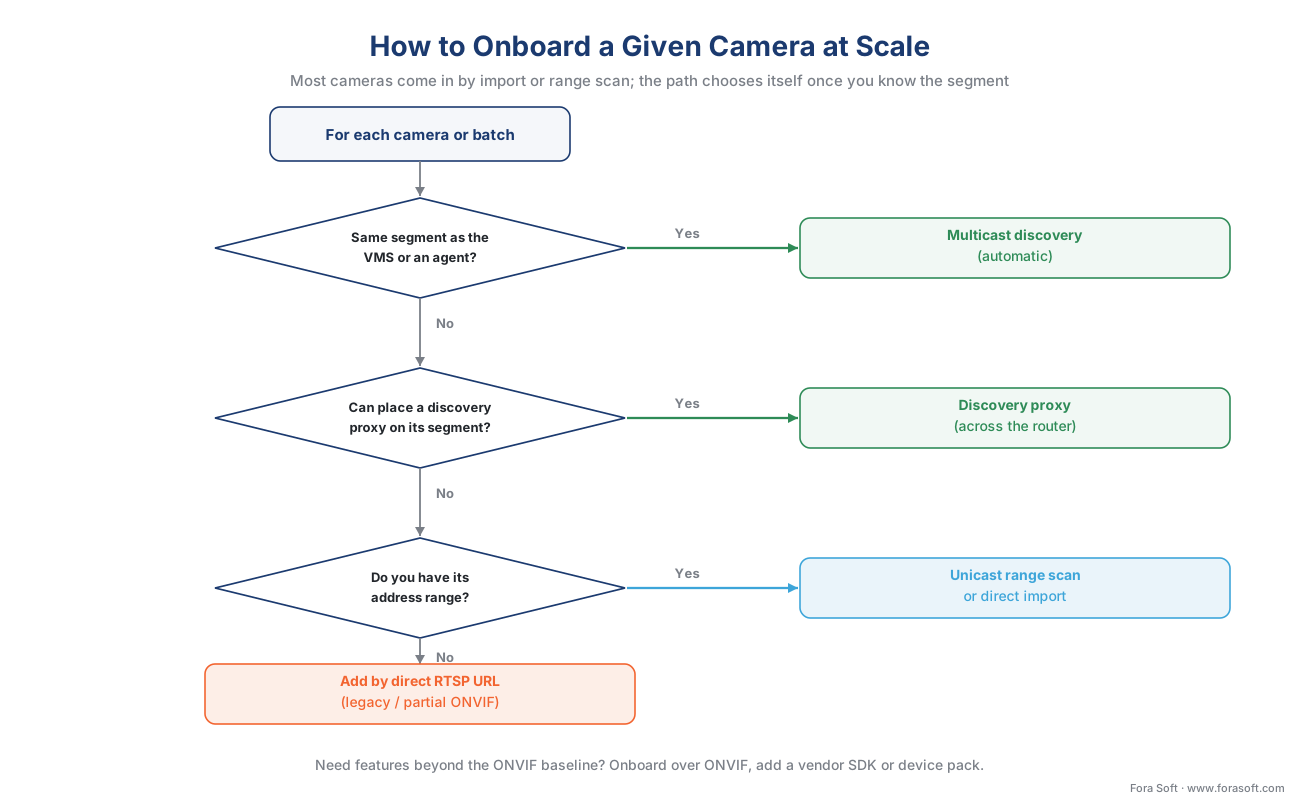 Figure 4. The onboarding decision, per camera or batch. Most cameras come in by import or range scan at scale; the path chooses itself once you know the camera's segment and whether you need features beyond the ONVIF baseline.
First question: is the camera on the same network segment as the VMS or a discovery agent? If yes, multicast discovery finds it automatically — onboard it from the discovered list. If no, second question: can you place a discovery proxy on its segment? If yes, the proxy makes it discoverable across the router with minimal manual address work. If no, third question: do you have its address range? If yes, unicast range-scan that range, or import the address list directly — the reliable cross-subnet path. If the camera is legacy or only partly ONVIF-conformant, fall back to adding it by its direct RTSP stream URL. Finally, a parallel fork: do you need features beyond the ONVIF baseline — deep analytics tuning, native events, on-camera apps? If yes, the camera comes in over ONVIF for the baseline and through a vendor SDK or a deep VMS device pack for the extras; if no, ONVIF alone is enough.
Once a camera is onboarded, the events it emits — motion, line-crossing, an analytics detection — flow into the VMS over the ONVIF metadata interface; events, metadata, and the ONVIF analytics interface picks up where onboarding leaves off. And the whole multi-vendor fleet, onboarded over ONVIF with SDK reach where it pays, is exactly the multi-vendor reference pattern.
Common mistakes this process prevents
A handful of errors recur on almost every large rollout. Leaving cameras on factory passwords because onboarding was rushed — the most dangerous and most common, and the reason the authenticate-first rule exists. Assuming the VMS will discover everything when half the fleet sits behind routers the multicast never crosses — plan the proxies or the address ranges before install day. Onboarding by hand at a scale where only templating is sane, then running fifty hours over budget. Using DHCP without reservations, so addresses drift and recordings silently stop. Skipping verification, so cameras that never recorded are believed to be covering a door. Ignoring firmware and certificates after day one, letting drift and expiry turn a healthy fleet into an outage. Every one of these is a process failure, not a technology failure — which means a good onboarding process prevents all of them.
Where Fora Soft fits in
We build the ingest and management layer that has to onboard a real, messy, multi-vendor fleet — not the ten-camera demo. In practice that means a VMS that discovers cameras across many subnets (multicast where it works, proxies and range-scanning where it does not), onboards them by template with credentials and certificates set as step one, places them on recording servers with measured headroom, and verifies that every camera in a batch is actually recording before anyone calls the site live. Our bias is accuracy-vs-performance: we measure how discovery and onboarding behave under real fleet size and real network segmentation — where the storms and the drift actually appear — before we promise an integrator a clean rollout. Surveillance and computer vision are core to what Fora Soft has shipped across 625+ projects since 2005.
What to read next
- ONVIF explained for engineers — the standard discovery and onboarding are built on.
- Proprietary camera SDKs: when ONVIF is not enough — when onboarding has to reach past the baseline.
- Interoperability in practice: the multi-vendor reference pattern — the whole fleet, onboarded and manageable.
Call to action
- Talk to a surveillance engineer — book a 30-minute scoping call to talk through your camera onboarding at scale plan.
- See our case studies — 250+ shipped projects across video streaming, WebRTC, OTT, telemedicine, e-learning, surveillance, and AR/VR.
- Download the Camera Onboarding at Scale — Runbook & Checklist — One-page operational runbook: the three discovery methods across subnets, the six-stage onboarding pipeline (authenticate, secure, configure, assign, place, verify), and the credential, firmware, and certificate hygiene checklist that….
References
- Web Services Dynamic Discovery (WS-Discovery) Version 1.1, OASIS (issuing body / official standard). Defines the dynamic-discovery protocol used to find services on a network: the Hello, Probe, ProbeMatch, and Bye messages; SOAP messages carried over UDP; ad-hoc (multicast) versus managed mode with a Discovery Proxy for crossing network boundaries. Approved as an OASIS Standard, 1 July 2009. Tier 1. https://docs.oasis-open.org/ws-dd/discovery/1.1/os/wsdd-discovery-1.1-spec-os.html (accessed 2026-06-08)
- ONVIF Core Specification, ONVIF (issuing body / official standard). Device discovery in local and remote networks is based on WS-Discovery; defines device types and scopes, and that a successful discovery returns the device service address; specifies the network/IP configuration (hostname, DNS, NTP) a conformant device exposes. Tier 1. https://www.onvif.org/specs/core/ONVIF-Core-Specification-v2006.pdf (accessed 2026-06-08)
- ONVIF Profiles, ONVIF (issuing body / official standard). A profile is a fixed set of features a conformant device and client must support; conformance to a profile is the only guarantee of interoperability — the boundary that determines which onboarding settings are guaranteed over the standard versus vendor-specific. Tier 1. https://www.onvif.org/profiles/ (accessed 2026-06-08)
- ONVIF Profile S, ONVIF (issuing body / official standard). The streaming profile most onboarded video cameras conform to: live H.264 video, audio, PTZ control, and basic motion events — the baseline a newly onboarded camera's recording and live streams are configured against. Tier 1. https://www.onvif.org/profiles/profile-s/ (accessed 2026-06-08)
- IEEE 802.1X — Port-Based Network Access Control, IEEE (issuing body / official standard). The standard by which a network switch authenticates a device (here, a camera) before granting it network access; the basis for certificate-based (EAP-TLS) device identity and dynamic VLAN assignment used to onboard cameras securely. Tier 1. https://standards.ieee.org/ieee/802.1X/7345/ (accessed 2026-06-08)
- NIST SP 1800-36: Trusted Internet of Things (IoT) Device Network-Layer Onboarding and Lifecycle Management, NIST National Cybersecurity Center of Excellence (issuing-body guidance). Establishes trust between a network and a device — attesting the identity and posture of both — before providing the device the credentials it needs to join; covers network-layer onboarding and lifecycle management for IP-based IoT devices. Finalized November 2025. Tier 2. https://csrc.nist.gov/pubs/sp/1800/36/final (accessed 2026-06-08)
- Alert (TA16-288A): Heightened DDoS Threat Posed by Mirai and Other Botnets, Cybersecurity and Infrastructure Security Agency / US-CERT (issuing-body guidance). The Mirai botnet scanned for IoT devices — including IP cameras and DVRs — still using factory default usernames and passwords from a short list; remediation is to change the default password to a strong password, reboot to clear memory-resident malware, and not reconnect before changing the credential. Tier 2. https://www.cisa.gov/news-events/alerts/2016/10/14/heightened-ddos-threat-posed-mirai-and-other-botnets (accessed 2026-06-08)
- System scaling — XProtect VMS products, Milestone Systems (first-party engineering, VMS side). Guidance on distributing cameras across recording servers, keeping single servers within capacity, and scaling out dedicated recording servers for larger systems; documented high-capacity recording-server camera counts. Tier 3. https://doc.milestonesys.com/latest/en-US/standard_features/sf_mc_gsg/sysarch_systemscaling.htm (accessed 2026-06-08)
- Maximum number of cameras for XProtect VMS software, Milestone Systems (first-party engineering, VMS side). Documented per-recording-server camera capacities by resolution (for example, several hundred 1080p cameras on a sufficiently provisioned server), supporting the capacity-planning stage of onboarding. Tier 3. https://supportcommunity.milestonesys.com/s/article/Maximum-number-of-cameras-for-XProtect-VMS-software (accessed 2026-06-08)
- 3 things to consider when integrating your IP camera with your VMS, Genetec (first-party engineering, VMS side). On firmware compatibility between camera and VMS, ONVIF versus a manufacturer-specific driver, and the practical integration checks that matter when bringing cameras into a VMS. Tier 4. https://www.genetec.com/blog/products/3-things-to-consider-when-integrating-your-ip-camera-with-your-vms (accessed 2026-06-08)
- Managing firmware on a large Axis system, IPVM (institutional/analyst). Practitioner discussion of fleet firmware management at scale — batch upgrade tooling, the bandwidth cost of pushing many firmware images at once, and the operational reality of remote upgrades. Tier 5; used for the operational-reality framing only, not for any standards claim. https://ipvm.com/discussions/managing-firmware-on-large-axis-system (accessed 2026-06-08)
- 802.1X EAP-TLS authentication flow explained, SecureW2 (educational). Orientation on how certificate-based EAP-TLS mutual authentication and RADIUS-driven dynamic VLAN assignment work in practice; used for plain-language framing of certificate onboarding, with IEEE 802.1X (ref 5) as the controlling source. Tier 6. https://securew2.com/blog/802-1x-eap-tls-authentication-flow-explained (accessed 2026-06-08)
