


Why this matters
If you are buying or scoping a surveillance system, a vendor will say its camera is "ONVIF-conformant" as if that settles whether every feature works with your software — and it does not. ONVIF guarantees a shared baseline; the headline analytics and management features that sold you the camera often live only in the manufacturer's SDK. Knowing exactly where the standard stops and the SDK begins lets you write a realistic specification, budget the integration work, and avoid both the "ONVIF just works" trap and the opposite mistake — paying for a custom SDK integration you never needed. You will not write SDK code; you will gain the vocabulary to decide, feature by feature, whether the standard is enough or the SDK is worth it.
ONVIF is a floor, not a ceiling
Start with the one idea this whole article rests on: ONVIF sets a floor, not a ceiling. ONVIF (the Open Network Video Interface Forum standard) is the common language that lets a camera from one maker and recording software from another understand each other. A useful analogy is a set of travel phrases: enough shared vocabulary for any two speakers to book a room and order a meal, but not enough to argue a court case. ONVIF is that shared phrasebook for cameras and software — broad enough to run a system, not deep enough to expose everything a camera can do.
The standard itself says so, in language worth reading twice. An ONVIF profile is a fixed set of features a conformant device and client must support, and conformance to a profile is the only thing that guarantees two products interoperate. But the same specification also defines conditional features — features that, in ONVIF's own words, a device "shall be implemented … if it supports that feature in any way, including any proprietary way." Read plainly: the standard anticipates that manufacturers build capabilities outside the mandatory baseline, in their own proprietary fashion. That single clause is this article in miniature.
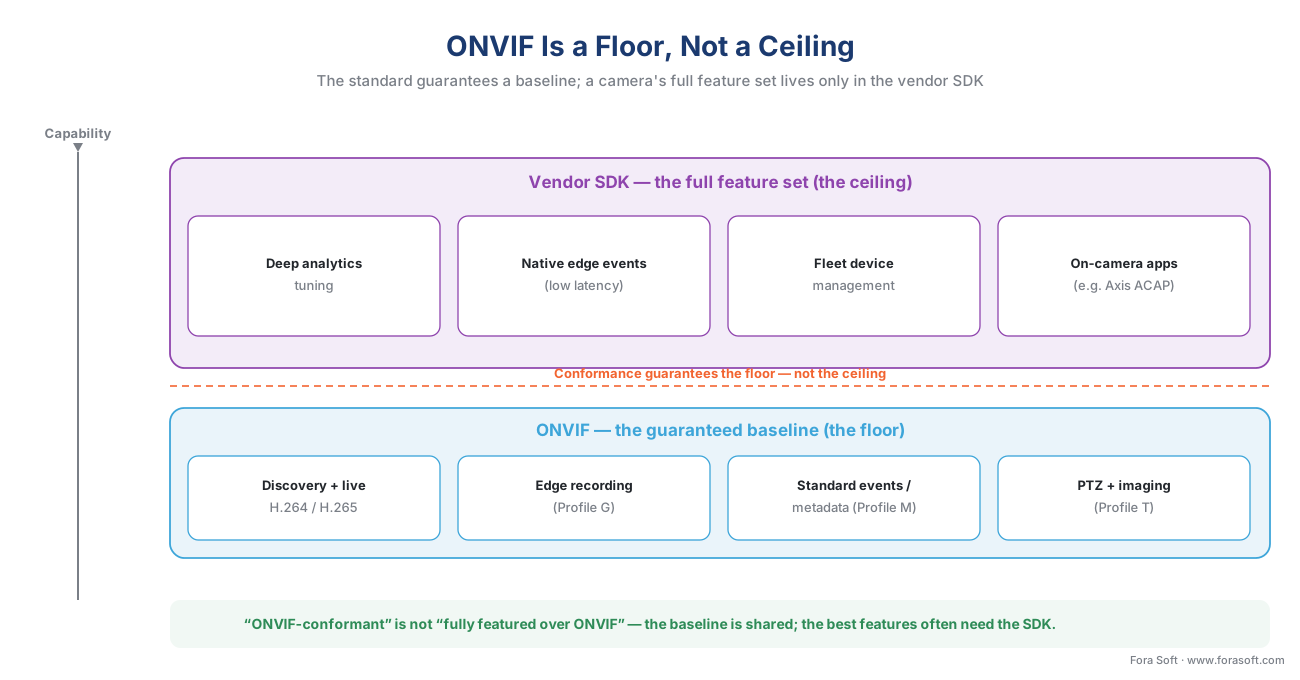 Figure 1. The floor and the ceiling. ONVIF guarantees the interoperable baseline every conformant camera shares; the manufacturer's SDK exposes the full feature set above it. The gap between them is where most "why doesn't this feature work?" surprises live.
There is a phrase for this gap that every integrator learns the hard way: "ONVIF-conformant" is not the same as "fully featured over ONVIF." A camera can pass the Profile S or Profile T conformance test and still expose its best analytics, its deepest configuration, and its on-camera application platform only through the vendor's own interface. The sticker on the box tells you the floor is there. It tells you nothing about the ceiling.
If you have not met ONVIF and its profiles yet, start with ONVIF explained for engineers and the profile decision guide; for the commercial overview Fora Soft maintains, see ONVIF profiles in security systems.
What ONVIF gives you — and where it stops
Before deciding when ONVIF is not enough, be precise about what it is enough for. The video-relevant profiles each guarantee a slice of functionality, and together they cover a lot of a working system.
Profile S, the original streaming profile, guarantees live H.264 video, audio, pan-tilt-zoom (PTZ) control, and basic motion events. Profile T, the advanced-streaming profile, raises that floor: per ONVIF's own profile page, Profile T covers H.264 and H.265 compression, imaging settings, motion-alarm and tampering events, metadata streaming, and bi-directional audio, with PTZ control mandatory on the client side. Profile G adds edge recording and retrieval — the camera storing and replaying video on its own SD card or network storage. Profile M, the metadata-and-analytics profile, standardizes a common way to carry analytics output such as object classification, often over the lightweight MQTT messaging protocol (the subject of events, metadata, and the ONVIF analytics interface).
So in 2026, ONVIF lets you discover a camera, pull an H.265 stream, set the image, record at the edge, and receive a standardized "object detected" event. That is a capable baseline. Here is the precise boundary of what it does not guarantee:
- Deep analytics configuration — the exact parameters of a vendor's on-camera detector (the loitering-zone geometry, sensitivity curves, the license-plate watch-list management). Profile M standardizes the output of analytics; it does not standardize the tuning of each vendor's product.
- Full device management — firmware-update campaigns across a fleet, certificate and credential rotation, per-sensor calibration, detailed health telemetry.
- The lowest-latency event path — a vendor SDK can push an event the instant it fires; a generic client that has to poll a standard interface may notice later. Exact timing depends on the camera and configuration, but push beats poll.
- On-camera applications — the ability to deploy your own code, or a third party's analytic, to run on the camera itself.
ONVIF is candid about one more limit: it standardizes interoperability, not legality. In ONVIF's words, "Compliance to regulations … are outside the scope of ONVIF," and manufacturers and integrators remain responsible for meeting local rules. The reframe to carry forward: ONVIF standardizes the interoperable subset of what cameras do. The newest, most differentiated features ship first in the vendor's own SDK and reach ONVIF — if ever — only after the relevant profile catches up.
What a vendor SDK actually unlocks
A software development kit (SDK) is the manufacturer's own toolbox — application programming interfaces (APIs), code libraries, and sometimes an on-device runtime — for talking to its cameras with nothing held back. Where ONVIF exposes the shared subset, the SDK exposes the whole device. Four categories of capability are what teams reach past the standard to get.
Advanced analytics configuration. The vendor's SDK lets you tune the on-camera detectors at a depth the standardized metadata never exposes — object classes, detection zones, sensitivity, schedules, and watch-lists. The standard tells your software what the camera detected; the SDK lets your software decide how the camera detects.
Edge events and metadata at full fidelity. SDKs deliver the camera's native event stream — richer fields, more event types, and an event-driven push instead of a polled pull. For an alarm that must trigger a response, the difference between "pushed the instant it fired" and "noticed on the next poll" is the difference between a useful alert and a late one.
Deep device management. Running a fleet of hundreds or thousands of cameras means firmware campaigns, certificate rotation, configuration backup, and health monitoring at scale — the operational layer that keeps a deployment alive. That layer is largely the manufacturer's own, reached through its SDK or its fleet-management service (and a major theme of camera discovery and onboarding at scale).
On-camera applications. The clearest example is Axis ACAP (AXIS Camera Application Platform), which Axis describes as "an open development framework designed to empower developers to create custom applications that run directly on Axis network devices." Those apps do on-device processing that, in Axis's words, reduces latency and minimizes bandwidth — even running computer-vision models on the camera. No ONVIF profile lets you ship your own software onto someone's camera; an application platform like ACAP does.
One boundary to keep clean: the detection models behind these analytics — how object detection, tracking, or license-plate recognition are built and trained — are a separate discipline, covered in the AI for Video Engineering section. This article is about how you reach and deploy those capabilities through the camera's interface, not how the models themselves work.
The major vendor SDKs at a glance
Vendor interfaces come in two architectural styles, and most large makers ship both. The first is an HTTP API — request-and-response over the network, the same simple style an ordinary web service uses, callable from almost any language. The second is a binary SDK — a compiled library you link directly into your application, more powerful and more tightly coupled to that vendor. Axis adds a third style on top: an on-camera application platform.
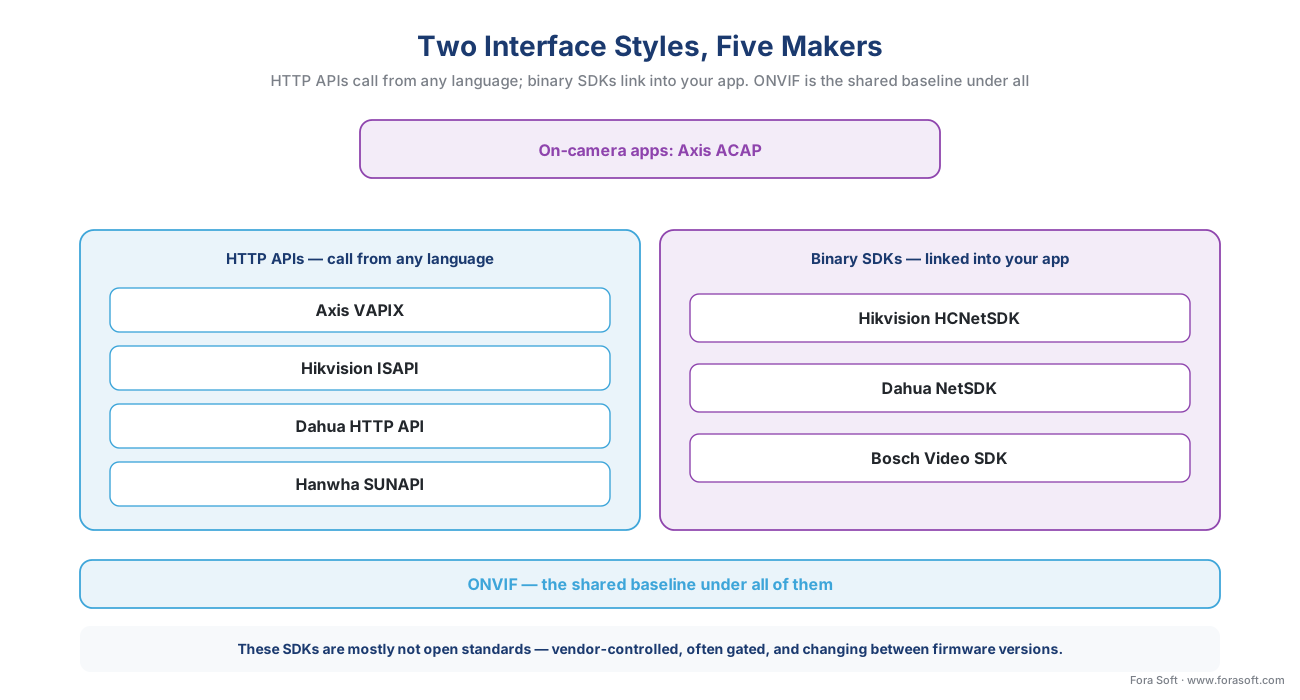 Figure 2. Two interface styles, five makers. HTTP APIs (left) are easy to call from any language; binary SDKs (right) link into your application for deeper control. Axis layers an on-camera app platform (ACAP) on top. ONVIF sits beneath all of them as the shared baseline.
| Vendor | SDK / API | Interface style | What it unlocks beyond ONVIF | Access notes |
|---|---|---|---|---|
| Axis | VAPIX + ACAP | HTTP API + on-camera apps | Full device control; deploy your own or third-party analytics that run on the camera | ACAP is an open framework; edge computer-vision on device |
| Hikvision | ISAPI + Device Network SDK (HCNetSDK) | HTTP/REST + binary SDK | Deep configuration, playback, PTZ, alarms, remote management of DVR/NVR/IPC | ISAPI advised for new work; SDK guides need a signed Materials License Agreement |
| Dahua | HTTP API + NetSDK | HTTP/REST + binary SDK | Login, live view, playback, PTZ, alarm reporting, device search across IPC/NVR/access | NetSDK spans the full device range |
| Hanwha (Wisenet) | SUNAPI | HTTP/CGI API | Image tuning, advanced events and analytics, storage, network and security config | SUNAPI 2.0 consumed by Wisenet WAVE and integrated by Genetec |
| Bosch | Video SDK + RCP+ | Binary SDK + RCP+ protocol | Unit configuration and deep integration; RCP+ over CGI where the Video SDK does not fit | RCP+ is Bosch's remote-control protocol for units and management systems |
Table 1. The major camera-maker interfaces. Each goes well beyond the ONVIF baseline — and each is vendor-controlled, not an open standard. Re-confirm the current SDK and firmware versions per project; these interfaces evolve.
The nuance that table cannot show in a cell: these SDKs are mostly not open standards. They are vendor-controlled, frequently gated behind a developer agreement — Hikvision, for instance, requires signing a Materials License Agreement before it releases the SDK guides — and they can change between firmware versions. That control is the source of both their power and their lock-in.
You usually integrate through a VMS driver, not raw SDK
Here is a fact that changes the whole build-versus-buy calculation: most teams never call a camera SDK directly. They run a Video Management System (VMS) — the software platform that ingests and manages many camera streams at scale — and the SDK integration lives inside a device driver, often called a "device pack," that ships with the VMS.
Milestone's MIP SDK (Milestone Integration Platform SDK) includes a Driver Framework built precisely so partners can create "fully featured device drivers" for the XProtect VMS, supplementing Milestone's own dedicated and generic drivers. Genetec exposes Hanwha cameras through SUNAPI and offers a Web SDK for third-party integration. In both cases, the deep, vendor-specific work has already been done inside the platform.
Why this matters to a buyer is simple, and it reframes the question. You rarely ask "can my team code against the camera SDK?" You ask: "does my VMS already ship a deep, vendor-specific driver for this exact camera model — or only generic ONVIF support?" A deep device pack hands you the SDK's features with no SDK code to write; generic ONVIF support hands you the baseline and stops there. Confirm which one you are getting, per camera model, before you commit — the same discipline that makes the multi-vendor reference pattern manageable, and a core reason teams weigh a custom VMS against off-the-shelf.
The real tradeoff: capability versus integration cost and lock-in
Going past ONVIF buys capability and costs two things: recurring integration effort and lock-in. Both are manageable, but only if you size them before you commit.
Integration effort is recurring, not one-time, because vendor SDKs move with every firmware release. Walk the arithmetic out loud. Suppose you support four camera makers directly through their SDKs, and each ships roughly three firmware or SDK changes a year that touch your integration:
4 vendors × 3 breaking changes/year = 12 integration updates/year
Each of those twelve updates means a developer re-tests and re-certifies that vendor's features against your software. Now add a fifth, long-tail camera over ONVIF instead of its SDK: it costs roughly zero extra integration work, because it already speaks the baseline your system supports. That is the whole economic argument in one line — the standard is what keeps your long tail cheap, and the SDK is what you pay for, deliberately, only where a feature earns it.
 Figure 3. The tradeoff. Each step from baseline ONVIF toward deep vendor-SDK integration buys capability and adds recurring maintenance and lock-in. The practical sweet spot is hybrid: ONVIF wide, SDK deep only where it pays.
Lock-in is the second cost. A system built around one vendor's SDK — its analytics, its management model, its event format — is expensive to re-point at a different vendor later, because the deepest integration is, by definition, non-portable. ONVIF is the portability insurance you keep across the fleet; the SDK is a considered bet on one supplier for one set of features. Neither is wrong. Confusing them is.
The mature pattern is hybrid, and worth stating as a rule: use ONVIF as the wide baseline that onboards every camera and absorbs the long tail, and reach into a vendor SDK — or a deep VMS device pack — only on the cameras whose advanced features you actually use. Where a device is only partly conformant, fall back to pulling its raw RTSP stream directly rather than abandoning the standard entirely.
A worked decision: ONVIF, SDK, or both
The fastest way to use everything above is a short decision path you can run per camera model.
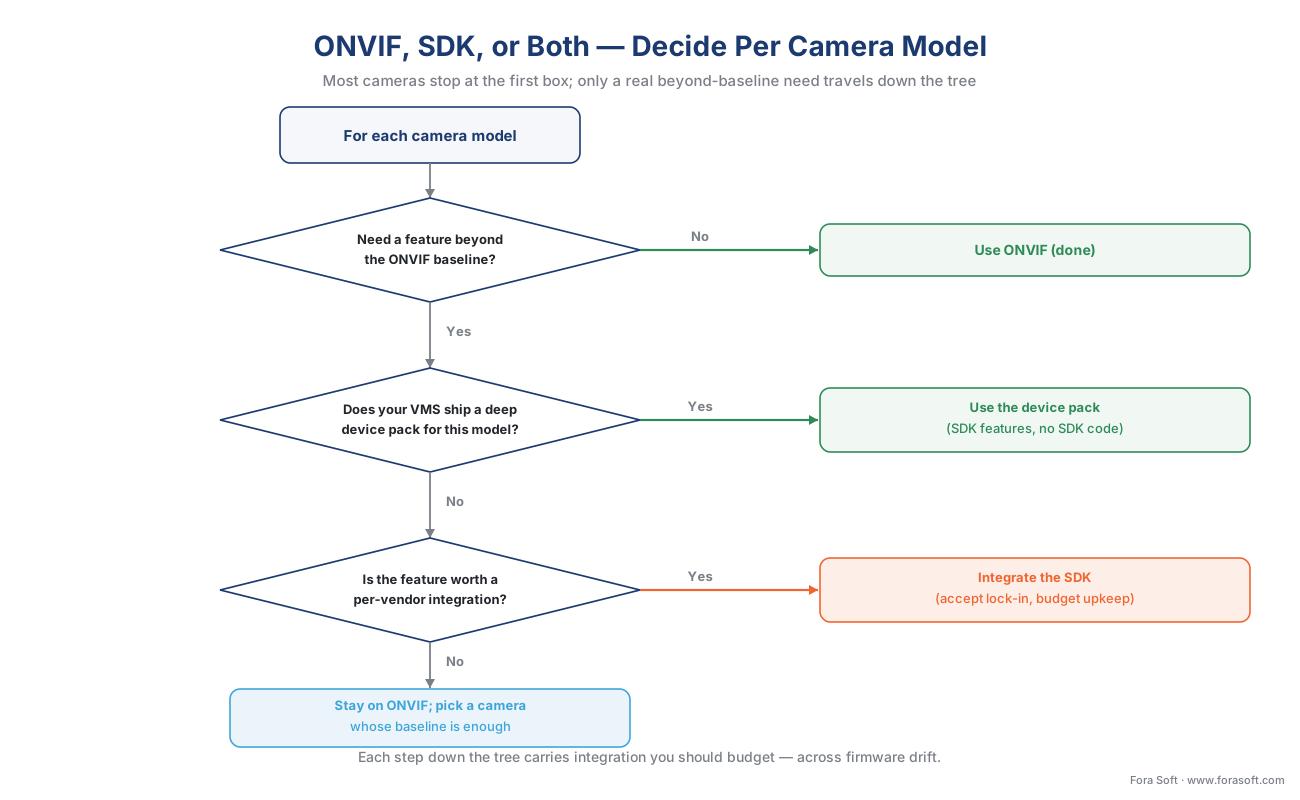 Figure 4. The decision, per camera model. Most cameras stop at the first box. Only the ones with a genuine beyond-baseline need travel down to a device pack or a direct SDK integration — and each of those carries maintenance you should budget.
First question: do you need a feature beyond the ONVIF baseline — deep analytics tuning, an on-camera app, fleet management? If no, use ONVIF and stop; you are done, and your long tail stays cheap. If yes, second question: does your VMS already ship a deep device pack for this model? If yes, use the device pack — you get the SDK's features with no SDK code and no integration to maintain yourself. If no, third question: is the feature worth a per-vendor integration you will maintain across firmware drift? If yes, integrate the SDK, accept the lock-in for that model, and budget the upkeep. If no, stay on ONVIF and choose a camera whose baseline features are simply enough.
Common mistakes this decision prevents
A handful of errors recur often enough to name. Reading "ONVIF-conformant" as "every feature works" — it guarantees the baseline only, and the headline analytic that sold the camera may be SDK-only. Treating SDK features as free — every vendor SDK is a recurring integration you maintain across firmware drift, not a one-time switch you flip. Coding straight to a camera SDK when your VMS already has a deeper driver — check the device pack first; you may be rebuilding what you already own. Standardizing on one vendor everywhere for simplicity — it is simpler, right up until you are locked in; keep ONVIF as the escape hatch for the rest of the fleet. Assuming Profile M metadata equals the vendor's full analytic — the standardized metadata is the common subset, not the tuned product, and the gap is exactly what the SDK fills.
Where Fora Soft fits in
We build the ingest and management layer that has to span both worlds at once. In a multi-vendor video surveillance system, that means a VMS that onboards the whole fleet over ONVIF, falls back to direct RTSP where a device is only partly conformant, and reaches into a vendor SDK or a deep device pack only where a specific analytic or management feature earns the integration. Our bias is accuracy-vs-performance: we measure what each "ONVIF-conformant" camera actually delivers over the standard versus what quietly needs the SDK — under real load — before we promise an integrator a clean multi-vendor fleet. Surveillance and computer vision are core to what Fora Soft has shipped across 625+ projects since 2005.
What to read next
- ONVIF explained for engineers — the baseline this whole tradeoff sits on top of.
- ONVIF Profile S, G, T, and M — which profile your product needs — exactly what each profile guarantees.
- Interoperability in practice: the multi-vendor reference pattern — how to stack ONVIF, RTSP fallback, and SDKs into one manageable system.
Call to action
- Talk to a surveillance engineer — book a 30-minute scoping call to talk through your proprietary camera sdk plan.
- See our case studies — 250+ shipped projects across video streaming, WebRTC, OTT, telemedicine, e-learning, surveillance, and AR/VR.
- Download the ONVIF-vs-SDK Decision Guide — One-page map of what ONVIF guarantees, what each major camera vendor SDK (Axis, Hikvision, Dahua, Hanwha, Bosch) unlocks beyond it, the integration-cost and lock-in tradeoff, and the questions to ask a vendor and your VMS at each layer.
References
- ONVIF Profiles, ONVIF (issuing body). A profile is a fixed set of features a conformant device and client must support; conformance to a profile is the only guarantee of interoperability; conditional features "shall be implemented … if it supports that feature in any way, including any proprietary way"; regulatory compliance is outside ONVIF's scope; Profile Q deprecated 1 April 2022. Tier 1. https://www.onvif.org/profiles/ (accessed 2026-06-08)
- Profile T, ONVIF (issuing body). Advanced streaming: H.264 / H.265 compression, imaging settings, motion-alarm and tampering events, metadata streaming, bi-directional audio; PTZ mandatory for clients; HTTPS streaming and motion-region configuration. Tier 1. https://www.onvif.org/profiles/profile-t/ (accessed 2026-06-08)
- ONVIF Profile Feature Overview v2.6 (April 2022), ONVIF (issuing body). The per-profile feature matrix marking each feature mandatory (M) or conditional (C) for a conformant device or client — the primary evidence that ONVIF standardizes a subset, with conditional/proprietary features outside the mandatory baseline. Tier 1. https://www.onvif.org/wp-content/uploads/2022/04/onvif-profile-feature-overview.pdf (accessed 2026-06-08)
- AXIS Camera Application Platform (ACAP) — developer documentation, Axis Communications (first-party engineering). ACAP as "an open development framework … to create custom applications that run directly on Axis network devices," enabling on-device processing that reduces latency and minimizes bandwidth; access to video, the event and parameter systems, and I/O; runs computer-vision models on the camera; ACAP version aligns with AXIS OS from 12.0. Tier 3. https://developer.axis.com/acap/ (accessed 2026-06-08)
- VAPIX — Applications and APIs, Axis Communications (first-party engineering). VAPIX as the HTTP network interface to Axis devices for video, audio, events, I/O, PTZ, and configuration; ACAP applications interface with AXIS OS through VAPIX and the SDK's C libraries. Tier 3. https://developer.axis.com/vapix/ (accessed 2026-06-08)
- Device Network SDK (HCNetSDK) and ISAPI Developer Guide, Hikvision (first-party engineering). HCNetSDK is a private-protocol SDK for remote connection and configuration of DVR/encoder/IPC (live view, playback, PTZ, arm/disarm, remote upgrade/reboot, device configuration), with C++/C#/Java libraries; ISAPI is an HTTP REST application-layer protocol recommended for new integrations; SDK guides require signing a Materials License Agreement. Tier 3. https://www.hikvision.com/en/support/download/sdk/ (accessed 2026-06-08)
- Dahua Network SDK (NetSDK) and HTTP API, Dahua Technology (first-party engineering). NetSDK provides device login, real-time monitoring, playback, download, PTZ, audio, snapshot, alarm reporting, and device search across IPC/NVR/access devices; an HTTP API additionally configures IPC cameras. Tier 3. https://depp.dahuasecurity.com/integration/guide/download/sdk (accessed 2026-06-08)
- WAVE SDK / API and SUNAPI, Hanwha Vision (first-party engineering). SUNAPI is an HTTP/CGI device API exposing device info, video profiles, image tuning, OSD, events and analytics, storage, network and security configuration; Wisenet WAVE supports SUNAPI 2.0 across Wisenet camera series. Tier 3. https://support.hanwhavisionamerica.com/hc/en-us/articles/115013501208-WAVE-SDK-API (accessed 2026-06-08)
- Notes about integrating Hanwha units using SUNAPI, Genetec (first-party engineering, VMS side). How Genetec Security Center ingests Hanwha cameras through SUNAPI; evidence that VMS platforms consume vendor APIs inside their device-integration layer. Tier 3. https://techdocs.genetec.com/r/en-US/Security-Center-Video-Unit-Configuration-Guide-5.12.1.0/Notes-about-integrating-Hanwha-units-using-SUNAPI (accessed 2026-06-08)
- RCP+ over CGI — Integration tools (developer), Bosch Security (first-party engineering). RCP+ (Remote Control Protocol plus) defines commands and messages to configure units and communicate between units and management systems; RCP+ over CGI targets environments where the Video SDK does not apply. Tier 3. https://media.boschsecurity.com/fs/media/pb/media/partners_1/integration_tools_1/developer/rcpplus-over-cgi.pdf (accessed 2026-06-08)
- MIP SDK — Driver Framework, Milestone Systems (first-party engineering, VMS side). The Milestone Integration Platform SDK lets partners build applications and "fully featured device drivers" for the XProtect VMS; the MIP Driver Framework supplements Milestone's dedicated and generic device drivers. Tier 3. https://doc.developer.milestonesys.com/mipsdk/gettingstarted/intro_driverframework.html (accessed 2026-06-08)
- The Truth About ONVIF: Real Compatibility in 2025, SmartVision (institutional/analyst). Orientation on the practical gap between ONVIF conformance and full feature parity, and where vendor SDKs win on deeper features and lower-latency events. Tier 5; used for framing only, not for any standards claim — the ONVIF primary sources control. https://news.smartvision.dev/vms-software/onvif-compatibility (accessed 2026-06-08)
