


Why this matters
If you are scoping a surveillance system with more than one camera brand — and almost every system above a single small site is — the single most expensive surprise is discovering, after purchase, that "ONVIF compatible" did not mean what you assumed. One camera streams but its motion events never reach your software; another connects but you cannot drive its pan-tilt-zoom; a third worked until a firmware update changed its behavior overnight. None of that is bad luck. It is the predictable result of treating a baseline standard as a guarantee of full compatibility. This article gives you the mental model and the buying questions that keep a multi-vendor fleet manageable, so you can write a specification a vendor cannot wriggle out of and architect an ingest layer that survives the messy reality of real cameras. You will not write code; you will gain the architecture that every serious VMS uses, explained in plain language.
The multi-vendor problem: why "it's all ONVIF" is not a plan
Start with the thing everyone gets told and almost no one stress-tests. ONVIF — the Open Network Video Interface Forum — is the open standard that lets cameras and recording software from different manufacturers talk to each other, the way a shared spoken language lets strangers exchange ideas. (If ONVIF is new to you, our ONVIF explainer for engineers covers the mechanics; here we assume the basics and build the system around them.) ONVIF is useful, and Fora Soft is on record about that — see the commercial overview, ONVIF profiles in security systems. But the word on a datasheet hides three gaps that only appear once you connect real hardware.
The first gap is in the standard's own design. An ONVIF profile is a fixed set of features a conformant camera and a conformant client both promise to support — Profile S for basic streaming, Profile T for advanced streaming with H.265, Profile G for on-device recording, Profile M for analytics metadata and events. But ONVIF also defines conditional features, and the standard is explicit that these "shall be implemented by an ONVIF device or ONVIF client if it supports that feature in any way, including any proprietary way" (ONVIF, ONVIF Profiles). In plain terms: a profile guarantees a core, then leaves a wide band of features optional. Two cameras can both truthfully claim the same profile and still differ in what they actually expose.
The second gap is how conformance is checked. ONVIF conformance is a self-declaration scheme (ONVIF, Conformance Process). A manufacturer runs the official ONVIF Device Test Tool against its own product, the tool generates a Declaration of Conformance and a Feature List, and the company submits those to be listed in the ONVIF database of conformant products. There is no independent lab re-testing every device. The process is structured and the test tool is real, but the testing is done by the party with the most to gain. That is why field reports of "ONVIF compliant" cameras whose motion detection, imaging controls, or PTZ range fail to work through a third-party VMS are common, not rare.
The third gap is time. Conformance is tied to one exact firmware version — it "is valid indefinitely for the specific firmware/software version of that product," and to stay conformant "the product's firmware/software version must match the version listed for the product" (ONVIF, Conformance Process). A camera that passed on firmware 1.4 is not promised to behave on firmware 1.7. Firmware drift across a fleet of hundreds of cameras, each updated on its own schedule, is one of the most common causes of an integration that worked on day one and broke in month six.
Put the three gaps together and the conclusion is not "avoid ONVIF." It is "design for the gaps." The reference pattern below is exactly that design.
The reference pattern: three layers, tried in order
The pattern that production systems converge on is a fallback ladder. For every camera, the VMS tries the most capable, most standard path first, and steps down only as far as it must. Three rungs.
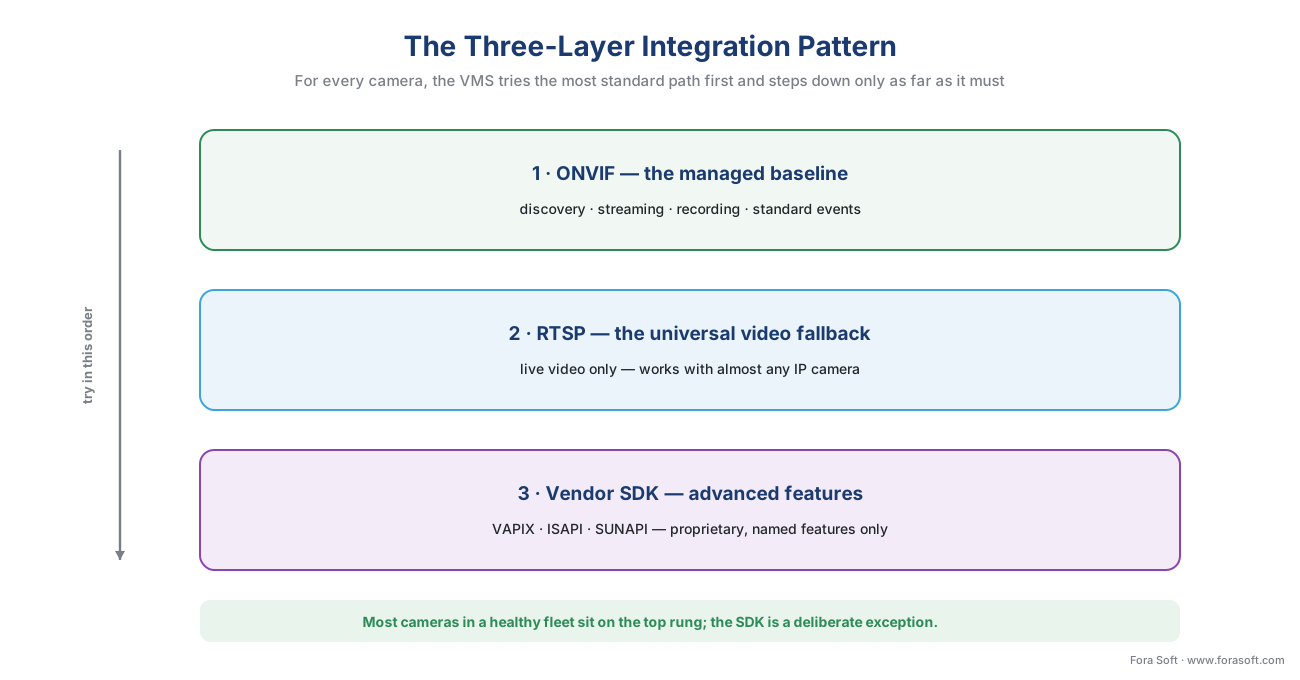 Figure 1. The three-layer integration model. The VMS tries ONVIF first for the most managed integration, falls back to a raw RTSP stream when ONVIF support is thin, and reaches into the vendor SDK only for advanced features the standard does not carry. Most cameras in a healthy fleet sit on the top rung.
Layer 1 — ONVIF, the managed baseline. This is the preferred path and where most cameras should sit. Over ONVIF the VMS can discover a camera on the network, ask it what it can do, pull its video stream address, configure recording, and subscribe to its events — all through one common interface, with no per-model code. Discovery uses an open mechanism called WS-Discovery, where a camera and a VMS find each other by sending small messages to a shared network address (OASIS, WS-Discovery 1.1). The streaming, recording, and metadata capabilities map to the profiles: Profile S or T for live video, G for recording, M for analytics events. The reason to prefer this layer is reach: one integration covers every conformant camera, and you can swap a vendor later without rebuilding.
Layer 2 — RTSP, the universal video fallback. When a camera's ONVIF implementation is incomplete, or onboarding over ONVIF simply will not complete, you can still almost always get the one thing that matters most: the live video. Nearly every IP camera exposes its stream over RTSP — the Real-Time Streaming Protocol, the remote control that sets up and tears down a video session (IETF, RFC 2326). RTSP itself does not carry the pictures; it issues the play and stop commands, and the compressed video travels over a companion transport called RTP (IETF, RFC 3550). If you know a camera's RTSP address — a URL the manufacturer documents, looking like rtsp://camera-ip:554/stream1 — the VMS can record and display it even with zero ONVIF. The trade is real: a raw RTSP feed gives you video and nothing else. No discovery, no events, no PTZ, no configuration. It keeps the camera in the system as a recording source while you sort out the richer integration, and it is the safety net for cheap or odd cameras that will never be first-class citizens. (The on-the-wire mechanics live in RTSP, RTP, and how surveillance video moves and, for transport depth, the Video Streaming section.)
Layer 3 — the vendor SDK, for what the standard leaves out. Some capabilities live above the ONVIF baseline by design: a camera maker's newest on-board analytics, fine-grained imaging tuning, proprietary event types, bulk device management. To reach those you use the manufacturer's own software development kit (SDK) or private interface — Axis VAPIX, Hikvision ISAPI, Hanwha SUNAPI, Dahua's HTTP API (Axis, VAPIX; Hikvision, ISAPI; Genetec, SUNAPI integration notes). Each is a vendor-specific way for software to talk to that vendor's cameras, and each unlocks features ONVIF does not expose. The cost is the thing the standard was invented to avoid: a separate integration per vendor, and a measure of lock-in to whoever wrote it. (We go deep on this trade in proprietary camera SDKs: when ONVIF is not enough.) Use this rung deliberately, for named features, never as the default.
The discipline of the pattern is the order. Try ONVIF; fall back to RTSP for video; climb to the SDK only for specific, justified features. A fleet where most cameras need the SDK is not a multi-vendor fleet — it is several single-vendor fleets wearing a trench coat, and it will cost like one.
The driver layer: how a VMS hides all this from itself
There is one more piece, and it is the piece that makes the pattern livable. If every part of the VMS had to know whether a given camera was talking ONVIF, raw RTSP, or VAPIX, the software would be unmaintainable. So a VMS wraps each camera in a small translator called a driver (some vendors say "device pack" or "video unit"): a thin adapter that speaks the camera's actual dialect on one side and presents one uniform interface — "give me your stream," "start recording," "tell me about events" — to the rest of the system on the other. The VMS core only ever talks to drivers. Which rung of the ladder a driver uses underneath is its own business.
This is not theory; it is exactly how the market-leading platforms are built. Milestone XProtect ships its camera support as device packs — bundles of tested, certified drivers released on a roughly two-month cadence and included in the installer, with the platform conformant to ONVIF Profiles S, T, G, and M (Milestone, device packs). Critically, Milestone also ships a Universal Driver that streams video and audio from devices that "lack a dedicated driver or ONVIF compliance" (Milestone, supported devices) — that is Layer 2, the RTSP fallback, productized. Genetec Security Center does the same with a different vocabulary: cameras are video units, you add them through Unit enrollment by auto-discovery or manual entry, and for a generic camera you pick "ONVIF" as the product type, while for a Hanwha device you can instead use a SUNAPI-based integration to reach the vendor's analytics events (Genetec, Video Unit Configuration Guide). Same three-layer pattern, two vendors, different names.
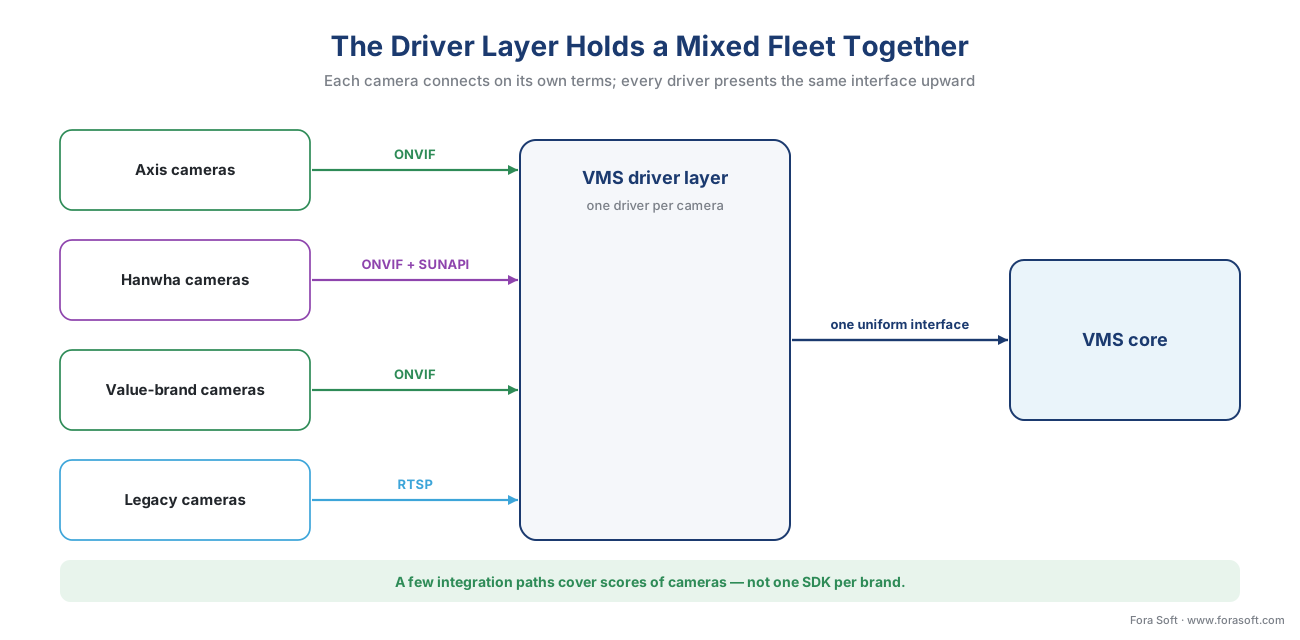 Figure 2. The driver layer in the middle. Each camera connects on its own terms — ONVIF for most, RTSP for the awkward one, an SDK for the brand whose analytics you need — and every driver presents the same uniform interface upward. The VMS core never sees the difference.
The payoff of the driver layer is what it does to risk. Adding a new camera model becomes "write or download one driver," not "modify the whole system." Replacing a discontinued camera with a different brand becomes a driver swap. And the awkward camera that only does RTSP is still a recording source today, not a blocker — you can upgrade its integration later without touching anything else.
Drawing the standards boundary explicitly
The reference pattern only works if you are honest about where the standard stops. The most useful single artifact in a multi-vendor design is an explicit map of what ONVIF guarantees versus what it does not — because every argument with a vendor, and every integration estimate, turns on that line.
On the inside of the boundary, ONVIF gives you a dependable baseline: device discovery, a video stream you can request and play, basic recording control where Profile G is supported, and a standard format for events and analytics metadata where Profile M is supported. "Conformance to profiles is the only way that ensures compatibility between ONVIF conformant products" (ONVIF, ONVIF Profiles) — so inside the boundary, conformance is a real promise, version-pinned and testable.
On the outside sit the things ONVIF deliberately does not standardize: the accuracy of a camera's analytics, the authoring format of detection rules, vendor-specific imaging and tuning parameters, the newest features a maker ships ahead of the standard, and — important for surveillance — regulatory compliance, which ONVIF states plainly is "outside the scope of ONVIF" and the responsibility of "manufacturers, system architects and/or integrators" (ONVIF, ONVIF Profiles). Anything outside the boundary is a candidate for the RTSP fallback (if you only need video) or the vendor SDK (if you need the feature).
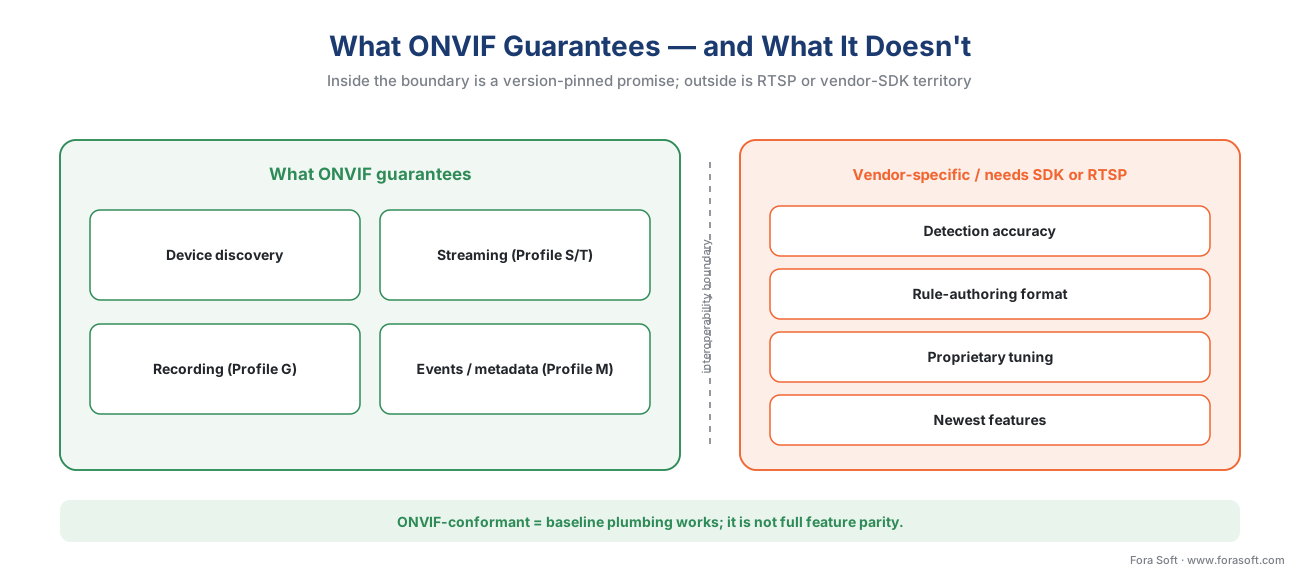 Figure 3. The interoperability boundary, drawn for a multi-vendor fleet. Inside: discovery, streaming, recording, and the event/metadata format — the version-pinned conformance promise. Outside: detection accuracy, rule formats, proprietary tuning, and the newest features — RTSP or the vendor SDK territory.
The one sentence to carry into every vendor meeting: ONVIF-conformant means the baseline plumbing works; it does not mean full feature parity. Keep "baseline interoperability" and "every feature I want" in separate columns and most ONVIF disappointments never happen.
The onboarding decision: a path for every camera
With the layers and the boundary defined, onboarding any camera becomes a short, repeatable decision rather than an open-ended investigation. The logic is the same whether you are adding three cameras or three thousand. (The operational craft of doing this at fleet scale — credentials, IP ranges, firmware — is its own article: camera discovery and onboarding at scale.)
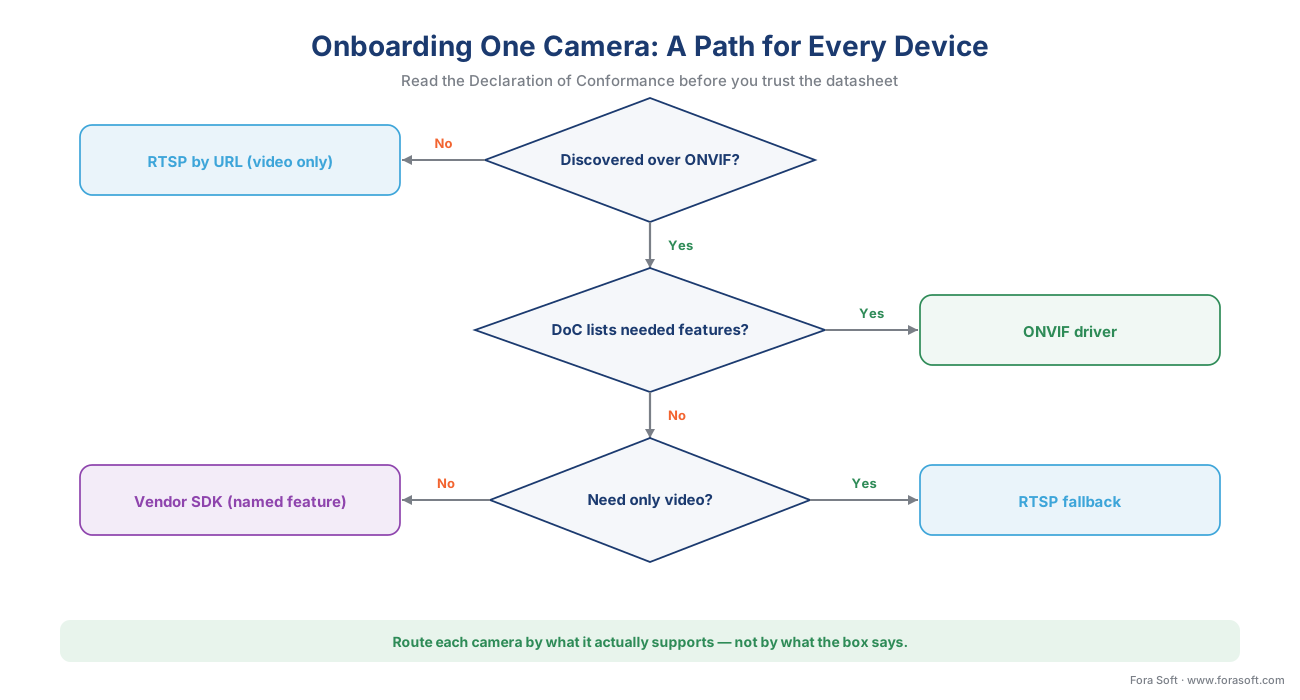 Figure 4. The per-camera onboarding decision. Read the Declaration of Conformance before you trust the datasheet; route the camera to the ONVIF driver, the RTSP fallback, or the vendor SDK based on what it actually supports — not on what the box says.
The first question is whether the VMS finds the camera over ONVIF at all. If discovery succeeds, the second question is the one most teams skip: does the camera's Declaration of Conformance and Feature List actually include the features this deployment needs? Those documents are public for every listed product, generated by the test tool itself, and they are the difference between "supports ONVIF" and "supports the ONVIF features you depend on." If the needed features are listed, use the ONVIF driver and you are done. If video is all you need from this camera, the RTSP fallback is the lightest path. If you need a specific advanced feature — a particular analytic, a proprietary event, deep imaging control — that is the deliberate case for the vendor SDK. And if the camera does not even discover over ONVIF, RTSP-by-URL keeps it as a recording source while you decide whether it earns an SDK integration or a replacement.
The table below is the same logic in a form you can drop into a specification.
| Integration layer | What you get | What it costs | Use it when |
|---|---|---|---|
| ONVIF driver (Profile S/T/G/M) | Discovery, streaming, recording, standard events/metadata, no per-model code | Limited to the conformant baseline; version-pinned | The default — the DoC lists the features you need |
| RTSP fallback (RFC 2326) | Live video and recording from almost any IP camera | Video only: no events, PTZ, or configuration | ONVIF is thin or absent and you need the stream now |
| Vendor SDK (VAPIX/ISAPI/SUNAPI) | Advanced analytics, proprietary events, deep device control | One integration per vendor; lock-in; maintenance | A named feature lives above the ONVIF baseline |
A worked example: a 120-camera mixed fleet
Numbers make the pattern concrete, so walk through a realistic mid-size deployment. Suppose a logistics site needs 120 cameras and, for good reasons — low-light performance here, budget there, an existing analytics contract elsewhere — the fleet is mixed: 70 Axis cameras, 30 Hanwha cameras, 15 budget ONVIF cameras from a value brand, and 5 older cameras inherited from a previous system.
Sort them by layer. The 70 Axis and 30 Hanwha cameras are current, conformant models whose Declarations of Conformance list Profile S/T streaming and Profile M events — 100 cameras, or 83% of the fleet, sit on Layer 1, the ONVIF driver, with no per-model work. The site also wants Hanwha's specific on-board people-counting analytics, which live above the ONVIF baseline, so those 30 Hanwha cameras additionally get a Layer 3 SUNAPI integration for that one feature — written once for the brand, not once per camera. The 15 budget cameras advertise ONVIF but their Feature List omits reliable event support, so they go in as Layer 1 for video and configuration but the team plans no analytics from them. The 5 inherited cameras do not onboard cleanly over ONVIF at all; they enter on Layer 2 as documented RTSP URLs — recording sources only, scheduled for replacement.
Now the integration-effort math, shown out loud. Custom integration work is not 120 units; it is one ONVIF driver path (already in the VMS), one SUNAPI integration for the Hanwha analytics, and five RTSP URLs to document:
Integration units  = 1 ONVIF path (covers 115 cameras)
                    + 1 vendor SDK integration (Hanwha analytics, 30 cameras)
                    + 5 documented RTSP fallbacks (1 each)
                    = 7 things to build and maintain, not 120
That ratio — a handful of integration paths covering scores of cameras — is the entire economic argument for the pattern. The failure mode to picture is the opposite: a team that, lacking the layered model, reaches for a vendor SDK on every brand "to be safe," and ends up maintaining four parallel integrations where one ONVIF path and one targeted SDK call would have done. The pattern is what turns 120 cameras into 7 integration decisions.
Common mistakes that break multi-vendor fleets
The same handful of errors sink most mixed-vendor projects, and every one of them is avoidable with the pattern above.
Trusting the datasheet instead of the Declaration of Conformance. "Supports ONVIF" on a product page is marketing; the DoC and Feature List are the engineering truth, generated by the test tool and public for every listed product. Reading them before purchase is the single highest-value habit in surveillance procurement. The matching pitfall: buying a camera that is not in the ONVIF conformant-products database at all, where "ONVIF" is an unverified claim.
Assuming conformance equals feature parity. A camera can conform to Profile S and still not expose the PTZ range, imaging controls, or events your project needs, because those can be conditional, not mandatory. Field reports of compliant cameras whose motion detection or PTZ fails through a third-party VMS trace straight to this assumption. Separate "baseline works" from "my features work."
No documented RTSP fallback. When a camera's ONVIF support fails in the field — and some will — the RTSP URL is the safety net that keeps it recording. Teams that never recorded each camera's RTSP address discover, during an incident, that the awkward camera has been offline for a week. Document the fallback URL for every camera, even the ones on Layer 1.
Ignoring firmware drift. Conformance is pinned to one firmware version. An uncoordinated fleet where every camera auto-updates on its own is a fleet where integrations break silently. Keep a record of the firmware version each camera was validated on, and treat firmware updates as changes to test, not background noise.
Skipping clock sync. Cameras from different vendors with unsynchronized clocks produce recordings and events whose timestamps do not line up, which makes multi-camera forensic search unreliable. Put every camera on a common network time source from day one — it is a five-minute setup that saves an investigation.
SDK creep and default credentials. Reaching for a vendor SDK by default trades away the portability you bought a standard to get; use it for named features only. And leaving cameras on factory-default passwords — something ONVIF explicitly leaves to the integrator to fix — turns a multi-vendor fleet into a multi-vendor attack surface.
Where Fora Soft fits in
Fora Soft has built video streaming, conferencing, surveillance, and computer-vision software since 2005, across more than 625 shipped projects, and multi-vendor ingest is the exact seam where that experience pays off. The honest framing is accuracy-vs-performance: a driver layer is judged not by the brands it supports on a slide but by how it behaves under load and at the edges — how it recovers when a camera drops, how cleanly it falls back from ONVIF to RTSP when a firmware update misbehaves, how it isolates one vendor's SDK quirks from the rest of the system. We build VMS ingest layers that treat ONVIF as the baseline, RTSP as the safety net, and vendor SDKs as deliberate, contained exceptions — so a mixed fleet stays maintainable as it grows. When the requirement is a custom or deeply integrated VMS rather than an off-the-shelf platform, that architecture is the work.
What to read next
- ONVIF Profile S, G, T, and M — which profile your product needs
- Proprietary camera SDKs: when ONVIF is not enough
- Custom vs off-the-shelf VMS: the real decision
Call to action
- Talk to a surveillance engineer — book a 30-minute scoping call to talk through your multi-vendor camera integration plan.
- See our case studies — 250+ shipped projects across video streaming, WebRTC, OTT, telemedicine, e-learning, surveillance, and AR/VR.
- Download the ONVIF / RTSP Multi-Vendor Interoperability Checklist — One-page checklist for a mixed-vendor fleet: pre-purchase checks (conformant-products database, Declaration of Conformance, feature list, firmware version), the three-layer integration plan (ONVIF driver, documented RTSP fallback,….
References
- ONVIF — ONVIF Profiles (overview). ONVIF. Defines the fixed-feature-set profile concept, conditional features ("including any proprietary way"), multi-profile support, the video-system profiles (D/G/M/S/T), and the statement that conformance to profiles is the only thing ensuring compatibility; also that regulatory compliance is outside ONVIF's scope. Tier 1. https://www.onvif.org/profiles/ (accessed 2026-06-08)
- ONVIF — Conformance Process. ONVIF. The self-declaration scheme: mandatory + conditional features, the Device/Client Test Tool, the Declaration of Conformance, Interface Guide, and Feature List, firmware-version-pinned conformance, and the Conformance Process Specification v5.7 (April 2026). Tier 1. https://www.onvif.org/profiles/conformance/ (accessed 2026-06-08)
- ONVIF Profile S Specification. ONVIF. The baseline video-streaming profile (configuration, streaming, PTZ command transmission) that the Layer-1 default rests on. Tier 1. https://www.onvif.org/profiles/profile-s/ (accessed 2026-06-08)
- ONVIF Profile T Specification, v1.0. ONVIF. Advanced streaming with H.264/H.265, imaging, motion/tampering events, and metadata streaming — the modern streaming baseline. Tier 1. https://www.onvif.org/wp-content/uploads/2018/09/ONVIF_Profile_T_Specification_v1-0.pdf (accessed 2026-06-08)
- ONVIF Profile M Specification, v1.1. ONVIF. Metadata and events for analytics applications — the standard event/metadata format a multi-vendor fleet relies on. Tier 1. https://www.onvif.org/wp-content/uploads/2024/04/onvif-profile-m-specification-v1-1.pdf (accessed 2026-06-08)
- IETF — RFC 2326, Real Time Streaming Protocol (RTSP). IETF, 1998. Defines RTSP 1.0, the session-control protocol nearly every IP camera still speaks for the Layer-2 video fallback. Tier 1. https://www.rfc-editor.org/rfc/rfc2326 (accessed 2026-06-08)
- IETF — RFC 7826, Real-Time Streaming Protocol Version 2.0. IETF, 2016. RTSP 2.0; obsoletes RFC 2326 and is not backward-compatible beyond version negotiation. Tier 1. https://www.rfc-editor.org/rfc/rfc7826.html (accessed 2026-06-08)
- IETF — RFC 3550, RTP: A Transport Protocol for Real-Time Applications. IETF, 2003. The transport that carries the actual compressed video RTSP sets up. Tier 1. https://www.rfc-editor.org/rfc/rfc3550 (accessed 2026-06-08)
- OASIS — Web Services Dynamic Discovery (WS-Discovery) v1.1. OASIS, 2009. The discovery mechanism ONVIF uses to find devices on a network segment. Tier 1. https://docs.oasis-open.org/ws-dd/discovery/1.1/os/wsdd-discovery-1.1-spec-os.pdf (accessed 2026-06-08)
- Axis Communications — VAPIX (developer documentation). Axis. First-party reference for the VAPIX private API/SDK used in the Layer-3 path. Tier 3. https://developer.axis.com/vapix/ (accessed 2026-06-08)
- Hikvision — ISAPI (Intelligent Security API). Hikvision. First-party reference for the RESTful/HTTP ISAPI protocol; example of a vendor SDK above the ONVIF baseline. Tier 3. https://www.hikvision.com/ (accessed 2026-06-08)
- Milestone Systems — Device packs and supported devices. Milestone. Device packs (bi-monthly, in-installer), ONVIF Profile S/T/G/M conformance, and the Universal Driver that streams from devices lacking a dedicated driver or ONVIF compliance — the RTSP fallback productized. Tier 3. https://www.milestonesys.com/support/software/device-packs/ (accessed 2026-06-08)
- Genetec — Security Center Video Unit Configuration Guide. Genetec. Unit enrollment, the generic "ONVIF" product type, and the Hanwha SUNAPI integration notes — a real VMS's three-layer model. Tier 3. https://techdocs.genetec.com/ (accessed 2026-06-08)
- Fora Soft — ONVIF profiles in security systems (2026). Fora Soft. Commercial overview of the ONVIF profile system; the position-1 companion this educational article links to rather than duplicates. Tier 4. https://www.forasoft.com/blog/article/onvif-profiles-in-security-systems (accessed 2026-06-08)
