


Why this matters
If you are responsible for a surveillance system — a security integrator, a product manager building video into your product, a retail or smart-building or city lead, or an enterprise security lead — sooner or later someone asks whether you should buy a Video Management System (the software platform that ingests, records, and manages many camera streams, abbreviated VMS) or build one. The question is usually framed as a binary, and framed that way it is almost always answered wrong: teams either buy a packaged product that fights their real requirement, or commission a from-scratch build that quietly costs three times its quote over five years. This is the decision the whole vendor block builds toward, and it is the one with the largest money and lock-in consequences. Read it to place your need on the right path — buy, extend, or build — with the cost, control, and maintenance trade-offs made explicit, before you sign a licence or a statement of work.
The decision is three doors, not two
The framing that wrecks this decision is "buy versus build." Stated that way, it hides the path most teams actually need. There are three doors, and they sit on a spectrum from least to most that you own and maintain.
Buy off-the-shelf. License a packaged, finished VMS — Milestone XProtect, Genetec Security Center, Avigilon, or a cloud subscription like Eagle Eye Networks — and fit your requirement to its model. You get a proven product now; you accept its boundaries and its commercial terms.
Extend a platform, or assemble on components. This is the wide middle, and the one the binary framing erases. You take a VMS that already exists — either a commercial platform you extend through its software development kit (a published toolkit, abbreviated SDK, that lets you add your own code), or open-source building blocks you assemble — and you build only the specific layer you need on top. You reuse the hard, solved engineering and you add the part that is actually yours.
Build fully custom. Write the VMS, or the parts of it that matter to you, from scratch. You get exact fit and total control, and you own everything — including the parts no demo ever shows.
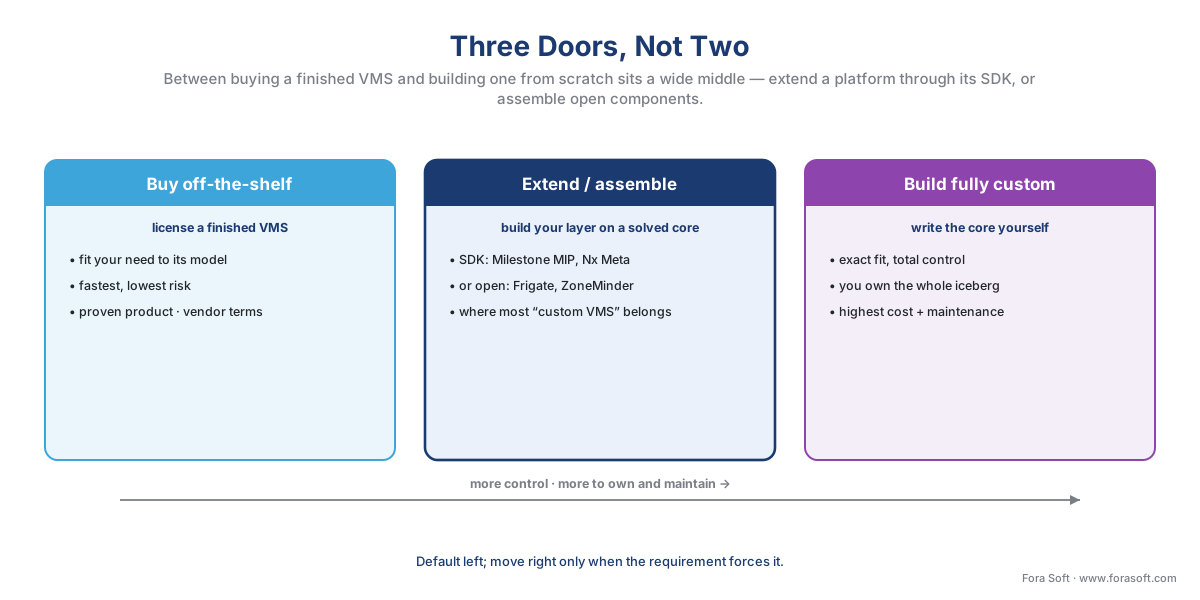 Figure 1. The decision is a spectrum, not a switch. The further right you go, the more you control and the more you own and maintain. The middle door — extend a platform or assemble components — is where most projects that call themselves "custom VMS" actually belong.
We mapped the vendor families this sits inside in the VMS vendor landscape, and the lighter version of this decision in build vs buy vs customize a VMS. This article is the deep version: where each door leads, what each costs over years rather than at purchase, and how to tell which one your requirement actually needs.
What an off-the-shelf VMS already solved (the part nobody demos)
Before comparing the doors, look at what the packaged product gives you, because it is mostly invisible and almost always underestimated. A demo shows the visible tenth — a clean video wall, a slick search, an analytics overlay. The nine-tenths under the waterline is the engineering that took the incumbent vendors twenty years and is the actual reason a VMS is expensive to build.
That hidden mass is concrete. It is recording many camera streams to disk continuously, for years, without dropping a frame when the server is busy and the network is congested. It is speaking ONVIF — the common language that lets cameras and recording software from different makers work together — to thousands of camera models, plus the vendor-specific quirks each one adds beyond the standard, a boundary we drew in proprietary camera SDKs. It is the storage and retention machinery, the failover that keeps recording when a disk or a server dies, the user and permission model, the client apps on desktop and mobile, and the capacity planning that lets one system grow from forty cameras to four thousand. None of it is glamorous. All of it is hard, and all of it is solved.
 Figure 2. The VMS iceberg. Above the waterline sits the visible tenth a buyer reacts to — the analytics, the workflow, the look. Below sits the nine-tenths that makes a VMS work: reliable recording, ONVIF interoperability, storage and retention, failover, scale. Buying or extending reuses the submerged mass; building from scratch means you carve all of it yourself.
This is the single most useful idea in the whole decision. The reason to think hard before building is not that a VMS is conceptually mysterious — it is not — but that re-creating the submerged engineering to a production standard is a multi-year effort whose payoff is a recorder that, at best, equals what you could have licensed. Build the visible tenth that is truly yours; reuse the submerged nine-tenths whenever you can. Every section below comes back to this line.
Path 1 — Buy off-the-shelf
Buying is the default for a reason: it converts a multi-year engineering risk into a purchase order. You select a VMS, license it per camera, deploy it, and you are recording within days. The product is proven across thousands of sites, it is maintained and patched by the vendor, and the integrator community around it means you are not the only person who has ever debugged it.
What you give up is fit and control. The product models the world its vendor imagined, and your requirement has to fit that model. If you need a workflow it does not offer, an integration it does not expose, or an analytic it does not run, you are limited to what its configuration screens and its add-on marketplace allow. You also accept the commercial relationship: the licensing shape, the support contract, the upgrade cadence, and the lock-in that comes from your video history and operator habits living inside one vendor's platform — the same "price the exit, not just the entry" caution we raised for cloud platforms in the AI-native profile.
The cost shape is either a one-time capital purchase (an on-premises licence you own, then maintain) or a recurring operating subscription (a cloud VSaaS — Video Surveillance as a Service — you rent), and we compare those shapes in on-prem, cloud, and hybrid VMS. Either way, buying is right far more often than engineers like to admit. If you need a thirty-camera retail or office system with standard recording, standard analytics, and no unusual integration, buy a licence and stop reading — building anything here is a way to spend six figures reproducing a product you could have switched on this week.
Path 2 — Extend a platform or assemble on components
This is the middle door, and it is where the phrase "custom VMS" most often truly lands. You are not buying a finished product as-is, and you are not building a recorder from nothing. You are standing on someone else's solved core and adding the part that is yours. There are two flavors.
Extend a commercial platform through its SDK. Several established VMS vendors expose a development kit precisely so you can build on them. Milestone's MIP SDK lets you add integrations, plug-ins, and components to XProtect — a custom analytic, a tie-in to a business system, a bespoke operator screen — while Milestone keeps owning the recording core. A second pattern goes further: a developer-first platform like Network Optix's Nx Meta exists so that companies build and sell their own re-branded VMS on top of it. The white-label product Digital Watchdog ships as DW Spectrum is built this way — it is the Nx platform, re-skinned and extended, not a from-scratch recorder. You get an enterprise-grade core, scale, and clients, and you spend your effort on differentiation.
Assemble open-source components. For smaller, edge-first, or budget-constrained systems, an open ecosystem assembles into a working VMS. Frigate is an open-source recorder built around object detection that runs on your own hardware, from a single-board computer to a server with a graphics processor; it pairs with go2rtc to relay and re-stream camera feeds, and with media servers such as MediaMTX for the RTSP plumbing. ZoneMinder has been the default open-source surveillance system since the early 2000s; Shinobi and Viseron are newer takes built on Node.js and Python respectively. You add ONVIF libraries for camera discovery and pipelines such as GStreamer, FFmpeg, or NVIDIA DeepStream for processing. The licence cost is zero; the integration and maintenance cost is entirely yours.
The trade on this middle path is the same in both flavors: you reuse the submerged nine-tenths and you own the seam where your layer meets the platform. That seam is real work — an SDK integration has to survive the platform's version upgrades, an assembled stack has to be held together by someone who understands every component — but it is a fraction of building the core, and it gets you exact fit on the part that matters. For most teams who think they need a custom VMS, this door, not the next one, is the right answer.
Path 3 — Build fully custom
Building from scratch means writing the VMS — or at least its core — as your own software. You design the ingest, the recording engine, the storage layer, the analytics pipeline, the clients, and the camera-interoperability layer, and you own the result completely. Nothing constrains the fit, because there is no vendor model to fit into. That is the appeal, and it is genuine: a fully custom system can do exactly what you need and nothing you do not, integrate as deeply as you like, and carry your brand and your roadmap.
It is also the door that re-creates the iceberg. Everything the packaged product solved invisibly is now yours to solve, to a production standard, under real camera load and on bad-network days — and then to keep solving, because software is never finished. The honest cost is therefore not the build; it is the build plus the years of maintenance after it. We will put numbers on that in the next section, because the maintenance figure is the one teams systematically forget.
Custom is the right door in specific, recognizable situations, not as a default. The clearest is when video is the product you sell — you are a VMS or camera vendor, or you embed recorded video into a larger product (a telemedicine platform, a courtroom or child-advocacy recording system, an industrial-inspection tool), and you must own the roadmap, the margins, and the user experience end to end. The others are unusual scale or topology no licence model fits, an integration so deep the VMS is just one component of a bespoke system, an analytic no packaged product ships, and a regulatory, data-residency, or procurement constraint that forecloses the off-the-shelf options. We collect those triggers into one test below.
The four levers: cost, time, control, lock-in
A buyer is really weighing four things across the three doors, and seeing them side by side is worth more than any feature list. The table includes the two columns that decide most VMS questions — whether the path exposes an open SDK, and what deployment model it implies — alongside the levers.
| Path | Open SDK / extensible? | Deployment model | Time to deploy | Up-front cost | Control & fit | Lock-in & exit |
|---|---|---|---|---|---|---|
| Buy off-the-shelf | Configuration + add-on marketplace; SDK varies by vendor | On-prem licence · cloud VSaaS · hybrid | Days to weeks | Low–moderate (licence or subscription) | Bounded by the product's model | Vendor lock-in — data and habits in one platform |
| Extend a platform (SDK / white-label) | Yes — built to be extended (Milestone MIP, Nx Meta) | Inherits the platform's (on-prem / edge / cloud) | Weeks to a few months | Moderate (platform fee + build of your layer) | High on your layer; core is the platform's | Platform lock-in, but you own your layer and brand |
| Assemble open components | Yes — fully open (Frigate, ZoneMinder, GStreamer) | Usually on-prem / edge; cloud if you host it | Weeks to months | Low licence, higher integration effort | High; limited by component maturity | Low vendor lock-in; high reliance on your own team |
| Build fully custom | It is your SDK | Anything you build for | Many months to years | High (build) + ongoing (maintenance) | Total | Locked to the team and codebase that built it (bus factor) |
Table 1. The three doors (with the middle split into its two flavors) on the levers a buyer actually weighs. Note the lock-in column: every path locks you to something. Off-the-shelf locks you to a vendor; a from-scratch build locks you to the team that wrote it. There is no lock-in-free door — only different exits to price.
The lever that flips most decisions is the last one, because it is the one people forget. "We will build it so we are not locked in" trades a vendor you can call for a codebase only your team understands. If that team disperses, your exit is worse, not better. Lock-in does not disappear when you build; it changes shape, and the from-scratch shape — a system whose only experts are your own staff — can be the least liquid of all.
The money, out loud
The cost comparison that matters is multi-year, and it is dominated by a number that never appears on the build quote: maintenance. Let us walk the arithmetic the way we walk storage math, on three lines.
Start with the build. A focused custom VMS for a single vertical — not a Milestone competitor, just the recorder and the specific layer you need — typically scopes from roughly 80,000 to 200,000 US dollars to build. Take the midpoint:
custom_build = $150,000 (one-time, to first production release)
Now add the part teams forget. Across the software industry, annual maintenance of custom software runs about 15–20% of the original build budget, and over a system's operating life total maintenance reaches two to four times the original investment. By widely cited figures — the O'Reilly "60/60" rule and IEEE studies — roughly 60% of a system's lifetime cost, and by some Forrester modeling closer to 78%, lands after launch, not before it. Apply the conservative 20%-per-year figure over five years:
annual_maintenance = 20% × $150,000          = $30,000 / year
five_year_maintenance = $30,000 × 5            = $150,000
five_year_custom_total = $150,000 + $150,000   = $300,000
The build was the down payment; the maintenance was the mortgage, and over five years they were about equal — with the maintenance share only growing the longer the system lives. Now compare the same five years on the other doors, for a representative 100-camera site. An on-premises off-the-shelf licence at, say, 150 US dollars per camera is a 15,000-dollar purchase plus roughly 20% annual support — on the order of 90,000 US dollars over five years all-in. A cloud VSaaS subscription at about 30 US dollars per camera per month is 36,000 US dollars a year, or roughly 180,000 over five years, with nothing to maintain yourself. (These are illustrative bands consistent with the surveillance cost model; real quotes vary widely and are discounted through integrators.)
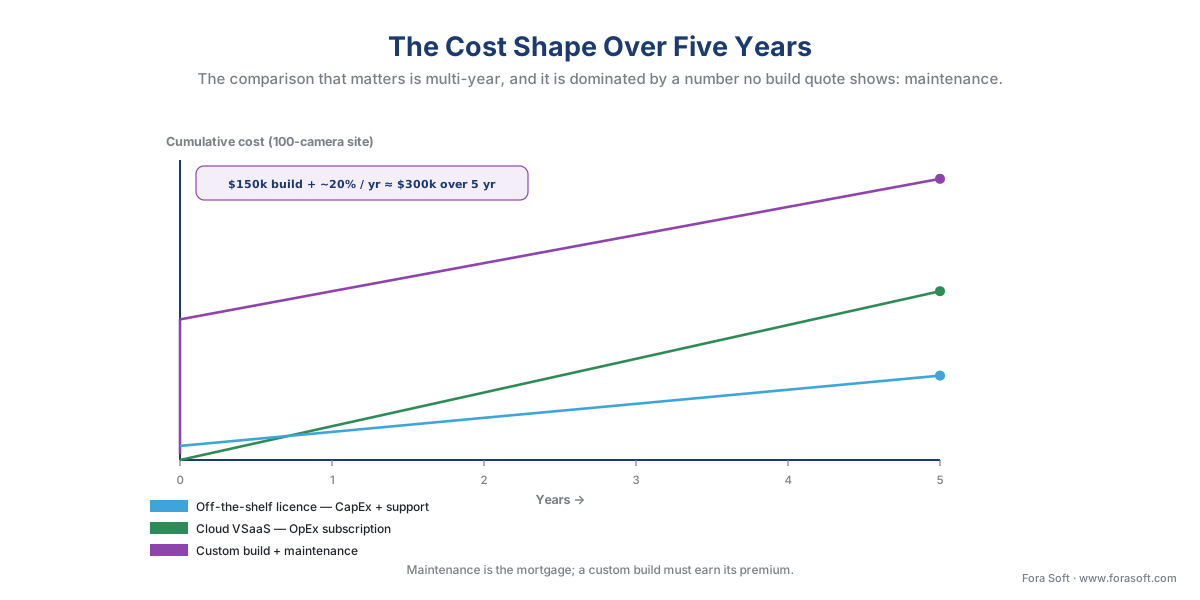 Figure 3. The shapes over five years. The off-the-shelf licence is a small step then a gentle support climb; the cloud subscription is a straight diagonal that never stops; the custom build is a large hump followed by a maintenance climb that, by year five, has roughly doubled the original quote. Custom only pays back when it removes a cost or unlocks revenue the packaged paths cannot — otherwise these lines are the whole argument.
The point of the math is not that custom is expensive — it is that custom has to earn its premium. A 300,000-dollar five-year custom total is money well spent if the system is a product you sell at a margin, or if it removes a cost or a risk the packaged options cannot. It is money lost if the same requirement could have been met by extending a platform for a fraction of the build, or by buying a licence outright. Compare the doors on the same multi-year footing, with maintenance counted, and most of the decision makes itself.
When custom is actually justified — the five triggers
Strip away the cases where buying or extending wins, and a short list of genuine custom triggers remains. If your requirement hits one or more of these — and cannot be met by extending a platform — a from-scratch build earns its cost. If it hits none, it almost certainly does not.
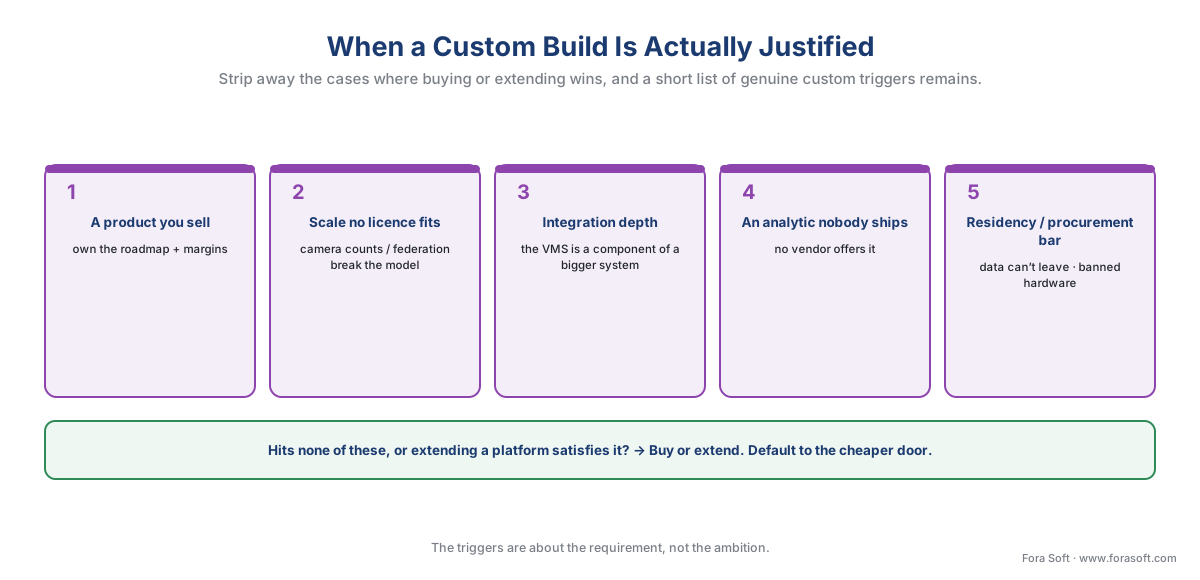 Figure 4. The five triggers for a custom build. Hit one or more that extending a platform cannot satisfy, and custom earns its premium; hit none, and the packaged or extended path wins. The triggers are about the requirement, not about ambition.
The first trigger is a product you sell. If video is part of what your customers pay you for — you are a VMS or camera maker, or you embed recording in a vertical product — you need to own the roadmap and the margins, and a licence under someone else's terms is a tax on every unit you ship. The second is scale or topology no licence fits: a deployment whose camera counts, federation pattern, or cost structure breaks every packaged licensing model. The third is integration depth, where the VMS is not the system but a component inside a larger bespoke platform, wired so tightly that a packaged product's boundaries get in the way. The fourth is an analytic nobody ships — a detection or workflow specific enough that no vendor offers it, where the differentiator we keep pointing at, the visible tenth, is truly novel; the model engineering for that lives in the AI for Video Engineering section, while this section owns how it embeds in a VMS, a thread we open in the video-analytics map. The fifth is a regulatory, residency, or procurement constraint that forecloses the alternatives — data that may not leave a jurisdiction, a sovereignty rule, or a hardware-procurement bar that the packaged options cannot satisfy.
Notice what is not on the list: "we want it to look exactly like our brand," "we need one custom report," "the vendor's screen annoys us." Those are extend-a-platform needs, not build-from-scratch needs, and treating them as the latter is the most common and most expensive mistake in this whole decision.
The standards and the law apply on every path
Two things travel with the system no matter which door you choose, and pretending otherwise is how custom builds get into trouble that a packaged product would have absorbed.
The first is the standard. ONVIF gives every path the same baseline way to get video and basic events out of a camera, which is exactly why "assemble on components" and "camera-agnostic" are possible at all — without it, a custom build would have to integrate every camera one model at a time. But remember the rule we hold throughout this section: ONVIF guarantees only a baseline, the profile both the camera and the software conform to (Profile S for streaming, T for advanced streaming, G for recording, M for metadata and analytics), and "ONVIF-conformant" is not "fully featured over ONVIF." Advanced device features still need the vendor's SDK. The mechanics are in ONVIF explained for engineers. The system-level surveillance standard IEC 62676 sets a floor any VMS should meet, bought or built. On the buy and extend paths, the platform handles most of this for you; on the custom path, it is your job.
The second is the law, and it does not care that you wrote the software yourself. The moment your system runs biometric face matching, it is processing special-category data under the European Union's General Data Protection Regulation (GDPR Art. 9), it requires a Data Protection Impact Assessment (GDPR Art. 35), and in Illinois it falls under the consent-and-private-right-of-action regime of the Biometric Information Privacy Act (BIPA, 740 ILCS 14), with statutory damages per person. The European Union's AI Act bans real-time remote biometric identification in public spaces (in force since 2 February 2025) and places other biometric systems in a high-risk tier whose obligations apply from 2 December 2027 under the 2026 deadline extension. Camera procurement can hit a national-security bar — in the United States, Section 889 of the 2019 National Defense Authorization Act forbids federally funded buyers from using named manufacturers' equipment — which is sometimes itself a reason a buyer wants the control of a custom stack. We treat the law itself in GDPR for video surveillance and BIPA and US biometric law, and the biometric capability in face recognition in surveillance. The point here: building does not let you out of the legal gate — it puts the whole gate on your side of the wall.
A common mistake to avoid
The costliest errors in this decision are not technical; they are errors of framing, and four recur. First, building the plumbing instead of the differentiator — spending the budget re-creating reliable recording, storage, and camera interoperability, the solved submerged nine-tenths, instead of buying that and building only the visible layer that is actually yours. Second, underpricing maintenance — treating the build quote as the cost when the multi-year maintenance is the larger number; a custom system that ships and is then starved of upkeep rots into a liability. Third, confusing "customizable" with "custom" — reaching for a from-scratch build when the real need is a brand, a report, or an integration that extending a platform through its SDK would deliver for a fraction of the cost and risk. Fourth, assuming building escapes lock-in — it does not; it trades a vendor you can call for a codebase only your departing team understands, so price that exit too. None of the three doors is wrong in the abstract; choosing the wrong one for a requirement is what costs money.
Where Fora Soft fits in
Fora Soft has built real-time video, streaming, and computer-vision software since 2005, across 625+ shipped projects, and a large share of our surveillance work lives on the middle and right-hand doors — extending a VMS platform through its SDK or API into a bespoke product, building the specific analytic a packaged platform does not ship, or building a full custom VMS for a vertical or a product a client sells. The discipline we bring is the one this section preaches: design for how the system behaves at full camera load and on a bad-network day first — realistic detection precision and recall under real lighting, latency you have measured, recording that degrades gracefully when a link drops — then the feature list. When a team sits between "license a product," "extend a platform," and "build it ourselves," we are honest about the iceberg: a reliable recorder and a tuned pipeline are expensive to reinvent, the good vendors solved a lot of it already, and the right answer is usually to build the differentiator and reuse the rest.
The decision, in one place
Put the doors and the triggers together and the choice reduces to a short walk down a tree. Start with the requirement, not the ambition.
 Figure 5. The decision in one path. A standard need on a short timeline buys off-the-shelf; a need for most of a VMS plus a specific layer extends a platform or assembles components; only a build trigger that extending cannot satisfy — a product you sell, scale no licence fits, integration depth, an analytic nobody ships, or a residency or procurement bar — justifies a fully custom build. Default left; move right only when the requirement forces it.
Read the tree as a series of honest questions. Is the need standard — ordinary recording, ordinary analytics, ordinary integration — on a short timeline at modest scale? Buy. Do you need most of a VMS plus one specific layer that is distinctly yours — a custom analytic, a deep integration, your own brand on a product? Extend a platform or assemble components; this is the answer far more often than teams expect. Only if a real build trigger remains, and extending a platform cannot satisfy it, do you walk to the last door and build — with the five-year maintenance counted from the start, not discovered in year two. The whole vendor block, and the way to weigh any comparison like the one in Table 1, comes together in reading a VMS comparison.
What to read next
- Reading a VMS comparison: the criteria that actually matter
- The VMS vendor landscape: how to read the market
- The surveillance cost model: what a system actually costs
For the commercial overview of the market this decision sits inside, see Fora Soft's video surveillance management systems playbook and the rundown of modern VMS software features.
Call to action
- Talk to a surveillance engineer — book a 30-minute scoping call to talk through your custom vms plan.
- See our case studies — 250+ shipped projects across video streaming, WebRTC, OTT, telemedicine, e-learning, surveillance, and AR/VR.
- Download the Custom vs Off-the-Shelf VMS — Decision Guide — One-page decision guide to the build-vs-buy-vs-customize VMS choice: the three doors (buy off-the-shelf, extend a platform or assemble components, build fully custom), the iceberg of what off-the-shelf already solved (recording, ONVIF….
References
- ONVIF — "ONVIF Profiles" (Profile S streaming, Profile T advanced streaming, Profile G recording, Profile M metadata/analytics; a profile is a fixed set of features a conformant device and client must support, and conformance to a profile is what ensures baseline interoperability between products from different makers). The open camera-ingest baseline that every build path — buy, extend, or assemble — relies on, and the reason "assemble on components" and "camera-agnostic" are possible; also the basis for the "ONVIF-conformant ≠ fully featured over ONVIF" distinction. Primary standard (tier 1). https://www.onvif.org/profiles/
- European Union — "General Data Protection Regulation (Regulation (EU) 2016/679)" (Art. 9 treats biometric data used to uniquely identify a person as special-category data; Art. 35 requires a Data Protection Impact Assessment for high-risk processing such as large-scale systematic monitoring). The legal gate any face-matching feature must answer to on every path, custom or packaged. Primary law (tier 1). https://eur-lex.europa.eu/eli/reg/2016/679/oj
- Illinois General Assembly — "Biometric Information Privacy Act (740 ILCS 14)" (requires informed written consent before capturing a face template or other biometric identifier, sets a retention-and-destruction duty, and provides a private right of action with statutory damages). The heaviest US biometric gate, and a reason building the capability puts the full legal exposure on your side. Primary law (tier 1). https://www.ilga.gov/legislation/ilcs/ilcs3.asp?ActID=3004&ChapterID=57
- European Commission — "AI Act (Regulation (EU) 2024/1689)" and the 2026 deadline extension (real-time remote biometric identification in public spaces prohibited since 2 February 2025; high-risk systems including biometrics apply from 2 December 2027 under the agreed deadline extension, with formal adoption expected mid-2026). The regulatory clock any biometric VMS build must plan against. Primary law (tier 1). https://digital-strategy.ec.europa.eu/en/policies/regulatory-framework-ai
- United States Congress — "John S. McCain National Defense Authorization Act for Fiscal Year 2019, Section 889 (Public Law 115-232)" (bars federal agencies, their contractors, and grant recipients from procuring video-surveillance equipment from named manufacturers on national-security grounds). A procurement gate that can itself push a buyer toward the control of a custom or assembled stack. Primary law (tier 1). https://www.congress.gov/bill/115th-congress/house-bill/5515/text
- IEC — "IEC 62676 series: Video surveillance systems for use in security applications" (specifies minimum requirements across the system lifecycle; EN IEC 62676-4:2025 covers application guidelines including information security and data privacy). The system-level floor any VMS should meet, whether licensed or built. Primary standard (tier 1). https://webstore.iec.ch/en/publication/34391
- Milestone Systems — "MIP SDK and Milestone Integration Platform" developer documentation (the published toolkit for extending XProtect with protocol, component, and plug-in integrations and a Driver Framework, while Milestone owns the recording core). The canonical "extend a commercial platform" path. First-party engineering (tier 3). https://doc.developer.milestonesys.com/
- Network Optix — "Nx Meta Video Management Platform" and the nx_open / nx_open_integrations repositories (a developer-first platform on which companies build and sell their own re-branded "Powered by Nx" VMS — e.g., Digital Watchdog DW Spectrum — with REST API and SDKs across desktop, mobile, server, and cloud). The canonical "build a custom VMS on a platform / white-label" path. First-party engineering (tier 3). https://www.networkoptix.com/nx-witness
- Frigate — "Frigate NVR documentation" and the go2rtc configuration guide (an open-source recorder built around object detection that runs on your own hardware from a single-board computer to a GPU server, pairing with go2rtc for stream relay and ONVIF for camera capability). A representative open-source building block for the "assemble on components" path. First-party engineering (tier 3/4). https://docs.frigate.video/
- Okteto / Leobit / Forrester Total Economic Impact summaries — "Total cost of ownership: build versus buy" (software maintenance commonly runs 50–80% of lifecycle cost; the O'Reilly 60/60 rule and IEEE studies put ~60% of lifetime cost after launch; annual maintenance of custom software ≈ 15–20% of the build budget; total maintenance reaches 2–4× the original investment). The basis for the multi-year cost math and the "maintenance is the mortgage" framing — used for the economics rule of thumb, not for any standards or legal claim. Institutional / analyst (tier 5). https://www.okteto.com/blog/total-cost-of-ownership-tco-of-building-versus-buying-software-for-development/
- Fora Soft — "Video Surveillance Management Systems: The 2026 Buyer & Builder Playbook" and "Features of Modern VMS Software" (the commercial overviews of the VMS market and feature set this educational decision sits beneath). Used for market orientation and as the required winning-blog cross-links, not as a standards or legal source. First-party (tier 4). https://www.forasoft.com/blog/article/video-surveillance-management-systems
