


Why this matters
If you are choosing a VMS for a camera estate or scoping a surveillance product, the vendor decision looks like a shootout between famous names, and that framing quietly leads you wrong. The market is consolidating fast — Motorola absorbed Avigilon, Canon owns Milestone, and in December 2025 Eagle Eye Networks and Brivo merged into a single cloud-native company — so a shortlist built on today's logos can be out of date within a quarter. What does not expire is the structure: the four families and the four axes below behave the same way no matter who owns whom. Learn to read the market by structure and you can evaluate a vendor in an afternoon, defend the choice to a CFO, and avoid the trap of buying a famous name that fits someone else's problem.
Read families, not logos
The single most useful move in this whole market is to stop ranking vendors and start sorting them. Before you compare Milestone against Genetec against Verkada, notice that those three are not really competing for the same job — they sit in different families that make different trade-offs on cost, control, and who runs the servers. Pick the family that fits your deployment first; only then does the vendor-versus-vendor comparison inside that family become meaningful.
There is a practical reason to lead with families rather than names: names move, structure stays. A list that says "the five best VMS platforms" is a snapshot of a market that reshuffles constantly through mergers and acquisitions. The four-family map, by contrast, has been stable for years and survives every merger, because a company changing hands does not change whether its product installs on your servers or runs from a vendor's cloud. If you only remember one thing from this article, remember to ask "which family?" before "which brand?"
 Figure 1. The four families of VMS. Sort a vendor into a family first; the family fixes the cost shape, the lock-in, and who owns the AI long before the brand name matters.
The four families of VMS
Here is the map. Each family is a different answer to the question "where does the software live, and who keeps it running?"
Enterprise on-prem is the traditional model: you license a heavyweight platform and run it on your own servers, inside your own network. Genetec Security Center, Milestone XProtect, Bosch BVMS, and Avigilon Unity live here. The strength is scale and depth — these platforms run thousands of cameras across many sites and integrate with access control, intrusion alarms, and dispatch systems through mature extension kits. The cost is weight: real servers, real storage, an annual support fee, and usually a security integrator to roll it out. Think of it as owning the building and the boiler room.
Cloud-native video-surveillance-as-a-service (VSaaS) flips that around. The vendor runs the servers; you connect cameras (often the vendor's own) and operate everything from a browser and a phone. Verkada, Eagle Eye Networks, Rhombus, and Spot AI are the names here. The strength is that there is nothing to install and the software updates itself, so artificial-intelligence features — the automated detection of people, vehicles, and events — arrive on day one. The cost is a per-camera monthly fee that never stops, plus a dependence on the vendor's cloud and your upload bandwidth. This is renting a serviced apartment: you move in today and the landlord fixes the plumbing.
Open hybrid is the mid-market middle ground: commercially licensed software that leans on open standards, runs on commodity hardware you choose, and ships a developer kit so integrators can extend it. Network Optix Nx Witness, Digifort, Hanwha WAVE, and Luxriot EVO sit here. The strength is affordability and camera choice — these platforms talk to almost any camera that speaks the common industry standard, ONVIF, and let you keep your recordings on your own disks. The trade-off is a smaller analytics and integration ecosystem than the enterprise giants. It is the apartment you are allowed to renovate.
Custom-built is the fourth family, and it is a real option, not a dare. Here you assemble a system on proven components — an open recording engine, standard media pipelines, ONVIF camera discovery, an artificial-intelligence runtime — and write only the workflow layer that is unique to you. You reach for it when an off-the-shelf product cannot model your workflow, when you need to own proprietary analytics, or when you sell surveillance software and the VMS is your core product. The trade-off is a build-and-maintain commitment you carry yourself. We cover this family in depth in build vs buy vs customize a VMS and the product-team version in custom vs off-the-shelf VMS.
The four families read fastest side by side. Note the two columns that matter most for a buyer and that vendor listicles routinely omit: the deployment model, and whether the platform ships an open developer kit you can build on.
| Family | Deployment model | Open SDK? | Cost shape | Best fit |
|---|---|---|---|---|
| Enterprise on-prem | Your servers, your network | Yes — mature (e.g. Milestone MIP) | High one-time per channel + annual support + hardware | >500 cameras, multi-site, integration-heavy |
| Cloud-native VSaaS | Vendor's cloud, browser + mobile | Limited — vendor API, closed core | Recurring per camera per month, forever | 5–200 cameras, many small sites, no on-prem IT |
| Open hybrid | Commodity hardware you choose | Yes — developer-friendly | Moderate one-time per channel | Mid-market, ONVIF camera choice, own your storage |
| Custom-built | Wherever you put it | You write it — full control | Build cost up front + maintenance | Regulated workflows, proprietary AI, you sell VMS |
Table 1. The four VMS families across the dimensions a buyer actually weighs. No row crowns a single winner — the right family is the one whose trade-offs match your deployment. Pricing is illustrative; channel partners discount enterprise quotes heavily above 100 cameras.
The four axes you actually compare on
Once a vendor is sorted into a family, four axes separate the genuine differences. Run any product through all four and the comparison stops being a popularity contest.
Where the software runs. On-prem, cloud, or hybrid is the first axis because it cascades into everything else — bandwidth, who patches the servers, where your video physically sits, and whether a network outage blinds you. The deployment-model decision deserves its own treatment; we give it one in on-prem, cloud, and hybrid VMS. For reading the vendor market, just note that family already tells you most of the answer.
How open it is. Openness is two separate questions. First, can the platform talk to cameras from any maker? That is the ONVIF question, and it protects you from being trapped by your camera fleet. Second, can your team build on the platform through a documented software development kit — the published set of tools and programming interfaces, called an SDK, that lets outsiders add features? An open SDK is the difference between a product you can extend and one you can only configure. Enterprise and open-hybrid platforms tend to be strong here; pure VSaaS tends to be a closed box with an API the vendor controls.
Who owns the AI. Every vendor says "AI" now, so the useful question is not whether a platform has analytics but who controls them. With VSaaS, the analytics are the vendor's — you get what ships, when it ships, at the accuracy it delivers, and you cannot tune the model. With enterprise platforms, you can usually add third-party analytics through the SDK. With a custom build, you own the model outright. This matters when detection quality is your differentiator, because analytics accuracy is a precision-and-recall range that depends on scene, lighting, and tuning — never a single guaranteed number — so the freedom to tune it is worth real money. The catalogue of what these analytics actually do is in the video-analytics map.
Which rules it satisfies. Procurement law and privacy law quietly delete vendors from your shortlist before any feature comparison begins. We treat this as its own axis below, because in this market compliance is not a footnote — it is a filter.
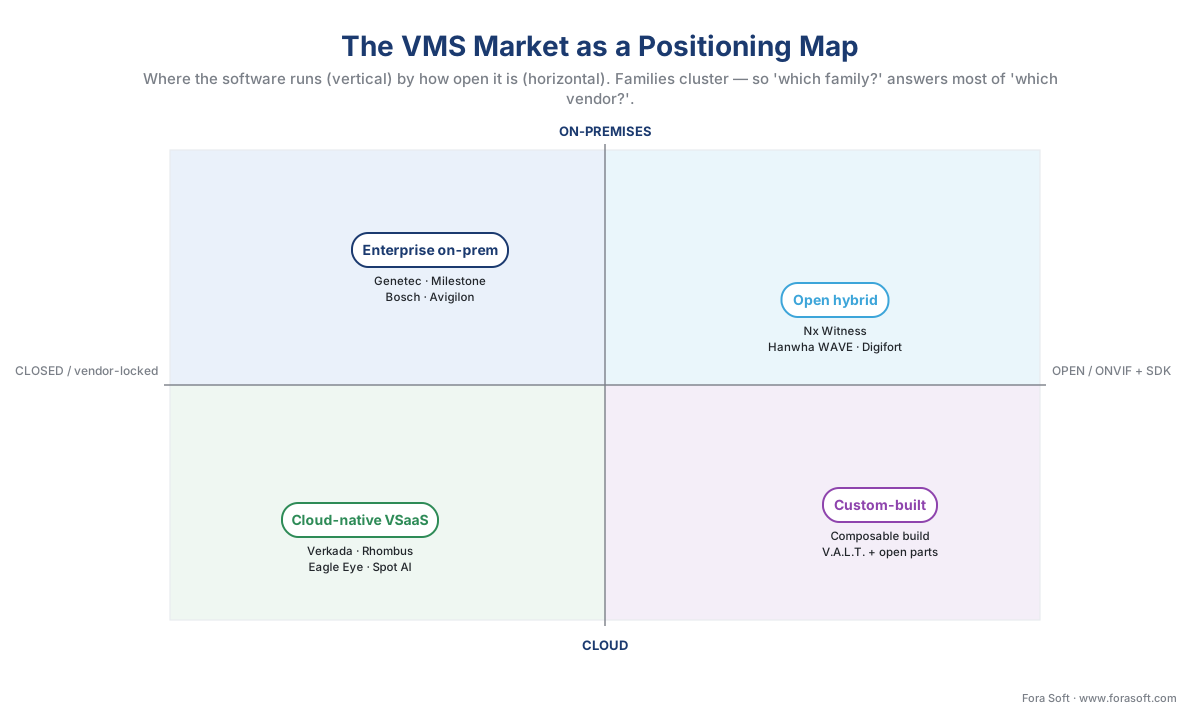 Figure 2. The same market as a positioning map. The vertical axis is where the software runs; the horizontal axis is how open it is. Families cluster in regions — which is why "which family?" answers most of "which vendor?".
The money has two shapes, and the family decides which
Cost is where the family choice shows its teeth, because the four families do not just cost different amounts — they cost in different shapes. Get the shape wrong and a quote that looked cheap becomes the expensive option two years in.
Enterprise on-prem and open hybrid are a capital expense: a one-time license per camera channel, plus servers and storage, plus an annual support fee that is a fraction of the license. You pay a lump up front and a little each year. Cloud-native VSaaS is an operating expense: a recurring fee per camera per month that bundles software, cloud storage, and updates, and that bills forever. Neither shape is wrong; they suit different balance sheets. The mistake is comparing a one-time number against a monthly number without putting them on the same five-year footing.
Walk the arithmetic out loud once. Take a 200-camera estate and compare an open-hybrid CapEx model against a VSaaS OpEx model over five years. Hardware and cameras cost roughly the same in both, so leave them out.
on-prem_5yr = (license_per_cam × cameras) + (annual_support × cameras × years)
on-prem_5yr = ($120 × 200) + ($25 × 200 × 5)
on-prem_5yr = $24,000 + $25,000 = $49,000

vsaas_5yr   = monthly_per_cam × cameras × 12 × years
vsaas_5yr   = $25 × 200 × 12 × 5 = $300,000
At 200 cameras over five years the VSaaS bill is several times the on-prem one — yet VSaaS still wins for many buyers, because it removes the servers, the IT staff, and the integrator, and it puts modern AI on every camera on day one. The point is not that one is cheaper; it is that the shapes cross. Below a certain camera count and time horizon, the convenience of VSaaS is worth its premium; above it, the per-camera-per-month meter overtakes a one-time license. Find that crossover for your own numbers before you sign, because it is the real decision hiding behind the brand names. The full treatment is in the surveillance cost model.
 Figure 3. The two cost shapes (illustrative). CapEx is a lump up front and a slow climb; OpEx starts cheap and rises forever. They cross — and where they cross, not the brand, is the decision.
Compliance is a market filter, not a footnote
In most software markets you compare features first and check compliance later. Surveillance inverts that, because two kinds of law can remove a vendor from contention before you ever open its datasheet. This is engineering and procurement guidance, not legal advice; confirm specifics with qualified counsel.
The first filter is procurement law. In the United States, Section 889 of the 2019 National Defense Authorization Act (Public Law 115-232) prohibits federal agencies and federal-grant recipients from buying video-surveillance equipment from five named Chinese manufacturers — Huawei, ZTE, Hytera, Hikvision, and Dahua — and their affiliates, where it serves security purposes. The implementing Federal Acquisition Regulation rule extended that prohibition to contractors who merely use such equipment anywhere in their operations. The effect on the vendor landscape is blunt: if you sell to government, take federal grant money, or sit in a federal supply chain, an entire tier of low-cost hardware is simply off the table, and the vendors who lead with "NDAA-compliant" messaging — Axis, Hanwha, Avigilon, Bosch, Verkada — are signalling exactly this.
The second filter is privacy law, and it bites hardest on analytics. Under the European Union's General Data Protection Regulation (GDPR, Regulation (EU) 2016/679), running face recognition or behavioural analytics triggers a mandatory Data Protection Impact Assessment under Article 35, and a face template counts as special-category biometric data under Article 9. In the United States, Illinois' Biometric Information Privacy Act (BIPA, 740 ILCS 14) requires written consent before you capture a face template and lets the people in the footage sue — the kind of exposure that produced a $650 million Facebook settlement. So a VSaaS platform whose headline feature is built-in face recognition is not automatically a shortlist winner; in some jurisdictions it is a liability you must gate before you switch it on. We treat these rules in depth in GDPR for video surveillance and BIPA and US biometric privacy law; for the market-reading purpose here, treat compliance as the first filter, not the last.
Openness: what ONVIF guarantees, and what it doesn't
Because "open" is the most abused word in vendor marketing, it pays to know precisely what the industry's interoperability standard does and does not promise. ONVIF is the common language that lets cameras and video software from different makers work together, and its governing body is explicit that "conformance to profiles is the only way that ensures compatibility between ONVIF conformant products." For video, the relevant profiles are S and T for live streaming, G for recording, and M for analytics metadata.
The trap is assuming "ONVIF-conformant" means "fully interchangeable." It does not. ONVIF guarantees a baseline — the specific profile both the camera and the software conform to — and advanced features routinely sit outside that baseline. Edge analytics events, advanced pan-tilt-zoom tours, and proprietary codecs typically need the vendor's own SDK, not ONVIF. So when a vendor says "we support ONVIF," the right follow-up is "which profiles, and which of your advanced features fall back to your SDK?" Keep "baseline interoperability" and "full feature parity" as separate ideas and you will not be surprised after purchase. The mechanics are covered in ONVIF explained for engineers; the standard also reminds integrators that "compliance to regulations is outside the scope of ONVIF," so the legal filters above remain your responsibility regardless of how open a platform is.
 Figure 4. The openness boundary. ONVIF guarantees a baseline both devices conform to; the advanced, differentiating features usually live outside it, behind a vendor SDK.
The market is consolidating — read motion, not snapshots
A vendor landscape is a moving picture, and the motion tells you as much as any single frame. Three patterns are worth tracking as you read the market.
First, the enterprise giants are inside larger companies now. Genetec remains independent and, by Omdia's 2024 and 2025 Video Surveillance and Analytics Database reports, the world's number-one VMS vendor — its fourteenth consecutive year at the top in the Americas. But Milestone has been owned by Canon since 2014, and Avigilon is a Motorola Solutions brand, sold today as Avigilon Unity (on-prem) and Avigilon Alta (cloud). Ownership shapes roadmap, and roadmap shapes the product you will live with for years.
Second, cloud-native challengers are consolidating into platforms. The clearest signal came in December 2025, when Eagle Eye Networks and the access-control company Brivo merged into a single cloud-native physical-security company, operating under the Brivo name and pitching one platform for video, access, and intrusion. The lesson for a buyer is that the VSaaS family is racing to bundle video with the rest of the security stack, so "just a camera platform" is becoming "the whole building's security."
Third, open-source recording engines are now credible building blocks. Projects such as ZoneMinder (in production since 2002) and Frigate (built around on-device AI detection) are mature enough to anchor a custom build, which is part of why the custom family is no longer exotic. None of this changes the four-family map — it populates it. Read the motion, and a merger becomes information rather than a reason to redo your shortlist.
A common mistake to avoid
The costliest pattern we see is shortlisting by brand fame instead of by family fit. A team reads a "best VMS software 2026" listicle, shortlists the three most-mentioned names, and discovers only after the demos that two of them are in the wrong family entirely — an enterprise on-prem giant pitched at a 25-camera single site, or a per-camera-per-month cloud platform pitched at a 2,000-camera estate that will hemorrhage money on the monthly meter. The fix is to choose the family before you collect names, then shortlist only inside it. A close cousin of this mistake is buying cameras before choosing the VMS. Cameras outlive the recorder, so a fleet bought without checking ONVIF conformance and procurement-law status can lock you out of the very family you later decide you need. Decide the family, set the compliance filters, then let those two constraints generate your shortlist — not a magazine's ranking.
Where Fora Soft fits in
Fora Soft has built real-time video, streaming, and computer-vision software since 2005, across 625+ shipped projects, and we are usually called in at the right-hand edge of this map — the open-hybrid and custom families, where off-the-shelf products stop fitting. The first thing we do is talk teams out of building when an off-the-shelf family is the right answer, because reinventing recording is expensive and someone solved it twenty years ago. When a custom or composable build genuinely fits — a regulated workflow, proprietary analytics, a platform you need to own — the discipline is the one this whole section preaches: design for how the system behaves at full camera load and on a bad-network day first, with realistic detection precision and recall under real lighting, then the feature list. A platform that records every frame under load and federates across sites beats one that demos beautifully and stalls at 300 cameras.
What to read next
- On-prem, cloud, and hybrid VMS — three deployment models
- Custom vs off-the-shelf VMS: the real decision
- Reading a VMS comparison: the criteria that actually matter
For the commercial overview of the market this map sits inside, see Fora Soft's video surveillance management systems playbook and the rundown of modern VMS software features.
Call to action
- Talk to a surveillance engineer — book a 30-minute scoping call to talk through your vms vendors plan.
- See our case studies — 250+ shipped projects across video streaming, WebRTC, OTT, telemedicine, e-learning, surveillance, and AR/VR.
- Download the VMS Vendor Landscape — Buyer's Field Guide — One-page field guide for reading the VMS market: the four families at a glance (deployment model, open SDK, cost shape, best fit), the four axes to compare on, the CapEx-vs-OpEx five-year cost math with the crossover, the compliance….
References
- ONVIF — "ONVIF Profiles" (an ONVIF profile has a fixed set of features a conformant device and client must support; "conformance to profiles is the only way that ensures compatibility between ONVIF conformant products"; video systems use Profiles D, G, M, S, and T; "compliance to regulations… are outside the scope of ONVIF." Page modified 2026-05-11). Primary standard (tier 1). https://www.onvif.org/profiles/
- U.S. Government / GSA — "Federal Acquisition Regulation: Prohibition on Contracting With Entities Using Certain Telecommunications and Video Surveillance Services or Equipment" (the FAR final rule implementing NDAA FY2019 Section 889(a)(1)(B); extends the prohibition to contractors that use covered equipment from Huawei, ZTE, Hytera, Hikvision, and Dahua). Primary regulatory document (tier 1). https://www.federalregister.gov/documents/2020/07/14/2020-15293/federal-acquisition-regulation-prohibition-on-contracting-with-entities-using-certain
- U.S. Election Assistance Commission — "What is Section 889 of the FY 2019 NDAA?" (plain-language summary of the Section 889 covered-equipment prohibition and the named entities, with the FY2019 NDAA Pub. L. 115-232 reference). Issuing-agency guidance (tier 2). https://www.eac.gov/what-section-889-fy-2019-ndaa
- European Union — "General Data Protection Regulation (Regulation (EU) 2016/679)" (Art. 9 treats biometric data used to uniquely identify a person as special-category data; Art. 35 requires a Data Protection Impact Assessment for high-risk processing such as systematic monitoring or large-scale biometric analytics). Primary law (tier 1). https://eur-lex.europa.eu/eli/reg/2016/679/oj
- IEC — "IEC 62676 series: Video surveillance systems for use in security applications" (specifies minimum requirements and recommendations across the system lifecycle; EN IEC 62676-4:2025 covers application guidelines including information security and data privacy). Primary standard (tier 1). https://webstore.iec.ch/en/publication/34391
- Fora Soft — "Video Surveillance Management Systems: The 2026 Buyer & Builder Playbook" (the market has split four ways — enterprise on-prem (Genetec, Milestone, Bosch, Avigilon), cloud-native VSaaS (Verkada, Eagle Eye, Rhombus, Spot AI), open hybrid (Network Optix Nx Witness, Digifort, Hanwha WAVE, Luxriot), and custom-built; pick the family first, then the vendor; on-prem ~$50–$300/channel one-time, VSaaS ~$10–$50/camera/month, open hybrid ~$50–$150/channel, custom $80K–$300K MVP; NDAA/GDPR/BIPA reshape the architecture). First-party engineering (tier 3); the required winning-blog outbound target. https://www.forasoft.com/blog/article/video-surveillance-management-systems
- Genetec — "Genetec retains world-leader position in video management software" (Omdia 2024 and 2025 Video Surveillance & Analytics Database reports rank Genetec the world's number-one VMS vendor and number one in the combined VMS-and-VSaaS market; fourteenth consecutive year first in the Americas). First-party / analyst-cited (tier 4). https://www.genetec.com/about-us/news/press-center
- Brivo / Eagle Eye Networks — "Brivo and Eagle Eye Networks Merge to Form the Industry's Largest AI Cloud-native Physical Security Company" (December 2025 merger of cloud video-surveillance provider Eagle Eye Networks and cloud access-control provider Brivo into one cloud-native platform operating under the Brivo name). Primary company announcement (tier 3). https://www.businesswire.com/news/home/20251229142420/en/
- Milestone Systems — "Milestone Integration Platform (MIP) SDK documentation" (the MIP SDK enables plug-in integrations inside XProtect and component integrations that share video and data; evidence of the open-SDK strength of the enterprise on-prem family). First-party engineering (tier 3). https://doc.developer.milestonesys.com/mipvmsapi/
- Grand View Research — "Video Management Software Market Size & Outlook" (values the global VMS market at roughly $11.7B in 2024 with a low-double-digit CAGR through the early 2030s; the fastest-growing slice is cloud-delivered VSaaS). Institutional/analyst (tier 5). https://www.grandviewresearch.com/industry-analysis/video-management-software-market-report
- ZoneMinder — project documentation (open-source video-surveillance / NVR software in production since 2002; an example of a mature open recording engine usable as a composable component in a custom build). Educational/community (tier 6). https://zoneminder.com/
- Frigate — project documentation (open-source NVR built around on-device AI object detection; an example of a modern composable recording component). Educational/community (tier 6). https://frigate.video/
