


Why this matters
If you are scoping, buying, or selling a surveillance system, the number that gets quoted first — the install price — is the smaller half of what you will actually spend, and quoting it alone is how projects end up underfunded. A system priced on hardware and forgotten on storage runs out of disk three weeks early; a system bought on a low monthly cloud fee quietly overtakes the cost of owning the gear by year three; a system scoped without the analytics or maintenance line gets the bill it did not budget for. This article gives you a complete, non-technical model of every cost in a surveillance system — what you pay once, what you pay forever, and the five levers that move the total most — so you can build a budget that survives contact with the real deployment. The goal is a number you can stand behind, not a number that looks good in the first meeting.
Two bills, one system
Before any line items, the single idea the whole article rests on. A surveillance system costs money in two distinct ways, and confusing them is the most common budgeting error in the field.
The first is the build cost — what you spend once, up front, to put the system in place. In finance terms this is capital expenditure (CapEx): a one-time purchase of equipment and the labor to install it. The second is the run cost — what you spend every month to keep the system working: maintenance, replacements, power, software support, and any cloud fees. This is operating expenditure (OpEx): a recurring cost that never stops while the system is live.
Both bills are real, but they are not equal in size. Across the full life of a surveillance system, industry total-cost-of-ownership studies put roughly 70% of the spending after installation and only about 30% at install — meaning the run bill, paid in small monthly slices, eventually dwarfs the build bill that felt so large on day one (Security Solutions Media; TechPro Security). A buyer who looks only at the install quote is looking at less than a third of the picture.
This build-versus-run split is not a marketing frame; it maps to how the controlling international standard treats a surveillance system. IEC 62676, the standard for video surveillance systems used in security applications, defines the whole lifecycle a system must be planned against — selection, planning, installation, commissioning, maintaining, and testing — and its application-guidelines part (IEC 62676-4:2025) gives practical guidance for exactly those phases (IEC 62676-1-1; IEC 62676-4:2025). Build cost covers selection through commissioning; run cost covers maintaining and testing for the system's whole life. A real cost model budgets both.
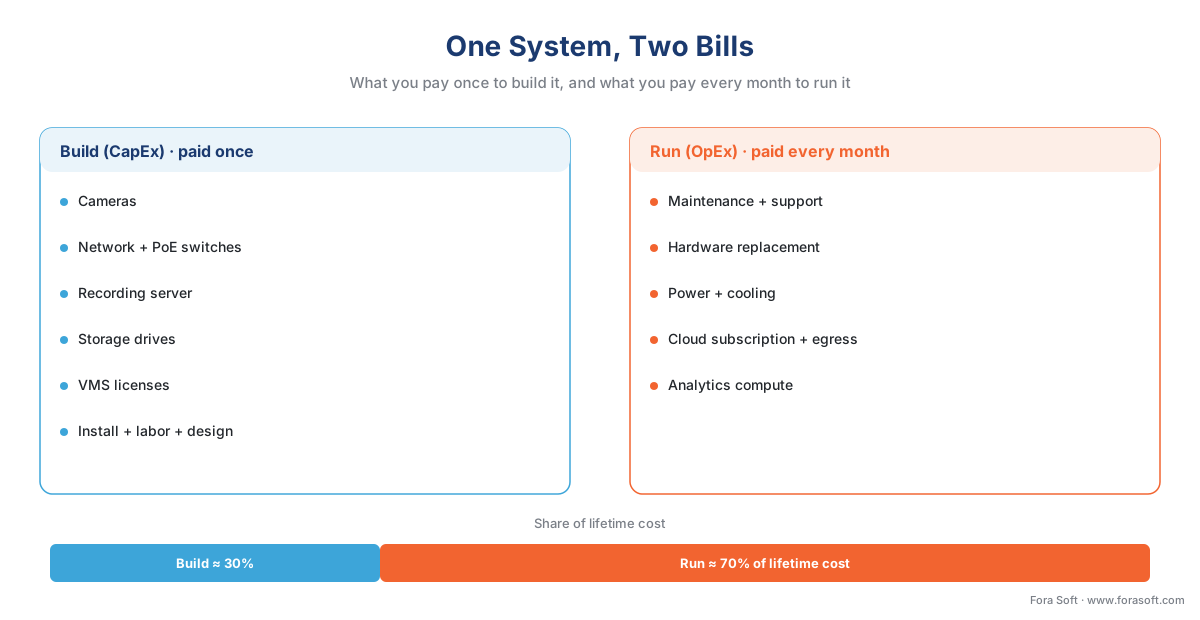 Figure 1. The two bills. Build (CapEx) is paid once at install; run (OpEx) is paid every month for the system's life. Over a typical lifetime the run bill is roughly 70% of total spend — which is why a model built on the install quote alone underfunds the system.
The five cost drivers, and how they multiply
Every surveillance cost — build and run alike — traces back to five inputs that multiply together. Get these five right and the rest of the budget follows; guess at any one and the total moves by a large factor. Here they are, in plain language, in the order they bite.
Camera count. The most obvious lever, and a true multiplier: nearly every other cost — licenses, storage, bandwidth, install labor, maintenance — scales per camera. Doubling cameras roughly doubles the system.
Resolution and frame rate. These set each camera's bitrate — the amount of video data the camera produces per second, measured in megabits per second (Mbps). A higher-resolution camera at a higher frame rate produces a fatter stream, and that stream is what you store and (sometimes) transmit. A 1080p camera commonly runs 1–2 Mbps; a 4-megapixel camera around 2–4 Mbps; a 4K camera several times that (Videoloft). Bitrate is the bridge from "what the camera sees" to "what it costs to keep."
Retention days. How long you keep every recording before it is overwritten. Retention is a straight multiplier on storage: keep footage twice as long and you need twice the disk. Because storage is usually the biggest single cost, retention is usually the single most expensive decision in the whole model.
Analytics tier. How much the system understands what it sees — from none, to simple motion detection, to AI that detects objects, reads license plates, or flags anomalies. Each step up adds compute cost (a chip on the camera, a server, or cloud processing) and often a per-stream software license. The software that ingests and manages all the camera streams, called a Video Management System (VMS), is where most of this analytics licensing lives.
Deployment model. Where the recording and storage physically sit: on-site (on-premises), in a provider's cloud (sold as Video Surveillance as a Service, or VSaaS), or split between the two (hybrid). This choice does not just change the total — it changes the shape of the bill, trading build cost for run cost. We covered the tradeoffs in depth in on-prem, cloud, and hybrid VMS; here we put numbers on each.
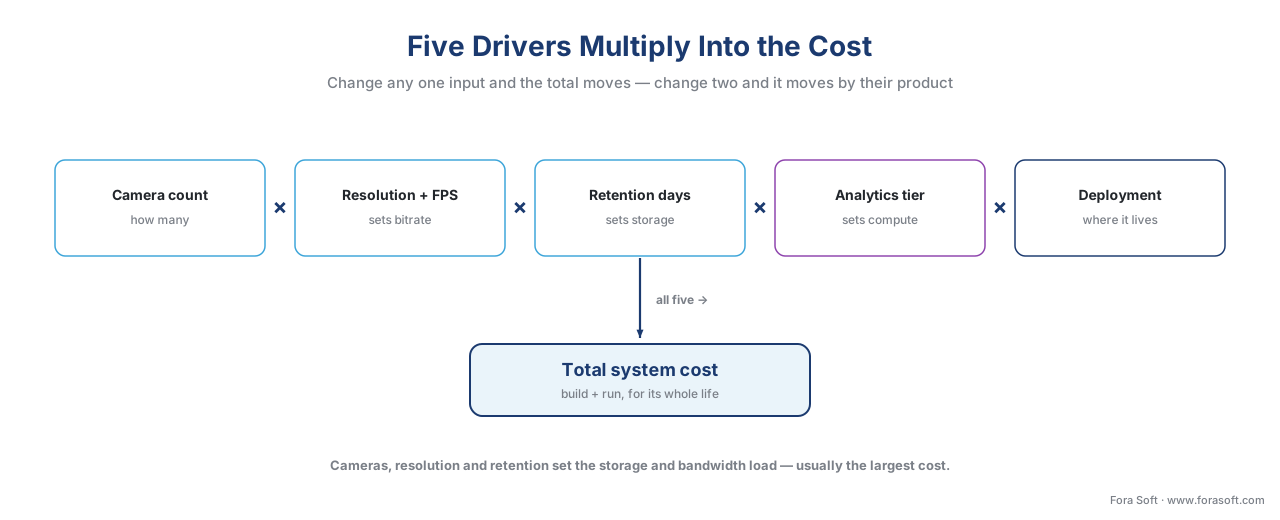 Figure 2. The five drivers multiply. Camera count, resolution/frame rate, and retention set the storage and bandwidth load; analytics tier and deployment model set how that load is processed and where it lives. Change any one input and the total moves — change two and it moves by their product.
The build bill, line by line
The build bill is everything you buy and install before the system records its first usable frame. For a professional commercial system it has six recurring line items. Industry pricing in 2026 puts a fully installed commercial camera — hardware, mounting, integration, and labor — in the range of $700–$1,500 per camera, but that blended figure hides a structure worth seeing, because each piece moves for different reasons (Security.org; Get Safe and Sound).
Cameras. The hardware itself. A commercial 4-megapixel IP camera — a camera that sends digital video over a network cable, as opposed to an older analog camera — runs roughly $300–$600 for the unit alone, more for specialized optics, thermal, or rugged housings. For the difference between camera types, see IP cameras vs analog cameras.
Network and power. Cameras need a network connection and power, usually delivered together over one cable by Power over Ethernet (PoE) — a method of sending electrical power and data down the same Ethernet cable. This means PoE switches, cabling, conduit, and the labor to run each cable. It is also the single most common surprise cost: infrastructure upgrades to switches and cabling routinely add $500–$3,000 or more to a project that budgeted only for cameras (Get Safe and Sound).
Recording server and storage. In an on-premises system, a server runs the VMS and writes video to disks. The disks are purpose-built surveillance hard drives rated for continuous writing; in 2026 they cost roughly $24–$36 per terabyte (TB) depending on capacity and volume — a 12 TB surveillance drive lists around $429, an 8 TB around $190–$215 in bulk (Seagate SkyHawk; Western Digital Purple). How many terabytes you need is the storage arithmetic we work out below.
VMS software licenses. Most professional VMS products charge per camera, called a per-channel license. The range is wide: some platforms offer a free tier for a handful of cameras, while professional and enterprise tiers commonly run $100–$330 per channel one-time, often plus a base license (for example, one well-known platform lists tiers around $1,479–$3,183 for the base plus roughly $199–$329 per camera) (DHS VMS Market Survey; Milestone XProtect). These figures are illustrative and vary by vendor and volume, but the structure — base plus per-channel — is near-universal.
Installation labor and design. The work of mounting cameras, running cable, configuring the VMS, and commissioning the system. Labor is not a rounding error: it commonly represents 40–70% of total project cost, and the professional installation service alone is typically 30–50% of the price (Get Safe and Sound). Complex runs, lifts, and difficult buildings push it higher.
Add these up and you have the build bill. The shape matters: on a typical commercial job, hardware is less than half, and labor plus infrastructure is the larger share — which is why "just add a few cameras" is rarely cheap.
The storage arithmetic, shown out loud
Storage deserves its own section because it is usually the largest single cost and the one most often guessed wrong. The math is simple, and you should be able to do it on a napkin.
Start with one camera. Storage per camera per day equals its bitrate times the number of seconds in a day. A handy shortcut collapses the unit conversion: storage in gigabytes (GB) per day ≈ bitrate in Mbps × 10.8. So for a 4-megapixel camera recording continuously at 2 Mbps:
2 Mbps × 10.8 ≈ 21.6 GB per camera per day.
Now scale to a 40-camera site kept for 30 days:
21.6 GB × 40 cameras × 30 days ≈ 25,920 GB ≈ 26 TB.
That 26 TB is the raw recording. In practice you provision more — extra capacity for the redundancy scheme that survives a dead disk (called RAID, where data is spread across drives so one failure loses nothing) and for headroom — so a real array for this site is closer to 36–40 TB usable. At roughly $28 per TB for the drives, the disks themselves are a modest $1,000–$2,000; the storage cost that hurts is in the cloud model, where you rent that capacity every month instead of buying it once.
The reason retention is the dominant lever is now visible: it sits in that multiplication as a straight multiple. Hold the same 40 cameras but change only the retention, and storage moves in lockstep:
7 days ≈ 6 TB · 30 days ≈ 26 TB · 90 days ≈ 78 TB · 365 days ≈ 315 TB.
A year of retention needs roughly twelve times the storage of a month — and in the cloud, often twelve times the storage fee. This is why the first question a good estimator asks is not "how many cameras?" but "how long must you keep it?" For the full treatment of retention and the levers that move it, see how surveillance storage works: the retention math.
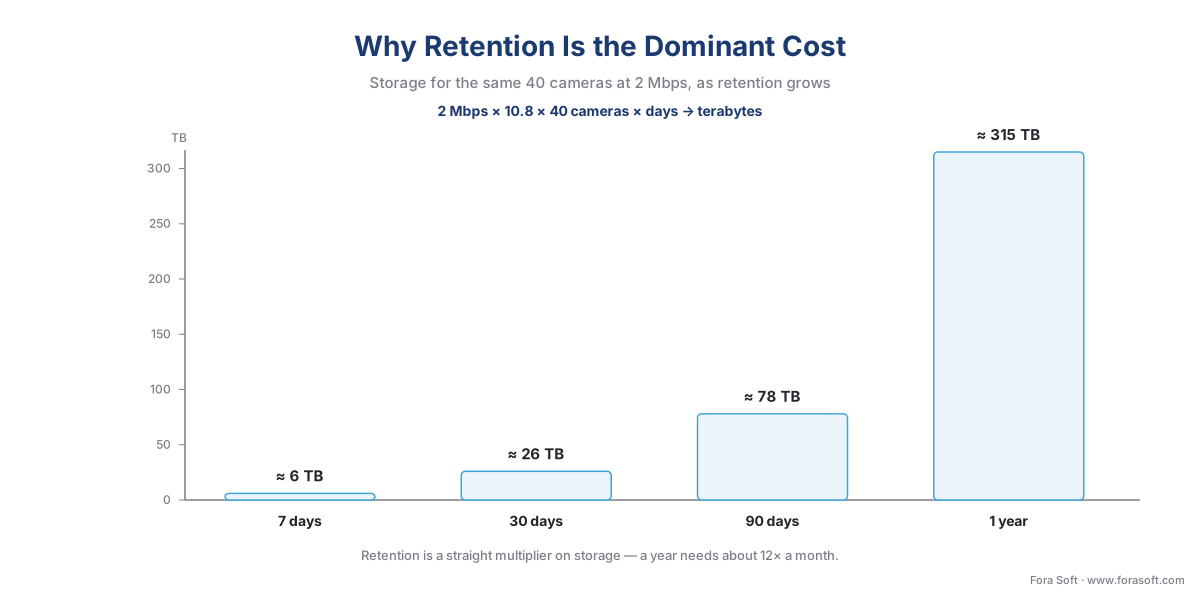 Figure 3. Why retention is the dominant cost. The same 40 cameras need roughly 6 TB for a week, 26 TB for a month, and 315 TB for a year — storage scales linearly with retention days, and in the cloud so does the monthly storage fee.
The run bill, line by line
The run bill is what keeps the system alive after install day. It is paid monthly or annually, and over the system's life it is the larger of the two bills. Its line items differ by deployment model, but the categories are consistent.
Maintenance and support. The contract that keeps the system patched, the failed camera replaced, and the help line answered. Professional maintenance contracts typically run 10–15% of the initial system value per year — a $50,000 system carries a $5,000–$7,500 annual maintenance budget — and maintenance is the single largest slice of lifetime operating cost (Security Solutions Media; TechPro Security). Many VMS vendors also sell an annual software "care" or update plan, often around 20% of the license cost per year, which lives here.
Hardware replacement. Cameras and especially surveillance drives wear out. Disks running 24/7 are consumables on a multi-year cycle, and a replacement budget belongs in the run bill, not as a surprise.
Power and cooling. Cameras, switches, servers, and storage all draw power continuously. Modest per device, real at scale.
Cloud subscription and egress. If any part of the system is in the cloud, this is the meter that never stops. Continuous-recording cloud subscriptions in 2026 commonly run $10–30 per camera per month for short (7–30 day) retention, $30–60 for longer, and $75–150 at the enterprise end (Solink). There is also a trap called egress — the fee cloud providers charge for data leaving their network. As a yardstick, general-purpose cloud storage charges about $0.09 per GB of egress; pulling a single camera's month of footage (≈ 648 GB) back out can cost roughly $58 in egress alone (AWS S3 Pricing). Managed VSaaS usually folds normal viewing into the subscription, but self-built cloud storage gets bitten by egress hard.
Analytics compute. If the system runs AI analytics in the cloud or on a dedicated server, that compute is a recurring cost too. The engineering of the analytics models themselves belongs to our AI for Video Engineering section; here it is a line item, and where it runs — on the camera, on a local box, or in the cloud — sets how much it costs to operate.
Across all five categories, the per-camera run cost of a professional system commonly lands around $50–$200 per camera per year for on-premises maintenance, and much higher for cloud once the subscription is counted (Security.org).
A worked example: 40 cameras, three ways, over five years
Numbers make the model real, so let us cost one site completely. The site: 40 cameras, each a 4-megapixel unit recording continuously at about 2 Mbps in H.265, kept for 30 days — the same site from our deployment-models article, now costed end to end. Every figure below is illustrative arithmetic built on the cited 2026 ranges; your numbers will differ, which is exactly what the downloadable calculator is for.
We already know the two physical quantities: ≈ 26 TB of storage (provision ~40 TB), and, only if video crosses the internet, 80 Mbps of sustained upload (2 Mbps × 40). Now the money, three ways.
On-premises. You buy everything once. Cameras ≈ $16,000 (40 × $400), network and PoE ≈ $8,000, recording server ≈ $6,000, storage drives ≈ $1,100 (≈ 39 TB provisioned × $28/TB), VMS licenses ≈ $6,000 (40 × ~$150), and install plus design ≈ $12,000 (40 × $300). Build ≈ $49,000. The run bill is light because nothing is rented: maintenance and support ≈ $5,900/year (about 12% of the build) plus power and drive replacement ≈ $1,100/year, so run ≈ $7,000/year. Over five years:
$49,000 build + (5 × $7,000) = $49,000 + $35,000 = $84,000.
Here the build is the larger share — about 58% — because you paid for capacity up front.
Cloud (VSaaS). You buy little hardware, but the cameras, cabling, and install labor do not disappear — only the server, the storage drives, and the VMS license do. Cameras ≈ $16,000, network and PoE ≈ $8,000, install ≈ $12,000 — build ≈ $36,000, lower than on-premises by exactly the gear you no longer buy. But the meter runs: subscription at $20/camera/month = $9,600/year, plus maintenance ≈ $4,300/year and an internet/upload allowance ≈ $800/year, so run ≈ $14,700/year. Over five years:
$36,000 build + (5 × $14,700) = $36,000 + $73,500 ≈ $109,500.
Now the proportions flip: run is about 67% of the total — close to the industry 70% rule — because you are renting the capacity you would otherwise own.
Hybrid. Heavy video records locally; the cloud handles management, backup, and event clips. Cameras ≈ $16,000, network ≈ $8,000, a local recorder with storage ≈ $4,700, VMS licenses ≈ $6,000, and install ≈ $12,000 — build ≈ $47,000. Run is moderate: maintenance ≈ $5,600/year, a lighter cloud-management fee (≈ $8/camera/month) ≈ $3,800/year, and power ≈ $1,000/year, so run ≈ $10,400/year. Over five years:
$47,000 build + (5 × $10,400) = $47,000 + $52,000 ≈ $99,000.
Hybrid sits between the two on build, and its five-year total reflects the cloud-management fee it adds on top of local gear.
| Cost element | On-premises | Cloud (VSaaS) | Hybrid |
|---|---|---|---|
| Deployment model | Recording + storage on-site | Recording + storage in provider cloud | Local recording + cloud management |
| Build (CapEx) | ≈ $49,000 (high) | ≈ $36,000 (low) | ≈ $47,000 (medium) |
| Run (OpEx) / year | ≈ $7,000 (low) | ≈ $14,700 (high) | ≈ $10,400 (medium) |
| 5-year total | ≈ $84,000 (lowest) | ≈ $110,000 (highest) | ≈ $99,000 |
| Build vs run split | ~58% build / 42% run | ~33% build / 67% run | ~47% build / 53% run |
| Cheapest to start | No (highest upfront) | Yes (lowest upfront) | Between |
| Cheapest over 5 years | Yes, for a single site | No — subscription compounds | Between |
Table 1. The same 40-camera site, three deployment models, costed to five years. The cost shapes differ sharply — on-premises front-loads the spend, cloud back-loads it, hybrid balances — and so do the totals: for one site kept five years, on-premises is the cheapest total and cloud the most expensive.
The totals tell a clear story: for a single site that records continuously and is kept five years, on-premises is the cheapest total and cloud the most expensive — because the never-ending per-camera subscription outruns the one-time hardware it replaced. Cloud still wins the opening stretch: its $36,000 build undercuts on-premises by $13,000, so it is cheaper until its higher run cost catches up, which happens partway through year two for this continuously-recording site. The lesson is not that cloud is bad; it is that cloud's appeal is the low entry cost and the operational simplicity, not the five-year total. Cloud and hybrid earn their keep managing many sites without on-site staff, surviving a local disaster with an off-site copy, and starting fast — benefits this single-site cost view does not capture.
 Figure 4. Five-year total cost, split into build and run. For one continuously-recording 40-camera site, on-premises is the cheapest total (~$84k), hybrid is between (~$99k), and cloud is the highest (~$110k) — cloud's low build is overtaken by its subscription partway through year two.
The five levers that move the bill most
Once the model is built, a handful of levers move the total far more than the rest. Pull these knowingly and you control the budget; ignore them and the budget controls you. They are ranked here by how much they typically move the number.
1. Retention days — the biggest single lever. Storage scales linearly with how long you keep footage, and storage is usually the largest cost. Cutting retention from 90 days to 30 cuts the storage bill by two-thirds. The discipline: keep footage as long as you genuinely need, and no longer — which, helpfully, is also what privacy law requires.
2. Resolution and codec. Bitrate sets storage and bandwidth, and two settings move bitrate hard. Resolution: a 4K camera produces two to four times the data of a 1080p one. Codec — the compression format — matters just as much: H.265 (HEVC) produces roughly half the file size of the older H.264 at the same quality, so choosing H.265 can nearly halve the storage bill for free. (Codec depth lives in our video encoding section; here it is a cost lever.)
3. Recording mode. Recording every camera continuously is the most expensive mode. Motion-only or event-only recording — storing video only when something happens — can cut storage by 50–80% on typical scenes, at the cost of gaps when nothing triggered. Match the mode to the risk per camera rather than defaulting all cameras to continuous.
4. Deployment model. As the worked example showed, on-premises, cloud, and hybrid produce different cost shapes and different five-year totals. For a large, long-lived system the model choice can swing the total by tens of thousands of dollars.
5. Analytics tier. Each step up in intelligence — motion, to object detection, to recognition and anomaly detection — adds compute and licensing. Running analytics at the edge (on the camera or a local box) avoids per-minute cloud compute fees; running it in the cloud trades that for elastic scale. The economics of that split are covered in the economics of analytics.
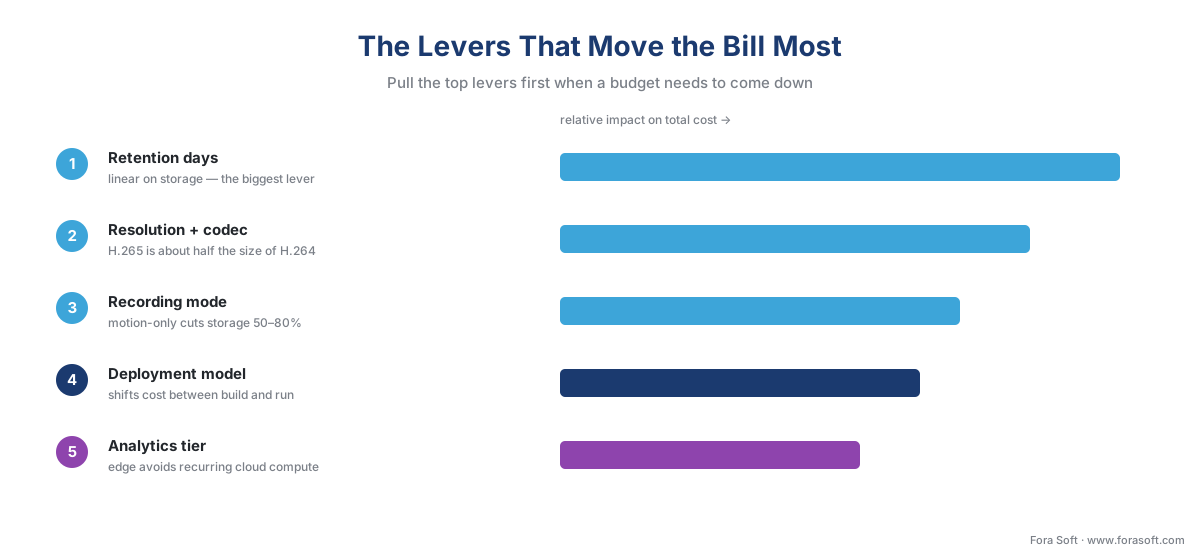 Figure 5. The levers, ranked by cost impact. Retention and the resolution/codec pairing move storage — the largest line — the most; recording mode, deployment model, and analytics tier follow. Pull the top levers first when a budget needs to come down.
A common mistake to avoid
The costliest pattern we see is budgeting the build and forgetting the run — pricing a system on its install quote and treating everything after as someone else's problem. It shows up in three predictable ways. The first is undersized storage: a team budgets motion-only retention but the cameras ship recording continuously, and the array fills three weeks early, forcing an emergency disk purchase nobody planned. The second is the cloud subscription that overtakes ownership: a low monthly fee that looked cheap in year one quietly passes the cost of owning the gear within about two years, with no asset to show for it. The third is the egress surprise: a team stores footage in a raw cloud bucket to save on subscription, then pays a four-figure egress bill the first time an investigation needs a month of video pulled back out. All three are avoided by the same discipline — model both bills, at full scale, before signing, and treat the run cost as the larger half it usually is. Privacy law adds a useful guardrail here: regulations such as the EU's General Data Protection Regulation require that personal data, including recognizable video, be kept no longer than necessary (GDPR Art. 5(1)(e)), so the shortest lawful retention is often the cheapest one too. This is engineering guidance, not legal advice; confirm specifics with qualified counsel.
Where Fora Soft fits in
Fora Soft has built real-time video, streaming, and computer-vision software since 2005, across 625+ shipped projects, and the cost model is a conversation we have with clients before a line of code is written, because the wrong model is expensive in ways that only show up in year three. Teams come to us when an off-the-shelf platform forces a cost shape that does not fit — a per-camera cloud fee that becomes unaffordable at full scale, a closed VMS whose per-channel licensing balloons, or a storage design that ignored retention and blew the budget. We build the custom VMS and analytics layer that lets the cost model fit the deployment: edge analytics that avoid recurring cloud-compute fees, hybrid record-local-manage-cloud pipelines that cut the bandwidth and subscription bill, and open-standard (ONVIF) ingest that keeps you from being locked into one vendor's pricing. The framing we lead with is always how the system behaves — and what it costs — under real load and real retention, not the number that looks smallest in the demo.
What to read next
- How surveillance storage works: the retention math
- On-prem, cloud, and hybrid VMS — three deployment models
- Build vs buy vs customize a VMS
Call to action
- Talk to a surveillance engineer — book a 30-minute scoping call to talk through your video surveillance software plan.
- See our case studies — 250+ shipped projects across video streaming, WebRTC, OTT, telemedicine, e-learning, surveillance, and AR/VR.
- Download the Surveillance Cost-Model Calculator — Live spreadsheet calculator: enter cameras, resolution/bitrate, retention, and deployment model, and it returns provisioned storage (TB), build cost, annual run cost, and a five-year total for on-prem, cloud, and hybrid.
References
- IEC — "IEC 62676-1-1: Video surveillance systems for use in security applications — Part 1-1: System requirements (General)" (gives recommendations and requirements for the selection, planning, installation, commissioning, maintaining, and testing of video surveillance systems — the lifecycle the build-vs-run cost split maps to). Primary standard (tier 1). https://webstore.iec.ch/publication/64385
- IEC — "EN IEC 62676-4:2025: Video surveillance systems for use in security applications — Part 4: Application guidelines" (practical guidance for planning, design, installation, testing, commissioning, and maintenance of VSS; current 2025 edition). Primary standard (tier 1). https://webstore.iec.ch/publication/68479
- European Union — "GDPR, Regulation (EU) 2016/679, Art. 5(1)(e) — storage limitation" (personal data, including recognizable video, must be kept no longer than necessary; caps maximum retention, which caps storage cost). Primary law (tier 1). https://eur-lex.europa.eu/eli/reg/2016/679/oj
- ONVIF — "Profile G" (open recording/retrieval profile; an open standard reduces vendor lock-in and the switching cost embedded in proprietary VMS licensing). Primary standard (tier 1). https://www.onvif.org/profiles/profile-g/
- Security.org — "How Much Do Security Cameras Cost in 2026?" (commercial installed cost ≈ $700–$1,500/camera; per-camera annual operating cost ≈ $50–$200; cloud storage ≈ $10–30/camera/month for 30-day retention). Institutional/analyst (tier 5). https://www.security.org/security-cameras/cost/
- Get Safe and Sound — "CCTV Installation Cost: Guide + Free Cost Calculator (2026)" (labor ≈ 40–70% of total project cost; professional installation ≈ 30–50%; network-infrastructure upgrades add $500–$3,000+). Vendor engineering (tier 4). https://getsafeandsound.com/blog/cctv-camera-installation-cost/
- Security Solutions Media — "Analysing the Total Cost of Ownership of Video Surveillance Systems" (≈ 70% of lifetime cost is incurred after installation; maintenance is the single largest TCO category at ≈ 20%). Institutional/analyst (tier 5). https://www.securitysolutionsmedia.com/2017/02/14/analysing-the-total-cost-of-ownership-of-video-surveillance-systems/
- TechPro Security — "How Much Does a Business Security Camera System Really Cost?" (≈ 70% of cost after install, ≈ 30% initial; maintenance contracts ≈ 10–15% of initial system value per year). Vendor engineering (tier 4). https://techprosecurity.com/security-articles/security-camera-system-installation/how-much-does-a-business-security-camera-system-really-cost/
- Solink — "Security camera cloud storage costs: the complete guide" (continuous-recording cloud subscriptions ≈ $10–30/camera/month short retention, $30–60 longer, $75–150 enterprise). Vendor engineering (tier 4). https://solink.com/resources/security-camera-cloud-storage-costs/
- Videoloft — "Bandwidth Requirements for Cloud Based CCTV" (≈ 1–2 Mbps upload per 1080p camera continuously; ≈ 2–4 Mbps for 4 MP — the bitrate basis for the storage and bandwidth math). Vendor engineering (tier 4). https://videoloft.com/bandwidth-requirements-for-cloud-based-cctv/
- Seagate — "SkyHawk Surveillance Hard Drives" (purpose-built 24/7 surveillance drives; 2026 retail ≈ $24–$36/TB depending on capacity — 12 TB ≈ $429, 8 TB ≈ $190–$215 in volume). First-party engineering (tier 3). https://www.seagate.com/products/surveillance-drives/skyhawk-hard-drive/
- Amazon Web Services — "Amazon S3 Pricing" (internet egress ≈ $0.09/GB after the first tier; the basis for the cloud egress-surprise example — ~$58 to pull one camera's month of footage). First-party engineering (tier 3). https://aws.amazon.com/s3/pricing/
- U.S. Department of Homeland Security — "Video Management Systems Market Survey Report" (VMS licensing structure is base license plus per-channel device license; illustrative per-channel figures ≈ $199–$329 across tiers). Institutional (tier 5; illustrative, dated — confirm current vendor pricing). https://www.dhs.gov/sites/default/files/publications/VMS-MSR_1214-508.pdf
