


Why this matters
If you are scoping or quoting a surveillance project, understanding what an IP camera actually is — and how it differs from an analog camera — is the decision underneath almost every other one. It sets your resolution ceiling, your cabling and labor cost, whether you can run analytics, and how exposed you are to a network breach. The terms get used loosely, and a buyer who picks analog to save money on cameras can end up paying more in separate power runs and lost capability, while a buyer who picks IP without planning bandwidth and security inherits problems analog never had. This article explains what an IP camera is in plain language, so you can make that call deliberately and talk to integrators without being sold the wrong thing. It builds directly on the vocabulary from what a VMS, an NVR, and a DVR really are.
What is an IP camera?
An IP camera (IP for Internet Protocol, the addressing scheme every networked device uses to find every other device) is a self-contained computer with a lens. It captures an image, compresses it into digital video on board using a codec such as H.264 or H.265, and sends that finished stream over the same kind of network cable your office computers use. Give it power and a network connection and it behaves like any other device on the network: it has its own address, runs its own software, and can be reached, configured, and recorded by other software from anywhere that network reaches. The recorder, or the management software, simply receives an already-digital stream.
That is the whole definition, but the weight of it only lands when you compare it to what came before. The simplest way to understand an IP camera is to understand the one thing it does that an analog camera cannot: it digitizes and thinks for itself. So the rest of this guide answers "what is an IP camera?" the way a buyer actually needs it answered — by walking through how it works, how it differs from analog, and what that difference costs and unlocks.
Hold onto one picture. An analog camera is an eye that ships raw signal to a brain somewhere else — a recorder. An IP camera is an eye with its own brain that ships finished video. Almost everything that follows is a consequence of that single relocation of the brains.
 Figure 1. What an IP camera is, made concrete. The analog camera ships a raw signal to a recorder that does the digitizing and the thinking; the IP camera is a networked computer that encodes the video itself and puts a finished digital stream on the network.
How an IP camera works, step by step
Every surveillance camera has to turn light into a picture, then turn that picture into something a recorder can store. What makes an IP camera an IP camera is that it does the whole chain itself, inside the housing, before anything leaves the camera. Walk the four steps once and the rest of the article is easy.
First, the lens and image sensor capture light and turn it into a raw digital image, exactly as a phone camera does. Second, an on-board processor encodes that image into compressed digital video using a codec — H.264 or the more efficient H.265 — so it is small enough to send and store. Third, the camera puts that stream onto the network using standard internet protocols, where a shared language called ONVIF and a streaming protocol called RTSP let recording software discover the camera and pull its video. Fourth, because there is a real processor inside, the camera can optionally run analytics on the spot — motion detection, line-crossing, object detection — and send a small tagged event instead of, or alongside, the full stream.
An analog camera does only the first half of step one and then stops. It captures an image and sends it out as a continuous electrical signal — think of a live, unprocessed video waveform — down a dedicated coaxial cable, the thick round cable with a screw-on BNC connector used by traditional closed-circuit television (CCTV). It has no network, no software, and almost no intelligence; it is an eye with a wire. All the digitizing, compressing, and recording happens later, inside the recorder. That is the line this whole article draws: the IP camera carries its own brain; the analog camera borrows one downstream.
A short history: the camera that became a computer
The shift has a clear birthday. On 17 September 1996, just after the Atlanta Olympic Games, the Swedish company Axis Communications launched the AXIS 200 "NetEye," the world's first network camera, built by engineers Martin Gren and Carl-Axel Alm (Axis Communications, "The brains behind the first network camera"). By modern standards it was almost comically slow — about one frame every 17 seconds — but the idea was the revolution: a camera you could reach over a network and watch through a web browser, from anywhere.
Because no chip existed to do image processing inside a camera, Axis designed its own, the ARTPEC (Axis Real Time Picture Encoder). That detail is the whole story in miniature: to make a camera that thinks, the industry had to put a real processor inside it. Once cameras had processors, they could compress video, then detect motion, then — decades later — run object detection on the camera itself. The analog camera never gained any of this, because it never gained a brain.
For years the two worlds ran in parallel, and analog held on longer than anyone expected. But the direction was one-way. By 2026, IP-based systems account for roughly 55–60% of the video-surveillance market and a clear majority of new professional installations, while analog continues a slow decline, surviving mainly where cabling is already in place (market-research estimates, 2025–2026; treat as directional, not exact). The reasons analog lost are worth walking through one at a time, because each one is a real engineering tradeoff you will weigh on a project.
Resolution: lines on a screen versus millions of pixels
The most visible difference is image detail, and the two technologies do not even measure it the same way.
Analog resolution is counted in TV Lines (TVL) — literally how many alternating black-and-white vertical lines the camera can resolve across the screen. A good standard-definition analog camera might manage 700 TVL, which works out to roughly 976 × 582 pixels, or about 0.4–0.5 megapixels (Pelco, "Finding the Right TV Line Resolution"). That was the ceiling for classic CCTV, and it is why old footage of a parking lot can show that a car was there but not its license plate.
IP cameras are counted in megapixels (MP), the same unit as a phone camera. Entry-level professional IP cameras start at 2 MP (1080p, "Full HD"), with 4 MP and 8 MP (4K) common and sensors above 20 MP available for wide areas. A 2 MP IP camera resolves roughly four to five times the detail of a 700 TVL analog camera — the difference between "someone was at the door" and "this specific person was at the door."
One honest caveat a good integrator will tell you, and a senior engineer will insist on: more megapixels is not automatically a better image. Sensor size, lens quality, and low-light performance matter as much as pixel count; a cheap 8 MP camera in a dark room can look worse than a well-made 2 MP one. Resolution is the headline difference, not the only one. Pixel count sets the ceiling on detail; the optics and sensor decide how much of that ceiling you actually get.
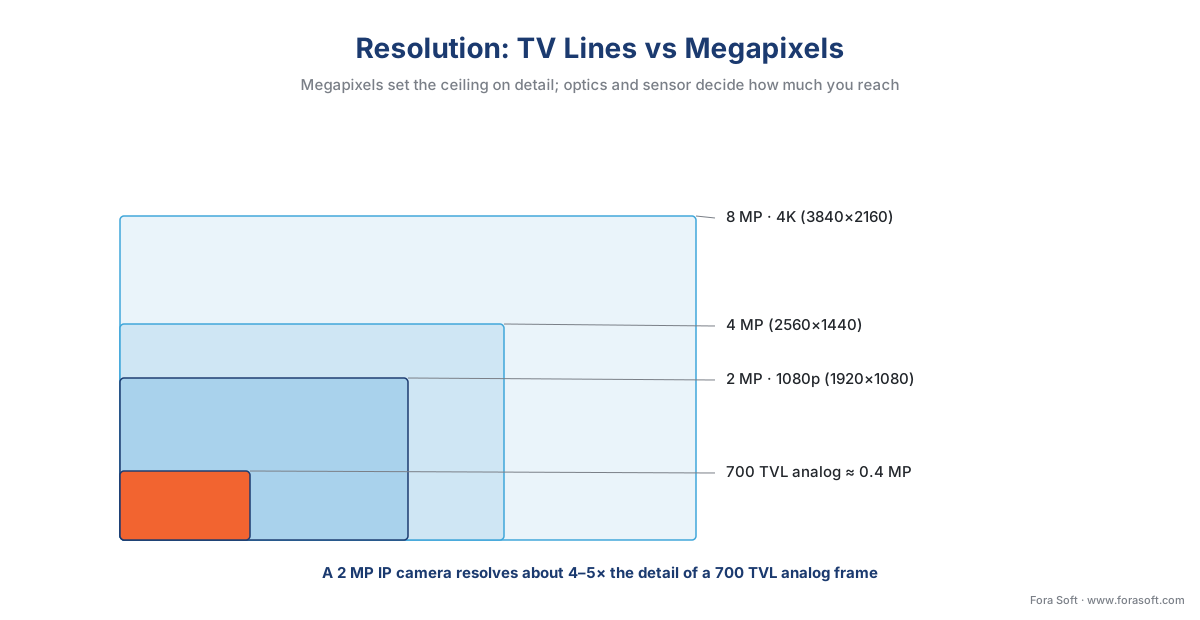 Figure 2. Resolution to scale: a 700 TVL analog frame against 2 MP, 4 MP, and 8 MP IP frames. Megapixels set the ceiling on detail; optics and sensor decide how much you reach.
"But analog went HD too": the HD-over-coax bridge
If you research this, you will hit a wall of acronyms — AHD, HD-TVI, HD-CVI, HD-SDI — and a fair claim that analog is not stuck at 0.5 MP anymore. This is true and worth understanding, because it is exactly why analog has not died.
These HD-over-coax formats push high-definition video, commonly 1080p and now higher, down the same coaxial cable an old analog plant already has (Amcrest, "HD Analog Comparison"). For a site with hundreds of existing coax runs in the walls, that is a real saving: you upgrade cameras and the recorder, reuse the cable, and skip a costly rewire. The catch is that these formats are mutually incompatible families — an HD-CVI camera will not talk to an HD-TVI recorder, even though they share the same physical cable, because they speak different signaling languages. You are buying into one vendor's coax ecosystem.
So the accurate framing is not "analog is low-resolution" — it is that HD-over-coax narrowed the resolution gap but kept all the other analog limits: no network intelligence, no one-cable power, no native interoperability standard, and a per-camera, per-recorder lock-in. It is a bridge for existing cabling, not a reason to choose coax for a new building.
Cabling and power: two cables become one
The wiring difference is where IP quietly saves the most money, and it comes down to power.
An analog camera typically needs two cable runs: coax for the video signal back to the recorder, and a separate power cable to a nearby outlet or power supply. Coax has one genuine advantage — a single run can stretch about 300 meters (1,000 feet) without a repeater, further than a single Ethernet segment.
An IP camera usually needs one cable, because of Power over Ethernet (PoE) — a standard that carries both the data and the electricity to run the camera over a single network cable. IP cameras that draw power this way are often sold as PoE cameras, and it is the single most common way modern IP cameras are wired. PoE is defined by the IEEE 802.3 standard, and the tiers are worth knowing because they decide which cameras a switch can power (IEEE Std 802.3):
| PoE standard | Common name | Power at the camera | Typical use |
|---|---|---|---|
| 802.3af | PoE | up to ~12.95 W | Fixed cameras |
| 802.3at | PoE+ | up to ~25.5 W | PTZ, heaters, IR |
| 802.3bt | PoE++ | up to ~51–71 W | Multi-sensor, heavy PTZ |
Table 1. The IEEE PoE tiers. Match the camera's power draw to a switch that supports the right tier; an 802.3af switch will not run a heated PTZ camera that needs 802.3at or 802.3bt.
One PoE network cable means no electrician for a separate power run, easier camera placement anywhere the network reaches, and — a detail that wins over facilities teams — central backup power. Put the PoE switch on one uninterruptible power supply (UPS) and every camera rides through an outage together, instead of each camera depending on its own local outlet. The single-segment distance limit (about 100 meters / 328 feet of Ethernet) is real, but it is solved cheaply with a switch in between, which also extends the network onward.
The deepest answer to "what is an IP camera?": software you can point at it
Resolution and cabling are the visible differences. The part of the definition that actually "defined modern surveillance" is less obvious: an IP camera has a processor, so it can run software — and a network port, so other software can reach it. An IP camera is, in the end, a camera you can run software on and point software at.
That single fact reshaped the whole system. Because the camera is a computer, it can run analytics at the edge — motion detection, line-crossing, object detection, even some recognition — right where the video is captured, and send a small alert or a tagged event instead of a full-time video stream. (How those analytic models actually work lives in our AI for Video Engineering section; how you choose between running them on the camera, an on-site server, or the cloud is the subject of edge vs cloud video analytics.) An analog camera cannot do any of this, because it is not a computer — its only output is a raw signal, and any intelligence has to be added downstream in the recorder.
Because the camera is also a networked device, it can be discovered, configured, and pulled by software over the network using a shared language. That language is ONVIF, an open standard created in 2008 by Axis, Bosch, and Sony so that IP cameras and recording software from different makers could work together (ONVIF, "Our Mission," onvif.org). ONVIF and the related streaming protocols are what let a single piece of software ingest cameras from a dozen brands at once — the foundation of the Video Management System (VMS), the software platform that records and manages many cameras. For the commercial overview of how cameras and profiles fit a security system, see Fora Soft's blog on ONVIF profiles in security systems; for the engineering depth, ONVIF explained for engineers.
This is also why IP camera software exists as a whole product category and analog "camera software" does not. Because an IP camera is programmable, networked, and standardized, an application — an NVR app or a full VMS — can find every camera on the network, record their streams, replay them, and run analytics across the fleet. An analog camera and its recorder were a closed pair with no equivalent: the camera was a dumb sensor wired to one matching box. The camera stopped being that sensor and became a node you can write software for and against. Everything modern surveillance is known for — searchable analytics, remote viewing, multi-vendor systems, AI — needed a camera that could think and talk on a network. That is the deepest part of the answer to "what is an IP camera?": it is the camera that made surveillance software possible.
The two new bills: bandwidth and security
IP did not arrive for free. It introduced two real costs the analog world did not have, and ignoring either is how IP projects go wrong.
Bandwidth. Every IP camera continuously pushes compressed video onto your network, and that adds up fast. A single 4 MP camera using the efficient H.265 codec runs roughly 2–4 megabits per second (Mbps); a 4K camera runs roughly 4–10 Mbps depending on scene motion. Walk the math for a modest system of 20 cameras at 4 Mbps each:
20 cameras × 4 Mbps = 80 Mbps of sustained traffic.
That is fine on a dedicated gigabit (1,000 Mbps) switch, but it is real load that shares the network, and it scales linearly: 200 cameras is 800 Mbps, enough to demand its own network design. Analog has no equivalent — each camera has a private coax run to the recorder and consumes zero shared network bandwidth. The codec is the main lever here (H.265 roughly halves the bandwidth of older H.264); the full storage and bandwidth math is in the surveillance storage and retention math, and the codec choice itself is covered in Video Encoding.
Security. This is the one that catches teams off guard. An analog camera is not on a routable network, so it cannot be hacked over the internet — it is, perversely, secure by being dumb. An IP camera is a networked Linux computer, which means it is an attack surface like any other computer. The Mirai botnet, first seen in 2016, did exactly this at scale: it hijacked hundreds of thousands of IP cameras and DVRs that still had default passwords and used them to launch some of the largest internet outages on record, including the October 2016 Dyn attack that took down Twitter, Netflix, and Reddit for much of the US (Akamai; Cloudflare incident analyses). The threat did not end: 2024–2025 Mirai variants exploited specific camera models through unpatched vulnerabilities, and many end-of-life cameras can never be fixed.
A common mistake to avoid
The most expensive IP-camera error is treating the camera like a passive appliance instead of the networked computer it is — installing it with the factory default password, on the flat office network, and never updating its firmware. That is precisely the configuration Mirai and its descendants feed on. The fix is basic computer hygiene applied to cameras: change every default credential, put cameras on their own isolated network segment (a VLAN) separated from business systems, keep firmware patched, disable unused services, and retire cameras that no longer receive security updates. None of this is exotic, but it has to be designed in from the start — bolting it on after a breach is far costlier than planning it on day one.
IP vs analog at a glance
| Criterion | Analog camera | IP camera |
|---|---|---|
| Where video is digitized | In the recorder (DVR) | On the camera |
| Resolution unit | TV Lines (≈0.4–0.5 MP typical) | Megapixels (2–8 MP+ common) |
| HD option | HD-over-coax (AHD/TVI/CVI/SDI) | Native, up to 4K and beyond |
| Cabling | Coax + separate power | One cable, data + PoE power |
| Max single run | ~300 m (coax) | ~100 m per Ethernet segment (extendable) |
| On-camera analytics | None (recorder only) | Motion, object, line-crossing, more |
| Interoperability standard | None (or vendor coax family) | ONVIF + RTSP |
| Network bandwidth used | Zero (private coax) | Continuous (Mbps per camera) |
| Cyber-attack surface | Effectively none | Real — must be hardened |
| Best fit | Reuse of existing coax | Almost every new system |
Table 2. The practical comparison. The deciding rows are "where video is digitized," "on-camera analytics," and the two IP-only costs: bandwidth and the attack surface.
So which should your project use?
For almost any new installation, the answer in 2026 is IP — the resolution, the single-cable PoE wiring, the analytics, the remote access, and the multi-vendor software ecosystem all sit on that side, and the two new costs are manageable with competent network and security design. You would deliberately choose analog in one main situation: a site already wired with coax where a full rewire is not justified. There, HD-over-coax cameras upgrade image quality on the existing cable, or, better for the long term, analog-to-IP video encoders convert each analog camera's signal into an IP stream so it can feed modern software — letting you keep the cameras while retiring the old recorder. A hybrid recorder (HVR/XVR) that accepts both is the third bridge. The decision tree below walks the call.
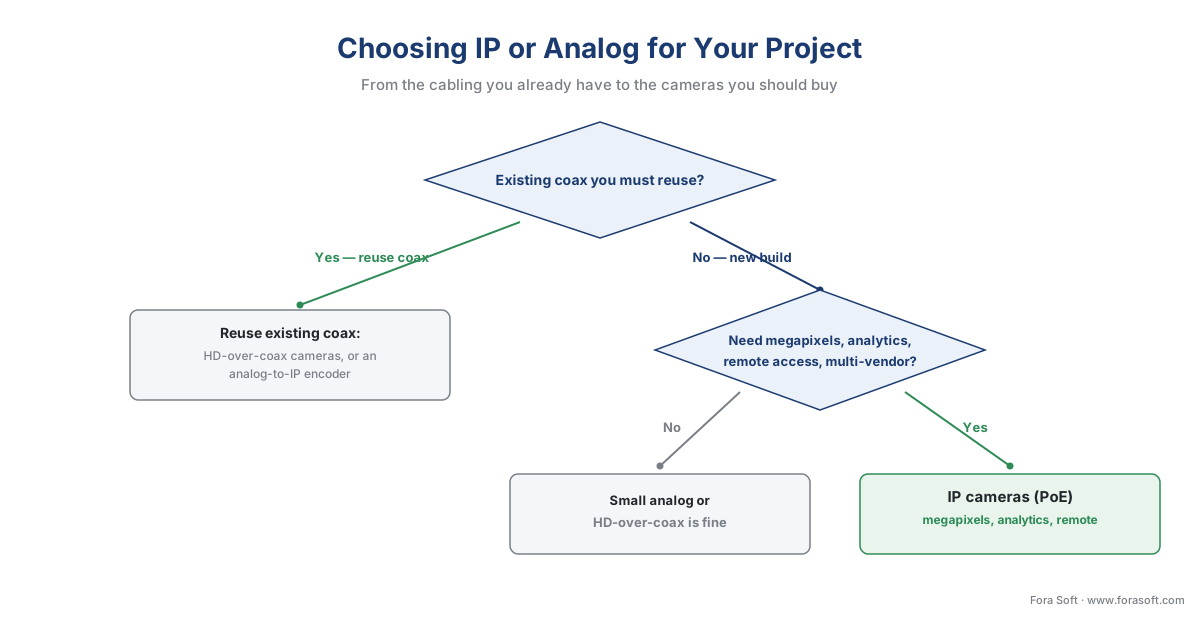 Figure 3. The short decision path: existing coax you must reuse points to HD-over-coax or an analog-to-IP encoder; a fresh build that needs megapixels, analytics, or remote access points to IP.
Where Fora Soft fits in
Fora Soft has built real-time video, streaming, and computer-vision software since 2005, across 625+ shipped projects, and the work almost always lives on the IP side of this line — because everything a client wants built (analytics, remote viewing, multi-vendor ingest, AI events) depends on the camera being a programmable network node. When teams come to us, the camera question is usually settled; the real work is the software that turns a fleet of IP cameras into a system: the ingest path over ONVIF and RTSP, the bandwidth and storage budget that keeps it stable at full camera count, the edge-or-cloud analytics split, and the network hardening that keeps the cameras from becoming someone's botnet. We design that layer around how it behaves under real load — realistic bandwidth, realistic analytics accuracy, realistic failure modes — not around a demo with four cameras.
What to read next
- What is a VMS, an NVR, and a DVR — the words that get confused
- The anatomy of a video surveillance system, end to end
- How a camera stream gets into the VMS: discovery, RTSP, and codecs
Call to action
- Talk to a surveillance engineer — book a 30-minute scoping call to talk through your what is an ip camera plan.
- See our case studies — 250+ shipped projects across video streaming, WebRTC, OTT, telemedicine, e-learning, surveillance, and AR/VR.
References
- Axis Communications — "Changing the face of surveillance: The brains behind the first network camera" (AXIS 200 "NetEye," 17 Sept 1996; Martin Gren & Carl-Axel Alm; ~1 frame/17s; ARTPEC chip). First-party/historical. https://newsroom.axis.com/article/first-network-camera
- ONVIF — "Our Mission" (open standard founded 2008 by Axis, Bosch, Sony; multi-vendor interoperability; profile-conformant product count). Primary (standards body). https://www.onvif.org/about/mission/
- ONVIF — "ONVIF Profiles" (Profiles S, T, G, M and what each standardizes for IP devices). Primary (standards body). https://www.onvif.org/profiles/
- IEEE — "IEEE Std 802.3 (Ethernet), incl. 802.3af/at/bt Power over Ethernet" (PoE power classes and the single-cable data+power model). Primary (standard). https://standards.ieee.org/ieee/802.3/10422/
- IEC 62676 series — "Video surveillance systems for use in security applications" (the international VSS standard; references ONVIF network-video specs). Primary (standard). https://standards.globalspec.com/std/1640982/iec-62676-1-1
- Pelco — "Finding the Right TV Line Resolution for Security Cameras" (TVL definition; 700 TVL ≈ 976×582 ≈ 0.4–0.5 MP). Vendor engineering. https://www.pelco.com/blog/tv-lines-and-security-cameras
- Amcrest — "HD Analog Comparison" (AHD/HD-TVI/HD-CVI/HD-SDI over coax; up to 1080p+; mutual incompatibility). Vendor engineering. https://amcrest.com/hd-analog-comparison
- FS.com — "Power over Ethernet (PoE) Explained: Standards and Wattage" (802.3af 12.95 W, 802.3at 25.5 W, 802.3bt Type 3/4 51–71.3 W at the device). Vendor engineering. https://www.fs.com/blog/understanding-poe-standards-and-wattage-21.html
- Reolink — "IP Camera Bandwidth Calculation" (4 MP H.265 ≈ 2–4 Mbps, 4K H.265 ≈ 4–10 Mbps; H.265 ~40–50% saving over H.264). Vendor engineering. https://reolink.com/blog/ip-camera-bandwidth-calculation/
- Akamai / Cloudflare — Mirai botnet incident analyses (2016 hijack of default-credential IP cameras and DVRs; Oct 2016 Dyn DDoS; 2024–2025 variants exploiting unpatched cameras). Institutional/analyst. https://www.akamai.com/blog/security-research/corona-mirai-botnet-infects-zero-day-sirt
