


Why this matters
If you are scoping a surveillance project, NVR vs DVR is the first fork in the road, and the words are used so loosely in marketing that buyers regularly order the wrong box. A DVR that cannot accept your new IP cameras, an NVR locked to a brand you wanted to leave, or an appliance bought for a site that will quadruple in a year are all expensive mistakes that come from confusing the terms. This article gives you a precise, plain-language answer to NVR vs DVR, then shows where a VMS fits once a single recorder stops being enough — so you can talk to engineers and vendors without being sold the wrong thing. It is the foundation the rest of this course builds on.
NVR vs DVR: the one idea that separates them
Every camera ultimately produces digital video — a compressed stream of bits a computer can store and replay. The thing that separates an NVR from a DVR is where that conversion from a raw image into a compressed digital stream happens. In a DVR, the camera sends a raw analog signal and the recorder does the conversion. In an NVR, the camera does the conversion and sends a finished digital stream that the recorder simply files.
Think of it like the difference between mailing a hand-written letter and mailing a typed document. A DVR receives a hand-written page (the analog signal) and types it up itself before filing it. An NVR receives pages that arrived already typed (digital streams from IP cameras) and just files them. Hold that picture — almost every practical difference in the NVR vs DVR debate, from cable type to resolution, falls out of who does the typing.
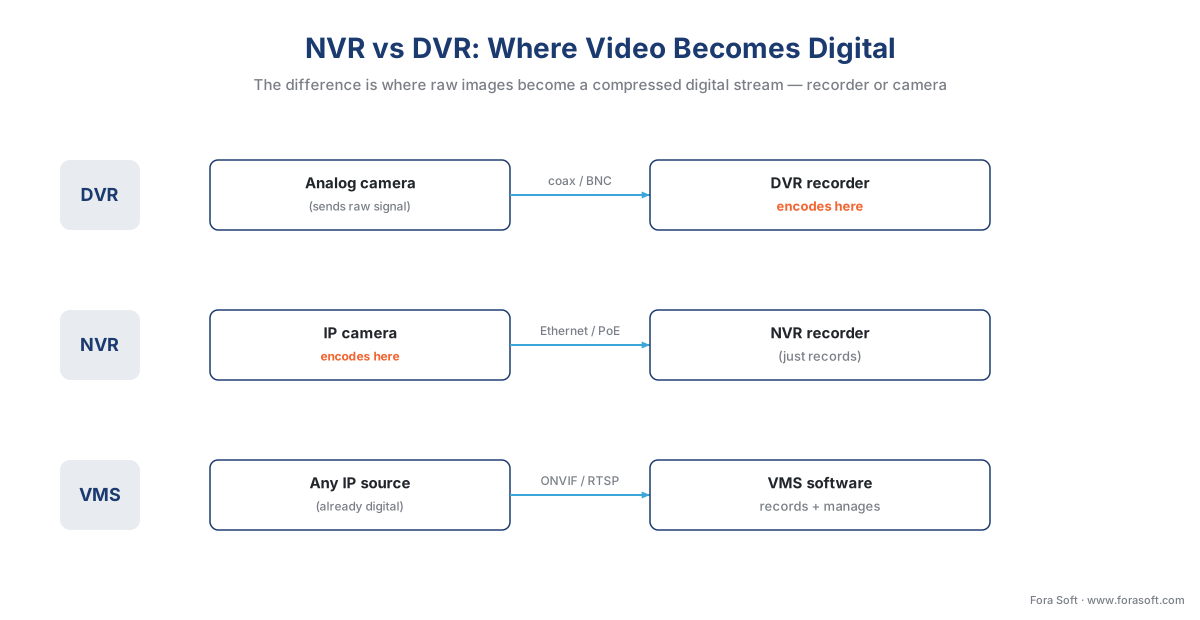 Figure 1. The core of NVR vs DVR: a DVR digitizes inside the recorder, an IP camera digitizes on-board for an NVR, and a VMS ingests already-digital streams from any source.
DVR: the analog recorder
A Digital Video Recorder, or DVR, is the appliance that records analog cameras. An analog camera sends a continuous electrical signal — not a digital file — down a coaxial cable, the thick round cable with a screw-on BNC connector that older closed-circuit television (CCTV) installations used. The camera itself is not a computer; it has no idea what a network is. All the intelligence lives in the recorder.
Because the camera sends a raw signal, the DVR has to do the conversion. Inside the DVR, a chip digitizes and compresses each incoming feed — this is called encoding — and writes the result to a hard disk. The name is the giveaway: it is a digital recorder for analog inputs, because the "digital" part is the job it performs on signals that arrive analog.
That design has consequences worth remembering when you weigh NVR vs DVR. First, a DVR is channel-bound: it has a fixed number of physical camera inputs, commonly 4, 8, 16, or 32, and you cannot exceed them without buying another unit. Second, picture quality is capped by the analog signal standard. Traditional analog tops out around D1 resolution (about 720×480), and even modern "HD over coax" formats (HD-TVI, HD-CVI, AHD) usually reach 1080p — well below the 4K that mainstream IP cameras hit in 2026. Third, the coaxial run is distance-limited: signal degrades past roughly 300–500 feet without a repeater, which constrains where cameras can go. DVRs persist today mainly where coaxial cabling is already in the walls and ripping it out would cost more than living with these limits.
NVR: the IP recorder
A Network Video Recorder, or NVR, is the appliance that records IP cameras. An IP (Internet Protocol) camera is a small networked computer: it captures the image, encodes and compresses the video on board, and sends a digital stream over a standard network cable — the same Ethernet cabling your office uses. Many IP cameras also draw power from that one cable through Power over Ethernet (PoE), so a single wire carries both video and electricity, which is a real installation saving over the separate power and coax runs a DVR needs.
Because the camera already did the encoding, the NVR's job is lighter than a DVR's: it discovers the cameras on the network, pulls their streams, and writes them to disk. The video never touches an analog stage. The payoff is the side of NVR vs DVR that wins most new projects — resolution and placement freedom. IP cameras commonly run at several megapixels up to 4K, and you can put one anywhere the network reaches rather than anywhere you can run dedicated coax.
An NVR is still, in most products, a fixed appliance. It supports a set number of camera channels and a set total throughput (measured in megabits per second across all streams), and once you pass either limit you add hardware. Many NVRs are also sold to pair best with one manufacturer's cameras; cross-brand support exists through standards (more on that below) but is often partial. The mental rule: an NVR is to IP cameras what a DVR is to analog ones — a self-contained recording box, just for the modern, network-native side of the world.
NVR vs DVR at a glance
Before we bring in the VMS, here is the head-to-head that answers most NVR vs DVR searches in one table.
| Criterion | DVR | NVR |
|---|---|---|
| Camera type | Analog (coax/BNC) | IP (Ethernet/PoE) |
| Where video is encoded | In the recorder | In the camera |
| Cabling | Coaxial + separate power | One network cable (PoE) |
| Typical resolution ceiling | D1 to 1080p (HD over coax) | Several megapixels to 4K |
| Cable distance per camera | ~300–500 ft on coax | ~330 ft per Ethernet run, extendable |
| Audio | Often a separate wire | Carried in the stream |
| Typical scale | 4–32 channels | 8–128 channels |
| Multi-vendor / open? | No (proprietary) | Partial (often one brand) |
| Best fit | Reusing existing coax | A small all-IP site |
Table 1. NVR vs DVR head-to-head. The deciding row is "where video is encoded" — everything else follows from it.
In short: choose a DVR when working analog cameras are already wired on coax and replacing them is not worth it. Choose an NVR when you are building fresh with IP cameras on a small, single-brand site. The one question NVR vs DVR does not answer is what happens when a single recorder is no longer enough — and that is where the third term comes in.
Where a VMS fits
A Video Management System, or VMS, is not a box at all — it is software. It runs on ordinary servers (on your premises, in the cloud, or both) and its purpose is to manage video at a scale and flexibility that a fixed appliance cannot reach. A VMS ingests, records, and plays back camera streams like an NVR, but it adds the things a growing operation needs: support for cameras from many different manufacturers, no hard channel ceiling, role-based access for many operators, search and analytics, and integration with other systems such as access control and alarms.
So a VMS is not a fourth competitor in the NVR vs DVR contest — it is the layer above both. The freedom comes from software not being tied to a port count. Need a hundred more cameras? Add a recording server. Three more buildings? Federate them into one view. A VMS such as Milestone XProtect or Genetec Security Center is sized by the servers and storage you give it, not by a number stamped on a chassis. This is why almost every large or multi-site deployment runs on a VMS rather than a stack of recorders.
A modern VMS in 2026 is also where the intelligence lives. Video analytics — software that detects people, vehicles, or unusual events — typically surfaces through the VMS, whether the detection itself runs on the camera, on an edge server, or in the cloud. The VMS becomes the single place operators watch live video, search recordings, receive alerts, and manage the whole estate. For the wider buyer's view of what that software does, see the commercial overview of video surveillance management systems and our breakdown of the features of modern VMS software.
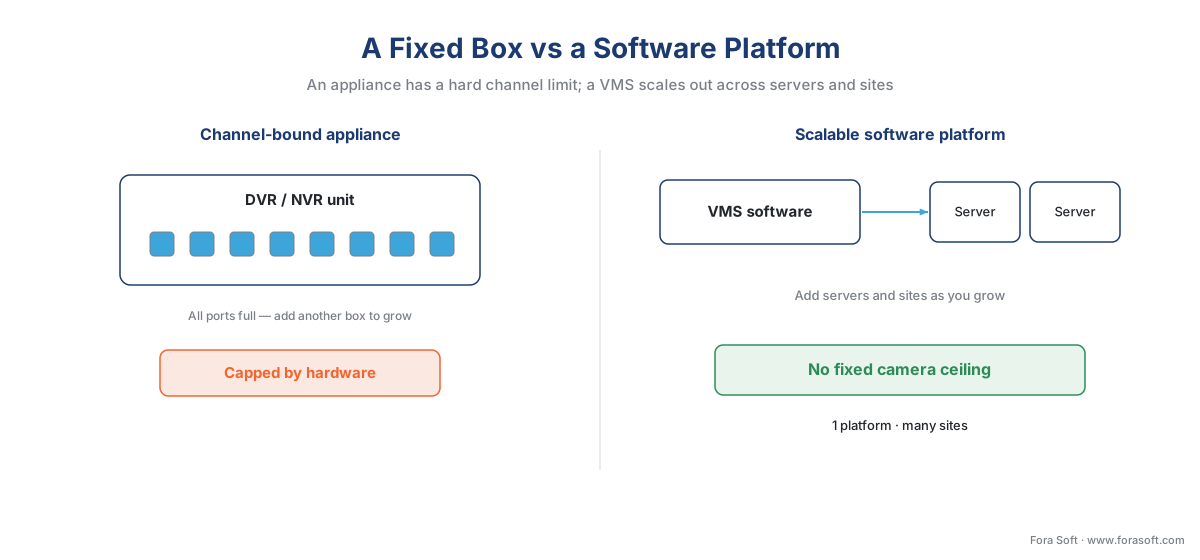 Figure 2. A DVR or NVR is a channel-bound appliance; a VMS is software that scales out across servers and sites with no fixed camera ceiling.
What does NVR stand for, and a few other confusing terms
Because the marketing is loose, a handful of terms cause most of the confusion. Quick definitions:
What does NVR stand for? Network Video Recorder — "network" because it records IP cameras over a data network, in contrast to the DVR's analog inputs. By the same logic, DVR stands for Digital Video Recorder, and VMS stands for Video Management System.
A hybrid recorder (HVR) or XVR accepts both analog and IP cameras in one box. It is the bridge for a site that has working analog cameras on coax and wants to add IP cameras without scrapping the old wiring — effectively a DVR and an NVR fused together, with the channel limits of both.
A video encoder (or "analog-to-IP encoder") is a small device that takes an analog camera's signal and turns it into an IP stream, so an old analog camera can feed an NVR or a VMS. It moves the encoding step out of the recorder and onto a dedicated converter — useful for retiring a DVR while keeping the cameras.
NVR software is the slippery one: vendors sell pure software that turns an ordinary PC into a network video recorder. It records IP cameras like an appliance NVR but has no dedicated hardware. The line between "NVR software" and "a small VMS" is deliberately fuzzy in marketing; the practical difference is scale and breadth — NVR software records, a VMS records and manages multi-site, multi-vendor, analytics, and integrations. We draw that line carefully in NVR software vs a VMS.
Cloud VMS, sometimes sold as Video Surveillance as a Service (VSaaS), moves the recording and management software off your servers and into a provider's data center. The cameras stream up; you watch through a browser. It is still a VMS — the deployment model changed, not the category. The three deployment models (on-premises, cloud, hybrid) get their own treatment in on-prem, cloud, and hybrid VMS.
The standards layer that makes "any camera, any software" possible
An NVR or a VMS can talk to cameras from many manufacturers because of a shared language, not magic. That language is ONVIF — the Open Network Video Interface Forum, an industry body founded in 2008 by Axis Communications, Bosch, and Sony to standardize how IP-based security devices talk to each other (ONVIF, "Our Mission," onvif.org). When a camera and an NVR or VMS both conform to the same ONVIF profile, the recorder can discover the camera, pull its stream, and control basic functions without a custom driver. ONVIF reports more than 33,000 profile-conformant products on the market, which is why multi-vendor systems are practical at all.
ONVIF is organized into profiles, each covering a function: Profile S for basic video streaming, Profile T for advanced streaming including the H.265 codec, Profile G for on-device recording and retrieval, and Profile M for analytics metadata and events (ONVIF, "Profiles," onvif.org). The detail that saves projects: "ONVIF-conformant" guarantees a baseline, not every feature. A camera and recorder that share Profile S will stream reliably; a vendor-specific feature, such as a particular analytic, often still needs that vendor's own software kit. Treat ONVIF as the common floor, not the full ceiling. This is also why an NVR's "supports any ONVIF camera" claim and "full feature parity with brand X" are not the same promise. We unpack this in ONVIF explained for engineers.
There is also a formal standard for the systems themselves. IEC 62676, published by the International Electrotechnical Commission, is the first international standard for Video Surveillance Systems (VSS), the term the standard uses in place of the older "CCTV" (IEC 62676 series). It spans system requirements, video transmission, interfaces, and application guidelines; notably, ONVIF's network-video specifications are referenced inside IEC 62676 Part 2-3 for video transmission. You will rarely read the standard cover to cover, but knowing it exists tells you the field has a real engineering baseline beneath the marketing.
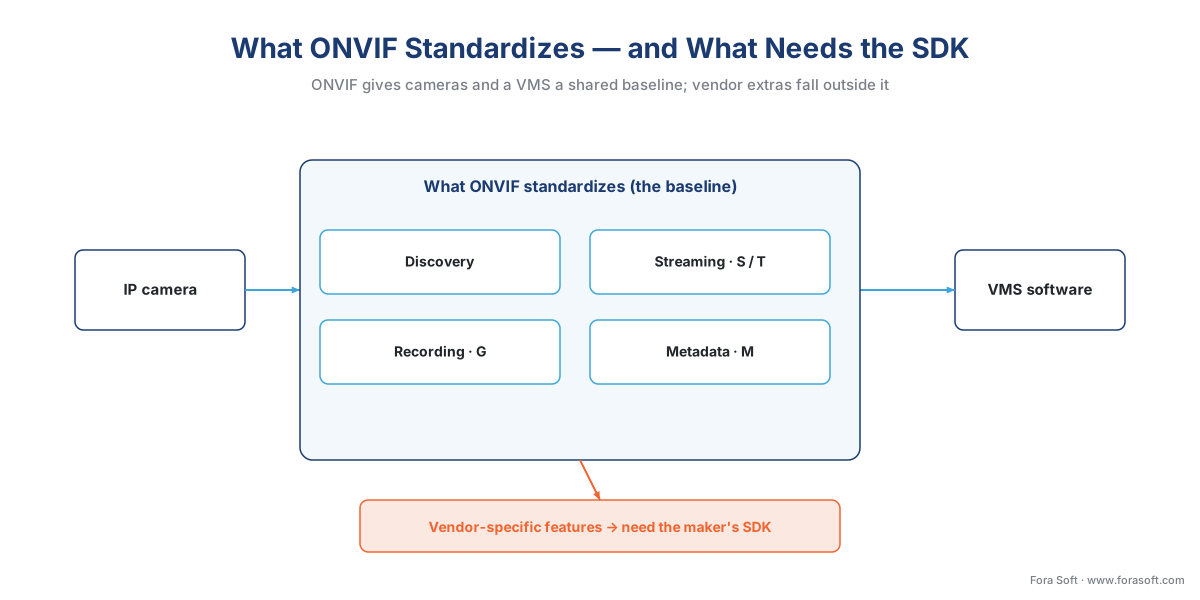 Figure 3. ONVIF guarantees a baseline — discovery, streaming, recording, metadata — while vendor-specific features fall outside the standard and need the manufacturer's SDK.
A quick numbers check: why scale forces the move past a recorder
NVR vs DVR settles the box; scale settles whether a box is enough at all. The reason camera count pushes you from an appliance to a platform is partly storage, and storage is arithmetic. Recorded video size is the bitrate times the number of cameras times the recording hours times the retention days. Work a small example.
Take one camera streaming continuously at a typical 4 megabits per second. In one hour it produces:
4 Mbit/s × 3,600 s = 14,400 megabits = 1,800 megabytes ≈ 1.8 GB per hour.
Over a full day that is about 43 GB per camera. For a 16-camera shop kept for 30 days:
43 GB × 16 cameras × 30 days ≈ 20,600 GB ≈ 20.6 TB.
A single mid-range NVR handles that comfortably. Now scale to a 300-camera, multi-building operation keeping footage for 60 days: the same math lands near 770 TB, spread across sites, with many operators, mixed camera brands, and analytics on top. No single appliance — DVR or NVR — does that. You need software that spreads recording across servers and presents it as one system. That is the moment a VMS stops being optional. We show the full storage model in how surveillance storage works: the retention math.
DVR vs NVR vs VMS at a glance
| Criterion | DVR | NVR | VMS |
|---|---|---|---|
| Camera type | Analog (coax/BNC) | IP (Ethernet/PoE) | IP, plus analog via encoders |
| Where video is encoded | In the recorder | In the camera | Already encoded before ingest |
| Form factor | Fixed appliance | Fixed appliance | Software on servers |
| Typical scale | 4–32 channels | 8–128 channels | Hundreds to thousands |
| Multi-vendor / open? | No (proprietary) | Partial (often one brand) | Yes (ONVIF + drivers) |
| Deployment model | On-prem box | On-prem box | On-prem, cloud, or hybrid |
| Analytics & integrations | Minimal | Basic | Extensive (analytics, access control, alarms) |
| Best fit | Legacy coax site | Small single-brand IP site | Multi-site, multi-vendor, at scale |
Table 2. The full picture. NVR vs DVR is decided by "where video is encoded"; the jump to a VMS is decided by scale and "multi-vendor / open?".
A common mistake to avoid
The most frequent and costly NVR vs DVR error is buying an appliance NVR for its low sticker price, then discovering it only fully supports one camera brand — usually the maker's own. The project starts fine, then a year later the preferred camera for a new building is a different brand, the NVR supports it only over a stripped-down ONVIF baseline, and half the features the buyer paid the cameras for are unreachable. The fix is to decide early whether you need multi-vendor freedom; if you might, start on a VMS, where cross-brand support is the design goal rather than an afterthought.
Which one does your project actually need?
Use the simple path in Figure 4. If working analog cameras are already wired on coax and the budget will not stretch to replacing them, a DVR (or a hybrid recorder, to add IP gradually) is the pragmatic choice. If you are building fresh with IP cameras, the site is small, one brand covers your needs, and you do not need analytics or multiple sites, an NVR is enough and cheaper to run. The moment you cross any of these lines — more than one site, more than one camera brand, serious analytics, many operators, or a camera count that will keep growing — you want a VMS, because that is the only one of the three designed to scale and integrate.
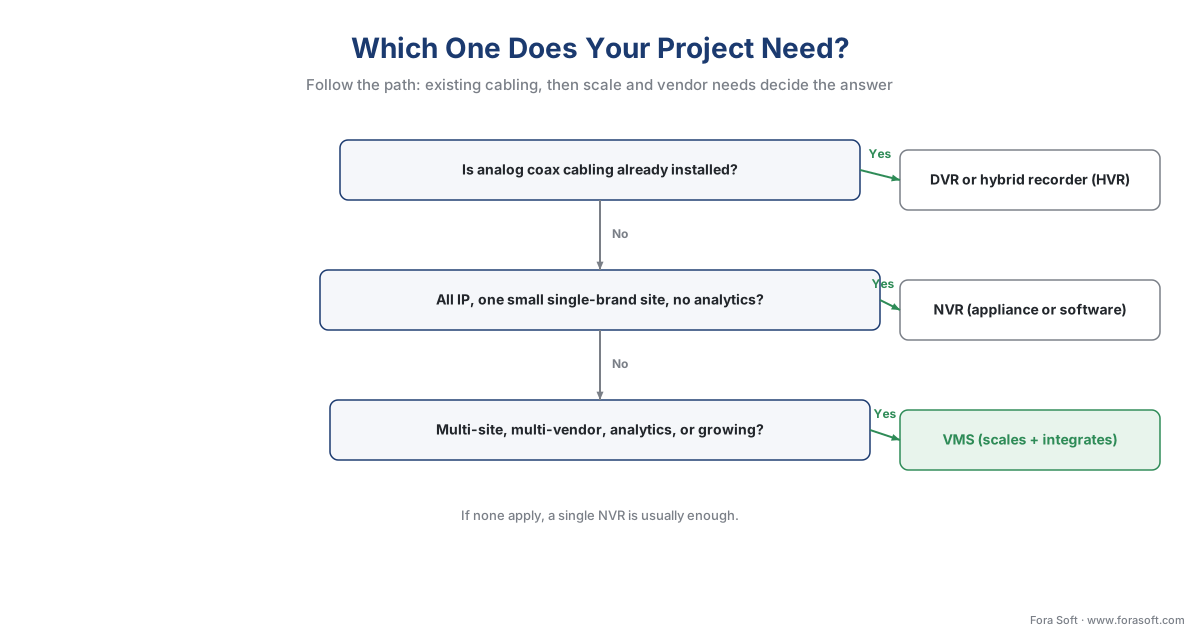 Figure 4. A short decision path: existing coax points to a DVR or hybrid; a small single-brand IP site to an NVR; scale, multi-vendor, or analytics to a VMS.
Where Fora Soft fits in
Fora Soft has built real-time video, streaming, and computer-vision software since 2005, across 625+ shipped projects, and surveillance sits at the intersection of all three. When teams come to us, the question is rarely "NVR or DVR" — it is "we have outgrown an appliance and need a VMS that ingests our mixed camera fleet, runs analytics at a realistic accuracy and latency under real load, and federates several sites." We build that VMS layer: the ingest path, the storage and retention model, the analytics integration, and the multi-vendor support, designed around how the system behaves at full camera count rather than in a demo. The honest framing we lead with is performance under load first, features second.
What to read next
- The anatomy of a video surveillance system, end to end
- NVR software vs a VMS: when a recorder is enough
- On-prem, cloud, and hybrid VMS — three deployment models
Call to action
- Talk to a surveillance engineer — book a 30-minute scoping call to talk through your nvr vs dvr plan.
- See our case studies — 250+ shipped projects across video streaming, WebRTC, OTT, telemedicine, e-learning, surveillance, and AR/VR.
References
- ONVIF — "Our Mission" (founding 2008 by Axis, Bosch, Sony; 500+ members; 33,000+ profile-conformant products; relationship to IEC 62676). Primary. https://www.onvif.org/about/mission/
- ONVIF — "ONVIF Profiles" (Profiles S, T, G, M, A, C, D and what each standardizes). Primary. https://www.onvif.org/profiles/
- IEC 62676 series — "Video surveillance systems for use in security applications" (first international VSS standard; Parts 1-1 general, 2-x transmission, 3 interfaces, 4 application guidelines). Primary. https://standards.globalspec.com/std/1640982/iec-62676-1-1
- Hanwha Vision — "NVR vs. DVR Security Systems Compared" (encoding location; coax vs Ethernet; resolution and placement differences). Vendor engineering. https://hanwhavisionamerica.com/blog/nvr-vs-dvr/
- Verkada — "DVR vs. NVR: What's the Difference and Which is Better?" (channel-bound appliances; analog vs IP inputs; scalability differences). Vendor engineering. https://info.verkada.com/compare/dvr-vs-nvr/
- Hanwha Vision — "What Is a Video Management System (VMS)?" (VMS as central platform; deployment models). Vendor engineering. https://hanwhavisionamerica.com/2026/04/15/what-is-a-video-management-system/
- Milestone Systems — "Choosing the best video management software (VMS)" (VMS scale, multi-vendor, open platform). Vendor engineering. https://www.milestonesys.com/resources/content/articles/choosing-best-VMS/
- Pelco — "What is an ONVIF Camera? Guide to Protocols & Profiles" (ONVIF profiles, conformance, RTSP relationship). Institutional/vendor. https://www.pelco.com/blog/onvif-guide
- Axis Communications — "From DORI to Visual Performance in IEC 62676-4:2025" (the VSS systems standard in practice). Vendor/standards-author. https://newsroom.axis.com/blog/iec-62676-4-video-surveillance
