


Why this matters
If you are scoping a surveillance product or a large camera estate, "should we buy this, extend it, or build it ourselves?" is the most expensive decision you will make, and it is usually made on instinct rather than arithmetic. Build when you should have bought and you burn a year and a budget reinventing recording, a problem the industry solved twenty years ago. Buy when you should have built and you ship a product that can never do the one thing your business actually needed, locked to a vendor's roadmap you do not control. The trap is that all three options look reasonable in a slide deck; only the five-year cost and the honest feature-fit separate them. This article is the framework that keeps the decision deliberate. You do not need to be an engineer — you need to know which of the three paths your project belongs on, and why.
The three paths, in plain language
Before any decision, get the three options clear, because teams routinely collapse them into a false binary of "buy or build" and miss the middle path that is often the right answer.
Buy means licensing a finished, commercial off-the-shelf VMS — a product such as Milestone XProtect or Genetec Security Center that you install (or subscribe to), point at your cameras, and operate. Someone else wrote it, maintains it, and patches it; you pay per camera and per year. Think of it as renting a fully furnished apartment: you move in this week, and you live by the building's rules.
Customize means starting from something that already exists and adapting the last part to your needs. This comes in two flavors. One is to take a commercial VMS and extend it through its official software development kit — the documented set of tools and programming interfaces a vendor publishes so outsiders can add features, called an SDK. The other is to assemble a system on open, reusable components — an open-source recording engine, standard streaming pipelines, and a custom application layer for your specific workflow. Either way you are buying 80% and building the 20% that is genuinely yours. This is the furnished apartment you are allowed to renovate.
Build means writing your own VMS from the ground up — your own recording, your own storage logic, your own interface, your own everything. You own the code and the roadmap completely, and you carry the full cost and the permanent maintenance burden. This is buying land and constructing the house exactly as you want it, then owning every repair forever.
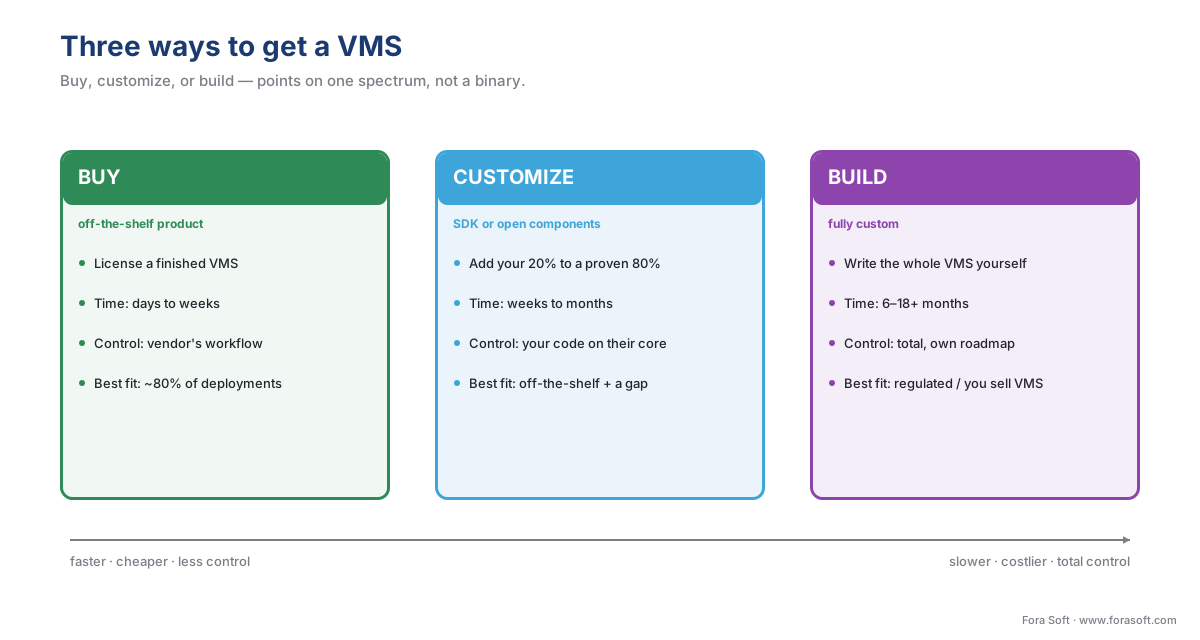 Figure 1. The three paths as a spectrum, not a binary. Moving right buys you control and fit; it costs you time, money, and the maintenance burden. Most deployments belong on the left; the interesting decisions happen in the middle.
One framing prevents most mistakes: these are points on a spectrum, not three separate products. Customize sits deliberately between buy and build because most "we need a custom VMS" conversations are really "off-the-shelf is 80% right and we need the other 20%" — and that 20% is far cheaper to add to an existing platform than to rebuild the 80% you would have gotten for free. If the underlying vocabulary still feels shaky — how a full VMS differs from a plain recorder — start with our VMS, NVR, and DVR explainer.
The four levers that decide it
Every honest build-vs-buy decision turns on four tradeoffs. Run your project through all four; no single one decides it, but the pattern across them almost always points to one path.
Money — but the five-year number, not the sticker. The most common costing error in software is comparing first-year price, which misses the majority of the real bill. General build-vs-buy analyses find that upfront cost ignores 60–80% of the total cost of ownership — the five-year, fully-loaded figure that includes integration, training, maintenance, and upgrades (Neontri; SoftwareSeni). Buying looks cheap on day one and accrues forever; building looks expensive on day one and then mostly stops. We will do the arithmetic below.
Time — to a working system. Buying a VMS is a matter of days to weeks: install, license, onboard cameras. Customizing through an SDK or on open components is weeks to a few months. Building from scratch is, realistically, 6 to 18 months or more before the system is production-grade — and surveillance has unforgiving correctness requirements, because a recorder that drops frames under load has failed at its one job (HatchWorks; Appinventiv).
Control and feature fit — does it match your real workflow? An off-the-shelf VMS is organized around the workflow its vendor assumed: cameras, watched by operators, on shifts. If your workflow is genuinely different, the mismatch never goes away. The clearest example is a legal evidence system organized around cases, sessions, witnesses, and exhibits rather than cameras and operators — no amount of configuration turns one into the other (Fora Soft, Video Surveillance Management Systems playbook). Control is also about the roadmap: when you buy, the vendor decides what ships next; when you build, you do.
Lock-in and ownership — who holds the keys? Buying ties you to a vendor's pricing, data formats, and survival. The true cost of switching VMS platforms later typically runs 50–100% of a year's software spend, and rises the longer you stay (build-vs-buy lock-in analyses). The strongest hedge is open standards: insisting that cameras talk to the software over ONVIF — the industry standard that lets devices and software from different makers interoperate — keeps the camera layer portable no matter which path you choose. More on that below.
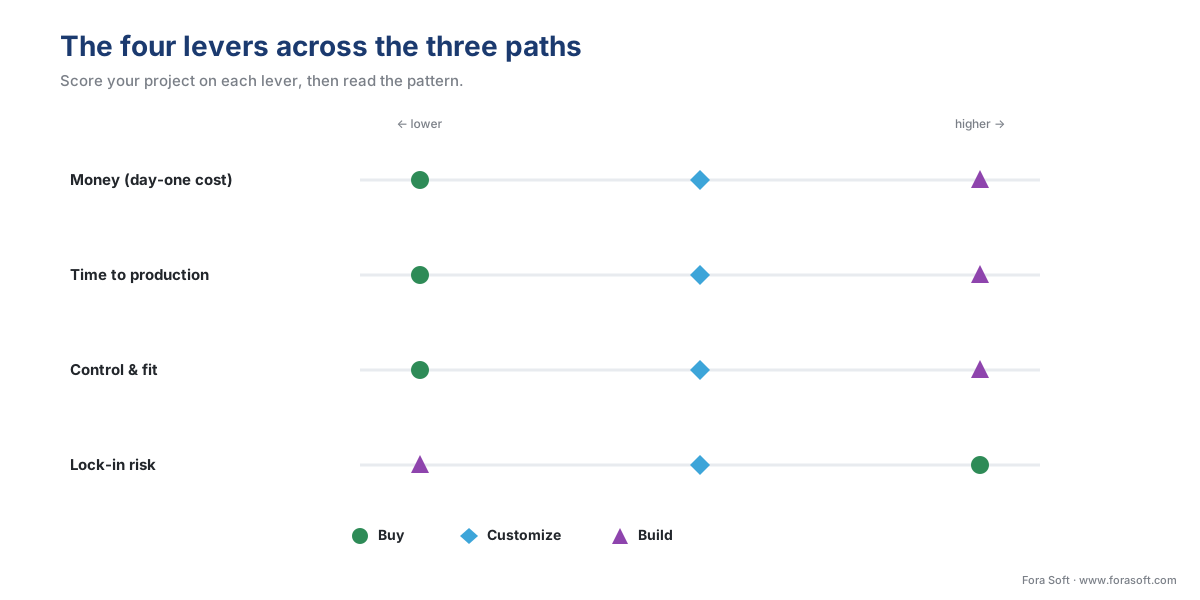 Figure 2. The four levers across the three paths. Buying wins on time and day-one cost; building wins on control and ownership; customizing splits the difference. Score your project on each lever, then read the pattern.
What "buy" actually looks like
Because buying is the default for most deployments, it pays to know exactly what you are buying. A commercial VMS is sold in editions and licensed per camera, with an annual fee on top.
Milestone XProtect, one of the most widely deployed platforms, ships in a tiered range: Express+ for a single small site (up to 48 cameras on one server), Professional+ for multi-site mid-sized deployments, Expert for large high-security installations, and Corporate for the largest enterprises, with incident-management features the lower tiers lack (Milestone, XProtect comparison). Each camera needs its own device license, and an annual care or maintenance plan keeps you eligible for updates and support. Note that editions change: Milestone discontinued the entry-level Essential+ tier in its XProtect 2025 R2 release, which is exactly the kind of vendor-roadmap decision a buyer does not control (Milestone).
Genetec Security Center shows the other dimension of the buy decision — how it is hosted. The same product can run on your own servers under a perpetual license plus a maintenance agreement, as a fully cloud-hosted subscription (Security Center SaaS) with no on-site servers and consumption-based pricing, or as a hybrid where cameras record locally while management lives in the cloud (Genetec, Security Center SaaS; Genetec TechDoc Hub). The industry is shifting toward the subscription and video-surveillance-as-a-service model, which trades a large upfront purchase for a predictable recurring fee. Which hosting model fits is its own decision, covered in on-prem, cloud, and hybrid VMS.
The point for the build-vs-buy decision is this: a bought VMS is a recurring per-camera cost and a dependency on the vendor's editions, pricing, and roadmap. That is a fair trade for most teams, because what you get back is a maintained, supported, proven system this week. For a head-to-head reading of the major platforms, see the VMS vendor landscape.
What "customize" actually looks like
Customize is the path teams most often overlook, and it is frequently the right one. Two routes lead here.
The first is extending a commercial VMS through its SDK. Milestone, for example, publishes the Milestone Integration Platform (MIP) SDK, which lets developers add to XProtect in three ways: a plug-in that lives inside the VMS interface so operators get one unified screen, a separate component that shares video and data with the VMS without appearing in its interface, and a basic protocol-level integration (Milestone, MIP SDK documentation). Development is mostly in C#/.NET against documented interfaces. This route keeps the proven recording, storage, and management core of a commercial product and adds only your specific feature — a custom analytic, a niche integration, a workflow screen — on top.
The second route is assembling a system on open, reusable components and writing only the application layer that is unique to you. Rather than rebuild recording, teams compose proven primitives: standard media pipelines (such as GStreamer or FFmpeg), a stream relay, ONVIF discovery to find cameras, an open-source recording engine, an edge-AI runtime for analytics, and a custom workflow layer on top (Fora Soft, Video Surveillance Management Systems playbook). Open-source recording engines are real and mature — ZoneMinder has been in production since 2002, and newer projects such as Frigate are built around on-device AI detection (ZoneMinder; Frigate). The skill here is integration and the workflow layer, not reinventing the recorder.
Both routes share one virtue: you get the 80% that is a solved problem cheaply, and you spend your engineering budget only on the 20% that differentiates you. That is why "customize" so often beats both a forced off-the-shelf fit and an expensive from-scratch build.
What "build" actually looks like — and when it is right
Building a VMS from the ground up means owning the entire stack: ingest, recording, storage management, the user interface, analytics, and integrations. The reward is total control — your own roadmap, your own intellectual property, a system shaped exactly to your workflow, and freedom from any single vendor's pricing or survival (Acceldata; ThirstySprout). The cost is equally total: a long build, real execution risk, and a maintenance burden that never ends, because the moment you ship, you own every bug, every camera-firmware change, and every security patch forever.
So when is it right? A useful rule from the field is that off-the-shelf is the correct choice for roughly 80% of deployments; the remaining 20% is where a custom platform earns its cost (Fora Soft, Video Surveillance Management Systems playbook). Concretely, build (or heavily customize) when one of these is true: you operate in a regulated vertical with workflows no generic VMS models — courts, child-advocacy centers, telemedicine; your workflow must live inside the recorder rather than beside it; you want to own proprietary analytics — the kind mapped in what a surveillance system can detect — as your competitive edge; an off-the-shelf product would leak more than roughly a third of your real requirements; or you are a software vendor whose product itself is a VMS. That last case is the clearest: if you sell surveillance software, you cannot rent your core product from a competitor. The full treatment of this decision for product teams is in custom vs off-the-shelf VMS: the real decision.
The arithmetic that decides it at scale
Feature lists persuade nobody signing the cheque; the five-year number does. Walk the math out loud once and the crossover becomes obvious. The figures below are illustrative — plug in your own quotes — but the shape is what matters.
Take a 200-camera estate over five years, comparing buy against build. Storage and camera hardware cost roughly the same in both cases, so leave them out; they cancel.
Buy. Say each camera needs a license at about \$150, and the annual maintenance runs about \$30 per camera per year, plus a one-time platform-and-setup cost of about \$20,000. Write the formula, then plug in:
buy_5yr = platform + (license × cameras) + (annual_per_camera × cameras × years)
buy_5yr = $20,000 + ($150 × 200) + ($30 × 200 × 5)
buy_5yr = $20,000 + $30,000 + $30,000 = $80,000
Build. Say a custom platform costs about \$250,000 to design and build in year one, then about \$15,000 per year to maintain and host for the next four years:
build_5yr = build_cost + (annual_maintenance × remaining_years)
build_5yr = $250,000 + ($15,000 × 4) = $310,000
At 200 cameras, buying ($80,000) beats building ($310,000) by a wide margin — which is exactly why most 200-camera deployments should buy. The interesting question is where the two lines cross. Buying grows with every camera; building is roughly flat, because the software handles 200 or 2,000 cameras with the same code. Set them equal and solve for the camera count N:
$20,000 + $150N + $150N(over 5yr maint) ≈ $310,000
all-in buy ≈ $300 per camera over 5 years, plus $20,000 fixed
$20,000 + $300N = $310,000  →  $300N = $290,000  →  N ≈ 970 cameras
In this illustration the crossover lands near 1,000 cameras — and field experience puts real crossovers in the same neighborhood, accelerating past 5,000 cameras where per-camera licensing piles up fastest (Fora Soft, Video Surveillance Management Systems playbook). Below the crossover, buy on cost. Above it, the per-camera licenses overwhelm the fixed build cost and custom wins on money too — on top of the control and fit it already gave you.
 Figure 3. The cost crossover (illustrative). Buying scales linearly with cameras; building is a large fixed cost that barely moves with scale. Below the crossover, buy; above it, custom wins on money as well as control.
The comparison reads fastest as a table.
| Dimension | Buy (off-the-shelf) | Customize (SDK / open components) | Build (fully custom) |
|---|---|---|---|
| Time to production | Days to weeks | Weeks to months | 6–18+ months |
| Day-one cost | Low | Moderate | High |
| 5-year cost (small estate) | Lowest | Moderate | Highest |
| 5-year cost (>~1,000 cams) | Highest (per-camera) | Moderate | Often lowest |
| Control / feature fit | Vendor's workflow | Your 20% on their 80% | Total |
| Maintenance burden | Vendor's | Shared | Yours, forever |
| Lock-in | High (hedge: ONVIF) | Medium | None |
| Best fit | ~80% of deployments | Off-the-shelf + a missing 20% | Regulated, proprietary, or you sell VMS |
Table 1. The three paths across eight dimensions. No column wins every row. If your honest answers cluster left, buy; if they cluster right, build; if a commercial product is close but not complete, customize.
ONVIF: the hedge that survives any path
Whichever path you pick, one decision lowers your risk across all of them: keep the boundary between cameras and software on an open standard. ONVIF is the industry standard that lets cameras and video software from different makers work together, and its governing body is explicit that "conformance to profiles is the only way that ensures compatibility between ONVIF conformant products" (ONVIF, Profiles, 2026). For video, the relevant profiles are S and T for streaming, G for recording, and M for analytics metadata.
Why this matters to a build-vs-buy decision: if you buy a VMS but insist your cameras are ONVIF-conformant, you can change VMS vendors later without ripping out the cameras — the single biggest switching cost. If you build or customize, ONVIF discovery is how your system finds and talks to cameras from any vendor without bespoke drivers for each. One caution the standard itself makes plain: ONVIF guarantees a baseline of interoperability, not every advanced feature, and "compliance to regulations is outside the scope of ONVIF" — privacy and retention law is your responsibility regardless of the standard (ONVIF, Profiles, 2026). The mechanics of profiles and discovery are covered in ONVIF explained for engineers.
There is also a floor that applies no matter which path you choose: the international standard for video surveillance systems, IEC 62676, sets out minimum system requirements and lifecycle guidance — selection, planning, installation, commissioning, maintenance, and testing — for security-application surveillance, with its 2025 application-guidelines part covering information security and data privacy across the system's life (IEC 62676 series; EN IEC 62676-4:2025). A bought system should conform to it; a built one still has to meet it. The standard does not care who wrote the code.
A common mistake to avoid
The costliest pattern we see is jumping straight to "build" because an off-the-shelf VMS is missing one feature. A team finds that their shortlisted product cannot do a single thing they need — a specific integration, a custom report, one analytic — and concludes they must build the whole platform. They then spend a year and a large budget rebuilding recording, storage, and user management — the solved 80% — to get the unsolved 20%. The fix is to check the middle path first: can the missing feature be added through the vendor's SDK, or by composing the system on open components with a thin custom layer? Most of the time it can, at a fraction of the cost and risk. Build the whole thing only when the core — the workflow model itself — is the mismatch, not when a single feature is missing. The opposite mistake is rarer but real: a VMS vendor trying to save money by building their product on a competitor's platform, accepting lock-in on the very thing they sell.
Where Fora Soft fits in
Fora Soft has built real-time video, streaming, and computer-vision software since 2005, across 625+ shipped projects, and we are usually called in for the right-hand side of this spectrum — the customize and build decisions where off-the-shelf stops fitting. The first thing we do is talk teams out of building when buying is correct, because reinventing recording is expensive and we would rather scope the 20% that is genuinely theirs. When a build is right, the discipline is the same one this whole section preaches: design for how the system behaves at full camera load and on a bad-network day first — realistic detection precision and recall under real lighting, recording that does not drop frames at scale — then the feature list. A custom VMS that federates reliably and records every frame under load beats one that demos beautifully and stalls at 300 cameras.
What to read next
- Custom vs off-the-shelf VMS: the real decision
- The surveillance cost model: what a system actually costs
- The VMS vendor landscape: how to read the market
For the commercial overview of the VMS market this decision sits inside, see Fora Soft's video surveillance management systems playbook and the rundown of modern VMS software features.
Call to action
- Talk to a surveillance engineer — book a 30-minute scoping call to talk through your custom vms plan.
- See our case studies — 250+ shipped projects across video streaming, WebRTC, OTT, telemedicine, e-learning, surveillance, and AR/VR.
- Download the Build vs Buy vs Customize a VMS — Decision Guide — One-page decision guide for the buy/customize/build choice: the three paths at a glance, the four levers (money, time, control & fit, lock-in) as questions, the five-year cost math with the camera-count crossover, and a 'choose buy if /….
References
- ONVIF — "ONVIF Profiles" (an ONVIF profile has a fixed set of features a conformant device and client must support; "conformance to profiles is the only way that ensures compatibility between ONVIF conformant products"; video systems use Profiles D, G, M, S, and T; "compliance to regulations… are outside the scope of ONVIF." Page modified 2026-05-11). Primary standard (tier 1). https://www.onvif.org/profiles/
- ONVIF — "ONVIF Profile Policy v3.5" (October 2024) (the governing document for how profiles are created, modified, and deprecated; establishes the conformance-and-profile concept that underpins multi-vendor interoperability). Primary standard (tier 1). https://www.onvif.org/wp-content/uploads/2024/10/onvif-profile-policy-v3-5.pdf
- IEC — "IEC 62676 series: Video surveillance systems for use in security applications" (specifies minimum requirements and recommendations for video surveillance systems; Part 1-1 covers general system requirements — selection, planning, installation, commissioning, maintenance, and testing; EN IEC 62676-4:2025 provides application guidelines across the full system lifecycle including information security and data privacy). Primary standard (tier 1). https://webstore.iec.ch/en/publication/34391
- Milestone Systems — "Milestone Integration Platform (MIP) SDK documentation" (the MIP SDK enables plug-in integrations hosted inside XProtect Management Client / Smart Client / Event Server, component integrations that share video and data, and basic protocol integrations; development primarily in C#/.NET). First-party engineering (tier 3). https://doc.developer.milestonesys.com/mipvmsapi/
- Milestone Systems — "XProtect variant comparison" (XProtect ships as Express+ (single site, up to 48 cameras/devices on one server), Professional+ (multi-site, unrestricted recording servers), Expert (unrestricted cameras/servers, high security), and Corporate (largest enterprise, incident manager); per-device camera licensing; Essential+ discontinued in XProtect 2025 R2). First-party engineering (tier 3). https://www.milestonesys.com/products/software/xprotect-comparison/
- Genetec — "Security Center SaaS" and "License options in Security Center" (Security Center runs on-premises under license plus maintenance, as a fully hosted SaaS subscription with consumption-based pricing and no on-site servers, or hybrid; licensed by feature module and per connection). First-party engineering (tier 3). https://www.genetec.com/products/unified-security/security-center-saas
- Fora Soft — "Video Surveillance Management Systems: The 2026 Buyer & Builder Playbook" (off-the-shelf is the right call for ~80% of deployments — retail, offices, schools, hotels, generic perimeter; reach for custom in regulated verticals, when workflow must live in the recorder, for proprietary AI, or when off-the-shelf leaks 30%+ of requirements; custom crossover near ~1,000 cameras, accelerating above 5,000; composable builds reuse media pipelines, stream relay, ONVIF discovery, open-source recording engines, and an edge-AI runtime). First-party engineering (tier 3). https://www.forasoft.com/blog/article/video-surveillance-management-systems
- Neontri — "Build vs. Buy Software: A 3-Model Decision Framework" (a modern decision adds a hybrid/composable option to the binary; upfront cost typically misses 60–80% of total cost of ownership; small teams usually favor buy, large multi-year deployments often favor build). Educational/orientation (tier 6). https://neontri.com/blog/build-vs-buy-software/
- SoftwareSeni — "Build vs Buy Software Decisions and Total Cost of Ownership Analysis" (five-year TCO comparison via a weighted matrix; hidden integration and training costs can add ~150–200% to a buy license over time). Educational/orientation (tier 6). https://www.softwareseni.com/build-vs-buy-software-decisions-and-total-cost-of-ownership-analysis/
- HatchWorks — "The Build vs Buy Framework in the Age of AI" (building offers full control, IP ownership, and no lock-in at the cost of long time-to-market and a permanent maintenance burden; buying offers speed at the cost of lock-in and recurring spend). Educational/orientation (tier 6). https://hatchworks.com/blog/gen-ai/build-vs-buy-framework/
- ZoneMinder — project documentation (open-source video surveillance / NVR software in production since 2002; records and manages IP cameras over RTSP on Linux; an example of an open recording engine usable as a composable component). Educational/community (tier 6). https://zoneminder.com/
- Frigate — project documentation (open-source NVR built around on-device AI object detection; an example of a modern composable recording component). Educational/community (tier 6). https://frigate.video/
