


Why this matters
If you are choosing a Video Management System — the software platform that ingests, records, and manages many camera streams, abbreviated VMS — you will at some point be handed a comparison table, or build one, and asked to pick a winner from it. The table looks objective. It is not: most comparison grids are built by one of the vendors in them, or assembled from datasheets that each vendor wrote, and the columns they choose to show are the columns where they win. Choose on the wrong axes and the consequence is not a bad week; it is a six-figure platform commitment, years of recorded video, and operator habits all living inside a system that fights your actual requirement. This article is the capstone of the vendor block: after the landscape, the individual profiles, and the custom-vs-off-the-shelf decision, it teaches you to read any comparison critically and score it against what you actually need.
The comparison table is a sales artifact, not a verdict
Start with a habit of suspicion about the grid itself. A feature comparison table answers one question well — "which boxes does each product tick?" — and that is almost never the question that decides a deployment. A checkmark is binary; the reality it stands for is a range. "Supports ONVIF," "has analytics," "offers an API," and "scales to enterprise" are all true of products that behave completely differently under your load, with your cameras, at your budget.
Think of the table the way you would a résumé. It tells you what a candidate claims to have done, in the framing most flattering to them, using the categories they chose. It is a starting point for questions, not an answer. The skill this article builds is reading the grid for what it hides: the depth behind each checkmark, the criteria the grid left out, and the weight each row should carry for you rather than for the vendor who drew it.
Two distortions follow from treating the grid as a verdict. The first is that buyers reward the criteria that are easy to put in a cell — a number, a yes, a logo — and discount the criteria that resist a cell, like "how painful is it to leave" or "what does this cost in year four." The second is that every product looks similar once reduced to ticks, so the decision drifts to the one differentiator the eye can see: the demo. Both distortions push you toward the wrong axes. Naming them is the first defense.
The criteria buyers over-weight
Some criteria get more attention than they deserve, because they are visible, easy to compare, or heavily marketed. None is worthless; each is over-weighted relative to its real impact.
The headline camera count. "Supports 6,000+ camera models from 150+ manufacturers" is a real strength of the open enterprise platforms, and a genuine line of difference from a single-vendor system that mainly drives its own cameras. But past the point where a platform supports your cameras well, a bigger number adds nothing. The question is never "how many models in total" but "how deeply does it drive the specific cameras I own or plan to buy" — a different and harder question we return to below.
The look of the client app. A clean video wall and a slick timeline scrubber are pleasant, and usability does matter for the operators who live in the tool all day. But the demo interface is the most rehearsed surface of any product, and the gap between a polished demo and daily operation at scale — hundreds of cameras, real alarms, a tired operator at 3 a.m. — is where the look stops mattering and behavior under load takes over.
The analytics feature list and its accuracy number. A long list of detections — people, vehicles, loitering, intrusion, license plates, face matching — reads as capability, and a single bold accuracy figure (a "99% accurate," or even a claim of perfect accuracy) reads as proof. Treat both skeptically. The model engineering behind each analytic lives in the AI for Video Engineering section; what matters for a VMS choice is whether the specific analytic you need works on your scenes, and accuracy is always a precision-and-recall range that depends on lighting, angle, and tuning, never a single perfect number. We treat that reality in tuning analytics.
The brand and the analyst quadrant. A familiar name and a top-right position on an analyst's chart lower perceived risk, and vendor longevity is a legitimate criterion. But the analyst grid scores a vendor against a general market, not against your requirement, and the brand premium can buy you features and a licensing model built for a buyer who is not you.
The sheer length of the checklist. More ticks looks like more product. Often it is more surface area to license, secure, and maintain — and a long list of features you will never enable is a cost, not a benefit.
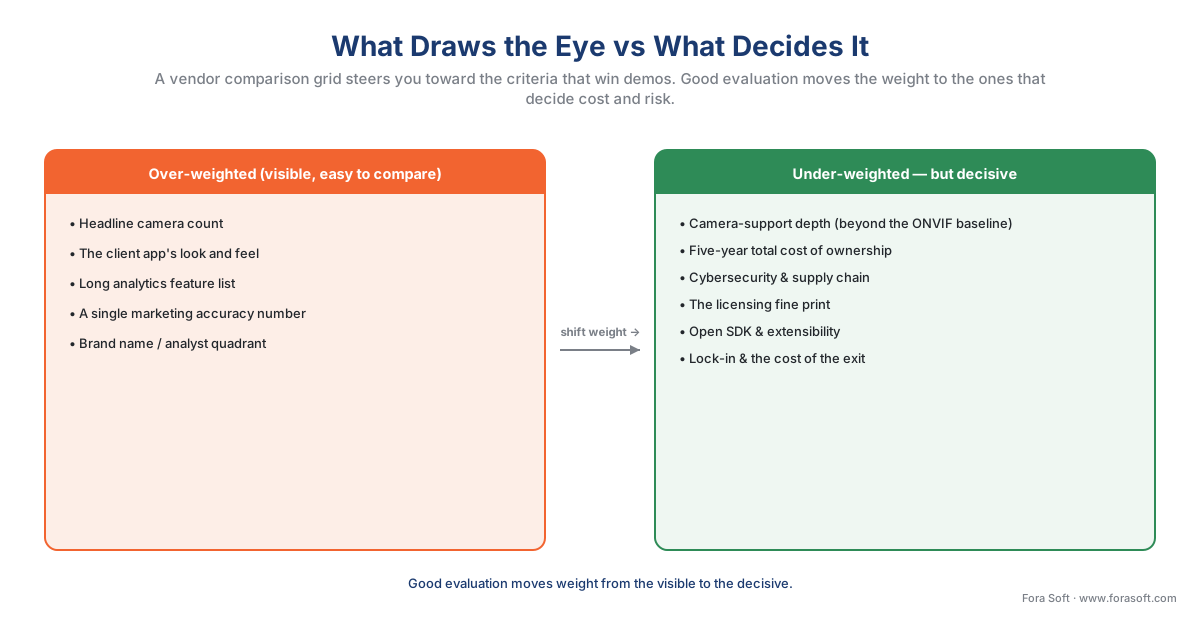 Figure 1. The attention gap. On the left, the criteria that draw the eye in a demo and a comparison grid; on the right, the criteria that quietly decide cost, risk, and whether you can live with the system in five years. Good evaluation moves weight from left to right.
The criteria buyers under-weight — grouped into four families
The criteria that decide a deployment are harder to compare, so they get less weight than they earn. It helps to group them into four families, each answering a plain question about the system. A complete evaluation scores every family, not just the first.
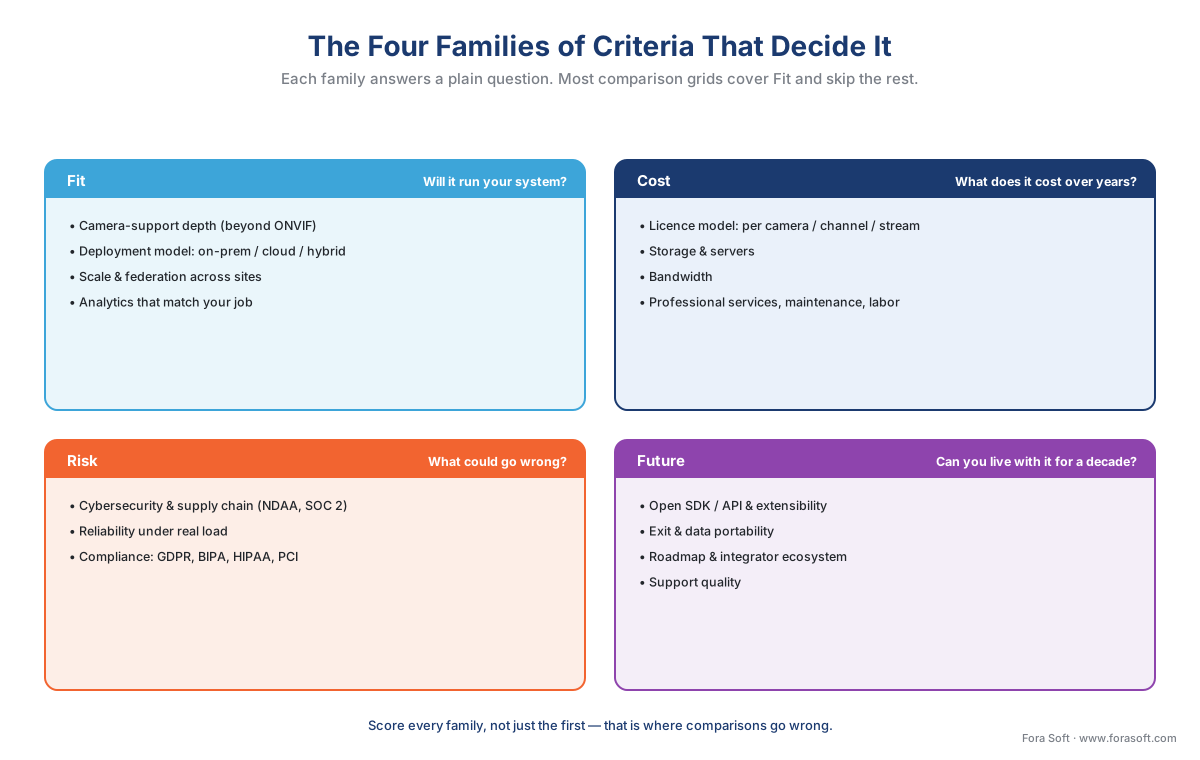 Figure 2. The four families of criteria. Fit asks whether it will run your system; Cost asks what it really costs over years; Risk asks what could go wrong; Future asks whether you can live with it. Most comparison grids cover Fit and skip the rest.
Family 1 — Fit: will it actually run your system? The first family is whether the platform suits your cameras, your topology, and your job. The criterion buyers most often get wrong here is camera-support depth. Every modern VMS speaks ONVIF — the open standard that lets cameras and recording software from different makers work together (Profile S for streaming, Profile T for advanced streaming, Profile G for recording, Profile M for metadata and analytics) — but ONVIF guarantees only a baseline, the profile both the camera and the software conform to. "ONVIF-conformant" is not "fully featured over ONVIF": advanced functions — a specific camera's analytics, its PTZ presets, its on-board events — often need the vendor's own driver or software development kit. So the real fit question is whether the VMS deeply integrates your camera models, not how many models it lists; the mechanics are in ONVIF explained for engineers and proprietary camera SDKs. Fit also covers the deployment model — on-premises, cloud, or hybrid, compared in on-prem, cloud, and hybrid VMS — and whether the platform scales to your camera count and federates across your sites as one.
Family 2 — Cost: what does it really cost over years? The licence price is the tip of the cost. The mass beneath it is infrastructure and operation: server hardware or cloud compute, storage arrays sized to your retention policy and camera count, network bandwidth, professional services to integrate and configure, the annual maintenance and support contract, and the ongoing labor to run the environment. Two products with the same per-camera licence can differ by half over five to ten years once those are counted. The licensing model itself is a criterion buyers skim: per-camera, per-channel, and per-recording-stream pricing produce different totals for the same deployment, and some platforms include multi-stream recording or a feature in the base licence while others charge for it as an add-on. Read the fine print before the headline number, and model the total against the surveillance cost model.
Family 3 — Risk: what could go wrong? Three risks sit under this family, and all three are routinely under-weighted because they are invisible in a demo. The first is cybersecurity and supply chain. A VMS is networked IT that streams data, takes firmware updates, and often reaches a cloud — and surveillance gear has historically been secured with less rigor than the rest of enterprise IT. Look for signed firmware, secure boot, encryption in transit and at rest, and the certificate-based authentication and TLS that ONVIF Profile T added; look for an independent audit such as a SOC 2 report; and check supply-chain posture, because in the United States Section 889 of the 2019 National Defense Authorization Act bars federally funded buyers from using video equipment from named manufacturers (Hikvision, Dahua, and others), a bar that increasingly shapes private procurement too. The second risk is reliability under load — recording that does not drop frames when the server is busy and the network is congested, and failover that keeps recording when a disk or a server dies. The third is compliance: a face-matching or license-plate feature is a legal gate before it is a capability, restricted under the EU's GDPR (Art. 9 treats biometric data as special-category) and Illinois BIPA, and your industry may add HIPAA, PCI, or sector rules, gathered in the compliance checklist.
Family 4 — Future: can you live with it for a decade? The last family is the one a comparison grid never has a column for, and it decides whether year four is comfortable or painful. It covers extensibility — whether the platform exposes an open SDK or API so you can add the integration or analytic that is yours, the difference between a product you can grow into and one you outgrow. It covers the exit: how your recorded video and configuration come out if you leave, because every platform locks you to something and the only question is how expensive the door is. And it covers vendor trajectory — the roadmap, the release cadence, the integrator and developer ecosystem around the platform, and the plain question of whether the vendor will still be investing in this product when you need it to.
Weights come from your requirements, not the vendor's table
Here is the principle that turns a list of criteria into a decision: the weight of a criterion is set by your deployment, not by how much the comparison emphasizes it. The same VMS comparison should produce a different winner for a 40-camera office, a 4,000-camera city system, and a retail chain that lives or dies on analytics — because the weights differ, even though the products do not.
A mixed-vendor camera estate makes camera-support depth the heaviest criterion; a single-vendor greenfield site makes it nearly weightless. A public-space deployment makes compliance and cybersecurity dominant; a private warehouse makes them lighter. A team with no IT staff weights operational simplicity and a cloud deployment model heavily; a team with a data center weights control and on-premises. The vendor's grid cannot know any of this, which is exactly why reading it at face value misleads.
Two disciplines make weighting honest. First, differentiate the weights — make your most important criterion carry at least twice the weight of your least important one, rather than treating everything as equal. Procurement research is consistent that differentiated weighting produces better selections than flat scoring; a flat scorecard lets a pile of minor ticks outvote the one criterion that actually matters. Second, set the weights before you score, ideally before you have a favorite, so the framework measures the vendors rather than rationalizing a choice you already made.
The scoring framework: a weighted matrix
The tool that operationalizes all of this is a weighted scoring matrix, and it is deliberately simple. List your criteria as rows. Give each a weight from your requirements — say 1 to 5, where 5 is mission-critical and 1 is nice-to-have. Put the vendors in columns. Score each vendor on each criterion from evidence, 1 to 5. Multiply each score by the criterion's weight, sum the columns, and you have a number that reflects your priorities instead of the vendor's.
Walk the arithmetic once so it is concrete. Suppose a buyer with a mixed-vendor camera estate weights three criteria: camera-support depth at 5 (their cameras are from several makers), five-year total cost at 4, and open-SDK extensibility at 3. Two vendors are scored on each:
Vendor A:  (camera 5 × w5) + (TCO 3 × w4) + (SDK 5 × w3)
        =   25            +  12           +  15            = 52
Vendor B:  (camera 3 × w5) + (TCO 5 × w4) + (SDK 2 × w3)
        =   15            +  20           +   6            = 41
max possible = (5 + 4 + 3) × 5 = 60   →   A = 52/60 = 87%,  B = 41/60 = 68%
Vendor B is cheaper and scores higher on cost, but because this buyer's heaviest criterion is camera-support depth, Vendor A wins. Change the buyer — a single-vendor site where camera depth drops to weight 2 and cost rises to 5 — and the same two vendors swap places. The matrix did not pick a favorite; it made the buyer's priorities do the picking. To keep a single strong score from hiding a fatal weakness, add a floor: any criterion scoring 1 or 2 on a weight-5 row is a disqualifier to investigate before the totals matter. And score the matrix twice, by two independent evaluators, then reconcile the gaps — the disagreements are where the real questions hide.
 Figure 3. The weighted matrix made concrete. Each criterion's weight comes from the buyer's requirements; each score comes from evidence; weight times score, summed, gives a total that reflects priorities rather than the vendor's framing. The companion matrix below is this, blank and ready to fill.
The table below shows what the matrix looks like populated across the main archetypes of VMS, with the two columns most comparison grids omit — whether the platform exposes an open SDK, and what deployment model it implies — made explicit. Use it as a worked example of the criteria in action, not as a verdict; your weights decide the winner.
| VMS archetype | Open SDK? | Deployment model | Camera-support depth | 5-yr cost shape | Cyber & supply chain | Lock-in / exit | Best-fit buyer |
|---|---|---|---|---|---|---|---|
| Open enterprise (Milestone, Genetec class) | Yes — published SDK + API | On-prem or hybrid | Deep — thousands of drivers beyond ONVIF | CapEx licence + your servers, storage, support | Mature hardening; NDAA-compliant options | Platform lock-in, but open export and SDK | Large, multi-site, deep-integration estates |
| Cloud VSaaS (Eagle Eye class) | Partial — REST API, limited SDK | Cloud, or cloud-bridge hybrid | ONVIF + a curated camera list | OpEx subscription + bandwidth + cloud storage | Vendor-run, SOC 2; you trust their cloud | Higher — footage lives in the vendor cloud | ≤100 cams/site, low-ops, fast rollout |
| AI-native (Ambient, Spot class) | Varies — API-first, analytics SDK | Cloud or on-prem appliance | Curated list, analytics-first | OpEx + appliance hardware | Modern, but newer-vendor viability risk | Analytics and data lock-in | Analytics-led, threat-detection priorities |
| Open-source / assembled (Frigate, ZoneMinder) | Yes — fully open | On-prem or edge | ONVIF + community drivers | Low licence, high integration labor | Entirely your responsibility | Low vendor lock-in, high team reliance | Budget or edge, with in-house skill |
Table 1. A criteria-in-action comparison across the four VMS archetypes, with the open-SDK and deployment-model columns most vendor grids leave out. The cells describe tendencies, not guarantees — a specific product can beat or miss its archetype, which is exactly why you score against evidence and a pilot, not a category.
Score a pilot, not a demo
The matrix is only as good as the evidence in its cells, and the most common way an evaluation goes wrong is scoring the cells from a vendor demo. A demo is the vendor's happy path: their cameras, their network, their tuned scene, their staged alarms. It tells you the product can work; it cannot tell you it will work for you.
The remedy is a proof of concept — a pilot on a slice of your system. Put a handful of your real camera models on the platform, on your network, recording your scenes, for long enough to see it under genuine conditions: a busy hour, a flaky link, an overnight stretch, a real false-alarm rate. Score the matrix from what the pilot shows, not from what the demo promised. Independent surveillance analysts who test platforms for a living still recommend that integrators and end users run their own trials before rollout, precisely because measured behavior and marketing diverge.
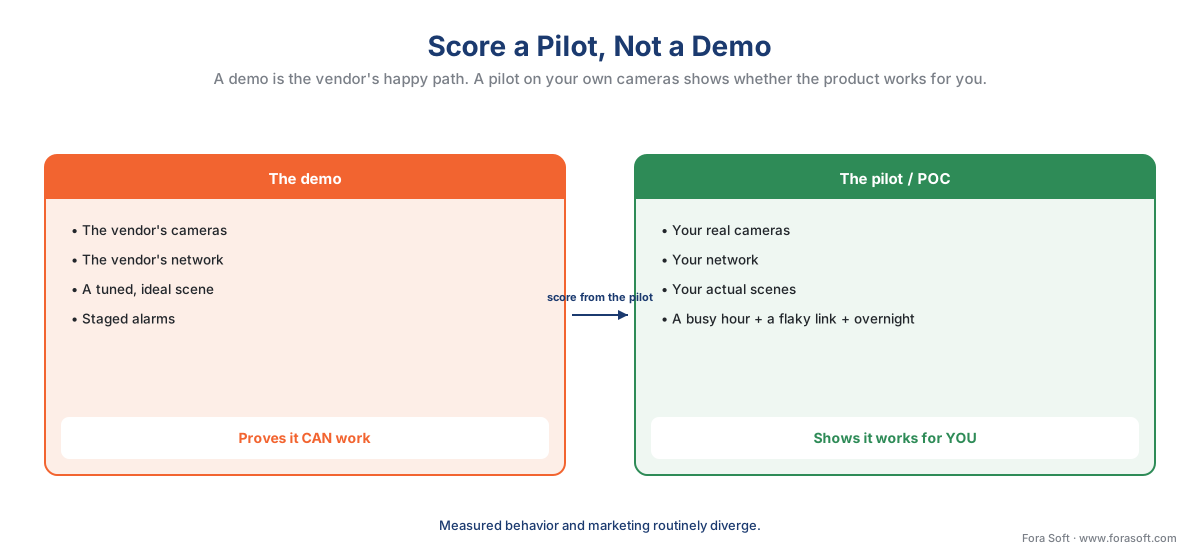 Figure 4. Demo versus pilot. The demo runs the vendor's cameras, network, and tuned scene and proves the product can work; the pilot runs your cameras, your network, and your load and shows whether it works for you. Score the matrix from the pilot.
A common mistake to avoid
The costliest errors in reading a comparison are errors of weighting, and four recur. First, scoring the headline — letting the biggest camera-count number, the prettiest interface, or the boldest accuracy claim decide it, when each is the most marketed and least predictive surface of the product. Second, flat weighting — treating every criterion as equally important, which lets a stack of minor features outvote the one capability your deployment actually depends on. Third, scoring the demo, not a pilot — taking the vendor's staged happy path as evidence instead of running your own cameras through it. Fourth, ignoring the columns the grid omits — total cost over years, cybersecurity and supply chain, and the exit, none of which fit neatly in a checkmark and all of which decide whether you are content in year four. A comparison read on the visible criteria alone is not a shortcut; it is the slow, expensive way to the wrong platform.
Where Fora Soft fits in
Fora Soft has built real-time video, streaming, and computer-vision software since 2005, across 625+ shipped projects, and we are often brought in at exactly this moment — a team holding a VMS comparison, unsure which axes should carry the weight. The discipline we bring is the one this section preaches: weight the criteria that show up under real load, not in a demo — camera-support depth on your actual models, recording that degrades gracefully when a link drops, analytics measured as a precision-and-recall range on your scenes rather than a marketing number — and prove them on a pilot before anyone signs. When the honest answer is that no off-the-shelf platform fits the heaviest criterion, that is the custom-vs-off-the-shelf conversation, and we are equally direct about when buying or extending a platform is the cheaper, safer call.
The evaluation in one workflow
Put the pieces together and reading a comparison becomes a short, repeatable process rather than a reaction to a grid.
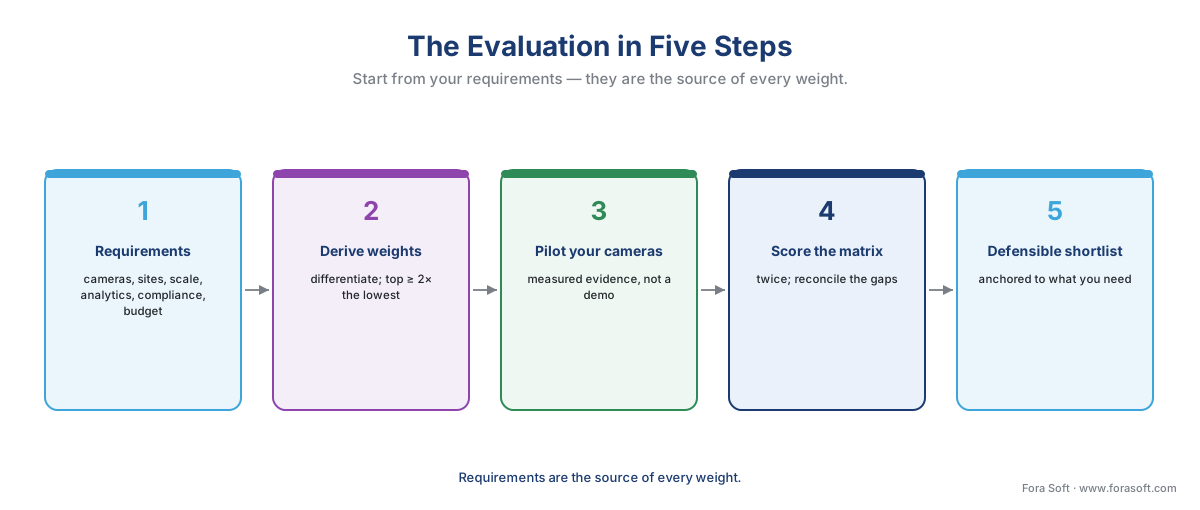 Figure 5. The evaluation in five steps. Start from your requirements, derive the weights, run a pilot on your own cameras, score the weighted matrix from that evidence, and the shortlist falls out — reproducibly, and defensibly to whoever signs.
Read the workflow as five moves. Write down your requirements first — cameras, sites, scale, analytics, deployment constraints, compliance, budget horizon — because they are the source of every weight. Turn them into a differentiated weighting, top criterion at least twice the lowest. Build the matrix and run a pilot to fill its cells with measured evidence. Score it independently, twice, and reconcile. The shortlist that comes out is anchored to what you need and defensible to whoever approves the spend — and if you want the commercial overview of the market this sits inside, Fora Soft's video surveillance management systems playbook and the rundown of modern VMS software features are the companion reads.
What to read next
- The VMS vendor landscape: how to read the market
- Custom vs off-the-shelf VMS: the real decision
- The surveillance cost model: what a system actually costs
For the commercial overview of the market this evaluation sits inside, see Fora Soft's video surveillance management systems playbook and the rundown of modern VMS software features.
Call to action
- Talk to a surveillance engineer — book a 30-minute scoping call to talk through your vms comparison plan.
- See our case studies — 250+ shipped projects across video streaming, WebRTC, OTT, telemedicine, e-learning, surveillance, and AR/VR.
- Download the VMS Vendor Comparison & Scoring Matrix — One-page evaluation tool for reading any VMS comparison: the four families of criteria (fit, cost, risk, future-proofing) and what each really measures; the over- and under-weighted cheat sheet; a weighting guide (differentiate, top….
References
- ONVIF — "ONVIF Profiles" (Profile S streaming, Profile T advanced streaming with TLS and certificate-based authentication, Profile G recording, Profile M metadata/analytics; a profile is a fixed feature set a conformant device and client must support, and conformance to a profile is what ensures baseline interoperability). The basis for the camera-support-depth criterion and the "ONVIF-conformant ≠ fully featured over ONVIF" distinction, and for the Profile T security capabilities under the cybersecurity criterion. Primary standard (tier 1). https://www.onvif.org/profiles/
- IEC — "IEC 62676 series: Video surveillance systems for use in security applications" (specifies minimum requirements across the system lifecycle; EN IEC 62676-4 covers application guidelines including information security and data privacy). The system-level evaluation floor any VMS comparison should measure against. Primary standard (tier 1). https://webstore.iec.ch/en/publication/34391
- United States Congress — "John S. McCain National Defense Authorization Act for Fiscal Year 2019, Section 889 (Public Law 115-232)" (bars federal agencies, their contractors, and grant recipients from procuring video-surveillance equipment from named manufacturers — Hikvision, Dahua, and others — on national-security grounds; implemented in procurement by FAR 52.204-25). The controlling source for the cybersecurity-and-supply-chain criterion. Primary law (tier 1). https://www.congress.gov/bill/115th-congress/house-bill/5515/text
- European Union — "General Data Protection Regulation (Regulation (EU) 2016/679)" (Art. 9 treats biometric data used to uniquely identify a person as special-category data; Art. 35 requires a Data Protection Impact Assessment for high-risk processing). The legal gate behind the compliance criterion for any biometric analytic in a VMS comparison. Primary law (tier 1). https://eur-lex.europa.eu/eli/reg/2016/679/oj
- IPVM — "How Should Video Management Software Be Evaluated?" (the independent surveillance-industry analysis of VMS evaluation criteria and the recommendation that integrators and end users run their own trials before rollout). The basis for the "score a pilot, not a demo" discipline. Institutional / analyst (tier 5). https://ipvm.com/reports/video-management-software-evaluation-criteria
- Milestone Systems — "Choosing the best video management software (VMS)" (a vendor's own framework for VMS selection — deployment model, openness, scale, analytics, and total cost). Used for orientation on the criteria a buyer weighs, not as a neutral source. First-party vendor (tier 4). https://www.milestonesys.com/resources/content/articles/choosing-best-VMS/
- AICPA — "SOC 2 and the Trust Services Criteria" (the audit framework — security, availability, processing integrity, confidentiality, privacy — that an independent SOC 2 report attests to). The reference behind the "look for an independent security audit" point in the risk family. Institutional framework (tier 2). https://www.aicpa-cima.com/topic/audit-assurance/audit-and-assurance-greater-than-soc-2
- Responsive (formerly RFPIO) — "RFP weighted scoring: steps, examples, and templates" (the weighted-scoring methodology — assign weights by importance, differentiate them, score independently, reconcile — adapted here to VMS selection; the finding that differentiated weighting outperforms flat scoring). The basis for the scoring framework and the weighting discipline. Institutional / analyst (tier 5). https://www.responsive.io/blog/rfp-scoring-weighted-scoring-guide
- Eagle Eye Networks — "The hidden costs in business video surveillance systems" (the infrastructure and operating costs — storage, bandwidth, servers, professional services, maintenance, labor — that sit beneath the licence price). Support for the total-cost-of-ownership criterion; vendor material used for the cost-structure point, not a price source. First-party vendor (tier 4). https://www.een.com/blog/the-hidden-costs-in-business-video-surveillance-systems/
- Fora Soft — "Video Surveillance Management Systems: The 2026 Buyer & Builder Playbook" and "Features of Modern VMS Software" (the commercial overviews of the VMS market and feature set this educational evaluation sits beneath). Used for market orientation and as the required winning-blog cross-links, not as a standards or legal source. First-party (tier 4). https://www.forasoft.com/blog/article/video-surveillance-management-systems
