


Why this matters
In our companion article on surveillance storage and the retention math, the output was a number: the terabytes a system has to hold. This article is about turning that number into real hardware that survives the day it matters. It is for the security integrator, product manager, or operations lead who has a storage estimate, a rack to fill, and an uneasy feeling about what happens when a disk dies during the one break-in everyone will later ask to review. The trade you are managing is not capacity — capacity is the easy part you can buy by the terabyte — it is sustained write performance and surviving a disk failure without dropping frames or losing the array. Get the topology and the RAID level wrong and the system records fine for a year, then loses the footage on the worst possible night. No special technical background is needed; every term is defined in plain language and every number is worked out in the open.
The one idea: capacity is the easy half; surviving the writes and a dead disk is the hard half
Most of the storage advice on the internet is written for office computing, where data is written once and read many times — a file server, a database, a media library. Surveillance is the mirror image. A surveillance system writes a relentless, around-the-clock stream from many cameras at once and reads almost none of it back; in a typical deployment well over ninety percent of all disk activity is writing. That single fact reshapes every storage decision. The disks have to absorb continuous writes for years without a rest, the way the disks are grouped has to keep accepting those writes even while one of them is dead and being rebuilt, and the storage has to be sized so the write load never overruns it.
So think of on-premises surveillance storage as answering two separate questions, in order. First, where do the disks physically sit relative to the recorder, and how does the recorder reach them? — that is the choice between direct-attached, network-attached, and a storage-area network. Second, how are those disks grouped so the failure of one (or two) does not take the footage with it? — that is the choice of RAID level. The rest of this article walks both questions, then spends real time on the failure that tests every answer: a disk dropping out mid-incident.
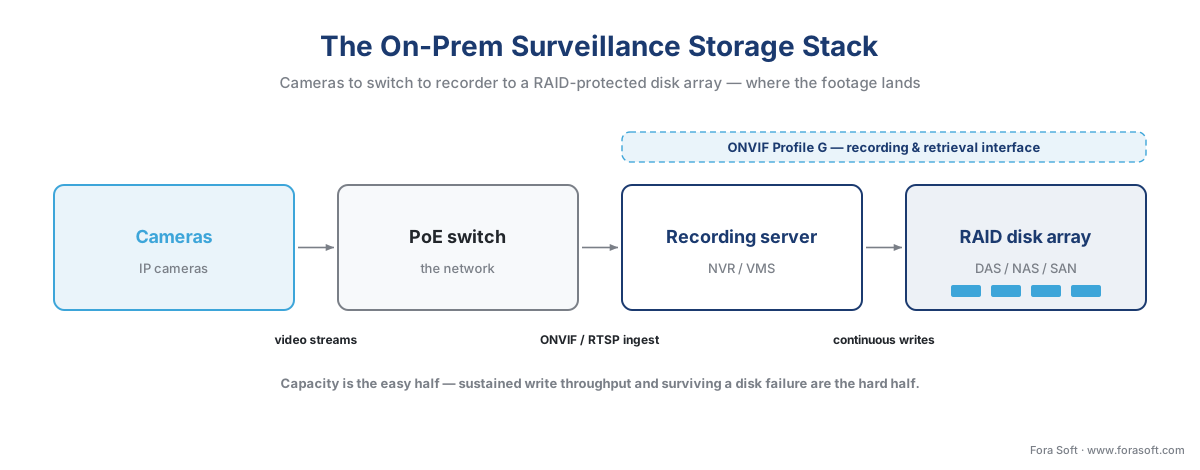 Figure 1. The on-premises stack: cameras to switch to recorder to a RAID-protected array. Capacity is bought by the terabyte; the hard parts are sustained write throughput and surviving a disk failure.
Where the footage physically lands: DAS, NAS, and SAN
The first decision is how the recording server — the machine running the recording software, whether that is a purpose-built Network Video Recorder (an NVR, a box that records IP cameras) or a Video Management System (a VMS, the software platform that records and manages many cameras at scale) — reaches its disks. There are three answers, and the difference between them is what the recorder sees on the other end of the wire.
Direct-attached storage (DAS) is the simplest: the disks sit inside the recorder, or in an expansion chassis bolted directly to it by a short cable using the same SATA or SAS connections an internal drive uses (SATA and SAS are the two standard interfaces that connect a drive to a computer). The recorder owns those disks outright; nothing else can touch them. DAS is the cheapest option and has the lowest latency because there is no network in the path, which is why nearly every small and mid-size NVR is DAS inside a single box. Its limit is scale: when you fill the chassis, you are largely done, and growing usually means adding another whole recorder rather than just more disks.
Network-attached storage (NAS) moves the disks onto the network and shares them as files. A NAS is itself a small appliance with its own disks and operating system, and it presents shared folders to the network using file-sharing protocols — SMB (the Windows file-sharing protocol) or NFS (its Unix equivalent). The recorder asks the NAS for a file by name, the way you open a document from a shared drive. NAS is convenient and cheap to grow, but there is a catch that trips up many first-time designers: most surveillance recording software does not reliably record live video straight to a NAS, because file-level sharing adds overhead and latency that a continuous many-camera write stream does not tolerate well. In practice a NAS earns its place on the back end of a surveillance system — as the archive tier that older footage is moved to — rather than as the primary recording target.
A storage-area network (SAN) also moves the disks onto the network, but it shares them as raw blocks instead of files. "Block-level" means the SAN hands the recorder a chunk of raw storage that the recorder treats exactly as if it were a local disk: the recorder puts its own filesystem on it and manages it directly, never knowing the disk is actually across the room. A recorder reaches a SAN over one of two transports — iSCSI, which carries the storage traffic over ordinary Ethernet and IP (cheaper and more flexible), or Fibre Channel, a separate high-speed cabling fabric dedicated to storage (faster and more expensive). Because the SAN serves raw blocks with low latency, it can carry the continuous write load that a NAS cannot, and because many recorders can attach to one SAN, it is the standard way to build large, multi-recorder deployments where storage is pooled and managed centrally.
The one distinction to hold onto: NAS serves files, a SAN serves raw blocks, and DAS skips the network entirely. That difference is exactly why a SAN can be a primary recording target and a NAS usually cannot — block-level access behaves like a local disk, file-level access does not.
 Figure 2. DAS, NAS, and SAN compared. DAS attaches disks directly; NAS shares files over the network; a SAN shares raw blocks the recorder treats as a local disk.
Here is the same comparison as a table, with the surveillance angle on each.
| Topology | How the recorder reaches it | Access level | Live recording target? | Scales by | Typical use |
|---|---|---|---|---|---|
| DAS | SATA / SAS cable, inside or attached | Local disk | Yes — the default | Adding/replacing the whole box | Small–mid NVR, single recorder |
| NAS | Network (SMB / NFS) | File | Rarely — overhead too high | Adding NAS units | Back-end archive tier |
| SAN | Network (iSCSI / Fibre Channel) | Block (looks local) | Yes — built for it | Adding disks / shelves, shared pool | Large multi-recorder deployments |
RAID: turning many disks into one that survives a failure
Choosing where the disks sit does nothing to protect the footage if a disk dies — and disks die. The protection comes from RAID, which stands for Redundant Array of Independent Disks: the practice of grouping several physical disks so the operating system sees one logical drive, arranged so that the failure of a disk does not lose the data. RAID does this with three building blocks, and every RAID "level" is a different recipe of them. Striping spreads data across disks so several can read and write at once, which adds speed but no protection on its own. Mirroring keeps a full duplicate of the data on a second disk, so a copy survives any single failure. Parity is the clever one: the array computes a compact mathematical summary of the data (a parity block) and stores it, so that if one disk is lost, its contents can be reconstructed from the surviving disks plus the parity — protection that costs only one disk's worth of space instead of a full duplicate.
The levels that matter for surveillance are five.
RAID 0 is striping alone — pure speed, zero redundancy. Lose any one disk and the entire array is gone. It has no place holding recorded surveillance footage; mentioned only so you never select it by accident.
RAID 1 is a straight mirror of two disks: everything written to one is written to the other. It survives one disk failure and gives you half the raw capacity as usable space. Simple and safe, but it does not scale past the pair, so it suits a small recorder, not a large array.
RAID 5 stripes data across three or more disks and sprinkles a single set of parity among them. It survives the loss of any one disk and gives you usable capacity of all-but-one of the disks — a four-disk RAID 5 of 12 TB drives yields about 36 TB usable. For two decades RAID 5 was the default, because it buys single-disk protection cheaply. As we will see, large modern drives have undermined it.
RAID 6 is RAID 5 with a second, independent set of parity. It needs four or more disks, costs two disks' worth of capacity, and — the whole point — survives the loss of two disks at once. On a big array that second parity is not a luxury; it is what keeps a rebuild from becoming a catastrophe.
RAID 10 combines mirroring and striping: disks are paired into mirrors, and data is striped across the pairs. It gives you half the raw capacity as usable space (like a mirror) but adds the speed of striping and, crucially, rebuilds quickly because restoring a replaced disk only means copying from its mirror, not recomputing parity across the whole array. It is the choice when write performance and fast recovery matter more than squeezing out capacity.
 Figure 3. The five RAID levels that matter for surveillance — usable capacity, failures survived, write penalty, and rebuild behavior compared.
| RAID level | Min disks | Usable capacity | Survives | Write penalty | Surveillance fit |
|---|---|---|---|---|---|
| RAID 0 | 2 | 100% | 0 failures | ×1 | Never — one disk lost loses all |
| RAID 1 | 2 | 50% | 1 failure | ×2 | Small single-recorder NVR |
| RAID 5 | 3 | (n−1)/n | 1 failure | ×4 | Small arrays, smaller drives only |
| RAID 6 | 4 | (n−2)/n | 2 failures | ×6 | The default for large arrays |
| RAID 10 | 4 | 50% | 1 per mirror | ×2 | Write-heavy, fast-rebuild priority |
A worked capacity example, because the usable-space math surprises people. Take eight 12 TB drives — 96 TB raw. In RAID 6 you lose two drives to parity, so usable capacity is (8 − 2) ÷ 8 × 96 TB = 6 ÷ 8 × 96 = 72 TB usable. That 72 TB is before the filesystem overhead and the headroom you should leave (never fill a surveillance array past about 80%), so the planning figure is closer to 58 TB of genuinely usable space. The lesson the math teaches: redundancy is not free, and you buy raw disks well above your usable target. Our retention-math article walks the raw-to-provisioned overhead in full.
Why surveillance write patterns are unusual
Now the part the office-storage guides get wrong for surveillance: the write penalty. When a RAID level uses parity, every change to the data also has to update the parity, and that turns one logical write into several physical disk operations. The standard figures are: RAID 1 and RAID 10 carry a ×2 penalty (write the data twice, to both halves of the mirror); RAID 5 carries a ×4 penalty (to change a stripe it must read the old data, read the old parity, write the new data, then write the new parity — four operations); and RAID 6, with two parities to maintain, carries a ×6 penalty. For a read-heavy office workload this rarely bites, because reads have no penalty. For surveillance, which is almost all writes, the penalty lands on nearly every operation.
This is why surveillance storage is sized for sustained write throughput, not just capacity, and it is a calculation most first systems skip. Work it out. The write load a storage array must absorb is simply the combined bitrate of every camera recording to it. Take 40 cameras each streaming at 4 Mbps:
40 cameras × 4 Mbps = 160 Mbps
160 Mbps ÷ 8 bits per byte = 20 MB/s of continuous writes
Twenty megabytes per second sounds trivial — a single modern drive can do ten times that sequentially. But that is the logical write rate, and it assumes every camera records continuously; the recording strategy you choose — continuous, motion, or event — sets how much of that load is actually sustained. Put it on RAID 6 with its ×6 penalty and the array's disks are doing the work of up to 120 MB/s of raw operations, and that load never stops, day or night, for the life of the system. Scale to 200 cameras at 6 Mbps and the logical write rate is 150 MB/s before the penalty — now you are sizing spindles and controllers for throughput, not terabytes. Two things rescue the budget. A hardware RAID controller (a dedicated card that manages the array) with a battery-backed write cache absorbs bursts and coalesces many small writes into efficient full-stripe writes, which sidesteps most of the parity penalty; the battery means a sudden power loss does not lose the cached writes. And the disks themselves have to be built for this.
Surveillance drives are a different product
A surveillance hard drive — Western Digital's Purple line, Seagate's SkyHawk line — is not the same product as a desktop drive, and the difference is built for exactly this write-dominated, always-on duty. Three things set them apart. They carry a far higher workload rating, the amount of data the maker certifies the drive to read and write per year: ordinary desktop drives are rated around 55 TB per year, while surveillance drives are rated from about 180 TB/year on smaller models up to 360 TB/year on larger ones, and the high-end SkyHawk AI and WD Purple Pro families reach 550 TB/year. A continuous many-camera write stream blows past a desktop drive's rating in months; that is what "rated for 24/7" actually means in numbers. They tolerate the vibration of many drives spinning in one chassis, with sensors that compensate so a sixteen-bay enclosure does not shake its own drives into errors. And their firmware uses a streaming-oriented command set that prioritizes writing the incoming stream over perfectly re-reading old data, the right trade for a recorder where a dropped frame is worse than a momentarily delayed read; the same families are validated to support large camera counts (WD Purple cites up to 64 cameras per drive).
Common mistake: putting SMR drives in a surveillance array. Modern hard drives come in two recording styles. CMR (conventional magnetic recording) writes to non-overlapping tracks and keeps a steady write speed. SMR (shingled magnetic recording) overlaps the tracks like roof shingles to pack in more capacity cheaply, but overlapping tracks mean a write often has to rewrite its neighbors, so under a sustained write load the drive's small fast-write buffer fills within minutes and throughput collapses to single-digit megabytes per second. In a surveillance recorder that means dropped frames; in a RAID rebuild it is worse — the SMR drive stalls so badly that the RAID controller declares it failed and ejects it from the array, turning a recoverable situation into a lost one. Surveillance-rated drives are always CMR for this reason. Check the model number against the maker's CMR/SMR list before you buy, every time — vendors have quietly shipped SMR drives into consumer lines, and one in a surveillance array is a time bomb.
Sizing for sustained write, not just capacity
Pulling it together, an on-premises surveillance array is sized against two budgets at once, and you must satisfy both. The capacity budget comes from the retention math — bitrate × cameras × retention days, grossed up for RAID and headroom — and tells you how many terabytes of raw disk to buy. The throughput budget comes from the combined camera bitrate times the RAID write penalty, and tells you how many disks (spindles) and how much controller capacity you need to absorb the continuous write rate with headroom to spare. A common trap is buying a few very large drives to hit the capacity number cheaply, then discovering the array cannot sustain the write load because there are too few spindles sharing it — capacity satisfied, throughput starved. The fix is to plan disk count from the throughput budget and disk size from the capacity budget, and take whichever demands more disks.
Two more practical pieces complete the design. A hot spare is an extra disk that sits in the array doing nothing until another disk fails, whereupon the controller automatically pulls it in and begins rebuilding onto it without waiting for a human — on an unattended recorder that automatic start can be the difference between a few hours of exposure and a few days. And the choice between a hardware RAID controller (a dedicated card, usually with that battery-backed cache) and software RAID (the operating system doing the parity math on the main CPU) comes down to write-heavy load: surveillance generally favors a hardware controller, because offloading the parity computation and caching the writes is exactly what the continuous write stream needs.
The failure mode that matters: a disk drops during an incident
Everything above earns its keep in one moment: a disk fails while the system is recording something you will need. This is not a hypothetical — over a multi-year life, a disk failure in a large array is closer to a certainty than a risk. What happens next is the real test of the architecture.
When a disk fails, a properly built RAID array does not stop recording. It enters a degraded state: the footage is still protected enough to be read and the cameras keep writing, but the array is now reconstructing the missing disk's data on the fly from parity or the mirror, which costs performance. On a heavily loaded surveillance array, that performance hit during the degraded period can itself start to drop frames if the system was sized with no headroom — the first reason to leave throughput margin.
Then comes the rebuild, and the rebuild is the dangerous part. When you replace the dead disk (or a hot spare kicks in), the array has to reconstruct every byte that lived on the failed disk and write it to the replacement, which on today's large drives is slow. Reconstructing a single large drive reads across all the surviving disks and routinely takes from 12 to 24 hours, and on a busy or poorly specified array it can stretch to days. Throughout that window the array is still degraded and now working harder than ever, and two specific dangers stack up.
The first danger is a second disk failure during the rebuild. On RAID 5, which survives only one failure, a second disk dying mid-rebuild loses the entire array — and the rebuild's heavy, sustained read load across aging disks that were all bought at the same time is exactly when a second failure is most likely. The second danger is subtler and is the reason experienced designers have abandoned RAID 5 for large drives: the unrecoverable read error, or URE. Every hard drive has a tiny rated rate of bits it may fail to read back — for consumer drives about one error in every 10^14 bits, which is roughly one unreadable sector per 12.5 terabytes read. A RAID 5 rebuild must successfully read every byte on all the surviving disks, and once those disks are large enough, the total data read during a rebuild approaches that error threshold — so the rebuild has a real chance of hitting an unreadable sector, which on single-parity RAID 5 means the reconstruction fails and data is lost. Reading every byte of a five-drive array of 12 TB disks during a rebuild scans about 44 TB, on the same order as the consumer URE limit. That math is why RAID 6, with its second parity, is the default for any large modern array: it survives a second disk failure and shrugs off a URE during rebuild, because it still has one layer of protection left. RAID 10 sidesteps the problem differently — a rebuild there only has to copy from one mirror partner, reading a few terabytes instead of forty, so both the rebuild time and the URE exposure are far smaller.
Common mistake: RAID 5 on big drives, no hot spare, no headroom. The classic on-premises surveillance failure is a four-by-16 TB RAID 5 array, filled to the brim, no hot spare, sized so the write load exactly matches the disks. It records perfectly for two years. Then a disk fails during an incident; the array goes degraded and starts dropping frames because there was no throughput margin; the admin swaps the disk a day later; the multi-day rebuild hammers the three surviving same-age disks; one of them throws a URE — and the footage of the incident is gone. Every step was avoidable: RAID 6 instead of RAID 5, a hot spare to start the rebuild immediately, and 20–30% throughput headroom so degraded mode still keeps up.
The takeaway is blunt. The incident is precisely the moment the array must not fail, so the architecture is judged not by how it runs healthy but by how it behaves with a dead disk inside it. That means double-parity RAID 6 (or RAID 10) on any sizeable array, a hot spare so the rebuild starts the instant a disk dies, surveillance-rated CMR drives that will not stall the rebuild, and enough throughput headroom that degraded mode still records every frame. Reliability here is also an evidentiary concern: footage that exists but is unreadable when an investigation needs it is, for practical purposes, footage you did not keep — which is why the international surveillance-systems standard IEC 62676 treats storage availability and integrity as system requirements, not afterthoughts.
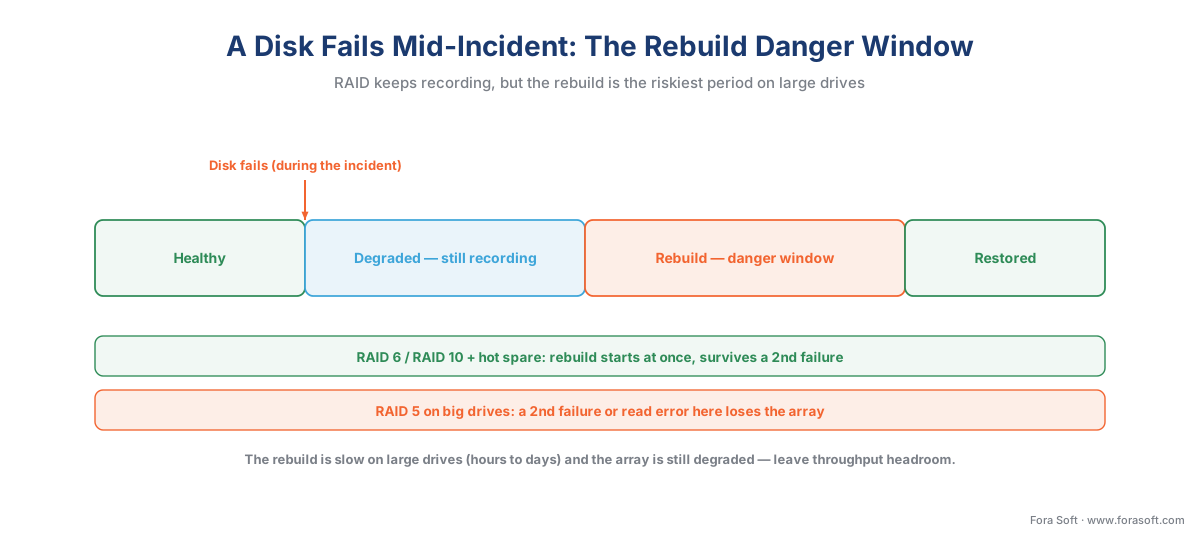 Figure 4. A disk fails mid-incident: the array keeps recording (degraded), but the rebuild window is the danger zone. RAID 6 and a hot spare shrink it; RAID 5 on big drives is where footage is lost.
Where the standards fit: ONVIF Profile G and the storage layer
For all the engineering underneath, none of it is visible to the surveillance software, and that boundary is worth drawing because it is what lets you change the storage without rewriting the system. ONVIF is the common language that lets cameras and recording software from different makers work together, split into profiles by job. The one that governs recorded video is ONVIF Profile G, the open standard for recording and retrieval — current version 1.1, published October 2025. Profile G is how a VMS controls recording on a device and how it searches and replays stored footage across vendors (FindRecordings, FindEvents).
The boundary is clean. Profile G standardizes the interface to recorded video — how the software asks for a clip from a given camera and time and gets it back. It says nothing about what holds the bytes: whether the disks are DAS, NAS, or a SAN; whether they are grouped as RAID 5, 6, or 10; whether a rebuild is in progress underneath. All of that lives in the storage layer below the VMS, and from the software's point of view the request comes through the same Profile G interface no matter what. Remember the rule from our ONVIF explainer: ONVIF guarantees a baseline both sides conform to, not the implementation beneath it. For the commercial overview of how the profiles map to real products, Fora Soft's guide to ONVIF profiles in security systems is the companion read.
That separation is what makes the storage architecture a free engineering choice rather than a software constraint. You can start a deployment on direct-attached disks in the recorder, later pool storage on a SAN as the camera count grows, and move older footage to a NAS archive or up to the cloud — all without the surveillance application changing how it records or retrieves, because every path still speaks Profile G. The tiering of that footage by age across fast and cheap storage is the subject of our storage tiers article, and the cloud and hybrid side is covered in cloud and hybrid storage for surveillance. The system-level planning of capacity, redundancy, and availability across the whole deployment is the subject of scaling a VMS.
 Figure 5. ONVIF Profile G standardizes the recording and retrieval interface; the topology (DAS/NAS/SAN) and the RAID level live in the storage layer below, invisible to the VMS.
Where Fora Soft fits in
On-premises storage is the part of a surveillance system that looks fine in a demo and fails in production if it was sized for capacity alone. Fora Soft has built video streaming, real-time video, and computer-vision systems since 2005 — more than 625 shipped projects — and surveillance sits at the intersection of all three. When we build or integrate a VMS, we size the storage against both budgets: the capacity from the retention math, and the sustained write throughput from the camera load times the RAID penalty, with headroom so a degraded array still records every frame. We default to double-parity RAID 6 or RAID 10 on any sizeable array, specify surveillance-rated CMR drives and a hot spare so a rebuild starts the moment a disk dies, and keep the storage behind the ONVIF Profile G interface so the topology can grow from direct-attached disks to a shared SAN without touching the application. The accuracy-vs-performance habit applies literally here: we plan for how the array behaves with a dead disk inside it during an incident, because that — not the healthy-day benchmark — is when the footage has to be there.
What to read next
- How surveillance storage works: the retention math
- Storage tiers: hot, warm, cold, and archive
- Cloud and hybrid storage for surveillance
Download the on-prem storage architecture decision guide (PDF) — DAS vs NAS vs SAN at a glance, the five RAID levels compared, the two-budget sizing recipe (capacity and sustained write), the surveillance-drive and CMR-not-SMR checklist, the rebuild-danger-window warnings, and a blank sizing worksheet.
Call to action
- Talk to a surveillance engineer — book a 30-minute scoping call to talk through your on-prem surveillance storage plan.
- See our case studies — 250+ shipped projects across video streaming, WebRTC, OTT, telemedicine, e-learning, surveillance, and AR/VR.
- Download the On-Prem Storage Architecture Decision Guide — One-page printable guide: DAS vs NAS vs SAN at a glance (access level, live-recording target, scaling), the five RAID levels compared (min disks, usable capacity, failures survived, write penalty, surveillance fit), the two-budget….
References
- ONVIF Profile G (recording and retrieval), ONVIF. The open standard for recording control and for searching and replaying stored footage (
FindRecordings,FindEvents) across vendors — the interface the VMS uses regardless of the storage topology or RAID level underneath. Establishes that ONVIF standardizes the recording/retrieval interface, not the physical storage. Current Profile G Specification v1.1 (October 2025). Tier 1. https://www.onvif.org/profiles/profile-g/ (accessed 2026-06-09) - EN IEC 62676-4:2025: Video surveillance systems for use in security applications — Part 4: Application guidelines, IEC / CENELEC. Practical guidance for planning surveillance recording and storage, including availability, integrity, and storage sizing — the system-level framework establishing that storage availability and integrity are design requirements, not afterthoughts. Current 2025 edition. Tier 1. https://webstore.iec.ch/publication/68479 (accessed 2026-06-09)
- IEC 62676-1-1: Video surveillance systems — Part 1-1: System requirements — General, International Electrotechnical Commission (IEC). The general system-requirements part of the surveillance-systems standard, covering recording, storage, and reliability requirements for a video surveillance system. Tier 1. https://webstore.iec.ch/publication/7570 (accessed 2026-06-09)
- SNIA Dictionary — DAS, NAS, SAN, RAID, block vs file storage, Storage Networking Industry Association (SNIA). The storage industry's standard definitions distinguishing direct-attached, network-attached (file-level), and storage-area-network (block-level) storage, and the RAID levels — the authoritative source for the block-vs-file and topology definitions. Tier 3 (first-party / standards body). https://www.snia.org/education/dictionary (accessed 2026-06-09)
- Choosing the Right Storage Technology for Video Surveillance (white paper), Seagate Technology. First-party engineering guidance on DAS, NAS, and SAN for surveillance, the block-vs-file distinction, and why SAN block-level access suits primary recording while NAS suits archive. Tier 4 (vendor engineering). https://www.seagate.com/files/www-content/product-content/storage/raid-storage/surveillance-storage/ (accessed 2026-06-09)
- SkyHawk and SkyHawk AI Surveillance Hard Drives — product datasheets, Seagate Technology. Workload ratings (180 TB/year SkyHawk; up to 550 TB/year SkyHawk AI), 24/7 duty, ATA streaming command set, rotational-vibration tolerance, and CMR recording — the basis for the surveillance-drive section. Tier 4 (vendor engineering). https://www.seagate.com/products/surveillance/skyhawk/ (accessed 2026-06-09)
- WD Purple and WD Purple Pro Surveillance Hard Drives — product specifications, Western Digital. Workload ratings (up to 180 TB/year ≤6 TB, up to 360 TB/year ≥8 TB, 550 TB/year Purple Pro), AllFrame streaming technology, support for up to 64 cameras, and CMR recording — the basis for the surveillance-drive section. Tier 4 (vendor engineering). https://www.westerndigital.com/products/internal-drives/wd-purple-sata-hdd (accessed 2026-06-09)
- Re-evaluating RAID-5 and RAID-6 for slower, larger drives, IBM Support. Engineering analysis of why large drives raise the probability of an unrecoverable read error during a RAID 5 rebuild and why double-parity RAID 6 is preferred for large arrays — the basis for the URE-and-rebuild argument. Tier 4 (vendor engineering). https://www.ibm.com/support/pages/re-evaluating-raid-5-and-raid-6-slower-larger-drives (accessed 2026-06-09)
- CMR vs. SMR hard drives for NAS, RAID, and surveillance, TerraMaster / industry technical references. Why shingled (SMR) drives stall under sustained writes and during RAID rebuilds — buffering writes in a small CMR cache that fills within minutes, collapsing throughput and causing the controller to eject the drive — and why surveillance arrays must use CMR. Tier 5 (institutional/technical). https://www.terra-master.com/global/blogs/page/cmr-vs-smr-hard-drive-guide-for-your-nas-das (accessed 2026-06-09)
- Understanding RAID write penalties (RAID 0/1/5/6/10), MassiveGRID / storage engineering references. The standard write-penalty figures — ×2 for RAID 1/10, ×4 for RAID 5, ×6 for RAID 6 — and how a hardware controller with battery-backed write cache coalesces writes to mitigate them; the basis for the sustained-write-throughput sizing. Tier 5 (institutional/technical). https://massivegrid.com/blog/understanding-raid-write-penalties-raid-0-1-5-and-6-explained/ (accessed 2026-06-09)
- Choosing the Right Storage for Video Surveillance (white paper), BCD. Institutional surveillance-storage guidance confirming that surveillance is a write-dominated workload, that NAS is typically a back-end archive rather than a primary recording target, and that SAN block-level access suits large multi-recorder deployments. Tier 5 (institutional/analyst). https://www.bcdvideo.com/ (accessed 2026-06-09)
Where sources disagreed, the official standard and first-party engineering documentation were followed. Popular storage listicles treat surveillance like office storage and quote capacity alone; the controlling reality from the surveillance-specific sources (Seagate/BCD white papers, the surveillance-drive datasheets) is that surveillance is a sustained-write workload, so the article sizes for write throughput and 24/7 endurance, not just terabytes. On the rebuild question, many guides still recommend RAID 5; the IBM analysis and the URE arithmetic show that single-parity RAID 5 is unsafe on large modern drives, so the article follows the standard engineering position and recommends RAID 6 or RAID 10, noting where the listicle advice is overridden. On the standards boundary, ONVIF Profile G establishes that ONVIF standardizes the recording/retrieval interface, not the storage medium or RAID level.
