


This is engineering guidance, not legal advice. Confirm specifics with qualified counsel.
Why this matters
If you are the person who has to sign off that a surveillance system is finished — the security integrator handing it over, the facilities or retail lead accepting it, the product manager shipping it, or the engineer who built the software behind it — you are signing a claim that is easy to make and hard to verify. A camera that powers on looks done. Whether it is recording the right scene at the right detail, with the right retention, on a time-synced and segmented network, with analytics tuned and signage posted and default passwords gone, is a different question — and it is answered by a checklist, not by a glance at a video wall. Skipping that checklist is how systems end up recording the wrong three weeks, missing the one incident they were bought for, or failing in court because nobody could prove the clock was right. This article gives you the opposite: an ordered, gated procedure with concrete tests, so the day you go live is the day the system is actually ready, not the day you hope it is.
The frame: "mounted" is not "deployed"
Every surveillance project has two finish lines that look identical from across the room. The first is when the hardware is installed: cameras on walls, cable in trays, a server humming in a rack, a login that works. The second is when the system has been verified to do the job it was bought for: each camera recording the right scene at the right detail, footage living exactly as long as policy requires, alerts that fire on real events and stay quiet otherwise, and a network and an account model that an attacker cannot walk through. The distance between those two finish lines is the deployment, and it is almost entirely invisible until something goes wrong.
The reason it matters is that surveillance is a system you only test under stress — during the incident you bought it for — by which point a missed setting is no longer a configuration error but a loss. A deployment checklist front-loads that stress. It forces you to prove, on a calm Tuesday, the things you will otherwise discover on the worst day: that the night image is usable, that the disk array survives a failed drive, that the clock is right, that the footage you need has not already been overwritten.
This is not a Fora Soft invention. The international standard for video surveillance systems, IEC 62676-4, is precisely a set of application guidelines — guidance for the planning, design, installation, testing, commissioning, and maintenance of a system. Its 2025 edition, published in October 2025 to replace the long-standing 2014 version, goes further: it requires a written security concept as the basis for planning, defines the competencies of the people who commission and operate the system, and ships explicit checklists for visual, functional, and service inspections. The standard, in other words, agrees with the premise of this article: a surveillance system is something you commission and hand over against documented criteria, not something you simply switch on.
How to use this checklist: five gates, six domains
A good deployment checklist has two axes. One is time — the project moves through phases, and each phase ends in a gate you should not pass until the prior work is verified. The other is domain — at every gate you check the same six families of things, at the depth that phase allows. Thinking in both axes at once is what stops a team from, say, mounting sixty cameras before discovering the network switch cannot power them, or tuning analytics before the clocks are synchronized.
The five gates are few and clear. Design ends when requirements, a layout, and acceptance criteria are written down and agreed. Staging is the bench phase — equipment configured and, where possible, factory-tested before it leaves for the site. Installation is the physical work: mounting, cabling, powering. Commissioning is where the system is configured and verified against the design until it actually behaves — the longest and most-skipped phase. Go-live is the formal handover: acceptance tests passed, documentation delivered, operators trained, the system in service. Each gate is a decision, not a date. If the night image fails at commissioning, you do not go live on schedule; you fix the lens or add light and re-test.
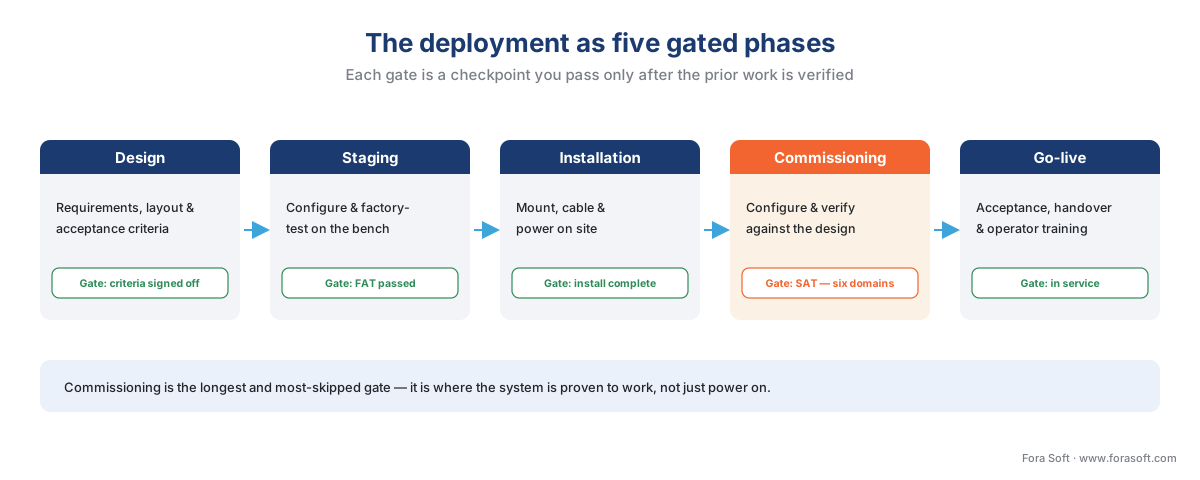 Figure 1. The deployment as five gated phases. Each gate is a checkpoint you do not pass until the prior work is verified — the commissioning gate, where most systems are quietly waved through, is the one that decides whether the system actually works on day one.
The six domains are the columns of the checklist, and they map onto the rest of this article: cameras and coverage, network and power, recording and storage, analytics, privacy and compliance, and cybersecurity and operations. The sections below take each in turn, with the concrete checks and the arithmetic. Throughout, we use one running example — the 60-camera distribution-and-retail site from our companion article on estimating a surveillance project — so the numbers stay grounded. The full, printable version of every check below is the deployment checklist at the end of this article.
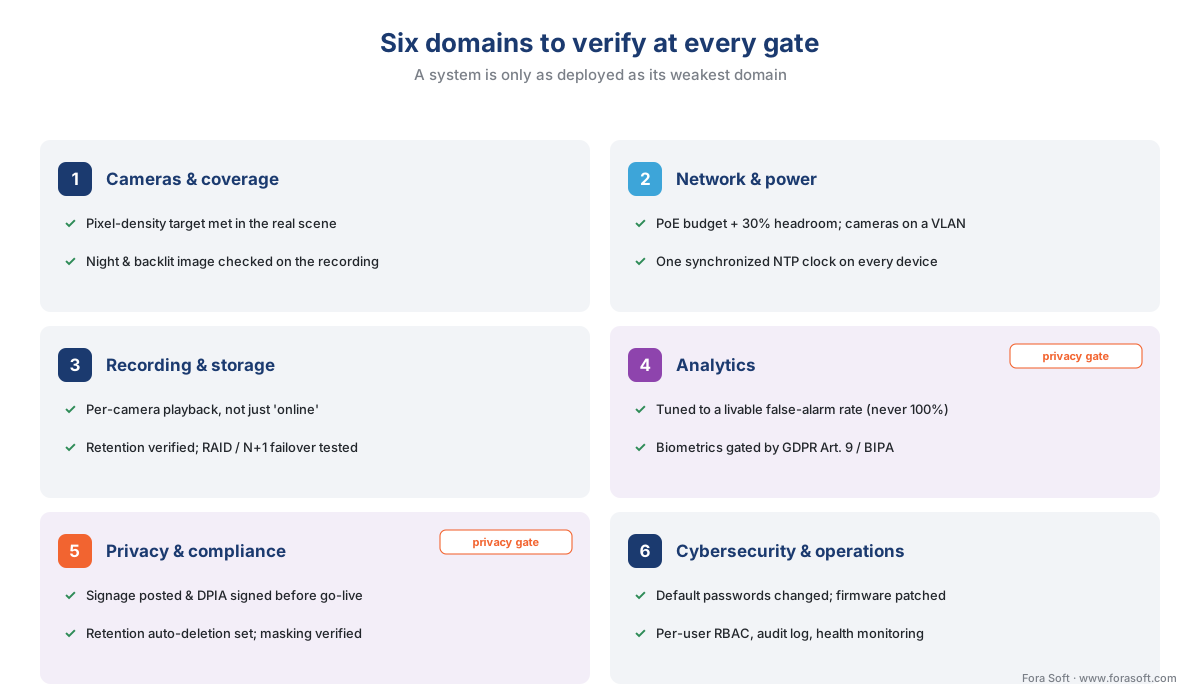 Figure 2. The six domains you verify at every gate. A system is only as deployed as its weakest domain — a perfect camera plan on an unsegmented, un-synced network is not a deployed system.
Domain 1 — Cameras and coverage: verify what each camera actually sees
The first domain is the one everyone remembers and the one most often signed off too early. The check is not "is the camera on?" but "does each camera deliver the operational requirement it was placed to deliver?" — the right field of view, at the right level of detail, under the conditions that actually occur.
The level of detail has a standard scale. IEC 62676-4 maps a plain-language goal to a required pixel density — how many pixels the camera lands across one metre of the scene at the distance that matters. A wide-area "detect that someone is present" needs far fewer pixels per metre than "identify a stranger from this footage". The familiar version of this scale is DORI — Detection, Observation, Recognition, Identification — and the full method of turning it into a camera count belongs to the estimating article, which this checklist assumes you have already done. A note on currency: the 2025 edition of the standard revised these categories, adding higher grades and explicitly retiring the old claim that 250 pixels per metre identifies a person "beyond reasonable doubt" — modern guidance treats reliable automatic face matching as needing far more detail. For deployment, the practical point is unchanged: every camera has a pixel-density target, and commissioning is where you confirm it is met in the real scene, not on a spec sheet.
That confirmation has a few parts. Verify the field of view and framing against the design for each camera — the scene it was placed to cover, with nothing important cropped and no unintended over-reach into areas you are not permitted to record. Verify focus and exposure on the actual subject distance, not the wall behind it. And verify the image in the lighting that matters — which for most outdoor and many indoor cameras means at night and against backlight, not just in the comfortable afternoon when the installer happened to be on a ladder.
This is the domain's classic pitfall, so it is worth stating plainly.
Common mistake: signing off in daylight. A camera that produces a crisp image at 2 p.m. can be useless at 2 a.m. — blown out by a single security light, blind in the dark without working infrared, or smeared by a slow shutter that turns a moving person into a blur. Surveillance earns its keep at night and during events, so commission it then. Walk the site after dark, trigger the analytics you will rely on, and look at the recorded stream — not the live one — because compression and frame rate change what is actually kept.
Domain 2 — Network and power: the layer that quietly decides everything
Cameras are the visible part of a surveillance system; the network is the part that determines whether the visible part works. Three checks dominate this domain: power, bandwidth, and time.
Power. Most modern IP cameras draw power over the same Ethernet cable that carries their data, using Power over Ethernet (PoE), an IEEE standard with three common tiers: the original 802.3af delivers up to about 15 watts per port, 802.3at (PoE+) up to about 30 watts, and 802.3bt (PoE++) up to about 60–90 watts for heated, pan-tilt-zoom, or illuminator-heavy cameras. The check at the gate is that the switch's total power budget comfortably exceeds the sum of the cameras' draw. The rule of thumb is at least 30% headroom. Walk the math on our 60-camera site: if the cameras average roughly 12.5 watts each, that is 60 × 12.5 = 750 watts of demand, so you want switches providing at least 750 × 1.3 ≈ 975 watts of PoE budget — and you confirm it against the switches' published budget, which is often lower than "ports × max watts" implies.
Bandwidth. Each camera produces a stream measured in megabits per second, and the recording server has to receive all of them at once, continuously, while also serving live views and exports. The aggregate is simple arithmetic: 60 cameras at an average of 4 Mbps is 60 × 4 = 240 Mbps flowing into the server every second of every day. A single gigabit network link (1,000 Mbps) carries that comfortably — but "carries the recording load" is not "carries everything", because an operator pulling up nine live cameras and exporting an incident adds to it. Size the links and the server's network interface for the recording load plus a real margin for retrieval, and verify the switch uplinks are not a hidden bottleneck between camera floors and the server room.
Time. This is the check that is almost always skipped and occasionally catastrophic. Every camera and recorder must share an accurate, synchronized clock, set from a common Network Time Protocol (NTP) source. The reason is evidential: if you cannot prove the time on a recording is correct, the recording can be challenged or dismissed as evidence, and footage from cameras whose clocks disagree cannot be reliably correlated into a single timeline. A few minutes of drift between two cameras is enough to create reasonable doubt about whether they show the same moment. Set every device to one NTP source at commissioning, confirm they agree, and — for systems where footage may go to court — consider a GPS-backed time source, which holds accuracy to within a couple of milliseconds.
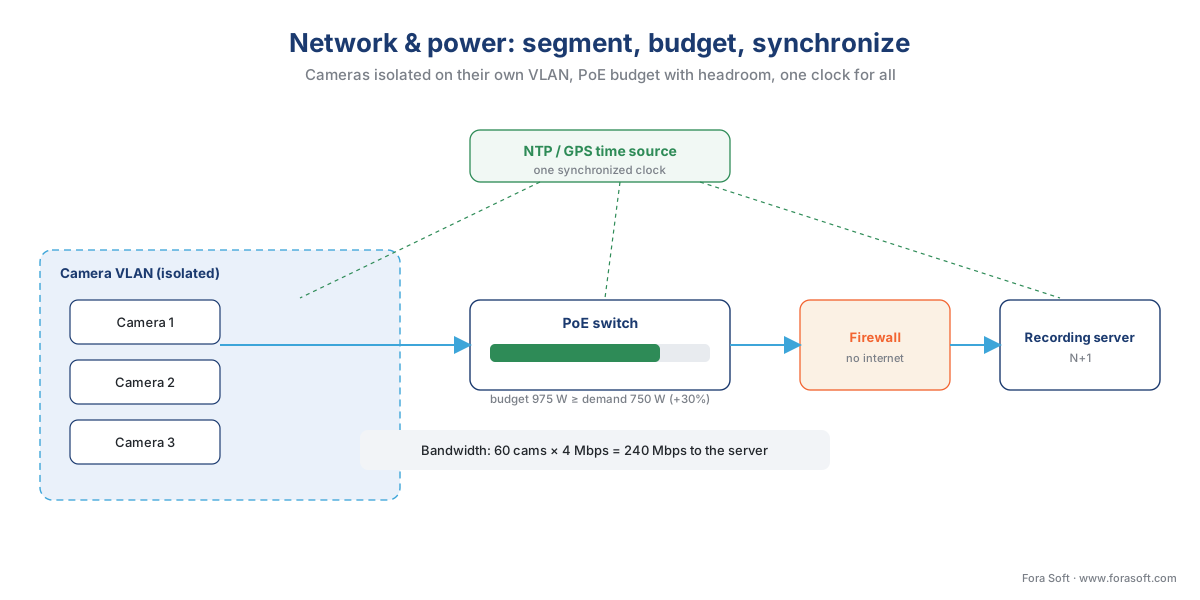 Figure 3. The three network checks that decide whether the camera plan survives contact with reality: enough PoE budget with headroom, cameras isolated on their own segment, and one synchronized clock across every device.
The fourth check in this domain is segmentation, and it sits on the border with cybersecurity (Domain 6). Cameras should live on their own network segment — a dedicated VLAN — isolated from the general business network and not reachable from the internet. This is a baseline that managed switches make easy and that flat networks make impossible; we return to why it matters under cybersecurity.
Domain 3 — Recording and storage: prove it is keeping what you think
A surveillance system's entire purpose is to have the footage when you need it. This domain verifies that it will — and "verifies" is the operative word, because the failure modes here are silent. A camera can show a perfect live image and record nothing; an array can look healthy until the first disk fails and takes the array with it; storage sized on paper can fill three weeks early once real motion is added.
The first check is per-camera recording, not server uptime. Confirm, camera by camera, that the stream is actually being written and can be played back from the archive — not that the camera is online, which is a different and weaker fact. The second is recording mode: continuous, motion-triggered, event-driven, or scheduled, set per the design, because the mode changes the storage footprint by a large factor and the recording-strategies article covers the trade-offs. The third is retention — that the system will actually hold footage for the required number of days. This is arithmetic you can check before the disks fill: storage equals bitrate × cameras × hours × retention days, and the full method lives in the storage and retention math. For our running site, 60 cameras at 4 Mbps recording continuously for 30 days needs roughly 78 TB of usable video, or about 100 TB of raw disk after redundancy. Verify the installed capacity matches the retention promise, not a smaller number someone hoped would do.
The fourth check is the one teams most want to skip because it feels destructive: the failover test. If the design promises redundancy — a RAID array that survives a disk failure, an N+1 spare recording server — then commissioning is where you prove it by causing the failure on purpose. Pull a drive from the array and confirm recording continues and the array rebuilds onto the hot spare. Take a recording node offline and confirm its cameras fail over. Redundancy that has never been tested is a hope, not a feature, and the incident is the wrong time to learn which.
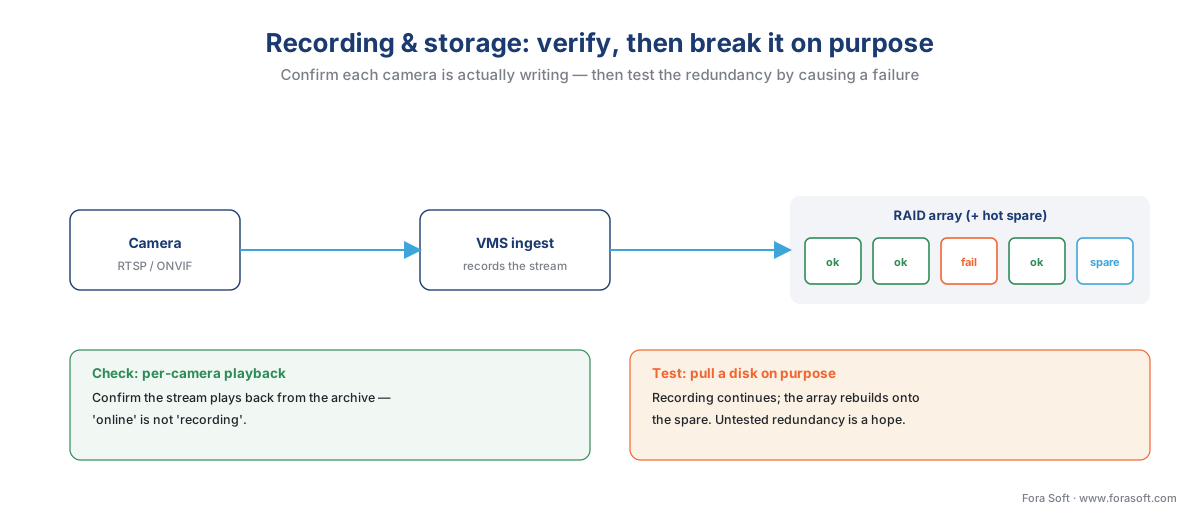 Figure 4. Two checks that fail silently otherwise. Confirm each camera actually plays back from the archive — "online" is not "recording" — then prove the redundancy by pulling a disk on purpose and watching recording continue while the array rebuilds onto the spare.
Common mistake: assuming "online" means "recording". The most common silent failure in surveillance is a camera that is reachable, shows a live picture, and is not writing to the archive — because a recording schedule was wrong, a licence lapsed, or a storage path filled. The live wall looks perfect. Only a per-camera playback check from the archive catches it, and only ongoing health monitoring (Domain 6) catches it after go-live.
Domain 4 — Analytics: tune it, don't trust the defaults
If the system includes video analytics — motion classification, line-crossing, intrusion zones, loitering, people-counting, license-plate or face recognition — this domain verifies that each analytic does its job in this scene, not in the vendor's demo. Analytics shipped at factory defaults are the surveillance equivalent of a smoke alarm taped to the ceiling without a battery: present, reassuring, and not actually protecting anything.
The first check is placement and processing tier: confirm each analytic runs where the design put it — on the camera (edge), on a local server, or in the cloud — because that choice drives latency, bandwidth, and cost, as the edge-vs-cloud analytics article explains. The second, and the heart of the domain, is tuning for false alarms. Every analytic has an accuracy that is a range, expressed as precision and recall, that depends on scene, lighting, angle, and the threshold you set — never a single perfect number, and never "100% accuracy" or "zero false alarms", which are marketing claims, not measured ones. Commissioning is where you tune the operating point: tight enough that real events are caught, loose enough that the operator is not buried in nuisance alerts. The discipline for this is its own subject, covered in tuning analytics for false alarms and accuracy; the deployment check is simply that it was done, against written acceptance criteria, on the live scene.
The models themselves — how object detection, tracking, or recognition work under the hood — belong to the AI for Video Engineering section; this checklist verifies the surveillance-system layer around them: that they are placed, tuned, and surfaced into the operator's workflow.
Common mistake: the system that cries wolf. An analytic tuned too sensitively floods operators with false alerts; within a week they mute it, and the system is now decorative. A deployment that ships untuned analytics has built an expensive way to be ignored. Tune to a nuisance-alarm rate the operators can actually live with, and write that rate into the acceptance test.
One analytic carries a separate, non-negotiable gate. Biometric analytics — face recognition, and in many jurisdictions license-plate recognition — are a legal question before they are a technical one. Capturing and matching faces processes special-category biometric data restricted under the EU's GDPR (Article 9) and, in the United States, under state biometric statutes most sharply Illinois' BIPA (740 ILCS 14), which carries a private right of action and statutory damages. Before you enable a biometric analytic at go-live, confirm the lawful basis, consent where required, and a completed privacy review exist — the subject of Domain 5 and of the dedicated BIPA and GDPR articles. This is the one checklist item where "we'll sort the paperwork later" can turn a working feature into a liability.
Domain 5 — Privacy and compliance: post the sign before you press record
A surveillance system collects personal data the moment it records a person, and most of the obligations that creates must be satisfied before go-live, not after. This domain is engineering guidance, not legal advice — confirm specifics with qualified counsel — but the deployment checks are concrete and well-defined, and the surveillance compliance checklist covers them in full.
Four checks anchor the domain. First, notice: people must be told they are being recorded before they enter the scene. European guidance — the EDPB's Guidelines 3/2019 on video devices, interpreting the GDPR — recommends a layered approach: a clear warning sign carrying the most important information (that recording is happening, who the controller is, the purpose, and where to find more) backed by a fuller privacy notice. Confirm the signage is physically posted and the notice published before the cameras go live, not as a follow-up task. The full treatment is in consent and notice for surveillance.
Second, the impact assessment: large-scale or public-area monitoring generally requires a Data Protection Impact Assessment (a DPIA, under GDPR Article 35) documenting the purpose, the necessity and proportionality, and the balancing test against the rights of the people recorded. Confirm it exists and is signed off. Third, retention: the system must delete footage at the limit policy sets. Note that retention has two distinct edges — an operational or legal minimum (how long you must keep footage) and a privacy-law maximum (how long you may), under GDPR's storage-limitation principle (Article 5(1)(e)). Confirm automatic deletion is configured to the right number and actually runs. Fourth, privacy masking: any area the system is not permitted to record — a neighbour's window, a private dwelling, sometimes a break room — must be masked in the camera or VMS configuration, and that masking verified on the recorded stream.
Common mistake: going live before the sign goes up. Energizing cameras that record the public before notice is posted and a DPIA is done is not a paperwork lag — in the EU it can be unlawful processing from the first frame. Treat signage and the DPIA as go-live blockers, exactly like a failed camera.
Domain 6 — Cybersecurity and operations: close the doors, then keep them closed
The last domain has two halves: locking the system down at go-live, and keeping it healthy afterward. They belong together because a surveillance system is a fleet of internet-capable computers with cameras attached, and an un-hardened one is both a privacy breach waiting to happen and a foothold into the rest of the network.
The hardening checks are specific and unglamorous. Change every default password — the most exploited weakness in the entire industry, the one that turned hundreds of thousands of cameras into botnets. Patch firmware to current versions and confirm there are no open advisories for the installed models; the security agency CISA publishes vulnerability advisories for camera products regularly, and the better vendors now commit to secure-by-design practices like rejecting default passwords and providing timely patches. Enforce the network segmentation from Domain 2 so cameras cannot reach, or be reached from, the general network or the internet. Encrypt the streams and management traffic where supported. And screen the supply chain: for US federal, defense, and many critical-infrastructure deployments, Section 889 of the 2019 NDAA and its procurement rule FAR 52.204-25 prohibit covered equipment from named manufacturers — a check that belongs in design but must be confirmed before acceptance, because remediating it later means replacing hardware.
The account and audit checks come next. Replace shared logins with per-user accounts and role-based access so the system knows who did what, and turn on audit logging so it keeps a record. These are not bureaucratic niceties: when footage is questioned, the audit trail is what establishes who viewed or exported it.
The operations half is about the long tail after go-live, and it is where systems silently rot. The check is that someone owns three ongoing jobs: health monitoring, so a camera that stops recording is noticed in hours rather than discovered during an incident; a maintenance plan, covering firmware updates, cleaning, and periodic image verification; and documentation — as-built drawings, configuration records, and the handover package — kept current. The cautionary tale here is real and stark: when the system is not monitored, failures accumulate invisibly. Reports have surfaced of large camera estates running with a majority of cameras inoperable, undetected, for months — a system that exists on paper and not in fact.
Common mistake: no health monitoring, slow decay. Cameras fail constantly — power glitches, knocked mounts, dead infrared, full disks — and without automated health monitoring nobody notices until the footage is needed and missing. The deployment is not finished when the system works; it is finished when someone is alerted the moment it stops.
The go-live gate: FAT, SAT, and the handover that makes it real
The final gate deserves its own treatment because it is where a deployment becomes a delivery. The discipline borrowed from industrial commissioning splits acceptance into two tests. The Factory Acceptance Test (FAT) happens before equipment reaches the site — on the bench or in staging — and verifies that the configured system meets the specification under controlled conditions. The Site Acceptance Test (SAT) happens after installation and verifies what the FAT could not: how the system performs in its real environment, on the real network, against the real scenes and lighting. A surveillance SAT walks the six domains above on the installed system and records the result of each check.
Passing the SAT triggers the handover package, and a deployment is not complete until that package is delivered. At minimum it contains the SAT report, the as-built drawings and configuration records, the device and credential inventory (stored securely), the maintenance plan and any service-level agreement, operator training, and a list of any known open issues. The package is what lets the next person — an auditor, a new integrator, you in six months — understand and maintain the system without reverse-engineering it.
 Figure 5. The go-live gate. The factory test catches configuration faults early; the site test verifies the system in its real environment; the handover package and a deliberate first-30-days watch turn a passed test into a system that is owned and maintained.
One last check belongs after the ribbon-cutting: a deliberate first-30-days watch. The early weeks surface the issues no test catches — a camera that drifts out of focus, an analytic that misfires in changing seasonal light, a retention setting that behaves differently under real load. Plan a review at the end of the first month, and treat the findings as the last phase of the deployment rather than the first complaints of operations.
A worked pass: the 60-camera site at the commissioning gate
To make the checklist concrete, walk our running 60-camera distribution-and-retail site through the commissioning gate. Cameras: 55 of 60 pass framing and focus; two yard cameras fail the night check because a new security light blinds them, so they are re-aimed and a lens hood added before sign-off. Network and power: the PoE budget math (750 W demand, ~975 W needed with headroom) is confirmed against two switches' published budgets; aggregate bandwidth of 240 Mbps sits comfortably under the gigabit links; one camera's clock is found four minutes fast and corrected against the shared NTP source. Recording and storage: per-camera playback confirms all 60 are writing; the 100 TB array is verified against the 30-day retention promise; a drive is pulled from the RAID 6 array and recording continues while it rebuilds. Analytics: the line-crossing and intrusion analytics on the perimeter are tuned from a noisy default down to a nuisance rate the night operator accepts; no biometric analytics are deployed, so the biometric gate is marked not-applicable and documented. Privacy: signage is confirmed posted at every entrance, the DPIA is signed, retention auto-deletion is set to 30 days and tested, and a neighbouring property is masked. Cybersecurity and operations: all default passwords changed, firmware current with no open advisories, cameras confirmed on an isolated VLAN, per-user accounts created, audit logging on, health monitoring configured to alert on a camera that stops recording. Five gate failures found and fixed before go-live — every one of which would otherwise have been discovered during an incident.
Where Fora Soft fits in
Fora Soft has built video systems since 2005 — surveillance and computer vision alongside streaming, conferencing, OTT, and e-learning — across more than 625 shipped projects for 400+ clients. In surveillance and VMS work, the lesson that recurs is the one this article is built on: the hard part is not making a feature work in a demo, it is making the whole system behave under real load, at night, on a real network, for months. We design deployments around verifiable acceptance criteria — measured detection rates and false-alarm rates rather than "100% accuracy", tested failover rather than promised redundancy, time-synced and segmented networks rather than assumed ones — because that is what separates a system that passes a demo from one that holds up when it is needed. The accuracy-versus-performance habit is the same one we bring to building custom VMS and computer-vision software.
What to read next
- Estimating a surveillance project: scope to number — the scope this checklist deploys.
- The surveillance compliance checklist — the privacy-and-compliance companion in depth.
- Surveillance storage and retention math — the arithmetic behind the storage gate.
For the broader commercial picture, see Fora Soft's overview of video surveillance management systems and the position-1 guide to ONVIF profiles in security systems.
Call to action
- Talk to a surveillance engineer — book a 30-minute scoping call to talk through your surveillance system deployment checklist plan.
- See our case studies — 250+ shipped projects across video streaming, WebRTC, OTT, telemedicine, e-learning, surveillance, and AR/VR.
- Download the Surveillance System Deployment Checklist — The section's capstone gated lead magnet: the full, printable, gate-by-gate checklist behind the article.
References
- IEC 62676-4:2025 — Video surveillance systems for use in security applications, Part 4: Application guidelines. International Electrotechnical Commission. The controlling lifecycle standard for planning, design, installation, testing, commissioning, and maintenance of a VSS; the 2025 edition adds a required security concept, defined operator competencies, and visual/functional/service inspection checklists. Tier 1. https://webstore.iec.ch/en/publication/7353 ; release summary by the standard's project lead: https://cctvbuyersguide.com/2025/10/new-release-of-iec-62676-4-application-guidelines/
- General Data Protection Regulation (Regulation (EU) 2016/679), Articles 5(1)(e), 9, 13, and 35. European Union (EUR-Lex). Storage limitation (retention), special-category biometric data, the duty to inform (notice), and the Data Protection Impact Assessment. Tier 1. https://eur-lex.europa.eu/eli/reg/2016/679/oj
- EDPB Guidelines 3/2019 on processing of personal data through video devices. European Data Protection Board. The layered-notice (warning sign + privacy notice) recommendation and the documented balancing test for legitimate interest. Tier 1 (issuing-body guidance). https://www.edpb.europa.eu/our-work-tools/our-documents/guidelines/guidelines-32019-processing-personal-data-through-video_en
- Illinois Biometric Information Privacy Act (BIPA), 740 ILCS 14. Illinois General Assembly. The US biometric statute with a private right of action and statutory damages — the legal gate before deploying face recognition. Tier 1. https://www.ilga.gov/legislation/ilcs/ilcs3.asp?ActID=3004&ChapterID=57
- Section 889, John S. McCain National Defense Authorization Act for FY2019; FAR 52.204-25. US Congress / Acquisition.gov. Prohibition on procuring covered telecommunications and video-surveillance equipment — the supply-chain screen for federal and critical-infrastructure deployments. Tier 1. https://www.acquisition.gov/far/52.204-25
- IEEE 802.3 (PoE: 802.3af / 802.3at / 802.3bt). Institute of Electrical and Electronics Engineers. Power-over-Ethernet tiers (~15 W / ~30 W / up to ~90 W per port) behind the PoE-budget check. Tier 1. https://standards.ieee.org/ieee/802.3/
- ONVIF Profiles (S, G, T, M). ONVIF. The interoperability baseline verified during camera onboarding — streaming (S/T), recording (G), and analytics metadata (M); ONVIF conformance guarantees a baseline, advanced features may need the vendor SDK. Tier 1/3. https://www.onvif.org/profiles/
- Network Time / NTP Guide for Video Surveillance. IPVM. Why synchronized, accurate time is required for evidential and multi-camera correlation, and how drift undermines footage. Tier 5 (institutional/analyst). https://ipvm.com/reports/network-time-guide-for-video-surveillance
- Leading surveillance camera vendor signs CISA's secure-by-design pledge. Cybersecurity Dive / CISA. Camera vulnerability advisories and the secure-by-design commitments (rejecting default passwords, timely patching) behind the hardening checks. Tier 2/5. https://www.cybersecuritydive.com/news/surveillance-camera-axis-signs-cisa-security-pledge/806907/
- Factory Acceptance Test and Site Acceptance Test in commissioning. Industry commissioning references. The FAT/SAT split and the handover-package contents adapted to a surveillance acceptance test. Tier 6 (orientation). https://kneat.com/article/the-difference-between-a-fat-and-a-sat/
- A Video Surveillance Case Study in Failure; reports of large camera estates running largely inoperable, undetected. Loss Prevention Media / public reporting. The real-world consequence of no health monitoring. Tier 5/6 (orientation, explicitly framed as illustrative). https://losspreventionmedia.com/a-video-surveillance-case-study-in-failure/
