


This is engineering guidance, not legal advice. Confirm specifics with qualified counsel.
Why this matters
If you have read the rest of this block, you have met every piece of the system one at a time — the camera, the edge server, the cloud, the hybrid split, the cost, the latency. This article is where they snap together into one design you can hand to an integrator and build. The reason that matters is that surveillance projects fail at the seams, not the parts: a camera that streams beautifully but cannot be recorded within the law, an analytics pilot that works on four cameras and collapses on four hundred, a "cloud" system that saturates the site's internet on day one. A reference architecture is a map of the whole system with the typical technology and the typical failure mode written on every hop, so you design for the worst day before you buy the first camera. It is written for the security integrator, product manager, or operations lead who has to scope the system and talk to engineers — not the engineer who already knows the field — and a senior video engineer should still be able to peel back each simple layer and find the precise standard underneath.
The whole system on one page
A reference architecture is just a labelled picture of a complete, working system that you adapt rather than invent — the blueprint a builder works from, not the finished house. Ours describes a hybrid AI surveillance system: where every component sits, what data flows between them, which standard governs each link, and roughly what it costs to run. Every real deployment in this section — retail, perimeter, city, campus, industrial — is a variation on this one shape.
The system reads left to right in six layers, and the order is the path a single frame of video takes through it. Capture is the cameras, some of them running their own AI. Network is the cabling and switches that carry power and video on the local network. Ingest is where the software that manages all the cameras, called a Video Management System (VMS), pulls each stream in. Recording and storage is where that video lands and how long it stays. Analytics is where the system decides what the video means — split across three tiers. And cloud is the rented data center far away that does the heavy, fleet-wide jobs. Wrapping all six, never a layer of its own, is the privacy and retention policy that decides what may be kept, for how long, and what may ever leave the building.
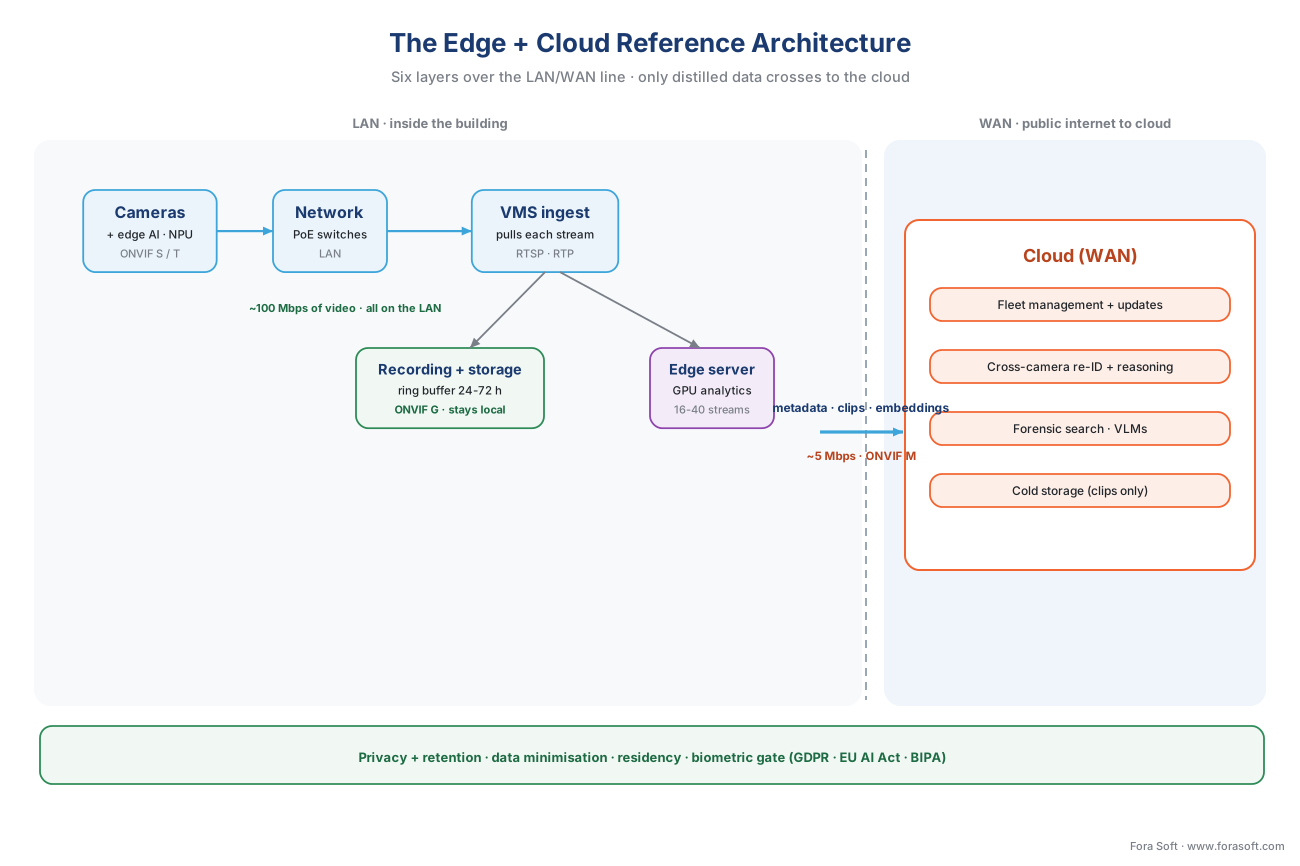 Figure 1. The complete reference architecture on one page. Cameras and edge AI feed a VMS that records locally and keeps a ring buffer; a thin metadata-and-clips pipe crosses to the cloud for fleet management, cross-camera reasoning, search, and cold storage. The privacy and retention layer wraps everything. Read the labels on the links — the bandwidth and the cost are where the design lives or dies.
The single most important feature of the diagram is the vertical line down the middle: the boundary between the local network inside the building (the LAN) and the public internet to the cloud (the WAN). Almost every good decision in surveillance architecture is a decision about what crosses that line. The heavy, continuous, private things — raw video, recording, recognizable faces — stay to the left of it. Only the small, distilled, occasional things — metadata, short clips, a model update — cross to the right. Keep that line in mind as we walk the layers, because each layer's job is partly defined by which side of it the work belongs on.
Layer 1 — Capture: the cameras, some of them smart
The capture layer is the cameras, and the one decision that ripples through everything downstream is how much thinking each camera does for itself. A plain IP camera (a camera that sends digital video over a network cable, as opposed to an older analog one) simply produces a video stream. An AI camera or edge camera adds a small AI chip — a neural processing unit, or NPU — that runs a lightweight detector right where the video is born, so the camera can decide "that is a person crossing the line" in tens of milliseconds and send a small structured alert instead of, or alongside, the video.
This matters to the architecture for two reasons, both of which we will keep meeting. The first is speed: a camera that detects on-device reacts in roughly 25 to 100 milliseconds because nothing leaves the local network, where a system that ships the frame to the cloud to think waits 300 to 800 milliseconds for the round trip. The full latency breakdown is the subject of latency and accuracy at each tier. The second is bandwidth: a smart camera can send a few kilobytes of metadata instead of a megabits-per-second video stream, which is the lever the whole hybrid design pulls. What actually runs on a camera chip, and the limits of it, is covered in on-camera edge AI; how the underlying detection models are built and trained lives in our AI for Video Engineering section under real-time edge vs cloud AI deployment, because this section owns where the model runs, not how it is made.
One honest caution belongs here, because it is the most common over-promise in the category: a camera chip is a small, fixed compute budget, and the accuracy you can run on it is a realistic precision-and-recall range that depends on lighting, angle, and tuning — never a single perfect number, and never "100%". Heavy or cross-camera reasoning will not fit on the camera; that is what the next two analytics tiers are for.
Layer 2 — Network: power, switches, and the LAN/WAN line
The network layer is the least glamorous and the most often undersized. Modern IP cameras are usually powered over the same cable that carries their video, using Power over Ethernet (PoE) — one wire for both, which is why a camera needs only a single run back to a switch. Those switches aggregate the cameras onto the building's local area network (LAN), the fast, private, effectively free network inside the building, and connect onward through a firewall to the wide area network (WAN) — the public internet — and the cloud beyond it.
The reason the network deserves real attention is that it carries the dominant data flow in the whole system: continuous video from every camera at once. A useful rule is that surveillance video runs around 2 to 4 megabits per second per camera in the efficient modern codec, and it runs all day. Fifty cameras is therefore roughly 100 to 200 megabits per second of sustained internal traffic — comfortable on a gigabit LAN, and the reason recording belongs on that LAN rather than across the internet. The typical failure mode is treating the camera network like office Wi-Fi; the fix is a wired, switched, often physically separate (VLAN-segmented) network sized for every camera streaming at once, plus enough PoE budget that adding cameras does not starve the switch. The transport details of how a stream actually moves — the protocols, the discovery — come up in the next layer and in how a camera stream gets into the VMS.
Layer 3 — Ingest: how the VMS pulls each stream
Ingest is where the Video Management System (VMS) — the software platform that manages many cameras at scale, records them, and gives operators one place to watch — actually connects to each camera and pulls its stream. Two standards do almost all the work here, and they are worth naming precisely because "it's standards-based" is where a lot of interoperability hope quietly dies.
The first is the transport. Surveillance video moves over RTSP and RTP: RTSP (the Real-Time Streaming Protocol, IETF RFC 7826, updating the original RFC 2326) is the remote control that tells the camera "describe your stream, start sending, stop"; RTP (the Real-Time Transport Protocol, IETF RFC 3550) is the envelope that actually carries the video and audio packets. Almost every IP camera on the market speaks them, which is why they are the floor of the ingest layer. Their full treatment, including how surveillance reuses streaming-world plumbing, is in RTSP, RTP, and how surveillance video moves on the wire and, for the transport derivation itself, the Video Streaming section.
The second is the interoperability layer that lets a VMS from one maker talk to a camera from another. ONVIF is the common language that lets cameras and software from different makers understand each other, organized into profiles — labelled feature sets that a device and a client both conform to. For ingest, the relevant ones are Profile S (live H.264 streaming, audio, pan-tilt-zoom control, and basic motion events) and Profile T (the modern superset that adds H.265 video, tamper and motion alarms, and metadata streaming). When a camera and a VMS both conform to Profile S or T, the VMS can find the camera, pull its stream, and receive basic events without a custom integration. The deep treatment is ONVIF explained for engineers, and the commercial overview is our blog on ONVIF profiles in security systems.
The caution that the whole section repeats applies most sharply here: conformance guarantees a baseline, not every feature. Profile S means the VMS will reliably get a stream; it does not mean every special analytic or proprietary setting is exposed. Treat the profile as the floor both devices stand on, and expect the vendor's own software kit for anything advanced.
Layer 4 — Recording and storage: local first, and the retention math
Recording is the layer where the LAN/WAN line earns its keep, because the rule is simple and absolute: continuous recording stays local. The raw video is the heaviest thing in the system, the local network carries it for free, and the internet uplink cannot carry it at all without a bill that dwarfs everything else. So the VMS — or a recording server, or a network video recorder appliance — writes every camera's continuous stream to disk on the local network, and the cloud never sees that firehose.
ONVIF has a profile for exactly this part. Profile G standardizes on-device and on-system recording, search, and playback, so a conformant VMS can record from, and replay, a conformant device in a vendor-neutral way. Alongside the always-on recording sits the ring buffer — a fixed block of local storage, typically the last 24 to 72 hours, that overwrites its oldest footage to make room — which is what lets a hybrid system survive an internet outage without losing a second of video. We will return to that resilience in the cloud layer; here the point is that it is local storage, sized in hours.
Storage is the dominant recurring cost in most surveillance systems, and it is pure arithmetic, so it is worth doing out loud once. Take our 50-camera site, each camera a 4-megapixel unit at about 2 megabits per second in the efficient H.265 codec, recording continuously, kept for 30 days:
2 Mbps ÷ 8 = 0.25 megabytes per second per camera
0.25 MB/s × 86,400 seconds/day = 21,600 MB ≈ 21.6 GB per camera per day
21.6 GB × 50 cameras × 30 days ≈ 32,400 GB ≈ 32 terabytes
So a fairly ordinary site holds about 32 terabytes of footage for a one-month retention window — all of it on the local network, none of it on the internet. Change a lever and the number moves: halve the retention and you halve the storage; switch from continuous to motion-only recording and a quiet site can fall by half or more; raise the resolution and it climbs. The full treatment of those levers, plus the hot/warm/cold storage tiers that age footage down to cheaper media, is the surveillance storage and retention math. The architectural takeaway is just that storage is a local cost measured in terabytes, and the privacy layer will later cap how long you may keep it.
Layer 5 — Analytics: three tiers, one metadata language
Analytics is where the system decides what the video means, and it is not one place but three, arranged by how much compute each can afford and how fast it must answer. This three-tier split is the heart of the block, derived in full in edge vs cloud analytics; the reference architecture's job is to wire all three together.
The first tier is on the camera — the lightweight detector on the NPU we met in Layer 1, answering the cheap, constant question "is anything here worth a closer look?" in milliseconds. The second tier is an on-prem edge server — a box on the local network with a real graphics processor (GPU) that runs heavier models across many cameras at once. A mainstream inference GPU handles roughly 16 to 40 simultaneous 1080p streams with a light detector at full frame rate, which is the sizing rule for this tier; its economics are worked in edge servers and on-prem AI appliances. The third tier is the cloud — elastic, powerful, distant, and metered — used for the models too heavy for any local box and the reasoning that must span every camera and site at once.
What keeps these three tiers from becoming three incompatible silos is a single standard for the one kind of data they all produce: analytics results. ONVIF Profile M standardizes analytics metadata and events — bounding boxes, object classifications (person, vehicle, face, license plate), and events like line-crossing, counting, and loitering — and, the detail that makes the whole architecture possible, a Profile M conformant consumer of that metadata can be a camera, a server, or a cloud service. The standard was deliberately written so the same metadata interface works on either side of the LAN/WAN line. That means a detection made on an Axis camera, an event raised on a third-party edge server, and a search run in the cloud all speak the same structured language, and the system stays vendor-neutral across the split. The deep treatment is events, metadata, and the ONVIF analytics interface.
The mechanism that connects the tiers efficiently is the cascade, or triage: the light camera-tier detector looks at every frame and lets the empty ones go — an empty corridor, a still parking lot — escalating only the few percent that contain something, or that it is unsure about, to the heavier edge-server or cloud model. Because the cheap filter runs first, the expensive tiers only ever see the frames that matter, which cuts both the bandwidth crossing the wire and the compute bill on the far side. The pattern, and where to draw each line, is the hybrid processing pattern.
Layer 6 — Cloud: fleet, search, and surviving the outage
The cloud layer is everything that is genuinely better done far away and now and then. It runs fleet management — one console that configures every camera and site, pushes model updates over the air, and shows the dashboards. It runs cross-camera reasoning — tracking a person or vehicle across forty cameras, or re-identifying them across a campus, which by definition needs to see many cameras at once. It runs forensic search over months of footage and the largest vision-language models that can describe a complex scene, both far too heavy for any camera. And it holds long-term cold storage of the small slice of footage worth keeping off-site — the alert clips, not the continuous firehose.
The connection between the building and the cloud is the thin pipe the whole design depends on, and it carries only three small things: metadata (the structured detection, a few kilobytes), event clips (a ten-second slice of actual video around something that happened), and embeddings or hard frames (a compact mathematical fingerprint that lets the cloud match faces or vehicles, plus the occasional frame the edge was unsure about). All three are tiny next to raw video, which is exactly why a hybrid site's upload stays well under 100 kilobits per second per camera — some edge-analytic cameras send thumbnails and metadata at about 20 kilobits per second — instead of the 2 megabits per second of a full stream.
The detail that separates a design that survives reality from one that only demos well is store-and-forward, and it is why "recording stays local" is the load-bearing wall of the architecture. When the internet link drops, the local ring buffer keeps recording without interruption because recording was never on the internet, and the metadata and clips bound for the cloud queue up locally and forward, in order, when the link returns — nothing lost. This is not theoretical: an Eagle Eye Networks bridge records video to local storage first specifically to buffer it against an internet failure, then handles encryption and intelligent upload, and the AWS IoT Greengrass edge runtime is built to operate through intermittent connectivity, spooling messages for the cloud until the link is back. Size the ring buffer for your worst realistic outage, not your average one; on a remote cellular site, local storage is the primary record and the cloud is an eventual archive.
The standards spine
Pulling the layers together, the architecture's defining property is that almost every link is governed by an open standard, which is what lets you mix a camera from one maker, a VMS from another, and a cloud service from a third without a rewrite. This is the unique core this section owns, so it is worth seeing on one row each.
| Layer | Component | Governing standard | What it guarantees | Typical failure mode |
|---|---|---|---|---|
| Capture | IP / AI camera | ONVIF Profile S / T | Discoverable, streamable, basic events | Assuming conformance exposes every feature |
| Network | PoE switches, LAN/WAN | IEEE PoE; IP networking | Power + video on one cable | Undersized switch / shared office network |
| Ingest | VMS pulls stream | RTSP (RFC 7826) · RTP (RFC 3550) | Vendor-neutral live transport | No discovery plan; per-camera hand-config |
| Recording | VMS / NVR + ring buffer | ONVIF Profile G | Standard record, search, playback | Sending the firehose to the cloud |
| Analytics | Camera · edge server · cloud | ONVIF Profile M | One metadata language across tiers | Three silos that cannot share results |
| Cloud | Fleet, search, archive | Vendor APIs (+ Profile M consumer) | Distilled output only crosses the wire | "Fake hybrid" streams full video up |
| Privacy + retention | Wraps all layers | IEC 62676; GDPR; EU AI Act; BIPA | Lawful capture, transfer, retention | Biometrics shipped without a legal review |
Table 1. The standards spine. Each layer maps to the open standard that keeps it vendor-neutral, what that standard actually guarantees, and the mistake that most often breaks the layer. The four ONVIF profiles — S/T to ingest, G to record, M to share analytics — are the backbone; RTSP/RTP carry the transport; IEC 62676 frames the system as a whole.
Two standards in that table are worth a word beyond their row. IEC 62676 is the international standard specifically for video surveillance systems used in security applications — its parts cover system and performance requirements (Part 1-1 and 1-2), video transmission protocols (Part 2), and, in the 2025 revision of Part 4, the application guidelines for selecting, planning, installing, and commissioning a system. It is the closest thing to a formal blueprint for the whole architecture, and a useful reference to cite when a client asks "to what standard is this built?". And the privacy laws in the last row are not a technical standard but a hard constraint that the architecture must be shaped to satisfy from the start — the subject of the wrap layer below.
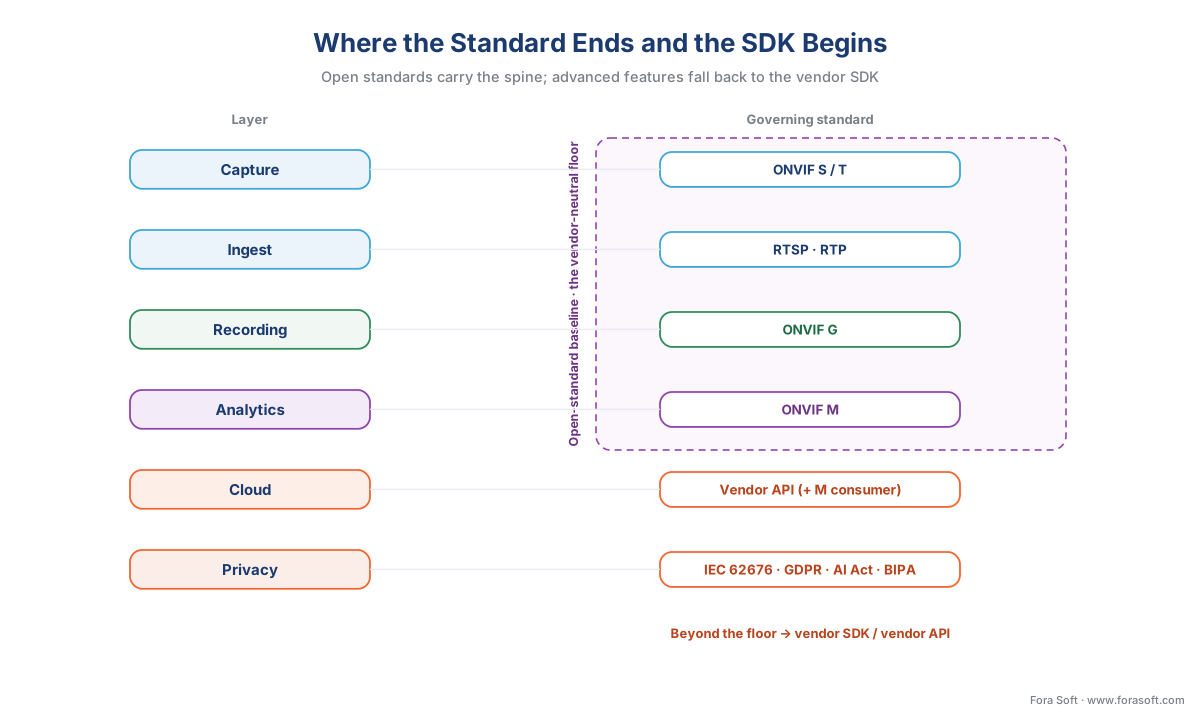 Figure 2. The standards boundary. ONVIF Profiles S/T (ingest), G (recording), and M (analytics metadata) cover the vendor-neutral baseline; RTSP/RTP carry the transport underneath; anything past the profile's guaranteed floor — a special analytic, a proprietary setting — falls back to the camera or VMS maker's own SDK. Knowing where the standard ends and the SDK begins is the difference between a portable design and lock-in.
The budget on the diagram
A reference architecture that does not carry its numbers is just a drawing, so the budget belongs on the diagram. Three quantities decide whether a surveillance system is affordable: the bandwidth crossing the WAN line, the storage sitting on the LAN, and the analytics cost per camera per month. We have two of them already; here they are together for the 50-camera site, with the third.
Bandwidth. Stream every camera to the cloud for analysis and you pay for the firehose continuously:
50 cameras × 2 Mbps = 100 Mbps of sustained upload, all day
Run the architecture as designed — detection at the edge, recording local, only telemetry and clips to the cloud — and the heavy video never crosses the line:
50 cameras × ~0.1 Mbps = ~5 Mbps to the cloud, in bursts
That is a 95% cut in internet upload, for the same cameras and the same detections, purely from where the looking happens.
Storage. As computed in Layer 4, continuous 30-day recording for this site is about 32 terabytes, all local — carried by a gigabit LAN for the price of disks, not by a metered uplink.
Analytics cost. The compute that powers the detection has a wildly different price depending on which tier runs it, and this is where the architecture saves the most. Pricing the same analytic four ways gives a spread worth internalizing:
| Where the analytic runs | Rough cost per camera per month | Why |
|---|---|---|
| On the camera (edge NPU) | ~$3 | Pay once for the chip; amortized over years |
| On an on-prem edge server (GPU) | ~$8 | One GPU shared across 16–40 cameras |
| Renting a cloud GPU continuously | ~$45 | Elastic, but you rent it by the hour, always on |
| A per-minute managed cloud API | ~$4,350 | Billed every minute of every camera — the trap |
Table 2. The analytics cost spread, same job, four tiers. The per-minute managed API is not a typo: billed continuously per camera it reaches into the thousands per camera per month, which is why continuous analytics belongs at the edge and the cloud is reserved for the occasional heavy job. Figures are representative and scene-dependent; the full cross-tier model is in the economics article.
The lesson of the budget is the lesson of the whole architecture in three numbers: route the heavy-and-continuous work (recording, constant detection) to the cheap local network, and the occasional-and-heavy work (search, cross-camera, big models) to the elastic cloud, and you pay the low price on every axis. The complete cost model — every line item, the break-even points, how retention and resolution multiply them — is the economics of analytics.
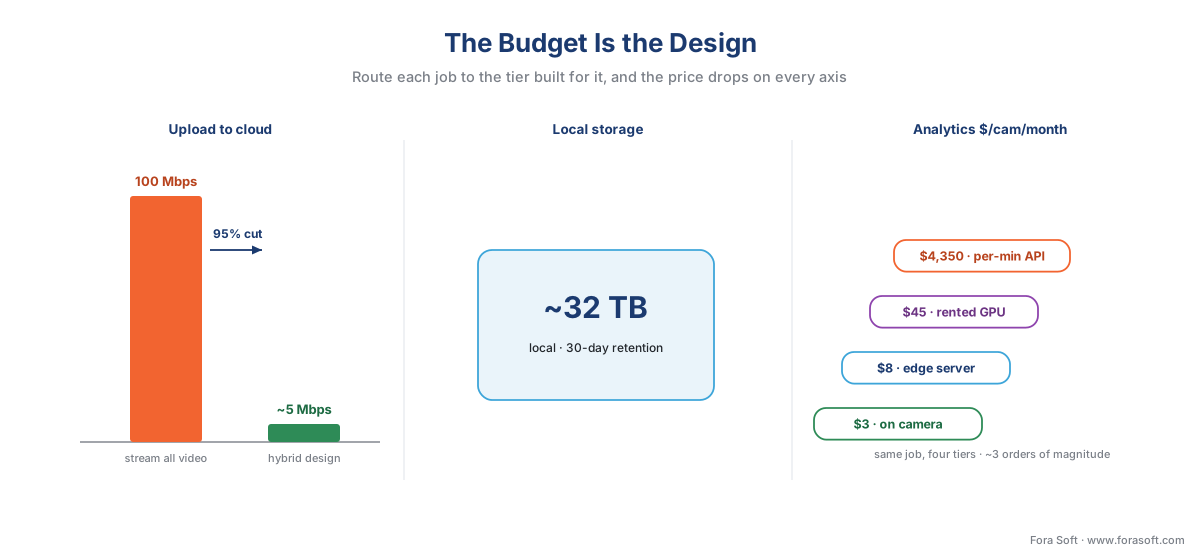 Figure 3. The budget on the diagram. Left: internet upload falls about 95% when detection moves to the edge. Center: continuous recording is a local storage cost in terabytes, not a bandwidth cost. Right: the same analytic costs roughly $3 a month on the camera and roughly $4,350 on a per-minute cloud API — a spread of three orders of magnitude, decided by which tier you put it on.
Three reference configurations that scale
One architecture, three sizes. The same six layers and the same standards spine describe a corner shop and a city, but where the compute and storage physically sit shifts with the scale and the quality of the internet link. These three configurations cover most real projects.
Single-site. One building, tens of cameras, a good wired internet connection. Everything local lives on one box: a single VMS server with a GPU does ingest, recording, and edge-server analytics together, smart cameras handle the time-critical detection, and the cloud is an optional add-on for off-site backup and remote viewing. This is the retail store, the small office, the clinic. The whole left side of the diagram collapses into one appliance.
Multi-site campus or chain. Many buildings, hundreds or thousands of cameras, run as one. Each site keeps its own local recording and edge analytics — because recording must survive that site's internet dropping — and a federation layer in the cloud ties them into a single console for cross-site search, fleet management, and reasoning that spans locations. This is the campus, the retail chain, the multi-building enterprise. The architecture does not change; it repeats per site, with the cloud layer doing the cross-site work no single building can.
Remote / cellular. A perimeter gate, a construction site, a substation, reached only over a flaky cellular link. Here the LAN/WAN line is at its most ruthless: the local box is the primary record with a deep ring buffer sized for multi-day outages, edge AI does as much as possible on-site because the uplink cannot be trusted, and the cloud receives a trickle of the most important events whenever the link is up. Store-and-forward is not a feature here; it is the entire reason the site has any cloud presence at all.
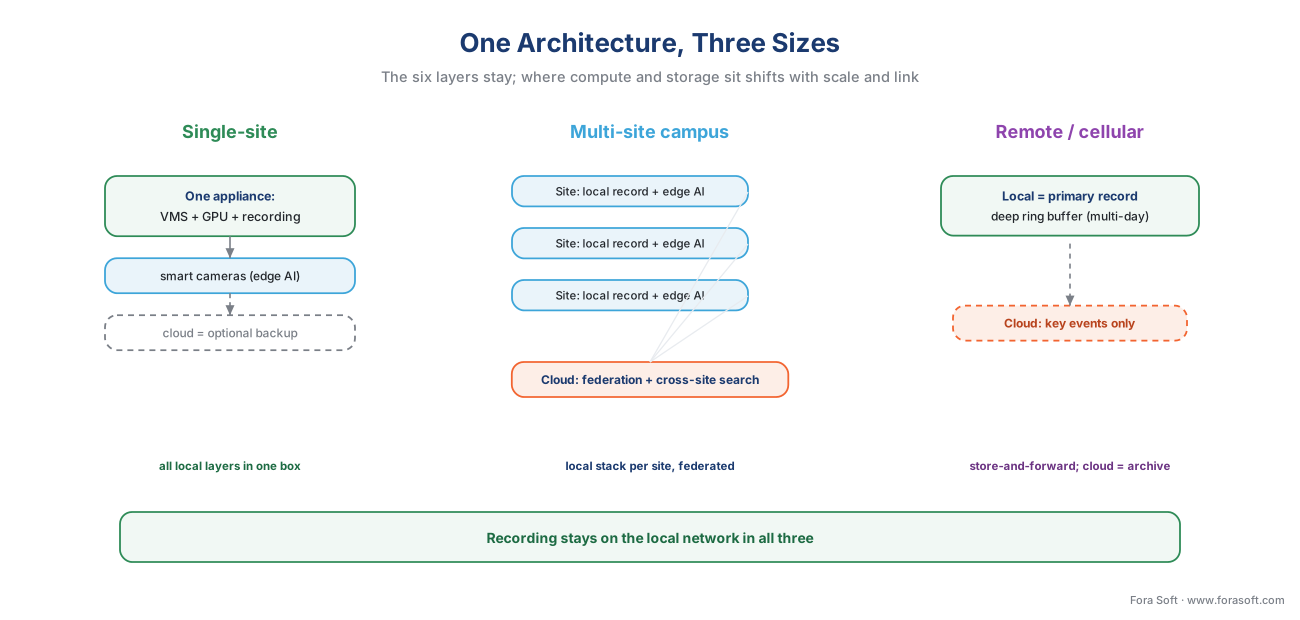 Figure 4. The same architecture at three scales. Single-site collapses the local layers into one appliance; multi-site repeats the local stack per building and federates through the cloud; remote/cellular makes local storage the primary record and the cloud an occasional archive. What stays fixed across all three is the rule that recording lives on the local network.
How the big platforms map onto it
The reference architecture is vendor-neutral on purpose, which means the real products you will evaluate are all instances of it — each emphasizing different layers. Seeing where they fit makes the architecture concrete and shows that the decision is rarely "which layer", but "build the integration myself or buy a platform that ships it".
| Platform | Deployment model | Open SDK? | Where it sits in the architecture |
|---|---|---|---|
| Milestone XProtect | On-prem VMS; hybrid via Milestone Kite | Yes (MIP SDK) | Strong ingest + recording (Layers 3–4), open analytics integration |
| Genetec Security Center | On-prem unified; hybrid / cloud-connected | Yes (SDK) | Unified VMS + access control + LPR; Layers 3–6 |
| NVIDIA Metropolis / Jetson Platform Services | Edge-to-cloud microservices; reference "AI-NVR" | Yes (open SDK / APIs) | Analytics tiers (Layer 5) + cloud connectivity |
| AWS (Greengrass + cloud) | Cloud-native with edge runtime | Yes (APIs) | Edge runtime + cloud (Layers 5–6), store-and-forward |
| Custom build (Fora Soft and similar) | Any — designed to the site | N/A — you own it | The whole architecture, shaped to the exact constraints |
Table 3. The market mapped onto the reference architecture. The established VMS platforms (Milestone, Genetec) are strongest at ingest, recording, and management and bolt analytics on; the AI-native and cloud stacks (NVIDIA Metropolis, AWS) are strongest at the analytics and cloud tiers. None is "cloud-native" in the way a web app is — every serious system keeps recording local — and the "open SDK?" column is what decides whether you can extend it or are locked in. How to read this market is the VMS vendor landscape; when a custom build beats all of them is custom vs off-the-shelf VMS.
The practical reading is that you almost never build all six layers from scratch. You pick a strong VMS for the ingest, recording, and management layers, you choose where each analytic runs across the three tiers, and you build custom integration only at the seams the platform does not cover — which, for a system with real AI requirements and a strict privacy regime, is usually the analytics split and the privacy wrap.
The privacy and retention wrap
The privacy and retention layer is drawn around the whole architecture rather than inside it because it constrains every other layer at once: what a camera may capture, what may cross the WAN line, where footage may be stored, and how long it may be kept. Designing it in from the start is far cheaper than retrofitting it, and the hybrid architecture happens to make compliance easier almost for free.
The governing principle is data minimisation — under the EU's General Data Protection Regulation (GDPR, Regulation (EU) 2016/679, Art. 5(1)(c)), personal data must be "adequate, relevant and limited to what is necessary". Video of identifiable people is personal data, so a design that keeps recognizable footage local and sends the cloud only metadata and short clips is data minimisation expressed as an architecture, not a policy bolted on after. The companion principle, storage limitation (Art. 5(1)(e)), is why the retention window is capped: privacy law sets a maximum how-long-you-may-keep, distinct from the operational minimum a security team wants — and the two must be reconciled deliberately, not left to a disk filling up.
The constraint sharpens at two places on the diagram. Crossing the WAN line, GDPR Chapter V restricts transferring personal data outside its region absent a legal mechanism; keeping recognizable video in-building means only de-identified metadata crosses a border, shrinking the problem to almost nothing. And at the analytics tier, biometrics are a legal gate, not just a feature: the EU AI Act (Regulation (EU) 2024/1689) prohibits real-time remote biometric identification in public spaces with narrow exceptions and classes after-the-fact biometric identification as high-risk, with those high-risk obligations set to apply from 2 August 2026 — a deadline a proposed "Digital Omnibus" amendment may postpone for Annex III systems to December 2027, still pending formal adoption as of mid-2026; in Illinois, the Biometric Information Privacy Act (BIPA, 740 ILCS 14) restricts capturing faceprints and lets individuals sue directly, with statutory damages. The architecture's answer is to keep face and plate processing on hardware you control, inside the building, and to treat any biometric feature as something a privacy and legal reviewer signs off before it ships. The deep treatments are GDPR for video surveillance and BIPA and US biometric privacy law. This is engineering guidance, not legal advice; confirm specifics with qualified counsel.
A common mistake to avoid
The most expensive architectural mistake is buying the layers in the wrong order — picking cameras and a VMS first, getting them installed, and only then discovering the AI requirement does not fit. A camera chosen purely on image quality may have no usable edge AI; a VMS chosen on price may have a closed SDK that blocks the analytics integration you need; a "cloud" platform chosen for its tidy dashboard may stream full video up and saturate the site's uplink on day one — the fake hybrid, whose tell is a sustained tens-of-megabits upload where a real hybrid sits at a few. The fix is to design top-down from the constraints that cannot move — the timing the system must hit, the privacy regime it must satisfy, the worst-case internet link it must survive — and let those pin the architecture before anyone picks a product. The reference architecture exists precisely so that the hard constraints shape the system, instead of the first vendor's catalogue shaping it for you.
Those constraints reduce to three questions, and answering them in order sizes the system. How many sites must run as one? Can the internet link be trusted? Is there a biometric or data-residency rule in play? Each answer narrows the design until it lands on one of the three configurations above — and on every path, recording stays on the local network.
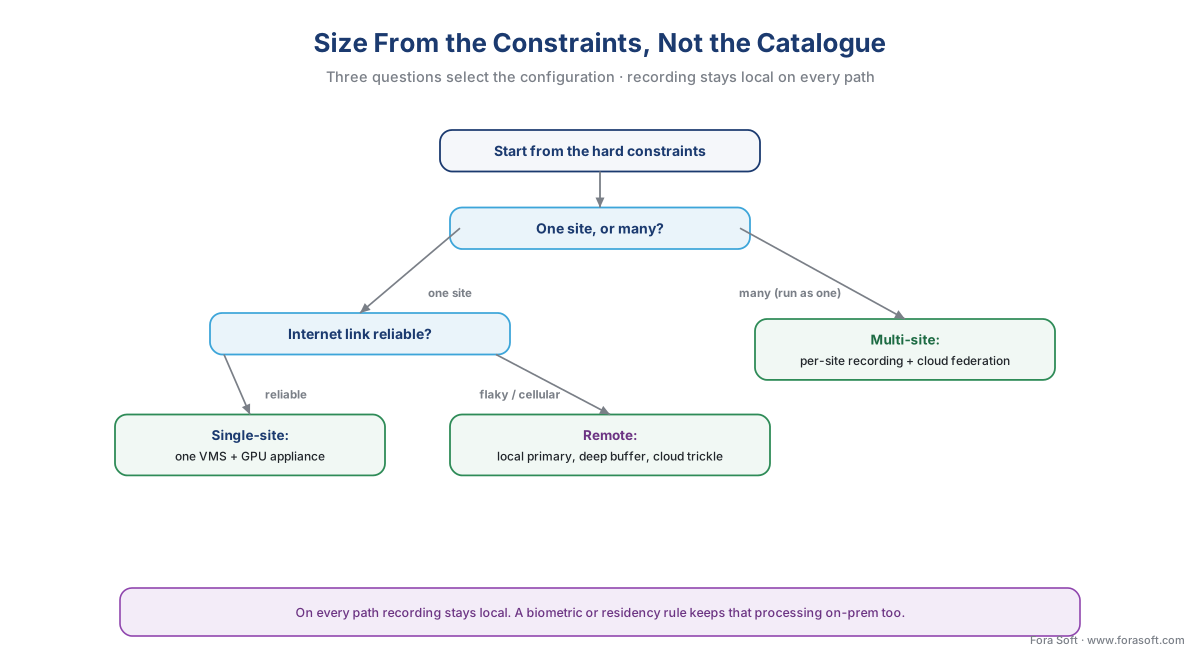 Figure 5. Size from the constraints, not the catalogue. Three questions — how many sites, how reliable the link, whether a biometric or residency rule applies — select the configuration. Recording stays local on every branch; only where the heavier compute and the cross-site reasoning sit changes.
Where Fora Soft fits in
Fora Soft has built real-time video, streaming, and computer-vision software since 2005, across 625+ shipped projects, and the edge-cloud reference architecture is the design we reach for most in surveillance work — because the off-the-shelf platforms each force their own line through it, and that line rarely matches a real site. Teams come to us when a system has to thread requirements no single product covers at once: millisecond detection at a perimeter, biometric processing kept on-premises for a residency rule, cross-site search over a thousand cameras, and an uplink that has to survive a storm. We design the whole stack to those constraints — edge AI and local recording sized for the worst outage, ONVIF Profile M metadata tying the analytics tiers together, store-and-forward that loses nothing, and only the few percent of footage that matters sent to the cloud — and we lead with how the system behaves under real load: the latency you can actually hold, the upload you actually consume, and the realistic precision and recall in your lighting, never a demo's perfect number. A blueprint that survives the worst day beats a tidy diagram that only works in the showroom.
What to read next
- The hybrid processing pattern: split work between edge and cloud
- The economics of analytics: bandwidth, compute, and storage tradeoffs
- The anatomy of a video surveillance system, end to end
Call to action
- Talk to a surveillance engineer — book a 30-minute scoping call to talk through your edge cloud reference architecture plan.
- See our case studies — 250+ shipped projects across video streaming, WebRTC, OTT, telemedicine, e-learning, surveillance, and AR/VR.
- Download the Edge + Cloud Reference Architecture — Build Pack — A one-page build pack distilling the article into a blueprint: the six layers (capture, network, ingest, recording, analytics, cloud) over the LAN/WAN line; the ONVIF standards spine (Profile S/T to ingest, G to record, M to share….
References
- ONVIF — "Profile S and Profile T" (Profile S standardizes live H.264 streaming, audio, PTZ, and basic events; Profile T adds H.265, tamper/motion alarms, and metadata streaming — the camera-to-VMS ingest baseline of the architecture). Primary standard (tier 1). https://www.onvif.org/profiles/
- ONVIF — "Profile G — Recording and storage" (standardizes on-device/on-system recording, search, and playback so a conformant VMS records from and replays a conformant device vendor-neutrally — the recording layer). Primary standard (tier 1). https://www.onvif.org/profiles/profile-g/
- ONVIF — "Profile M — Metadata and events for analytics applications" (standardizes analytics metadata and events — bounding boxes, classifications, line-cross/counting/loitering — and a conformant consumer can be a camera, a server, or a cloud service; the metadata spine across the edge-cloud line. Profile M Specification v1.1, 2024). Primary standard (tier 1). https://www.onvif.org/profiles/profile-m/
- IETF — "RFC 3550: RTP, A Transport Protocol for Real-Time Applications" and "RFC 7826: Real-Time Streaming Protocol Version 2.0" (RTP carries the media; RTSP controls the session — the vendor-neutral transport every IP camera speaks, the floor of the ingest layer). Primary standard (tier 1). https://www.rfc-editor.org/rfc/rfc3550 · https://www.rfc-editor.org/rfc/rfc7826.html
- IEC — "IEC 62676 — Video surveillance systems for use in security applications" (Part 1-1/1-2 system and performance requirements, Part 2 video transmission protocols, Part 4:2025 application guidelines for selecting, planning, installing, and commissioning — the formal system-level reference standard for the whole architecture). Primary standard (tier 1). https://webstore.iec.ch/publication/34391
- European Union — "GDPR, Regulation (EU) 2016/679, Art. 5(1)(c) data minimisation, Art. 5(1)(e) storage limitation, Chapter V transfers" (personal data limited to what is necessary, kept no longer than necessary, restricted from leaving the region absent a legal mechanism — the principles the privacy wrap enforces and that the hybrid split satisfies by construction). Primary law (tier 1). https://eur-lex.europa.eu/eli/reg/2016/679/oj
- European Union — "Artificial Intelligence Act, Regulation (EU) 2024/1689, Art. 5 and Annex III" (real-time remote biometric identification in public spaces prohibited with narrow exceptions; post-hoc biometric identification high-risk; high-risk obligations set to apply from 2 August 2026, with a proposed Digital Omnibus amendment that may postpone the Annex III high-risk duties to 2 December 2027 (pending formal adoption as of mid-2026) — the biometric gate at the analytics tier). Primary law (tier 1). https://eur-lex.europa.eu/eli/reg/2024/1689/oj
- Illinois General Assembly — "Biometric Information Privacy Act (BIPA), 740 ILCS 14" (restricts collection of biometric identifiers such as faceprints; private right of action with statutory damages — the US biometric gate that keeps face/plate processing on local hardware). Primary law (tier 1). https://www.ilga.gov/legislation/ilcs/ilcs3.asp?ActID=3004
- NVIDIA — "DeepStream SDK / Metropolis Microservices (Jetson Platform Services)" (a mainstream inference GPU runs roughly 16–40 simultaneous 1080p streams with a light detector; Metropolis Microservices ship cloud-native edge-to-cloud building blocks and a reference 'AI-NVR' — the basis for sizing the edge-server tier and a real published edge-to-cloud reference design). First-party engineering (tier 3). https://developer.nvidia.com/deepstream-sdk · https://developer.nvidia.com/metropolis-microservices
- AWS — "AWS IoT Greengrass — FAQs and developer guide" (the edge runtime runs local processing and ML inference, operates through intermittent connectivity, and spools messages for the cloud while offline, syncing on reconnect — the first-party basis for the store-and-forward seam). First-party engineering (tier 3). https://aws.amazon.com/greengrass/faqs/
- Eagle Eye Networks — "Bridges and the Cloud VMS architecture" (the on-premise bridge records to local storage first to buffer against internet failure, then handles encryption, deduplication, bandwidth management, and intelligent upload — real-world evidence that leading 'cloud' systems are hybrid with local recording). Vendor engineering (tier 4). https://www.een.com/hardware/bridges/
- Verkada — "Reducing bandwidth consumption of a cloud camera to 20 kbps" (edge-analytic cameras send encrypted thumbnails and metadata roughly every 20 seconds at no more than ~20 kbps per camera, letting 100+ cameras share a ~2 Mbps link — the thin-pipe figure behind the <100 kbps/camera uplink and the ~95% bandwidth cut). Vendor engineering (tier 4). https://www.verkada.com/blog/reducing-bandwidth-consumption-cloud-camera/
- Milestone Systems — "XProtect VMS System Architecture Document" and Genetec — "Security Center" (open-platform and unified VMS platforms; distributed recording servers plus management server, edge storage, and hybrid/cloud extensions, with open SDKs — the established VMS layer the reference architecture ties together). Vendor engineering (tier 4). https://www.milestonesys.com/ · https://www.genetec.com/products/unified-security/security-center
- asmag.com / Security Info Watch — "Hybrid cloud-edge deployments: a resource guide for security integrators in 2026" (industry reporting that hybrid edge-plus-cloud is the dominant 2026 deployment model for serious surveillance products — market-reality orientation, not a primary citation). Institutional/analyst (tier 5). https://www.asmag.com/showpost/35496.aspx
