


This is engineering guidance, not legal advice. Confirm specifics with qualified counsel.
Why this matters
If you are designing or buying an AI surveillance system, the edge server is the tier everyone forgets until the camera runs out of room and the cloud bill arrives. The smart camera is cheap but small; the cloud is powerful but distant and metered. Between them sits a box on your own network that runs the analytics the camera cannot and keeps the video the cloud should not have. Knowing when that middle tier is the right home for the work — before you have committed to "all on the camera" or "all in the cloud" — is what keeps a project from a redesign a year in. This article gives you a plain-language model of edge servers and on-prem AI appliances so you can size one, read a vendor's spec sheet critically, and decide which jobs belong on a server you own.
The three places analytics can run
Every surveillance analytic runs in one of three places, and the whole of this block is about choosing among them. The camera itself can run light analysis on its own video — that is on-camera edge AI, and it is capped by the few watts a network cable delivers. The cloud can run anything, but the video has to travel there and you pay to move and process it — that is cloud video analytics. The full tier-by-tier comparison, and why the choice drives the whole system, is the subject of edge vs cloud analytics; a commercial overview of that trade-off lives in our blog on edge AI vs cloud AI for video surveillance.
This article is about the third place: a computer you own, on your own network, sitting between the cameras and the cloud. It is powerful enough to run the work the camera cannot, and close enough that the video never has to leave the building. To see why that middle position is so useful, start with what the box actually is.
 Figure 1. The three tiers, and where the edge server sits. The camera analyses its own view in a few watts; the edge server runs heavy, cross-camera models on local GPUs while the video stays inside the building; the cloud is elastic but distant and metered. This article is the middle box.
What an edge server actually is
An edge server is a regular, powerful computer placed at the "edge" of your network — on-site, near the cameras — whose job is to run video analytics that are too heavy for any single camera. The word "edge" simply means it is close to where the data is born, not in a distant data center. In a surveillance system it usually sits in the same server room as the recording, takes in streams from dozens of cameras, and runs the artificial-intelligence models that turn those streams into detections, tracks, and searches.
What makes it powerful is the same component that powers a gaming PC or an AI data center: a GPU, short for graphics processing unit — a chip built to do thousands of small calculations at once, which is exactly the shape of the math an AI model needs. Where a camera carries a tiny AI chip rated in single-digit "trillions of operations per second" (TOPS) inside a few watts, a server GPU is rated in the hundreds of TOPS and draws tens of watts. That gap is the reason the server can do what the camera cannot: run a larger model, run several models at once, and look across many cameras instead of one.
There are two ways to buy this tier, and the difference matters. The first is a build-it-yourself server — a standard rack server fitted with one or more inference GPUs, running the analytics software you choose. NVIDIA, whose GPUs dominate this space, certifies partner servers for exactly this purpose under its NVIDIA-Certified Systems program (NVIDIA). The second is a turnkey AI appliance — a sealed box from a surveillance vendor with the GPUs, the operating system, and the analytics pre-integrated, so you rack it and connect cameras. BriefCam, an analytics platform owned by Milestone, is a representative example: it runs its analytics fully on-premise on servers with Intel processors and NVIDIA GPUs, licensed one GPU at a time, with no dependency on the cloud (Milestone / BriefCam). An appliance trades flexibility for a shorter path to running; a built server trades setup work for control over the hardware and the models.
Either way, the defining trait is the same: a GPU-equipped computer you own, on your own network, that runs the analytics and keeps the video local. Hold onto that, because every advantage below flows from it.
The chip economics: why a server does what a camera can't
To understand the middle tier, compare the silicon at each tier side by side. The numbers tell the story better than any adjective.
A camera's AI chip is built for performance per watt, because it survives on the roughly 13 watts a single Power-over-Ethernet (PoE) cable delivers — and from that it must also run the sensor, the encoder, and the network (IEEE 802.3). A server GPU has no such limit: it lives in a box with its own power supply and cooling, so it is built for raw throughput. NVIDIA's L4, a mainstream inference GPU designed to fit in any server "from the edge to the data center," delivers up to 485 INT8 TOPS in a 72-watt envelope, carries 24 GB of memory, and includes four dedicated hardware video decoders — and a server can hold one to eight of them (NVIDIA L4). A purpose-built edge module like NVIDIA's Jetson AGX Orin reaches up to 275 TOPS in 15 to 60 watts for smaller on-site boxes (NVIDIA Jetson). Set those beside a camera's single-digit-to-low-tens of TOPS and the division of labor is obvious.
| Tier | Typical compute | Power | Streams it serves | What it runs |
|---|---|---|---|---|
| On-camera (NPU/SoC) | 1–20 TOPS | ~3–4 W (within PoE) | 1 (its own) | One or two light detectors |
| Edge server (1 GPU, e.g. L4) | ~200–485 TOPS | ~72 W per GPU | ~16–40 live streams | Heavy + cross-camera models |
| Edge server (multi-GPU box) | hundreds of TOPS ×N | server power | dozens–100+ | Many models, whole site |
| Cloud (elastic GPU) | effectively unbounded | off-site | unbounded (metered) | Largest models, on demand |
Table 1. Compute by tier. The camera and the server differ by more than an order of magnitude in both compute and power, which is exactly why heavy and cross-camera work moves off the camera onto a box that has power and cooling to spare. Throughput figures are vendor-stated (NVIDIA) and depend on the model and input; L4 TOPS shown with sparsity.
The shape to remember: the camera is sized for one stream in a few watts, and the server is sized for many streams with power to burn. The next question is the practical one a buyer actually asks — how many cameras does one server carry?
Stream density: how many cameras one box carries
The capacity of an edge server comes down to one phrase, stream density: how many live camera streams one GPU can decode and analyze at once. It is set by two limits in series, and missing the first one is the most common sizing mistake in this whole tier.
The first limit is decode. Before a GPU can analyze a camera's video it must first decompress it, turning the compressed H.264 or H.265 stream back into images. A GPU does this in fixed-function hardware — the L4 has four dedicated decoders — and each decoder can handle only so many streams. If the decoders are full, it does not matter how much AI compute is left; no more cameras fit. Decode is the doorway, and it is narrower than people expect.
The second limit is inference — actually running the AI model on each decoded frame. Here is the worked number to anchor the tier. On a single mainstream inference GPU running 1080p streams through a light object detector at full frame rate, teams typically run 16 to 32 simultaneous streams (NVIDIA DeepStream). A common, well-understood optimization roughly doubles that: instead of running the detector on every frame, run it every second or third frame and let a lightweight tracker follow objects in between, which can lift density toward 40-plus streams with little accuracy loss (NVIDIA DeepStream). Walk the arithmetic for a site:
1 GPU ≈ 24 streams (1080p, light detector, every-frame)
× 2 GPUs in one box ≈ ~48 streams
→ one 2-GPU edge server covers a ~48-camera site, video never leaving the building.
Two cautions keep that number realistic. Heavier models — face recognition, multi-camera re-identification, anything beyond a light detector — cost more per stream and pull the count down, sometimes far down. And higher resolution multiplies the load: 4K streams decode and infer far slower than 1080p. So "how many cameras per server" always carries an unstated "running what, at what resolution." Quote the density with the model and the resolution, or it means nothing — the same discipline the camera tier demands.
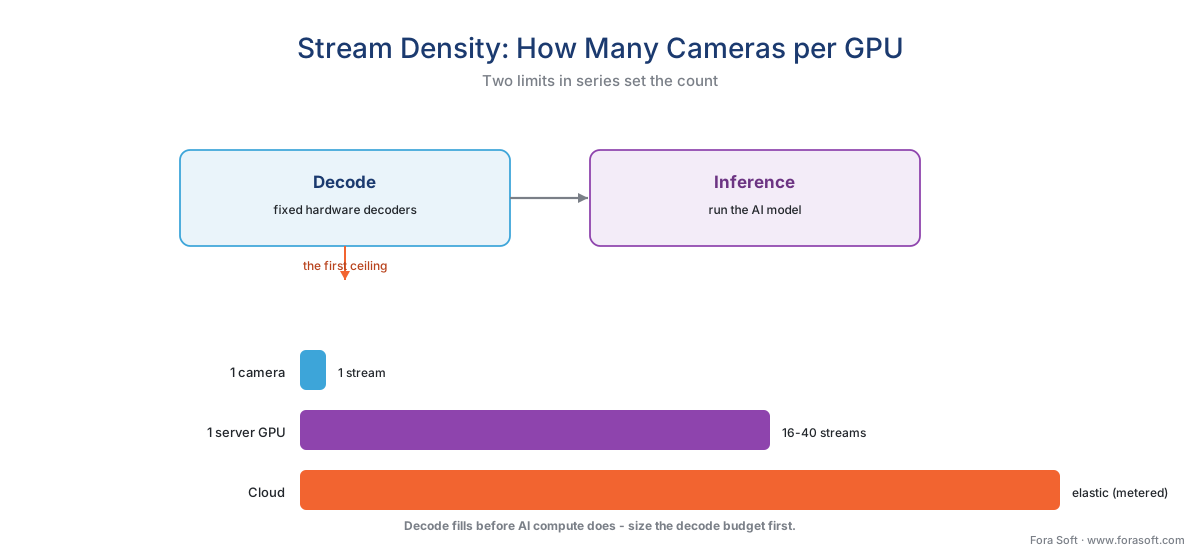 Figure 2. Stream density, and the two limits that set it. Video must be decoded before it can be analyzed; the GPU's fixed decoders are the first ceiling, inference the second. One mainstream GPU carries roughly 16–40 light-detector streams — orders of magnitude past the camera's single view, and the unit you size a site in.
When the on-prem appliance beats both the camera and the cloud
The middle tier is not a compromise; it is the correct answer to three specific questions. When any one of them is "yes," the box you own wins.
One — the model is too heavy or too wide for the camera. A camera sees its own view and runs one or two light models. The moment the job needs to follow a person across twenty cameras (re-identification), search a month of footage for "a red truck," run face recognition against a watch-list, or apply a large model the camera's memory cannot hold, the work exceeds the device. The model engineering for those tasks belongs to our AI for Video Engineering section; the point here is where it runs — on a GPU with the compute and the cross-camera view the camera lacks. The edge server is the first tier that can see the whole site at once.
Two — the data must stay local. Some video cannot leave the building, or the country, for legal or policy reasons. An on-prem server processes it where it is recorded, so the recognizable footage never travels. We treat this in its own section below, because it is often the deciding factor.
Three — moving the video to the cloud costs more than the server. Cloud analytics mean streaming video up continuously, and that bandwidth is metered. Past a certain camera count the recurring bill for moving video exceeds the one-time cost of a box that does the work on-site. We show that arithmetic next.
When none of the three holds — a light model, no residency constraint, a handful of cameras — the camera or a small cloud footprint is simpler. The middle tier earns its place precisely when the work is heavy, the data is sensitive, or the fleet is large. Most real systems end up using all three tiers together, a split covered in the hybrid processing pattern.
A worked example: the cloud-egress crossover
Numbers make the bandwidth case concrete. Take a 100-camera site, each camera a 4-megapixel stream at about 2 megabits per second of continuous H.265 video. To analyze that video in the cloud, you must first send it there, and cloud providers charge for data leaving their network ("egress") — a representative published rate is about $0.09 per gigabyte (AWS).
First, the data one camera produces in a month:
2 Mbps × 2.6 million seconds/month ÷ 8 bits/byte ≈ 648 GB per camera per month.
Now the whole site, and the cloud bill just to move it:
648 GB × 100 cameras = 64,800 GB/month
64,800 GB × $0.09/GB ≈ $5,832 per month ≈ ~$70,000 per year — egress alone.
That is before a single cloud GPU runs, before storage, before processing. A capable two- or four-GPU edge server is a one-time purchase in the low tens of thousands of dollars; against a ~$70,000-a-year egress line that recurs forever, the on-prem box pays for itself inside the first year and keeps saving after. The crossover is not subtle — it arrives early and steepens with every camera you add. (The deeper cost model, including storage and compute, is worked in the economics of analytics and the surveillance storage retention math.)
 Figure 3. Why bandwidth tips the scale. Cloud egress is a recurring cost that climbs with every camera; an on-prem server is a one-time purchase that then runs flat. For a continuously recording fleet the lines cross early — often inside the first year — after which the box you own only widens the gap.
Latency and data residency: the two advantages money can't add to the cloud
Two more advantages come built into the middle tier, and neither can be bought back in the cloud at any price.
The first is latency — the delay between something happening and the system reacting. An edge server sits on the same local network as the cameras, so a detection travels a few meters, not a few thousand kilometers. Local inference typically lands in the tens of milliseconds; a round trip to a cloud GPU and back commonly runs several hundred milliseconds, and can stretch toward a second or more under load or distance (industry measurements, 2026). For analytics that must trigger something in the physical world — a perimeter line-cross that should sound a deterrent, a barrier that should drop — that difference is the difference between stopping an event and reviewing it. The per-tier latency and accuracy ranges are detailed in latency and accuracy at each tier.
The second is data residency — keeping the video, and the people in it, inside a defined boundary. This is where the on-prem server is not just faster but sometimes the only lawful option. Video of identifiable people is personal data, and biometric analysis of it (faces, in some readings license plates) is a special, heavily regulated category. Three rules shape the choice:
- GDPR transfer rules. The EU's General Data Protection Regulation (Reg. (EU) 2016/679) does not forbid storing data abroad, but its Chapter V restricts sending personal data outside the European Economic Area unless a specific legal mechanism is in place. Processing on a server inside the building sidesteps the cross-border-transfer question entirely — the data never leaves (GDPR, Chapter V). The same regulation's data-minimization and storage-limitation principles (Art. 5) favor designs that move and keep the least data possible (GDPR Art. 5; EDPB Guidelines 3/2019 on video devices).
- The EU AI Act. Real-time remote biometric identification of people in public spaces is, with narrow law-enforcement exceptions, prohibited; analyzing such footage after the fact is classed as "high-risk" and tightly governed. Under Regulation (EU) 2024/1689, the prohibitions applied from 2 February 2025 and the high-risk obligations apply from 2 August 2026. Where a biometric workload is permitted at all, keeping it on-prem reduces the surface that has to be governed (EU AI Act, Reg. (EU) 2024/1689).
- US biometric law. In Illinois, the Biometric Information Privacy Act (740 ILCS 14) restricts capturing biometric identifiers such as faceprints, and — unusually — gives individuals a private right to sue with statutory damages. The legal gate comes before the technical capability, wherever the model runs (Illinois BIPA, 740 ILCS 14).
None of this makes an on-prem server automatically compliant — it does not. But it removes the hardest problem, the cross-border transfer and the third-party processor, from the board. For regulated video, "the data never left the building" is a sentence worth a great deal.
When the edge server consumes or produces analytics metadata, it speaks the same standard the cameras do: ONVIF Profile M defines the metadata and events analytics produce, and a conformant product can be a server or appliance, not only a camera (ONVIF Profile M). The standards layer is covered in events, metadata, and the ONVIF analytics interface, with the commercial overview in ONVIF profiles in security systems.
A common mistake to avoid
The costliest pattern we see is sizing the server by AI compute and forgetting the decode ceiling and redundancy. A buyer reads "485 TOPS" and assumes one GPU swallows a hundred cameras — then discovers the GPU's fixed video decoders fill up at a fraction of that, and that the heavy model they actually wanted (face recognition, re-identification) costs several times more per stream than the light detector the density figure assumed. The second half of the mistake is treating one box as the whole plan: a single edge server is a single point of failure, and a site that loses all analytics when one machine reboots was under-designed. The fix is to size in real units — streams of your model at your resolution, decode budget first, inference second — leave headroom, and plan for a second box or a failover path before, not after, the first one is full. Capacity planning for the whole fleet is its own topic in scaling a VMS.
Where Fora Soft fits in
Fora Soft has built real-time video, streaming, and computer-vision software since 2005, across 625+ shipped projects, and the edge-server tier is where a lot of surveillance work actually lands. Teams come to us when a camera's on-board model has run out of room, when cross-camera tracking or forensic search needs a box that can see the whole site, or when a residency rule means the video simply cannot go to the cloud. We design the on-prem pipeline around how it behaves under real load — the stream density you can actually hold on a given GPU once the real model and resolution are plugged in, the decode budget before the inference budget, the failover path when one server drops — and we lead with the realistic precision and recall in your scene, never a demo's "99%". A server sized to the model it will truly run, with headroom and a second box in the plan, beats one sized to a spec-sheet TOPS number that no real workload ever sees.
What to read next
- Edge vs cloud analytics: the deployment decision that defines the system
- Cloud video analytics: when to send video up, and what it costs
- The hybrid processing pattern: split work between edge and cloud
Call to action
- Talk to a surveillance engineer — book a 30-minute scoping call to talk through your edge ai server plan.
- See our case studies — 250+ shipped projects across video streaming, WebRTC, OTT, telemedicine, e-learning, surveillance, and AR/VR.
- Download the On-Prem AI Server — Sizing Checklist — A one-page checklist to size an edge AI server by streams of the real model, not a spec-sheet TOPS number: the decode-budget-first rule, streams-per-GPU at your resolution, build-vs-appliance choice, failover and growth planning, and….
References
- European Union — "GDPR, Regulation (EU) 2016/679, Chapter V (Arts. 44–50) and Art. 5" (Chapter V restricts transfers of personal data outside the EEA absent a legal mechanism — adequacy, SCCs, or BCRs; Art. 5 sets data-minimization and storage-limitation principles. The basis for the data-residency advantage of processing video on-prem). Primary law (tier 1). https://eur-lex.europa.eu/eli/reg/2016/679/oj
- European Union — "Artificial Intelligence Act, Regulation (EU) 2024/1689, Art. 5 and Annex III" (real-time remote biometric identification in publicly accessible spaces is prohibited with narrow law-enforcement exceptions; post/non-real-time remote biometric identification is high-risk. Prohibitions apply from 2 Feb 2025; high-risk obligations from 2 Aug 2026). Primary law (tier 1). https://eur-lex.europa.eu/eli/reg/2024/1689/oj
- European Data Protection Board — "Guidelines 3/2019 on processing of personal data through video devices" (video of identifiable persons is personal data; biometric identification is special-category; data-minimization favors processing that moves and retains the least data — supports keeping analytics and video local). Primary guidance (tier 1/2). https://www.edpb.europa.eu/our-work-tools/our-documents/guidelines/guidelines-32019-processing-personal-data-through-video_en
- Illinois General Assembly — "Biometric Information Privacy Act (BIPA), 740 ILCS 14" (restricts collection of biometric identifiers such as faceprints; provides a private right of action and statutory damages — the legal gate before a biometric workload, wherever it runs). Primary law (tier 1). https://www.ilga.gov/legislation/ilcs/ilcs3.asp?ActID=3004
- ONVIF — "Profile M — Metadata and events for analytics applications" (standardizes analytics metadata and events; a conformant product can be an edge device such as a camera, or a server/cloud service — the basis for an edge server exchanging standardized analytics with cameras and the VMS. Profile M Specification v1.1, 2024). Primary standard (tier 1). https://www.onvif.org/profiles/profile-m/
- IEEE — "IEEE 802.3 Ethernet, Power over Ethernet (Clauses 33/145; Types 1–4)" (802.3af Type 1 delivers ~12.95 W to the device, 802.3at ~25 W — the camera-side power budget that explains why heavy GPU work moves to a powered server). Primary standard (tier 1). https://standards.ieee.org/ieee/802.3/10422/
- NVIDIA — "L4 Tensor Core GPU" (up to 485 INT8 TOPS with sparsity, 24 GB memory, four NVDEC hardware decoders, 72 W TDP, low-profile PCIe, 1–8 GPUs per server, positioned 'from the edge to the data center' — the representative mainstream inference GPU for an edge server). First-party engineering (tier 3). https://www.nvidia.com/en-us/data-center/l4/
- NVIDIA — "DeepStream SDK — multi-stream video analytics" (a mainstream inference GPU runs ~16–32 simultaneous 1080p streams with a light detector at full frame rate; frame-interval inference plus tracking roughly doubles stream density with little accuracy loss — the basis for the stream-density figures). First-party engineering (tier 3). https://developer.nvidia.com/deepstream-sdk
- NVIDIA — "Jetson AGX Orin module" (up to 275 TOPS at 15–60 W — the purpose-built edge module for smaller on-site AI boxes, the lower end of the edge-server tier). First-party engineering (tier 3). https://www.nvidia.com/en-us/autonomous-machines/embedded-systems/jetson-orin/
- Milestone Systems / BriefCam — "BriefCam video analytics — deployment and licensing" (analytics run fully on-premise on servers with Intel CPUs and NVIDIA GPUs, licensed one GPU at a time, with no cloud dependency; the new engine reports ~38% higher real-time throughput; XProtect App Platform GA planned late 2026 — a representative turnkey on-prem appliance). First-party / vendor engineering (tier 3/4). https://www.milestonesys.com/company/news/press-releases/open-platform-ai-native-era/
- Amazon Web Services — "EC2 / S3 data transfer (egress) pricing" (internet data-transfer-out is about $0.09/GB for the first 10 TB per month, with 100 GB/month free — the representative cloud-egress rate used in the bandwidth crossover example). Vendor pricing (tier 3/4). https://aws.amazon.com/ec2/pricing/on-demand/
