


This is engineering guidance, not legal advice. Confirm specifics with qualified counsel.
Why this matters
If you are buying or building an AI surveillance system, "the camera has AI built in" is the phrase that hides the most. Two cameras can both claim edge AI and differ by an order of magnitude in what they can actually detect, how many models they run at once, and whether you can ever update them. Understanding what the chip inside can and cannot do — before the cameras are mounted on a wall and wired to a switch — is what separates a system that grows with you from one you have to rip out. This article gives you a plain-language model of on-camera AI so you can read a datasheet critically, ask a vendor the right questions, and know in advance which jobs belong on the camera and which do not.
What "AI on the camera" actually means
Start with the camera itself, because the whole article rests on one shift in how to picture it. A modern network surveillance camera is not just a lens and a sensor; it is a small, self-contained computer that happens to point at the world. Inside it runs an operating system, compresses video, talks to the network, and — in a smart camera — runs artificial intelligence on what it sees.
The term for that last part is edge AI. "Edge" means the computing happens at the edge of the network, right where the data is born, instead of in a distant data center; "edge AI" is simply running the analysis on the device itself. When the device is the camera, we call it on-camera or on-device analytics, to separate it from analysis that runs on a separate box on the local network (an edge server) or in the cloud. Those three places are compared tier by tier in edge vs cloud analytics; this article lives entirely inside the first one — the camera.
Here is the move that makes on-camera AI worth the trouble. A camera without AI is a faucet: it pours raw video down a pipe to be recorded and, maybe, watched. A camera with AI looks at its own feed first and describes what it sees. Instead of sending a continuous video of an empty parking lot, it can stay quiet until a vehicle enters, then send a short message: vehicle, this location, 14:02:11, confidence 0.91. The camera ships meaning, not pixels — and meaning is thousands of times smaller than the video it came from.
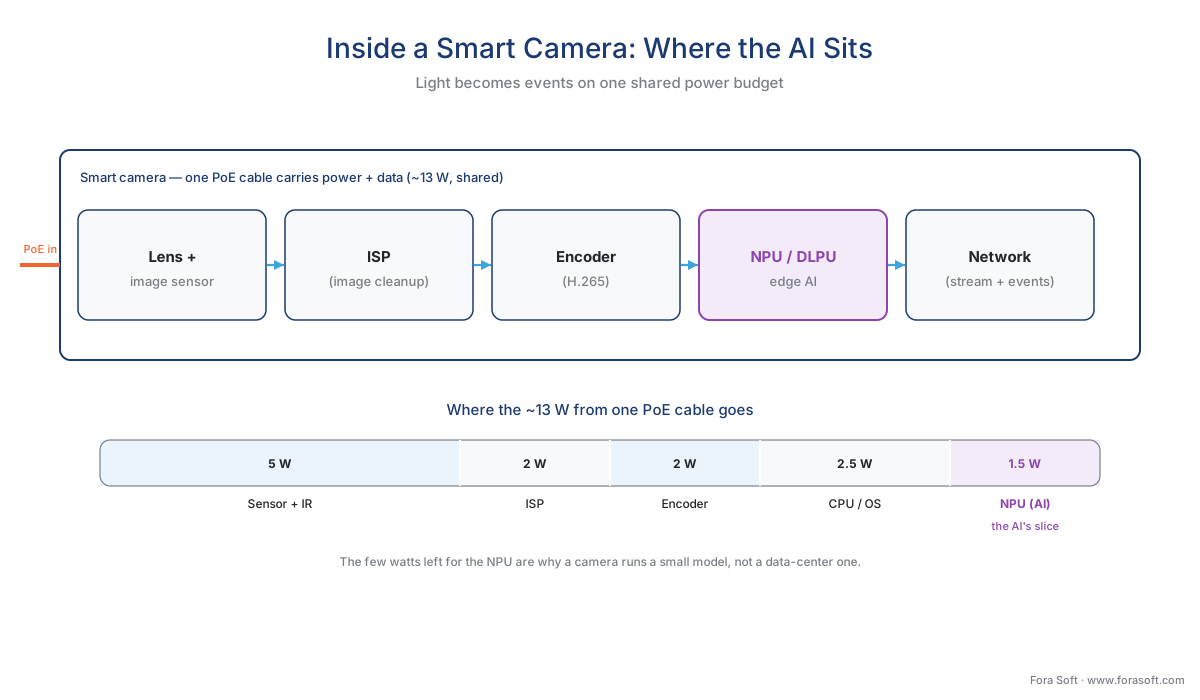 Figure 1. What is actually inside a smart camera. Light becomes a digital image at the sensor, the ISP cleans it, the encoder compresses it for recording, and the NPU runs the AI that turns the picture into events. Everything shares one power budget delivered over a single network cable — the constraint that shapes the rest of this article.
The chip inside: NPUs, vendor SoCs, and add-in accelerators
The piece doing the AI work is a specialized chip called a Neural Processing Unit (NPU) — hardware built to run the particular math of an AI model far more efficiently than a general-purpose processor. Its throughput is quoted in TOPS, short for trillions of operations per second: a rough yardstick for how much AI work the chip can do each second. A camera-class NPU offers single-digit to low-tens of TOPS; hold that number in mind, because the gap between it and a data-center chip is the whole story of what fits.
In most professional cameras the NPU is not a separate part but one block on a system-on-chip (SoC) — a single piece of silicon that combines the image processor, the video encoder, the main processor, and the AI engine. Ambarella's CV72S is a representative example: a 4K vision SoC for mainstream security cameras that runs modern neural networks, including the newer transformer type, while drawing under 3 watts of power, and still has headroom to run more than one network at once, such as person tracking alongside another detector (Ambarella, CV72S, 2023). Axis builds its own AI block, the Deep Learning Processing Unit (DLPU), into its ARTPEC SoC line; the current ARTPEC-9 generation runs on-camera analytics several times faster than the previous one and runs models "of any size, as long as they fit in the device's memory" (Axis developer documentation). That last clause is the entire limit of edge AI in nine words, and we will come back to it.
A second pattern adds a dedicated AI chip alongside the camera's main processor. Hailo builds both: the Hailo-15 family of vision SoCs for smart cameras, rated at 7, 11, and 20 TOPS across its tiers, and a companion accelerator, the Hailo-8, that packs 26 TOPS into roughly 2.5 watts in a chip small enough to embed inside a camera (Hailo). The numbers are concrete enough to ground the point: the top Hailo-15 can run a mid-size YOLO object-detection model at full sensor frame rate on a high-resolution input, which is a serious detector — but it is a detector, run one or two at a time, not a roomful of them.
The shape to take away is this. On-camera silicon is engineered around performance per watt, not raw power, because of a constraint we will make explicit in a moment: the camera has very little power to spend. That focus buys real capability — current SoCs run today's detection models in real time — but it sets a ceiling that no datasheet adjective erases.
| Chip (example) | Type | AI throughput | Power | What it runs on a camera |
|---|---|---|---|---|
| Ambarella CV72S | Camera SoC (CVflow 3.0) | "Highest perf/watt" class; runs transformer NNs | < 3 W | 4K, concurrent detectors (e.g. person + mask) |
| Axis ARTPEC-9 (DLPU) | Camera SoC + AI block | ~3× the prior generation | Camera budget | Models of any size that fit in device memory; TensorFlow Lite |
| Hailo-15H | Camera vision SoC | 20 TOPS | Low single-watt class | A mid-size YOLO detector at full frame rate |
| Hailo-8 | Add-in accelerator (M.2) | 26 TOPS | ~2.5 W | One or two embedded detectors; TF / PyTorch / ONNX |
| NVIDIA Jetson AGX Orin | Edge-server module (for contrast) | up to 275 TOPS | 15–60 W | ~8 camera streams, several models each — not on a camera |
Table 1. The silicon, smallest to largest. The first four sit inside a camera and share its tight power budget; the Jetson is included only to show the scale of the next tier up — its 15–60 W draw is more than an entire PoE camera receives, which is why it lives in a box on the network, not in the camera. Figures from vendor documentation (Ambarella, Axis, Hailo, NVIDIA); throughput numbers are vendor-stated and depend on the model and input size.
The hard reason the camera stays small: the power budget
Before models, settle the physical limit, because it explains every other limit. Most surveillance cameras receive both their data and their electricity through one Ethernet cable, using Power over Ethernet (PoE) — a standard that sends power down the same wire that carries the network. PoE is generous on paper and tight in practice. The common 802.3af tier (Type 1) delivers about 12.95 watts to the device after cable losses; the 802.3at tier, "PoE+", raises that to about 25 watts; the newer 802.3bt tiers go higher, but most fixed cameras are specified to run inside the lower two (IEEE 802.3).
Now spend that budget. From those ~13 watts the camera must run the image sensor, the image-cleaning processor, the video encoder, the network interface, the main processor — and, at night, infrared illuminators that alone can draw 2 to 5 watts. The AI chip gets only what is left. That is precisely why on-camera SoCs are engineered to do their work in under 3 or 4 watts total: there is no more to give. A camera cannot host a power-hungry data-center accelerator for the same reason a phone cannot run a desktop graphics card — the energy and the heat have nowhere to go.
This single fact — a few watts, shared — is the root of every "limit of edge AI" later in this article. It is not a software shortcoming a vendor will patch next year; it is physics on the end of a cable.
What models actually fit
With the power budget fixed, the question "what AI can a camera run?" has a precise answer: a small, quantized model, usually one or two at a time. Both halves of that phrase matter.
"Small" means a model with relatively few parameters, built to be light. In surveillance these are the compact object detectors — the lighter members of the YOLO family ("You Only Look Once", a widely used real-time detection design) such as the n and s variants, along with MobileNet-SSD and EfficientDet-Lite, models designed from the start for phones and cameras rather than servers (industry tooling and benchmarks, 2025–2026). They do the bread-and-butter jobs of surveillance well: detect and classify people and vehicles, count objects, read a line crossing. They do not do the heavy, open-ended reasoning a large model in a data center can.
"Quantized" is the trick that makes them fit. Models are trained using high-precision numbers (32-bit floating point), which are accurate but bulky. Quantization rewrites the model in smaller whole numbers — typically 8-bit integers, written INT8 — which shrinks its memory footprint and lets the NPU run it far faster, for a small, usually acceptable loss of accuracy; recent detector designs are built so the INT8 version keeps nearly the accuracy of the full one (industry tooling, 2026). Axis, for instance, runs the TensorFlow Lite format on its DLPU and recommends per-channel quantization as the more accurate option (Axis developer documentation). A camera typically runs such a model at 15 to 30 frames per second — fast enough to track real movement.
The boundary, then, is not "AI or no AI" but which AI. How these detectors are designed, trained, and shrunk to fit a camera is a model-engineering topic, and it belongs to a different part of Learn: see distillation and quantization for edge video AI and the YOLO production lineage in our AI for Video Engineering section. This article stays on the surveillance question: what the camera does with the model once it is on board, and where that runs out.
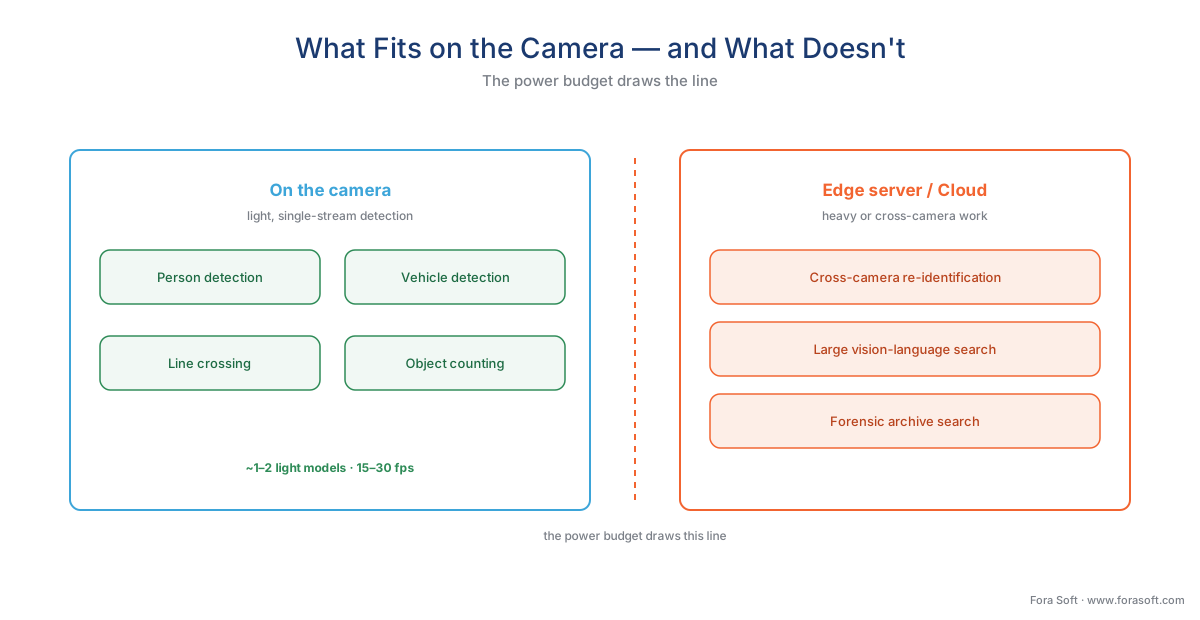 Figure 2. What fits on the camera, and what does not. Light, single-stream detection lives comfortably on-device; cross-camera reasoning, large vision-language models, and archive-wide search need the compute of an edge server or the cloud. The line is drawn by the power budget, not by ambition.
What the camera emits: metadata, not video
When an on-camera model fires, the camera produces a detection event — a compact description of what it saw. A single event is a few hundred bytes to a few kilobytes: an object type, a bounding-box location, a timestamp, often a confidence score. That is the product of edge AI, and its size is the source of its power.
Compare it with the video. A 4-megapixel camera streams roughly 2 megabits per second of compressed video, around the clock. An event is a message you could fit in a text. So a camera that analyzes its own feed and sends only events replaces a 2 Mbps firehose with a trickle measured in kilobits per second — a reduction well past 99% in the traffic needed to understand what the camera sees. The video can still be recorded, but the analysis no longer has to travel.
This is the property that lets edge AI scale. Put 100 cameras on a site and send their video somewhere to be analyzed, and you need the bandwidth for 100 video streams; let each camera analyze itself and send events, and the analysis traffic barely registers. We work the full arithmetic below.
For those events to be useful, the camera and the software receiving them must agree on a format — and there is an industry standard for exactly that. ONVIF is the common language that lets cameras and software from different makers work together, and one ONVIF profile is built for analytics. ONVIF Profile M standardizes the metadata and events that analytics produce: generic object classification, plus defined metadata for geolocation, vehicle, license plate, human face, and human body, and event interfaces for object counting, license-plate recognition, and facial recognition (ONVIF, Profile M Specification v1.1, 2024). The detail that matters here is in the profile's own scope: a Profile M conformant product can be an edge device such as an IP camera, and its metadata can travel three ways — inside the video stream, through the ONVIF event service, or over MQTT, a lightweight messaging protocol common in Internet-of-Things systems (ONVIF). ONVIF's own example is telling: a Profile M camera detects a person in a room and sends an event over MQTT to a building platform, which adjusts a thermostat. The camera became a sensor for more than security.
The same caution applies here as everywhere with ONVIF: conformance guarantees a baseline, not every feature. A camera and a VMS that both support Profile M will reliably exchange standard metadata; a vendor's special analytic or a proprietary attribute may still need that manufacturer's own software kit. Treat the profile as the floor both sides stand on, not the ceiling. The full standards layer is covered in events, metadata, and the ONVIF analytics interface, with the commercial overview in ONVIF profiles in security systems.
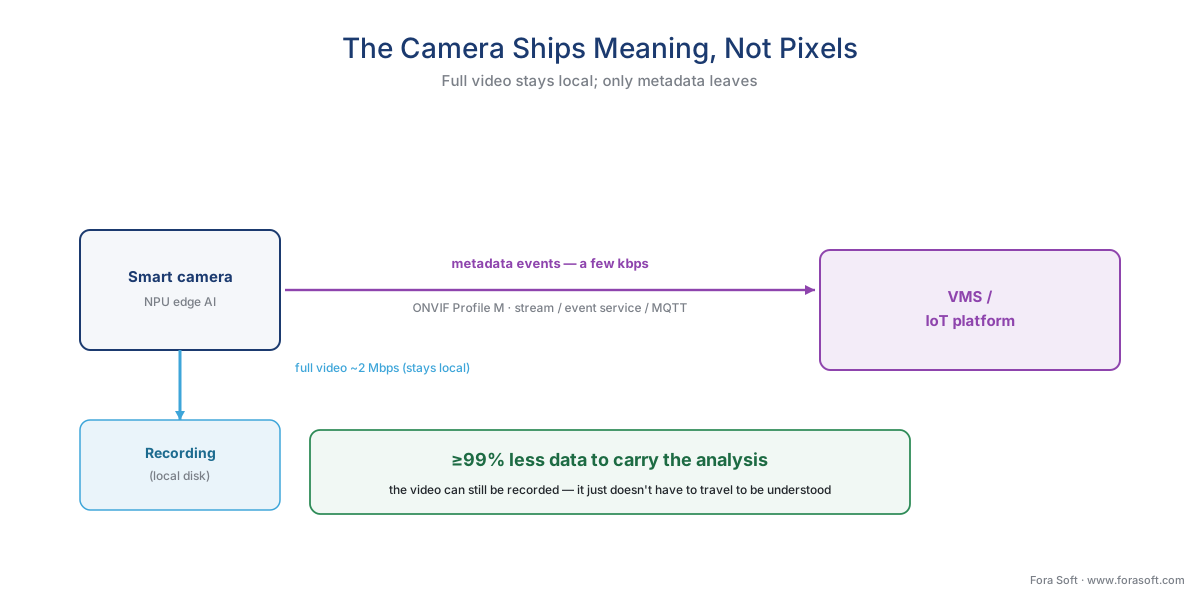 Figure 3. The camera ships meaning, not pixels. The heavy video stays local for recording; only compact metadata events leave, carried in a standard form by ONVIF Profile M over the stream, the event service, or MQTT. This is why on-camera analytics cut analysis bandwidth by more than 99%.
A worked example: the bandwidth an on-camera model saves
Numbers make the saving concrete. Take one 4-megapixel camera at about 2 Mbps of continuous H.265 video, and ask how much data its analysis needs to send under two arrangements.
Send the video to be analyzed elsewhere. The camera must stream its full feed continuously, because nothing can detect on video it has not received:
2 Mbps × 1 month ≈ 2 Mbps × 2.6 million seconds ÷ 8 ≈ 648 GB per camera per month.
Analyze on the camera, send only events. The camera looks at its own feed and emits metadata. Even at a busy average of a few kilobits per second of events:
~5 kbps × 2.6 million seconds ÷ 8 ≈ 1.6 GB per camera per month.
That is the same camera, the same detections, and a drop from about 648 GB to under 2 GB a month — well over 99% less data to carry the analysis. Scale it to a 100-camera site and the contrast is the difference between provisioning for roughly 200 Mbps of continuous upload and provisioning for almost nothing. The video itself can still be recorded locally; what disappears is the need to move it just to understand it. The deeper economics — how this interacts with storage and per-camera monthly cost — are worked in the economics of analytics and surveillance storage and the retention math.
There are three more payoffs that come with keeping the work on the camera, each a direct result of the data staying put. Latency — the delay between an event and the reaction — falls to tens of milliseconds, because there is no network round-trip to a server; for a perimeter line-cross that should trigger a deterrent immediately, that speed is the point. Privacy improves by construction, because recognizable video can stay inside the camera while only abstract metadata leaves — the tier that moves the least data also exposes the least. And resilience improves: a camera that detects on its own keeps working through a network outage or a server failure, where a cloud-dependent system goes blind.
The limits of edge compute
Everything above is the case for the camera. Here is the case against asking too much of it — the set of ceilings every honest edge-AI design runs into. None is a flaw to be patched; each follows from the few-watts-shared budget.
The first ceiling is compute. A camera NPU's single-digit-to-low-tens of TOPS runs one or two light models well. It cannot run a large model, or many models at once, or a heavy new architecture every quarter. The headroom is real but finite, and "add another analytic" is a request the chip can refuse.
The second ceiling is memory, which is the literal meaning of the Axis line quoted earlier: the camera runs models "of any size, as long as they fit in the device's memory." A camera carries a small amount of working memory, and a model too large to load simply will not run — there is no swapping in more, the way you would on a server.
The third ceiling is the model is largely fixed once chosen. Updating analytics across a fleet of cameras means pushing new firmware or models to hundreds of devices over the network, one by one, each with its own compatibility quirks — a real operations task, not a click. A camera that detects people well today but cannot host the behavior model you need next year is a common and expensive surprise; the compute was already full.
The fourth ceiling is accuracy is bounded by what fits. There is no "100% accuracy" in video analytics on any hardware, and the camera's small model sets a lower ceiling than a data-center model would. Detection quality is reported as two numbers in tension — precision, the share of alerts that are real, and recall, the share of real events caught — and both depend on the scene, the lighting, the angle, and tuning. A small model tuned well for a clean scene can be excellent; the same model in glare, rain, or a crowd will miss more. Ask any vendor for precision and recall in your conditions, never a single "99%". The realistic ranges per tier are treated in latency and accuracy at each tier.
The last ceiling is scope. A camera sees its own view and nothing else. Following one person across twenty cameras (re-identification), searching a month of footage for "a red truck", or running a large vision-language model that answers open questions about a scene — these need to see across cameras and across time, which a single camera structurally cannot. That work belongs to the next tiers: a dedicated edge server or on-prem AI appliance on the local network, or cloud video analytics when elastic, central compute is worth the bandwidth and the cost.
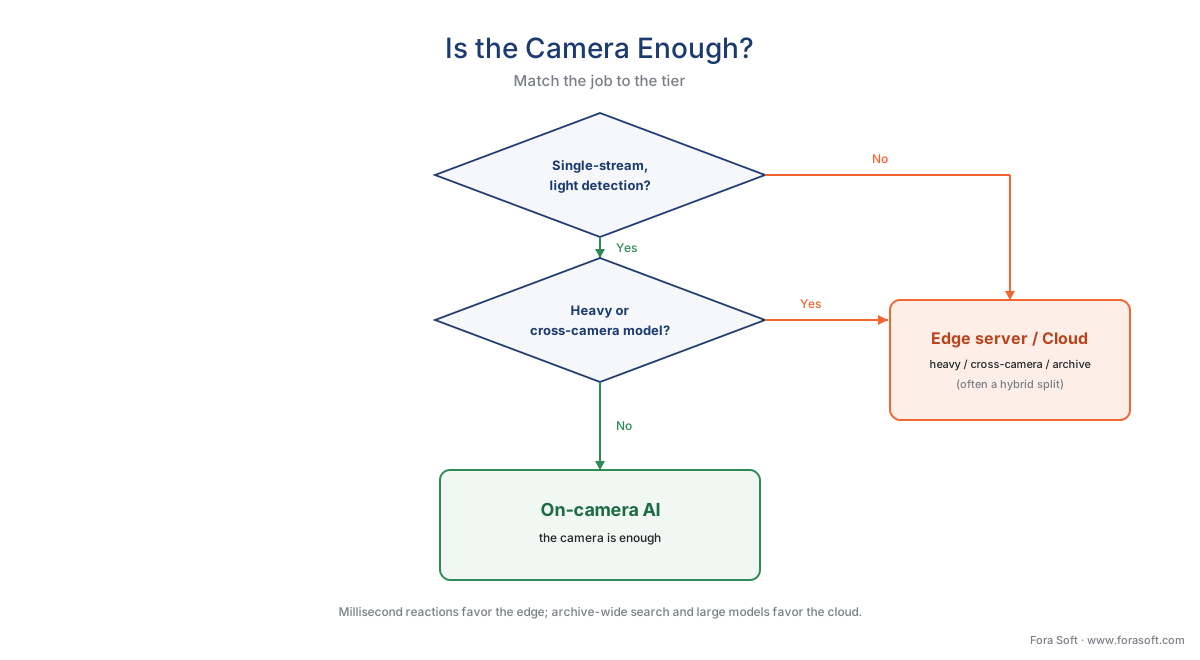 Figure 4. Is the camera enough? Light, single-stream, real-time detection is exactly the camera's job. Heavy models, cross-camera reasoning, or archive-wide search exceed the on-device budget and move to an edge server or the cloud — usually in a hybrid split, not an either-or.
A common mistake to avoid
The costliest pattern we see is buying "AI cameras" on the label, not the spec. "Edge AI" on a datasheet says nothing about how many TOPS the chip has, which models it can load, how many it can run at once, or — the one teams forget — whether you can update those models after purchase. A camera chosen because today's demo detected a person can become a dead end the moment the project needs vehicle classification, loitering behavior, or a newer detector, because the compute and memory were already spent. The fix is to treat the chip as a procurement decision: ask for the NPU's throughput, the exact models it runs and at what frame rate, how many run concurrently, the model and firmware update path, and the precision and recall in lighting like yours. A camera you can re-task is an asset; one you cannot is a fixed-function appliance wearing an AI label.
Where Fora Soft fits in
Fora Soft has built real-time video, streaming, and computer-vision software since 2005, across 625+ shipped projects, and on-camera analytics is a layer we design around constantly, because the chip's ceiling is a hard input, not a detail. Teams come to us when a camera's stock model cannot hold the accuracy a scene demands, when a fleet needs on-camera detection feeding a server or cloud for the cross-camera work the device cannot do, or when recognizable video must stay on the camera to satisfy a privacy rule. We build the pipeline that fits the budget — a quantized detector sized to the NPU, ONVIF Profile M metadata into the VMS, and only the heavier analysis pushed off-device — and we lead with how it behaves under real load: the latency you can hold, the bandwidth you actually consume, and the realistic precision and recall in your lighting, not a demo's. A design that respects the few watts on the end of the cable beats one that assumes them away.
What to read next
- Edge vs cloud analytics: the deployment decision that defines the system
- Edge servers and on-prem AI appliances
- Events, metadata, and the ONVIF analytics interface
Call to action
- Talk to a surveillance engineer — book a 30-minute scoping call to talk through your edge ai camera plan.
- See our case studies — 250+ shipped projects across video streaming, WebRTC, OTT, telemedicine, e-learning, surveillance, and AR/VR.
- Download the On-Camera AI — Buyer's Checklist — A one-page checklist to take into any AI-camera evaluation: the NPU and TOPS questions, which models run and at what frame rate, concurrency, the model/firmware update path, the ONVIF Profile M event check, the PoE power budget, and the….
References
- ONVIF — "Profile M — Metadata and events for analytics applications" (standardizes analytics metadata and events: generic object classification; defined metadata for geolocation, vehicle, license plate, human face and body; event interfaces for object counting, LPR and facial recognition; metadata sent over the stream, the ONVIF event service, or MQTT. A conformant product can be an edge device such as an IP camera, or a server/cloud service; a client can be a VMS, NVR, or cloud service. Profile M Specification v1.1, 2024). Primary standard (tier 1). https://www.onvif.org/profiles/profile-m/
- IEEE — "IEEE 802.3 Ethernet, Power over Ethernet (Clauses 33/145; Types 1–4)" (802.3af Type 1 delivers ~12.95 W to the powered device, 802.3at Type 2 'PoE+' ~25 W, 802.3bt Types 3–4 higher; the power budget a single cable supplies to a camera). Primary standard (tier 1). https://standards.ieee.org/ieee/802.3/10422/
- European Union — "GDPR, Regulation (EU) 2016/679, Art. 9" (biometric data processed for the purpose of uniquely identifying a natural person is special-category data; the legal gate before on-camera face or license-plate recognition is deployed). Primary law (tier 1). https://eur-lex.europa.eu/eli/reg/2016/679/oj
- European Data Protection Board — "Guidelines 3/2019 on processing of personal data through video devices" (video of identifiable persons is personal data; biometric identification triggers Art. 9 special-category treatment; data-minimization favors processing that does not retain recognizable footage). Primary guidance (tier 1/2). https://www.edpb.europa.eu/our-work-tools/our-documents/guidelines/guidelines-32019-processing-personal-data-through-video_en
- Ambarella — "CV72S 4K 5nm edge AI vision SoC" (mainstream security-camera SoC on CVflow 3.0; under 3 W; runs transformer neural networks; 6× the AI performance of its predecessor; headroom for concurrent networks such as person tracking and mask detection; dual Arm Cortex-A76). First-party engineering (tier 3). https://www.ambarella.com/news/ambarella-launches-4k-5nm-edge-ai-soc-for-mainstream-security-cameras-with-new-highs-in-ai-performance-per-watt-image-quality-and-sensor-fusion/
- Axis Communications — "Deep Learning Processing Unit (DLPU) — developer documentation" (ARTPEC-9 DLPU runs on-camera analytics several times faster than the prior generation; supports the TensorFlow Lite format; per-channel and per-tensor quantization, per-channel recommended for accuracy; performs well with models of any size as long as they fit in device memory). First-party engineering (tier 3). https://developer.axis.com/computer-vision/computer-vision-on-device/axis-dlpu/
- Hailo — "Hailo-15 AI vision processors and Hailo-8 AI accelerator" (Hailo-15 family for smart cameras at 7/11/20 TOPS, multi-stream 4K, the 20-TOPS part running a mid-size YOLO detector at full frame rate; the Hailo-8 accelerator at 26 TOPS in ~2.5 W with TensorFlow/PyTorch/ONNX support). First-party engineering (tier 3). https://hailo.ai/products/ai-vision-processors/
- NVIDIA — "Jetson Orin module specifications" (Jetson AGX Orin up to 275 TOPS at 15–60 W, running multi-stream analytics across roughly eight cameras — the next tier up from the camera, included for scale contrast). First-party engineering (tier 3). https://www.nvidia.com/en-us/autonomous-machines/embedded-systems/jetson-orin/
- Ultralytics / DigitalOcean — "Edge object-detection models and INT8 quantization" (light detectors — YOLO n/s variants, MobileNet-SSD, EfficientDet-Lite — run on edge NPUs at 15–30 fps; INT8 quantization compresses FP32 models with recent designs retaining nearly full-precision accuracy). Educational (tier 6). https://www.ultralytics.com/blog/deploy-ultralytics-yolo11-on-rockship-for-efficient-edge-ai
- Yole Intelligence (via Ambarella) — "Imaging for Security" (infrastructure cameras with advanced AI acceleration growing at roughly 23% CAGR 2022–2027, the market context for the shift of analytics onto the camera). Institutional/analyst (tier 5). https://www.yolegroup.com/product/report/imaging-for-security-2022/
