


This is engineering guidance, not legal advice. Confirm specifics with qualified counsel.
Why this matters
If you are choosing how to add AI to a surveillance system, "just put it in the cloud" sounds simple and turns out to be the costliest sentence in the project. The cloud is the right home for some analytics and a budget sinkhole for others, and the line between the two is mostly about how continuous and how large the workload is. This article gives you a plain-language model of what cloud video analytics actually costs — meter by meter, with the arithmetic shown — and a clear test for when sending video up is worth it. Read it before you sign a usage-based contract or design an architecture that streams every camera to a data center, because both decisions are expensive to reverse a year in.
The third place analytics can run
Every surveillance analytic runs in one of three places, and choosing among them is the whole subject of this block. The camera itself can run light analysis on its own video — that is on-camera edge AI, capped by the few watts a network cable delivers. A computer you own, on your own network, can run heavier models across many cameras — that is the edge server or on-prem AI appliance. And a rented computer in a distant data center can run anything, on demand — that is the cloud, the subject of this article. The full tier-by-tier comparison, and why the choice drives the whole system, lives in edge vs cloud analytics; a commercial overview of that trade-off is in our blog on edge AI vs cloud AI for video surveillance.
This article does not re-argue that comparison. It answers two narrower, practical questions about the cloud tier specifically: what does it actually cost to run analytics up there, and when is sending the video worth it. We start with the cost, because the cost is where the surprises live.
 Figure 1. The cloud tier and its three meters. Uploading video is free at the cloud's door but consumes your site's uplink; once the video is inside, you pay for compute to analyze it, storage to keep it, and egress every time you pull it back out. Compute is usually the largest of the three.
What "cloud video analytics" actually means
Two very different things wear the same name, and they have wildly different price tags. Knowing which one a vendor is quoting is the first step to reading a cloud bill.
The first is a managed analytics service — an application programming interface (API), which is just a way for your software to send video to a provider's ready-made model and get results back. Amazon's Rekognition Video and Google's Cloud Video Intelligence are the textbook examples: you hand them a video, they return labels, faces, or text, and you pay per minute of video processed. You write no model and rent no server; you are buying analysis by the minute, the way you might buy translation by the word.
The second is rent-your-own-infrastructure — you rent a virtual computer with a graphics processor (a GPU, the chip built to run AI models fast), install your own analytics software on it, and run it yourself. Amazon's EC2 G6 instances, which carry the same NVIDIA L4 GPU an on-prem edge server might use, are a representative example: you pay by the hour for the machine, whether it is busy or idle, and everything that runs on it is your job to build and operate. You are not buying analysis; you are renting the factory.
The shorthand: a managed API is a taxi — you pay per trip, zero maintenance, and it gets expensive if you ride all day. Rented infrastructure is a leased car — a flat monthly cost, cheaper if you drive constantly, but now you are the driver and the mechanic. The cost math below shows exactly where the taxi stops making sense.
Getting the video up: the bandwidth nobody budgets for
Before any meter runs, the video has to reach the cloud, and this is the first quiet constraint. Sending data into a cloud — called ingress — is free at every major provider; Amazon, Google, and Microsoft do not charge you to upload. So the upload itself costs nothing at the cloud's door.
What it costs is your uplink — the upload half of your site's internet connection, which you pay your internet provider for and which is almost always smaller than the download half. Walk the math for a modest site. One 4-megapixel camera streaming continuously in the efficient H.265 codec runs about 2 megabits per second of video:
1 camera × 2 Mbps = 2 Mbps of sustained upload
50 cameras × 2 Mbps = 100 Mbps of upload, 24 hours a day, every day.
A hundred megabits of sustained upload is a business-grade symmetric link, not the upload a typical office or retail connection provides. This is the wall that pure-cloud designs hit at scale, and it explains a pattern worth noticing: the leading "cloud" surveillance vendors do not actually stream every raw frame up. Verkada's cameras do analytics on the device and sit at roughly 20 to 50 kilobits per second per camera at rest, sending thumbnails and metadata and pulling full video only on demand. Eagle Eye Networks puts an on-premise "bridge" at each site that records locally, buffers up to a couple of days, and uploads intelligently. Both are, underneath the marketing, hybrid systems — precisely because moving continuous raw video to a data center is bandwidth-prohibitive. Hold that thought; it is the shape most real systems end up in.
What the cloud charges you for: three meters
Once the video is up, the cloud runs three independent meters. Add them to your uplink cost and you have the true price of cloud analytics. We will work each one for a single camera analyzed continuously — 60 minutes × 24 hours × 30 days = 43,200 minutes a month — because "continuous" is where the meters either stay sane or run away.
Meter one: compute (the per-minute API trap)
Compute is the cost of actually running the model, and it is almost always the largest of the three. With a managed per-minute service, the rate is published and simple: Amazon Rekognition Video bills about $0.10 per minute for stored-video label, face, or text detection, and Google Cloud Video Intelligence bills about $0.10 per minute for label detection after a small free monthly allowance. One rate, easy to multiply — and that is exactly the trap:
43,200 minutes/month × $0.10/minute = $4,320 per camera per month.
Four thousand dollars a month, for one camera. For a 100-camera site analyzed continuously, that is $432,000 a month. The number is not a mistake; it is a sign you are using the wrong tool. Per-minute APIs are priced for occasional video — analyze a clip after an alarm, tag a day's footage for a forensic search, moderate user uploads — not for staring at a live fleet around the clock.
Now the same camera on rented infrastructure. An EC2 G6 instance with one NVIDIA L4 GPU rents for about $0.80 an hour on demand:
$0.80/hour × 24 × 30 = $576 per GPU per month.
One L4 GPU carries roughly 16 to 40 simultaneous 1080p streams through a light detector (the same density an on-prem L4 delivers — see edge servers). Take a middle figure of 24 streams:
$576 per GPU ÷ 24 cameras ≈ $24 per camera per month, compute only.
Twenty-four dollars versus four thousand three hundred. Running the model yourself is on the order of 180 times cheaper than the per-minute API for continuous work — because you are paying for the machine, not for every minute it watches. The catch is in the word "yourself": now you build, secure, scale, and babysit the infrastructure, and you pay for the GPU even when nothing is moving. Reserved or spot pricing cuts the hourly rate further, but it does not change the shape of the trade.
Meter two: storage
If you keep the footage in the cloud rather than on a local recorder, you pay by the gigabyte-month. A 4-megapixel camera at 2 Mbps produces about 648 GB a month (the storage arithmetic is worked in full in the retention math). At a representative cloud rate of $0.023 per gigabyte-month for standard storage:
648 GB × $0.023/GB-month ≈ $15 per camera per month, at 30-day retention.
Retention is the multiplier: keep 90 days instead of 30 and roughly triple it, toward $45 per camera per month, because three times as much video sits resident. Storage is rarely the line that blows up a budget, but it scales linearly with both fleet size and how long you keep footage, so it compounds quietly.
Meter three: egress (the charge for getting your video back)
The third meter runs in the opposite direction from the upload. Pulling data out of the cloud — egress — is metered at about $0.09 per gigabyte (the first 100 GB a month is free). You pay it every time you stream stored footage back to an operator, export a clip for an investigation, or move video between regions. If your team reviews even 5% of a 100-camera site's monthly footage:
100 cameras × 648 GB × 5% reviewed = 3,240 GB
3,240 GB × $0.09/GB ≈ $292 per month, just to watch your own video.
That figure is modest only because the review fraction is small. Architectures that send live video up and stream it back down for viewing — instead of viewing locally — turn egress from a footnote into a headline. The meter is easy to forget precisely because it bills the boring act of looking at footage you already paid to store.
The three meters side by side
| Cost component | What triggers it | Representative rate | Continuous, 1 camera / month |
|---|---|---|---|
| Upload (ingress) | sending video up | free at cloud; uses your uplink | 2 Mbps of sustained uplink |
| Compute — managed API | per minute analyzed | ~$0.10 / minute | ~$4,320 |
| Compute — rented GPU | per GPU-hour | ~$0.80 / hr (L4) ÷ ~24 streams | ~$24 |
| Storage | per GB kept, per month | ~$0.023 / GB-month | ~$15 (30-day retention) |
| Egress | per GB pulled back down | ~$0.09 / GB | varies with how much you review |
Table 1. The cloud's meters for one camera analyzed around the clock. Rates are representative public list prices (AWS and Google Cloud, 2026) and vary by region, commitment, and provider; reserved and spot pricing lower the compute lines. The single most important row is the gap between the two compute options — the per-minute API and the rented GPU price the same work two orders of magnitude apart.
The lesson of the table is not a single number; it is a shape. The cloud's meters are built for work that is occasional (compute billed per minute), modest in volume (storage and egress per gigabyte), or spiky (rent a GPU for an hour, release it). Point them at many cameras running continuously and every meter works against you at once. The full cross-tier cost model — edge versus server versus cloud, per camera per month — is the subject of the economics of analytics; here the point is narrower and sharper: continuous cloud analytics of a large fleet is the most expensive way to do the job.
When sending video up is the right call
If the meters punish continuous fleet-wide work, what is the cloud actually good for? Four situations, where its elasticity and zero on-site footprint are exactly what you want.
Bursty or occasional heavy analysis. When the job is to analyze a clip after an incident, run a forensic search over a window of footage, or apply a large model now and then, the per-minute API is cheap precisely because you use it rarely. You pay $0.10 a minute for ten minutes, not for a month. This is the API's home turf, and the search-by-event and forensic patterns live here.
Many small, scattered sites. A chain of 200 stores with four cameras each cannot justify a server and an IT visit per location. A cloud service manages them all centrally, updates the models in one place, and needs only a small uplink at each site. The cloud's strength here is operational, not computational: one pane of glass over a fleet too dispersed to put hardware in.
No on-site infrastructure, by choice or constraint. Some deployments have no server room, no rack, and no one to maintain one. The cloud trades a capital purchase and a maintenance burden for a monthly bill — a sensible swap when the camera count is low enough that the bill stays small.
Elastic spikes you do not want to own. If analytics demand jumps during an event and falls back afterward, renting GPUs for the spike and releasing them beats buying hardware sized for a peak that happens twice a year. Pay for the peak only while it lasts.
Notice the thread: every winning case is intermittent, distributed, or elastic. The cloud bills for what you use, which is a gift when you use it lightly and a penalty when you use it constantly. The architecture most large systems actually land on — cheap detection at the edge, only events and clips sent up for heavy cloud analysis, recording kept local — is the hybrid pattern, and it exists to put each job on the tier that bills it most kindly.
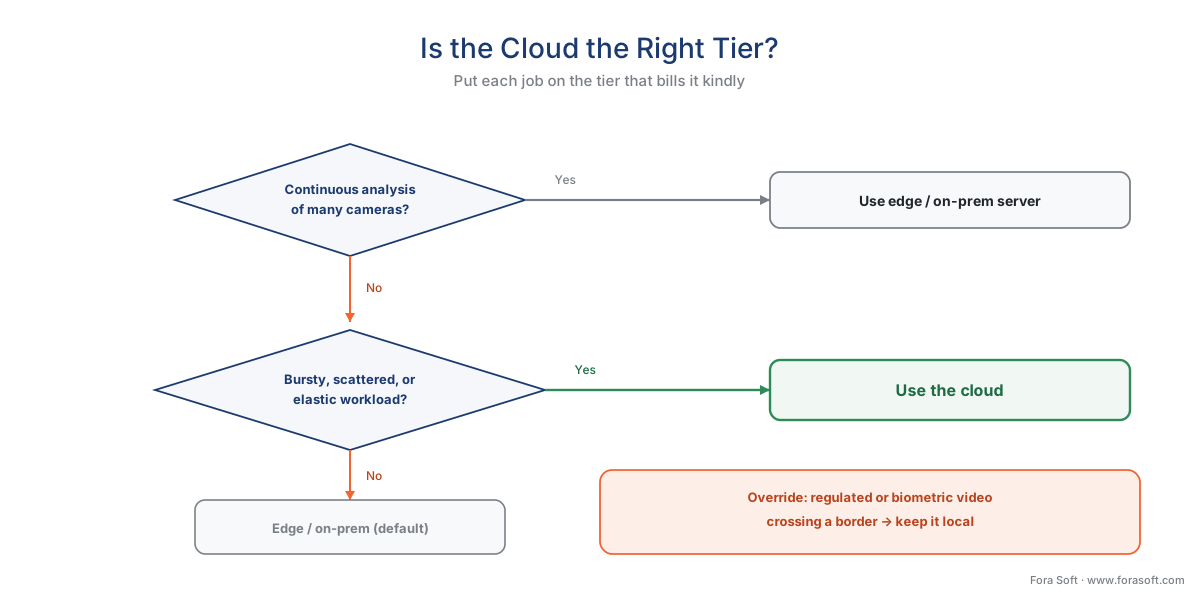 Figure 2. Is the cloud the right tier for this job? Bursty, scattered, or elastic workloads point to the cloud; continuous analysis of a large fleet points back to the edge or an on-prem server; regulated or biometric video that cannot cross a border points to keeping the work local regardless of cost.
The privacy exposure of sending video up
Cost is not the only thing that changes when video leaves the building. Video of identifiable people is personal data, and the moment it travels to a third-party data center — possibly in another country — it crosses two boundaries at once: out of your control, and potentially across a national border. For regulated or biometric video, that border is a legal gate you must clear before the first frame moves.
The core rule is European. The EU's General Data Protection Regulation (GDPR, Regulation (EU) 2016/679) does not forbid cloud processing, but its Chapter V restricts sending personal data outside the European Economic Area unless a specific legal mechanism is in place (GDPR, Chapter V, Arts. 44–50). For transfers to the United States — where the large clouds are headquartered — that mechanism is currently the EU-US Data Privacy Framework (DPF), an adequacy decision the European Commission adopted in July 2023. A cloud provider that self-certifies under the DPF can lawfully receive EU personal data today. But the ground here has moved before and may move again: the EU's two previous US adequacy arrangements, Safe Harbor and Privacy Shield, were both struck down by the Court of Justice (the second in the 2020 Schrems II judgment, over US surveillance law). The DPF survived its first challenge when the EU General Court dismissed the Latombe case on 3 September 2025, but that ruling is under appeal at the Court of Justice (Case C-703/25 P), with no hearing scheduled as of mid-2026. The framework is valid law now; its long-term durability is an open question a careful architect should track.
Two more gates apply specifically to biometric workloads, wherever the compute physically runs:
- EU AI Act. Under Regulation (EU) 2024/1689, real-time remote biometric identification of people in public spaces is prohibited with narrow law-enforcement exceptions, and analyzing such footage after the fact is classed as "high-risk" and tightly governed. The prohibitions applied from 2 February 2025; the high-risk obligations apply from 2 August 2026. Sending faces to a cloud model does not escape these rules — it adds a third-party processor to them.
- US biometric law. In Illinois, the Biometric Information Privacy Act (BIPA, 740 ILCS 14) restricts capturing biometric identifiers such as faceprints and — unusually — lets individuals sue directly, with statutory damages. The legal gate comes before the technical capability, and using a cloud face-recognition API does not move the obligation off you. The full treatment is in BIPA and US biometric privacy law; the EU side is in GDPR for video surveillance.
The engineering posture that falls out of all this is simple and conservative: for ordinary, non-biometric analytics, cloud processing under a current transfer mechanism is workable; for biometric or otherwise sensitive video, the safest design keeps the recognizable footage in-region or in-building and sends the cloud only what it needs — a posture that also happens to be the cheap one. When the cloud does consume analytics, it speaks the same standard the cameras do: ONVIF Profile M defines the metadata and events analytics produce, and a conformant consumer can be a cloud service, not only a camera (ONVIF Profile M). The standards layer is covered in events, metadata, and the ONVIF analytics interface, with the commercial overview in ONVIF profiles in security systems.
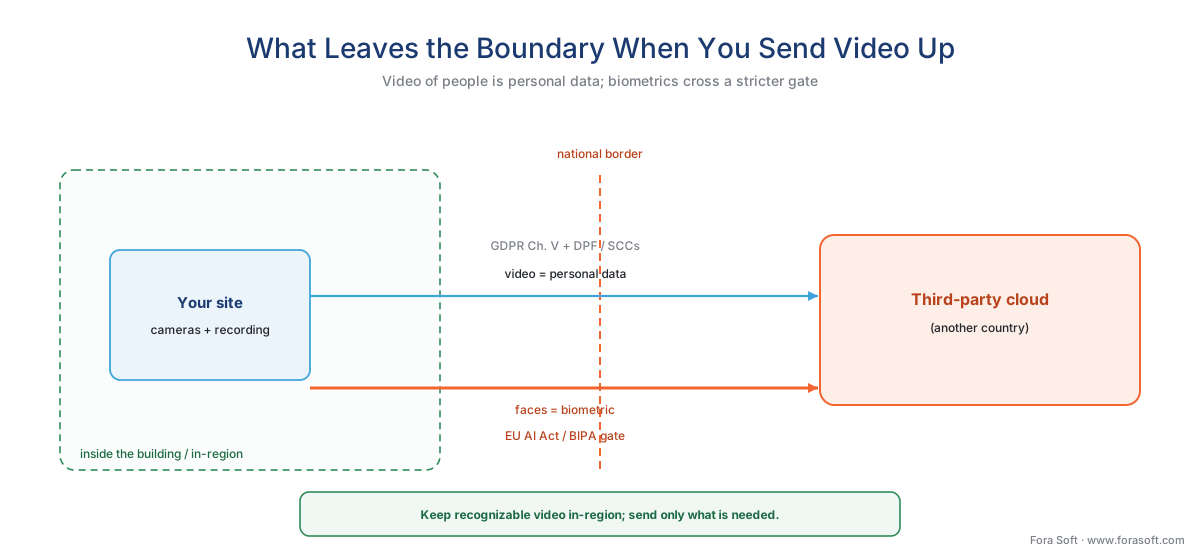 Figure 3. What leaves the boundary when you send video up. Ordinary video crossing into a third-party cloud is governed by GDPR Chapter V and a transfer mechanism; biometric video (faces) crosses a stricter gate under the EU AI Act and laws like Illinois BIPA. Keeping recognizable footage in-region shrinks the surface you must govern.
A common mistake to avoid
The costliest pattern we see is pointing a per-minute analytics API at continuous video and discovering the bill at the end of the month. A team prototypes with Rekognition or Video Intelligence on a few clips, the demo costs a dollar, and they wire it to a live fleet — then the $0.10-a-minute meter runs 43,200 minutes per camera and the invoice arrives with four zeros. The fix is to match the billing model to the workload: per-minute APIs for occasional and clip-based jobs, rented or owned GPUs for continuous ones, and edge pre-filtering so the cloud only ever sees the minutes that matter. The companion to this mistake is forgetting egress — designing a system that streams video up and back down for routine viewing, so every glance at footage runs the $0.09-a-gigabyte meter. View locally, send up only what needs heavy analysis, and the cloud bill stays a tool instead of a surprise.
Where Fora Soft fits in
Fora Soft has built real-time video, streaming, and computer-vision software since 2005, across 625+ shipped projects, and the cloud-versus-local cost question is one we work through with clients before a line of code is written. Teams come to us when a cloud proof-of-concept quietly turned into a five-figure monthly bill, or when a residency rule means the video cannot go to a US data center at all, or when they need a managed service for a hundred small sites but cannot afford per-minute analysis on any of them. We design the split around how the system behaves and bills under real load — the per-minute meter modeled against the real camera count, the uplink sized to the real upload, the storage and egress priced against the real retention and review habits — and we lead with the realistic precision and recall a model delivers in your scene, never a demo's "99%". A workload placed on the tier that bills it kindly, with the cloud reserved for the bursty and the elastic, beats a system that streams everything up because the cloud sounded simple.
What to read next
- Edge vs cloud analytics: the deployment decision that defines the system
- Edge servers and on-prem AI appliances
- The hybrid processing pattern: split work between edge and cloud
Call to action
- Talk to a surveillance engineer — book a 30-minute scoping call to talk through your cloud video analytics cost plan.
- See our case studies — 250+ shipped projects across video streaming, WebRTC, OTT, telemedicine, e-learning, surveillance, and AR/VR.
- Download the Cloud Video Analytics — Cost Worksheet — A one-page worksheet to price the three cloud meters for your own fleet: the upload-bandwidth (uplink) the site must sustain, the compute choice (per-minute API vs rented GPU) and the camera-count where the API stops making sense, the….
References
- Amazon Web Services — "Amazon Rekognition pricing" (stored-video analysis billed about $0.10 per minute for labels, faces, and text; streaming video events about $0.00817 per minute — the representative per-minute managed-analytics rate used in the compute math). Vendor pricing (tier 3/4). https://aws.amazon.com/rekognition/pricing/
- Google Cloud — "Cloud Video Intelligence API pricing" (label detection about $0.10 per minute after 1,000 free minutes per month — the second representative per-minute managed-analytics rate, confirming the ~$0.10/min figure across providers). Vendor pricing (tier 3/4). https://cloud.google.com/video-intelligence/pricing
- Amazon Web Services — "Amazon EC2 G6 instances" (NVIDIA L4 GPU instances for cost-effective inference, g6.xlarge from about $0.80 per hour on demand — the basis for the rent-your-own-GPU compute figure of ~$24/camera/month at ~24 streams per GPU). Vendor pricing / first-party engineering (tier 3/4). https://aws.amazon.com/ec2/instance-types/g6/
- Amazon Web Services — "Amazon S3 pricing" (S3 Standard storage about $0.023 per GB-month for the first 50 TB; internet data-transfer-out about $0.09/GB for the first 10 TB with 100 GB/month free; data transfer in is free — the basis for the storage, egress, and free-ingress figures). Vendor pricing (tier 3/4). https://aws.amazon.com/s3/pricing/
- NVIDIA — "DeepStream SDK — multi-stream video analytics" (a mainstream inference GPU runs roughly 16–40 simultaneous 1080p streams with a light detector at full frame rate — the stream-density figure dividing GPU-hour cost into a per-camera cost). First-party engineering (tier 3). https://developer.nvidia.com/deepstream-sdk
- European Union — "GDPR, Regulation (EU) 2016/679, Chapter V (Arts. 44–50)" (restricts transfers of personal data outside the EEA absent a legal mechanism — adequacy, SCCs, or BCRs; the controlling rule for sending surveillance video to a cloud in another country). Primary law (tier 1). https://eur-lex.europa.eu/eli/reg/2016/679/oj
- European Commission — "Adequacy decision for the EU-US Data Privacy Framework" (Commission Implementing Decision (EU) 2023/1795 of 10 July 2023; certified US organizations may receive EU personal data — the current transfer mechanism for US clouds). Primary law / issuing-body decision (tier 1/2). https://commission.europa.eu/document/fa09cbad-dd7d-4684-ae60-be03fcb0fddf_en
- Court of Justice of the European Union — "Schrems II, Case C-311/18 (16 July 2020)" and EU General Court — "Latombe v Commission, Case T-553/23 (3 September 2025)" (Schrems II invalidated the Privacy Shield over US surveillance law; the General Court upheld the successor DPF, a ruling now under appeal as Case C-703/25 P — the basis for the article's "valid now, track it" framing). Court judgments (tier 1/2). https://curia.europa.eu/juris/liste.jsf?num=C-311/18
- European Union — "Artificial Intelligence Act, Regulation (EU) 2024/1689, Art. 5 and Annex III" (real-time remote biometric identification in public spaces prohibited with narrow exceptions; post-hoc biometric identification high-risk; prohibitions from 2 Feb 2025, high-risk obligations from 2 Aug 2026 — the biometric gate that a cloud model does not escape). Primary law (tier 1). https://eur-lex.europa.eu/eli/reg/2024/1689/oj
- Illinois General Assembly — "Biometric Information Privacy Act (BIPA), 740 ILCS 14" (restricts collection of biometric identifiers such as faceprints; provides a private right of action with statutory damages — the legal gate before a cloud biometric workload, regardless of where the model runs). Primary law (tier 1). https://www.ilga.gov/legislation/ilcs/ilcs3.asp?ActID=3004
- ONVIF — "Profile M — Metadata and events for analytics applications" (standardizes analytics metadata and events; a conformant consumer can be a server or cloud service, not only a camera — the basis for a cloud analytics service exchanging standardized metadata with the VMS. Profile M Specification v1.1, 2024). Primary standard (tier 1). https://www.onvif.org/profiles/profile-m/
- Eagle Eye Networks — "Cloud VMS architecture and the on-premise Bridge" / Verkada product documentation (cloud surveillance vendors place an on-prem bridge or edge-analytic camera that records and buffers locally and uploads intelligently — the real-world evidence that leading "cloud" systems are hybrid because continuous raw upload is bandwidth-prohibitive). Vendor engineering (tier 4). https://www.een.com/support/cloud-vms-faq/
