


Why this matters
If you ship a video product, the next AI feature you greenlight will pass through three architectural decisions long before an engineer writes code. How fast must the answer come back? Where in the network does the model live? Does the model see the input as a stream or as a finished file? Those three numbers determine your cost-per-minute, your privacy posture, your operational complexity, and whether the feature survives its first production weekend. This article is the cheat sheet your product, engineering, and finance teams should share — so that when the next "can we add this AI feature?" request lands, the answer comes back in a day, not a quarter.
The triangle
Three choices sit at the heart of any video-AI feature. Pick any two and the third is forced.
The latency budget is the time you have between input arriving and answer leaving. For a real-time call it's 100–200 milliseconds end-to-end. For a meeting summary it's five minutes. For an archive search index it's hours. The budget is set by the user experience, not by the model — the model has to fit the budget, not the other way around.
The deployment topology is where the model physically runs. Four layers exist in 2026: on-device (the user's phone, laptop, camera), on-edge (a server in the same metro area as the user — a CDN node, a regional GPU pool, a 5G MEC site), in-region cloud (a hyperscaler GPU in the same continent), and cross-region cloud (a GPU somewhere else on the planet). Each layer adds a fixed cost in milliseconds and changes the cost-per-minute by an order of magnitude.
The real-time-vs-batch posture is whether the model must produce partial answers while input still arrives, or can wait for the whole input before starting. Streaming ASR emits partial words at 300-millisecond intervals; batched ASR waits for the recording to finish and then produces a perfect transcript. Streaming and batched versions of the same model are different engineering deliverables, with different code paths and different quality envelopes.
The triangle is tight. A 100-millisecond latency budget forces the model on-device or on-edge, which forces a small model, which forces real-time streaming with degraded quality. A 5-minute budget allows in-region cloud, allows a large model, allows batched processing with peak quality. Try to violate any vertex and the other two break.
The rest of this article walks each vertex of the triangle in turn, then shows you the decision tree that ties them together.
Vertex 1 — The latency budget
Latency is the time from "user did something" to "result shown back to user". For video-AI features, that budget is set by what the user is doing, not by what the model can do.
A real-time conversational feature — live captions, live translation, an AI agent in the call — has a budget of 200–500 milliseconds end-to-end. Above that, the user's brain registers the lag and the feature feels broken. Live captions specifically need partial words inside 300 milliseconds of speech and finalised text inside one second; the streaming ASR community calls these partial_latency and final_latency, and the budget for both has been stable since 2020.
A near-real-time feature — in-call action items, mid-meeting summary, live moderation — has a budget of 1–10 seconds. The user is still inside the session but accepts a few seconds of delay because the result enriches the call rather than driving it. Most "smart meeting" features sit here.
A post-session feature — meeting summary, chapter markers, highlight reel, full-quality transcript — has a budget of 30 seconds to 5 minutes. The user is offline, browsing a meetings page, expecting the result to be ready by the time they click into the recording. Anything faster than 30 seconds is wasted engineering; anything slower than 5 minutes triggers support tickets.
An archive feature — multimodal search index, brand-safety pass over a VOD catalogue, embedding generation for recommendation — has a budget of hours to days. The work is offline, batched, and re-run periodically. Latency is measured in "did the nightly job finish by 6 AM".
The numbers below quantify what each budget physically allows. They come from production deployments, not from a model's standalone benchmark.
| Feature | Budget | Hard upper bound | Source of the bound |
|---|---|---|---|
| Live captions (partial) | 300 ms | 500 ms | Reader keeps up with speech |
| Live captions (final) | 1.0 s | 1.5 s | UI text update feels live |
| Live translation | 800 ms | 1.5 s | Conversation back-and-forth |
| AI agent in call | 200–500 ms | 800 ms | Turn-taking feels natural |
| Background blur, per frame | 33 ms | 50 ms | 30 fps capture loop |
| In-call action items | 3–10 s | 30 s | User scrolls a side panel |
| Meeting summary | 30 s – 5 min | 10 min | User opens the recording page |
| Highlight reel | 1–10 min | 30 min | Notification UX |
| Archive search index | hours | nightly | Daily refresh rhythm |
The budget is the first input you write down. Every other decision in this article depends on it.
Vertex 2 — Deployment topology
Once you know the budget, you pick the layer where the model lives. Each layer has a fixed network cost in milliseconds and a fixed cost-per-minute envelope.
Layer A — On-device
The model runs on the user's hardware — phone GPU/NPU, laptop GPU/CPU, browser via WebGPU, IP camera SoC, AR/VR headset. Network cost is zero — the round-trip never leaves the device.
What lives here: background blur, virtual backgrounds, on-device noise suppression, beauty filters, gaze correction, on-device wake-word detection, small ASR models for live captions, simple object-detection prefilters for surveillance cameras. The unifying property is that the model fits in tens to hundreds of megabytes and runs on a watt-class power budget.
The runtimes are the lowest layer of the stack a non-engineer is likely to hear about. On Apple devices it's Core ML; on Android it's LiteRT (formerly TensorFlow Lite); in the browser it's WebGPU plus ONNX Runtime Web or transformers.js; on Linux edge devices it's TensorRT (NVIDIA Jetson) or OpenVINO (Intel) or QNN (Qualcomm). Google's LiteRT consolidated the cross-platform GPU story in 2025 — it now hits OpenCL, Metal, Vulkan, and WebGPU through the same ML Drift backend, with the GPU delegate running 1.4× faster than the previous TFLite GPU delegate (Google Developers Blog, 2025).
The economics are inverted compared to cloud. Operational cost per minute is zero — every cycle runs on hardware the customer paid for. The price you pay is engineering complexity at launch: you ship the model to every supported platform (iOS, Android, Chrome, Safari, Edge, Electron), keep it small enough to run on the worst hardware in your install base, and degrade gracefully when the GPU is busy elsewhere.
Layer B — Edge
The model runs on a server geographically close to the user — same metro area or same country, typically 5–30 milliseconds of round-trip away. The four sub-types of edge in 2026 are: a CDN edge node (Cloudflare Workers AI, Akamai EdgeWorkers AI, Fastly Compute), a 5G mobile edge compute (MEC) site, a regional GPU pool (the user's nearest hyperscaler region or a regional cloud provider), and on-premise infrastructure for enterprise installs.
What lives here: live captions in a regional call, content moderation in a regional SFU, real-time translation, a LiveKit Agents worker that joins a call, surveillance analytics on a venue's local server, telemedicine inference on a hospital's in-building rack. The unifying property is that the round-trip latency is small enough that real-time is achievable but the hardware is general-purpose and shared.
Edge gets the most attention in 2026 because the cost-saving story is the strongest. NVIDIA's AI Grid reference design — distributed edge inference across telco networks — reports 76% lower inference cost during traffic bursts and a sub-500-millisecond latency target consistently met across geographies (NVIDIA GTC 2026 announcement). A 1,000-camera surveillance deployment that runs detection at the edge cuts backbone load from tens of gigabits per second to single digits, because the network only carries alerts and short clips upstream instead of raw video.
The trade-off is reliability and patching. A failed CDN edge node fails over to the next region — adding 30–80 ms of round-trip — which can break a live-translation feature if the budget was tight. Edge is the layer most exposed to the operational gap between "demo works" and "production at scale survives a region outage".
Layer C — In-region cloud
The model runs on a hyperscaler GPU in the same continent as the user — AWS us-east-1 for a US user, eu-west-1 for a European user. Network round-trip is 30–100 milliseconds depending on user location and ISP.
What lives here: most production AI APIs that don't need sub-200-ms latency, batched ASR for post-call transcripts, video VLM passes over recorded meetings, generative video API calls (Sora, Runway, Veo), embedding generation for archive search. The unifying property is that the model is too large to live on a CDN edge but the latency budget tolerates a continental network round-trip.
The runtimes here are the inference servers that ML engineering teams actually compare: vLLM for LLMs and VLMs (42,000 monthly searches and growing in 2026 — the de-facto serving engine for open-weights LLMs), Triton Inference Server for mixed-model deployments, TensorRT-LLM for NVIDIA-specific squeezing, and managed offerings like Modal, Replicate, Together AI, and Fireworks for "I don't want to run a serving layer myself".
Cloud is where the cost-per-minute meter is the most visible. An NVIDIA L4 on-demand at $0.65/hour costs $0.011/minute; an A100 at $1.50/hour is $0.025/minute; an H100 at $2.50/hour is $0.042/minute. The actual cost-per-minute-of-video depends on how many streams share a GPU — a 720p30 segmentation model can serve hundreds of concurrent streams on a single L4, while a 4K generative video model uses the whole H100 for a single 10-second clip.
Layer D — Cross-region cloud
The model runs in a region on a different continent than the user. Network round-trip is 100–300 milliseconds. Almost never the right answer for video features, but sometimes forced by regulation (the only EU-hosted model for a feature lives in eu-central-1) or by model availability (a frontier model is only deployed in us-west-2).
What lives here: occasional fallback paths, regulatory edge cases, model-availability constraints during a launch window. If you find yourself routinely depending on cross-region for a real-time feature, the architecture is wrong — you need to either run a smaller model in-region or accept that the feature isn't real-time.
 Figure 1. The four topology layers stack from zero-network on-device up through metro-edge, in-region cloud, and cross-region cloud. Each layer adds a fixed cost in network milliseconds and changes the cost-per-minute envelope.
Vertex 3 — Real-time vs batch
Once budget and topology are pinned, the third decision is whether the model streams or batches. The two postures are different deliverables, not different configurations of one model.
A real-time (streaming) model emits partial answers while input still arrives. Whisper-streaming emits partial transcripts at 300-millisecond intervals; Pyannote-streaming emits diarisation labels frame-by-frame; a streaming video VLM emits a running scene description as frames arrive. Real-time has three hard properties: it must emit a partial answer before the full input has arrived; it must respect a fixed latency budget regardless of model load; and its failures are immediately visible to the user (a five-second stall in live captions is a support ticket).
A batch model waits for the full input. Batched Whisper-Large-v3 waits for the recording to finish, runs the model end-to-end, and produces a higher-quality transcript than any streaming version can. Batch has the inverse properties: it accepts unbounded input length; it can queue when load spikes; and its failures look like "result arrived later than the operator expected" — annoying, not fatal.
Three engineering consequences follow from the difference. First, the same model name (Whisper, Pyannote, Qwen-VL) has two distinct production deployments — different code paths, different chunking strategies, different beam search settings, and noticeably different quality envelopes. Second, the same product almost always wants both: live captions during the call (real-time, fast-and-rough) and a clean transcript after the call (batch, slow-and-precise). Build both and switch the user over at session end. Third, treating the live result as the archived result is the single most common mistake in this layer — you end up with a degraded transcript permanently saved against the recording.
The 30-frames-per-second arithmetic is unforgiving. At 30 fps, the system has 33 milliseconds to process each frame. If inference takes longer, the system either drops frames (visible jitter), introduces lag (visible delay), or both (Ultralytics, Real-Time Inference glossary, 2026). YOLO26-N released in January 2026 hit a 43% CPU-inference speedup over YOLO11-N specifically to fit this budget on devices without a GPU.
The decision is not "either-or" — it's "in which mix". A telemedicine product wants real-time live captions in the consultation, batched diarisation and chart-coding after the consultation ends, and a nightly archive pass for billing audit. Three deliverables, three different deployments, one shared product surface.
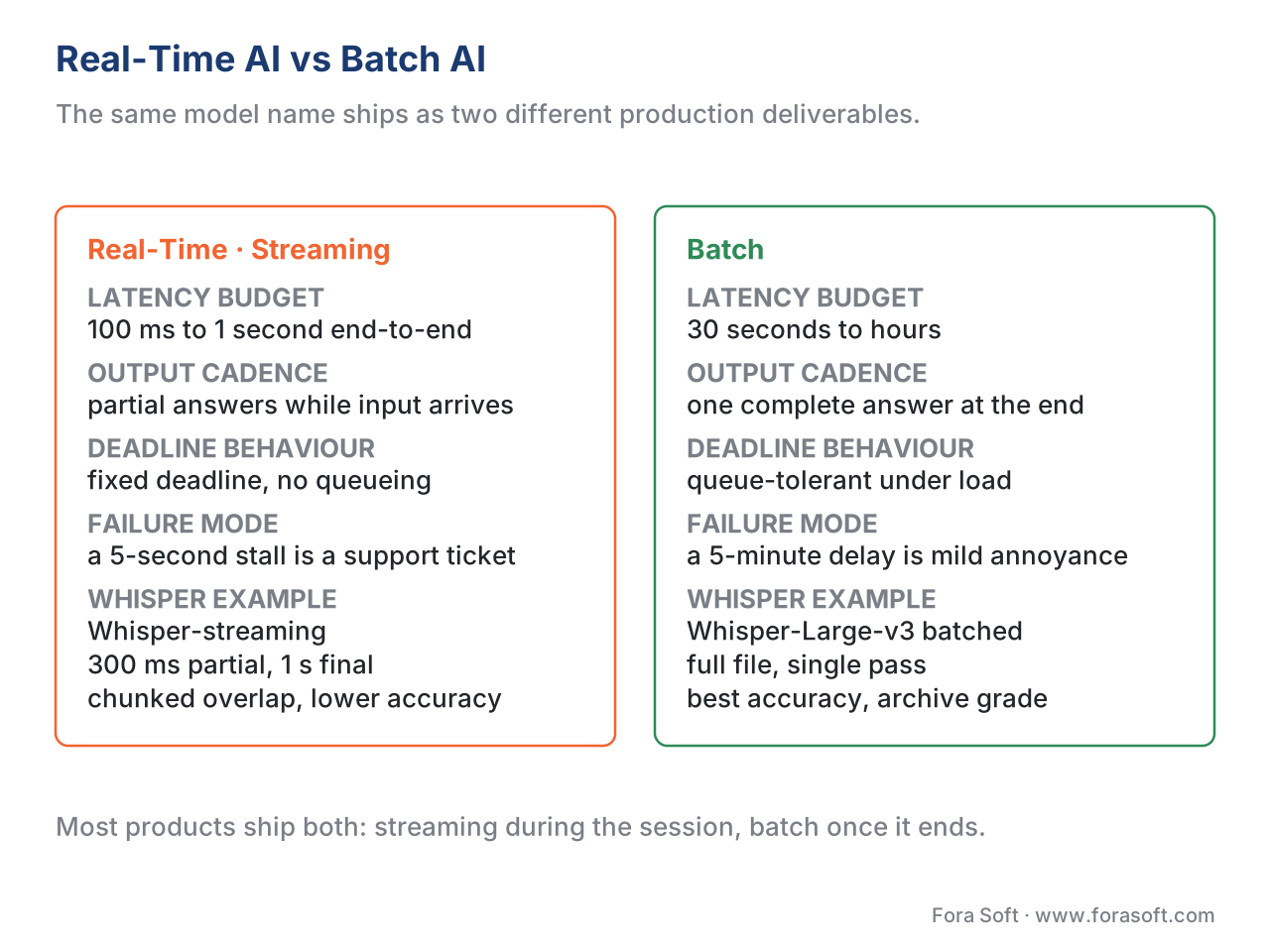 Figure 2. Real-time and batch AI are different engineering deliverables. The same model name (Whisper, Pyannote, Qwen-VL) lives in two production deployments with different code paths and different quality envelopes.
The triangle in practice — three worked examples
The triangle becomes concrete the moment you put numbers into it. Three short worked examples, one for each common video-AI feature shape.
Example 1 — Live captions on a 1-on-1 call
User experience: subtitles appear on the screen as the speaker talks, with partial words visible within 300 milliseconds and finalised text within 1 second.
Triangle:
- Budget — partial_latency 300 ms, final_latency 1.0 s.
- Topology — edge or in-region cloud. On-device fails because the model needs >100 MB and the smallest on-device ASR has noticeably worse word error rate.
- Posture — streaming.
Production stack: Deepgram Nova-3 or AssemblyAI Universal-Streaming on the API side (both quoted around 300 ms partial latency at production load in 2026); or self-hosted Whisper-medium-streaming on a regional L4 with a chunked-overlap streaming wrapper (faster-whisper or WhisperX). Round-trip overhead in-region adds 30–80 ms, comfortably inside budget. Cost runs around $0.0048 per minute of audio for Deepgram Nova-3 or roughly $0.001/minute self-hosted at high utilisation. (Pricing benchmarks: Deepgram public pricing page, 2026.)
Example 2 — Background blur on a video call
User experience: blur turns on instantly; the user's face stays sharp; the background is smoothed; no frame drops, no visible lag.
Triangle: - Budget — 33 ms per frame at 30 fps. - Topology — on-device. Edge fails because a 50-ms round-trip eats the entire frame budget. - Posture — real-time, frame-by-frame.
Production stack: MediaPipe Selfie Segmentation v2 via WebGPU on Chrome/Edge, Core ML on Safari/macOS, LiteRT on Android. Per-frame compute is ≈3 ms on an M-class laptop GPU, ≈8 ms on a mid-range Android device. Operational cost per minute is $0 — the model runs on hardware the customer already owns. The engineering cost lives at launch — you ship per-platform builds and degrade gracefully on low-end hardware. This is the canonical on-device feature.
Example 3 — Meeting summary after the call
User experience: when the user opens the meeting page after the call ends, the summary, chapter markers, and action items are already there.
Triangle: - Budget — 30 seconds to 5 minutes. - Topology — in-region cloud. - Posture — batch.
Production stack: a job pulls the recording from object storage when the session ends; runs Whisper-Large-v3 batched on a regional A100; passes the transcript through a frontier LLM (GPT-5 / Claude Opus 4 / Gemini 2.5 Pro) for summary and chapters; writes the result back to the recording's metadata. Cost per meeting hour: roughly $0.10–0.30 depending on which LLM. (Frontier-LLM API pricing: per-vendor 2026 public pricing pages.) The job is interruptible and queueable; if the queue spikes during peak meeting hours, results arrive 5 minutes late instead of 30 seconds late — no user-visible breakage.
The decision tree — turning a feature request into a deployment
In production, you do not derive the triangle from first principles for every feature. You walk a decision tree. The tree below condenses the three vertices into a five-step procedure.
Step 1. What is the user-experience latency budget? Pick one: ≤500 ms (real-time conversational), 1–30 s (near-real-time), 30 s – 10 min (post-session), hours–days (archive).
Step 2. Given the budget, what's the maximum tolerable network round-trip? Subtract round-trip from budget to get the inference window. For ≤500 ms budgets, the inference window is so tight (≤100 ms after subtracting any network) that you must be on-device or on-edge.
Step 3. Given the inference window and the model size you need, which topology layer fits? A 50 MB segmentation model fits on-device; a 7 B-parameter VLM fits on a regional A100; a 70 B LLM fits on an H100. If the model doesn't fit a layer, either the budget is wrong or the model is wrong — pick a smaller model or a slower feature.
Step 4. Given topology, what's the cost-per-minute envelope at expected concurrency? On-device is $0; edge GPU is $0.0003–$0.003/min per stream depending on hardware and utilisation; cloud GPU is $0.001–$0.05/min per stream. Multiply by expected concurrent streams to get the monthly bill.
Step 5. Streaming or batch? If the user sees partial output before input ends, streaming. Otherwise, batch — and remember that streaming and batched versions of the same model are different engineering deliverables.
If you cannot answer all five steps without contradiction, the feature doesn't have a deployable shape yet — back up and refine the product spec.
 Figure 3. The five-step decision tree turns any new AI-feature request into a deployment plan. If any step cannot be answered without contradiction, the feature does not yet have a deployable shape.
Common mistakes — three patterns that recur
Three deployment-topology mistakes recur across video-AI projects. Each is fixed by re-running the triangle, not by tuning the model.
The first is the on-device-as-cloud mistake — running a model in the cloud because "the AI team works in the cloud" when the right answer was on-device. Background blur is the textbook case: rendering blur in a cloud GPU costs $0.001–0.01/minute per stream and adds a round-trip of network latency, while the same model on-device costs zero and has zero latency. The mistake compounds with scale; the cure is to draw the triangle before the AI team owns the feature.
The second is the live-summary mistake — trying to produce a meeting summary in real time when the right answer is batched post-call. Live summaries are always worse than post-call summaries because the input is incomplete, and they cost more because the model runs continuously rather than once. Cure: keep streaming for captions and action items, move the summary to a post-call batch job.
The third is the cross-region default — deploying every model in us-east-1 because that's where the team is, then watching European users hit 200-ms cross-Atlantic round-trips. For real-time features this is fatal. Cure: deploy regionally and accept the operational complexity, or accept that the feature isn't real-time for users outside the region.
Where Fora Soft fits in
Fora Soft has shipped video products since 2005 across video conferencing, OTT, live streaming, surveillance, e-learning, telemedicine, and AR/VR — and has run the latency-topology-posture triangle for every AI feature in those products. In conferencing we ship on-device blur and on-device noise suppression at the capture layer, edge ASR for live captions and translation, and regional batch jobs for post-call summaries. In surveillance we run a multi-layer architecture: edge prefilter, regional confirmation, cloud archive audit. The triangle in this article is the same triangle we draw on the whiteboard at the start of every AI engagement — before model selection, before pricing, before the first PR. That decision is the first step of our AI integration projects, and for vision features that must run at the edge our real-time AI video agent development deploys on NVIDIA Jetson and Triton.

The book
AI for Video: A Complete Guide to Intelligence in Video Products: From Models and Inference to Computer Vision, Speech, Search, and Generative Video
We wrote a seven-volume handbook that takes the whole video stack apart, from the pixel to production, and this lesson continues in Volume 6. It runs the AI feature lifecycle and the deployment topologies in full — what fits on-device, what belongs at the edge, what the model artifact costs you at each layer — then walks the capabilities you will be placing there: detection, tracking, speech, and search over an archive. Volume 7 picks up where the latency budget gets tight: the real-time pipeline, serving on vLLM and Triton, and the cost-per-stream-hour arithmetic behind the envelopes above. Written by Nikolay Sapunov, CEO at Fora Soft.
Not sure which layer your next AI feature belongs on?
Send us the feature and the user experience you want, and we will come back with the latency budget it implies, the topology layer that fits, the streaming-or-batch call, and what it costs per minute at your concurrency. 250+ video products shipped since 2005.
See our case studies
Case study
WorldCastLive
Vertex 1 with the budget pushed to its floor: 0.4–0.5 s glass-to-glass at a 1.5 Gb/s bitrate for 10,000 simultaneous viewers, on a custom WebRTC and Kurento architecture.
Case study
Mindbox
Vertex 2 at the edge: facial recognition at 99.5%+ and ANPR across 500,000+ vehicles a day, with detection close to the cameras so the backbone carries alerts instead of raw video — 50+ deployments since 2020.
Case study
VALT
Vertex 3 on the batch side: every session recorded, transcribed on Amazon Transcribe after the fact, and word-searchable across the archive for 770+ organizations and 50,000+ users.
What to read next
Foundations
The shape of AI inside a video product
The map this article zooms into — where an AI feature attaches to a video pipeline at all.
On-device
MediaPipe Selfie Segmentation v2 with WebGPU
Worked example 2 built out: the 33 ms frame budget met on hardware the customer already owns.
Edge
Live captions — the SFU-side ASR fan-out pattern
Worked example 1 built out: where the streaming ASR sits when the budget is 300 ms partial.
Economics
What AI in video actually costs at scale
Step 4 of the tree in full: the per-minute envelopes turned into a monthly bill.
References
- W3C, MediaStreamTrack Insertable Media Processing using Streams — the browser primitive that exposes raw
VideoFrameto the on-device layer. https://www.w3.org/TR/mediacapture-transform/ - W3C, WebRTC Encoded Transform — spec enabling JavaScript to intercept encoded frames between encoder and network. https://www.w3.org/TR/webrtc-encoded-transform/
- IETF RFC 8825, Overview: Real-Time Protocols for Browser-Based Applications (WebRTC), January 2021 — the protocol context for the edge layer. https://www.rfc-editor.org/rfc/rfc8825
- NVIDIA, AI Grid reference design announcement — GTC 2026 keynote. 76% lower inference cost at burst, sub-500 ms latency target.
- Google Developers Blog, LiteRT: The Universal Framework for On-Device AI — 1.4× faster GPU delegate, WebGPU/Metal/OpenCL/Vulkan unified backend. https://developers.googleblog.com/litert-the-universal-framework-for-on-device-ai/
- Ultralytics, Real-Time Inference glossary entry — the 33 ms frame budget arithmetic at 30 fps. 2026. https://www.ultralytics.com/glossary/real-time-inference
- Roboflow, YOLO26 release blog — January 2026. YOLO26-N delivers 43% faster CPU inference than YOLO11-N. https://blog.roboflow.com/yolo26/
- Vikas Chandra (Meta AI Research), On-Device LLMs: State of the Union, 2026 — survey of on-device runtimes, NPUs, and quantisation. https://v-chandra.github.io/on-device-llms/
- AWS Prescriptive Guidance, Pattern 3: Real-time inference at the edge — production patterns and worked latency budgets. https://docs.aws.amazon.com/prescriptive-guidance/latest/agentic-ai-serverless/pattern-real-time-inference.html
- Deepgram, public pricing page, 2026 — Nova-3 streaming pricing reference used in Example 1.
- Edge AI and Vision Alliance, Accelerate AI Inference for Edge and Robotics with NVIDIA Jetson T4000 and JetPack 7.1, January 2026 — edge GPU hardware reference. https://www.edge-ai-vision.com/2026/01/accelerate-ai-inference-for-edge-and-robotics-with-nvidia-jetson-t4000-and-nvidia-jetpack-7-1/
