Key takeaways
• A video management system is the software that turns cameras into a product. Six layers — ingest, recording, analytics, operator UI, alerts, integration. Weaken one and operators quietly go around it.
• ONVIF Profile T is the 2026 baseline. It carries H.265 plus analytics and tamper events; without it you re-run inference server-side and double your compute bill. Profiles are a menu you combine, not a ladder you climb.
• Off-the-shelf wins under ~500 cameras and generic security; custom wins for vertical workflows and fleets past ~5k. Genetec, Milestone and Verkada are fast to stand up; a build pays back when licence cost or a specialised workflow dominates.
• Storage is the number teams get wrong. One 4 Mbps H.264 camera running 24/7 is 15.8 TB a year, not 43. H.265 roughly halves it. A 1,000-camera fleet is ~15.8 PB/yr raw before tiering.
• Hikvision and Dahua are restricted in US federal and critical-infrastructure markets. Since July 16, 2026 the FCC also bars importing and marketing their previously authorized models, so enterprise buyers default to Axis, Hanwha, Avigilon and Verkada.
A video management system (VMS) is the software that records, stores, displays and manages video from a fleet of IP cameras, and ties that video into analytics, alerts and adjacent systems like access control. It is the operator’s control room; the cameras are just sensors. This guide is the architecture view: the six layers, the ONVIF reality, the storage math and the path from off-the-shelf to custom. For the buyer’s checklist, see our 12 must-have VMS software features; to compare platforms and vendors, see how to choose a video surveillance management system.
Why Fora Soft wrote this playbook
We have built and operated video management systems for two decades, so this guide is written from the deployment side, not the brochure side. Fora Soft has delivered 250+ projects since 2005 with 50+ in-house specialists, and video surveillance is one of our oldest lines. Our flagship is VALT by Intelligent Video Solutions — a recording-and-observation platform now used by 770+ US organizations and 50,000+ active users, where we have been the sole development team for 10+ years.
We have also shipped NetCamStudio, EyeBuild for construction-site surveillance, and Live Eye Surveillance. That range is the point: we have built custom video management systems from scratch and we have integrated Genetec and Milestone for clients who were better off buying. This guide gives you the architecture, the ONVIF reality, an honest vendor matrix, the storage math, and a build-vs-buy framework — and it tells you when not to call us. For the commercial view, see our video surveillance development page.
Choosing a VMS for 100 to 10,000 cameras?
Send us your fleet size, vertical and integration needs. We will come back with a vendor-or-build recommendation, no charge.
What a video management system does
A video management system (VMS) is the software layer that turns a fleet of IP cameras into something an operator can actually use. It ingests camera streams, records and stores them, surfaces live and recorded video through an operator UI, runs or integrates analytics, dispatches alerts, and connects to adjacent systems: access control, alarm panels, building management, CRM or case management.
Where a VMS stops. It is not a camera SDK (those talk to one vendor's hardware), not an analytics engine (detection models usually live on the camera, an edge box, or a cloud service), and not an incident-response tool (PagerDuty and ServiceNow own that workflow). The VMS is the operator's window into the camera reality; the work that happens after an alert lives elsewhere. Keep that boundary clear and every later decision gets simpler.
VMS vs NVR vs DVR, in one table
Short answer: a VMS is software that scales across servers to thousands of cameras; an NVR is a fixed appliance that records a bounded set (often 32 or fewer); a DVR digitises analog cameras over coax and is legacy for new builds. If you are choosing today and expect to grow or integrate, you want a VMS.
| What it is | Typical scale | Deployment | Best for | |
|---|---|---|---|---|
| VMS | Software on commodity or virtual servers | Dozens to 100k+ (with federation) | On-prem, cloud or hybrid | Multi-site, integrations, growth |
| NVR | Recorder appliance for IP cameras | Usually ≤ 32 cameras | On-prem box | Single site, fixed camera count |
| DVR | Recorder for analog cameras over coax | 4–16 channels | On-prem box | Legacy analog retrofits only |
The practical rule: if you will ever add a second site, a new integration, or a hundred more cameras, buy or build a VMS. An NVR that hits its channel ceiling turns into a rip-and-replace project.
The six layers of a modern VMS
Every serious VMS is six layers stacked camera-to-operator. Naming them makes gaps obvious in a review, because each layer owns exactly one job.
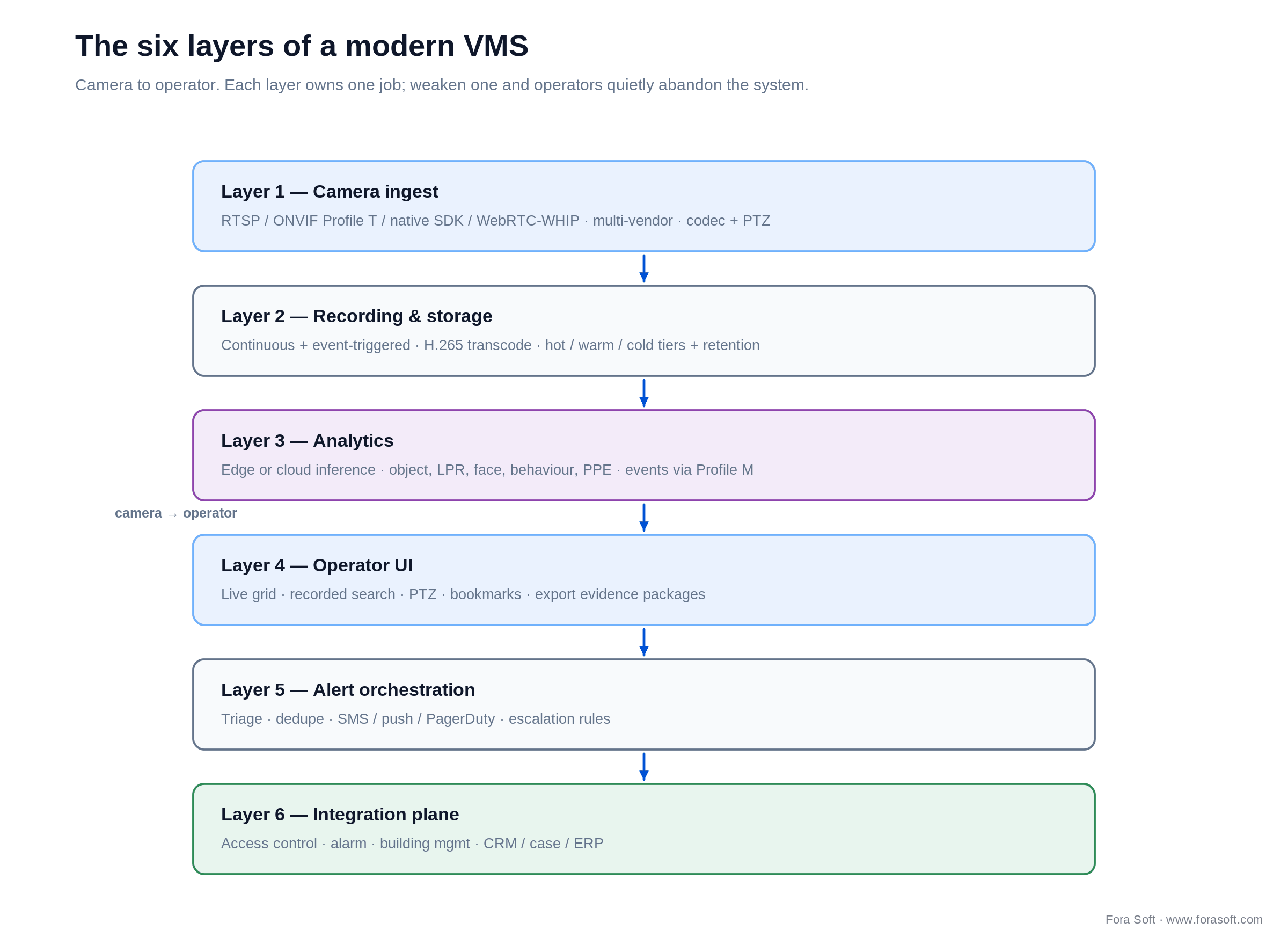
Figure 1. The six layers of a modern VMS, camera to operator. Each layer owns one job.
1. Camera ingest. RTSP, ONVIF Profile T, native SDKs, and increasingly WebRTC/WHIP for low-latency views. This layer negotiates codecs and carries PTZ commands across mixed-vendor fleets.
2. Recording and storage. Continuous plus event-triggered recording, H.265 transcode to cut bitrate, and hot/warm/cold tiers governed by a retention policy. This is where budgets quietly explode; see the storage math below.
3. Analytics. Edge or cloud inference for object, licence-plate, face, behaviour and PPE detection. A modern VMS ingests those results as events via ONVIF Profile M rather than re-running the models.
4. Operator UI. Live grid, recorded search, PTZ control, bookmarks, and evidence export. This is the layer that decides whether the system gets used; a clumsy UI gets bypassed within weeks.
5. Alert orchestration. Triage, deduplication, and routing to SMS, push or PagerDuty with escalation rules. Without dedupe, a windy afternoon buries operators in motion alerts.
6. Integration plane. Access control, alarm, building management, CRM, case or ERP systems. The value of surveillance often lives in the correlation, not the raw video.
ONVIF profiles: the S, T, G, M decision
Answer first: ONVIF profiles are conformance certifications you combine, not a ranking you ascend. For a 2026 video build you take Profile T for streaming, add Profile G to manage recordings stored on the camera, and add Profile M when analytics results must reach the software. Profiles A, C and D only matter when you touch access control.
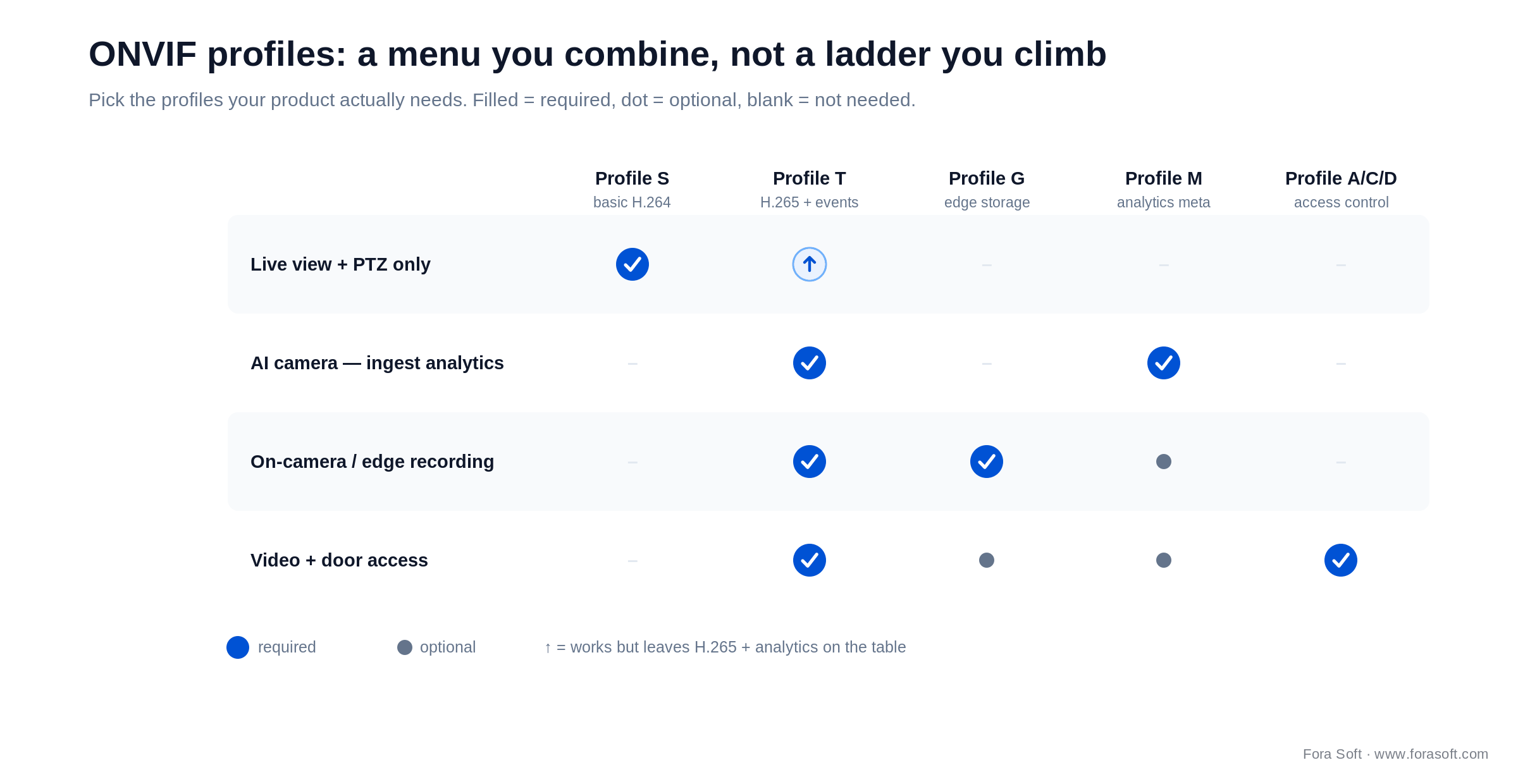
Figure 2. ONVIF is a menu you combine. Pick the profiles your product actually needs.
| Profile | Since | Capability | When you need it |
|---|---|---|---|
| Profile S | 2012 | Basic H.264 streaming, audio, PTZ, motion events | Baseline for any IP camera; no H.265 |
| Profile T | 2018 | H.264 + H.265, imaging, motion/tamper events, metadata, two-way audio | The 2026 baseline for AI-capable cameras |
| Profile G | — | Recording and on-camera (edge) storage retrieval | Cameras with on-board SD-card recording |
| Profile M | 2021 | Analytics metadata — object detection, classification, IoT data | Streaming AI events into the VMS |
| Profile A / C / D | 2013–21 | Access-control config, door events, reader/lock peripherals | When the VMS ties into doors and access |
Why Profile T is the line in the sand. Skip it and you are stuck on H.264 with no standard channel for camera-side events; pair it with Profile M and on-camera analytics reach the VMS as events instead of forcing you to re-run detection server-side and pay for the compute twice. Verify Profile T before buying any AI-capable camera. For the full breakdown, read our guide to ONVIF profiles in security systems and the engineer-focused Profile S/G/T/M decision guide, or check the ONVIF profile spec directly.
On-prem vs cloud vs hybrid
Answer first: pick on-prem when storage cost and data residency dominate, cloud (VSaaS) when you want zero maintenance for a smaller or multi-site fleet, and hybrid (an on-site bridge or CMVR that syncs to a cloud dashboard) when you want both. The constraint that decides it is usually upload bandwidth, not software.
On-prem keeps petabytes of recording on your own storage, which is far cheaper at scale and simplifies GDPR or HIPAA residency. Cloud VSaaS, a market projected around $7.8 billion in 2026, removes servers and patching entirely, but every camera streaming to the cloud eats uplink and per-camera subscription fees add up. Hybrid is the common enterprise middle: record locally, search and manage from the cloud, and only push clips and metadata upstream.
The vendor matrix
There is no single best VMS; there is a best VMS for your fleet size, vertical and compliance posture. Here is the honest 2026 shortlist, then a one-line rule for each.
| Vendor | Strength | Best for |
|---|---|---|
| Genetec Security Center | Unified video + access (Synergis) + LPR (AutoVu); strong government adoption | Government, transit, large enterprise |
| Milestone XProtect | Open modular platform, widest camera/driver support (Canon-owned) | Integrator-led, mixed-vendor fleets |
| Avigilon Unity / Alta | On-prem (Unity) and cloud (Alta) under Motorola; AI appearance search | US enterprise and public safety |
| Hanwha Wisenet | Camera + VMS bundled, NDAA-compliant | Mid-market wanting one vendor |
| Hikvision / Dahua | Large feature set, low price | Non-restricted markets only (not US federal) |
| Frigate / ZoneMinder | Open-source; Coral/Hailo edge AI, strong community | Prosumer, developer prototyping |
| Custom (Fora Soft) | Vertical specialisation, full IP ownership, no per-camera licence | Product VMS, specialised workflow, scale |
Reach for Genetec when: government, transit or public safety, multi-system unification (video + access + LPR), and a fleet in the thousands.
Reach for Milestone when: a diverse camera fleet, an integrator-led deployment, and a large partner ecosystem you want to plug into.
Reach for open-source when: a technical owner, fewer than ~30 cameras, and edge AI on a Coral or Hailo — not a compliance-bound enterprise deployment.
Cloud and AI-native platforms
Answer first: AI-native means built analytics-first and cloud-first, not a recorder with AI bolted on afterwards. The four names worth knowing differ by what they replace: a VMS, the cameras, or nothing at all.
Verkada sells a tightly integrated hardware-plus-software package: cameras store footage locally and sync to Verkada Command, and the ecosystem extends to access, intercom and alarms. Eagle Eye Networks is a true-cloud VMS that bridges the cameras you already run; note it merged with Brivo in December 2025, so it now sits inside an access-plus-video suite. Spot AI is camera-agnostic and adds a per-camera AI layer to hardware you already own. Ambient.ai goes furthest: its Ambient Pulsar vision-language model reasons about video in real time to flag actual threats rather than raw motion, running as an intelligence layer on top of existing cameras and access control.
Reach for AI-native cloud when: you want turnkey deployment, standardise on a vendor stack, and value fewer motion false-alarms over full control — see our AI-native VMS breakdown for the trade-offs.
Build vs buy
Four questions decide it, and one strong Yes usually settles the case for custom.
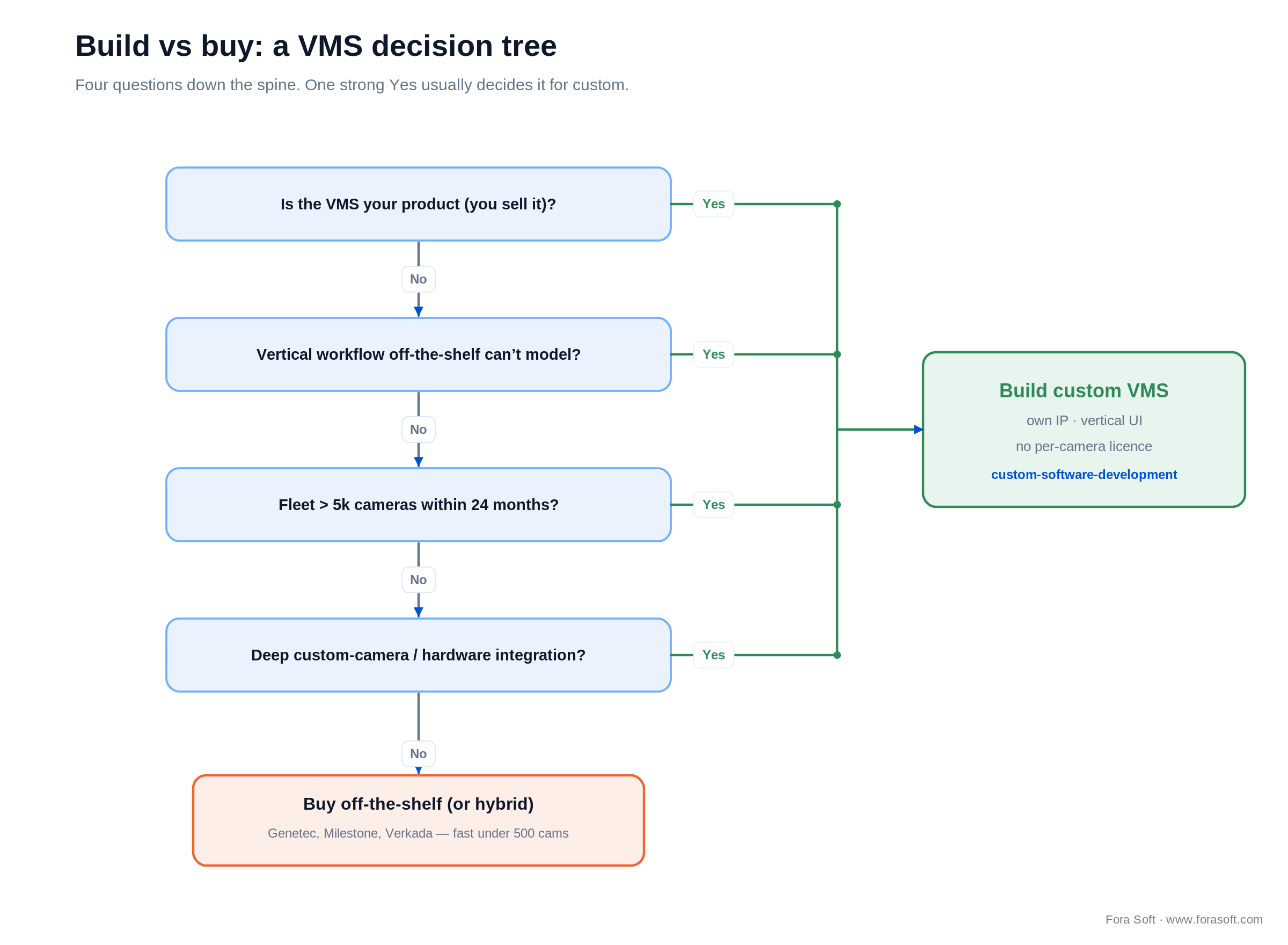
Figure 3. The build-vs-buy decision tree. One strong Yes down the spine usually points to custom.
Buy when: the use case is generic security, the fleet is under ~500 cameras, you do not need to sell the VMS as your own product, and an integrator can stand up an off-the-shelf platform with vendor support.
Build when: the VMS is part of a product you ship, the workflow is vertical-specific (legal review, construction, retail loss-prevention, medical observation), the fleet runs past ~5k cameras where licence cost balloons, or you need deep hardware integration such as custom cameras and PTZ.
Hybrid is common and underrated: off-the-shelf for baseline security plus custom modules for the specialised 20% that motivates the whole project.
Custom VMS: when it is the right call
Vertical workflow. Off-the-shelf optimises for a security operator on shift. A medical simulation lab thinks in sessions, subjects and reviewers; a construction PM thinks in sites, phases and trades; retail loss-prevention thinks in POS-correlated events. When your mental model is not "cameras on a wall," a custom UI earns its keep.
Custom analytics. Bundled vendor models cover generic person and vehicle detection. Specialised events — PPE compliance for specific equipment, player tracking with team kit, equipment-state detection — need custom models, and custom models need a VMS that can display and search them.
Compliance and residency. HIPAA-grade healthcare video, GDPR EU-only residency with customer-managed keys, and public-sector requirements are available off-the-shelf, but usually only at the enterprise tier with the pricing premium that implies.
Cost at scale. Genetec and Milestone licence per camera. Past ~5k cameras the licence line alone can justify a build; our custom software development team has shipped platforms where the saved licence fees paid back the build inside two years. When you sell the VMS, owning the IP also removes a per-seat royalty from your own margin.
Weighing a custom VMS against Genetec or Milestone?
Tell us the vertical and the fleet, and we will map the honest trade-offs — including when buying is the smarter call.
Storage and retention math
This is the number teams get wrong, so here is the arithmetic out loud. Storage per day in gigabytes is roughly bitrate in Mbps times 10.8. A single 4 Mbps H.264 camera running continuously is therefore 4 × 10.8 = 43.2 GB per day, which is 43.2 × 365 ≈ 15.8 TB per year — not the 43 TB you get if you confuse the daily figure with the annual one.
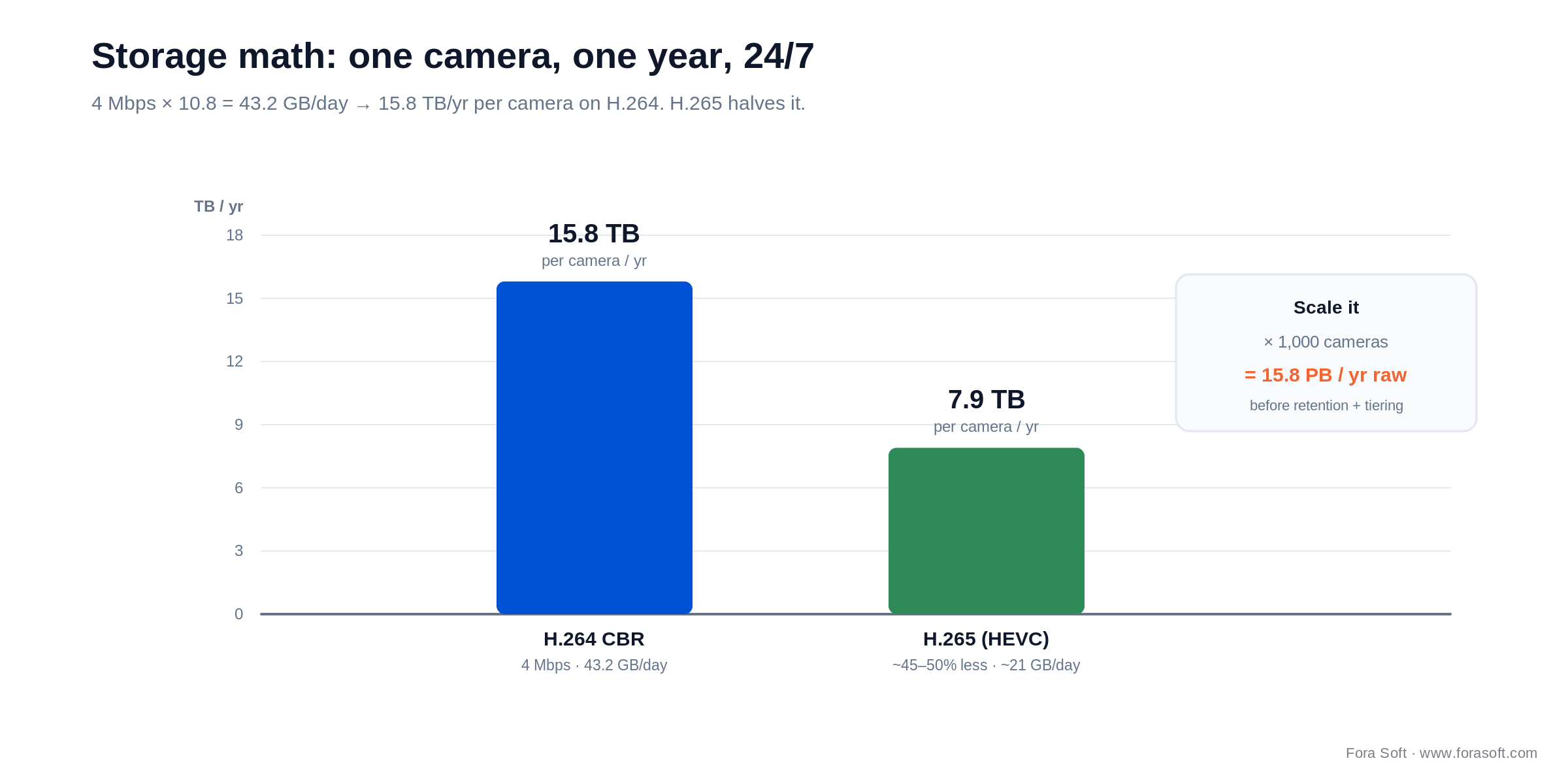
Figure 4. Per-camera yearly storage on H.264 vs H.265, and what it becomes across a 1,000-camera fleet.
Switch that camera to H.265 (HEVC), which needs roughly 45–50% less bitrate for the same quality, and the figure drops to about 7.9 TB per year. Now multiply: a 1,000-camera fleet on H.264 is about 15.8 PB per year of raw recording before you apply retention limits, motion-only recording, or hot/warm/cold tiering. Budget compression, retention policy and tiered storage from day one, or the storage line will dwarf every other cost in the build.
Cost at different fleet sizes
Rough 2026 figures to frame the trade-off, not a quote. Off-the-shelf columns include per-camera licence, support and hosting; custom Year 1 includes design, build and deployment, and Year 2+ is maintenance and hosting. We estimate conservatively — our Agent Engineering approach tends to land below typical agency numbers, so treat these as ceilings.
| Fleet size | Off-the-shelf / yr | Custom (Year 1 / then) | Verdict |
|---|---|---|---|
| 100 cameras | ~$25k | ~$120k / ~$40k | Buy wins clearly |
| 1,000 cameras | ~$220k | ~$300k / ~$80k | Crossover zone |
| 10,000 cameras | ~$2.0M | ~$650k / ~$200k | Custom dominates |
| 100,000 cameras | $15M+ | ~$2.5M / ~$800k | Custom is the only sane path |
The shape is what matters: off-the-shelf is cheap to start and linear per camera, so it crosses over with a custom build somewhere around 1,000 cameras and is beaten badly past 5,000. Below a few hundred cameras, buying is almost always right.
Mini case: VALT
VALT, by Intelligent Video Solutions, is a recording-and-observation platform — not a guards-watching-a-wall security VMS. It is used across medical education and simulation labs, law-enforcement interviews, child-advocacy centers and behavioral research. The workflow is organised around sessions, subjects and reviewers, which is exactly what off-the-shelf security platforms do not model.
What we built. We built VALT from scratch and have been the sole development team for 10+ years. It records from fixed IP cameras and from phones and tablets through a companion capture app, does HD streaming and recording with PTZ presets and scheduled/recurring sessions, and — the feature reviewers love — word-search inside recordings via Amazon Transcribe, exportable as PDF reports. It is HIPAA and GDPR compliant, with permission control and an admin analytics panel.
Outcome. VALT now serves 770+ US organizations and 50,000+ active users, and we shipped VALT 6.5 in 2025 with better performance and integrations. None of it would exist as a product if IVS had tried to bend a generic security VMS around a research-and-training workflow. Book a 30-min call if you have a vertical workflow that off-the-shelf cannot model.
Migration playbook: off-the-shelf to custom
Phase 1 (weeks 1–4): scope and architecture. Document the exact gaps in the current platform, design the custom VMS, and audit the camera fleet — which cameras carry ONVIF Profile T, which need replacing.
Phase 2 (weeks 5–14): build the core. Ingest, recording and a minimum operator UI, run in parallel with the incumbent for under 10% of the fleet as a canary.
Phase 3 (weeks 15–20): the vertical features. The specialised 20% that motivated the move — session organisation, custom analytics, evidence export. Cut 25–50% of the fleet over.
Phase 4 (weeks 21–28): integration and cutover. Connect access, alarm and business systems, ramp to 100%, and keep the old platform for a 60-day rollback window before decommissioning.
Privacy, NDAA and compliance
China-camera restrictions. NDAA 2019 §889 names Hikvision, Dahua, Hytera, Huawei and ZTE as covered and bars federal agencies from buying or using them. The FCC put Hikvision and Dahua on its Covered List and, from November 2022, blocked new equipment authorizations for US sale; in 2025 it moved to widen that to imports and previously-authorized (older) models. Installed gear is not being recalled and consumer use stays legal, but federal and critical-infrastructure procurement is restricted — which is why enterprise buyers default to NDAA-compliant vendors like Axis, Hanwha, Avigilon and Verkada.
Privacy law. Under GDPR, video of identifiable people is personal data: you need a lawful basis, a defined retention limit, signage, and the ability to redact or mask faces on export. In the US, Illinois' BIPA makes biometric identification (face recognition) a written-consent matter, with real statutory damages. Bake privacy-by-design in: default deletion at the retention limit, role-based access to recordings, and redaction tooling before anyone asks for it.
Pick your path in five questions
Q1. Is the VMS your product or your tool? A tool: buy off-the-shelf almost every time. A product you sell: custom, unless it is tiny and serving very few customers.
Q2. How specialised is the workflow? Generic security points to off-the-shelf. Legal, construction, retail, sports, medical or industrial observation usually justifies custom.
Q3. What is the fleet size in 24 months? Under 500 favours buying. 500–5,000 often lands on hybrid. Past 5,000 the cost curve favours custom.
Q4. What is the compliance posture? Standard security: off-the-shelf. HIPAA, strict EU residency, or public-sector controls: custom, or an off-the-shelf enterprise tier priced accordingly.
Q5. How deep is the hardware integration? Off-the-shelf cameras keep every path open. Custom cameras or bespoke PTZ and power states force a custom VMS to ingest them.
Pitfalls to avoid
1. Buying cameras before the VMS. Verify ONVIF Profile T and prove the exact camera model works with your chosen VMS in a one-week pilot. Camera returns at fleet scale are painful and slow.
2. Underestimating storage. Re-read the storage section: 15.8 TB per camera per year on H.264, ~15.8 PB across a 1,000-camera fleet. Plan H.265, retention limits and tiering on day one, not after the first invoice.
3. Restricted cameras in the wrong market. Hikvision and Dahua are barred from US federal and critical-infrastructure use and raise privacy flags in the EU. Default to Axis, Hanwha, Avigilon or Verkada for enterprise sales.
4. Treating the operator UI as an afterthought. Operators abandon a clumsy UI within weeks — pulling clips manually, watching cameras directly, missing alerts. VMS UI design is harder than it looks and deserves real budget.
5. Proprietary recording lock-in. Some platforms record in a container only their own player reads, which makes migration nearly impossible. Insist on standard formats or documented export tools before you sign.
When NOT to build a custom VMS
Custom is the wrong answer more often than a development shop will admit, so here is the honest counter-position. Do not build when the fleet is under ~500 cameras and the use case is generic security — Genetec, Milestone or a cloud VSaaS will beat you on time and cost. Do not build if you have no product ambition for the VMS itself; owning IP you will never sell is a liability, not an asset.
Do not build if you cannot fund maintenance: a VMS is a living system, and an unmaintained custom platform ages worse than a supported off-the-shelf one. Do not build purely for compliance that an enterprise-tier off-the-shelf plan already meets. And do not build if you need it live in under three months — a real VMS core takes longer than that to do safely. If several of those apply, buy, and spend the saved budget on cameras and storage.
KPIs to measure
Quality KPIs. Camera connection success rate (target 99.5%), recording completeness across mandated retention windows (target 100%), and operator query response — under 3 seconds for live, under 5 for recorded search.
Business KPIs. Operator time-on-task, mean time to resolve an incident, cost per camera per month, and — for a VMS sold as a product — customer churn.
Reliability KPIs. Storage-tier failover success, recording loss rate (target zero), and recovery-drill success rate (target 100% each quarter). If you do not drill recovery, you do not have it.
FAQ
What is the difference between a VMS and an NVR?
A VMS is software that runs on commodity or virtual servers and scales across nodes to thousands of cameras with integrations and federation. An NVR is a hardware appliance that records a fixed set of IP cameras, usually 32 or fewer. Modern multi-site deployments default to a VMS; NVRs suit a single fixed site.
Can I run a video management system in the cloud?
Yes. Cloud VSaaS platforms such as Eagle Eye Networks, Verkada and Rhombus are mature for SMB and mid-market. Enterprises often keep recording on-prem or hybrid for storage cost and data residency, because uplink bandwidth from camera to cloud is the real constraint.
How long does it take to build a custom VMS?
An MVP with ingest, recording and an operator UI for under 100 cameras is typically 12–16 weeks. A vertical-specific product at 1,000+ cameras with integrations runs 24–36 weeks. Reusing patterns from prior builds like VALT pulls that toward the lower end.
Can a VMS handle 100,000 cameras?
Yes, with a federation architecture — multiple regional VMS instances behind a central federation layer. Genetec and Milestone both federate, and so do well-built custom platforms. Past about 50,000 cameras the binding constraint is storage cost, not the VMS software.
Should I avoid Hikvision and Dahua?
In US federal and critical-infrastructure contexts, yes — they are on the FCC Covered List and barred by NDAA §889, and the FCC widened the restriction toward imports and older models in 2025. In private and non-US markets they remain common, though EU privacy rules warrant caution. Enterprise buyers usually default to Axis, Hanwha, Avigilon or Verkada.
What is ONVIF Profile T for?
Profile T carries H.264 and H.265 video plus analytics and tamper events, imaging settings and two-way audio. It is the 2026 baseline because it lets a VMS ingest analytics events from AI cameras without re-running inference server-side.
What is the best video management system in 2026?
There is no single best VMS. Genetec leads for unified government and enterprise security, Milestone for mixed-vendor integrator deployments, Verkada and Eagle Eye for cloud-first estates, and a custom VMS for product companies and specialised workflows. Match the platform to fleet size, vertical and compliance, not to a leaderboard.
How much storage does one camera need?
About 15.8 TB per year for a 4 Mbps H.264 camera recording 24/7 (4 × 10.8 GB/day × 365). H.265 roughly halves it to ~7.9 TB. Motion-only recording and retention limits reduce it further; plan tiered storage before you scale.
What to read next
Edge AI
Edge AI Video Surveillance
Where inference should run: camera, edge or cloud.
Analytics
AI Video Analytics in 2026
The analytics layer, architecture and ROI, in depth.
ML
Anomaly Detection for Surveillance
Behaviour detection that feeds the analytics layer.
Scale
Scalable VMS Design
Federation patterns for 50k+ camera fleets.
AI Infra
MCP for Video Apps
Put an LLM agent on top of VMS events.
Ready to pick the right VMS?
Six layers, ONVIF Profile T as the baseline, and a vendor choice driven by fleet size and vertical. Off-the-shelf wins under ~500 cameras and generic security; custom wins for specialised workflows and fleets past ~5k, where licence cost and control dominate. VALT's 770+ organizations show what a purpose-built platform does that a generic one cannot.
Get the storage math right, keep Hikvision and Dahua out of restricted markets, and treat the operator UI as a first-class layer rather than an afterthought. Do that, and the system gets used instead of bypassed.



The handbook · 7 volumes
Fora Soft Video Engineering Handbook
Storage and retention math for a VMS comes down to codec and bitrate choices multiplied across every camera on the fleet. Our seven-volume Fora Soft Video Engineering Handbook covers the video stack end to end. Start with Volume 1 on H.264, HEVC and AV1 compression, then Volume 6 for detection, tracking and search across the archive, and Volume 7 for real-time pipelines and biometric compliance. Written by Nikolay Sapunov, CEO at Fora Soft.
Browse the handbook on Amazon →7 volumes · 9,000+ pages · Kindle & paperback
Want a one-page VMS recommendation for your fleet?
Send camera count, vertical and the integrations you need. We will return vendor-versus-custom trade-offs and a rough build plan.