Key takeaways
• Size an edge AI camera in milliseconds, not TOPS. 30 fps gives you 33.3 ms per frame. YOLO26s measures 10.2 ms on a Hailo-8 and 5.25 ms on a Jetson Orin Nano Super at TensorRT INT8, so one buys two model heads and the other buys four.
• The licence can cost more than the silicon. YOLO26 is AGPL-3.0. Ship it inside closed-source camera firmware and you either buy an Ultralytics Enterprise licence or publish your stack. D-FINE is Apache-2.0 at comparable accuracy. Check the weights and not just the repo, though — DEIMv2 is Apache code, but its stronger checkpoints carry a Meta DINOv3 backbone licence on top.
• Cloud inference on a 24/7 stream is $353 per camera per month. 43,200 minutes × $0.00817 for label detection on Amazon Rekognition Streaming Video — a service that closed to new customers on 30 April 2026. Streaming face search is $0.12 a minute, roughly fifteen times more. A $199 Hailo-8 amortised over five years costs $3.64 including power.
• On a cellular fleet the SIM decides, not the accelerator. 1.6 GiB of event traffic costs $49 a month at $0.03/MB and $8 at $5/GB. Streaming raw video over the same link is four figures.
• Nobody plans the second year. Model drift, staged rollouts with an accuracy gate, and rollback on regression are what separate a fleet that still works next winter from one that quietly stopped detecting.
Updated October 2026: NVIDIA’s July 2026 Jetson price rise (Orin Nano Super dev kit now $399), Microchip’s completed Hailo acquisition, the YOLO27 announcement, and a new per-watt benchmark table for ARM64 edge hosts.
A camera that runs a detector on-device is now the cheap option, and the cost curves are not close. What is still hard is everything after the demo: fitting two or three model heads inside one frame interval, keeping the accelerator under a PoE budget that also has to power infrared illuminators, pushing a new model to ten thousand installed devices without bricking any of them, and proving to a customer that the thing still detects as well in December as it did in July. Get one of those wrong and you own a fleet of expensive motion sensors. We have shipped enough of these systems — the platforms, the event paths and the fleet tooling around the cameras — to have opinions, and this is the build guide we wish had existed.
Why Fora Soft wrote this playbook
Fora Soft is a software development company. We have built software since 2005 — 250+ projects, 50+ in-house specialists, and a long run of video surveillance work specifically, including AI video recognition software that runs at the edge: Mindbox, an AI video management system with 50+ deployments across transport, pharma and gated communities since 2020, whose ANPR module reads 500,000+ vehicles a day across India and whose face-recognition pipeline runs with liveness checks against spoofing; VALT, a recording and observation platform used by 770+ US organizations and 50,000+ users under HIPAA, where we have been the sole development team for over ten years; EyeBuild, solar-powered construction-site surveillance on 4G with no wired internet at all; Live Eye Surveillance, retail loss prevention that added 10,000+ new locations from January 2025; and NetcamStudio.
You will not find an accuracy percentage in that paragraph, and that is deliberate. A section below argues that a percentage quoted without a dataset, a confidence threshold and a day-versus-night split is a sales number rather than a measurement. The rule applies to ours too. The figures we can defend live in the projects, next to the protocol that produced them.
The fleet-operations half of this guide comes from somewhere less obvious. Our Android device-management platform runs up to 10,000 Android devices from a single console, inside an Instacom platform that reports 99.99% uptime since 2015. Cameras are not phones, but a staged rollout with an automatic rollback path is the same engineering problem, and the failure mode is identical: one bad artifact, ten thousand devices, no hands on site.
One thing we are not: a silicon vendor. Every hardware number below is a published vendor figure or a measured benchmark with the source named, and where a vendor refuses to publish a number — Axis publishes no TOPS at all, and Ambarella publishes none for its security and AIoT camera SoCs, only an eTOPS figure for the automotive CV3-AD line — we say so rather than filling the gap with an estimate. If you are sizing an edge AI camera product, or deciding whether to retrofit a fleet you already own, this is written for you.
Cloud inference bill growing faster than the fleet?
Bring your camera count, event rate and current cloud spend to a 30-minute call and we will run the edge-versus-cloud arithmetic with you live. Prefer it in writing? Email the same three numbers and the one-page feasibility forecast comes back inside 48 hours.
What an edge AI camera actually is
An edge AI camera is a camera that runs the detection model itself and sends out results instead of pixels. A neural accelerator sits next to the image sensor, the encoder and the network PHY. Frames go from the sensor to the accelerator, a detector labels what it sees, and what leaves the device is a small typed record — object class, bounding box, confidence, timestamp — plus, usually, one JPEG best-shot. The video itself stays in a local ring buffer until someone asks for it.
That is the definition, and it hides an important ambiguity. “The edge” means one thing to a security integrator and another to an IT architect, and mixing them up wastes weeks of design time. Three shapes are worth naming separately:
1. On-camera inference. The accelerator is inside the camera housing, sharing a PoE budget with everything else. Lowest latency, lowest bandwidth, hardest thermal and power constraints, and the only shape where you can honestly say raw frames never leave the device.
2. Edge box. A small server or a Jetson-class module on the same LAN pulls RTSP from several existing cameras and runs inference for all of them. The retrofit path: no camera replacement, more watts and more thermal headroom, but the raw stream now crosses your local network.
3. Cloud or on-prem GPU. Frames go to a central cluster. Elastic, easiest to iterate on, and the only option when you ingest heterogeneous third-party cameras you do not control. Also the one that scales its bill linearly with frames.
The rest of this guide is mostly about shape 1, with shape 2 as the retrofit answer and shape 3 as the honest fallback. If you want the on-camera silicon comparison in tutorial form, our on-camera edge AI chapter in Learn covers it from first principles; if you are still deciding between edge and cloud as an architecture, start with edge AI vs cloud AI for video surveillance.
Reach for on-camera inference when: the link is cellular or unreliable, the response has to land under 100 ms, or the customer has told you raw footage must not leave the premises.
The 33 ms edge inference budget
Here is the arithmetic that decides your bill of materials, and almost nobody publishes it. One 30 fps stream gives the camera 33.3 ms per frame. Out of that, decoding, resizing to the model input, and publishing the result cost something — call it 8 ms, and measure it on your own board rather than trusting that number. What remains is the edge inference allowance, and the number of model heads you can run is simply that allowance divided by measured per-pass latency. Every edge inference sizing argument we have ever had with a vendor collapses into this one division.
passes ≤ (frame_interval − host_overhead) / measured_latency_per_pass

Hailo-8,   YOLO26s @640 INT8:  (33.3 − 8) / 10.2 ms = 2.48  → 2 heads
Hailo-8,   YOLO26n @640 INT8:  (33.3 − 8) / 6.21 ms = 4.07  → 4 on paper, spec 3
Hailo-8L,  YOLO26s @640 INT8:  (33.3 − 8) / 15.0 ms = 1.69  → 1 head
Orin Nano, YOLO26s @640 INT8:  (33.3 − 8) / 5.25 ms = 4.82  → 4 heads
Those numbers come from published benchmarks rather than a model of our own. Hailo publishes model zoo throughput per chip: on a Hailo-8 at 640×640 and 8-bit, YOLO26s runs 97.6 FPS at batch 1 and YOLO26n runs 161 FPS. The 10.2 ms and 6.21 ms we use below are the reciprocals of those figures, not a published latency column — a distinction that matters once you start budgeting in tenths of a millisecond. The same networks on the 13-TOPS Hailo-8L drop to 66.6 and 111 FPS. One caveat once you start reading across generations: Hailo compiles each part’s zoo with its own Dataflow Compiler release — the Hailo-8 and 8L tables share a line, the Hailo-10H table does not — so a cross-generation gap carries a toolchain difference as well as a silicon one. Ultralytics publishes the Jetson side: on an Orin Nano Super at 640, batch 1, inference only, YOLO26n takes 3.80 ms at INT8 and YOLO26s 5.25 ms, against 4.78 ms for YOLO26s on an Orin NX 16 GB and 1.75 ms on an AGX Thor.
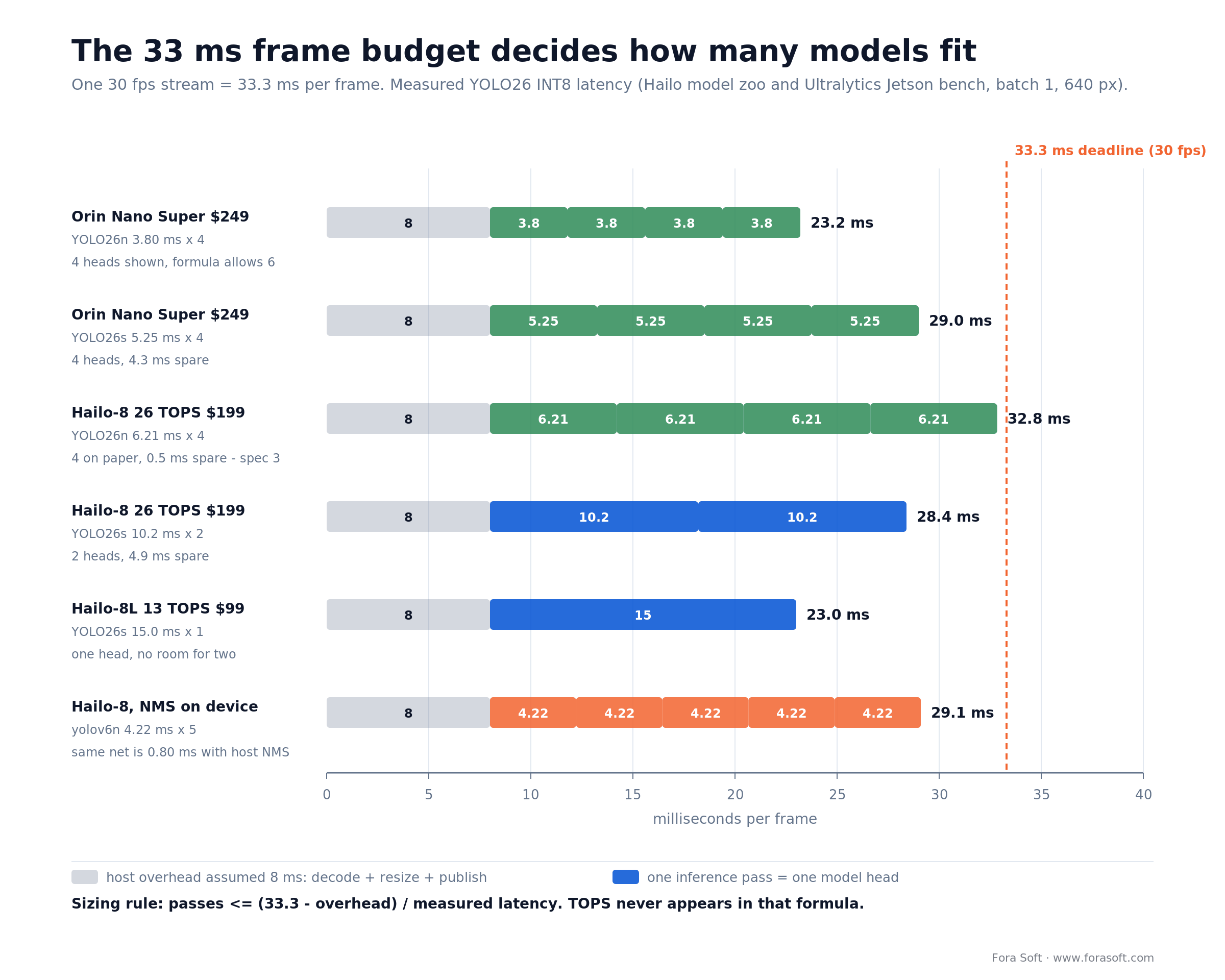
Figure 1. How many model heads fit in one 30 fps frame interval. The grey block is host overhead; each coloured block is one inference pass. The bottom row is the same network compiled with non-maximum suppression on the accelerator instead of the host.
Three things fall out of this that change design decisions.
TOPS is not in the formula. The Hailo-10H is rated 40 TOPS at INT4 and 20 at INT8 against the Hailo-8’s 26, and on YOLO26s it measures 125 FPS versus 97.6 — better, but nowhere near the headline ratio. Raspberry Pi says the quiet part out loud in its own AI HAT+ 2 announcement: the 40-TOPS part’s computer-vision performance is “broadly equivalent to that of its 26-TOPS predecessor,” and the extra capacity buys generative workloads, not faster detection. Buy latency, not TOPS.
Where you run post-processing matters more than it should. Compiling non-maximum suppression onto a Hailo-8 costs roughly 5.3× throughput: in Hailo’s own public model zoo the same yolov6n network runs 1,256 FPS with NMS on the host CPU and 237 FPS with NMS compiled onto the device. That single fact is the strongest practical argument for the NMS-free detectors that arrived in 2026, and it is invisible in any spec sheet.
The floor function lies at the margin. Look at the Hailo-8 running YOLO26n in Figure 1. The arithmetic says (33.3 − 8) / 6.21 = 4.07, so four heads. Four heads leave 0.46 ms of slack in a 33.3 ms budget, which is not slack — it is one garbage-collection pause, one thermal step-down or one busier-than-usual frame away from a dropped frame. We spec three and keep the fourth in reserve for the model you will want in year two. Take the floor of the division, then take one off it whenever the remainder is under about 15% of a pass.
Sanity check for anyone tempted to skip the accelerator: on a Raspberry Pi 5 CPU alone, YOLO26n at 640 takes 130.33 ms per image via ONNX, 67.69 ms via NCNN and 70.74 ms via OpenVINO, all from the same Ultralytics Raspberry Pi benchmark table. Real-time detection on a general CPU at this resolution is not close.
Per-watt benchmarks on ARM64 edge hosts
On an ARM64 edge node the dedicated NPU wins on frames per watt and the Jetson wins on raw latency: a Hailo-8 delivers roughly 30–41 FPS per watt on YOLO26s, a Hailo-10H about 50, and a Jetson Orin Nano Super 8–27, while a Raspberry Pi 5 CPU alone manages under 15 FPS in total. The table puts the published numbers side by side so you can price a node per stream before you buy a board.
| Edge node | Model @640, batch 1 | Latency per pass | FPS | Power (vendor figure) | FPS per watt | Price, October 2026 |
|---|---|---|---|---|---|---|
| Raspberry Pi 5 CPU only (NCNN) | YOLO26n | 67.69 ms | 14.8 | not published for this workload | — | $0 extra |
| Hailo-8L on an ARM64 host | YOLO26s | 15.0 ms | 66.6 | 1.4–1.9 W typ | 35–48 | $85 module |
| Hailo-8 on an ARM64 host | YOLO26s | 10.2 ms | 97.6 | 2.4–3.3 W typ | 30–41 | $169 module |
| Hailo-10H on an ARM64 host | YOLO26s | 8.0 ms | 125 | 2.5 W typ | ≈ 50 | $238.75 starter kit (4 GB) |
| Jetson Orin Nano Super (ARM64 SoC + GPU) | YOLO26s, TensorRT INT8 | 5.25 ms | ≈ 190 | 7–25 W module | 8–27 | $399 dev kit |
FPS: Hailo model zoo (batch 1, 8-bit) and the Ultralytics Jetson and Raspberry Pi benchmark tables; Jetson latency is inference only. Power is the vendor’s typical figure for the part, not a measurement at this exact workload, so treat FPS per watt as a ranking, not a guarantee. Prices: Mouser list for Hailo modules and the NVIDIA store for Jetson, checked 27 October 2026. Accuracy is the same network on every row (YOLO26s: 48.6 mAP50-95 on COCO), so the comparison is speed and power only.
Reach for a bigger accelerator when: your product roadmap has more than two analytics running at once — person, vehicle, PPE and licence plate on the same stream is four passes, and four passes need a sub-6 ms detector.
Silicon in 2026, with prices
Prices below are distributor or vendor-store list, re-checked 27 October 2026. Where a vendor publishes no TOPS figure, the cell says so; that is not laziness, it is the state of the datasheets.
| Part | Rated AI compute | Power | List price | Where it wins / where it breaks |
|---|---|---|---|---|
| Hailo-8 (M.2) | 26 TOPS INT8 | 2.4–3.3 W typ, 8.65 W TDP | $169 module, $191.25 starter kit (Mouser) | Best-documented throughput per watt; full public model zoo. Needs a host SoC and a spare M.2 slot. |
| Hailo-8L (M.2) | 13 TOPS INT8 | 1.4–1.9 W typ, 6.6 W TDP | $85 module (Mouser) | Half the price, roughly two-thirds the FPS. One model head at 30 fps, not two. |
| Hailo-10H (M.2) | 40 TOPS INT4 / 20 INT8 | 2.5 W typ | $238.75 starter kit, 4 GB (Mouser) | On-module 4 or 8 GB LPDDR4/4X, aimed at generative workloads. Detection throughput is close to Hailo-8, not double it — and the Hailo-8 carries three more years of field deployments, driver packages and model-zoo coverage, which is why the cost model below still anchors on the Hailo-8. |
| Jetson Orin Nano Super | 67 sparse / 33 dense INT8 TOPS | 7–25 W | $399 dev kit (was $249 until July 2026) | Fastest per-pass latency in this class and a full Linux stack. Blows a 12.95 W PoE budget on its own. |
| Hailo-15L / 15H (camera SoC) | 7 TOPS / 20 TOPS | < 3 W / < 5 W | design-win only | Integrated ISP plus NPU in one camera-grade part; Hailo places the 15L in Type 1 Class 2 PoE cameras without IR LEDs, and Class 3 once the AI pipeline gets complex. Precision behind the TOPS number is unpublished. |
| Ambarella CV72S, CV7 | not published | < 3 W (CV72S) | design-win only | Excellent encode plus AI in a camera thermal envelope. CV7 sampled from January 2026; no absolute TOPS to compare with. |
| Axis ARTPEC-8 / ARTPEC-9 | not published | not published | inside Axis cameras only | Shipping analytics platform with a real ACAP ecosystem; ARTPEC-9 triples analytics and adds AV1. Closed to your own hardware. |
| Qualcomm Dragonwing QCS6490 / Q-7790 | 12 dense TOPS / 24 TOPS INT8 | 6–9 W (QCS6490) | design-win only | Up to five concurrent cameras and supply longevity to July 2036. Q-7790 launched January 2026, so tooling is young. |
| DEEPX DX-M1 (M.2) | 25 TOPS INT8 | 1–5 W | $139 | Hailo-8 class compute at lower power and price. Much smaller ecosystem and fewer public benchmarks. |
| Rockchip RK3588 | up to 6 TOPS | SoC-level | low, module-dependent | The default cheap Linux camera SoC. 6 TOPS is a hard ceiling; note RK3576’s identical headline is a sparsity figure. |
| Google Coral Edge TPU | 4 TOPS INT8 | ≈ 2 W | $24.99 (M.2) | See the warning below. Do not start a 2026 design on it. |
Two supply-side changes since July 2026. NVIDIA raised Jetson list prices by 33–101% in July 2026: the Orin Nano Super developer kit went from $249 to $399, the Orin NX 16 GB module from $599 to $999 and the Jetson T4000 module from $1,999 to $2,999, as CNX Software tracked on 22 July 2026. And Microchip completed its acquisition of Hailo on 21 September 2026, stating it will keep supporting the existing Hailo portfolio, software environment and customer engagements. For a camera you have to support for five years, a vendor backed by a large semiconductor company is a better supply risk than a funding-constrained start-up — but ask for the part’s longevity commitment in writing, because the press release does not name individual chips.
The Coral trap
Coral hardware is still on sale at coral.ai with 2020-era prices and no end-of-life notice, which is exactly why people keep specifying it. The software is a different story. Google archived gasket-driver — the kernel driver every PCIe and M.2 Coral needs — on 18 April 2026, after archiving pycoral in July 2025 and libedgetpu in October 2025. The Python runtime is frozen on tflite_runtime 2.5.0 (TensorFlow 2.5, May 2021) with wheels that stop at CPython 3.9, so it will not install on a current distro. Frigate’s own hardware documentation now says the Coral “is no longer recommended for new Frigate installations, except in deployments with particularly low power requirements” or on hardware that cannot take an alternative AI accelerator for object detection — and it lists Hailo parts first.
One more source of confusion: Google reused the Coral name in October 2025 for “Coral NPU,” an open-source RISC-V core aimed at wearables at roughly 512 GOPS. The 4-TOPS Edge TPU is 4,000 GOPS, so the new part is about eight times smaller — a different class of device for a different job. It is a brand reuse, not a successor. Our position: Coral is software-abandoned but never formally discontinued, which is the worst of both worlds for a product you have to support for five years.
Cameras you can actually buy in 2026 — and the number none of them print
We went through the published datasheets of the current edge AI cameras a buyer would shortlist. The striking result: not one surveillance-grade vendor publishes a TOPS figure. Axis, Hanwha and i-PRO all describe their AI engines in relative terms — “triples video analytics performance,” “3× inference” — against their own previous generation. Only the robotics and maker vendors print an absolute number, and only Luxonis states the precision it was measured at. That is the whole argument of this article in one table: if the people who build the cameras will not commit to TOPS, you cannot size a fleet with it either.
| Camera | AI engine | Published TOPS | Power | Price / NDAA Sec. 889 |
|---|---|---|---|---|
| Axis P1486-LE | ARTPEC-9 (shipped June 2026) | None. “Triples analytics performance” vs ARTPEC-8 | 802.3af Type 1 Class 3 | Quote · 889 compliant |
| Hanwha XNV-A9084R | Wisenet 9, dual NPU | None. “3× inference” vs Wisenet 7 | 802.3af Class 3; 8.4 W typ, 11.2 W max | Quote · 889 compliant |
| i-PRO WV-X41701-F1 | Ambarella CV72 | None — not from i-PRO, not from Ambarella | 802.3af Class 0, ~11.5 W | Quote · 889 compliant |
| Advantech ICAM-540 | Jetson Orin NX 8 GB, Sony IMX334 8 MP | Not published by Advantech. Ignore the third-party “100 TOPS” — that is the 16 GB part | 19–24 V DC, 15 W typ / 18 W max. No PoE | Quote · no 889 statement |
| Luxonis OAK 4 D | Qualcomm QCS8550 / RVC4 | 48 INT8 + 12 FP16 — the only vendor here that states precision | PoE+; 10–15 W avg, 25 W peak, IP67 | $849 · 889 marked |
| Raspberry Pi AI HAT+ (module) | Hailo-8, PCIe Gen 3 to a Pi 5 | 26 (13 on the Hailo-8L board); precision not stated | Not published; 0–50 °C | $110 / $70 · no 889 statement |
Vendor datasheets and product pages, linked per row, checked July 2026. “Quote” means no public list price. Section 889 status is the vendor’s own published claim, not our legal advice.
Read the table as a procurement instruction. If you are buying finished surveillance cameras, you cannot size the fleet from the spec sheet at all — you have to put the camera on a bench, run your own model and measure milliseconds, or make the vendor commit to a frame rate with your model in a written acceptance test. If you are building the camera or the box yourself, the maker-side parts publish numbers you can hold them to, which is exactly why our own reference designs start there.
Reach for an M.2 accelerator plus a generic SoC when: you are building your own camera or edge box and want published benchmarks you can hold a vendor to. Reach for an integrated camera SoC when the thermal and BOM budget cannot carry two chips.
The PoE power budget nobody itemises
Power, not compute, is what kills on-camera AI designs. IEEE 802.3af delivers about 12.95 W at the powered device and 802.3at about 25.5 W. Everything shares that: image sensor, ISP, video encoder, the network PHY, the main CPU, the pan-tilt motor if there is one, and — the line that surprises people — the infrared illuminators, which only draw current at night, which is also when your intrusion detection matters most.
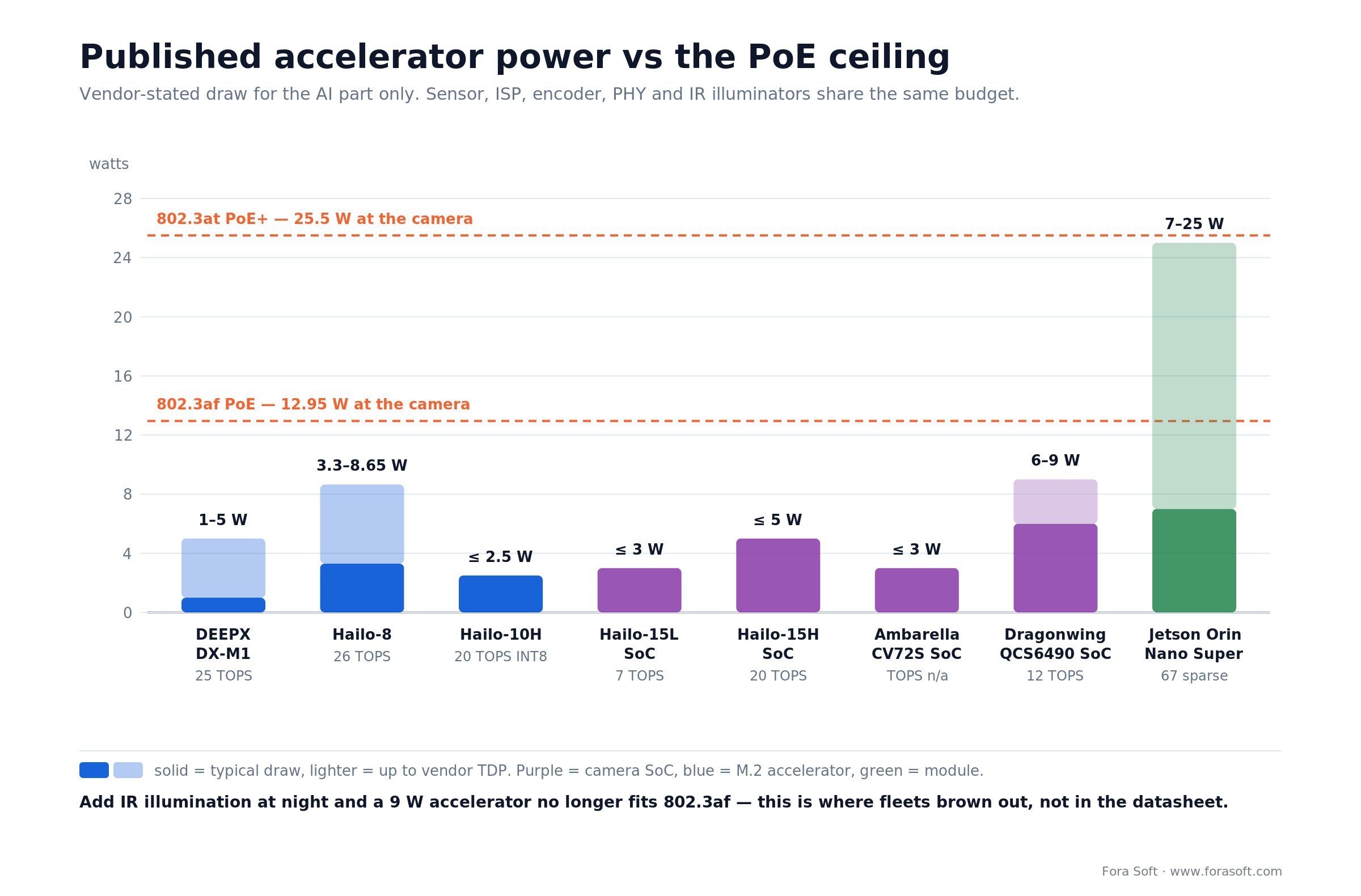
Figure 2. Vendor-stated draw for the AI part only, against the two PoE ceilings. Solid bars are typical draw, lighter extensions run to the published TDP.
Read that chart as a subtraction problem. A Hailo-8 at its 8.65 W TDP leaves roughly 4 W of an 802.3af budget for the entire rest of the camera, which is not enough — so either the accelerator stays near the 2.4–3.3 W its datasheet gives for typical configurations, or the design moves to 802.3at, or the illuminators get dimmer. Read the datasheet columns carefully here: Hailo lists 8.65 W as thermal design power and 8.25 W (2.5 A off the 3.3 V rail) as the maximum draw at full utilisation. TDP is the number that matters for a sealed housing; maximum draw is the number that matters for the PoE injector. A Jetson Orin Nano Super at 7 W minimum is a camera-adjacent box, not a camera.
Two practical consequences we design around:
Thermal derate is a real fps number, not a footnote. A dome enclosure in direct summer sun runs far hotter than a bench. Accelerators throttle, and the frame budget you validated in April stops holding in July. Budget headroom: if your design needs exactly two model heads, buy silicon that fits three.
Solar and battery fleets invert the priorities. When there is no PoE at all, perf-per-watt beats raw perf, and duty cycling beats both. Do the sum before you argue about chips. Take a 10 W camera in which the accelerator averages 3 W: gate that accelerator on PIR so it runs 5% of the time and you drop to 7.15 W, which is 1.4× the runtime on the same battery, not ten times. The order-of-magnitude wins only arrive when the encoder and the modem duty-cycle with it, so design the sleep path across all three or do not promise the number.
Picking a detector — and the licence trap
The licence will cost you more than the accelerator, and most guides do not mention it. Ultralytics released YOLO26 on 14 January 2026 under AGPL-3.0 plus a paid Enterprise licence. AGPL is a network-copyleft licence. Put an AGPL model and its inference code inside closed-source camera firmware you sell, and you are either buying the Enterprise licence or publishing your source. That applies to YOLOv8, YOLO11, YOLO26, YOLOv12 and YOLOv13 alike. Ultralytics announced YOLO27 at YOLO Vision on 13 September 2026 — 28 models in n, s, m and l sizes, with YOLO27l the first Ultralytics model above 60 mAP on COCO — for release later in 2026. The announcement states no licence, so until the LICENSE file says otherwise, budget it as AGPL-3.0 plus Enterprise like every predecessor. Talk to a lawyer, not to a forum thread — and price the Enterprise licence into the BOM before you build the demo, because ripping a detector out after integration is a rewrite.
| Detector | Licence | Accuracy (COCO) | Latency | When we pick it |
|---|---|---|---|---|
| YOLO26 (n/s/m) | AGPL-3.0 or paid Enterprise | 40.9 / 48.6 / 53.1 mAP50-95 @640 | 1.7 / 2.5 / 4.7 ms on T4; 6.21 / 10.2 ms on Hailo-8 | Internal deployments, or products where the Enterprise licence is already budgeted. NMS-free by default, which is worth real throughput on-device. |
| YOLO11 (n/s) | AGPL-3.0 or paid Enterprise | 39.5 / 47.0 mAP50-95 | 1.5 / 2.5 ms on T4 | When the target board’s YOLO26 toolchain is still shaky. Widest deployment precedent. |
| D-FINE (N–X) | Apache-2.0 | 42.8–55.8 AP, up to 59.3 with Objects365 pretraining | 2.12–12.89 ms on T4 FP16 | Commercial closed-source firmware. ICLR 2025 Spotlight, sits on or above the YOLO11 curve with no copyleft. |
| DEIMv2 — HGNetv2 line (Atto, Femto, Pico, N) | Apache-2.0, code and weights | 23.8 AP at 0.5 M params, 43.0 AP at 3.6 M | 1.10 ms (Atto), 2.32 ms (N) on T4 | The clean option. Tiny memory footprint, which matters when the model has to fit device RAM alongside the ISP buffers. |
| DEIMv2 — DINOv3 line (S, M, L, X) | Apache-2.0 code, Meta DINOv3 licence on the weights | 50.9 AP at 9.7 M, up to 57.8 AP | 5.78 ms (S) on T4 | S and M use a ViT-Tiny distilled from DINOv3-S; L and X use DINOv3 directly. Strong numbers, but see the warning below before you ship them. |
| RT-DETR (R18–R101) | Apache-2.0 upstream only | 46.5–54.3 AP | transformer-shaped, no NMS | Baidu’s model. Apache only from lyuwenyu/RT-DETR or PaddleDetection. from ultralytics import RTDETR pulls the same architecture out of the AGPL-3.0 ultralytics package, and the import line is what your lawyer will read. |
| RF-DETR (N–L) | Apache-2.0 (N–L); XL and 2XL are not | 48.0–60.5 AP | transformer-shaped, no NMS | Roboflow’s model, its own repo, not in PaddleDetection. Check the size you actually download — the largest variants ship under a separate licence. |
Check the weights, not the badge. A repository can be Apache-2.0 while the checkpoint you actually load is not. DEIMv2 is the live example: the code is Apache, but the S, M, L and X checkpoints are built on Meta’s DINOv3 — S and M through a ViT-Tiny distilled from DINOv3-S, L and X using DINOv3 backbones directly. The DINOv3 licence travels with those derivatives and brings attribution, a pass-through obligation on redistribution, and use restrictions that a closed-source camera OEM cannot wave away. If you want DEIMv2 with no strings, take the HGNetv2 variants — Atto through N. Our rule on every project: before a detector goes into a build, someone reads the LICENSE file, the model card and the backbone’s licence, and writes down all three.
What the numbers do and do not tell you
Three caveats we always restate to clients. First, YOLO26’s widely quoted “43% faster CPU inference” is scoped to YOLO26n against YOLO11n in ONNX on an Intel Xeon at 2.00 GHz — nano scale only, not the family. Second, YOLOv8’s published latency column is measured on an A100, so it is not comparable with the T4 numbers in the YOLO11 and YOLO26 tables; people compare them anyway and reach wrong conclusions. Third, COCO mAP is a proxy for nothing that matters on your site. A detector that scores 48 mAP on COCO and cannot separate a person from a fence post at 3 a.m. in rain is a worse detector for you than one that scores 42 and can.
Beyond generic detection, the analytics that customers actually pay for are narrower: person versus animal to kill false alarms, vehicle type for site logistics, PPE compliance, licence plates, abandoned objects, loitering. Most of these are a fine-tune of a general detector on site imagery rather than a new architecture. For anomaly detection specifically — where you train on what normal looks like and flag divergence — we wrote up the model side separately in AI-based anomaly detection for surveillance systems.
Reach for an Apache-2.0 detector when: the model ships inside firmware you sell and you do not want a copyleft obligation or an annual licence line item attached to every unit.
From a training run to ten thousand cameras
The model is maybe a fifth of the work. The pipeline that gets it onto installed hardware safely is the rest, and it is where projects quietly fail.
1. Quantise deliberately
Almost every camera-class accelerator runs INT8, not FP32. Post-training quantisation is quick and usually costs a point or two of accuracy; quantisation-aware training costs a training cycle and usually recovers most of it. Our threshold: if PTQ loses more than 2 points of mAP on your own validation set, do QAT. And follow the vendor guidance on granularity — Axis documents per-channel quantisation as preferable to per-tensor for accuracy on its DLPU, and the same pattern holds broadly. One honest caveat about “INT8” as a label: Hailo’s YOLO26 compilation pins some layers to 16-bit, so pure-INT8 claims about published throughput are not strictly accurate.
2. Export to the edge inference runtime the chip actually wants
LiteRT (TensorFlow Lite) for Axis DLPU and most Android-class parts, ONNX for Hailo and the broad middle, TensorRT for maximum Jetson performance, CoreML for Apple silicon. Export early, in week one, on the real target board. An operator that exists in PyTorch and not in your target runtime is the single most common late-stage surprise in edge projects.
3. Check that it fits in memory, then check again
Axis states the constraint with unusual honesty: models of any size will run “as long as they fit in the device’s memory.” Memory, not TOPS, is the real ceiling on multi-model deployments. Two model heads plus a tracker plus the encoder’s working set is where the budget goes, and DRAM pricing in 2026 has made the cheap way out — specify more RAM — less cheap than it used to be.
4. Sign the artifact
A model file is executable content on a device that is physically reachable by strangers. Sign it, verify the signature on-device before load, and pin a model version against a firmware version so an old binary cannot load a new graph. Reserve flash for two model versions, always, because that reserve is what makes rollback possible.
# model manifest that travels with every artifact
model_id:        det-person-vehicle
model_version:   2026.07.3
runtime:         hef/hailo-8      # or tflite / trt / onnx
input:           640x640 rgb888
quantisation:    ptq-int8 (per-channel), 1.4 mAP below fp32
min_firmware:    4.11.0
sha256:          9f1c...  signed with fleet-release key
baseline_metrics: precision 0.94 / recall 0.91 @conf 0.45 (site-A 72 h, day+night split)
That manifest is not paperwork. It is the input to the promotion gates in the next section, and the artefact your customer’s auditor will ask for when an alert ends up in a legal proceeding.
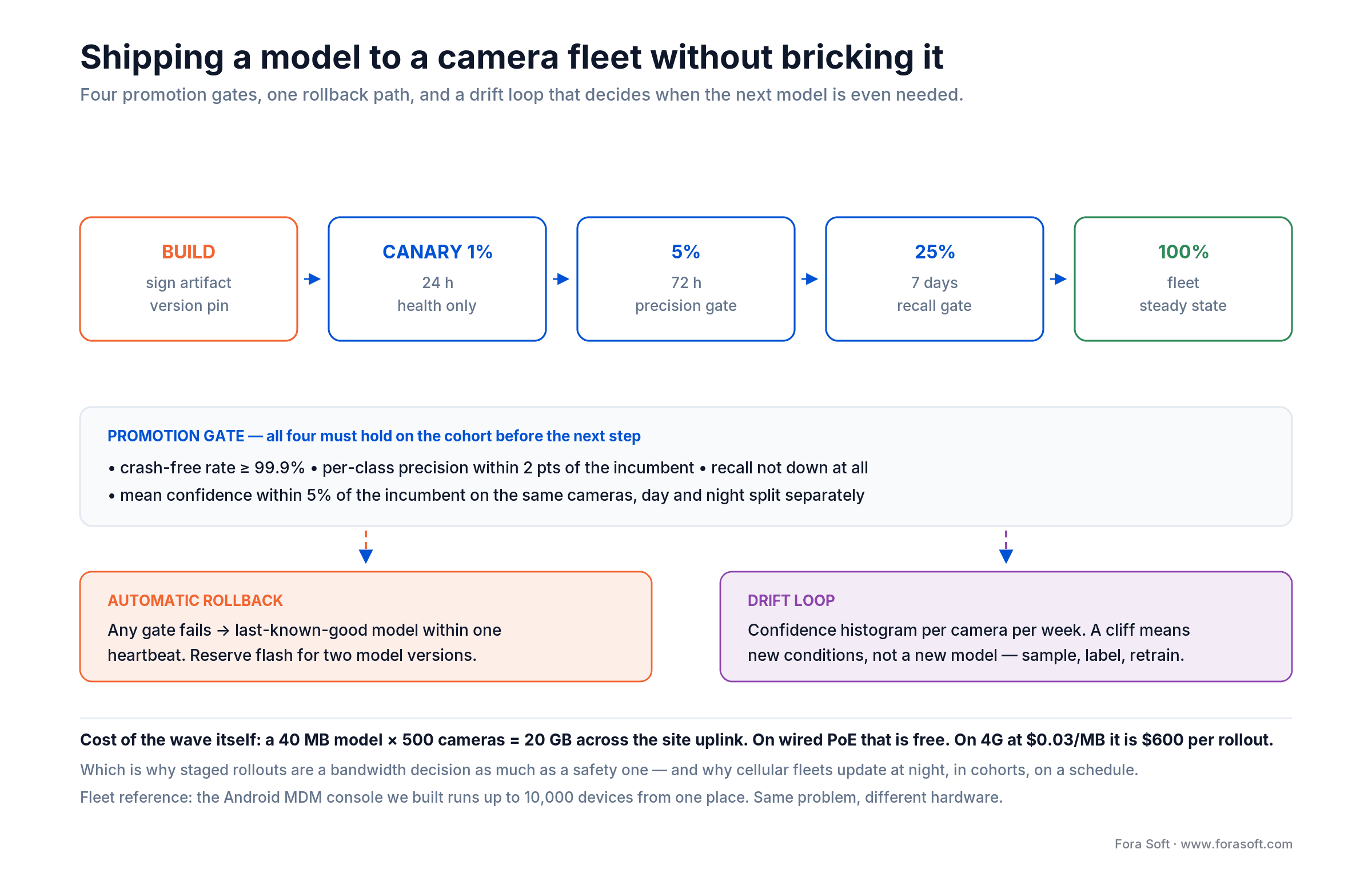
Figure 3. The rollout we run for camera fleets: four promotion gates, one automatic rollback path, and a drift loop that decides whether a new model is even needed.
5. Roll out in cohorts, gate every step
Canary 1% of the fleet for 24 hours on health metrics alone. Then 5% for 72 hours with a precision gate, 25% for a week with a recall gate, then the rest. Every promotion needs four things to hold on the cohort: crash-free rate at or above 99.9%, per-class precision within 2 points of the incumbent model, recall not down at all, and mean confidence within 5% of the incumbent on the same cameras with day and night evaluated separately. Any gate fails, the fleet returns to last-known-good inside one heartbeat.
Cohort by serial range or site, never randomly, so that a bad wave is geographically contained and a truck roll is one trip. And price the wave itself: a 40 MB model across 500 cameras is 20 GB of traffic. Free on wired PoE; about $600 per rollout at $0.03/MB on cellular. That is why cellular fleets update at night, in cohorts, on a schedule, and why “just push the new model” is not a plan.
Building a custom AI camera, an edge box or the VMS behind them?
Book 30 minutes and we will whiteboard it live: the reference architecture, a silicon shortlist with measured latency per part, and where the phased plan should break. No spec needed beforehand — camera count and what you want it to detect is enough to start.
Drift and edge observability — the year-two problem
A camera tuned in July that silently degrades by December is the default outcome, not the exception. This is the largest hole in the published material on edge AI: everyone explains how to deploy a model and nobody explains how to know it is still working. On-camera inference makes it worse, because the thing that used to tell you something was wrong — a human occasionally watching the stream — is exactly what you removed.
What changes underneath a working model: seasons and sun angle, a new building phase that changes the scene, a lens that fogs, a repositioned camera, new vehicle types on site, a switch from infrared to colour night mode. None of these throw an error. Detection quality just decays.
The minimum telemetry that makes drift visible
- Confidence histogram per camera per week. Not the mean — the distribution. A cliff in the upper quartile is the earliest signal you get.
- Detections per class per hour, per camera. Cheap to send, and it catches a camera that stopped seeing people at 6 p.m. because someone installed a floodlight.
- Frame drop and inference-latency percentiles. Thermal throttling shows up here first, weeks before anyone notices missed events.
- Operator dispositions fed back. Every alert an operator dismisses is a free label. If your VMS does not return that signal to the model pipeline, you are discarding the highest-quality training data you will ever have.
- Model and firmware version, per device, always. Fleets skew. Half your cameras running last quarter’s model is a diagnosis, not a footnote.
Two techniques worth the effort. Shadow mode: run the challenger model alongside the incumbent on a small cohort, log both decisions, promote on evidence rather than on a release date. Privacy-safe sampling: you cannot retrain without new frames, and new frames conflict head-on with “video never leaves the camera.” Resolve it explicitly — consented sampling windows, on-device masking before upload, a documented retention limit on the training set — and write the resolution into the contract. A pipeline that quietly exfiltrates frames for retraining is the fastest way to lose an enterprise customer.
Reach for shadow-mode evaluation when: the fleet is above roughly 200 cameras, or when a missed detection has a cost measured in dollars rather than in operator annoyance.
ONVIF Profile M on the wire
Profile M is the standard that lets a third-party VMS consume your camera’s analytics without a custom integration. ONVIF released it in 2021 (specification v1.1, March 2024) and it covers analytics configuration and query, metadata streaming, generic object classification, and defined metadata for geolocation, vehicle, licence plate, human face and human body, plus event interfaces for object counting, licence-plate recognition and face recognition. Read that list twice, because most of it is conditional rather than required.
The transport detail is the part that matters architecturally and is usually skipped: Profile M allows event delivery in the media metadata stream, through the ONVIF event service, or over MQTT. That third option is what turns a camera into a building sensor — a camera publishing occupancy to an MQTT topic can drive a thermostat with no VMS in the path at all. Profile T, finalised 25 October 2018, is the companion for H.264 and H.265 streaming with standardised tampering, motion and I/O events.
# what an event actually looks like on the bus
topic:  sites/plant-04/cameras/cam-117/analytics/object
payload:
  {
    "ts":        "2026-07-25T21:14:07.412Z",   # NTP-synced, camera clock
    "event_id":  "cam-117-1785014047-3",       # dedup key, stable across retries
    "class":     "person",
    "conf":      0.91,
    "bbox":      [0.42, 0.31, 0.11, 0.28],     # normalised x,y,w,h
    "track_id":  4471,
    "model":     "det-person-vehicle@2026.07.3",
    "best_shot": "s3://.../cam-117/1785014047-3.jpg"
  }
Where Profile M conformance quietly fails
Start with the part the marketing pages leave out. The Profile M specification makes about ten features mandatory for a conformant device — user authentication, discovery, capabilities and system services, metadata information, metadata streaming, and the configuration of metadata and analytics profiles among them. Object classification, the geolocation, vehicle, plate, face and body metadata, the counting, LPR and face-recognition events, and MQTT itself are all conditional — required only if the device supports that feature at all. A camera can be fully Profile M conformant and publish no object metadata and no MQTT. So “Profile M conformant” in an RFP response is not an answer. The answer is the conformance statement listing which conditional features the device actually implements, and you should ask for it by name.
Conformance is not interoperability. The failure modes we hit repeatedly: taxonomy mismatch, where the camera emits a class name the VMS has no slot for and the event lands in a generic bucket; vendor-proprietary attributes that carry the useful part of the payload outside the conformant schema; clock skew, where an unsynchronised camera clock puts events in the wrong place on the timeline and nobody notices until an incident review; and transport divergence, where a camera is conformant over the event service but its in-stream metadata is subtly different. Test whichever transports the camera actually claims — against your real VMS, before you sign anything, with a written class-mapping table as a deliverable.
Worth watching: ONVIF published the release candidate for Profile V on 9 July 2026 — a cloud profile where the device makes a secure outbound connection to a cloud VMS and streams live video and audio over WebRTC, with a mandatory security add-on using OAuth 2.0. Finalisation is targeted for the end of 2026; as of late October 2026 it is still a release candidate. If you are designing a cloud-connected camera now, design toward it. The specification set as a whole moved to release 26.06 in June 2026, which added metadata aspect-ratio transformation and multi-dimensional sensor data to the analytics specifications, plus natural-language and image-based search in recording search.
Edge video analytics on the wire
Edge video analytics only pays off if the plumbing behind it is right, and the reference shape is boring on purpose. Inference and the ring buffer live on the camera. A broker carries typed events. The VMS owns the timeline, search, operator UX and alert orchestration. Storage tiers down from local to warm to cold on a documented schedule.

Figure 4. What crosses the link, on our own deployments: roughly 1–2 KB of JSON per event plus a 60–120 KB best-shot. Size yours against real payloads before you commit to a tariff. The full stream stays local until an operator pulls a clip.
Store-and-forward is the whole design
Everything interesting happens during an outage, so specify the queue properly rather than discovering it in production. Four decisions: queue depth in events and in hours, sized against your worst realistic outage rather than your average one; delivery semantics, which in practice means at-least-once plus a stable dedup key, because exactly-once over a flaky LTE link is a fantasy; ordering, which you will not preserve across a reconnect, so the VMS has to sort by event timestamp and not arrival time; and backpressure, meaning what the camera drops first when the queue fills. Our default is to drop best-shots and keep event records, because a timeline with gaps in imagery is usable and a timeline with gaps in events is not.
What has to stay off the camera
Two workloads are structurally central, no matter how much silicon you put in the housing. Cross-camera re-identification needs to see several cameras at once; no on-camera NPU ever does. Archive-wide search — the “find the red van from last Tuesday” query that vision-language models made plausible — runs against an index, not a live frame. Design the event schema so those central jobs have something to work with: stable track IDs, normalised bounding boxes, embeddings if you have them. For the platform side of that, we went deep on scaling video management systems and on building a custom VMS.
Reach for a hybrid edge-plus-cloud verification step when: false positives are expensive. Let the camera detect in 10 ms, then have the cloud re-check only the flagged frames with a heavier model. Bandwidth stays low and precision goes up.
Proving accuracy before you sign
“90% fewer false alarms” is a marketing sentence, not an acceptance criterion. Every vendor in this market quotes a reduction number and none publishes the method behind it. If you are buying, ask for the protocol. If you are building, define it yourself before the pilot, because a pilot without a pass/fail rule never ends.
The protocol we use on surveillance projects, in the order it happens:
1. Ground truth from the customer’s own site. Not COCO, not a vendor demo reel. A minimum of 72 continuous hours per representative camera, labelled by a human, split explicitly into day, night, and adverse weather. Fewer hours than that and you are measuring luck.
2. Per-class precision and recall at a stated confidence threshold. One aggregate accuracy number hides everything. Person recall at 0.89 with vehicle recall at 0.62 is a completely different product from the reverse, and the customer cares about exactly one of them.
3. A threshold sweep, not a single operating point. Report the curve from confidence 0.3 to 0.7 so the operator team can choose where to sit. Our default for the first 90 days is to tune for precision over recall: an alert stream that cries wolf trains operators to ignore it, and that damage takes months to undo.
4. False positives per camera per day, as the headline number. This is the metric an operations manager feels. Under 0.5 per camera-day is a fleet people trust; above 2 is a fleet people mute.
5. A written acceptance clause. Concretely: “On the agreed 72-hour ground-truth set, person-class recall at confidence 0.45 is at least 0.90 and false positives do not exceed 0.5 per camera per day, measured separately for day and night.” That sentence has settled more disputes for us than any architecture diagram.
Privacy, biometrics and procurement law
On-camera inference genuinely helps with data minimisation, and it does not exempt you from anything. Two claims get conflated constantly. Processing locally reduces what you transfer; it does not stop you processing personal data, and it does not remove the need for a data protection impact assessment.
1. Prove the minimisation, do not assert it. Write the byte-level inventory of what leaves the device: event JSON, best-shot images, health telemetry, model-update traffic, and any sampled frames for retraining. That inventory is the DPIA data-flow section. Every serious buyer asks for it eventually, and the vendors who cannot produce it lose the deal.
2. The best-shot question nobody asks. A cropped face image, stored to make an alert reviewable, is a photograph. It becomes Article 9 special-category biometric data the moment you put it through a technical process that uniquely identifies someone — the embedding and the match, not the file sitting on disk (GDPR Recital 51). That distinction has a practical edge: the same JPEG lands in two different legal regimes depending on what the next stage of your pipeline does with it. Decide the lawful basis and the retention period for best-shots specifically — separately from the video — before the feature ships. In most projects the honest answer is to mask faces in the stored crop and keep identification out of scope entirely.
3. Detection is not recognition, and the law cares about the difference. Knowing a person is present is a much lighter obligation than knowing which person. Most surveillance value — intrusion, loitering, PPE, counting, vehicle logistics — needs detection only. Under the EU AI Act, real-time remote biometric identification in publicly accessible spaces for law enforcement has been prohibited since 2 February 2025 with narrow exceptions; the high-risk regime that covers other biometric systems was pushed back to 2 December 2027 by the Digital Omnibus on AI. That is now settled law rather than a proposal: Parliament and the Council adopted it on 8 July 2026, and it landed in the Official Journal on 24 July 2026 as Regulation (EU) 2026/1744, in force since 27 July 2026. High-risk AI embedded in products regulated under Annex I gets until 2 August 2028. Plan for the 2027 date and treat the delay as a bonus, not a reprieve.
4. US biometric law bites hardest in Illinois. BIPA carries a private right of action, which is why the case law is there and not elsewhere. Consent and a written retention schedule before any face or fingerprint processing, and note that Illinois amended the statute in 2024 (P.A. 103-0769) so that repeated collection by the same method yields a single recovery rather than one per scan. Read the limit narrowly: it covers the collection and disclosure sections, not the retention-policy or safeguards duties, which still accrue per violation.
5. Procurement restrictions can disqualify your hardware before anyone evaluates your software. NDAA Section 889 bars US federal agencies, contractors and grant recipients from procuring video surveillance equipment produced by Hikvision, Dahua and other named manufacturers, including OEM variants and any system that uses the covered equipment as a “substantial or essential component” or as “critical technology” — that is the wording of FAR 52.204-25(b)(1), and the Hikvision and Dahua prong is scoped to public-safety, government-facility, critical-infrastructure and national-security uses. No firmware change fixes that; the manufacturer is the manufacturer. If your roadmap touches US federal, state or education buyers, check the camera ODM before you check the NPU. We covered the wider compliance surface in video surveillance software development for IoT.
Reach for on-device masking when: footage covers a public space, a retail floor, a transport hub or a school — blur faces and plates before encode, not after upload, so the unmasked pixels never exist outside the sensor pipeline.
Mini case — EyeBuild on solar and 4G
Situation. EyeBuild sells construction-site surveillance as a turn-key service: from $199 per camera per month as a rental covering unit, install, data and service, same-day installation across Arizona, month to month, with a free first week. The cameras are manufactured by the client and the deployment constraints are brutal: 4K UHD sensors, solar power with a 14-day battery plus a three-day emergency reserve, no wired internet anywhere, 4G/5G uplink only, 360-degree pan and tilt, and two night-vision modes. On-device motion detection separates people from vehicles so that alerts mean something.
Why the architecture is forced rather than chosen. You cannot stream 4K continuously over LTE at any price a construction client will pay, and you cannot wait for a cloud round trip while someone is climbing the fence. Detection has to happen on the camera. That single constraint sets everything downstream: what the uplink carries, what the battery has to survive, how storage tiers, and what the operator console can assume is available.
What we built. Fora Soft’s scope is the platform, not the camera silicon: the cloud ingest and event path, multi-camera live streaming and recording, the analytics dashboard, timelapse progress tracking, 30-day cloud storage, and the operator experience — on React, Next.js, NestJS, MongoDB, RabbitMQ, WebRTC and LiveKit with FFmpeg doing the media work. The interesting engineering is on the seams: event delivery that tolerates a cellular link disappearing for an hour, and a dashboard that stays useful when the underlying footage is deliberately not in the cloud.
Where the line sits, and why we draw it out loud. On EyeBuild the client owns the camera hardware and the on-device detector, and we own everything from the uplink inward. On Mindbox the split runs the other way and the analytics side is ours. If what you need is somebody to hand-tune a quantised graph against a specific NPU errata sheet, say so on the first call — that is a silicon-vendor FAE conversation, and we would rather tell you than bill you to find out. What we do own end to end is the part that decides whether a fleet still works in year three: the event path, the OTA and rollback machinery, the drift loop, and the acceptance protocol that proves the model still does what the contract says it does.
The number that matters. The uplink carries events and snapshots, so a camera moves single-digit gigabytes a month instead of the hundreds of gigabytes a continuous 4K stream would need. On a solar site with a SIM, that is not an optimisation — it is the difference between a product and a proposal. Book a 30-minute call if you want the same assessment run against your own camera spec and connectivity.
Build, retrofit or buy
If your cameras are 2015 or newer and speak RTSP, retrofitting an edge box is almost always the cheapest route into edge computing video surveillance on an estate you already own; build into the camera only when you sell the camera. The table compares the four paths on what you pay up front, what you own afterwards and where each one breaks. Figures are 2026 list, checked July 2026, and exclude your engineering time.
| Path | Up-front | Per camera | Best when | Where it breaks |
|---|---|---|---|---|
| Off-the-shelf AI cameras (Axis, Hanwha, Bosch) | low | $400–$2,000 per camera | You operate cameras as a customer and generic person or vehicle detection is enough. | No custom models, no branded hardware, vendor analytics roadmap is not yours. Check NDAA status per ODM. |
| Edge box on existing cameras | low–medium | one box per 8–16 streams | Retrofit. The fleet is modern enough to pull RTSP and you do not want to replace it. | Raw streams now cross your LAN; the box is a single point of failure for every camera behind it. |
| White-label camera plus your own firmware | high | $80–$300 hardware plus engineering | AI features are your product and you sell hardware. The EyeBuild shape. | You own the whole lifecycle: OTA, CVEs, drift, RMA. Do not start this without a fleet-ops plan. |
| Bring-your-own-camera software platform | medium | software licence only | You sell software and customers have heterogeneous existing fleets. | You cannot ship firmware, so on-camera inference is off the table. Plan for edge boxes or central GPU. |
| Cloud vision API | near zero | $43–$353 per camera per month at list | Pilots, forensic batch jobs, and fleets under roughly 30 cameras. | Cost scales with frames, not value. And services move: Rekognition Streaming Video closed to new customers on 30 April 2026. |
The retrofit question is the one we get asked most, so the short answer: if the cameras are 2015 or newer and speak RTSP, an edge box is almost always the cheapest path to working analytics, and you keep the option to replace cameras later. Replace cameras when you need on-camera latency, when the site has no room for a box, or when you are selling the hardware yourself. We wrote up the integration mechanics in integrating video analytics with an existing surveillance system.
Cost model — the real math
Every figure here is 2026 list price with the arithmetic shown, so you can substitute your own numbers. One camera, 30 fps, motion-active two hours a day.
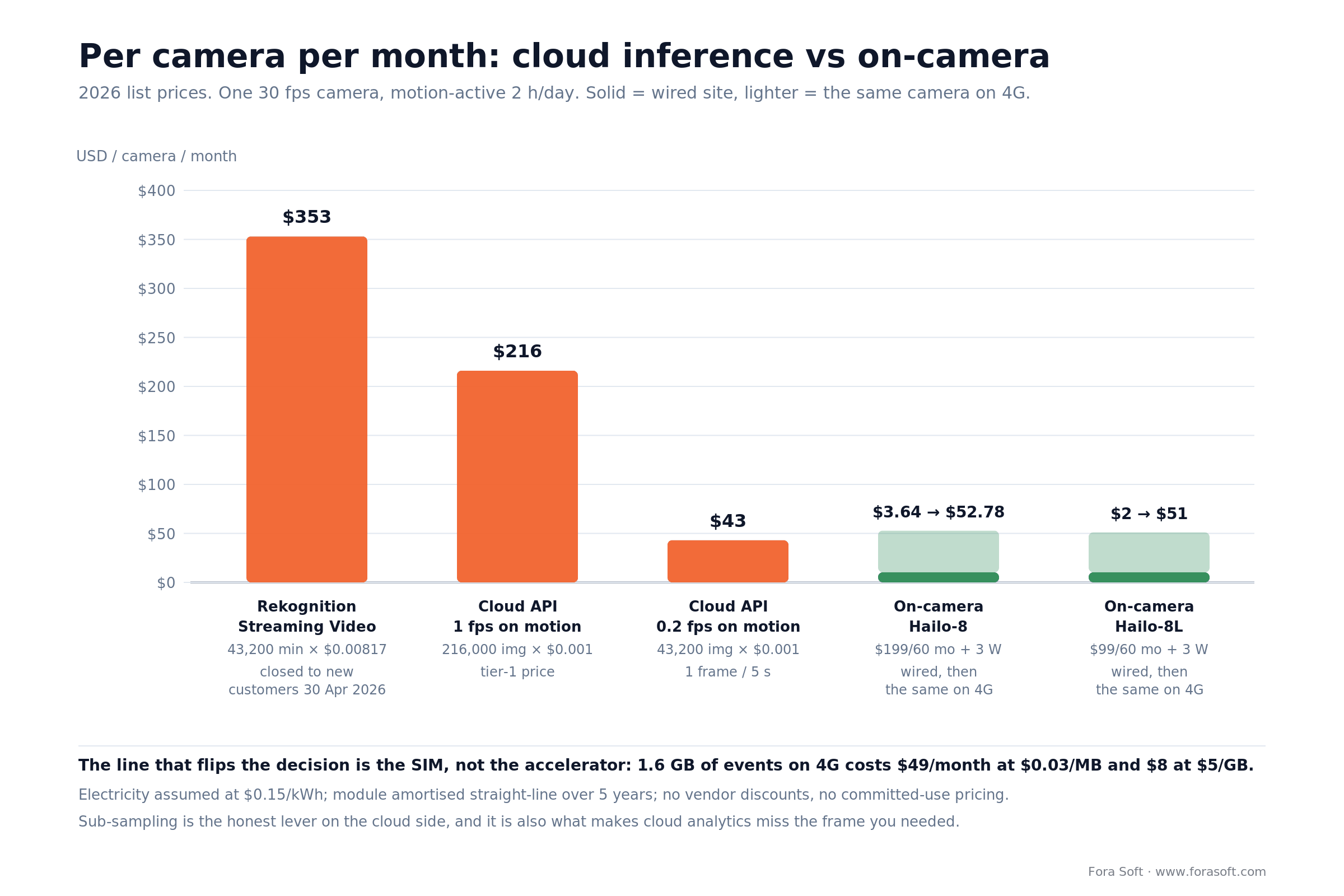
Figure 5. Per camera per month at 2026 list prices. The solid part of each on-camera bar is a wired site; the lighter extension is the same camera on a cellular SIM.
The cloud side
Rekognition Streaming Video, 24/7:
  60 min x 24 h x 30 d              = 43,200 min/month
  43,200 x $0.00817                 = $352.94 per camera per month
  (Kinesis Video Streams billed separately, on top)

Rekognition Image, 1 fps while motion is active:
  2 h/day x 3,600 s x 30 d          = 216,000 images/month
  216,000 x $0.0010 (first 1M tier)  = $216.00 per camera per month

Same, sub-sampled to one frame every 5 s:
  216,000 / 5                       = 43,200 images/month
  43,200 x $0.0010                  = $43.20 per camera per month
For comparison at list: Google Cloud Vision label detection is $1.50 per 1,000 units and object localization $2.25 per 1,000, both above a free 1,000 units a month; Google Video Intelligence is $0.10 per minute for label detection on stored video and $0.12 streaming; Azure Image Analysis Standard S1 is $1.00 per 1,000 transactions in its first tier and Video Indexer runs $0.045 to $0.15 per minute. Note that Azure’s older Computer Vision API v1.0 to v3.1 retired on 13 September 2026, and Image Analysis v3.2 and v4.0 follow on 25 September 2028 — plan migrations, because platform churn is a real cost line in this space.
The edge side
On-camera, Hailo-8:
  $199 module / 60 months           = $3.32/month
  3 W x 720 h = 2.16 kWh x $0.15    = $0.32/month
                                      -------------
                                      $3.64 per camera per month

Same camera on a cellular SIM (1.6 GiB of events + best-shots;
per-MB plans bill binary, per-GB plans decimal - check which yours uses):
  1,638 MB x $0.03/MB (Hologram)    = $49.14  -> $52.78 total
  1.6 GB x $5.00/GB (1NCE add-on)   = $8.00   -> $11.64 total
  KORE at $0.10/MB                  = $163.80 -> $167.44 total
We keep $199 for the Hailo-8 as a conservative kit-level figure; at Mouser’s October 2026 bare-module price of $169 the wired line drops to $3.14, which only widens the gap. The spread across SIM providers is larger than the entire cost of the accelerator, and it is where we see budgets blown. Do the SIM maths before the silicon maths on any non-wired fleet.
Sensitivity: what actually moves the number
- Sub-sampling rate is the biggest lever on the cloud side and it is linear. It also directly trades away the frame you needed.
- Cellular tariff is the biggest lever on the edge side, and the range is 20× at list.
- Retention days drive storage, and storage is usually the second-largest line after connectivity on a large fleet.
- Model count per camera changes silicon tier, which changes power, which can change the whole PoE design. This is the one that bites late.
- Engineering and retraining labour is real and recurring. Budget it explicitly; a fleet needs someone watching the drift dashboards, and pretending otherwise is how year two goes wrong.
Two things we deliberately leave out: negotiated cloud discounts, which are real but not something you can plan a product around, and any claim about total cost of ownership over five years, because the honest version depends on retention policy and staffing more than on either architecture.
Pick edge in five questions
Q1. How many cameras, and are they yours? Above roughly 50 cameras that you control the firmware on, on-camera inference wins on cost alone. Below 30, or if you ingest other people’s cameras, central inference is simpler and cheaper in engineering time.
Q2. What is the uplink? Cellular or flaky Wi-Fi makes edge mandatory, and the SIM tariff then dominates your entire cost model. Wired gigabit makes edge optional and turns this into a latency and privacy question instead.
Q3. How fast does the response have to be? Perimeter breach, fall detection, fire and smoke need sub-100 ms and cannot wait for a round trip. Operator-in-the-loop monitoring can absorb a second.
Q4. Who is asking about the data? Strict residency requirements, sensitive premises, or a buyer whose security review includes a DPIA all push hard toward on-camera processing — provided you can produce the byte-level inventory that proves it.
Q5. How often will the model change? A model still under weekly iteration belongs on a server where you can redeploy in minutes. Push to the fleet once the model has stabilised and you have promotion gates that work.
Answer three or more toward edge and the build is worth doing properly. If you want a second opinion on your specific answers, that is a 30-minute conversation and we do not charge for it — our video surveillance engineering team has taken this decision with clients often enough to tell you quickly when the answer is “do not build this.”
Five ways these projects fail
1. No OTA story before the first hundred cameras ship. Without a signed, staged, reversible update path you cannot fix a model bug, patch a CVE, or evolve the product. Retrofitting OTA onto an installed fleet costs an order of magnitude more than building it first. This is the mistake that ends products.
2. Sizing on TOPS. A spec sheet number with an undisclosed precision and an undisclosed sparsity assumption is not a performance figure. Every Orin- and Thor-generation Jetson quotes its headline TOPS with sparsity on: the Orin Nano Super’s 67 is 33 dense. Size on measured milliseconds for your model on your board.
3. Treating the alert pipeline as an afterthought. Ten thousand cameras generate enough events to drown an operator team in a morning. Deduplication, triage rules and priority scoring are product requirements, not phase-two nice-to-haves. On Live Eye Surveillance the target is an alert in an owner’s hand inside 30 seconds, and hitting it was a pipeline design decision rather than a detector one.
4. Shipping with recall tuned high. An alert stream operators stop believing is worse than no alerts, and their trust does not come back when you fix the model. Use the metric this article already defined rather than a percentage: above two false positives per camera-day, people mute the fleet. Tune for precision for the first 90 days, publish the false-positives-per-camera-day number weekly, and raise sensitivity only once the number is boring.
5. No rollback rehearsal. Everybody builds the update path. Far fewer test the reverse path under real conditions — low battery, half-applied update, a device that rebooted mid-flash. Rehearse rollback on a real cohort before you need it, because the day you need it you will need it on every device at once.
What to measure
Quality KPIs. Per-class precision and recall on your own site ground truth at a stated threshold, not COCO mAP. False positives per camera-day, target under 0.5. Inference latency p50 and p99 against the frame budget, so throttling shows up as a number. Mean confidence stability, with an alert when the monthly mean moves more than 5%.
Business KPIs. Operator minutes per camera per day, target under five for a fleet of 100+. Fully loaded cost per camera per month including connectivity, storage and the labour of keeping models current. Time from a customer reporting a missed detection to a deployed fix — the metric that predicts renewals better than any accuracy figure.
Reliability KPIs. Fleet uptime, target 99.5%. OTA success rate, target 99.8% with a tracked rollback count. Bandwidth per camera per month with an alarm at twice baseline, which is how you catch a camera that quietly started uploading raw video. Model-version skew across the fleet. And for battery or solar sites, the state-of-charge distribution, because a camera that browns out at 4 a.m. is not detecting anything.
When not to put AI on the camera
On-camera AI is the wrong choice in five situations: fleets under roughly 30 cameras, one-off forensic search across an archive, models whose accuracy is still moving week to week, cameras you do not control, and analytics that are structurally central such as cross-camera re-identification. In each of those a cloud API or a single edge box wins on cost, on schedule or on both.
Fleets under about 30 cameras. The engineering investment does not amortise. Run a cloud API or a single edge box, spend the saved months on the product your customer actually buys, and revisit at scale.
One-off forensic work. Searching six months of archive for one event is an elastic batch job. Central GPUs scale to it in an afternoon; a camera fleet cannot help you at all.
Models still changing weekly. If accuracy is still moving, every OTA cycle is friction against your own iteration speed. Centralise inference until the model stabilises, then push it down.
Cameras you do not control. No firmware access means no on-camera inference. Edge box or central GPU, and be honest about it in the sales conversation rather than promising on-camera privacy you cannot deliver.
Analytics that are structurally central. Cross-camera re-identification, archive-wide vision-language search, and anything correlating multiple sites belong in the middle. Trying to distribute them is a category error, not an optimisation problem.
Not sure whether your fleet should run AI on the camera?
We will review your camera spec, uplink, event volume and model roadmap, then tell you plainly which of the five paths fits — including when the answer is to stay in the cloud.
FAQ
What is an edge AI camera, and how is it different from a regular IP camera?
An edge AI camera runs the detection model on hardware inside the camera and sends out results — object class, bounding box, confidence, timestamp, usually one best-shot image — instead of a continuous video stream. A regular IP camera sends pixels and lets something else decide what they mean. The practical consequences are latency under 100 ms, event traffic measured in kilobytes rather than megabits, and raw frames that can stay on the device.
Can I add AI to cameras I already own, or do I have to replace the fleet?
Usually you can retrofit. If the cameras are roughly 2015 or newer and expose RTSP, an edge box on the same network can pull several streams and run inference for all of them — typically 8 to 16 streams per box depending on resolution and model count. You give up the two things that only on-camera inference provides: sub-100 ms latency and the guarantee that raw frames never cross a network. Analog cameras need an encoder first, and at that point replacement is often cheaper.
How many TOPS do I need, and how many models can one camera run at once?
TOPS is the wrong unit. Take your frame interval (33.3 ms at 30 fps), subtract host overhead (measure it; 8 ms is a reasonable starting assumption), and divide by the measured latency of one inference pass on your target board. A Hailo-8 running YOLO26s at 10.2 ms per pass fits two model heads; a Jetson Orin Nano Super at 5.25 ms fits four. Memory is the other ceiling, and on multi-model deployments it usually binds before compute does.
How much does edge AI cost per camera per month compared with cloud analytics?
At 2026 list prices, a $199 Hailo-8 amortised over five years plus 3 W of power costs $3.64 per camera per month on a wired site. The same camera on a cellular SIM adds $8 to $164 a month depending entirely on the tariff. Cloud inference on the same camera runs $43 a month sub-sampled to one frame every five seconds, $216 at 1 fps during two hours of daily motion, and $353 for 24/7 streaming analysis. Published vendor claims of $3 to $15 per camera per month generally mean licence fees only, not the whole picture.
What false-alarm reduction should I accept from a vendor?
Classifying what moved — person, vehicle, animal — instead of merely detecting that something moved removes most weather, foliage and animal alarms, and the improvement is large. Refuse to accept a percentage without a method. Ask for per-class precision and recall at a stated confidence threshold, measured on at least 72 hours of ground truth from your own site with day and night split separately. Any vendor who cannot produce that has not measured it.
Can a camera do facial recognition or licence-plate recognition entirely on-device?
Partly, and the split matters legally. Detecting and cropping a face or a plate happens comfortably on-camera. Matching that crop against a watchlist needs the watchlist, which normally lives centrally — so the crop travels even if the video does not. Small on-device whitelists are feasible. Either way, a stored face crop used for identification is special-category biometric data under GDPR Article 9, and in Illinois it triggers BIPA consent and retention duties.
How do I update the model on hundreds of installed cameras, and what if an update makes accuracy worse?
Sign the artifact, pin it to a firmware version, and roll out in gated cohorts: 1% for 24 hours on health metrics, 5% for 72 hours on a precision gate, 25% for a week on a recall gate, then the fleet. Automatic rollback to last-known-good fires on any gate failure, which requires reserving flash for two model versions on every device. Rehearse the rollback on a real cohort before you need it. And budget the traffic: a 40 MB model to 500 cameras is 20 GB, which is free on PoE and about $600 on cellular.
Will an edge AI camera keep working when the network goes down?
That is one of its better arguments, if you designed the queue. Inference continues, events land in a local store-and-forward queue, and the ring buffer keeps recording. On reconnect the queue drains with at-least-once delivery and a stable dedup key, and the VMS sorts by event timestamp rather than arrival time. Specify queue depth in hours, and decide what gets dropped first when it fills — we drop best-shot images and keep event records.
Is on-camera AI more privacy-compliant than cloud, and does it remove the need for a DPIA?
It reduces what you transfer, which is real data minimisation, and it does not exempt you from anything. You are still processing personal data and you still need a DPIA where one is required. What on-camera processing buys you is a much easier assessment to pass — provided you can produce a byte-level inventory of what actually leaves the device, including best-shots, telemetry and any frames sampled for retraining.
Is Google Coral still a reasonable choice for a new build?
No. The hardware is still on sale at 2020 prices with no formal end-of-life notice, but Google archived the kernel driver every PCIe and M.2 Coral depends on in April 2026, and the Python runtime is frozen on TensorFlow 2.5 from May 2021 with wheels that stop at CPython 3.9. Frigate now recommends against it for new installations. The Coral NPU announced in October 2025 is an unrelated RISC-V core for wearables at roughly 512 GOPS against the Edge TPU’s 4,000, about eight times smaller and aimed at a different job. It is not a successor.
Is YOLO26 free to use in a commercial camera product?
Only if you buy the Enterprise licence or open your source. Ultralytics released YOLO26 on 14 January 2026 under AGPL-3.0 plus a paid Enterprise option. AGPL is network copyleft, so shipping the model and its inference code inside closed-source camera firmware triggers the source-disclosure obligation. D-FINE is Apache-2.0 at comparable accuracy, and DEIMv2’s HGNetv2 variants are Apache in both code and weights.
Does ONVIF Profile M guarantee my camera sends object metadata over MQTT?
No. In the Profile M specification, object classification, the vehicle, plate, face and body metadata, the LPR and counting events, and MQTT transport are all conditional features, required only if the device supports them. A camera can be fully Profile M conformant and publish neither object metadata nor MQTT. Ask for the conformance statement listing which conditional features the device implements, and test it against your actual VMS.
Hailo-8 or Jetson Orin Nano Super — which should I put in a camera?
Hailo-8 for a camera, Orin Nano Super for a box next to it. A Hailo-8 ($169 as a bare M.2 module in October 2026) runs YOLO26s in 10.2 ms and draws 2.4–3.3 W typical, which fits inside a PoE budget shared with an IR illuminator. The Orin Nano Super developer kit, $399 since NVIDIA’s July 2026 price rise, is faster at 5.25 ms and fits four model heads instead of two, but its 7–25 W floor puts it outside 802.3af and usually outside the housing.
Which ARM64 edge accelerator gives the most frames per watt for video analytics?
On published 2026 figures for YOLO26s at 640, a Hailo-10H gives about 50 FPS per watt, a Hailo-8 30–41 and a Jetson Orin Nano Super 8–27, while the Jetson has the lowest latency per pass at 5.25 ms. Pick the NPU for a powered-by-PoE camera and the Jetson for a box that runs four or more model heads.
Is YOLO27 out, and does it change the licence question?
Ultralytics announced YOLO27 on 13 September 2026 for release later in 2026, and has not stated its licence. Every previous Ultralytics model ships under AGPL-3.0 with a paid Enterprise option, so plan for the same until the LICENSE file says otherwise.
What to Read Next
Architecture
Edge AI vs cloud AI for video surveillance
The comparison layer: latency, cost and privacy weighed side by side.
VMS
Building a custom video management system
The platform your camera events land in, from ingest to operator console.
Analytics
AI-based anomaly detection for surveillance
The model side of catching what rules-based alarms miss.
Integration
Integrating video analytics with an existing system
The retrofit path when replacing the camera fleet is not an option.
Ready to size an edge AI camera properly?
The short version: size in milliseconds, because the frame budget and not the TOPS number decides how many analytics you can ship. Check the licence before the silicon, because an AGPL detector inside sold firmware is a business decision, not a technical one. Do the SIM arithmetic before the accelerator arithmetic on any fleet without wired power. And budget for year two — staged rollouts, an accuracy gate, rollback rehearsal and a drift dashboard — because that is the difference between a fleet that still works next winter and a lot of expensive motion sensors.
If you are building a camera product, retrofitting a fleet, or evaluating a vendor’s claims, we are happy to look at the specifics. Our AI integration team and the surveillance engineers behind Mindbox, VALT and EyeBuild will tell you where your plan is sound and where it is not, including when the honest answer is to keep inference in the cloud.

The book · Volume 6 of 7
AI for Video: A Complete Guide to Intelligence in Video Products: From Models and Inference to Computer Vision, Speech, Search, and Generative Video
Fitting a detector into a 33 ms budget on a PoE camera is the decision this guide sizes; the models behind it deserve the same rigour. Our volume on AI for video covers that ground: deployment topologies from camera to cloud, model artifacts and quantized formats, detection, tracking and segmentation, and the ML minimum a team needs to judge accuracy claims before signing. Written by Nikolay Sapunov, CEO at Fora Soft.
Read it on Amazon →Kindle & paperback · Fora Soft Video Engineering Handbook
Want the frame budget and cost model run on your own spec?
Email the camera spec, uplink type, event volume and model roadmap and you get back the same spreadsheet we use internally: measured latency per candidate part and a per-camera cost model with every line of arithmetic left in, so your team can change the assumptions and re-run it. Want it walked through instead? Book the call.