Key takeaways
• Build an MCP server when your AI feature has to act on a system you own. MCP is the open contract that lets any LLM call your tools. If the feature only summarises, you may not need it; if it has to move a camera, cut a clip, or route a room, you do.
• The 2026-07-28 spec made MCP stateless. The old initialize handshake and session header are gone. Servers now scale horizontally with no sticky routing, which is the single biggest change for anyone shipping to production this year.
• Video and real-time products get the most from it. “Search recordings by event,” “summarise the last meeting,” “move the PTZ camera to gate 3,” “reroute today’s class to another SFU” all become one server any AI client can drive.
• Production is a gateway problem, not a protocol problem. A bare server on the open internet is an incident waiting to happen. Put OAuth 2.1, identity propagation, tool-poisoning defence, redaction and audit in front of every server.
• Custom beats off-the-shelf for vertical features. Buy Composio or Zapier MCP for Slack and GitHub. For your VMS, your SFU, your EMR, build it: the vertical schema is the moat a competitor cannot copy.
Why Fora Soft wrote this playbook
Fora Soft has shipped 250+ projects since 2005, and most of them are video products: StreamLayer (interactive sports streaming for NBC, CBS, Red Bull and Chelsea FC), EyeBuild (solar-powered AI construction surveillance), VALT (a courtroom and interview recording platform used by 770+ US organizations and 50,000+ users), BrainCert ($3M ARR e-learning with 100K+ customers and 500M+ classroom minutes delivered), Mangomolo and TradeCaster.
Through 2025 and into 2026 we built production MCP servers on top of those stacks: a meeting-summary server for a conferencing client, a recording-search server for legal e-discovery, a PTZ-control server for construction PMs, an analytics-query server for an OTT broadcaster, and a triage-routing server for a telehealth platform. The advice here comes from those builds and from the open MCP specification, which changed materially in July 2026.
If you are scoping an AI feature on top of an existing video, conferencing, surveillance or real-time product, this guide gives you the architecture, the stateless model, the security envelope and the cost math in one place. We work on this daily as part of our AI integration services.
Need an MCP server on top of your video stack?
Send us your platform, whether it is conferencing, surveillance, broadcasting or telehealth. We return a one-page MCP architecture and a shipping plan in 48 hours, free.
What an MCP server is in 60 seconds
An MCP server is a small program that exposes your tools, data and templates to an AI agent over an open JSON-RPC 2.0 contract. The agent (Claude, ChatGPT, Cursor, or your own client) reads the server’s declared capabilities, calls them against your real systems, and continues the conversation with the structured result. The spec authors call it “the USB-C for AI”: one connector shape so any model can talk to any backend.
Before MCP, every team wrote a separate tool-calling adapter for each model: one for OpenAI function calling, another for Claude tool use, a third for Gemini. Build one MCP server and every MCP-aware client can use it: Claude Desktop, ChatGPT, Cursor, Zed, Cline and a long list of agent frameworks. Anthropic introduced the protocol in November 2024; OpenAI adopted it in March 2025; in December 2025 the project moved to the Linux Foundation as a vendor-neutral standard, which is why the spec footer now reads “a Series of LF Projects, LLC.”
What the 2026-07-28 spec changed, and why it matters
The short answer: MCP went stateless, and that is the change to design around. The 2026-07-28 revision, the largest in the protocol’s history, removed the initialize/notifications/initialized handshake and dropped the Mcp-Session-Id header. Every request now carries its protocol version and client capabilities in a _meta field, and any server that needs cross-call state mints an explicit handle and passes it back as a normal tool argument.
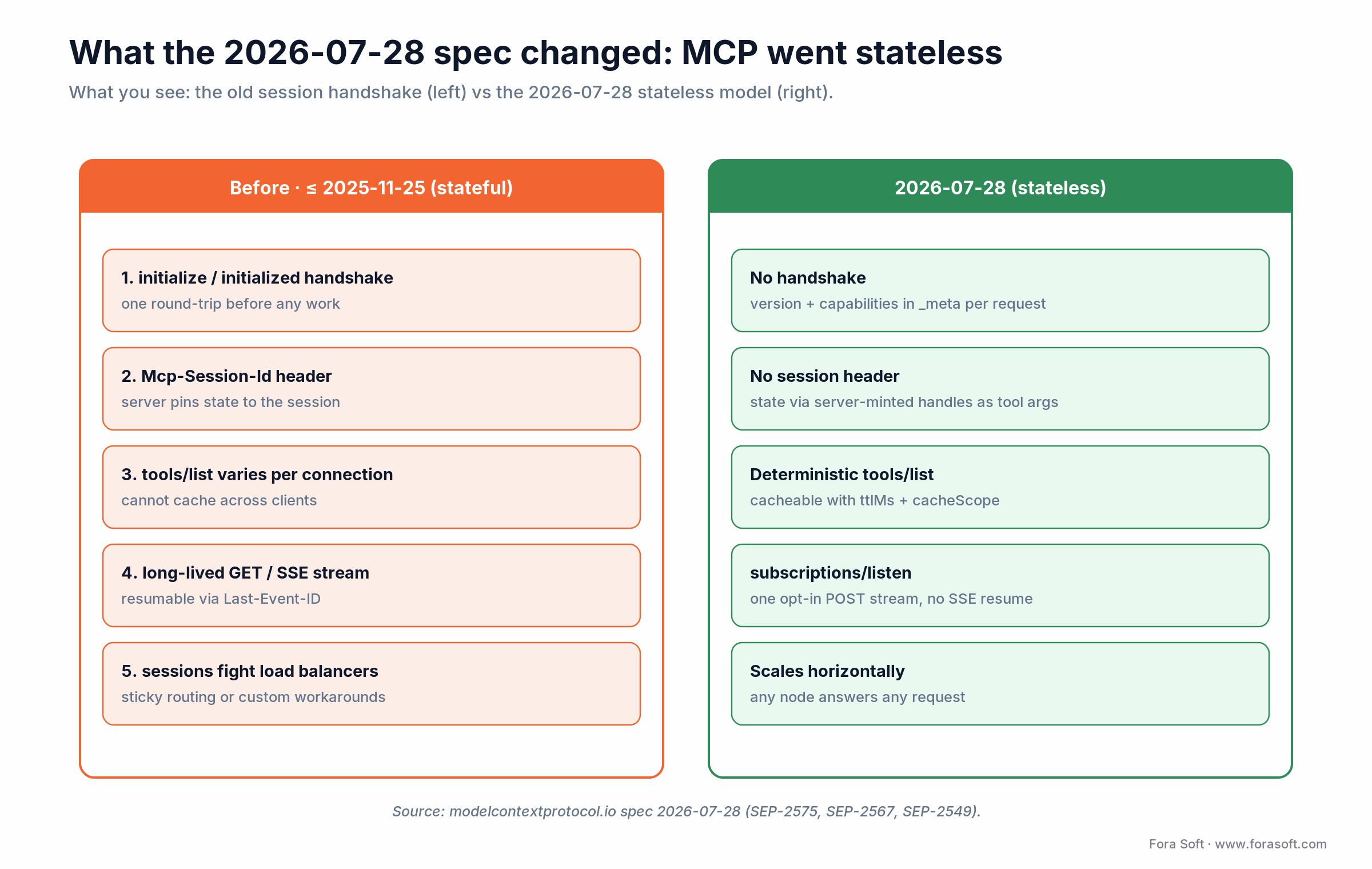
Figure 1. The stateful session model (left) versus the 2026-07-28 stateless model (right).
Why does one protocol change deserve top billing? Because it deletes the hardest part of running MCP at scale. The March 2026 roadmap named the problem in plain terms: stateful sessions fought load balancers, and horizontal scaling needed workarounds. With sessions gone, any node can answer any request, so you scale a server the way you scale a normal HTTPS API. If a guide still tells you to pin sessions to a node, it predates this spec.
Four more changes shape a 2026 build. Results are now cacheable: tools/list and friends return ttlMs and cacheScope, so clients stop re-polling your catalogue. A new server/discover call advertises versions and capabilities without a live connection. The Multi Round-Trip Requests pattern replaces server-initiated calls: your server returns an InputRequiredResult and the client retries with the answer. And the legacy HTTP+SSE transport, along with the Roots, Sampling and Logging features, entered a formal deprecation window of at least twelve months.
Why MCP matters specifically for video and real-time apps
Most MCP guides cover Slack, GitHub and CRM connectors. Video and real-time products have a different shape. They own large catalogues of recordings, live streams, room sessions, camera channels and analytics events. Until MCP, exposing that catalogue to an LLM meant a custom REST wrapper plus a per-vendor function-calling layer. Now you ship one server, and four properties make the vertical harder than generic SaaS.
1. The asset is binary, not text. A video server exposes tools that return URLs, frame timestamps, transcript chunks and snapshot JPEGs, not just JSON rows. The agent rarely reads the video; it queries metadata and hands back a deep link the user clicks.
2. Latency budgets are real. “Move PTZ camera to preset 5” has to finish in well under a second or the operator loses trust. Tool latency sits on the critical path of the experience, which is rarely true for “summarise this Salesforce account.”
3. Multi-tenant isolation is not optional. A surveillance server must never let agent A see camera footage from tenant B. An e-discovery server must never let counsel for case 12 query case 17. The server validates tenant scope on every call, not once at session start. The stateless model actually helps here: because every request carries its own auth context, there is no session to hijack.
4. Privacy and compliance bite harder. A meeting summary holds PII, a telehealth recording holds PHI, a courtroom feed carries a chain of custody. These servers redact, audit and honour retention rules that a generic CRM never has to think about.
Tools, resources, prompts — the three primitives
An MCP server exposes three kinds of capability. Knowing which is which is the difference between a clean server and one that confuses every model that connects.
1. Tools. Functions the model calls to take action: find_recordings(query, time_range, channel), move_ptz(camera_id, preset), create_breakout_room(participants). Each carries a typed JSON schema and a plain-language description; the model reads both to decide when to call it.
2. Resources. Read-only data the model fetches by URI. A camera channel becomes vms://channels/12; a meeting transcript livekit://rooms/abc/transcript; a policy doc kb://policies/data-retention. Resources are listed up front so the model knows what exists.
3. Prompts. Reusable templates the user or host app invokes: a “summarise yesterday’s board meeting” template with parameters, or a “build a security incident report from this footage” flow. They are server-side templates, not the model’s system instructions, so your product enforces a fixed flow without brittle client-side prompt engineering.
Reach for tools when: the model needs to take an action with a side effect (create, move, delete, schedule). Tools are the workhorse of any MCP server.
Reach for resources when: the model needs read-only context you want the host UI to surface in a sidebar, and you want clients to cache it with the new ttlMs hint.
Reach for prompts when: you want a fixed flow (“daily security report,” “post-meeting recap”) that users trigger from a menu instead of typing free-form chat.
Transports in 2026 — stateless streamable HTTP
MCP keeps two transports, and the working group was explicit in the 2026 roadmap that it is not adding more this cycle. Picking the wrong one is the most common architecture mistake we see in reviews.
| Transport | Deployment | Best for | 2026 status |
|---|---|---|---|
| stdio | Local subprocess on the user’s machine | Dev tools, file access, single-user CLI agents | Stable |
| Streamable HTTP (stateless) | HTTPS endpoint, many clients, horizontal scale | Production servers, multi-tenant, enterprise | Default in 2026 |
| HTTP+SSE | Long-lived server-to-client stream | Legacy builds only | Deprecated (12-month window) |
Use stdio when the agent and the server live on the same machine and the tool reaches into local files or developer tooling. Use stateless streamable HTTP for anything you would call a product. The old HTTP+SSE transport is on its way out, so new builds in 2026 skip it. One practical note from the new spec: streamable HTTP now requires Mcp-Method and Mcp-Name headers on every POST, which makes routing and rate-limiting at the gateway far easier.
Reference architecture for an MCP server in production
A production deployment has five layers. The top layer (the agent) and the bottom layer (your real systems) are not yours to design. The middle three are, and the gateway is where most of the engineering discipline lives.
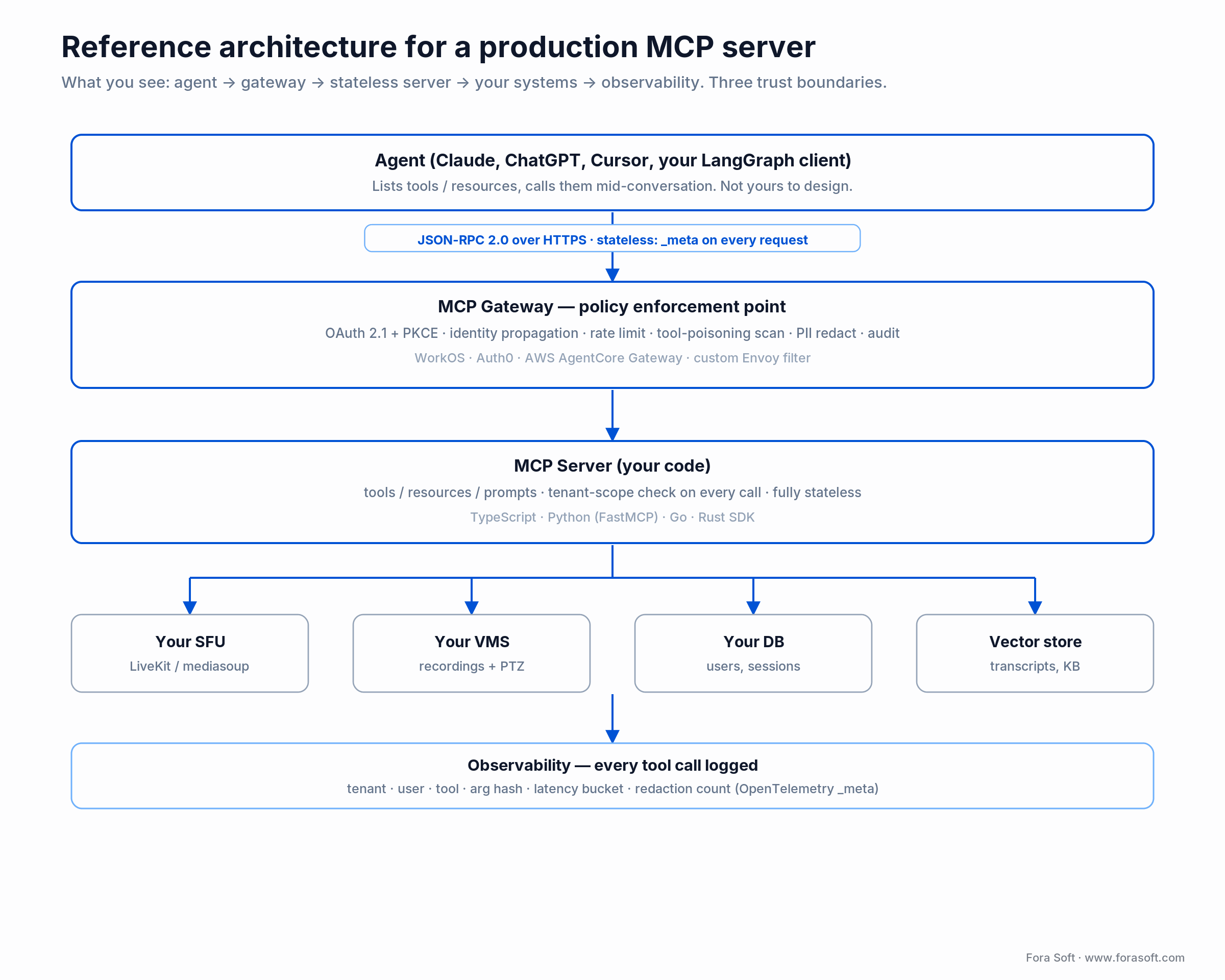
Figure 2. Five-layer reference architecture with three trust boundaries.
Layer 1, the agent. Whatever AI client the user picked. Design as if it could be any of them.
Layer 2, the gateway. The policy enforcement point in front of every server. It validates the OAuth 2.1 token, propagates the user’s identity into the request, applies rate limits, scans for prompt injection and poisoned tool metadata, redacts PII from outgoing results, and writes the audit trail. Skip it and you have handed the keys to the kingdom to the open internet. Teams reach for WorkOS, Auth0, the AWS Bedrock AgentCore Gateway, or a custom Envoy filter here.
Layer 3, the server. Your code. It implements tools/list, tools/call, resources/list and the rest, checks tenant scope on every call, and stays fully stateless. Each request carries its own auth context, so you can run as many replicas as traffic needs.
Layer 4, backends. Your SFU control API, your VMS catalogue, your database, your vector store, and any third-party APIs you already use. Each tool reaches into one or more of these. They are deterministic: the agent asks, the system answers, the agent does not improvise.
Layer 5, observability. Every call is logged with tenant, user, tool, argument hash, latency and redaction count. The 2026 spec added OpenTelemetry trace-context conventions in _meta, so a single trace can now follow a request from the agent through the gateway into your backend.
Have an MCP prototype that needs hardening?
We run a one-week MCP audit (stateless migration, security envelope, tenant isolation, observability) and return a ranked fix list with effort estimates.
Four use cases we ship today
1. Recording-search for legal e-discovery. A VMS like VALT holds tens of thousands of courtroom recordings. Tools: find_recordings(case_id, query, date_range), get_transcript_chunk(recording_id, time_range), create_evidence_package(recording_ids, format). The agent answers “find every moment the defendant referenced the contract in case 24-CV-1402” with deep links and transcript chunks. Compliance: tenant isolation per case, a chain-of-custody log entry per query.
2. PTZ control for construction. An EyeBuild-style deployment with hundreds of solar-powered PTZ cameras. Tools: list_cameras(site_id), move_to_preset(camera_id, preset_id), snapshot(camera_id), find_event(site_id, event_type, time_range). The PM types “show me the gate at 3am last night,” the agent calls find_event, returns the snapshot, then offers to draft an incident report.
3. Meeting summaries for conferencing. Wraps the LiveKit or mediasoup room API. Tools: list_recent_rooms(user_id), get_room_summary(room_id), extract_action_items(room_id), create_followup_meeting(participants, topic, time). “What did we agree on yesterday with Mark?” gets answered without leaving the chat.
4. Analytics queries for OTT. Wraps a broadcaster’s data warehouse. Tools: query_engagement(content_id, time_range, geo), compare_campaigns(a, b), forecast_subs(scenario). The product VP asks “why did engagement drop in Q3 in LATAM?”, the agent runs the query and returns the numbers, and the next question follows naturally.
Custom vs off-the-shelf MCP: the matrix
Composio, Zapier, Glama and others now sell pre-built MCP servers for hundreds of SaaS APIs. The decision is not build-everything or buy-everything; it is per integration. Buy the generic, build the vertical.
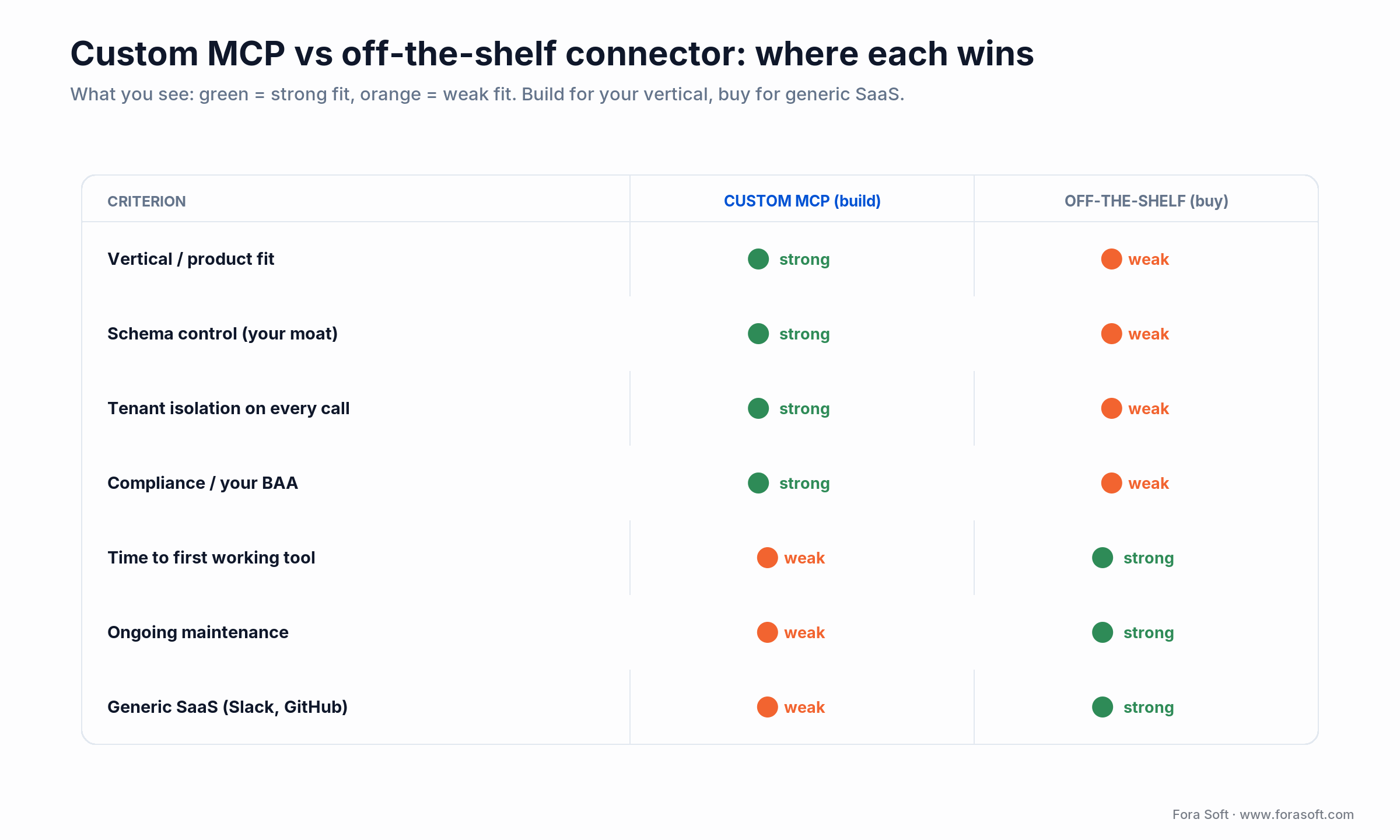
Figure 3. Where a custom build wins and where an off-the-shelf connector wins.
| Criterion | Custom MCP (build) | Off-the-shelf (buy) |
|---|---|---|
| Fit to your vertical product | Exact: your VMS, SFU, room model | Generic; no concept of your domain |
| Schema control (your moat) | You own it end to end | Vendor owns and versions it |
| Tenant isolation per call | Enforced in your data model | Limited to the vendor’s scopes |
| Compliance and your BAA | Self-hosted in your VPC | Hosted; BAA often unavailable |
| Time to first working tool | Days of engineering | Minutes to connect |
| Generic SaaS (Slack, GitHub) | Wasted effort | Exactly what it is for |
Reach for off-the-shelf when: the agent talks to Slack, Gmail, Calendar, GitHub, HubSpot or Notion. The schemas are stable and your engineers are better spent on the vertical.
Build your first MCP server in 30 minutes
The fastest path to a working server is three steps: install the SDK, declare one tool, then run and test it. Python with the official SDK is the shortest route, so start there and graduate to the production shape in the next section.
1. Install and write it. Run pip install "mcp[cli]" (or npm i @modelcontextprotocol/sdk for TypeScript). A hello-world server with one tool is about ten lines of Python.
from mcp.server.fastmcp import FastMCP

mcp = FastMCP("hello-server")

@mcp.tool()
def add(a: int, b: int) -> int:
    """Add two numbers and return the result."""
    return a + b

if __name__ == "__main__":
    mcp.run()   # stdio transport for local development
2. Run and connect it. mcp install server.py registers the server with Claude Desktop, or add it by hand to claude_desktop_config.json.
{
  "mcpServers": {
    "hello-server": { "command": "python", "args": ["server.py"] }
  }
}
3. Test it before any model touches it. mcp dev server.py launches the MCP Inspector in your browser, where you list the tools and call add by hand. When it returns 5 for inputs 2 and 3, you have a working MCP server. That is the 30-minute version. Everything below turns it into something you can put in front of customers: the stateless transport, the gateway, tenant isolation, and the vertical schema.
Code walkthrough — a stateless MCP server for a LiveKit room
The hello-world server runs on your laptop. Production looks different: stateless, tenant-scoped and gateway-fronted. Here is the same idea against a LiveKit deployment in TypeScript. Note the stateless shape, with no session setup and tenant scope read from the per-request auth context the gateway propagates.
import { McpServer } from "@modelcontextprotocol/sdk/server/mcp.js";
import { StreamableHTTPServerTransport } from "@modelcontextprotocol/sdk/server/streamableHttp.js";
import { z } from "zod";
import { RoomServiceClient } from "livekit-server-sdk";

const lk = new RoomServiceClient(
  process.env.LK_URL!, process.env.LK_API_KEY!, process.env.LK_API_SECRET!
);

const server = new McpServer({ name: "forasoft-livekit-mcp", version: "2.0.0" });

server.tool(
  "list_rooms",
  "List active LiveKit rooms for the current tenant.",
  { tenant_id: z.string() },
  async ({ tenant_id }, ctx) => {
    // Tenant scope check on every call — no session to trust.
    if (ctx.auth.tenant !== tenant_id) throw new Error("forbidden");
    const rooms = await lk.listRooms();
    return { content: [{ type: "text",
      text: JSON.stringify(rooms.map(r => ({ name: r.name, n: r.numParticipants }))) }] };
  }
);

server.tool(
  "create_breakout",
  "Create a breakout room and move participants in.",
  { parent_room: z.string(), name: z.string(), participants: z.array(z.string()) },
  async ({ parent_room, name, participants }, ctx) => {
    await lk.createRoom({ name });
    for (const id of participants) await lk.removeParticipant(parent_room, id);
    return { content: [{ type: "text",
      text: `Created ${name} with ${participants.length} participants` }] };
  }
);

// Stateless streamable HTTP: any replica answers any request.
const transport = new StreamableHTTPServerTransport({ stateless: true });
await server.connect(transport);
Four things this short example skips and you must add for production. OAuth 2.1 and identity propagation: the gateway validates the token and passes the identity into ctx.auth. Idempotency keys: if the agent retries create_breakout, you do not want two rooms. Per-tenant rate limits: a misbehaving agent can hammer your control plane. Schema versioning: add new fields as optional, and version a tool name only when you truly must break it.
Security — OAuth 2.1, gateway, tool poisoning
MCP is unusually attack-prone because the caller is, by design, an LLM that follows untrusted instructions. The Cloud Security Alliance and independent researchers name two dominant 2026 attack classes: prompt injection (text that tricks the model into running hidden commands) and tool poisoning (malicious tool descriptions that steer the agent toward unsafe calls). Five controls are non-negotiable.
1. OAuth 2.1 with PKCE for every remote connection. The spec requires it for remote servers, and the 2026 revision hardened it further: authorization servers should return the iss parameter per RFC 9207, clients must validate it, and Dynamic Client Registration is deprecated in favour of Client ID Metadata Documents. Static API keys are unsafe because the agent can be talked into leaking them.
2. Identity propagation. The user’s identity has to reach the server, not just the agent. The gateway issues short-lived per-user tokens scoped to a single server, with claims the server uses for tenant scope. Otherwise one compromised agent token exposes every user’s data.
3. Output redaction. Every result that returns data passes through a redaction layer for PII, PHI, secrets and card numbers. We do it at the gateway: the server returns raw data, the gateway redacts before the response leaves your VPC.
4. Prompt-injection and tool-poisoning defence. Treat any text the agent ingests from a tool as untrusted, and treat tool metadata from third-party servers the same way. Sanitise user-generated content before echoing it, pin the tool catalogue you trust, and keep a human in the loop for destructive or irreversible actions.
5. Audit log. Every call logged with tenant, user, tool, argument hash, response hash, latency and redaction count. Required for compliance and priceless during incident response.
Reach for a gateway when: the server is reachable off your own machine. That is every remote deployment. A local stdio dev tool can skip it; a product cannot.
Cost model — what an MCP build actually runs
Here is the honest arithmetic for a mid-size video product. The build is one-time; the running cost splits into cheap fixed infra and a variable LLM bill. The server itself is a stateless HTTPS endpoint, so one or two small containers serve thousands of agent sessions.
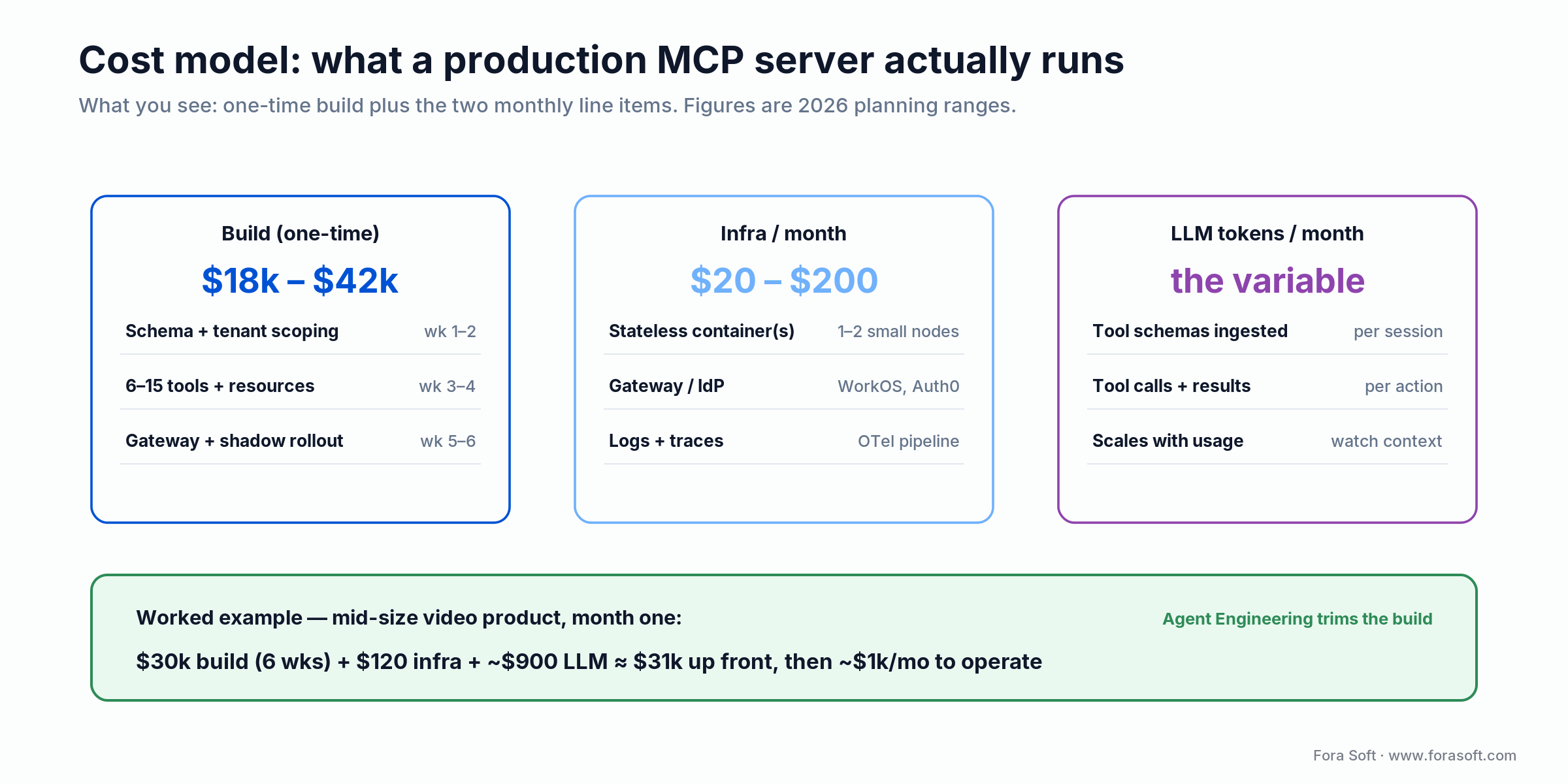
Figure 4. One-time build plus the two monthly line items, with a worked example.
Work the example: a six-week build at our blended rate lands near $30,000 for six to fifteen tools with the gateway and a shadow rollout. Infra runs $120 a month (two small nodes plus a managed IdP and a trace pipeline). The LLM bill is the variable one, because the agent burns input tokens listing your tools and processing results; budget roughly $900 a month at early scale. That is about $31,000 up front, then close to $1,000 a month to operate. We use Agent Engineering internally, which trims the build side below a hand-coded estimate; if a number ever feels shaky, we tell you rather than publish it.
Timeline — prototype to production
A basic server with two or three tools is a 30-minute exercise with the official SDK. A production server is six weeks of focused work, faster when the underlying API is already stable. Here is the shape we run.
| Phase | What ships | Output |
|---|---|---|
| Weeks 1–2 | Schema design, tenant-scoping rules, OAuth gateway behind your IdP | Signed-off tool contracts |
| Weeks 3–4 | Six to fifteen tools plus resources, redaction, observability | Working server in staging |
| Weeks 5–6 | Shadow rollout to a pilot group, then the full team | Production, with SLOs live |
Mini case — surveillance MCP for a construction PM
A construction-tech client running 220 PTZ cameras across 18 sites came to us in late 2025 with a time problem. Their PMs spent roughly two hours a day inside the surveillance dashboard hunting for incidents: after-hours intrusion, equipment moved off-site, weather damage. The VP of Operations wanted a Claude-Desktop-style assistant that could simply answer “what happened on site B last night?”
The six-week build. Weeks 1–2 covered schema design, tenant-scoping rules, and an OAuth gateway behind their existing IdP. Weeks 3–4 delivered six tools (list_sites, list_cameras, find_event, snapshot, create_incident_report, notify_subcontractor) and three resources. Weeks 5–6 ran a shadow rollout to two pilot PMs, then the full team.
Outcome at 60 days. Dashboard time dropped from about two hours a day to roughly 22 minutes. Incident-report drafting, the job PMs hate most, fell from about 25 minutes per report to four. The agent handled most routine questions without a human step, and the client expanded scope to a second server for their procurement system. Want a similar assessment for your stack? Book a 30-minute call, or read how we approach video surveillance development.
Want an MCP server for your product, not a generic one?
We have shipped production MCP servers across video, conferencing, surveillance, broadcasting and telehealth. Let us scope yours against the 2026 stateless spec.
A decision framework — ship MCP in five questions
Walk these five questions top to bottom. Five yes answers mean build a custom server; any no sends you to a cheaper option.
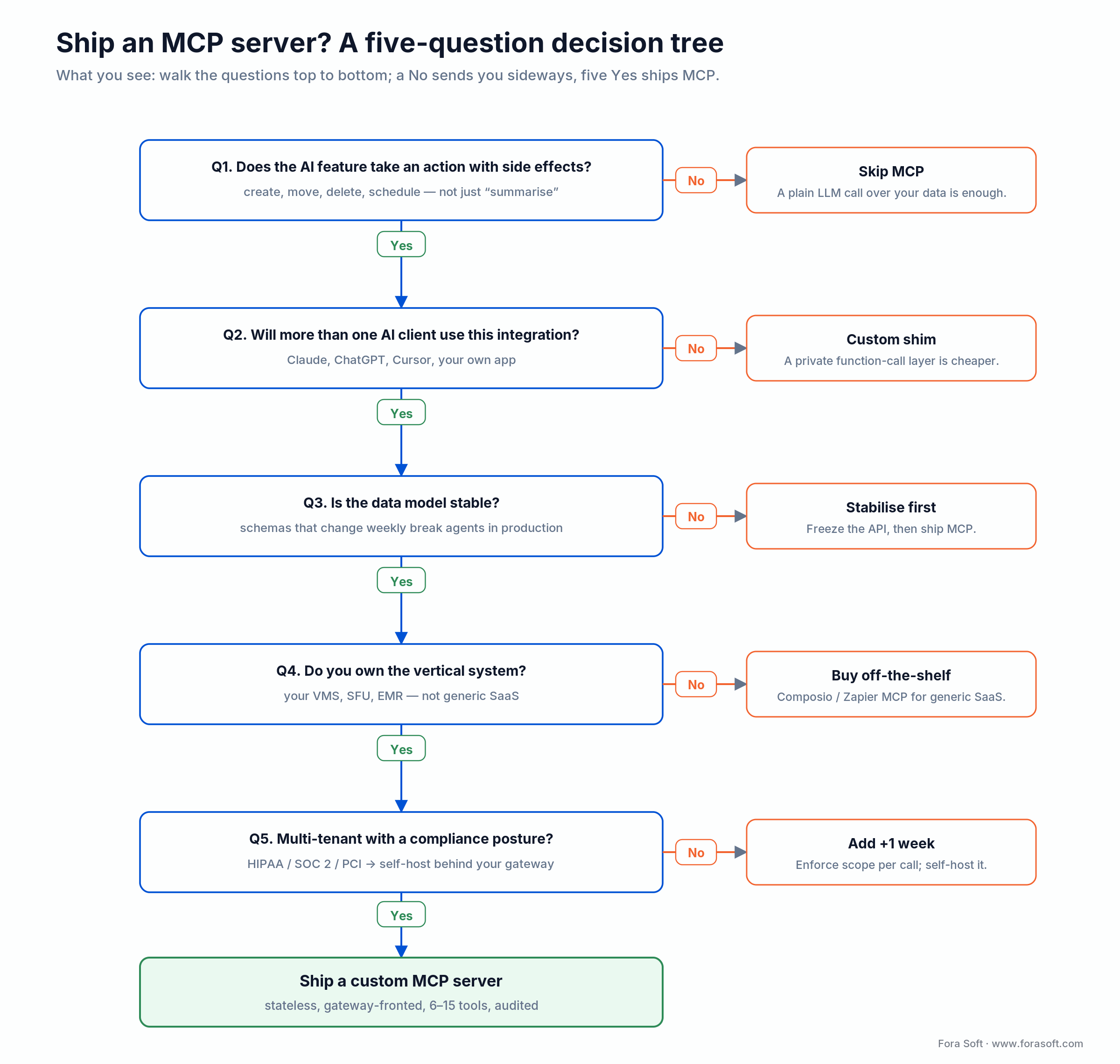
Figure 5. Five questions that decide build, buy, or skip.
Q1. Does the AI feature take an action with a side effect? Create, move, delete, schedule means yes, build. If it only summarises or explains, a plain LLM call over your data may be enough.
Q2. Will more than one AI client use it? If users on Claude, ChatGPT, Cursor and your own product all need the same backend, MCP saves you N adapters. One client forever means a private function-call layer is cheaper.
Q3. Is the data model stable? If your API changes weekly, the tool schemas change with it and every change risks breaking agents in production. Freeze the model first.
Q4. Do you own the vertical system? Your VMS, SFU or EMR is a build. Generic SaaS is a buy.
Q5. Multi-tenant with a compliance posture? HIPAA, SOC 2 or PCI pushes you to a self-hosted server in your own VPC behind your own gateway. Add a week for the isolation and audit work.
Pitfalls to avoid
1. Exposing the server directly to the internet. No gateway means no auth, no rate limit, no audit, no redaction. Treat “MCP server on the open web” the way you would treat “Postgres open to the internet.”
2. Bloated tool catalogues. Sixty tools confuse every model that connects; selection gets worse and latency climbs as the schema grows. Aim for six to fifteen tools per server and split by domain when you have more.
3. Tools that return huge blobs. A 50,000-token transcript blows the model’s context. Return a summary plus a URI the model or user can drill into, and page the long form.
4. Designing for sessions. This was the classic scaling trap, and the 2026-07-28 spec removed it: there are no protocol sessions anymore. Build stateless from day one and pass any state as a server-minted handle, rather than porting an old session design forward.
5. Forgetting to redact. A summary tool that returns “Sarah gave her SSN as 123-45-6789 on the call” just leaked PII to an LLM provider. Redact on the way out, every time.
KPIs to measure
Quality KPIs. Tool-call success rate above 96 %. Mean tool latency under 300 ms for control-plane tools and under 800 ms for query tools. Schema-mismatch rate below 2 %: when the model passes bad arguments often, the tool description is unclear, not the model.
Business KPIs. Containment rate, the share of agent sessions resolved without falling back to the old UI, with 70 %+ a good target. Time-on-task versus the manual path, aiming for a 50 % cut. Adoption, the fraction of eligible users who used the agent in the last seven days.
Reliability KPIs. Gateway availability at 99.95 %. Server p99 latency under 1.5 s. Token-rotation success: short-lived tokens must rotate cleanly, or sessions break mid-conversation. Statelessness makes this easier, since a failed node no longer strands a session.
When NOT to ship an MCP server
Single-LLM, single-app deployments. If your AI feature lives entirely inside your own product and only ever talks to your own model, a private function-calling layer is simpler and tighter. Add MCP later if you open up to external clients.
Volatile data models. If the underlying API changes weekly, keeping tool schemas in sync costs more than it returns. Stabilise the API first; MCP rewards mature systems.
Pure read-only context. If the agent only retrieves documents and never acts, a vector store plus retrieval is lighter than a full server. Reserve MCP for the action surface, and pair it with our context-engineering guide and the AI for Video Engineering course.
FAQ
What is an MCP server?
An MCP server is a small program that exposes tools, resources and prompt templates to an AI agent over an open JSON-RPC 2.0 contract. The agent calls the server, the server runs the request against your real systems, and the agent gets a structured result. Build one server and any MCP-aware client can use it.
What changed in the 2026-07-28 MCP spec?
The protocol became stateless. The initialize handshake and the session header were removed, protocol version and capabilities now travel in _meta per request, list results are cacheable, and the legacy HTTP+SSE transport plus the Roots, Sampling and Logging features entered a 12-month deprecation window.
Is MCP only for Claude?
No. Anthropic introduced it, but it is open and now governed under the Linux Foundation. ChatGPT, Cursor, Zed, Cline, Continue and many agent frameworks support MCP servers, and OpenAI, Google and Microsoft have all shipped support.
How long does it take to build a production MCP server?
A basic server with two or three tools takes about 30 minutes with the official SDK. A production server with an OAuth gateway, tenant isolation, redaction, observability and a sensible tool catalogue is about six weeks, faster when the underlying API is already stable.
Should you use Composio or build your own MCP server?
Use Composio, Zapier MCP, Glama or Pipedream for generic SaaS such as Slack, GitHub, Calendar and Gmail. Build your own when the integration touches your vertical product: your VMS, SFU, EMR or custom backend. The vertical schema is your moat.
Can MCP work for HIPAA workloads?
Yes, if you self-host the server in your VPC, sign a BAA with the LLM provider, redact PHI on the way out, and log every call. Off-the-shelf hosted MCP services usually do not have your BAA. See our HIPAA-compliant video platform guide for the BAA architecture.
How do you stop prompt-injection and tool-poisoning attacks?
Treat tool output and third-party tool metadata as untrusted. Sanitise user-generated content before echoing it, pin the tool catalogue you trust rather than auto-loading servers, scan requests at the gateway, and keep a human approval step for destructive actions.
What does an MCP server cost to run?
The server is a stateless HTTPS endpoint, so one or two small containers handle thousands of sessions. Budget $20 to $200 a month for infra at startup scale; the variable cost is the LLM tokens the agent burns listing tools, calling them and processing results.
What to Read Next
SDK
LiveKit AI Agents Playbook
The SFU layer that pairs naturally with an MCP-driven agent.
Voice AI
OpenAI Realtime API Production Guide
The voice-agent companion to your MCP server.
Architecture
Context Engineering for AI Agents
Designing the resource shape that makes MCP servers shine.
Streaming
WHIP & WHEP: Replace RTMP
The transport-layer cousin of MCP; modernise both at once.
Compliance
HIPAA Video Platforms
If your MCP touches PHI, start here for the BAA architecture.
Ready to build an MCP server for your video stack?
MCP is the right answer when your AI feature has to act on a system you own. Pick stateless streamable HTTP, wrap the server in a gateway with OAuth 2.1 and identity propagation, keep the catalogue under fifteen tools, defend against prompt injection and tool poisoning, audit every call, and split by domain instead of building one mega-server. The protocol is now stable under the Linux Foundation and the SDKs are mature; the engineering risk lives in the security envelope and the schema discipline.
For video, conferencing, surveillance and real-time products, MCP opens workflows that custom function-calling layers could not justify before: recording search, PTZ from chat, meeting recaps with action items, analytics by conversation. The vertical specificity is the moat your competitors will not copy, and the 2026 stateless model finally makes it cheap to run at scale.
Want a shipping plan for your MCP server?
Send us your platform and one user story you want the agent to handle. We return a one-page architecture, a security envelope and a shipping plan in 48 hours, free.