Key takeaways
• The OpenAI Realtime API is GA and production-ready. It went generally available on 28 August 2025; the current model is gpt-realtime-2.1 — the reasoning-grade 2.x line (gpt-realtime-2 landed May 2026, 2.1 in July) — plus a cheaper gpt-realtime-2.1-mini.
• Pricing is stable and the cache discount is the big lever. Audio in is $32/M tokens, audio out $64/M, cached input $0.40/M — an 80× drop. Wire prompt caching correctly and a typical agent runs about $0.06–$0.10 per conversational minute in model cost.
• 800 ms voice-to-voice is achievable, not free. The API gives you WebRTC, WebSocket and (now GA) SIP transports, native async tool calls and remote MCP. Long sessions still drift; you budget latency stage by stage and bound the context.
• The audio path is still not HIPAA-eligible. As of August 2026, neither OpenAI’s nor Azure’s BAA covers the Realtime audio modality. Healthcare voice agents route audio through HIPAA-eligible speech-to-text and text-to-speech, or wait.
• Below ~10k minutes/month, a platform beats DIY. Vapi or Retell ship faster and cost less at low volume. Above the crossover, an OpenAI Realtime + LiveKit stack wins on cost and control. We work the exact math below.
Why Fora Soft wrote this playbook
Fora Soft has built video and real-time communication products since 2005 — 250+ projects, most of them involving live audio in one form or another. That experience includes TransLinguist, a real-time multilingual interpretation platform running on the NHS UK national framework, and Nucleus, an on-prem communications platform handling 600M+ AI phone minutes a month. We know where voice pipelines break because we have had to fix them at scale.
In the last twelve months we shipped several production voice agents on the OpenAI Realtime API and more on LiveKit Agents talking to OpenAI’s text models. We also ran two migrations in opposite directions: one off Vapi onto a self-managed OpenAI Realtime + LiveKit stack to cut cost, and one the other way — a healthcare client where the HIPAA gap forced a retreat to a chained pipeline. The numbers, latencies and design calls in this guide come from those builds, not from a docs page.
If you are scoping a voice agent in 2026, this playbook tells you when gpt-realtime is the right pick, what production architecture beats the latency target, where the money actually goes, and the three places where the honest answer is “use something else.”
Need a voice agent that ships in 8 weeks, not 8 months?
Send us your use case, expected call volume and compliance constraints. We’ll return a one-page architecture, cost forecast and 8-week plan within 48 hours, free.
What the gpt-realtime GA changed
OpenAI’s Realtime API spent most of 2024–2025 in public beta as gpt-4o-realtime-preview: high price, uneven latency, a habit of talking over the user. On 28 August 2025 OpenAI made the Realtime API generally available and shipped gpt-realtime, its production speech-to-speech model. Five things changed that matter for a real build.
1. Price dropped 20%. Audio input is $32 per million tokens (about $0.02 per minute of speech heard), audio output $64 per million (about $0.077 per minute spoken). Cached input is $0.40 per million — an 80× discount, and the single biggest cost lever in production.
2. Function calling got reliable — and asynchronous. The model calls your tools mid-conversation and, since GA, long-running calls no longer freeze the session: it keeps the conversation fluid while a slow tool resolves. At GA, gpt-realtime scored 66.5% on the ComplexFuncBench audio eval versus 49.7% for the December 2024 preview; the 2.x generation pushed function calling further still.
3. Remote MCP is native. You pass a remote Model Context Protocol server URL into the session and the API handles tool calls for you — point the session at a different MCP server and those tools appear with no glue code. This is how we now wire a voice agent into an existing tool surface without rebuilding integrations.
4. Image input and two new voices. The model can take a screenshot or photo alongside audio (“read the text in this image”), and OpenAI added two voices, Cedar and Marin, on top of the eight it refreshed — all preset, no cloning. Named production users on OpenAI’s own page include Zillow, T-Mobile, StubHub, Oscar Health and Lemonade.
5. SIP is GA, not beta. Phone calling over Session Initiation Protocol shipped as a supported feature at GA. You can connect a number to a voice agent without bringing your own media stack — good for a receptionist line, though a contact-centre product still wants a real telephony layer (Twilio, Telnyx) for routing, recording and DID pools. Full details are in the OpenAI Realtime docs.
New in 2026: gpt-realtime-2.1 and the mini model
The GA gpt-realtime model was the start of the line, not the end. On 8 May 2026 OpenAI shipped gpt-realtime-2, its first reasoning-grade speech-to-speech model — GPT-5-class reasoning in a live voice loop, a 128k-token context window and an adjustable reasoning-effort control. It scores 96.6% on the Big Bench Audio reasoning benchmark (Artificial Analysis), up from 82.8% at the 2025 GA. In July 2026 gpt-realtime-2.1 refined it further — better alphanumeric recognition, silence and noise handling, and interruption behaviour — and OpenAI added a distilled gpt-realtime-2.1-mini. p95 latency across the line is down roughly 25%.
The full gpt-realtime-2.1 keeps the $32/$0.40/$64 audio pricing. The mini is about a third of the price: $10 per million audio input, $0.30 cached, $20 per million output. It is reasoning-capable but tuned for speed, so the pattern we use is a two-tier router — mini handles greetings, FAQ and simple lookups, the full model takes over when reasoning or tool orchestration matters, and the adjustable reasoning effort lets you dial cost against quality per turn. On a chatty receptionist, routing 60% of turns to mini cuts the model bill by roughly a third with no perceptible quality drop.
Reach for gpt-realtime-2.1-mini when: the turn is a greeting, a menu, an FAQ answer or a single lookup. Route to the full model only when reasoning, multi-step tool use or nuanced tone actually matters. The price gap is 3×, so the routing pays for itself fast.
Speech-to-speech vs the chained pipeline
Voice agents historically chained three models — speech-to-text (STT) like Deepgram or Whisper, a text-only LLM, and text-to-speech (TTS) like ElevenLabs or Cartesia. Each hop adds latency, each hop has its own failure modes, and tone is lost between the user’s voice and the model’s reply.
The Realtime API replaces all three with a single speech-to-speech model: raw audio in, raw audio out, reasoning in between. The latency floor drops because there’s no STT-finalise wait and no TTS startup delay; the expressiveness rises because the model hears emotion and produces it. And the reasoning gap has closed: the current gpt-realtime-2 generation scores 96.6% on the Big Bench Audio reasoning eval — up from 82.8% at the 2025 GA and 65.6% on the December 2024 preview.
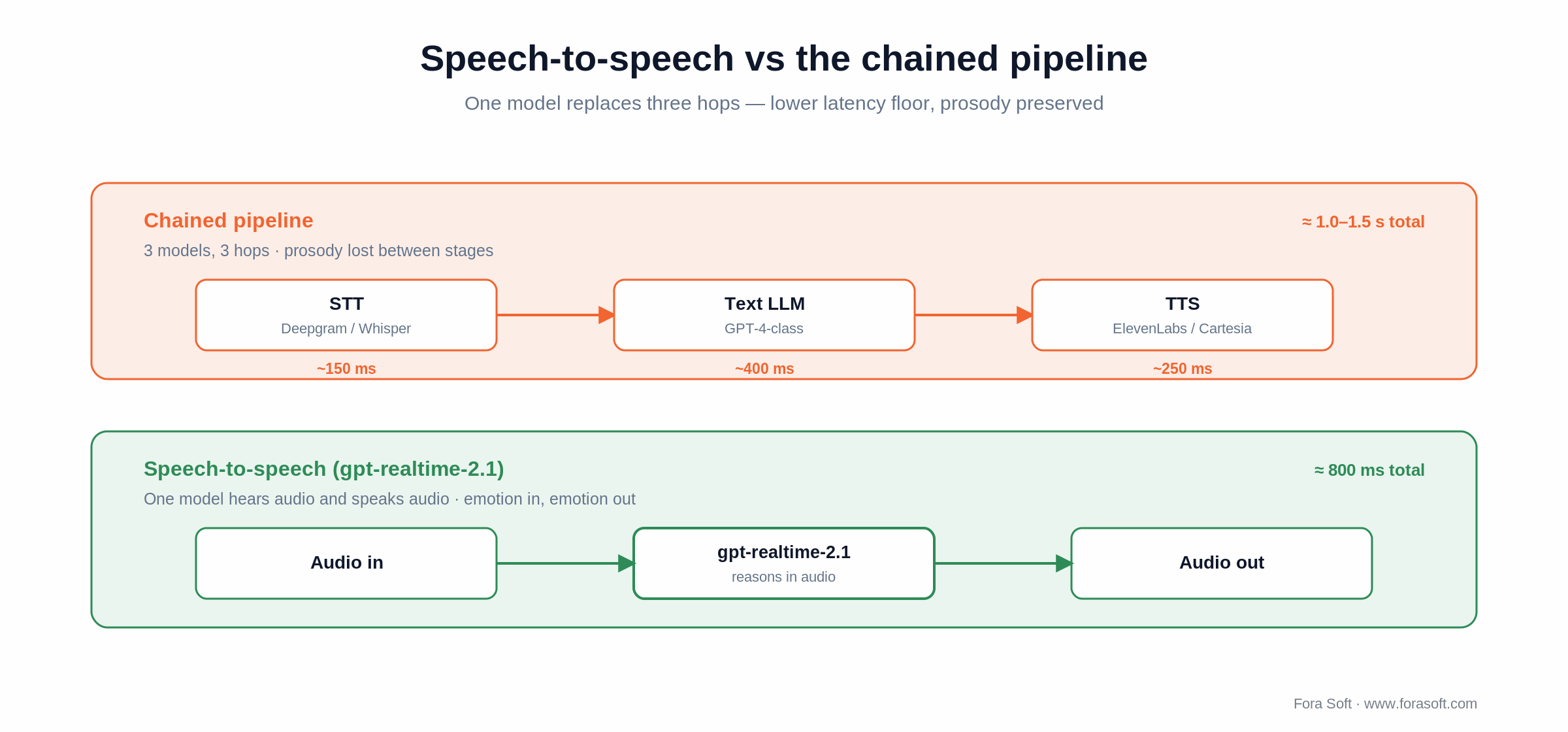
Figure 1. The chained pipeline stacks three model hops; speech-to-speech collapses them into one, halving the latency floor.
It’s not a free trade. Speech-to-speech is harder to debug because the text intermediate is implicit; tool-call accuracy, though much improved, is still a touch below a tool-tuned text model; and voice is limited to OpenAI’s preset catalogue. When custom voice cloning or near-deterministic tool reliability matters more than the last 200 ms, the chained pipeline still wins.
Reach for speech-to-speech (gpt-realtime) when: the conversation is open-ended, tone matters (sales, coaching, support empathy) and your tool calls are simple lookups. Sub-second voice-to-voice is your selling point.
Reach for the chained pipeline (Deepgram + text LLM + ElevenLabs) when: compliance needs HIPAA-eligible STT/TTS the Realtime audio path doesn’t have, you need a custom-cloned voice, or tool-call reliability has to be near-deterministic.
WebRTC vs WebSocket vs SIP — pick your transport
The Realtime API has three transport modes. Each maps cleanly to a use case, and choosing wrong forces latency or compliance trouble no prompt engineering will fix.
| Transport | Where the connection lives | Best for | Latency cost | Server-side control |
|---|---|---|---|---|
| WebRTC | Browser/app ↔ OpenAI direct | Web/mobile UX, demos, internal tools | Lowest (no server hop) | Limited — ephemeral keys, edge tokens |
| WebSocket | Your server ↔ OpenAI | Compliance logging, multi-tool orchestration, business-policy injection | + ~80–150 ms via your server | Full — you mediate every event |
| SIP (GA) | Phone number ↔ OpenAI | PSTN voice agents (receptionist, after-hours line, simple IVR) | + telephony hop (~50–100 ms) | Limited routing & recording features |
| LiveKit/SFU + WebRTC | Browser ↔ SFU ↔ agent server ↔ OpenAI | Multi-party calls, voice in video conferences, server-side tools and audit | + SFU hop (~30 ms) & agent hop (~50 ms) | Full — agent runs in your VPC |
For most production deployments we end up on the LiveKit + WebRTC pattern. It gives the user-perceived latency of WebRTC plus the server-side control of WebSocket: the agent runs on your infrastructure, calls OpenAI over WebSocket, mediates tool calls, redacts PII, writes the audit log, and forwards audio to the user through the SFU. Our LiveKit AI Agents playbook and the LiveKit for AI Agents guide cover the SFU side end to end.
Reach for WebRTC direct when: the use case is a quick prototype or internal tool, you don’t need to mediate calls server-side, and you can ship ephemeral keys safely from your backend.
Reach for WebSocket via your server when: compliance, audit logging, multi-tool orchestration or business-policy injection sits on the critical path. The 80–150 ms hop is worth it.
Reference architecture — what production looks like
A production-grade voice agent has six layers: client, edge media, agent runtime, model API, tool plane and observability. Each does one job, and the boundaries between them are where most of the bugs live.
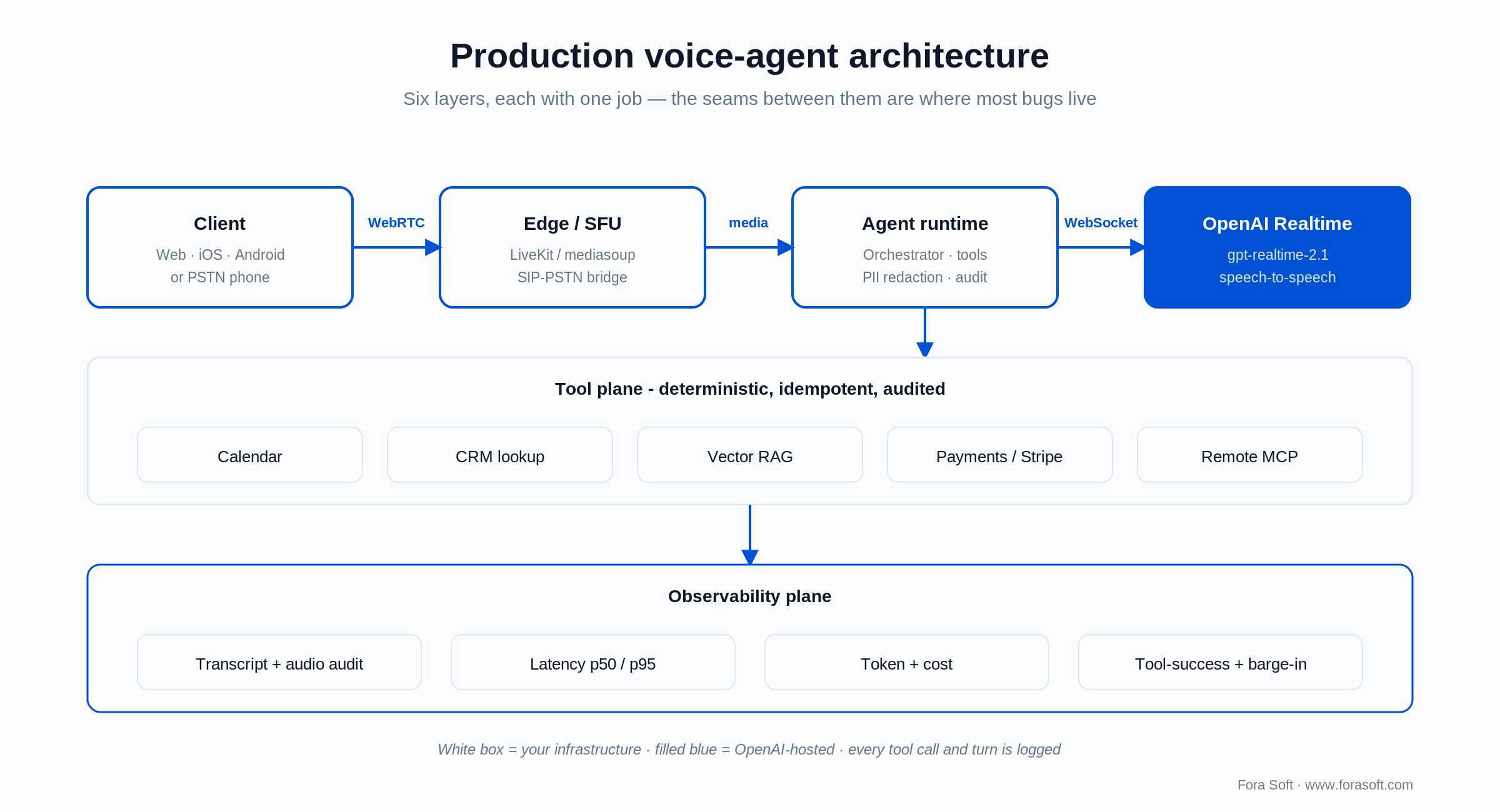
Figure 2. The six layers of a production voice agent. White boxes are your infrastructure; the filled box is OpenAI-hosted.
1. Client. Browser, mobile app or telephony endpoint. Audio capture is 16-bit PCM at 24 kHz (the API’s native rate; 48 kHz wastes bandwidth and adds resampling latency). Echo cancellation is non-negotiable on the client — without it, the agent hears its own voice and barges in on itself.
2. Edge / SFU. A LiveKit or mediasoup SFU sits between the client and your agent runtime. It handles fan-out (one user to multiple subscribers — e.g. a human supervisor listening in on a coaching call), TURN/STUN for NAT traversal, and room isolation. SIP-PSTN bridges drop phone callers into the same agent room as browser users.
3. Agent runtime. A long-running process — LiveKit Agents, a custom Node/Python service, or Pipecat — that pulls audio off the SFU, drives the OpenAI WebSocket, dispatches tool calls, redacts PII and writes the audit trail. This is where your business logic and your compliance both live.
4. Model API. The OpenAI Realtime endpoint. The runtime opens a WebSocket, sends a session.update with prompt, tools and voice, and streams audio. The model streams audio back as it generates — there’s no “wait for the whole response” step.
5. Tool plane. Calendar, CRM, a vector store for RAG, a payment provider, internal APIs, and remote MCP servers. Each tool is exposed to the model as a JSON schema; the model picks one mid-conversation and the runtime executes it. Tools must be idempotent (the model may retry), strictly typed (it may hallucinate fields) and audited (you need the trail for compliance and debugging).
6. Observability plane. Helicone, LangSmith or your own stack capturing every session: full audio, full transcript, every tool call, latency p50/p95 per turn, token usage and cost per session. We once lost two days of debugging on a production agent because nobody enabled audio capture. Don’t skip it.
In code, the runtime opens the WebSocket and sends one session.update with the model, a voice, turn detection and the tools (including a remote MCP server). Everything after that is a stream of audio and events:
{
  "type": "session.update",
  "session": {
    "type": "realtime",
    "model": "gpt-realtime-2.1",
    "audio": { "output": { "voice": "cedar" } },
    "turn_detection": { "type": "semantic_vad" },
    "tools": [
      { "type": "mcp", "server_label": "crm",
        "server_url": "https://mcp.example.com" },
      { "type": "function", "name": "book_appointment" }
    ]
  }
}
On barge-in, the runtime sends a response.cancel the moment it detects user speech and flushes the client’s playout buffer — the model has usually streamed a few hundred milliseconds ahead of what the caller has heard. WebRTC, WebSocket and SIP all drive the same event surface, so this loop is identical whichever transport you pick.
Latency budget — how to actually hit 800 ms
800 ms voice-to-voice is the threshold above which conversation feels laggy. Humans reply to each other in roughly 200 ms; 800 ms reads as “digital but fine.” Above 1.2 s, users start talking over the agent. Here is the budget we engineer against, stage by stage.
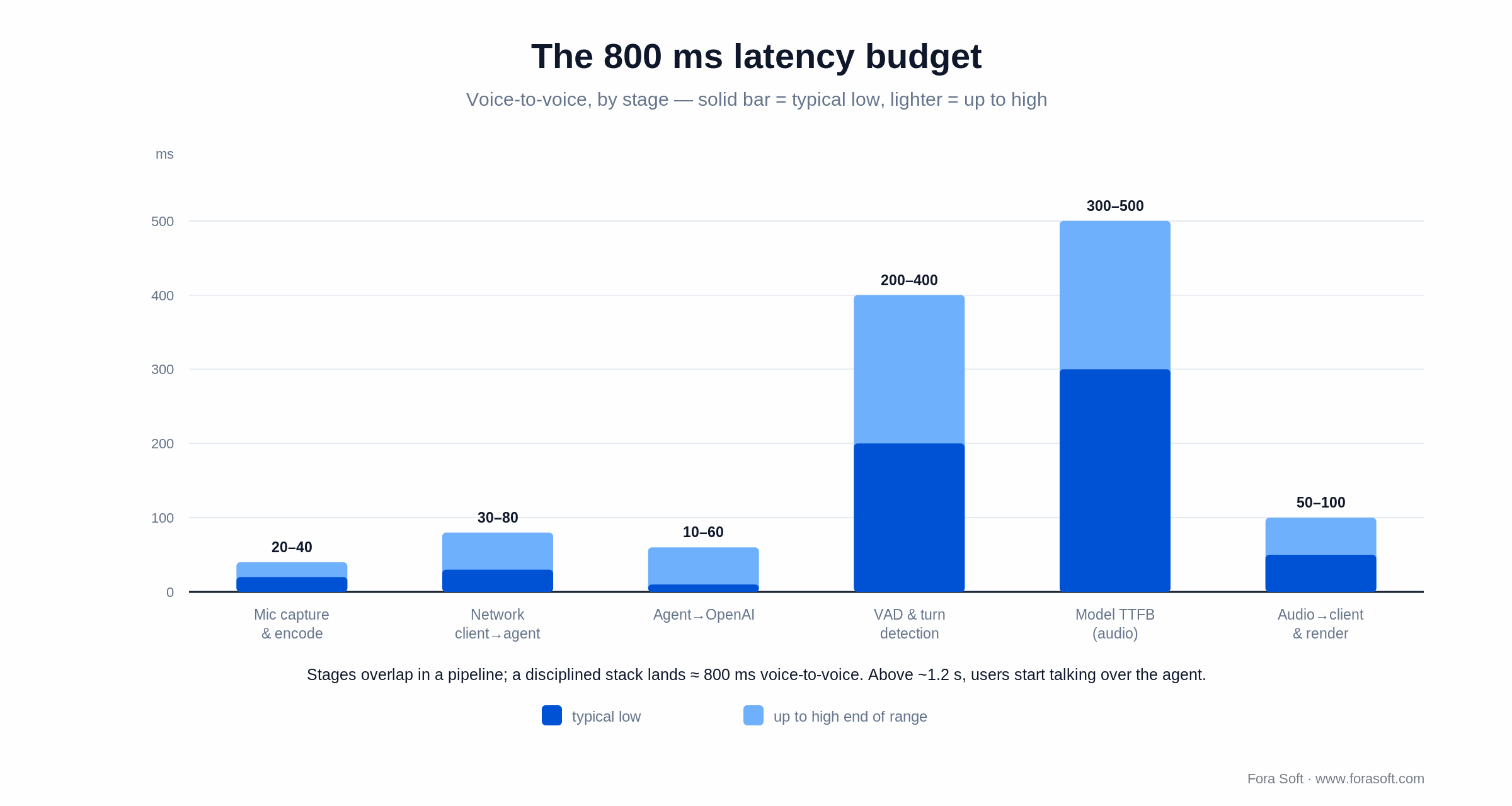
Figure 3. The 800 ms budget by stage. VAD/turn detection and model time-to-first-byte dominate; everything else is single- or double-digit ms.
| Stage | Typical | How to compress it |
|---|---|---|
| Mic capture & encode | 20–40 ms | Native echo cancellation, 24kHz PCM, no resample |
| Network: client → agent | 30–80 ms | SFU close to the user (regional), QUIC/WebRTC |
| Agent → OpenAI WS | 10–60 ms | Agent in the same region as the OpenAI endpoint |
| VAD & turn detection | 200–400 ms | Server-VAD threshold tuning OR client push-to-talk |
| Model TTFB (audio) | ~300–500 ms | Cached prompt, tight system instructions, 2.1 snapshot |
| Audio → client & render | 50–100 ms | Stream audio chunks; don’t wait for response.done |
| Total target | ~800 ms | Achievable with discipline; long sessions drift higher |
Two traps deserve separate calling out.
Long-session drift. Reports from the OpenAI developer forum and our own production data show median turn latency climbing from ~800 ms early in a session to over 2 s after 20+ turns, because each turn re-includes prior context. GA added fine-grained context control — token limits and multi-turn truncation — so you now bound the active context natively instead of hand-rolling pruning. We still rotate sessions every 8–12 turns by reseeding a summary into a fresh session on the longest calls.
Tool-call latency. A tool call adds your tool’s round-trip. Async function calling means the model keeps the conversation alive while a slow tool resolves, but the user still hears a gap if the answer depends on that result. Front-load common lookups (greet the caller with their name already known), parallelise batched tool calls, and speak a short “let me check that” while the result lands.
Latency drifting in your voice-agent prototype?
We’ll run a one-week instrumented latency audit, return a ranked fix list, and — if it makes sense — ship a prototype patch in week two.
Cost model — the real $/minute
Headline pricing is misleading; actual cost depends on the talk ratio, the prompt-cache hit rate and which model handles each turn. Here is the real math, with a worked example from a build we shipped.
The published rates (gpt-realtime-2.1, 2026): $32 per million audio input tokens, $0.40 cached, $64 per million audio output. A minute of audio is roughly 600 input tokens heard and roughly 1,200 output tokens spoken. So listening costs about $32/M × 600 = $0.019/min and speaking about $64/M × 1,200 = $0.077/min. Model cost lands around $0.06–$0.10 per conversational minute once you account for the agent/user talk split and cached context.
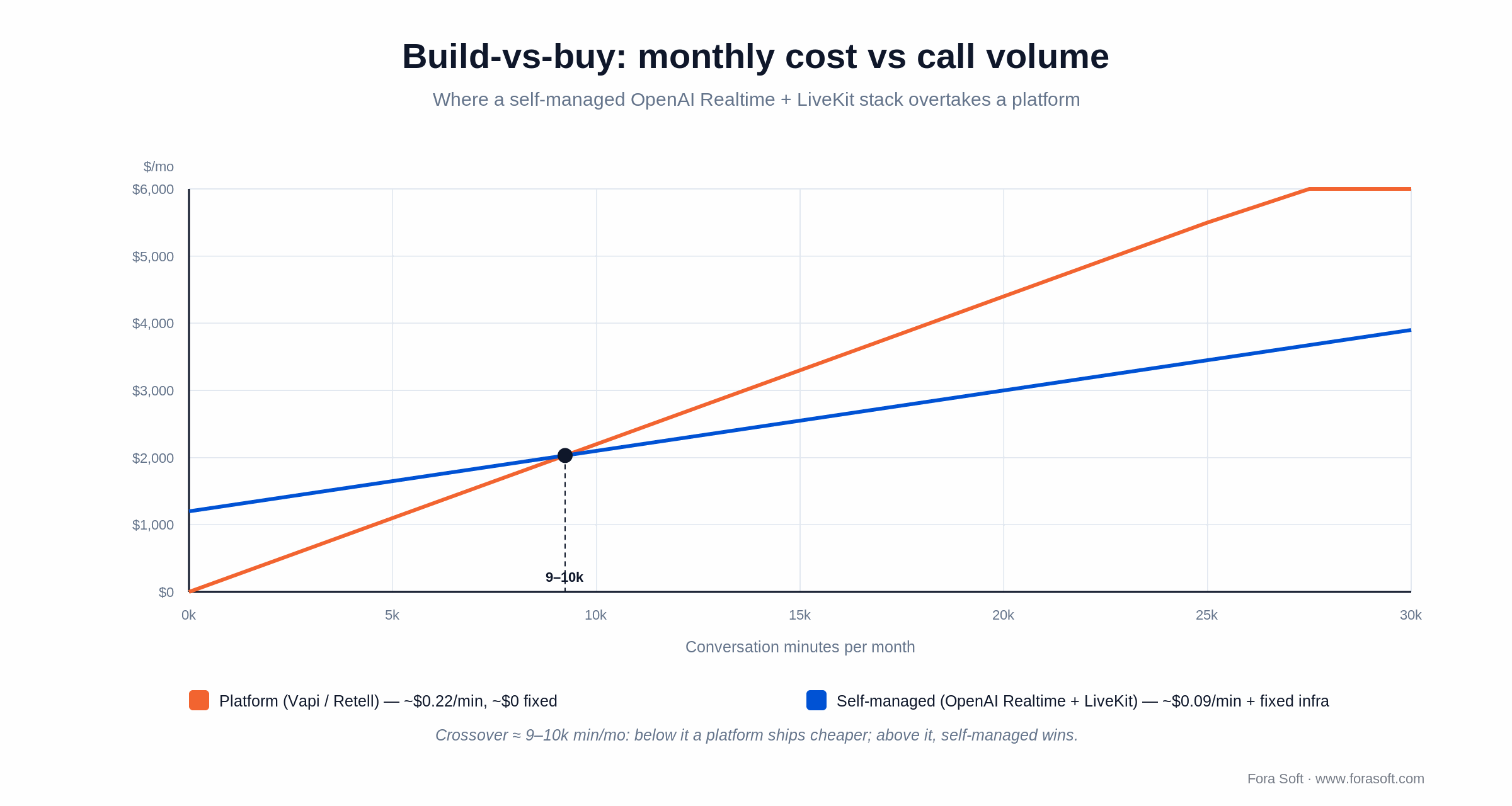
Figure 4. A platform’s near-zero fixed cost wins at low volume; a self-managed stack overtakes it around 9–10k minutes/month.
Worked example — an AI receptionist for a dental practice. 800 calls/month, 4 minutes each, so 3,200 conversation-minutes. The agent speaks roughly 60% of the time, the caller 40%. Output: 3,200 × 0.6 × $0.077 ≈ $148. Input: 3,200 × 0.4 × $0.019 ≈ $24. Cached system prompt and tool schemas add only a few dollars. Model subtotal ≈ $180/month. Add ~$32 telephony and ~$50 for a self-hosted LiveKit/SFU and you land near $260/month all-in — about $0.08/min, or $0.33 per call. Route the routine 60% of turns to the mini model and the model bill drops by roughly a third.
Per-call economics. $0.33 per call against a human after-hours receptionist at $20–$25/hour: the agent pays for itself even if it only handles a fraction of out-of-hours volume. For the full breakdown by talk pattern and cache rate, see our companion OpenAI Realtime API pricing analysis.
Crossover vs Vapi/Retell. Platform all-in cost is $0.10–$0.31/min once you add LLM tokens, premium voices and telephony pass-through. At low volume that beats a self-managed stack because the platform’s fixed cost is near zero. A self-managed OpenAI Realtime + LiveKit stack carries fixed infra and ops but a lower per-minute rate, so it overtakes the platform around 9–10k minutes/month (Figure 4). That line counts running cost only — model tokens plus a self-hosted LiveKit/SFU (roughly $500/month fixed). Amortise a full from-scratch build — engineering, monitoring, on-call — and the break-even shifts well higher, which is why a pure build-vs-buy analysis quotes a larger threshold than the opex-only crossover here. Below the line, ship on a platform; above it, own the stack.
Interruptions, barge-in and turn detection
A voice agent that can’t handle interruptions feels robotic in 30 seconds and unbearable in three minutes. Three things you have to engineer: voice activity detection (VAD), turn detection and barge-in cancellation.
1. Voice activity detection. The base layer — is the user speaking right now? The API offers server-side VAD with a configurable threshold. Set it too low and false positives spike (a throat-clear reads as speech); too high and the agent waits too long. We tune around 0.5 and instrument the false-positive rate via the audit log.
2. Turn detection. Has the user finished, or just paused? Naive VAD with a 500 ms silence window cuts off slow speakers; a 1.5 s window feels laggy to fast ones. Semantic turn detection — using the model’s own listening to predict when the user is done — is steadier but adds 100–200 ms. We use it on customer-facing deployments and accept the hit.
3. Barge-in cancellation. When the user speaks over the agent, the agent must stop, discard the in-flight audio buffer and listen. The API supports a response.cancel event that does this server-side; the client must also stop playing the buffered audio it already received. Failing to clear the client buffer is the most common interruption bug we fix on prototypes.
Tool calling and side-effect orchestration
A voice agent that only talks is a demo. A production agent calls tools — books appointments, looks up customers, runs charges, queries knowledge bases, reaches remote MCP servers. Three rules from production.
1. Tools are deterministic, idempotent and timed. The model may retry a tool, call it twice by accident, or pass a slightly malformed argument. All three happen every week in production. Validate every argument, return well-defined errors, and complete in under 800 ms — or, thanks to async function calling, hand back a “working on it” status the agent can speak while the tool runs.
2. Pre-load common context. If the user is logged in, the agent already knows their name, account ID and recent activity. Inject that into the session at start rather than making the model call get_user_info on every greeting. This one change cut latency by 600 ms on a sales coach we shipped.
3. Audit every tool call. Compliance, debugging and product analytics all need the trail. Log the argument JSON, the response, the latency and the model’s decision context. Helicone or LangSmith make this nearly free; rolling your own takes a sprint and is worth it for HIPAA workloads. For the transport-layer view of how agents reach tools, see how AI agents work with WebRTC.
The HIPAA catch nobody mentions
As of August 2026, the OpenAI Realtime API audio modality is not covered under OpenAI’s or Microsoft Azure’s standard Business Associate Agreement. The text-based Azure OpenAI service is HIPAA-eligible; the audio-in / audio-out path is not. Microsoft’s own guidance on the Azure Realtime HIPAA question is to not transmit or process PHI through it until it is formally added to the eligible-service list.
If you’re building a healthcare voice agent, you have three options.
1. Hybrid pipeline. Run audio through a HIPAA-eligible STT (Azure Speech with BAA, Google Cloud Speech-to-Text with BAA, or AWS Transcribe Medical), pass redacted text to a text LLM under BAA (Azure OpenAI), then back to a HIPAA-eligible TTS (Azure Speech, Google TTS, AWS Polly). You lose the speech-to-speech latency benefit but keep BAA coverage. This is the architecture we used for our 2025 telemedicine agent.
2. Self-hosted everything. A HIPAA-eligible STT/TTS pair (self-hosted Whisper, Coqui or XTTS in your VPC) plus an Azure-OpenAI-on-private-endpoint LLM. End-to-end latency is higher (1.2–1.8 s typical) but you control every byte and the BAA chain stays intact.
3. Ship a non-PHI agent now. If the use case is appointment scheduling and the conversation never references diagnoses or symptoms, you can launch on the Realtime API and make clear in your privacy notice that PHI isn’t captured. We’ve done this for dental practices — the agent books and reschedules without ever discussing medical content.
For telehealth clients we default to the hybrid pipeline. Our HIPAA-compliant video platform guide covers the BAA architecture in depth, and the same patterns apply to voice.
OpenAI Realtime vs Vapi vs Retell vs LiveKit
In 2026 there are four serious paths to a voice agent. Here is how they compare on cost, control and time to ship — platform rates are all-in, including LLM, voices and telephony pass-through.
| Option | All-in cost | Latency | Time to ship | When to pick it |
|---|---|---|---|---|
| OpenAI Realtime + LiveKit | ~$0.10–$0.25/min | ~800 ms | 6–10 weeks | >10k mins/mo, full control, video+voice |
| Vapi | $0.10–$0.30/min | 900–1100 ms | 2–4 weeks | Validating quickly, <10k mins/mo |
| Retell | $0.07–$0.31/min | 900–1100 ms | 2–3 weeks | Telephony-first, SOC 2 / HIPAA out of the box |
| Pipecat (chained, self-host) | ~$0.06–$0.15/min | 1.0–1.5 s | 8–12 weeks | Custom voice cloning, HIPAA, multi-vendor LLM |
A practical heuristic: below 10k minutes/month and still validating, ship on Vapi or Retell. Move to OpenAI Realtime + LiveKit when you cross volume, need control over the SFU layer (video + voice in one room), or want the agent embedded inside a platform you already own. Retell ships SOC 2 Type II, HIPAA and GDPR by default, which shortens procurement for regulated buyers.
Voice-agent vendor in the wrong tier for your scale?
We’ll run the crossover math on your call profile and tell you straight whether to stay on Vapi/Retell or move to OpenAI Realtime + LiveKit. No follow-up sales call unless you want one.
Mini case — an AI receptionist in 8 weeks
A US dental group with seven practices came to us in late 2025 to replace their after-hours answering service. It was costing $4,800/month, missing roughly 22% of calls during peak holiday windows, and producing zero structured data — appointments were captured on paper and rekeyed in the morning.
The 8-week build. Weeks 1–2: discovery, conversation-flow design, integration mapping (the NexHealth booking system, Twilio for the number). Weeks 3–4: agent runtime on LiveKit Agents driving the OpenAI Realtime WebSocket, with three tools (find_appointment_slots, book_appointment, escalate_to_human). Weeks 5–6: prompt iteration, accent and edge-case testing on synthetic call data. Weeks 7–8: shadow deployment behind the existing service, then full cutover with a business-hours human fallback.
Outcome at 90 days. 1,100 calls/month handled, 86% containment (completed without human handoff), 3.4-minute average call. Per-call cost dropped from ~$4 (answering service, amortised) to $0.71 all-in. The post-call SMS satisfaction score rose from 3.7/5 on the legacy service to 4.4/5 on the agent. The group is rolling out to two more practices and asked us to add a follow-up agent for outstanding insurance balances. Want a similar build? Book a 30-minute scoping call and we’ll sketch the equivalent for your industry.
Pick gpt-realtime in five questions
Q1. Does the conversation involve PHI or other regulated data? If yes, the Realtime audio modality is off the table for the audio path. Use the chained pipeline with HIPAA-eligible STT/TTS, or scope the agent so it never touches PHI. Don’t pretend the BAA gap isn’t there.
Q2. What volume are you targeting in 12 months? Below 10k minutes/month, Vapi or Retell ship faster and the cost difference doesn’t matter. Above 10k, OpenAI Realtime + LiveKit pays back the extra integration time within a quarter.
Q3. Where is the user — browser, mobile app or phone? Browser/app → WebRTC. Phone → SIP (or Twilio + WebRTC). The transport choice cascades through the rest of the architecture.
Q4. How tightly does voice integrate with video? If the agent is part of a video meeting (sales coach, AI moderator, lecture assistant), you want LiveKit or mediasoup as the SFU and the agent as a participant in the room. Voice-only on a phone line can run a thinner stack.
Q5. Do you need custom voice cloning? If yes, the chained pipeline with ElevenLabs or Cartesia wins — the Realtime API is preset-only. If one of OpenAI’s voices works (the refreshed eight plus the newer Cedar and Marin), Realtime stays the best pick.
Pitfalls to avoid
1. Skipping echo cancellation on the client. Without native AEC, the agent hears its own audio through the user’s mic, treats it as speech and barges in on itself. Use the platform AEC (WebRTC’s default in browsers, the platform AudioSession on iOS/Android). We’ve burned two days on “the agent talks over itself” only to find AEC disabled in the audio constraints.
2. Letting the context grow unbounded. Long sessions slow down (latency drift) and cost more (each turn re-includes prior context). Use the native token limits and multi-turn truncation, rotate sessions, or summarise old turns into a compressed system message every N turns.
3. Trusting tools only at the schema layer. The model can produce valid JSON that is semantically wrong. Validate at the business-logic layer too — appointment dates in the past, payment amounts above a sanity threshold, customer IDs from the wrong tenant. We add a pre-execution policy check on every tool that touches money or PII.
4. Forgetting to redact the audit log. Capturing every transcript and audio file is great for debugging and a GDPR/HIPAA breach if those logs hold PII/PHI and your retention is “forever.” Set 30-day retention by default and redact emails, phone numbers, card numbers and SSNs at write time.
5. Believing the demo is the product. A 5-minute demo on office fibre at 9am Monday looks great. The same agent at 7pm Friday on a customer’s 4G in a noisy car is a different product. Test with synthetic calls under packet loss, jitter and background noise before launch.
KPIs to measure
Quality KPIs. Voice-to-voice latency p50 (target < 800 ms) and p95 (target < 1.4 s). Word error rate on the agent’s transcription (target < 8% on clean audio, < 15% on noisy). Tool-call success rate (target > 96%). Hallucination flags — the rate the agent invents facts not in its tool responses (target < 1%, sampled periodically).
Business KPIs. Containment rate — calls completed without human handoff (target 75%+ for routine support, 85%+ for appointment booking). Average handle time. Cost per containment (cost per minute divided by containment). Post-call satisfaction score.
Reliability KPIs. Session-establishment success rate (target 99.5%). Mean time to recovery on transient OpenAI errors (target < 2 s, measured as the gap between error and the agent picking the conversation back up). Audit-log delivery success rate (target 100%; missing logs are a compliance failure regardless of customer impact).
When NOT to use OpenAI Realtime
A hard cost ceiling under $0.06/min. Even with caching and the mini model, all-in production cost lands around $0.10–$0.25/min. If your unit economics demand less, a chained pipeline with self-hosted Whisper, a small text model and a cheap TTS (Cartesia, OpenVoice) is the path. You give up the speech-to-speech latency and prosody, but the model cost drops.
A multi-vendor mandate. If procurement requires you to keep options open across OpenAI, Anthropic, Google and others, don’t lock the audio path into Realtime — a chained pipeline lets you swap LLMs without rewriting the audio surface. Use Pipecat or LiveKit Agents with a model-agnostic LLM call.
HIPAA-grade healthcare audio. Covered above — the audio modality isn’t on the BAA list as of August 2026. If you’re certain the conversation never touches PHI you can ship; otherwise, default to the hybrid pipeline.
Fully on-prem deployment. The Realtime API is a hosted service. If the model must run inside your own data centre (defence, banking, certain government tenants), Realtime is out; consider a self-hosted Llama or Qwen with a chained pipeline. If AI in general is on your roadmap, our AI integration services and the AI for video engineering hub go deeper.
FAQ
Is the OpenAI Realtime API HIPAA-compliant?
As of August 2026, no. OpenAI’s and Microsoft’s Business Associate Agreements cover Azure OpenAI text endpoints, but the Realtime API audio modality is not on the HIPAA-eligible list. For a healthcare voice agent, use a chained pipeline with HIPAA-eligible STT and TTS (Azure Speech, Google Cloud STT/TTS, AWS Transcribe Medical) plus the text LLM under BAA, or scope the agent so it never touches PHI.
What does the OpenAI Realtime API cost per minute in production?
Model cost is about $0.06–$0.10 per conversational minute: audio input is $32/M tokens (~$0.019/min heard) and output $64/M (~$0.077/min spoken), with cached input at $0.40/M. Add telephony and infrastructure and most production agents run $0.10–$0.25/min all-in. Routing routine turns to gpt-realtime-2.1-mini ($10/$20 per million) cuts the model bill by roughly a third.
What is the difference between gpt-realtime-2.1 and the mini model?
Both went out in July 2026. The full gpt-realtime-2.1 is the strongest reasoning and tool-calling model at $32/$0.40/$64 per million tokens. gpt-realtime-2.1-mini is a distilled, faster model at about a third of the price ($10 input, $0.30 cached, $20 output). The production pattern is a router: mini for greetings, menus and simple lookups; the full model when reasoning or nuanced tone matters.
Does the OpenAI Realtime API work with my own SIP/PSTN setup?
Yes. Path A: OpenAI’s native SIP support (GA since August 2025) connects a phone number directly — good for low-volume agents, though it lacks routing, recording and DID-pool features. Path B: Twilio or Telnyx terminates the PSTN call into your LiveKit room and the agent joins as a normal WebRTC client. Path B is the production pattern for any contact-centre-class workload.
How do I keep latency low in long sessions?
The API exhibits latency drift in long sessions because each turn re-includes prior context. Two mitigations: use the native context controls (token limits and multi-turn truncation added at GA) to bound the active context, and rotate sessions every 8–12 turns by reseeding a summary into a fresh session. The 2.1 snapshot also cut p95 latency by about 25% over the previous model.
When should I pick Vapi or Retell instead?
When you’re below ~10,000 minutes/month, your team is under three engineers, you need to ship in 2–3 weeks, or the voice agent is incidental to your core product. The platform fee buys orchestration, telephony, monitoring and 24/7 ops. Above 10k minutes/month or with custom integration needs, an OpenAI Realtime + LiveKit stack catches up and pulls ahead.
Does it support custom voice cloning?
No. The Realtime API uses preset voices only — the eight OpenAI refreshed at GA plus the newer Cedar and Marin. Preset-only is a deliberate anti-impersonation measure. If voice cloning is a hard requirement, use the chained pipeline with ElevenLabs (best quality), Cartesia (best latency) or self-hosted XTTS (no per-minute fees, with quality trade-offs).
How long does a production build take?
For a focused use case (AI receptionist, sales coach, appointment booking), 6–10 weeks with one senior engineer, one mid-level engineer and a part-time PM. Discovery and design is weeks 1–2; agent runtime and the first end-to-end call is weeks 3–4; iteration on tone, edge cases and tool reliability is weeks 5–7; shadow deployment and cutover is weeks 8–10. Healthcare with the chained pipeline adds 2–3 weeks for the BAA-eligible audio plumbing.
What to read next
SDK
LiveKit AI Agents Playbook
The companion guide for the SFU layer that pairs with the OpenAI Realtime model.
Voice AI
Voice AI Agents on LiveKit
Patterns for embedding voice agents inside a video meeting platform.
Cost
OpenAI Realtime API Pricing
The full cost-per-minute breakdown by talk pattern and cache-hit rate.
Architecture
How AI Agents Work With WebRTC
The transport-layer pattern that underlies every modern voice-AI stack.
Compliance
HIPAA-Compliant Video Platforms
The BAA architecture that wraps a voice agent for healthcare deployments.
Ready to ship a voice agent in 8 weeks?
gpt-realtime is the right pick when latency and tone matter, your volume justifies the operations layer, and your data doesn’t include PHI. Below ~10k minutes/month or with HIPAA in scope, the answer changes — sometimes Vapi or Retell, sometimes a chained pipeline with HIPAA-eligible STT/TTS. The five-question framework tells you where you sit, and the mini model gives you a real cost lever the day you go live.
The architecture is well understood now: client, SFU, agent runtime, model API, tool plane, observability. Most of the engineering risk lives in the boundaries — barge-in cancellation, tool latency, session drift — and we’ve walked through each. What’s left is execution.
Want a voice agent that lands in 8 weeks, not 8 months?
Send us your call profile, compliance constraints and target metrics. We’ll return a one-page architecture, fixed-fee scope and an 8-week plan within 48 hours, free.