


Key takeaways
• Video encoding trades bits for quality on purpose. Raw 1080p30 runs near 750 Mbps; a good encode ships the same clip at 4–8 Mbps and almost nobody notices the difference.
• Codec choice is a business decision, not a taste test. H.264 plays everywhere, H.265 cuts bitrate 30–40% but drags a licensing mess, and AV1 is royalty-free and now production-ready thanks to SVT-AV1.
• Bitrate, resolution and frame rate fight over one budget. Raise any two and the third has to give — match them to the screen and the content, not to habit.
• Adaptive bitrate isn't optional. HLS, DASH or CMAF serve every device the rung it can sustain, or you lose viewers to buffering on the first stall.
• Cloud encoding beats a GPU farm until you're huge. Mux, AWS MediaConvert and Bitmovin remove the ops burden, and self-hosting only pays back at steady, high volume.
Why Fora Soft wrote this encoding guide
Video encoding is the layer that decides whether your product streams cleanly or stutters, and whether your cloud bill is a rounding error or a line item someone asks about. We've shipped it in both directions. Fora Soft has built video and real-time platforms since 2005 (250+ projects, 50 in-house engineers), and encoding sits under almost all of them: live classrooms, OTT catalogs, telemedicine calls, surveillance archives.
So this guide isn't a glossary. It's the decision tree we actually walk when a client asks “which codec, what bitrate, cloud or self-host,” written for the smart product owner on the first read and the senior engineer on the second. For BrainCert, that stack now carries 500M+ real-time classroom minutes across ten datacenters at 99.995% uptime; on the OTT side, we've built platforms (Mangomolo) that stream to 30M+ viewers. Where a number here comes from a spec or a vendor, we cite it. Where it's our opinion, we say so.
What is video encoding?
Video encoding is the process of compressing raw video into a smaller format that a device can store, stream and play back. Raw video is enormous: one second of uncompressed 1080p at 30 fps (8-bit, 4:2:0) is about 93 MB, roughly 750 Mbps, and RGB pushes that past 1.5 Gbps. Encoding squeezes that down to a few megabits per second by throwing away detail your eyes weren't going to catch anyway, then rebuilding a close-enough copy on playback.
A finished encode is three layers stacked together: the container, the codec, and the settings. Get the codec and the settings right and a 4-second clip that started at hundreds of megabytes leaves at a few. Get them wrong and you either waste bandwidth or ship mush. The figure below shows where encoding sits in the wider delivery pipeline, and only one stage actually destroys detail.
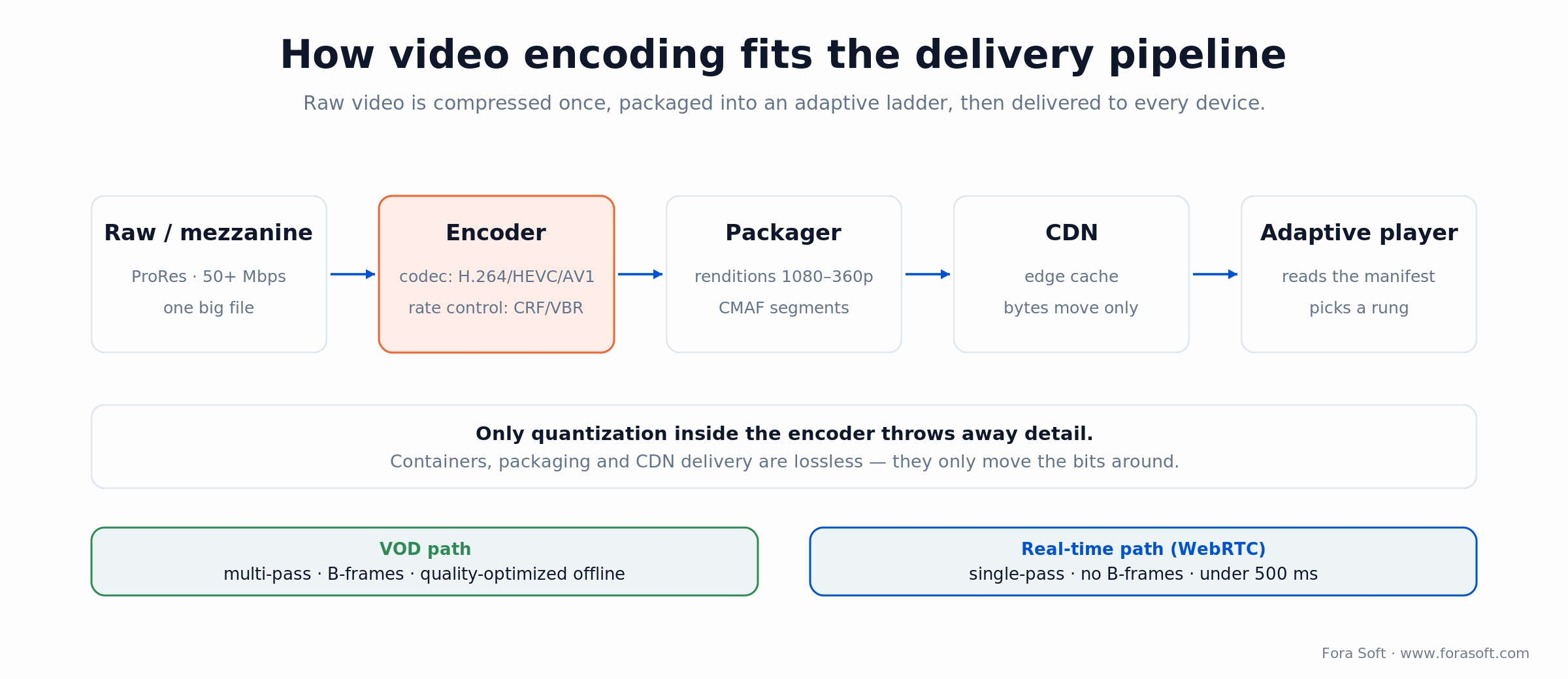
Figure 1. Encoding compresses once; everything downstream just moves the bits. Only quantization inside the encoder is lossy.
Container vs. codec: not the same thing
People mix these up constantly, and it causes real bugs. The container is the wrapper: .mp4, .webm, .mkv, .mov. It packages the video stream, the audio stream, subtitles and metadata into one file. The codec is the compression algorithm inside: H.264, H.265, VP9, AV1. One MP4 file can hold H.264 or AV1; the container is the box, the codec is what's in it. Browser support, hardware acceleration and licensing all follow the codec, not the container, which is exactly why “it's an MP4, why won't it play” is a question we still answer every year.
One more distinction worth nailing down: encoding turns a raw source into a compressed stream for the first time, while transcoding re-processes an already-encoded file into a different codec, bitrate or container. Changing just the bitrate is transrating; changing just the resolution is transsizing. Every rung of an adaptive ladder past the source is a transcode. They use the same tools; the difference is the input.
The codecs that matter in 2026
Five codecs cover essentially every product decision today. Here's where each one wins and where it breaks, with the controlling spec named so you can check us.
H.264 / AVC — the one that plays everywhere
First published in 2003 as Rec. ITU-T H.264 (ISO/IEC 14496-10), H.264 is still the default for a reason: near-universal hardware decode, mature tooling, and licensing that's clear enough for the open web. It compresses worse than everything newer, but it plays on the fifteen-year-old tablet in the waiting room. That's a feature.
Reach for H.264 when: you need guaranteed playback across unknown devices, or you're doing real-time video (WebRTC) where every endpoint already has a hardware decoder.
H.265 / HEVC — better bits, worse paperwork
HEVC (Rec. ITU-T H.265, 2013) delivers the same quality at roughly 30–40% less bitrate than H.264 in real workloads. The spec-sheet “50%” assumes ideal encodes. It's the workhorse for 4K and broadcast. The problem was never the technology; it's that royalties are split across multiple pools (Via LA and Access Advance) plus unaffiliated patent holders, which is why browsers dragged their feet and the industry started looking for a way out.
Reach for H.265 when: you're delivering 4K to Apple devices or set-top boxes with HEVC hardware, and you've already priced the licensing into the plan.
VP9 — Google's royalty-free bridge
VP9 is royalty-free and lands in HEVC territory (roughly 40–50% better than H.264). It carries a big chunk of YouTube today and decodes in every modern browser. Software encoding is slow and hardware encode support is thinner than H.264, so it's more of a delivery codec than a production one. In practice it's the fallback that made royalty-free streaming work before AV1 grew up.
AV1 — royalty-free and finally practical
AV1, from the Alliance for Open Media (Netflix, Google, Amazon, Meta and others), compresses about 30% better than HEVC, roughly 50% better than H.264, and it's explicitly royalty-free. Older guides, including our own from a couple of years back, called it 10 to 50 times slower than H.264. That's stale. SVT-AV1, built by Intel and Netflix, runs 2–5x faster than the old libaom encoder and ships in FFmpeg; v4.0 landed in January 2026. Add hardware: NVIDIA NVENC AV1 on RTX 40-series and newer hits around 500 fps at 1080p. The result is real adoption: YouTube encodes 75%+ of its catalog in AV1 and Netflix delivers roughly 30% of streaming hours in it, expecting AV1 to pass H.264 during 2026.
Reach for AV1 when: bandwidth is your biggest cost, you want zero royalties, and you can spend encode time up front — VOD, archives, high-volume streaming. We dig deeper in our state-of-AV1 explainer.
VVC / H.266 — watch, don't ship
VVC (Rec. ITU-T H.266, finalized July 2020) claims another 30–50% over HEVC. Fraunhofer's VVenC and VVdeC make it usable in software, and FFmpeg 8.0 added VVC hardware decode. But device support is thin and the licensing picture is unclear, so for most teams in 2026 it's a “check again next year” codec, not a production choice.
Stuck between H.264, H.265 and AV1?
We've shipped pipelines on every codec, from telemedicine to live commerce. Get a 30-minute review of your stack and a straight answer on what to change.
Codec comparison matrix
The one-screen version. “Efficiency” is bitrate needed for the same perceived quality (lower is better), and every column is a trade-off against the next.
| Codec | Bitrate efficiency | Hardware support | Encode speed | Licensing |
|---|---|---|---|---|
| H.264 | Baseline | Universal | Fast | Clear for web |
| H.265 / HEVC | ~30–40% better | Wide (Apple, STBs) | Medium | Multi-pool royalties |
| VP9 | ~40–50% better | Browsers, some mobile | Slow (software) | Royalty-free |
| AV1 | ~50% better | Growing fast (2023+) | Practical (SVT-AV1 / HW) | Royalty-free |
| VVC / H.266 | ~55–65% better | Minimal | Slow | Unclear |
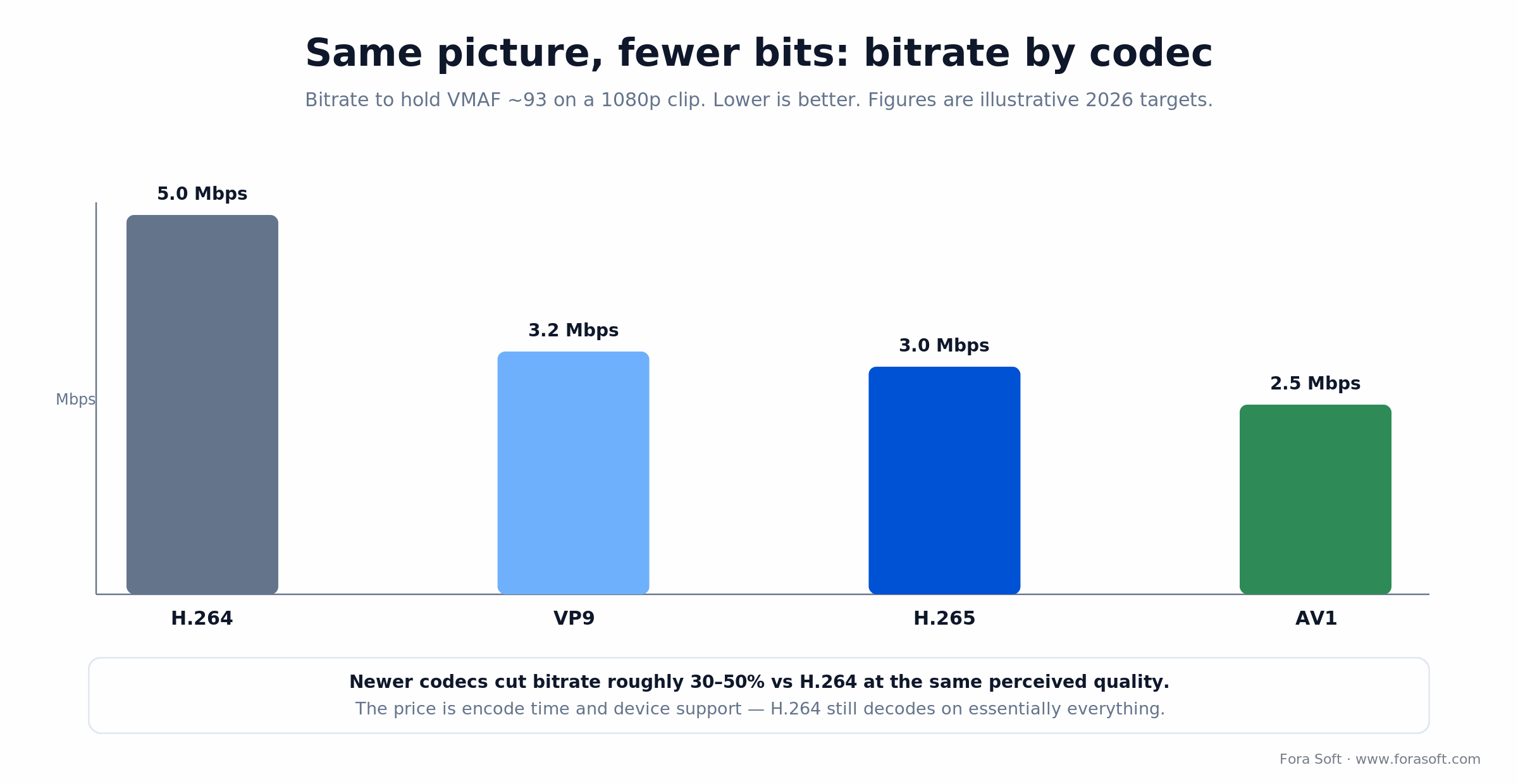
Figure 2. Illustrative bitrate to hold the same perceived quality on a 1080p clip. Newer codecs buy bandwidth savings with encode time and device support.
Bitrate, resolution and frame rate
Every encode has three dials, and they pull against a single bandwidth budget. Push resolution up and the same bitrate spreads thinner. Double the frame rate and you need roughly 50–60% more bits to hold quality. Cap the bitrate and something visible gives. You don't get to max all three — pick the two that matter for your content and let the third settle.
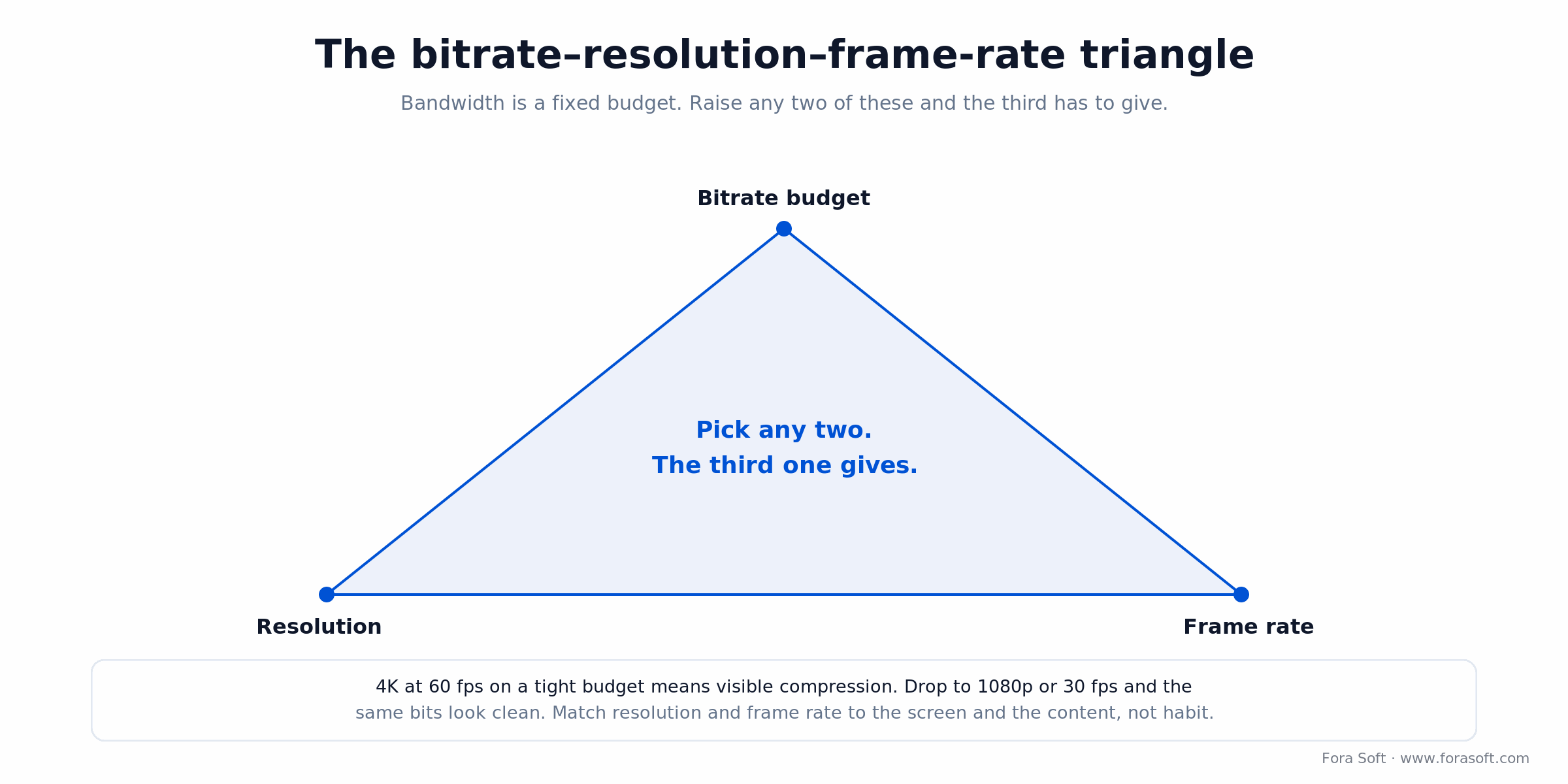
Figure 3. The bitrate–resolution–frame-rate triangle. Fix your budget, then choose which two to protect.
These are sane 2026 H.264 starting points for streaming. Newer codecs let you shave 30–50% off each row for the same look.
| Resolution | H.264 bitrate (30 fps) | Typical use |
|---|---|---|
| 360p | 0.5–1.0 Mbps | Low-bandwidth fallback, talking heads |
| 480p | 1.0–2.0 Mbps | Budget SD streaming |
| 720p | 2.5–4.0 Mbps | Web, education, the safe default |
| 1080p | 4.5–8.0 Mbps | Premium on-demand |
| 4K | 15–25 Mbps (HEVC/AV1) | Big screens, HDR |
Our blunt take: above 720p on a phone, most viewers can't tell the difference, so spend those bits where the eyeballs are. A lecture doesn't need 4K; a Premier League match does.
Rate control: CBR, VBR and capped CRF
Rate control decides how the encoder spends its bit budget across a clip. There are three modes worth knowing, and picking wrong is a common way to either waste money or stall a player.
CBR (constant bitrate) spends the same bits every second, calm scene or car chase. It's wasteful but predictable, which is exactly what live streaming and fixed-bandwidth pipes need.
VBR (variable bitrate) gives complex scenes more bits and static ones fewer, producing smaller files at equal quality. It's the default for on-demand, usually with two passes so the encoder can plan ahead.
Capped CRF is the one we reach for most for VOD: encode to a constant quality target (CRF) but cap the peak bitrate with maxrate and bufsize so no scene blows past what the ladder rung allows. You get VBR's efficiency without the outliers that break adaptive streaming.
Reach for CBR when: you're live or the delivery pipe has a hard ceiling. Everywhere else, capped CRF gives better quality for the same average bitrate.
I-, P-, B-frames and the GOP
Codecs don't compress each frame on its own — they exploit the fact that consecutive frames barely change. Three frame types do the work. I-frames are self-contained, compressed like a JPEG, and the biggest; they're your seek points. P-frames store only the difference from earlier frames, so they're much smaller. B-frames reference both past and future frames for the smallest size of all — but they need look-ahead, which adds latency, so real-time video bans them.
The pattern of these frames is the GOP (group of pictures). Long GOPs compress better; short ones seek faster and are required for clean HLS/DASH segments. The rule that saves you grief: make the keyframe interval match your segment length, so every segment starts on an I-frame. Get that wrong and seeking turns jerky.
Chroma subsampling: throw away color you can't see
Your eyes read brightness far better than color, and codecs cash in on that. 4:4:4 keeps full color per pixel (archival, mastering). 4:2:2 halves horizontal color (broadcast). 4:2:0 keeps a quarter of the color detail and looks identical on phones and laptops — which is why nearly all streaming ships 4:2:0 and pockets the 30–40% saving for free.
Adaptive bitrate: HLS, DASH and CMAF
Adaptive bitrate (ABR) streaming means encoding one source into several renditions (a “ladder” of resolutions and bitrates), chopping each into short segments, and letting the player climb to the highest rung the network sustains. It's the reason your video drops to 480p instead of freezing when the train enters a tunnel.
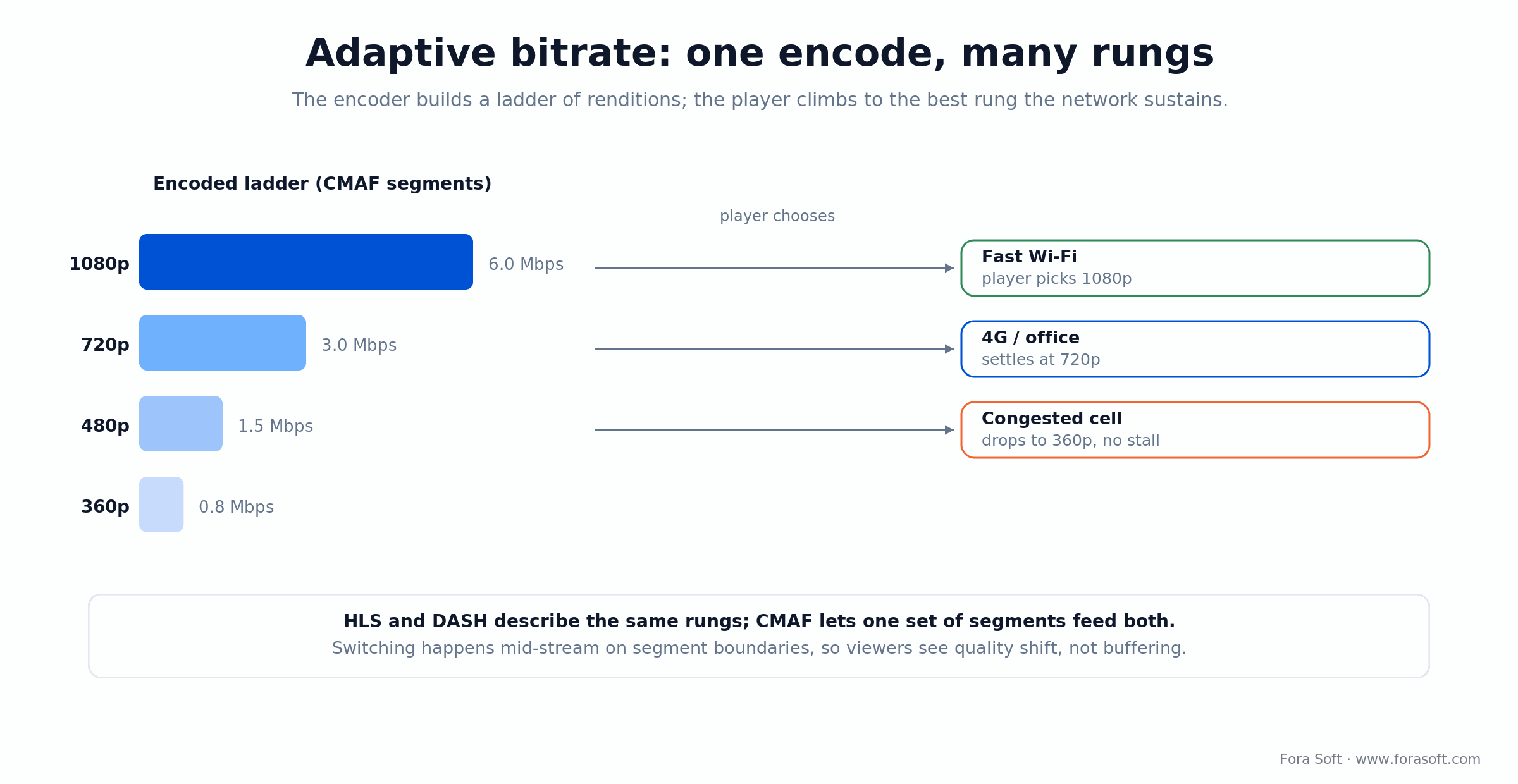
Figure 4. One encode, several rungs. The player switches on segment boundaries, so viewers see quality change instead of a spinner.
Three formats carry it. HLS is Apple's protocol and the safe choice on iOS and macOS (Apple's HLS docs are the reference). MPEG-DASH is the open standard, strong on the desktop web. CMAF is the one that ends the fork: one set of segments that both HLS and DASH can read, which cuts your storage and packaging in half. In 2026 the default is: encode a high-quality mezzanine, transcode to a 4–6 rung ladder, package once with CMAF. If you're weighing this against real-time delivery, our P2P vs MCU vs SFU guide covers the conferencing side.
Hardware vs software encoding
Encoding is expensive on a CPU, so hardware encoders exist to make it fast and cheap — at some cost to quality-per-bit. The honest trade-off: hardware for speed and volume, software when every bit counts.
NVIDIA NVENC does H.264, HEVC and now AV1, an order of magnitude faster than software. Intel Quick Sync is built into most Intel CPUs. Apple VideoToolbox handles H.264 and HEVC on Macs and iPhones. Android MediaCodec varies wildly by device. The software encoders (libx264, libx265, libsvtav1) are slower but give you the tightest control and the best quality at a given bitrate. Cloud encoding farms run mostly on hardware; a quality-critical master is where software slow presets earn their keep.
Cloud encoding services in 2026
You can build your own encoding farm, but for most teams a managed transcoder is cheaper and far less work. Pricing shifted a lot since the old “$0.05 a minute” rules of thumb, so here's the 2026 shape. We put the deep pricing detail in our video encoding API comparison.
AWS Elemental MediaConvert bills normalized output-minutes: roughly $0.0075/min base on the tier where most teams sit, but resolution and codec multipliers stack. HD H.264 is about 2x base (~$0.015/min), and a multi-pass HD HEVC job can hit 7x. Read the multiplier table before you forecast.
Bitmovin lists $0.02 per output-minute for VOD (2,000 free minutes a month) and $3/hour for live. Mux folds encoding into its storage-and-delivery pricing, so you pay for minutes stored and streamed rather than a separate encode fee. Coconut and Google Transcoder round out the budget and Google-shop options.
Reach for a bundled service (Mux) when: you want one vendor for encode, storage, delivery and a player, and you'd rather not reason about multiplier tables. Reach for MediaConvert when you already live in AWS and want per-job control.
What encoding actually costs
Numbers beat adjectives, so let's work one. Say you encode 500 hours of 1080p lecture video a month (30,000 source minutes) into a four-rung H.264 ladder (1080p, 720p, 480p, 360p).
On AWS MediaConvert, the 1080p rung runs about $0.015 per output-minute and the lower rungs cost less; counting all four, budget roughly $900–$1,100 a month. On Bitmovin at $0.02 per output-minute, four rungs of 30,000 minutes is 120,000 output-minutes, so around $2,400 before the free tier. On Mux, that encode is bundled and you pay for storage and delivery instead. Self-hosting, one rented RTX-class GPU node runs about $400–$900 a month and can encode far more than 30,000 minutes, but retries, monitoring and idle capacity become your job.
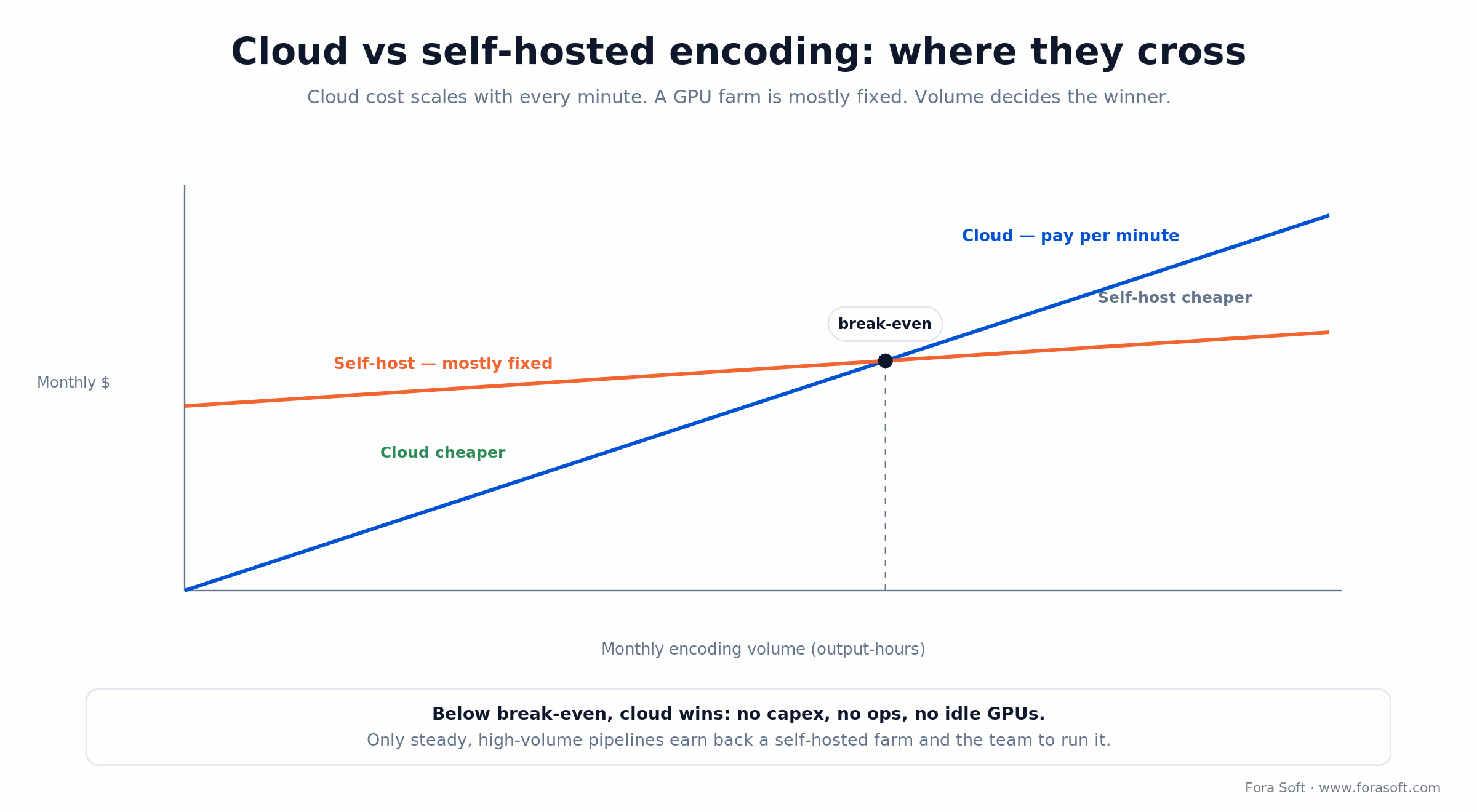
Figure 5. Cloud cost scales per minute; a farm is mostly fixed. Only steady, high-volume pipelines cross into self-host territory.
The KPIs that keep the bill honest
Quality: average VMAF (hold it above ~93 for premium, ~80 for utility video), frame-drop rate under 0.1%, decode errors under 0.01%.
Operations: job success rate above 99%, encode time per minute of source, queue depth, and GPU usage in the 70–85% band — below that you're overpaying for idle silicon.
Cost: cost per encoded minute, cost per TB delivered, and cost per view. Watch the trend month over month; a rising cost-per-minute is your cue to renegotiate or re-ladder.
Want an honest cloud-vs-self-host number?
We'll model FFmpeg, Mux, MediaConvert and Bitmovin against your real volume and hand you the spreadsheet, not a sales pitch.
FFmpeg commands you'll actually use
FFmpeg is the tool under almost every pipeline, cloud ones included. Version 8.0 “Huffman” shipped in August 2025 with a Vulkan AV1 encoder and VVC decode; 8.1 followed in early 2026. These recipes are current for that generation. Grab the binary from ffmpeg.org.
H.264, 720p, quality-targeted:
ffmpeg -i input.mov -c:v libx264 -preset medium -crf 22 -maxrate 4M -bufsize 8M \
  -vf scale=1280:720 -c:a aac -b:a 128k output.mp4
AV1 with SVT-AV1 (the fast, modern path — not old libaom):
ffmpeg -i input.mov -c:v libsvtav1 -preset 6 -crf 30 \
  -c:a libopus -b:a 128k output.mkv
HEVC on an NVIDIA GPU (NVENC), capped for a ladder rung:
ffmpeg -i input.mov -c:v hevc_nvenc -rc vbr -cq 23 -maxrate 6M -bufsize 12M \
  -vf scale=1920:1080 -c:a aac -b:a 128k output.mp4
Measure the result against the source with VMAF:
ffmpeg -i source.mp4 -i encoded.mp4 -lavfi libvmaf=log_fmt=json:log_path=vmaf.json -f null -
Measuring quality: PSNR, SSIM and VMAF
“Looks fine to me” doesn't scale to a million videos. Three metrics automate the judgment, in rising order of usefulness. PSNR measures raw pixel error in decibels; it's cheap and correlates poorly with what people actually see, so treat it as a sanity check. SSIM (Wang, Bovik, Sheikh and Simoncelli, IEEE 2004) compares structure and contrast and tracks perception better, scoring 0 to 1.
VMAF is the one to standardize on. Netflix trained it on human ratings and open-sourced it (github.com/Netflix/vmaf); it fuses several metrics into a 0–100 score, where roughly 93+ is near-transparent and below 60 is visibly rough. Bake a VMAF check into your pipeline, alert when a batch drops below target, and you've turned quality from a vibe into a number.
WebRTC vs video-on-demand encoding
Real-time and on-demand are different sports, and the settings that win one lose the other. This is where a lot of teams get burned, so it's worth being explicit.
WebRTC (real-time): the whole game is latency under ~500 ms. That means single-pass encoding, no B-frames, in-session bitrate adaptation, and codecs with hardware decoders everywhere — VP8, VP9, H.264, and increasingly AV1. Frame rate matters more than resolution here; a smooth 720p beats a stuttering 1080p on a call.
VOD: latency is irrelevant, so you spend time to save bits. Two or more passes, B-frames on, offline optimization, any codec you like. Real-time encoding is our home turf; it's what our video conferencing work is built on. The single biggest mistake we see is copying VOD encoder settings into a live path and then wondering why calls lag.
Mini-case: 500M+ classroom minutes with BrainCert
The situation. BrainCert runs a virtual-classroom LMS with 100K+ customers worldwide. Live HD classrooms and their recordings both flow through encoding, and both had to hold up across ten datacenters without the cost or the stall rate getting out of hand.
The plan. We built the WebRTC infrastructure for the live side, where the encoding rules are strict: H.264 single-pass, no B-frames, low latency, frame rate protected over resolution so a class stays smooth on a weak connection. Recordings take the opposite path — they're transcoded offline into an adaptive ladder so playback adapts to each student's network instead of forcing one bitrate on everyone.
The result. That split (real-time encoding for the classroom, ladder-based VOD for the replay) now carries 500M+ real-time classroom minutes at 99.995% uptime. The encoding choices aren't glamorous, but they're the difference between a class that just works and one that buffers. Want the same audit on your stack? Grab 30 minutes with us.
A decision framework in five questions
When an encoding decision lands on your desk, ask these five in order and most of the choices make themselves.
1. What device and network is this playing on? Old phones on shaky mobile set your resolution and codec ceiling far more than your ambition does.
2. Is latency critical? Under half a second means WebRTC rules — single-pass, no B-frames. If not, optimize for quality with multi-pass and B-frames.
3. What's the content? Talking heads and screen shares sip bitrate; sports and fast motion drink it. Match the bitrate to motion, not to a fixed number.
4. Do royalties matter? If you need to avoid licensing, AV1 or VP9. If you can absorb it, HEVC buys you mature 4K hardware.
5. How much ops can your team carry? No spare hands means a managed cloud transcoder. A platform team that wants control and has the volume can justify a farm. When in doubt, start on cloud and revisit at scale — that's the advice we give most clients.
Five encoding pitfalls we still see
1. Over-encoding. Past a threshold, more bitrate buys zero visible quality and just burns bandwidth. Start conservative, 2.5 Mbps at 720p, and only climb if VMAF says you need to.
2. Uncapped VBR in a ladder. Pure variable bitrate lets a complex scene spike past the rung's ceiling and stall the player. Cap it with maxrate and bufsize.
3. Ignoring color space. Mixing BT.709 and BT.601 without tagging shifts colors on playback. Set -colorspace, -color_primaries and -color_trc explicitly.
4. Keyframes that don't match segments. If segments are 4 seconds but the GOP is 30 frames, seeking gets ugly. Align the keyframe interval to segment length.
5. Shipping a profile devices can't decode. A fancy 10-bit or high-profile encode that 70% of your audience can't play is a support ticket, not a feature. Constrain the profile and test on real target devices first.
When not to encode
Encoding adds cost, latency and complexity, and sometimes the right move is to skip it. That honesty saves clients money, so here's where we tell people to stop.
The source is already fine. A 720p H.264 file at 2.5 Mbps is already streaming-ready. Re-encoding it just adds a generation of loss and a bill, so pass it through instead.
Your audience is tiny. Below a few thousand views a month, a self-serve product like Cloudflare Stream is cheaper and simpler than any custom pipeline. Don't build a farm to serve a village.
You're not measuring quality. Encoding without VMAF or real user feedback is guessing with a GPU bill attached. Measure first; you might find you don't need to touch a thing.
Not sure your pipeline is worth the bill?
We'll audit your codecs, ladder and rate control against your traffic and tell you where the waste is — even if the answer is “change nothing.”
FAQ
What is video encoding, in one sentence?
Video encoding compresses raw video into a smaller format a device can store, stream and play — trading detail your eyes won't miss for a file that's often 100x smaller.
What's the difference between encoding and transcoding?
Encoding compresses a raw source for the first time. Transcoding re-processes an already-encoded file into a different codec, bitrate or container — every rung of an adaptive ladder past the source is a transcode.
Which video codec should you use in 2026?
H.264 for guaranteed compatibility and real-time video, AV1 when bandwidth cost matters and you want zero royalties, HEVC for 4K to Apple and set-top hardware. Most production ladders still lead with H.264 and add AV1 as the efficient tier.
Is AV1 still too slow to use?
No — that's outdated. SVT-AV1 runs 2–5x faster than the old libaom encoder and ships in FFmpeg, and NVIDIA, Intel and Apple all have AV1 hardware. YouTube and Netflix already serve most of their catalogs in AV1.
What's the difference between CRF and a bitrate target?
CRF sets a constant quality and lets bitrate float to hold it (great for VOD). A bitrate target sets a hard ceiling on data rate (needed for live and for ladder rungs). Capped CRF combines both: constant quality with a maxrate cap.
HLS or DASH — which one?
Use both, via CMAF. HLS has native iOS and macOS support; DASH is the open standard strong on the desktop web. CMAF lets one set of segments feed both, so you don't double your storage.
Should I always use hardware acceleration?
Not always. Hardware is fast and cheap but gives up some quality-per-bit. For real-time and high-volume work, use it. For a quality-critical master, software encoders on slow presets usually win.
Is cloud encoding cheaper than running my own servers?
For most teams, yes. Cloud cost scales per minute with no capex or ops, and a self-hosted GPU farm only pays back at steady, high volume — plus the team to run it. Start on cloud and revisit if your volume grows large and predictable.
What to read next
Tooling
Video Encoding APIs Compared
Mux vs AWS vs custom, on price and control.
Streaming
Video Streaming App Development
End-to-end architecture from ingest to playback.
Cost
Video Platform Development Cost
2026 pricing from MVP to enterprise.
Security
Secure Video Streaming
DRM, encryption and access control done right.
Where to start
Video encoding rewards a few clear decisions over endless tuning. Pick a codec by who has to play it: H.264 for reach, AV1 for efficiency, HEVC where the 4K hardware already lives. Set bitrate by content and screen, not habit. Ship an adaptive ladder packaged with CMAF so every device gets the rung it can hold. Start on a cloud transcoder, measure with VMAF, and only build a farm when the volume is large and steady.
Do that and encoding stops being the thing that breaks and becomes the thing that quietly saves you bandwidth, cost and support tickets. We've built it at the scale of half a billion classroom minutes — if you'd rather not learn all of this the hard way, that's what we're here for.
Ready to ship encoding that just works?
FFmpeg pipeline, ABR ladder design, or a Mux/MediaConvert integration — we'll scope it with you in 30 minutes.

