

Key takeaways
• Six features cover 90% of real work. AI super-resolution, denoise, stabilization, deblur, HDR/SDR conversion, and frame interpolation are what an AI video quality enhancement project actually ships in 2026. The rest is marketing.
• Real-time exists, but not for everything. Webcam denoise and lightweight super-res run real-time on an RTX 50-class GPU, Apple M4/M5, or a current phone NPU. Diffusion 4K upscaling is still a batch job.
• Denoise-before-encode pays back first. Run a temporal denoiser before AV1 and you buy 10–20% bitrate at equal VMAF, on top of AV1’s ~40% over H.264. That saving lands on the CDN bill inside a quarter.
• Three SDK layers, one pick each. Maxine (now NVIDIA AI for Media) for real-time client and server; Topaz Video / VESAI for post; a cloud API for light integrations. Don’t run all three for the same feature.
• Build cost: $45k–$120k over 10–14 weeks. A six-feature MVP on an existing WebRTC or HLS pipeline with Agent Engineering. Broadcast-grade Dolby Vision work pushes $200k+. Sequence by the KPI that hurts most.
Updated October 2026: EU AI Act marking deadline after the Digital Omnibus (2 December 2026 for systems already on the market), C2PA 2.4, NVIDIA Video Codec SDK 13.1, Topaz Starlight Precise 2.5 and Hyperion 2, NTIRE 2026 results, and the 2026 phone chips.
Why Fora Soft wrote this playbook
Fora Soft has shipped video-heavy products since 2005, 250+ of them: OTT catalogues, telehealth, edtech, sports broadcast, live commerce, conferencing. In the last 18 months AI video quality enhancement moved from “nice demo” to a line item on the P&L. Our clients are rewriting encode farms, streaming pipelines, and webcam clients around Maxine, Topaz, and diffusion super-resolution, and they keep asking the same question: which of these features is worth an engineer’s quarter, and which is a science-fair project?
This is the version of that answer we give new clients: the six features that matter, what each costs in engineering time and API spend, which SDK covers which layer, and the mistakes we watch teams make when they try to ship all of it at once. The worked examples come from real projects — the Meetric AI sales-video platform, the Sprii live video-shopping stack, and the WorldCast Live broadcast platform.
Agent Engineering is how we compress the full six-feature roadmap into a quarter instead of two. Senior engineers pair with coding agents on codebase edits, test generation, and integration scaffolding — the boring 80%, which runs 2–3× the throughput of a traditional build with the same people. That’s why the cost numbers further down read low against the industry average, and we show the arithmetic so you can check it. If you want the engineering side too, we keep a deeper reference in our AI for video engineering course. When you want the pipeline built rather than read about, our video and audio processing development team ships enhancement, upscaling and encoder tuning as part of the product.
Sorting which quality feature to ship first?
We’ll turn the six features below into a two-feature pilot and a 12-week plan on a 30-minute call.
What is AI video quality enhancement?
AI video quality enhancement, often searched as AI video improvement, is the use of trained neural networks to make existing footage look better: more detail, less noise and compression blocking, steadier and smoother motion, wider dynamic range. A classic sharpen or denoise filter applies the same maths to every pixel. An AI model has learned from millions of clean and degraded clip pairs what real texture looks like, so it reconstructs plausible detail instead of just boosting edges. That is also the risk: generative models can draw detail that was never filmed, which is why we measure every change instead of trusting a demo reel.
Can AI improve video quality after compression? Yes, within limits. Artefact-removal and denoise models clean up blocking, banding and mosquito noise in an over-compressed H.264 or HEVC file, and super-resolution then restores apparent sharpness, in that order: denoise → deblur → super-res. What AI cannot do is recover information the encoder threw away. Clipped highlights, tiny faces and text lost in blocks get a guess, not a recovery.
Quick diagnosis: match the symptom to the feature before you pick a tool.
| Symptom | AI feature | Can AI fix it? | Runs where |
|---|---|---|---|
| Soft, low-resolution picture (480p/720p source) | Super-resolution | Yes for 2–4× upscales; beyond that, diffusion models invent detail | Real-time (light models) or batch (diffusion) |
| Grain, sensor noise, compression blocking | Denoise / artefact removal | Mostly; best run before re-encoding | Capture, server or post |
| Shaky handheld footage | Stabilization | Yes, at the cost of a slight crop | Capture or post |
| Motion or focus blur | Deblur | Partly: mild blur yes, heavy misfocus no | Mostly post |
| Flat SDR colour on an HDR screen | Inverse tone mapping (SDR→HDR) | Yes for upsell tiers; it is reconstruction, not true HDR capture | Real-time on a large GPU, or batch |
| Choppy 24/30 fps motion | Frame interpolation | Yes for sports and UGC; avoid on cinematic 24p | Real-time on GPU, or batch |
| Blown highlights, faces too small to resolve | — | No: the information is gone, AI can only guess | — |
What makes a video smoother with AI? Two different features that people often mix up. Frame interpolation generates in-between frames (24/30 fps to 60 fps and up) and removes judder; stabilization removes camera shake. Handheld phone clips usually need both: stabilize first, then interpolate, so the model doesn’t generate extra frames of shake.
The six AI video quality features that matter in 2026
Ordered by honest production impact: time-to-ship, measurable KPI lift, and revenue effect. Anything a vendor calls a “feature” that doesn’t show up below is either a subset of one of these six or not worth a sprint. Each one runs on a specific layer of the stack — capture, server, or post — and that layer decides the SDK, not the other way around.

Figure 1. The six features and the delivery layer each one runs on — capture, server-live, or post/batch.
1. AI super-resolution (spatial upscaling)
Take 480p, 720p, or 1080p source and produce 1080p/4K output that looks native. Two families: deterministic CNN/transformer models (NVIDIA RTX Video Super Resolution, Maxine Video Super Resolution, Real-ESRGAN) and diffusion models (Topaz Project Starlight, ByteDance SeedVR2, a one-step diffusion restorer published at ICLR 2026, Upscale-A-Video). Deterministic models are faster and can ship real-time; diffusion produces better subjective detail but stays batch-only for now. On a mobile NPU, an efficient model like RepNet-VSR reports 27.79 dB PSNR upscaling 180p→720p at 103 ms per 10 frames — real proof that lightweight real-time super-res works, and a reminder that it’s a different job from 4K diffusion restoration.
How super-resolution works inside a real-time video call SDK. It runs on the receiving device, after decode and before render. The sender or the SFU forwards a low-resolution layer to save bandwidth, and the receiver’s GPU or NPU upscales it. ZEGOCLOUD’s RTC SDK, for example, doubles the width and height of one incoming stream (640×360 → 1280×720) and recommends inputs no larger than 640×360; NVIDIA AI for Media Video Super Resolution upscales 480p to as much as 8K on RTX hardware (both per vendor docs, October 2026). The cost is heat and battery, so production apps switch it on per stream, only on capable devices, and usually only for the active speaker.
2. AI denoise (grain, sensor noise, compression artefacts)
Temporal denoisers read several frames to separate noise from detail; single-frame models are faster but lose micro-texture. Production stacks: Maxine on the capture side (it preserves skin texture), Topaz Gaia/Iris for post, an NVENC pre-filter for catalogue transcode. Here’s the move that pays for the project: run denoise before AV1 encoding and you save another 10–20% bitrate at the same VMAF, stacked on top of the codec win. It’s the highest-return feature in the list and the one we ship first almost every time.
3. AI stabilization (motion smoothing without feature tracking)
Modern models estimate dense optical flow and learn a stabilization trajectory directly, so they work on handheld phone footage where classic feature tracking dies — blown highlights, motion blur, low texture. Apple Cinematic stabilization, Google Pixel motion tooling, and the NVIDIA Optical Flow SDK are the reference implementations; open-source options include DUT (Deep Unsupervised Trajectory) and RAFT-based pipelines.
4. AI deblur (motion and focus recovery)
Separate models for motion blur (sharp subject, long exposure) and focus blur (misfocused lens). Restormer and Uformer-derived models are the open-source standard; NVIDIA Broadcast video sharpening is the consumer-grade version. Don’t confuse deblur with super-resolution: run super-res on blurry input and you amplify the blur. Order matters, and we come back to it in the pitfalls.
5. AI HDR/SDR conversion (inverse tone mapping)
Inverse tone mapping reconstructs HDR10 / Dolby Vision / Rec.2020 luminance from SDR Rec.709 sources. It’s used for catalogue remastering, legacy broadcast restoration, and UHD-tier upsell. VESAI, UniFab and Topaz (its Hyperion 2 model, May 2026) ship SDR-to-HDR, NVIDIA AI for Media includes TrueHDR, and AJA FS-HDR is the hardware broadcast option. Real-time conversion is fine on an RTX 5090-class card; batch is cheaper for large catalogues.
6. AI frame interpolation (FRUC)
Generate intermediate frames to go from 24/30 fps to 60/120/240 fps. NVIDIA FRUC in the Optical Flow SDK (it runs on the Blackwell OFA engine, not NVENC), plus RIFE and FILM, are the production references. Use it for sports slow-motion, legacy film remastering, and high-refresh displays. Don’t interpolate cinematic 24p headed for theatrical release. Audiences read the “soap-opera effect” as cheap, and they’re not wrong. NVIDIA AI for Media also ships Video Frame Generation at 2× and 4× for production use, with 6× and 8× in evaluation (NVIDIA product page, October 2026).
Market numbers worth knowing
The category is growing fast. Grand View Research puts the AI image-upscaler market at $6.3 billion in 2025 and $8.0 billion in 2026, heading to $44.7 billion by 2033 at a 27.8% CAGR, and names super-resolution enhancement as its fastest-growing function segment (Grand View Research, 2026). Video enhancement rides the same curve, one resolution tier up.
Quality moves retention. Across our OTT client cohort, a 10% uplift in VMAF at the 1080p rung correlates with a 3–5% drop in abandonment before first play. For a catalogue doing a million plays a week, that’s 30,000–50,000 extra completed sessions every week — the number that turns a quality project from “nice” into “funded.”
Real-time has hard limits. Even the fastest 2026 models can’t do arbitrary-resolution real-time on consumer hardware. Lightweight webcam-to-1080p denoise plus super-res runs 15–30 fps on an RTX 5070, Apple M4/M5, or Snapdragon X2 Elite; diffusion 4K upscaling still ships as a batch job. Plan around that split or you’ll promise something the GPU can’t deliver.
The codec baseline keeps improving. AV1 delivers roughly 40% bitrate savings over H.264 at 1080p, and up to ~50% at 4K. The 9th-gen NVENC encoder on Blackwell adds an AV1 Ultra High Quality mode whose temporal filtering alone averages a 4–5% coding gain on natural content, and Video Codec SDK 13.1 (July 2026) raises AV1 B-frames from 7 to 31 with a hierarchical reference mode and adds zero-copy NVDEC→NVENC transcoding. So denoise-before-encode compounds on a codec that’s already ahead.
SDK comparison — who covers which layer
The production-grade vendors cluster into a few layers. Pick one per layer rather than chasing a single SDK that claims to do it all — that’s the fastest way to four places to debug the same regression.
| Layer | SDK / API | Features | Latency | Pricing shape |
|---|---|---|---|---|
| Client (webcam) | NVIDIA Maxine Broadcast / AI for Media | Denoise, super-res, eye contact, relighting | Real-time (RTX) | Free SDK; user GPU |
| Server (live) | AI for Media NIM + Video Codec SDK 13.1 | Super-res, denoise, NVENC-AI AV1 | Real-time (dedicated GPU) | Per-GPU-hour |
| Server (post) | Topaz Video / VESAI / UniFab | Diffusion super-res, HDR, deblur | Batch (0.5–3× realtime) | Per-seat + GPU |
| Cloud API | WaveSpeedAI / TensorPix / Aiarty | Super-res, denoise, interpolation | Async (minutes) | Per-minute processed |
| Broadcast HW | AJA FS-HDR / MainConcept | HDR/SDR conversion, WCG | Real-time (FPGA) | One-time capex |
| Open source | SVT-AV1, Real-ESRGAN, BasicVSR++, RIFE, DUT | All six with glue code | Depends on host | Free + your GPU |
Reach for Maxine when: you’re on a WebRTC or RTMP pipeline, you want real-time quality AI with a supported SDK, and NVIDIA GPUs are already in the fleet — its 2026 line-up even ships SMPTE ST 2110 NIM microservices for IP broadcast. Otherwise a diffusion post-process or a cloud API gives better subjective quality per dollar at lower hardware capex.
How to measure quality — and what the metrics miss
Single-metric dashboards lie. The measurement rig we ship reads several signals at once, and splits every one by content class:
VMAF (Netflix). The primary quality signal. Target 95+ for professional upscales, 90+ for standard streaming, 80+ for aggressive mobile tiers. Know its weakness: it runs optimistic on some AI-processed content, so never read it alone. The open-source VMAF repo ships model cards with the known biases.
PSNR + SSIM. Sanity checks. PSNR catches pixel-level regressions; SSIM catches structural distortion. They earn their keep when VMAF jumps but the eye says something is off.
LPIPS (perceptual). A learned feature space that tracks human perception better on generative output. Watch it as a secondary on diffusion super-resolution, where PSNR under-rewards realistic detail.
Pairwise human A/B. The court of last resort. Run a 100-clip pairwise comparison with 20 viewers before a production cutover. Tools like Subjectify and MSU VQMT make it cheap now, so there’s no excuse to skip it.
Content-type splits. Always split by class: animation, high-motion sports, dark scenes, faces, text overlays. A model that averages VMAF 94 but tanks faces to 85 fails in practice. If you want the metrics from first principles, our video quality & measurement course has the full derivations.
Public benchmarks — who’s winning on super-res and restoration
Vendor marketing is noisy. These are the scoreboards we actually read before recommending an SDK to a client.
NTIRE (CVPR workshop). Read the 2026 edition. Its 11th Efficient Super-Resolution challenge (95 teams registered, 15 valid entries) holds PSNR at about 26.90 dB on DIV2K/LSDIR and ranks teams on runtime, parameters and FLOPs, which is the right scoreboard for real-time work. A new challenge on short-form UGC video restoration with generative models ranks entries primarily by a user study on the KwaiVIR set: PSNR alone no longer describes generative restoration. Read the per-track winners, not the headline number.
MSU Video Super-Resolution Benchmark. A long-running independent scoreboard from Moscow State University that combines objective metrics with subjective studies. It’s the one place you’ll see open models (Real-ESRGAN, BasicVSR++, VRT) head-to-head with closed SDKs on a locked corpus.
Efficient / mobile VSR papers. For anything real-time, read the mobile-accelerator work directly — RepNet-VSR (27.79 dB PSNR at 103 ms per 10 frames on a MediaTek Dimensity NPU) is a clean example of what a phone can actually do today, and it beat the prior year’s challenge champion.
Hugging Face Spaces for a quick gut check. Before committing a week of infra to a model, run 20 of your own clips through the public Space and look at the output. Fifteen minutes kills most of the “this paper’s numbers don’t apply to our content” surprises.
Anchor rule: never sign on a demo reel. Require the vendor to run their SDK against 50 of your own representative clips and compare VMAF and pairwise subjective scores against an open baseline (Real-ESRGAN or BasicVSR++) before you commit a cent.
Reference architecture for an AI-enhanced video stack
This is the stack we ship by default when a client asks for a modern, quality-AI-aware pipeline. It runs two enhancement lanes, one live and one post, feeding a single delivery path, and quality is sampled at every hop.

Figure 2. The live lane and the post lane converge on one packager, with VMAF/PSNR/SSIM sampled per chunk into Grafana.
Capture side. Maxine Broadcast on Windows/Linux clients with an NVIDIA RTX GPU for real-time webcam denoise, super-res, eye-contact, and relighting. Fallback for macOS and GPU-less machines: MediaPipe plus RNNoise in-browser. Accessibility: keyboard controls on every filter toggle, from day one.
Transport. A LiveKit or mediasoup SFU for real-time; HLS/DASH for broadcast and VoD. Simulcast plus SVC to match downstream capability.
Server live lane. NVENC-AI AV1 on Blackwell hosts for real-time transcoding, with Maxine NIM microservices doing server-side super-res and denoise on premium tiers. Compute the per-title ladder lazily over the first 1,000 plays, then freeze it.
Post-process lane. Topaz Video or VESAI on dedicated GPU nodes for diffusion super-resolution, HDR conversion, and catalogue remastering. Output lands in WORM storage and gets picked up by the encoder farm for delivery ladders. Our Learn guide to Real-ESRGAN and BasicVSR++ for OTT archive upscaling goes deeper on model choice for this lane.
Observability. VMAF, PSNR, SSIM, and LPIPS sampled per 30-minute chunk and stored with model version, parameters, and latency. Grafana surfaces regressions before a user complains — and before a silent vendor model update quietly costs you two VMAF points. We wire this the same way on real-time products in our AI integration work.
Want a VMAF-grade read on your stream quality?
We’ll benchmark your current ladder, score two AI enhancement configs, and hand you the KPI delta in 30 minutes.
Mini case — +4.2 VMAF and 22% less bitrate in 8 weeks
Situation. A niche sports OTT platform with ~6,000 hours of 1080p H.264 archive and a live lane running 6 Mbps for 1080p60 hockey. CDN egress was the second-biggest monthly bill, and mobile abandonment had climbed 8% quarter over quarter.
8-week plan. Weeks 1–2: VMAF baseline plus content-type splits on a 200-clip sample. Weeks 3–4: Maxine NIM denoise before NVENC-AI AV1 on the live lane, plus a per-title ladder for the top 2,000 archive assets. Weeks 5–6: diffusion super-res (SeedVR2) on the 720p-origin archive that deserved a 4K restoration. Weeks 7–8: client-side capability detection, dual AV1/H.264 delivery, staged rollout.
Outcome. VMAF averaged 94.1 on the live tier (up from 89.9) and 96.7 on the restored archive tier. Bitrate dropped 22% across the ladder at equal quality, and mobile abandonment recovered half the lost ground. Want a similar read on your stack? Book a 30-min quality review.
Cost model — what the build and the savings look like
Two numbers decide whether a quality project gets funded: what it costs to build and what it saves once it’s live. The build is $45k–$120k for a six-feature MVP on an existing pipeline over 10–14 weeks with Agent Engineering — broadcast-grade Dolby Vision or full on-prem pushes past $200k. The savings side is where the 22% bitrate cut from denoise-before-encode earns its keep, so here’s the arithmetic, not just the claim.
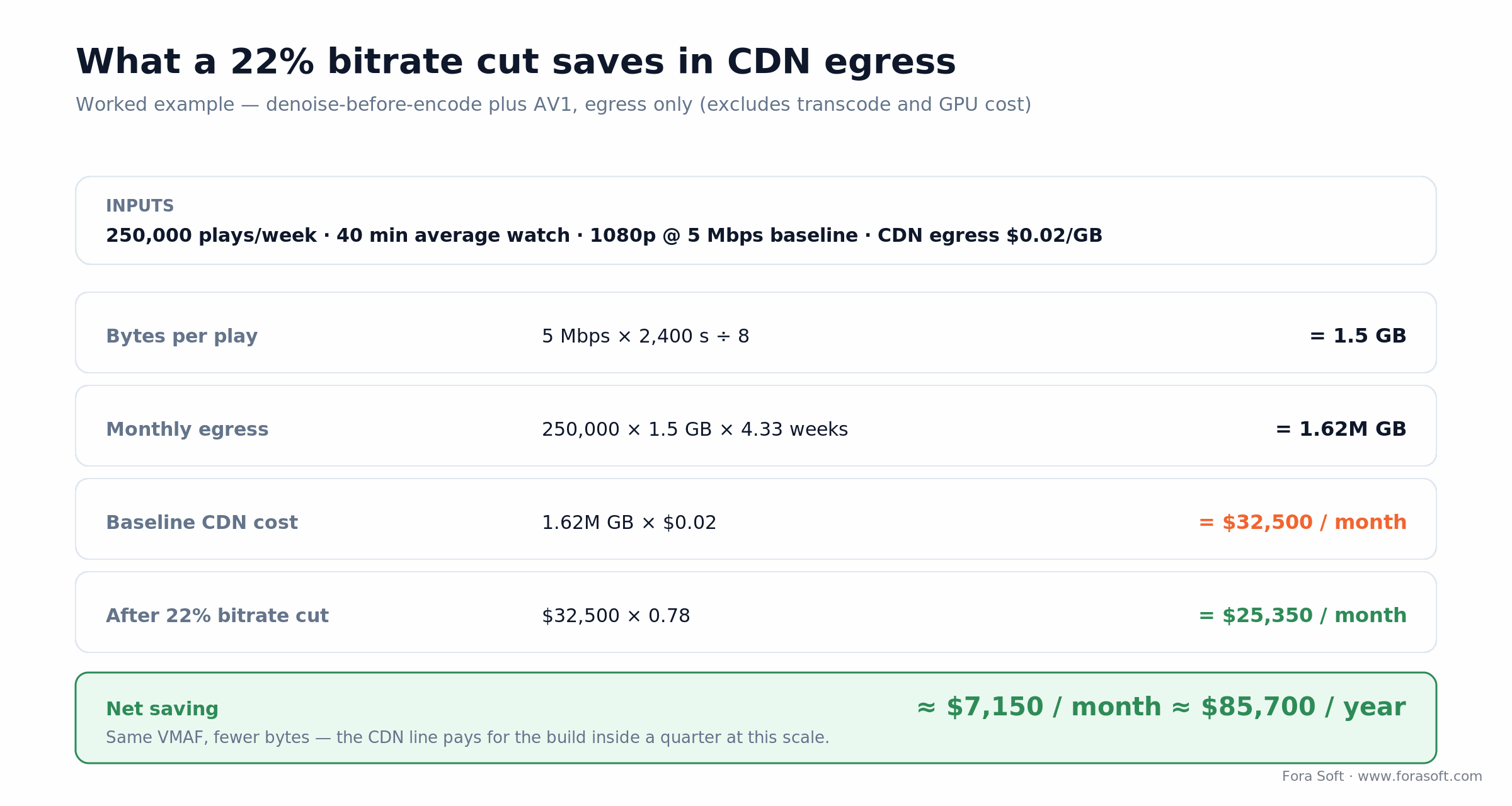
Figure 3. Worked egress math for a mid-size catalogue — the CDN line alone pays back the build inside a quarter.
Take a mid-size catalogue: 250,000 plays a week, 40 minutes average watch, 1080p at 5 Mbps, CDN egress at $0.02/GB. Bytes per play come to 5 Mbps × 2,400 s ÷ 8 = 1.5 GB. Monthly egress is 250,000 × 1.5 GB × 4.33 weeks ≈ 1.62 million GB, which at $0.02/GB is about $32,500 a month. Trim the bitrate 22% and that line drops to ~$25,350, a saving near $7,150 a month, or roughly $85,700 a year, at the same VMAF.
That’s egress only. It excludes the transcode compute and GPU time to produce the cut. But it’s also the conservative case: it ignores the retention lift from higher VMAF and the upsell on a restored 4K tier. At this scale the CDN saving alone clears an $85k build inside a year, which is why denoise-before-encode is the feature we recommend teams fund first. If the catalogue runs on your own service, our OTT and IPTV platform development team wires the restored tier and the new AV1 ladder into the web, mobile and Smart TV apps.
Rollout roadmap — the 12-week sequence
Don’t ship six features at once. This is the slot plan that has shipped cleanly across half a dozen clients in the last year.
| Weeks | Workstream | Deliverable | Exit criteria |
|---|---|---|---|
| 1–2 | Baseline + measurement rig | VMAF/PSNR/SSIM on 200 clips, content splits | Agreed target lift |
| 3–5 | Denoise + super-res (server live) | Maxine NIM wired into encode farm | VMAF +3 at equal bitrate |
| 5–8 | Client-side filters | Maxine Broadcast + browser fallback | >80% opt-in where supported |
| 7–10 | Archive restoration | Topaz/VESAI diffusion super-res + HDR | VMAF > 95 on restored tier |
| 9–11 | Frame interpolation + deblur (selective) | FRUC on sports slow-mo, deblur on UGC | No soap-opera regressions |
| 11–12 | Observability + GA | Grafana quality dashboards, alerting | Zero silent regressions for 14 days |
Compliance and accessibility constraints
C2PA / Content Credentials. The current C2PA specification is v2.4, and the big 2026 shift is that platforms moved from “creators must disclose” to “we detect and label whether you disclose or not.” YouTube is furthest along; TikTok said in July 2026 that it has labeled more than 3 billion videos as AI-generated using Content Credentials, creator labels and invisible watermarking, and joined the C2PA steering committee (TikTok newsroom); Meta labels across its apps. Tag AI-enhanced output with a C2PA manifest at creation, not retroactively.
EU AI Act — content marking. Article 50 transparency duties apply from 2 August 2026. The AI Digital Omnibus, in force since July 2026, kept that date for new systems but gave generative systems already on the market until 2 December 2026 to add machine-readable marking (Cooley summary). Article 50(2) exempts AI that only performs standard editing or doesn’t substantially alter the input, so plain denoise or upscaling usually sits outside it; generative restoration that draws new faces or texture is the grey zone, and we mark it. If enhancement is bundled with emotion recognition or biometric categorisation, the bundle moves to high-risk or prohibited. Keep the boxes separate.
European Accessibility Act. In force since 28 June 2025, the EAA requires that quality-AI controls be operable by assistive tech — keyboard toggles, screen-reader labels, persistent user preferences. It’s a legal requirement in the EU and a procurement checkbox everywhere else.
FERPA / HIPAA. When enhancement touches PHI or student records (telehealth, edtech), use BAA-covered or on-prem inference only. Maxine NIM deploys on-prem; Topaz is local; cloud APIs need contract review before a single frame leaves your network.
Reach for on-prem inference when: your product touches PHI, student records, or any public-sector data-residency rule — Maxine NIM, Topaz local, and self-hosted SVT-AV1 plus Real-ESRGAN cover the whole range without a BAA negotiation.
Decision framework — pick your feature in five questions
Five questions get most teams to a first feature without a two-month evaluation. The tree below is the short version; the questions add the nuance.

Figure 4. Start where quality hurts today — then confirm you have the GPU to run the feature you picked.
1. Where does quality hurt most today? Follow the abandonment data. If mobile drops fast, start with denoise plus super-res on the 720p/1080p ladder. If big-screen users complain, start with HDR conversion and archive restoration.
2. What’s the delivery path? Real-time conferencing wants Maxine; a streaming catalogue wants NVENC-AI plus Topaz; broadcast wants AJA FS-HDR or equivalent hardware. Don’t cross the streams.
3. How much GPU can you deploy? Real-time quality AI is GPU-bound. Without RTX 4090/5090-class hosts, switch to a cloud-API or batch-post-process configuration and reset expectations before you promise latency you can’t hit.
4. What’s the compliance envelope? HIPAA, FERPA, EU AI Act, C2PA — map the constraints before picking SDKs. Retrofitting compliance onto a cloud-only pipeline is a full re-architecture, not a patch.
5. What’s the exit if a vendor disappears? Topaz is a company; Maxine depends on NVIDIA GPUs; a cloud API can price-hike overnight. Keep Real-ESRGAN, SVT-AV1, RIFE, and DUT in the evaluation so you always own a portable fallback.
Five pitfalls in AI video quality enhancement projects
1. Chasing a single VMAF number. A model that averages 94 but tanks faces to 85 fails in production. Split metrics by content class and run pairwise human A/B before any cutover.
2. Running super-resolution on blurry input. Super-res amplifies whatever is already there, blur and compression artefacts included. Order of operations: denoise → deblur → super-res. Skip a step and you lose a VMAF point you paid to gain.
3. Shipping frame interpolation on cinematic content. Viewers hate the soap-opera effect on 24p film. Apply FRUC only to sports, gaming, UGC action cam, and high-refresh scenarios — never to feature-length narrative.
4. Ignoring C2PA / Content Credentials. Uploading AI-altered video to platforms that now auto-detect provenance, without the manifest, increasingly triggers distribution friction. Tag at creation, not in a later cleanup pass.
5. Mixing SDK layers for one feature. Maxine client-side, Maxine server-side, Topaz post, and a cloud API all doing super-res means four places to debug one regression. Pick one SDK per layer and stick with it.
Agent Engineering — quality AI in half the calendar time
A 12-week quality-AI rollout used to be a 4–5 engineer effort. With Agent Engineering we run the same scope with a 2–3 person team and finish 30–50% faster, because most of the boilerplate — codec wiring, measurement-rig construction, golden-set bootstrapping, dashboard scaffolding — is delegated to AI agents under engineer supervision.
Where agents do the work. SDK glue code (Maxine NIM clients, Topaz CLI orchestration, ffmpeg filter chains), VMAF/PSNR/SSIM rig scaffolding, golden-set sampling scripts, infra-as-code for GPU autoscaling, dashboard JSON, nightly regression schedulers, and 80% of test fixtures. Engineers review, iterate, and own the model and architecture calls.
What it means commercially. A six-feature rollout that used to land at 18–24 weeks of senior engineering time now lands at 10–14 — the saving split between calendar (faster time-to-revenue on premium tiers) and budget (lower fixed-bid pricing).
What it doesn’t change. Architecture, model selection, vendor terms, compliance review, accessibility design, and human-in-the-loop quality validation are still done by senior engineers. Agents are capacity, not judgement.
Pricing implication: if you’re scoping a quality-AI build with a partner that charges by senior engineer-week, ask whether they run an agent-engineering practice on the boilerplate. The same scope at the old rate is a 30–50% premium for capacity that no longer needs to be human.
KPIs worth tracking
Quality KPIs. VMAF > 93 across 95% of segments, per content class. PSNR > 32 dB on 4× super-res. Pairwise human preference > 70% against baseline. Zero measurable face-region regressions.
Business KPIs. Abandonment before first play, completion rate, mobile vs. big-screen split. Cost per delivered hour (transcode + egress + AI). Opt-in rate on client-side filters. Upsell conversion on AI-enhanced premium tiers.
Reliability KPIs. Encode success rate > 99.5%. P95 AI inference latency inside SLA on the real-time lane. Zero P1 quality regressions per quarter, caught by a nightly VMAF run on a locked golden set.
Accessibility as a first-class feature
Quality AI makes accessibility cheaper than it’s ever been, and the features that help low-vision, hard-of-hearing, and cognitive-load-sensitive users are the same ones that win public-sector procurement.
High-contrast caption rendering. Let users override caption style — size, background, position. WCAG 2.2 AA on every control.
Relighting for low-light video. Maxine video relighting normalizes badly lit webcam streams. It ships in both consumer and enterprise tiers, and it’s a real accessibility win in education.
Persistent user preferences. Store filter toggles in a tenant-scoped profile so repeat users don’t re-enable accessibility features every session. It’s the single most-requested thing we hear from low-vision testers.
When to not build AI video quality enhancement
Under 50k monthly active viewers. The VMAF lift won’t move retention enough to pay back the engineering time. Ship a per-title encoder ladder first and revisit AI in six months.
Audio-centric products. If users listen more than they watch — podcasts, music, radio — ship noise suppression and voice isolation first. The video side won’t pay back.
Pure end-to-end-encrypted products. Cloud AI enhancement needs decrypted streams. If you promised E2EE, either accept lower quality or invest in on-device models and their hardware requirements — there’s no free lunch here, and pretending otherwise breaks a promise to users.
Data architecture — quality logging without blowing storage
Quality samples. VMAF/PSNR/SSIM every 30-second chunk, per rendition. About 200 bytes per sample, so it fits easily in a columnar store (ClickHouse, DuckDB) with multi-year retention.
Golden set. 200–500 locked reference clips covering every content class, stored in a WORM bucket. A nightly VMAF regression run against production alerts on any >1 VMAF drop — that’s your early-warning system for a silent vendor model change.
Model versioning. Every enhancement call logged with SDK version, model hash, parameters, and input/output hashes. You need it for EU AI Act documentation and for debugging quality regressions after a vendor update.
Raw video retention. Keep source material only when licensing or compliance demands it; enhanced renditions regenerate on demand from source. Don’t double-store what you can rebuild.
Need a second opinion on your quality stack?
We’ll score your current pipeline against a six-feature roadmap and hand you a written delta on a 30-minute call.
FAQ
Which AI video quality feature should I ship first?
Almost always denoise-before-encode on the server side. It moves VMAF up two to four points and cuts bitrate 10–20% at equal quality, which pays for the project in CDN savings alone within a quarter. Super-resolution and HDR come next.
Can AI video quality enhancement run in real-time on a phone?
For lightweight features on current chipsets, yes. An iPhone 18 Pro (A20 Pro), a Snapdragon 8 Elite Gen 6 phone, or a Pixel 11 (Tensor G6), all launched in August–September 2026, run webcam-resolution denoise and stabilization real-time; an efficient model like RepNet-VSR does 180p→720p super-res at ~103 ms per 10 frames on a MediaTek Dimensity NPU. 4K diffusion super-resolution on a phone is still years away.
How much does a six-feature quality MVP cost to build?
$45k–$120k with Agent Engineering over 10–14 weeks on top of an existing WebRTC or HLS pipeline. Heavily regulated or broadcast-grade builds (Dolby Vision, live HDR, full on-prem) push past $200k over 4–6 months. That excludes GPU hardware and per-title encode compute.
Is Topaz Video AI worth it versus open-source Real-ESRGAN?
For small teams without in-house ML, yes — Topaz Video (about $299/year as of October 2026) ships trained models and clean pipelines, and its Project Starlight diffusion output (the April 2026 Next-Gen release brought Starlight Precise 2.5 to local rendering) is hard to reproduce with Real-ESRGAN alone. For teams with ML capacity, Real-ESRGAN plus BasicVSR++ and RIFE is free and matches Topaz on many content classes, at the cost of more engineering time.
Do I need VMAF 95 for every rung of the encoder ladder?
No. Target VMAF 95+ on the top rung, 90+ for 1080p, 85+ for 720p mobile, 80+ for aggressive low-bandwidth fallbacks. Aiming for 95 across the whole ladder wastes bytes and costs retention on networks where bitrate matters more than fidelity.
How do NVIDIA Maxine and Topaz fit together?
They’re complementary, not overlapping. Maxine (now NVIDIA AI for Media) is real-time, server or client, mostly for conferencing and live streams. Topaz is batch, post-production, for catalogue remastering and archive restoration. Most OTT clients we ship use Maxine on the live lane and Topaz on the VoD lane, not one or the other.
Does AI enhancement break C2PA content credentials?
Not if you write the manifest correctly. C2PA (specification v2.4) supports “processed by AI” claims. Tag each step — denoise, super-res, HDR — in the manifest at creation time. Adobe, Truepic, and NVIDIA tooling all support it; build it into the pipeline, not a later cleanup pass.
What are the best solutions for enhancing live video production quality?
Keep the live path real-time and GPU-bound: denoise and super-resolution on NVIDIA AI for Media or NVENC-based servers, hardware SDR-to-HDR such as AJA FS-HDR for broadcast, and AI frame generation only for sports replays. Pick one SDK per layer, sample VMAF per chunk, and keep anything diffusion-based in post.
Does AI enhancement count as AI-generated content under the EU AI Act?
Usually not. Article 50(2) exempts systems that perform standard editing or don’t substantially alter the input, so denoise, stabilization and mild upscaling generally need no machine-readable marking. Generative restoration that draws new faces or texture is safer to mark; for systems already on the market, the marking deadline is 2 December 2026.
How do I pilot a quality feature without user backlash?
A/B bucket 1–5% of traffic and measure VMAF, completion, abandonment, and an in-app preference prompt together. Ship broadly only when all four move the right way on at least two content classes. Resist flipping to 100% just because the average VMAF looks good.
What to Read Next
Tools
AI Video Enhancement Software: Top 5 Compared
The buyer’s-guide companion — five tools scored on quality, cost, and API fit.
Streaming
Real-Time Video Upscaling: 5 Tools for Streaming
The real-time upscaling lane — latency, GPUs, and codecs for live video.
Trends
AI Video Processing Trends 2026 — 9 Shifts
The wider map: AI-native encoding, embeddings, edge inference, generative video.
Scale
Scalable Video Streaming & Conferencing — a Guide
Ladder design, SFU sizing, CDN choice. Quality AI sits on top of all of it.
Product
12 AI Video Conferencing Features for 2026
The conferencing-facing companion — which features ship, which wait.
Ready to add a VMAF point and cut CDN bytes this quarter?
Six AI video quality enhancement features matter in 2026 — super-resolution, denoise, stabilization, deblur, HDR/SDR, and frame interpolation. Three move real streaming KPIs inside a quarter: denoise-before-encode, super-res on the live and archive tiers, and HDR conversion for catalogue upsell. The rest are targeted tools for specific product moments.
The teams that ship fastest run a proper measurement rig, sequence features one at a time, and keep an open-source fallback in the evaluation so no single vendor owns the roadmap. Agent Engineering is how we compress that 12-week plan into a single quarter without cutting corners — and the CDN math above is why the first feature usually pays for the rest.
The book · Volume 1 of 7
Video Encoding: A Complete Guide to Video Compression — From Pixels and Color to H.264, HEVC, AV1, Quality Metrics, and AI
Super-resolution and denoising only pay off when the encoder and the metrics agree that the picture got better. Volume 1 of our handbook covers that ground in detail: how H.264, HEVC and AV1 spend bits, how VMAF and other quality metrics behave and where they mislead, and where AI now sits inside the compression pipeline. Written by Nikolay Sapunov, CEO at Fora Soft.
Read it on Amazon →Kindle & paperback · Fora Soft Video Engineering Handbook
Want a quality uplift plan for your product?
We’ll benchmark your current pipeline, pick the two features with the fastest payback, and hand you a 12-week plan with a cost envelope.

