

Key takeaways
• Scalable video streaming and scalable video conferencing are two different problems. One-to-many streaming scales on CDNs, transcoding farms and adaptive bitrate. Many-to-many conferencing scales on SFUs, cascade meshes and tight latency budgets. Solving both with one architecture is the most common and most expensive mistake in the category.
• Scale is a structural problem, not a server-count problem. Ten more instances behind a single origin still send 100% of viewers to that origin. Stateless APIs, CDN-first edge delivery, horizontal SFUs, autoscaling transcoders and a clean data boundary are what move the numbers.
• Most struggling platforms stabilise in 2–6 weeks. A focused audit usually finds two or three bottlenecks (origin, transcoder, DB contention, TURN) that cause more than 80% of the incidents. Fixing those buys roughly 10× the concurrency before a rebuild is needed.
• Latency budget picks the stack. 15–30s standard HLS, ~2s LL-HLS/CMAF, sub-500ms WebRTC, under 200ms for interactive conferencing. Choose the budget before the tooling — you cannot bolt sub-second onto 6-second segments.
• Know your unit economics. Broadcast is egress-dominated (CDN $/GB); conferencing is compute-dominated (per participant-minute). In 2026 that is roughly $0.005–$0.12/GB for delivery and $0.0005–$0.009 per participant-minute for managed WebRTC.
• Fora Soft ships this every day. We built Scholarly, a live-class platform running up to 2,000 students in one room on LiveKit and DASH/HLS, and we have audited and rescued dozens of video products. We know where the numbers flip and we tune for them early.
Why Fora Soft wrote this playbook
Fora Soft has spent 20+ years building real-time video and streaming products, across 250+ projects since 2005. Our work runs from live-video classrooms to broadcast-grade streaming, telemedicine, WebRTC courtrooms, OTT platforms and video surveillance. We have built, audited and rescued more of these systems than we can comfortably count, so this is written from production scars, not slideware.
One example we lean on throughout: BrainCert and Scholarly, a Sydney EdTech platform we built that streams live classes to up to 2,000 students at once and serves 15,000+ active users on LiveKit, WebRTC and DASH/HLS behind Kubernetes, Cloudflare and Grafana. It replaced a fragmented Zoom-plus-Discord setup and holds up through exam-season peaks. That is the exact streaming-and-conferencing overlap this guide is about.
This playbook is what we tell clients in week one of a scaling engagement: how streaming and conferencing actually differ, where platforms break first, how to size them honestly, and what a realistic fix looks like. If your dashboard goes red on every product demo, our troubleshooting and optimisation team plugs in next to your existing stack and buys headroom before a rebuild becomes unavoidable.
Platform buckling under real traffic?
Thirty minutes on a call is usually enough to name the two or three bottlenecks blocking your next order of magnitude of growth. Free, no sales theatre.
Streaming vs conferencing: two problems
Every scaling decision starts with one question: what traffic shape is the product? Broadcast (one publisher, many viewers) and conferencing (many publishers, many viewers) look similar on a pitch deck and behave nothing alike in production. Get this split right and the rest of the architecture falls out of it.
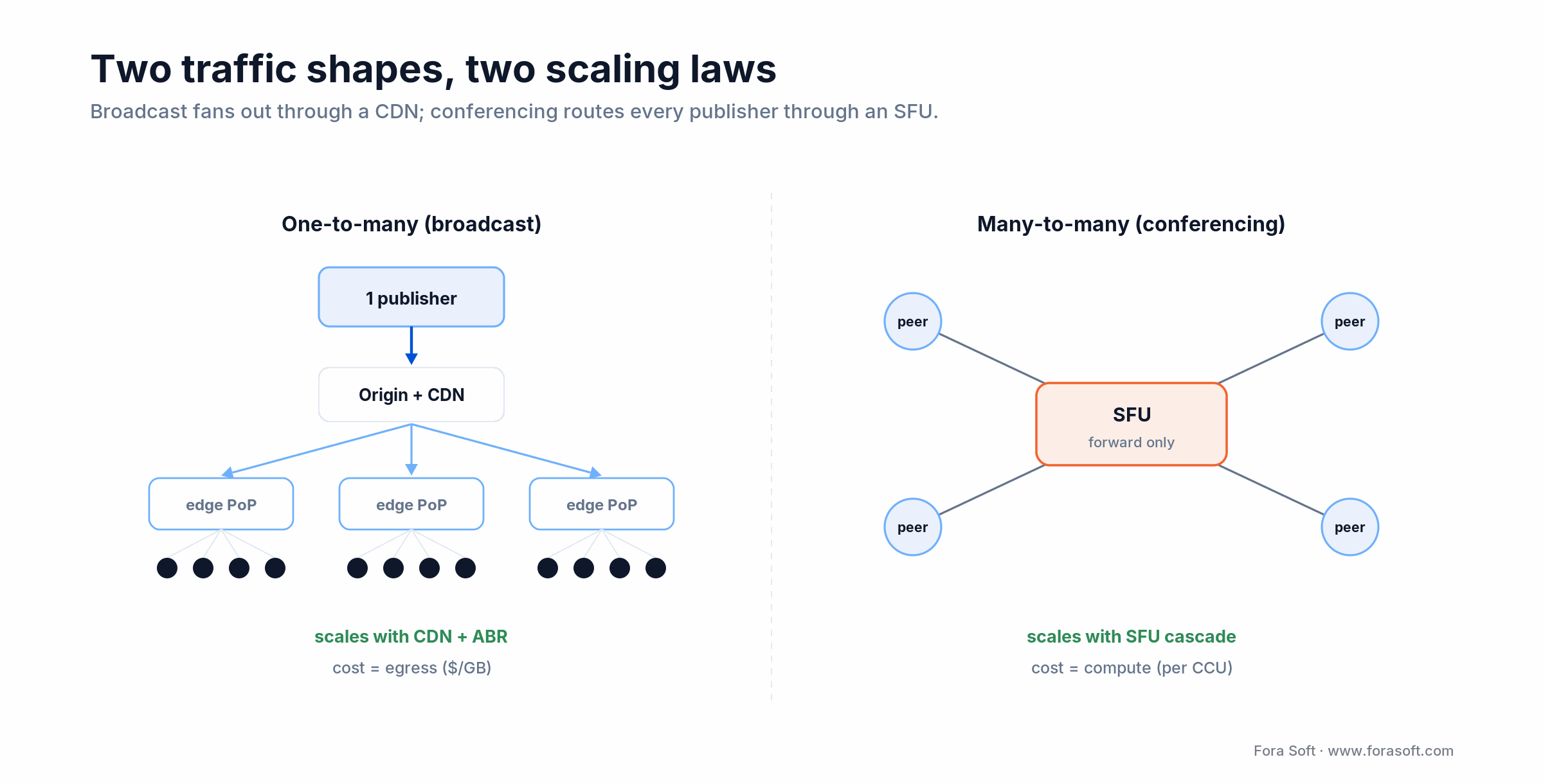
Figure 2. Broadcast fans out through CDN edges; conferencing hubs every peer through an SFU.
| Dimension | One-to-many streaming (OTT/live) | Many-to-many conferencing |
|---|---|---|
| Traffic shape | 1 publisher, 10k–10M viewers | 2–1000 publishers, same viewers |
| Latency budget (glass-to-glass) | 15–30s standard, ~2s LL-HLS/CMAF, <500ms WebRTC-over-CDN | <200ms interactive, <50ms high-trust |
| Core primitive | Ingest → transcode → package → CDN → player | WebRTC peer → SFU → optional cascade → peer |
| Hot bottleneck | Transcoder CPU/GPU, origin egress | SFU bandwidth/port count, TURN capacity |
| Cost shape | Egress-dominated, CDN-billed per GB | Compute-dominated, SFU hosting per CCU |
| Scaling unit | PoP + cache layer per region | SFU node per 500–1000 concurrent streams |
| Player | HLS/DASH + ABR ladder | WebRTC SDK (browser/native) |
Rule of thumb: if you want high fan-out and tolerate 2–10s latency, bet on HLS + CDN. If you need interactive sub-second latency with many publishers, bet on an SFU. Hybrid products — live classes, watch parties, interactive sports — need both, designed together from day one.
Why video platforms actually break
When a platform buckles during the webinar, the cricket final or the virtual classroom, the cause is rarely total CPU count. It is almost always one of these five structural failures. Adding servers makes the failure louder, not smaller.
1. A single origin fanning out to every viewer. No CDN, or an undersized one. Egress saturates the first NIC that hits its cap, and buffering spreads region by region.
2. A transcoder on a general-purpose VM. ABR ladders are CPU-hungry. Running 1080p60 H.264 on a shared t-class instance is the textbook source of stream drops.
3. An SFU sized for “peak yesterday”. Conferencing SFUs saturate on egress bandwidth or port count. One node comfortably holds a few hundred concurrent tracks; past that you need cascade or autoscaling.
4. Stateful application servers. If session state lives in the app process, you cannot scale horizontally without sticky sessions or shared state. Move state to Redis, Postgres or a dedicated session store.
5. No observability. No rebuffer dashboard, no P95 startup time, no SFU CPU alert — you find out when a customer tweets. Monitoring is cheap; rebuilding on fire is not.
Downtime is expensive. ITIC's 2024 survey found that for more than 90% of mid-size and large enterprises a single hour of downtime costs over $300,000, and 41% put it between $1M and $5M+ per hour. On a live event that is a fraction of the lost advertising, cancelled subscriptions and brand damage. A focused audit paid once is almost always cheaper than the next incident.
How scalable video systems are designed
Well-scaled video products share the same six design principles. None of them are proprietary tricks; they are table stakes, and their absence is what you find during an audit.
1. Stateless compute, stateful storage. API services hold no user state in memory. Sessions live in Redis, media state in the SFU or origin, business data in Postgres. Any service can die or scale without sticky routing.
2. CDN-first edge distribution. For broadcast, package HLS/DASH at the origin and cache it on a CDN (Cloudflare, Fastly, Akamai, CloudFront); 95–99% of viewer traffic then never touches the origin. For low latency, use LL-HLS or WebRTC-over-CDN. This is the single biggest lever in scalable video streaming.
3. Adaptive bitrate (ABR). A ladder of renditions (240p/480p/720p/1080p at roughly 0.4/1.2/3/6 Mbps) lets each viewer take the best quality their connection supports. Rebuffer rate drops by an order of magnitude.
4. Horizontal SFU with cascade. Cap each SFU at a known limit; when a room grows past it, cascade onto a second node. mediasoup, LiveKit, Jitsi and Janus all support this, with different mechanics.
5. Transcoding on the right hardware. Serious broadcast runs transcoders on bare metal with NVENC or dedicated CPU (we use Hetzner AX-series), bursting into cloud encoders for spikes. Transcoding on a shared app VM is a trap.
6. Monitoring and graceful degradation. Dashboard P95 startup, rebuffer ratio, error rate per region, SFU CPU and TURN bandwidth. Alarm at 70% of capacity. When things go wrong, drop non-essentials first (simulcast layers, the 4K rendition, fancy filters) and keep the base stream alive.
Reference architecture
The shape below is what we default to above a few thousand concurrent users. A small product uses a subset; an enterprise product adds regional replicas and private-origin redundancy. The key idea: both media planes split from one shared control plane.
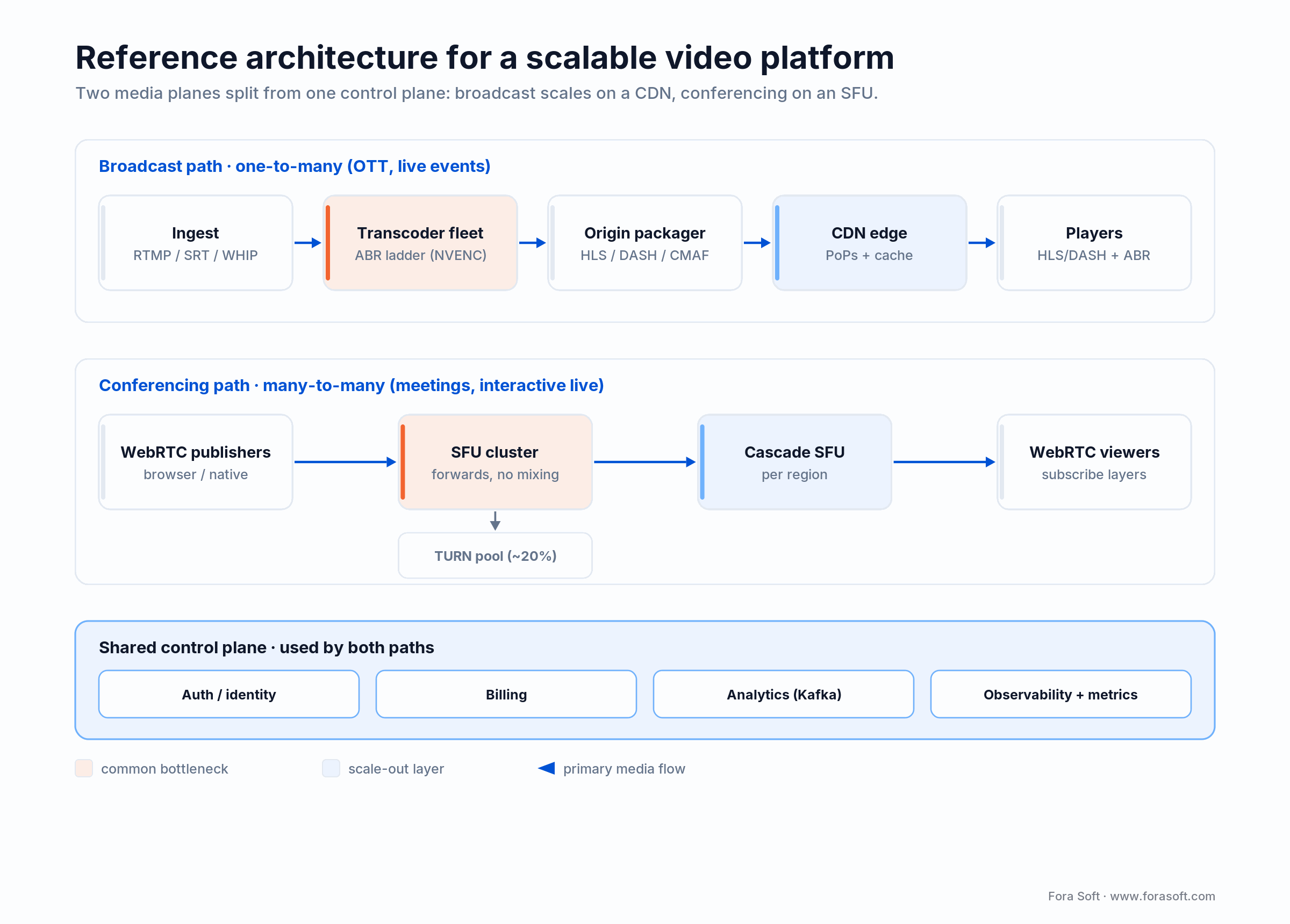
Figure 1. Broadcast path (top) and conferencing path (middle) split at the media plane but share auth, billing and monitoring.
Broadcast path (OTT, live events)
Ingest (RTMP, SRT or WebRTC-WHIP) → a transcoder fleet producing an ABR ladder → origin packaging to HLS/DASH + CMAF LL → CDN edge → player. The scaling unit is a region's transcoder fleet sized for peak ingest, with an autoscaling group for spikes.
Conferencing path (meetings, interactive live)
WebRTC peer → SFU cluster → optional cascade SFU → WebRTC peer. TURN servers are sized separately based on symmetric-NAT prevalence (rule of thumb: roughly 20% of users need TURN). For interactive live products, the conferencing stage can feed the broadcast path via server-side RTMP egress.
Shared control plane (auth, billing, analytics)
Identity, billing, user records and analytics are shared across both paths. These services stay stateless and horizontally scaled behind a regional load balancer, talking to replicated Postgres or Aurora. Analytics events stream to Kafka, land in a warehouse for reporting and a time-series store (Prometheus, Grafana) for operations.
How many users can one SFU hold?
A single well-tuned SFU node handles roughly 500–800 concurrent video participants, and most teams add nodes at around 500–1,000 concurrent users. But head-count is the wrong unit. What an SFU actually pays for is subscribed tracks, and that number depends on the room shape, not the raw number of people.
mediasoup states it plainly: one Worker maps to one CPU core, and a core forwards on the order of 500 consumers (outgoing streams) before it saturates (mediasoup scalability docs). LiveKit frames the same cost as O(n×m) in subscribed tracks, and both agree on the hard rule: a single room must fit on one node. Clustering distributes rooms, not the participants of one room.
Here is the arithmetic that catches teams out. A 200-person all-hands where everyone has video on is 200 publishers × up to 199 subscribers each, on the order of 40,000 forwarded streams. A 5,000-viewer webinar with one presenter is 1 publisher × 5,000 subscribers, so 5,000 forwarded streams, but each viewer only pulls one. The webinar is cheaper per head by a wide margin, which is why interactive-plus-broadcast hybrids route the long-tail audience to HLS instead of the SFU.
Two levers push a single node further: simulcast/SVC (the SFU forwards a lower layer to weak subscribers instead of the full stream) and cascade (split one big room across nodes and relay between them). Past a national audience you also want regional SFUs so media does not cross oceans twice. When someone quotes you a flat “users per server” number without asking your room shape, treat it as a red flag.
Latency budgets that pick your stack
Before picking tools, pick the latency budget. Everything else follows from it, and it is the number product owners most often negotiate up without realising they are asking for a re-architecture.
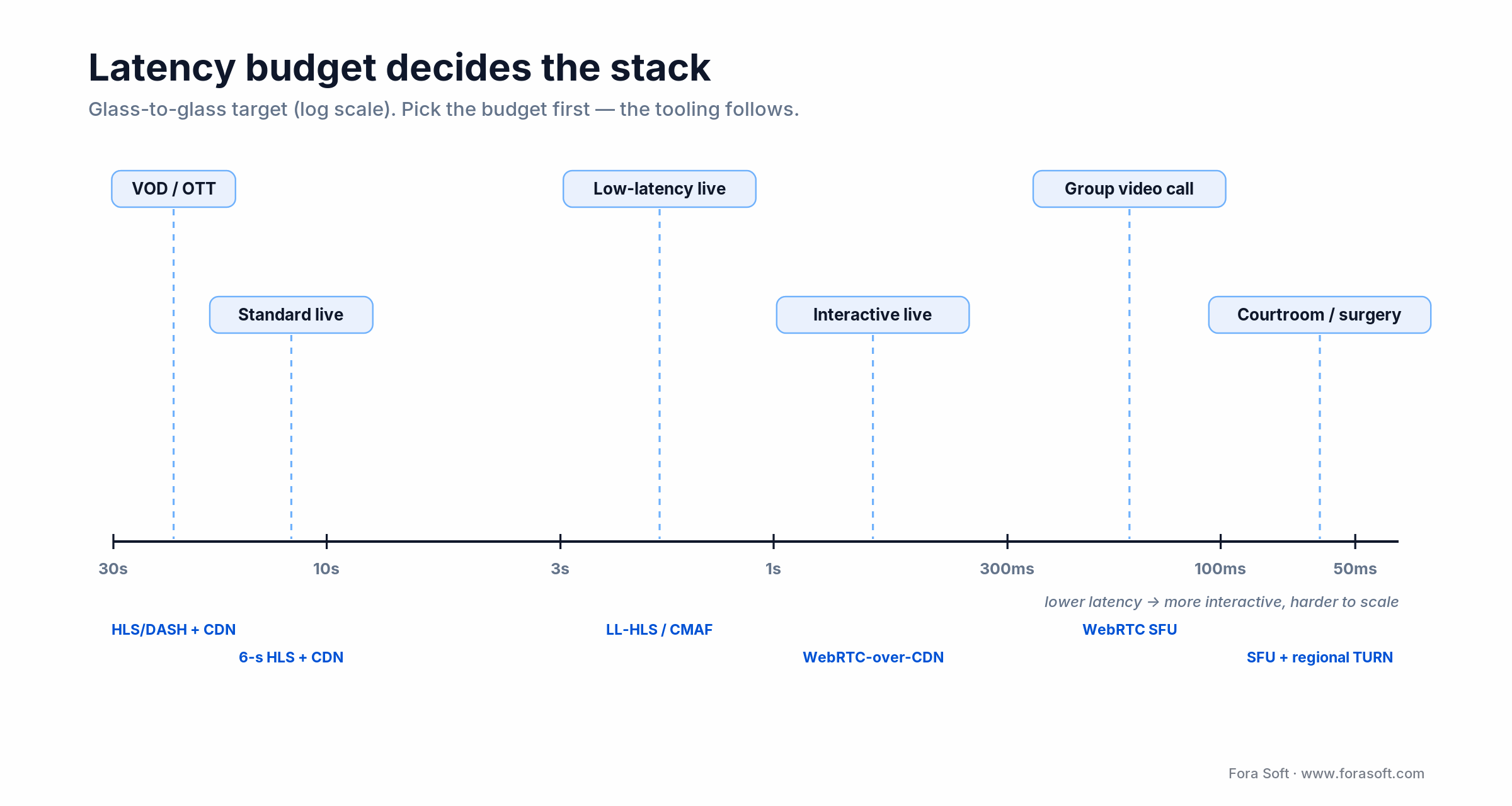
Figure 3. Glass-to-glass targets on a log scale, with the stack that fits each budget.
| Use case | Glass-to-glass target | Tech stack fit |
|---|---|---|
| VOD / OTT library | n/a (startup < 3s) | HLS/DASH + CDN, VOD packager |
| Standard live (sports, concerts) | 15–30 s | HLS/DASH 6-s segments + CDN |
| Low-latency live (betting, auctions) | 2–5 s | LL-HLS, CMAF low-latency |
| Interactive live (e-learning, gym) | 300 ms–1 s | WebRTC-over-CDN or SFU + RTMP egress |
| Group video call | <200 ms | WebRTC SFU (LiveKit, mediasoup, Jitsi) |
| Courtroom, surgery, trading | <50 ms | WebRTC SFU + regional TURN, QoS-tuned |
Common trap: asking for sub-second latency on a platform designed around 6-second HLS segments. That shift is not “tune a parameter” — it is a move to a different protocol family. Decide it before you build, not after launch.
Protocols and codecs in 2026
Pick the protocol by latency, then the codec by reach. Standard HLS lands around 15–30 seconds glass-to-glass with 6-second segments (RFC 8216); Apple Low-Latency HLS and chunked CMAF pull that to roughly 2–4 seconds; WebRTC is the only mainstream option under 500 milliseconds, with interactive conferencing targeting under 200 ms mouth-to-ear. Those are protocol families, not settings, so the choice is architectural.
On the codec side, simulcast and SVC are how an SFU serves weak and strong subscribers from one publisher. Simulcast (independent VP8/H.264 layers) works across every major browser including Safari and iOS; SVC (a single layered stream) is more efficient and only VP9 and AV1 support the full range of scalability modes (W3C WebRTC), with spatial-layer encoding still effectively Chrome-only in 2026. Practical call: VP8/H.264 simulcast for cross-browser coverage, VP9 SVC only when you control the client.
Two freshness notes that trip up older guides. First, Twilio Programmable Video is not dead — Twilio reversed its 2024 end-of-life decision in October 2024 and it remains a standalone product, so any article telling you to migrate off it “before shutdown” is out of date. Second, the Amazon Chime SDK is very much alive; it is the standalone Chime meetings app that loses support in February 2026, not the developer SDK. Conflating the two is a common and costly mistake.
AV1 is worth watching, not betting the launch on: it is roughly 30–40% more efficient than HEVC but not yet turnkey for real-time encode in 2026. HEVC now works in WebRTC on Chrome (since Chrome 136) but not Firefox, so for cross-platform conferencing the safe baseline is still H.264 or VP8 for calls and H.264/HEVC in HLS for broadcast.
Reach for WebRTC when a human is waiting on the other end of the stream — a teacher, an auctioneer, a surgeon. Reach for HLS/LL-HLS when the audience is watching rather than interacting and you need it to reach millions cheaply. Most real products draw the line per feature, not per platform.
Not sure which stack your product needs?
We will stress-test your architecture against the latency budget and traffic shape you actually have. If the plan is sound, we will tell you so and leave you to build.
CDN, multi-CDN and egress costs
Once a CDN is in front of your origin, delivery cost is the CDN bill, and it swings by more than 20× between providers. Broadcast is egress-dominated, so the per-GB rate you negotiate is one of the biggest line items on the platform.

Figure 5. Representative 2026 list egress per GB; committed contracts run well below list.
The 2026 spread is real money at scale. Bunny.net lists $0.01/GB standard and $0.005/GB on its volume tier; AWS CloudFront starts around $0.085/GB and slides toward $0.02–$0.03 at petabyte scale; Fastly lists near $0.12/GB before commitments; Akamai is negotiated, commonly landing near $0.04/GB. Committed-traffic contracts typically shave 20–40% off list, so treat these as starting points, not quotes.
Cloudflare is the outlier: its CDN bundles bandwidth, and Cloudflare Stream bills about $1 per 1,000 delivered minutes with no separate egress charge — roughly $0.06 per viewer-hour, which is easy to reason about but not always cheapest at very high scale. For large or global audiences, a multi-CDN setup (steering traffic across two providers by price, performance and availability) both lowers blended cost and removes a single point of failure. It adds orchestration, so it pays off above roughly tens of terabytes a month.
Scaling WebRTC across regions
Conferencing scales globally by putting SFUs near users and relaying between them, not by growing one central cluster. A single SFU in Virginia serving participants in Sydney adds a fixed ocean of latency to every packet, and TURN relay makes it worse.
Three moves matter. Regional SFUs: run a cluster per major region and pin each room to the region closest to its participants. Cascade: when a room spans regions, connect the regional SFUs to each other so each peer still talks to a local node while media relays between clusters over the backbone. TURN placement: roughly 20% of sessions need a TURN relay (far more on locked-down enterprise networks), so put TURN in every region too, or those users route through a distant relay and feel it.
The practical test is a chaos test: kill a region and watch whether rooms fail over or freeze. If a single region going dark takes the platform with it, you have a central cluster wearing a regional costume. We build this with health-checked regional pools and geo-routing so a lost node degrades gracefully instead of dropping calls.
The stabilisation playbook
Most platforms we audit are not broken beyond repair. They have two or three bottlenecks causing the vast majority of incidents, and a focused 2–6 week intervention buys roughly 10× headroom. The standard sequence:
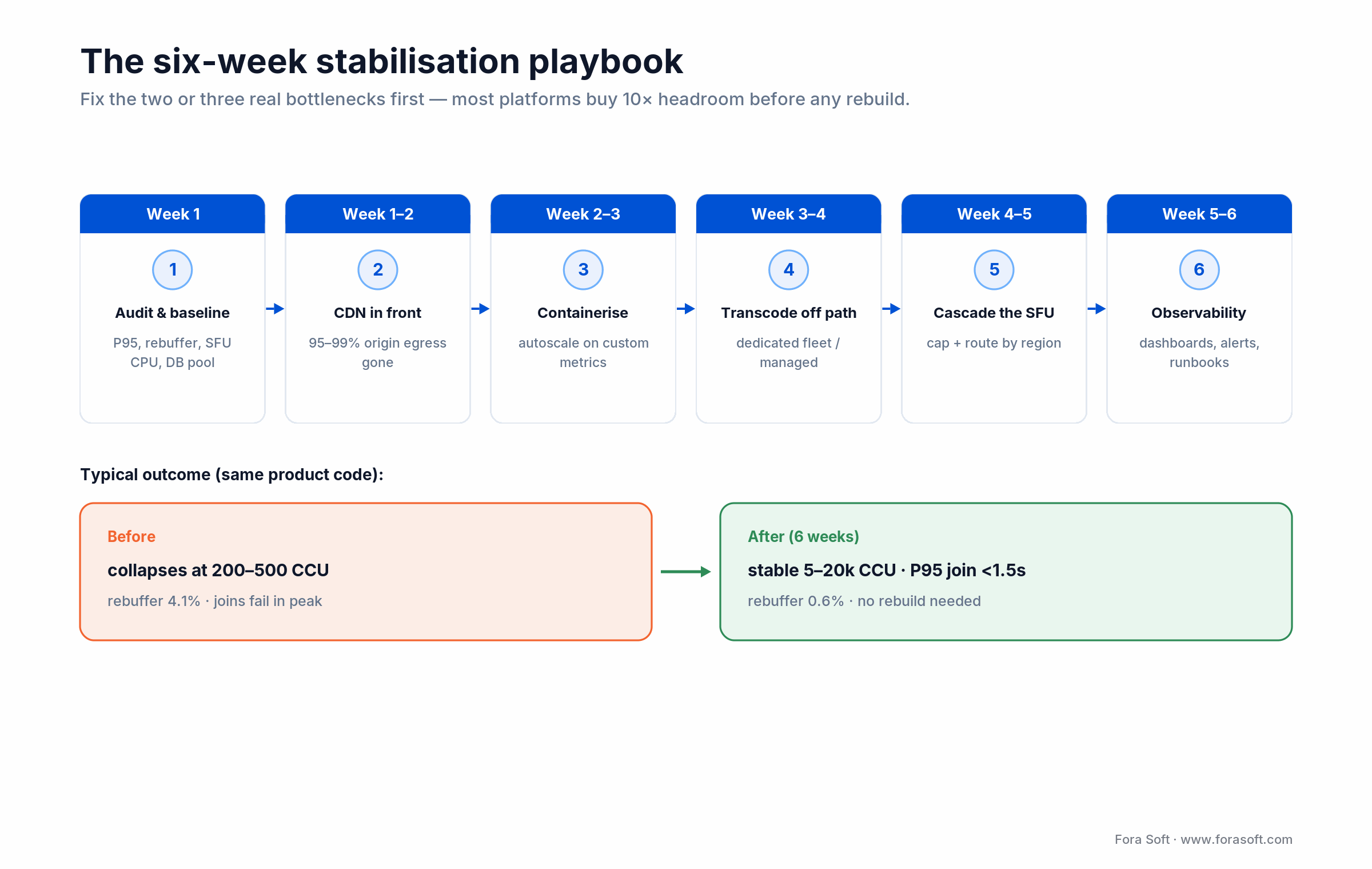
Figure 4. The six-week sequence and the concurrency it typically buys on the same product code.
Week 1 — audit and baseline. Measure P95 startup, rebuffer ratio, SFU CPU, origin egress and DB pool. Name the top three bottlenecks. A written architecture audit becomes the map.
Week 1–2 — put a CDN in front of the origin. Same-day win for broadcast: a CDN on the HLS/DASH endpoint cuts origin egress by 95–99% almost immediately.
Week 2–3 — containerise and autoscale. Move stateless services into containers and autoscale on custom metrics (SFU CPU, transcoder queue depth), not just CPU percentage.
Week 3–4 — move transcoding off the app path. Transcoders go to dedicated hardware or managed encoders, driven by a queue rather than in-request.
Week 4–5 — cascade the SFU. Cap each SFU at a known limit, cascade rooms across nodes, and route by geography.
Week 5–6 — observability and runbooks. Dashboards on the KPIs below, alerts at 70% of capacity, runbooks for the top five incidents, and blue-green or canary deploys so rollouts stop being outages. For single-call incidents the dashboards can’t explain, our StreamTest guide shows how to diagnose a frozen WebRTC stream right in the browser.
Outcome we typically see: platforms that collapsed at 200–500 concurrent users reach a stable 5–20k CCU inside six weeks, without touching core product code. Full migrations take longer; stabilisation does not.
Load-testing before you launch
You do not know a platform scales until you have pushed it to twice its expected peak and watched the KPIs hold. Real traffic is the worst time to discover the origin caps at 500 viewers or the SFU pins a CPU at 600 tracks.
Load-test to 2× your worst-minute peak, not your average. For broadcast, drive synthetic viewers against the ABR ladder and watch startup time, rebuffer ratio and origin egress. For conferencing, spin up headless WebRTC clients (tools like the mediasoup or LiveKit load generators) to the participant count you expect, then keep going until something turns red — that ceiling is your real capacity number.
Then chaos-test: kill a region, drop an SFU node, sever the database primary. A platform that rides through with graceful degradation is scalable; one that needs every component healthy is fragile at any size. Bake both into CI before launch and re-run them before every big event, so the load test fails in a staging window instead of during the cricket final.
Cost model: where the money goes
Two patterns to internalise, because they drive completely different budgets:
Broadcast is egress-dominated. With a CDN, compute is cheap and bandwidth is the bill. A 2 Mbps stream watched for one hour is about 900 MB, so at $0.01–$0.085/GB that is roughly $0.01–$0.08 per viewer-hour in delivery, with transcoding a fixed fleet cost amortised across all viewers.
Conferencing is compute-dominated. Managed WebRTC prices per participant-minute: LiveKit Cloud from about $0.0005/min, Amazon Chime SDK at $0.0017/min, Daily and 100ms around $0.004/min, and Agora at $3.99 per 1,000 minutes (about $0.004/min) for 720p, more for 1080p. Self-hosted SFUs on bare metal can be 3–5× cheaper per minute at steady scale but need a platform team to run them.
| Workload profile | Best-fit hosting | Rough cost per unit | Notes |
|---|---|---|---|
| VOD / OTT library | Object storage + CDN | $0.005–0.02 / viewer-hour | Hit-rate-driven; origin near zero at scale |
| Live event (peaky) | Cloud transcode + CDN | $0.02–0.06 / viewer-hour | Burst-friendly, higher per-GB |
| Live streaming steady-state | Bare metal transcode + CDN contract | $0.008–0.03 / viewer-hour | Hetzner AX + Cloudflare is our common pick |
| Managed conferencing | Agora / Daily / LiveKit Cloud | $0.0005–0.009 / participant-min | No ops cost; some vendor lock-in |
| Self-hosted SFU | mediasoup / LiveKit on bare metal | $0.0008–0.003 / participant-min | Needs a platform team; big savings at scale |
Worked crossover: at $0.004/min managed versus roughly $0.0012/min self-hosted (server plus ops amortised), the two lines meet near 30,000–50,000 participant-minutes per day. Below that, managed conferencing is almost always the lower total cost of ownership once you count engineering time; above it, self-hosting pays back within a quarter if you have the team to run it.
Mini case: a live e-learning platform
Situation. A live-video e-learning product on a monolithic Node server with a single SFU collapsed at 300–400 concurrent users during the evening study rush in Asia. Classes degraded to audio-only, attendees dropped, and app-store ratings followed.
What we changed in six weeks. We moved stateless services behind a load balancer and autoscaled them on Kubernetes. We cascaded the SFU cluster (mediasoup) across four regional nodes (two EU, one US East, one Singapore) and put TURN behind a dedicated pool. We added Grafana dashboards for P95 startup, join failures and SFU CPU, alarming at 70% capacity.
Outcome. Stable 8–10k CCU on the same product code, P95 join under 1.5s, rebuffer down from 4.1% to 0.6%. Monthly infra rose by roughly $6k and avoided an estimated $400k rebuild, unblocking a new enterprise tier. The pattern repeats across scalable video management systems and interactive live tools in general.
Want the same assessment on your platform? Book a 30-minute call and we usually leave you with a one-page punch list you can ship next sprint.
A five-question decision framework
Q1. Broadcast or interactive? One publisher to many viewers → HLS + CDN. Many-to-many under 200ms → WebRTC SFU. Hybrid (a live class with Q&A) → both, wired together.
Q2. What is the real latency budget? Write it in milliseconds and do not let anyone negotiate it up later without redesigning the pipeline.
Q3. What is the concurrency peak? Peak CCU sizes the fleet. Ordinary traffic hides the problem — model the worst minute of the worst day you care about.
Q4. Managed or self-hosted media? Below ~30k participant-minutes/day, managed wins on total cost. Above it, self-hosted pays back within a quarter if you have the team.
Q5. Who is on call? Video is 24/7. With no rotation and runbooks, you pay that cost in outages instead of salaries. If four or more of these are still unanswered, that is the conversation to have before writing code.
Five pitfalls we see every time
1. Single origin for broadcast. No CDN, no cache layer; the first few hundred viewers saturate the NIC and quality collapses region by region.
2. Stateful app servers. Session state pinned to a process means no horizontal scale, and sticky sessions become the new bottleneck.
3. One SFU for the world. Fine until the first global event. Cascade and regional SFUs are not optional past a few hundred concurrent streams.
4. Transcoding on the app VM. CPU spikes crash the API. Move transcoding to its own fleet or a managed encoder.
5. Zero observability. No rebuffer dashboard, no startup histogram, no SFU CPU alert — you learn about outages from customers, not systems.
KPIs to monitor every week
Quality KPIs. P95 startup under 3s (broadcast) or 1.5s (interactive). Rebuffer ratio under 1%. Video start failures under 0.5%. MOS at or above 4.0 for conferencing. Glass-to-glass P95 inside your budget.
Business KPIs. Concurrent viewers, session duration, watch-through rate, churn by region, and cost per viewer-hour or per participant-minute. These pay for the whole program.
Reliability KPIs. Origin and SFU CPU (alert at 70%), TURN bandwidth, error rate per region, P99 join latency, deployment failure rate and MTTR under 30 minutes. Treat the video plane like a payments system: when it is down, revenue bleeds.
When not to build custom scalability
Early MVP with unknown demand. Use managed services (Mux, Cloudflare Stream, LiveKit Cloud, Agora, Daily) to buy time. Custom pays off after you have a reliable growth curve.
Very small audience, very long product life. 200 active users on a tutoring app: managed forever — the engineering cost of DIY dwarfs the savings.
Team without WebRTC or streaming depth. Self-hosted SFUs and transcoders are unforgiving. If you cannot hire that skill, stay managed until you can.
Commodity feature inside someone else's ecosystem. A meeting widget inside an EMR usually belongs on the Amazon Chime SDK or Zoom Video SDK — both still fully supported in 2026 — not on a bespoke SFU fleet.
Thinking about migrating off Agora or Twilio?
We have run the migration many times on mediasoup, LiveKit and Janus. Tell us your CCU and we will come back with a TCO delta and a realistic timeline.
FAQ
What does “scalable” actually mean for a video platform?
It means the system can grow concurrent users or sessions by at least an order of magnitude without a proportional jump in cost, latency or failure rate. In practice: P95 startup and rebuffer stay inside budget, SFU and origin CPU stay under 70%, and adding capacity is a matter of scaling a group, not redeploying a stack.
How many participants can a single SFU handle?
A well-tuned mediasoup or LiveKit node handles roughly 500–800 concurrent video participants, and most teams add nodes at 500–1,000 CCU. The real limit is subscribed tracks, not head-count: a 5,000-viewer webinar (one publisher) is far cheaper than a 200-person all-hands where everyone publishes. Cascade and simulcast push a node further.
Should I build on WebRTC, HLS, or both?
Broadcast with 15–30s latency tolerance (VOD, sports, concerts): HLS/DASH + CDN. Group calls, courtrooms, telehealth: WebRTC SFU. Interactive live (classrooms, auctions): usually both — WebRTC for active participants, HLS or LL-HLS for the passive long-tail audience.
Is Twilio Programmable Video being discontinued?
No. Twilio announced an end-of-life in 2024 but reversed it in October 2024, and Programmable Video remains a standalone product in 2026. Guides that tell you to migrate off it “before shutdown” are out of date. Separately, the Amazon Chime meetings app loses support in February 2026, but the Chime SDK for developers continues.
What is the cheapest CDN for video streaming in 2026?
On list egress, Bunny.net is the cheapest of the majors at roughly $0.005–0.01/GB, versus about $0.085/GB for AWS CloudFront and $0.12/GB for Fastly; Cloudflare bundles bandwidth instead of charging per GB. Committed contracts cut 20–40% off list, and at large scale a multi-CDN setup usually beats any single provider on blended cost.
Is scalability just about buying more servers?
No. Hardware does not fix a structural bottleneck; it makes the failure louder. Ten servers behind a single origin still send 100% of viewers to that origin. Spend on CDN, stateless redesign and monitoring first, then scale the compute.
Can an overloaded platform be stabilised without a full rebuild?
Usually yes. A focused 2–6 week program covering CDN, stateless services, SFU cascade, dedicated transcoding and monitoring typically buys a 10× increase in safe concurrency. A full rebuild is occasionally necessary — for example when the app is built around a broken signalling protocol — but it is the exception.
How long does it take to make a video platform scalable?
Quick wins (CDN in front of origin, async transcoding, basic dashboards) land in days. A full stabilisation program — SFU cascade, autoscaling, blue-green deploys, observability — takes 4–8 weeks for most platforms. A custom from-scratch build is a 4–9 month effort depending on scope.
How do I know my platform is actually scalable?
Load-test to 2× your expected peak and watch the KPIs: P95 startup under 3s, rebuffer under 1%, no region below target quality, SFU CPU under 70%. Add a chaos test (kill a region, drop a node). If it rides through, you are good; if any of those go red, you have a scaling gap.
What to Read Next
Architecture
WebRTC Architecture Guide for Business (2026)
SFU, MCU, cascade and TURN explained for product leaders picking a conferencing stack.
Migration
Agora.io Alternative: Custom WebRTC
TCO and migration playbook when managed conferencing gets too expensive at scale.
Cost
How to Estimate Server Cost for a Video Platform
A CCU-driven cost model that puts real numbers against real workloads.
VMS
Scalable Video Management Systems in 2026
The five engineering decisions that matter when VMS goes past a few thousand cameras.
Build guide
Building a Streaming App: VOD, Live and Conferencing
End-to-end build guide for founders picking the right video pattern from day one.
Ready to scale without breaking it?
Scalability in video is never “buy more servers.” It is a set of structural decisions: stateless compute, CDN-first edge, ABR, horizontal SFUs, dedicated transcoders and serious monitoring. Streaming and conferencing each have their own version of the playbook, and solving both with one architecture is the most expensive mistake in the category.
Most platforms struggling today can be stabilised within six weeks; the remaining fraction need a deeper re-architecture, best done once stabilisation has bought the runway to plan it. Either way: measure the right KPIs, keep humans on call, and design for the growth curve you actually expect — not the one you hope for.


The handbook · 7 volumes
Fora Soft Video Engineering Handbook
Streaming and conferencing scale on different machinery, and this playbook gives each its budget. Our seven-volume handbook covers the full video stack: encoding, delivery, audio and AI. Start with Volume 3 for ABR, CDN caching, WebRTC and the economics of delivery, then Volume 2 for ingest, latency budgets and HLS and CMAF packaging. Written by Nikolay Sapunov, CEO at Fora Soft.
Browse the handbook on Amazon →7 volumes · 9,000+ pages · Kindle & paperback
Let us scope your scalability program
Thirty minutes, a real engineer, a one-page plan: bottlenecks, priorities, realistic budget and timeline. Free.

