

The demo streams beautifully to twelve people. Then marketing lands a launch, 40,000 viewers hit play in the same minute, and the feed stalls into a spinner. That is the single most expensive failure a video product can ship, because the churn happens in the exact moment you paid to acquire the audience. A scalable video streaming platform is the architecture that makes that minute the same as any other. Fora Soft has built 250+ video products since 2005, so this is the honest version: the real constraints, the 2026 numbers, and where teams overspend.
This is for the CTO, founder, or product lead deciding how to build video that survives its own success without a runaway cloud bill. We’ll walk the five problems that actually break at scale (bandwidth and latency, adaptive bitrate, protocol choice, CDN egress, and real-time topology), then the capacity math, a reference architecture, a worked cost example, and a decision framework. Every number carries a year and a source.
Key takeaways
• “Scalable” means cost per viewer stays flat as viewers grow. If your bill scales linearly and your latency creeps up under load, you have a working demo, not a platform.
• Protocol sets your ceiling: WebRTC is the only option under 500 ms glass-to-glass (2026), but scales per-room; LL-HLS/LL-DASH give 1–5 s at CDN scale; standard HLS buffers 15–30 s but reaches millions cheaply.
• CDN egress is the bill that eats you. One 2-hour event for 50,000 viewers is roughly $13,000 of CloudFront egress on H.264 at October 2026 tiered list prices, about $6,400 on AV1 — same audience, ~60% less bandwidth.
• Real-time topology matters: P2P mesh breaks past ~4–6 peers, MCU burns CPU mixing, SFU forwards streams and scales to large rooms. Almost every serious platform lands on an SFU.
• Build vs buy flips on volume and control. Below a few hundred thousand streaming-minutes a month, a managed platform wins; past that, or under hard compliance, a custom platform pays back inside a year.
Updated October 2026: tiered CloudFront egress math (October 2026 list prices), a six-step plan for scaling to thousands of viewers, the March 2026 72.5M-concurrent streaming record, WHIP as RFC 9725 and AV2 status.
The short answer: what makes video scale
A video platform scales when three things stay flat as your audience grows: startup time, rebuffering rate, and cost per viewer-hour. Everything below is in service of those three numbers.
The levers, in the order they pay off: pick the delivery protocol that matches your latency need (not the lowest latency you can imagine); push bytes through a CDN, not your origin; encode an adaptive bitrate ladder so weak connections downshift instead of buffering; pick the newest codec every target device can decode; and separate your control plane from your data plane so they scale independently. Get those right and 50,000 concurrent viewers cost the same per head as 500.
The honest test: load-test at 10× your expected peak before launch. If startup time and rebuffer ratio hold and the cost line stays linear-or-better, you scale. If any of the three bends, you found your bottleneck cheaply, which is the point.
How to scale video for thousands of viewers: six steps
To scale live video for thousands of concurrent viewers, deliver it as adaptive HLS or DASH through a CDN, so viewers pull cached segments from the edge and never touch your origin. Add an origin shield, an ABR ladder, autoscaled transcoding and a 10× load test, and the same design holds from 5,000 to hundreds of thousands of viewers; what grows is node counts and the CDN contract. The six steps, in order:
- Pick the latency tier first. Passive viewers go to HLS or DASH (2–30 s); only the people who must interact get WebRTC (under 500 ms).
- Encode once, centrally. Transcode each input into a 5–7 rung ABR ladder once. The number of viewers never changes the number of encodes.
- Put a CDN and an origin shield in front of the origin. The edge collapses thousands of identical segment requests into one fetch, so origin load stays flat as the audience grows.
- Autoscale on leading signals. Scale transcoders on queue depth and SFUs on connection count, and pre-warm capacity before scheduled events.
- Watch startup time, rebuffer ratio and cost per viewer-hour live. Player-side QoE beacons (CMCD) show trouble before support tickets do.
- Load-test at 10× the expected peak. Run it with real players hitting the CDN, not just synthetic requests to your API.
That pattern scales well past thousands. CDN-delivered HTTP streaming carried the global record of 72.5 million concurrent digital viewers on JioHotstar for the ICC Men’s T20 World Cup final in March 2026, as reported by the ICC (the semi-final three days earlier had peaked at 65.2 million). The architecture is the same at 5,000 viewers; only the scale of each box changes.
Why Fora Soft wrote this
We build video and real-time platforms for a living: 250+ projects since 2005 with 50+ in-house specialists, on WebRTC, LiveKit, and the media servers underneath. Scaling video is most of what we do, so the failure modes here are ones we’ve debugged at 2 a.m., not ones we read about.
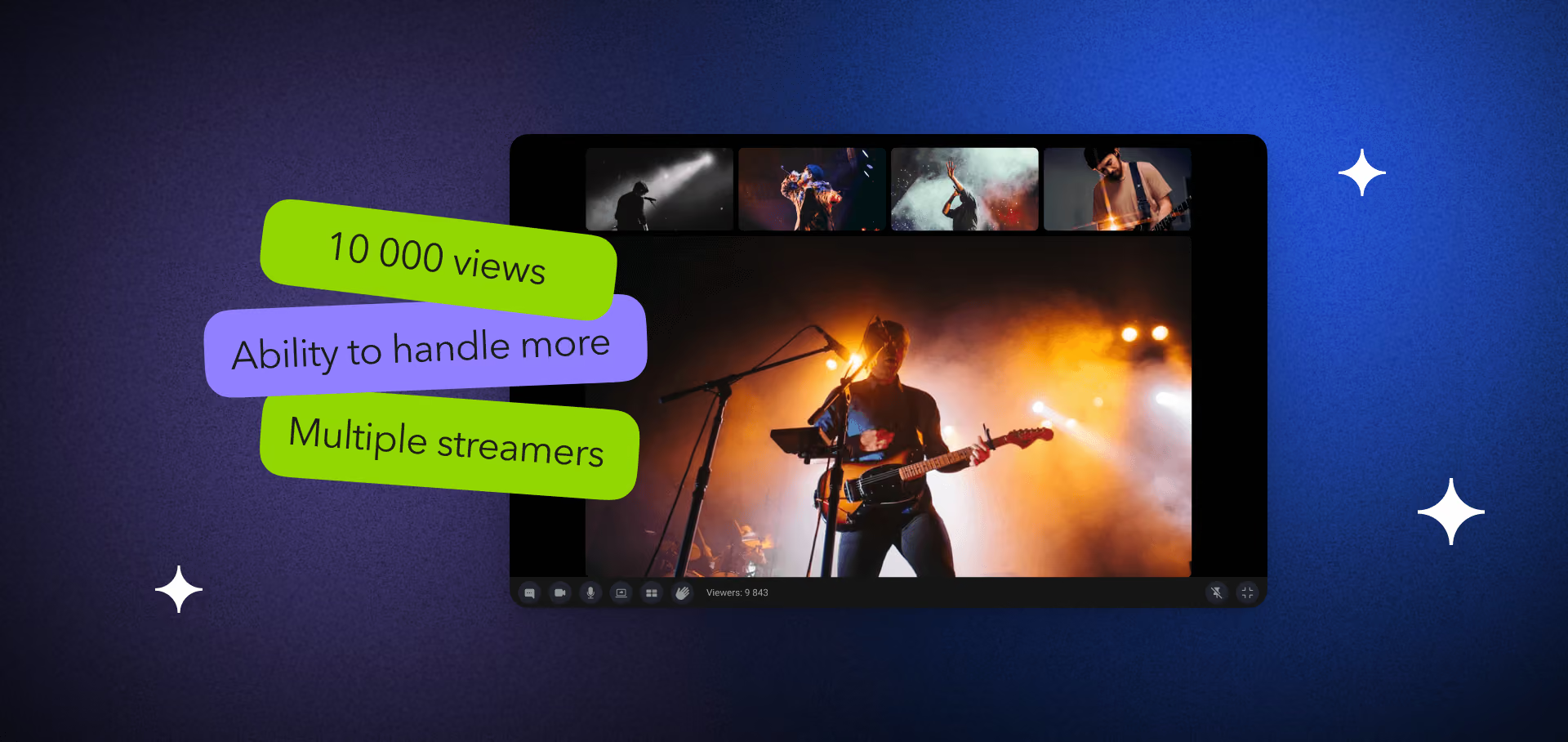
For grounding: BrainCert runs on the order of 500M+ classroom minutes; Worldcast Live streams HD concerts to ~10,000 concurrent viewers; and Vodeo is a Netflix-style VOD service across iOS and TV. If you want that experience pointed at your platform, our video & audio streaming development team does exactly this — what follows is the same reasoning we walk clients through.
What “scalable” actually means for video
Scalability is not “handles a lot of users.” It’s a shape: as load rises, quality-of-experience holds and marginal cost stays flat or falls. Two platforms can both “work” at 1,000 viewers and diverge violently at 100,000. One caches at the edge and downshifts gracefully; the other re-encodes per viewer and melts.
Three metrics decide it, and you should instrument all three from day one:
- Startup time (join-to-first-frame). Under 2 seconds is the 2026 bar for VOD; live viewers are less patient. It should not grow with concurrency.
- Rebuffer ratio. Time spent buffering ÷ total watch time. Above ~1% and abandonment climbs fast. Adaptive bitrate is what keeps this near zero on bad networks.
- Cost per viewer-hour. All-in delivery cost divided by watch hours. This is the number that quietly kills startups. If it’s flat, you scale; if it rises with volume, you have a leak.
Live, VOD, and interactive video are different animals here. VOD scales almost purely on caching and storage. Live adds real-time transcoding and thundering-herd spikes. Interactive video (calls, auctions, classrooms) adds the hardest constraint of all: sub-second latency, which rules out the cheap CDN path. Know which one you are before you pick a stack — the video delivery primer in our Learn track breaks down the differences.
Bandwidth and latency: the constraint under everything
Video is most of the traffic you are competing for: it made up about 75% of all mobile data traffic at the end of 2025, according to the June 2026 Ericsson Mobility Report (summary by TelecomLead). So bandwidth is the scarce resource, and every scaling decision is a trade between latency and reach. You cannot have sub-second latency and cheap CDN delivery to millions at once — physics and buffering economics won’t allow it. So the first question is not “how do we go faster,” it’s “how much latency can this product tolerate?”

Figure 1. Glass-to-glass latency by protocol (2026). WebRTC is real-time; LL-HLS/LL-DASH are low-latency; standard HLS/DASH buffer 15-30s.
Standard HLS runs 15–30 seconds behind live because it ships video in multi-second segments the player must buffer (per Apple’s HLS documentation). Low-latency HLS and LL-DASH cut that to 1–5 seconds. LL-HLS does it with partial segments of 200–400 ms, preload hints and blocking playlist reloads (Apple dropped the original HTTP/2 push requirement in 2020, so the CDN only has to hold blocking playlist requests and keep the _HLS_msn/_HLS_part parameters in its cache key); LL-DASH does it with CMAF chunks sent over chunked transfer encoding. WebRTC is the only protocol consistently under 500 ms glass-to-glass across 2026 browsers and mobile — the price is that it scales per room, not per CDN. Our low-latency streaming playbook goes deeper on the sub-second path.
Reach for low latency only when the product needs it. A watch party or auction needs sub-second so reactions land in sync. A sports stream tolerates 2–5 seconds if chat is synced to the video. A film catalog is fine at 20 — and 20 is far cheaper to scale. Buying latency you don’t need is the most common overspend we see.
Adaptive bitrate: how weak networks stop breaking playback
Adaptive bitrate streaming (ABR) is the single technique that lets one stream serve a fiber connection and a subway 4G signal without buffering either. Here’s the mechanism, plain: your encoder produces the same video at several bitrates — a “ladder” of, say, 240p to 1080p. The player measures throughput and buffer health every few seconds and switches rungs. Bad network, it drops to a lower rung and keeps playing; good network, it climbs back up.
Without ABR, a viewer on a weak connection stalls and leaves. With it, they get a softer picture and stay — and staying is the whole business. The engineering cost is in the ladder: too few rungs and switches are jarring; too many and you pay to encode and store rungs nobody watches. A sensible 2026 default is five to seven rungs, tuned per content type with per-title encoding so a talking-head stream doesn’t carry a ladder built for action footage.
Picking a delivery protocol: HLS, LL-HLS, DASH, WebRTC
The protocol is your scaling ceiling and your latency floor at once. Get it wrong and no amount of infrastructure rescues you. Match it to the two things that don’t change: how low your latency must go, and how many people watch at once.
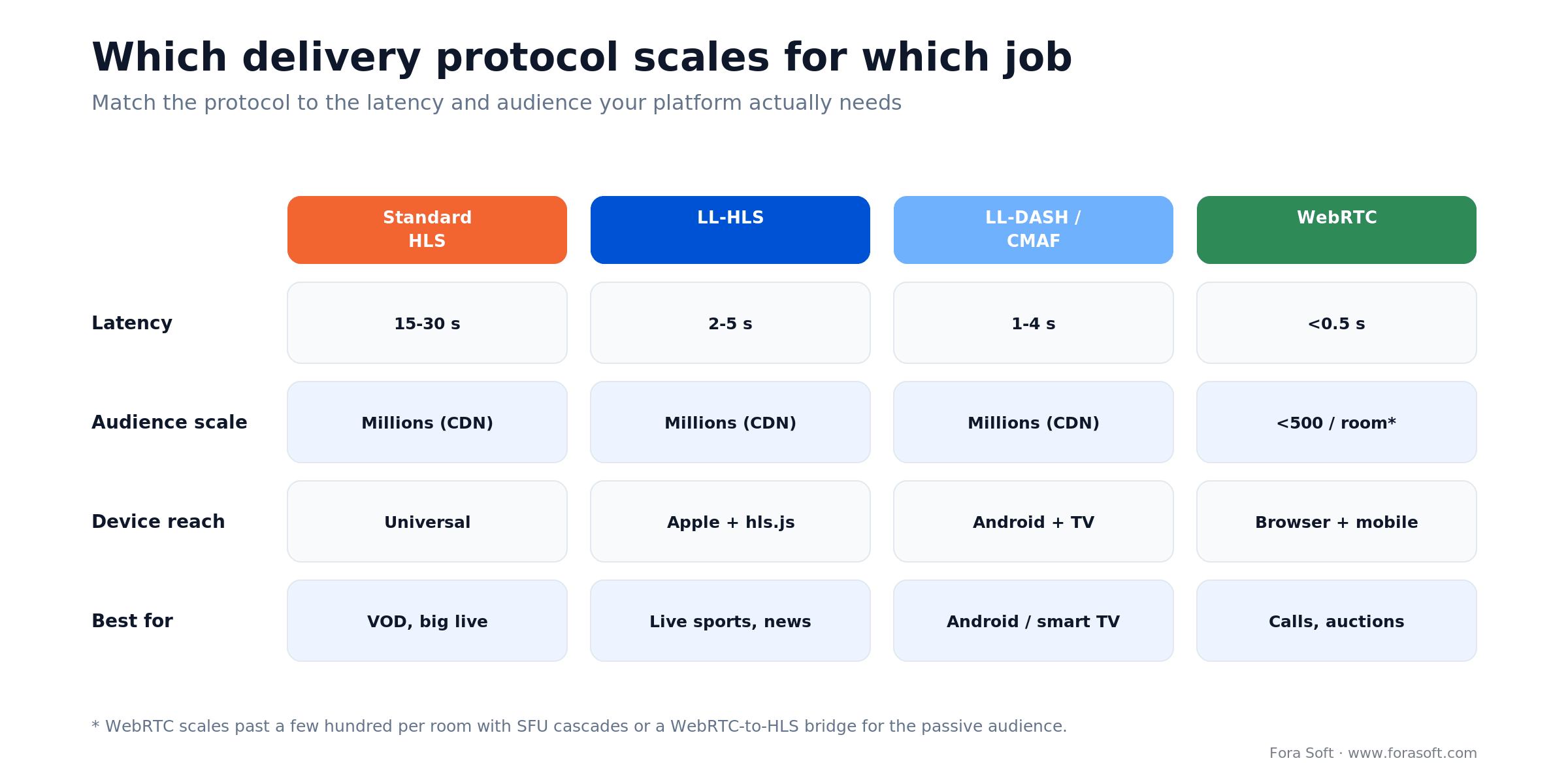
Figure 2. How the four main delivery protocols compare on latency, scale, and device reach — and the job each one is built for.
| Protocol | Latency | Scale | Best for |
|---|---|---|---|
| Standard HLS | 15–30 s | Millions via CDN | VOD catalogs, large live where delay is fine |
| LL-HLS | 2–5 s | Millions via CDN | Live sports, news — Apple & hls.js devices |
| LL-DASH / CMAF | 1–4 s | Millions via CDN | Android and smart TV low-latency live |
| WebRTC | <0.5 s | Hundreds per room* | Calls, auctions, classrooms, watch parties |
| RTMP (ingest) | — | Ingest only | Getting the source in (OBS, encoders) — not delivery |
*WebRTC scales past a few hundred per room with SFU cascades or by bridging the passive audience to LL-HLS. The common 2026 pattern for a big interactive event: WebRTC for the people on stage, an HLS bridge for the crowd. For the deeper protocol history and codec pairings, see our roundup of the best technologies for video streaming apps.
Reach for LL-HLS when you need “fast enough” live at massive scale (sports, live commerce, breaking news) and a 2–5 second delay with synced chat is acceptable. It keeps CDN economics while shaving the worst of the HLS lag.
Two 2026 changes on the ingest and delivery edges are worth planning for. WHIP, the WebRTC-HTTP ingestion protocol, became a standard as IETF RFC 9725 (March 2025), so browsers and encoders such as OBS can push sub-second WebRTC into your pipeline instead of RTMP. Media over QUIC (MoQ) is still an IETF Internet-Draft (moq-transport draft 20, August 2026): it promises sub-second latency with CDN-style fan-out, but treat it as a pilot next to HLS and WebRTC, not a replacement. If you want to trial it early, our Media over QUIC development team builds MoQ relays and WebTransport players alongside a standard HLS fallback.
CDN delivery and the egress bill that eats margins
Answer-first: at scale, bandwidth (not compute or storage) is your biggest line item, and a CDN is how you keep it from being catastrophic. A CDN caches your video on edge servers near viewers, so 50,000 people in a city pull from one nearby cache instead of hammering your origin 50,000 times.
But the CDN sends you an egress bill, and video is the worst kind of traffic to pay for: sustained and high-bandwidth, so caching and compression help less than they do for web assets. Amazon CloudFront lists egress at $0.085/GB after the first free terabyte in the US and Europe, stepping down to $0.080 for the next 40 TB, $0.060 for the next 100 TB and $0.040 for the next 350 TB; Japan and Australia start at $0.114, Southeast Asia at $0.120, India at $0.109 and South America at $0.110 (list prices checked October 2026). CloudFront’s newer flat-rate plans (Pro $15, Business $200 and Premium $1,000 a month) each include 50 TB of transfer, less than a quarter of the single event in the cost example below, so video at scale still lands on per-GB or committed pricing. A single 1080p viewer at 4 Mbps burns ~1.8 GB per hour. Multiply that by your audience and you see why the bill compounds.
How a CDN delivers live streaming video. The packager writes each new segment to the origin every 2–6 seconds (or every 200–400 ms for LL-HLS parts). The first viewer request at each edge pulls it through an origin shield; every other request for that segment is served from cache or held and collapsed into that single fetch. That is why a live audience of 50,000 creates a handful of origin requests per segment (roughly one per shield region), not 50,000. Keep playlist cache times shorter than the segment duration, or viewers see a stale live edge.
Three ways to cut egress without cutting quality
- Codec. Moving 1080p from H.264 (~5 Mbps) to AV1 (~2 Mbps) cuts bytes ~60% at equal quality. This is the single biggest lever — more below.
- Multi-CDN + content steering. Route each viewer to the cheapest healthy CDN in their region; fail over automatically. It also removes single-CDN outage risk. The steering options and their costs are in our Learn guide to multi-CDN architecture.
- Commit deals. List price is for tourists. Any real volume negotiates 30–70% off, or uses a discount CDN for the long tail. Our Learn track has a full breakdown in CDN cost engineering: egress, commits, and the 95th percentile.
Not sure what your streaming bill will look like at scale?
Send us your expected audience and bitrate ladder. We’ll model your egress across codecs and CDN options and hand back a cost-per-viewer-hour number you can plan against.
Real-time at scale: P2P vs MCU vs SFU
If your product is interactive (calls, classrooms, auctions), the protocol is WebRTC and the next question is topology: how the server moves media between participants. This choice decides your per-room cost and your ceiling on room size.

Figure 3. Three real-time topologies. P2P mesh breaks past a handful of peers; MCU mixes at heavy CPU cost; SFU forwards streams and scales.
- P2P mesh. No media server — every peer sends to every other. Cheap and private for 2–4 people; upload load grows with each added peer, so it breaks past roughly 4–6.
- MCU (Multipoint Control Unit). The server decodes every stream, mixes them into one, and re-encodes it. Clients get a single tidy stream, but the server burns heavy CPU per room — expensive to scale. Worth it mainly when a single composited recording is the actual product.
- SFU (Selective Forwarding Unit). The server forwards each participant’s stream to the others without decoding or mixing. Low CPU, scales to large rooms, and it’s what LiveKit, mediasoup, and Janus implement. This is the default for almost any serious real-time platform.
We ship SFU platforms by default and reach for MCU only when the composited output is the deliverable; sizing SFU cascades and multi-region media routing is the core of our custom WebRTC architecture design work. The full trade-off, with numbers, is in our guide to P2P vs MCU vs SFU for video apps; if WebRTC itself is new to you, start with what WebRTC is and how it works. When one product needs a live stage and a large watching audience at once, our scalable video platform playbook for streaming plus conferencing covers SFU capacity math and a six-week stabilisation plan.
Reach for an SFU when rooms exceed a handful of people and you want them to keep growing. Reach for MCU only when you need one merged recording or a single low-power output (legacy hardware, a broadcast feed). P2P stays in its lane: tiny, private, cheap.
Server scalability and the capacity math
Answer-first: scale horizontally (add servers), autoscale on the right signal, and pre-warm before known spikes — because cold-scaling into a launch is how platforms crash on their best day. The single-big-server instinct is the trap; one machine has a hard ceiling and a single point of failure.
The math you actually need is capacity per node. Say each transcoding node handles ~20 live ABR ladders, and each SFU node forwards ~500 concurrent WebRTC subscribers before CPU tips. Then a 10,000-participant interactive event needs ~20 SFU nodes; a live event with 40 simultaneous input streams needs ~2 transcoding nodes. Size from measured per-node limits, not hope:
| Layer | Rough capacity per node | Scaling signal | Notes |
|---|---|---|---|
| Ingest / transcode | ~15–25 live ABR ladders | Queue depth, CPU | GPU nodes for high-res; per-title to trim waste |
| SFU (WebRTC) | ~500 subscribers | CPU, bandwidth | Cascade SFUs for very large rooms |
| Packager / origin | Thousands of req/s | Origin egress | Front with CDN; origin shield to cut fan-out |
| CDN edge | Effectively elastic | — | You pay per GB, not per server |
Two rules keep this honest. First, autoscale on a leading signal (queue depth, connection count) not a lagging one (CPU already pegged) — reactive-only scaling always arrives late. Second, pre-warm capacity before scheduled events; ML-based prediction helps for recurring patterns, but a known 8 p.m. kickoff just needs nodes up at 7:45.
Storage, transcoding, and codec choice
Transcoding, turning one source into the ABR ladder, is CPU- and GPU-heavy, and it’s where live platforms slip most. For VOD you transcode once and cache forever; for live you transcode in real time, so under-provisioning here stalls every viewer at once. Per-title and per-scene encoding cut the wasted bitrate of a one-size ladder.
Scalable video transcoding means the number of encodes grows with the number of input streams, never with viewers: each live input gets one ladder, run on a pool of CPU or GPU workers that autoscales on queue depth (live encodes are long-running jobs; VOD chunks are short stateless ones). For VOD, split long files into chunks and encode them in parallel, then stitch; for live, keep one warm worker per channel plus spare capacity for the top-of-the-hour spike.
Codec choice is the highest-impact decision on this whole page, because it multiplies against every byte you ever deliver. Three codecs matter in 2026:
| Codec | 1080p bitrate* | Bytes vs H.264 | Device reach | Use it for |
|---|---|---|---|---|
| H.264 (AVC, 2003) | ~5 Mbps | baseline | Universal — every device | Fallback rung, always ship it |
| H.265 (HEVC) | ~2.5 Mbps | ~50% less | Apple, modern smart TVs | 4K/HDR, primary on Apple & TV |
| AV1 (royalty-free) | ~2 Mbps | ~60% less | Growing: Chrome, Android, new TVs | Highest rungs where CDN savings are biggest |
*Approximate, equal-quality 1080p; per the Alliance for Open Media and 2026 codec benchmarks. The trade-off is real and worth stating plainly: newer codecs cost more CPU to encode and don’t decode on every device. So the 2026 default is to keep H.264 as the universal fallback, add HEVC for Apple and TV, and layer AV1 on the top rungs for devices that support it — where the bandwidth saved is largest. YouTube does exactly this: AV1 for 4K, H.264 for the long tail. The next step, AV2, was released by the Alliance for Open Media in June 2026, but there is no shipping hardware decode yet, so it is a 2027-plus planning item, not a 2026 ladder rung.
Reach for AV1 when your egress bill is real (six figures a year and up) and enough of your audience runs devices that decode it. On a tight budget with a broad low-end device mix, HEVC plus H.264 captures most of the saving with less encoding cost and fewer support gaps.
DRM, security, and compliance
If you license premium content or handle regulated data, security is not a feature you add later — it gates launch. Two layers to plan.
DRM stops copying of licensed content, and it’s three-headed by necessity: Widevine (Google: Android, Chrome), FairPlay (Apple: Safari, iOS, tvOS), and PlayReady (Microsoft: Edge, Windows, many smart TVs). Full device coverage means packaging your content for all three, usually via CMAF with multi-key encryption so one packaging job feeds every device. Studios won’t license without it.
Compliance is about where data lives and who can see it. GDPR forces EU data residency and deletion-on-request; HIPAA (US health) demands audit trails and long retention; a growing list of recording-consent laws governs who can be recorded and how. A scalable platform pins media and metadata to regions you choose and keeps recordings under your own storage and access control — which, not incidentally, is a strong reason regulated products end up self-hosting rather than renting a black-box service. In the EU, the European Accessibility Act has applied since 28 June 2025 to services that give access to audiovisual media: the player, its controls and the electronic programme guide must be accessible, and subtitles and audio description must be passed through to viewers, as summarized by Taylor Wessing.
Building for HIPAA, GDPR, or content-licensing rules?
Compliance is cheaper to design in than to retrofit. Book a call and we’ll map DRM, data residency, and audit requirements against your architecture before you write the code that’s hard to unwind.
A reference architecture for a scalable streaming platform
Here’s the shape that holds up. The core idea: separate the data plane (the path video takes, ingest to player) from the control plane (API, auth, analytics). They have completely different load profiles, so they should scale independently — a viewership spike shouldn’t strain your catalog API, and a metadata migration shouldn’t touch live delivery.
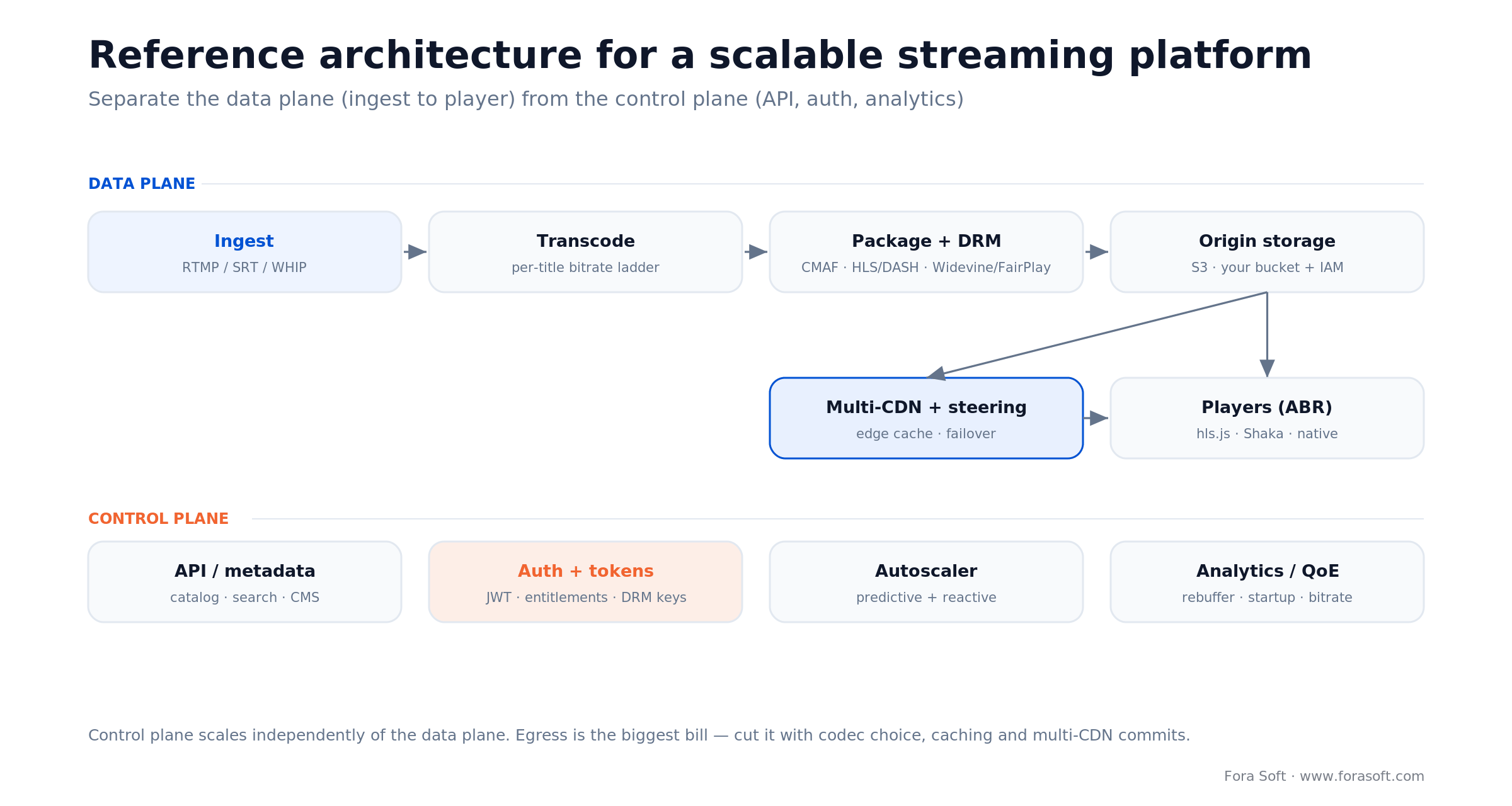
Figure 4. Reference architecture: the data plane runs ingest to player; the control plane (API, auth, autoscaler, analytics) scales on its own.
The data plane, left to right: ingest takes the source in (RTMP, SRT, or WHIP from encoders and OBS); transcode builds the ABR ladder; package + DRM wraps segments as CMAF for HLS and DASH and applies encryption; origin storage (your S3 bucket, your access control) holds the segments; multi-CDN with content steering caches at the edge and fails over; players run the ABR logic (hls.js, Shaka, or native). The control plane runs alongside: catalog and metadata API, auth and token minting (including DRM keys), the autoscaler, and analytics/QoE tracking rebuffer and startup so you see trouble before viewers tweet about it.
Nothing here is exotic — that’s the point. It’s the same skeleton behind YouTube-scale and behind a well-built startup, differing only in how many nodes sit in each box.
A worked cost example: 50,000 concurrent viewers
Let’s put real numbers on one event and show the arithmetic, because “it depends” helps nobody. Scenario: a 2-hour live event, 50,000 concurrent viewers, delivered over a CDN. The dominant cost is egress, and egress is bitrate × time × audience.
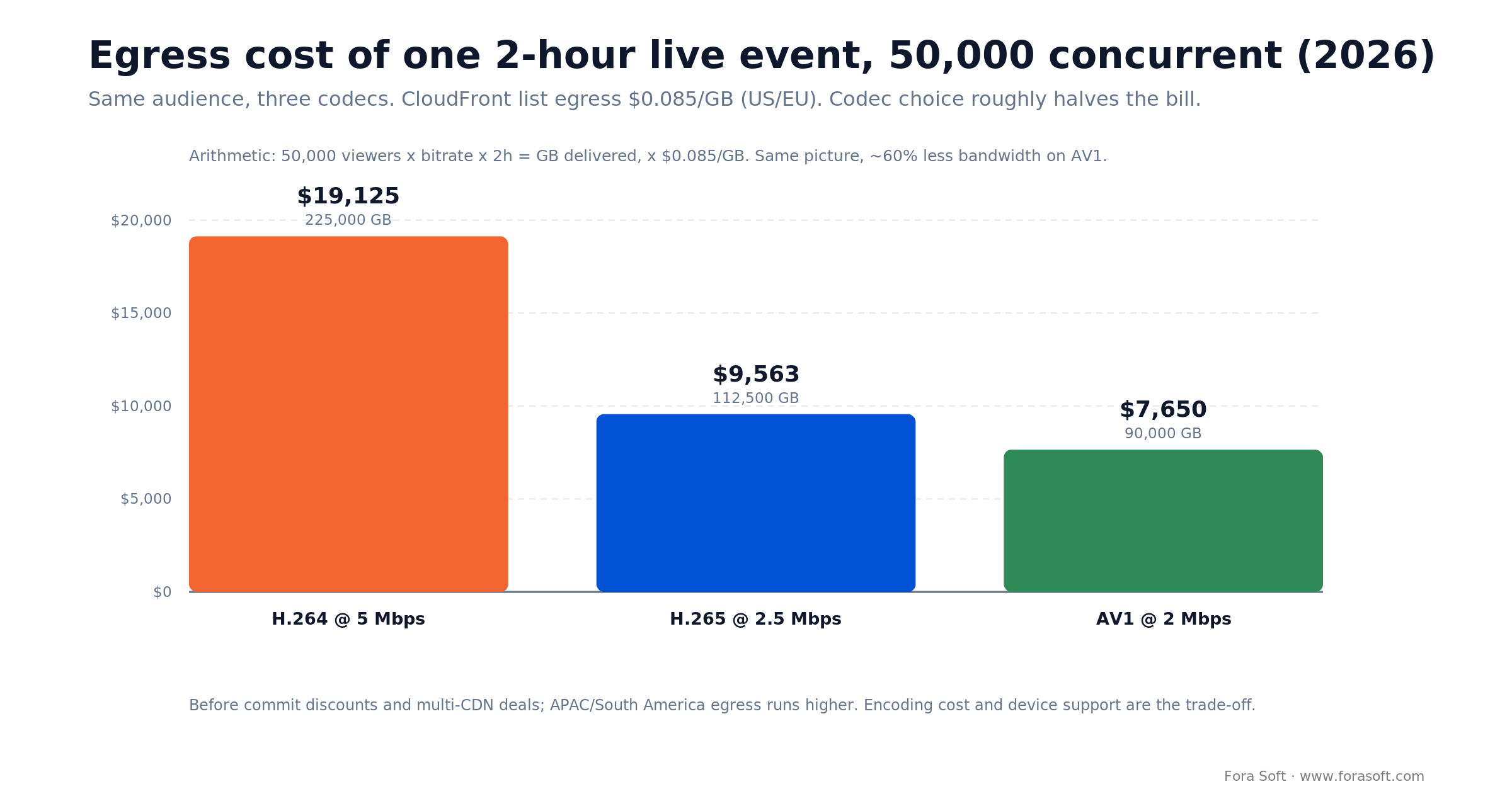
Figure 5. Egress cost of one 2-hour, 50,000-viewer event by codec, priced flat at the $0.085/GB first tier (the upper bound). AV1 delivers the same event for ~60% less bandwidth.
The math, on H.264 at 5 Mbps: each viewer pulls 5 Mbps × 3,600 s ÷ 8 ÷ 1,000 ≈ 2.25 GB per hour, so 4.5 GB over two hours. Times 50,000 viewers = 225,000 GB (225 TB). Priced flat at CloudFront’s $0.085/GB first tier, that would be ~$19,125. CloudFront actually bills in tiers (October 2026 US list: 1 TB free, then $0.085, $0.080, $0.060 and $0.040 per GB), so if this event is the month’s only traffic the bill is ~$13,000. Switch the ladder to H.265 (~2.5 Mbps, 112.5 TB) and it drops to ~$7,700; AV1 (~2 Mbps, 90 TB) lands near ~$6,400. Same event, same picture quality, ~60% fewer bytes and about half the bill — purely from the codec.
Two honest caveats. This is list price before discounts; real commit deals and multi-CDN routing take 30–70% off, and APAC/South America egress runs higher. And codec savings aren’t free — AV1 costs more CPU to encode and doesn’t decode on every device, so you ship it on the rungs and devices where it pays. But the direction is unarguable: at scale, codec and CDN strategy decide whether streaming is a healthy-margin business or a slow bleed.
What shipping streaming platforms taught us
Patterns that repeat across our video project portfolio. Specifics are generalized where clients are under NDA.
E-learning, live classes that had to hold quality at peak. An education platform we build for runs on the order of hundreds of millions of classroom minutes. The scaling problem wasn’t raw viewer count — it was simultaneous live classes at the top of every hour, a thundering herd of transcoding demand. We moved to horizontal transcoding with pre-warmed capacity on the class schedule and an SFU for the interactive seminars, and startup time stopped drifting under load.
Live concerts, ~10,000 concurrent in HD. A concert-streaming product needed HD to hold up when the whole audience arrived in the same two minutes. The fix was boring and effective: LL-HLS over a multi-CDN setup with origin shielding, an ABR ladder tuned for music (motion-light, so lower rungs still looked good), and hard load-testing at 3× expected peak. It held.
VOD catalog across mobile and TV. For a Netflix-style service, the scaling story was almost entirely caching and codec: transcode once into a wide ABR ladder, cache aggressively at the edge, and layer newer codecs on the high rungs to trim egress. Want a read on your own scaling plan? Book a 30-minute architecture review. Across all three, the lesson was the same: the bottleneck is almost never the thing the demo tested — it’s the shape of the spike.
Want an architecture review of your streaming plan?
Bring your expected audience curve and latency target. We’ll pressure-test the design, flag the bottleneck that shows up at 10× load, and hand back a scaling plan — no commitment.
Build a custom platform or buy a managed one?
Answer-first: below a few hundred thousand streaming-minutes a month, buy a managed platform — the convenience is worth the premium. Past that, or under hard compliance or feature constraints, a custom platform pays back inside a year and keeps compounding.
Managed platforms (Mux, api.video, Cloudflare Stream, and the SDK crowd for real-time) get you to launch fast and absorb the ops burden. A managed live streaming server is exactly that: you send RTMP, SRT or WHIP, and the provider runs transcoding, packaging and CDN delivery. For scale, Cloudflare Stream lists $1 per 1,000 minutes delivered and $5 per 1,000 minutes stored (October 2026), and starts billing WebRTC delivery on 15 October 2026. The 50,000-viewer, 2-hour event in the cost example above is 6 million delivered minutes, about $6,000 at that list price whatever the bitrate. The catch is per-minute or per-GB pricing that scales with every viewer, feature ceilings you hit at exactly the wrong moment, and a media plane you don’t control when compliance asks hard questions. A custom platform on open-source pieces (LiveKit or mediasoup for real-time, standard transcode/package/CDN for streaming) inverts that: higher up-front build, near-flat marginal cost, total control. That is the build our scalable video streaming team ships on mediasoup, LiveKit and multi-CDN delivery. We walk the full switch economics in build vs buy for a video platform.
Stay on a managed platform when you’re pre-product-market-fit, under ~300k streaming-minutes/month, have no compliance ask, and no ops capacity. The premium buys speed and a pager you don’t carry — at that stage, worth every cent.
A decision framework: pick your scaling path in five questions
Answer these in order. The first one that clearly points somewhere is usually your answer.
- 1. How low must latency go? Sub-second and interactive → WebRTC + SFU. A few seconds live → LL-HLS/LL-DASH. Delay is fine → standard HLS and the cheapest scaling.
- 2. How big is the audience, and how spiky? Millions but passive → CDN-delivered HTTP streaming. Large but interactive → SFU cascades, or WebRTC on stage + HLS bridge for the crowd.
- 3. What’s your egress budget? If bandwidth is a material cost, codec strategy (AV1/HEVC) and multi-CDN aren’t optional — they’re the difference between margin and bleed.
- 4. What does compliance demand? Hard residency, audit trails, or content licensing → own your media plane and DRM; lean toward custom or self-hosted.
- 5. Do you have ops capacity and volume? No pager and low volume → managed. Real volume, a team, and control needs → custom pays back. If two or more answers push you toward custom and you want a second opinion, that’s a 30-minute call with us.
The short version: latency and audience shape decide your protocol and topology; egress budget and compliance decide your codec and control model; volume and ops capacity decide build vs buy.
When NOT to over-engineer for scale
Scaling architecture is insurance, and insurance you don’t need is just cost. Four times to deliberately keep it simple:
- Pre-product-market-fit. If you haven’t proven people want the product, a managed platform and a single region is the right call. Don’t build for a million users you don’t have.
- Small, predictable audiences. An internal training portal or a niche B2B tool with hundreds of viewers doesn’t need multi-CDN or an SFU cluster. Boring scales fine here.
- No latency requirement. If 20 seconds behind live is acceptable, don’t pay for WebRTC or LL-HLS complexity. Standard HLS over a CDN is cheaper and simpler.
- No ops capacity. Owning a media plane means owning a pager. If nobody can carry it, a managed platform is the honest choice regardless of volume — a self-hosted stack nobody maintains is a liability, not scale.
FAQ
What is a scalable video streaming platform?
A scalable video streaming platform is an architecture where quality of experience (startup time, rebuffer ratio) and cost per viewer-hour stay flat as the audience grows. It combines adaptive bitrate encoding, CDN delivery, the right protocol for your latency need, and a control plane that scales independently of the data plane.
How do you scale video for thousands of viewers?
Deliver it as adaptive HLS or DASH through a CDN with an origin shield, so viewers pull cached segments from the edge instead of your origin. Encode each input once into an ABR ladder, autoscale transcoding on queue depth, keep WebRTC only for the people who must interact, and load-test at 10× your expected peak.
How does a CDN deliver live streaming video?
The packager writes short segments to the origin every few seconds; CDN edges fetch each new segment once through an origin shield and serve every viewer from cache, collapsing duplicate requests. Short playlist cache times keep viewers at the live edge.
What is a managed live streaming server?
A hosted service that takes your RTMP, SRT or WHIP feed and runs transcoding, packaging and CDN delivery for you, priced per minute or per GB (Cloudflare Stream lists $1 per 1,000 minutes delivered in October 2026). It is the fastest way to launch; a custom pipeline wins at high volume or under strict compliance.
How many concurrent viewers can a video streaming platform handle?
With CDN-delivered HTTP streaming (HLS/DASH), effectively millions — the CDN absorbs the load and you pay per GB, not per server. The record so far is 72.5 million concurrent viewers on JioHotstar in March 2026. Interactive WebRTC is capped per room (roughly 500 subscribers per SFU node) but scales to large audiences via SFU cascades or by bridging passive viewers to HLS.
Which streaming protocol has the lowest latency in 2026?
WebRTC, at under 500 ms glass-to-glass — the only protocol consistently that fast across browsers and mobile. LL-HLS and LL-DASH reach 1–5 seconds while keeping CDN scale; standard HLS runs 15–30 seconds but is the cheapest to scale to huge audiences.
How much does CDN egress cost for video streaming?
Amazon CloudFront lists $0.085/GB after the first free terabyte in the US and Europe, falling to $0.040/GB past 150 TB a month, and $0.109–$0.120/GB to start in Asia-Pacific and South America (October 2026). A 1080p viewer at 4 Mbps uses ~1.8 GB/hour. Real volume negotiates 30–70% off list, and codec choice (AV1/HEVC) can cut the underlying bytes by half or more.
What is the difference between P2P, MCU, and SFU?
P2P mesh has no server — peers send directly to each other, which breaks past ~4–6 people. An MCU mixes all streams into one on the server (heavy CPU, one output). An SFU forwards each stream selectively without mixing (low CPU, scales to large rooms). Most real-time platforms use an SFU.
Should you build a custom video streaming platform or buy a managed one?
Buy managed below roughly 300,000 streaming-minutes a month, or before product-market fit — speed and low ops burden win. Build custom past that volume, or when compliance, cost control, or blocked features justify it; a custom platform typically pays back the build inside a year at scale.
Which video codec should you use in 2026?
Ship H.264 as the universal fallback (it decodes everywhere), use HEVC/H.265 for 4K/HDR and Apple and smart-TV devices, and add AV1 on the highest bitrate rungs for devices that support it. AV1 cuts bandwidth ~60% versus H.264 at equal quality but costs more to encode and isn’t universal yet. AV2 was released in June 2026 but has no hardware decode yet.
How much does it cost to build a scalable video streaming platform?
It depends on scope — live vs VOD vs interactive, compliance, and how many platforms you target. Rather than quote a number blind, we scope it against your requirements; Fora Soft uses Agent Engineering, so our estimates typically come in faster and lower than traditional dev shops. Book a call for a scoped figure.
What to read next
Low latency
Real-Time Video Streaming: The 2026 Low-Latency Playbook
The sub-second path in depth: WebRTC, LL-HLS, and where each wins.
Architecture
P2P vs MCU vs SFU for Video Apps
The topology choice under every interactive video build, with numbers.
Build vs buy
Build vs Buy a Video Platform
When a managed platform stops paying off — and what the switch costs.
Tech stack
Best Technologies for Video Streaming Apps
Protocols, codecs, and servers — the toolkit behind a streaming platform.
UX
Streaming App UX Best Practices
Seven pillars that keep viewers watching once the stream is fast.
Building a streaming platform that scales?
Scaling video comes down to keeping three numbers flat as the audience grows (startup time, rebuffer ratio, and cost per viewer-hour), and every decision on this page serves one of them. Pick the protocol for the latency you actually need, push bytes through a CDN not your origin, encode an adaptive ladder, choose the newest codec your devices can decode, and split the control plane from the data plane.
Get those right and 50,000 concurrent viewers cost the same per head as 500. Get the protocol or the codec wrong and no infrastructure saves you. If you want the design pressure-tested against your traffic curve before you build, that’s exactly the kind of problem we like.


The handbook · 7 volumes
Fora Soft Video Engineering Handbook
Protocol choice, CDN egress and SFU topology set the ceiling of a streaming platform, and each one deserves more than an architecture overview. We wrote a seven-volume handbook on the full video stack, from encoding and delivery to sound and AI. Begin with the volume on ABR, CDNs, WebRTC and delivery economics, then go to HLS, DASH and ingest, and to codecs like AV1 for cutting egress. Written by Nikolay Sapunov, CEO at Fora Soft.
Browse the handbook on Amazon →7 volumes · 9,000+ pages · Kindle & paperback
Ready to build video that survives its own launch?
No sales pitch — bring your audience curve and latency target, and you’ll leave with a defensible scaling plan and a cost-per-viewer number. That’s the fastest way to find your bottleneck before your users do.

