


Why this matters
If you are deciding whether to build a streaming product, scoping a project for a vendor, sizing a CDN bill, or simply trying to talk to engineers without nodding politely, this is the foundation. Every later article in our Video Streaming track — on protocols like HLS, DASH and WebRTC, on latency budgets, on adaptive bitrate, on multi-CDN architectures — assumes you already hold this mental model. We wrote this piece for the smart non-technical reader first; a senior streaming engineer should still respect every fact. If something below feels obvious by paragraph five, you will save real time on the rest of the section.
The simplest comparison: a photo vs a video
Imagine you upload a single photograph — a JPEG of a coffee cup — to a website. A browser somewhere asks for the file. Your web server reads it from disk, sends roughly two hundred kilobytes of bytes over a network connection, and the browser draws the picture once. The whole transaction lasts a few hundred milliseconds. If the network briefly stalls, the image takes an extra second to appear. Nobody complains. The job is done the moment the last byte arrives.
Now imagine the same coffee cup, but filmed: a 30-minute live cooking show at 1080p, 30 frames per second. The same browser asks for "the video". What does the server send?
The honest answer: it cannot just send one file. Even if it had one, two problems break the simple model immediately. First, a 30-minute 1080p video uncompressed weighs roughly 200 gigabytes — far too large to send before the viewer loses interest. The number that tells you the size of a video stream per second of playback, called the bitrate, can be calculated as resolution × bit depth × frame rate. For uncompressed 1080p at 30 fps that is 1920 × 1080 × 24 bits × 30 ≈ 1.49 Gbps, about 187 megabytes every second, or 5.6 gigabytes per minute. The very best home broadband connection delivers a fraction of that. Second, if the show is live, the file does not even exist yet — the chef is still cooking.
A JPEG is a single object that travels once. A video is a continuous, timed, ordered stream that has to keep arriving at the rate the eye expects to see it. Solving "how do we serve a JPEG" is a small networking problem. Solving "how do we serve a video to anyone, anywhere, on any device, often live" is the whole field of video streaming.
The four jobs of a streaming system
Every streaming pipeline, from a one-person Twitch channel to Netflix in eight regions, performs the same four jobs in sequence. Call them capture, encode, deliver, and play. Each job is where a different category of engineer earns their salary, and each job has its own typical first failure.
Capture is the moment a real-world scene becomes a digital signal — a camera sensor sampling light, a microphone sampling sound. The output is uncompressed pixels and audio samples. This is also where production failures happen first: a dropped HDMI cable, an out-of-focus lens, a microphone gain too low. Anything that goes wrong here cannot be fixed downstream.
Encode is where uncompressed video becomes a stream small enough to ship. A piece of software called a codec (short for coder-decoder) compresses the raw pixels by exploiting two redundancies: spatial (a single frame has large regions of similar color) and temporal (consecutive frames often differ only in a few moving objects). Common modern codecs include H.264, H.265, AV1, VVC, and the legacy MPEG-2 still used in broadcast. We cover codecs in depth in our Video Encoding section. For now, hold one number: a well-tuned H.264 1080p stream needs about 4.5 Mbps for clean motion at 30 fps. That is roughly 330 times less bandwidth than the uncompressed version above.
Deliver is the part most readers underestimate. It includes packaging the encoded stream into network-friendly chunks, distributing those chunks through a content delivery network — abbreviated CDN, a chain of servers placed close to viewers — and reacting to network conditions in real time. Delivery is where most of the protocol vocabulary lives: HLS, DASH, CMAF, WebRTC, MoQ, SRT, RTMP. Each one is a recipe for moving compressed video over a particular kind of network with a particular latency goal.
Play is the viewer's app or browser doing four things at once: fetching the next chunk, deciding whether the picture quality should go up or down, decoding the chunk, and drawing frames at exactly the right time. The player is more code than most people realise — modern web players like hls.js, Shaka Player, and dash.js are tens of thousands of lines, with their own state machines, buffering policies, and error recovery.
Capture is hardware. Encode is math. Deliver is networking. Play is software. The discipline of video streaming is the art of keeping these four jobs synchronised, in order, at the rate the eye expects.
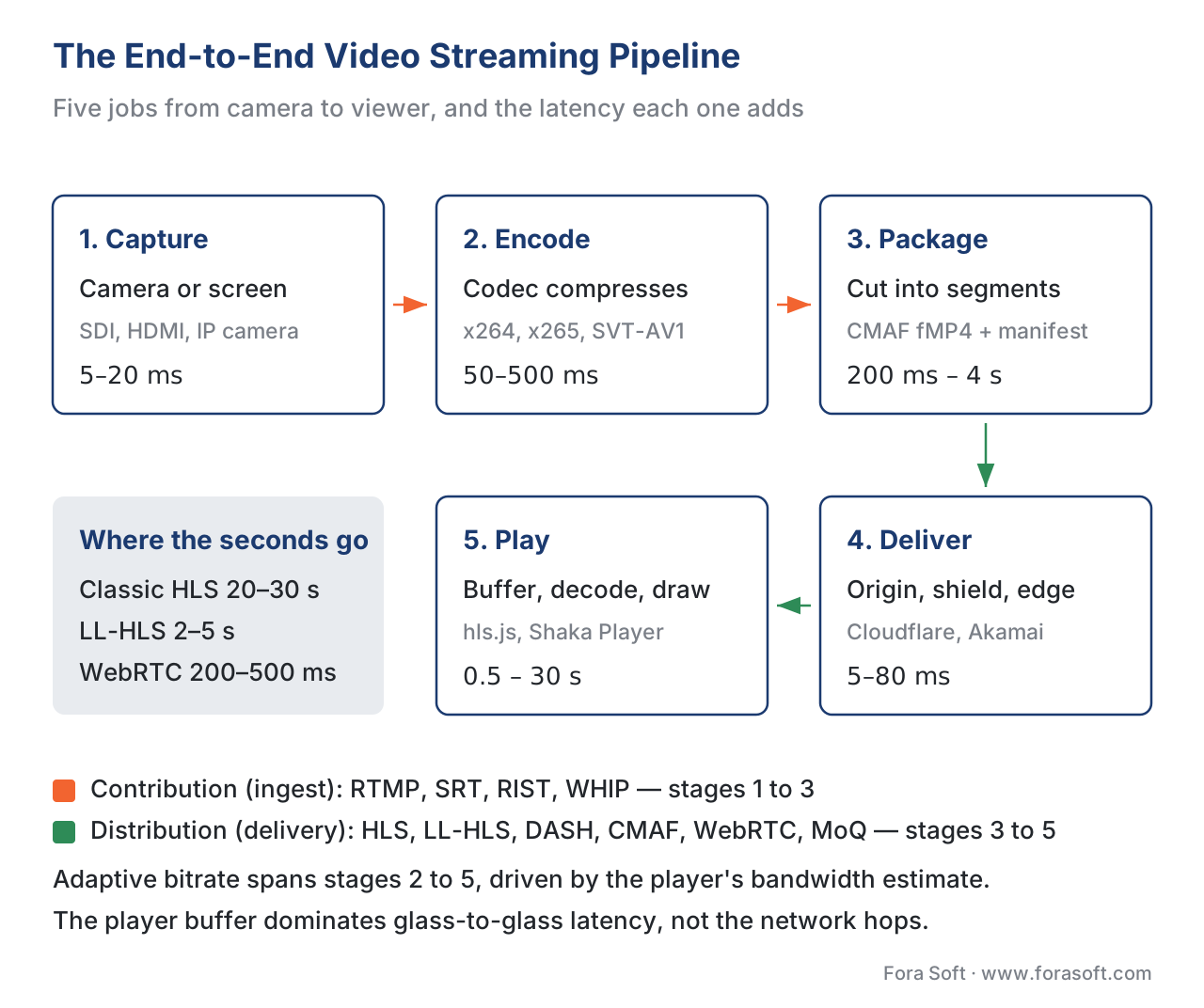 Figure 1. The end-to-end streaming pipeline. Each box is a job; each arrow is a network hop where things can fail.
What "on time, in order, at quality" really demands
The three constraints that make video different from a JPEG are timing, ordering, and quality. They are not independent. Pulling one tighter usually loosens another.
On time means each frame has to be ready to display at its scheduled moment. A 30-fps stream gives the player 33 milliseconds per frame; a 60-fps stream gives 16. If the next frame is not decoded by then, the viewer sees the previous frame again — that is the visible stutter every streaming engineer has nightmares about. The whole concept of player buffering exists to absorb network jitter, called the variation in arrival time of consecutive packets, so the decoder always has the next frame ready. A typical HLS player carries 6–30 seconds of buffer; a WebRTC player carries 50–500 milliseconds. The shorter the buffer, the lower the end-to-end delay — and the less margin for any single network hiccup.
In order means the player must show frame 100 after frame 99 and before frame 101. The transport protocol underneath cares deeply about this. TCP, the reliable byte-stream protocol the web is built on, will retransmit a lost packet and wait for it to arrive before delivering the next one; that wait costs latency. UDP, used by WebRTC, will not wait — it asks the player to do its best with what arrived. The choice between TCP and UDP underpins every protocol in this field. We unpack the trade-off in our article on TCP, UDP, and the choice every streaming protocol must make.
At quality means the picture must look acceptable on the device, given the network. This is where adaptive bitrate streaming, abbreviated ABR, comes in. The encoder produces not one stream but a ladder — typically five to seven versions of the same video at increasing bitrates and resolutions, say 360p at 600 kbps up to 1080p at 4500 kbps. A manifest file, called a playlist in HLS and an MPD in DASH, lists all available rungs. The player keeps measuring how fast it is actually downloading and picks the highest rung it can sustain. When you see the quality drop on a train and rise again at home, that is ABR working. We explain the mechanics in our article on adaptive bitrate streaming.
Live, VOD, and the latency budget
Two large families of streaming sit on top of the same pipeline, and they behave very differently.
Video on demand (VOD) means the content exists in full before anyone presses play — a Netflix episode, a recorded lecture, a YouTube upload. Because there is no live deadline, the system can encode multiple ABR ladders at leisure, pre-package every segment, push everything to the CDN edges, and let the player buffer aggressively. Latency for VOD is not a constraint; quality, cost, and reliability are.
Live streaming means the content is being generated as the viewer watches — a concert, a football match, breaking news. Now every step has a clock attached. The encoder works in real time; the packager cuts segments while the camera is still recording; the CDN has to propagate fresh segments before they expire; the player has to keep a buffer thin enough to feel "live" but thick enough to absorb a sneezing Wi-Fi router. A near-live category sits between: live news with a 30-second delay; sports with a betting-window delay; live shopping. We compare all three in Live vs VOD vs near-live.
The number every streaming engineer obsesses about is latency — the time between something happening in the real world and a viewer seeing it. The standard yardstick is glass-to-glass latency, measured lens-to-eye across the whole pipeline. A traditional HLS workflow lands around 20–30 seconds. Low-Latency HLS, the modern Apple stack, lands at 2–5 seconds. WebRTC delivery is 200–500 milliseconds. Each step down costs real engineering complexity and often real money. We break down the budget in Latency, glass-to-glass, end-to-end.
Why the internet makes this harder than it looks
A photograph survives a glitchy network because the worst that happens is that it loads a little later. A video does not get that luxury — the clock keeps running. Three properties of the public internet make video delivery hard.
First, the network you publish on is not the network the viewer uses. You control your origin server; you do not control the viewer's mobile carrier, their Wi-Fi router, the coffee shop's congested uplink, or the undersea cable between Singapore and Marseille. Real-world video has to be resilient to bandwidth that fluctuates by an order of magnitude, packet loss that spikes when too many phones share a cell tower, and jitter that grows on every shared link.
Second, scale shapes the architecture. Serving one viewer from one server works for a hobby project. Serving one million viewers from one server is impossible — the network card cannot push that many bits, the disks cannot read that many segments, and the cost of bandwidth at the origin would bankrupt you. A CDN solves this by replicating segments to edge servers in hundreds of cities, so most requests are answered close to the viewer. A single Cloudflare or Akamai edge serves thousands of identical streams from one cached copy. We dig into the topology in What a CDN actually is, for the streaming engineer.
Third, devices are heterogeneous. The same stream has to play on an iPhone running Safari, an Android phone running Chrome, a smart TV running webOS, an Xbox, a Roku, a laptop browser, and a 10-year-old Samsung TV in a hotel room. Each one supports a different subset of codecs, protocols, and DRM systems. The streaming team's job is to publish enough variants and enough protocols to cover the device matrix without exploding the storage bill.
A worked example: 1 stream, 1 million viewers, 90 minutes
Let us make the constraints concrete with arithmetic.
A live sports match runs for 90 minutes. The publisher targets a peak audience of 1 million concurrent viewers across an ABR ladder whose average rendition is 4 Mbps. The simultaneous outbound bandwidth from somewhere is:
1,000,000 viewers × 4,000,000 bits/sec = 4,000,000,000,000 bits/sec
= 4 terabits per second
A modern 100-gigabit network card maxes at 100 Gbps. To serve that traffic from a single origin you would need 40 such cards saturated, which no single machine offers. The arithmetic is why every serious live event runs through a CDN: 4 Tbps spread across, say, 200 edge cities is 20 Gbps per city — well within a normal edge cluster's capacity, especially with caching. Over the full 90-minute match the data shipped is:
4 Tbps × 5,400 sec = 21,600 Tb = 2.7 petabytes
That is the entire Library of Congress, moved twice, in an afternoon. This is also why CDN cost economics get interesting; we cover that in CDN cost economics.
A picture is worth a thousand spec pages
The streaming pipeline, drawn as a single diagram, looks deceptively simple. The truth hides in the arrows.
| Stage | Typical tech (2026) | Typical latency contribution |
|---|---|---|
| Capture | SDI / HDMI / IP camera | 5–20 ms |
| Encode | x264, x265, SVT-AV1, hardware ASIC | 50–500 ms |
| Package | Shaka Packager, MediaPackage, JIT origin | 200 ms – 4 s |
| Origin / shield | Cloud storage + origin shield | 30–80 ms |
| CDN edge | Cloudflare, Akamai, Fastly, AWS CloudFront | 5–30 ms |
| Player buffer | hls.js, Shaka, native HLS, dash.js | 0.5 – 30 s |
The common mistake: "just upload an MP4"
The first instinct of every smart engineer new to video is to upload a single MP4 file and point a <video> tag at it. It works. The MP4 plays. The engineer concludes that streaming is trivial.
It is trivial, until any of the following is true:
- More than one viewer hits play at the same time on a slow network.
- The viewer is on mobile and the picture freezes during the third-quarter ad break.
- A different viewer is on an old Samsung TV that does not understand AV1.
- The content is live and starts before the upload finishes.
- The viewer skips to minute 47 of a two-hour video.
- Legal asks you to encrypt the stream so it cannot be downloaded.
The MP4-and-<video>-tag pattern fails as soon as the audience or the use case stops being trivial. The whole industry — ABR ladders, segmented protocols, CDNs, adaptive players, DRM, multi-CDN steering — exists because production video at scale is not the same problem as a JPEG.
Where Fora Soft fits in
Fora Soft has built video streaming, WebRTC, conferencing, OTT, e-learning, telemedicine, surveillance, and AR/VR products since 2005, with more than 239 shipped projects. The pipeline this article describes is not a textbook for us — it is the diagram on every project's first whiteboard. We help clients pick protocols and CDNs that match their latency budget, design adaptive players that recover gracefully from bad networks, and ship to the device matrix without paying twice for the same content. If you are scoping a streaming product and want a second opinion, we are happy to read your architecture and tell you where it will fail first. That second opinion is what our video streaming and WebRTC consulting delivers in about a week, and when the plan is set our streaming software development team builds the ingest, packaging, CDN and player layers end to end.
The book
Video Streaming: A Complete Guide to Video Delivery: From Network Protocols and Transport to Ingest, HLS, and MPEG-DASH
This article walks the pipeline once, at a height where every stage fits on one screen. The book takes the same five stages hop by hop: what the network does to a stream, how the glass-to-glass latency budget is actually spent, and how contribution (RTMP, SRT, RIST) and segmented distribution (HLS, MPEG-DASH, CMAF) are built in production. Written by Nikolay Sapunov, CEO at Fora Soft.
Scoping a streaming product and want to know which hop breaks first?
Send us the architecture you have in mind and we will tell you where it fails first: the latency budget, the CDN bill, or the device matrix. 250+ video products shipped since 2005.
See our case studies
Case study
Worldcast Live
Concert streaming at 0.4-0.5 s glass-to-glass for 10,000 simultaneous viewers at 1.5 Gb/s, on a custom WebRTC and Kurento stack: the bottom end of the latency budget above.
Case study
MindBox
A video management system with 50+ deployments that converts RTSP camera feeds through FFmpeg into HLS: stages 1 to 3 of this pipeline, running in production.
Case study
Speed Space
Remote production used on Netflix, Electronic Arts and HBO shoots, recording at 1080p and 8 Mbps, over five times the bitrate of standard conferencing: the capture and encode stages, tuned for quality.
What to read next
Pipeline
The Streaming Pipeline, End to End
The same five stages one level deeper: what each box actually runs, and what it hands to the next.
Latency
Latency, Glass-to-Glass, End-to-End: What the Seconds Actually Mean
Where the seconds in the diagram above come from, and which of them you can buy back.
Transport
TCP, UDP, and the Choice Every Streaming Protocol Must Make
Why the delivery hop behaves the way it does once the network stops being perfect.
Delivery
What a CDN Actually Is, for the Streaming Engineer
Stage 4 in detail: origin, shield and edge, what each of them caches, and what it costs.
References
- IETF RFC 8216, HTTP Live Streaming, August 2017 — the canonical specification of HLS, including segment, playlist, and Media Sequence Number semantics. <https://www.rfc-editor.org/rfc/rfc8216.html>
- ISO/IEC 23009-1:2022, Information technology — Dynamic adaptive streaming over HTTP (DASH) — Part 1: Media presentation description and segment formats, Fifth Edition — the controlling document for MPEG-DASH. <https://www.iso.org/standard/83314.html>
- ISO/IEC 23000-19:2024, Common Media Application Format (CMAF) for segmented media, Fourth Edition — the packaging format that unified HLS and DASH. <https://www.iso.org/standard/85188.html>
- Apple Inc., HLS Authoring Specification for Apple Devices, revision 2025-09 — Apple's normative authoring rules including Low-Latency HLS partial segments, preload hints, and rendition reports. <https://developer.apple.com/documentation/http-live-streaming/hls-authoring-specification-for-apple-devices>
- IETF RFC 9000, QUIC: A UDP-Based Multiplexed and Secure Transport, May 2021 — the QUIC transport that underpins HTTP/3 and Media over QUIC.
- W3C, Media Source Extensions (MSE), Candidate Recommendation Snapshot 2024-11-05 — the browser API that makes adaptive bitrate possible in HTML5.
- Sandvine, Global Internet Phenomena Report 2024 — empirical share of video in fixed and mobile traffic; on-demand streaming at 54% of downstream volume per subscriber.
- Bitmovin, Video Developer Report 2025 — industry survey on codec, protocol, and ABR adoption across vendors. <https://bitmovin.com/video-developer-report/>
- Cloudflare, What is a video CDN? — vendor reference summarising CDN topologies for streaming. <https://www.cloudflare.com/learning/video/what-is-video-cdn/>
- Mux, Video Content Delivery Network: What It Is, How It Works — practitioner perspective on origin shielding and edge caching. <https://www.mux.com/articles/video-content-delivery-network-cdn-what-it-is-how-it-works-and-real-life-examples>
