


Why This Matters
You will meet H.264 in every video product you ship in 2026, even when the headline codec is AV1 or HEVC. It is the mandatory video codec for WebRTC — so any browser-based real-time product depends on it for cross-vendor interop. 6 It is the default encode profile for almost every smartphone camera roll. It is the fallback rendition in every adaptive-bitrate ladder that targets old televisions, set-top boxes, in-flight entertainment, hotel TVs, and the long tail of embedded devices. And it is the only codec with browser compatibility above 98% across desktop and mobile in 2026. 10 Knowing what H.264 actually is, where its limits are, and how to encode it well is the difference between a streaming product that "kind of works on most things" and one that hits every screen at the quality and latency the user expects.
This article walks you through what H.264 is, why it became the workhorse of the internet, the technical pieces you actually need to understand, how it compares against newer codecs in 2026, where it still earns its keep, and how to encode it correctly. You do not need prior knowledge of codecs. Every term is defined in plain language before we use it. If you have not yet read A short history of video codecs: from H.120 (1984) to AV2 (2025), that gives the wider context; this article is the deep dive on the one codec the entire industry built its plumbing around.
What H.264 Actually Is
A codec is two things glued together: an encoder that takes raw pictures and packs them into a small file, and a decoder that reverses the process to put the pictures back on a screen. The name is a portmanteau — coder + decoder. H.264 is the codec the internet standardised on between 2003 and 2010, replacing the older MPEG-2 that television had been using since 1995 and the proprietary Sorenson Spark and VP6 codecs that Adobe Flash had ridden into the browser in the early 2000s. We covered MPEG-2 in MPEG-2: The Grandfather of Digital TV; H.264 is its direct successor and shares the same broad blueprint.
The standard is published under two parallel names because two standards bodies wrote it together. The Moving Picture Experts Group (MPEG) sits inside the International Organization for Standardization (ISO) and the International Electrotechnical Commission (IEC) — the two consensus bodies that publish most of the world's industrial standards. The Video Coding Experts Group (VCEG) sits inside the Telecommunication Standardization Sector of the International Telecommunication Union (ITU), the United Nations agency that coordinates global telecoms. The two groups formed a Joint Video Team (JVT) in December 2001 specifically to write H.264, and the result was published as ITU-T Recommendation H.264 on the ITU side and as ISO/IEC 14496-10 — Part 10 of the wider MPEG-4 suite — on the ISO side. Both documents are word-for-word identical. 1 2
The official long name of the codec is Advanced Video Coding, abbreviated AVC. You will see all three names — H.264, AVC, MPEG-4 Part 10 — used interchangeably in the industry, sometimes in the same sentence. They all refer to the same standard.
The JVT was chaired by Gary Sullivan of Microsoft, Thomas Wiegand of the Fraunhofer HHI in Berlin, and Ajay Luthra of Motorola. 1 Their goal was a codec that would halve MPEG-2's bitrate at the same picture quality, run on the embedded processors of the early 2000s, and license cleanly to the consumer-electronics industry. It met all three goals. The first version of the spec was approved by ISO in March 2003 and by ITU-T in May 2003. 1
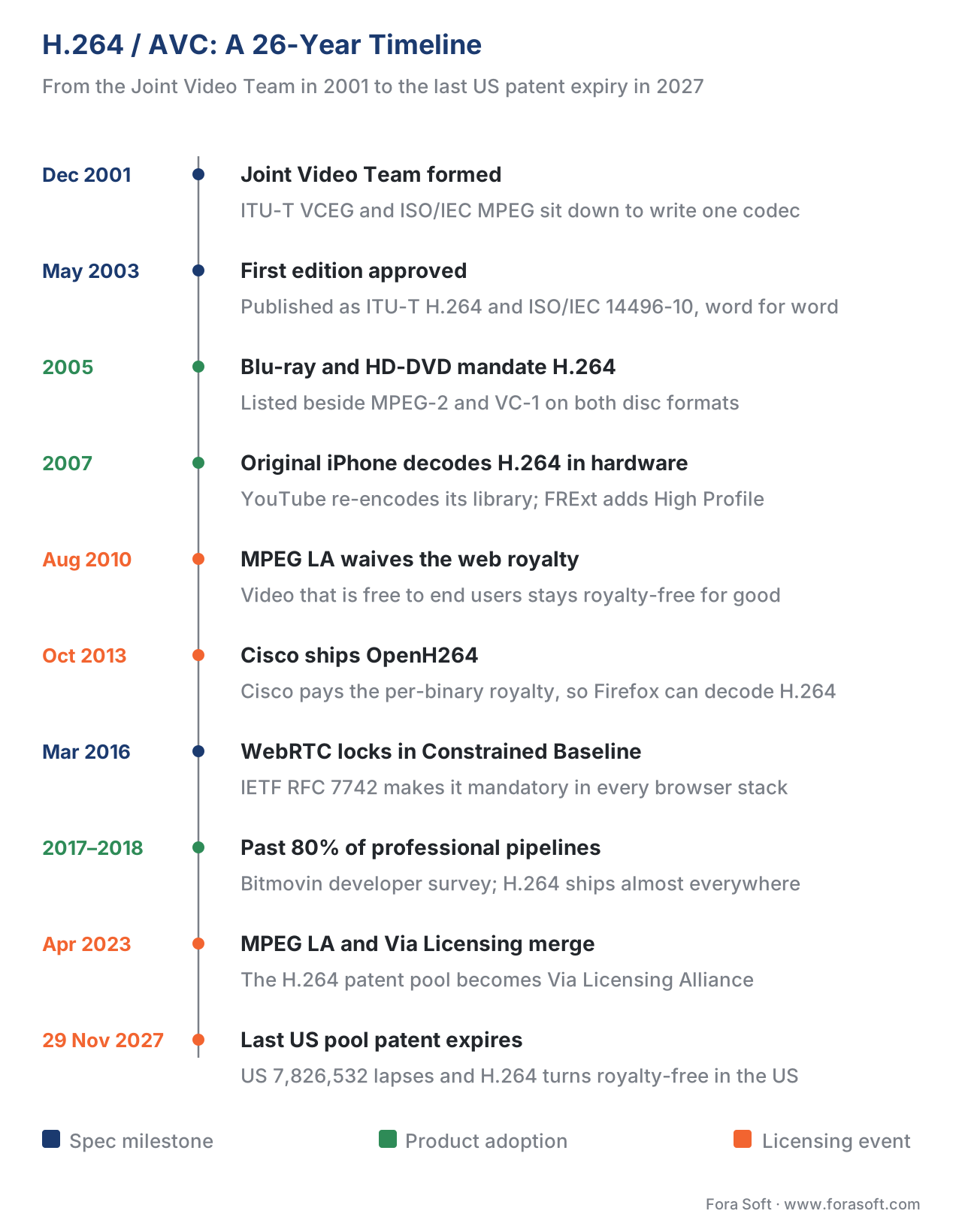 Figure 1. The H.264 timeline. The standard was published in 2003 and within seven years had displaced every previous codec across discs, mobile devices, web video, and live broadcast.
A Short History: Why H.264 Won the Internet
By the early 2000s the industry had a problem. MPEG-2, published in 1995, was magnificent for broadcast television but inefficient for the bitrates that home broadband could deliver in 2003 — a typical US DSL line at the time carried 1.5 megabits per second, and MPEG-2 needed three to four times that to look reasonable. Adobe's Flash plug-in had filled the gap with proprietary codecs (Sorenson Spark, then VP6) that compressed better than MPEG-2 but were locked behind a single vendor. The DVD-Video disc was running out of bits for the longer movies that the home-theatre market wanted, and the future Blu-ray disc needed a codec that could fit a two-hour high-definition film into 25 gigabytes. Every part of the video industry needed a single, license-able, two-times-better codec, and H.264 was that codec.
The first wave of adoption was on optical discs. The Blu-ray Disc Association added H.264 to its mandatory codec list in 2004, alongside MPEG-2 and VC-1, and Blu-ray players shipping from 2006 onwards all decoded H.264 in hardware. The competing HD-DVD format made the same choice. By the time HD-DVD lost the format war in February 2008, every HD optical disc player in production was an H.264 player.
The second wave was mobile. The original iPhone, launched on 29 June 2007, shipped with a hardware H.264 decoder built into its PortalPlayer / Samsung S5L8900 application processor. 3 Apple bet the new device on H.264 from day one: the YouTube app on the original iPhone only played H.264 videos, which forced Google to transcode the entire YouTube library from VP6/Flash into H.264 within a few months of the iPhone launch. Every subsequent generation of iPhone and every other smartphone that wanted to play YouTube followed the same path. By 2010 H.264 was the lingua franca of mobile video.
The third wave was the browser. In August 2010, MPEG LA — the patent pool that administered H.264 royalties at the time — announced that internet video that was free to end users would never require an H.264 royalty for as long as the standard was in force. 4 This single sentence unblocked YouTube, Vimeo, Brightcove, and the rest of the web video industry from a feared per-stream patent bill, and it was the trigger for browsers to add H.264 decode to their <video> element. By 2013 every major browser played H.264 either natively or, in Firefox's case, through Cisco's OpenH264 module — a free binary that Cisco distributed at its own cost and paid the per-binary royalty for, on behalf of every Firefox user on Earth. 5
The fourth wave was the camera. Every smartphone camera since roughly 2010 records to an H.264 .mp4 or .mov file by default, and the same is true for the consumer-grade and prosumer-grade cameras from Canon, Sony, Panasonic, Nikon, GoPro, and DJI. Whatever you upload to YouTube or Instagram in 2026 was almost certainly H.264 by the time it left the device.
The fifth wave was live streaming. The Real-Time Messaging Protocol (RTMP) that Adobe published in 2009, the HTTP Live Streaming (HLS) that Apple shipped with iOS 3 in the same year, and the Microsoft Smooth Streaming that preceded MPEG-DASH all carried H.264 as their primary video codec. We unpack the protocol layer in Streaming protocols: the 8 that matter in 2026; the point here is that H.264 became the codec the streaming pipes were designed around, and twenty years later they still are.
That five-wave rollout — discs, mobile, browsers, cameras, streaming — is what makes H.264 the workhorse of the internet. No other codec has ever been adopted by so many parts of the video stack at once. As of 2026 it is still the default codec that almost every encoder writes by default, and it is the only codec that every modern device decodes without preconditions.
How H.264 Compresses Video, in Plain English
H.264 is a hybrid block-based codec, the same broad architecture that MPEG-2 introduced and that every codec from H.265 to AV1 has since refined. We unpack the full architecture in Hybrid video codec architecture; here is the short version with H.264's specific choices.
Every frame of video is cut into squares of pixels called macroblocks, each one 16 pixels wide and 16 pixels tall. The encoder then runs four steps on every macroblock, in order.
The first step is prediction. Instead of encoding the macroblock's raw pixel values, the encoder guesses what those pixels look like — either from neighbouring pixels in the same frame (intra-prediction) or from a similar patch in a previous or future frame (inter-prediction, also called motion-compensated prediction). The encoder then only has to write down the small residual, the difference between its guess and the truth. H.264's big leap over MPEG-2 here is directional intra-prediction: instead of guessing only from the previous block, the encoder picks one of nine spatial directions (horizontal, vertical, diagonal, and so on) and projects the neighbouring pixels along that direction. For inter-prediction, H.264 added multiple reference frames — up to 16 previous frames the encoder can look at, instead of MPEG-2's single previous frame — and quarter-pixel motion vectors, which let the encoder describe motion at four times MPEG-2's spatial precision. We cover the mechanics in Intra-frame coding: how a single frame is compressed and Inter-frame coding and motion estimation.
The second step is transform. The residual is sent through a small integer transform — H.264's transform is a simplified version of the classic Discrete Cosine Transform (DCT), a mathematical operation from 1974 that re-expresses a patch of pixels as a list of frequency coefficients. The integer version is the engineering trick that made H.264 portable across processors: MPEG-2 used a floating-point DCT, which produced tiny rounding differences between encoder and decoder implementations and forced standards to define a tolerance, while H.264's integer transform is bit-exact, so every conformant decoder gets the same answer for the same input. H.264 uses a 4×4 integer transform by default, and an optional 8×8 integer transform in the High profile. We unpack the math in Transform coding: DCT, ADST, integer transforms.
The third step is quantization. Each transform coefficient is divided by a step size and rounded, throwing away the small coefficients entirely. This is where picture quality is permanently lost and where the encoder's quality knob lives — a finer step size keeps more detail and produces a larger file, a coarser step size strips more detail and shrinks the file. See Quantization: where quality is lost for the precise mechanics.
The fourth step is entropy coding. The surviving coefficients, the prediction modes, the motion vectors, and the residual signalling are all written to the bitstream using one of two coding methods. The simpler method is Context-Adaptive Variable-Length Coding (CAVLC), which writes each symbol using a Huffman-style code table whose contents change based on the symbols that came before. The smarter method is Context-Adaptive Binary Arithmetic Coding (CABAC), which encodes the entire bitstream as a single fractional number whose precision tells the decoder which symbols were emitted. CABAC compresses roughly 10–15% better than CAVLC at the cost of more decoder work. 7 CAVLC ships in every H.264 decoder; CABAC ships only in Main, High, and the studio profiles. We dive into the math in Entropy coding: a short introduction and the H.264-specific implementation in Entropy coding in detail: CAVLC, CABAC, arithmetic coding.
Three further H.264 features need a name even at this level of overview. The in-loop deblocking filter runs inside the decoder loop after every macroblock is reconstructed; it smooths the edges between blocks where heavy quantization would otherwise produce visible block boundaries. This single filter is responsible for a large part of H.264's perceptual quality advantage over MPEG-2, which has no in-loop filter and shows visible "blockiness" at low bitrates. See In-loop filtering: deblocking, SAO, ALF, CDEF for the modern lineage.
B-frames — short for bidirectionally predicted frames — were already in MPEG-2 but H.264 extended them. A B-frame predicts pixels from both a previous and a future frame, which cuts bitrate sharply for slow-motion content but means the decoder has to decode frames out of display order. We cover the mechanics in GOP structure: I, P, B-frames, open vs closed GOP.
Variable block sizes are H.264's most-cited efficiency win over MPEG-2. Where MPEG-2 fixed every motion-compensated block at 16×16 pixels, H.264 lets the encoder split a macroblock into rectangles as small as 4×4 pixels — sixteen sub-block shapes in total. The encoder picks the best split for each region of the picture, so flat sky stays in one big 16×16 block while a player running across the frame gets carved into many small 4×4 blocks that track the motion precisely. See Block-based prediction: MBs, CTUs, SBs and superblocks.
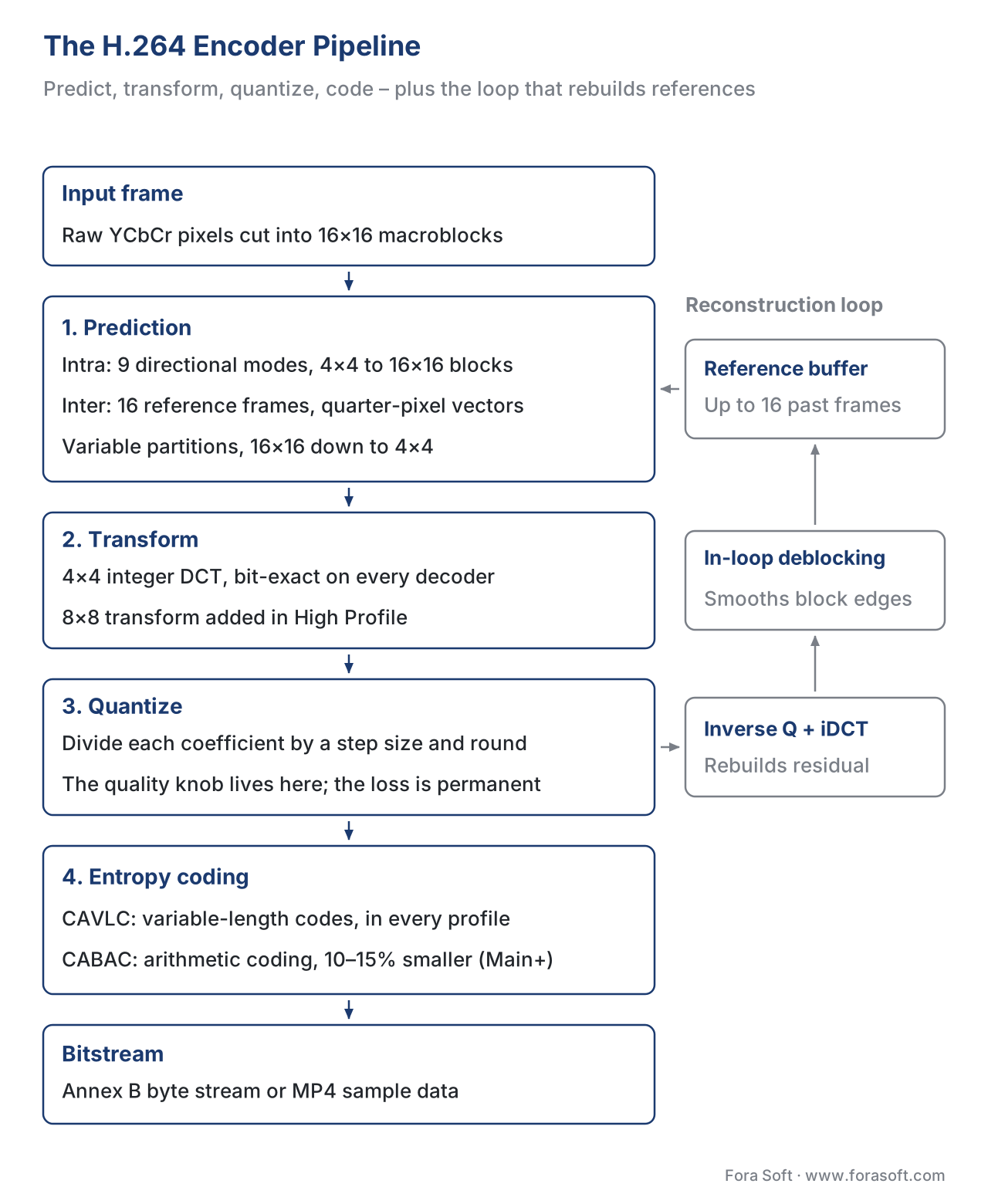 Figure 2. The H.264 encoder pipeline. The architecture is the same as MPEG-2 — predict, transform, quantize, code — but every stage was redesigned for roughly two times the compression.
Profiles and Levels: How One Codec Ships Across 50 Use Cases
A codec spec like H.264 has to cover everything from a 176×144 video call on a 2003 flip phone to a 4K studio master on a 2026 broadcast contribution link. To keep decoder chips affordable, the standard slices its feature set into a grid of Profiles (which coding tools you may use) and Levels (the resolution, frame rate, bitrate, and decoded picture buffer caps). A decoder is built to a specific Profile/Level combination, and an encoder must stay within that envelope. 1
H.264 defines roughly twenty profiles and seventeen levels in total. The combinations that actually shipped in volume are a much shorter list.
| Profile | What it adds | Where it shipped in volume |
|---|---|---|
| Constrained Baseline (CBP) | The minimum subset — I and P frames, CAVLC, no B-frames, no CABAC, no interlaced tools | Mandatory for WebRTC; first-generation iPhone; low-end video calling |
| Baseline (BP) | CBP + flexible macroblock ordering, redundant slices for error resilience | Early mobile video, videoconferencing over lossy networks |
| Main (MP) | B-frames + CABAC + interlaced support | First-generation HDTV broadcast, mobile TV |
| Extended (XP) | Streaming-specific error-resilience tools | Real-time streaming; rarely used in practice |
| High (HiP) | All Main tools + 8×8 transform + 8×8 spatial prediction + custom quantization matrices | The default profile for Blu-ray, broadcast HD, YouTube, Netflix, almost all VOD streaming |
| High 10 (Hi10P) | High + 10-bit samples | Anime fansubs, some HDR delivery experiments before HEVC took over |
| High 4:2:2 (Hi422P) | High 10 + 4:2:2 chroma subsampling | Professional broadcast contribution (Sony XDCAM 422, Panasonic AVC-Intra) |
| High 4:4:4 Predictive (Hi444PP) | Hi422P + 4:4:4 chroma + 12-bit samples + RGB + lossless mode | Professional post-production mastering; rarely streamed |
Table 1. The H.264 profiles you will actually meet in product work. The full standard defines another dozen scalable and multi-view profiles (SVC, MVC) that never reached volume.
Constrained Baseline Profile Level 1.2 is the mandatory-to-implement video codec for WebRTC — every browser and every native WebRTC SDK must support it for cross-vendor interop, as locked in by IETF RFC 7742. 6 This is why your browser-based video-call product can always negotiate H.264 even when one side is Safari on iOS and the other is Chrome on Linux. We unpack the protocol implications in WebRTC in depth: SDP, ICE, STUN/TURN, SFU vs MCU.
High Profile is the default for everything else. When YouTube transcodes your upload, Netflix prepares an episode for streaming, or a broadcaster ingests a contribution feed, the H.264 rendition is almost always High Profile at one of the higher levels. The 8×8 transform and the 8×8 intra-prediction modes that High adds on top of Main are worth roughly 5–10% bitrate at the same quality on typical content. 8
Levels add a second axis. Level 4.1 caps resolution at 1920×1080 at 30 fps and bitrate at 50 Mbps for the High profile — that is exactly the Blu-ray cap, by design. Level 5.1 moves the cap to 4096×2304 and up to 240 Mbps — that is what 4K Blu-ray and 4K cameras use. Level 5.2 allows 4K at 60 fps. Level 6.2 allows 8K at 120 fps, although in practice anyone shipping at 8K has moved to HEVC or AV1 instead.
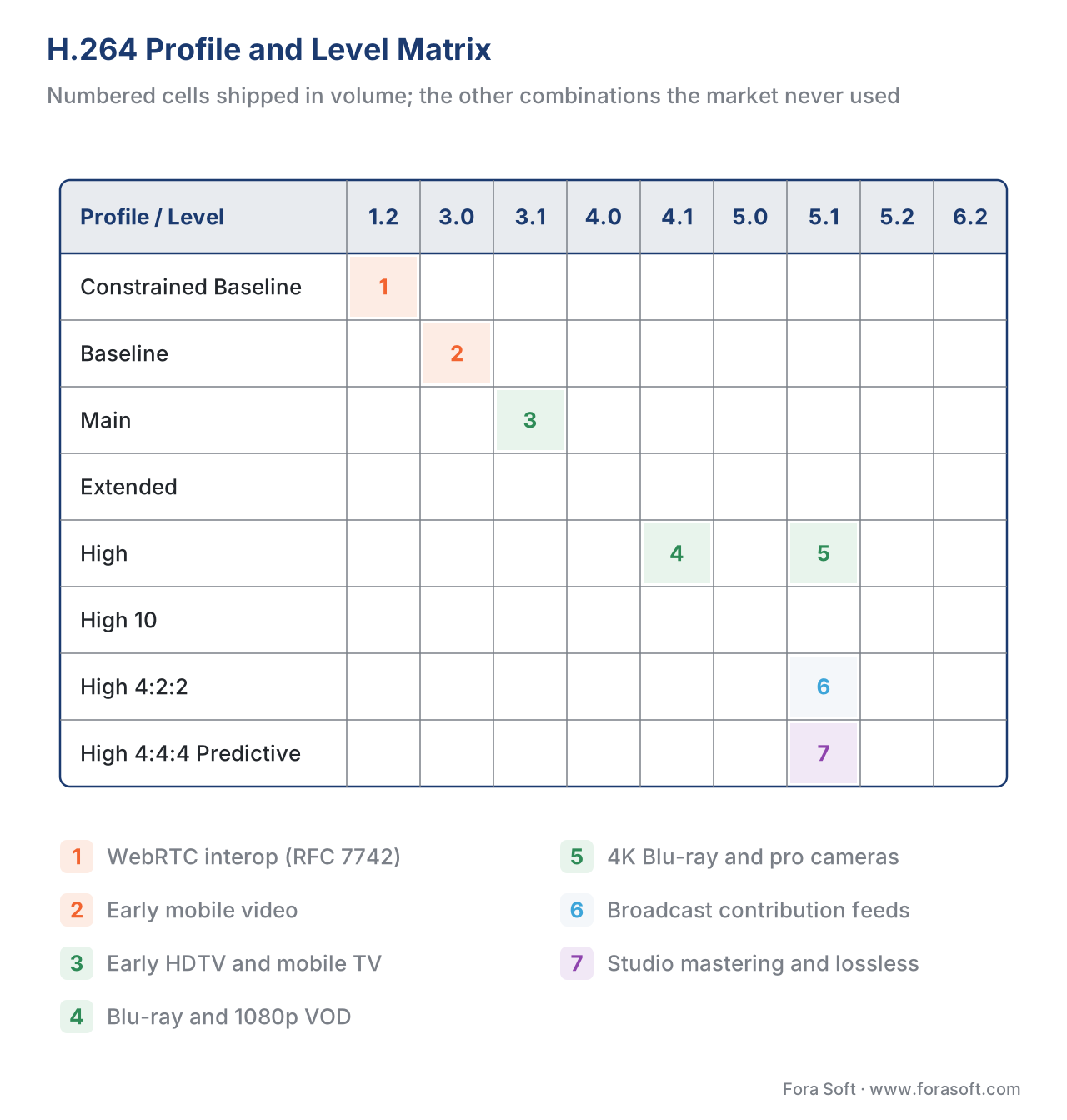 Figure 3. The Profile × Level matrix. Each tinted cell is a combination that actually shipped in volume; the white cells are theoretical combinations the spec allows but the market never used.
The bitrate math behind these levels is direct. A 90-minute movie encoded at 8 Mbps of High Profile Level 4.1 occupies:
8 Mbps × 90 min × 60 s = 43,200 Mb total
43,200 Mb ÷ 8        = 5,400 MB ≈ 5.27 GB
That is why a single-layer 25 GB Blu-ray comfortably fits a long film plus lossless audio plus extras at high H.264 bitrates, and why 1080p Netflix streams at the same 4–8 Mbps look as good as they do.
Compression Efficiency: H.264 vs Every Codec That Came After
The single most useful number for any codec is its bitrate savings — how many fewer bits a newer codec needs to deliver the same picture quality. H.264 set the benchmark in 2003 by halving MPEG-2's bitrate at matched quality, and every codec since then has been measured against H.264 in turn.
| Codec | Year published | Bitrate at matched quality vs H.264 |
|---|---|---|
| MPEG-2 (H.262) | 1995 | ≈ 200% (uses twice as many bits) |
| H.264 / AVC | 2003 | baseline (100%) |
| H.265 / HEVC | 2013 | ≈ 50% |
| VP9 | 2013 | ≈ 55% |
| AV1 | 2018 | ≈ 35% |
| H.266 / VVC | 2020 | ≈ 25% |
Table 2. Approximate bitrate at matched perceptual quality, expressed as a fraction of H.264's bitrate. Lab numbers from BD-rate studies; real-world savings are typically two-thirds to three-quarters of the headline. See Comparison table: codec matrix for the full picture.
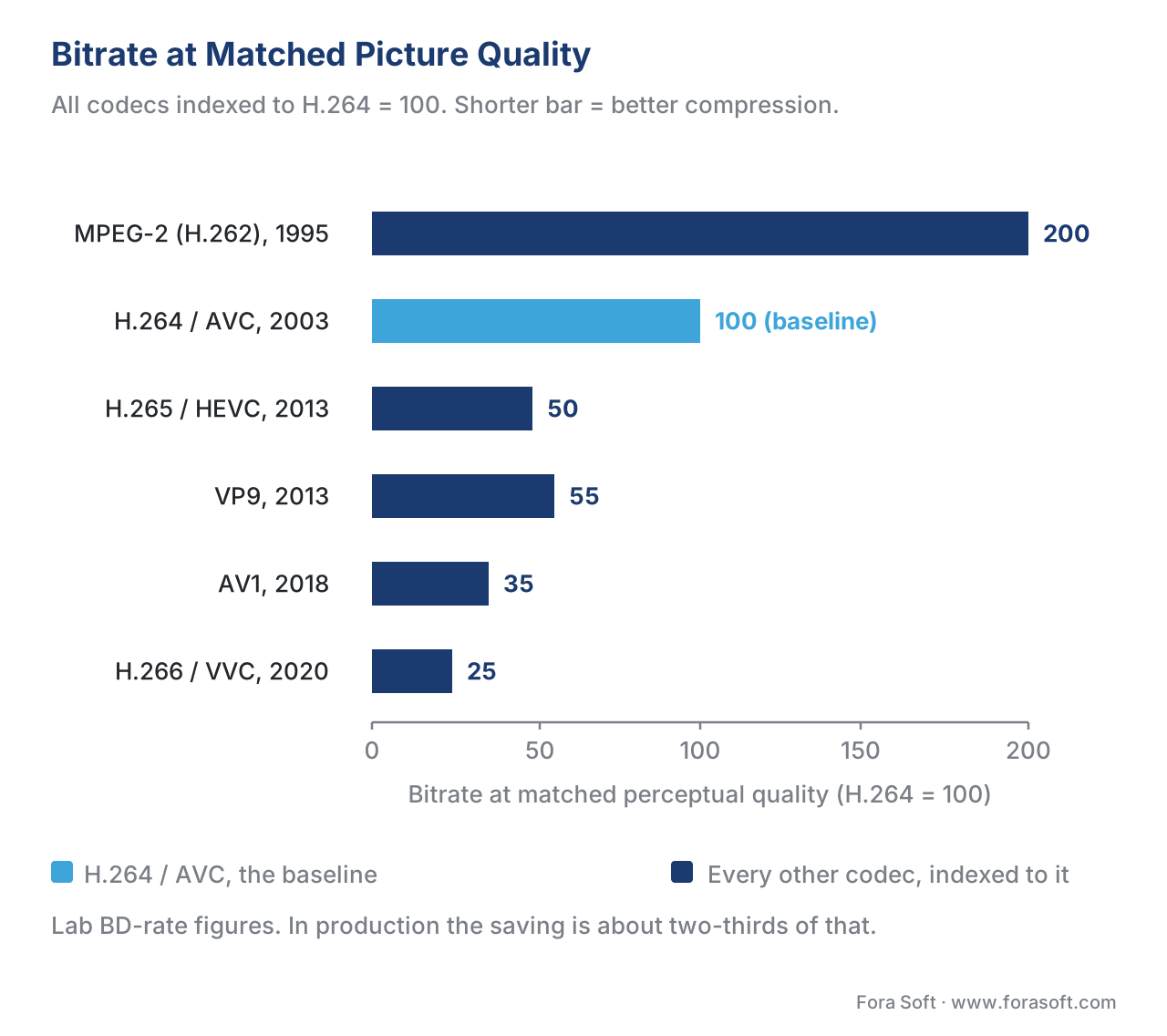 Figure 4. Bitrate at matched perceptual quality, indexed to H.264 = 100%. Lab BD-rate figures; real-world deltas are smaller.
Plug numbers in to see what those ratios buy. A 1080p Netflix stream that today uses 5 Mbps of H.264 would need:
- 5.0 Mbps with H.264 (today's baseline)
- 2.5 Mbps with HEVC
- 2.75 Mbps with VP9
- 1.75 Mbps with AV1
- 1.25 Mbps with VVC
Netflix's own production measurements bear out the lab numbers. The platform reports that AV1 sessions use roughly one-third less bandwidth than the equivalent H.264 sessions and produce 45% fewer rebuffering events, with VMAF — a perceptual quality metric we cover in Objective quality metrics: PSNR, SSIM, MS-SSIM, VMAF — scoring 4.3 points higher for AV1 versus H.264 at the same bitrate. 9
Those numbers explain why every major streamer is moving content off H.264 to HEVC or AV1 wherever the playback device supports it. They also explain why H.264 is not going away: a stream that needs to play on a 2013 smart TV, a hotel-room set-top box, or a corporate Cisco videoconference endpoint has no choice but H.264, because nothing else decodes there. We unpack the trade-off in How to choose a codec for your service in 2026.
Where H.264 Stands in 2026: Market Share, Adoption, and the Multi-Codec Reality
The 2025 Bitmovin Video Developer Report — the industry's longest-running survey of professional streaming workflows, in its eighth edition at the time of writing — puts H.264 at roughly 79–80% of production deployments, with H.265 / HEVC at 49% and AV1 at 30% of those same deployments (most production workflows ship more than one codec, so the percentages overlap). 10 Every other survey we have read for the current year agrees on the broad shape: H.264 still ships almost everywhere, HEVC ships in about half of professional pipelines, AV1 is growing fast in the streamers that have invested in encoder hardware to make it affordable.
Browser compatibility tells the same story. As of May 2026, H.264 plays in 99% of installed desktop browsers and 99.5% of installed mobile browsers. 11 HEVC plays in roughly 75% of installed browsers — Safari on every platform, Edge on Windows, and Chrome on hardware-accelerated devices, but still not in Firefox without an OS-level codec. AV1 plays in roughly 80% of installed browsers in 2026, up from 50% two years earlier, but still excludes a long tail of older devices.
Netflix's own data is the clearest single window into where modern streaming actually lives. Netflix has confirmed that AV1 now powers roughly 30% of its overall streaming, surpassing HEVC to become the platform's second-most-used codec behind H.264. 9 That means H.264 is still carrying the majority of Netflix's bytes in 2026 — a striking number twenty-three years after the codec was published, and it is true for almost every other major streaming platform too. AV1 has won the leading edge; H.264 still owns the long tail.
The patent landscape is the other story that defines H.264's position in 2026. The MPEG LA H.264 patent pool, which merged with Via Licensing in April 2023 to form the Via Licensing Alliance (Via LA), charges per-device royalties on H.264 encoders and decoders. 12 In early 2026, Via LA quietly restructured the streaming licensing tier for H.264, replacing the previous flat $100,000-per-year cap with a tiered system that tops out at $4.5 million per year for the largest unlicensed platforms entering the pool. 13 This change applies only to new licensees seeking a first H.264 streaming licence in 2026 or later, but it is the clearest economic signal yet that the pool is preparing for the codec to enter end-of-life and that any new project should consider the licensing exposure carefully.
The last US H.264 patent in the Via LA pool — US 7,826,532 — expires on 29 November 2027. 14 After that date, every patent the pool currently administers will have lapsed in the US market, and H.264 will be available royalty-free in the same way MPEG-2 has been since 2018. Other jurisdictions follow on their own clocks, but the US date is the one most product teams plan around. Until then, every commercial H.264 encoder and decoder shipped in a US-distributed product is technically a licensed implementation, and the AAC audio that almost always rides alongside H.264 is licensed under a separate Via LA pool with its own expiration calendar.
Cisco's OpenH264, released in 2013 as a fully open-source H.264 implementation that Cisco distributes as a pre-compiled binary, paid the per-binary MPEG LA royalty out of Cisco's pocket on behalf of every end user. 5 Firefox uses the Cisco binary as its H.264 implementation, which is why Firefox plays H.264 video without an OS-level codec on every platform Cisco supports. After 29 November 2027, Cisco will no longer need to write that royalty cheque, and OpenH264 — and every other free implementation — will be unambiguously free in the US.
H.264 in Practice: Encoding It Well
The standard tells the decoder how to interpret a bitstream; it does not tell the encoder how to make one. Every H.264 encoder is a different software project, and the gap between the best and the worst can be three times the bitrate at the same quality. Three encoder families matter in 2026.
x264 is the open-source software encoder maintained as part of the VideoLAN project. It has won the MSU MPEG-4 AVC/H.264 Video Codec Comparison every year since 2006 15 and is the encoder under the hood of FFmpeg's libx264, HandBrake's H.264 preset, OBS Studio's "x264" output, and the H.264 transcoders inside almost every Linux-based encoder appliance. x264 is the quality benchmark every other H.264 encoder is measured against.
OpenH264 is Cisco's open-source H.264 encoder and decoder, released in 2013 to break the patent deadlock that kept Firefox without a native H.264 implementation. 5 OpenH264 trails x264 in quality by roughly 10–15% at the same bitrate but is the codec inside Firefox and a popular choice in real-time WebRTC applications because of its low-latency tuning. We use OpenH264 inside several Fora Soft WebRTC products for this reason.
Hardware H.264 encoders ship in every desktop GPU, every smartphone application processor, every modern broadcast appliance, and most laptop CPUs. NVIDIA NVENC, AMD VCE / VCN, Intel Quick Sync Video, Apple VideoToolbox, and a long list of ASIC encoders from NETINT, Bitmovin, and others trade some quality at the same bitrate for orders-of-magnitude faster encoding and far lower CPU usage. The historical gap was wide enough that broadcasters dismissed hardware encoders for delivery as recently as 2018; by 2026 the gap has narrowed to roughly 5–10% versus x264's slower presets, which is acceptable in almost every live and many VOD workflows. 16 We unpack the trade-offs in Hardware acceleration: GPU, VPU, ASIC.
The two encoder controls that matter most in any H.264 pipeline are the rate control mode and the preset. The rate control mode tells the encoder how to allocate bits across the timeline: Constant Rate Factor (CRF) asks for a target perceptual quality and writes whatever bitrate is needed to hit it; Variable Bitrate (VBR) caps the average bitrate over a window; Constant Bitrate (CBR) holds the bitrate inside a strict envelope for live streaming. We dig into the mechanics in Rate control: CBR, VBR, CRF, ABR, capped CRF.
The preset is x264's name for a bundle of speed/quality settings; valid presets are ultrafast, superfast, veryfast, faster, fast, medium, slow, slower, veryslow, placebo. 15 Slower presets enable more expensive analysis (smaller block partitions, more reference frames, more rate-distortion checks) and produce smaller files at the same quality, at the cost of more encoder CPU.
A typical VOD encode of a 1080p source might look like this:
# 1080p high-quality VOD encode with CRF 21 and the slow preset.
# Produces a single-pass file suitable for ABR ladder member.
ffmpeg -i input.mov \
  -c:v libx264 -profile:v high -level 4.1 \
  -preset slow -crf 21 \
  -pix_fmt yuv420p \
  -c:a aac -b:a 128k \
  -movflags +faststart \
  output_1080p_h264.mp4
A live encode for low-latency streaming changes only a few flags:
# 720p low-latency live encode for an RTMP or WebRTC ingest.
# tune zerolatency disables look-ahead and B-frames for sub-second latency.
ffmpeg -re -i input_live_source \
  -c:v libx264 -profile:v baseline -level 3.1 \
  -preset veryfast -tune zerolatency \
  -x264-params "keyint=60:min-keyint=60:scenecut=0" \
  -b:v 2500k -maxrate 2500k -bufsize 5000k \
  -c:a aac -b:a 96k -ar 44100 \
  -f flv rtmp://your.ingest.example/live/stream-key
A complete cheat sheet of these recipes, the profile/level table, and the FFmpeg flags that pair with each rate-control mode is in the H.264 / AVC cheat sheet PDF included with this article.
Common H.264 Pitfalls
The list below is the short version of the mistakes we see most often when we audit other teams' H.264 pipelines.
Targeting Baseline when you should target High. A surprisingly large amount of production VOD is still encoded against Baseline or Main, often because somebody copied a 2009-era encoder preset and never revisited it. High Profile is supported by every device shipped since roughly 2008, and it saves 5–10% bitrate at the same quality. Use High unless you have a specific reason — typically WebRTC mandatory-to-implement requirements or a known legacy endpoint — to fall back. 8
Encoding at the wrong level. A 1080p file encoded at Level 4.0 instead of Level 4.1 can be rejected by some Blu-ray authoring tools and by older smart TVs. A 4K file encoded at Level 5.1 instead of Level 5.2 caps frame rate at 30 fps even if the source is 60 fps and the encoder silently drops half the frames. Match the level to the resolution and frame rate, not to a half-remembered default.
Forgetting -pix_fmt yuv420p. FFmpeg's libx264 defaults to the same chroma format as the source, which is sometimes yuv422p or yuv444p. Many consumer players and almost all hardware decoders only handle yuv420p. Adding -pix_fmt yuv420p to every consumer-facing encode prevents the "video plays on Mac but not on smart TV" support ticket.
Forgetting +faststart. Without the -movflags +faststart flag, FFmpeg writes the MP4 moov atom — the file's table of contents — at the end of the file. Browsers cannot start playback until they download the moov atom, which means they download the whole file first. +faststart rewrites the file so the moov atom lives at the start and progressive playback works. We cover the container internals in Containers: MP4, fMP4, MKV, WebM, MOV, MPEG-TS.
Using -tune zerolatency for VOD. The zerolatency tune is designed for live encoding: it disables look-ahead, disables B-frames, and shortens the GOP. Using it on a VOD encode trades 15–20% of bitrate savings for latency you do not need. Use -tune film, -tune animation, or no tune at all for VOD.
Confusing H.264 with H.264. The same standard ships under three names — H.264, AVC, MPEG-4 Part 10 — and three brand families (Apple, Microsoft, Adobe) used different sub-names for it. "H.264 Baseline" in one tool is "AVC Baseline" in another and "MPEG-4 AVC, Constrained Baseline" in a third. They are the same thing. The most common confusion is between the older MPEG-4 Part 2 (also branded "MPEG-4", and the codec inside DivX and Xvid) and the newer MPEG-4 Part 10 / H.264 / AVC. They are different codecs and they do not interoperate.
Free download: H.264 / AVC Cheat SheetOne-page reference: profiles, levels, x264 presets, FFmpeg recipes for VOD and live, and the patent calendar through 29 November 2027.Where Fora Soft Fits In
We have been shipping H.264-based video systems since the standard reached commercial volume in 2007. In video conferencing and WebRTC products, we lean on H.264 Constrained Baseline for interop with every device the customer's users bring; in video streaming and OTT/Internet TV workflows we encode the bulk of customer libraries in High Profile and run the AV1/HEVC ladder alongside for capable devices. Video surveillance systems we have built for security integrators ship H.264 over RTSP to the recorder and H.264 over WebRTC to the live viewer in the same pipeline. E-learning and telemedicine products are typically multi-codec, with H.264 the codec we use when we need to guarantee playback on a specific institution's locked-down devices. AR/VR work is largely on HEVC and AV1 because of bandwidth, but the H.264 fallback rendition is still part of the ladder. The pattern is the same across all of it: H.264 is the codec we use when "must work" is more important than "must save bytes".
The book
Video Encoding: A Complete Guide to Video Compression
This article covers H.264 in one sitting; the book gives it room. The profile and level tables are written out in full, CAVLC and CABAC each get a worked example, and the chapters on intra modes, motion estimation, GOP structure and rate control take the four pipeline stages of Figure 2 apart one at a time, with the x264 settings that move each of them. It is volume 1 of the seven-volume Fora Soft Video Engineering Handbook, 1,522 pages, written by Nikolay Sapunov, CEO at Fora Soft.
Is H.264 still the right default for your ladder?
Send us your current encoder settings and the device list you have to support, and we will tell you what the H.264 rung is costing you and what a second codec would save. That means checking whether you are still shipping Baseline where High would cost 5–10% fewer bits, whether your levels match the resolution and frame rate you actually deliver, and which share of your audience can decode HEVC or AV1 today. You get the numbers on your own content. 250+ video products shipped since 2005.
See our case studies
Case study
Mindbox
Video management in 50+ deployments, pulling RTSP cameras through FFmpeg into HLS. Cameras emit H.264 and nothing else, so the recorder, the transcoder and the browser viewer all speak the codec this article describes — usually at Baseline or Main, because that is what the camera chip encodes.
Case study
Worldcast Live
Concert streaming at 1.5 Gb/s with 0.4–0.5 s latency to 10,000 simultaneous viewers. Sub-second latency is the case where you give up B-frames and look-ahead on purpose — the -tune zerolatency trade-off from the pitfalls section, made deliberately instead of by accident.
Case study
Speed.Space
Remote production used on Netflix, EA and HBO shoots, recording at 1080p / 8 Mbps with per-shoot control of resolution, fps, codec and bitrate. That is the profile-and-level grid of Figure 3 turned into a setting someone picks on the day of the shoot.
What to read next
Architecture
Hybrid Video Codec Architecture
The four stages of Figure 2 as a general blueprint: the same predict, transform, quantize, code loop that every codec from MPEG-2 to AV1 runs, and why the reconstruction path has to exist.
Encoding
Rate Control: CBR, VBR, CRF, ABR, Capped CRF
The first of the two x264 knobs this article names, in detail: what CRF 21 actually promises, when a live encode needs a strict CBR envelope, and where capped CRF fits.
Tooling
FFmpeg: A Must-Know Cheat Sheet for Developers
The command lines above, generalised: the flags that pair with each rate-control mode, and the ones like -pix_fmt yuv420p and +faststart you regret forgetting.
Decision
How to Choose a Codec for Your Service in 2026: A Decision Tree
What to do with Figure 4 in practice: when H.264 alone is still right, when to add HEVC or AV1 beside it, and what a second rendition costs to encode and store.
-
Advanced Video Coding, Wikipedia, accessed 2026-05-16. https://en.wikipedia.org/wiki/Advanced_Video_Coding — JVT formation December 2001, first version approved March 2003 (ISO) and May 2003 (ITU-T), JVT chaired by Sullivan, Wiegand, Luthra. ↩↩↩↩
-
ITU-T Study Group 16, Joint Video Team, accessed 2026-05-16. https://www.itu.int/en/ITU-T/studygroups/com16/video/Pages/jvt.aspx ↩
-
H.264, Apple Wiki, accessed 2026-05-16. https://apple.fandom.com/wiki/H.264 — original iPhone shipped with hardware H.264 decode; Apple aggressively standardised on H.264 across iTunes, iPod, iPhone, iPad. ↩
-
Apple-supported H.264 standard gains free license for Internet video use, AppleInsider, 26 August 2010. https://appleinsider.com/articles/10/08/26/apple_supported_h_264_standard_gains_free_license_for_internet_video_use — MPEG LA announces free-to-end-user internet video royalty waiver in perpetuity. ↩
-
Cisco's OpenH264 Now Part of Firefox, Cisco Blogs, 2013. https://blogs.cisco.com/collaboration/ciscos-openh264-now-part-of-firefox — Cisco distributes OpenH264 binary, paying MPEG LA royalty per-binary on behalf of every end user. ↩↩↩
-
IETF RFC 7742, WebRTC Video Processing and Codec Requirements, March 2016. https://datatracker.ietf.org/doc/html/rfc7742 — H.264 Constrained Baseline Profile Level 1.2 is mandatory-to-implement for WebRTC. ↩↩
-
Context-adaptive binary arithmetic coding, Wikipedia, accessed 2026-05-16. https://en.wikipedia.org/wiki/Context-adaptive_binary_arithmetic_coding — CABAC compresses 10–15% better than CAVLC; Main and higher profiles only. ↩
-
MPEG-4 AVC / H.264, ITU-T Workshop on End-to-End Quality of Service, May 2006 (Ajay Luthra). https://www.itu.int/ITU-T/worksem/h325/200605/presentations/s3p1-luthra.pdf — High Profile 8×8 transform and 8×8 intra-prediction yield ~5–10% additional savings vs Main. ↩↩
-
Decoding Netflix's AV1 Streams, Kay Singh (analysis of Netflix public data), accessed 2026-05-16. https://singhkays.com/blog/netflix-av1-decode/ — AV1 ≈ 30% of Netflix streaming, ⅓ less bandwidth than H.264, 45% fewer rebuffering events, 4.3 VMAF points higher than H.264 at the same bitrate. ↩↩
-
Bitmovin, Video Developer Report 2025, summarised by Streaming Media and KitPlus, February 2025. https://www.streamingmedia.com/Articles/ReadArticle.aspx?ArticleID=143193 — H.264 ≈ 79–80% of professional workflows; H.265/HEVC ≈ 49%; AV1 ≈ 30%. ↩↩
-
Can I use… MPEG-4 / H.264 video format, caniuse.com, accessed 2026-05-16. https://caniuse.com/#feat=mpeg4 — Above 98% browser support across desktop and mobile. ↩
-
MPEG LA and Via Licensing and MPEG LA Unite to Form Via Licensing Alliance, Via LA, April 2023. https://www.via-la.com/via-licensing-and-mpeg-la/ — MPEG LA absorbed into Via LA; H.264 pool continues under new administrator. ↩
-
Firm quietly boosts H.264 streaming license fees from $100,000 up to staggering $4.5 million, Tom's Hardware, 2026. https://www.tomshardware.com/service-providers/streaming/h264-streaming-license-fees-jump-from-100000-to-4-5-million — Via LA replaces flat $100k cap with tiered scheme topping $4.5 million per year for the largest unlicensed platforms entering 2026. ↩
-
US Patent Expiration for MP3, MPEG-2, H.264, OSnews. https://www.osnews.com/story/24954/us-patent-expiration-for-mp3-mpeg-2-h264/ — last H.264 patent in the MPEG LA / Via LA pool, US 7,826,532, expires 29 November 2027. ↩
-
Lighterra: Video Encoding Settings for H.264 Excellence. https://www.lighterra.com/papers/videoencodingh264/ — x264 has won the MSU MPEG-4 AVC/H.264 Codec Comparison annually since 2006; preset and rate-control reference. ↩↩
-
Hardware vs Software Live Streaming Encoders, Wowza. https://www.wowza.com/blog/hardware-vs-software-live-streaming-encoders — historical hardware-vs-software gap and 2024–2026 convergence in H.264 encoder quality. ↩
