


Why this matters
The settings you pick for GOP length, B-frame count, reference frames, and motion-search preset directly determine bitrate, latency, CPU load, and visual quality on the streams your product ships. A product manager who knows that "preset slower" doubles encode time mostly to do harder motion searches can make smarter cost trade-offs. A founder who understands that low-latency streaming forbids B-frames will not be surprised when their WebRTC architecture costs more bits than HLS at the same quality. An operations lead who knows that camera pans crater compression efficiency can stage demos and benchmarks fairly. The mental model below takes thirty minutes to acquire and pays back every time you read a vendor data sheet or stare at a bitrate ladder.
What "inter" means and the one big idea
The word inter is Latin for between. Inter-frame coding is the part of a video codec that compresses one frame by reference to other frames the decoder has already decoded. Its opposite — intra-frame coding, which we covered in the previous article on intra-frame coding — compresses a frame using only the pixels inside that same frame.
The big idea behind inter-frame coding is that consecutive frames in real video are almost the same picture. Two frames captured 1/30th of a second apart usually differ only in a few moving objects against a mostly static background. A whole-frame description of frame 2 is enormously wasteful when frame 1 has already given the decoder 95% of the answer.
Inter-frame coding throws away that waste. Instead of describing frame 2 from scratch, the encoder tells the decoder: "Take the patch at coordinates (320, 480) of frame 1, shift it by (+3, −1) pixels, paste it at (320, 480) of frame 2. Now correct it with this tiny error block." The shift (+3, −1) is a motion vector. The tiny error block is the residual. Both together cost a few bytes; the full re-description would cost kilobytes.
Multiply that saving by every block in every non-keyframe in every video, and you have the engine that built the streaming internet.
How inter-frame coding compares to intra-frame coding
Both pipelines share the same back end — transform, quantize, entropy-code — but the front end is different. Intra-frame coding predicts a block from its already-coded neighbours in the same frame. Inter-frame coding predicts a block from a patch in another frame. Same machine, different reference.
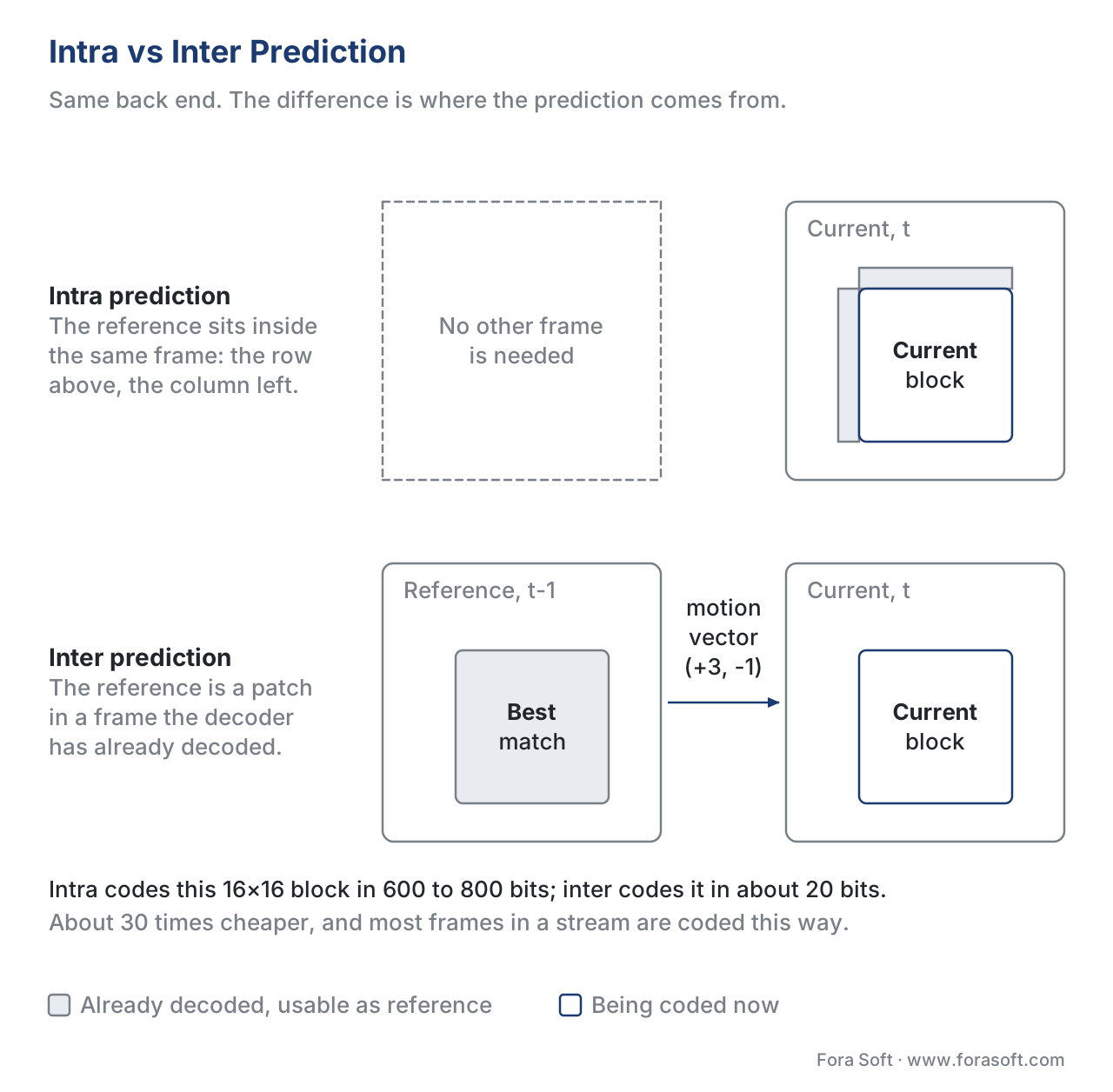 Figure 1. Intra and inter prediction share a back end. The difference is what the prediction is built from: neighbouring pixels in the same frame, or a patch in another frame.
The two coexist inside every video codec because they win on different content. Intra wins on the first frame, on hard scene changes, and on regions where the prior frame is unreliable (occlusion, new objects, lighting flips). Inter wins on the long stretches in between, which is most of the video. A typical 2-second HLS segment in H.264 contains roughly 1 keyframe plus 47 inter-coded frames at 24 fps; inter-frame coding accounts for the lion's share of every byte saved.
Frame types: I, P, and B
A real video stream contains three flavours of frame. The names date back to MPEG-1 (1993) and they have stuck.
An I-frame (intra-coded frame) is a complete still image, like a JPEG. It can be decoded on its own. Every video stream needs I-frames as starting points and as recovery anchors. I-frames are big.
A P-frame (predicted frame) is coded using prediction from one or more past reference frames. The encoder copies patches from the past, applies motion vectors, adds residuals. A P-frame is typically around 50% the size of an I-frame of the same content. The number changes a lot with scene complexity, but 50% is the right order of magnitude.
A B-frame (bi-predicted frame) is coded using prediction from both past and future reference frames. The encoder can copy from either direction and even average two patches together. B-frames are the most compressible: typically around 25% the size of an I-frame. They cost decoder buffering and latency, because the decoder has to receive a future frame before it can render a B-frame that depends on it.
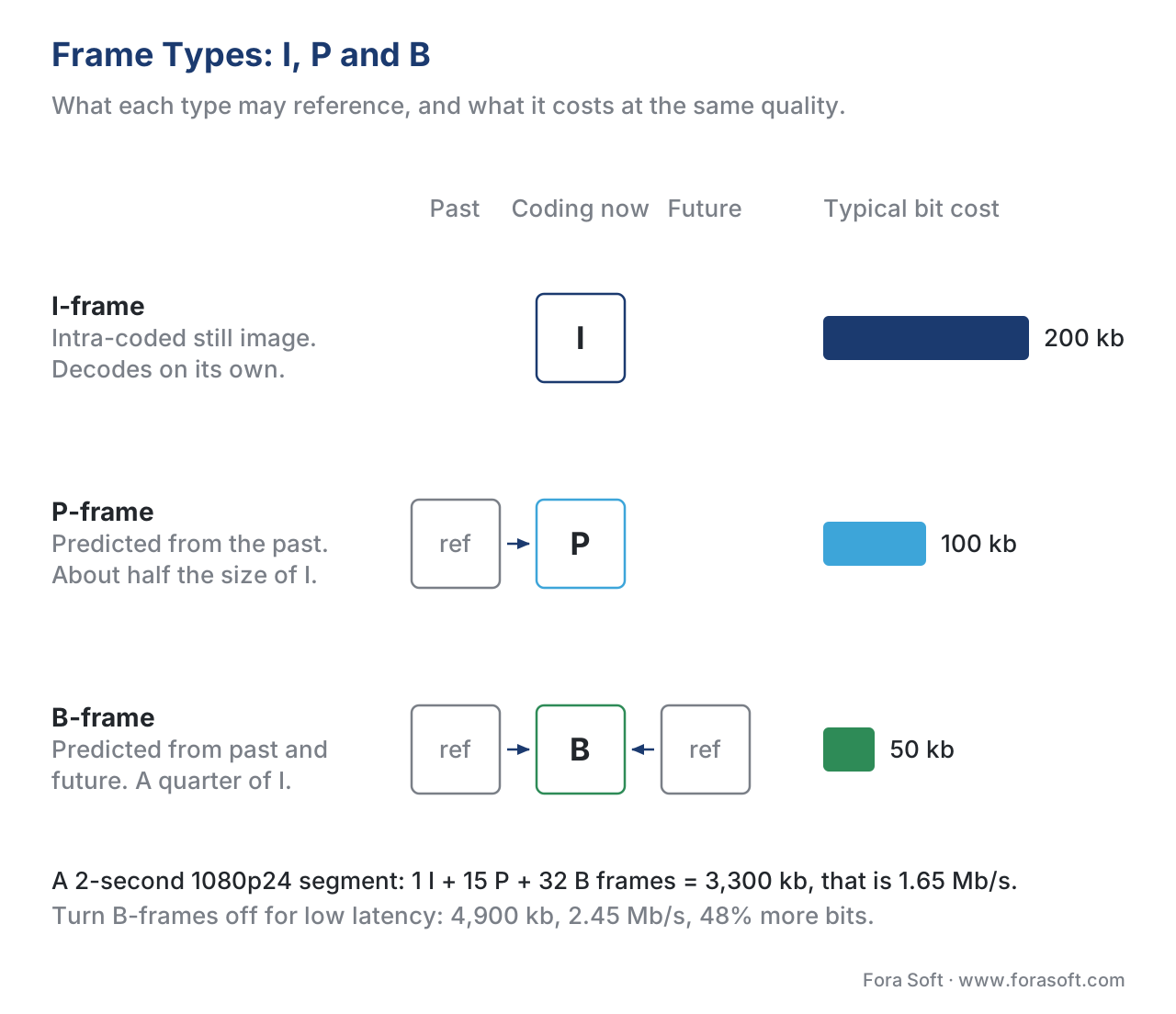 Figure 2. The three frame types and what they reference. B-frames reach both backward and forward in time; P-frames only reach backward. Bar length shows typical bit cost at matched quality.
A worked example anchors the numbers. Take a 2-second HLS segment of typical web video at 1080p24, encoded by x264 at "veryslow" with a closed GOP of 48 frames and a B-frame pattern IBBPBBPBBPBB… repeated. That segment contains 1 I-frame, 15 P-frames, and 32 B-frames.
Suppose the I-frame costs 200 kilobits and a P-frame averages 100 kilobits and a B-frame averages 50 kilobits. Then:
total = 1 × 200 + 15 × 100 + 32 × 50
total = 200 + 1500 + 1600
total = 3300 kilobits per 2 seconds
total bitrate = 1650 kilobits per second ≈ 1.65 Mbps
Now replay the same segment with B-frames disabled — common in low-latency live streams — and the encoder has to add P-frames instead. Each old B-frame slot now holds a P-frame at 100 kilobits.
total = 1 × 200 + 47 × 100
total = 200 + 4700
total = 4900 kilobits per 2 seconds
total bitrate = 2450 kilobits per second ≈ 2.45 Mbps
Removing B-frames cost you about 48% more bitrate for the same visual quality. That is the price you pay for the lower latency in a WebRTC or LL-HLS pipeline.
Motion estimation: the search that does the work
The encoder's job is to find, for every block in the current frame, the patch in the reference frame that matches it best. That search is called motion estimation, often abbreviated ME. The output of motion estimation is a motion vector for each block.
A motion vector is just two numbers — a horizontal shift and a vertical shift — measured in pixel (or sub-pixel) units. The vector (+3, −1) says: "Take the patch at the same coordinates in the reference frame, shift it 3 pixels right and 1 pixel up, and use that as the prediction for the current block."
Motion estimation is the single most expensive step in a video encoder. Multiple studies put it at 60–80% of total encoding time. Every minute of CPU saved here translates directly to faster transcodes, lower cloud bills, and the ability to run more streams per server. Every byte saved in the motion vector and residual is a byte the user does not have to download.
Step 1 — Pick the search area
The encoder cannot afford to compare the current block against every possible patch in the entire reference frame. A 1080p frame contains about 2 million possible 16×16 patches; multiplied by 8,000 blocks per frame, that is 16 billion comparisons per frame. At 30 fps the encoder would need to do half a trillion comparisons per second of input — impossible on a CPU.
Instead the encoder restricts the search to a small window around the block's own coordinates in the reference frame, called the search range or merange in x264/x265 parlance. A typical search range is 16, 24, or 32 pixels. Inside that window the encoder considers candidate patches and scores each one.
Step 2 — Score candidates with a cost function
Each candidate patch is scored by how well it matches the current block. Two metrics dominate.
Sum of Absolute Differences (SAD) takes the absolute difference between each pair of pixels and adds them up. It is fast, integer-only, and the default in nearly every real-time encoder.
Sum of Squared Differences (SSD) squares each pixel difference before summing. It correlates more closely with perceived quality but costs more compute. Higher-quality presets use SSD or a hybrid metric called SATD that runs the difference block through a small Hadamard transform first to weight perceptual frequencies.
Step 3 — Search patterns that don't check every candidate
Even inside a 32-pixel window the brute-force "check every position" search — sometimes called full search or exhaustive search — is too slow for real-time work. A 32-pixel window contains roughly 4,225 candidate positions. Codecs use smart search patterns that visit a small subset and converge quickly to a good answer.
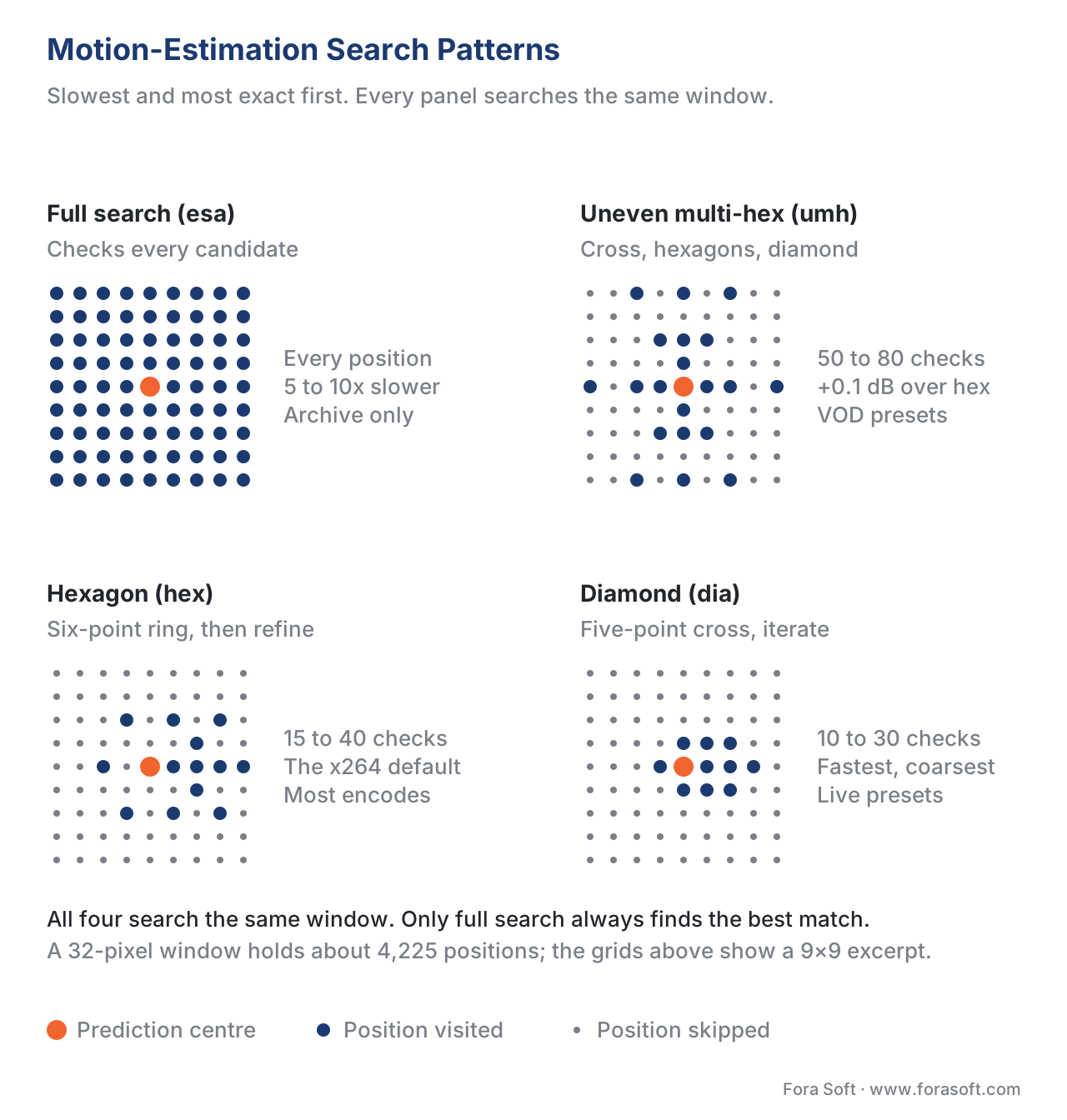 Figure 3. Four motion-search patterns, ordered from slowest and most exact to fastest. Production encoders default to hexagon or UMH; full search is reserved for archival quality.
The patterns you will see named in encoder docs:
Diamond search centres on a prediction, tests the four cardinal neighbours plus the centre, jumps to the winner, and repeats. Cheap and fast; the default for x264's me=dia preset and the floor for real-time encoding.
Hexagon search uses a six-point ring instead of a four-point cross. The hexagonal pattern hits more orientations per step and converges to better minima than diamond. This is x264 and x265's default (me=hex) and a reasonable speed/quality trade-off.
Uneven Multi-Hexagon (UMH) runs a cross search first to detect large translational motion, then a sequence of hexagons at decreasing radii, then a diamond refinement. UMH catches faster motion than plain hexagon and gives roughly 0.1 dB more PSNR on the typical reference suite, at a 30–40% encode-time cost.
Enhanced Predictive Zonal Search (EPZS) builds an initial prediction from motion vectors of spatial and temporal neighbours (the same block in the previous frame, the block to the left, the block above) and only searches near those predictions. Excellent on smooth motion such as camera pans; widely used in cloud transcoders.
Full search (also called exhaustive search, x264's me=esa and me=tesa) checks every position. Used only for placebo-grade archive encodes; in practice UMH gets within a fraction of a dB at a fraction of the cost.
A practical rule of thumb in x264: me=hex for live and "fast" presets, me=umh for VOD, me=esa/tesa for "placebo" presets and never for production.
Step 4 — Refine to sub-pixel accuracy
The best integer-pixel match is rarely the true minimum. Real motion is continuous, not on a pixel grid, and a slight further shift almost always reduces the residual.
So after integer-pixel motion estimation, the encoder does sub-pixel refinement. It interpolates the reference frame to a finer grid — half-pixel, quarter-pixel, eighth-pixel — and searches a small neighbourhood of the integer winner. The interpolation uses a small filter (typically a 6-tap or 8-tap separable filter); the search uses a tiny diamond.
The pay-off is significant. Half-pixel motion vectors gained MPEG-2 around 1 dB over integer-only. Quarter-pixel gained another 0.5–0.8 dB on top of half-pixel. AV1 and VVC support eighth-pixel accuracy for some block types. The bits to signal a finer vector are nearly free; the bits saved in the residual are not.
Worked example: from search to motion vector to byte cost
A concrete walk-through helps cement the mental model. Imagine a 16×16 block in the current frame containing part of a man's jacket. The reference frame from 1/30 second ago showed the same jacket, three pixels to the right and one pixel down (because the camera was panning left and up).
The encoder picks a 16-pixel search range centred on the block's own coordinates in the reference frame. It runs hexagon search and lands on the integer-pixel candidate (+3, −1) with SAD = 320. It refines to half-pixel and the SAD drops to 210 at (+3.0, −1.0) — the integer was already on the grid. It refines to quarter-pixel and the SAD drops further to 198 at (+3.0, −1.25) — the true motion was slightly below the integer grid.
The encoder now stores three pieces of information for this block. First, the motion vector (+3.00, −1.25) in quarter-pixel units, encoded as a difference from the predicted vector (the median of three neighbouring blocks' vectors). Second, a single bit indicating this block uses inter-prediction with the previous frame as reference. Third, the residual: a 16×16 block of differences between the current block and the shifted reference patch. The residual is small — the SAD was 198, which means an average error of about 0.8 levels per pixel — so once it is transformed and quantized, almost every coefficient becomes zero. The block ends up costing roughly 20 bits in the bitstream.
Compare to the cost of intra-coding the same block: roughly 600–800 bits. The inter path is about 30× cheaper.
How modern codecs extend the basic recipe
The single-vector translational search above is the H.261 / MPEG-2 baseline. Every codec generation since has bolted on tools that catch motion the baseline cannot describe. Six tools account for most of the gains.
Variable block sizes
A whole 16×16 block sharing one motion vector is too coarse when the block straddles two objects moving differently. H.264 introduced partitions down to 4×4. H.265 added a quad-tree that goes from 64×64 down to 4×4. AV1 starts from 128×128 superblocks. VVC uses a 128×128 CTU with binary, ternary, and quad splits down to 4×4. Smaller blocks cost more vector bits but track motion boundaries cleanly.
Multiple reference frames
Why force the encoder to predict from the immediately previous frame? Maybe the block matches a patch from three frames ago better — say, because a moving foreground briefly occluded it. H.264 introduced multi-reference prediction with up to 16 reference frames. AV1 maintains seven reference frames in two categories: past (LAST, LAST2, LAST3, GOLDEN) and future (BWDREF, ALTREF, ALTREF2). VVC supports up to 15 reference frames. The encoder picks per block; the gain is largest on content with periodic motion or short occlusions.
B-frames and compound prediction
A B-frame can predict each block from either or both of two references — one past, one future — and average the two. The bidirectional average smooths out noise and reduces residuals. AV1 extends this to compound prediction modes including wedge-based, difference-modulated, and distance-weighted blending of the two predictors, which lets the codec express more complex motion boundaries inside a single block.
Affine motion: rotation, scaling, zoom
A single motion vector can describe translation. It cannot describe rotation, scaling, or perspective warp. VVC and AV1 both added affine motion models: instead of one vector per block, the encoder signals two or three control-point vectors per block, and the decoder computes a different vector for each 4×4 sub-block by interpolation. The result handles camera zoom, dolly shots, vehicle turns, and rotating logos with a tiny fraction of the bits a per-sub-block independent vector would cost.
Warped and global motion (AV1's signature tools)
AV1 sits between simple translational ME and full affine. Its global motion tool signals one affine model per reference frame at the frame level — useful when the whole frame is undergoing the same warp, such as a camera pan or zoom. Its local warped motion derives the warp parameters at the block level from the motion vectors of neighbouring blocks, with almost no signalling cost. Together these tools catch the long stretches of pan and zoom that translational ME wastes bits on.
Optical-flow refinement (VVC's BDOF, DMVR)
VVC adds two decoder-side refinement tools that improve a coarse vector without spending any signalling bits. Bi-Directional Optical Flow (BDOF) applies an optical-flow correction at the 4×4 sub-block level based on the gradients of the two reference patches. Decoder-side Motion Vector Refinement (DMVR) lets the decoder run a small block-match search around a received vector and use the refined position instead. Both reduce the bit cost of the motion vector itself, because the encoder can transmit a coarser vector and let the decoder finish the job.
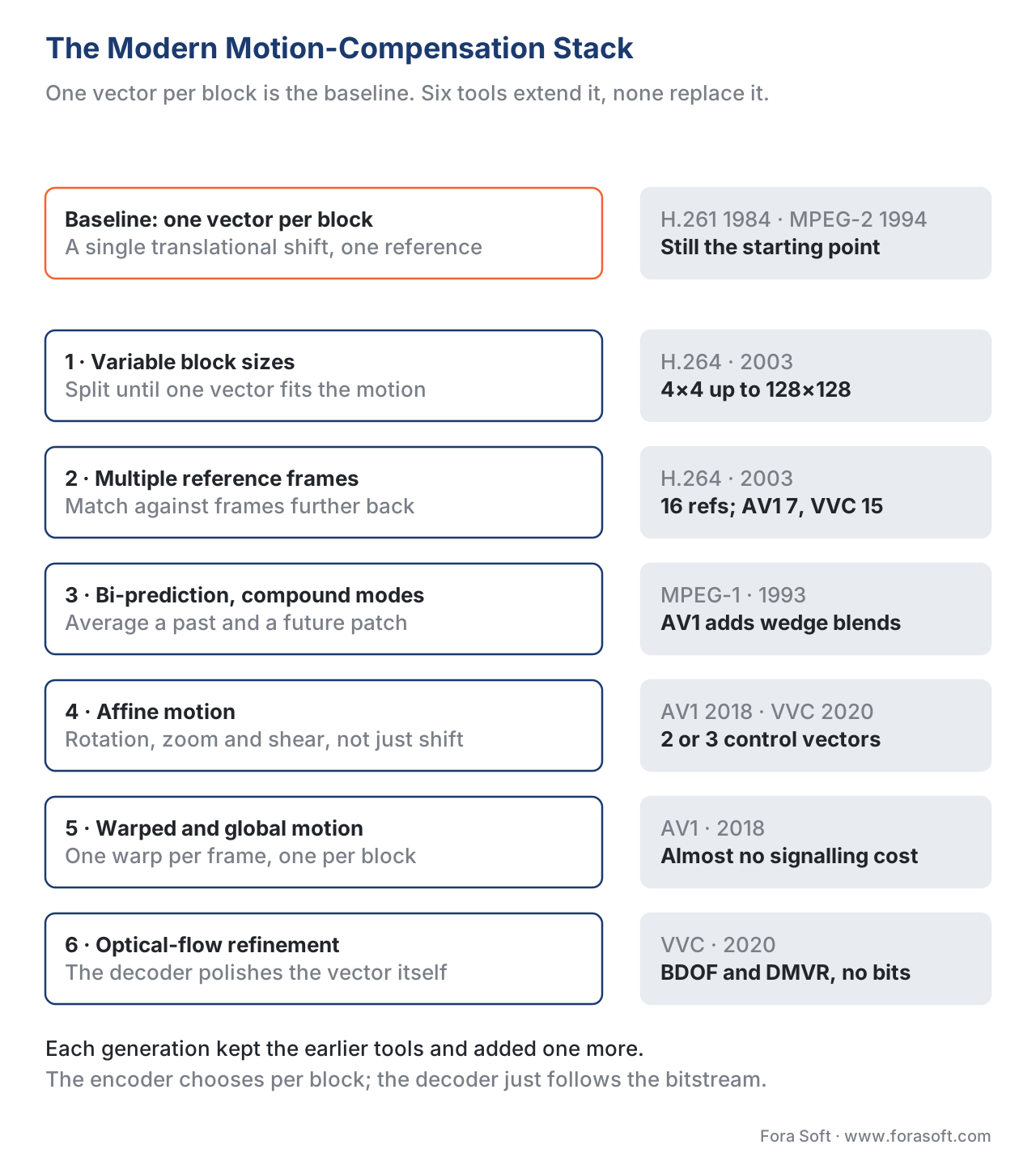 Figure 4. The motion compensation of a modern codec is the basic block-match plus a stack of refinements. Each refinement was added by a different codec generation, and none of them replaced the one before.
What this costs on the encoder and on the decoder
The asymmetry of inter-frame coding is one of its underappreciated features. The encoder does enormous work to find motion vectors; the decoder simply reads the vectors and copies the patches. Encoding a one-hour movie at 4K HEVC takes 15–60 minutes of CPU on a fast server; decoding the same movie runs comfortably on a five-year-old phone.
This asymmetry is what makes streaming economics work. A studio can spend ten hours of GPU time per minute encoding a Netflix master and amortise that cost across hundreds of millions of plays. A live encoder running at a sports event has a single chance to encode each frame in real time, which is why live presets disable B-frames, narrow the search range, and switch to diamond or hexagon search.
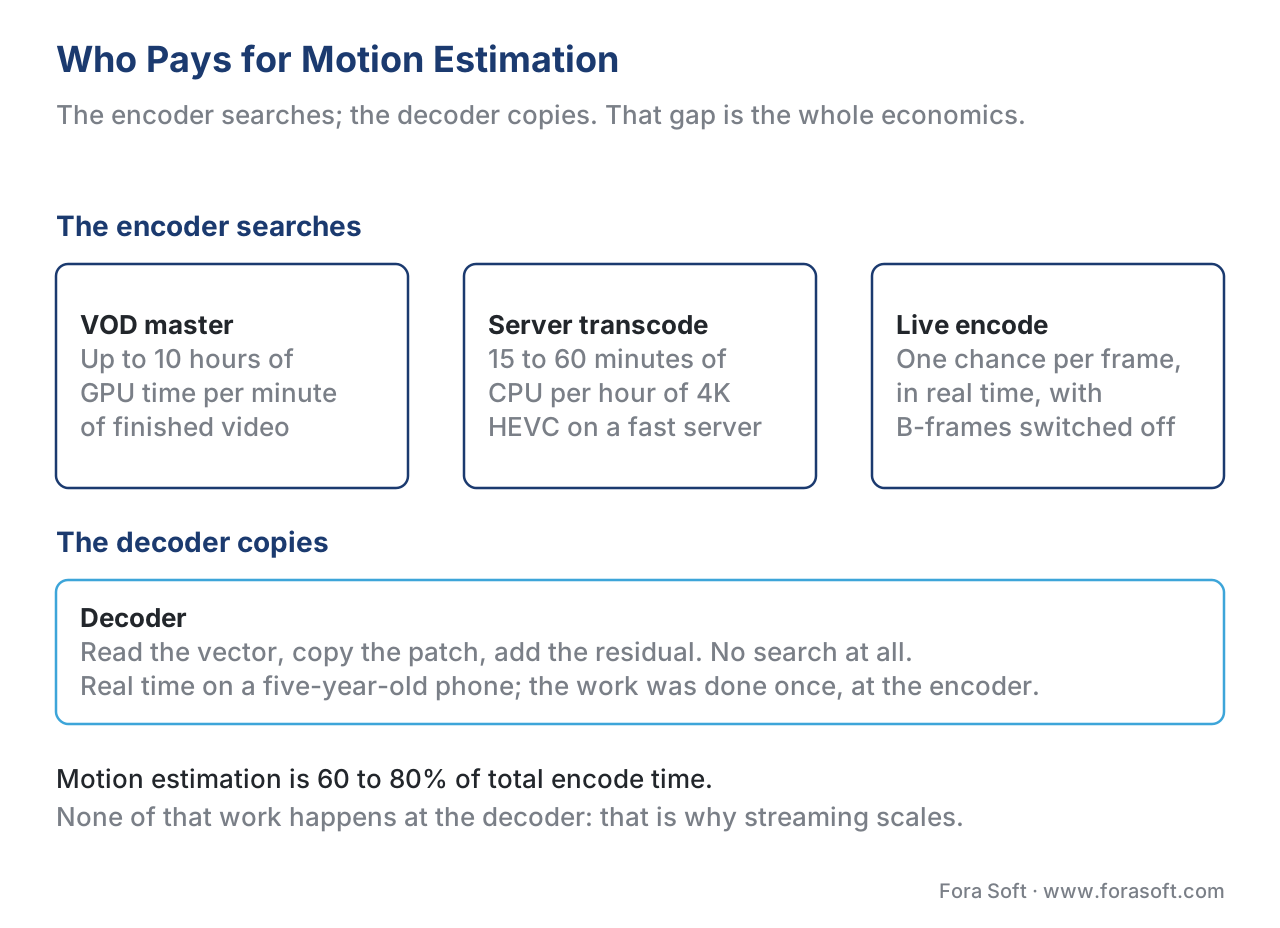 Figure 5. The same bitstream costs hours at the encoder and milliseconds at the decoder. That asymmetry is what lets a studio amortise one expensive encode across millions of cheap plays.
The trade-offs every preset makes are:
| Setting | What it controls | Bit-cost impact | Encode-time impact |
|---|---|---|---|
| Search range | Width of the search window | Wider = lower bitrate on fast motion | Wider = quadratically slower |
| Search pattern | Which candidate positions are tested | Better pattern = lower bitrate | Better pattern = 2–10× slower |
| Sub-pixel depth | Half, quarter, eighth pixel | Finer = lower bitrate | Each level ≈ 1.5× slower |
| Reference frames | How many past/future frames | More = lower bitrate, lower diminishing returns | More = linearly slower |
| B-frame count | How many B-frames between P-frames | More B = lower bitrate | More B = small encode hit, large decode buffer |
| Affine / warped motion | Whether non-translational models are enabled | Lower bitrate on rotation/zoom content | Adds 5–15% encode time |
A real-world cheat sheet for x264 and x265 is in the download below.
Common mistake: assuming "motion estimation accuracy" means perceptual accuracy
A frequent miscommunication between product and engineering happens around the word "accuracy". A motion vector is "accurate" if it minimises a cost function — usually SAD, sometimes SSD or SATD. None of those cost functions measures perceptual quality the way VMAF or SSIM do.
The result is that two motion vectors with identical SAD can produce noticeably different visual quality after the residual is quantized at low bitrates. Encoders try to bridge the gap with rate-distortion optimisation (RDO), which scores each candidate by the total bit cost of (motion vector + residual) rather than residual alone, and by SATD-based searches that approximate perceptual frequencies. Slower presets do more RDO; faster presets skip most of it. If you ship a low-bitrate stream and quality looks "blocky on motion", the answer is rarely "increase bitrate" — it is usually "use a slower preset so the encoder spends more RDO cycles per block."
Where Fora Soft fits in
Inter-frame coding settings touch every product Fora Soft has shipped since 2005. In our video conferencing and WebRTC work, low-latency constraints force a B-frame-free pipeline and small search ranges, which we offset with smart bitrate ladders and selective forward error correction. In OTT and Internet TV builds we tune per-title encoding ladders that exploit the full motion-compensation toolset of HEVC and AV1, often shaving 25–40% off CDN egress at matched VMAF. In video surveillance projects long static stretches let us push enormous GOPs and adaptive keyframe insertion driven by scene-change detection. Our e-learning, telemedicine, and AR/VR work hits the same toolbox from different angles — the article you are reading distils a decade of those production calls.
The book
Video Encoding: A Complete Guide to Video Compression
This article walks the search once; the book gives it chapters. The cost functions SAD, SSD and SATD written out, every search pattern from diamond to EPZS with its cost in checks, sub-pixel interpolation filters, the reference-frame systems of H.264, AV1 and VVC, affine and warped motion, and the rate-distortion arithmetic that decides which vector actually wins. It is volume 1 of the seven-volume Fora Soft Video Engineering Handbook, 1,522 pages, written by Nikolay Sapunov, CEO at Fora Soft.
Is your motion-search preset a measurement or a default?
Send us your encoder command line, your latency budget and one hour of typical content, and we will come back with three numbers: what your current preset costs in CPU per stream-hour, what a different search pattern and search range would save at matched VMAF, and what B-frames would cost you in latency if you turned them on. The arithmetic runs on your own footage, not on a reference clip. 250+ video products shipped since 2005.
See our case studies
Case study
Worldcast Live
Concert streaming at 1.5 Gb/s with 0.4–0.5 s latency to 10,000 simultaneous viewers. At that budget B-frames are off and the search range is narrow — the 48% bitrate penalty from the worked example above is what low latency actually costs.
Case study
Speed.Space
Remote production recording at 1080p and 8 Mb/s for Netflix, Electronic Arts and HBO shoots, where creators pick resolution, fps, codec and bitrate per stream. Every one of those controls moves the motion-search budget behind the scenes.
Case study
Mindbox
An AI video management system on RTSP, FFmpeg and HLS with 50+ deployments across transport, pharma and gated communities. Fixed cameras mean long static stretches, so the motion search finds near-zero vectors and the bitrate collapses — until someone walks through frame.
What to read next
Partitioning
Block-Based Prediction: MBs, CTUs, SBs and Superblocks
Tool 1 of the stack opened up: why the 16×16 macroblock became a 128×128 superblock, and how the encoder decides where to split.
Mode decision
Mode Decision and Rate-Distortion Optimization (RDO)
How the encoder scores a candidate vector by total bit cost rather than residual alone — the answer to the “blocky on motion” problem above.
Rate control
Rate Control: CBR, VBR, CRF, ABR, Capped CRF
Motion estimation decides how few bits a frame could take; rate control decides how many it gets. CRF, VBV and why live streams behave differently.
Quality
Objective Quality Metrics: PSNR, SSIM, MS-SSIM, VMAF
SAD is not quality. What PSNR, SSIM and VMAF actually measure, and which one to put on the other axis when you compare two presets.
References
- AOMedia, "AV1 Bitstream & Decoding Process Specification", Version 1.0.0 with Errata, 2019. URL: https://aomediacodec.github.io/av1-spec/. Accessed 2026-05-16. Authoritative source for AV1 reference-frame system, compound prediction, warped/global motion, and OBMC.
- J. Han et al., "A Technical Overview of AV1", Proceedings of the IEEE, 2021, preprint at arXiv:2008.06091. URL: https://arxiv.org/pdf/2008.06091. Accessed 2026-05-16. Source for AV1 motion-vector accuracy (1/8 pixel) and seven-reference-frame design.
- ITU-T Recommendation H.266, "Versatile Video Coding", v3, 2022. URL: https://www.itu.int/rec/T-REC-H.266. Accessed 2026-05-16. Authoritative source for VVC affine motion model, BDOF, DMVR.
- B. Bross et al., "Overview of the Versatile Video Coding (VVC) Standard and its Applications", IEEE Transactions on Circuits and Systems for Video Technology, 2021. URL: https://ieeexplore.ieee.org/document/9311650. Accessed 2026-05-16. Source for VVC inter-prediction toolset summary.
- Andrey Norkin (Netflix), "AV2 Video Codec Architecture", QoMEX 2025 slide deck. URL: https://norkin.org/pdf/QoMEX_2025_AV2_Architecture_slides.pdf. Accessed 2026-05-16. Source for AV2 motion-tool evolution.
- AOMedia, "Overview of Coding Tools Under Consideration in AVM", ICIP 2024. URL: https://aomedia.org/docs/Overview.of.Coding.Tools.Under.Consideration_ICIP2024.pdf. Accessed 2026-05-16. Source for AV2/AVM motion-estimation and reference-frame design.
- Y. Tourapis, "Enhanced Predictive Zonal Search for Single and Multiple Frame Motion Estimation", VCIP 2002. Foundational reference for EPZS.
- C. Zhu, X. Lin, L. Chau, "Hexagon-Based Search Pattern for Fast Block Motion Estimation", IEEE TCSVT, 2002. Foundational reference for hexagon search.
- x264 documentation, "Motion Estimation Methods and Settings". URL: https://silentaperture.gitlab.io/mdbook-guide/encoding/x264.html. Accessed 2026-05-16. Source for me=dia/hex/umh/esa/tesa quality-speed numbers.
- x265 Project, "Command Line Options — x265 documentation". URL: https://x265.readthedocs.io/en/master/cli.html. Accessed 2026-05-16. Source for x265 motion-estimation settings.
- ITU-T Recommendation H.264, "Advanced Video Coding for Generic Audiovisual Services", v14, 2021. URL: https://www.itu.int/rec/T-REC-H.264. Accessed 2026-05-16. Source for H.264 multi-reference prediction.
- ITU-T Recommendation H.265, "High Efficiency Video Coding", v8, 2023. URL: https://www.itu.int/rec/T-REC-H.265. Accessed 2026-05-16. Source for HEVC inter-prediction tools.
