


Why this matters
If you build a streaming product, your engineering team will spend more time tuning block-partition settings than tuning any other encoder knob, because the partition decision determines both the bitrate of your output and the wall-clock time of your encode. Cloud transcoding bills, live-streaming latency budgets, and quality-vs-cost curves all bottom out on what the encoder decides about block size. A product manager who understands "the encoder is searching through trees of rectangles" can read a vendor benchmark, ask the right questions about preset choices, and not be surprised when a faster preset costs 25% more bitrate. A founder who can sit in a codec-roadmap meeting and challenge "why do we still use 16×16 blocks in 2026" can save the company months of needless legacy work.
A frame is a grid of rectangles
To compress a frame, every modern codec begins with the same mechanical act: it lays a grid over the image and treats each cell as an independent unit of work. The cell is the smallest piece of pixels the encoder will reason about as a whole. Inside one cell the encoder makes one prediction (from neighbours or an earlier frame), computes one residual (the leftover error after the prediction), and writes one compact description into the bitstream.
Think of it like tiling a wall with mosaic squares. If the wall has a plain blue patch, one big tile is enough. If the wall has a face in it, you need small tiles around the eyes and mouth and large tiles for the smooth cheeks. The block partition decision is the encoder choosing tile sizes on the fly, one frame at a time, to spend the fewest bits on the boring areas and the most bits on the busy areas.
The rectangle the encoder starts from has a different name in each codec family. In H.264 / AVC it is called a macroblock, abbreviated MB, fixed at 16×16 luma pixels. In H.265 / HEVC and H.266 / VVC it is the coding tree unit, abbreviated CTU, sized 64×64 in HEVC and 128×128 in VVC. In VP9 and AV1 it is the superblock, abbreviated SB, sized 64×64 in VP9 and 128×128 in AV1. The names look different and history made them so, but the role is identical: this is the biggest rectangle the encoder will ever treat as a single decision.
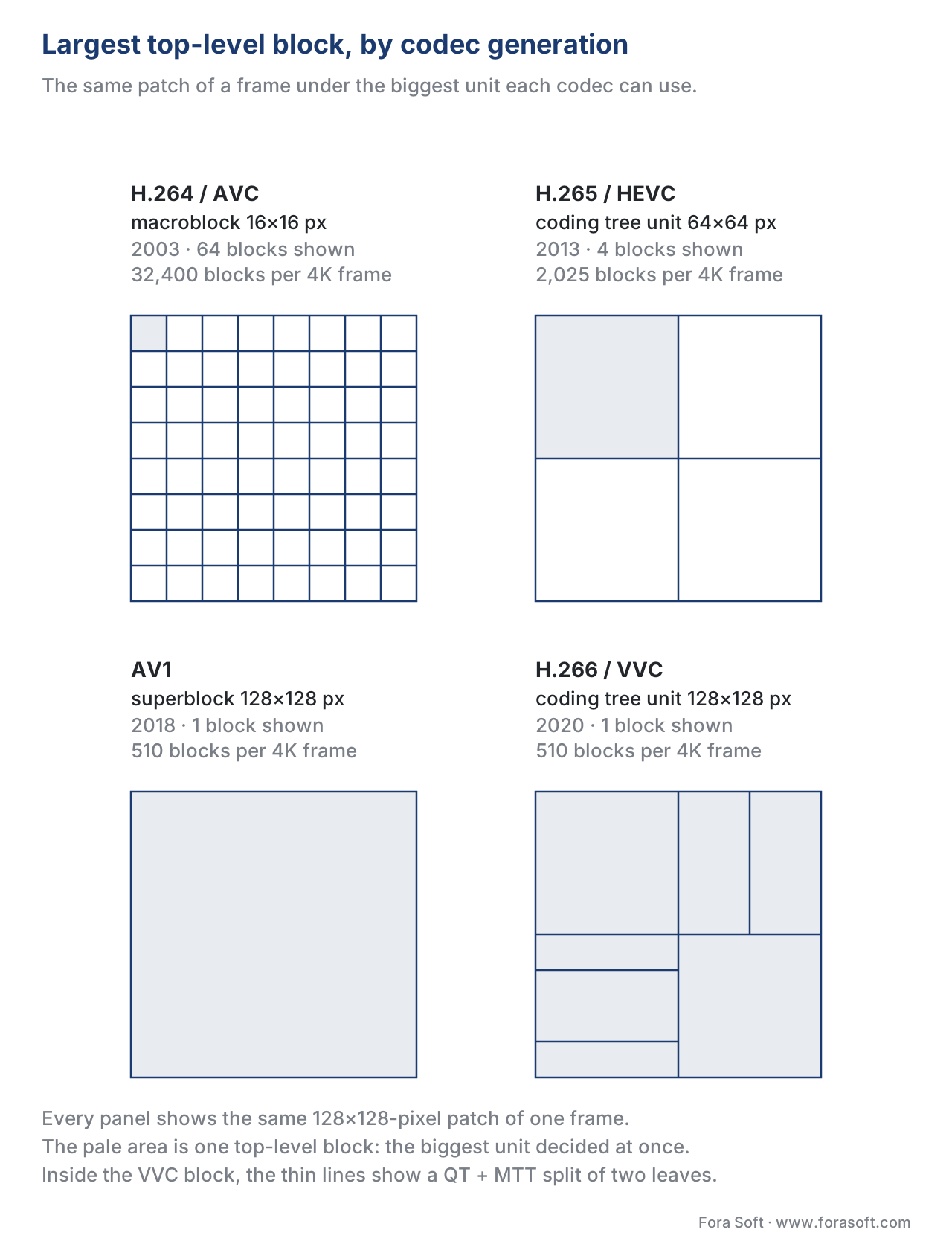 Figure 1. The biggest rectangle each codec generation treats as one decision, over the same 128×128 patch. One shaded cell in H.264 is a sixty-fourth of what AV1 decides at once.
The reason every generation has grown the rectangle is simple. A bigger top-level block lets the encoder describe a smooth, slow-moving area with one motion vector and one tiny residual, instead of sixteen or sixty-four redundant copies of the same vector. A 4K frame compressed with H.264's 16×16 macroblocks contains 32,400 macroblocks per frame; the same frame compressed with AV1's 128×128 superblocks contains 2,025 superblocks per frame — fifteen times fewer top-level decisions to make. Coding overhead per block adds up fast; fewer blocks means less overhead.
The macroblock — H.264 / AVC
Macroblocks were defined in H.261 in 1988 and inherited unchanged by MPEG-1, MPEG-2, MPEG-4 Part 2, and H.264. The macroblock is always 16×16 luminance pixels, paired with two 8×8 chrominance blocks under 4:2:0 sampling — the colour-subsampling layout we explained in our article on color spaces.
What changed in H.264 was not the macroblock size but the freedom inside it. Earlier codecs forced every macroblock to use one prediction. H.264 lets the encoder split a single macroblock into smaller sub-blocks for motion compensation:
- 16×16 — one motion vector for the whole macroblock.
- 16×8 or 8×16 — two motion vectors, one per half.
- 8×8 — four motion vectors, one per quarter.
- And inside any of the four 8×8 quadrants: 8×4, 4×8, or 4×4 — up to sixteen motion vectors in a single macroblock.
This is called tree-structured motion compensation because the choices form a small two-level tree. The encoder picks the cheapest combination using a process called rate-distortion optimization, abbreviated RDO, which we cover in detail in the article on mode decision and RDO. For now, the only thing to remember is that the encoder is a search engine: it explores partitions, costs each one, and keeps the cheapest.
The macroblock cap at 16×16 has aged badly. Modern content — 1080p, 4K, HDR — has large, smooth areas where one motion vector could describe a whole 64×64 patch. H.264 cannot say so; it must spend bits to repeat the same vector across sixteen macroblocks. This is the single biggest reason H.264 leaves 30–50% bitrate on the table relative to a 2026 codec on the same content.
The CTU and the quadtree — HEVC / H.265
HEVC, finalized in 2013, kept the macroblock idea but threw away the fixed 16×16 size. The new top-level rectangle is the coding tree unit — CTU — and it can be 16×16, 32×32, or 64×64. Almost every real-world HEVC encoder uses 64×64.
Inside a CTU, HEVC introduced the quadtree: a recursive splitting structure where any square block can be split into four equal quadrants, and any of those quadrants can be split again, down to a minimum of 8×8. A 64×64 CTU is at depth 0; an 8×8 leaf is at depth 3.
Imagine the CTU is a 64×64 cake. You can either decode the whole cake as one piece, or cut it into four 32×32 slices and decide for each slice whether to cut it again. If a slice has uniform texture, leave it whole. If a slice has fine detail, split it into four 16×16 sub-slices, and so on. The encoder picks the cheapest tree using RDO.
The math behind why this works: on a 4K HDR sky, you can describe a whole 64×64 patch with one motion vector and a near-zero residual. On a face in the same frame, the encoder splits down to 8×8 around the eyes, where every pixel changes per frame, and to 32×32 across the cheek where motion is uniform. The total bit cost is dramatically lower than forcing 8×8 across the whole frame, and the picture quality is identical.
The price is encoder runtime. A full RDO search at HEVC depth 3 evaluates 1 + 4 + 16 + 64 = 85 candidate partitions per CTU, not counting prediction-mode choices inside each. Multiply by 32,400 ÷ 64 ≈ 510 CTUs per 1080p frame, then by 60 frames per second for live encoding, and you have 26 million partition evaluations per second to decide. Practical encoders use early-termination shortcuts — if a 32×32 block is good enough, do not bother splitting it further — but the full search remains the upper bound on quality.
The reason 64×64 turned out to be the sweet spot, not 128×128: HEVC's research showed that 64×64 captures 95% of the gain available from large blocks on 1080p content, and the remaining 5% does not pay back the complexity cost. AV1 and VVC went bigger anyway, because by 2018 the dominant resolution had moved to 4K and 8K.
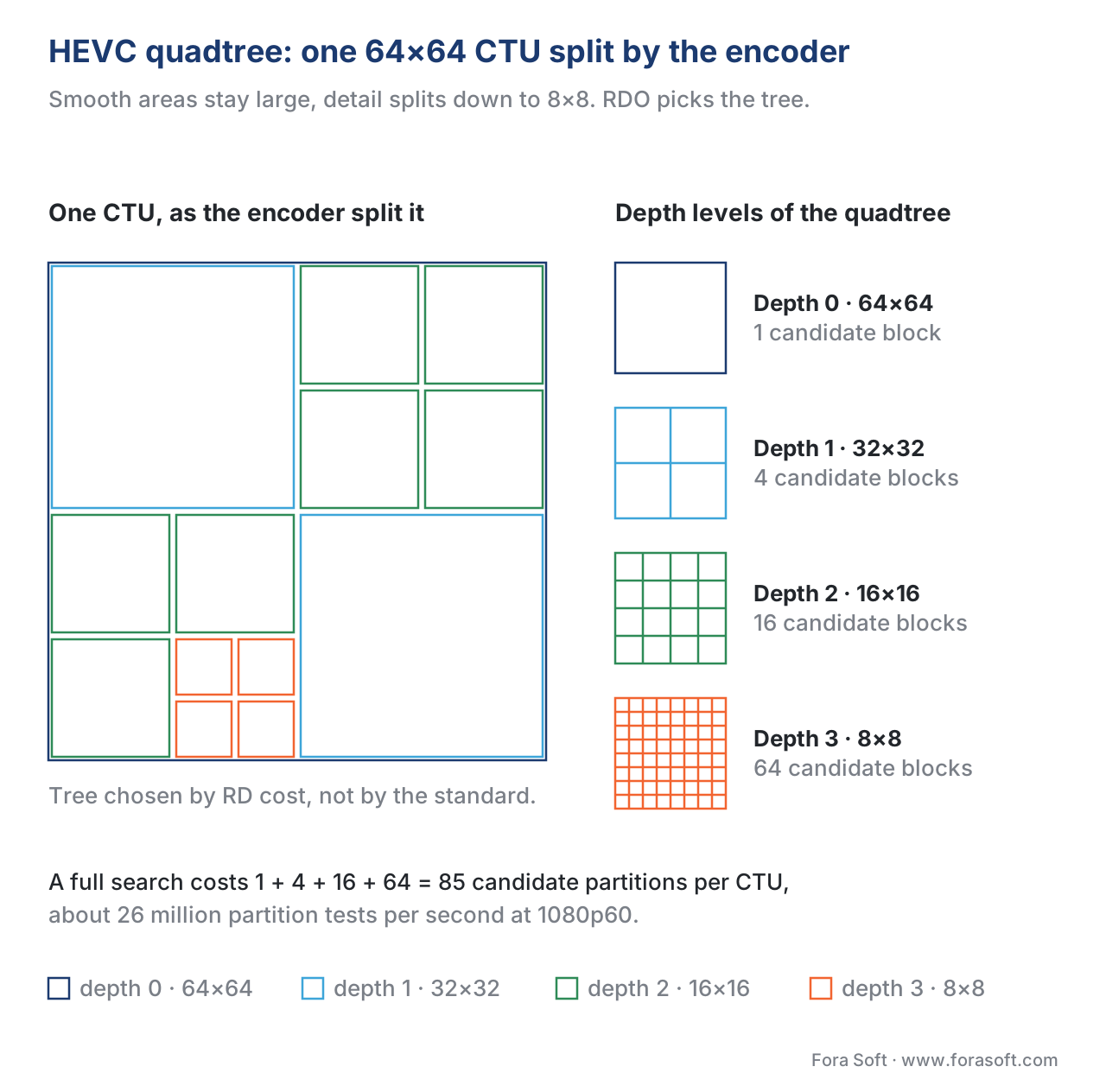 Figure 2. A 64×64 HEVC CTU split by the quadtree: smooth quadrants stay at 32×32, the detailed corner goes down to 8×8. A full search prices all 85 candidates.
The superblock and the 10-way tree — VP9 and AV1
VP9, finalized in 2013 alongside HEVC, introduced the term superblock for the same idea, sized at 64×64. The partition structure was simpler than HEVC's pure quadtree: a superblock could split into four 32×32 sub-blocks (the classic quadtree split) or into two horizontal halves or two vertical halves, all the way down to 8×8 (with 4×4 reserved for special intra cases). This four-way + horizontal/vertical option is sometimes called a partial quadtree or R-shaped tree.
AV1, finalized by AOMedia in March 2018, kept VP9's superblock concept but did three things differently. First, it doubled the maximum size to 128×128. Second, it expanded the partition set from four options to ten. Third, it allowed asymmetric splits — three rectangles instead of four squares — to match T-shaped texture boundaries that quadtrees handle awkwardly.
The full AV1 partition set, for a single block at any size that supports them all:
- PARTITION_NONE — keep the block whole.
- PARTITION_HORZ — split into two horizontal halves (top + bottom).
- PARTITION_VERT — split into two vertical halves (left + right).
- PARTITION_SPLIT — split into four equal squares (the classic quadtree split). Only this split can be recursed.
- PARTITION_HORZ_A — three rectangles: two small top + one wide bottom.
- PARTITION_HORZ_B — three rectangles: one wide top + two small bottom.
- PARTITION_VERT_A — three rectangles: two small left + one tall right.
- PARTITION_VERT_B — three rectangles: one tall left + two small right.
- PARTITION_HORZ_4 — four thin horizontal slabs (4:1 aspect ratio).
- PARTITION_VERT_4 — four thin vertical slabs (1:4 aspect ratio).
The four T-shaped splits are the headline trick. A face in profile, the boundary of a building against a sky, or a vertical edge of text — these are content patterns that a quadtree must encode with three blocks of the wrong shape, while AV1 captures them in one decision. On typical content, the T-splits and the 4-slab splits together contribute 3–5% of AV1's bitrate savings over VP9 on the same fidelity.
There are restrictions. Both 128×128 and 8×8 blocks cannot use the 4:1 and 1:4 splits. 8×8 blocks cannot use any T-shaped split. Rectangular partitions, once created, cannot be subdivided further — only the square PARTITION_SPLIT outcome recurses. This is why AV1's tree is sometimes called a constrained 10-way recursive tree rather than a free-form partition graph: the constraints are what keep the decoder's job tractable.
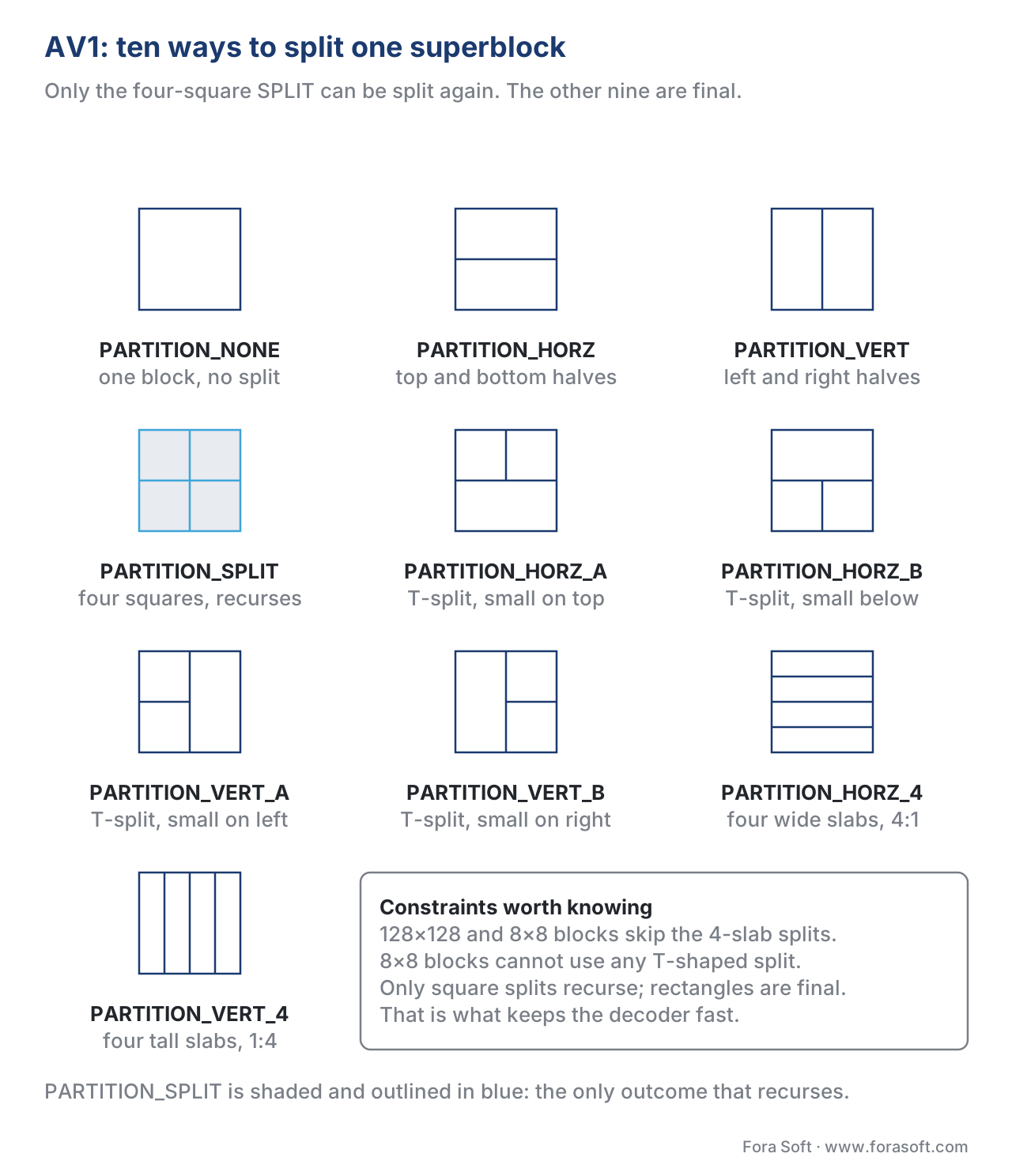 Figure 3. AV1’s ten partition outcomes for one superblock. Only the four-square SPLIT recurses; the T-shaped and 4-slab splits are terminal, which is what keeps decoding tractable.
QT + MTT and the ternary split — VVC / H.266
VVC, finalized by JVET as H.266 in July 2020, took a fourth approach. The top-level rectangle is the CTU at 128×128, like AV1. The partition structure is a quadtree with nested multi-type tree — usually shortened to QT + MTT or QTMT.
The split happens in two phases. First, the CTU is recursively quadtree-split into smaller squares — the same recursive split HEVC uses. Then, each leaf of the quadtree may be further split using a multi-type tree (MTT) that adds five options:
- No split — the quadtree leaf is the final coding unit.
- Horizontal binary split — two horizontal halves.
- Vertical binary split — two vertical halves.
- Horizontal ternary split — three horizontal slabs in the ratio 1:2:1.
- Vertical ternary split — three vertical slabs in the ratio 1:2:1.
The 1:2:1 ternary split is the new geometric idea VVC contributed. Many texture boundaries in real content sit at the 1/4 or 3/4 mark of a block, not the 1/2 mark. A binary split puts the boundary in the wrong place; a ternary split lands it exactly. The ternary split is what gives VVC's partition tree another 3–7% bitrate edge over a pure binary tree on the same content.
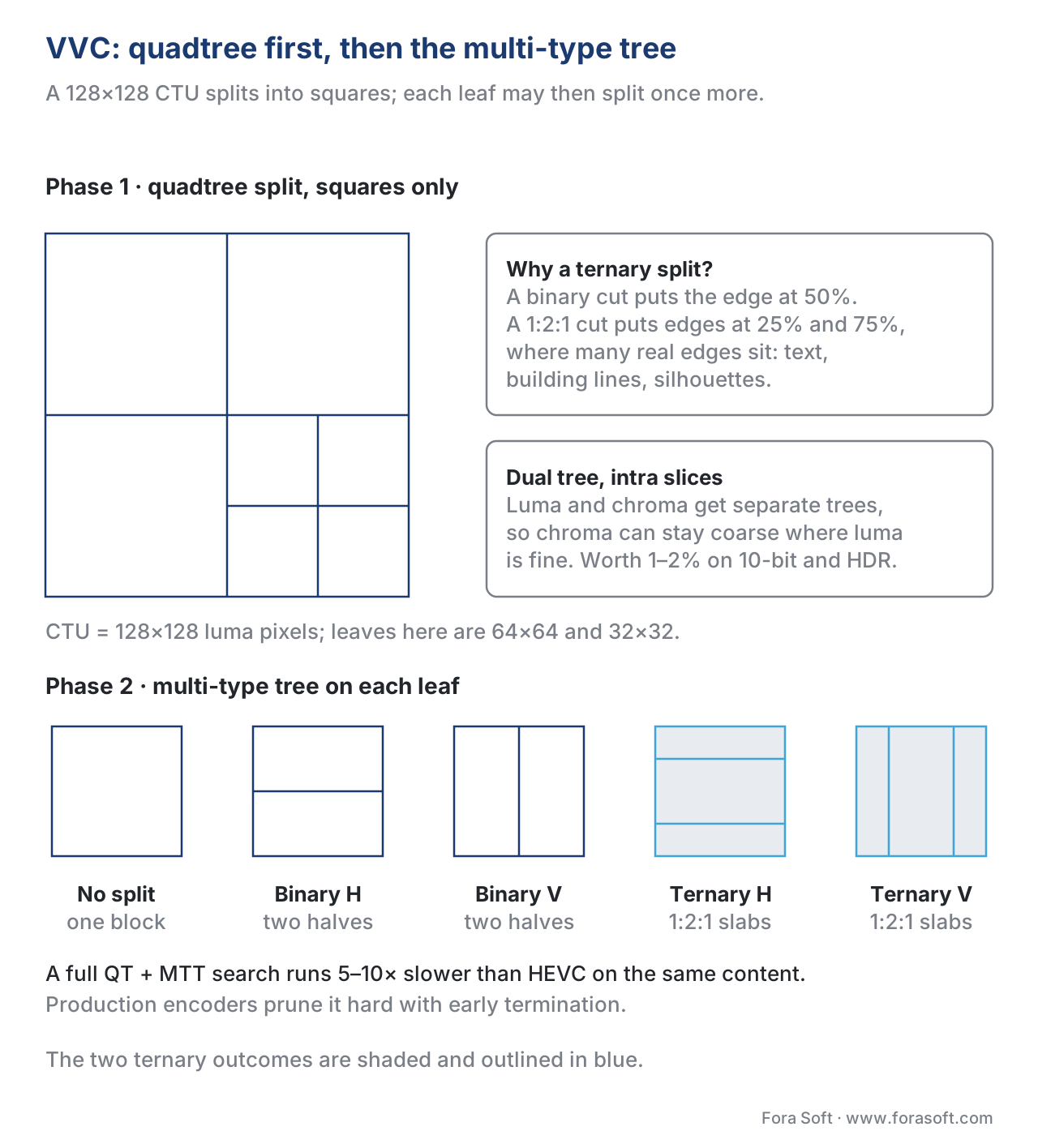 Figure 4. VVC splits in two phases: the quadtree cuts squares, then the multi-type tree cuts each leaf once more — binary at 50%, or ternary at 25% and 75%.
The geometric flexibility comes at a runtime cost. VVC's encoder must evaluate the full QT recursion and all five MTT options and combine the two phases. The complexity-reduction literature reports that exhaustive VVC partition search is 5–10× slower than HEVC for the same content, with most of the slowdown spent on MTT exploration. This is why VVC's adoption has been slowest of any modern codec: the encoder is hard to make real-time even on dedicated silicon.
VVC, like AV1, also separates the luma partition tree from the chroma partition tree in intra slices — a feature called dual tree — which gives chroma the freedom to use bigger blocks where luma uses small ones. This catches another 1–2% of bitrate on HDR and 10-bit content, where chroma is naturally smoother than luma.
| Codec | Year | Top-level block | Smallest block | Partition options | Approx. encoder complexity |
|---|---|---|---|---|---|
| H.264 / AVC | 2003 | 16×16 macroblock | 4×4 | 4 + nested 4 (tree-structured MC) | 1× (baseline) |
| H.265 / HEVC | 2013 | 64×64 CTU | 8×8 (4×4 transform) | Pure quadtree | 5–10× |
| VP9 | 2013 | 64×64 superblock | 8×8 (4×4 intra) | Quadtree + horz/vert split | 4–8× |
| AV1 | 2018 | 128×128 superblock | 4×4 | 10-way recursive tree | 15–40× |
| VVC / H.266 | 2020 | 128×128 CTU | 4×4 | QT + binary + ternary (MTT) | 30–80× |
Table 1. Block partition design across modern video codecs. Encoder complexity is measured for full-search reference encoders; production encoders (x265, libaom, VTM) use early-termination heuristics that reduce these numbers by 5–50× at a quality cost of 1–3%.
Why bigger blocks win on high resolution
There is a simple rule from compression theory: the bigger the redundant region in an image, the bigger the block that can describe it efficiently. Up to 720p, most redundant regions are smaller than 64×64 pixels because the camera has aggressively smoothed the input — 16×16 macroblocks still capture most of the gain. At 1080p, 64×64 captures more. At 4K, a single 128×128 block can describe a 5cm patch of skin or sky with one motion vector and almost no residual.
A concrete number: NETINT's 2024 benchmarks on a 4K 60fps HDR test corpus showed AV1 with 128×128 superblocks beating AV1 forced to 64×64 by 4.8% bitrate at the same VMAF — entirely from large-block efficiency. The same comparison on 1080p SDR content showed only a 1.1% gap, because there are fewer big redundant patches to exploit.
The corollary: as resolution and bit depth grow, the cost of not having big blocks grows. This is why AV2, in draft as of May 2026, extends some configurations to 256×256 blocks for 8K and high-frame-rate content. It is also why hardware H.264 encoders for 4K cameras have all but disappeared from new product lines — the macroblock cap costs too much bitrate at modern resolutions.
The encoder is a search engine — the practical cost
Every story about block partitioning ends at the same place: the encoder is searching. The bigger the partition tree, the bigger the search, the longer the encode, the higher the cost per second of video.
A worked example. An x265 encoder at the medium preset, encoding 4K HDR content on a recent CPU, runs at roughly 8 frames per second real-time. The same content encoded with x265 at placebo — the slowest preset, which performs a near-exhaustive partition search — runs at about 0.4 frames per second, twenty times slower, for an extra 4–7% bitrate efficiency. The same content with libaom-av1 at cpu-used=2 runs near 0.6 frames per second; at cpu-used=6 it runs near 30 frames per second with a 12–18% bitrate penalty.
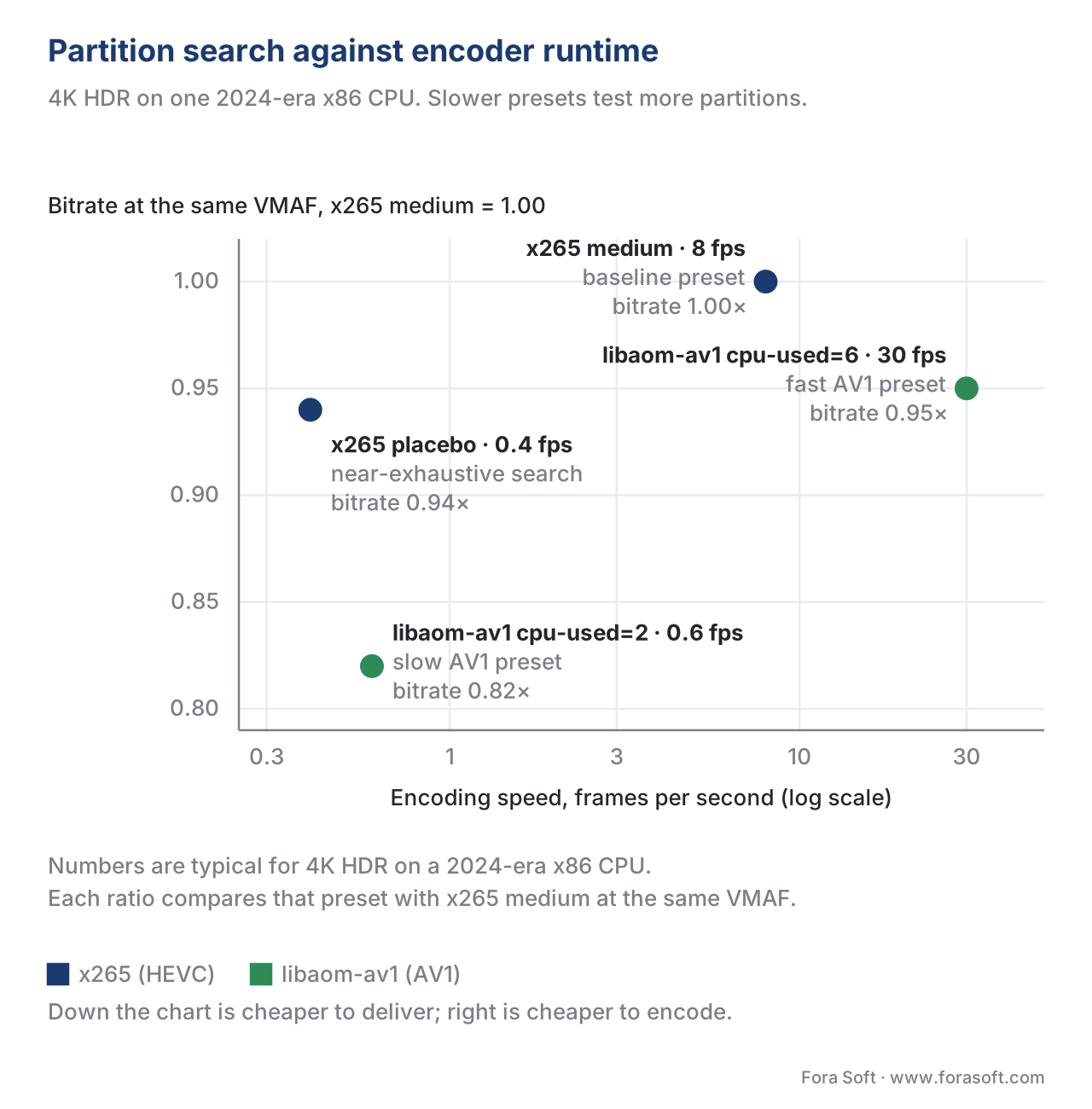 Figure 5. Four presets on the same content. Inside x265, twenty times the encode time buys 6% of bitrate; libaom-av1 at cpu-used=2 buys 18% and runs thirteen times slower than x265 medium.
The trade-off is brutal and unavoidable: every preset shortcut you take to save runtime is a partition the encoder did not evaluate. The shortcut might be "if the parent block's RD cost is low, skip the deeper children", or "if the previous frame chose 32×32 here, try 32×32 first and bail early if it is good enough". These are called early termination heuristics and modern encoders are full of them. They are also the most active area of academic research in 2024–2026, with neural-network-guided partition decisions becoming common in cloud transcoding pipelines.
For a streaming product, the practical guidance is:
- For VOD encoded once and streamed millions of times — use the slowest preset that fits your cost budget. Every percent of bitrate saved compounds across viewers.
- For live encoded once and watched once — use the fastest preset that meets your quality bar. Latency and CPU dominate over efficiency.
- For ABR ladders (read more here) — the top rung of the ladder (the highest quality you serve) deserves a slower preset than the bottom rung, because the highest-rung viewers consume the most bytes.
A common pitfall — forcing small CTUs and superblocks on modern content
A surprising number of production pipelines deliberately cap the CTU or superblock size at 32×32 or 16×16, believing this saves encode time. It does the opposite. Small top-level blocks force the encoder to encode more block headers, more motion vectors, and more partition signalling per frame — and the RDO search over a flat structure with many small blocks is not faster than a deep search over fewer big blocks. The result is a 5–10% bitrate penalty at the same quality with no encode-time saving. If your encoder pipeline has a --ctu-size 16 flag anywhere, audit it. The setting almost always exists because a long-departed engineer ported it from a 2010-era H.264 config and never revisited the assumption.
Where Fora Soft fits in
We have been writing block-level encoder code, tuning x264 / x265 / libaom / VPP partition shortcuts, and shipping cloud transcoding pipelines since 2005 — across video streaming, OTT/Internet TV, video conferencing, e-learning, telemedicine, surveillance, and AR/VR. The teams we build understand both the silicon — Nvidia NVENC, Intel QSV, NETINT VPUs, AMD VCE, custom FPGA — and the software-encoder partition heuristics behind every preset choice. When a client asks us to cut their AWS Elemental bill by 30% without losing VMAF, the answer almost always lives inside the partition tree.
The book
Video Encoding: A Complete Guide to Video Compression
This article picks the rectangle; the book builds the encoder around it. Macroblocks, coding tree units and superblocks written out standard by standard, the HEVC quadtree, AV1’s ten-way tree and VVC’s QT + MTT with the search cost of each, and the rate-distortion machinery that chooses between them frame after frame. It is volume 1 of the seven-volume Fora Soft Video Engineering Handbook, 1,522 pages, written by Nikolay Sapunov, CEO at Fora Soft.
Is your encoder still deciding in 16×16 blocks?
Send us your encoder command line and an hour of typical content, and we will come back with three numbers: what your current top-level block size costs in bitrate at matched VMAF, what one preset slower would cost in encode time, and whether any --ctu-size or --sb-size flag in the pipeline is still carrying a 2010 default. The arithmetic runs on your own footage, not on a reference clip. 250+ video products shipped since 2005.
See our case studies
Case study
Worldcast Live
Concert streaming at 1.5 Gb/s with 0.4–0.5 s latency to 10,000 simultaneous viewers. That budget is the live half of the preset rule above: the partition search gets whatever milliseconds are left, and the bitrate pays for it.
Case study
Speed.Space
Remote production recording at 1080p and 8 Mb/s for Netflix, Electronic Arts and HBO shoots, where creators pick resolution, fps, codec and bitrate per stream. Change the resolution and the block size that pays off changes with it.
Case study
Mindbox
An AI video management system on RTSP, FFmpeg and HLS with 50+ deployments across transport, pharma and gated communities. Fixed cameras are mostly large static areas — exactly the content a capped CTU size taxes hardest.
What to read next
Mode decision
Mode Decision and Rate-Distortion Optimization (RDO)
This article lists the partitions an encoder may choose; RDO is the arithmetic that prices them and picks one.
Transforms
Transform Coding: DCT, ADST, and Integer Transforms
What happens inside a block once its size is settled: the DCT, the ADST that AV1 adds, and why transforms are integer-only.
Inter prediction
Inter-Frame Coding and Motion Estimation
Every block carries a motion vector. Where that vector comes from, and why one big block beats sixteen copies of the same one.
Codecs
AV1: The New Internet Standard And Where It Stands In 2026
The codec with the widest partition set: hardware support, encoder speed and where the ten-way tree pays for itself today.
References
- ITU-T Rec. H.264 (08/2024) — Advanced video coding for generic audiovisual services. https://www.itu.int/rec/T-REC-H.264
- ITU-T Rec. H.265 (09/2023) — High efficiency video coding. https://www.itu.int/rec/T-REC-H.265
- ITU-T Rec. H.266 (04/2024) — Versatile video coding. https://www.itu.int/rec/T-REC-H.266
- AOMedia. AV1 Bitstream & Decoding Process Specification, v1.0.0-errata1. https://aomediacodec.github.io/av1-spec/
- Google / WebM. VP9 Bitstream & Decoding Process Specification, v0.6, March 2016. https://storage.googleapis.com/downloads.webmproject.org/docs/vp9/vp9-bitstream-specification-v0.6-20160331-draft.pdf
- Sullivan, G. J., Ohm, J.-R., Han, W.-J., Wiegand, T. (2012). Overview of the High Efficiency Video Coding (HEVC) Standard. IEEE Transactions on Circuits and Systems for Video Technology, 22(12). https://ieeexplore.ieee.org/document/6316136
- Bross, B. et al. (2021). Overview of the Versatile Video Coding (VVC) Standard and its Applications. IEEE TCSVT, 31(10). https://ieeexplore.ieee.org/document/9503377
- Chen, Y., Mukherjee, D., et al. (2018). An Overview of Core Coding Tools in the AV1 Video Codec. AOMedia. https://www.jmvalin.ca/papers/AV1_tools.pdf
- Wikipedia. Coding tree unit. https://en.wikipedia.org/wiki/Coding_tree_unit
- Wikipedia. Macroblock. https://en.wikipedia.org/wiki/Macroblock
- Wikipedia. AV2. https://en.wikipedia.org/wiki/AV2
- Vcodex. HEVC: An introduction to high efficiency coding. https://www.vcodex.com/hevc-an-introduction-to-high-efficiency-coding
- NETINT. State of Video Encoding 2024–2025 Benchmark Report. https://netint.com/
- Bitmovin. Video Developer Report 2024–2025. https://bitmovin.com/video-developer-report
