


Why this matters
GOP length is the single setting that controls how big your video files are, how quickly a viewer can seek, how cleanly an HLS player can switch bitrates, and how much latency a live stream carries from camera to glass. Pick a GOP that is too long and seek-to-position becomes sluggish; pick one too short and your bitrate jumps 20–40% for the same visual quality. Open versus closed GOP is the next decision after that, and it draws a hard line between archival masters and streaming deliverables. A founder who reads this article can sit in a streaming-infrastructure meeting and challenge the right numbers; an operations lead can audit a vendor's encoder ladder and spot misalignment in five seconds.
What a GOP is and why it exists
A Group of Pictures, almost universally shortened to GOP, is the run of frames that starts at one keyframe and ends just before the next keyframe. The keyframe is the entry point: a frame the decoder can decode without having seen anything that came before. Every other frame in the GOP needs the keyframe (or some chain of frames that leads back to it) to be reconstructed.
Think of it like chapters in a book. You can open the book at the start of any chapter and read forward without having read the previous chapter, but you cannot pick up a sentence from the middle of chapter three and understand it without context. The keyframe is the first sentence of a chapter; the frames that follow are sentences that build on it; the next keyframe is the first sentence of the next chapter.
This chapter-and-pages design exists because of the compression maths we covered in the prior articles on intra-frame coding and inter-frame coding. Inter-frame coding — describing a frame as a small correction to an earlier frame — is roughly 30 times more efficient than intra-coding the same content. But that efficiency comes with a price: a P-frame is useless on its own. You must replay every frame from the most recent keyframe to reconstruct it.
GOP structure is the compromise between those two facts. Long GOPs give the encoder lots of inter-coded frames and shrink the bitrate. Short GOPs give the decoder lots of entry points and make seeking, channel switching, and adaptive streaming snappy. Every stream you have ever watched picked a point on that line.
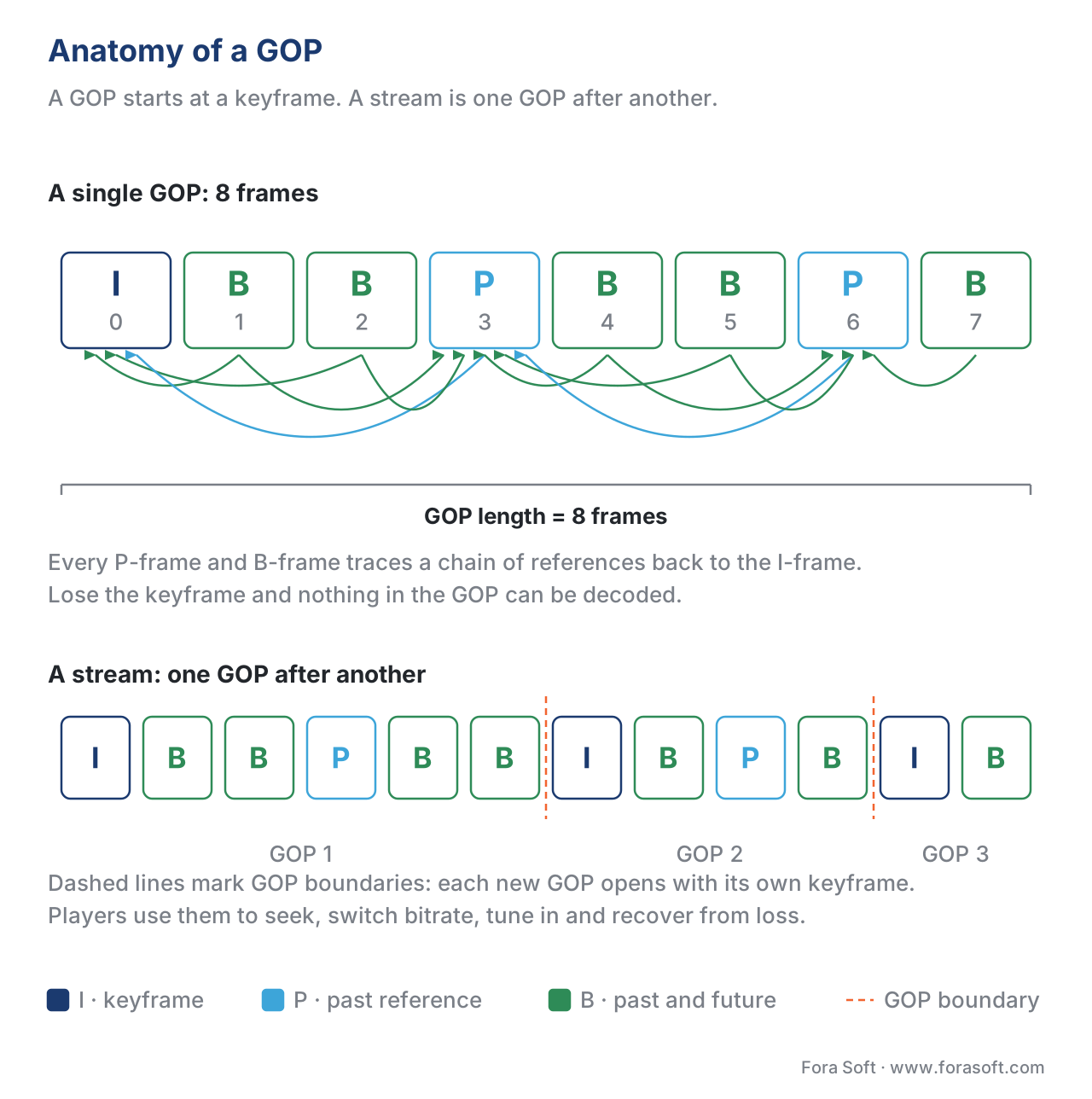 Figure 1. A GOP is a keyframe plus everything that depends on it. Every P-frame and B-frame traces a chain of references back to the I-frame at the start, and a stream is one GOP after another.
The three frame types and how they fit into a GOP
The full names — Intra-coded, Predicted, Bi-predicted — were set in MPEG-1 in 1993 and have not changed. The compression behaviour has barely shifted either: modern codecs add new tricks to each type but keep the same letters.
An I-frame is a complete still image. It is compressed using only the information inside itself — the same kind of coding that powers JPEG. An I-frame can be decoded on its own. Every GOP starts with one. A typical 1080p I-frame in H.264 costs 80–250 kilobits.
A P-frame is a frame that copies most of its content from a frame that came earlier in display order, then patches the differences. The "P" stands for Predicted. The encoder describes each block by a motion vector — a pointer to a similar patch in a past frame — plus a small residual. A P-frame in the same content typically costs 30–60% of an I-frame.
A B-frame is a frame that may copy content from both a past and a future frame, and may average the two. The "B" stands for Bi-predictive. B-frames are the most compressible of the three: typically 15–30% of an I-frame. They are also the most expensive in latency, because the encoder cannot produce them until it has seen the future reference, and the decoder cannot render them until it has decoded that future frame.
A working GOP weaves the three types into a repeating pattern. The classic pattern is IBBPBBPBBPBB… — one keyframe, then a P-frame every three slots with two B-frames between each P. Hierarchical B-pyramid structures, which we cover below, replace this simple template with something cleverer, but the principle is the same: an I-frame seeds the GOP, P-frames hop forward, B-frames fill the gaps.
A worked example anchors the numbers. Take a 2-second segment of 1080p24 video — 48 frames at 24 fps — encoded by a modern x265 preset with a closed GOP of 48 and the pattern IBBPBBPBBPBB…. That segment contains 1 I-frame, 15 P-frames, and 32 B-frames.
I-frame cost:  1 × 200 kbit = 200 kbit
P-frame cost: 15 × 100 kbit = 1500 kbit
B-frame cost: 32 ×  50 kbit = 1600 kbit
total per 2-second segment:  3300 kbit
average bitrate:            1650 kbit/s ≈ 1.65 Mbps
Now replay the same segment with B-frames disabled, which is how a low-latency live encoder runs. Every B-frame slot becomes a P-frame.
I-frame cost:  1 × 200 kbit = 200 kbit
P-frame cost: 47 × 100 kbit = 4700 kbit
total per 2-second segment:  4900 kbit
average bitrate:            2450 kbit/s ≈ 2.45 Mbps
Removing B-frames cost you 48% more bitrate for the same visual quality. That is the standing price of low-latency live streaming, and it is the single biggest reason a WebRTC pipeline needs more bits than an HLS one at the same resolution.
Frame order: how display order and decode order diverge
The frames in a B-pattern GOP are not stored on disk in the order you watch them. They are stored in the order the decoder needs to process them, which is not the same thing. This decoupling — known as display order versus decode order — is the source of most beginner confusion around B-frames.
Consider a GOP starting I B B P …. In display order — the order the frames flash on screen — the sequence is I(0) B(1) B(2) P(3). But the second B-frame at display position 2 needs the P-frame at position 3 as one of its references. The decoder cannot decode B(2) before P(3), so the encoder reshuffles. In decode order the same four frames are stored as I(0) P(3) B(1) B(2).
The decoder reads frames in decode order, builds a small reorder buffer, and emits them in display order at the right moment. The reorder buffer adds one frame of latency per reorder depth — which is why a stream with N B-frames between P-frames adds up to N frames of decoder buffering.
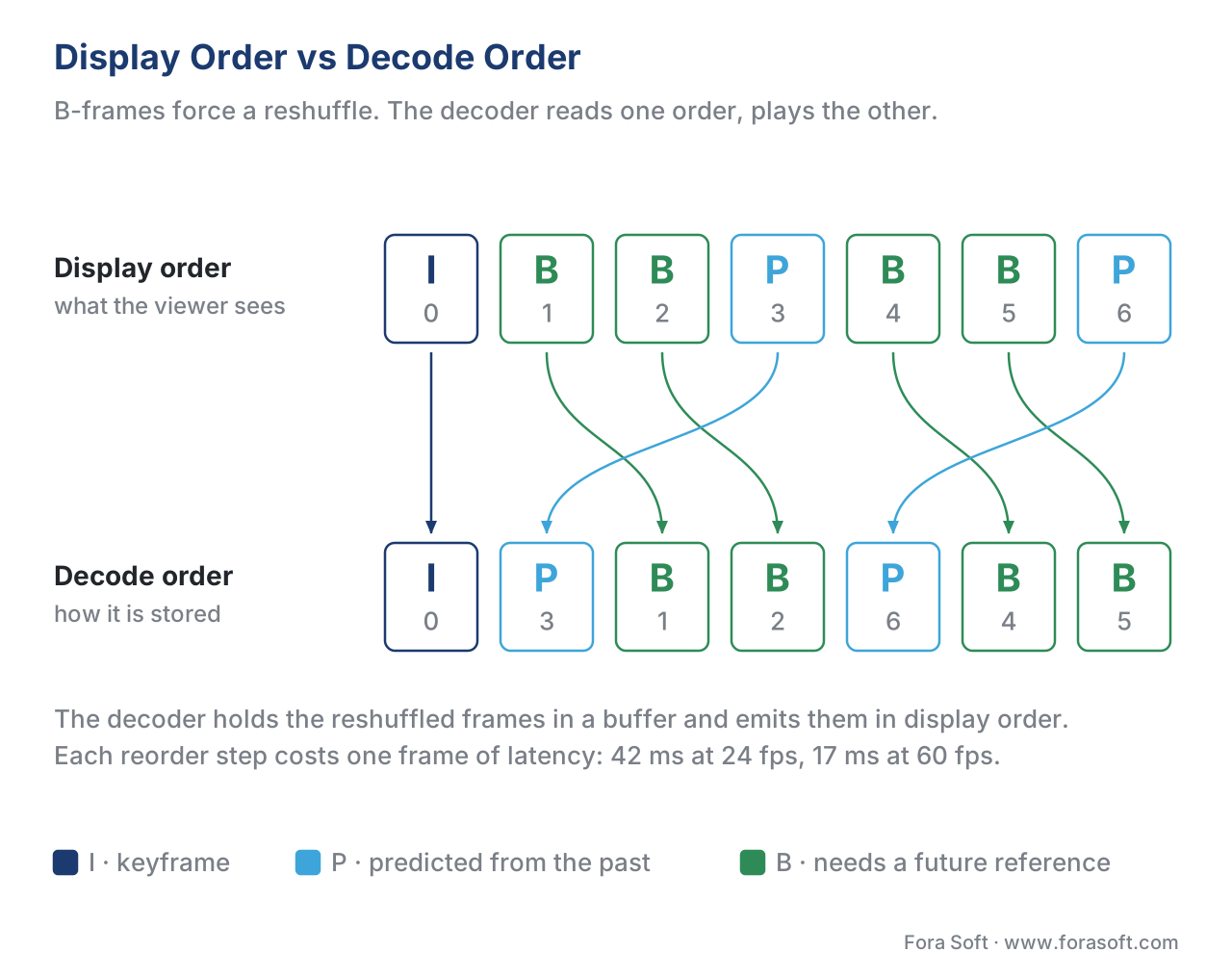 Figure 2. The encoder stores frames in the order the decoder needs them, and the decoder reshuffles them for playback. Each reorder step costs one frame of buffering latency — 42 ms at 24 fps, 17 ms at 60 fps.
This reordering is not optional for B-frames — it is structural. The two practical consequences for product builders are: first, every B-frame adds a frame of end-to-end latency, which is roughly 42 ms at 24 fps and 17 ms at 60 fps; second, players, transmuxers, and packagers must respect the picture-timing metadata in the bitstream to play frames at the correct wall-clock time. A common bug is for a quick FFmpeg pipeline to drop picture-order data, which causes the player to render B-frames at decode time and produces visible jitter.
Hierarchical B-frames: the pyramid pattern
A GOP with one B-frame between each P-frame is the floor of the design space. Modern encoders go several levels deeper. The hierarchical B-frame structure, often called a B-pyramid, lets B-frames reference other B-frames, building multiple temporal layers inside a single GOP.
Picture a 16-frame GOP. A flat structure inserts B-frames between P-frames at one level: I B B B B B B B B B B B B B B P. A pyramid structure organises those same 16 frames into a tree. Frame 8 is a B-frame at the top of the pyramid, referencing the I-frame and the next P-frame. Frames 4 and 12 are mid-level B-frames, referencing frame 0, frame 8, and frame 16. Frames 2, 6, 10, 14 are lower-level B-frames, and so on. Each level uses references one level up, so the dependency chain has logarithmic depth instead of linear depth.
The pay-off is significant on the compression side: hierarchical B-pyramid coding earns HEVC and AV1 roughly 10–15% better compression on typical content than a flat B structure at the same GOP length. The cost is decoder buffering — the deepest B-frame depends on references up to GOP_length/2 frames apart. For VOD this is no problem; for live streaming it is a non-starter, which is why live LL-HLS streams keep the pyramid shallow or disable it entirely.
To exploit B-pyramid fully you set the GOP length to a power of two: 16, 32, or 64 frames. Both HEVC and AV1 are tuned for this. AV1 uses a four-frame mini-GOP by default with three temporal layers; its ALTREF and GOLDEN reference system is essentially a pyramid built out of non-displayable filtered frames, which we touch on in the AV1 section below.
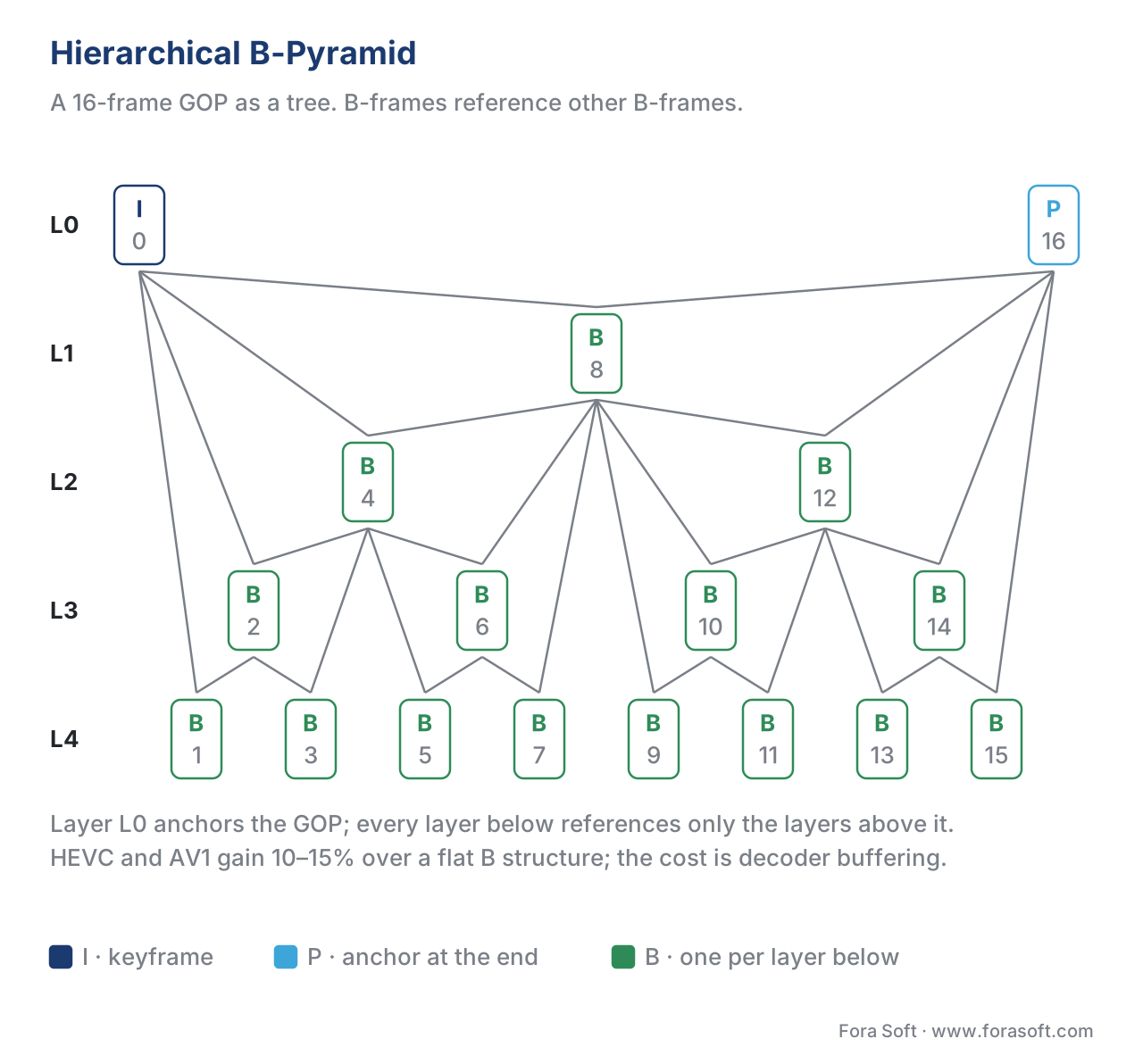 Figure 3. A 16-frame hierarchical B-pyramid. Every B-frame references frames a layer up, so the dependency chain grows logarithmically instead of linearly — and the deepest layer is referenced by nothing at all.
IDR, CRA, and the difference between an I-frame and a keyframe
A frequent source of bugs is the assumption that "I-frame" and "keyframe" mean the same thing. They do not. Every keyframe is an I-frame, but not every I-frame is a keyframe.
An IDR frame — Instantaneous Decoder Refresh — is an I-frame that also clears the decoder's reference buffer. After an IDR, no later frame is allowed to reference anything before it. IDRs are true random-access points: a player can drop into the stream at any IDR and decode forward correctly. In HLS, DASH, and CMAF every video segment starts with an IDR, by spec.
A non-IDR I-frame is a fully intra-coded picture, but later frames are still allowed to reference frames before it. A scene-cut detector that inserts an I-frame for compression efficiency at the start of a new shot does not automatically insert an IDR — that depends on the encoder's configuration.
HEVC adds a third category: the Clean Random Access (CRA) picture. A CRA looks like an IDR — leading frames can be decoded if you start from it — but its trailing leading pictures may reference frames before the CRA, which makes the boundary cleaner for stream-splicing applications. AV1 takes a different route: its display order equals its coding order, so the GOP concept is closer to VP9's notion of a "golden frame group", and the keyframe-vs-I-frame distinction is replaced by KEY_FRAME and INTRA_ONLY_FRAME bitstream signals.
The practical consequences in HLS and DASH workflows are: first, you want every segment boundary to be an IDR, not an ordinary I-frame, or the player will fail to seek to that segment; second, force fixed GOP length so the encoder cannot insert scene-cut keyframes at irregular positions across resolutions in your bitrate ladder; third, never confuse a player's keyframe counter (which counts IDRs) with an encoder's I-frame counter (which counts both).
Open versus closed GOP
A GOP is closed when no frame inside it references any frame outside it. The boundary between two closed GOPs is a hard cut: you can stop decoding at the end of one GOP, throw away every reference, and start fresh at the next IDR with zero loss.
A GOP is open when a B-frame near the start of the GOP is allowed to reference the last P-frame of the previous GOP. The reasoning is purely compression: that previous P-frame is often a much better reference for the first one or two B-frames of the new GOP than the new GOP's own I-frame. Allowing the cross-boundary reference saves bits.
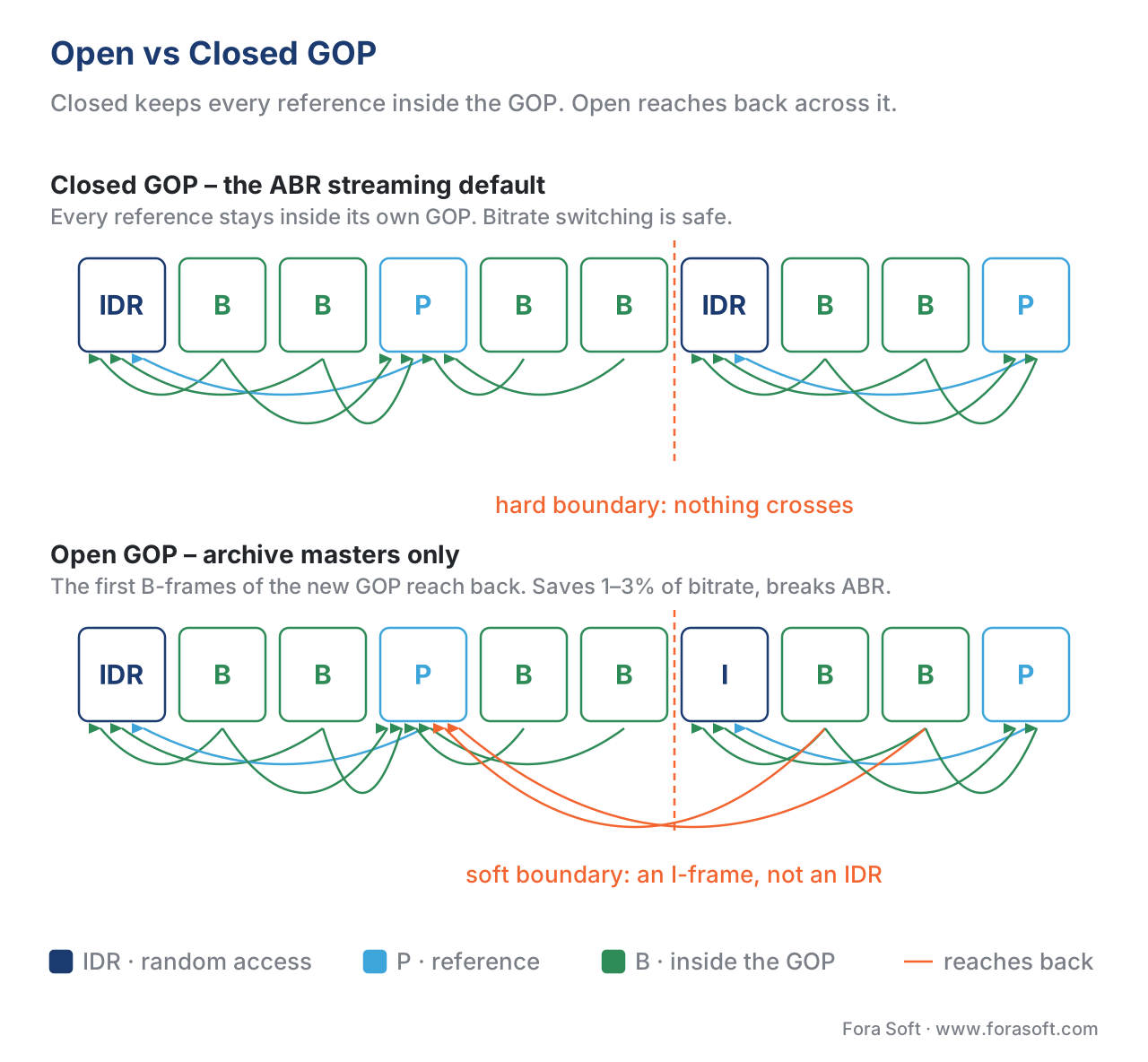 Figure 4. Closed GOPs keep every reference inside their own boundary; open GOPs let the first B-frames of a new GOP look back into the previous one. Open GOPs save 1–3% on bitrate; closed GOPs are required for ABR streaming.
Open GOPs typically save 1–3% in bitrate at the same VMAF. They are the right default for archival masters and single-file VOD where you never seek into the middle of a segment.
Closed GOPs are required for every modern adaptive-bitrate workflow. Apple's HLS authoring spec and the DASH-IF interoperability guidelines both call for closed GOPs aligned across every rendition in the ladder. The reason is structural: when a player switches from the 720p rendition to the 1080p rendition, it switches at a segment boundary. If the 1080p segment starts with an open GOP whose first B-frames want to reference a P-frame the player has never seen, the player decodes garbage for a frame or two and shows visible corruption.
The rule for production is unambiguous: closed GOPs, fixed length, aligned across all renditions. The 1–3% bitrate savings of open GOP belong to mezzanines and archive copies — never to delivery.
GOP length: the most-tuned setting in streaming
GOP length — the distance from one keyframe to the next, measured in frames or seconds — is the single setting an operations engineer touches most often. The right value depends on what you are optimising.
In VOD streaming a longer GOP wins on bitrate. Each I-frame is expensive; the further apart you space them, the lower the average bit-per-pixel. The ceiling is set by seeking, switching, and segment-alignment constraints. A typical YouTube or Netflix master uses a GOP of 2 seconds; a 24 fps movie at 2 seconds is 48 frames.
In live streaming the GOP length is the lower bound on latency. A player cannot start playing until it has received a full segment, and a segment cannot end until the next keyframe. A 2-second GOP means at minimum 2 seconds of segment latency on top of network and buffer latency. LL-HLS streams running with 1-second GOPs and CMAF parts of 200–400 ms can reach 3-second glass-to-glass latency; full-segment HLS with 6-second GOPs sits at 15–25 seconds in the wild.
In WebRTC the GOP length is dominated by network resilience rather than seek. WebRTC uses RTP-level feedback (PLI, FIR, NACK) to request keyframes on demand when a peer loses sync, so the encoder usually runs with a very long GOP — sometimes one keyframe per minute — and inserts a keyframe only when feedback asks for one. The result is bit-efficient at the cost of zero random-access support, which is fine because WebRTC streams are not segmented for adaptive delivery.
In broadcast the GOP length is set by the standard: ATSC mandates IDRs every 0.5–1 second; DVB targets 0.5–2 seconds; SCTE-35 markers must land on IDR boundaries for ad insertion.
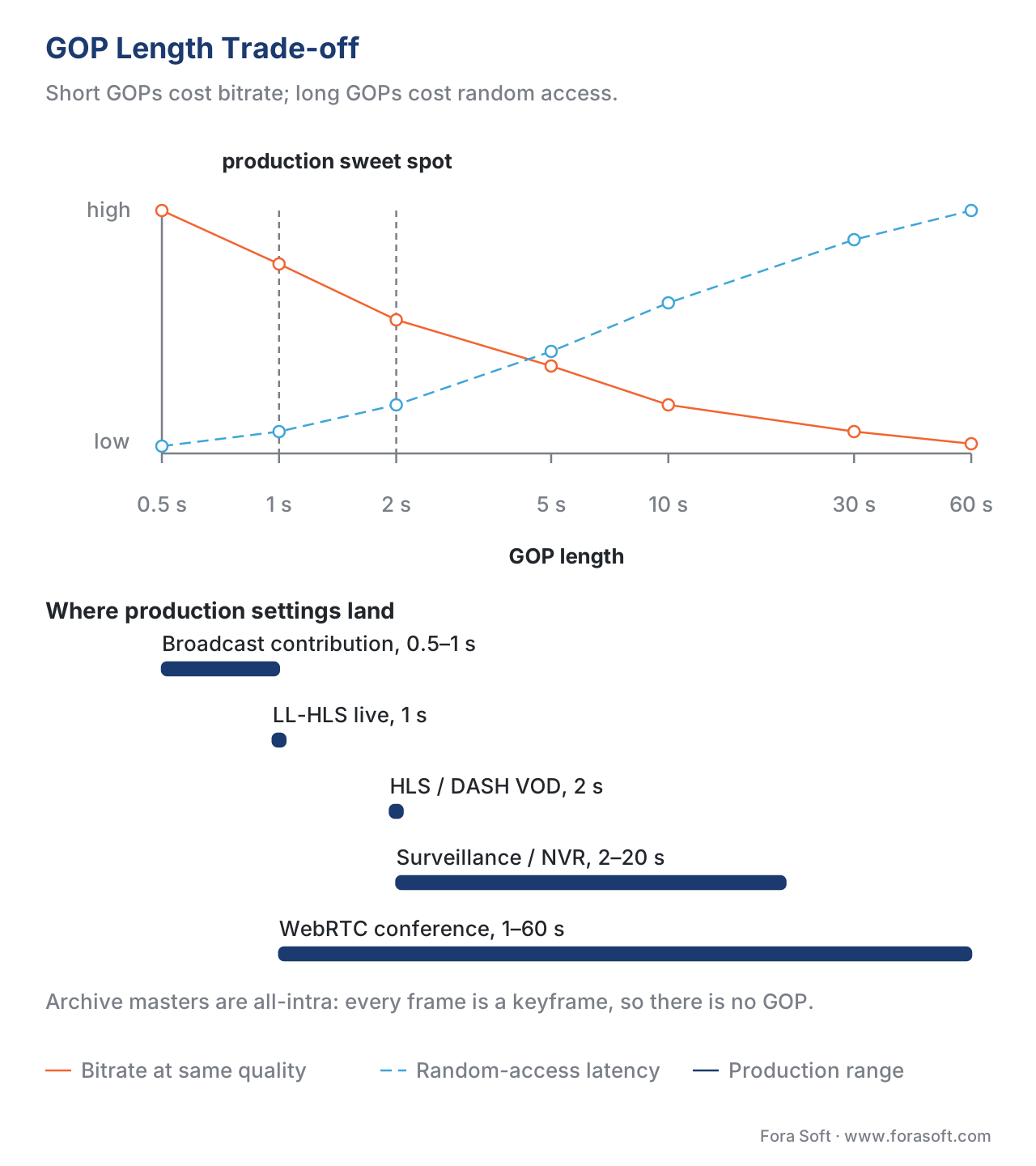 Figure 5. One setting pulls two ways: bitrate at constant quality falls as the GOP grows, random-access latency rises. Each workflow lands where its own constraint bites hardest.
The empirically common settings in production, as of 2026:
| Workflow | GOP length | Notes |
|---|---|---|
| HLS / DASH VOD, 24 fps | 48 frames (2 s) | Closed, B-pyramid enabled |
| HLS / DASH VOD, 30 fps | 60 frames (2 s) | Closed, B-pyramid enabled |
| HLS / DASH VOD, 60 fps | 120 frames (2 s) | Closed, B-pyramid enabled |
| LL-HLS / LL-DASH live | 24–60 frames (1 s) | Closed, B-pyramid disabled or 2-level only |
| WebRTC conference | 30–1800 frames (1–60 s) | Driven by feedback, B-frames off |
| Surveillance / NVR | 60–600 frames (2–20 s) | Often open, B-frames off, very long when scene is static |
| Broadcast contribution | 12–30 frames | Short for splicing; B-frames optional |
| Archive master (ProRes / DNxHR) | 1 frame (all-intra) | No GOP — every frame is a keyframe |
A practical rule for streaming: pick a GOP length that divides evenly into your segment length, your audio sample-per-segment count, and your frame rate. Misalignment causes the encoder to insert extra IDRs at segment boundaries and quietly bumps your bitrate.
Common pitfall: misaligned GOPs across the bitrate ladder
The most expensive mistake in HLS and DASH is having unaligned GOPs across renditions. If the 720p stream and the 1080p stream insert keyframes at slightly different timestamps — say because each encoder runs its own scene-cut detector — the segments do not line up. The player can still play either stream alone, but the moment it switches between them at a segment boundary, it skips or repeats a frame, and ABR switching becomes visibly bumpy.
The fix is to force fixed, identical GOPs across every rendition. In x264 this means --keyint 48 --min-keyint 48 --no-scenecut. In x265 it is --keyint 48 --min-keyint 48 --no-scenecut --no-open-gop. In FFmpeg with libx264, the equivalent is -g 48 -keyint_min 48 -sc_threshold 0. Set the same numbers on every rendition in the ladder.
A second, related mistake is mixing open and closed GOP across renditions — usually because one ladder rung was re-encoded with default settings while the others used explicit ABR options. Audit your ladder periodically: the HLS ladder cheat sheet PDF below lists the exact FFmpeg flags for the most common workflows.
A third mistake worth naming: setting GOP length in seconds without checking that your frame rate is constant. Variable-frame-rate sources can produce GOPs of wildly varying byte count even when the time-domain spacing is "constant". CFR your input first, then set GOP.
Codec-specific differences worth knowing
The conceptual GOP is the same across every modern codec, but the implementation details shift.
H.264 / AVC. Up to 16 reference frames. Default B-pyramid via b-pyramid normal in x264. IDR and non-IDR I-frames clearly separated. SPS/PPS NAL units at the start of every IDR ensure decoders can start mid-stream.
H.265 / HEVC. Same model as H.264 plus CRA pictures, which allow leading frames that decode independently and trailing leading pictures that reference across the CRA. HEVC's GOP structures are typically 4 or 8 levels of hierarchical B; SVT-HEVC's default low-delay mode uses a 4-frame mini-GOP.
VP9. Concept of a "golden frame group" — a long-period reference frame distinct from the immediately previous frame — that behaves like a soft GOP without strict random-access semantics.
AV1. Display order equals coding order; the AV1 GOP is shaped by reference-frame management rather than reorder buffering. Two non-displayable reference types — ALTREF (forward, temporally filtered) and ALTREF2 (forward, shorter horizon) — combined with GOLDEN, LAST, LAST2, LAST3, and BWDREF give the encoder a seven-reference toolkit. The libaom-av1 high-delay mode runs golden-frame groups of 16 frames with a built-in three-layer pyramid.
H.266 / VVC. Inherits HEVC's IDR/CRA/BLA family with a new picture type — Gradual Decoding Refresh (GDR) — that lets the decoder recover progressively from an error or stream join over a defined number of frames, rather than waiting for the next IDR. GDR matters for low-latency satellite and contribution links.
Free download: GOP Structure Cheat SheetOne-page reference: frame types, open vs closed GOP, length recipes for VOD, LL-HLS, WebRTC, surveillance and broadcast, the FFmpeg, x264, x265 and AV1 flags that set them, and a closed-GOP audit checklist.Where Fora Soft fits in
GOP tuning is one of those settings that touches every Fora Soft engagement. In our WebRTC and video-conferencing builds we run feedback-driven keyframes and very long GOPs to minimise bandwidth on unicast peer connections. In OTT and Internet TV ladders we enforce closed, fixed-length GOPs aligned across every resolution rung, because misalignment is the silent killer of ABR quality. In video surveillance projects we exploit long static stretches to push GOPs to 20 seconds or more, then insert event-driven IDRs from motion-detection metadata. Our e-learning and telemedicine work hits the middle ground: enough random-access points for instant scrubbing, enough GOP length for a thrifty CDN bill. The cheat sheet below summarises the production presets we ship most often.
The book
Video Encoding: A Complete Guide to Video Compression
This article picks a GOP; the book builds the encoder around it. The reference-frame systems of H.264, HEVC and AV1 written out picture type by picture type, IDR, CRA, BLA and VVC’s gradual decoding refresh, hierarchical B-pyramids with the buffering arithmetic that decides how deep you can go, and the bit allocation and rate control that spend a GOP’s budget frame by frame. It is volume 1 of the seven-volume Fora Soft Video Engineering Handbook, 1,522 pages, written by Nikolay Sapunov, CEO at Fora Soft.
Is your GOP length a decision or a default?
Send us your encoder command line, your segment length and one hour of typical content, and we will come back with three numbers: what your current GOP costs in bitrate at matched VMAF, how many seconds it puts between camera and glass, and whether every rung of your ladder cuts at the same timestamp. The arithmetic runs on your own footage, not on a reference clip. 250+ video products shipped since 2005.
See our case studies
Case study
Worldcast Live
Concert streaming at 1.5 Gb/s with 0.4–0.5 s latency to 10,000 simultaneous viewers. At that budget B-frames are off and the GOP is short — the 48% bitrate penalty from the worked example above is what those milliseconds cost.
Case study
Mindbox
An AI video management system on RTSP, FFmpeg and HLS with 50+ deployments across transport, pharma and gated communities. Fixed cameras and long static stretches are exactly the case for 20-second GOPs with event-driven IDRs from the motion detector.
Case study
Speed.Space
Remote production recording at 1080p and 8 Mb/s for Netflix, Electronic Arts and HBO shoots, where creators pick resolution, fps, codec and bitrate per stream. Change the frame rate and the GOP in frames has to move with it, or the segment boundaries drift.
What to read next
Bit allocation
Bit Allocation Inside a GOP
The GOP decides how many frames share a budget; this decides how the budget is split between the I-frame, the P-frames and each layer of the pyramid.
Rate control
Rate Control: CBR, VBR, CRF, ABR, Capped CRF
GOP length sets how few bits a segment could take; rate control decides how many it gets. CRF, VBV and why a live stream behaves differently from a VOD master.
Bitrate ladders
Per-Title and Per-Scene Encoding: Smart Bitrate Ladders
The ladder that has to stay GOP-aligned rung to rung, and what changes when each title gets its own rungs instead of a fixed table.
Tooling
FFmpeg: A Must-Know Cheat Sheet for Developers
Where -g, -keyint_min and -sc_threshold actually go, and the rest of the command line you will be typing around them.
References
- Wikipedia contributors, "Group of pictures". URL: https://en.wikipedia.org/wiki/Group_of_pictures. Accessed 2026-05-17. Definitional reference for GOP, IDR, and frame types.
- ITU-T Recommendation H.264, "Advanced Video Coding for Generic Audiovisual Services", v14, 2021. URL: https://www.itu.int/rec/T-REC-H.264. Accessed 2026-05-17. Authoritative source for AVC IDR semantics, reference-buffer management, and frame-reordering rules.
- ITU-T Recommendation H.265, "High Efficiency Video Coding", v8, 2023. URL: https://www.itu.int/rec/T-REC-H.265. Accessed 2026-05-17. Source for HEVC IDR, CRA, and BLA picture types.
- AOMedia, "AV1 Bitstream & Decoding Process Specification", Version 1.0.0 with Errata, 2019. URL: https://aomediacodec.github.io/av1-spec/. Accessed 2026-05-17. Authoritative source for AV1 reference-frame system, ALTREF and golden-frame mechanics.
- J. Han et al., "A Technical Overview of AV1", Proceedings of the IEEE, 2021. URL: https://arxiv.org/pdf/2008.06091. Accessed 2026-05-17. Source for AV1 hierarchical reference structure and seven-reference design.
- Apple, "HLS Authoring Specification for Apple Devices". URL: https://developer.apple.com/documentation/http-live-streaming/hls-authoring-specification-for-apple-devices. Accessed 2026-05-17. Source for closed-GOP requirement, 2-second GOP recommendation, and ABR alignment rules.
- DASH Industry Forum, "Guidelines for Implementation: DASH-IF Interoperability Points", v5.0. URL: https://dashif.org/guidelines/. Accessed 2026-05-17. Source for DASH closed-GOP and SAP-type recommendations.
- Jan Ozer, "Open and Closed GOPs — All You Need to Know", Streaming Learning Center, 2023. URL: https://streaminglearningcenter.com/blogs/open-and-closed-gops-all-you-need-to-know.html. Accessed 2026-05-17. Source for closed-vs-open GOP bitrate trade-off measurements.
- OTTVerse, "Closed GOP and Open GOP — Simplified Explanation". URL: https://ottverse.com/closed-gop-open-gop-idr/. Accessed 2026-05-17. Source for closed-GOP ABR rationale.
- OTTVerse, "IDR vs CRA Frames in HEVC". URL: https://ottverse.com/what-are-idr-cra-frames-hevc-differences-uses/. Accessed 2026-05-17. Source for HEVC random-access picture taxonomy.
- x265 Project, "Command Line Options — x265 documentation". URL: https://x265.readthedocs.io/en/master/cli.html. Accessed 2026-05-17. Source for keyint, min-keyint, scenecut, no-open-gop, b-adapt, and B-pyramid options.
- Dolby OptiView (THEOplayer), "Optimizing LL-HLS: The Impacts of GOP Size on Viewing Experience". URL: https://optiview.dolby.com/resources/blog/streaming/optimizing-ll-hls-the-impacts-of-gop-size-on-viewing-experience/. Accessed 2026-05-17. Source for LL-HLS GOP-length recommendations.
- AWS Media Services, "How to configure a low-latency HLS workflow using AWS Media Services". URL: https://aws.amazon.com/blogs/media/how-to-configure-a-low-latency-hls-workflow-using-aws-media-services/. Accessed 2026-05-17. Source for keyframe alignment to CMAF part boundaries.
- SVT-AV1 documentation, "Appendix: Alt-Refs". URL: https://gitlab.com/AOMediaCodec/SVT-AV1/-/blob/master/Docs/Appendix-Alt-Refs.md. Accessed 2026-05-17. Source for AV1 ALTREF construction and non-displayable reference frames.
