


Why this matters
Rate control is the single setting that decides whether your viewers see smooth playback, your CDN bill matches the spreadsheet, and your encoder cluster finishes on time. A product manager who knows that capped CRF saves Netflix-class operators about 20% over fixed-bitrate ABR ladders will stop arguing with engineers about "just lowering the bitrate." A streaming engineer who can read an encoder log and tell whether the VBV buffer underflowed at frame 412 will know exactly why a viewer's stream stalled. A founder evaluating a transcoding vendor will recognise that two clouds running the same codec at the same nominal bitrate can ship completely different files, because their rate-control loops make different bit-allocation decisions. This article walks through CBR, VBR, CRF, ABR, and capped CRF, the VBV/HRD buffer model that keeps them honest, the practical FFmpeg recipes, and the trade-offs you will actually argue about in production.
What rate control is, and what it is not
Inside an encoder, every coding decision — the mode decision inside a block, the quantisation parameter for that block, the choice to add or skip a B-frame — is locally optimal given some target. Rate control is the loop that sets that target. Concretely, it watches the bits already used, projects how many are left in the budget, and tells the lower-level mode decision what quantisation parameter (QP) to aim for in the next frame or block.
Two confusions matter. First, rate control is not the same as mode decision. Mode decision picks the cheapest J = D + λR for one block at a fixed λ. Rate control sets λ — usually by sliding QP up and down between frames, which moves λ via the exponential λ ≈ 0.85 × 2^((QP − 12)/3) formula that HEVC and AV1 share. Second, rate control is not the same as bandwidth shaping at the network layer. The encoder's job is to produce a compliant bitstream; the CDN's job is to deliver it. Both layers care about bitrate, but they care about different things.
The other actor in the conversation is the VBV buffer — the Video Buffering Verifier, also known as the Hypothetical Reference Decoder (HRD) in H.264, HEVC, and VVC. The VBV is a notional buffer at the decoder side. Bits flow in at a fixed rate; whole pictures are pulled out at the frame rate. If the buffer ever underflows (the decoder needs the next picture but the bits have not arrived yet), playback stalls. If it overflows (the encoder ships more bits than the buffer can hold), the bitstream is non-conformant. Every rate-control mode worth shipping respects a VBV model — the difference between modes is mostly how they respect it.
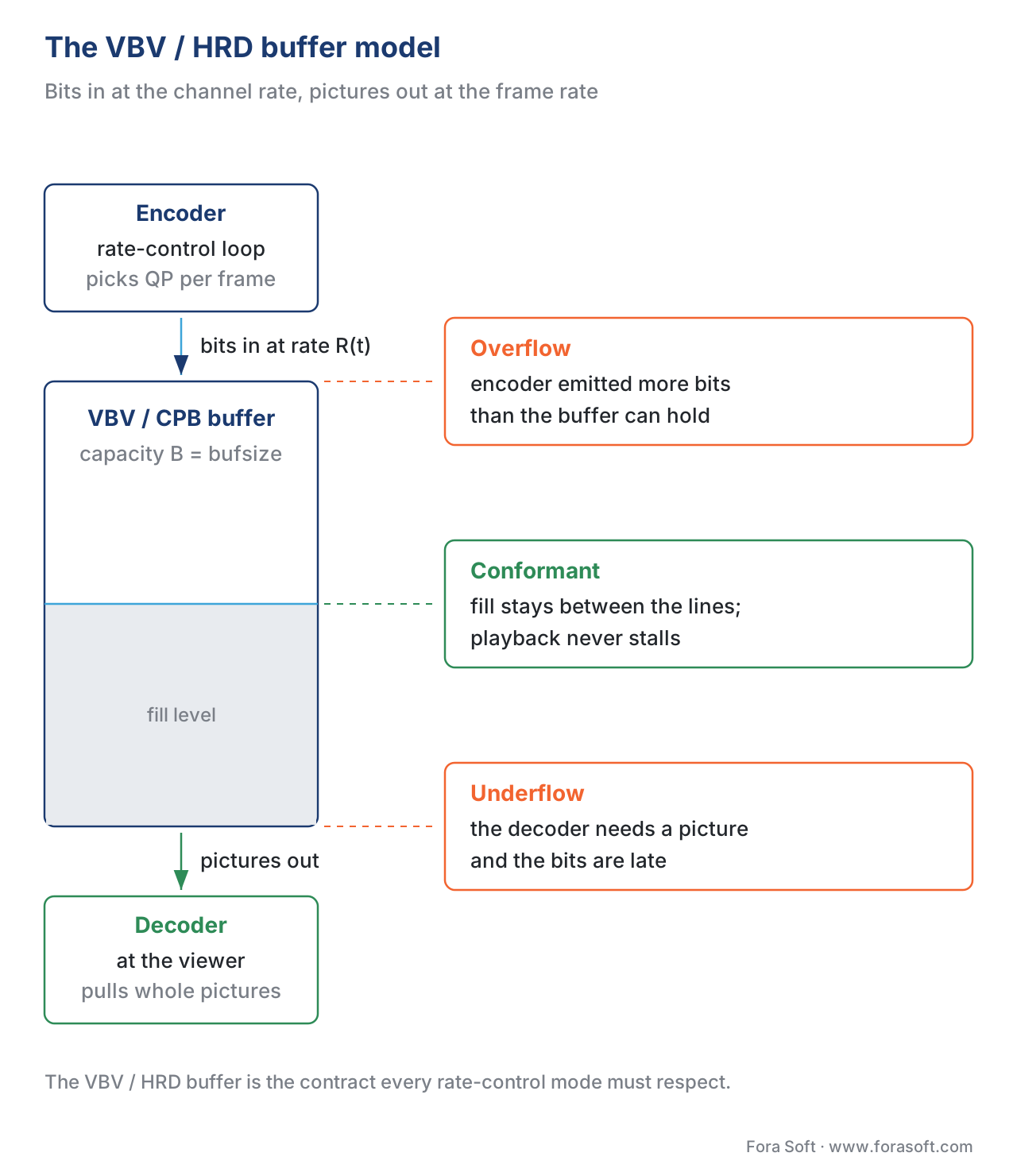 Figure 1. The Video Buffering Verifier (VBV/HRD) is a notional buffer at the decoder. Bits flow in at the channel rate; pictures are extracted at the frame rate. Rate control must keep the fill level between the two horizontal dotted lines for every frame, for every viewer. The encoder, the buffer and the decoder are drawn as one vertical path; the three state cards line up with the ceiling, the fill level and the floor they describe.
CBR — constant bitrate, fixed pipe
Constant bitrate is the oldest and simplest rate-control mode. It dates back to MPEG-1 and the days when video rode on dedicated DVB transports. The encoder targets the same bitrate, frame after frame. Quality moves to make room.
The exact algorithm in x264 is this: the encoder tracks how many bits it has emitted versus how many it should have emitted by now (frame_index × target_bitrate / frame_rate). If it is ahead of budget, it raises QP for the next frame, which throws away more detail and uses fewer bits. If it is behind, it lowers QP and uses more bits. The QP swings can be aggressive on shot cuts; CBR encoders normally cap the maximum QP swing per frame to avoid visible flicker.
A worked example. Suppose you are encoding at 4000 kbps, 30 fps. Each second has a budget of 4000 × 1000 = 4,000,000 bits, or about 133,333 bits per frame on average. If the encoder is ahead by 500,000 bits after one second, it pushes QP up until the next-frame estimate drops by about 500,000 / 30 ≈ 16,667 bits per frame, until the deficit closes over a 30-frame horizon.
CBR is the right answer when two conditions both hold: the downstream pipe is narrow and inflexible, and the consumer cannot tolerate buffering. Live broadcast and live ingest are the canonical cases. Twitch's published guidance is CBR with a 2-second keyframe interval, because the ingest infrastructure expects a steady stream and the playback layer cannot afford to drop into ABR fallback mid-game. CBR is also the default in low-latency teleconferencing because the network round-trip budget is tight enough that any bitrate excursion shows up as packet-loss or one-way audio.
CBR is the wrong answer for VOD because it wastes bits. Encode a 2-hour drama at 5 Mbps CBR and you have spent the same bits on the black-frame cold open as on the climactic battle scene. A talking head at the kitchen table looks exactly as good as it would at 1.5 Mbps; the battle scene starves at 5 Mbps. The fix is one of the other modes below.
The FFmpeg recipe for x264 CBR with a tight VBV buffer:
# CBR-like x264: target 4 Mbps, 4 Mbps max, 4 Mbps buffer (1-second window)
ffmpeg -i in.mp4 -c:v libx264 -preset veryfast -tune zerolatency \
  -b:v 4M -maxrate 4M -minrate 4M -bufsize 4M \
  -g 60 -keyint_min 60 -sc_threshold 0 -profile:v high -pix_fmt yuv420p \
  -c:a aac -b:a 128k -ar 48000 out.mp4
Two-second GOP (-g 60 at 30 fps), no scene-cut adjustment (-sc_threshold 0), bufsize equal to maxrate to keep the buffer at one-second worth of bits — the exact shape Twitch and most CDN ingest endpoints expect.
VBR — variable bitrate, average target
Variable bitrate lets the bitrate move. The encoder targets an average bitrate over the whole title (or over a long buffer window) and reallocates bits between scenes by complexity. Simple scenes use less; complex scenes use more. Quality stays closer to constant than under CBR.
There are two flavours that you will run into. Single-pass VBR does the reallocation online: the encoder runs a lookahead window of 50–250 frames, estimates each frame's complexity (the higher the predicted entropy after transform, the more bits it needs), and distributes the running budget accordingly. It is fast and works for live, but its allocation is myopic — it cannot know that an even harder scene is coming in 10 seconds, so it can over-spend on a moderately hard scene and arrive at the hard one underfunded.
Two-pass VBR fixes that. The first pass encodes the whole title at a placeholder QP and writes a stats file with the actual bit cost of every frame. The second pass uses the stats file as a complexity map and allocates bits to land on the target average with very high precision — typically within 0.5% of target on a 90-minute file. The Korn et al. 2009 paper "A two-pass rate control algorithm for H.264/AVC HD video coding" is the canonical analysis; the algorithm uses a Lagrangian rate-distortion model fit to the per-frame statistics, then solves analytically for the QP that hits the budget.
Two-pass VBR is what every VOD pipeline has been built on since the early DVD era. It is the default in HandBrake's "Average Bitrate" mode, in FFmpeg's -pass 1/-pass 2 workflow, and inside the encoding services of AWS Elemental, Bitmovin, Mux, and Brightcove. The downside is twofold: total CPU time is roughly 2.5× single-pass (the first pass is cheap, but it is still a full encode), and you cannot stream a VBR-encoded file live because you do not know the target until you finish.
A worked numeric example to make the bit-allocation concrete. Suppose your two-pass target is 4 Mbps × 7,200 seconds = 28.8 Gb total. The first pass tells you the file contains 1,200 seconds of "easy" content (talking heads, static backgrounds) with average per-frame complexity factor 0.4, and 6,000 seconds of "hard" content (action, motion) with factor 1.1. Total weighted complexity = 1,200 × 0.4 + 6,000 × 1.1 = 480 + 6,600 = 7,080. So the easy seconds get (480 / 7,080) × 28.8 Gb = 1.95 Gb (≈ 1.63 Mbps), and the hard seconds get 26.85 Gb (≈ 4.47 Mbps). Both averages average to your 4 Mbps target while moving bits to where they buy the most visible quality.
The FFmpeg recipe for x264 two-pass VBR:
# Pass 1: collect statistics, write to ffmpeg2pass-0.log
ffmpeg -y -i in.mp4 -c:v libx264 -preset medium -b:v 4M -pass 1 \
  -an -f mp4 /dev/null

# Pass 2: apply allocation, encode the final file
ffmpeg -i in.mp4 -c:v libx264 -preset medium -b:v 4M -pass 2 \
  -c:a aac -b:a 128k out.mp4
VBR with a VBV cap — sometimes called constrained VBR — is what AWS Elemental, Dacast, and Brightcove ship when an operator wants "VBR-like quality with a hard ceiling for streaming." It is structurally the same as capped CRF except the optimisation target is a bitrate, not a quality factor; we will come back to this below.
CRF — constant rate factor, fixed quality
Constant rate factor is the rate-control mode invented for x264 in the mid-2000s and now copied into x265, libvpx, libaom (AV1), SVT-AV1, VVenC, and the AOMedia reference. It flips the constraint around: instead of fixing the bitrate and letting quality move, CRF fixes a perceptual quality target and lets the bitrate move.
The exact mechanism. The user supplies a CRF value between 0 and 51 (for the H.26x family) or 0 and 63 (for AV1). Internally the encoder computes a base QP from CRF and a per-frame modifier based on motion and complexity: "easier" frames get a higher QP (fewer bits, no perceptual loss because the human eye is forgiving of static content), "harder" frames get a lower QP (more bits to preserve detail). Across a long file the average bitrate ends up wherever the content takes it. CRF 18 is visually lossless for most natural video on x264; CRF 23 is the x264 default and a sensible streaming starting point; CRF 28 is the x265 default. AV1's psychovisual scale differs — SVT-AV1 around CRF 30 is comparable to x264 CRF 23 at roughly 40–50% lower bitrate on natural content.
A worked example to anchor the scale. Encode a 1-hour 1080p30 talking-head video at x264 CRF 23 — typical podcast or webinar content. You will land near 1.8–2.4 Mbps. Encode the same hour of fast-cut sports content at the same CRF 23 — typical Premier League highlight reel — and you will land near 6–9 Mbps. Same CRF, same perceived quality, very different bitrates. That is the whole point of CRF.
CRF is the right answer for VOD where bandwidth is cheap relative to quality and you do not need a guaranteed ABR ladder. Personal archives, in-house corporate video, downloadable educational material, master files that will be re-transcoded later. CRF is the wrong answer for ABR streaming on its own — the variable output bitrate breaks the assumptions of HLS and DASH ladders, where the player needs to know in advance what bitrate each rendition runs at. The fix is capped CRF, two sections down.
A note on what CRF does NOT do. CRF does not constrain peak bitrate. A pathological scene can blow past 25 Mbps for a few seconds and still be a "compliant" CRF stream from the codec's point of view. If you serve that file over a 5 Mbps mobile pipe, playback will stall. That is why every production CRF deployment for ABR runs CRF with -maxrate and -bufsize — and at that point it is no longer plain CRF, it is capped CRF.
The FFmpeg recipe for x264 CRF (plain) and the slhck.info canonical reference:
# Plain CRF: x264, quality target 22, no bitrate cap
ffmpeg -i in.mp4 -c:v libx264 -preset slow -crf 22 \
  -c:a aac -b:a 128k out.mp4

# Plain CRF: x265, quality target 26
ffmpeg -i in.mp4 -c:v libx265 -preset slow -crf 26 \
  -c:a aac -b:a 128k out.mp4

# Plain CRF: SVT-AV1, quality target 30
ffmpeg -i in.mp4 -c:v libsvtav1 -preset 6 -crf 30 \
  -c:a libopus -b:a 96k out.mp4
ABR — average bitrate (and the streaming sense of "ABR")
The phrase "ABR" has two unrelated meanings in video, and people muddle them constantly. Average bitrate is a rate-control mode inside a single encode — the encoder targets a fixed average over the title, similar to single-pass VBR but with a tighter convergence loop. Adaptive bitrate streaming (also "ABR") is a delivery technique where the player switches between multiple pre-encoded renditions on the fly. They share an acronym and nothing else.
In the rate-control sense, ABR is x264's -b:v 4M mode without the -pass flags. It runs the same complexity tracker as single-pass VBR but converges more aggressively on the average — the heuristic is tuned for "I have to land on 4 Mbps within ±2%, do not waste cycles being clever." ABR is what you reach for when you want bitrate predictability without the cost of a second pass and you do not care about the quality variance that VBR would smooth out.
In the streaming sense, ABR is the assumption that a CDN serves several pre-encoded files at different bitrates and the player picks one. Each file inside the ladder is itself encoded in some rate-control mode — historically two-pass VBR, increasingly capped CRF. The ladder is what an adaptive bitrate streaming protocol like HLS or DASH manifests to the player.
Netflix's seminal "per-title encoding" paper from 2015 changed how ladders are built. Rather than encoding every title at the same fixed bitrate ladder (235, 560, 1050, 1750, 2350, 3000, 4300, 5800 kbps for 1080p, the so-called "Netflix ladder"), Netflix runs an analysis pass on each title, builds a convex hull of (resolution, bitrate, quality) points using VMAF as the quality metric, and picks the ladder rungs that hug that hull. Across a catalogue the bandwidth savings averaged about 20% at constant quality (Aaron, Li, Manohara et al. 2015 — Netflix Tech Blog "Per-Title Encode Optimization"). The technique reduced overall package size by up to 40% versus fixed ladders.
The "Dynamic Optimizer" published in 2018 took it further: encode each shot (a few seconds of stable camera and lighting) independently, run a per-shot convex hull, and stitch the optimal shots together. Netflix reported 30%+ bitrate savings on top of per-title at constant VMAF. Modern Netflix VOD pipelines run something close to per-shot optimisation with capped CRF as the inner rate-control mode.
If you do not have Netflix's scale, the simpler win is still per-title. Mux, Bitmovin, and Cloudinary all offer "automated per-title encoding" as a service, and AWS Elemental MediaConvert has an "Automated ABR" mode that does it natively.
Capped CRF — quality target plus a hard ceiling
Capped CRF is the mode you actually want for most streaming use cases in 2026. It runs the CRF inner loop — perceptual quality target, variable bitrate output — but constrains the output to a maximum bitrate using the VBV buffer. The contract: "give me CRF 23 quality, but never exceed 6 Mbps with a 6-Mbit one-second buffer."
The behaviour. For easy content (talking heads, low-motion VOD), CRF dominates: the encoder sails along at 1–3 Mbps and the cap never bites. For hard content (sports, action, scene cuts), the cap takes over: the encoder cannot satisfy the CRF target without exceeding the cap, so it raises QP enough to land at exactly the cap. The net effect is "as much quality as I can afford, but no buffering."
Compared to plain CBR at the same cap, capped CRF saves 20–40% bandwidth on average titles because the easy scenes spend less. Compared to plain CRF, capped CRF gives you the bitrate predictability that ABR needs. Compared to two-pass VBR at the same average, capped CRF runs single-pass (cheaper, faster, fine for live) and gives you a hard ceiling instead of a soft average.
Capped CRF is what Jan Ozer at the Streaming Learning Center has been recommending since 2020. It is what Bitmovin, Mux, Brightcove, and Visionular ship as the default for new VOD pipelines. NETINT's VPU-accelerated encoders ship capped CRF as a free implementation of "content-aware encoding" without the per-title analysis pass. AWS Elemental's "Automated ABR" mode is capped-CRF-like internally.
A worked numeric example. Encode a 1-hour mixed-content video at x265 CRF 24 capped at 5 Mbps with a 5-Mbit buffer. Three regimes will appear in the output:
- Cold open and end credits (low motion, near-black frames). The CRF target lands at 0.6 Mbps; cap is irrelevant.
- Main dialogue and dramatic scenes (moderate motion, talking heads, mid-shots). CRF lands at 2.5–3.5 Mbps; cap is irrelevant.
- Action sequences and rapid cuts. CRF would land at 7–9 Mbps; the cap clamps the encode to 5 Mbps and QP rises by 2–4 in those scenes.
The average across the file is around 2.8 Mbps. The same content at fixed-bitrate 5 Mbps CBR would average 5 Mbps with worse quality in the action scenes (because CBR has to allocate from the same fixed budget) and obscene over-spending on the dialogue scenes.
The FFmpeg recipes for capped CRF — these are the ones you will copy and paste:
# Capped CRF x264: 22 quality target, 5 Mbps cap, 10 Mbit buffer (2-second)
ffmpeg -i in.mp4 -c:v libx264 -preset medium -crf 22 \
  -maxrate 5M -bufsize 10M \
  -c:a aac -b:a 128k out_x264.mp4

# Capped CRF x265: 26 quality target, 5 Mbps cap, 10 Mbit buffer
ffmpeg -i in.mp4 -c:v libx265 -preset medium -crf 26 \
  -x265-params "vbv-maxrate=5000:vbv-bufsize=10000" \
  -c:a aac -b:a 128k out_x265.mp4

# Capped CRF SVT-AV1: 30 quality target, 5 Mbps cap, 10 Mbit buffer
ffmpeg -i in.mp4 -c:v libsvtav1 -preset 6 -crf 30 \
  -maxrate 5M -bufsize 10M \
  -c:a libopus -b:a 96k out_av1.mp4
Note the buffer-to-bitrate ratio. A 2× buffer (10 Mbit at 5 Mbps cap, 2-second buffer) is the comfortable default for VOD. A 1× buffer (5 Mbit at 5 Mbps cap, 1-second buffer) is the right answer for low-latency live. A 0.5× buffer (2.5 Mbit at 5 Mbps cap) is the right answer for ultra-low-latency conferencing where any buffering manifests as audio lag.
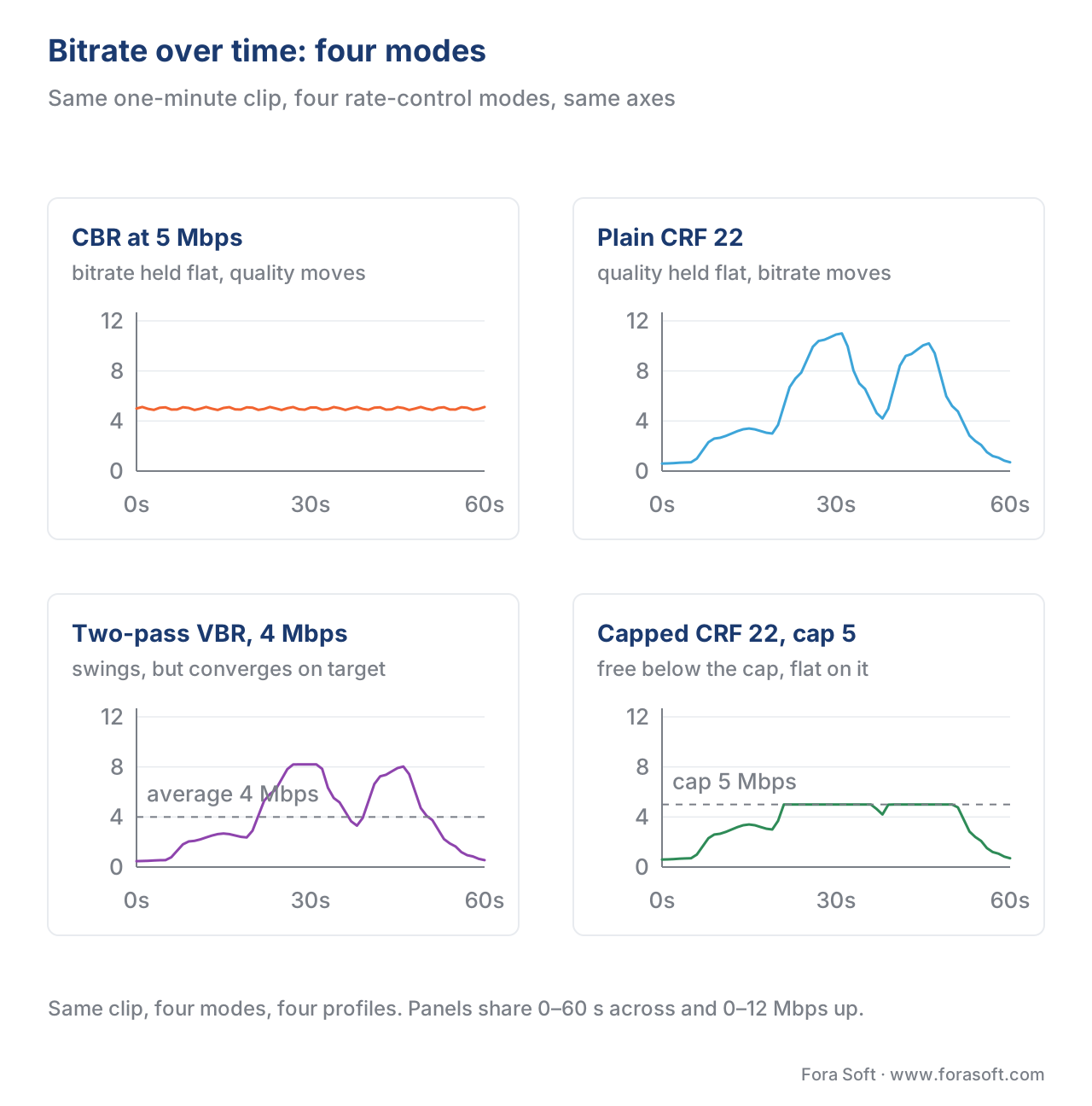 Figure 2. Bitrate over time for the same clip under four rate-control modes. CBR is flat. Plain CRF swings widely with content complexity. Two-pass VBR follows complexity but converges on a target average. Capped CRF behaves like CRF below the cap and like CBR above it. All four panels carry the same clip and the same axes, so the only thing that changes between them is the mode.
Where lambda comes in — the rate-control / mode-decision interface
Rate control and mode decision share one variable: λ. The mode-decision loop minimises J = D + λR at every block; the rate-control loop chooses λ by choosing QP. The relationship inside HEVC is
λ_mode = α · 2^((QP − 12) / 3)
with α around 0.85 for B-frames. The same exponential law, with slightly different constants, ships in every modern encoder. A rate-control loop "raising QP by 6" therefore "doubles λ", which "halves the rate the mode-decision loop is willing to spend per unit of distortion".
Why this matters. When the VBV says "you are running 200 kbit over budget", the rate-control loop translates that into "raise QP by N for the next M frames". The mode decision in those frames suddenly has a higher λ, and its per-block decisions trend toward cheaper modes — fewer transform coefficients, smaller partitions, more skip blocks. The image gets coarser to release bits. When the budget is comfortable, λ drops, the mode decision picks richer modes, and the image gets finer.
Two practical consequences. First, encoder tuning flags like --psy-rd, --psy-rdoq, and --aq-mode are all small adjustments to the effective λ inside the mode-decision loop, layered on top of whatever rate control says. They are how "tune for VMAF" or "tune for SSIM" gets implemented. Second, capped CRF works because raising QP by a few units when the cap bites is exactly the right intervention — it raises λ everywhere in the next frame, which makes the mode decision cheap-up uniformly rather than starving one region.
The eight production scenarios — and which mode wins each
For every video application, there is a right answer and several wrong ones. The table below is the one to print and pin above your encoder dashboard.
| Scenario | Right mode | Why | Common wrong choice |
|---|---|---|---|
| Live Twitch / YouTube stream | CBR with 1-second buffer | Ingest expects steady rate; viewer cannot buffer through a complex scene | CRF (bitrate explodes; ingest drops) |
| WebRTC conferencing | CBR with 0.5-second buffer | Network round-trip is tight; lag manifests as audio echo | VBR (variance breaks low-latency ABR) |
| Cloud video conferencing recording | Capped CRF | Quality matters; the cap protects re-distribution | Plain CRF (peaks blow CDN budgets) |
| OTT VOD ladder (Netflix-class) | Per-shot capped CRF | Bandwidth dollars at scale; quality must be visually constant | Fixed-ladder CBR (20–30% wasted bits) |
| OTT VOD ladder (small operator) | Per-title capped CRF | Same logic, smaller analytical budget; Mux or AWS Auto-ABR does it for you | Hand-tuned CBR (manual labour, suboptimal) |
| Personal archive / master copy | High-quality CRF (no cap) | Bandwidth is irrelevant; quality is everything | Two-pass VBR (slower, no quality gain) |
| Video surveillance recording | Capped CRF with low cap | Disk budget is fixed; static scenes are most of the day | CBR (wastes disk on empty corridors) |
| Educational / corporate VOD | Capped CRF | Mostly low-motion content; the cap is rarely hit | Plain CRF (peaks fail mobile playback) |
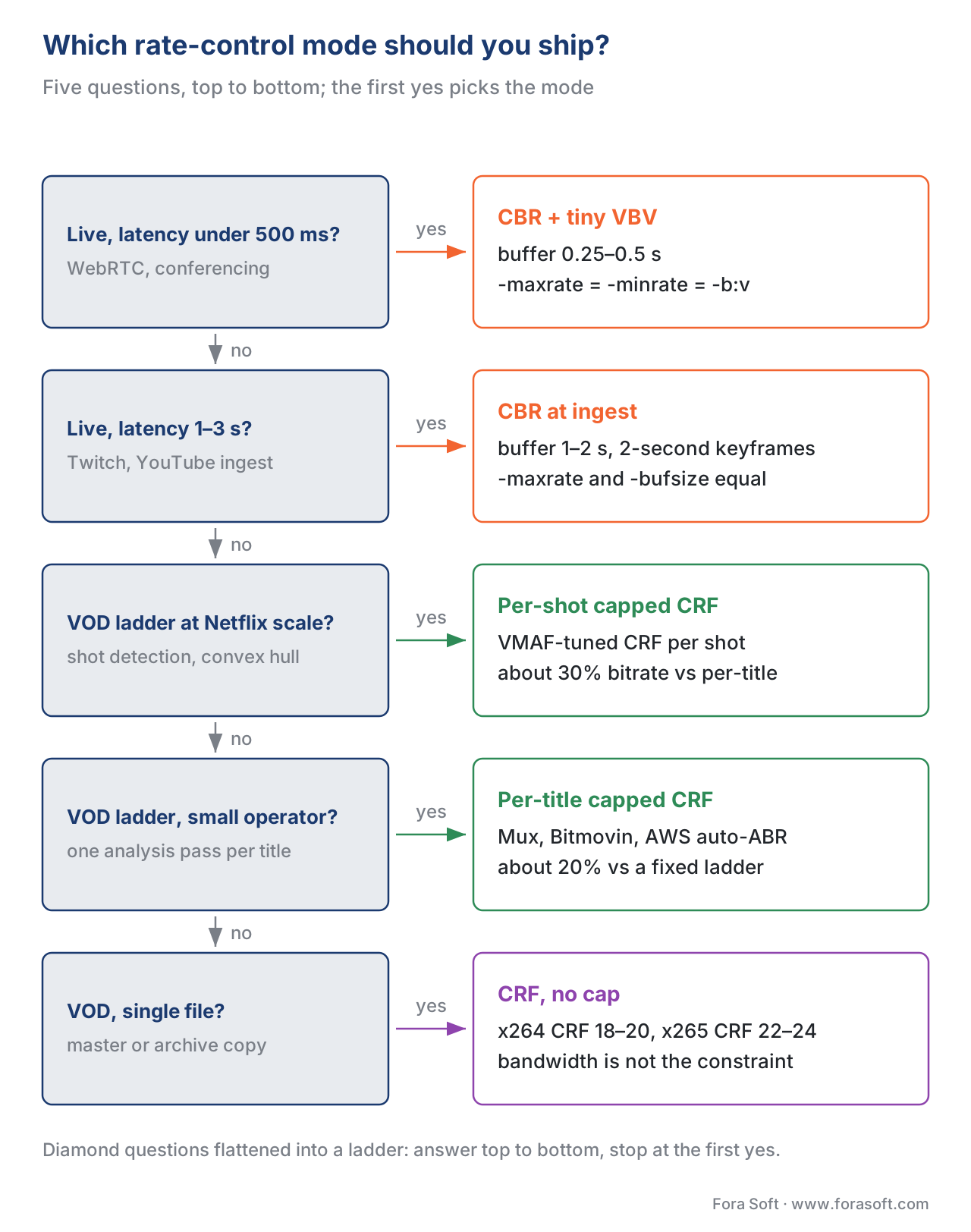 Figure 3. The same decision as a ladder: five questions from the tightest live budget down to the archive master. Answer them top to bottom and stop at the first yes — the card on the right carries the mode and the flags that go with it.
How real services configure rate control in 2026
A snapshot of what the visible production pipelines are doing, compiled from public engineering blogs and conference talks.
Netflix. Per-shot encoding with capped CRF inside each shot. Two reference encoders are involved: a pre-analysis pass that determines the shot boundaries and the per-shot CRF targets, and a final pass that produces the deliverable bitstream. The shot-level convex hull picks the (resolution, CRF) combination that maximises VMAF per bit. Internal tool name: Dynamic Optimizer. Reported savings: ~30% bitrate at constant VMAF versus per-title (Netflix Tech Blog, multiple posts 2018–2024).
YouTube. Per-title encoding with capped CRF for VOD; CBR for live. YouTube's 2024 stream-settings guidance to creators specifies recommended bitrate ranges and 2-second keyframes for live. On the VOD side, YouTube re-encodes uploads through its internal codec pipeline which includes per-title CRF analysis.
Twitch. CBR end-to-end at the ingest layer. The platform's published guidance for streamers is unambiguously CBR with a 2-second keyframe interval. The transcoded output for ABR delivery uses CBR at each rendition too — Twitch optimises for low latency, not for bandwidth efficiency.
Disney+ / Hulu / HBO Max. Per-title capped CRF using cloud transcoders (AWS Elemental MediaConvert, Bitmovin, or in-house). Most ship with x265 or AV1 at preset 6 / --rd 4, CRF 22–26, cap at the rendition's nameplate bitrate.
Zoom / Microsoft Teams. CBR over WebRTC with very tight VBV buffers (~250–500 ms). Both platforms run scalable video coding (SVC) on top of H.264 SVC or AV1, where SVC's temporal and spatial layers add a different dimension to rate control that we cover in a WebRTC deep dive.
Surveillance NVRs (e.g., Avigilon, Milestone, Hikvision). Capped CRF or constrained VBR with very low caps, tuned for disk endurance over visual quality. Static-background scenes hover at 100–300 kbps; motion events spike to the cap.
VBV — the buffer constraint that makes everything work
Every rate-control mode that respects a buffer is implementing the same conceptual model: bits flow into a notional buffer at the channel rate, pictures are pulled out at the frame rate, and the buffer must stay within capacity bounds at every instant. The bit-stream specification calls this the Coded Picture Buffer (CPB) in H.264/HEVC parlance, the same thing as VBV in the encoder-side literature.
The two parameters that matter:
- VBV-maxrate. The channel rate the buffer fills at. In a CBR encode, this equals the target bitrate. In a capped CRF or constrained VBR encode, it is the maximum bitrate the output stream may sustain.
- VBV-bufsize. The buffer capacity. Roughly the number of bits you can "save up" during easy scenes to spend on the next hard scene. A larger buffer means more room for VBR-style allocation but more end-to-end latency on the wire (since the decoder must pre-fill the buffer before playback can start). A 2-second buffer is the streaming standard; a 0.5-second buffer is the conferencing standard; an 8-second buffer is broadcast.
The HEVC HRD model adds two refinements over H.264. First, sub-picture-level HRD operation — the buffer can be tracked at picture-segment granularity rather than just picture granularity, which makes ultra-low-latency operation more precise. Second, alternate sets of initial buffering parameters at random-access points, so the decoder can resync the buffer cleanly at every IDR frame without overflowing. Both are in the Improved Hypothetical Reference Decoder for HEVC paper (Hannuksela et al. 2013).
A common engineering pitfall: setting bufsize == maxrate. That collapses the VBV to a one-second sliding window. Quality drops measurably because the encoder cannot save bits across scene boundaries. The fix is bufsize = 2 × maxrate for VOD or 1 × maxrate for live, never less unless you have a specific latency reason.
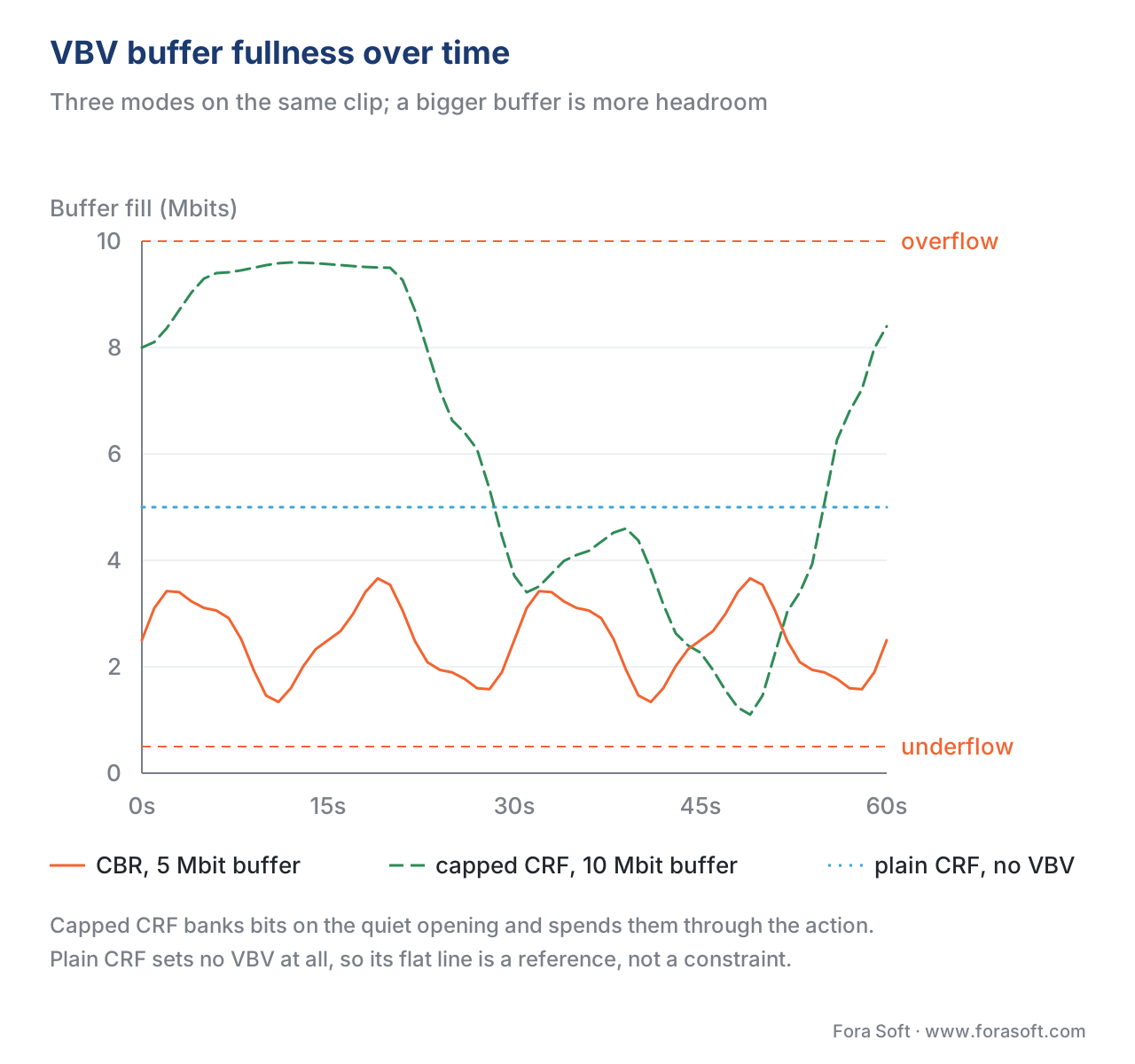 Figure 4. Simulated VBV buffer fullness over time for three rate-control modes on the same clip. CBR rides flat near the centre. Capped CRF moves freely — saving bits on easy content (high fill) and spending on hard (low fill). A buffer that never hits the floor is the proof that the encode is conformant. Capped CRF banks bits on the quiet opening and spends them through the action; plain CRF sets no VBV at all, so its flat line is a reference rather than a constraint.
Common mistakes — the five we see in real audits
1. Mismatched buffer size. bufsize == maxrate collapses the VBV. Fix: 2× for VOD, 1× for live. Visible as banding or blocking on shot cuts that should not be hard.
2. CRF for ABR ladders without a cap. A 25 Mbps spike on a 4 Mbps ladder rung breaks the player's bandwidth estimator. Fix: capped CRF with maxrate equal to the rung's nameplate.
3. Two-pass VBR for live streams. You cannot run two-pass on a live ingest. Fix: capped CRF or CBR for live; reserve two-pass for VOD.
4. Comparing presets at iso-CRF instead of iso-bitrate. A faster preset at the same CRF produces a larger file with worse quality — the encoder is making worse mode-decision choices and needing more bits. The correct comparison is iso-bitrate or iso-VMAF. This is the single most common mistake in encoder evaluation blog posts.
5. Setting both -b:v and -crf at the same time. They compete. -crf wins and -b:v becomes a target the encoder ignores. The encoder typically prints a warning that nobody reads. Fix: pick one or the other, not both.
Looking forward — content-aware and neural rate control
The next frontier in rate control is moving the decision-making further upstream. Two visible directions in the 2024–2025 literature:
Content-aware rate control without a separate analysis pass. NETINT's VPU-accelerated encoders implement a fast complexity classifier inside the encoding loop that adjusts the effective CRF target frame-by-frame. The classifier is small enough to run inline at 4K real-time. The result is per-title-quality bandwidth efficiency without the per-title analysis pass — the "free CAE" branding that NETINT uses in their marketing.
Learned rate-control policies. The 2024 ECCV paper "Learned Rate Control for Frame-Level Adaptive Neural Video Compression" trains a neural-network policy that, given an encoder state and a target bitrate, predicts the QP that will produce the best frame-level rate-distortion outcome. The reported improvement is 14.8% BD-rate over the conventional rate-control + RDO pipeline at frame level. Smaller block-level versions of the same idea are in research codebases.
These will not replace VBV. The conformance contract that VBV defines is independent of which loop chooses QP. What changes is the policy by which the loop chooses — and an inline neural classifier is exactly the right place to make that decision smarter without bolting on a separate pre-analysis stage.
Free download: Rate Control Mode Picker Cheat SheetOne page with the five modes side by side, the FFmpeg flags for each, the VBV buffer-sizing rules, and the decision tree for live, VOD, ABR, archive and surveillance.Where Fora Soft fits in
We design and operate video pipelines for streaming, OTT/Internet TV, video conferencing, telemedicine, e-learning, and surveillance. In every vertical the right rate-control answer is different. A telemedicine consultation needs CBR with a sub-second VBV buffer to keep the audio in sync with the doctor's voice. An OTT VOD ladder needs per-title or per-shot capped CRF and saves 20–30% on the CDN bill over a fixed ladder. A surveillance recorder needs aggressive capped CRF with a low cap to fit a 30-day retention budget on commodity storage. We tune each pipeline against the metric that matters for its vertical — VMAF for VOD, MOS for conferencing, disk-day cost for surveillance — and instrument the encoder logs so the rate-control behaviour is observable in production.
The book
Video Encoding: A Complete Guide to Video Compression
This article gives you the five modes and the VBV rules that hold them together; the book works through the machinery underneath. Volume 1 walks the rate-control loops that x264, x265 and SVT-AV1 actually ship — the CRF-to-QP mapping, the two-pass allocation, the VBV state machine and the HRD conformance checks — and then the two stages a bit budget lands on: quantisation, which turns the budget into a QP, and mode decision, which spends it block by block. Volume 1 of the seven-volume Fora Soft Video Engineering Handbook, 1,522 pages. Written by Nikolay Sapunov, CEO at Fora Soft.
Picking maxrate and bufsize by feel?
Send us your content, your delivery target and your latency budget, and we will measure it on your own footage: which mode holds quality at your bitrate, what buffer your players actually need, and how much bandwidth per-title capped CRF saves across your library. You get the numbers and the FFmpeg command line, not a recommendation to trust. 250+ video products shipped since 2005.
See our case studies
Case study
Worldcast Live
Concert streaming at 1.5 Gb/s with 0.4–0.5 s latency to 10,000 simultaneous viewers. At half a second glass-to-glass no one can buffer through a complex scene, so the encode runs CBR against a sub-second VBV — the first row of the ladder above.
Case study
Mindbox
An AI video management system on RTSP, FFmpeg and HLS with 50+ deployments across transport, pharma and gated communities. Cameras watch empty corridors most of the day, and that is where a low-capped CRF beats CBR: the disk budget is fixed, so a still frame should not cost what motion costs.
Case study
Speed.Space
A remote production platform recording at 1080p and 8 Mbps — five times a normal call — for Netflix, EA and HBO shoots. The recording is the deliverable and it gets re-distributed afterwards, which is the conferencing-recording row of the table: a quality target with a cap, not a fixed bitrate.
What to read next
Codec architecture
Mode Decision and Rate-Distortion Optimization
The other end of the λ that rate control moves: how J = D + λR spends the budget block by block.
Codec architecture
Quantization: Where Quality Is Lost
The QP that every mode in this article is really setting, and what each step of it costs you.
Encoding pipeline
Per-Title and Per-Scene Encoding
Per-title and per-shot capped CRF in detail: convex hulls, shot detection and what the analysis pass costs.
Encoding pipeline
FFmpeg: A Cheat Sheet for Developers
The command lines around the flags used here, from two-pass logs to hardware encoders.
References
- ITU-T Recommendation H.264 / ISO/IEC 14496-10 (AVC), Annex C — Hypothetical Reference Decoder. — The canonical specification of the HRD/VBV model in H.264.
- ITU-T Recommendation H.265 / ISO/IEC 23008-2 (HEVC), v8, 2023, Annex C. — HEVC HRD definition, including sub-picture operation.
- M. M. Hannuksela, Y. Wang, et al. "An Improved Hypothetical Reference Decoder for HEVC." Proc. SPIE Applications of Digital Image Processing, 2013. — Engineering analysis of the HEVC HRD improvements over H.264.
- J. Ribas-Corbera and S. Lei. "A generalized hypothetical reference decoder for H.264/AVC." Microsoft Research Technical Report, 2003. — Foundational paper introducing the generalised HRD.
- C.-Y. Wu et al. "A two-pass rate control algorithm for H.264/AVC high definition video coding." Signal Processing: Image Communication, 2009. — Two-pass VBR analysis with Lagrangian allocation.
- T. Wiegand and B. Girod. "Lagrange multiplier selection in hybrid video coder control." Proc. ICIP 2001. — Original analysis of λ as a function of QP.
- Netflix Technology Blog. "Per-Title Encode Optimization." 2015. https://netflixtechblog.com/per-title-encode-optimization-7e99442b62a2 (accessed 2026-05-17).
- Netflix Technology Blog. "Dynamic Optimizer — a perceptual video encoding optimization framework." 2018. https://netflixtechblog.com/dynamic-optimizer-a-perceptual-video-encoding-optimization-framework-e19f1e3a277f (accessed 2026-05-17).
- Netflix Technology Blog. "Optimized shot-based encodes: Now Streaming!" 2018, updated through 2024. (accessed 2026-05-17).
- J. Ozer. "What is CBR, VBR, CRF, Capped-CRF? Rate Control Modes Explained." OTTVerse, 2020–2024 updates. https://ottverse.com/what-is-cbr-vbr-crf-capped-crf-rate-control-explained/ (accessed 2026-05-17).
- J. Ozer. "Choosing the Optimal CRF Value for Capped CRF Encoding." Streaming Learning Center, 2023. (accessed 2026-05-17).
- J. Ozer. "Capped CRF in a Multi-Codec World: FFmpeg and NVIDIA Implementations." Streaming Learning Center, 2024. (accessed 2026-05-17).
- W. Robitza. "Understanding Rate Control Modes (x264, x265, vpx)." slhck.info, 2017. (accessed 2026-05-17).
- W. Robitza. "CRF Guide (Constant Rate Factor in x264, x265 and libvpx)." slhck.info, 2017. (accessed 2026-05-17).
- AOMedia SVT-AV1 project. SVT-AV1 documentation — Appendix: Rate Control, v3.1, 2026. (accessed 2026-05-17).
- x265 project. Command Line Options — x265 documentation. https://x265.readthedocs.io/en/master/cli.html (accessed 2026-05-17).
- AWS Elemental. "Encoding — Rate Control." Documentation, 2024. (accessed 2026-05-17).
- NETINT Technologies. "Optimizing Video Streaming with Capped Constant Rate Factor (CRF) Encoding." White paper, 2024. (accessed 2026-05-17).
- YouTube Help. "Choose live encoder settings, bitrates, and resolutions." 2024–2025. (accessed 2026-05-17).
- Twitch. "Broadcasting Guidelines." 2024. (accessed 2026-05-17).
