


Why this matters
Intra-frame coding is the foundation of every adaptive bitrate stream, every video file, and every all-intra production workflow you depend on. The keyframe interval you set in OBS or your CDN's transcoder, the size of HLS and DASH segments, the cost of mastering 4K HDR in ProRes, the latency of seeking a YouTube video — all of these are direct consequences of intra-frame coding choices. Product managers who can read a vendor data sheet that mentions "intra prediction modes", "angular modes", or "all-intra profile" without translating in their head make better decisions about cost, latency, and quality. The mental model below takes thirty minutes to acquire and saves years of confused conversations with engineers.
What "intra" means and why we need it
The word intra is Latin for inside. Intra-frame coding compresses a video frame using only information inside that same frame. Its opposite is inter-frame coding, which compresses a frame by referring to other frames. Every video stream uses both, but intra-coded frames — usually written I-frames or keyframes — are the anchors. They can be decoded on their own. Inter-frame coded frames cannot.
You need intra-coded frames for four reasons that have nothing to do with compression efficiency.
First, playback has to start somewhere. When you open a video, your player needs at least one fully-decodable frame to draw before it can start predicting future frames. That first frame must be intra-coded.
Second, adaptive streaming relies on switching points. In HLS or DASH, the player switches between bitrate ladders at segment boundaries — typically every two to six seconds. Each segment must start with an I-frame, because the segment must be decodable without seeing the previous one.
Third, error recovery needs a reset. If a network packet is dropped or corrupted in a live stream, every subsequent inter-frame is wrong until the next intra-coded frame arrives. Without periodic I-frames, a glitch lasts forever.
Fourth, editors need frame-accurate cuts. Cutting a video at an inter-coded frame requires re-encoding everything from the previous I-frame forward. Production codecs — Apple ProRes, Avid DNx (formerly DNxHD/DNxHR), Sony XAVC-I — code every frame as intra-coded for exactly this reason. Each frame is independently decodable; you can cut anywhere.
So intra-frame coding is not just one tool inside a video codec. It is a complete still-image codec that lives inside every video codec, and it is also the entire codec for several professional formats. JPEG, JPEG 2000, and HEIF use the same machinery without the "video" wrapper.
The five stages, in order
Intra-frame coding is five sequential stages with no loops or feedback. Read it left to right.
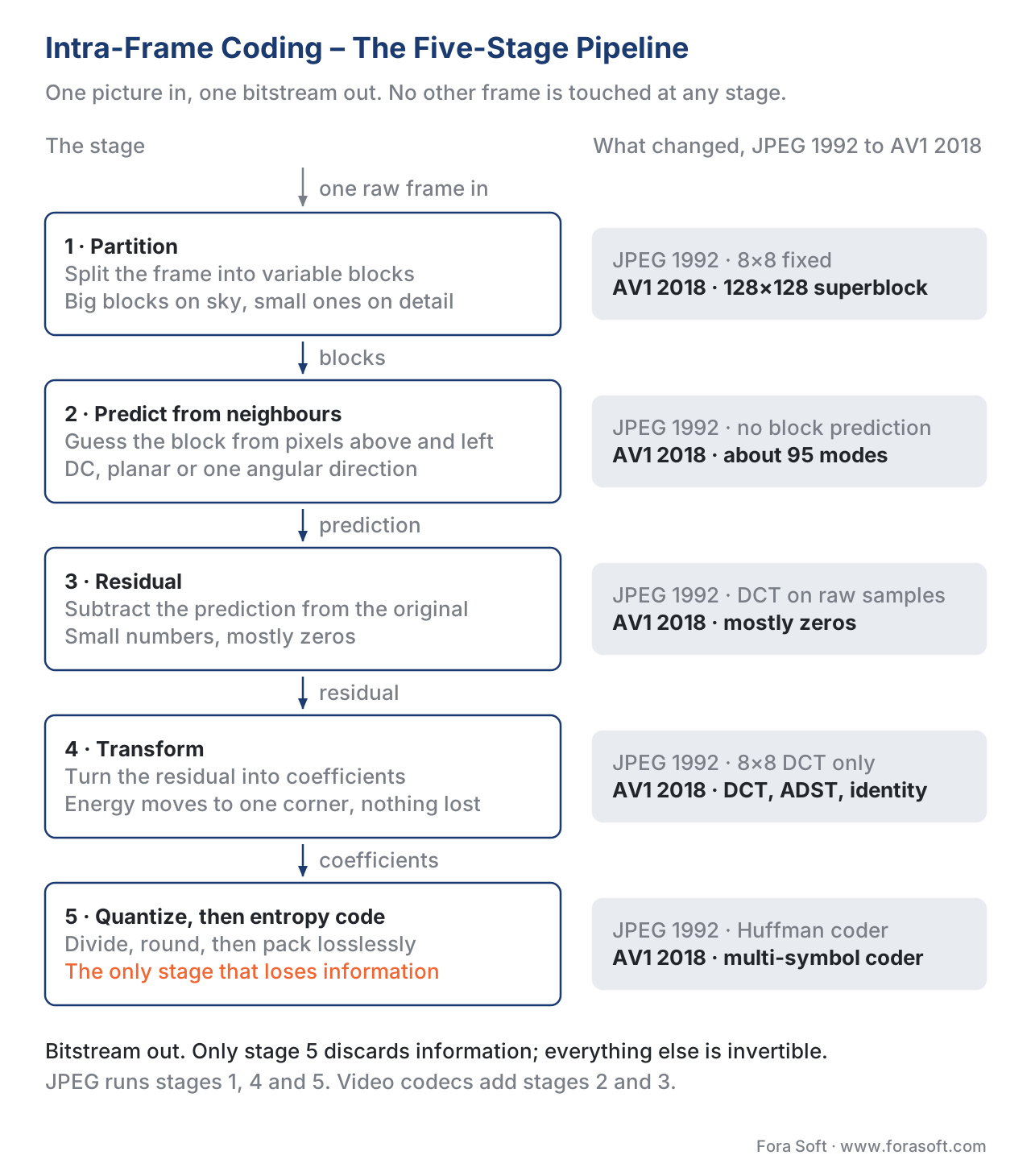 Figure 1. The intra-frame coding pipeline. Every still-image codec and every video keyframe runs through these five stages in this order.
Stage 1 — Block partitioning
The encoder receives one frame — for a 1080p video, that is a grid of 1,920 × 1,080 luma samples plus two chroma planes — and splits it into rectangular blocks. The block size is not fixed. Smooth regions like a blue sky get large blocks. Detailed regions like an eyelash get small blocks.
The exact block sizes depend on the codec. JPEG uses fixed 8×8 blocks. MPEG-2 uses 16×16 macroblocks. H.264 partitions a 16×16 macroblock down to 4×4. H.265/HEVC uses a quad-tree from 64×64 down to 4×4. AV1 starts with a 128×128 superblock that can split into rectangles as small as 4×4. H.266/VVC uses a 128×128 coding tree unit with even more flexible splits, including ternary and binary splits, going down to 4×4.
Why bother with variable size? Because the next stage — prediction — works better when each block contains one thing instead of three. A 4×4 block sitting on an eyelash and a 64×64 block sitting on a sky both get accurate predictions. A single 16×16 block straddling both gets a bad one. Variable partitioning lets the encoder choose locally what serves the picture best.
Stage 2 — Prediction from neighbours
This is the heart of intra-frame coding and the part that has changed the most across codec generations. For each block, the encoder looks at the pixels just above and just to the left — pixels that have already been encoded earlier in the same frame — and uses them to predict what the current block looks like.
A predicted block is a guess. The guess is rarely perfect, but it is usually close, because neighbouring pixels in a real photograph are highly correlated. If the row of pixels above the block shows the top of a wooden door, the block itself is probably also part of the wooden door.
The encoder has many ways to predict — many modes — and tries them all. The simplest are:
- DC mode: fill the block with the average of the pixels along the top edge and left edge. Useful on flat surfaces.
- Planar mode: fit a smooth plane through the boundary pixels. Useful on smooth gradients like sky or a soft-lit cheek.
- Angular modes (also called directional): copy a line of pixels from the top or left edge along a specific direction. Useful on edges and textures with a clear orientation.
Imagine you have a photograph of a slanted roof line. The roof goes from lower-left to upper-right at, say, 30 degrees. An angular mode at 30 degrees takes the pixels at the top-left of the block and slides them down along that 30-degree line to fill the block. The result is a near-perfect prediction of the roof inside the block.
The number of available modes has grown with each codec generation. The progression tells a story:
| Codec | Year | Intra prediction modes (luma) |
|---|---|---|
| JPEG | 1992 | none (DC only on DC coefficient) |
| MPEG-2 | 1994 | DC only |
| H.264 / AVC | 2003 | 9 (DC + Planar + 7 angular for 4×4 blocks) |
| H.265 / HEVC | 2013 | 35 (DC + Planar + 33 angular) |
| VP9 | 2013 | 10 (DC + TM/Paeth-like + 8 angular) |
| AV1 | 2018 | ~95 (8 nominal angles × 6 deltas + DC + Smooth-V/H/Bi + Paeth + recursive + CfL for chroma + palette + intra block copy) |
| H.266 / VVC | 2020 | 67 (DC + Planar + 65 angular) + MIP + MRL + ISP + CCLM + PDPC |
| AV2 (AVM, in-progress) | 2025 | All AV1 modes + data-driven learned modes + improved CfL + multi-reference line |
Sources for the table: ITU-T H.264, H.265, H.266 specifications; AOMedia AV1 specification and tool description; AV2 AVM development drafts (2025).
A reader who has seen the architecture article will recognise that intra prediction is the prediction stage of the hybrid codec, restricted to references that live inside the current frame. Inter-frame coding is the same stage with references from past frames.
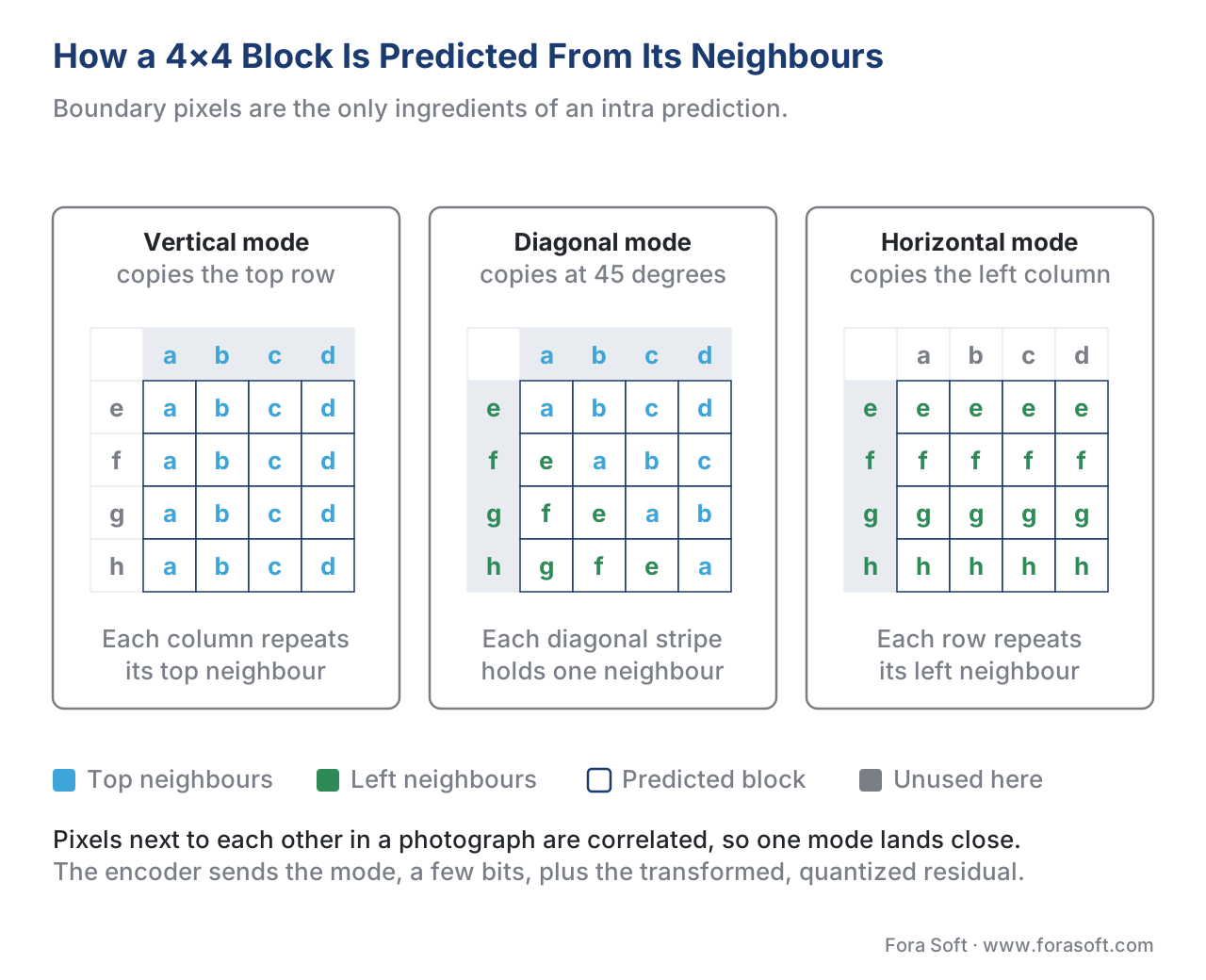 Figure 2. The same eight boundary pixels, three prediction modes. Each letter shows which neighbour that predicted sample is copied from — nothing else enters the block.
Stage 3 — Residual: subtract the prediction
Once the encoder picks the best prediction mode for a block, it subtracts the predicted block from the original block, sample by sample. The result is a block of differences called the residual.
If the prediction was perfect — a flat sky predicted with DC mode often is — the residual is a block of zeros. If the prediction was good but not perfect, the residual contains small numbers near zero with a sprinkling of larger values where the prediction missed. The residual always has less energy than the original, because the encoder picked the best of many modes.
Why is reducing energy useful? Because every later stage compresses small numbers more efficiently than large numbers. Quantization will round small numbers to zero. Entropy coding will give short codes to common values, which are now mostly zeros and small integers. The whole pipeline is tuned for a residual that hugs zero.
Stage 4 — Transform: spatial to frequency
The residual is fed through a mathematical transform that converts the block of pixel differences into a block of frequency coefficients. The most common transform is an integer approximation of the discrete cosine transform, abbreviated DCT.
The intuition: a smooth residual — one where neighbouring samples are similar — can be described with very few low-frequency coefficients. A high-detail residual needs more coefficients at higher frequencies. The DCT does not throw away information; it reshuffles it so that energy concentrates in the top-left corner of the coefficient block (the low frequencies), with the bottom-right corner (high frequencies) usually near zero.
The transform on its own does not compress. It re-organises. If you knew every coefficient exactly, you could invert the transform and recover the residual exactly.
Modern codecs include several transform variants because no single transform fits every block. AV1 picks between DCT, ADST (asymmetric discrete sine transform), flipped ADST, and the identity transform for each block independently. VVC has multiple transform selection (MTS) and low-frequency non-separable transform (LFNST) for further squeezing. AV2 extends the menu again. The encoder tries each one and picks the smallest output.
Stage 5 — Quantization, then entropy coding
This is where the codec actually throws information away. Each transform coefficient is divided by a step size and rounded to the nearest integer. A coefficient of 137 divided by step size 8 becomes 17. The decoder will multiply 17 back by 8 and reconstruct 136 instead of 137. The error you just introduced is permanent and is the source of every visible compression artifact in the world.
Step size is controlled by the quantization parameter, or QP. Low QP means a small step size, high quality, lots of bits. High QP means a big step size, low quality, few bits. After quantization, most coefficients are zero, and the few non-zero ones are small integers — exactly the shape entropy coding compresses best.
Entropy coding is the last lossless squeeze. It gives short bit-strings to common values (zero, ±1) and long bit-strings to rare ones. H.264 introduced Context-Adaptive Binary Arithmetic Coding (CABAC), which compresses about 14% harder than the simpler Huffman-style coder it replaced. AV1 and AV2 use a multi-symbol arithmetic coder. The output of this stage is the bytes that go into the file or the network packet.
That is intra-frame coding from start to finish. Five stages, no loops, no future-frame dependencies, no motion estimation. JPEG implements stages 1, 4, and 5. Modern video codecs add stages 2 and 3. Everything else — inter-prediction, GOP structure, rate control — sits on top.
A numeric walk-through: one 4×4 block
Take a single 4×4 luma block from the corner of a slightly textured wall. Original sample values (after subtracting 128 to centre around zero) are:
 24  22  20  18
 26  24  22  20
 28  26  24  22
 30  28  26  24
The values rise from upper-right to lower-left in a smooth gradient. This is a classic angular pattern — perfect for an angular intra mode.
Step 1 — Predict. The encoder chooses an angular mode pointing along the gradient direction (45 degrees, copying from the top-left corner). The predicted block is:
 24  22  20  18
 26  24  22  20
 28  26  24  22
 30  28  26  24
In this artificial example the prediction is perfect because we built the block from a perfect gradient. The encoder signals "mode = angular at 45 degrees" — that costs about 4 to 6 bits of overhead.
Step 2 — Residual. Original minus prediction:
 0  0  0  0
 0  0  0  0
 0  0  0  0
 0  0  0  0
All zeros. Sum of squared residual values: 0.
Step 3 — Transform. The DCT of an all-zero block is an all-zero block of coefficients. Zero in, zero out.
Step 4 — Quantize. Zero divided by any step size is zero. The block produces no non-zero quantized coefficients.
Step 5 — Entropy code. The encoder writes "mode = 45-degree angular" plus an "end of block" signal that says "no non-zero coefficients follow". Total cost for this block: maybe 6 bits.
That is the entire compression of one 4×4 block of original 16 samples × 8 bits = 128 bits down to 6 bits — a 21× ratio. The compression came from the prediction. Real photographs are messier and the residual is rarely zero, but the principle holds: most of the saving in intra-frame coding comes from the prediction, not the transform.
Now suppose the original block had been a noisier patch of wall where the prediction missed by ±2 per sample. The residual would have non-zero entries near ±2. After DCT, energy would spread across a few low-frequency coefficients. After quantization at QP = 20 (step size ≈ 10), most coefficients would round to zero, with maybe one or two ±1 coefficients surviving. The block would cost perhaps 25 to 40 bits — still a large compression ratio, with a small reconstruction error introduced by quantization.
Inside the prediction zoo
The most active area of innovation in intra coding has been the prediction stage. Below is a tour of the most important tools, with one or two sentences each. You do not need to memorise them — but if a codec data sheet mentions one, you will recognise the family.
DC mode — fill the block with the mean of boundary samples. The oldest mode; present in every codec.
Planar mode — fit a smooth plane through the boundary samples. Excellent for soft gradients like a face under window light.
Angular modes — copy boundary samples along a specific direction. H.264 had 8 angles. HEVC has 33. VVC has 65. AV1 has 56 (8 nominal × 7 deltas).
Paeth predictor — for each predicted pixel, pick whichever of three reference samples (above, left, top-left) is closest to the linear extrapolation. Originally from PNG, adopted by VP9 and AV1.
Smooth modes — AV1 includes Smooth, Smooth-Horizontal, and Smooth-Vertical, which interpolate from the corners and edges. Excellent for soft gradients.
Recursive intra prediction — AV1 splits the block into 2×2 sub-blocks and predicts each sub-block from the one before it using a small filter. Useful on noisy textures.
Cross-component linear model (CCLM) — VVC predicts the chroma block as a linear function of the reconstructed luma block in the same location. Parameters are derived from the neighbouring boundary samples. Saves about 14% of bitrate on chroma in all-intra coding.
Chroma from luma (CfL) — AV1's equivalent of CCLM. Uses subsampled luma to predict chroma.
Matrix-based intra prediction (MIP) — VVC includes a set of small data-driven prediction matrices learned from training data. The encoder picks the best matrix and applies it to the boundary samples. Useful on patterns no rule-based mode handles well.
Multiple reference line (MRL) — VVC and AV2 allow the encoder to predict from a reference line that is 2 or 3 samples away from the block boundary instead of the immediate neighbour. Useful when the immediate neighbour is corrupted by quantization noise.
Intra subpartition (ISP) — VVC splits a coding block into vertical or horizontal strips and predicts each strip from the previously-coded strip. Useful on small detail.
Position-dependent prediction combination (PDPC) — VVC blends the angular prediction with the boundary samples using a position-dependent weight, smoothing the transition at the block edge.
Palette mode — H.265 SCC, AV1, and AV2 use a small colour palette and an index per sample. Designed for screen content like text, UI mockups, and game streams where each block has only a handful of distinct colours.
Intra block copy (IBC) — H.265 SCC and AV1 allow a block inside the current frame to be predicted from another already-coded block in the same frame, using a displacement vector. Like motion compensation, but within one frame. Useful on screen content with repeating elements.
Data-driven / learned modes (AV2) — AV2 introduces intra prediction modes whose parameters are learned from a corpus of training images. The encoder picks among rule-based and learned modes per block.
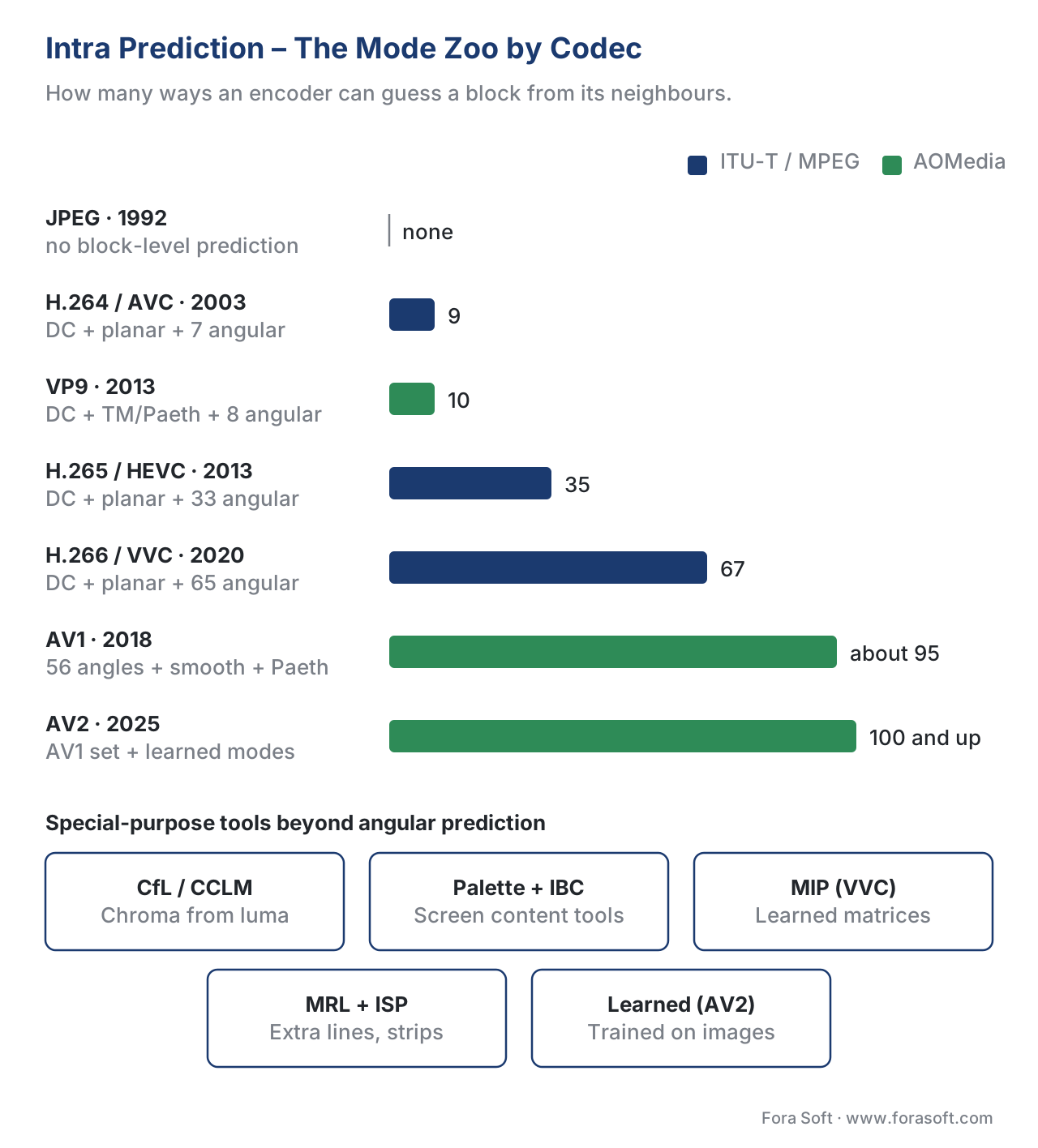 Figure 3. Intra prediction modes by codec generation. The number of directions has grown roughly with the cube root of decoder complexity; the bigger wins came from special-purpose tools like CCLM and palette mode, not from more angles.
Common mistake: assuming more modes always helps
A natural reading of the table above is that AV1 must be roughly ten times better at intra than H.264 because it has ten times the modes. It is not. Two things break the linear intuition.
First, mode signalling costs bits. Every additional mode the encoder can pick adds bits to the per-block overhead, because the bitstream has to say which mode won. The next codec generation only earns a net gain on a block when the better prediction it offers saves more bits than the extra signalling costs. In practice the gain on a per-mode basis follows diminishing returns.
Second, encoder time grows with mode count. The encoder must try every mode (or use a smart heuristic to skip most of them) and score each one. AV1's full-rate intra search is roughly 8× slower than HEVC's, which is in turn roughly 4× slower than H.264's. Production encoders ship with presets — veryfast, medium, slow, veryslow — that all trade off how many modes the encoder is allowed to try.
The headline numbers — VVC saves about 35% over AV1 on intra at the cost of roughly 8× encoding time, according to the 2026 academic benchmarks — tell you that the prediction zoo really does help, but that you pay for it on the encode side. The decoder side is much cheaper, which is what matters for delivery.
Where intra-coded frames sit in a video stream
In a stream that uses both intra and inter frames, intra frames are placed periodically as anchors. The spacing between them is called the GOP length (group of pictures) or the keyframe interval.
Three forces pull the interval in opposite directions.
First, compression efficiency favours long GOPs. Intra frames are large — typically 4 to 10× the size of inter frames at the same quality — because they cannot reuse content from past frames. The longer the GOP, the smaller the average frame size, the lower the bitrate. Netflix optimised its VOD encodes by extending the random-access picture period from one every two seconds to one every fifteen seconds, saving roughly 20% on file size at matched VMAF.
Second, adaptive streaming forces specific intervals. HLS and DASH players switch bitrate at segment boundaries. Each segment must start with an intra-coded frame. Segment lengths are typically two to six seconds. If your segment is two seconds and your frame rate is 30 fps, you need an intra-coded frame every 60 frames, full stop. Bitmovin's default 2-second segments enforce 2-second keyframe intervals.
Third, live and low-latency streaming want short GOPs. A new viewer who joins a live stream has to wait for the next keyframe before playback can start. A 15-second keyframe interval gives a 15-second worst-case startup delay. Low-latency HLS and WebRTC-style streaming use one-second or sub-second keyframe intervals.
Production codecs sidestep all of this. ProRes, DNx, and Sony XAVC-I code every frame as intra. The GOP length is one. Files are much larger, but every frame is an independent keyframe, which is the only thing an editor cares about.
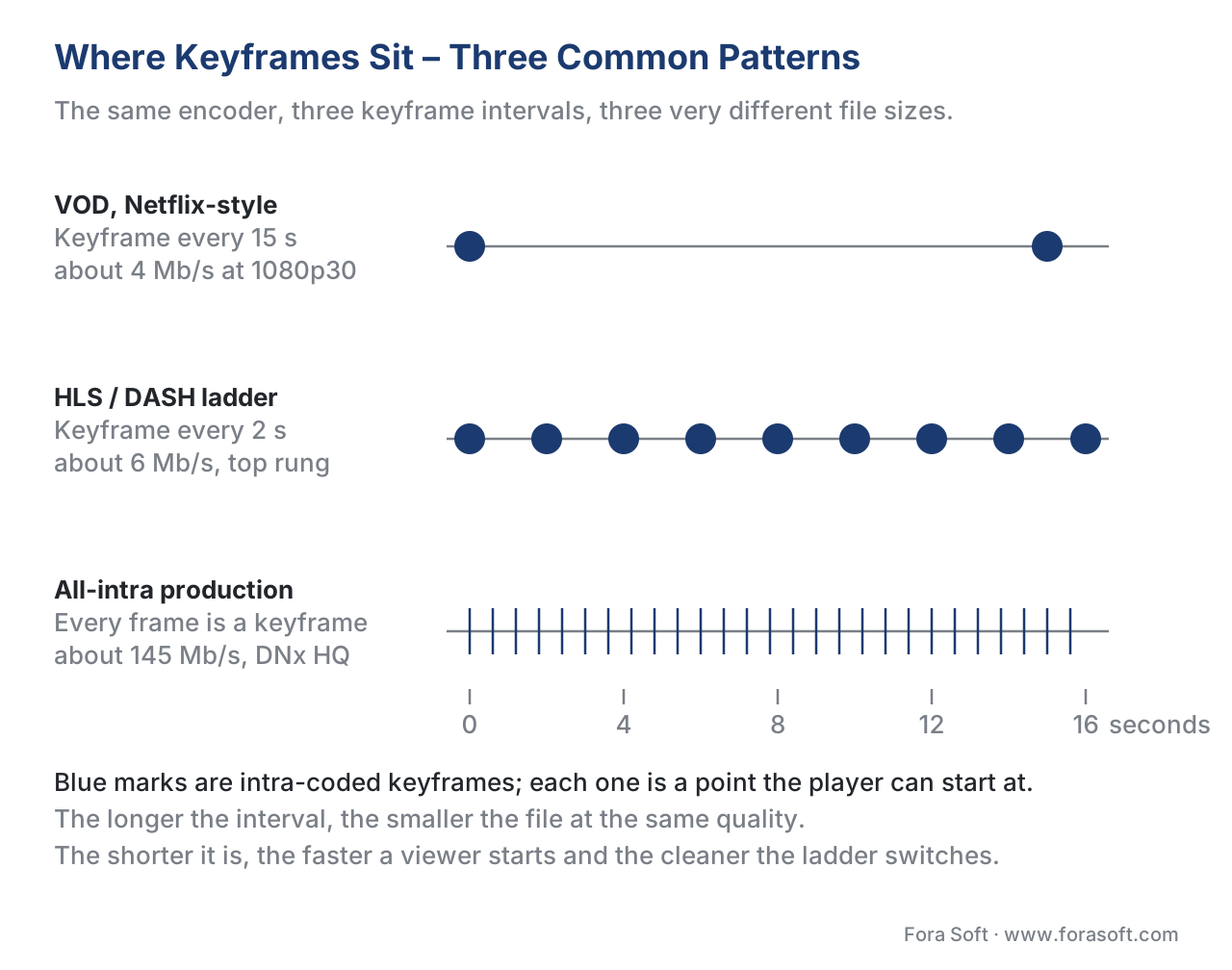 Figure 4. Three placements of intra-coded frames. The same encoder, three different keyframe intervals, three different file sizes at matched quality.
Numeric example: how much bigger is an I-frame?
Take a 1080p30 video encoded with x264 at CRF 23 (a common quality target). Typical frame sizes for a movie-style sequence look like this:
- I-frame (intra-only): ~120 kilobits (≈ 15 KB).
- P-frame (predicted from previous): ~25 kilobits (≈ 3 KB).
- B-frame (predicted from past and future): ~10 kilobits (≈ 1.25 KB).
A two-second GOP at 30 fps contains 60 frames: typically 1 I-frame, then a mixture of P and B frames. Total GOP size in bits:
1 × 120 + 25 × 25 + 34 × 10 = 120 + 625 + 340 = 1,085 kilobits per 2 seconds
That is roughly 542 kilobits per second. The I-frame alone contributes 120 / 1085 ≈ 11% of the bits while making up only 1 / 60 ≈ 1.7% of the frames. Halving the keyframe interval to one second doubles the contribution of I-frames to roughly 20% of the bitstream — that is the cost of giving the player more frequent random-access points.
Now run the same calculation for an all-intra codec like Avid DNx HQ at the same resolution and frame rate. DNx HQ at 1080p30 lands around 145 megabits per second — roughly 270× the bitrate of the H.264 stream. That is the price of making every frame independent.
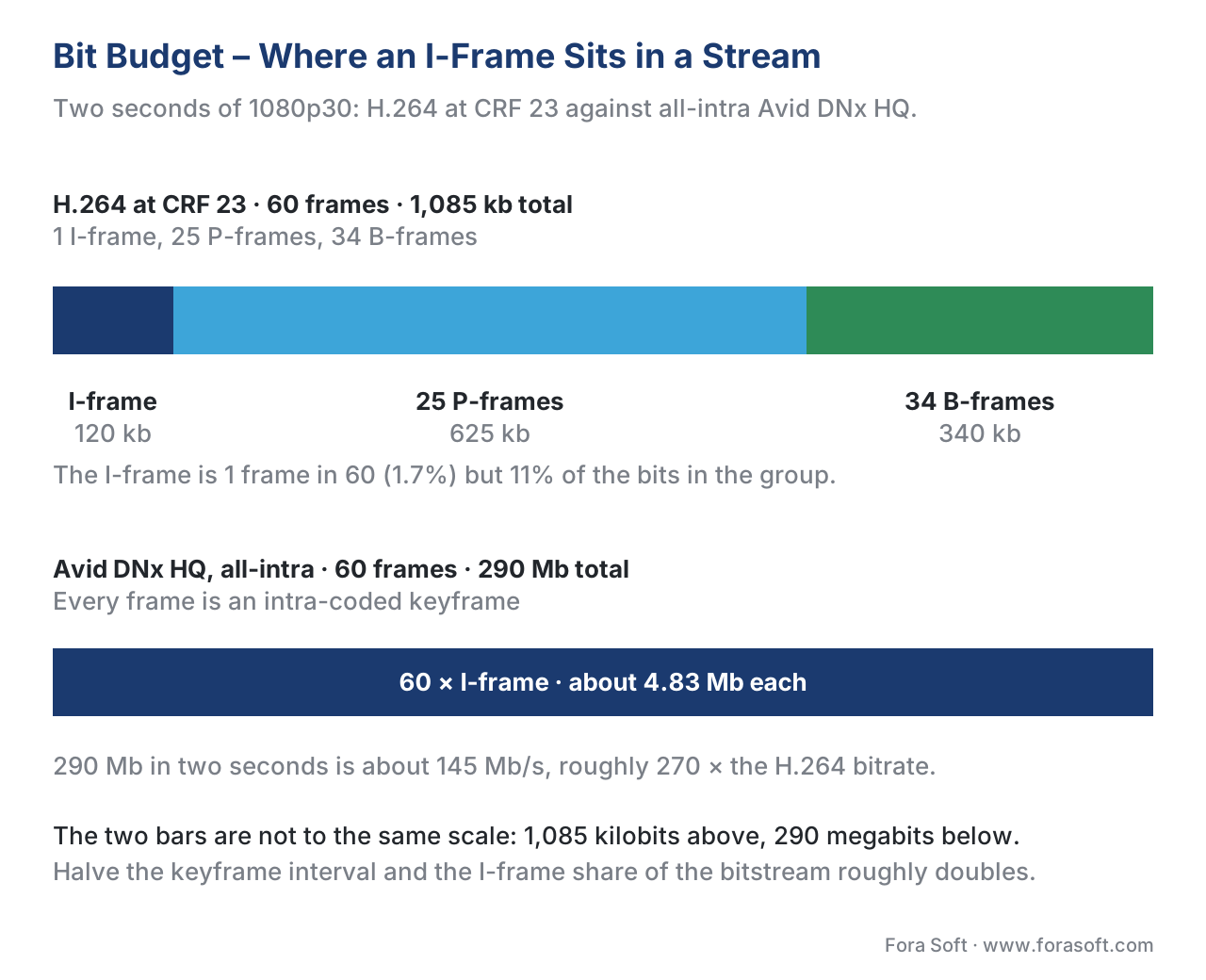 Figure 5. Where the bits go in two seconds of 1080p30. The I-frame is 1.7 % of the frames and 11 % of the bits; making every frame an I-frame costs about 270× the bitrate.
How intra-frame coding shapes the rest of the codec
Intra-frame coding is more than just the keyframe machinery. It also affects intra-coded blocks inside inter-coded frames. When an inter-frame encoder cannot find a good match in the reference buffer — because the scene changed, an object was occluded, or the content is brand new — it falls back to intra-coding for that specific block. A P-frame with many intra-coded blocks is called a "P-frame with high intra-cost"; it costs more bits than an average P-frame but less than a full I-frame.
This is why scene-cut detection matters. A good encoder detects a scene change and forces an I-frame at that point, even if it breaks the regular GOP rhythm. Otherwise the first P-frame after the cut would be almost entirely intra-coded blocks (no good motion match exists across a cut) and would be nearly as large as an I-frame anyway, but without giving the player a random-access point.
This is also why screen content is special. A block of solid colour or a block of crisp font glyphs has a very different statistical profile from a block of camera-captured pixels. The intra tools that win on camera content — angular modes, planar, DCT — are not the ones that win on screen content. Palette mode and intra block copy were added precisely for desktop sharing, remote work, and cloud gaming streams.
Free download: Intra-Frame Coding Cheat SheetOne-page A4 reference: the five-stage pipeline, intra prediction modes by codec generation, keyframe interval guidance, and common gotchas.Where Fora Soft fits in
We ship video infrastructure that lives or dies on intra-frame decisions. In WebRTC conferencing, the keyframe interval drives connection-recovery time after packet loss — we tune it per use case for our telemedicine and e-learning clients. In OTT and Internet-TV stacks, we align keyframes with HLS and DASH segment boundaries so adaptive bitrate switching does not stall. In video surveillance, we balance long GOPs for storage cost against frequent keyframes for forensic seek time. In AR/VR and 360° streaming, low-latency intra refresh patterns ("gradual decoder refresh", or intra-block-level keyframes) replace traditional I-frames entirely. We have not written a new codec — we use H.264, H.265, AV1, and WebRTC profiles — but we have configured them across 239 shipped projects since 2005.
The book
Video Encoding: A Complete Guide to Video Compression
This article walks the five stages once; the book gives each of them a chapter. Block partitioning from the 8×8 macroblock to the 128×128 superblock, the whole prediction zoo mode by mode, the DCT and ADST written out, quantization and QP, and the entropy coders from Huffman to multi-symbol arithmetic — with the keyframe-interval arithmetic that decides what an I-frame costs you. It is volume 1 of the seven-volume Fora Soft Video Engineering Handbook, 1,522 pages, written by Nikolay Sapunov, CEO at Fora Soft.
Is your keyframe interval set by measurement or by the default?
Send us your encoder settings, your segment length and one hour of typical content, and we will come back with three numbers: what your I-frames cost today as a share of the bitstream, what a longer GOP would save at matched VMAF, and how much startup and recovery time that would add for a live viewer. The arithmetic runs on your own content, not on a reference clip. 250+ video products shipped since 2005.
See our case studies
Case study
Worldcast Live
Concert streaming at 1.5 Gb/s with 0.4–0.5 s latency to 10,000 simultaneous viewers. At that latency budget a viewer cannot wait for the next keyframe, so the interval is short and the I-frame share of the bitstream is the first number we tune.
Case study
Speed.Space
Remote production recording at 1080p and 8 Mb/s for Netflix, Electronic Arts and HBO shoots, where creators pick resolution, fps, codec and bitrate per stream. Those controls decide block sizes and QP — stages 1 and 5 of the pipeline above, exposed as four sliders.
Case study
Mindbox
An AI video management system on RTSP, FFmpeg and HLS with 50+ deployments across transport, pharma and gated communities. Long GOPs cut the storage bill; short ones cut forensic seek time. Picking a number per camera is the whole job.
What to read next
GOP
GOP Structure: I, P, B-Frames, Open vs Closed GOP
The three timelines above, written out as rules: how I, P and B frames are scheduled, and what open and closed GOPs change for a player.
Partitioning
Block-Based Prediction: MBs, CTUs, SBs and Superblocks
Stage 1 opened up: why the 16×16 macroblock became a 128×128 superblock, and how the encoder decides where to split.
Transform
Transform Coding: DCT, ADST, and Integer Transforms
Stage 4 with the arithmetic in it: what the DCT actually does to a residual, and why AV1 keeps four transforms instead of one.
Quantization
Quantization: Where Quality Is Lost
Stage 5, the one box that throws information away. QP, step size, and why the same encoder gives you a different file at every setting.
References
- ITU-T Recommendation H.264 (V14, 08/2021). Advanced video coding for generic audiovisual services. International Telecommunication Union, 2021. https://www.itu.int/rec/T-REC-H.264
- ITU-T Recommendation H.265 (V9, 09/2023). High efficiency video coding. International Telecommunication Union, 2023. https://www.itu.int/rec/T-REC-H.265
- ITU-T Recommendation H.266 (V3, 09/2023). Versatile video coding. International Telecommunication Union, 2023. https://www.itu.int/rec/T-REC-H.266
- Pfaff, J. et al. Intra Prediction and Mode Coding in VVC. IEEE Transactions on Circuits and Systems for Video Technology, 31(10), 3834–3847, October 2021. https://ieeexplore.ieee.org/document/9400392
- AOMedia. AV1 Bitstream & Decoding Process Specification. Version 1.0.0-errata1, 2019. https://aomediacodec.github.io/av1-spec/
- AOMedia. Tool description for AV1 and libaom (V11). 2023. https://aomedia.org/docs/AV1_ToolDescription_v11-clean.pdf
- Trudeau, L., Egge, N., Barr, D. Predicting Chroma from Luma in AV1. Data Compression Conference (DCC), 2018. https://research.mozilla.org/files/2018/02/CfL.pdf
- Bross, B., Wang, Y.-K., Ye, Y., Liu, S., Chen, J., Sullivan, G., Ohm, J.-R. Overview of the Versatile Video Coding (VVC) Standard and its Applications. IEEE Transactions on Circuits and Systems for Video Technology, 31(10), 3736–3764, October 2021. https://ieeexplore.ieee.org/document/9446139
- Han, J., Li, B., Mukherjee, D., Chiang, C.-H., Grange, A., Chen, C., Su, H., Parker, S., Deng, S., Joshi, U., Chen, Y., Wang, Y., Wilkins, P., Xu, Y., Bankoski, J. A Technical Overview of AV1. Proceedings of the IEEE, 109(9), 1435–1462, September 2021. https://ieeexplore.ieee.org/document/9363937
- ISO/IEC 14496-10:2022 / ITU-T H.264. Advanced video coding.
- ISO/IEC 23008-2:2023 / ITU-T H.265. High efficiency video coding.
- Aaron, A., Chen, Z., Manohara, M., Ronca, D. More Efficient Mobile Encodes for Netflix Downloads. Netflix Technology Blog, 2016. https://netflixtechblog.com/more-efficient-mobile-encodes-for-netflix-downloads-625d7b082909
- Bitmovin Encoding documentation. Configuring keyframe intervals for adaptive streaming. 2025. https://developer.bitmovin.com/encoding/docs
- Apple Inc. Apple ProRes White Paper. April 2023. https://www.apple.com/final-cut-pro/docs/Apple_ProRes_White_Paper.pdf
- Avid Technology. Avid DNx Codec — Technical Reference. 2025. https://www.avid.com/dnx
- SMPTE. ST 2019-1:2026 — VC-3 Picture Compression and Data Stream Format. Society of Motion Picture and Television Engineers, 2026.
- AOMedia. AV2 — AOM Video Model (AVM) Development Notes. 2025. https://gitlab.com/AOMediaCodec/avm
- ITU-T Rec. T.81 (1992). Information technology — Digital compression and coding of continuous-tone still images: Requirements and guidelines (JPEG). https://www.itu.int/rec/T-REC-T.81
- ISO/IEC 23008-12:2022. Information technology — High Efficiency Image File Format (HEIF).
- Mukherjee, D., Han, J., Bankoski, J., Bultje, R., Grange, A., Koleszar, J., Wilkins, P., Xu, Y. A Technical Overview of VP9 — the Latest Open-Source Video Codec. SMPTE Motion Imaging Journal, 124(1), 44–54, 2015.
- Sullivan, G., Ohm, J.-R., Han, W.-J., Wiegand, T. Overview of the High Efficiency Video Coding (HEVC) Standard. IEEE Transactions on Circuits and Systems for Video Technology, 22(12), 1649–1668, December 2012.
