


Why this matters
If you are deciding how to ship video — whether to spend more on encoding to save bandwidth, whether to add a new codec to your stack, whether your live stream looks acceptable on a phone, whether the new compression you just turned on is actually working — you need a number you can trust. Subjective testing, where you sit thirty people in a room and ask them to score clips, is the gold standard but it is slow and expensive: a typical lab study costs five-figure money and takes weeks. Objective quality metrics give you a cheap, fast, repeatable proxy for that human judgment, and they let an encoder push the bitrate up or down a hundred times in an hour to find the cheapest setting that still looks good. Get the metric wrong and the encoder optimises for the wrong thing — sharper-looking but actually-worse video, or smoother-looking but smaller-file video that human viewers will hate.
This article is for the product manager, founder, engineering manager, or video operations lead who needs to read the metric numbers on an encoder dashboard, follow a codec comparison report, or argue with a vendor about which configuration to ship. We will start from what "quality" means to a human eye, walk through the four standard metrics in plain language with the math shown on screen the first time it appears, and finish with the practical rules of thumb that decide which metric to trust in which situation.
What "video quality" actually means
The word quality in this article means one thing only: how good a real human viewer says a piece of video looks. Not how mathematically close it is to the original, not how many bits it took to encode, not how clever the codec is. Just: did the viewer notice the compression, and did the compression bother them?
The gold-standard way to measure that is to run a subjective test: pit the original video next to the compressed copy, show both to a panel of trained or untrained viewers, ask each viewer to rate the quality on a five-point scale (5 = excellent, 4 = good, 3 = fair, 2 = poor, 1 = bad), and average the scores. The average is called the Mean Opinion Score, or MOS. The procedure is standardised by the International Telecommunication Union as ITU-T Recommendation P.910, which since its 2023 revision also absorbs the old P.913 methodology for modern devices like phones and tablets. 1 A serious lab will recruit at least 24 viewers, calibrate their displays, control the room lighting, and randomise the clip order; a study that does any less than that gets discounted by the rest of the industry.
The trouble is that subjective testing does not scale. A typical encoder run produces ten or twenty quality levels per clip and a streaming service has a catalogue of millions of clips; nobody has the budget to put thirty humans in a room for every encode. So the industry built objective metrics — algorithms that look at the original frame and the compressed frame and output a single number — that try to predict what the MOS would have been if you had run the lab study. A good objective metric correlates tightly with MOS across thousands of test clips; a bad one correlates badly. The whole game of metric design is: how do we get a machine to score video the way a human would?
There are three generations of objective metric in common use in 2026. They built on top of each other, and each one was a reaction to the previous one's failures.
The pixel-error family — PSNR is the famous member — looks at how far each pixel in the compressed frame is from the same pixel in the original, averages those errors, and reports a number. It is fast, simple, and well-understood mathematically. It is also wrong in ways that matter, because the human eye does not care about pixel-by-pixel error the way the math does.
The structural-similarity family — SSIM and its descendants — was the response. It scores not the raw pixel difference but the difference in local structure: brightness patterns, contrast, edges. Wang and Bovik introduced SSIM in 2004, MS-SSIM (a multi-scale extension) followed in 2003, and the family is still the workhorse of every codec research paper. 2
The perceptual-learned family — VMAF is the famous member — takes a different approach. Instead of designing the formula by hand, it trains a machine-learning model on thousands of subjectively-scored clips and lets the model figure out the right combination of low-level features. Netflix open-sourced VMAF in 2016 and it has become the de-facto standard for codec comparison and ladder optimisation. 4
 Figure 1. Three families of objective video quality metrics, with the canonical year each was published. PSNR came from communications theory; SSIM and MS-SSIM came from image-processing research; VMAF came from a streaming service that needed to encode a million clips a year.
PSNR — the simplest and the oldest
PSNR, short for peak signal-to-noise ratio, is the metric every video engineer learns first and every paper since 1980 has reported. The name itself tells you what it is: peak signal divided by noise, in decibels. The "peak signal" is the highest possible pixel value (255 for 8-bit video, 1023 for 10-bit, 4095 for 12-bit) and the "noise" is the average pixel-by-pixel difference between the original frame and the compressed frame.
The arithmetic happens in two steps. First you compute the mean squared error, or MSE, between the two frames — for every pixel, take the difference, square it, and average across the whole frame. Then you plug the MSE into a logarithm formula and call the result PSNR.
MSE = (1 / N) × Σ (original_pixel − compressed_pixel)²
PSNR = 10 × log₁₀ ( MAX² / MSE )
where N is the number of pixels in the frame and MAX is the maximum pixel value (255 for 8-bit video). PSNR is reported in decibels (dB), and higher is better. Numbers in the range 30 to 50 dB are normal for lossy compression; below 30 the picture is starting to look noticeably worse than the original; above 45 most viewers cannot tell the compressed version apart from the original at sensible viewing distances. 11
Walk a worked example out loud the first time, just to anchor it. Suppose your reference and compressed frames are 1920 × 1080 = 2,073,600 pixels. The encoder introduced, on average, a small per-pixel error of 5 (on the 0-255 scale). Then:
MSE = 5² = 25
PSNR = 10 × log₁₀ ( 255² / 25 )
     = 10 × log₁₀ ( 65025 / 25 )
     = 10 × log₁₀ ( 2601 )
     = 10 × 3.415
     ≈ 34.2 dB
A PSNR of 34.2 dB sits comfortably in the "good but not transparent" range. Halve the error to 2.5 per pixel and the PSNR rises about 6 dB to roughly 40.2 dB, which most viewers would call indistinguishable from the original on a TV. Every doubling of MSE costs about 3 dB; every doubling of pixel error costs about 6 dB. Keep that rule of thumb in your head and most PSNR numbers will instantly make sense.
The two big advantages of PSNR are its speed and its universality. It runs at video-real-time on any laptop, every encoder reports it, and every paper for the last forty years used it, so PSNR is the lingua franca for talking about codec results historically.
The big problem is that PSNR is not perceptual. The human eye does not care equally about every pixel. We tolerate huge errors in flat regions of the image where there is nothing interesting to look at, and we are extremely sensitive to small errors near sharp edges and faces and text. PSNR averages everything together and reports one number — so a codec that smears a face but keeps the sky perfect can score the same PSNR as a codec that keeps the face crisp but adds a tiny amount of noise everywhere. To the math, those two compressed videos are identical. To a viewer, one of them is unwatchable. Worse, PSNR is famously bad at scoring blur — a heavily blurred copy of the original can score a high PSNR while looking obviously degraded. 12
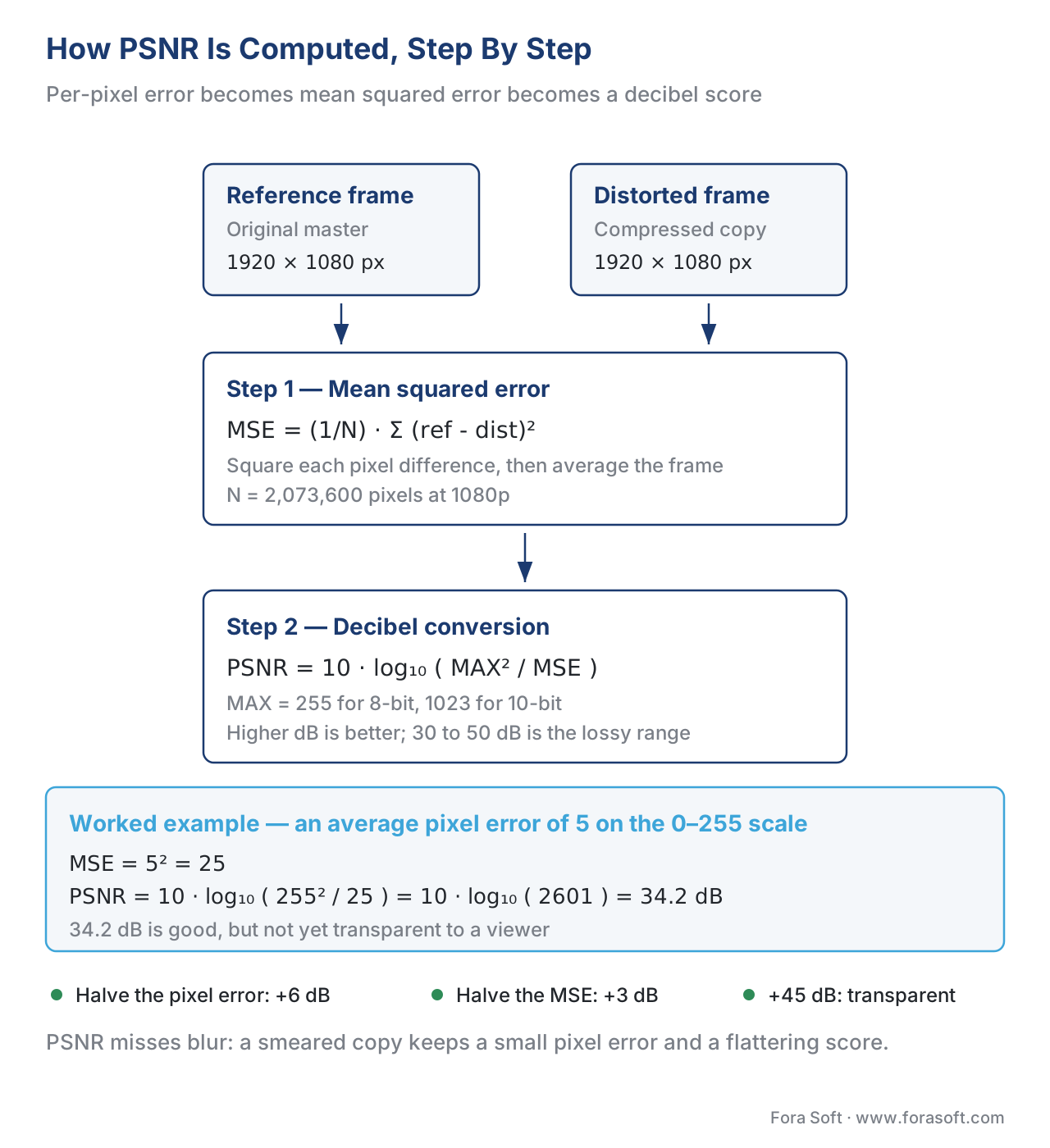 Figure 2. PSNR computed step-by-step. The MSE is the average squared pixel-by-pixel difference; the logarithm turns it into a decibel score where higher is better.
That weakness is what motivated the structural-similarity family.
SSIM — measuring structure, not pixels
SSIM, short for structural similarity, was introduced by Zhou Wang and Alan Bovik at the University of Texas at Austin in their landmark 2004 IEEE paper, Image Quality Assessment: From Error Visibility to Structural Similarity. 2 The paper has been cited over 50,000 times — one of the most-cited articles in all of image processing — and won the IEEE Signal Processing Society Best Paper Award. Every quality metric since then is, in some sense, a footnote on this paper.
The premise is the one we hinted at above: the human visual system is not a pixel-error detector. It is a structure detector. You glance at a face and you do not measure the colour of every individual hair; you measure the spatial pattern of light and dark that tells your brain "face". Two images that have the same pixel error can look very different if one of them preserves that spatial pattern and the other one breaks it. So instead of averaging the raw pixel error, SSIM compares the two images on three perceptual axes, multiplies them together, and reports the result.
The three axes are luminance, contrast, and structure. Luminance is the average brightness of a small image patch — you take an 11 × 11 window of pixels, average them, and compare the average of the original to the average of the compressed. Contrast is the spread of brightness inside the same patch — high in busy regions of the image, low in flat regions. Structure is the spatial pattern of bright and dark inside the patch with the average brightness and the spread already factored out — which is to say, the bit that tells the eye "this is a hair, this is an eye, this is a nose". Each axis produces a similarity score between 0 (no resemblance) and 1 (identical), and the three are multiplied together to produce the SSIM index for that patch. The patches slide across the whole frame and the average is the SSIM score for the frame.
SSIM(x, y) = [luminance(x, y)]^α × [contrast(x, y)]^β × [structure(x, y)]^γ
The exponents α, β, γ are usually set to 1 each so the equation simplifies to the product of the three terms. The SSIM index sits between -1 and 1 for arbitrary signals but in practice for two real video frames it sits between 0 and 1, where 1 is "compressed frame is identical to original" and lower numbers mean less similar. Numbers above 0.99 are typically transparent to a viewer; numbers around 0.95 are very good; numbers below 0.90 are visibly worse than the original on a careful comparison; numbers below 0.80 are obvious low-bitrate compression. 13
What does that buy you over PSNR? Three things, in order of importance.
First, SSIM correlates much better with what humans actually report in subjective tests, especially for structural distortions like blocking artefacts, ringing, and edge smearing. A compressed frame that has lost the texture of a brick wall will get a low structure-axis score and therefore a low SSIM, even if the raw pixel error is small. PSNR cannot see this; SSIM can.
Second, SSIM is scale-invariant in the right way. Multiply every pixel value by a constant — make the whole image brighter — and the SSIM stays close to 1, because the luminance term factors out. PSNR, in contrast, drops dramatically: the human eye barely notices, the math screams.
Third, SSIM is local. It computes a similarity score per 11 × 11 patch and averages them across the frame. That means a single region of severe damage drags the average down meaningfully — the way it would for a human viewer — instead of being diluted by all the easy flat regions like PSNR does.
SSIM is still not perfect. It struggles with motion (it was designed for images, not videos), with the way our eyes adapt at different viewing distances, and with very high-resolution displays. Those weaknesses motivated the next two refinements.
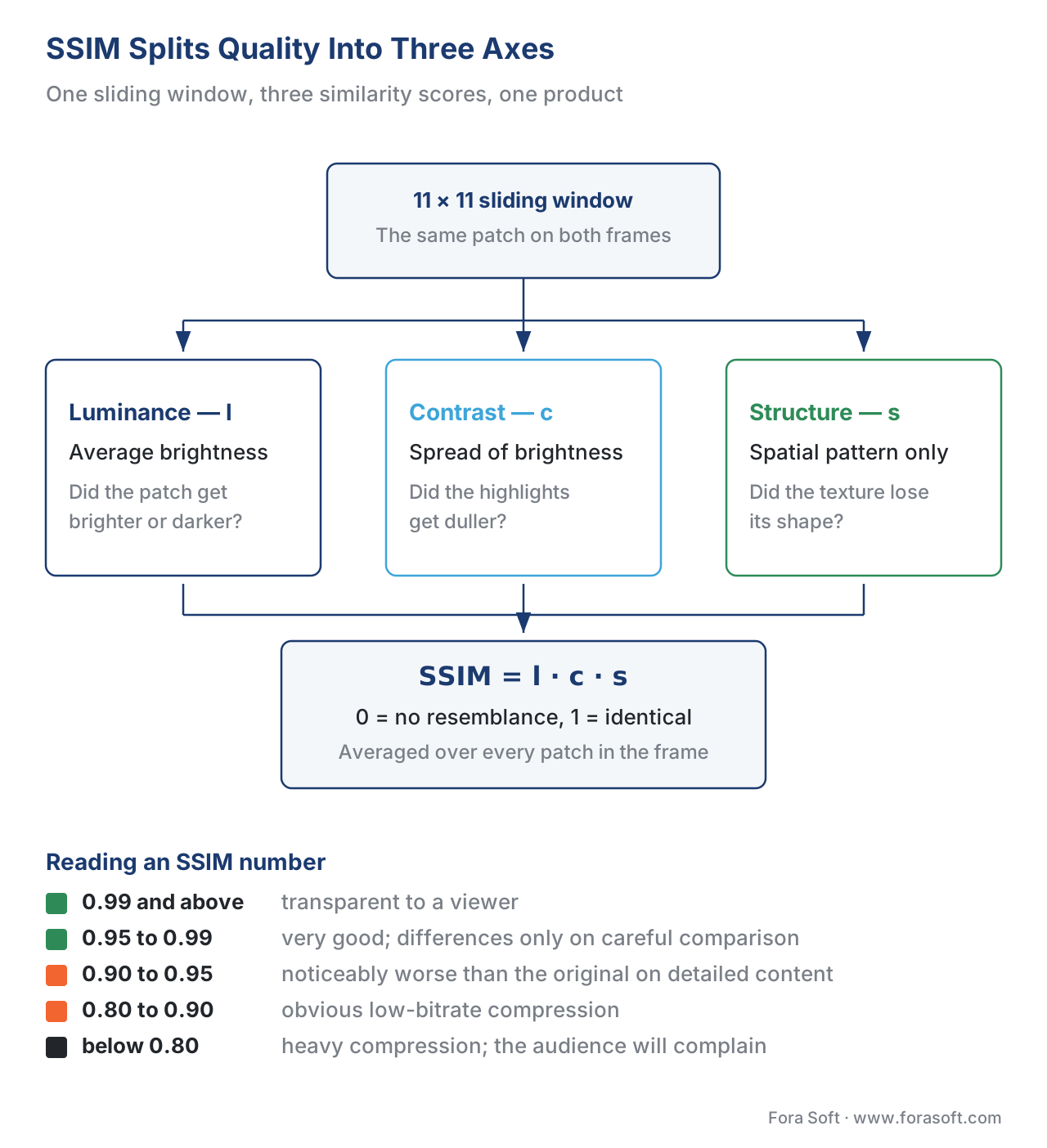 Figure 3. SSIM computes three local similarity scores per patch — luminance, contrast, structure — multiplies them together, and averages across the whole frame.
MS-SSIM — the multi-scale extension
MS-SSIM, short for multi-scale SSIM, was actually published before SSIM, in a 2003 conference paper by the same authors plus Eero Simoncelli. 3 The "multi-scale" idea is intuitive once you think about how the eye works at different viewing distances.
When you look at a video on a phone held close to your face, you see fine detail — the texture of skin, the edges of letters. The same video projected onto a cinema screen from the back row looks softer; you stop seeing the fine detail and start seeing the broad shapes. Your perception of compression damage depends on which one you are looking at. A small pixel-level artefact that is obvious on a phone might be invisible at cinema distance; a large structural distortion that the cinema viewer sees clearly might be lost in the phone viewer's other distractions.
MS-SSIM models that by computing SSIM at several scales: it runs SSIM at the original resolution, then downsamples the frame by 2 and runs SSIM again, then downsamples by 2 again, and so on, typically for five total scales. The five SSIM scores are combined with weights that have been calibrated against subjective experiments — the middle scale carries more weight than the extremes, because the human visual system is most sensitive at moderate spatial frequencies. The combined score is the MS-SSIM index for the frame, also sitting between 0 and 1.
In practice MS-SSIM is what video researchers use when they want a structural metric they can defend in a paper. It correlates measurably better with subjective scores than SSIM does, especially on high-resolution content, and it has become the de-facto "SSIM" that everyone really means when they write "SSIM" in 2026. Modern FFmpeg reports MS-SSIM via the libvmaf filter (feature=name=ms_ssim) if you ask for it; older ssim filters report the original 2004 variant.
The trade-off is computational cost: MS-SSIM runs roughly 5× slower than plain SSIM because it touches the same pixels five times. For real-time monitoring of a live stream that matters; for offline encoder evaluation it does not.
VMAF — the machine-learning era
VMAF, short for Video Multimethod Assessment Fusion, was introduced by Netflix in June 2016 as a way to escape both PSNR's perceptual blind spots and SSIM's mid-life crisis. 4 The idea is simple: instead of writing the formula by hand, take a handful of existing low-level metrics, feed them all into a machine-learning model, and train the model on a large database of clips that humans have rated. The model learns the best way to combine the inputs to produce a number that tracks human judgment.
What goes into VMAF? Three families of low-level features, computed on every pair of original and distorted frames:
- VIF (Visual Information Fidelity) at four scales — a measure of how much of the information in the original frame the compressed frame has preserved. VIF is a 2006 metric from Sheikh and Bovik at UT Austin; VMAF uses a modified per-scale version.
- ADM (Additive Detail Measure, also called DLM, Detail Loss Metric) at four scales — a measure of how much of the "detail" the compressed frame has lost, separated from the more general impairment. ADM is a 2011 metric from Li, Krasula, Le Callet et al.
- Motion — a simple measure of how much the frame changes from the previous one, used to make the model weight static and moving content differently. 5
That gives nine features per frame. VMAF feeds them into a regression model — a support vector machine with a radial basis kernel in the original release, more recently a random-forest variant in the bootstrap models — and the model outputs a score on a 0-to-100 scale. 100 is "matches the reference perceptually" and 0 is "looks nothing like the reference". A typical 1080p Netflix encode targets a VMAF of 93 to 96 on the highest rung of its bitrate ladder; anything lower is the ladder going down for slower connections.
VMAF is trained against subjective scores. The original training set used a few hundred clips that Netflix's internal lab had scored, with viewers shown each clip on a calibrated 1080p TV at three picture heights' viewing distance. New models are retrained periodically as more data accumulates. 6 This is the key conceptual difference from PSNR and SSIM: VMAF does not have a fixed formula, it has a fixed training methodology. Change the training data and you change the metric.
The trade-off is twofold. On one hand, VMAF correlates much better with subjective MOS than PSNR or SSIM do — the Netflix tech blog reports Pearson correlations around 0.93-0.96 on validation sets, where PSNR typically hits 0.6 to 0.7 on the same sets. 7 On the other hand, VMAF inherits all the limitations of its training data: it was trained on a specific kind of content (Netflix-style premium streaming video), at a specific viewing distance (3H, "three picture heights"), with a specific kind of distortion (codec compression, not noise, not transmission errors). Push VMAF outside that envelope — score a heavily upscaled phone clip, score a screen capture of code, score a synthetic test pattern — and the numbers become much less trustworthy.
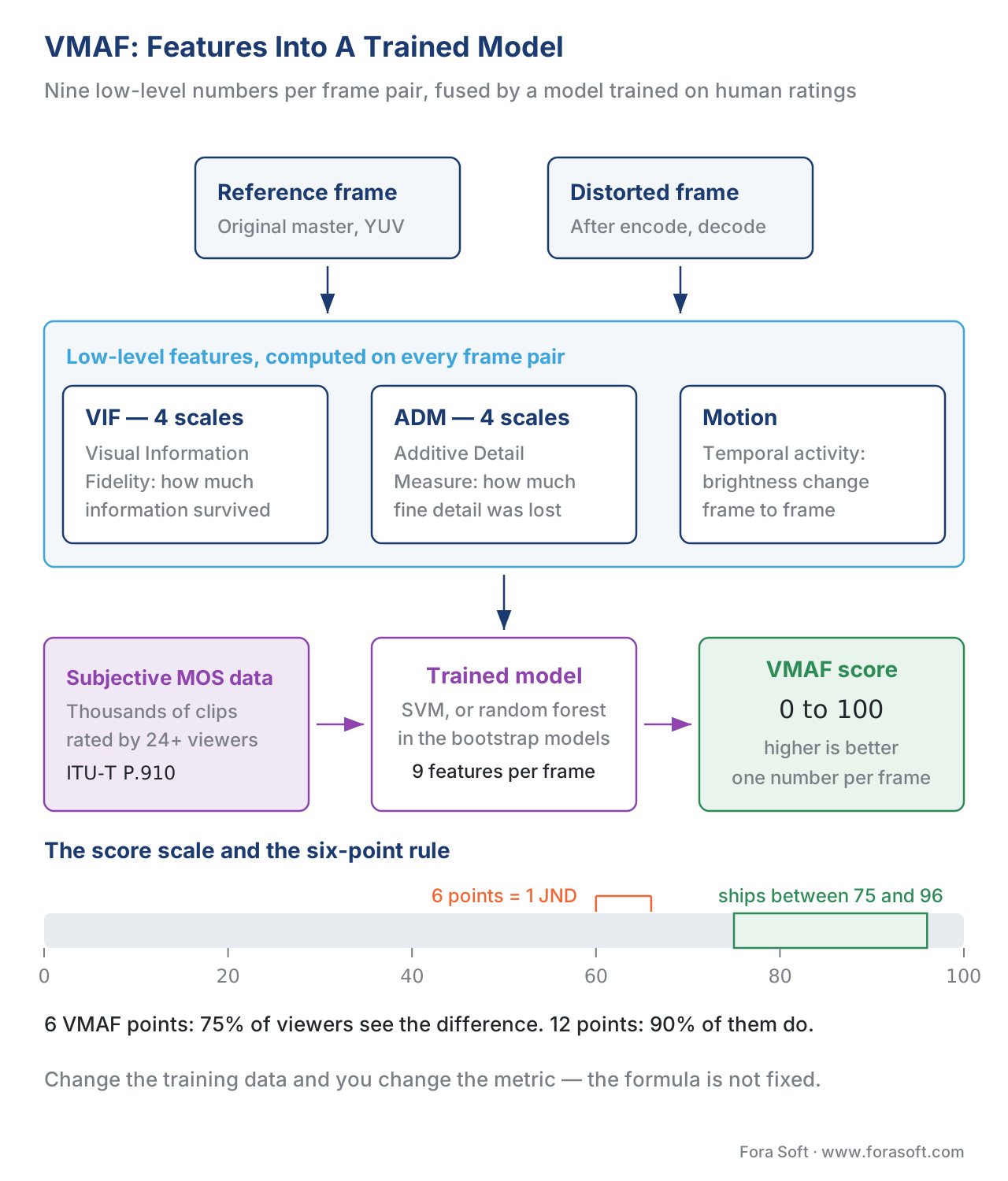 Figure 4. VMAF's architecture. Three families of low-level features go into a machine-learning model trained on thousands of human ratings; the model outputs a single score from 0 to 100.
The VMAF score scale and the six-point rule
The scale is calibrated so that 100 is perceptually transparent and roughly 20 is the lowest-bitrate-still-watchable encode in Netflix's training set. Most of what a streaming service actually ships sits between 75 (lowest mobile rung) and 96 (top rung).
The most useful number to memorise on the VMAF scale is 6 points = 1 JND, where JND is Just Noticeable Difference — the smallest quality change that more than half of viewers can spot in a side-by-side comparison. Netflix proposed this rule in 2017 and the streaming-quality industry has lived by it since: a six-point VMAF gap is what 75% of viewers will notice in an A/B test, and a twelve-point gap is what 90% of viewers will notice. 8 In practice this means:
- If you are designing a bitrate ladder, no two adjacent rungs should be more than two VMAF points apart, so the player can switch quality up and down without the viewer ever seeing the change.
- If your top rung scores higher than 95, you are spending bandwidth on quality the audience cannot see and you can probably ratchet the bitrate down 10-20% with no complaint.
- If your lowest rung scores below 70, you are pushing viewers into a quality level they will perceive as broken; either raise that rung's bitrate or stop serving it.
VMAF variants — they are not interchangeable
In 2026, "VMAF" is not one number — it is a small family of related numbers. The four variants you will see in tools and papers are:
| Variant | Slug | What it scores | When to use |
|---|---|---|---|
| Default | vmaf_v0.6.1 |
1080p TV viewed at 3 picture heights, includes "enhancement gain" | General SDR streaming evaluation |
| NEG | vmaf_v0.6.1neg |
Same as default but with No Enhancement Gain | Codec-only evaluation; sharpening cannot inflate the score |
| Phone | vmaf_v0.6.1 + --phone-model |
1080p clip viewed on a phone screen | Mobile-only bitrate-ladder tuning |
| 4K | vmaf_4k_v0.6.1 |
4K TV viewed at 1.5 picture heights | Premium UHD content |
The most-misunderstood variant is NEG (No Enhancement Gain). Netflix found in 2021 that the default VMAF could be tricked by deliberately oversharpening or boosting saturation before encoding — those tricks made the picture look better in still-frame comparisons even though the moving video was worse. The NEG variant strips that loophole out, so it is the right metric to use whenever you are comparing two encoders that might pre-process the picture before compression. Use NEG for codec evaluation, default for end-to-end pipeline evaluation. 9
The phone model is a small recalibration that accepts a wider tolerance because phone viewers can see less detail. The same encode that scores 78 on the default model can score 88 on the phone model — and both numbers are correct for their viewing condition. The implication is sometimes uncomfortable: you may be able to ship a measurably worse 480p stream to phones without anyone noticing.
The 4K model is calibrated for a 4K display at 1.5 picture heights of viewing distance, which is the closest a viewer is realistically going to sit. It is more demanding than the default model and you should expect 4K VMAF scores to run 2-4 points lower than 1080p scores on the same source.
Computing all four metrics with FFmpeg
The easiest way to get all four numbers off a single encoded clip is the FFmpeg libvmaf filter, which has shipped with FFmpeg since 4.4 and gained CUDA acceleration in FFmpeg 6.1. 10 One command, one read of the file, all four metrics:
# Compute VMAF (default model), PSNR, SSIM, MS-SSIM and CAMBI on encoded.mp4
# vs reference.mp4. log_fmt=json writes a machine-readable per-frame log.
ffmpeg -i encoded.mp4 -i reference.mp4 \
  -lavfi "libvmaf=feature='name=psnr|name=float_ssim|name=float_ms_ssim|name=cambi':log_fmt=json:log_path=metrics.json" \
  -f null -
If your encoded file has a different resolution or frame rate from the reference (almost certain in a real bitrate-ladder evaluation), scale and conform first:
# Conform the encoded file (e.g. 720p30) to the reference (1080p60) before measuring
ffmpeg -i encoded_720p30.mp4 -i reference_1080p60.mp4 \
  -lavfi "[0:v]scale=1920:1080:flags=bicubic,fps=60[dist];[dist][1:v]libvmaf=feature='name=psnr|name=float_ssim|name=float_ms_ssim'" \
  -f null -
For GPU acceleration on an NVIDIA card, swap in libvmaf_cuda, which gives roughly 6× faster throughput at 1080p and 4K and is the production deployment of choice at Netflix and most large encoders.
The JSON log gives you per-frame numbers — which is what you want, because a single average across a long clip can hide bad moments in good ones. A clip with one terrible second and 59 perfect seconds averages 95 VMAF; the same clip with the bad second smoothed out also averages 95. Looking at the per-frame minimum exposes the difference. The Netflix recommendation, and ours, is to track the 5th-percentile VMAF (the worst 5% of frames) at least as carefully as the mean.
When each metric fails — anchor table for production
Pick the wrong metric and you will optimise for the wrong thing. Use this table whenever you are deciding which numbers to look at first.
| Metric | What it does well | Where it fails | Best for |
|---|---|---|---|
| PSNR | Fast, universal, well-understood mathematically, every encoder reports it | Misses blur, smears with sharp content, ignores where in the frame the error sits | Historical comparisons; sanity checks; very-high-bitrate encoder tuning |
| SSIM | Correlates with structural distortions, scale-invariant for brightness shifts | Single-scale; struggles at very high resolutions; not designed for motion | Image quality work; legacy codec papers |
| MS-SSIM | Better correlation than SSIM, especially on high-res content; cheap | Still a hand-designed formula, no training data | Codec research; offline evaluation on UHD content |
| VMAF (default) | Best correlation with human MOS for SDR streaming on TVs | Sensitive to pre-processing (sharpening inflates the score); trained on Netflix-style content | Streaming ladder tuning; A/B codec comparisons on professional content |
| VMAF NEG | Same as VMAF but immune to sharpening tricks | Slightly lower correlation than default model on un-sharpened content | Pure codec evaluation; fair comparisons across encoders |
| VMAF phone | Calibrated for mobile viewing distance | Will overstate quality if used for TV/desktop playback | Mobile-only bitrate ladders |
| VMAF 4K | Calibrated for 4K at 1.5H viewing distance | Will understate quality for content viewed further back | Premium UHD content |
| XPSNR | Lightweight, perceptually weighted, designed for HDR and UHD | Newer, less industry adoption than VMAF | HDR / VVC encoding; low-complexity production monitoring |
| CAMBI | Catches banding artefacts that all the others miss | Banding-only — useless for general quality | HDR pipeline validation; gradient-heavy content |
The right answer in production is almost never "use one metric". Real evaluation pipelines compute three or four — typically PSNR + MS-SSIM + VMAF NEG + CAMBI — and look at all of them at once. When the metrics disagree, that disagreement is itself useful information: it usually points to a specific kind of distortion. PSNR high but VMAF low → blurring; PSNR low but VMAF high → minor pixel noise that the eye does not see; SSIM high but CAMBI also high → smooth gradients with banding.
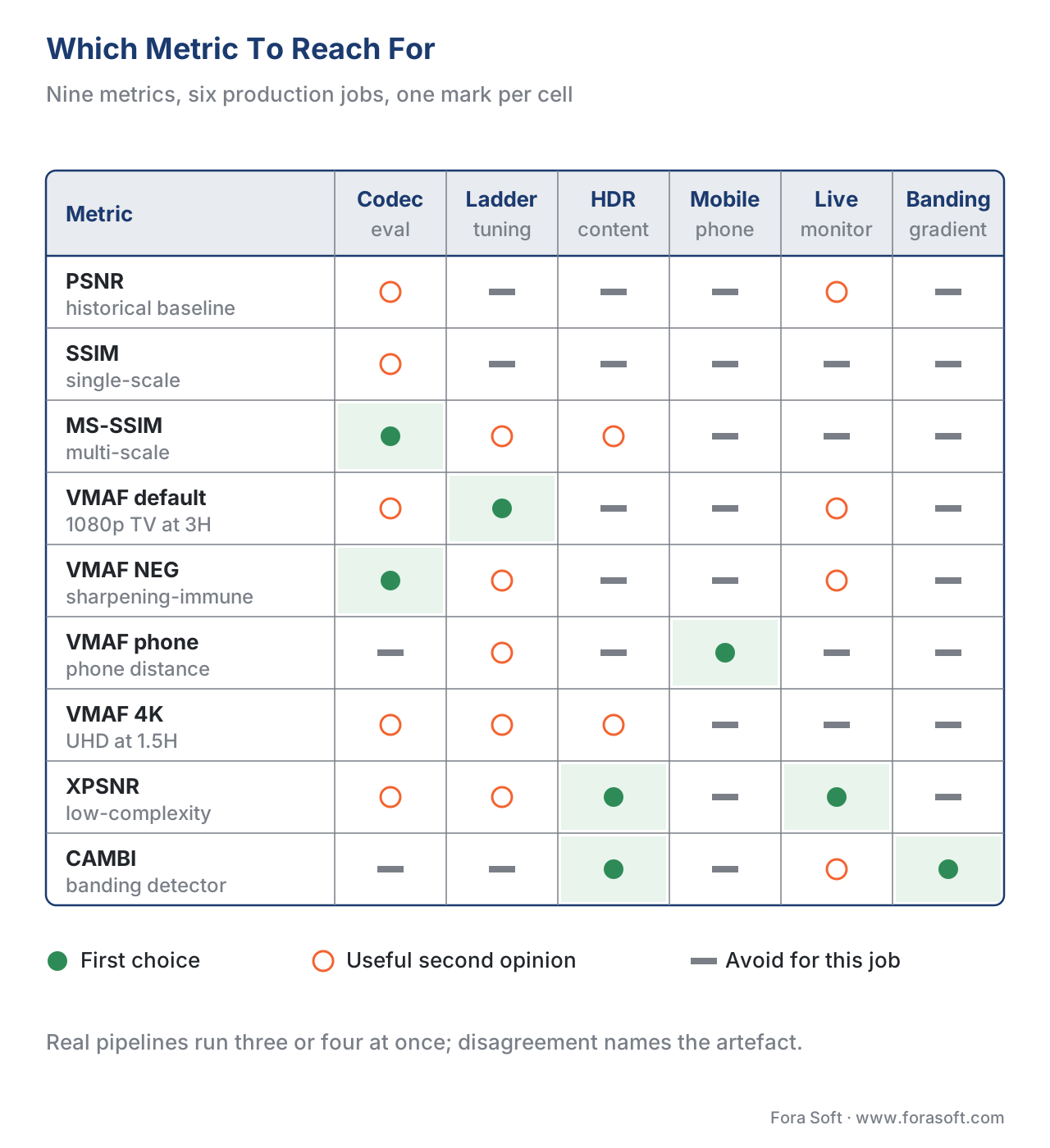 Figure 5. Which metric to reach for in each common production scenario. The most defensible production pipelines compute several at once and only ship encoder changes when the numbers agree.
Putting metrics to work — BD-rate
The most common use of these metrics in 2026 is not scoring a single clip; it is comparing two codecs. The standard tool for that is BD-rate, short for Bjøntegaard Delta rate, proposed by Gisle Bjøntegaard at the ITU-T VCEG working group in 2001 and still the industry-standard way to express how much one codec beats another. 14
The idea is to encode the same content at four to six different bitrates with each codec, plot quality (PSNR, SSIM, or VMAF — you pick) on the Y axis against bitrate on the X axis, and fit a smooth curve through the points. The two curves — one per codec — are usually pretty close in shape. BD-rate asks: at the same quality level, how much less bitrate does codec B need compared to codec A? The answer is the average bitrate saving across the overlapping quality range, reported as a percentage. "AV1 has a 30% BD-rate gain over H.264 at the same VMAF" means: AV1 ships the same VMAF score for 30% less bitrate.
The catch — and this is where vendors burn each other in white papers — is that BD-rate depends on which quality metric you choose. The same two codecs can show a 30% gain measured against VMAF, a 22% gain measured against MS-SSIM, and a 12% gain measured against PSNR. None of the numbers are wrong; they each answer a slightly different question. The honest practice is to report BD-rate against at least two metrics (typically PSNR and VMAF) and warn the reader when the numbers diverge.
When a codec comparison reports a single BD-rate number with no metric attached, you are reading either marketing or sloppy science. Ask which metric, what content, what encoder settings, and what bitrate range. The answer is sometimes inconvenient for the people quoting the number.
CAMBI, HDR-VMAF, and the road forward
Two improvements have shipped in the last three years that close real gaps in the metric stack.
CAMBI — Contrast-Aware Multiscale Banding Index — is Netflix's banding detector, open-sourced in 2021 and integrated into libvmaf since v2.3. 15 Banding is the visible step-pattern that appears in smooth gradients (a sunset sky, a backlit silhouette) when there are not enough quantisation levels to represent the smooth ramp. PSNR misses it almost completely; SSIM misses it; VMAF misses it. CAMBI is a specialised metric that scores banding only, and is now the standard "second number" alongside VMAF for HDR and gradient-heavy content. Unlike the others, CAMBI inverts the direction: higher CAMBI means more banding, which is worse. A score below 1 is clean, between 1 and 5 is marginal, above 5 is "viewer is going to notice".
HDR-VMAF is Netflix's extension of VMAF to high-dynamic-range content, originally developed with Dolby Laboratories in 2021 and refined since. The plain VMAF was trained on SDR (standard dynamic range) clips and gets the absolute brightness levels wrong on HDR content — a 1000-nit highlight in a dark room is a very different perceptual event from the same 1000-nit highlight in a bright room. HDR-VMAF re-trains on PQ-domain (Perceptual Quantizer) clips with a viewing-environment model attached. It is not yet a standalone open-source release at the time of writing in May 2026, but its scoring methodology is well documented and supported in major commercial tools. 16
Beyond these, two longer-term directions are worth watching. XPSNR, the Extended Perceptually Weighted PSNR developed by Christian Helmrich and Christian Stoffers at Fraunhofer HHI, is a lightweight perceptual metric that runs at PSNR speeds but scores like a structural metric. It is shipping in the Fraunhofer VVC encoder (vvenc) and in FFmpeg as a filter; on UHD HDR content it correlates with subjective MOS roughly as well as MS-SSIM does at a fraction of the cost. 17 Neural quality metrics — proprietary ones like MainConcept VMAF-E, open ones like the recent VQUAD-style transformer models — are starting to ship in production tools and may eventually replace the hand-engineered features inside VMAF with a deep network. Adoption is still small in 2026 and we recommend treating these as complementary to VMAF rather than as a replacement.
Common pitfalls
The five mistakes we see most often in production video pipelines, in rough order of how much damage they cause:
Reporting a single average for a long clip. A two-hour movie that averages VMAF 92 can have a fifteen-second stretch that averages VMAF 55, and the human viewer will see only that fifteen seconds. Always track the 5th-percentile or the minimum, not just the mean.
Mixing VMAF model variants without saying which. "Our codec hit a VMAF of 88" means nothing without naming the model. NEG, default, phone, and 4K can each differ by 5-10 points on the same encode. State the model in every report.
Trusting PSNR to compare two perceptually different codecs. PSNR can prefer a blurry copy over a slightly noisy one, because blur reduces pixel error and noise increases it, even though the noisy copy looks better to a human. Never make a codec choice on PSNR alone when the candidates differ by more than 10% in bitrate.
Comparing encodes at different resolutions without rescaling first. A 720p encode and a 1080p encode of the same source produce frames of different sizes; you have to scale one to match the other before computing pixel-by-pixel metrics, and the scaling itself introduces error. Document the scaling algorithm; bicubic and Lanczos give measurably different PSNR numbers.
Ignoring the screen and viewing distance. A clip that scores VMAF 84 on a 65-inch TV at 3H may score VMAF 92 on a phone at arm's length. Use the phone model for phone content; do not use the desktop default for everything.
Free download: Video Quality Metrics Cheat SheetOne page: PSNR, SSIM, MS-SSIM, VMAF in all four variants, XPSNR and CAMBI — what each scale means, the six-point JND rule, the FFmpeg one-liners, and eight rules of thumb for production.Where Fora Soft fits in
Fora Soft has been shipping video streaming, WebRTC, conferencing, surveillance, e-learning, telemedicine, OTT, and AR/VR products since 2005, with 239+ projects delivered to clients across every major vertical. In every one of them, the question "is this stream good enough to ship?" is decided by a metric pipeline rather than by a human eye. Our reference quality stack for OTT and VOD clients computes PSNR, MS-SSIM, VMAF (default and NEG), and CAMBI on every encode and flags anything where the 5th-percentile VMAF drops below the client's contractual floor. For WebRTC and telemedicine, where we cannot store the reference frame for a full-reference metric, we use no-reference proxies and bitstream features cross-checked against periodic VMAF spot checks. The result is that we know, before the customer sees it, exactly how good every output of our pipelines is — and we have the numbers to defend the encoder budget when finance asks why we are paying for the extra compute.

The book
Video Encoding: A Complete Guide to Video Compression — From Pixels and Color to H.264, HEVC, AV1, Quality Metrics, and AI
Volume 1 takes the four numbers in this article back to the encoder that produced them: where quantisation actually throws detail away, why blur costs PSNR so little and VMAF so much, and how a rate-control mode turns a target score into a bitrate you can budget. It works BD-rate through in full — the anchor points, the curve fit, and the content and settings that separate an honest codec comparison from a marketing one — and closes with the AI side, including the learned metrics that are starting to appear next to VMAF. Written by Nikolay Sapunov, CEO at Fora Soft.
Can you defend the bitrate you are paying for?
Tell us what you encode, what your dashboard reports and which metric decides when a change ships — we will tell you which number is carrying the decision, where it is flattering you, and what the second metric should be. 250+ video products shipped since 2005.
See our case studies
Case study
Worldcast Live
Concert streaming at 1.5 Gb/s with five audio channels, 0.4–0.5 s latency and 10,000 simultaneous viewers — dynamic quality adjustment only earns its keep when something measures what each rung actually looks like.
Case study
Speed.Space
Remote production for Netflix, Electronic Arts and HBO, recording at 1080p and 8 Mb/s — over five times the bitrate of standard conferencing, which is a number you can only justify by showing what the cheaper encode costs in quality.
Case study
Mindbox
An RTSP to FFmpeg to HLS pipeline running across 50+ deployments, where facial recognition holds 99.5%+ accuracy — transcode too hard and the detector starts missing faces, so the encode is tuned against measurement, not taste.
What to read next
Quality
Benchmarking Encoders: Same VMAF, Different Bitrate and Speed
How to run the comparison these metrics are meant for, without fooling yourself.
Tooling
Per-Title and Per-Scene Encoding: Smart Bitrate Ladders
Turning a VMAF target into a ladder where no rung wastes bandwidth.
Codecs
How to Choose a Codec for Your Service in 2026
What a BD-rate number should and should not decide for you.
Foundations
The Complete Guide to HDR: HDR10, HDR10+, Dolby Vision, HLG
Why CAMBI and HDR-VMAF exist, and what the SDR models get wrong.
-
ITU-T Recommendation P.910 (10/2023), Subjective video quality assessment methods for multimedia applications, International Telecommunication Union. https://www.itu.int/rec/T-REC-P.910 — accessed 2026-05-16. Defines the subjective testing methodology that all objective metrics are validated against; absorbed the former P.913 in 2024. ↩
-
Zhou Wang, Alan C. Bovik, Hamid R. Sheikh, Eero P. Simoncelli, Image Quality Assessment: From Error Visibility to Structural Similarity, IEEE Transactions on Image Processing, vol. 13, no. 4, pp. 600-612, April 2004. https://ieeexplore.ieee.org/document/1284395 — accessed 2026-05-16. The foundational SSIM paper, cited 50,000+ times. ↩↩
-
Zhou Wang, Eero P. Simoncelli, Alan C. Bovik, Multi-scale structural similarity for image quality assessment, 37th IEEE Asilomar Conference on Signals, Systems and Computers, November 2003. https://ece.uwaterloo.ca/~z70wang/publications/msssim.html — accessed 2026-05-16. The MS-SSIM extension. ↩
-
Reza Rassool et al., Toward A Practical Perceptual Video Quality Metric, Netflix Technology Blog, June 2016. https://netflixtechblog.com/toward-a-practical-perceptual-video-quality-metric-653f208b9652 — accessed 2026-05-16. VMAF's public introduction. ↩↩
-
Netflix VMAF documentation, Features. https://github.com/Netflix/vmaf/blob/master/resource/doc/features.md — accessed 2026-05-16. Describes VIF, ADM, and motion feature extractors used in VMAF v0.6.x. ↩
-
Netflix VMAF v3.0.0 release notes and architecture overview. https://github.com/Netflix/vmaf/releases/tag/v3.0.0 — accessed 2026-05-16. Documents the v3.0 changes, CUDA acceleration, and FFmpeg 6.1 integration. ↩
-
Christos Bampis, Zhi Li, et al., VMAF: The Journey Continues, Netflix Technology Blog. https://netflixtechblog.com/vmaf-the-journey-continues-44b51ee9ed12 — accessed 2026-05-16. Reports PCC and SROCC against subjective MOS on Netflix internal datasets. ↩
-
Jan Ozer, Finding the Just Noticeable Difference with Netflix VMAF, Streaming Learning Center. https://streaminglearningcenter.com/codecs/finding-the-just-noticeable-difference-with-netflix-vmaf.html — accessed 2026-05-16. Source for the "6 VMAF points = 1 JND" rule. ↩
-
Jan Ozer, Netflix Addresses VMAF Hackability with New Model, Streaming Learning Center. https://streaminglearningcenter.com/blogs/netflix-addresses-vmaf-hackability-with-new-model.html — accessed 2026-05-16. Explains the NEG variant and why sharpening can inflate default VMAF. ↩
-
FFmpeg libvmaf filter documentation, Netflix vmaf repository. https://github.com/Netflix/vmaf/blob/master/resource/doc/ffmpeg.md — accessed 2026-05-16. Canonical reference for using VMAF inside FFmpeg. ↩
-
Peak signal-to-noise ratio, Wikipedia, with citations to ITU-T J.247. https://en.wikipedia.org/wiki/Peak_signal-to-noise_ratio — accessed 2026-05-16. Used here for the canonical PSNR formula and the 30-50 dB typical range. ↩
-
FastPix, VMAF vs. PSNR vs. SSIM: Understanding Video Quality Metrics. https://fastpix.com/blog/understanding-vmaf-psnr-and-ssim-full-reference-video-quality-metrics — accessed 2026-05-16. Used for the PSNR-misses-blur observation. ↩
-
Elecard, Interpretation of objective video quality metrics. https://www.elecard.com/page/article_interpretation_of_metrics — accessed 2026-05-16. SSIM threshold interpretation in production tools. ↩
-
Christian Herglotz, Hannah Och, et al., Bjøntegaard Delta (BD): A Tutorial Overview of the Metric, Evolution, Challenges, and Recommendations, arXiv:2401.04039, January 2024. https://arxiv.org/abs/2401.04039 — accessed 2026-05-16. Modern reference for BD-rate including its metric dependence. ↩
-
Joel Sole, Lukáš Krasula et al., CAMBI, a banding artifact detector, Netflix Technology Blog, 2021. https://netflixtechblog.com/cambi-a-banding-artifact-detector-96777ae12fe2 — accessed 2026-05-16. CAMBI introduction; integrated into libvmaf since v2.3. ↩
-
Netflix and Dolby Laboratories, HDR-VMAF, presented at Mile-High Video 2023. https://www.csimagazine.com/csi/netflix-reveals-hdrvmaf-solution.php — accessed 2026-05-16. Architecture and validation results for the HDR variant. ↩
-
Christian R. Helmrich, Sebastian Bosse, Mischa Siekmann et al., A Study of the Extended Perceptually Weighted Peak Signal-to-Noise Ratio (XPSNR) for Video Compression, ITU Journal: ICT Discoveries, vol. 3, no. 1, 2020. https://www.itu.int/dms_pub/itu-s/opb/journal/S-JOURNAL-ICTS.V3I1-2020-8-PDF-E.pdf — accessed 2026-05-16. XPSNR specification and Fraunhofer HHI reference implementation. ↩
