


The picture got brighter — and more confusing
For about eighty years, watching a screen meant one quiet promise: the brightest white in the picture would be about as bright as a sheet of paper under a desk lamp. That ceiling was baked into the rules. Cameras measured the world but only kept the top sliver of it. Studio monitors were built around that sliver. Televisions in living rooms expected nothing more.
Then HDR happened, and the ceiling came off. A modern HDR television can throw out a flash a hundred times brighter than a desk lamp. A sunset on a phone screen can actually feel like a sunset, not like an orange smudge. Black levels go deeper. Colours that used to be impossible — the molten orange inside a fire, the specific green of a city park at dusk — now sit on the screen looking like themselves.
The trade-off is that HDR is not one thing. It is four things wearing similar uniforms — HDR10, HDR10+, Dolby Vision, and HLG — and a product team that picks the wrong one ships pictures that look broken on half their customers' devices. The four formats are not interchangeable. They were built for different problems, by different companies, and they reach the viewer through different pieces of infrastructure.
This article is the map. It explains what HDR actually is, walks through each of the four formats in plain English, shows the decision a product team has to make, and lists the bugs that come up in production when the formats get mixed up.
Quick read for the busy reader. HDR10 is the universal baseline — pick it if you only ship one format. Dolby Vision is the premium choice with the best picture and the highest licensing cost. HDR10+ is Samsung's free alternative to Dolby Vision, supported by Amazon Prime Video. HLG is the format for live broadcasts and for any signal that has to look right on both HDR and SDR sets without re-encoding.
What HDR actually is
The letters stand for High Dynamic Range. The "dynamic range" of any picture is the gap between the darkest part and the brightest part the screen can show without clipping.
Take an SDR television. The standard says its brightest white is 100 nits. (A nit is the unit of brightness — one candela per square metre, the technical way of saying "how much light leaves the surface of the screen". For comparison: a candle is around 1 nit. A page of a book under indoor lighting is somewhere between 80 and 200 nits. The sun, looking straight at it, is around 1.6 billion nits.) Real-world scenes regularly contain elements thousands of times brighter than that. A sunlit cloud is 10,000 nits. A specular highlight off a chrome bumper outdoors is 20,000 nits. SDR throws all of that away — anything above 100 nits gets clamped to white. Cinematographers and colourists spend their careers compressing the world into that narrow window.
HDR's job is to widen the window. A typical HDR television in 2026 hits 1,000 to 4,000 nits at the brightest point. Premium models go to 4,000 and beyond. Phones reach 1,600 to 2,500 nits for HDR highlights. The dynamic range is no longer a thousand-to-one (SDR), it is a hundred-thousand-to-one or better. Suddenly the sunset on screen contains the same kind of brightness ratio your eye saw when the camera was there.
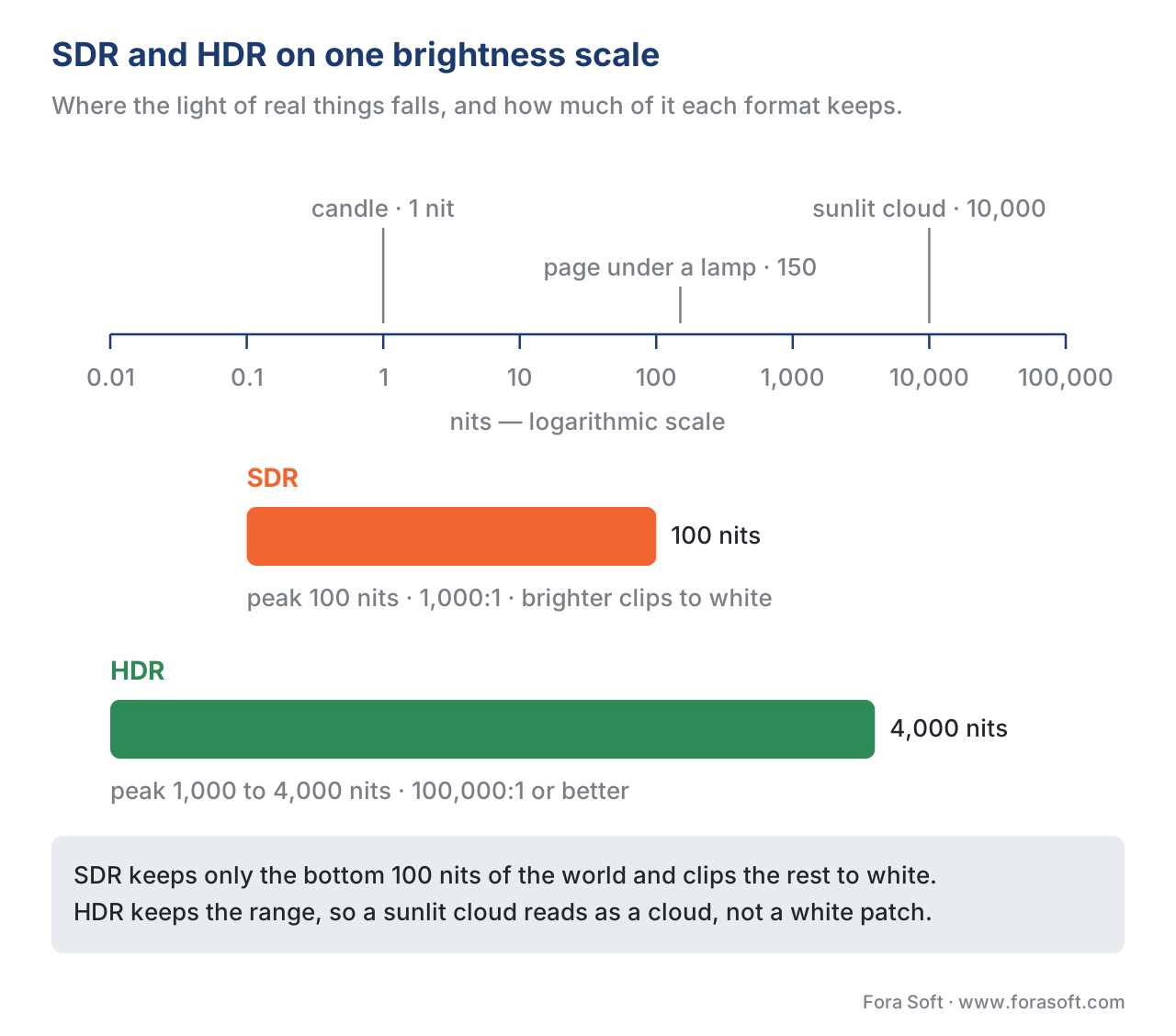
Three things have to happen for HDR to work end-to-end, and all three have to agree. First, the camera has to capture more dynamic range than SDR ever asked for. Second, the file has to carry that range without crushing it — which means more bits per pixel (10-bit minimum), a wider colour space (Rec. 2020), and a transfer function that knows how to describe very bright pixels (PQ or HLG, not gamma). Third, the display has to know what it is receiving and tone-map it correctly to its own physical capabilities.
That third step is where the four HDR formats start to matter. They are different recipes for how the camera-side and the display-side agree on what the picture should look like.
Why there are four formats, not one
The answer is "industry politics", but a slightly longer answer is more useful.
In the early 2010s, two camps were trying to solve HDR at the same time. One camp was Dolby, sitting on a research lab full of patents from years of working on cinema projection. The other camp was the broadcast world — the BBC, NHK Japan, and the consortium that runs European television. Dolby wanted to ship one master file that looked perfect everywhere, with detailed metadata describing every scene. The broadcasters wanted a signal that worked on existing SDR televisions out of the box, because they had millions of viewers with sets they were not going to replace just because the World Cup got better cameras.
The two camps could not agree, so we got both: Dolby Vision is the Hollywood-grade premium standard with per-scene metadata. HLG is the broadcasters' compromise — one signal that gracefully reaches both HDR and SDR sets.
In the middle sat HDR10 — an open, royalty-free baseline format that the rest of the industry could rally around. HDR10 is essentially "the bare minimum to deliver HDR without paying Dolby". Every HDR TV must support it.
HDR10+ came later. Samsung was unwilling to pay Dolby's per-device licensing fee for Dolby Vision and unwilling to ship its premium televisions with the same static-metadata limitations as plain HDR10. So Samsung teamed up with Panasonic and 20th Century Fox in 2017 and built HDR10+ — a royalty-free alternative that copies most of Dolby Vision's dynamic-metadata trick.
So the four formats are not really four equivalent options. They are two static-metadata formats (HDR10, HLG) and two dynamic-metadata formats (Dolby Vision, HDR10+), each emerging from a different bet about who would control HDR distribution.

The split matters because it determines which devices can play your content, what your encoding pipeline looks like, and whether you pay licensing fees.
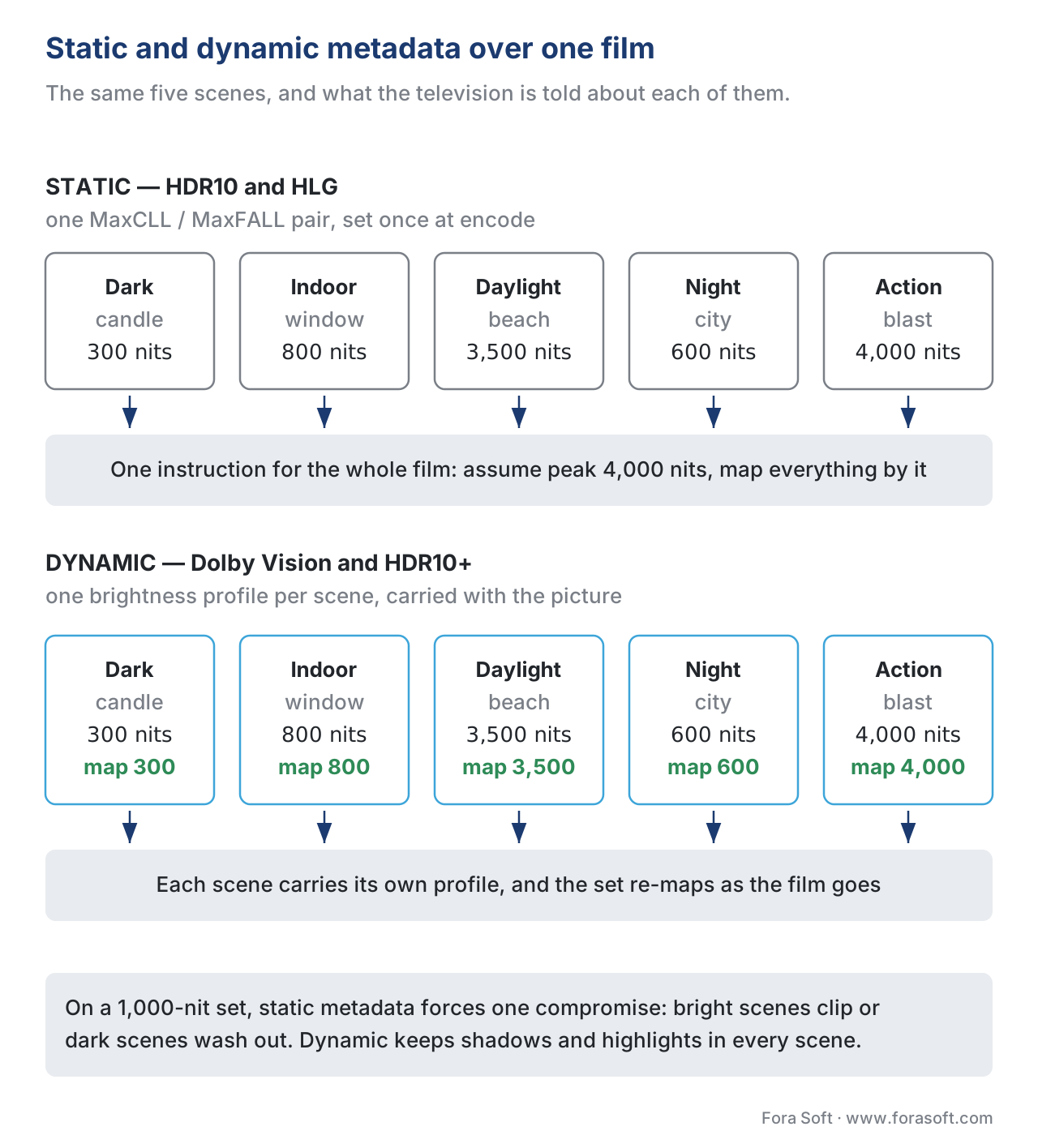
Static versus dynamic metadata, in one sentence. Static metadata gives the display one brightness instruction for the whole film; dynamic metadata gives a different instruction for every scene or every frame.
HDR10: the universal baseline
HDR10 is the format every HDR-capable device supports. It is open, royalty-free, and required by both the Blu-ray Disc Association and the UHD Alliance for any 4K HDR delivery. If you encode one and only one HDR variant of your content, it should be HDR10.
The recipe is straightforward. The signal uses the PQ transfer function (SMPTE ST 2084) — the absolute-brightness curve that maps signal values to real-world nits all the way to 10,000. The colour space is Rec. 2020. The bit depth is 10 bits per channel (so the signal can describe brightness without banding). And the file carries a small chunk of static metadata, set once for the whole title, listing two things:
- MaxCLL (Maximum Content Light Level): the brightest single pixel in the whole movie.
- MaxFALL (Maximum Frame Average Light Level): the brightest average frame in the whole movie.
When the TV plays the file, it reads these numbers and decides how to map the brightness of the source to the brightness of its own screen. If you mastered a film with peaks at 4,000 nits and the viewer's TV only does 800 nits, the TV uses MaxCLL / MaxFALL to tone-map — to gently compress the brightest highlights so they fit on its screen instead of clipping to white.
The catch is the word static. The TV gets one set of instructions for the whole film. Which means a dim, contemplative arthouse film and a Marvel third act with constant explosions get tone-mapped the same way. If your film mixes intimate candle-lit scenes with daylight ocean sequences in the same hour, HDR10's static metadata cannot give the dark scenes one treatment and the bright scenes another. The TV has to find one compromise that works for both, and the compromise is usually visible.
That is what dynamic metadata fixes.
Where HDR10 shines. Any HDR-capable device made after 2016 plays it. Encoding cost is the same as encoding regular HEVC. There is no licensing fee. It is the "ship one HDR master and be done" answer.
Dolby Vision: the premium picture
Dolby Vision is Dolby's response to HDR10's tone-mapping problem, and it is the most technically capable of the four formats.
The format does several things HDR10 does not. First, it uses 12-bit colour depth instead of 10-bit, which gives 4,096 brightness steps per channel instead of 1,024 — useful for the smoothest possible gradients. Second, it carries dynamic metadata described by SMPTE ST 2094-10, with per-scene or per-frame instructions for tone mapping. Third, it specifies a strict mastering workflow with calibrated reference monitors going up to 4,000 nits, which means the metadata reflects the colourist's actual creative intent, not just the camera's automatic output.
In practice, the dynamic metadata tells your TV things like: "scenes 1 to 14 should be tone-mapped assuming 600 nits is the brightest important detail — anything above that can compress; scenes 15 to 30 are the daylight beach sequence, the brightest important detail is 3,000 nits, treat the whole scene differently." A 1,000-nit TV plays both scenes correctly because it gets explicit instructions for each one.
Dolby Vision has several profiles, and product teams need to know two of them. Profile 5 is what shows up on UHD Blu-ray discs and many streaming services — it uses Dolby's proprietary IPT colour space and is not backward-compatible with HDR10. If the player can't decode Dolby Vision, the file does not play at all. Profile 8.1 is the streaming-friendly version: it uses HDR10 as a fallback layer, so devices that cannot decode the Dolby Vision metadata still see plain HDR10. Profile 8.1 is what Netflix, Apple TV+, and Disney+ deliver, because it works everywhere.
The other thing worth knowing about Dolby Vision is Dolby Vision IQ. This is the in-home extension that reads the TV's ambient light sensor and adjusts tone mapping based on how bright the room is. On a sunny afternoon the picture brightens; in a dark room it preserves shadow detail. LG, Panasonic, Hisense, and TCL all ship Dolby Vision IQ on their 2025 lineups.
The price for all of this is licensing. Dolby charges TV manufacturers a per-device fee (estimates range from $2 to $3 per set). It charges streaming services and disc publishers to encode content. The most-quoted result of this licensing is that Samsung does not support Dolby Vision on any of its televisions — and Samsung is the world's largest TV maker. So Dolby Vision plays on most premium sets except Samsung's.
Where Dolby Vision shines. Premium VOD where picture quality is part of the value proposition (Netflix, Apple TV+, Disney+). Reference-grade content where colourists work to a precise creative intent. Hardware ecosystems where Dolby Vision is bundled (every iPhone since the iPhone 12 records and plays back Dolby Vision natively).
HDR10+: the royalty-free dynamic format
HDR10+ exists because Samsung did not want to pay Dolby's licensing fee. Samsung partnered with Panasonic and 20th Century Fox, and in 2017 launched HDR10+ as an open, royalty-free alternative.
Technically, HDR10+ is HDR10 plus dynamic metadata — exactly what the name says. The base layer is plain HDR10 (PQ transfer, Rec. 2020, 10-bit), so any HDR10-capable TV plays the underlying content correctly. On top of that, HDR10+ adds SMPTE ST 2094-40 metadata with per-scene tone-mapping instructions, very similar in spirit to Dolby Vision's dynamic metadata.
The result is that on a TV that supports HDR10+ (Samsung's whole HDR lineup, plus Panasonic, Hisense, TCL), the picture gets per-scene tone mapping. On a TV that doesn't (LG OLEDs, for example), the same file falls back to plain HDR10 and still plays.
The catch is content availability. Dolby Vision has roughly ten years of head start on Hollywood. HDR10+ has Amazon Prime Video as its anchor streaming service. Apple TV, Disney+, Netflix, Max — none of them ship HDR10+ as of 2026. So even though HDR10+ is technically excellent, it has a smaller content library.
Samsung is pushing hard. In late 2025 it announced HDR10+ Adaptive, the equivalent of Dolby Vision IQ — ambient-light-aware tone mapping using the TV's light sensor. In 2026 it announced HDR10+ Advanced, an AI-driven upgrade with peak brightness handling up to 5,000 nits, Amazon Prime Video as the first streaming partner, and a clear positioning as the direct rival to Dolby's next-generation work.
For a product team building a streaming service in 2026, HDR10+ is a "support if you target Samsung devices heavily" decision, not a "use instead of Dolby Vision" decision. Dolby Vision still has the wider footprint in premium content.
Where HDR10+ shines. Samsung-centric audiences. Streaming services that can't or won't pay Dolby's licensing fees. As a fallback dynamic-metadata layer alongside Dolby Vision Profile 8.1 (some streamers carry both in the same package).
HLG: the broadcaster's compromise
The other three formats are all variations on one theme — absolute brightness with metadata. HLG is fundamentally different.
HLG was developed jointly by the BBC and NHK (Japan's public broadcaster) for a very specific problem: live broadcast. When a sports network sends out a live HDR signal to millions of homes, it can't grade each scene manually. It can't run mastering software in real time. It can't ship dynamic metadata that comes from a colourist working in a suite. The signal goes out, hits transmitters, hits cable headends, hits satellite uplinks, and ends up in living rooms full of mixed equipment — some sets are HDR-capable, some are still SDR-only, and the network has no way of knowing which.
HLG solves this with a clever curve. The bottom half of the HLG transfer function is identical to the SDR gamma curve. The top half is logarithmic, encoding HDR-style extended range. So an old SDR television, oblivious to HDR metadata, decodes the bottom half of the signal as if it were a regular SDR broadcast — and gets a perfectly watchable, slightly-darker-than-ideal SDR picture. A new HDR television sees the full signal and gets the extended range.
There is no metadata in HLG. The whole point is that the format works without it. This means HLG is "relative brightness" not "absolute brightness" — the signal does not specify exact nits, it specifies signal levels that the TV translates based on its own peak brightness. A 4,000-nit TV uses the full range; a 700-nit TV uses a compressed range; an SDR TV uses only the bottom of the curve. No metadata to drop, no metadata to honour, no metadata to get wrong.
The catch is that HLG cannot match Dolby Vision's per-scene precision. There is no creative-intent description. The TV does its own thing with the signal, and the broadcaster trusts that the rough-and-ready compatibility wins more than the precision lost.
HLG is the format for BBC iPlayer HDR, for NHK's 8K broadcasts, for live sports HDR in Europe, and for any pipeline that has to send HDR through legacy SDR infrastructure without re-encoding. It is rarely used for on-demand premium content, where Dolby Vision or HDR10+ does a better job.
Where HLG shines. Live broadcast. Anything that has to coexist with SDR-only consumer hardware. Educational and corporate distribution where a single master has to reach a fragmented audience.
Putting them side by side
Here is the same table every TV manufacturer's marketing page tries to bury under product photography.
| HDR10 | Dolby Vision | HDR10+ | HLG | |
|---|---|---|---|---|
| Released | 2015 | 2014 | 2017 | 2015 |
| Transfer function | PQ | PQ | PQ | HLG |
| Bit depth | 10-bit | 12-bit | 10-bit | 10-bit |
| Metadata | Static | Dynamic | Dynamic | None |
| Peak brightness target | 1,000–4,000 nits | up to 10,000 nits | up to 10,000 nits | scales to display |
| Backward-compatible with SDR | No | No | No | Yes (partially) |
| Royalty | Free | Paid (Dolby) | Free | Free |
| Samsung TVs | Yes | No | Yes | Yes |
| LG TVs | Yes | Yes | No | Yes |
| Anchor streaming service | All HDR streamers | Netflix, Apple TV+, Disney+ | Amazon Prime Video | BBC iPlayer, NHK |
| iPhone records natively | Yes | Yes (since iPhone 12) | No | Yes |
| Live broadcast suitable | No | Limited | No | Yes |
| Per-scene precision | No | Yes | Yes | No |
The table answers most decisions immediately. Two more things shape it in practice: which device ecosystem you primarily serve, and whether you can absorb Dolby's licensing.
Which one should your product ship?
For most product teams, the question reduces to four delivery profiles.
Profile 1: Single HDR master, broadest reach. Ship HDR10. Every HDR-capable device in the wild supports it. The picture is not the best possible HDR picture, but it is correct everywhere. Licensing is zero. Most YouTube HDR, most user-generated HDR, and many smaller streaming services live here.
Profile 2: Premium on-demand with the best possible picture. Ship HDR10 as the base and add Dolby Vision Profile 8.1 on top. The Profile 8.1 fallback means devices that can't decode Dolby Vision still get HDR10 — no broken playback. This is what Netflix, Apple TV+, and Disney+ do for premium content. Optionally add HDR10+ in parallel if Samsung penetration matters to you (some streamers carry all three; Amazon Prime Video leads with HDR10+ first, then HDR10).
Profile 3: Live broadcast HDR. Ship HLG. It is the only format designed for this case. Dolby Vision and HDR10+ both need pre-graded content; HLG works on a live signal that nobody has had time to grade. BBC, NHK, and most European sports broadcasters use HLG.
Profile 4: Backward-compatible single signal for mixed audiences. Ship HLG. If you can't afford to ship separate HDR and SDR variants and you need the same file to look acceptable on every device from a 2015 SDR set to a 2026 HDR phone, HLG is the only format that handles both within one signal.
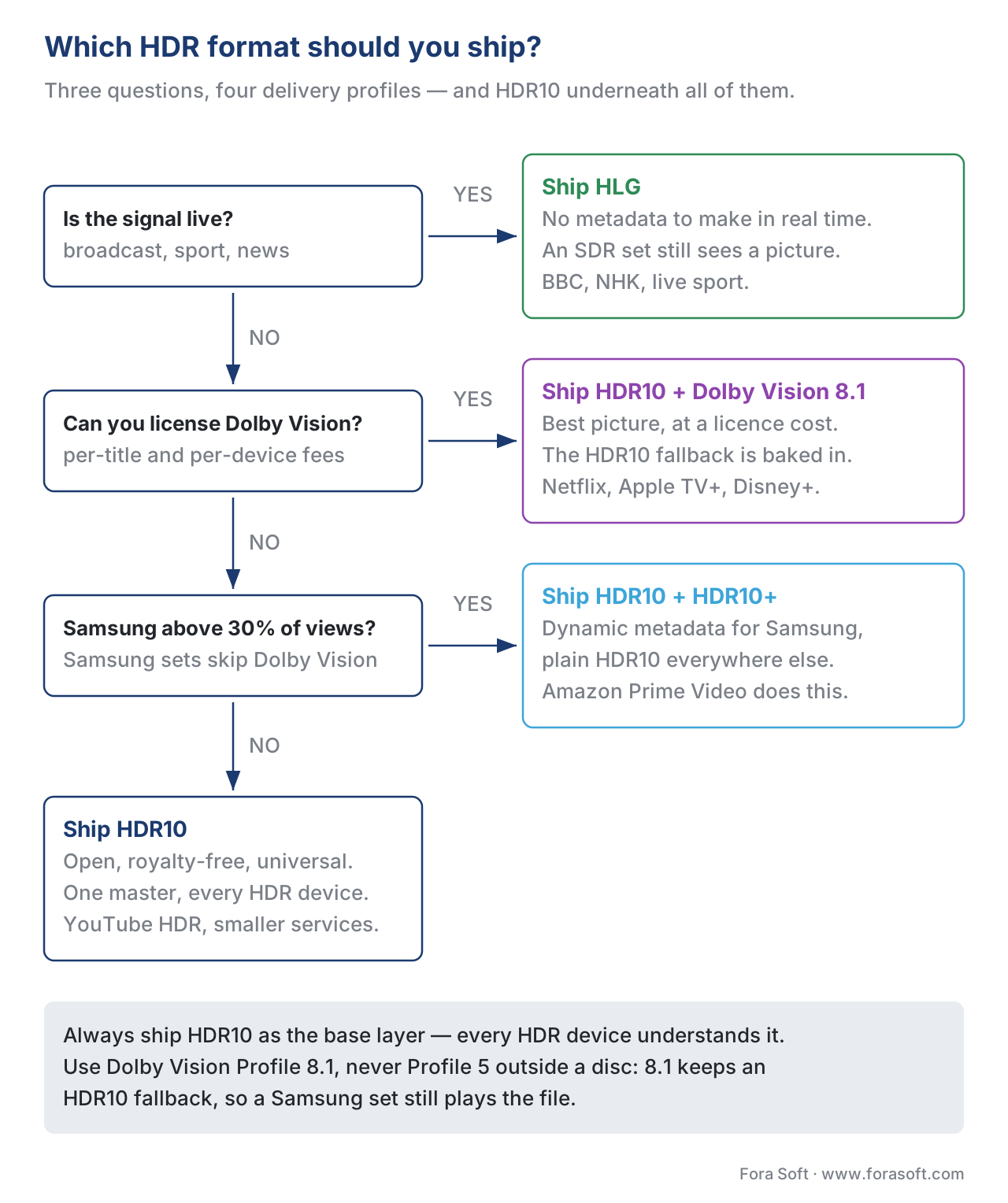
A useful tiebreaker if you are stuck between Dolby Vision and HDR10+: what fraction of your audience uses Samsung TVs? Above roughly 30%, HDR10+ becomes hard to ignore (Samsung is around a third of global TV shipments). Below 20%, Dolby Vision alone covers virtually everyone except Samsung owners, and Samsung owners still see HDR10 as a fallback.
What can go wrong: the production bugs
These are the failure modes that show up in real product launches.
Tag mismatch
An HDR file gets transcoded somewhere in the pipeline and the color_transfer tag changes from smpte2084 (PQ) to bt709 (gamma). Now the player applies the gamma decoder curve to PQ-encoded data. The picture comes out as if a colour-blind designer turned every saturation slider to 11 — neon greens, burning reds, faces in an unnatural orange. Every "HDR looks weird on this app" bug report comes down to this in the end.
Tag mismatch usually happens at a transcode step that strips metadata atoms. The fix is auditing every stage of the pipeline with ffprobe and confirming that color_primaries, color_transfer, and color_space are still bt2020, smpte2084, and bt2020nc (or the HLG equivalents) at the CDN edge, not just at the encoder output.
Wrong fallback profile
A streamer ships Dolby Vision Profile 5 (the IPT colour space version with no HDR10 fallback) to a Samsung TV. Samsung does not support Dolby Vision. The TV cannot decode the file at all and the playback fails outright — no picture, error code on screen. The fix is to ship Profile 8.1, which always carries an HDR10 base layer that Samsung can fall back to.
Bit depth too low for the format
The encoder is configured to write 8-bit output and the metadata says PQ. The PQ transfer function, by its absolute-brightness math, requires fine-grained tone steps in dark and mid-range tones. An 8-bit signal does not have enough discrete steps and produces severe banding — visible stripes across what should be smooth gradients (sky, skin, walls). The fix is to use 10-bit minimum for PQ, 12-bit if the codec supports it. HEVC Main10 and AV1 both support 10-bit natively; H.264 does not (commercially supported), so HDR requires moving to HEVC or AV1.
MaxCLL/MaxFALL not set
The HDR10 file gets shipped without the static brightness metadata. The TV has no information about the brightest pixel or the brightest frame, so its tone mapper falls back to safe assumptions — which usually means clipping highlights. The fix is to compute MaxCLL/MaxFALL during encode and verify with ffprobe -show_frames that they are written into the bitstream.
Mismatched colour space
The file is HDR10 but the color_primaries tag says bt709 instead of bt2020. The TV interprets the wide-gamut Rec. 2020 colours as if they were Rec. 709 and shifts everything toward green. Fix is the same as tag mismatch — audit metadata at every stage.
Display does not actually support what it advertises
The TV reports HDR10 capability over HDMI EDID but its peak brightness is 350 nits and its colour gamut is 92% of Rec. 709. The HDR signal reaches the TV but the TV tone-maps so aggressively that the resulting picture looks dimmer and flatter than the SDR version of the same content. This is not really a pipeline bug — it is a hardware reality — but product teams catch the support tickets and need to know.
What HDR is not
HDR is not 4K resolution. Many devices are HDR-capable at 1080p; others are 4K but SDR-only. The two specifications are independent. You can have HDR 1080p (small format, wide range) or SDR 4K (high resolution, narrow range) or HDR 4K (both) or SDR 1080p (neither).
HDR is not a colour space. Colour space describes the range of colours (Rec. 709 vs Rec. 2020 vs DCI-P3). HDR describes the range of brightness. They are usually paired — HDR almost always uses Rec. 2020 — but they answer different questions.
HDR is not a guarantee of better picture. A poorly mastered HDR file looks worse than a well-mastered SDR file. The HDR decision is the start of a quality pipeline, not the end of one. Bit depth, transfer function tagging, colour primaries, encoder bitrate, and player tone mapping all have to be right.
HDR is not the same on every TV. Two 4K HDR TVs in a store can produce visibly different pictures from the same source — one will tone-map aggressively, the other will hold highlights, a third will shift colour temperature. This is a feature, not a bug, of HDR ecosystem reality. The format gives the TV instructions; the TV decides how to honour them given its physical capabilities.
A short field guide to verifying HDR delivery
The fastest way to confirm an HDR pipeline is working is to look at three things for every file at every stage.
First, the transfer tag. ffprobe -show_streams file.mp4 | grep color_transfer. Should return smpte2084 for PQ-based formats (HDR10, HDR10+, Dolby Vision) or arib-std-b67 for HLG. If it returns bt709, the file is being treated as SDR somewhere upstream.
Second, the colour primaries. ffprobe -show_streams file.mp4 | grep color_primaries. Should return bt2020 for any HDR file. bt709 here means the file is HDR by transfer function but the primaries metadata is mislabelled — the TV will not interpret colours correctly.
Third, the bit depth. ffprobe -show_streams file.mp4 | grep pix_fmt. Should return yuv420p10le (10-bit) for HDR10 and HDR10+, or yuv420p12le (12-bit) for Dolby Vision. yuv420p without the 10/12 suffix means 8-bit, which will band badly.
If all three are correct at every stage of your pipeline — encoder output, packager output, CDN edge, player input — the HDR delivery is healthy. If any one is wrong, that is the bug.
The takeaway for product teams
Treat HDR like a delivery decision, not a feature toggle. The four formats are not interchangeable. HDR10 for everyone, Dolby Vision for premium, HDR10+ for Samsung-heavy reach, HLG for broadcast and SDR fallback — that is the four-line summary that survives every meeting where someone asks "but should we just ship HDR?"
The format choice locks in the tooling, the licensing, the device coverage, and the operational practices around metadata. Pick the wrong one and you ship a year's worth of bug reports about pictures that look broken on someone's specific TV. Pick the right one and the picture matches the creative intent on every screen the format reaches.
The bigger lesson — and the through-line of this whole section of the Knowledge Base — is that every link in the video chain has to agree. Bit depth has to match the transfer function. The transfer function has to match the colour space. The colour space has to match the display capability. The metadata has to survive every transcode. HDR is not a single magic flag at the end of the encode. It is a pipeline-wide commitment that has to hold from the camera to the screen.
When that commitment holds, the picture earns the brightness it claims. When it breaks, the picture looks broken — and the customer's first thought is not "the studio's encoder is misconfigured", it is "this app is bad".
Free download: HDR Delivery Decision ChecklistA one-page A4 worksheet across delivery model, content type, target devices, metadata and pipeline consistency that lands you on HDR10, Dolby Vision, HDR10+ or HLG.Where this fits in the Knowledge Base
HDR is the apex of Block 1 — every concept from the earlier articles converges here. The signal carries more bits per pixel (Bit depth) so it can describe brightness without banding. It uses a wider colour space (Color spaces) so it can describe colours SDR cannot. It uses a different transfer function (Transfer functions) so the display knows what to do with the numbers. HDR is what you get when all three are tuned together.
The next article moves to a different axis — time instead of brightness — and looks at frame rate, judder, and motion blur.
Need help choosing an HDR format for a product, or auditing an HDR pipeline that ships pictures that look wrong on someone's TV? See our work — Fora Soft has been shipping video products since 2005.

The book
Video Encoding: A Complete Guide to Video Compression
HDR only works when bit depth, colour primaries and the transfer function all agree, and the book follows those three tags through the whole chain across 1,500+ pages — what PQ and HLG actually describe, why 10 bits is the floor under PQ, and how HEVC and AV1 carry MaxCLL, MaxFALL and dynamic metadata from encoder to decoder. It then works through what a dropped or mislabelled tag does to the picture, and how to find the stage that lost it in a pipeline you did not build. Written by Nikolay Sapunov, CEO at Fora Soft.
HDR that looks right on one television and broken on another?
Tell us what your pipeline encodes, packages and delivers, and we will tell you which stage drops the HDR metadata, which format your device mix actually calls for, and what it takes to fix it at the source instead of patching the player. 250+ video products shipped since 2005.
See our case studies
Case study
Speed.Space
Remote production used on Netflix, EA and HBO shoots, where the crew picks resolution, frame rate, codec and bitrate per shoot and records 1080p at 8 Mbps — graded material of the kind Dolby Vision and HDR10+ were built for.
Case study
Worldcast Live
Concert feeds reaching the public web at 1.5 Gb/s and 0.4–0.5 s latency for 10,000 simultaneous viewers — the live case where nobody grades a scene and HLG earns its place.
Case study
Mindbox
AI video management in 50+ deployments, pulling RTSP from cameras of every vintage and normalising them through FFmpeg before HLS delivery — the transcode step where colour and HDR tags go missing most often.
What to read next
Compression
8-Bit vs 10-Bit Encoding: The "10-Bit Is Just For HDR" Myth
Why the 10 bits HDR needs also pay off on ordinary SDR content.
Codecs
H.265 / HEVC: +50% Over H.264 And The Patent Nightmare
The codec HDR pushed you towards, and the licensing story that came with it.
Pipeline
Transcoding Pipeline in Depth: Decode, Filter, Encode, Mux
The four stages a file passes through, and where HDR metadata tends to fall out.
Tooling
FFmpeg: A Must-Know Cheat Sheet for Developers
The ffprobe calls behind the field guide above, and the flags that set the tags.
References
- HDR10 vs HDR10+ vs Dolby Vision: Format adoption 2026 — Smart TV Comparisons
- Dolby Vision Metadata Levels — Dolby Professional Support
- Dolby Vision — Wikipedia
- HDR10+ Adaptive — Samsung Newsroom
- HDR10+ Advanced launch — SamMobile
- SMPTE ST 2094 dynamic metadata explained — The Broadcast Knowledge
- What is Dolby Vision IQ — FlatpanelsHD
- HDR10+ — Wikipedia
