


Why this matters
If your product hosts video that any viewer might watch on an HDR-capable phone, laptop, or TV, you'll encounter transfer functions the first time a piece of content "looks weird on iPhone but fine on the office monitor." Eight times out of ten the answer is that the transfer function tag is missing, wrong, or the player can't interpret it. This article gives you the model to spot that problem instantly and the names you need to use when you talk to your encoding vendor. You don't need a maths degree — we'll build the idea step by step.
What a "transfer function" actually does
Let's start with the word transfer function. It's just engineering jargon for "a recipe that converts one number into another." In video, the conversion happens twice: once when the camera writes the file, and once when the screen displays it.
Here's why a recipe is needed at all. The light a real-world scene emits and the brightness a screen produces are continuous values — a sky might be one million times brighter than the inside of a shadow at the same moment. The numbers we store in a digital file are discrete — for an 8-bit channel they go from 0 to 255, and that's it. Mapping a one-million-fold brightness range onto only 256 numbers requires a translation table. That table is the transfer function.
If you used a simple linear table — "0 means no light, 255 means the maximum light, every number in between scaled proportionally" — you'd waste almost all your numbers on bright areas of the scene and have almost none left for dark areas, because the human eye is exponentially more sensitive to brightness changes in the dark than in the light. A 1% change in shadow brightness is enormous and obvious. A 1% change in highlight brightness is invisible. So instead of a straight line, transfer functions are deliberately curved to spend most of their numbers where the eye actually cares — in the shadows and midtones.
Every transfer function comes in two halves that mirror each other:
- OETF (Opto-Electrical Transfer Function): camera-side recipe. Converts the physical light landing on the sensor into the number stored in the file. The "O" is "optical" (light) and the "E" is "electrical" (the stored signal).
- EOTF (Electro-Optical Transfer Function): screen-side recipe. Converts the number read from the file back into a physical brightness on the display. Same letters, reversed direction.
For the system to work, the camera's OETF and the screen's EOTF must agree on which recipe was used. That agreement is the transfer function "tag" carried as metadata inside the video file. If the camera writes one curve and the screen applies a different one, the picture comes out wrong — usually too dark, too bright, or with crushed shadows or blown highlights. We'll come back to this at the end. 1
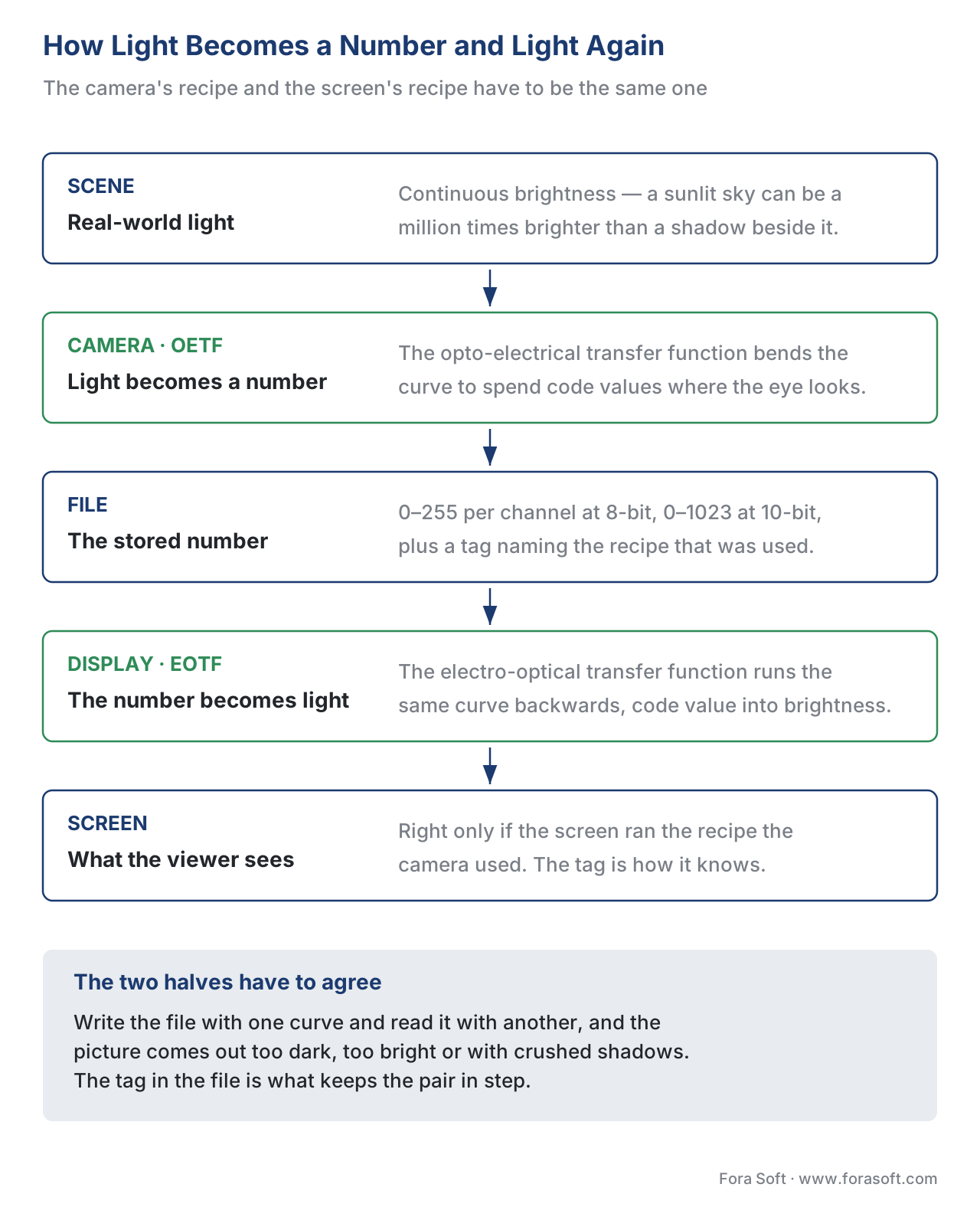 Figure 1. The transfer-function pipeline. Light from the scene is "encoded" by the camera's OETF into a stored number; the display reverses the process with its EOTF and produces light on screen. If the two halves don't use the same recipe, the picture comes out wrong.
Gamma — the original recipe that still rules SDR
The oldest transfer function in video is gamma, and it's an accident of physics turned into a standard.
Cathode-ray tube (CRT) televisions from 1939 onwards had a quirk: the electron beam they used to paint the screen didn't respond linearly to the voltage you sent into it. Send a voltage that's 50% of the maximum, and the beam produced light that was only about 22% of the maximum, not 50%. This non-linear behaviour was described by the equation brightness = voltage^γ, where γ (the Greek letter gamma) was about 2.2 to 2.4. 2
Early broadcast engineers had to choose: either build expensive correction circuits into every TV to fix the curve, or accept the curve and pre-correct the signal at the broadcasting end. They chose the cheaper option — apply the inverse curve at the camera, so by the time the CRT's natural curve "uncorrected" the signal, the picture came out right. The cameras did voltage = light^(1/2.2), the TVs did light = voltage^2.2, and the two cancelled out.
When digital video and flat-panel displays arrived, the engineers could have switched to a linear system. But by then the world owned billions of hours of gamma-encoded content, and modern LCD and OLED screens simply emulate the old CRT curve. Today's BT.1886 standard formalises gamma 2.4 as the EOTF for HDTV. The sRGB standard for computer graphics uses a slightly different gamma curve that averages to about 2.2. 3
The accident turned out to be useful. The gamma curve happens to be a decent match for human eye sensitivity — it allocates more of the 256 numbers (for 8-bit video) to dark tones where the eye is most sensitive, and fewer to bright tones where the eye won't notice. That's why SDR video at 8 bits looks acceptable. If gamma had been a straight line, 8-bit video would show terrible banding in shadows.
Where gamma is still used in 2026: every SDR video stream you watch — Netflix SDR, YouTube SDR, broadcast TV, Zoom calls, your laptop's webcam, every social media app. Roughly 95% of all video in commercial use today is gamma-encoded.
Where gamma fails: anywhere brighter than about 100 nits. SDR was designed for a screen's peak white at 100 nits — about as bright as a sheet of paper under office lights. Modern HDR screens can go to 1000, 4000, even 10,000 nits, and gamma simply doesn't have a defined behaviour above 100. That's why HDR needed a new recipe.
PQ — the precise recipe for premium HDR
The first recipe designed specifically for HDR is PQ, short for Perceptual Quantizer. It was created by Dolby in 2014 and standardised by SMPTE the same year as SMPTE ST 2084. 4
What makes PQ different from gamma is its starting point. Gamma was an accident of CRT physics. PQ was deliberately designed around the human visual system — specifically, around how many distinct brightness levels the eye can actually distinguish at each brightness. A team at Dolby measured this for hundreds of viewers and built a curve called the Barten ramp that describes the eye's "just noticeable difference" (JND) at every brightness from very dark to extremely bright. PQ allocates its 1,024 levels (in 10-bit) so that each step on the curve is just one JND apart at every point — meaning the eye genuinely can't see the steps, no matter how bright or dark.
The result is a recipe that produces visually-perfect gradients up to 10,000 nits — more than 100× brighter than gamma's 100-nit ceiling. In 12-bit, PQ produces no visible banding anywhere in its full range. 4
But PQ comes with a strong opinion baked into its design: it specifies absolute brightness, not relative. When a PQ-encoded file says "level 50%", it means "exactly 92 nits on screen, regardless of what kind of screen you're using." If your screen can't physically reach 10,000 nits (and almost no consumer screen can), the player has to apply "tone-mapping" — squashing the very bright parts of the picture down into whatever range the display can actually show. Tone-mapping is its own complicated problem, and different player implementations do it differently. The same PQ file can look subtly different on an LG OLED, a Samsung QLED, and a Sony TV, even though the file itself is identical.
Where PQ is used in 2026: every Dolby Vision and HDR10 stream. Netflix HDR, Disney+ HDR, Apple TV+ HDR, all premium 4K Blu-rays, all Dolby Vision cinema masters. PQ has become the universal recipe for on-demand premium HDR. 4
Where PQ struggles: in live broadcast (where you can't always pre-grade content for absolute brightness on unknown displays) and in mixed SDR/HDR viewing environments (where a single feed might be seen on both old and new TVs simultaneously). That's the gap HLG was designed to fill.
HLG — the recipe designed for live broadcast
HLG, short for Hybrid Log-Gamma, was developed jointly by the BBC and Japan's NHK in 2015 and standardised as ARIB STD-B67. Its name describes its structure: the bottom half of the curve is a traditional gamma curve (compatible with existing SDR TVs), and the top half is a logarithmic curve (which extends into HDR brightness). 5
HLG was designed to solve a specific broadcast-industry problem. Imagine the BBC broadcasting a football match. Some viewers have brand-new HDR TVs, some have old SDR TVs from 2014. You can't broadcast two separate feeds — bandwidth and budget don't allow it. You need one signal that looks correct on both types of screen automatically.
The trick is that an SDR TV, which doesn't know what HLG is, sees only the bottom half of the HLG curve — and that bottom half is just a regular gamma curve, so the SDR TV displays it correctly. An HDR TV, which knows what HLG is, decodes the full curve including the log-extended top half — and gets a proper HDR picture. Same file, two viewers, both happy, no special handling required. 5
HLG also handles the absolute-vs-relative brightness problem differently from PQ. HLG is relative: a 50% signal level doesn't mean a fixed brightness, it means "50% of whatever your screen's peak is." A 500-nit display shows it as 250 nits. A 1,000-nit display shows it as 500 nits. No tone-mapping is needed because the brightness scales with the display automatically. That makes HLG easier to ship for live content but means the artistic intent ("this highlight should be exactly this bright") is less precise than PQ allows.
Where HLG is used in 2026: live broadcast HDR. The BBC, Japan's NHK, most European public broadcasters, and a growing number of sports productions use HLG. YouTube also accepts HLG for HDR uploads. 6
Where HLG struggles: in carefully-graded cinematic content. Filmmakers want absolute brightness control — when a scene is meant to be dim, it should be dim everywhere, not stretch to fill whatever screen you're using. PQ gives that control; HLG sacrifices it for convenience.
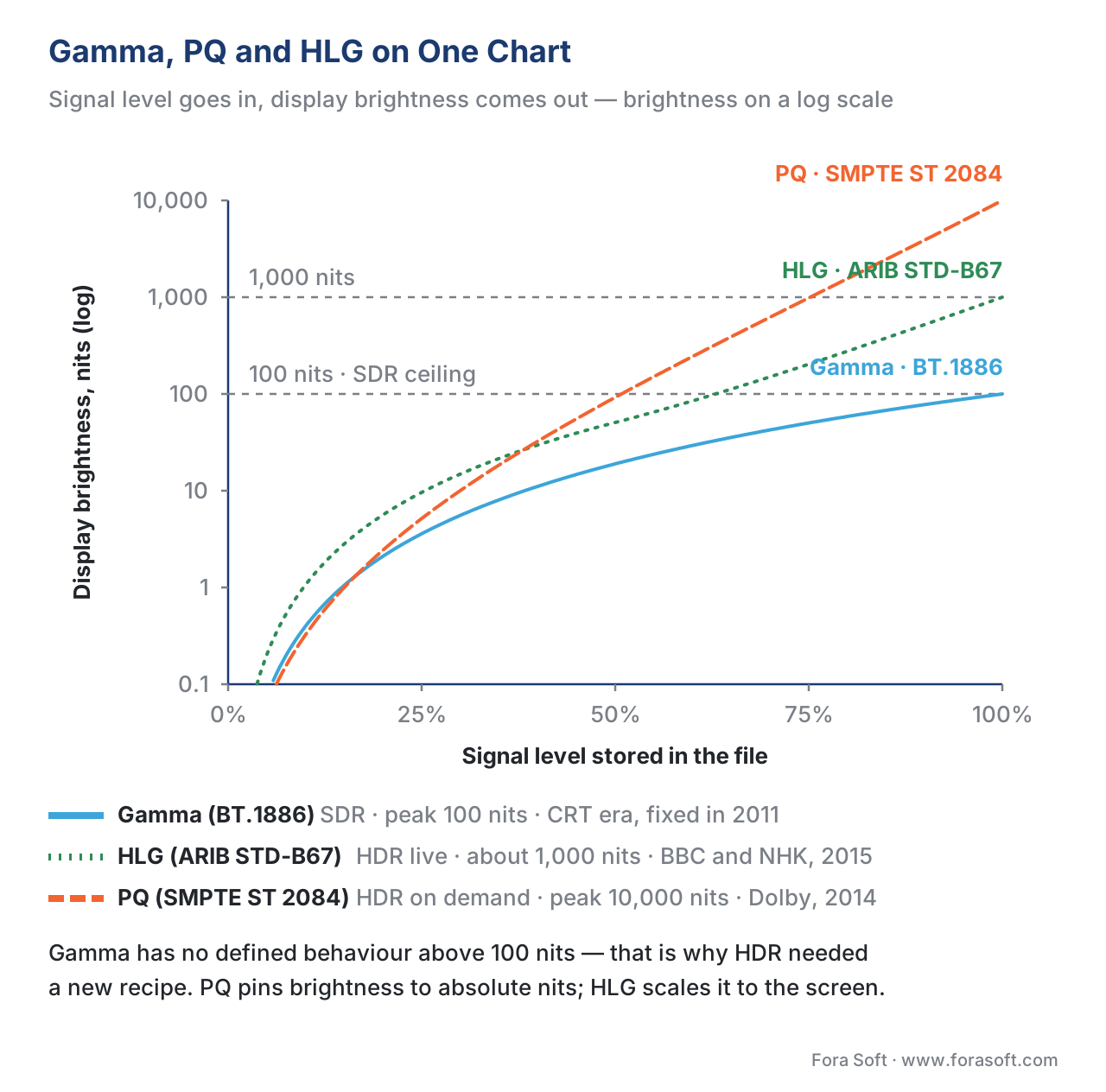 Figure 2. The three transfer functions side by side. Gamma tops out at 100 nits. PQ scales to 10,000 nits with mathematically-uniform perceptual steps. HLG has a gamma-shaped bottom (so SDR TVs can read it) and a logarithmic top (so HDR TVs can stretch it). Different recipes, different trade-offs.
Side-by-side: gamma vs PQ vs HLG
The whole story compressed into one table.
| Property | Gamma (BT.1886 / sRGB) | PQ (SMPTE ST 2084) | HLG (ARIB STD-B67) |
|---|---|---|---|
| Standard year | 1939 (CRT era), 2011 (BT.1886) | 2014 | 2015 |
| Peak brightness | 100 nits | 10,000 nits | typically 1,000 nits on modern HDR sets |
| Signal type | Relative | Absolute | Relative |
| Backward-compatible with SDR TVs | n/a (it IS SDR) | No | Yes (bottom half is a gamma curve) |
| Tone-mapping needed for displays below peak? | No (SDR is 100-nit baseline) | Yes — and it varies by player | No (scales automatically) |
| Typical use | Every SDR stream, broadcast TV, Zoom, web video | Dolby Vision, HDR10, premium streaming | Live HDR broadcast, BBC, NHK, sports |
| Bit depth needed for no banding | 8-bit (with caveats) | 10-bit minimum, 12-bit for full range | 10-bit |
Why this matters in your pipeline — the tagging problem
Here's the practical engineering trap that catches every product team eventually. Every video file carries a metadata tag declaring which transfer function it was encoded with. If that tag is missing, wrong, or stripped by a transcoding step, the player on the other end has to guess. And different players guess differently.
The three failure modes you'll see in production:
Failure 1: HDR file tagged as SDR. Someone exported a PQ-encoded HDR master without preserving the transfer function metadata. The file gets to a player that, finding no tag, assumes gamma. The player feeds PQ numbers through a gamma curve and produces a picture that's far too bright, with neon greens and burning reds. This is what people mean when they say "the HDR file looks oversaturated on my SDR phone."
Failure 2: SDR file tagged as HDR. Rarer but worse. The encoder wrote the wrong tag, an HDR-aware player applies a PQ EOTF to gamma-encoded numbers, and the picture comes out grey, dim, and lifeless. Everything looks like a foggy day. This is what people mean when "the HDR feature on this TV makes everything look washed out."
Failure 3: Tag dropped mid-pipeline. The original encode is correct but a transcoding step (often a cloud function or a packaging service) strips the colour metadata. The next stage in the pipeline can't know what curve to use and defaults to gamma. Quality silently degrades.
The fix in all three cases is the same: inspect the file with ffprobe, find which transfer function tag is set (or missing), and re-tag at the upstream stage. The tag values to look for are color_transfer=bt709 (gamma for SDR), color_transfer=smpte2084 (PQ), or color_transfer=arib-std-b67 (HLG). If you see unknown you have a tagging problem upstream.
# Inspect a file's transfer-function tag and other colour metadata
ffprobe -v error -select_streams v:0 \
  -show_entries stream=color_transfer,color_primaries,color_space,color_range \
  -of default=noprint_wrappers=1 input.mp4
A correctly-tagged HDR file should return something like:
color_primaries=bt2020
color_transfer=smpte2084
color_space=bt2020nc
color_range=tv
A correctly-tagged SDR file should return:
color_primaries=bt709
color_transfer=bt709
color_space=bt709
color_range=tv
If the color_transfer field is unknown or missing, the upstream encode dropped the metadata — and you must fix it there. We covered the same tagging problem in Colour spaces: RGB, YCbCr, BT.709, BT.2020, DCI-P3; the transfer function tag is one of the three colour-related tags that has to flow end-to-end. 3
Which transfer function for which product?
Practical recommendations for what you'd actually ship:
| Product type | Transfer function | Why |
|---|---|---|
| SDR streaming, conferencing, e-learning, surveillance | Gamma (BT.1886 / sRGB) | Universal device support; 95% of viewers see SDR anyway |
| Premium 4K VOD with HDR (Netflix-style) | PQ | Used by all premium HDR services; precise artistic control |
| Live 4K broadcast (sports, news, events) | HLG | Single signal works on both SDR and HDR sets; no tone-mapping at the client |
| Theatrical / cinema-grade premium streaming | PQ + Dolby Vision dynamic metadata | Dolby Vision is built on PQ + per-scene metadata |
| YouTube HDR uploads | Either PQ or HLG | YouTube accepts both; HLG is slightly easier to ship |
| Mixed pipeline (some HDR, some SDR delivery) | PQ master + automatic SDR derivative | One HDR source, two transcodes — the SDR fallback is automatic |
If you're not sure which one you need, the answer is almost always gamma. You only step up to PQ or HLG when you have a deliberate HDR strategy, a target audience with HDR devices, and a content library that benefits from extended brightness. More on the broader HDR picture.
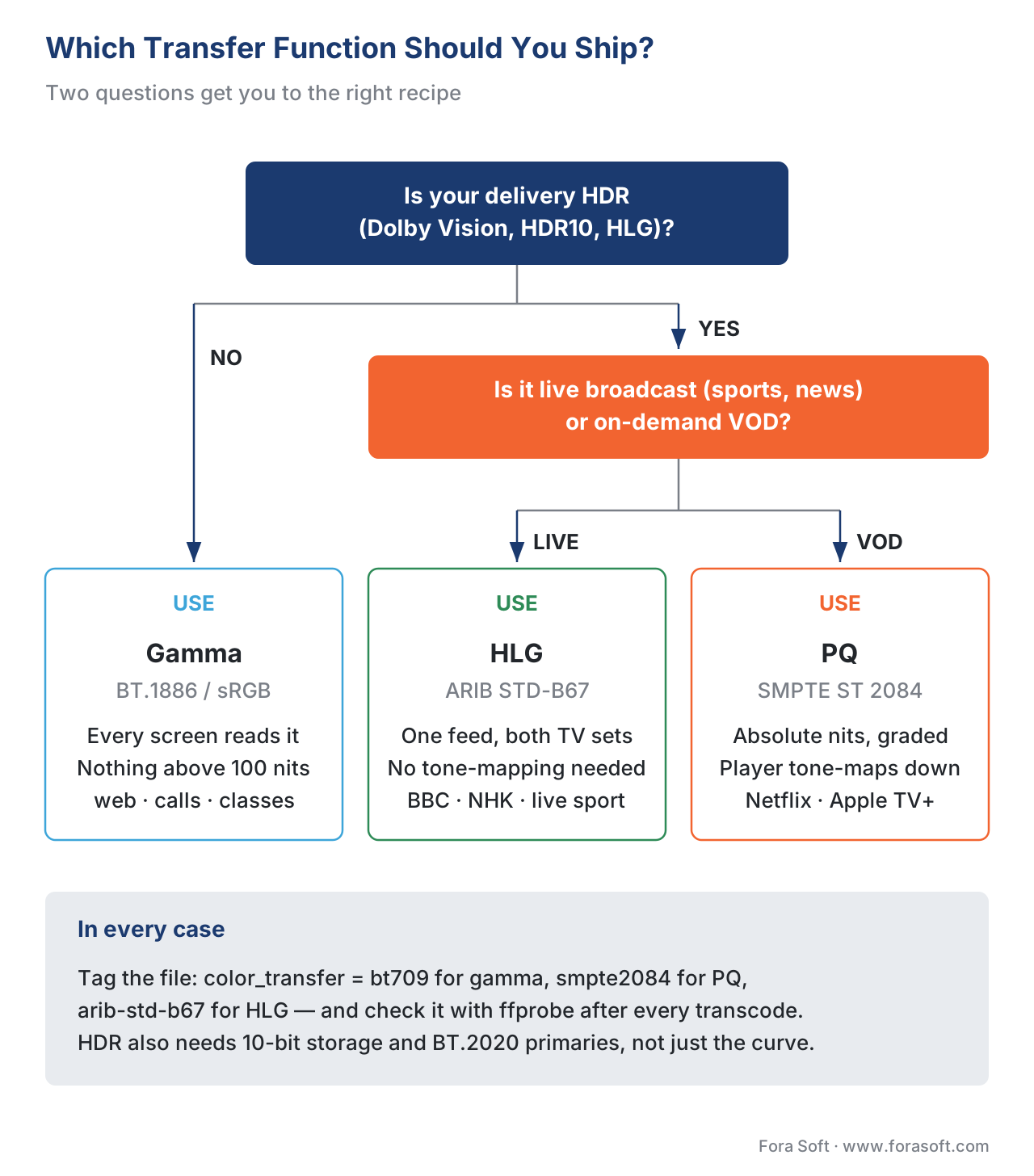 Figure 3. Decision tree for picking a transfer function. Two questions — is your delivery HDR, and is it live? — get you to the right recipe.
Common mistake: assuming "10-bit = HDR"
A trap product teams fall into: confusing bit depth with HDR. They are not the same thing.
Bit depth is how many discrete brightness levels each pixel can take (covered here). Transfer function is the recipe that maps those levels onto actual light. You can have 10-bit SDR content (lots of products do — it just gives you smoother gradients in SDR). You can have 10-bit HDR content (Netflix HDR is exactly this). The two concepts are independent.
In practice they tend to go together because PQ and HLG both work best at 10-bit minimum, and you rarely need 10-bit for SDR (gamma at 8-bit is fine for most viewers). But the link is correlation, not causation. When you ship an HDR product, you need both — 10-bit storage and PQ or HLG transfer — and you need them tagged correctly. More on bit depth here.
Free download: Transfer Function Picker ChecklistA one-page A4 audit across delivery model, content type and target devices that lands you on gamma, PQ or HLG.Where Fora Soft fits in
We see transfer function bugs in client pipelines almost every week. A telemedicine platform suddenly sees skin tones go orange on iPhone but not on Android — turns out the colour-transfer tag got stripped during the ingest step. An OTT service rolls out HDR and gets complaints that the picture looks "muddy" on cheaper TVs — tone-mapping at the player is misbehaving. A surveillance system pulls feeds from cameras that write HLG by default, and the recording playback looks washed out — wrong EOTF applied by the viewer software. The fix is always upstream, in the tag flow. The framework in this article is the one we apply.
The book
Video Encoding: A Complete Guide to Video Compression
The transfer function is one of three colour tags a file has to carry, and the book follows all three through the chain across 1,500+ pages — how gamma, PQ and HLG are defined, what 10-bit storage and BT.2020 primaries add on top, and how H.264, HEVC and AV1 move transfer characteristics from encoder to decoder. It then works through what a wrong tag does to the picture and how to find the stage that dropped it in a pipeline you did not build. Written by Nikolay Sapunov, CEO at Fora Soft.
Same file, correct on one screen and washed out on another?
Tell us where the video comes from and what it passes through, and we will tell you which stage drops the transfer-function tag and what it takes to fix it there instead of patching the player. 250+ video products shipped since 2005.
See our case studies
Case study
Speed.Space
Remote production used on Netflix, EA and HBO shoots, where the crew sets resolution, frame rate, codec and bitrate per shoot and records 1080p at 8 Mbps — the graded pipeline PQ exists for.
Case study
Worldcast Live
Concert feeds reaching the public web at 1.5 Gb/s and 0.4–0.5 s latency for 10,000 simultaneous viewers — one signal that has to look right on every screen it lands on.
Case study
Mindbox
AI video management in 50+ deployments, pulling RTSP from cameras of every vintage and normalising them through FFmpeg before HLS delivery — the stage where colour metadata goes missing most often.
What to read next
Colour
Colour Spaces: RGB, YCbCr, BT.709, BT.2020, DCI-P3
The other two colour tags that travel beside this one, and what breaks when they disagree.
Foundations
Bit Depth: 8, 10, 12 Bits and the Banding Problem
Why 10-bit keeps getting mistaken for HDR, and what the extra bits actually buy you.
Pipeline
Transcoding Pipeline in Depth: Decode, Filter, Encode, Mux
The four stages a file passes through, and where the transfer-function tag tends to fall out.
Tooling
FFmpeg: A Must-Know Cheat Sheet for Developers
The -color_trc flag and the ffprobe call that says which curve a file claims.
-
OETF / EOTF / OOTF definitions; how the camera and display halves must agree. Transfer Functions and Their Functions in High Dynamic Range Workflow, Telestream Blog. https://blog.telestream.com/2022/11/transfer-functions-and-their-functions-in-high-dynamic-range-workflow/ ↩
-
Gamma curve as a quirk of CRT physics; 2.2 / 2.4 exponent history; BT.1886 formalises gamma 2.4 for HDTV. HDR Primer Part 2, The Broadcast Bridge. https://www.thebroadcastbridge.com/content/entry/13733/hdr-primer-part-2-advanced-hdr-details ↩
-
HDR video terms explained; transfer function tagging and pipeline implications. HDR Video Part 3: HDR Video Terms Explained, Paradox Post. https://www.paradoxpost.com/post/hdr-video-part-3-hdr-video-terms-explained ↩↩
-
PQ / SMPTE ST 2084 standard; Dolby 2014 origin; Barten ramp and JND-uniform quantisation; 10,000-nit range. Wikipedia: Perceptual quantizer. https://en.wikipedia.org/wiki/Perceptual_quantizer ↩↩↩
-
HLG developed by BBC and NHK; hybrid log + gamma structure; backward-compatible with SDR. The BBC Explains Hybrid Log Gamma for HDR, Display Daily. https://displaydaily.com/the-bbc-explains-hybrid-log-gamma-for-hdr/ ↩↩
-
PQ vs HLG comparison: absolute vs relative; tone-mapping requirements; broadcast vs streaming use cases. PQ and HLG transfer functions for HDR, Venera Technologies. https://www.veneratech.com/hdr-transfer-functions-hlg-pq ↩
