


Why this matters
If you build a video product — Netflix-style streaming, a video conferencing platform, a telemedicine system, an online learning service — you'll eventually be asked "should this be 10-bit?" and you'll have to know what's actually at stake. The answer depends on three things: whether your content has smooth gradients that need to look smooth, whether your target devices can display 10-bit accurately, and whether you can afford the extra processing cost. This article gives you the model to answer that question without guessing. By the end you'll know exactly when 10-bit pays for itself, when 12-bit is overkill, and when 8-bit is the right answer despite what the spec sheet enthusiasts say.
We're going to build the picture step by step, with no prior knowledge required. We'll define every term before we use it.
What "bit depth" actually means
Let's start with the word bit itself. A bit is the smallest unit of information a computer can store — it's either a 0 or a 1, on or off, yes or no. That's it. Everything in a computer is built from bits.
When you put bits together, you can count higher. One bit lets you count to 2 (the values 0 and 1). Two bits let you count to 4 (00, 01, 10, 11). Three bits give you 8 (000 through 111). Each extra bit doubles the number of values you can record. The formula is "2 to the power of the number of bits":
1 bit  = 2¹ = 2 values
2 bits = 2² = 4 values
8 bits = 2⁸ = 256 values
10 bits = 2¹⁰ = 1,024 values
12 bits = 2¹² = 4,096 values
Notice how fast the numbers grow. Two extra bits (going from 8 to 10) doesn't add a little — it multiplies your value count by four. Four extra bits (going from 8 to 12) multiplies it by sixteen.
Now apply this to colour. A pixel in your video has three colour components — one for red, one for green, one for blue (we covered this in What is digital video). The bit depth is how many bits each of those three components uses. With 8-bit depth, the red component can be one of 256 values (from 0, meaning "no red", to 255, meaning "full red"). With 10-bit depth, the red component can be one of 1,024 values. With 12-bit depth, 4,096 values.
How many total colours can a pixel display? Multiply the per-channel options:
- 8-bit: 256 × 256 × 256 = about 16.7 million colours.
- 10-bit: 1,024 × 1,024 × 1,024 = about 1.07 billion colours.
- 12-bit: 4,096 × 4,096 × 4,096 = about 68.7 billion colours.
A billion colours sounds like a marketing slogan, and 68 billion sounds preposterous. But neither number is about how many colours the eye can simultaneously distinguish (it can't — the human eye sees maybe 10 million distinct colours in good lighting). They're about the smoothness of gradients between two colours that the eye can see. That's the real point of higher bit depth.
The banding problem — what too few bits actually looks like
Here's the practical problem that makes bit depth matter.
Look at a sunset photo or a slow fade-to-black at the end of a movie. The sky goes smoothly from bright orange near the horizon to deep blue overhead, hitting every shade in between. To represent that smooth fade in a digital image, you need many slightly-different shades of orange and blue, each only a hair different from its neighbour. If you have enough shades, the gradient looks smooth — you can't see where one shade ends and the next begins. If you don't have enough shades, the gradient breaks into visible bands of solid colour, like contour lines on a map.
That artefact is called banding (or sometimes "posterisation"), and it's instantly recognisable once you know what to look for. Smooth skies turn into striped skies. Slow fades show staircase steps. Dark scenes in HDR develop visible patches where you expect a single uniform shadow. 1
Why does it happen? Because 256 shades (8-bit) sounds like a lot but isn't enough to cover the brightness range of a real scene smoothly. Imagine you're painting a wall and you have 256 cans of paint, each a slightly different shade of grey, going from pure black to pure white. The cans are evenly spaced. If you use them all on a small area, the result looks smooth. But if you try to cover an enormous gradient — say, the full brightness range of a sunset — you have to stretch those same 256 cans across that whole range, and now the steps between adjacent cans are visible to the eye. That's banding.
10-bit gives you 1,024 cans across the same range. The steps between adjacent cans are four times smaller. To the eye, that's the difference between a visible staircase and a continuous slope. 12-bit gives you 4,096 cans, with steps that are sixteen times smaller than 8-bit. 2
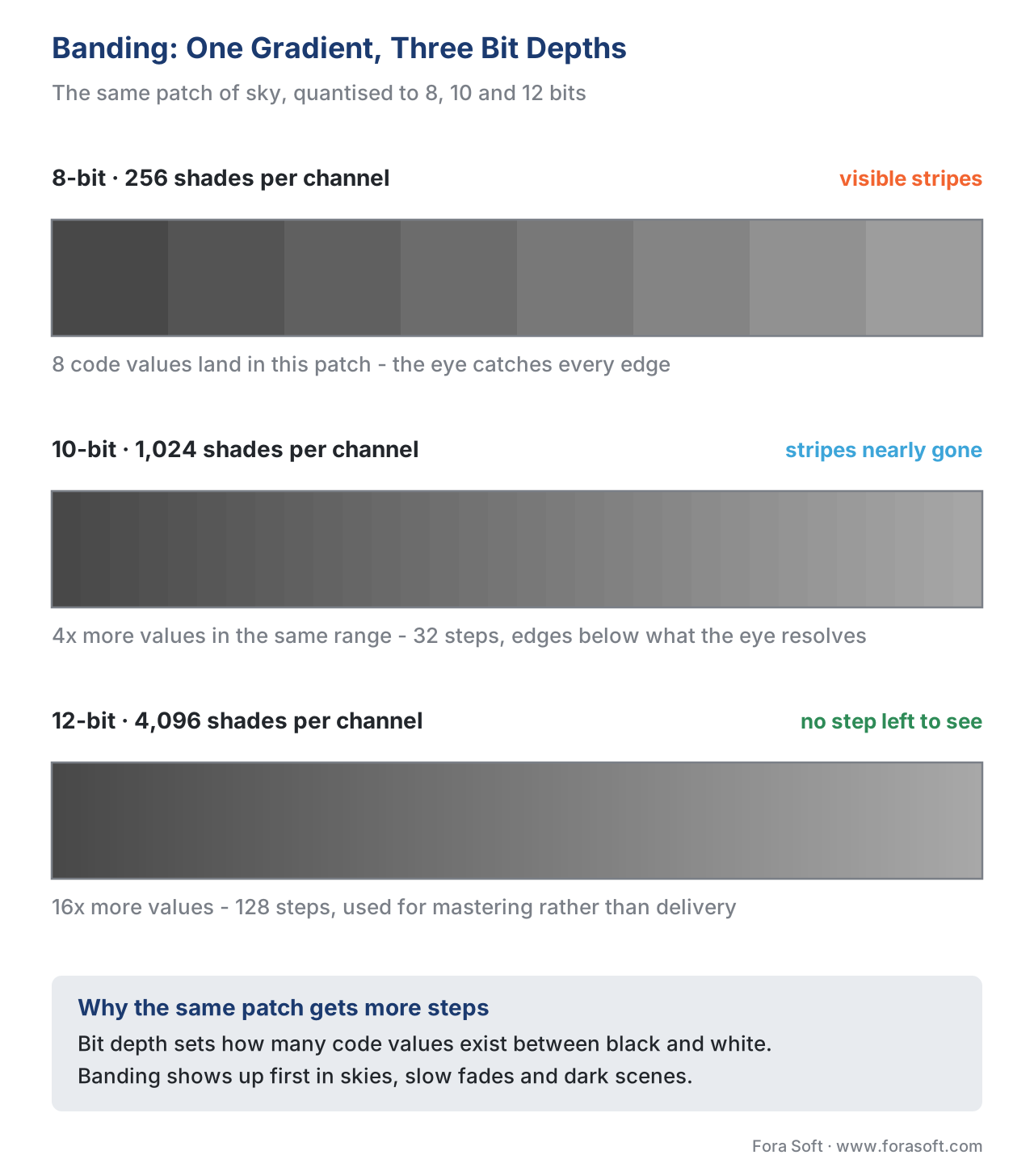 Figure 1. The same smooth gradient at three bit depths. 8-bit produces visible stripes (banding) on subtle transitions. 10-bit reduces them dramatically. 12-bit is smooth enough that the eye can't detect a step.
Where banding hurts you most
Three types of content show banding the worst.
Smooth skies, sunsets, and underwater scenes. Any time the picture is dominated by a single colour fading smoothly from one shade to another, banding is visible. A wedding video shot at dusk against a clear sky will band on 8-bit. A live broadcast from a swimming pool will band on 8-bit. A nature documentary at sunrise will band on 8-bit.
Dark scenes and shadow detail. This is the worst case for 8-bit. The human eye is most sensitive to brightness differences in dark areas — that's where we evolved to spot predators. The brightness "steps" between adjacent 8-bit values are perceptually huge in shadows, so banding shows up first there. HDR content, which deliberately puts more detail into shadows, almost always needs 10-bit just to avoid banding in those shadow areas. 3
Slow fades and dissolves. Any video transition where the picture slowly fades to black or cross-dissolves between two scenes is at risk. The fade goes through hundreds of intermediate brightness levels — exactly what 8-bit struggles to represent smoothly.
If your product's content includes any of the above as a major share, 10-bit pays for itself in the first complaint you don't receive.
The arithmetic of "how much extra data?"
Here's the part product teams care about: what does higher bit depth cost in storage, bandwidth, and processing?
In raw, uncompressed video, the answer is exactly proportional to the bit increase. 8 bits per channel becomes 10 bits per channel — that's 10/8 = 1.25, or 25% more raw data. 8 to 12 bits is 12/8 = 1.5, or 50% more raw data.
8-bit per channel  → 24 bits per pixel (RGB) or ~12 bits per pixel (YCbCr 4:2:0)
10-bit per channel → 30 bits per pixel (RGB) or ~15 bits per pixel (YCbCr 4:2:0)
12-bit per channel → 36 bits per pixel (RGB) or ~18 bits per pixel (YCbCr 4:2:0)
In compressed video — the kind you actually ship — the cost is much smaller than you'd guess. The good codecs (HEVC, AV1) are surprisingly efficient with extra bits, because the smoother gradients in 10-bit data compress better than the noisier 8-bit version of the same scene. In real production benchmarks, encoding the same 4K scene at 10-bit instead of 8-bit typically costs only 5–15% more bandwidth, not 25%. Sometimes 10-bit content even compresses smaller than its 8-bit equivalent because the encoder doesn't have to fight against the noise that banding artefacts introduce. 4
Processing cost is similar but real. A 10-bit decoder needs more memory bandwidth and slightly more CPU per frame than an 8-bit decoder. On older mobile hardware (phones from before about 2019) this can show up as battery drain or thermal throttling. On modern silicon — recent iPhones, recent Android flagships, any 2020+ smart TV — the difference is invisible.
HEVC Main10, AV1, and the rest of the codec landscape
Not every codec supports every bit depth. The matrix is important.
| Codec | 8-bit | 10-bit | 12-bit | Notes |
|---|---|---|---|---|
| H.264 (AVC) | ✓ | (Hi10P only, no hardware decode) | ✗ | The 10-bit profile exists on paper but almost no consumer device decodes it in hardware. Use H.265 instead. |
| H.265 (HEVC) | Main | Main10 | Main12 (rare) | Main10 is the workhorse for everything from streaming to broadcast HDR. 5 |
| VP9 | Profile 0 | Profile 2 | ✗ | VP9 10-bit is used by YouTube for HDR content. |
| AV1 | Main | Main | ✓ | AV1 was designed for 10-bit and 12-bit from day one. |
| VVC (H.266) | ✓ | ✓ | ✓ | Full bit-depth support; encoders and decoders still maturing in 2026. |
A practical takeaway: if you need 10-bit, use HEVC Main10 or AV1. Don't try to use H.264 High 10. It works in theory but consumer devices don't have the hardware decoder for it, so playback drops to software, drains batteries, and stutters.
The 10-bit profile of HEVC was added to the standard in October 2012 specifically to support the Rec. 2020 colour space and HDR content without banding artefacts. 5 It's been the basis of every commercial HDR streaming service since (Netflix HDR, Disney+ HDR, Apple TV+ HDR — all use HEVC Main10 or AV1 Main 10-bit). AV1 picked up the same role for newer rollouts; in 2026 Netflix is allocating about 30% of its bitrate budget to AV1, and roughly 85% of its HDR catalogue uses AV1 + HDR10+. 6
The 10-bit-helps-SDR-too paradox
Here's a counter-intuitive fact that surprises every product team the first time. 10-bit encoding can actually compress 8-bit source video to a smaller file than 8-bit encoding does.
This sounds impossible — surely more bits means a bigger file? But the math is subtle. When an encoder works in 10-bit internally, it has more precision in its intermediate calculations. Rounding errors that would force a slightly wrong colour decision in 8-bit don't happen in 10-bit. The encoder's output is closer to the original, with less "wasted" data spent on the rounding noise it's trying to fix. The result, in published benchmarks, is that 10-bit HEVC encoding of an 8-bit source typically produces a file that's the same size or slightly smaller than 8-bit HEVC encoding, while looking visibly better in gradient-heavy scenes. 4
This means the 10-bit decision is not a "is my content HDR?" question — it's a "is my content gradient-heavy?" question. A wedding video at sunset benefits from 10-bit even if it's never going to be HDR.
When 10-bit is overkill — when 8-bit is the right answer
10-bit isn't free, and not every product needs it. Three categories where 8-bit is the right choice:
Real-time video calls and conferencing. WebRTC, Zoom-style calls, telemedicine consultations — these run at low resolutions, on devices that vary wildly, and the content is mostly faces against indoor walls. There's no gradient to band. 8-bit keeps battery drain and CPU load down. The few WebRTC implementations that support 10-bit (mostly experimental) gain almost nothing in real-world quality.
Surveillance footage. Continuous recording from IP cameras. Storage cost is the primary constraint — months of footage per camera. The content is also rarely gradient-heavy (parking lots, hallways, lobbies). 8-bit at a reasonable bitrate beats 10-bit at the same storage cost almost every time.
User-generated short-form content. TikTok-style clips, social media uploads, basic VOD platforms where users upload their own videos. The source material is almost always 8-bit (most consumer phones record 8-bit). Encoding it to 10-bit during transcode adds no real quality but doubles your decode burden on every viewer's device. Stay 8-bit.
A useful filter: if your source is shot in 10-bit (most pro cameras, recent iPhones in ProRes mode, ARRI Alexa, Sony Venice), keep the 10-bit through the pipeline. If your source is 8-bit and you're not adding HDR effects, encoding to 10-bit gains you little.
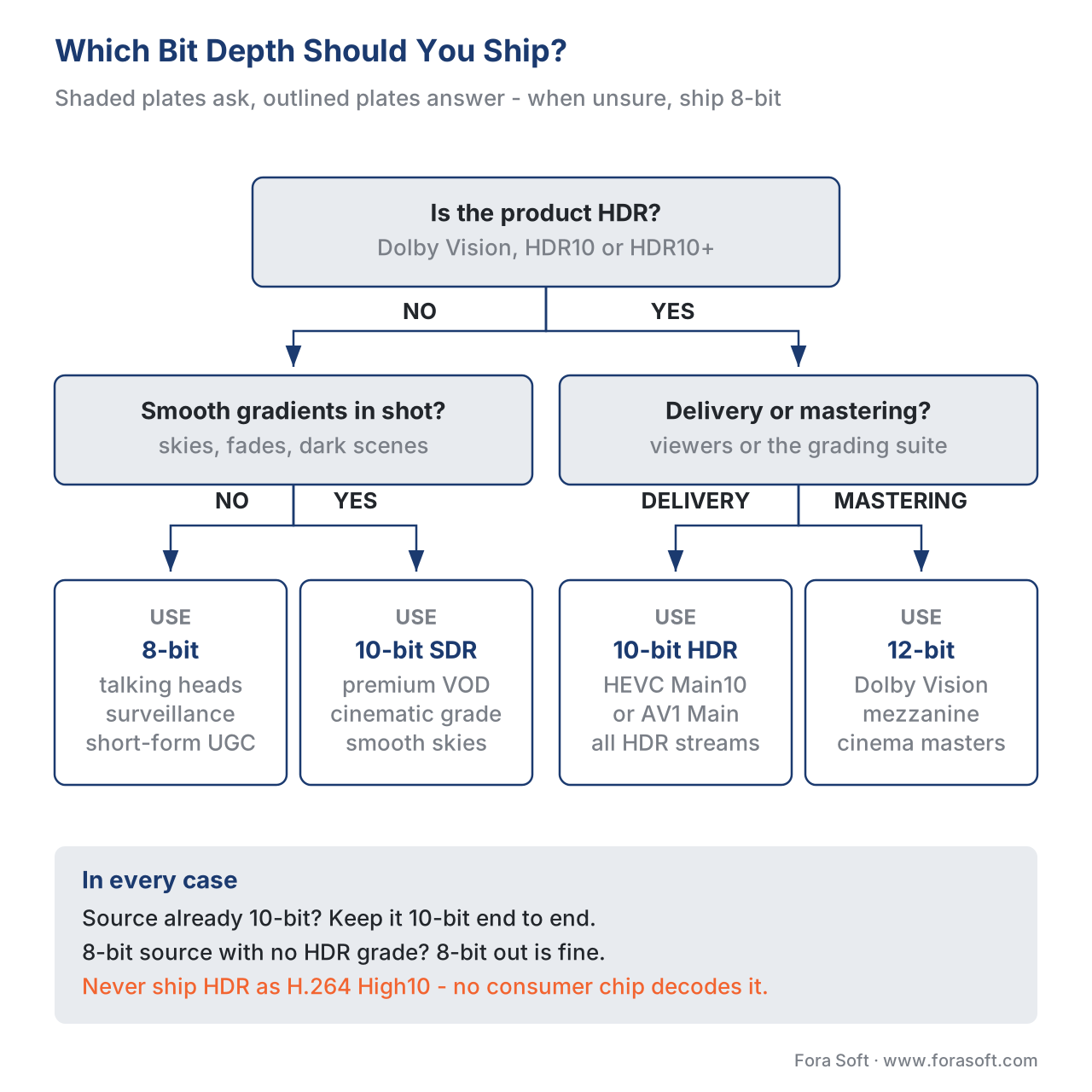 Figure 2. A decision tree for picking bit depth. The right answer depends on your content type, your target devices, and whether your source is already 10-bit.
Dithering — the trick that saves 8-bit when you can't go higher
There's one more concept worth knowing because it shows up in spec sheets and engineering conversations: dithering.
Dithering is a deliberate addition of small random noise to a gradient before it's encoded at lower bit depth. It works because the human eye averages out noise in nearby pixels. Where banding would draw a hard edge between two solid shades, dither sprinkles a few "wrong" pixels across the boundary — and the eye reads the noisy boundary as a smooth gradient instead of a sharp step.
Every good encoder, monitor, and TV applies some kind of dithering when downsampling from a higher bit depth to a lower one. Modern OLED TVs dither aggressively to display 10-bit content on what is internally an 8-bit panel (most "10-bit" TVs are actually 8-bit with frame-rate-controlled dither, called 8-bit + FRC). The result is good enough that most viewers can't tell. If you're stuck with 8-bit output, software dithering can recover much of the quality 10-bit would have given you, at no encoding cost. FFmpeg has the dither flag for exactly this.
Where Fora Soft fits in
When we scope a video product, the bit depth question comes up early. For OTT streaming with HDR ambitions, we ship HEVC Main10 or AV1 on day one — the cost is minimal and the future-proofing is worth it. For telemedicine and surveillance, we recommend 8-bit by default because the content doesn't need more and the storage savings are real. For online learning platforms, the answer depends on whether the content includes screen captures (which need higher bit depth to avoid banding on slide gradients) or just talking heads (8-bit fine). The question is never "do we want quality?" — it's "where in this pipeline is bit depth actually limiting?" That's the question this article exists to help you ask.
The book
Video Encoding: A Complete Guide to Video Compression
Bit depth quietly sets the ceiling for everything downstream of it. The book follows that chain across 1,500+ pages — what 10-bit gives quantisation and rate control to work with, why HEVC Main10 and AV1 Main became the profiles HDR actually ships on, and where dithering earns its keep. Written by Nikolay Sapunov, CEO at Fora Soft.
Not sure whether your pipeline needs 10-bit?
Tell us what your cameras record, what your encoder does with it and who watches the result, and we will tell you where bit depth is actually limiting quality — and where paying for it buys you nothing. 250+ video products shipped since 2005.
See our case studies
Case study
Speed.Space
Remote production used on Netflix, EA and HBO shoots, where the crew sets resolution, frame rate, codec and bitrate per shoot and records 1080p at 8 Mbps locally instead of letting the network decide.
Case study
Worldcast Live
Concert streaming at 1.5 Gb/s and 0.4–0.5 s latency for 10,000 simultaneous viewers — stage lighting and slow fades are exactly the content that shows banding first.
Case study
Mindbox
AI video management across 50+ deployments in transport, pharma and gated communities, pulling RTSP from cameras of every vintage — the case where 8-bit is the right answer and the storage saving is real.
What to read next
Perception
Psycho-Visual Redundancy: Things The Viewer Won't Notice
Why dithering gets away with it, and what else the eye lets you throw out.
HDR
The Complete Guide to HDR: HDR10, Dolby Vision and HLG
Where 10-bit stops being a choice, and what else HDR asks of the pipeline.
Compression
8-Bit vs 10-Bit Encoding: The "10-Bit Is Just For HDR" Myth
The same argument with the benchmark numbers, including where 10-bit files come out smaller.
Codec architecture
Quantization: Where Quality Is Lost
The other place steps get coarser — and why it meets the bits you started with.
Supplementary references: Encoding to 10-bit benefits discussion, VideoHelp Forum, https://forum.videohelp.com/threads/394569-I-there-any-benefit-to-encoding-to-10-bits · HEVC 10-bit vs 12-bit comparison, Copy Programming, https://copyprogramming.com/howto/h-265-10-bit-vs-12-bit
-
8-bit colour banding mechanics; 10-bit eliminates visible stripes in gradients. Video Color Depth Explained: 8-Bit vs 10-Bit, Flipper File, accessed May 2026. https://flipperfile.com/video-file-guides/video-color-depth-explained/ ↩
-
Bit-depth value counts and gradient smoothness comparison. Bit Depth in Video: 8-bit, 10-bit, and 12-bit Explained, Zencopa, accessed May 2026. https://zencopa.com/learn/bit-depth-in-video-8-bit-10-bit-and-12-bit-explained ↩
-
Shadow detail and human visual sensitivity in dark areas; why HDR needs 10-bit minimum. Why Video Bit-depth Matters, Larry Jordan, accessed May 2026. https://larryjordan.com/articles/why-video-bit-depth-matters-2/ ↩
-
10-bit HEVC encoding of 8-bit source often matches or beats 8-bit file size; gradients compress better. AVC vs. HEVC, 8-bit vs. 10-bit Video Encoding, Archimago's Musings, accessed May 2026. http://archimago.blogspot.com/2016/12/quick-compare-avc-vs-hevc-8-bit-vs-10.html ↩↩
-
HEVC Main 10 profile added October 2012 specifically for Rec. 2020 / HDR to avoid banding. Wikipedia: High Efficiency Video Coding, accessed May 2026. https://en.wikipedia.org/wiki/High_Efficiency_Video_Coding ↩↩
