


Why this matters
If you are about to build a product that uses video — a Netflix-style service, an online doctor visit, a video conferencing app, a security camera platform, an online learning tool — you will spend the next year of your life having conversations about video that sound like another language. Engineers will tell you that you need "H.265 at 4K with 4:2:0 chroma and 10-bit depth" and you will have to decide if that's right for your customers, your budget, and your timeline. This article is the foundation that makes those conversations make sense. By the end you'll be able to read a vendor's pricing page, a YouTube engineering blog post, or an FFmpeg command and know what the trade-offs are.
We're going to build the picture piece by piece. No prior knowledge required. We'll define every term before we use it, and we'll come back to the important ones every few sections so you don't have to remember everything at once.
From analog to digital: a 90-second history
For most of the 20th century, television and video were analog. "Analog" here just means continuous — a continuous wave of electricity that varied smoothly to represent the changing brightness of a scene. A camera turned the light it saw into a wavy electrical signal, broadcast that signal over the air, and a television set used the signal to direct a beam of electrons across a glass screen, painting the picture line by line at high speed. There were no numbers anywhere in the chain. The picture was a wave, and the screen drew the wave.
Three regional standards dominated this analog era, defined by how many horizontal lines they used and how fast they refreshed:
- NTSC — North America and Japan. 525 lines per picture, 60 refreshes per second. Adopted in black-and-white in 1941 and updated for colour in 1953. 1
- PAL — most of Europe. 625 lines, 50 refreshes per second. Patented by the German company Telefunken in December 1962. 2
- SECAM — France and parts of the former Soviet bloc. Same line count as PAL but a different way of encoding colour.
This analog system worked but had real limits. Tapes degraded every time you copied them. The signal carried only so much detail before it started looking fuzzy. And computers couldn't really do anything with the signal — you couldn't process it, search it, or efficiently send it over the internet, because computers think in numbers, not waves.
The shift to digital video happened between roughly 1993 and 2009. Digital means sampled into numbers — instead of a continuous wave, you have a long list of discrete values that a computer can store, copy, process, and send. The milestones came fast: MPEG-1 (the first widely-used digital video format) in 1993, DVD-Video in 1996, the ATSC standard for digital terrestrial television adopted in the United States in 1996, and similar standards rolled out across Europe under the name DVB. By June 2009 the United States government had legally required all over-the-air TV broadcasters to shut off their analog transmitters. 3 After that point, every camera, every disc, every stream you and your customers touch is digital.
Digital won for three reasons that still matter for any product you build today. First, digital copies are perfect — copying a number doesn't degrade it the way copying a tape did. Second, digital can be compressed — you can throw away information your eye can't see and shrink the file enormously, which is what makes streaming over the internet possible at all. Third, digital can be processed by software — you can apply filters, run AI on it, search it, edit it on any laptop. None of that is possible with a continuous wave.
What's actually inside a digital video file
A digital video file is, at its heart, very simple. It's a long ordered list of still pictures called frames, played back at a fixed speed so your eye sees motion instead of slides. This is the same illusion as a flipbook — a stack of slightly different drawings, flipped fast enough that the brain stitches them together into movement. The difference is that a video file has thousands of frames per minute, and each frame is much more detailed than a flipbook drawing.
Each frame is a flat, two-dimensional grid of tiny coloured dots called pixels (short for picture elements). Imagine the floor of a bathroom tiled in very small mosaic tiles, where every tile is a single solid colour. From far away you see a smooth picture; up close you see individual squares. That's exactly how a digital image works. A Full HD frame, for example, is a grid of 1,920 pixels wide and 1,080 pixels tall — that's just over two million tiles per frame.
Each pixel is stored as a small group of numbers. The most intuitive way to store colour is as three numbers — one for red, one for green, one for blue — because mixing those three primary colours in different proportions can produce any visible colour. This system is called RGB, short for Red-Green-Blue, and it's how computer monitors and cameras think about colour. A bright red pixel might be stored as the numbers (255, 0, 0). A bright blue pixel is (0, 0, 255). A grey pixel is (128, 128, 128) — equal amounts of each colour blended together.
Now here's the first counter-intuitive thing in video. Almost every video codec — the software that compresses video for storage and streaming — does not work in RGB. Instead it converts each pixel to a different three-number system called YCbCr. In YCbCr, the first number (Y) is the luma, meaning brightness only — how light or dark the pixel is. The other two numbers (Cb and Cr) describe the chroma, meaning colour information only — how blue and how red the pixel is, separate from its brightness.
Why convert? Because the human eye has a quirk that video engineers love. Your eye is far more sensitive to changes in brightness than to changes in colour. You'll instantly notice if a bright detail goes fuzzy, but you won't notice if a colour goes slightly fuzzy — especially in a moving image. By separating brightness from colour, a codec can spend lots of bits on the brightness component and throw away most of the colour bits, and the result still looks great to a human eye. That trick alone roughly halves the size of a video file before "real" compression even starts. The technical name for that trick is chroma subsampling, and we'll come back to it in the colour space article. More on YCbCr and colour spaces here.
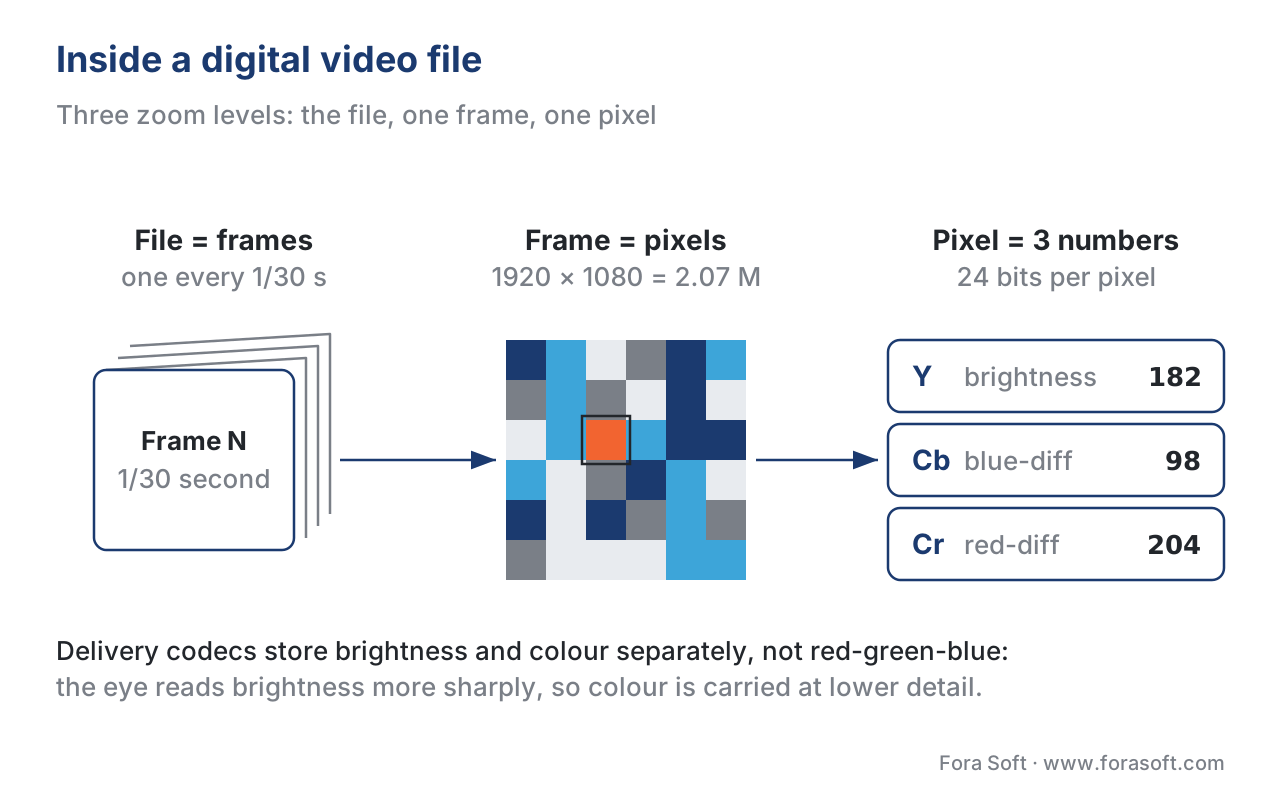 Figure 1. Three zoom levels of the same video. A file is a sequence of frames. A frame is a grid of pixels. A pixel is three numbers — one for brightness (Y, luma) and two for colour (Cb, Cr, chroma). Codecs work in YCbCr because the eye cares more about brightness than colour.
That whole structure — file ➜ list of frames ➜ grid of pixels ➜ trio of numbers per pixel — is the entire mental model. Everything else in this article is a different way of asking "how many numbers do we use, and what do they mean?"
The five things that describe any video
Every spec sheet, every camera setting, every streaming app config boils down to five values. Get these five right, and the rest of the technology stack follows.
Resolution — how many pixels per frame
Resolution counts the pixels in one frame. The two numbers you'll see — for example, 1920 × 1080 — are the width and height of the pixel grid. Multiply them and you get the total pixel count per frame. So 1920 × 1080 ≈ 2.07 million pixels per frame. People also use names like "Full HD" or "1080p" as shorthand for the same thing. 4
The standards in active use in 2026 are:
| Common name | Pixel dimensions | Total pixels per frame | Where you meet it |
|---|---|---|---|
| SD 480p | 720 × 480 | 345,600 | Legacy broadcast, old surveillance archives, DVDs |
| HD 720p | 1,280 × 720 | 921,600 | Video conferencing, mobile streams |
| Full HD 1080p | 1,920 × 1,080 | 2,073,600 | Mass-market Netflix-style services, online learning, telemedicine |
| 4K UHD | 3,840 × 2,160 | 8,294,400 | Premium streaming, modern TVs, recent cinema |
| 8K | 7,680 × 4,320 | 33,177,600 | Flagship demos, niche broadcast |
There's an important thing buried in those numbers. When you double each side, you quadruple the pixel count. 1080p has roughly 2 million pixels. 4K is twice as wide and twice as tall, but the total count jumps to about 8 million — four times as many. 8K is four times as many again, about 33 million. That's why moving up a resolution step takes much more bandwidth, storage, and processing power than it sounds — you're not doubling the data, you're roughly quadrupling it.
Frame rate — how many pictures per second
Frame rate is the number of frames shown per second, written as fps (frames per second). 5 The three families of frame rates you'll meet are:
- Cinematic — 24 fps. The standard for movies since 1927. Hollywood settled on 24 fps because it was the slowest rate that still allowed synchronised sound to play back smoothly when film projectors were mechanical, and because film stock was expensive. 6 Audiences came to associate the slight blur of 24 fps with "movie feel," and the standard has stuck for nearly a century. Almost every feature film you've ever seen was shot at 24 fps.
- Broadcast — 25 or 30 fps. Television and most YouTube videos use 25 fps in PAL regions (Europe) and 29.97 or 30 fps in NTSC regions (US and Japan). The split happened in the 1940s and 50s because TV refresh rates were tied to the local electrical power frequency — 50 Hz in Europe gives you 25 frames, 60 Hz in the US gives you 30.
- High motion — 50, 60, 120, 240 fps. Live sports, gaming streams, action footage, virtual reality. Higher frame rates make fast motion look smoother and reveal more detail in moving objects.
The crucial trade-off: a higher frame rate means more data per second. Going from 30 fps to 60 fps literally doubles the number of frames the system has to capture, encode, store, and deliver. It also makes fast motion look much smoother, which is why sports broadcasters spend the money.
Colour space — which red, green, and blue?
Colour space is a definition that pins down exactly which red, green, and blue (and every shade in between) the numbers in your video actually refer to. This sounds odd — surely red is just red? — but it's not. Different display technologies can show different ranges of colour, and your numbers have to specify which range you mean, or the picture will look wrong on the other end.
Think of it like translating "warm." Tell a Norwegian to bring a "warm" jacket and tell a Saudi to bring a "warm" jacket, and you'll get very different jackets, because their everyday reference for "warm" is different. Colour spaces are like that: they define the reference points.
The three colour spaces you meet in 2026 are: 7
- BT.709 for High Definition (1080p) video. Released by the international standards body ITU in 1990. Covers about 36% of the colours a human eye can actually see.
- DCI-P3 for digital cinema and many modern phones and laptops. Covers about 54% of human-visible colour — much more vibrant reds and greens than BT.709.
- BT.2020 for 4K and what's called HDR (High Dynamic Range) video. Covers about 76% of human-visible colour. This is the colour space behind the very saturated blues and reds you see on a modern OLED TV.
You don't need to remember the percentages. The point is that the bigger and newer the colour space, the more vivid the picture can look — but only on a screen that's capable of displaying that colour space. Mismatched colour spaces (e.g. a BT.2020 file shown on a BT.709 screen with no conversion) make everything look washed out or wildly oversaturated. More on colour spaces.
Bit depth — how precisely each colour number is stored
Bit depth is the number of bits used to store one colour number for one pixel. The bigger the bit depth, the more precise the colour gradient.
A quick refresh: a bit is the smallest unit of computer storage — it's either a 0 or a 1. With 8 bits you can store 2⁸ = 256 different values (because every bit doubles the number of combinations). With 10 bits you can store 2¹⁰ = 1,024 values. With 12 bits, 2¹² = 4,096 values.
Consumer video has historically used 8-bit depth — each of the three colour components per pixel takes a number from 0 to 255. That means each pixel can be any of 256 × 256 × 256 ≈ 16.7 million distinct colours. That's enough for most everyday content. HDR (High Dynamic Range) video needs much finer gradations because it has to represent both very bright highlights and very dark shadows in the same scene without showing visible steps in smooth gradients — a problem called banding, where instead of a smooth sky you see thin striped bands of slightly different blues. HDR therefore uses 10-bit or 12-bit depth — 1,024 or 4,096 shades per channel, or roughly a billion to 68 billion distinct colours total. More on bit depth and banding.
The trade-off in concrete terms: 10-bit video carries about 25% more data than 8-bit. 12-bit carries about 50% more. Worth it for premium content, overkill for a security camera.
Scan type — how each frame is drawn
Scan type describes how the lines of each frame are drawn. There are two options.
Progressive scan draws every line of every frame in one pass, top to bottom. Each frame is one complete, coherent snapshot of the scene. Almost everything modern — every Netflix stream, every Zoom call, every YouTube video, every modern TV — uses progressive scan.
Interlaced scan was an old trick from the 1930s for fitting motion into the limited bandwidth of analog broadcast TV. It splits each frame into two halves — the odd-numbered horizontal lines first, then the even-numbered lines a fraction of a second later. The TV stitches them together so quickly that the eye sees one whole picture. The problem: anything that moves between the two halves creates a visible saw-tooth pattern at the edges, called combing. Modern displays don't have an electron beam scanning across the screen anymore, so interlaced doesn't even work on them properly without extra processing. More on progressive vs interlaced.
For any product you ship in 2026, treat interlaced as a legacy input format you might receive from old archives or some broadcast feeds — never as something you create yourself.
The bitrate problem — why raw video is impossibly large
Here's where the abstract idea of "video is just numbers" turns into a very concrete engineering problem. Raw, uncompressed digital video is enormous — so enormous it would be unusable on any real network. The math is short and worth walking through carefully because every codec decision you'll ever make is about managing this number.
Bitrate is the number of bits a video uses per second of playback. It's the most important single number in the whole field. It's measured in bits per second, written as bps, or thousands of bits per second (Kbps), or millions (Mbps), or billions (Gbps). You can think of bitrate as the size of the pipe your video has to flow through, like water pressure in a hose. A low-quality video uses a thin pipe; a high-quality video needs a much thicker one.
The formula for raw, uncompressed bitrate is:
bitrate = width × height × bits_per_pixel × frame_rate
For an everyday Full HD video — 1920 × 1080, 30 frames per second, 8-bit colour, using the 4:2:0 chroma subsampling we mentioned earlier — bits_per_pixel works out to about 12 bits per pixel on average (a long story; the short version is that the 4:2:0 trick effectively gives you 1.5 bytes per pixel instead of 3). Let's run the numbers step by step:
bitrate = 1920 × 1080 × 1.5 bytes × 30 frames
        = 1920 × 1080 × 1.5 × 30
        = 93,312,000 bytes per second
        ≈ 93 MB/s
        ≈ 746 Mbps
746 megabits per second for raw Full HD. To put that in perspective, an average home internet connection in 2026 is 100–300 Mbps — already too slow to handle even a single uncompressed 1080p stream. A 90-minute movie at that rate would be about 504 gigabytes — a stack of nine Blu-ray discs for one film.
Now let's do the same math for 4K at 60 fps with 10-bit colour:
bitrate = 3840 × 2160 × 1.875 bytes × 60 frames
        ≈ 933 MB/s
        ≈ 7.46 Gbps
7.46 gigabits per second. That's a fire hose. Almost no consumer network on earth can handle it.
Compare those numbers to what people actually receive in 2026. YouTube recommends uploads at 8–15 Mbps for 1080p content and 35–45 Mbps for 4K. 8 Netflix delivers 4K to your TV at roughly 15–25 Mbps on average. 9 Compare 15 Mbps delivery to 7,460 Mbps raw — that's a compression ratio of nearly 500 times smaller. That ratio is the entire reason video codecs exist, and it's also why every modern streaming business is, deep down, in the business of choosing and tuning codecs. More on the math behind bitrate.
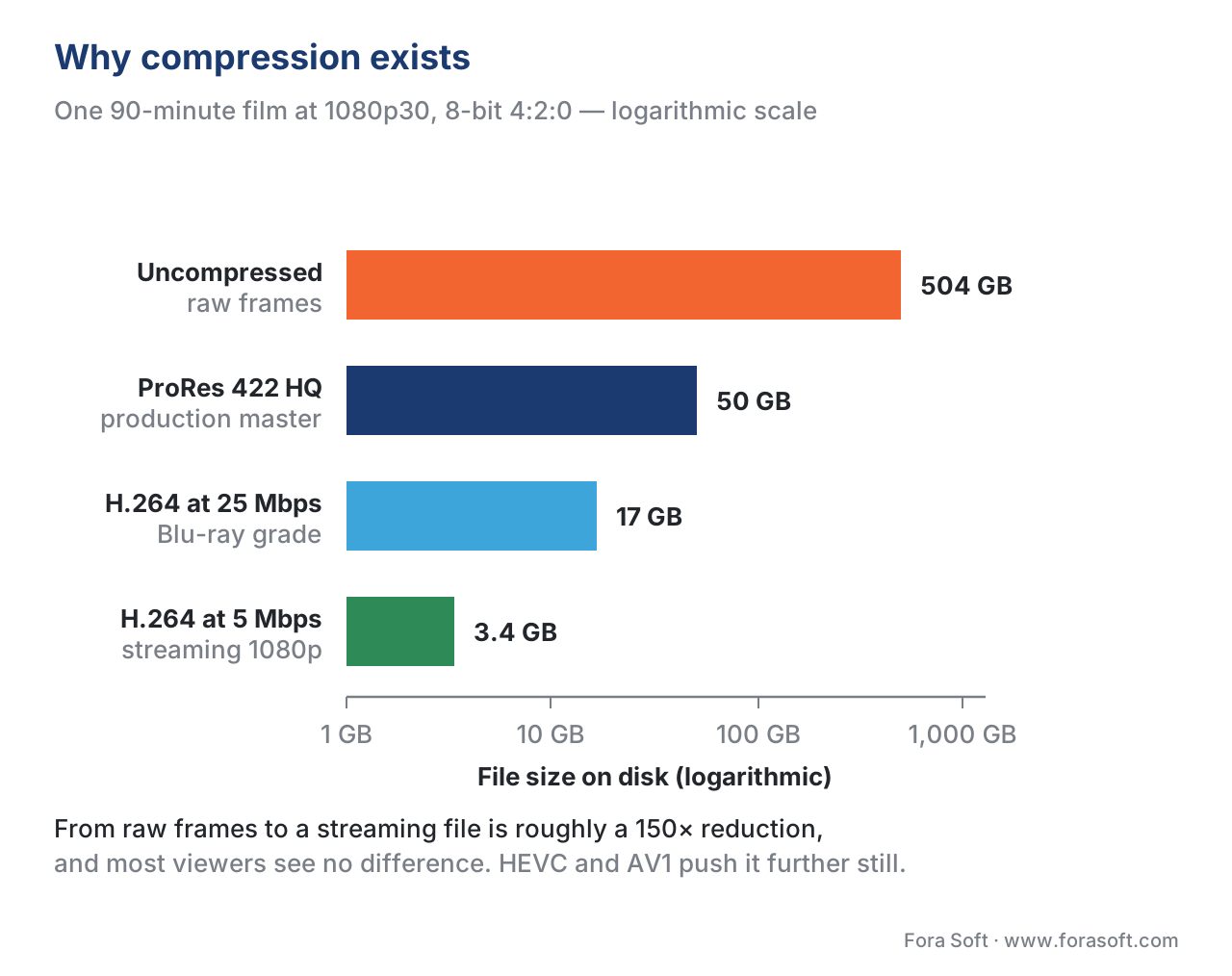 Figure 2. Compression turns a 504 GB raw film into a 3.4 GB streamable file — about 150× smaller, with no quality loss most viewers can see.
Codecs and containers — the confusion almost everyone has
The single most common mix-up in product conversations is treating MP4 and H.264 as if they were the same thing. They're not, and the distinction matters because device support is granted at the codec level, not the container level.
A codec is a piece of software that compresses raw frames into a compact stream of bits, and decompresses them on the other end. The word is short for coder-decoder. Modern codecs include H.264, H.265 (also called HEVC), AV1, and VP9. Each is a particular set of mathematical recipes for shrinking video while preserving quality. They get released by international standards bodies or by industry consortiums every few years, with each generation roughly 30–50% more efficient than the last.
A container is a file format that wraps the compressed video stream, the compressed audio stream, subtitles, chapter markers, and metadata into a single file. Common containers are MP4, MKV, WebM, and MOV. The container doesn't compress anything — it just defines how the different streams are organised inside the file.
The analogy: the container is the cardboard box, and the codec is the language the book inside the box is written in. The same box (MP4) can hold a book in any language (H.264, H.265, AV1). The same book (H.264) can be packed in any of several boxes (MP4, MKV, MPEG-TS) depending on whether you're streaming it, archiving it, or broadcasting it. 10
Why does this matter for you? Because when you tell a developer "ship the video as MP4," you haven't actually told them anything specific about quality, file size, or compatibility. Their next question will be "MP4 with what codec inside?" — because a Safari browser will happily open an MP4 file and then refuse to play it if the codec inside is, say, AV1 and the user's device doesn't have an AV1 decoder. Always specify both. The correct sentence is something like "MP4 container with H.264 High Profile, level 4.1 inside." More on containers.
How video gets from a camera to a viewer's screen
Every video product, whether it's a Netflix-style streaming service serving 50 million viewers or a one-doctor telemedicine call, runs the same six-stage pipeline.
 Figure 3. The end-to-end video pipeline. The same six stages run inside Netflix, Zoom, a video doorbell, and an online doctor visit. Only the latency budget and the protocol change.
1. Capture. A camera sensor turns light into a digital signal. The sensor is a grid of tiny light-sensitive cells; each cell measures how much light hits it during the exposure for one frame, and that measurement becomes the pixel values. The output of this stage is raw frames — exactly the giant uncompressed numbers we calculated above.
2. Encoding. A codec compresses those raw frames into a small stream of bits, throwing away information your eye can't see and finding patterns that repeat across the frame and between frames. This is where the 500× shrinkage happens.
3. Packaging. A piece of software called a packager takes the encoded stream, wraps it in a container format, and chops it into short segments (usually 2–10 seconds each). Short segments are what makes adaptive streaming protocols like HLS and MPEG-DASH work — the player can grab one segment at a time and switch quality between segments without anyone noticing.
4. Distribution. A Content Delivery Network (CDN) is a worldwide network of servers that holds copies of those segments close to viewers. When you press play in Spain, the segments come from a server in Spain, not from a data centre in California — that's what keeps the video smooth and fast.
5. Playback. The viewer's app or browser downloads segments, runs the codec in reverse to decode the bits back into frames, and hands the frames to the display.
6. Display. The screen — phone, laptop, TV — turns the frames back into light that the viewer actually sees.
Different products run different latency budgets through this pipeline. For Netflix-style on-demand, you can have minutes between when the video was filmed and when the viewer sees it, because nobody is watching live. For a live sports broadcast, the budget shrinks to 8–30 seconds. For a Zoom call or a telemedicine consultation, it shrinks again to under one second, because two humans can't have a back-and-forth conversation with a one-second delay between them. The pipeline is the same; the rules around it change.
Common mistake: assuming higher resolution always looks better
A 4K stream at 5 Mbps almost always looks worse than a 1080p stream at the same 5 Mbps. Why? Because the same data budget is spread across four times as many pixels. Each pixel has less data describing it, so each pixel is fuzzier, and the picture is full of compression artefacts.
The right way to think about quality is "bits per pixel," not "resolution." A 1080p stream at 5 Mbps has roughly 2.4 bits per pixel per second. A 4K stream at the same 5 Mbps has only about 0.6 bits per pixel per second — four times worse. Resolution only delivers its promise if the bitrate scales with it. The right question for any video product is never "is it 4K?" — it's always "is it 4K at a bitrate that supports 4K?"
Free download: HDR Readiness ChecklistOne-page A4 audit of an HDR pipeline from capture to display — 21 checks plus the two most common production pitfalls.Where Fora Soft fits in
We have been writing video software at Fora Soft since 2005, and the pipeline above is what we live inside every day. We ship video conferencing and WebRTC platforms, on-demand and live streaming services, video surveillance systems, online learning platforms, telemedicine, and AR/VR experiences. The same five parameters and the same six pipeline stages constrain every one of those products — what changes is the latency budget, the codec choice, the streaming protocol, and the device matrix. The understanding in this article is the first thing a new engineer on our team is expected to internalise, and it's the first thing we walk a non-technical product team through when we start a project.
The book
Video Encoding: A Complete Guide to Video Compression
This article is the first step of a much longer road. The book walks the same plain-language path across 1,500+ pages — from pixels and colour to H.264, HEVC and AV1, rate control, quality metrics, and where AI actually helps. Written by Nikolay Sapunov, CEO at Fora Soft, out of 20 years of shipping video products.
Building a product that has to move video?
Tell us what you are building and we will tell you what it takes — resolution, bitrate, codec, latency budget, and the pipeline behind them. 250+ video products shipped since 2005.
See our case studies
Case study
Worldcast Live
HD concert streaming at 1.5 Gb/s with 0.4–0.5 s latency for 10,000 simultaneous viewers, and quality that adapts when the connection drops.
Case study
Speed.Space
Remote production used on Netflix, EA and HBO shoots: 1080p at 8 Mbps recorded locally, with resolution, frame rate, codec and bitrate under the crew’s control.
Case study
Mindbox
AI video management in 50+ deployments: RTSP camera ingest, FFmpeg transcoding and HLS delivery across transport, pharma and gated communities.
What to read next
Compression
Why We Compress Video: The Math of Bitrate
Where the 746 Mbps number comes from, and why every video you have ever watched is compressed.
Codecs
A Short History of Video Codecs: From H.120 to AV2
Forty years of codecs in one thread, and why H.264 still carries most of the internet.
Containers
Containers: MP4, fMP4, MKV, WebM, MOV, MPEG-TS
The box, not the book: which container to pick for playback, streaming and archiving.
Colour & HDR
The Complete Guide to HDR: HDR10, Dolby Vision, HLG
What HDR actually changes, what it costs to ship, and which format to support first.
-
NTSC standard history and 1953 colour update. Wikipedia: NTSC, accessed May 2026. https://en.wikipedia.org/wiki/NTSC ↩
-
PAL standard, patented by Telefunken in December 1962. Wikipedia: PAL, accessed May 2026. https://en.wikipedia.org/wiki/PAL ↩
-
U.S. analog shutoff on June 12, 2009; ATSC adopted 1996. Wikipedia: Digital television transition, accessed May 2026. https://en.wikipedia.org/wiki/Digital_television_transition ↩
-
ITU-R BT.709 parameter values for HDTV. International Telecommunication Union. https://www.itu.int/rec/R-REC-BT.709 ↩
-
ITU-R BT.2020 parameter values for UHDTV. International Telecommunication Union. https://www.itu.int/rec/R-REC-BT.2020 ↩
-
24 fps standardised 1927–1930 by Hollywood for sound-on-film economics. Why are movies 24 frames per second?, StudioBinder, accessed May 2026. https://www.studiobinder.com/blog/why-are-movies-24-frames-per-second/ ↩
-
Colour gamut coverage: BT.709 ≈ 35.9%, DCI-P3 ≈ 53.6%, BT.2020 ≈ 75.8% of human-visible colour. Understanding color gamut, BenQ, accessed May 2026. https://www.benq.com/en-us/business/resource/trends/understanding-color-gamut.html ↩
-
YouTube recommended upload bitrates 2026: 8–15 Mbps 1080p, 35–45 Mbps 4K SDR 30fps. YouTube Bitrate Guide 2026, Swarmify. https://swarmify.com/blog/what-you-need-to-know-about-the-video-bitrate/ ↩
-
Netflix 4K delivery averages 15–25 Mbps via HEVC / AV1. Netflix-recommended internet speeds, Netflix Help Center. https://help.netflix.com/en/node/306 ↩
-
Codec vs container distinction; H.264 inside MP4. Video Codec vs Container, Callaba. https://callaba.io/difference-between-video-codecs-and-containers ↩
