


Why this matters
If you are building anything that ships video to viewers — a streaming service, an online learning platform, a video conferencing app, a telemedicine product, a security-camera dashboard — your engineers will eventually ask you "which container?" and your answer shapes the cost, compatibility, and roadmap of the product for years. A platform that picks plain MP4 for its live streaming pipeline ends up rebuilding the whole packaging layer the day it adds live events, because plain MP4 cannot be streamed in real time. A platform that picks MKV for downloads ends up explaining to users why their iPhones cannot open the files. A platform that picks MPEG-TS for video-on-demand ends up paying a 10 to 15 percent storage and bandwidth premium on every file forever, because MPEG-TS was designed for cables and satellites, not for hard drives and CDNs. None of these problems show up on day one. They show up on month nine, when changing course is expensive.
This article gives you the mental model you need to make the decision once, calmly, and correctly. We will start from the difference between a container and a codec, build up to the six containers in active use today, walk through the internal structure of each one, and finish with a decision tree you can apply to a real product without talking to an engineer first.
The container is not the codec
Before anything else, settle this distinction. A codec — short for coder-decoder — is a piece of software that compresses raw video pixels into a much smaller stream of bits, and decompresses them back when someone wants to watch. H.264, H.265 (HEVC), VP9, AV1, and VVC are codecs. They are pure mathematics: take in a sequence of frames, output a stream of bits that, when fed back into the same codec, reproduces (almost) the same frames.
A container is the file format that wraps the bits. It is the box that holds the compressed video track, the compressed audio track, the subtitle tracks, the chapter markers, the cover image, the metadata that tells the player "this video is 1920 by 1080, 24 frames per second, BT.709 colour space, starts at timecode 01:00:00", and the index that lets the player jump to minute 37 of a two-hour movie without scanning the entire file. None of that is the codec's job. The codec does not know — and does not care — what container the bits will end up in.
The same H.264 video stream can be wrapped in an MP4, in an MKV, in an MOV, in an MPEG-TS, or in a fragmented MP4. The bits inside are identical. The wrapping is what changes. A useful analogy: the codec is the bottled drink, and the container is the crate it ships in. Pepsi tastes the same whether you buy it in a six-pack carton, a vending machine, or a restaurant glass — but the packaging determines how easy it is to transport, store, label, and serve.
This separation is also why "MP4 versus AV1" is not a meaningful comparison. MP4 is a container; AV1 is a codec. The real question is "MP4 with AV1 video and Opus audio versus WebM with AV1 video and Opus audio" — same content, different envelope. Once you internalise this, half of the confusion in any container conversation evaporates.
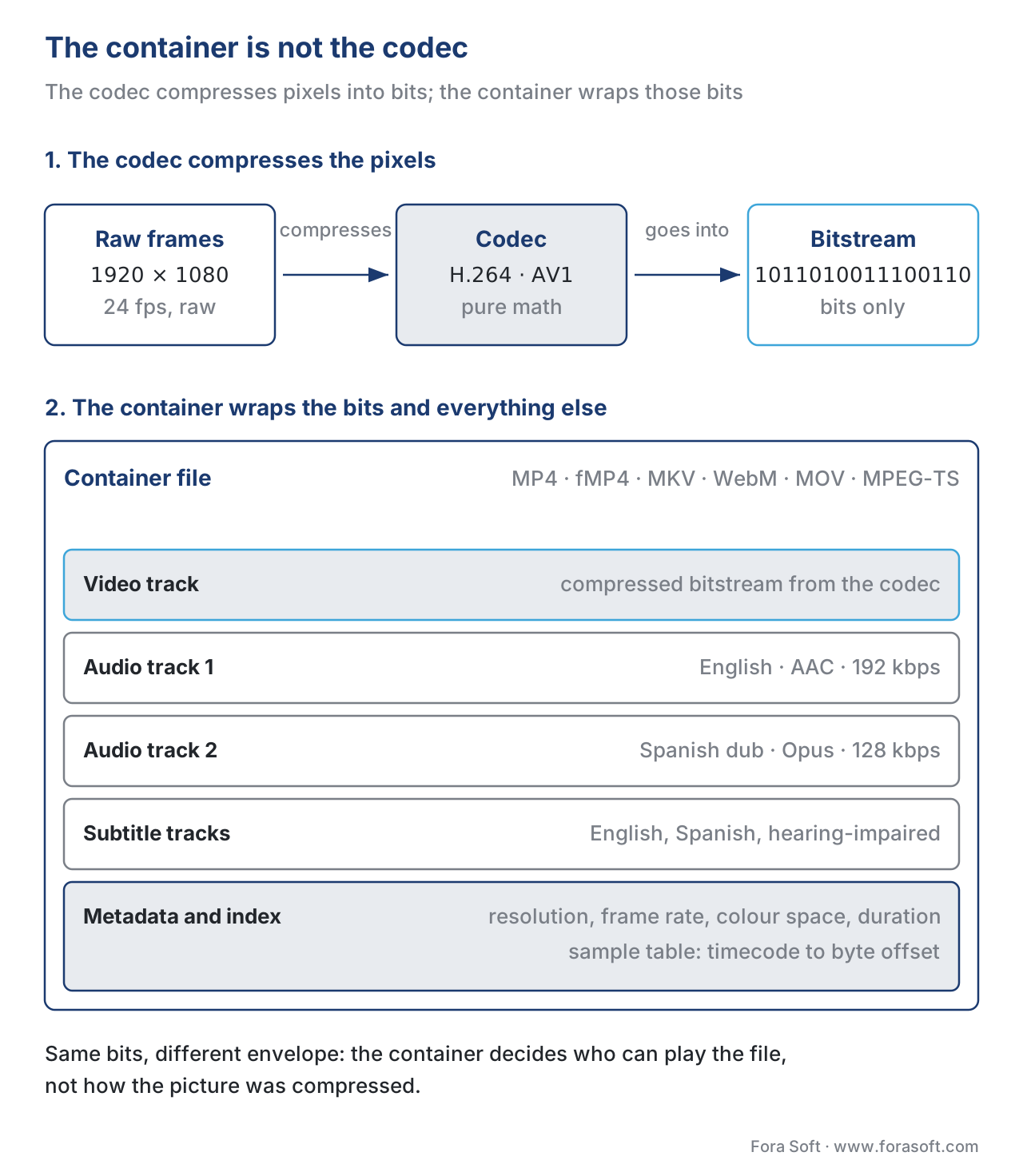 Figure 1. The container holds and synchronises the tracks; the codec compresses the pixels inside the video track. Different codecs and different containers solve different problems and combine freely.
What a container actually has to do
Look at the job description. A video file has to do five things at once.
First, it has to store more than one stream of media. A typical movie has one video stream, two or three audio streams (English, dubbed Spanish, director's commentary), and several subtitle tracks. They all need to live in one file in a way the player can find.
Second, it has to keep those streams synchronised so dialogue matches lips and subtitles appear at the right moment. The container does this by stamping every chunk of video and audio with a precise time code that says "play this 17.504 seconds in" — the player uses those time codes to align all the streams.
Third, it has to let the player jump around inside the file without re-reading from the start. If you click to minute 90 of a two-hour movie, the player needs to know exactly which byte to read first. The container stores an index (sometimes called a sample table, an offset table, or a cues block depending on the container) that maps "minute 90" to "byte 2,041,876,332".
Fourth, it has to carry metadata — the descriptive labels and parameters that travel with the file: title, language, codec name, resolution, frame rate, colour space, audio sample rate, channel layout, chapter names, even cover art. Without this metadata the player has to guess, and guessing fails fast.
Fifth, it has to be writable in chunks, ideally without rewriting the whole file when the writer wants to append more material at the end. This matters for cameras (which write while recording), for live encoders (which write while the event is happening), and for streaming servers (which want to start sending the file before the recording is finished).
Each of the six containers in this article solves those five jobs slightly differently. The differences in the solutions are what makes one better than another for a given task.
ISO BMFF — the family tree that ties everything together
Three of the six containers we cover — MP4, fMP4, and MOV — share a common ancestor. They are all built on the ISO Base Media File Format, abbreviated ISO BMFF, which is standardised as ISO/IEC 14496-12 by the International Organization for Standardization. 1 If you understand ISO BMFF, you understand 90 percent of the containers you will ever touch.
ISO BMFF organises the file as a tree of boxes, sometimes also called atoms (the Apple term that came first). Each box has a fixed header — four bytes describing its size, four bytes naming its type, like ftyp or moov or mdat — and a body that contains either raw data or more boxes nested inside. The whole file is one giant nested tree of boxes.
A typical MP4 has a small set of top-level boxes. The ftyp box at the very start identifies the file format and version, the way a "magic number" identifies a JPEG or a PNG. The moov box, the movie box, holds all the metadata for the file — track information, codec parameters, timing, and the all-important sample table that maps timecodes to byte offsets inside the media. The mdat box, the media data box, holds the actual compressed video and audio bits with no internal structure beyond what the moov indexes describe. 1
Two facts about this layout matter for everything that follows. First, the player has to read the moov box before it can play anything, because the moov is the table of contents that tells it where every frame lives inside the mdat. Second, the moov is usually small — a few kilobytes for a one-hour video. So if the moov is placed at the front of the file, the player can start playing within the first network packets; if it is placed at the end (the default in some recording software), the player has to download the entire file before playback can begin. Putting the moov at the front is called "fast-start" or "moov atom first" or "web-optimised" depending on which tool you read. Always do this for files you serve over the web.
 Figure 2. The anatomy of an ISO BMFF file. The standard MP4 layout (left) keeps all metadata in one
 moov box. The fragmented layout (right) replaces that single block with many self-contained moof+mdat pairs, each playable on its own.
ISO BMFF has been the dominant container family for two decades because it is flexible: the same box structure scales from a one-minute phone clip to a four-hour 4K HDR feature to a fragmented live stream. The same parsers, demuxers, and tooling work across all of them. Most of the rest of this article is about the specific dialects of ISO BMFF used in different contexts, plus the two non-ISO-BMFF formats — Matroska and MPEG-TS — that solve different problems.
MP4 — the default everyone supports
MP4, defined as ISO/IEC 14496-14 and finalised in 2003, is the most widely supported video container in existence. 3 If you want a video file that plays on every smartphone, every laptop, every browser, every smart TV, and every game console without further thought, you save it as MP4. Almost every camera, screen recorder, and editing tool exports MP4 by default; almost every social platform — YouTube, TikTok, Instagram, LinkedIn — accepts MP4 as its preferred upload format.
Inside, MP4 is a straight implementation of ISO BMFF with a small set of MP4-specific boxes layered on top. The ftyp brand says isom or mp42 and the moov indexes the streams. The codecs commonly carried inside are H.264 for video (the universal default), H.265 for newer 4K and HDR content, AAC for audio, AC-3 and E-AC-3 for surround sound, Opus for low-latency audio, and increasingly AV1 for next-generation efficiency. 3
MP4's main weakness is the one consequence of its design: it was meant to be a file, written once and played back from disk. The single moov index that makes the file efficient for playback also makes it awkward for live streaming, because the moov cannot be finalised until the writer knows where every frame is in the file — which it cannot know until the recording is done. You can stream a finished MP4 over HTTP, but you cannot start streaming an MP4 that is still being recorded. That problem is exactly what fMP4 was invented to solve.
A small numeric reality check helps you appreciate MP4's efficiency. A two-hour 1080p movie encoded at 5 megabits per second of video and 192 kilobits per second of audio takes:
total bits = (5,000,000 + 192,000) × 7,200 seconds
total bits = 5,192,000 × 7,200
total bits ≈ 37.4 billion bits
total bytes ≈ 4.67 gigabytes
The MP4 container overhead on top of that is roughly 0.5 to 1 percent — a few tens of megabytes of moov, ftyp, and sample-table boxes — so a 4.67 GB raw payload becomes a 4.69 GB MP4. That is the smallest packaging tax you will pay for any container, and one of the reasons MP4 stays the default.
fMP4 — MP4 cut into streamable slices
Fragmented MP4, abbreviated fMP4, is the same ISO BMFF file format with one structural change: instead of one big moov index pointing into one big mdat, the file is split into many small fragments, each one a self-contained moof (movie fragment box) plus its own mdat. The moof box carries the small index for just its fragment; the mdat carries just the bytes for that fragment. 2
This sounds like a small change. It is not. It is the single most important change in the history of internet video delivery.
The reason: a fragment is independently playable. A player can fetch fragment 47 of a live broadcast, decode it, and display the picture without ever having seen fragments 1 through 46. Each moof is a complete table of contents for the bytes that follow it in its mdat. So you can encode and write a fragment the instant it is captured, upload it to a CDN, and a player can start consuming it within seconds of capture. You can split a file across many CDN edge nodes, and a player can mix and match fragments from different sources. You can change quality level between fragments and the player will not notice — which is the basis of every adaptive bitrate streaming protocol on the internet today.
That last point is so important it has a name: Adaptive Bitrate streaming, or ABR. The encoder produces several copies of the same video at different bitrates — say, 5 Mbps, 3 Mbps, 1.5 Mbps, and 600 kbps — and slices each one into 2-to-6-second fMP4 fragments. The player monitors the viewer's bandwidth and CPU and picks the right bitrate, fragment by fragment, on the fly. When you watch Netflix and the picture sharpens after a few seconds, that is ABR swapping a low-bitrate fragment for a high-bitrate one. fMP4 is the chassis that makes this possible.
fMP4 has become the standard packaging for both major HTTP streaming protocols. HLS (HTTP Live Streaming), Apple's protocol since 2009, originally used MPEG-TS segments but added fMP4 support at WWDC 2016. 4 MPEG-DASH (Dynamic Adaptive Streaming over HTTP), the international-standard equivalent, has used fMP4 from day one. The third initialism you will meet — CMAF, the Common Media Application Format — is essentially a tightened profile of fMP4 designed so that one set of fragments can serve both HLS and DASH at once. We come back to CMAF later.
For anything that streams live — concerts, sports, live news, classroom lectures, surgical broadcasts — fMP4 is the container layer of choice in 2026. For static video-on-demand files served at a single bitrate, plain MP4 is often simpler and slightly more efficient. For anything in between, fMP4 wins because it gives you ABR for free.
 Figure 3. MP4 plays from a single file; fMP4 plays from a stream of small fragments. The fragmented layout is what makes adaptive bitrate streaming possible.
MOV — the professional ancestor and editing format
MOV, more formally the QuickTime File Format, was created by Apple in 1991 for its QuickTime multimedia platform. 5 It is the direct ancestor of MP4 — the MP4 specification was built by taking QuickTime, generalising it, and standardising it through ISO in 1998. Internally, MOV and MP4 are so similar that many tools open one and treat it as the other; the differences are mostly in the brand identifier in the ftyp box and in a handful of MOV-specific atoms that hold professional metadata MP4 does not formally support.
In daily life MOV is the professional production format. Final Cut Pro, Avid Media Composer, and DaVinci Resolve all write MOV by default for intermediate and master files. The codec almost always sitting inside is ProRes — Apple's "intermediate" codec designed for editing, with much higher bitrates and much lighter compression than H.264 or H.265, so that an editor can scrub, cut, and re-render without watching the picture degrade with every pass. A one-hour 1080p ProRes 422 master file weighs about 66 gigabytes, compared to about 2.3 gigabytes for the same content in H.264 — but ProRes decodes faster, edits cleanly, and preserves enough fidelity to survive ten generations of edits without visible loss.
When should you use MOV? Inside a video production pipeline, almost always. The colour-fidelity metadata in MOV is richer than in plain MP4 — gamma tags, matrix tags, and primary-colour tags survive round trips between editing tools without the corruption that has plagued MP4 colour metadata for years. Outside production, never; the world ships MP4. The transition from MOV to MP4 happens at the end of post-production, when the master cut is re-encoded for delivery. Many editing tools call this step "Export H.264 / MP4 for delivery", and that is exactly the right mental model: MOV is the master, MP4 is the print.
MKV / Matroska — the kitchen sink of containers
Matroska, with the file extension .mkv, is an open-source multimedia container designed in 2002 to do the one thing ISO BMFF was deliberately not built for: hold every feature a viewer might ever want, in one file, with no licensing fees. 6 It is built on a parallel binary format called EBML (Extensible Binary Meta Language) rather than on the ISO BMFF box hierarchy. Functionally EBML and ISO BMFF play similar roles — both are tree-of-tagged-elements structures — but Matroska went its own way.
The strengths of MKV come from that wide scope. An MKV file can carry an unlimited number of video, audio, and subtitle tracks. The subtitle support in particular is unusually rich — Matroska natively understands SubStation Alpha (SSA / ASS), SubRip (SRT), VobSub, and PGS image-based subtitles, with proper styling and positioning. 6 It also handles chapter markers, attached fonts, attached images, edit decision lists, and arbitrary metadata that no other container will let you keep inside the file.
For the practical user — and especially for an end consumer downloading or ripping their own collection — MKV is unbeatable. A single MKV of a movie can hold the 4K HDR Dolby Vision picture, the English Atmos audio track, the dubbed French audio track, English subtitles, Spanish subtitles, hearing-impaired subtitles, chapter markers, and a poster image, all in one file that plays cleanly in VLC, Kodi, mpv, and modern smart TVs.
But MKV has one painful weakness: the web does not natively support it. No mainstream browser plays MKV through the standard HTML5 <video> element. Apple's ecosystem — iOS, iPadOS, tvOS, Safari on macOS — does not play MKV at all. HLS and DASH packagers cannot fragment MKV files for adaptive streaming the way they can fragment ISO BMFF files. If you want to put a video on the web, MKV is the wrong answer. 7
The mental model: MKV is the format you use for archival, for personal libraries, and for cases where you control both the producer and the player. MP4 (or fMP4) is the format you use anywhere the playback environment is out of your hands.
WebM — Google's web-first profile of Matroska
WebM is what you get when you take Matroska, throw out everything that is not royalty-free, and lock the codec list to a small whitelist that the web can play. Google announced it in May 2010 alongside the open-source release of the VP8 codec, and the design intent was bluntly stated: a video format the open web could use without paying patent licences to any external party. 8
A WebM file is structurally a Matroska file. The container syntax is the same EBML tree, and most Matroska tools handle WebM as a special case. The constraints are on the contents: WebM allows only VP8, VP9, and AV1 for video, and only Vorbis and Opus for audio. 8 No H.264, no H.265, no AAC, no AC-3. The point is to keep the entire stack — container, video codec, audio codec — free of royalty obligations from the MPEG patent pools.
WebM gets you two practical benefits. First, every modern browser plays it natively: Chrome, Firefox, Edge, and (since Safari 14.1 in 2021) Safari. Second, the codecs inside — VP9 and AV1 in particular — give meaningful bitrate savings over H.264. AV1 at typical web settings is 30 to 50 percent more efficient than H.264 for the same perceived quality, which translates directly into lower CDN bills and faster start-up on slow connections.
The weaknesses are also two. First, hardware decode support for AV1, while now widespread on devices made after 2022, is not universal — older phones, older TVs, and many corporate laptops will fall back to software decoding, which costs battery life and can stutter on cheap hardware. Second, the iOS world still prefers HEVC-in-MP4 for hardware-accelerated playback, so even though Safari now plays WebM, AV1, and VP9, the smoothest experience on iPhones is still HLS-packaged fMP4 with H.265 or H.264.
The practical recommendation for 2026: if your audience is web-first and skews toward Chrome / Firefox / Android, ship WebM as your primary delivery format. If your audience is universal — phones, tablets, smart TVs, set-top boxes — ship fMP4 / MP4 with H.264 or H.265 and offer WebM only as a secondary high-efficiency variant for capable browsers.
MPEG-TS — the broadcast workhorse
MPEG Transport Stream, usually abbreviated MPEG-TS or just TS, is the oldest container in this list and the one with the most counter-intuitive design choices. It was defined as part of MPEG-2 Systems (ISO/IEC 13818-1) in 1995 for one specific job: transporting compressed video over imperfect networks where data can be lost, corrupted, or arrive out of order. 9 That meant satellite links, cable TV, terrestrial digital broadcast, and IPTV networks. Every digital TV channel you watch today is delivered to your set-top box as an MPEG-TS stream.
The internal structure is exotic compared to the box-based formats. An MPEG-TS stream is a continuous sequence of fixed-size 188-byte packets. Each packet starts with a sync byte (the hexadecimal value 0x47), a small header that includes a 13-bit Packet Identifier (PID) telling the receiver which stream this packet belongs to, and a payload of up to 184 bytes. 9 The 188-byte size was chosen so that exactly four packets fit into the AAL-1 cell of an ATM (Asynchronous Transfer Mode) network — the telecom backbone of the 1990s. That detail is a fossil today, but the size has never changed.
The PID lets one stream multiplex several programmes at once. A single MPEG-TS feed from a satellite can carry 20 TV channels — each channel has its own video PID, its own audio PIDs, its own subtitle PIDs — and a receiver tunes in by filtering for the PIDs it cares about. The whole architecture is built around the assumption that some packets will be lost in transit, so each one is self-contained: a corrupted packet can be dropped without disturbing the rest.
For internet streaming, MPEG-TS arrived through the back door. When Apple introduced HLS in 2009, it chose MPEG-TS as the segment format because every broadcast encoder already produced it and every hardware decoder already understood it. 4 An early HLS stream was a sequence of 6-to-10-second .ts files listed in an .m3u8 playlist. That worked, but MPEG-TS carries about 10 to 15 percent of overhead per packet compared to the equivalent fMP4 — those 4-byte headers stack up across millions of packets — and the size is a real cost when you are paying CDN egress per gigabyte. 10
The story of MPEG-TS in internet video over the last decade is a slow retreat. HLS adopted fMP4 as an alternative segment format in 2016. CMAF (covered next) unified HLS and DASH packaging on fMP4 by 2018. New HLS deployments default to fMP4 segments. MPEG-TS is still everywhere — every set-top box, every broadcast contribution feed, every SRT (Secure Reliable Transport) ingest into a streaming origin — but for new internet video projects, MPEG-TS is now the right answer only when you are talking to a broadcast device or system that explicitly needs it. For everything else, fMP4 has eaten its lunch.
CMAF — the unification layer for HLS and DASH
A note on CMAF, the Common Media Application Format, because you will see it in every modern packaging conversation. CMAF is not a container in the sense of MP4 or MKV. It is a constrained profile of fMP4, standardised in 2018 as ISO/IEC 23000-19, that locks down the boxes, codecs, encryption, and timing rules so that one set of fragments can be played by HLS and DASH players alike. 11
Before CMAF, a streaming platform that wanted to reach both Apple devices (HLS) and everything else (DASH) had to package every piece of content twice — once as .ts segments for HLS, once as fMP4 for DASH. That meant double the storage, double the CDN cost, and double the encoding work. CMAF replaces both with a single fMP4 payload that both protocols index from their respective manifests. The bytes on disk are identical; only the .m3u8 or .mpd playlist differs.
CMAF also enables low-latency streaming. By breaking each segment into smaller chunks of 0.5 to 2 seconds and using HTTP/1.1 chunked transfer encoding, a CMAF stream can reach the viewer 2 to 4 seconds after capture, instead of the 20-to-30-second latency typical of pre-CMAF HLS. 12 That speed unlocks live sports, interactive broadcasts, live auctions, and any product where the audience needs to feel "in the same room" as the event.
In 2026 CMAF is the default packaging format for new streaming infrastructure. AWS Elemental MediaPackage, Bitmovin, Mux, Wowza, Shaka Packager, and Unified Streaming all default to CMAF output. If your engineers say "we are packaging in CMAF," they mean "fMP4 segments tuned to play under both HLS and DASH, ready for low-latency delivery." That is the right architecture for any new product launching today.
A side-by-side comparison
The table below condenses the practical answer to "which container?" Use it as a quick reference; the long discussion above is what actually justifies each cell.
| Container | Spec / family | Primary codecs | Streaming-ready | Subtitles | Mobile / browser support | Best for |
|---|---|---|---|---|---|---|
| MP4 | ISO BMFF (MPEG-4 Part 14, 2003) | H.264, H.265, AAC, Opus, AV1 | No (single-bitrate VOD only) | Limited (mov_text, TTML) | Universal | Static VOD, downloads, uploads |
| fMP4 / CMAF | ISO BMFF (Part 12 fragmented) | H.264, H.265, AV1, AAC, Opus | Yes (HLS + DASH + LL-streaming) | TTML, WebVTT (sidecar) | Universal | All modern streaming |
| MOV | QuickTime (1991, ISO BMFF cousin) | ProRes, DNxHR, H.264 | No | Limited | Apple ecosystem | Editing masters, post-production |
| MKV | Matroska / EBML (RFC 9559, 2024) | Any (VP9, AV1, H.265, FLAC, …) | No (not segmentable for ABR) | Rich (SSA/ASS, SRT, PGS) | None native in browsers | Archival, personal libraries |
| WebM | Matroska / EBML profile (Google, 2010) | VP8, VP9, AV1, Vorbis, Opus | Partial (MSE-based) | WebVTT | All modern browsers | Web video, royalty-free delivery |
| MPEG-TS | MPEG-2 Systems (ISO/IEC 13818-1, 1995) | H.264, H.265 (rare AV1) | Yes (legacy HLS, broadcast) | DVB-Sub, Teletext, CC | Broadcast hardware | Broadcast contribution, IPTV, legacy HLS |
A pattern: MP4 wins on compatibility, fMP4 / CMAF wins on streaming, MOV wins on professional metadata, MKV wins on richness, WebM wins on royalty-free web delivery, MPEG-TS wins on broadcast lineage. No one container wins everywhere — and that is why your video pipeline will, eventually, use several.
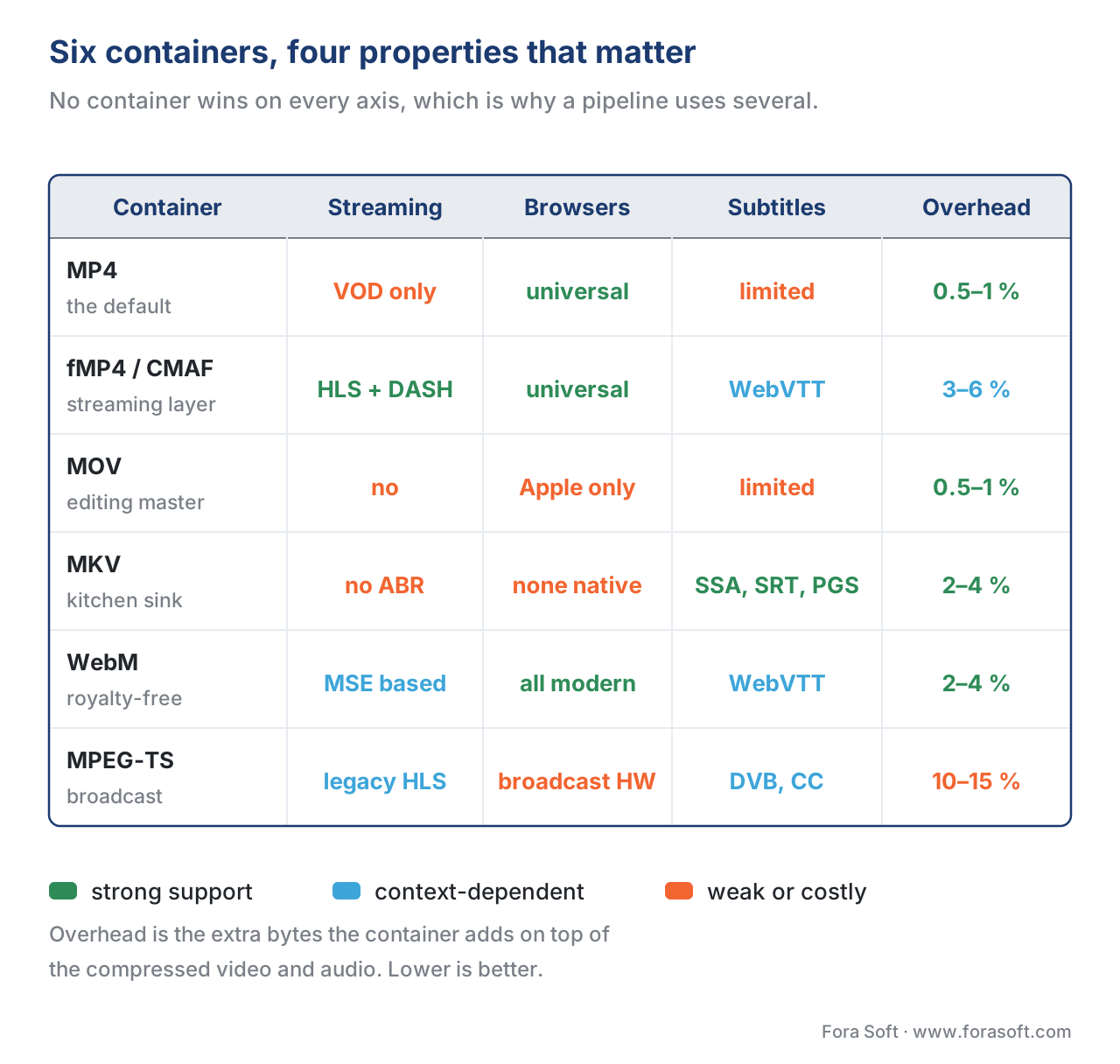 Figure 4. The same six containers scored on the four properties that decide a pipeline: whether they stream, who can play them, how rich their subtitles are, and what they cost in packaging overhead.
A common mistake: shipping one container for every job
The single most common architectural mistake in early-stage video platforms is choosing one container and using it for everything. The temptation is understandable — fewer formats means fewer bugs — but it costs you in one of two ways.
If you choose plain MP4 everywhere, you will pay for it the day you add live streaming or adaptive bitrate, because plain MP4 cannot stream live and cannot adapt. You will have to add a second packaging stage (fMP4 / CMAF) on top of your existing pipeline. The cost is a few weeks of engineering plus storage and CDN duplication for the transition period.
If you choose MKV everywhere because it is the most flexible, you will pay for it the day your first non-technical user complains that their iPhone or iPad cannot open the file you sent them. You will end up transcoding to MP4 anyway, but later — and the user-facing damage is already done.
The right architecture splits the pipeline into stages, each with its own container. The capture stage records in MOV (cameras, editors) or MKV (archival). The transcoding stage produces MP4 (downloads) and fMP4 / CMAF (streaming) from the master. The delivery stage serves whichever output the player asked for. Each container does the job it was designed for, and you never fight the format.
 Figure 5. Pick the container from the stage of the pipeline. Editing and archival keep their own formats; delivery splits into fMP4 / CMAF for streaming and MP4 for downloads.
Where Fora Soft fits in
We have built containers into more than 239 video products since 2005 — across video streaming, video conferencing, OTT and Internet TV, video surveillance, e-learning, telemedicine, and AR/VR. The container choice is rarely the first decision a client thinks about, and almost always one of the ones that quietly determines cost and scalability. In OTT and Internet TV products we ship CMAF as the unified streaming layer with both HLS and DASH manifests on top. In telemedicine and video conferencing we use fMP4 for recordings, MP4 for evidentiary downloads, and MPEG-TS only where a legacy hospital system requires it. In e-learning we keep MOV in the production pipeline and ship adaptive fMP4 to the learner. The pattern repeats: the right container for each stage, never one container forced into every role.

The book
Video Encoding: A Complete Guide to Video Compression — From Pixels and Color to H.264, HEVC, AV1, Quality Metrics, and AI
This article stops at the edge of the container; the book covers what goes inside it. Across 1,522 pages it walks the whole compression path — colour and bit depth, the hybrid codec loop, rate control, and the quality metrics that prove a bitrate ladder is right — so the H.264, HEVC and AV1 streams you wrap in MP4 or CMAF are the ones you meant to ship. It is volume one of the seven-volume Fora Soft Video Engineering Handbook, which covers the whole stack from the pixel to production. Written by Nikolay Sapunov, CEO at Fora Soft.
Not sure which container your product should ship?
Tell us what you are building and we will map containers onto your pipeline stages — capture, transcode, delivery — before anyone writes the packaging layer. 250+ video products shipped since 2005.
See our case studies
Case study
Worldcast Live
Concert streaming at 0.4–0.5 s latency for 10,000 simultaneous viewers at 1.5 Gb/s — the packaging layer has to hand the player self-contained fragments, never a finished file.
Case study
Mindbox
RTSP camera feeds transcoded through FFmpeg into HLS for the browser across 50+ deployments: the broadcast-era container converted into the one the web can actually play.
Case study
Speed.Space
1080p at 8 Mbps recorded locally for Netflix, Electronic Arts and HBO productions, where the master keeps the quality and a separate delivery encode does the shipping.
What to read next
Tooling
Transcoding pipeline: decode, filter, encode, mux
The mux step is where the container actually gets written. See the four stages that lead to it.
Delivery
DRM and packaging: Widevine, FairPlay, PlayReady, CENC
CMAF fragments are also where encryption lands. How protected delivery is packaged.
Decision
How to choose a codec for your service in 2026
You have picked the envelope. This is the decision tree for what goes inside it.
Codecs
Comparison table: MPEG-2, H.264, H.265, VP9, AV1, VVC
The codec-side companion to the container table in this article.
-
ISO/IEC 14496-12. Information technology — Coding of audio-visual objects — Part 12: ISO base media file format. International Organization for Standardization. https://www.iso.org/standard/68960.html ↩↩
-
ISO base media file format — Wikipedia. Box types and fragment structure. https://en.wikipedia.org/wiki/ISO_base_media_file_format ↩
-
MPEG-4 Part 14 (ISO/IEC 14496-14:2003). Information technology — Coding of audio-visual objects — Part 14: MP4 file format. https://www.iso.org/standard/38538.html ↩↩
-
Apple Developer. HTTP Live Streaming with fragmented MP4 — WWDC 2016 Session 504. https://developer.apple.com/videos/play/wwdc2016/504/ ↩↩
-
Apple Inc. QuickTime File Format Specification. https://developer.apple.com/library/archive/documentation/QuickTime/QTFF/QTFFPreface/qtffPreface.html ↩
-
IETF. RFC 9559 — Matroska Media Container Format Specification. https://datatracker.ietf.org/doc/rfc9559/ ↩↩
-
Matroska FAQ. Browser and HTML5 support status. https://www.matroska.org/faq.html ↩
-
WebM Project. About WebM — codec restrictions and design intent. https://www.webmproject.org/about/ ↩↩
-
ISO/IEC 13818-1. Information technology — Generic coding of moving pictures and associated audio information — Part 1: Systems (MPEG-2 Transport Stream). https://www.iso.org/standard/74427.html ↩↩
-
Ittiam Systems. MPEG2-TS encapsulation overheads in HLS. https://www.ittiam.com/mpeg2-ts-encapsulation-overheads-in-hls/ ↩
-
ISO/IEC 23000-19:2018. Information technology — Multimedia application format (MPEG-A) — Part 19: Common media application format (CMAF) for segmented media. https://www.iso.org/standard/71975.html ↩
-
Wowza. Low-Latency CMAF: chunked transfer encoding and chunked encoding. https://www.wowza.com/blog/low-latency-cmaf-chunked-transfer-encoding ↩
