


Why this matters
If you build a product that ingests video from outside sources — telemedicine systems pulling from older medical equipment, surveillance platforms accepting old IP cameras, online learning tools repurposing archive content, broadcasting platforms taking satellite contribution feeds — you will receive interlaced material whether you ask for it or not. If your team processes that material as if it were modern progressive video, every moving object in the resulting stream will grow visible "teeth" — a defect called combing — and your codec will waste bits encoding that defect instead of real picture content. Combing makes professional-looking content look broken, and once it's baked into the encoded file there is no removing it.
The fix is well-known and cheap, but it has to happen at the right step in your pipeline and you have to know what to look for. By the end of this article you'll understand exactly when to apply it and which of the available tools is the right choice for your situation.
The 1930s problem that gave us interlaced scan
To understand why interlacing exists, you have to remember what television looked like in the 1930s. Engineers in the UK, USA, and Germany were racing to send moving pictures over the air for the first time, and they hit a brutal trade-off. They needed pictures that were detailed enough to be useful (enough horizontal lines per picture), they needed those pictures to refresh fast enough that motion looked smooth (a high refresh rate), and they had only a narrow slice of radio bandwidth to send everything through. The technology of the time couldn't deliver all three at once.
Here's the trade-off in concrete numbers. A high refresh rate — about 50 or 60 pictures per second — was necessary because anything slower visibly flickered on the cathode-ray tubes of the era; the screen would noticeably dim between frames and the viewer would see it. But the radio bandwidth available could carry only about half that much detail. Engineers had to pick: either flicker-free at low detail, or detailed but flickering. Neither was acceptable.
A British engineering team came up with a clever workaround in 1936 for the BBC's 405-line system. 2 Instead of sending each complete picture in one go, they split every picture into two halves. The first half contained only the odd-numbered horizontal lines (1, 3, 5, 7…). The second half contained only the even-numbered lines (2, 4, 6, 8…). Each half — called a field — could be transmitted in half the bandwidth a whole picture would need, so the engineers sent two fields in the time one whole frame would have taken. The viewer's TV stitched them together visually so fast that the brain saw one detailed picture refreshing 50 times per second, even though each individual half-picture was only at 25 picture-equivalents per second.
The trick worked because of two quirks of human vision. The phosphor coating on a CRT screen kept glowing for a tiny moment after the electron beam hit it, which softened the transition between fields. And your eye is slow enough that two interlocking half-pictures, drawn 1/50 of a second apart, look like one whole picture. Interlaced scan was, in effect, the first video compression trick — a 2× bandwidth saving in exchange for the visual sleight of hand. 4
Every major analog broadcast standard that followed inherited the same idea: NTSC in America used 525 lines interlaced at 60 Hz, PAL in Europe used 625 lines interlaced at 50 Hz, and SECAM in France used similar numbers. 3 For the next 60 years, that's how almost all the television in the world was transmitted.
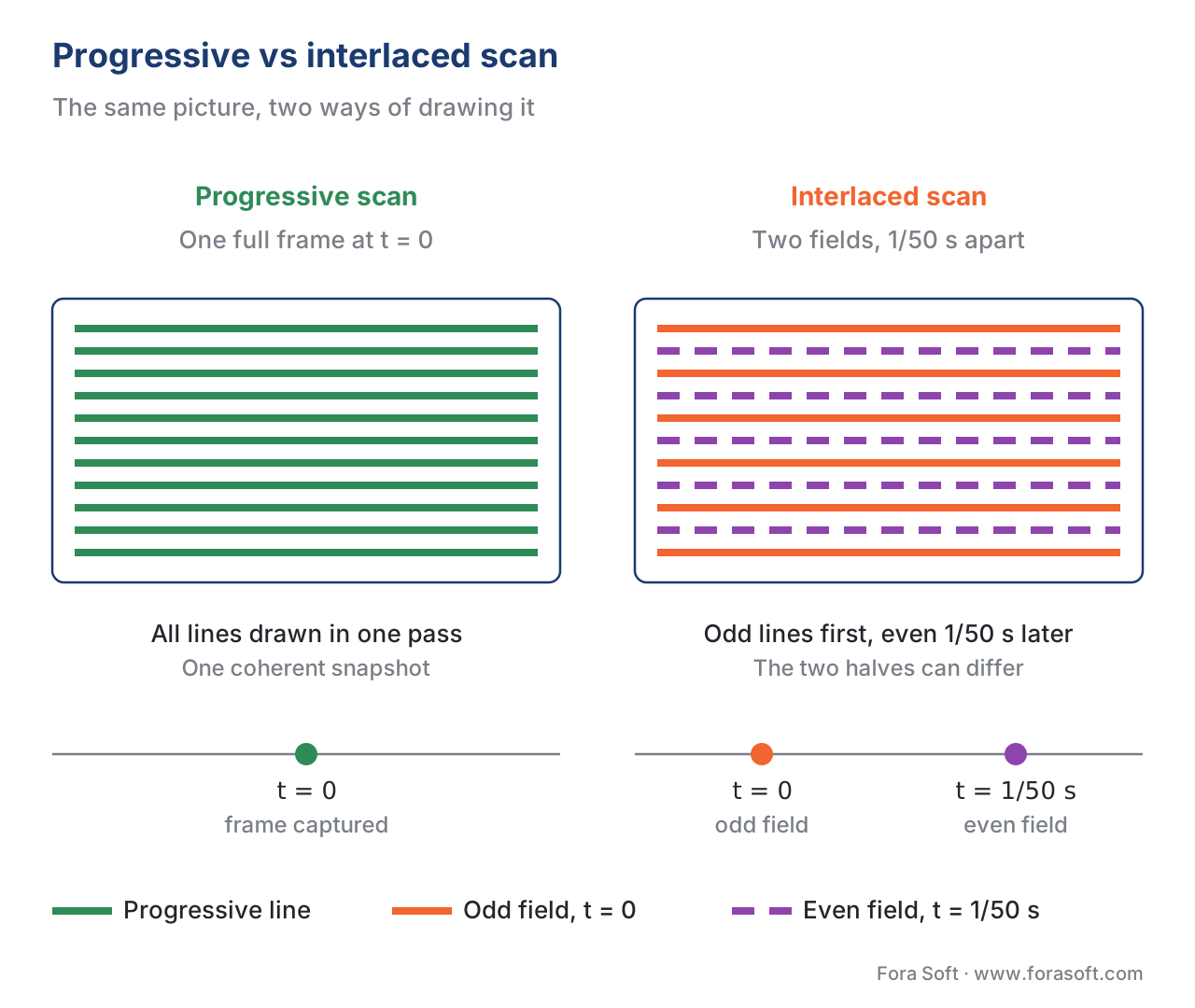 Figure 1. Progressive draws every line of a frame in one pass at one moment in time. Interlaced draws odd lines first, then even lines 1/50 (or 1/60) second later — so the two halves of a "frame" can already show different things if anything in the scene moved between them.
Progressive scan, and why it took over
Progressive scan is the modern alternative. It draws every line of every frame in order, top to bottom, in a single pass at a single moment in time. Each frame is one complete, coherent snapshot. The name comes from the fact that the lines progress straight down the picture instead of jumping between odd and even.
You don't have to design around bandwidth tricks anymore for three reasons that all became true in the 1990s and 2000s.
First, screens changed. The flat-panel LCD and OLED displays in your phone, laptop, and TV don't have an electron beam scanning across phosphor anymore — they have a grid of individual pixels that all update together. Drawing odd lines first and even lines second doesn't even map onto how a modern screen physically works. Modern screens just refresh whole frames.
Second, compression got smart enough. Video codecs — the software algorithms that compress video so it can fit in a streaming bitrate — are designed around the assumption that each frame is one coherent snapshot. They look for patterns across a frame and between frames, and the math they use breaks down on interlaced data where the two halves of a frame show slightly different things. Feeding interlaced material to a modern codec like H.264, H.265, or AV1 wastes bits and produces worse output. 8
Third, the internet doesn't care about analog bandwidth. The protocols that deliver video on the web — HLS, MPEG-DASH, WebRTC, CMAF — were all designed for progressive frames from day one. There's simply no clean path for an interlaced signal to reach a viewer through a modern streaming pipeline without being converted first.
The result: 720p, 1080p, 4K UHD, 8K — all of them are progressive by specification. The "p" in "1080p" actually stands for progressive. (The "i" in "1080i," which still shows up in some broadcast contribution feeds, stands for interlaced.) For any product you build in 2026, treat interlaced as a legacy input format you might receive from outside, never as something you produce yourself.
The combing artefact — and why it's so destructive
Here's where the abstract idea of "two fields per frame" becomes a concrete visual problem.
Imagine you're filming a soccer ball flying across the screen. With interlaced scan, the camera captures the odd lines of the picture at one moment, and the even lines 1/50 of a second later. During that 1/50 of a second, the ball has moved a few centimetres. So the odd lines see the ball in one position, and the even lines see it slightly to the right. If the TV correctly stitches them together visually, you don't notice — the eye and the CRT blend them into smooth motion.
But what happens if you take that interlaced data and try to display it as if it were progressive — for example, by writing both fields into a single image and showing that single image on a modern flat panel? The two halves don't blend anymore. The odd lines show the ball in its first position; the even lines show it in its second. Anywhere the ball's edge is, you see a horizontal sawtooth pattern — the famous combing artefact. 5
The sawtooth looks exactly like the teeth of a comb, hence the name. Static parts of the frame (the grass, the goalposts) don't show combing because nothing moved between the two fields; the odd and even lines line up perfectly. Combing appears only at moving edges.
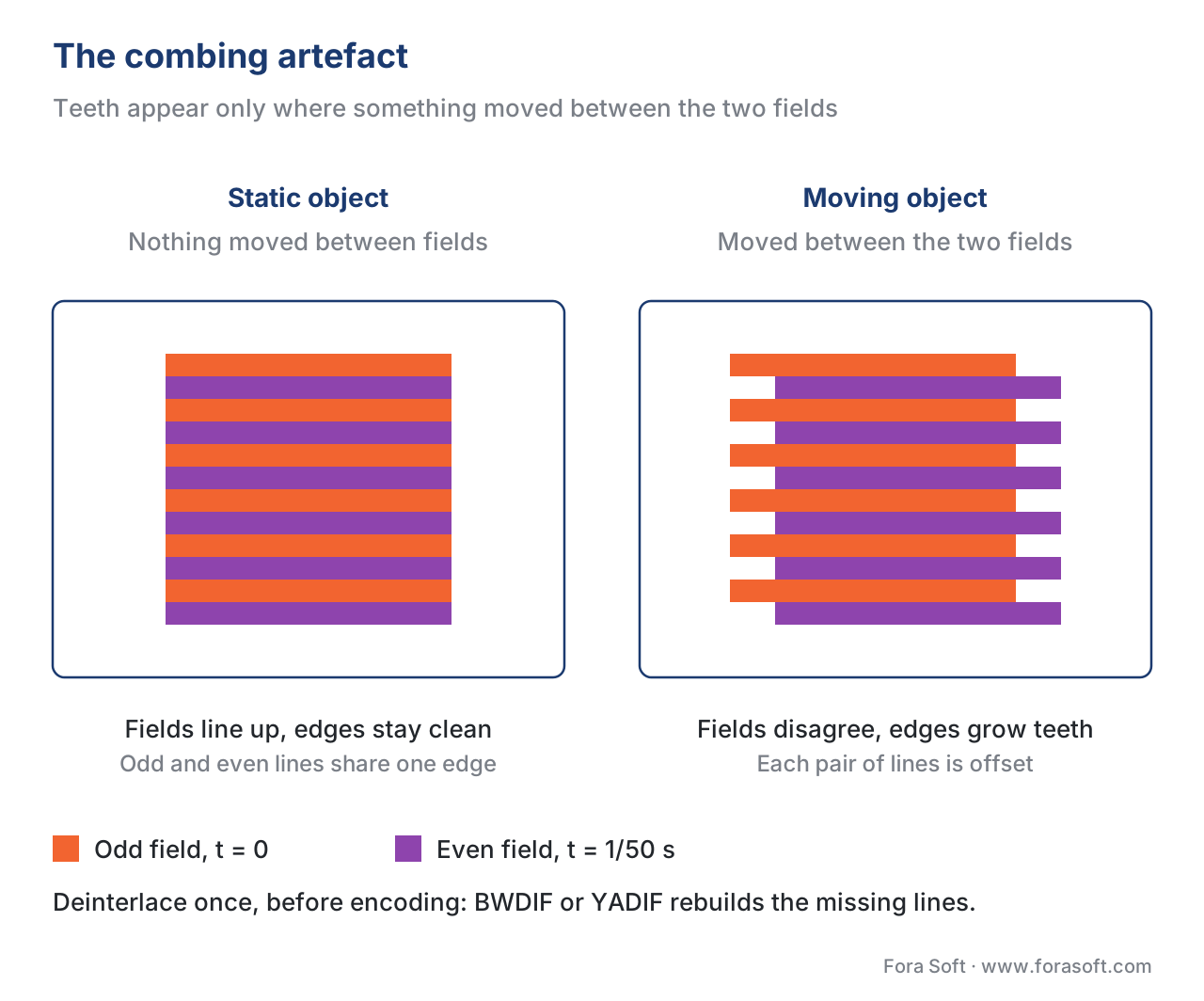 Figure 2. Combing appears anywhere something moved between the two field captures. Static areas of the frame look fine; moving edges develop the characteristic "teeth" because the odd and even fields recorded slightly different positions.
Now the destructive part. Combing is not a display problem that goes away when the viewer's screen does its thing. The artefact is baked into the data the moment you treat two fields as if they were one frame. If you feed that combed frame to a modern codec, the codec sees those horizontal jaggies as real picture detail and dutifully compresses them. Bits get wasted encoding noise. Motion estimation — the part of the codec that figures out how each frame relates to the next — gets confused by all the high-frequency horizontal noise. The output stream ends up bigger and worse-looking than the source deserved.
This is why every responsible pipeline converts interlaced sources to progressive before encoding, not after. Once you've encoded a combed frame, the combing is in the file forever.
Deinterlacing — do it once, do it right
The conversion process is called deinterlacing. It takes a two-field interlaced source and produces a series of full progressive frames the modern world can use. There are four families of deinterlacing algorithms, in order of how cheap and bad they are versus how expensive and good they are.
| Method | What it does | When to use it | Quality |
|---|---|---|---|
| Weave | Stick the odd and even fields together into one frame, exactly as captured. | Only safe if the scene is completely static — no motion at all. | Combs on every motion. |
| Bob (line doubling) | Throw away one of the two fields; double every remaining line to fill the gap. | Cheap real-time conversion when you have no compute budget. | Half vertical resolution, jagged edges. |
| Motion-adaptive (YADIF, BWDIF) | Check every pixel to see if it moved between fields; weave the still areas, interpolate the moving ones. | The default for almost every production pipeline. | Production grade. |
| Motion-compensated (QTGMC, neural) | Build per-pixel motion vectors between fields; reconstruct missing samples along the actual paths of moving objects. | High-end restoration of old footage, archive work. | Best available; CPU/GPU heavy. |
For the overwhelming majority of jobs, the right answer is the motion-adaptive category — specifically a filter called BWDIF.
BWDIF (Bob Weaver Deinterlacing Filter) is a refinement of an older filter called YADIF (Yet Another DeInterlacing Filter, originally written for the MPlayer open-source video player by an engineer named Michael Niedermayer). 6 Both filters work by inspecting each pixel: if the pixel sits in a part of the frame that didn't move between the odd and even fields, they "weave" — they trust both fields and combine them directly. If the pixel sits in a region with motion, they "bob" — they discard the conflicting field and synthesise a replacement line by looking at the surrounding still pixels. The difference between YADIF and BWDIF is how aggressively each one looks at future frames to make better decisions: BWDIF examines past, current, and future frames simultaneously and handles fast motion better. 7 Both ship inside the popular open-source video tool FFmpeg out of the box.
Here is the actual command — the one we run in production at Fora Soft for a 1080i source coming in over a broadcast SRT link:
# Deinterlace a 1080i source to 1080p25 using BWDIF, then re-encode to H.264.
ffmpeg -i in.ts -vf "bwdif=mode=send_frame:parity=tff" \
       -c:v libx264 -preset slow -crf 18 -c:a copy out.mp4
The cryptic-looking part is the bwdif=mode=send_frame:parity=tff filter chain. mode=send_frame tells the filter to produce one progressive frame for every two interlaced fields — which keeps the frame rate the same as the source (1080i25 → 1080p25). The alternative is mode=send_field, which produces a progressive frame from every single field — doubling the frame rate (1080i25 → 1080p50) and preserving the smoothest possible motion. Use send_field for fast-motion content like sports; use send_frame for everything else.
parity=tff tells the filter which field of each interlaced frame is the "top" one — the odd-numbered lines or the even-numbered lines. "TFF" stands for "top field first," "BFF" for "bottom field first." Interlaced sources in the wild are not all the same; some send TFF, some send BFF, and getting the parity wrong produces a jittery output that looks like time is broken. It's a frustratingly hard problem to debug if you don't know it's the cause.
Always check parity before processing in bulk. The tool to use is ffprobe, which inspects a video file and reports its metadata, or the idet filter inside FFmpeg, which examines actual pixel data to detect parity rather than trusting the file's metadata flag. Run a 5-second sample of the source through idet and look at the result before you start a 4-hour batch job.
Common mistake: deinterlacing twice, or not at all
Two failure modes show up over and over in production audits. Both are easy to make and hard to detect after the fact.
Mistake 1: deinterlacing twice. A capture device deinterlaces on input (because the manufacturer's firmware does it automatically). Later in the pipeline, a transcoding step deinterlaces again (because the operator wasn't told the previous step had already done it). The double-conversion produces soft, smeared, slightly-jittery output that looks "wrong" but is hard to localise to one stage. Pick one place in your pipeline to deinterlace, do it carefully, and clearly label the result as progressive in your metadata so nobody downstream tries to deinterlace it a second time.
Mistake 2: deinterlacing never happens. Someone uploads "1080i25" footage to a pipeline that assumes everything is progressive. The encoder happily processes the data as if it were progressive — and bakes combing into every motion-heavy frame in the output. The viewer sees teeth on everything that moves, and the file is now permanently broken; only re-encoding from a clean source can fix it.
The fix for both: have one clearly-labelled deinterlace step in your ingest pipeline, immediately after the source enters your system. Mark the output as "progressive — already deinterlaced." Every subsequent stage trusts that label and does not re-process.
Free download: FFmpeg Deinterlace Cheat SheetOne-page PDF with TFF/BFF detection, BWDIF, YADIF and QTGMC presets, plus three common-mistake callouts.Where Fora Soft fits in
We deal with interlaced sources almost every week. Telemedicine systems often receive 1080i contribution feeds over SRT from older hospital equipment. Surveillance archives reach back into NTSC and PAL eras when the cameras were inherently interlaced. Broadcast partners sometimes hand off feeds in 1080i25 that need to land on the public web as 1080p25 or 1080p50 — work that lives inside our video and audio streaming practice. The fix is always a small, careful piece of pipeline glue — a parity-detection step that runs idet on a sample, a deinterlace filter chosen to match the content type, and clean progressive output that every downstream codec and player will accept. The principles in this article are the ones we apply every time.
The book
Video Encoding: A Complete Guide to Video Compression
Deinterlacing is one filter in a much longer chain. The book walks the rest of it in the same plain language across 1,500+ pages — how a codec predicts, transforms and quantises a frame, why motion estimation suffers on the high-frequency noise combing leaves behind, and how rate control and quality metrics decide what your output finally looks like. Written by Nikolay Sapunov, CEO at Fora Soft.
Receiving 1080i feeds you have to put on the web?
Tell us where the interlaced material comes from and we will tell you where the deinterlace step belongs, which filter fits the content, and what it costs to run. 250+ video products shipped since 2005.
See our case studies
Case study
Mindbox
AI video management in 50+ deployments across transport, pharma and gated communities: RTSP ingest from cameras of every vintage, normalised by FFmpeg before HLS delivery.
Case study
Worldcast Live
Live concert feeds landing on the public web as 1.5 Gb/s HD at 0.4–0.5 s latency for 10,000 simultaneous viewers, with quality that adapts when a connection drops.
Case study
Speed.Space
Remote production used on Netflix, EA and HBO shoots, where the crew sets resolution, frame rate, codec and bitrate per shoot — 1080p at 8 Mbps recorded locally.
What to read next
Foundations
What is Digital Video: From Analog Signal to Bits
Where scan lines, frames and bits come from — one step before this article starts.
Motion
Frame Rate: 24, 60, 120 fps, Judder and Motion Blur
Why send_field doubles the frame rate to 1080p50, and when that is worth the extra bits.
Pipeline
Transcoding Pipeline: Decode, Filter, Encode, Mux
Which stage the deinterlace filter belongs to, and what runs before and after it.
Tooling
FFmpeg: A Must-Know Cheat Sheet for Developers
The commands around bwdif: idet parity detection, scaling, and the encode that follows.
Additional supporting references: FFmpeg official documentation on bwdif and yadif filters at https://ffmpeg.org/ffmpeg-filters.html · Progressive scan, Wikipedia, https://en.wikipedia.org/wiki/Progressive_scan · Interlace: Part 1 — It Began In The 1930s, The Broadcast Bridge, https://www.thebroadcastbridge.com/content/entry/19116/interlace-part-1-it-began-in-the-1930s
-
Mechanics of interlaced capture and display; field rate, frame rate. Wikipedia: Interlaced video, accessed May 2026. https://en.wikipedia.org/wiki/Interlaced_video ↩
-
1936 UK 405-line interlaced television; thermionic-valve scan-rate constraints. Interlacing — the hidden story of 1920s video compression technology, BECG, accessed May 2026. https://becg.org.uk/2018/12/16/interlacing-the-hidden-story-of-1920s-video-compression-technology/ ↩
-
NTSC adopted monochrome 1941, colour update 1953; PAL patented 1962 by Telefunken. Wikipedia: NTSC, accessed May 2026. https://en.wikipedia.org/wiki/NTSC ↩
-
Interlacing as a 2× bandwidth-conservation compromise. Understanding interlace, TV Tech, accessed May 2026. https://www.tvtechnology.com/news/understanding-interlace-268148 ↩
-
Combing artefact mechanics — what happens when two fields are displayed as one frame. What is Deinterlacing?, IO River, accessed May 2026. https://www.ioriver.io/terms/deinterlacing ↩
-
YADIF deinterlacing filter; spatial and temporal checks across previous, current, next frames. Wikipedia: Deinterlacing, accessed May 2026. https://en.wikipedia.org/wiki/Deinterlacing ↩
-
BWDIF examines past and future frames; outperforms YADIF on general video. FFmpeg deinterlace effectively, HitPaw, accessed May 2026. https://www.hitpaw.com/video-tips/ffmpeg-deinterlace.html ↩
-
Why modern codecs prefer progressive: motion estimation and intra prediction assume coherent frames. Wikipedia: Deinterlacing, accessed May 2026. https://en.wikipedia.org/wiki/Deinterlacing ↩
