


Why this matters
If you build any product that records, processes, or shows video — a Netflix-style streaming service, a video doorbell, an online doctor visit, a live sports app, an online learning platform — you will run into aliasing artefacts. They'll show up as wrinkly textures on a customer's clothing, blurry text on a slide deck, weird-looking car wheels in a sports clip, or "teleporting" subjects in security footage. None of these are bugs in your encoder. They're the inevitable consequence of sampling something continuous at a finite grid, and the theorem in this article explains exactly when they will happen and where in your pipeline to stop them. You don't need a maths degree — we'll build the idea piece by piece, starting from absolutely zero.
What "sampling" actually means
Let's start with the word sampling, because everything else in this article hangs from it.
In the real world, light, sound, and motion are continuous. A wave of light hitting a camera lens isn't broken up into pieces; it's a smooth, unbroken stream of information. Same with sound entering a microphone — it's a continuous wiggle in air pressure, not a series of separate noises.
But a digital camera or a digital microphone can't store "continuous." Computers only deal in numbers. So every digital device takes the continuous signal coming in and measures it at regularly-spaced moments — checking "how bright is the light right now?" or "how loud is the sound right now?" — and writes down the answer as a number. That process of measuring at regular intervals is called sampling, and each individual measurement is called a sample.
A useful everyday analogy: imagine watching a long river and dropping a thermometer into the water once every minute to write down the temperature. The river's temperature actually changes smoothly and continuously through the whole day, but your notebook only has a list of one-minute snapshots. If something happened in the river that lasted less than a minute — a hot-water release, a sudden cold inflow — you might miss it entirely, because your snapshots happened on either side of the event. The faster you sample (every 10 seconds instead of every minute), the less you miss. But the faster you sample, the more entries you have to write down.
That trade-off is at the heart of every digital recording. A higher sampling rate captures more of the original, but produces more data to store and transmit. Engineers spend their lives picking the right rate for the job.
Now apply this to digital video.
A digital video isn't really "moving pictures." It's a long list of measurements of the light at fixed places and fixed times. Each frame is itself a grid of measurements — measure the light at this position on the sensor, write it down as a pixel value, move to the next position, measure again, write it down, and so on. And the sequence of frames is itself a series of snapshots in time — measure the whole scene right now, store it as Frame 1; wait 1/30 of a second; measure the whole scene again, store it as Frame 2.
So a digital video is sampled in three ways simultaneously:
- Horizontally — how many measurement points across the width of each frame? That's the horizontal pixel count, and we covered it in What is digital video.
- Vertically — how many measurement points down the height of each frame? The vertical pixel count.
- In time — how many full frames per second? That's the frame rate.
Three different sampling problems, all happening at once. Each one has its own potential failure.
The theorem, in three plain sentences
Here's where we meet the rule that controls all three. Two American engineers — Harry Nyquist in 1928 and Claude Shannon in 1949 — proved a remarkable result that has shaped every digital recording technology ever built. 1 In plain English, the Nyquist–Shannon sampling theorem says:
If you want to capture some continuous signal accurately, your sampling rate has to be more than twice as fast as the fastest thing happening in the signal. If your sampling rate is slower than that, the fast detail does not just disappear — it gets recorded as something fake and visible that wasn't there before.
Three sentences, no maths. Let's unpack each piece.
"The fastest thing happening in the signal" is the part that varies most quickly. For sound, it's the highest pitch — a high whistle wiggles air pressure many thousands of times per second. For an image, "the fastest thing" is the finest detail — tightly-spaced stripes, sharp edges, thin lines. For motion in a video, "the fastest thing" is the quickest movement — a spinning wheel, a hummingbird wing, a strobe light.
"More than twice as fast" is the rule. If the fastest thing in the signal repeats 100 times per second, you have to sample more than 200 times per second to capture it correctly. The exact threshold — "twice the highest frequency in the signal" — is called the Nyquist limit. Sample faster than it, you're fine. Sample slower than it, you're in trouble.
"Recorded as something fake" is the surprise. This is the central insight of the theorem and it's worth dwelling on. When you undersample a signal, you don't just lose information — the lost information re-emerges as a totally different, but real-looking, lower-frequency pattern. The technical word for the false pattern is alias, and the phenomenon as a whole is called aliasing. The signal gets disguised as something else, and unless you know what to look for, you won't realise you're seeing the disguise instead of the real thing.
That last point is what makes aliasing so insidious — and so important to a video engineer. A blurry under-sampled picture is obviously a problem. An aliased picture looks sharp, looks like it has detail, but the detail is fake.
What aliasing looks like in real video
Aliasing in video has three faces, one for each of the three sampling axes. Let's walk through each.
Moiré — spatial aliasing on patterned surfaces
You've seen moiré if you've ever photographed someone wearing a finely striped shirt or a herringbone jacket. Instead of clean stripes, the photo shows wavy bands of light and dark that move around as the camera or subject moves. Or you've seen it when filming a TV screen with another camera — the second camera produces shimmering rainbow-coloured stripes that aren't on the real screen at all. 3
Here's what's happening, in our sampling language. The shirt's stripes are a high-frequency pattern in space — many alternations between dark and light per centimetre. The camera's sensor is a regular grid of measurement points. If the shirt's stripe frequency is below the sensor's Nyquist limit, the sensor captures the stripes correctly and you see stripes in the photo. If the stripe frequency is above the limit, the sampling theorem kicks in and the high-frequency stripes get recorded as a different, lower-frequency pattern — those wavy bands. That false pattern is the alias, and the phenomenon is spatial aliasing. The bands move with the camera because tiny shifts in the camera position change which exact moment each sensor cell catches each stripe.
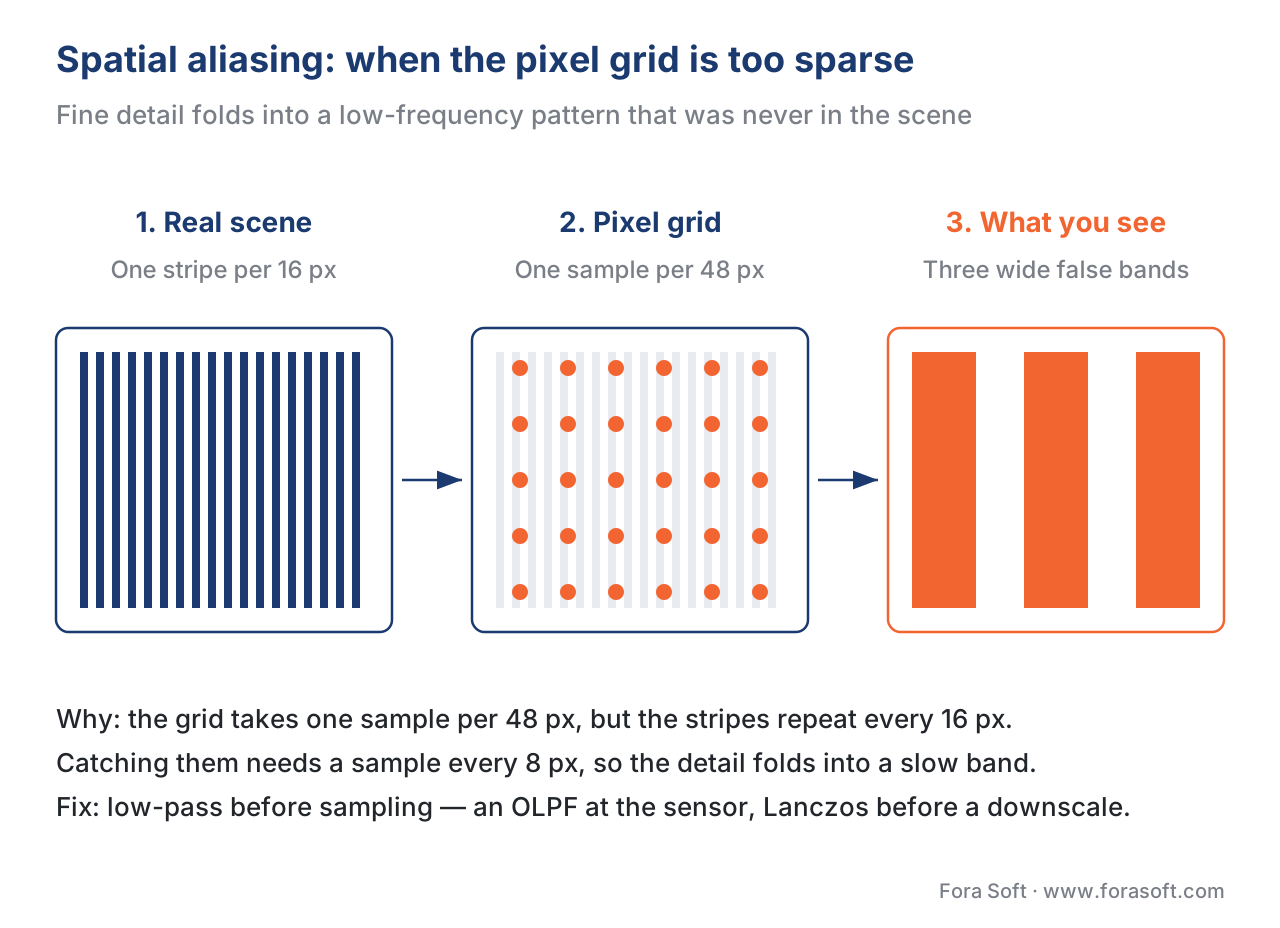 Figure 1. Spatial aliasing turns fine detail into fake low-frequency noise. The pixel grid samples the signal slower than twice its frequency, so the high-frequency stripes "fold" into a slow moiré pattern that wasn't in the original scene.
Jaggies — spatial aliasing on diagonal edges
The second visible face of spatial aliasing is the jaggies — the visible stair-step pattern along the edge of a diagonal line, especially when the line is nearly horizontal or nearly vertical. A real-world edge is geometrically smooth; a pixel grid forces it into discrete steps. When the angle of the edge produces stripes that fall above the Nyquist limit of the sensor grid, those stripes can't be captured cleanly and the result is the visible staircase. This is what game engines spend enormous effort fixing through "antialiasing" features — they apply intentional smoothing to break up the staircase pattern.
The wagon-wheel effect — temporal aliasing on fast motion
The third face — and the most famous one — is what happens to motion when the frame rate is too slow.
Take a classic Hollywood movie shot at 24 frames per second. The camera takes 24 snapshots per second. By the sampling theorem, the fastest motion the movie can capture correctly is anything that completes its cycle slower than 12 times per second — half of 24, the Nyquist limit for time. Any motion faster than that gets aliased.
Now picture a wagon-wheel onscreen, spinning fast. Say the wheel makes 18 full rotations every second — clearly above the Nyquist limit. What does the audience see? Not a wheel rotating 18 times per second. They see a wheel that appears to rotate slowly backwards, or stand completely still, or rotate at some other random-looking pace. 4
Here's why, with no maths. Between Frame 1 and Frame 2 (which are 1/24 of a second apart), the wheel rotates 18/24 = 3/4 of a full turn. The spoke that was pointing up in Frame 1 is now pointing left in Frame 2. But the viewer's brain has no idea the wheel made 3/4 of a turn — the brain assumes "the spoke moved a little bit." And "a little bit counter-clockwise" is the simpler interpretation than "almost a full turn clockwise." So the brain perceives slow backwards rotation. The high-frequency motion has been aliased into a fake low-frequency motion.
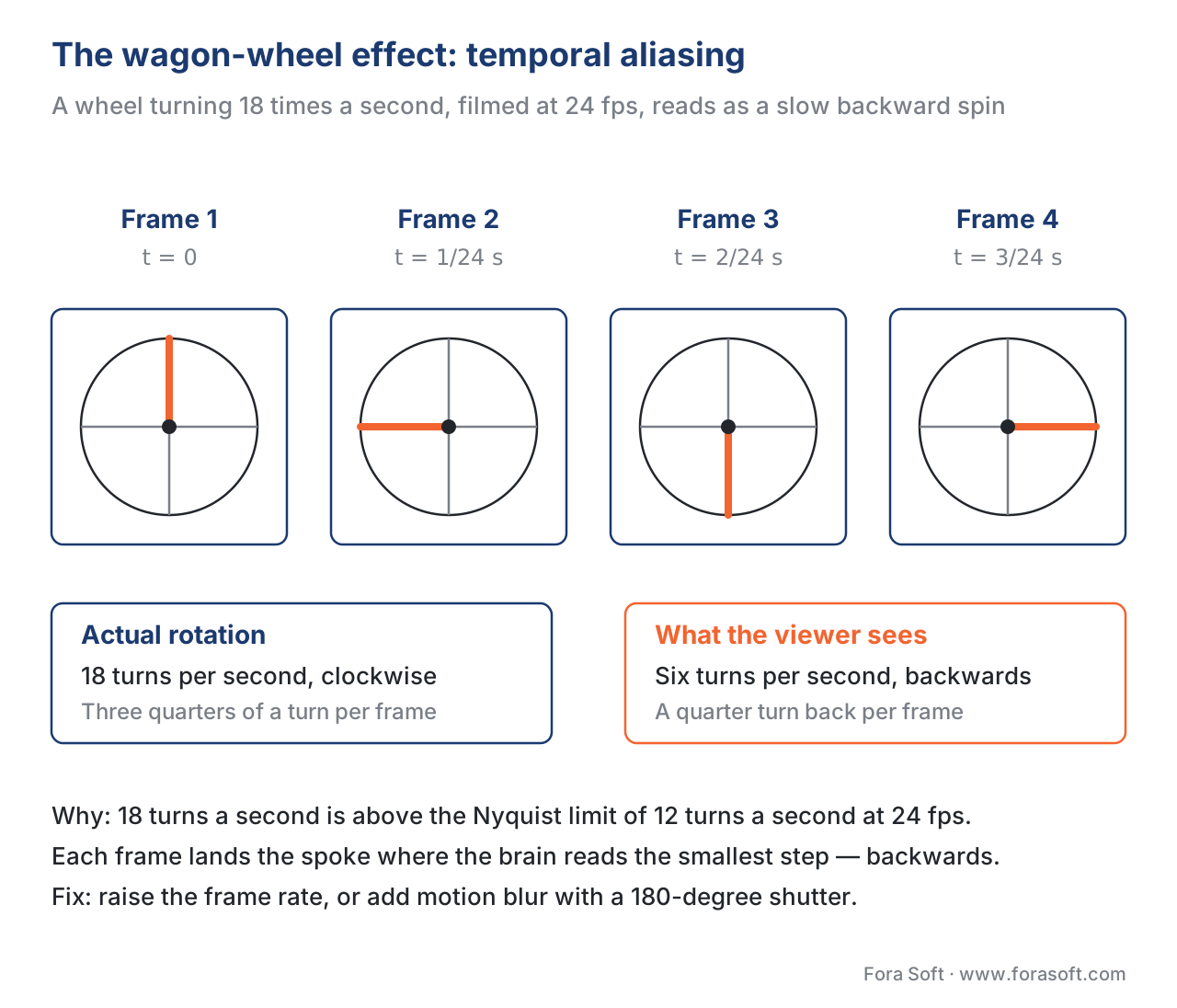 Figure 2. Temporal aliasing at 24 fps. A wheel turning 18 times per second is faster than the Nyquist limit of 12 turns/sec. Each frame captures a spoke position the viewer's brain reads as a small backwards step instead of the actual near-full forward rotation.
You see exactly the same trick on car wheels at highway speed in news footage, on helicopter blades in aerial shots, and on the rotating LED scoreboards inside stadiums during live broadcasts. Surveillance footage at low frame rates produces a different but related problem: a subject walking through the frame at normal speed can appear to "teleport" from one position to the next, because the system never captured the in-between moments and the motion-detection algorithm sees an unphysical jump.
The wagon-wheel effect, like moiré, is not a glitch in the video file. It's the exact, predictable consequence of sampling motion below the Nyquist limit.
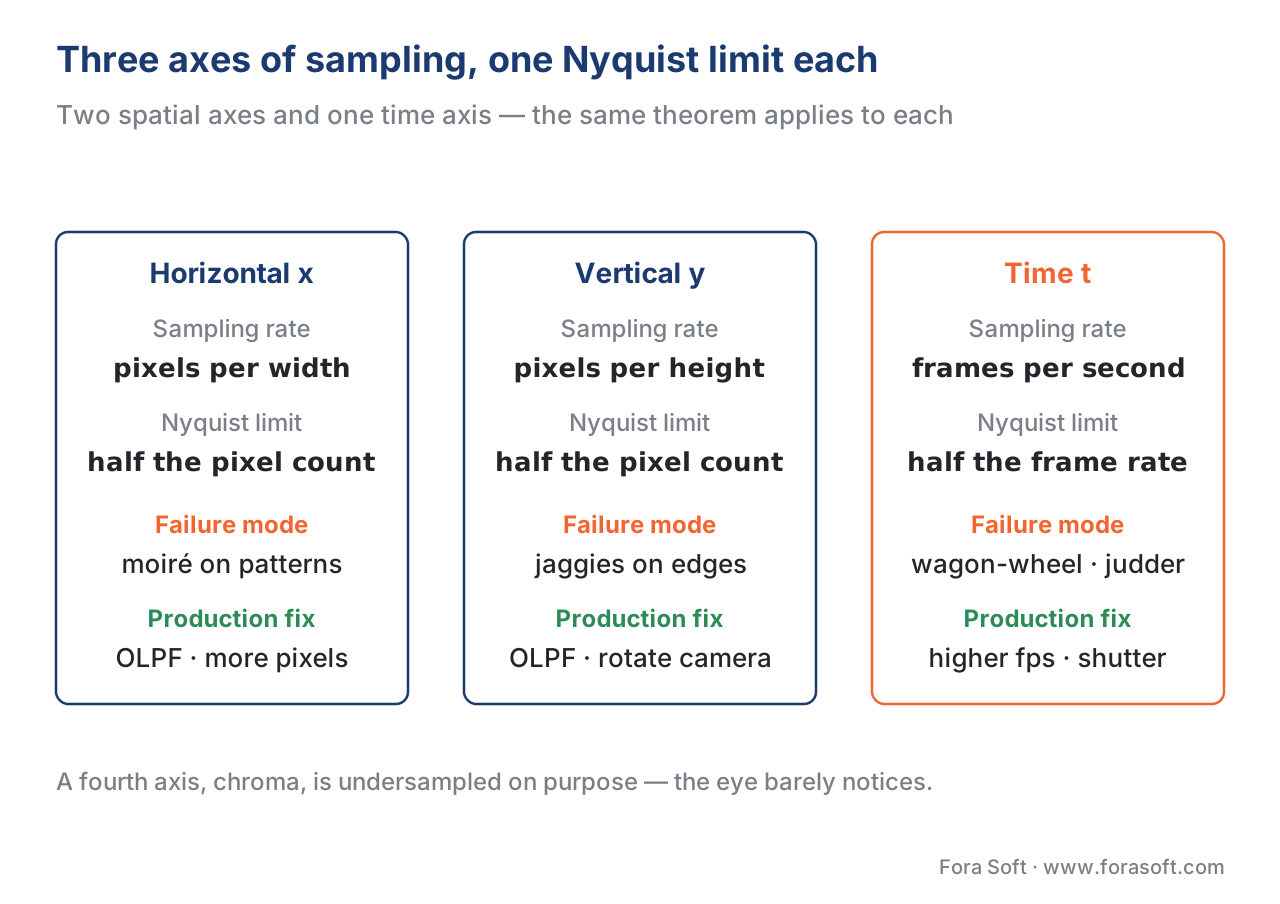 Figure 3. The three axes summarised. Each axis has its own sampling rate, its own Nyquist limit, its own characteristic failure mode, and its own production fix. The Nyquist rule is the same; only the consequences look different.
Chroma subsampling — when engineers break Nyquist on purpose
Up to this point, "aliasing bad, anti-aliasing good." Now we meet the interesting twist: every modern video codec deliberately violates the Nyquist rule on purpose. The reason it's not catastrophic comes down to a quirk of human vision.
Let's set the stage. We mentioned in What is digital video that codecs convert each pixel from the natural RGB system into a different three-number system called YCbCr. The first number, Y, is the luma — the brightness of the pixel. The other two numbers, Cb and Cr, are the chroma — the colour of the pixel, separate from its brightness.
The reason for that split is a fact about human eyes: we are much more sensitive to changes in brightness than to changes in colour. 5 You'll notice immediately if a bright detail goes blurry, but you won't notice if a colour edge goes slightly fuzzy. This is true to such an extreme degree that codecs can sample the chroma channels at half the resolution of the luma channel and the result still looks indistinguishable from full-resolution chroma to almost every viewer.
The shorthand for how aggressively a codec subsamples chroma is the three-digit notation J:a:b. Don't worry about the maths — just memorise the three combinations you'll meet:
| Format | What it does | Data savings vs full chroma | Used for |
|---|---|---|---|
| 4:4:4 | Full chroma resolution — no Nyquist violation. | 0% | Production masters, colour grading, graphics-heavy content |
| 4:2:2 | Half horizontal chroma — moderate Nyquist violation. | ~33% | Broadcast contribution, ProRes 422 |
| 4:2:0 | Half horizontal AND half vertical chroma — aggressive Nyquist violation. | ~50% | Everything you stream — Netflix, YouTube, WebRTC, video calls |
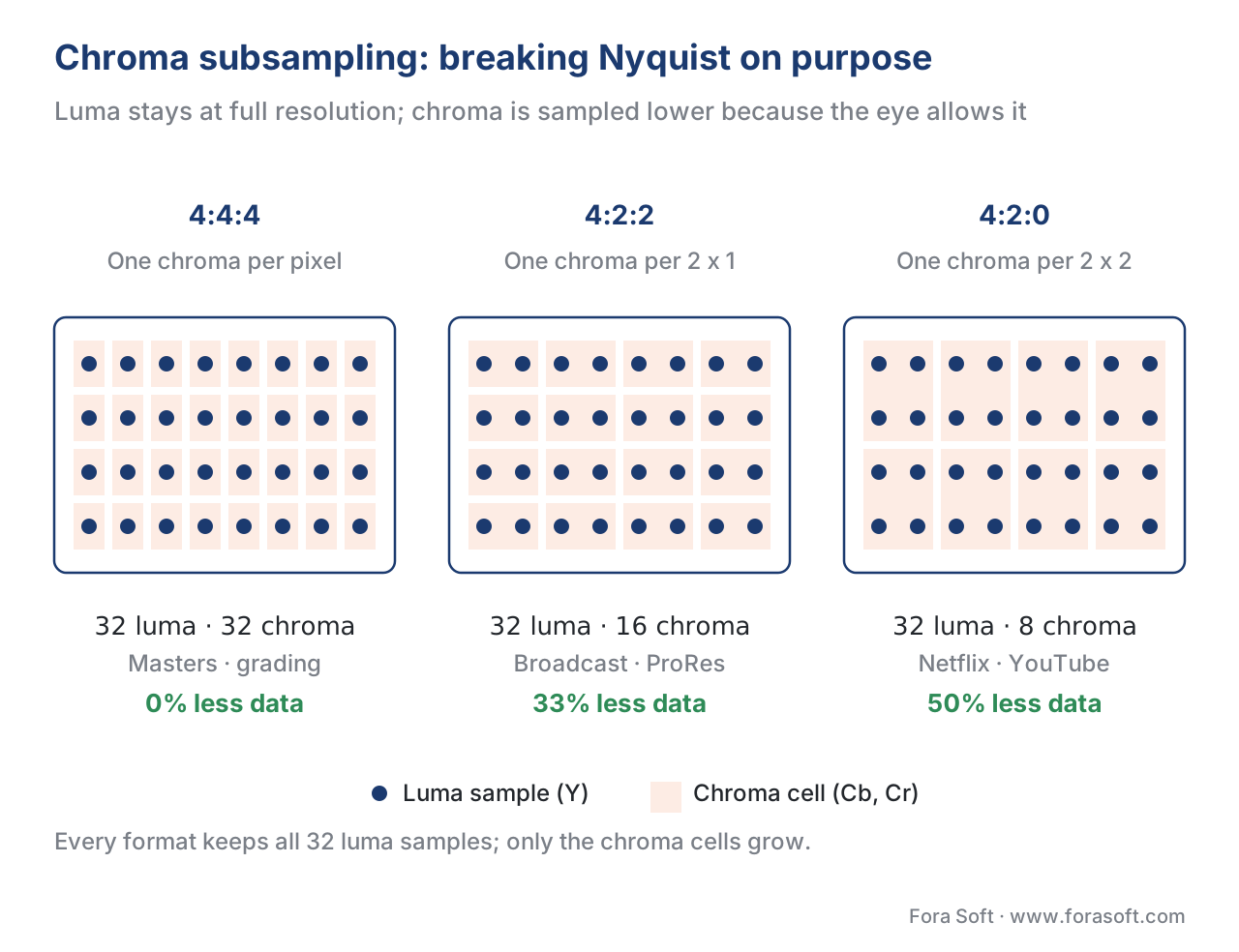 Figure 4. All three formats keep luma at full resolution. They differ only in how aggressively chroma is undersampled — and the eye barely notices.
Yes, the chroma is being technically aliased. Above the chroma's lowered Nyquist limit, fine colour detail folds into false low-frequency colour. But because the eye doesn't pay attention to colour detail, the artefacts are invisible to most viewers in most content, and the bitrate savings are enormous — about 50% before "real" codec compression even starts.
There is one place this trade-off bites you: presentation-style content with crisp red or blue text on a white background. The eye can see colour fringing on a sharp text edge, and 4:2:0 produces visible chromatic artefacts there. The fix is to use 4:2:2 or 4:4:4 for the presentation rendition in your bitrate ladder. We'll go deeper on this in Colour spaces: RGB, YCbCr, BT.709, BT.2020, DCI-P3.
How the industry actually prevents aliasing
You can't always raise the sampling rate enough to avoid aliasing — sensors have finite pixel counts, frame rates are constrained by data budgets, eyes are finite. So the industry takes a different approach: before the signal hits the sampler, remove the parts of it that are above the Nyquist limit. Anything that can't be captured cleanly is blurred out at the source. This pre-filtering is called anti-aliasing, and it has three layers, applied at three places in the pipeline.
Layer 1 — the optical low-pass filter at the sensor
The first defence is a tiny piece of crystal glued in front of the camera's image sensor. It's called an optical low-pass filter or OLPF, and it's made of a material called birefringent crystal that splits each ray of light into two slightly-offset rays. 6 The effect is to deliberately blur the image very slightly — by exactly the right amount to remove spatial frequencies above the sensor's Nyquist limit, without blurring the detail that the sensor can capture.
Every professional cinema camera (ARRI Alexa, Sony Venice) and every broadcast camera ships with an OLPF. Some recent stills-oriented mirrorless cameras (Fujifilm X-T5, Sony A7R-series) skip the OLPF because their pixel counts are so high — 40+ megapixels — that real-world scenes rarely contain detail fine enough to alias. But "rarely" is not "never," which is why those cameras still produce moiré when filming a fabric pattern or another screen.
Layer 2 — the shutter, for motion
The OLPF deals with the spatial axes (horizontal and vertical). The time axis needs a different fix, and it's the simplest one in this entire article: motion blur, created by holding the shutter open for a fraction of each frame's duration.
Here's how it works. If your camera takes 24 frames per second, each frame lasts 1/24 of a second. If you hold the shutter open for half of that — 1/48 of a second per frame — anything moving during that half-frame produces a smeared image. The smear is the motion blur that gives cinema its characteristic look. It's also a precise anti-aliasing filter for the time axis: it deliberately averages out the fast motion within each frame, so the frame's content represents motion that's "slow enough" to fit within the Nyquist limit. That convention is called a 180-degree shutter, named after the half-pie-slice shape of mechanical shutters from the film era. 7
If you film with a much shorter shutter speed — 1/8000 of a second per frame — every frame is razor-sharp, every wheel spoke visible, every droplet frozen. And every fast-moving object now aliases like crazy, because there's no motion blur to band-limit the motion. This is why action footage shot with a short shutter speed shows weird-looking wheels even at 60 fps.
For real-time computer graphics — video games, virtual reality — the equivalent fix is software-based. The renderer slightly jitters its sampling points between frames and blends the results, producing the same band-limiting effect a physical shutter would. That technique is called Temporal Anti-Aliasing or TAA, and it's the reason modern games look as smooth as they do despite running at high frame rates with short effective shutter times.
Layer 3 — proper low-pass filtering whenever you downscale
The third defence applies inside your software pipeline, every time you reduce a video's resolution. If you have a 4K master and you produce a 1080p delivery rendition, you're sampling the 4K image at a lower rate. The same Nyquist rule applies: anything above the new Nyquist limit must be filtered out before the downsampling, or you get aliasing all over again.
Every responsible video tool does this for you automatically. The default scaler in FFmpeg — the most popular open-source video tool — uses an algorithm called Lanczos, which is a high-quality approximation of the ideal low-pass filter for downsampling. You only get in trouble if you explicitly tell FFmpeg to use a worse algorithm. Here's the contrast:
# Good: Lanczos is a high-quality low-pass filter, the FFmpeg default
ffmpeg -i 4k.mp4 -vf "scale=1920:1080:flags=lanczos" 1080p.mp4

# Bad: nearest-neighbour throws every other pixel away without filtering
ffmpeg -i 4k.mp4 -vf "scale=1920:1080:flags=neighbor" aliased.mp4
The bad command above is genuinely useful for one purpose: demonstrating aliasing to a client who doesn't believe it's real. The output is crawling with moiré on any patterned surface in the source.
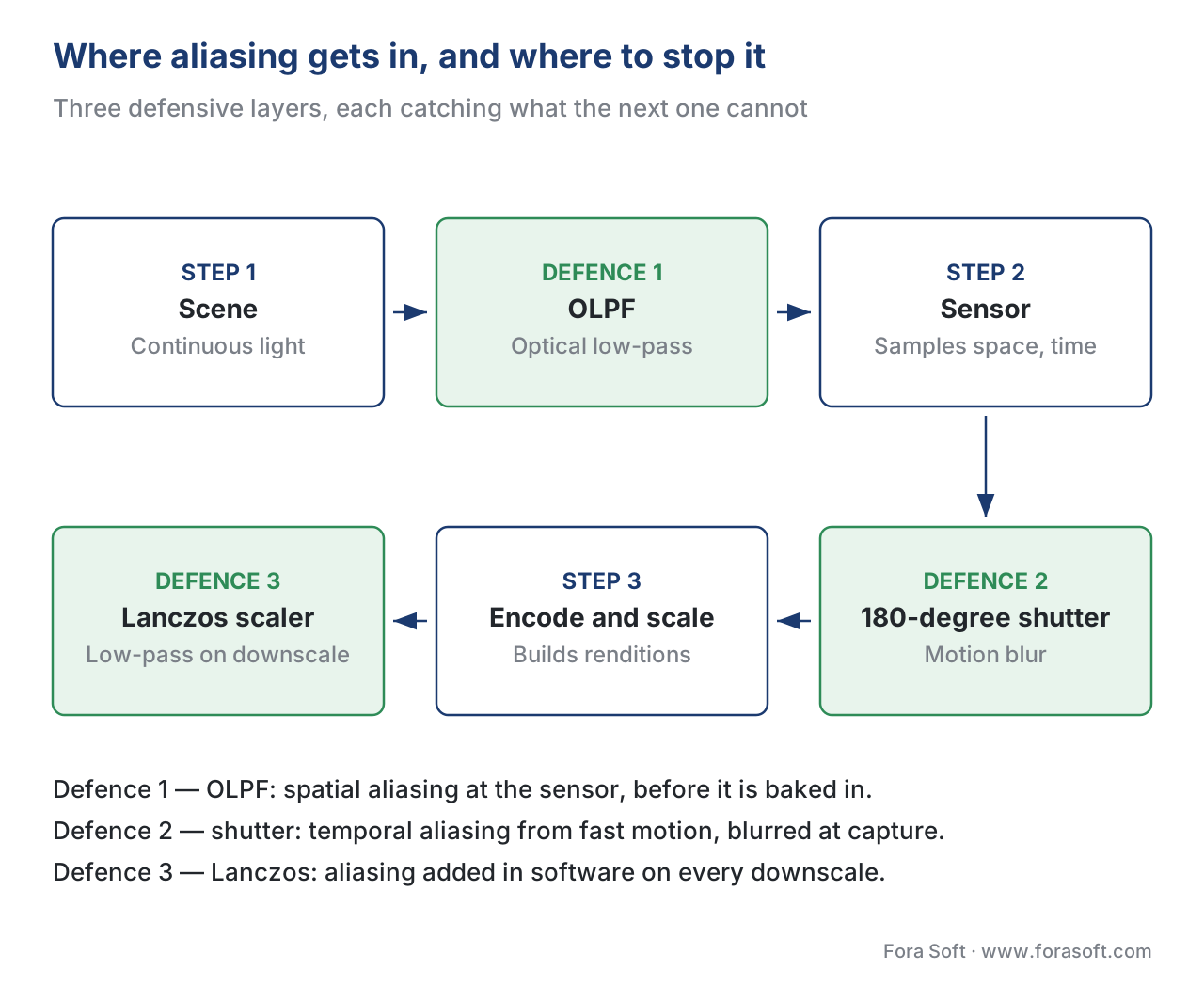 Figure 5. The three defensive layers and where they sit in the pipeline. OLPF catches spatial aliasing at the sensor. The shutter catches temporal aliasing at the moment of capture. Lanczos (or similar) catches aliasing in software whenever you downscale.
Common mistake: blaming the codec for the sensor
Here's a scene we live through at Fora Soft on a fairly regular basis. A wedding cinematographer ships a client a 4K wedding film. The bride's lace dress shows distracting moiré in every wide shot. The client blames the editor. The editor blames the codec. Somebody asks if a higher bitrate would help.
It won't. The moiré is not in the codec — it's in the sensor recording. The shoot used a high-resolution mirrorless camera with no OLPF, the lace had spatial frequencies above the sensor's Nyquist limit, and the moiré got baked into every frame at the moment of capture. No amount of bitrate adjustment, codec switching, or resolution upscaling will remove it. The only fix is at capture: a different camera with a stronger OLPF, a different angle that breaks up the lace pattern, a different focal length that changes the spatial frequencies projecting onto the sensor, or shooting at a much higher sensor resolution and downsampling with a proper Lanczos filter.
Aliasing is always the result of a sampling rule violation upstream of where you notice it. Fixing it means going upstream to the point of the violation.
Putting the three axes together
Here is the whole picture on one table. Every video product team makes the same three decisions implicitly. Make them explicit and pin them on the wall.
| Axis | Sampling rate | Nyquist limit | Common failure mode | Production fix |
|---|---|---|---|---|
| Horizontal | pixels per inch / cm | half the pixel count | moiré on regular patterns | OLPF · higher resolution · change framing |
| Vertical | pixels per inch / cm | half the pixel count | jaggies on near-horizontal edges | same as horizontal · rotate the camera |
| Time | frames per second | fps ÷ 2 | wagon-wheel effect · judder · missed motion | higher fps · 180° shutter · TAA |
| Chroma | depends on format | half luma in 4:2:0 | colour fringes on red text | 4:2:2 or 4:4:4 for graphics-heavy content |
The chroma row is the one most product teams miss. If your platform hosts presentation-style videos with red and blue text on white backgrounds, default 4:2:0 encoding will fringe the text edges. The cost-effective fix is to maintain a separate "graphics preset" in your bitrate ladder that uses 4:2:2 chroma — or to source content with that profile from the upload step.
Free download: Video Aliasing Audit ChecklistOne-page A4 audit across capture (spatial), capture (temporal), encode/transcode and delivery/playback — 16 checks plus four common production culprits.Where Fora Soft fits in
We work the sampling problem from both ends. On capture-side telemedicine and surveillance projects, the question is which OLPF is in the camera and whether the customer's chosen resolution matches the field of view's actual detail. On delivery-side OTT streaming and video conferencing work, the question is which downscaling filter the pipeline uses, whether the chroma sampling matches the content type, and whether the bitrate ladder includes a 4:2:2 step for presentation-style content. The principle is identical on both ends — only the controls change.
The book
Video Encoding: A Complete Guide to Video Compression
Sampling is the first decision in the chain; everything downstream is compression. The book walks that rest in the same plain language across 1,500+ pages — how the transform and quantiser drop what the eye will not miss, why 4:2:0 costs nothing on camera footage and shows on red text, and how rate control and VMAF decide what your viewers finally get. Written by Nikolay Sapunov, CEO at Fora Soft.
Seeing moiré, fringed text or backwards wheels in your video?
Send a sample clip with your capture and transcode settings and we will tell you which stage broke the sampling rule, whether it can still be fixed downstream, and what it costs to fix at the source. 250+ video products shipped since 2005.
See our case studies
Case study
Mindbox
AI video management in 50+ deployments across transport, pharma and gated communities, where RTSP feeds from cameras of every vintage and frame rate are normalised through FFmpeg before HLS delivery.
Case study
Sprii
Danish live shopping platform with 72,000+ live events and 12.3 million products sold in 2024 — patterned fabric held up to a phone camera is exactly the content that turns moiré into a revenue question.
Case study
Speed.Space
Remote production used on Netflix, EA and HBO shoots, where the crew picks resolution, frame rate, codec and bitrate per shoot and records 1080p at 8 Mbps locally.
What to read next
Motion
Frame Rate: 24, 60, 120 fps, Judder and Motion Blur
How raising the frame rate lifts the Nyquist limit for motion, and what the extra bits cost.
Perception
Psycho-Visual Redundancy: Things the Viewer Won't Notice
Why the eye lets 4:2:0 through, and what else a codec drops on the same reasoning.
Tooling
FFmpeg: A Must-Know Cheat Sheet for Developers
The scale flags around Lanczos, and the ones that put the aliasing straight back.
Ladders
Per-Title and Per-Scene Encoding: Smart Bitrate Ladders
Where a 4:2:2 graphics preset belongs in a ladder, and how the other rungs get picked.
Supplementary references: Sampling and Aliasing: The Nyquist Theorem Explained Visually, DSPRelated, https://www.dsprelated.com/foundations/sampling.php · Bayer filter, Wikipedia, https://en.wikipedia.org/wiki/Bayer_filter · Chroma Subsampling Techniques, RED Digital Cinema, https://www.red.com/red-101/video-chroma-subsampling · What Is Aliasing in Audio, Video, and Medical Imaging, ScienceInsights, https://scienceinsights.org/what-is-aliasing-in-audio-video-and-medical-imaging/
-
Nyquist–Shannon sampling theorem; sampling rate must exceed twice the highest signal frequency. Wikipedia: Nyquist–Shannon sampling theorem, accessed May 2026. https://en.wikipedia.org/wiki/Nyquist%E2%80%93Shannon_sampling_theorem ↩
-
Two-dimensional application of the sampling theorem; independent Nyquist conditions on horizontal and vertical axes. Sampling Theorem: an overview, ScienceDirect Topics, accessed May 2026. https://www.sciencedirect.com/topics/computer-science/sampling-theorem ↩
-
Moiré patterns as spatial aliasing; wagon-wheel effect as temporal aliasing. Wikipedia: Aliasing, accessed May 2026. https://en.wikipedia.org/wiki/Aliasing ↩
-
Wagon-wheel effect mechanics in cinematography; spokes appearing to rotate backwards. Fighting the wagon-wheel effect — a new anti-aliasing method for video signal generation, IEEE Xplore, accessed May 2026. https://ieeexplore.ieee.org/document/5655724/ ↩
-
Human visual sensitivity asymmetry luma vs chroma; 4:4:4 / 4:2:2 / 4:2:0 formats and data savings. Wikipedia: Chroma subsampling, accessed May 2026. https://en.wikipedia.org/wiki/Chroma_subsampling ↩
-
Optical low-pass filter function: blurring high spatial frequencies above sensor Nyquist; trade-off with sharpness. Anti-Aliasing Filter / OLPF, Tony & Chelsea Northrup, accessed May 2026. https://northrup.photo/gear-basics/camera-body-features/anti-aliasing-filterolpf/ ↩
-
Temporal anti-aliasing through shutter integration and through software jittering. Wikipedia: Temporal anti-aliasing, accessed May 2026. https://en.wikipedia.org/wiki/Temporal_anti-aliasing ↩
